Hybrid Blazor apps in the Mobile Blazor Bindings July update
Eilon
July 22nd, 2020
I’m excited to announce we are releasing the Mobile Blazor Bindings July update! This release adds support for building Hybrid Blazor apps, which contain both native and web UI.
Hybrid apps are a composition of native and web UI in a single app. With Mobile Blazor Bindings this means you can write the native UI of your app using Blazor, and also create web UI in your app using Blazor. A major advantage of hybrid apps is that the HTML part of the app can reuse content, layout, and styles that are used in a regular web app, while enabling rich native UI to be composed alongside it. You can reuse code, designs, and knowledge, while still taking full advantage of each platform’s unique features. This feature supports Android, iOS, Windows (WPF), and macOS. And it’s all Blazor, C#, .NET, and Visual Studio. Woohoo!
You can mix and match native and web UI in whatever structure makes sense for your app. Here’s a simple example:
These are the major new features in the 0.4 Preview 4 release:
New Hybrid Apps feature enables mixing Blazor native UI components with Blazor web UI components in the same page. This one is HUGE!
Hybrid Apps are hosted in a new BlazorWebView component that uses a browser component to contain the web part of the app. No remote or local web server; all your code runs in the app’s process.
New blazorhybrid project template that supports Android, iOS, Windows (WPF), and macOS for creating hybrid apps
Updated dependencies: Xamarin.Forms 4.7, Xamarin.Essentials 1.5, and other libraries.
.NET Core 3.1 SDK is required to use the new preview
How does it work?
In hybrid apps all the code (both for the native UI parts and the web UI parts) runs as .NET code on the device. There is no local or remote web server and no WebAssembly (WASM). The .NET code for the entire app runs in a single process. The native UI components run as the device’s standard UI components (button, label, etc.) and the web UI components are hosted in a browser view (such as WebKit, Chromium, and Edge WebView2). The components can share state using standard .NET patterns, such as event handlers, dependency injection, or anything else you are already using in your apps today.
Get started
To get started building a Blazor Hybrid app with Experimental Mobile Blazor Bindings preview 4, install the .NET Core 3.1 SDK and then run the following command:
dotnet new -i Microsoft.MobileBlazorBindings.Templates::0.4.74-preview
And then create your first project by running this command:
Here’s the code for an app similar to what was seen at the top of this post. It has native UI and web UI sharing the same app state, running together in the same app process (no web server or HTTP). The native UI uses the new <BlazorWebView> component to specify which web component to load and where to locate static web assets. Blazor does all the work.
Check out last month’s ASP.NET Community Standup where I talked a bit about these new features and did a demo of Blazor hybrid apps (starts at 30:35):
For more information please check out:
Thank you to contributors
This release had several major contributions from Jan-Willem Spuij. Jan-Willem had already built his own BlazorWebView component and kindly helped us get this functionality into the Mobile Blazor Bindings project with many great improvements. Thank you Jan-Willem!
What’s next? Let us know what you want!
This project relies on your feedback to help shape the future of Blazor for native and hybrid scenarios. Please share your thoughts on this blog post or at the GitHub repo so we can keep the discussion going.
Posted by: xSicKxBot - 09-10-2020, 07:29 PM - Forum: Windows
- No Replies
Empowering NFL clubs and fans with help from the Microsoft Playbook
At Microsoft, we’re honored to partner with the NFL to bring modern fan experiences to the game of football. Since 2013, the NFL has used Microsoft Surface to help manage all aspects of their business and gameday operations. Earlier this year, we expanded this deep technology partnership to include Microsoft Teams, enhancing communication and collaboration across the League, and enabling new digital experiences. In April, when the pandemic made us change our way of life, the League used both Surface devices and Teams to help power the first-ever virtual NFL Draft. And today we’re announcing new innovations – developed with the League and NFL Clubs – that reimagine gameday for players and fans and help keep operations safe during a season unlike any other.
“Microsoft technology has been an integral part of NFL operations for several years,” says Michelle McKenna, CIO, NFL. “And with the new challenges ahead of us this season, Microsoft will be instrumental in helping us innovate the best possible experiences for our players, coaches, officials, and fans, through activation like the Fan Mosaic and the Bud Light Showtime cam.”
New gameday experiences
Crowd energy and engagement energizes players and connects fans to one another. With fans mostly unable to attend games live, the NFL turned to Microsoft to create rich, virtual experiences that bring fans into the game when they can’t be there in person.
Using Microsoft Teams technology, key games this season will feature a feed of virtual fans called a Fan Mosaic. The Fan Mosaic will be displayed in stadiums on LED screens, and on broadcast to create a richer viewing experience.
For each game, the home team will invite lucky fans to a virtual VIP experience in which they watch the game together via a Microsoft Teams meeting. These fans will see a dual screen display of the live game next to a Gallery View of fellow fans. Each fan video feed will be isolated and mixed into the Fan Mosaic display. Fan audio from the Teams meeting will be mixed with augmented crowd noise customized for each stadium.
We also wanted to help the NFL digitally reimagine touchdown celebrations. This season, it will debut the Bud Light Showtime cam in stadiums at key games to give players a new way to connect with fans after scoring touchdowns.
After a player scores a touchdown they will see fans from the Fan Mosaic appear on LED screens installed at each end zone, allowing them to connect and celebrate the moment.
New operations experiences
NFL Football Operations will reduce the number of representatives onsite at each game. It will use Microsoft Teams to virtually manage operations for all games every week, supporting communication to gameday staff before, during, and after the game, and helping with document collaboration, reporting, and adherence to League and gameday protocols.
Ongoing support with Surface
Along with these new Teams integrations, Surface devices continue to be a vital tool for the League, clubs, players, and coaches on and off the field, on game day and every day.
Game preparation: NFL Game Officials rely on Surface to prepare for games by analyzing game film and collaborating as an officiating crew and the League office in advance of game day. At the club level, players and coaches prepare for the game with video reviews and playbooks.
Gameday: For players and coaches, the Microsoft Surface Sideline Viewing System has become an integral part of the game as Microsoft technology helps power 269 NFL gameday events each year with more than 2,000 Surface devices and 170 Windows Servers deployed across 30 NFL stadiums.
Additionally, Surface is an important tool for tracking all elements in-game. For example, it is critical in monitoring key parts of the IT infrastructure during a game.
In a season of countless challenges, we are honored to deploy Microsoft’s powerful combination of hardware and software to help the NFL bring football to people everywhere. With new fan and player experiences and operations solutions that keep everyone safe, we have developed a deep and lasting partnership with the NFL, and we look forward to future collaboration in the days to come.
Video: Take A Closer Look At The New Game & Watch: Super Mario Bros. System
Nintendo has released a new trailer for the Game & Watch: Super Mario Bros. system that was announced during last week’s Super Mario 35th Anniversary Direct.
As you might remember from last week, this new system is inspired by the original LCD-based handhelds from the ’80s and comes with a modern screen and rechargeable battery. It also boasts Super Mario Bros., Super Mario Bros.: The Lost Levels and a version of the Game & Watch title, Ball, as well as a digital clock with 35 “little touches” to discover.
The trailer doesn’t reveal anything new, but does present a particularly flashy tour of the system and its features. The Game & Watch: Super Mario Bros. launches on 13th November and pre-order options have already started to appear online.
Do you plan on treating yourself to one of these? Are you just like us, unable to resist pretty little collectors items? Let us know in the comments.
Anniversary: Super Mario Maker Turns 5 Years Old Today
The original Super Mario Maker is celebrating its fifth anniversary today, after originally launching for the Wii U in Japan on 10th September, 2015.
Also appearing in Europe and North America on the following day, Super Mario Maker flipped the Mario platforming franchise on its head by giving players access to a full suite of level creation tools for the very first time. Gone were the days of simply playing whatever levels Nintendo made for us; now we were the ones making our own levels. And what a time we had.
The concept was so obvious yet so mind-boggling at the same time; the potential for fun and creativity on offer is obvious right off the bat, but giving players the ability to create an infinite number of levels would surely kill off the main series, right? Why would we ever need a traditional Mario ever again?
Of course, the success of New Super Mario Bros. U Deluxe soon proved that we needn’t have ever worried, and the usual assortment of 2D and 3D offerings continue to appear to this day. Now, the relatively recent arrival of Super Mario Maker 2 on Switch has taken this new level-building venture to new heights, and it wouldn’t be all that surprising to see more Mario Maker titles appear on future Nintendo systems.
Did you play Super Mario Maker on the Wii U? Any fond memories of the game? Share them with us in the comments below.
Ninja Returns To Twitch With Exclusive Multi-Year Deal
Popular streamer Tyler "Ninja" Blevins is returning to his previous livestreaming home, Twitch. The two parties have signed a multi-year deal, with Ninja streaming exclusively on the Amazon-owned service.
"I am excited to get back to streaming full-time and connecting with my loyal fanbase," Ninja said in a statement. "I really took my time to decide which platform was best and Twitch has been supportive throughout this process and understanding my overall career goals. In this next chapter, I'm going to make it a point to elevate and bring more eyes to underrepresented creators. I am looking forward to working with Twitch to demonstrate how this amazing community of gamers can make a meaningful impact."
Master coders behave like architects that connect and build upon various design patterns to create a functional whole. One of the most important design patterns is a singleton—a class that has only one instance. You may ask: How does that look like? Let’s have a look at the code implementing a singleton in our interactive code shell:
Exercise: Try to create multiple instances of the singleton class. Can you do it?
Let’s dive into a deeper understanding of the singleton. We’ll discuss this code in our first method, so keep reading!
What’s a Singleton?
A singleton is a class that has only one instance. All variables for the class point to the same instance. It is simple and straight forward to create and use and it is one of the design patterns described by the Gang of Four. After creating the first instance, all other creations point to the first instance created. It also solves the problem of having global access to a resource without using global variables. I like this concise definition from Head First Design Patterns:
The Singleton Pattern ensures a class has only one instance, and provides a global point of access to it.
Why Would You Need a Singleton?
If you are reading this, you likely already have a possible use. Singleton is one of the Gang of Four’s Creational patterns. Read on to determine if its a good candidate for the problem you need to solve.
A singleton can be used to access a common resource like a database or a file. There is a bit of controversy on its use. In fact, the controversy could be described as outright singleton shaming. If that concerns you, I’ve listed some of the objections below with some links. In spite of all that, singletons can be useful and pythonic. From The Zen of Python (Pythonistas say Ohm):
Simple is better than complex
Practicality beats purity
Still the objections have merit and may apply to the code you are currently working on. And even if they don’t apply, understanding those objections may give you a better understanding of Object Oriented principals and unit testing.
A singleton may be useful to control access to anything that changes globally when it is used. In addition to databases and files, a singleton may provide benefit for access to these resources:
Logger
Thread pools
caches
dialog boxes
An Http client
handles to preference settings
objects for logging
handles for device drivers like printers.
(?) Any single resource or global collection
A singleton can be used instead of using a global variable. Global variables are potentially messy. Singletons have some advantages over global variables. A singleton can be created with eager or lazy creation. Eager creation can create the resource when the program starts. Lazy creation will create the instance only when it is first needed. Global variables will use an eager creation whether you like it or not. Singletons do not pollute the global namespace.
And finally, a singleton can be a part of a larger design pattern. It may be part of any of the following patterns:
abstract factory pattern
builder pattern
prototype pattern
facade pattern
state objects pattern If you have not heard of these, no worries. It won’t affect your understanding of the singleton pattern.
Implementation
The standard C# and Java implementations rely on creating a class with a private constructor. Access to the object is given through a method: getInstance()
Here is a typical lazy singleton implementation in Java:
public Singleton { private static Singleton theOnlyInstance; private Singleton() {} public static Singleton getInstance() { if (theOnlyInstance) == null){ theOnlyInstance = new Singleton() } return new Singleton(); }

}
There are many ways to implement Singleton in Python. I will show all four first and discuss them below.
Method 1: Use __new__
class Singleton: _instance = None def __new__(cls): if cls._instance is None: cls._instance = super(Singleton, cls).__new__(cls) # Initialize here. No need to use __init__().. cls.val = 0 return cls._instance def business_method(self, val): self.val = val x = Singleton()

y = Singleton()

x.val = 42

x is y, y.val
It uses the Python dunder __new__ that was added to Python to provide an alternative object creation method. This is the kind of use case __new__ was designed for
Pros:
I believe this implementation is the closest in spirit to the GoF implementation. It will look familiar to anybody familiar with the standard Singleton implementation.
Easy to understand code meaning is important for teams and maintenance.
Uses one class to create and implement the Singleton.
Cons:
In spite of its ‘correctness’ many python coders will have to look up __new__ to understand the object creation specifics. Its enough to know that
__new__ instantiates the object.
Code that normally goes in __init__ can be placed in __new__.
In order to work correctly the overridden __new__ must call its parent’s __new__ method. In this case, object is the parent. Instantiaion happens here with this line:
object.__new__(class_, *args, **kwargs)
Method 2: A Decorator
def singleton(Cls): singletons = {} def getinstance(*args, **kwargs): if Cls not in singletons: singletons[Cls] = Cls(*args, **kwargs) return singletons[Cls] return getinstance @singleton

class MyClass: def __init__(self): self.val = 3 x = MyClass()

y = MyClass()

x.val = 42

x is y, y.val, type(MyClass)
Pros
The code to write the decorator is separate from the class creation.
It can be reused to make as many singletons as you need.
The singleton decorator marks an intention that is clear and understandable
Cons
The call type(MyClass) will resolve as function.
Creating a class method in MyClass will result in a syntax error.
If you really want to use a decorator and must retain class definition, there is a way. You could use this library:
pip install singleton_decorator
The library singleton_decoratorwraps and renames the singleton class. Alternately you can write your own. Here is an implementation:
def singleton(Cls): class Decorated(Cls): def __init__(self, *args, **kwargs): if hasattr(Cls, '__init__'): Cls.__init__(self, *args, **kwargs) def __repr__(self) : return Cls.__name__ + " obj" __str__ = __repr__ Decorated.__name__ = Cls.__name__ class ClassObject: def __init__(cls): cls.instance = None def __repr__(cls): return Cls.__name__ __str__ = __repr__ def __call__(cls, *args, **kwargs): if not cls.instance: cls.instance = Decorated(*args, **kwargs) return cls.instance return ClassObject() @singleton

class MyClass(): pass x = MyClass()

y = MyClass()

x.val = 42

x is y, y.val
The output is:
(True, 42)
Interactive Exercise: Run the following interactive memory visualization. How many singleton instances do you find?
Method 3: Use Metaclass and Inherit From Type and Override __call__ to Trigger or Filter Instance Creation
class Singleton(type): _instances = {} def __call__(cls, *args, **kwargs): if cls not in cls._instances: cls._instances[cls] = super(Singleton, cls).__call__(*args, **kwargs) return cls._instances[cls] class MyClass(metaclass=Singleton): pass x = MyClass()

y = MyClass()

x.val=4

x is y, y.val
The output is as follows:
(True, 4)
Method 3 creates a new custom metaclass by inheriting from type. MyClass then assigns Singleton as its metadata:
class MyClass(metadata = Singleton):
The mechanics of the Singleton class are interesting. It creates a dictionary to hold the instantiated singleton objects. The dict keys are the class names. In the overridden __call__ method, super.__call__ is called to create the class instance. See custom metaclass to better understand the __call__ method.
Pros
Singleton code is separate. Multiple singletons can be created using the same
Cons
Metaclasses remain mysterious for many python coders. Here is what you need to know:
In this implementation, type is inherited:
class Singleton(type)
In order to work correctly the overridden __call__ must call its parent’s __call__ method.
class Singleton: _instance = None def __new__(class_, *args, **kwargs): if not isinstance(class_._instance, class_): class_._instance = object.__new__(class_, *args, **kwargs) return class_._instance class MyClass(Singleton): pass

x = MyClass()

y = MyClass()

x.val=4

x is y, y.val
The output is as follows:
(True, 4)
Pros
Code can be reused to create more singletons
Uses familiar tools. (Compared to decorators, metaclasses and the __new__ method)
In all four methods, an instance is created the first time it is asked for one. All calls after the first return the first instance.
Singletons in a Threaded Environment
If your Singleton needs to operate in a multi-threaded environment, then your Singleton method needs to be made thread-safe. None of the methods above is thread-safe. The vulnerable code is found between the check of an existing Singleton and the creation of the first instance:
if cls._instance is None: cls._instance = super(Singleton, cls).__new__(cls)
Each implementation has a similar piece of code. To make it thread-safe, this code needs to be synchronized.
with threading.Lock(): if cls._instance is None: cls._instance = super(Singleton, cls).__new__(cls)
This works fine and with the lock in place, the Singleton creation becomes thread-safe. Now, every time a thread runs the code, the threading.Lock() is called before it checks for an existing instance.
If performance is not an issue, that’s great, but we can do better. The locking mechanism is expensive and it only needs to run the first time. The instance creation only happens once so the lock should happen at most one time. The solution is to place the lock after the check statement. Then add another check after the lock.
import threading

... if cls._instance is None: with threading.Lock(): if cls._instance is None: cls._instance = super(Singleton, cls).__new__(cls)
import threading

class Singleton: _instance = None def __new__(cls): if cls._instance is None: with threading.Lock(): if cls._instance is None: cls._instance = super(Singleton, cls).__new__(cls) # Initialize here. No need to use __init__().. cls.val = 0 return cls._instance def business_method(self, val): self.val = val x = Singleton()

y = Singleton()

x.val = 42

x is y, y.val
The output is:
(True, 42)
To make it thread-safe, we added two lines of code. Each method could be made thread-safe in a similar way
Alternatives to using a Singleton
Use a Module as a Singleton (The Global Object Pattern)
In Python, modules are single, unique, and globally available. The Global Object Pattern is recommended by the Python docs. It simply means to create a separate module and instantiate your object in the module’s global space. Subsequent references just need to import it.
Use Dependency Injection
Generally, this means using composition to provide objects to dependent objects. It can be implemented in countless ways but generally, put dependencies in constructors and avoid creating new instances of objects in business methods.
The Problems With Singletons
Of all 23 patterns in the seminal 1994 book Design Patterns, Singleton is the most used, the most discussed, and the most panned. It’s a bit of a rabbit hole to sift through the thousands of blogs and Stack Overflow posts that talk about it. But after all the Singleton hating, the pattern remains common. Why is that? It’s because conditions that suggest its use are very common: One database, one config file, one thread pool …
The arguments against its use are best stated in some elegant (and old) blog posts that I cannot match. But I will give a summary and links for further reading.
They are generally used as a global instance, why is that so bad? Because you hide the dependencies of your application in your code, instead of exposing them through the interfaces. Making something global to avoid passing it around is a code smell. (That is some effective name-calling. Whatever code smell is, it makes me cringe just a bit and wrinkle my nose as I imagine it).
They violate the single responsibility principle: by virtue of the fact that they control their own creation and lifecycle.
They inherently cause code to be tightly coupled. This makes faking them out under test rather difficult in many cases.
They carry state around for the lifetime of the application. Another hit to testing since you can end up with a situation where tests need to be ordered which is a big no no for unit tests. Why? Because each unit test should be independent from the other.
Should You Use Singletons in Your Code?
If you are asking yourself that based on the other peoples’ blogs, you are already in the rabbit hole. The word ‘should’ is not welcome in code design. Use singletons or not and be aware of possible problems. Refactor when there are problems.
Possible Problems to Consider
Tools are for people who know how to use them. In spite of all the bad stuff written about Singletons, people still use them because:
They fill a need better than the alternatives.
and / or
They don’t know any better and they are creating problems in their code by using them.
Avoid problems. Don’t be in group 2.
Problems with Singletons are caused because they break the single responsibility rule. They do three things:
Guarantee only a single instance exists
Provide global access to that instance
Provide their own business logic.
Because they break the single responsibility rule, Singletons may be hard to test
Inversion of control IoC and dependency injection are patterns meant to overcome this problem in an object-oriented manner that helps to make testable code.
Singletons may cause tightly coupled code. A global instance that has an inconstant state may require an object to depend on the state of the global object.
It is an OO principal to Separate Creational Logic from Business Logic. Adhering to this principle “Singletons should never be used”. Again with the word should. Instead, Be Yoda: “Do or do not!“. Base the decision on your own code.
Memory allocated to a Singleton can’t be freed. This is only a problem it the memory needs to be freed.
In a garbage collected environment singletons may become a memory management issue.
Hevery worked at Google when he wrote these blogs. His blogs were readable, entertaining, informative, provocative, and generally overstated to make a point. If you read his blogs, be sure to read the comments. Singletons are Pathological Liars has a unit testing example that illustrates how singletons can make it difficult to figure out dependency chains and start or test an application. It is a fairly extreme example of abuse, but he makes a valid point:
Singletons are nothing more than global state. Global state makes it so your objects can secretly get hold of things which are not declared in their APIs, and, as a result, Singletons make your APIs into pathological liars.
Of course, he is overstating a bit. Singletons wrap global state in a class and are used for things that are ‘naturally’ global by nature. Generally, Hevery recommends dependency injection to replace Singletons. That simply means objects are handed their dependencies in their constructor.
Where have all the singletons gone makes the point that dependency injection has made it easy to get instances to constructors that require them, which alleviates the underlying need behind the bad, global Singletons decried in the Pathological Liars.
Python programmers almost never implement the Singleton Pattern as described in the Gang of Four book, whose Singleton class forbids normal instantiation and instead offers a class method that returns the singleton instance. Python is more elegant, and lets a class continue to support the normal syntax for instantiation while defining a custom __new__() method that returns the singleton instance. But an even more Pythonic approach, if your design forces you to offer global access to a singleton object, is to use The Global Object Pattern instead.
Know when to use singletons, and when to leave them behind
J.B. Rainsberger
Published on July 01, 2001 Automated unit testing is most effective when:
Coupling between classes is only as strong as it needs to be
It is simple to use mock implementations of collaborating classes in place of production implementations
Singletons know too much
There is one implementation anti-pattern that flourishes in an application with too many singletons: the I know where you live anti-pattern. This occurs when, among collaborating classes, one class knows where to get instances of the other.
Towards acceptible singletons
Singleton abuse can be avoided by looking at the problem from a different angle. Suppose an application needs only one instance of a class and the application configures that class at startup: Why should the class itself be responsible for being a singleton? It seems quite logical for the application to take on this responsibility, since the application requires this kind of behavior. The application, not the component, should be the singleton. The application then makes an instance of the component available for any application-specific code to use. When an application uses several such components, it can aggregate them into what we have called a toolbox.
Instead of using this pattern, simply instantiate a single instance and propagate it to places that use the object as a parameter to make the dependency explicit.
The games are free to keep until Sep 17th, 2020 - 15:00 UTC.
We are welcoming everyone to join our discord[discord.gg]. We are more active there on finding giveaways, small or large, and there are daily raffles you can participate.
How Quarkus brings imperative and reactive programming together
The supersonic subatomic Java singularity has expanded!
42 releases, 8 months of community participation, and 177 amazing contributors led up to the release of Quarkus 1.0. This release is a significant milestone with a lot of cool features behind it. You can read more in the release announcement.
Building on that awesome news, we want to delve into how Quarkus unifies both imperative and reactive programming models and its reactive core. We’ll start with a brief history and then take a deep dive into what makes up this dual-faceted reactive core and how Java developers can take advantage of it.
Microservices, event-driven architectures, and serverless functions are on the rise. Creating a cloud-native architecture has become more accessible in the recent past; however, challenges remain, especially for Java developers. Serverless functions and microservices need faster startup times, consume less memory, and above all offer developer joy. Java, in that regard, has just in recent years done some improvements (e.g., ergonomics enhancements for containers, etc.). However, to have a performing container-native Java, it hasn’t been easy. Let’s first take a look at some of the inherent issues for developing container-native Java applications.
Let’s start with a bit of history.
Threads and containers
As of version 8u131, Java is more container-aware, due to the ergonomics enhancements. So now, the JVM knows the number of cores it’s running on and can customize thread pools accordingly — typically the fork/join pool. That’s all great, but let’s say we have a traditional web application that uses HTTP servlets or similar on Tomcat, Jetty, or the like. In effect, this application gives a thread to each request allowing it to block this thread when waiting for IO to occur, such as accessing databases, files, or other services. The sizing for such an application depends on the number of concurrent requests rather than the number of available cores; this also means quota or limits in Kubernetes on the number of cores will not be of great help and eventually will result in throttling.
Memory exhaustion
Threads also cost memory. Memory constraints inside a container do not necessarily help. Spreading that over multiple applications and threading to a large extent will cause more switching and, in some cases, performance degradation. Also, if an application uses traditional microservices frameworks, creates database connections, uses caching, and perhaps needs some more memory, then straightaway one would also need to look into the JVM memory management so that it’s not getting killed (e.g., XX:+UseCGroupMemoryLimitForHeap). Even though JVM can understand cgroups as of Java 9 and adapt memory accordingly, it can still get quite complex to manage and size the memory.
Quotas and limits
With Java 11, we now have the support for CPU quotas (e.g., PreferContainerQuotaForCPUCount). Kubernetes also provides support for limits and quotas. This could make sense; however, if the application uses more than the quota again, we end up with sizing based on cores, which in the case of traditional Java applications, using one thread per request, is not helpful at all.
Also, if we were to use quotas and limits or the scale-out feature of the underlying Kubernetes platform, the problem wouldn’t solve itself; we would be throwing more capacity at the underlying issue or end up over-committing resources. And if we were running this on a high load in a public cloud, certainly we would end up using more resources than necessary.
What can solve this?
A straightforward solution to these problems would be to use asynchronous and non-blocking IO libraries and frameworks like Netty, Vert.x, or Akka. They are more useful in containers due to their reactive nature. By embracing non-blocking IO, the same thread can handle multiple concurrent requests. While a request processing is waiting for some IO, the thread is released and so can be used to handle another request. When the IO response required by the first request is finally received, processing of the first request can continue. Interleaving request processing using the same thread reduces the number of threads drastically and also resources to handle the load.
With non-blocking IO, the number of cores becomes the essential setting as it defines the number of IO threads you can run in parallel. Used properly, it efficient dispatches the load on the different cores, handling more with fewer resources.
Is that all?
And, there’s more. Reactive programming improves resource usage but does not come for free. It requires that the application code embrace non-blocking and avoid blocking the IO thread. This is a different development and execution model. Although there are many libraries to help you do this, it’s still a mind-shift.
First, you need to learn how to write code executed asynchronously because, as soon as you start using non-blocking IOs, you need to express what is going to happen once the response is received. You cannot wait and block anymore. To do this, you can pass callbacks, use reactive programming, or continuation. But, that’s not all, you need to use non-blocking IOs and so have access to non-blocking servers and clients for everything you need. HTTP is the simple case, but think about database access, file systems, and so on.
Although end-to-end reactive provides the best efficiency, the shift can be hard to comprehend. Having the ability to mix both reactive and imperative code is becoming essential to:
Use efficiently the resources on hot paths, and
Provide a simpler code style for the rest of the application.
Enter Quarkus
This is what Quarkus is all about: unifying reactive and imperative in a single runtime.
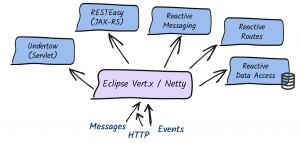
Quarkus uses Vert.x and Netty at its core. And, it uses a bunch of reactive frameworks and extensions on top to help developers. Quarkus is not just for HTTP microservices, but also for event-driven architecture. Its reactive nature makes it very efficient when dealing with messages (e.g., Apache Kafka or AMQP).
The secret behind this is to use a single reactive engine for both imperative and reactive code.
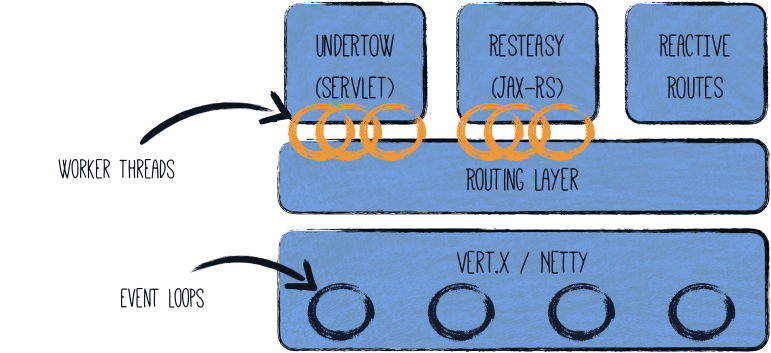
Quarkus does this quite brilliantly. Between imperative and reactive, the obvious choice is to have a reactive core. What that helps with is a fast non-blocking code that handles almost everything going via the event-loop thread (IO thread). But, if you were creating a typical REST application or a client-side application, Quarkus also gives you the imperative programming model. For example, Quarkus HTTP support is based on a non-blocking and reactive engine (Eclipse Vert.x and Netty). All the HTTP requests your application receive are handled by event loops (IO Thread) and then are routed towards the code that manages the request. Depending on the destination, it can invoke the code managing the request on a worker thread (servlet, Jax-RS) or use the IO was thread (reactive route).
For messaging connectors, non-blocking clients are used and run on top of the Vert.x engine. So, you can efficiently send, receive, and process messages from various messaging middleware.
To help you get started with reactive on Quarkus, there are some well-articulated guides on Quarkus.io:
There are also reactive demo scenarios that you can try online; you don’t need a computer or an IDE, just give it a go in your browser. You can try them out here.
On this day, six years ago, players all over the world began a grand adventure. Since then, over 167 million Guardians have joined our ranks and championed the Light for over 8.6 billion hours.
During that time, this community has answered the call time and time again, raising over $8.5 million for Little Lights and worthy causes all over the world. So, when it comes to defending humanity, whether you’re in the 31% that smash, the 31% that love space magic, or the 38% that make cloaks look good, we’re humbled that you have chosen to make the Tower your home.
And now, as we stand at the precipice of a new era, ready to step beyond the Light, we should at least have some cake first. So, let’s light the candles and celebrate with the friends we’ve made in this truly incredible community. From the Farm to the Moon, it’s been a wild ride and we’re incredibly proud to have you at our sides for all of it. Here’s to the future – happy birthday, Destiny.
Keep reading for a few birthday surprises to help you join the celebration as well as a couple of updates on new ways to play our favorite game.
Destiny Birthday Cake
Infinite cake technology still eludes us, but Victoria Rosenthal is getting closer! Not one to slow down after knocking it out of the park with the official Destiny cookbook, she’s here to share her “Infinite Forest” Chocolate Cake with all of us. Find all the instructions you’ll need to transmat yours below.
Difficulty: Hard
Prep Time: 24 hours
Cook Time: 2 hours
Servings: 1 cake
Dietary Notes: Dairy
Cherry Filling Ingredients:
¾ pound cherries (fresh or frozen), pitted and cut in half
2 tbsp water
3 tbsp honey
¼ cup sugar
The night before, combine cherries, water, honey, and sugar in a saucepan. Bring to a boil and reduce to a simmer for 30 minutes (if using frozen cherries, simmer for about 45 minutes). Cook until the liquid has reduced by ¼. Place the mixture in a bowl, cover, and allow to rest in the refrigerator overnight.
Cake Ingredients:
¾ cup cocoa powder
⅓ cup cherry fruit spread
¾ cup hot water
2 cups all-purpose flour
1 tsp baking soda
1 tsp baking powder
1 tsp salt
1 cup unsalted butter, room temperature
1 ½ cups sugar
2 eggs, room temperature
1 tbsp vanilla extract
¾ cup sour cream
Preheat oven to 350°F. Whisk together cocoa powder, cherry fruit spread, and hot water in a small bowl. In another bowl, combine the flour, baking soda, baking powder, and salt.
Cream the butter and sugar in a large bowl until smooth. Add the eggs one at a time. Mix in vanilla extract. Add the cocoa powder mixture.
Mix in half of the flour until it just comes together. Mix in the sour cream. Add the remainder of the flour and mix until fully combined.
Spray two 9-inch baking pans with nonstick spray. Split the batter between the two pans and place in the oven to bake for 25 to 30 minutes or until done. Remove the cakes from the baking pans and allow to cool completely.
Frosting Ingredients:
1 ½ cups butter, room temperature
16 oz cream cheese, room temperature
½ tbsp vanilla extract
¼ cup maraschino cherry liqueur
4 cups confectioners’ sugar
Place the cream cheese and butter in a large bowl and mix together. Add the vanilla extract and maraschino cherry liqueur. Once mixed together, begin to slowly add the confectioners’ sugar. Whisk until the frosting thickens.
Additional Ingredients:
Fresh cherries to top, optional
To assemble the cake, make sure both cake layers are level. Place the bottom layer on a plate and top with a portion of the frosting. Add the cherry filling in the center, spreading it close to the edge but not completely. Cover the filling with additional frosting. Top with the other layer of cake. Top with the remaining frosting. Decorate with fresh cherries on top.
HD Wallpaper
A new poster inspired by some of Destiny’s most beloved characters went live on the Bungie Store today (US/EU), but if you can’t wait for shipping to get it to you, here’s a glorious digital HD preview.
Starting on September 22, both Forsaken and Shadowkeep are coming to Xbox Game Pass! That makes this the perfect time to binge the story before it’s time to get your passport stamped and head off to Europa.
Beyond Light Stasis Deep Dives
Last week, we began unveiling details around the three new Stasis subclasses in Beyond Light. Starting with the Warlock Shadebinder, we followed that up with the Titan Behemoth. The final deep dive focusing on the Hunter Revenant went live yesterday. They’re a fantastic read if we do say so ourselves and (much like a fireteam) function as three pieces of a whole. So, in case you missed any, you can find them here: