Create an account


Welcome, Guest
You have to register before you can post on our site.

Username
  

Password


Search Forums

(Advanced Search)

Forum Statistics
» Members: 20,204
» Latest member: Berrybrave
» Forum threads: 21,758
» Forum posts: 22,649

Full Statistics

Online Users
There are currently 534 online users.
» 0 Member(s) | 529 Guest(s)
Applebot, Baidu, Bing, Google, Yandex

 
  Xbox Wire - Road to Guangdong: How do Writing a Game and Writing a Book Differ?
Posted by: xSicKxBot - 09-09-2020, 03:03 PM - Forum: Xbox Discussion - No Replies

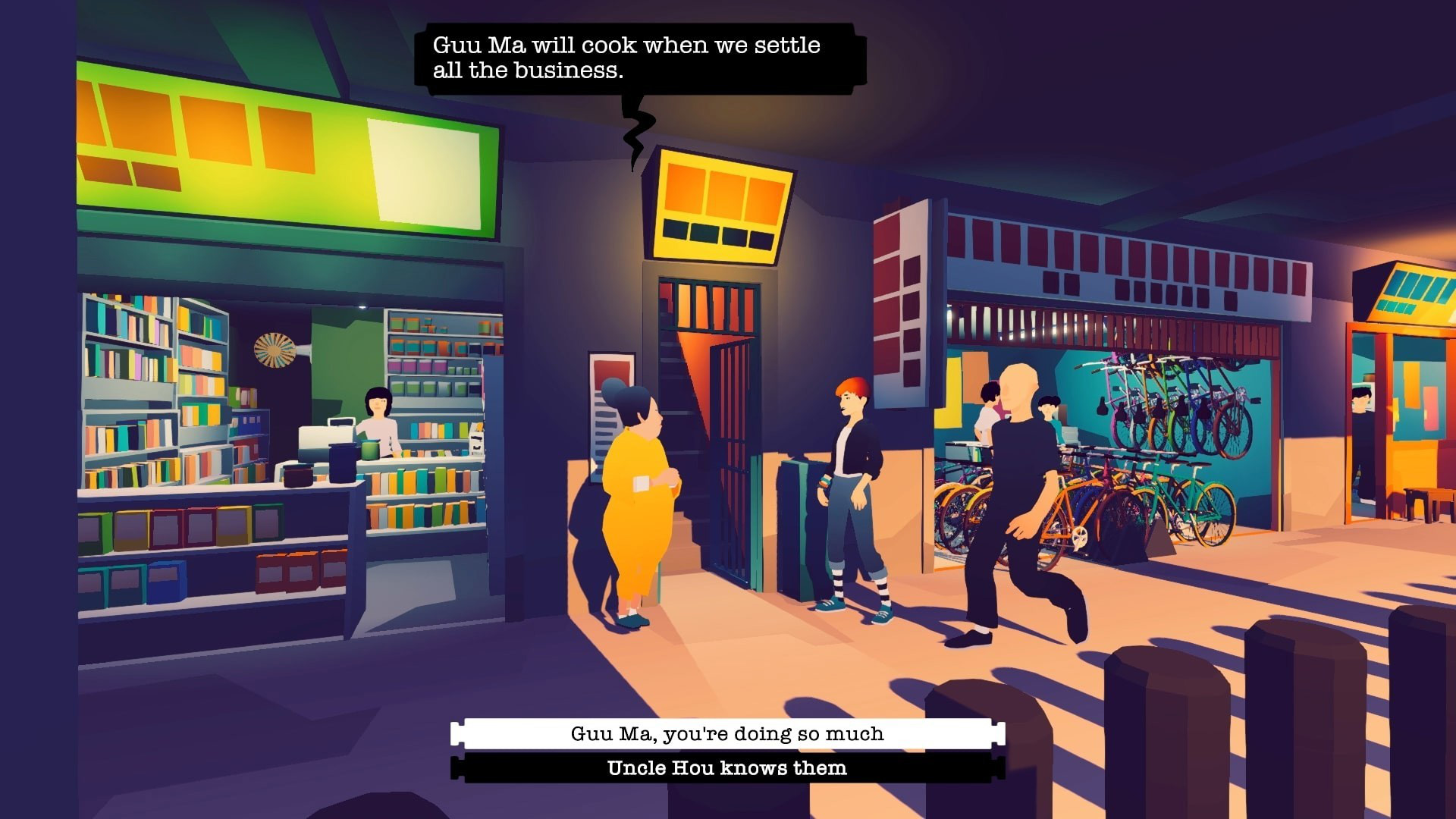
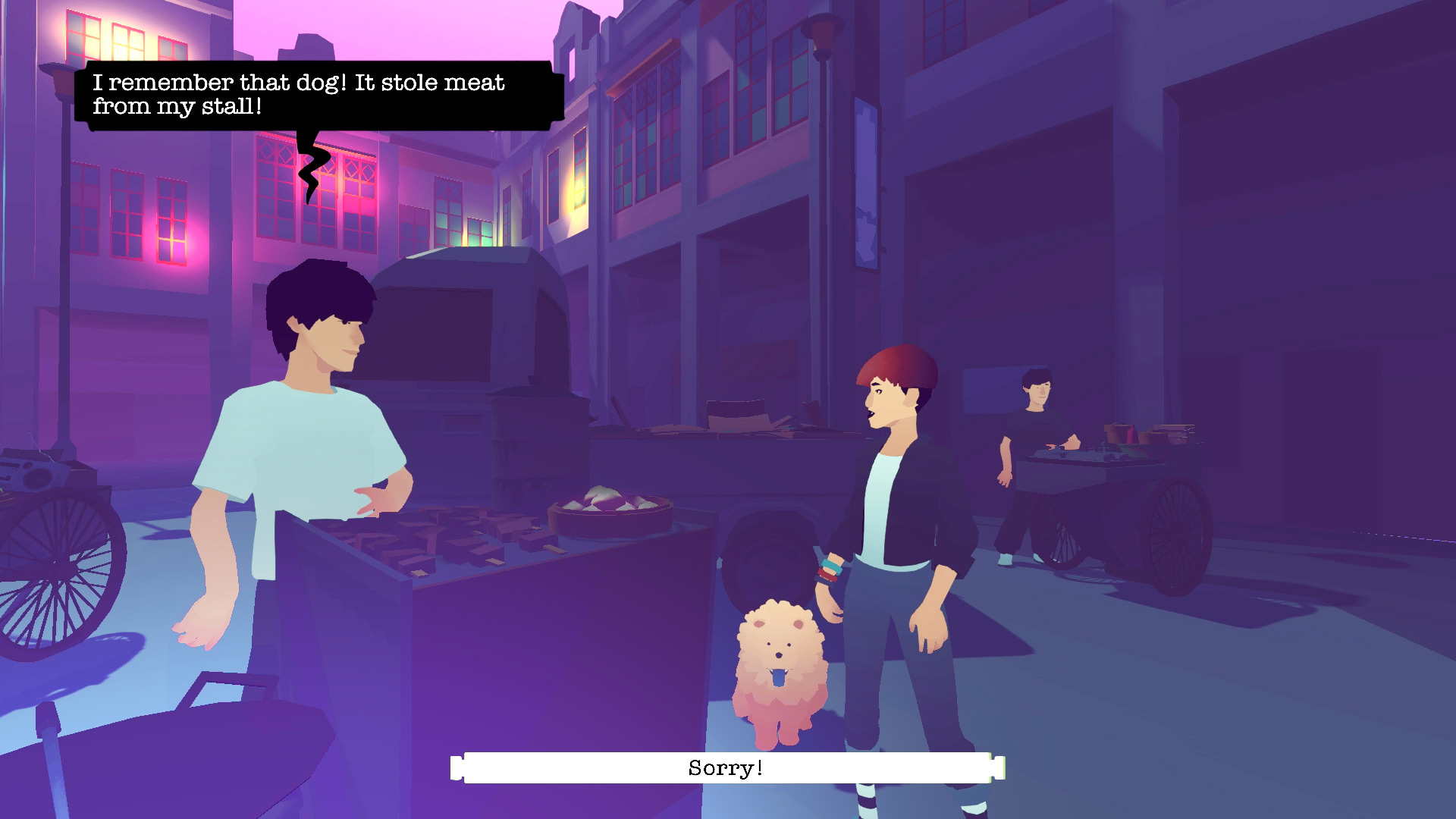
Road to Guangdong: How do Writing a Game and Writing a Book Differ?

Summary


  • Road to Guangdong, written by acclaimed author Yen Ooi, is out now on Xbox One!
  • Road to Guangdong is a narrative road trip game about family, mixing driving simulation with story puzzles.
  • Yen Ooi is the author of the sci-fi novel “Sun: Queens of the Earth.”

I’ve always been passionate about learning how to write for different formats and platforms. I love storytelling that spans across multiple media and story franchises that are able to hold audiences captive through various experiences. And in my journey as a writer, I’ve learned that storytelling is about creating engaging environments, rounded characters, and well-paced plots to reveal compelling stories.

However, applying good storytelling to different media for different audiences requires different skill sets and understanding. Here are some comparisons I found while working on Road to Guangdong. 

Solitary vs. Social

In book writing, a manuscript doesn’t usually get read by someone else until the first full draft is completed. And even then, it would be seen only by one or two people who are involved with the editing process.


However, game writing requires the writer to be a good team player and not be shy about presenting their work even in very draft form. At every stage of production for Road to Guangdong, I worked closely with the whole team (production, design, art and music) to ensure that the narrative design and the story writing developed in line with all aspects of the game.

Sequenced vs iterative

Book writing follows a somewhat strict sequence of actions. After a complete draft manuscript is written, it will go through the editorial process where after each edit, the writer will consider the notes and rewrite the manuscript as necessary. Edits are applied to the entire book as a whole each time, which as you can imagine, becomes quite a lengthy process.


In game production, technical developments, design, art, music and writing all need to happen more or less concurrently to keep to fairly tight production schedules. And keeping in mind the close working relationships between teams, game writing becomes an iterative process. What this means is that every bit of writing or development gets reviewed by the team to consider whether it’ll work with the game as a whole before moving on to the next parts. It’s a constant cycle of edits and changes, taking on board comments and feedback from the team, to improve the game while next bits of writing and development are being created.

Indirect vs Direct (Prose vs Dialogue)

The relationship between the writer and the audience is really interesting and this ties into the required style of writing for the formats. While writing a book, the writer has freedom and scope through writing in prose to do things that might obscure or surprise the reading process. In fact, many book genres favour making the reader work hard to figure out the story. As plain text, prose forces the writer to describe everything and a good writer can do so creatively, but because the engagement is purely with the text, there’s no need to worry about the immersive experience of the reader.


While working on Road to Guangdong, at every point of the game, we had to think about what the player might be experiencing and ensure that they understand what they have to do to advance further. Because games today are so varied and gameplay is becoming more and more intricate, when working on game design, it’s also about applying themes that might be expected in the game’s genre, while adding new ideas that would entertain the player, and still keep to what the game had set out to do in the first place. All of this happens through two types of writing; dialogue that appears in the gameplay; and notes and descriptions that are used in production and design. There is a lot of writing that the player doesn’t read but experiences, and it is this ongoing negotiation between writing while keeping the player in mind that makes the player a core and visible part of the game development process.

Writer’s choice vs Player’s choice

Which brings us to the most important difference: choice. In a book, the writer makes all the choices in the storytelling, leaving the reader to just experience the story through reading.

However, because gameplay requires that the player make choices that drive the story, the writer’s responsibility here is to ensure that players are able to make meaningful choices. And within these choices, the writer needs to maintain the integrity of the characters and keep within parameters of the plot. In Road to Guangdong, one of my key concerns while writing, was in maintaining Sunny’s character in all the choices presented.

Whether it is about the writing environment, the process, or the audience, I love exploring the differences in writing for different media. However, in every form of writing, I’m always reminded that the ultimate pleasure comes from knowing that the writing is enjoyed by the audience.

Road to Guangdong is out now on Xbox One!


https://www.sickgaming.net/blog/2020/08/...ok-differ/

Print this item

  News - Don’t Miss: Deaf accessibility in video games
Posted by: xSicKxBot - 09-09-2020, 03:02 PM - Forum: Lounge - No Replies

Don’t Miss: Deaf accessibility in video games

The following blog post, unless otherwise noted, was written by a member of Gamasutra’s community.
The thoughts and opinions expressed are those of the writer and not Gamasutra or its parent company.


When/How to use Deaf Accessibility Tools


According to the World Health Organization (2016), over 360 million people in the world have mild to profound hearing loss. To narrow down further, approximately 48 million Americans have some degree of hearing loss. That is roughly 15% of the population who are hard of hearing or deaf. And that’s a lot.

Within the video game industry, we strive for players of all backgrounds to enjoy our games, including but not limited to those who are d/Deaf and hard of hearing (d/Deaf/HoH). So how can we make our games more accessible?

The two major tools to promote deaf accessibility in video games are (1) subtitles/captions and (2) visual cues. This basic guide will define the tools and outline when/how to integrate them into game design (tl;dr at the end).

  • Subtitles and Closed Captions:
    • Subtitles vs. Closed Captions
    • Best Practices
  • Visual Cues
  • Integrating Deaf Accessibility Tools into Video Games
    • Why should the tools be added?
    • When should the tools be added?
    • How should the tools be added?

Summary: Subtitles = Dialogue // Closed Captions = Dialogue + Sound Effects

Subtitles


Subtitles derive from text within a written script or spoken dialogue. As a tool, subtitles are designed under the assumption that the user is hearing. Still, there are many benefits to subtitles for both hearing and d/Deaf/HoH individuals. For example, if the dialogue is in another language, subtitles can provide a thorough and accurate translation for non-native speakers. Here is a quick example.

Hearing individuals will use subtitles for varying purposes, including but not limited to understanding poor audio quality, heavy accents, and dialogue in a noisy environment. Additionally, subtitles serve a functional purpose for those who are watching a video on their lunch break at work or trying not to wake a baby.

Generally, subtitles can also assist in comprehension. If content is designed to be informative (i.e. a lecture or “how-to” video), subtitles can provide extensive technical information in written form to assist users in following along with the dialogue. Additionally, users find that subtitles help with following a story by alleviating concentration fatigue. They also improve literacy, which is an added plus.

A friend recently joked that once he turned on subtitles in Red Dead Redemption 2, he found that he could never go back to playing games with the subtitles off. Subtitles complimented the game audio and dialogue, as well as assisted him in comprehension.

His experience is reflected by recent data released by Ubisoft, which shows that 95% of Assassin’s Creed Odyssey and 97% of Far Cry: New Dawn players kept subtitles on.

A man on a horse during the night. Text reads, Micah: Quite a business...

Red Dead Redemption 2 (2018)

However, though subtitles are helpful for deaf and hard of hearing individuals, it does not immediately equate to equal access.

Closed Captions


The term “closed captions” is often used interchangeably with subtitles, but both features are different. Closed captions, often displayed as [cc], are intended to not only accommodate for dialogue, but also other sound effects. Oftentimes, closed captions will include indicators for music or background noise (i.e. explosions, gunshots, breaking glass, etc.). As a tool, closed captions are designed under the assumption that the user is deaf or hard of hearing. The intent of the tool is to provide equal access to d/Deaf/HoH individuals.


It’s a Dog’s Life With Bill Farmer (2020): Two examples of closed captions from a Disney film.

If there is a sound effect or if something occurs off-screen, then captions will include a written cue to notify deaf and hard of hearing individuals.

The main benefits of closed captions is that they provide additional context and therefore, improve immersion for d/Deaf/HoH individuals. Users are able to focus more on the story and content, rather than spending their time trying to decipher subtitles and wondering what they might have missed.

NOTE: In the entertainment industry, captions are categorized as either open or closed. What makes them “closed” is that a user can toggle the captions on and off, whereas “open” captions are embedded in the product and cannot be turned off. In the video game industry, captions are almost always categorized as “closed.”

Best Practices for Subtitles and Closed Captions


Now that we know the difference between subtitles and closed captions, how do we add them to a game? The rule of thumb is to consider the following:

Accuracy: Within the FCC closed captioning rules, it states that all spoken words in dialogue needs to be accurate to the fullest extend possible. Keep in mind that scripts may not be the end product, as voice actors may add their own dialogue. If the team is strapped for time, RevGoTranscript, and Ai-Media are popular closed captioning services. However, game companies are still responsible for formatting.

Labels: Given the nature of video games, the text should always label the speaker(s). Typically, it’s recommended that speakers are labelled using all capital letters. Other designers will use color-coded names to indicate speakers. Just make sure that it is consistent. Additionally, if the speaker is off screen, use an arrow to indicate dialogue is occurring out of view.

Here are some examples:

< SUSANA: When I know more, I’ll let you know.

JAMES: What are you doing?

MAN: I don’t want to do that now.

BOTH: We want to play too!

ALL: Happy birthday, Timmy!

If the same speaker is continuing on to the next line or in a fresh set of subtitles/captions, the speaker does not need to be labelled.

Intonation and emotion: When applicable to the dialogue, intonation and emotion can be labelled within the text. The format is as follows:

(SLURRED): But I love you!

JAN (WHISPERS): Don’t let him near you.

Another option is to integrate intonation and emotion into the displayed text. For example rather than labelling text as (STUTTERS) it can be displayed as JOHN: I’m g-g-going home. Here are some other examples:

Everything that matters…is a mystery

What do you think you’re…?!

You mean you’re going to marry him?!

It’s a BOOK, damnit!

Lastly, a single subtitle/caption can indicate critical intonation that is not affiliated with a speaker.

APPLAUSE DROWNS SPEECH

LONG PAUSE

For additional technical examples, please check out the BBC Subtitle Guidelines.

Accents: Only indicate an accent when it is critical to the dialogue. Text can be displayed as

Steve [AMERICAN ACCENT]: I don’t know what you mean.

Screenshot from the Office. Steve is captioned, stateing Yeeaacck! TMI. TMI, my friends.

The Office (2005)

Music: Always label music and it’s source. For instance, if someone is whistling a tune, text should read HE WHISTLES AN UPBEAT TUNE. When applicable, describe incidental music using the following format:

MUSIC: “God Save The Queen”

Designers can also combine music source with incidental music, such as JOHN HUMS “God Save The Queen”. If there isn’t a source and the song name is not necessary, music can be labelled: EERIE MUSIC or UPBEAT MUSIC. Label mood music only when required.

Sound Effects: For closed captions, critical sound effects should be properly labelled in the text. The BBC rule of thumb:

  • Sound effects should be capitalized
  • Describe the sounds, not actions (i.e. GUNFIRE)
  • Subject + verb should be brief (i.e. FLOOR CREAKS)

Hamilton the music screenshot.

Hamilton (2020): The speakers are indicated and the text is properly labelled being sung.

Font: The font should be simple and legible. Rev recommends the following fonts: Lucida Grande, Arial, STIXGeneral, Verdana, Helvetica Neue, Times, and Futura. Essentially, any standard document-style font.

Size: Make sure the size is appropriate (and can be properly viewed from a couch). Well-researched standards state that the font size needs to fit within a minimum line height of 8% of the active video height. Other game experts recommend size to be a minimum of 46px for a 1080p screen and allowing scaling both up and down from there.

Image showing line height being 8% of active video height, character height being sized to fit

BBC Guidelines (2020): 0.5em = 8px

Text background: To improve legibility, the text should always contrast with the background. To assist with contrast, it is recommended to include a text background (opacity 50%) to accentuate text. On both sides of each line, the rectangular background should have a 8px gap (as seen above).

Color: BBC guidelines recommend that subtitles/captions should be white, yellow, cyan, or green (in order of priority). Colors can also assist in distinguishing names and other core concepts within combat. Just make sure to not go overboard and be mindful of colorblindness.

A an on a rope sliding down an open crater. Text states, JD: All right, Control. We're going in.

Gears of War 5 (2019): An example where the text is an appropriate size and the background properly contrasts with the text to improve legibility.

People looking a the screen in a laboratory. Text is illegible.

Wolfenstein II: The New Colossus (2017): An example where text is too small, the contrast between the background and text makes it illegible, and the speaker is not labelled.

A mansion with text over it, but both are a similar brown green color.

Darkest Dungeon (2016): The text is not a standard color and does not contrast with the background, making it illegible.

Positioning: Traditionally, text is horizontally displayed on the bottom of the screen. Depending on the interface, it may be helpful to move the text to another location. Just make sure that the text is not obstructed by the gameplay and vice versa, as according to FCC guidelines on positioning.

Length: d/Deaf/HoH users utilize active reading skills, as they constantly need to flick their eyes between text and the gameplay. Therefore, do not present too much data all at once, as users should be able to easily read along with the dialogue. Again, BBC states that only two (at most three) lines should be displayed at a time and a single line should not exceed 38 characters.

Break at natural points: Text should always break in logical points. Ideally, a line should be broken in the event of punctuation or the changed speakers. If the game requires split speech, it is advised by experts to avoid splitting in the event of a(n):

article and noun (e.g. the + table; a + book)preposition and following phrase (e.g. on + the table; in + a way; about + his life)conjunction and following phrase/clause (e.g. and + those books; but + I went there)pronoun and verb (e.g. he + is; they + will come; it + comes)parts of a complex verb (e.g. have + eaten; will + have + been + doing)

BBC Guidelines (2020)

Left, right and center justification can be used to identify sound location or speaker. Just make sure breaks also need to consider eye-movement.

text for left and right reads We all hope you are feeling much better. Left has an x, and right have a check.

BBC (2020) example of an unnatural line break.

A woman holding a walkie talkie, stating Jonah I'm here. Just a little stuck. Uh-- a rock pinned my [UNNATURAL BREAK IN LINE] leg.

Shadow of the Tomb Raider (2018): An example where the text is properly contrasted and easy to read, but includes an arbitrary, unnatural line break.

TimeWhen text appears on the screen, users should have an ample amount of time to read the text. Generally, users can read 160-180 words per minute. Channel 4 recommends a rough estimate of 2 seconds per line. But when adding combat or character movement to the equation, it is safe to say that readers may have a decreased reading rate. Since there isn’t data on this topic yet, be ready to have playtesters available. Additionally, as users cognitively adjust to the game’s subtitles/captions, make sure that the display time is consistent.

Synchronization: The text within the subtitles should always match what is happening in the gameplay. According to FCC guidelines, text should be displayed with corresponding dialogue and sound effects “to the greatest extent possible.” It wouldn’t be fun to read a spoiler before it happens on the screen.

A man with a long chin stating a lot of text that is difficult to read.

Outcast – Second Contact (2017): The text is too long for users to read and comprehend in an appropriate amount of time, thus slowing down gameplay.

A warrior staring off into the distance. Text reads, LEONIDAS: I would have liked to have gone fishing with my son.

Assassin’s Creed Odyssey (2018): An example of text that is presented at an appropriate length, uses a clear text color with a suitable background contrast, and properly identifies the speaker.

Directionality: When possible, always indicate the direction of the dialogue, music, and sound. It can be as simple as an arrow point left or right.

A Minecraft screenshot that includes directional subtitles on the righthand side.

Minecraft (2020): An example of closed captions indicating the location of the sound using or >.

Consistency, consistency, CONSISTENCY: Whether the team decides to use colors or brackets, make sure text is consistent. Doing so will ensure intuitive use for the product.

Visual cues


Games require a large amount of information to be translated to the user. The most commonly utilized method for helping a user understand and react to a game’s mechanics or intent is through the use of visual cues. Essentially, visual cues are used within game design to notify users of pertinent gameplay information so that the user may make informed decisions.

For deaf and hard of hearing users, visual cues are the key to success.

Valorant (2020): An example of a user taking damage and the game notifying the user through a damage directional indicator.

Visual cues can come in many shapes, sizes, colors, and forms. More often than not, designers will use visual elements that users are already familiar with, as doing so will make gameplay intuitive for users. Depending on the gameplay and designer’s intent, visual cues are often accompanied by a sound cue and at times can be subtle.

Some common examples of visual cues include:

  • Damage directional indicators
  • Pathfinding hints
  • Timing cues during combat (i.e. glint on weapon before a swing)
  • Highlights over loot and drops.

Remnant: From the Ashes (2019): An example of a user being visually notified of drops.

Now that we know about the tools to promote deaf accessibility, what do we do with them? It’s hard to say “these types of games should have these types of features” since genres are very much blended together. However, here are some general design suggestions.

Why should the tools be added to the game?


When it comes to Deaf Accessibility, there is no single solution. It’s easy to add closed captions and call it a day. But accessibility involves interactive and integrated design.

For example, only adding closed captions does not immediately equate to Deaf Accessibility. Hearing people’s processing speed index benefits from both visual and auditory processing. However, from d/Deaf/HoH individuals, auditory processing is decreased or removed from the picture.

To create a more accessible product, designers will need to add additional visual information to assist with d/Deaf/HoH processing. The downside of only including closed captions is that active reading takes up a large portion of cognitive flexibility. This might work for TV or movies, but video games require player engagement. What if the gameplay is unpredictable and includes lots of sounds? For d/Deaf/HoH users, they’re forced into a multi-tasking dilemma and oftentimes, experience cognitive overload. They do not benefit from the interconnection between auditory and visual processing.

This is why the Deaf Accessibility tools are critical and, more so, why there needs to be healthy balance of both subtitles/captions and visual cues.

When should the tools be added to the game?


Accessibility should always be considered in the early stages of development. The reasoning is that oftentimes, foundational design choices prevent the application of accessible features.

Within the game development pipeline, a game typically goes through five stages: concept, pre-production, production, launch, and post-launch. In pre-production, timelines are made, storylines are drafted, gameplay mechanics are determined, and level design is established. The game is taking shape and details are being defined.

Arrows indicating the process: concept, pre-production, production, launch, and post-launch.

Deaf accessibility tools need to be integrated during this pre-production phase. Once the game enters production, it is extremely difficult to go back and say, “Hey remember all those sound effects we made? Turns out they aren’t accessible to deaf people.” Sure, it’s easy to add some subtitles, but what about all the other sound cues? There will be a lot of backtracking and last-minute, imperfect solutions might be implemented.

To hold the development team accountable, it is advised to hire a full-time accessibility manager or specialist. Doing so will create a common language, understanding, and discourse that strives towards lasting changes and informed decisions. Of course, if the studio is small, then there is the option of hiring an accessibility consultant. Additionally, it may be helpful to designate one designer who actively researches accessibility and is in charge of holding others reliable. However, a full-time specialist is the most ideal route.

How should the tools be added to the game?


To answer this question, I will walk through some examples and scenarios.

What to do with a story-driven game.


If the gameplay is intended to be story-driven with extensive dialogue, then the designers need to create thorough, comprehensive closed captions.

Two women speaking with eachother. Captions read: These are dangerous times. I'd hate to meet Hades without having tasted those lips.

Assassin’s Creed Odyssey (2018)

What to do if dialogue happens off-screen.


If dialogue occurs off-screen, closed captions can include a directional indicator to alert users of the source. For example, in The Last of Us Part II, combat is subtitled and includes a directional indicator to let d/Deaf/HoH users know their enemies’ location.

A girl with a rifle on her back. Text indicates to the left and states, WLF Soldier: This is dumb, we should be pushing in.

The Last of Us Part II (2020): The subtitles include a directional indicator.

What to do with a combat-driven game.


A major issue in combat-driven games is that off-screen events/alerts will occur, but will only notify the user through an audio cue.

To make combat-driven games accessible, there are generally three choices:

  1. Make a visual cue
  2. Caption it
  3. Make a visual cue and caption it

Making a visual cue is a quick and simple solution. For example, Sledgehammer Games includes a directional visual cue to alert users that there is a grenade off-screen that could be dangerous.

The user is defending a point. A red grenade icon is visible that is pointing behind the user.

Call of Duty: WWII (2017): Includes a visual cue that indicates that a grenade is behind the user.

If events/alerts can be expressed through text, closed captions are a viable route. To optimize gameplay, closed captioning should include directional indicators. However, be mindful of “info dumping” text on the screen, as too many closed captions during combat may cause cognitive overload.

Voicelines are captioned in the bottom center of the screen. Characters are labelled and accents/noises are indicated.

Overwatch (2018): Key voicelines are included as closed captioned to notify users that an ability is being used.

In other instances, a cue can be both visual and captioned. The benefit is that the user is alerted of off-screen events, while also receiving direct knowledge of what is causing the sound.

An arrow points to the right and is subtitled as "Explosion"

Far Cry New Dawn (2019): The off-screen “Explosion” visual cue is also captioned.

What to do with a combat-driven competitive game.


During a competitive game, users need to receive information as quickly and efficiently as possible. Typically, designers will use audio cues, as hearing individuals can subconsciously obtain information through subconscious, auditory processing. However, this does not work for d/Deaf/Hoh users.

The best course of action is visualizing sound effects. Fortnite uses a revolutionary visualization for all sound effects. Within the visualization, there are visual cues such as treasure chests, gliders, gunshots, and footsteps. Additionally, colors within the visualization helps distinguish which sounds are neutral vs. dangerous. Opacity is also used to indicate distance of the sound.

A ring in the center is indicating that there are two footsteps sound cues near by.

Fortnite (2017): Includes a directional indicator for treasure, gunshots, footsteps, and more.

How to improve player communication.


Team-based, first-person shooters are extremely popular these days and for many of these online games, they require player communication. However, voice chat is an obvious barrier for d/Deaf/HoH individuals. Users can use the text chat to communicate with each other or clarify information, but given the fast-paced nature of online games, this is neither efficient nor ideal. More so, text chat can inhibit users or place them at a disadvantage, as they spend more time reading/typing rather than searching for gear or engaging in combat.

One option is to include an integrated ping system. Having a precise and flexible ping system improves player communication, as users are able to quickly and efficiently provide information to their teammates. Plus, there are plenty of reasons people can’t or prefer not to speak in-game. Maybe their family is asleep, or they can’t afford a high-quality mic? Therefore, this is a universal solution that would not only benefit d/Deaf/HoH users, but also improve the game’s quality of life.

Apex Legends (2019): Showcases a three-dimensional, fully integrated ping system.

Another option is to convert speech to text. Though this solution is functional, there is a still chance the conversion is inaccurate due to poor microphone quality, background noises, accents, and incoherent speech. However, companies have proven it is good enough to show a substantial benefit for the d/Deaf/HoH communities.

Apex Legends' accessibility settings are shockingly good. Features voice to chat text and play incoming text chat as speech.

Apex Legends (2019): Users are able to convert incoming voice to chat text.

What to do if the game relies on music.


Music can be visually represented in gameplay. Though Cadence of Hyrule is a rhythm game, Brace Yourself Games cleverly integrates a visual-heavy interface that relies on visual-audio cues. Notice that enemies pulse with the music, creating a visual cue that alerts users of the next move. Here is a sample of the game.

5 Minutes of Cadence of Hyrule Gameplay DIRECT FEED (Cucco Attack ...

Cadence of Hyrule (2019): The rhythm is visually illustrated in the below bar.

How to accommodate for different types of hearing disabilities.


There is no such thing as one d/Deaf/HoH diagnosis. Hearing can range from mild to profound hearing loss. Some people use hearing devices such as hearing aids or cochlear implants, while others do not. Some were born with hearing loss, whereas others lose their hearing later in life. Therefore, as designers, it is difficult to predict user experience and the needs of the user base.

To accommodate varying deaf backgrounds, it is recommended to include:

  1. Customization
  2. Hearing Accessibility Presets

Customization: In the entertainment industry, it is always recommended to allow users to customize their subtitles/captions. Every individual has their own individual abilities that a designer is not always able to predict. For example, some people need full solid black text background with no transparency, particularly when dyslexia comes into it. Meanwhile, others may find font edging intrusive or distracting.

By adding customization to the interface, the designer is enabling users to adjust their interface to meet their needs. Recent advocates support the use of a full slider, as it allows fine tuned adjustments.

It is essential that a customization menu includes a preview so that users can identify pain points and shift settings, as needed.

Subtitles features with colors, size, font edge, background color/opacity, window color/opacity, etc.

Disney+: An example of extensive customization for subtitles/captions.

Here is a recent example: Naughty Dog’s game has extensive customization options within their accessibility settings. Users are able to adjust the size, background, names, directions, and colors of the subtitles.

Subtitle customization menu. Under subtitles, users can adjust size, background, names, name colors, direction, and general color. On the right, subtitles are displayed.

The Last of Us Part II (2020): Subtitles with extensive customization options.

When to use controller vibration.


If the game uses a controller, designers have the opportunity to utilize vibration as an accessibility feature. However, note that vibration does not immediately indicate equal access. The reasoning is that not everyone is able to use controller vibration (i.e. Peripheral Neuropathy).

Controller vibration should only be used to emphasize the significance of a visual cue or closed caption that already exists, and should not be used as a core feature. For example, if there is an explosion in the background, the game can caption [EXPLOSION] and have the controller vibrate at the same time. Doing so will not only assist with immersion, but will also allow the player to prioritize during the decision-making process.

What to do with in-game stealth mechanics.


Whether it be the user completing a stealth mission or an enemy sneaking up on the user’s character, a common pain point for d/Deaf/HoH users is in-game stealth mechanics.

If a user is having difficultly while remaining stealthed, designers can add a noise indicator. For example, Nintendo added a noise indicator in their most recent Zelda installment (the circle with pink on the bottom left), which notifies users of their noise levels. Users may be unaware that one weapon is quieter than another. However, the noise indicator will notify deaf and hard of hearing users of their character’s noise levels, therefore serves as an extremely effective tool.


The Legend of Zelda: Breath of the Wild (2017): Stealth indicator assists with controlling character noise levels.

However, what do we do if an enemy is sneaking up on a user? In addition to integrating visual cues, designers can add awareness indicators. Awareness indicators will warn users when an enemy is about to spot them and from which direction the enemy is coming from. Awareness indicators assist in both stealth and combat, as it’ll let users know if an enemy is sneaking or charging up from behind them.

HUD in the center shows two white pulses, indicating that the player has been caught by two enemies.

The Last of Us Part II (2020): Includes awareness indicators to notify the player that they are no longer stealth

Another overall solution is adding a mini-map that identifies all enemy locations through visual cues. Doing so will paint a clear picture of all enemy locations, leaving less room for interpretation and more room for tactical decision-making.

A close-up of the mini-map. Enemies are in red, neutrals are in gray.

Between subtitles/captions and visual cues, there are so many creative ways to promote accessibility in video games. This piece only scratches the surface of what we, as designers and developers, can do to make our games more accessible to deaf and hard of hearing gamers. I will continue to add to this piece as additional questions and examples surface. If you have a question, comment, or concern, please reach out to [email protected] or connect with me on Twitter @momoxmia.

Republished leahybaker.com (includes additional examples). Reviewed by Ian Hamilton (Accessibility Specialist, Independent), Anthony Norcott (Designer, Gunfire Games), Michael Anthony (Developer, Microsoft), and Jordan Colbert, MMFT (Assistive Technology Professional, USC).


The two tools are:

1. Subtitles/captions

Subtitles = Dialogue

Closed Captions = Dialogue + Sound Effects

2. Visual cues = Visually notifies users of pertinent gameplay information


Why should the tools be added to the game? d/Deaf/HoH individuals require accessibility in order to fully enjoy the video game. More so, they do not benefit from the interconnection between auditory and visual processing.

When should the tools be added to the game? In the early stages of the pipeline, ideally in the pre-production stage.

How should the tools be added to the game? Integrate subtitles/captions and visual cues into your game. Any audio cue should always have a corresponding visual cue.

Examples of integrating tools:

  1. What to do with a story-driven game: Include detailed and comprehensive closed captions.
  2. What to do if dialogue happens off-screen: Include directional indicators for closed captions.
  3. What to do with a combat-driven game: If there is a sound effect, (1) make a visual cue, (2) caption it, or (3) make a visual cue and caption it. If applicable, rumble pack can additionally be used.
  4. What to do with a combat-driven competitive games: Create a visualization for all sound effects (i.e. Fortnite).
  5. How to improve player communication: Include an integrated ping system and voice chat transcriptions.
  6. What to do if the game relies on music: Visually represent rhythm within the interface and through visual cues.
  7. How to accommodate for different types of hearing disabilities: Include customization options and a Hearing Accessibility Preset.
  8. When to use controller vibration. Use controller vibration to emphasize the significance of a visual cue or closed caption.
  9. What to do with in-game stealth mechanics. Add noise indicators, awareness indicators, and a comprehensive mini-map.

Additional reading


For other helpful resources tips, I highly recommend reading Ian Hamilton’s piece on How to do subtitles well: basics and good practices. Max Deryagin also wrote a great piece on What Video Game Subtitling Got Wrong In 2017, which identifies common pain points. CanIPlayThat includes reviews and resources as complimentary reading material. Should videos be your preferred method of learning, you can also check out Making Games Better for the Deaf and Hard of Hearing by Game Maker’s Toolkit.

If you are hoping to broaden your understanding in accessibility, Game Accessibility Guidelines can be found here: http://gameaccessibilityguidelines.com/



https://www.sickgaming.net/blog/2020/09/...deo-games/

Print this item

  News - Remaining Lab Zero staff laid off following dev exodus
Posted by: xSicKxBot - 09-09-2020, 03:02 PM - Forum: Lounge - No Replies

Remaining Lab Zero staff laid off following dev exodus

Skullgirls developer Lab Zero has laid off the remainder of its staff shortly after many members of the team departed the studio over issues with its owner Mike Zaimont.

According to Kotaku, roughly 11 developers remained at Lab Zero following the voluntary exodus but were informed on August 25 that the studio no longer had the funds to fund payroll.

“We are exploring all funding options in hopes of bringing those team members back, but right now that’s the reality,” reads a portion of Zaimont’s full statement published by Kotaku.

Indivisible creative director Mariel Cartwright, a voluntary Lab Zero departure, started selling off sketchbooks to raise money for impacted Lab Zero earlier this week, prompting Jonathan Kim, an artist among last week’s voluntary departures, to reveal via tweet that the remaining Lab Zero staff had been laid off (seemingly without severance).

Several prominent developers, including Kim and Cartwright, published statements last week announcing their departure from the studio and pinning the blame on what they described as problematic behavior and a lack of accountability from Zaimont.

Shortly after those departures, Skullgirls IP holder Autumn Games and Skullgirls mobile developer Hidden Variable announced that they would no longer work with Lab Zero itself over the accusations,  but would continue to support the games through cooperation with the departing members of Lab Zero’s Skullgirls team.


https://www.sickgaming.net/blog/2020/09/...ev-exodus/

Print this item

  gRPC-Web for .NET now available
Posted by: xSicKxBot - 09-09-2020, 10:57 AM - Forum: C#, Visual Basic, & .Net Frameworks - No Replies

gRPC-Web for .NET now available

Avatar

James

gRPC-Web for .NET is now officially released. We announced experimental support in January and since then we’ve been making improvements based on feedback from early adopters.

With this release gRPC-Web graduates to a fully supported component of the grpc-dotnet project and is ready for production. Use gRPC in the browser with gRPC-Web and .NET today.

Getting started


Developers who are brand new to gRPC should check out Create a gRPC client and server in ASP.NET Core. This tutorial walks through creating your first gRPC client and server using .NET.

If you already have a gRPC app then the Use gRPC in browser apps article shows how to add gRPC-Web to a .NET gRPC server.

What are gRPC and gRPC-Web


gRPC is a modern high-performance RPC (Remote Procedure Call) framework. gRPC is based on HTTP/2, Protocol Buffers and other modern standard-based technologies. gRPC is an open standard and is supported by many programming languages, including .NET.

It is currently impossible to implement the gRPC HTTP/2 spec in the browser because there are no browser APIs with enough fine-grained control over requests. gRPC-Web is a standardized protocol that solves this problem and makes gRPC usable in the browser. gRPC-Web brings many of gRPC’s great features, like small binary messages and contract-first APIs, to modern browser apps.

New opportunities with gRPC-Web


gRPC-Web is designed to make gRPC available in more scenarios. These include:

  • Call ASP.NET Core gRPC apps from the browser – Browser APIs can’t call gRPC HTTP/2. gRPC-Web offers a compatible alternative.
    • JavaScript SPAs
    • .NET Blazor Web Assembly apps
  • Host ASP.NET Core gRPC apps in IIS and Azure App Service – Some servers, such as IIS and Azure App Service, currently can’t host gRPC services. While this is actively being worked on, gRPC-Web offers an interesting alternative that works in every environment today.
  • Call gRPC from non-.NET Core platforms – HTTP/2 is not supported by HttpClient on all .NET platforms. gRPC-Web can be used to call gRPC services from Blazor and Xamarin.

gRPC loves Blazor and .NET

gRPC is a registered trademark of the Linux foundation. Blazor is compatible with gRPC-web

We’ve worked with the Blazor team to make gRPC-Web a great end-to-end developer experience when used in Blazor WebAssembly apps. Not only will gRPC tooling automatically generate strongly typed clients for you to call gRPC services from your Blazor app, but gRPC offers significant performance benefits over JSON.

A great example of the performance benefits in action is Blazor’s default template app. The data transferred on the fetch data page is halved when gRPC is used instead of JSON. Data size is reduced from 627 bytes down to 309 bytes.

Developer tools showing gRPC-Web transfer size

The performance gain here comes from gRPC’s efficient binary serialization over traditional text-based JSON. gRPC-Web is an exciting opportunity to improve rich browser-based apps.

Try gRPC-Web with ASP.NET Core today


For more information about gRPC-Web, check out the documention, or try out a sample app that uses gRPC-Web.

gRPC-Web for .NET is out on NuGet now:

We look forward to seeing what you create with .NET, gRPC and now gRPC-Web!


https://www.sickgaming.net/blog/2020/06/...available/

Print this item

  AppleInsider - Apple halts iOS 13.6.1 code signing following iOS 13.7 release
Posted by: xSicKxBot - 09-09-2020, 10:57 AM - Forum: Apples Mac and OS X - No Replies

Apple halts iOS 13.6.1 code signing following iOS 13.7 release

Apple on Tuesday ceased signing code for iOS 13.6.1, effectively barring users who updated to the latest iOS 13.7 operating system from downgrading.

Issued last week, iOS 13.7 includes new capabilities for Apple and Google’s coronavirus Exposure Notification system. Specifically, users can now opt in to the program without first downloading an app developed by their local government.

In addition, the new Exposure Notification Express feature enables Apple to present health instructions to users if it is determined that they were potentially exposed to the virus. This is accomplished without a third-party app, though data sharing with public health authorities is required for full functionality.

The outgoing iOS 13.6.1 arrived in August to fix a number of minor bugs including a thermal management issue that could cause an iPhone’s screen to display a green tint. Also remedied was a problem with Exposure Notification alerts, as well as an issue that prevented the deletion of unused system files.

Today’s stoppage means users can no longer download the out-of-date operating system from Apple’s servers. Apple regularly ceases signing of older code to prevent installation of past iOS versions following the release of a new variant, a practice that keeps users safe from new threats and ensures devices are running the latest feature-rich software.

Apple’s iOS 13.7 could be the version’s final point update as the company moves toward the release of iOS 14, a next-generation operating system expected to debut alongside new iPhones in the coming weeks.


https://www.sickgaming.net/blog/2020/09/...7-release/

Print this item

  Microsoft - Tips for using tech to ace homework assignments
Posted by: xSicKxBot - 09-09-2020, 10:56 AM - Forum: Windows - No Replies

Tips for using tech to ace homework assignments

Spending more time on a computer because of remote, distance, virtual, or hybrid learning means it’s a great time to use some key features that can provide extra help with school assignments. Learn how to capture thoughts more quickly, get coaching to improve presentation skills, get assistance with math homework, do two things at once, and more. Whether you’re a parent helping a younger student or a student learning the basics of your computer, these tips are designed to help make schoolwork a little easier.

Capture thoughts more quickly


Most people can talk faster than they can type. If that describes you or your student, use speech-to-text to author content in Microsoft Word in Office 365 Education version for some extra help.

First-time users of the Dictate feature will be asked to give permission for Word to use the microphone, after which talking and transcribing can begin. Thoughts can be recorded with focus kept intact and productivity preserved. Word will do its best to transcribe everything with capitalization and punctuation. This is especially helpful for kids who have dyslexia, dysgraphia, or who have trouble reading or writing.

Get coached on presentation skills


Practicing presentations while looking into a mirror is a long-standing tradition, but at best it can help you with eye contact and facial expressions. Now you can get extra help on your presentation skills with Presenter Coach in PowerPoint. If you give permission to use your computer’s microphone, it can analyze a speech or presentation.

Here’s some of the things Presenter Coach looks out for:

  • Pacing (words per minute)
  • Pitch
  • Usage of fillers, like ums, ers, uhs, you knows, etc.
  • Informal speech
  • Euphemisms and culturally sensitive terms

For example, if you said the phrase, “best man for the job,” Presenter Coach would suggest “best choice for the job” to use more inclusive language.

Improve reading comprehension


Ever read a large block of single-spaced, tiny-sized text and not comprehend a word of it? Immersive Reader can help with that or can provide extra help to a student who is struggling to learn to read.

It takes text and increases the sizes of the letters and spacing between lines, while simultaneously enabling it to be read aloud in voice. As it progresses through the passage, it highlights words for focus. At any time, you can change the reading speed, font, background color, and even highlight which words are nouns, adjectives, or verbs.

This powerful tool can also read to you and can translate words or entire documents into 67 languages. It is included in Word, Outlook for the web, OneNote, Teams, Flipgrid, Forms, Microsoft Edge, Minecraft, Whiteboard, and Office Lens.

Get help with math assignments


Write or type math problems and Math Assistant in OneNote can solve it for you—helping you reach the solution quickly or displaying step-by-step instructions that help you learn how to reach the solution on your own.  Math Assistant is a digital tutor that provides help for students and parents on math assignments and homework.

Say you were faced with a problem in your textbook with an ask like “solve for x”. Where would you start?

With Math Assistant in OneNote, it would be with the draw tool. After solving, you can even go as far as have Immersive Reader read steps aloud and generate quizzes for additional practice to help you learn the concepts, not just get the assignment done.

See what you need on screen, side-by-side


Your class is streaming in your browser and you’re taking notes in OneNote or “passing notes” in Teams or Skype. Your math notes are in OneNote and you’re doing a math worksheet online. Your reference material is on a web page and you’re answering questions in another app. If you’re still flipping back and forth between the different apps and windows, prepare to be delighted by Snap.

So, the extra time spent on a computer during remote, distance or hybrid learning, combined with the extra help with school assignments can help increase productivity and maximize academic success.


https://www.sickgaming.net/blog/2020/09/...signments/

Print this item

  News - Rumour: Nintendo Is Ramping Up Switch Production (Again)
Posted by: xSicKxBot - 09-09-2020, 10:56 AM - Forum: Nintendo Discussion - No Replies

Rumour: Nintendo Is Ramping Up Switch Production (Again)

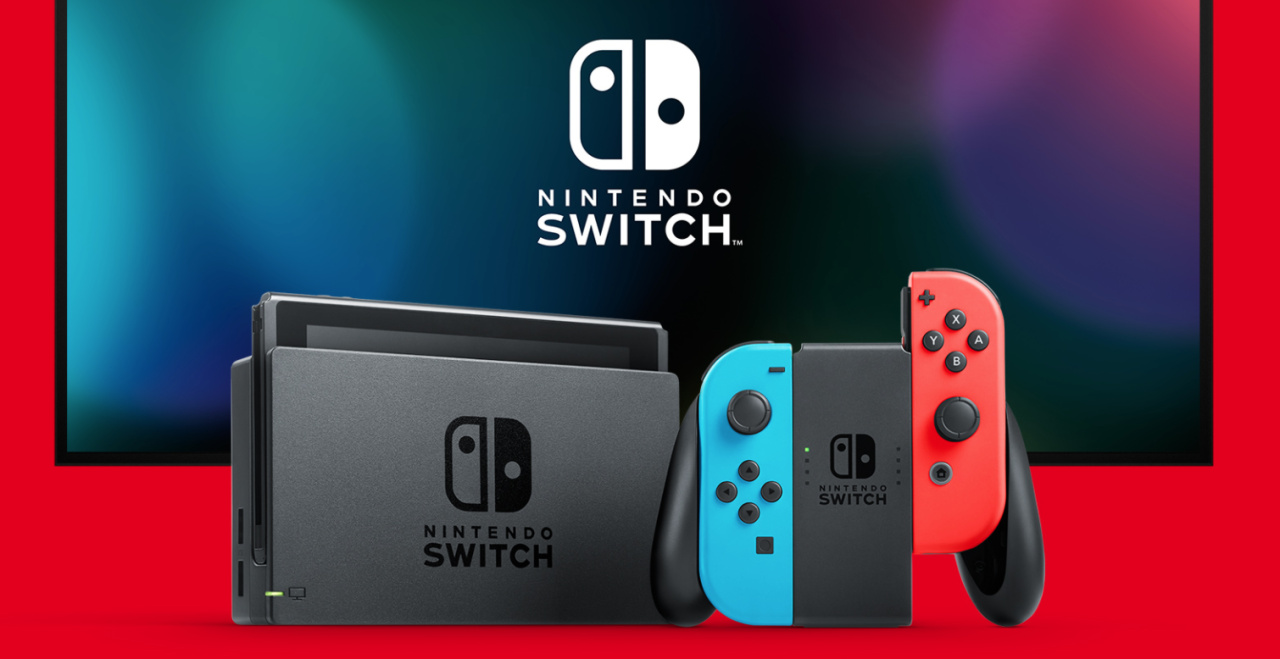
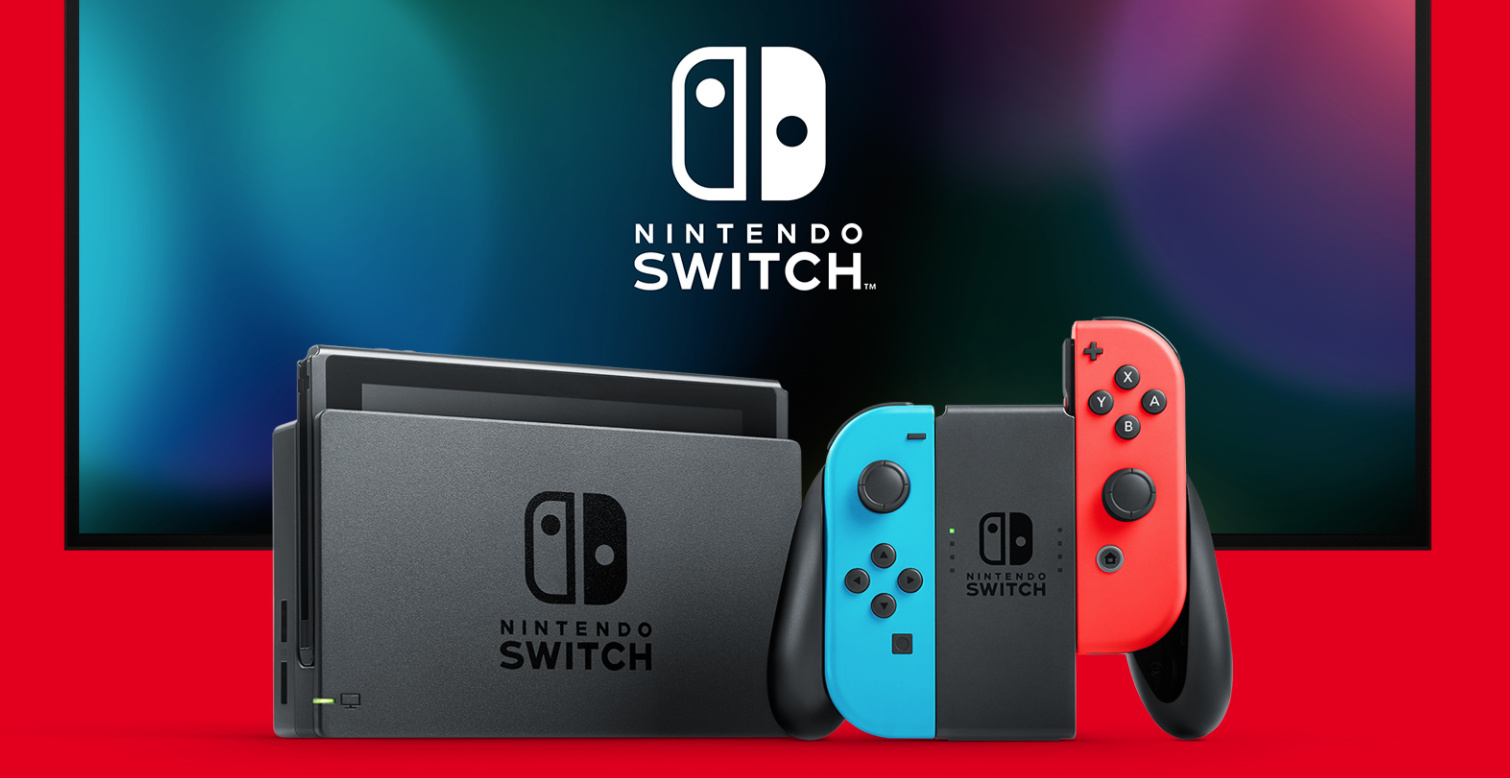
Nintendo Switch

Bloomberg has reported that Nintendo is looking to increase Switch production, upping its previous total of 25 million units in 2020 to a whopping 30 million units.

According to the report, Nintendo boosted production in August to 25 million for the year in order to cope with demand triggered by the ongoing COVID-19 pandemic, which showcases just how successful Nintendo console has been during 2020.

While Nintendo’s release slate has been a little less busy than in previous years, the company has had a global smash hit in the form of Animal Crossing: New Horizons, a title which has sold 22 million copies so far (and that’s August’s figures – it’s no doubt even more now) and has caused a flood of new Switch hardware purchases.

Switch has now sold 61.44 million hardware units worldwide as of June 30th, according to Nintendo, and has already surpassed the lifetime sales of systems such as the NES, SNES, GameCube and N64. It is also rumoured that a Switch Pro model will launch in 2021, which will give Nintendo’s hybrid hardware even more momentum.


https://www.sickgaming.net/blog/2020/09/...ion-again/

Print this item

  News - Fresh Prince Reboot Lands Huge New Deal On Peacock
Posted by: xSicKxBot - 09-09-2020, 10:56 AM - Forum: Lounge - No Replies

Fresh Prince Reboot Lands Huge New Deal On Peacock

Will Smith took to his personal YouTube channel to announce that Bel-Air, the previously announced dramatic series adaptation of The Fresh Prince of Bel-Air, has "just officially closed the deal with Peacock with an unprecedented two-season order from a pitch." Smith, who has been working in television for 30 years, called the deal "unprecedented." You can check out the full announcement below, which is more like an informal gathering with himself and the other principals involved in production.

Continue Reading at GameSpot

https://www.gamespot.com/articles/fresh-...01-10abi2f

Print this item

  [Tut] How to Sort and Return a Python List in One Line?
Posted by: xSicKxBot - 09-09-2020, 04:08 AM - Forum: Python - No Replies

How to Sort and Return a Python List in One Line?

To sort and return a Python list in a single line of code, use the sorted(list) method that returns a new list of sorted elements. It copies only the references to the original elements so the returned list is not a deep but a shallow copy.

How to Sort and Return a Python List in One Line?

Let’s dive into the challenge to learn about more details and alternatives. Everything is not always simple. By studying the different methods that solves this, you’ll become a better coder!

Problem: Given a list of comparable objects such as integers or floats. Is there a way to sort the list and return the sorted list in a single line of Python code?

Example: Say, you’ve got the following list.

a = [4, 2, 1, 3]

You want to sort this list and return the result in a single line. If you use the list.sort() method, the return value is None:

print(a.sort())
# None

The return value of the list.sort() method is None, but many coders expect it to be the sorted list. So they’re surprised finding out that their variables contain the None type rather than a sorted list.

However, returning None makes perfect sense for the list.sort() method. Why? Because you call the method on a list object and it modifies this exact list object. It doesn’t create a new list—there won’t be a new list object in memory.

So, how to sort and return a list in a single line of Python code? As a rule of thumb, there are always multiple ways to accomplish the same thing in Python. Let’s dive into the different ways to accomplish this!

Here’s a quick overview of the methods addressed in this article:

Exercise: Change the list to be sorted by adding negative floats. Does it still work?

You’ll now learn more about each of the methods.

Method 1: sorted()


The easiest way to accomplish this task is to call Python’s built-in sorted() function that takes an iterable and returns a new list with sorted elements.

a = [4, 2, 1, 3] # Method 1: sorted()
print(sorted(a))

The sorted() function generates a new sorted list that is put into the print() function that prints the sorted list to the shell. The output is the sorted list:

[1, 2, 3, 4]

This method is the most Pythonic one. But are there alternatives?

Method 2: list.sort() + Ternary Operator


The sorted() method leaves the original list unchanged. But what if you want to sort the original list and get this original list as an output that you can assign to a variable?

The answer is simple: use a combination of the list.sort() method and the ternary operator!

a = [4, 2, 1, 3] # Method 2: list.sort() + ternary
print(a if a.sort() else a)
# [1, 2, 3, 4]

You need to understand two concepts: (1) list.sort() and (2) the ternary operator:

  1. The list.sort() method sorts the list elements in place in an ascending manner. To customize the default sorting behavior, use the optional key argument by passing a function that returns a comparable value for each element in the list.
  2. The ternary operator x if c else y consists of three operands x, c, and y. It returns x if the Boolean expression c evaluates to True. Otherwise, if the expression c evaluates to False, the ternary operator returns the alternative y.

The beautiful thing is that the one-liner print(a if a.sort() else a) modifies the original list and returns it right away. How does it do this?

Explanation: First, the a.sort() method is called to check which “branch” of the ternary operator should be visited. The return value of a.sort() will always be None. The None value is automatically converted to the Boolean False. Thus, the ternary operator always returns the list object referred to by variable a.

Note that the only purpose of the ternary operator is to make sure to call the a.sort() method before returning the value a—to make sure it is sorted!

If you print the original list to the shell, you’ll see that it is now sorted:

>>> print(a)
[1, 2, 3, 4]

Method 3: Combining Multiple Statements in a Single Line with Semicolon


An alternative is chaining the statements with a semicolon ; to one-linerize a Python code snippet. This strategy works with flat Python programs without, possible nested, blocks:

a = [4, 2, 1, 3] # Method 3: semicolon
a.sort(); print(a)
# [1, 2, 3, 4]

If you need to sort a Python list and print its return value to the shell—for example because you run this command from the command line or terminal—you can use this excellent strategy.

You can learn more about how to one-linerize any Python program in my following video:


Python One-Liners Book


Python programmers will improve their computer science skills with these useful one-liners.

Python One-Liners

Python One-Liners will teach you how to read and write “one-liners”: concise statements of useful functionality packed into a single line of code. You’ll learn how to systematically unpack and understand any line of Python code, and write eloquent, powerfully compressed Python like an expert.

The book’s five chapters cover tips and tricks, regular expressions, machine learning, core data science topics, and useful algorithms. Detailed explanations of one-liners introduce key computer science concepts and boost your coding and analytical skills. You’ll learn about advanced Python features such as list comprehension, slicing, lambda functions, regular expressions, map and reduce functions, and slice assignments. You’ll also learn how to:

  Leverage data structures to solve real-world problems, like using Boolean indexing to find cities with above-average pollution
  Use NumPy basics such as array, shape, axis, type, broadcasting, advanced indexing, slicing, sorting, searching, aggregating, and statistics
  Calculate basic statistics of multidimensional data arrays and the K-Means algorithms for unsupervised learning
  Create more advanced regular expressions using grouping and named groups, negative lookaheads, escaped characters, whitespaces, character sets (and negative characters sets), and greedy/nongreedy operators
  Understand a wide range of computer science topics, including anagrams, palindromes, supersets, permutations, factorials, prime numbers, Fibonacci numbers, obfuscation, searching, and algorithmic sorting

By the end of the book, you’ll know how to write Python at its most refined, and create concise, beautiful pieces of “Python art” in merely a single line.

Get your Python One-Liners Now!!


https://www.sickgaming.net/blog/2020/09/...-one-line/

Print this item

  [Tut] How to Get the Client User IP Address in PHP
Posted by: xSicKxBot - 09-09-2020, 04:08 AM - Forum: PHP Development - No Replies

How to Get the Client User IP Address in PHP

Last modified on August 13th, 2020.

This is fairly a straightforward topic. Just a few lines of PHP code will do the work of getting the client user IP address. Most of the times it is true, it is all about a few lines of PHP script.

Sometimes things get tricky. We shall see about those things and also an other aspect like the privacy issue involved with it.

Following one line PHP code will get you the client user’s IP address. Then why all the fuss? Read through the article and you will know about it.

$_SERVER['REMOTE_ADDR'];

$_SERVER is a PHP array which is set by the server. Depending on this one line PHP code may not yield the best results in many a situation. For example, if a client is behind a proxy server, then this variable will not be suitable. Also be aware that, these headers can be easily spoofed by the users by setting an IP address themselves.

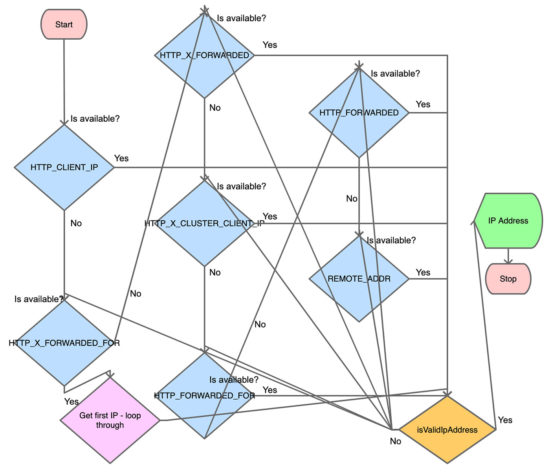
Following PHP script covers majority of the scenario and returns the user’s IP address.

<?php class Request
{ /** * Retrieves IP address set in the request header. * * Each ISPs sets them following their own logic. There is also a possibility for the user * to easily spoof their IP address. * * So using this for mission critical situations is not advisable. * If you are getting the IP address for casual logging purposes, then this is fine. */ public function getIpAddress() { $ipAddress = ''; if (! empty($_SERVER['HTTP_CLIENT_IP']) && $this->isValidIpAddress($_SERVER['HTTP_CLIENT_IP'])) { // check for shared ISP IP $ipAddress = $_SERVER['HTTP_CLIENT_IP']; } else if (! empty($_SERVER['HTTP_X_FORWARDED_FOR'])) { // check for IPs passing through proxy servers // check if multiple IP addresses are set and take the first one $ipAddressList = explode(',', $_SERVER['HTTP_X_FORWARDED_FOR']); foreach ($ipAddressList as $ip) { if ($this->isValidIpAddress($ip)) { $ipAddress = $ip; break; } } } else if (! empty($_SERVER['HTTP_X_FORWARDED']) && $this->isValidIpAddress($_SERVER['HTTP_X_FORWARDED'])) { $ipAddress = $_SERVER['HTTP_X_FORWARDED']; } else if (! empty($_SERVER['HTTP_X_CLUSTER_CLIENT_IP']) && $this->isValidIpAddress($_SERVER['HTTP_X_CLUSTER_CLIENT_IP'])) { $ipAddress = $_SERVER['HTTP_X_CLUSTER_CLIENT_IP']; } else if (! empty($_SERVER['HTTP_FORWARDED_FOR']) && $this->isValidIpAddress($_SERVER['HTTP_FORWARDED_FOR'])) { $ipAddress = $_SERVER['HTTP_FORWARDED_FOR']; } else if (! empty($_SERVER['HTTP_FORWARDED']) && $this->isValidIpAddress($_SERVER['HTTP_FORWARDED'])) { $ipAddress = $_SERVER['HTTP_FORWARDED']; } else if (! empty($_SERVER['REMOTE_ADDR']) && $this->isValidIpAddress($_SERVER['REMOTE_ADDR'])) { $ipAddress = $_SERVER['REMOTE_ADDR']; } return $ipAddress; } /** * To validate if an IP address is both a valid and does not fall within * a private network range. * * @access public * @param string $ip */ public function isValidIpAddress($ip) { if (filter_var($ip, FILTER_VALIDATE_IP, FILTER_FLAG_IPV4 | FILTER_FLAG_IPV6 | FILTER_FLAG_NO_PRIV_RANGE | FILTER_FLAG_NO_RES_RANGE) === false) { return false; } return true; } }

There are many options given all through this article to get the client user’s IP address. This is the best among all the possibilities given, but I highly recommend you to read the section “IP address reliability” below.

Flowchart to get client user’s IP address


I have tried my best minimize the flowchart. Please do not look for diagrammatic accuracy. It is just an attempt to present the above PHP script in a flowchart model. But after drawing I realized that the above PHP script is easier to understand than this flowchart ?

flowchart to get client user ip address in php

Minimal code to get user’s IP address


Below one line code will work in most of the situation. Read the ‘IP address reliability’ section below, must. It will give you a good idea.

$ipAddress = $_SERVER['REMOTE_ADDR']?:($_SERVER['HTTP_X_FORWARDED_FOR']?:$_SERVER['HTTP_CLIENT_IP']); 

Get user’s IP address for CloudFlare hosted websites


I have taken CloudFlare as example. There are many similar services. You need to talk to that service provider to know which request header they are setting and get the IP address accordingly.

When the website is hosted using CloudFlare service, $_SERVER['REMOTE_ADDR'] will return the CloudFlare server’s IP address and not the user’s IP address. So in such a situation, you can make use of the variable set by the CloudFlare server to get the IP address.

if (isset($_SERVER["HTTP_CF_CONNECTING_IP"])) { $_SERVER['REMOTE_ADDR'] = $_SERVER["HTTP_CF_CONNECTING_IP"]; $ipAddress = $_SERVER['REMOTE_ADDR'];
}

IP address reliability


$_SERVER['REMOTE_ADDR'] is the most reliable variable from the above list of variables. REMOTE_ADDR may not contain the real IP address of the TCP connection as well. It depends on the SAPI configuration.

If the user is behind a proxy server, HTTP_X_FORWARDED_FOR will be set. But this can be easily spoofed by the user by setting an IP address he wishes to expose.

Even the variable X-Forwarded-For or the Client-IP can be set by the user to any value he wishes. So, when you maintain a log of user’s IP address, it is better to store the IP address that is returned by $_SERVER['REMOTE_ADDR'] also.

Take an example of a shopping cart. You may display the product price according to the user’s country. In such a scenario, you may use the user’s IP address to determine the user’s country. In such a scenario, the code to get user’s IP address should be fool-proof.

So in summary, if you are building a mission critical application that depends on the user’s IP address, then this is not the way to go. For audit log of the user’s IP address, this may suffice. In essence, understand each line of these PHP code and variables used. Know your use-case well and use it accordingly.

IP address field length


When you are storing the IP address in the database, remember to have the field size as 45 for single IP. Because there is a possibility for IPv6 IP addresses. It its full form the IPv6 IP address can be 45 characters in length.

How to get the IP address of a host


Using a hostname, we can get the server’s IP address using the PHP’s built-in function gethostbyname. This returns the IPv4 address for the host given in argument.

$ipAddress = gethostbyname('www.example.com');

The reverse is possible too by using gethostbyaddr().

Client user’s IP address and privacy issues


Client’s IP address can be considered as private information in certain legislation. It depends on the land of law. Internet is public in general. You never know from which geographic region you will get users.

As per GDPR (Article 4, Point 1; and Recital 49), IP address is a personal data. I would suggest to inform the user and get consent to log the IP address. Also, call it out explicitly in your “Privacy Policy” document.

Explicitly state that you are collecting and logging the client user’s IP address and the reason for doing so.

Conclusion


Understand your use-case well. A good understanding of the scenario in which you are going to get and use the client user’s IP address is important. Then understand that the end user can easily spoof his IP address and present you something else. Third understand each line of the code, the server variables, from where the IP address is fetched, who sets it etc. Then decide how it will impact your use-case. Last but not the least, explicitly call out in your privacy policy that you are getting the client user’s IP address and storing it. Also state why you are doing it. As per GDPR, IP address is user’s personal information and so it would be better to get user’s consent before processing it.

↑ Back to Top


https://www.sickgaming.net/blog/2020/08/...ss-in-php/

Print this item

 
Latest Threads
WoW Admin Panel (Probably...
Last Post: Berrybrave
2 hours ago
Black Ops (BO1, T5) DLC's...
Last Post: Prdzch
2 hours ago
(Indie Deal) Approaching ...
Last Post: xSicKxBot
4 hours ago
News - GDQ Cancels SNK St...
Last Post: xSicKxBot
4 hours ago
Redacted T6 Nightly Offli...
Last Post: Ber2128
11 hours ago
(Indie Deal) FREE Brocco,...
Last Post: xSicKxBot
Yesterday, 04:36 PM
(Free Game Key) Epic Game...
Last Post: xSicKxBot
Yesterday, 04:36 PM
News - The New PlayStatio...
Last Post: xSicKxBot
Yesterday, 04:36 PM
[BesT ►{{90% off}}Temu Di...
Last Post: das210
Yesterday, 12:17 PM
[BesT ►{{90% off}}Temu Re...
Last Post: das210
Yesterday, 12:10 PM

Forum software by © MyBB Theme © iAndrew 2016