Bandai Namco Hosting “Play Anime Live” Digital Showcase Later This Month
If you love anime, you might be interested in checking out Bandai Namco’s “Play Anime Live” digital showcase later this month.
The publisher promises to share the latest news and trailers about upcoming anime video games coming to console, PC, and mobile devices. This live event will be streamed across YouTube, Twitch, and Facebook.
Here are the times: 4:00 pm PT (July 22), 7:00 pm ET (July 22) / 12:00 am UK (July 23), 1:00 am EU (July 23)
Apart from news and trailers, there’ll also be a questions-and-answers session with the developers along with giveaways. What Switch-related news are you hoping for? Share your thoughts down below.
Nintendo’s Free eShop Game Jump Rope Challenge Is Keeping Switch Owners Active
One release that popped up out of nowhere last month was Jump Rope Challenge. It’s a free Switch eShop download that’s available until this September. The aim of it – as you probably already know – is to jump at least 100 times per day.
As basic as it is, it seems Switch players around the world are sticking with this new exercise routine. Following on from the last update on 19th June (which recorded 200 million jumps), players have now jumped over 590,000,000 times in the game. This latest update was shared during Nintendo’s 80th General Shareholders Meeting Q&A.
Here’s exactly what was said, according to translator and Nintendo Life contributor, Robert Sephazon:
Director Takahashi goes onto say that Jump Rope Challenge was created by Nintendo developers during remote work. Over 590,000,000 jumps have been recorded by the time of the Q&A.
As limited as this game is, we actually gave this game eight out of ten stars in our recent mini-review and said it was a noble attempt to get Switch owners active during these difficult times – and would perhaps even put a smile on your face, too.
Have you contributed to this jump count yet? Leave a comment down below.
Bandai Namco Announces Play Anime Live Stream, Featuring Anime Games
Bandai Namco has announced a new event for anime fans, and it'll focus on their upcoming slate of games that are anime focused. The event, called Play Anime Live, hasn't announced the games it will focus on yet.
The stream will begin on July 22 at 4 PM PT--that's a Wednesday. It's not yet clear how long the event will run for.
Bandai Namco publishes many anime games, including games based on Dragon Ball and Naruto. It's been a while since we've seen a new Naruto game, and the Dragon Ball FighterZ Fighters Pass 3 currently has several unannounced fighters, so we could see news about these series (although nothing has been confirmed).
You can sign up for the event now, which will put you in the running to win a "VIP box" prize containing $75 worth of anime-themed swag.
GameSpot has officially kicked off Play For All--a celebration of all things gaming. Join us as we bring you the summer's hottest news, previews, interviews, features, and videos, as well as raise money for COVID-19 relief efforts and Black Lives Matter with the help of our friends from around the gaming world. Check out the Play For All schedule for more.
Posted by: xSicKxBot - 07-01-2020, 09:50 AM - Forum: Lounge
- No Replies
New Apex Legends Patch Addresses Lost Treasures Bugs
Respawn has pushed a hotfix update for Apex Legends which addresses several noticeable bugs that popped up in the battle royale game with the release of the Lost Treasures update. The full patch notes for this latest hotfix update are listed below.
Of note, the hotfix addresses the Mobile Respawn Beacon that spawned in the now-open bunker near Water Treatment. Currently, Mobile Respawn Beacons are exclusive to the limited-time Armed & Dangerous mode, but they're set to release into the standard modes when Lost Treasures ends. Some players--myself included--believed the beacon that spawned in the bunker was a hidden secret that teased what was to come, but apparently not! It was a bug.
The hotfix update also addresses notable issues with Wraith and Octane. In Lost Treasures, Wraith got a new legendary skin called The Marble Goddess. Equipping the skin caused a bug that prevented Wraith from taking headshot damage when hit in the head--instead, the game mistakenly assigned the less severe body damage to a headshot. That issue has now been fixed, alongside a bug that allowed Octane to use healing items while using Stim.
Posted by: xSicKxBot - 07-01-2020, 05:31 AM - Forum: Python
- No Replies
What Does “if __name__ == ‘__main__’” Do in Python?
Today, let’s discuss something that’s all over the place in many code bases: what does if __name__ == '__main__' do in Python?
If you are learning Python programming step by step, you would have bumped into the above piece of code snippet somewhere. Even if you have not, I am sure you will soon come across it, and this might feel like a jerk in your so far smooth journey of learning Python programming. I have been there. I was going through a book on Python programming when I first saw this piece of code, and I thought—wait a minute, did I miss anything on my way up to here? Then I went back, revising the last few pages to figure out what I missed, and this loop went on for a while before I finally sat down to face the demon, and honestly, I smiled when I figured it out, it is that simple. Maybe, we learn this way. We go back and forth, keep jumping, and then one day, the magic happens. The only thing that works is not giving up.
Today I will try to make this understanding simple for you in a way that will hopefully bring a smile to your face if you have been in the loop of getting a hint of what it is and then keep forgetting.
To understand what is if __name__ == __main__ used for we will dive into some code examples first to understand what __name__ and __main__ are. Then we will cement the learning through another example. So be patient and go through the article carefully. The code snippets may look a little confusing but wait until we explain and see what is happening exactly.
What are __name__ and __main__?
Let us start with __name__. Simply put, __name__ is a special variable that is built-in in Python.
In Python, we can run code as a source file or, in other words, a python code that runs on its own (read – not imported from some separate Python source file). This sentence may be confusing at the moment, but let us explore this further.
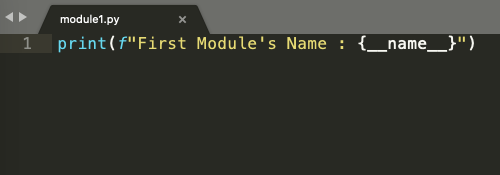
Look at the code snippet below. It is a simple python file with just one line:
print(f" First Module's Name : {__name__}")
Simply put, we are asking Python to print the value that __name__ variable has at this moment. Notice there is no import statement or even any other line of code above it.
Figure 1
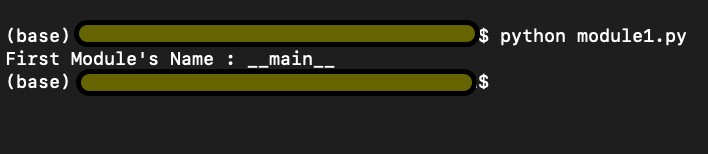
Check the output in Figure 2 below. We run the above lines of code and find the output
First Module’s Name : __main__
Figure 2
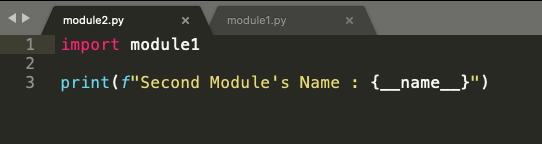
We import module1.py into module2.py and ask Python to return the second module’s name (second because this is the second python code we are running) stored in__name__variable again.
Figure 3
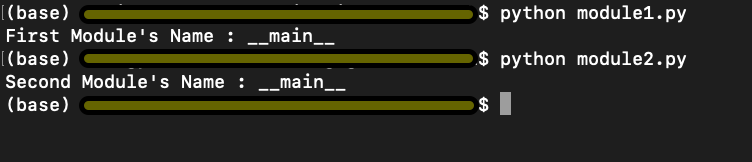
Interestingly, in Figure 5 below, we have the output
First Module’s Name : module1
Second Module’s Name : __main__
Figure 4
The above information summarised simply can be explained as follows. Python starts executing the first line of code found in a Python file, but before it runs anything to show the output, Python defines some special variables. __name__ is one such variable. When the source file is executed on its own i.e, not being imported from some other source code, the __name__ variable is set to value __main__, and hence the output we got in Figure 3 was First Module’s Name : __main__. If you import the file from some other module (as in the code snippet from Figure 4), the value of __name__ variable is set to the name of the module it is imported from. Hence the output in Figure 5.
Now let us look at the sequence of execution.
module1.py in Figure 1 is executed,
Variable __name__ is set to the value __main__
__main__ module is executed, and the output is First Module’s Name : __main__
Module2.py in Figure 4 is executed,
Variable __name__ is set to the value module1
module1 is the block of code in module1.py which is executed, and the output is First Module’s Name : module1
Next, we move on to line 3 in module2.py, the name value is reset to __main__, because this is a fresh piece of code in module2.py, and the output is Second Module’s Name : __main__
Using if __name__ == ‘__main__’
But let’s think only concerning the code in module2.py. In the real world, with module2.py I would not like to print the output from module1.py rather only import some functionality and get output for the lines of code written in module2.py i.e. Second Module’s Name : __main__
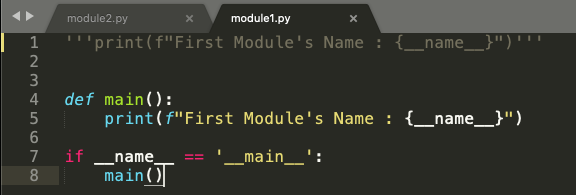
But how can we do it? There has to be a way because this seems more logical that way. Refer to the code snippet below in Figure 6.
Figure 5
So, we will define a function main(), and put the print statement from module1.py inside the main function. Now we use this small trick of using the statement if __name__ == ‘__main__’ and put the main function inside this if statement. Now let’s look at the execution sequence of our program.
We have a main() function where we ask to print the name of the first module stored in the __name__ variable. From the above example, we know the value stored in the __name__ variable is __main__
In line 7, we say if the value in __name__ variable is equal to __main__, only then go ahead and execute the main() function.
Now running the modified module1.py, we can see the output as First Module’s Name : __main__ as expected. Refer to the first output in Figure 7
Now when we run module2.py, we get the output as Second Module’s Name : __main__
Notice how the output for module2.py has changed now. Although we have imported module1 in our module2.py program, the program in module1.py doesn’t run. Why? Because the value stored in the __name__ variable at this moment is module1 and not __main__. So, using a main() function and if __name__ == ‘__main__’ has put restrictions on execution of lines of code in module1.py as it would only execute module1.py only if __name__ == ‘__main__’
Figure 6
Putting it all into a real-world example
We now take a more generic example, which would make more sense of all we have discussed above.
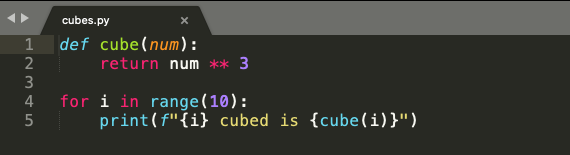
Have a look at the below code snippet from cubes.py in Figure 8. In line 1 and line 2, we have a function cube(), which takes num as an argument. The function cubes(num) returns the cube of a given number.
On line 4, we use a for loop which iterates over a list of numbers from 0 to 9.
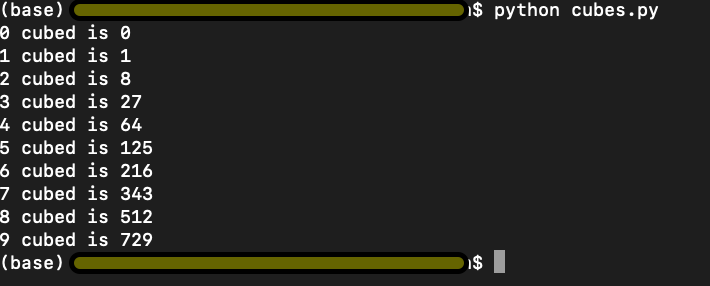
On line 5, we use the cubes(num) function with i as input to display the cube, as shown in figure 9. Simple enough.
Figure 7
Figure 8
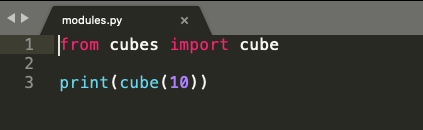
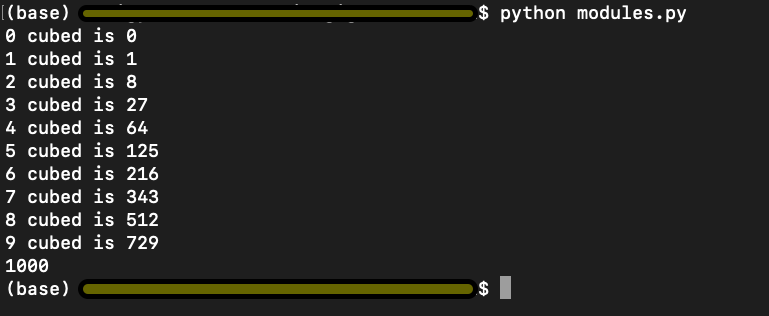
In the code snippet from modules.py below in Figure 10, we import cube(num) function from cubes.py and try to print cube of 10 in line 3. Logically, we are trying to use the function cube(num), which returns a cube of any given input number.
Figure 9
However, look at the output below. We have the output of both the programs cubes.py and modules.py. This is not what we intended or wanted to do.
Figure 10
Remember the explanation from above where we used if __name__ == ‘__main__’ to limit the execution of code from modules1.py. Let us try and implement the same idea and see if that works here.
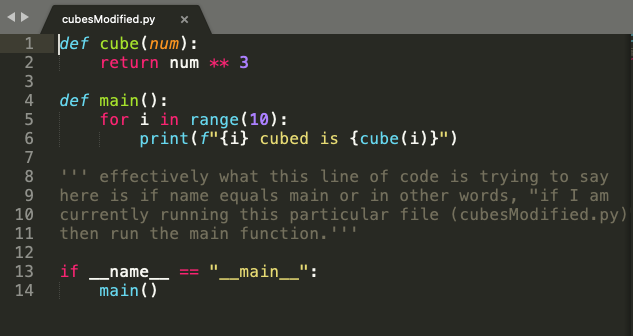
In the code snippet from cubesModified.py in Figure 11, we put the for loop and the print statement from cubes.py in the main() function. And again, we use the statement if __name__ == ‘__main__’ to execute code from cubesModified.py only when the value of __name__ variable equals to __main__.
Figure 11
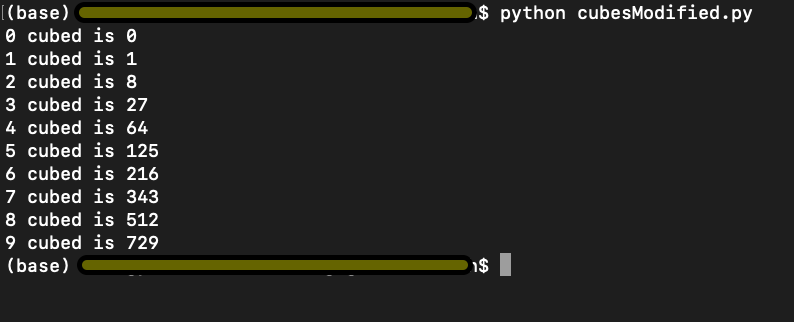
We run cubesModified.py and get the output as below and per our expectation.
Figure 12
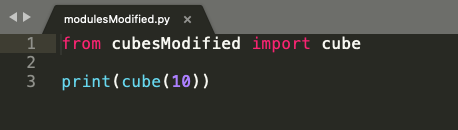
However, now when we run modulesModified.py where we import cube(num) function from cubesModified.py, it only executes the code from our modulesModified.py as shown in Figure 15, and the output is 1000 because the value stored in the __name__ variable in cubesModified and not __main__.
Figure 13
Figure 14
I hope this explanation helps you with a better understanding of what does if __name__ == ‘__main__’. Go ahead and play around with the code in the code editor and cement your understanding. Best of Luck!!
Built with security as the prime focus. Safe from SQL injection, CSRF attack, XSS attack and standard security measures in place.
Easy customization
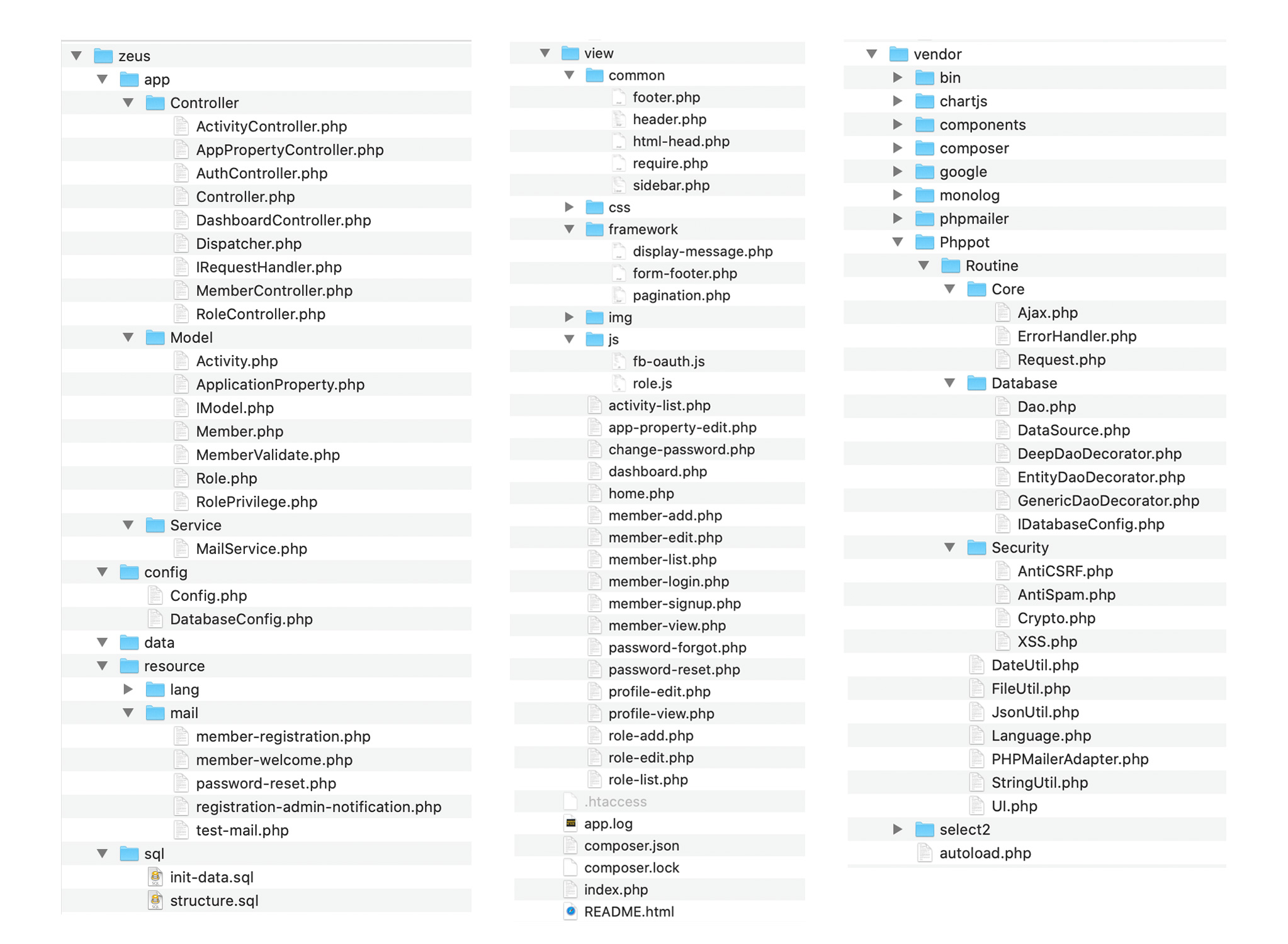
Code is sleek, modular, separated in layers for easy understanding and customization. PSR standard compliant source code with optimum comments. Easy to understand, enhance and maintain.
User management
Admin can create users via the control panel or allow the users to register and signup on the system. Facebook oAuth login can be enabled. Admin can choose any or all of these via control panel.
Access management
Role based access privilege control authorization. Admin can manage access for users at functionality level with just a click of a button.
Admin control
Admin has complete control over the application. Every aspect of the application behavior can be configured via the admin control panel. Right from tracking user activity to restricting permission, all levels can be done via the control panel.
Multi-language
By default the application comes with English and German languages. You can add a new language in just minutes.
Awesome Summer days await you with the IndieGala Scratchy Summer Sale. Get huge discounts on your favorite games + a Scratch Card with a secret Steam game in it! [www.indiegala.com] [www.indiegala.com] [www.indiegala.com]
The 191st GalaQuiz will be LIVE soon, win up to $50 in GalaCredit!
[www.indiegala.com] The GalaQuiz will take place in less than 15 minutes from this announcement Today's GalaQuiz[www.indiegala.com] hints are up. The theme will be Rhino.
Godot just got a new feature for the upcoming Godot 4.0 release, SDFGI, or Signed Distance Field Global Illumination. It is described accordingly on the Godot website:
SDFGI stands for Signed Distance Field Global Illumination. It means this technique makes heavy use of Signed Distance Fields (an Euclidean distance based representation of the signed distance function of a grid) to create this lighting.
While implementation is not final, and there will probably be many improvements to quality and performance, it seems to be good enough for general use now.
I would like to thank hugely Matias Goldberg for his enormous help on this, our patrons for their continued support, and Tim Sweeney and Epic Games for their confidence in helping us finance our research via Epic Megagrant. This new technique was developed entirely in the open and implemented under our MIT license, so anyone is welcome to use it in their own engines and games.
Now in terms of what SDFGI actually does:
SDGFI is something akin to a dynamic real-time lightmap (but it does not require unwrapping, nor does it use textures). It’s enabled and it automatically works by generating global illumination for static objects. It does not require raytracing, and it runs in most current (and some years old) dedicated GPUs, even medium-end budget CPUs from some years ago (SDFGI was developed and tested on a GeForce 1060, running at a stable 60 FPS).
Light changes are real-time, meaning any change in lighting conditions will result in an immediate update. Dynamic objects are supported only for receiving light from the environment, but they don’t contribute to lighting. Some degree of support is planned for this eventually, but not immediately.
In the video below, we look at traditional Global Illumination, then show an example of the new SDFGI, including a small tutorial on how to use it. Godot creator Juan Linietsky also has a video on his channel about SDFGI should you wish to learn more.
These are the Apple Stores that re-closed due to COVID-19 spikes
Due to a resurgence in COVID-19 infections across many U.S. states, Apple is closing many of its retail locations just weeks after they were reopened. Here’s which Apple Stores have re-closed.
Since mid-June, however, cases of COVID-19 have been on the rise across in more than 20 states. That prompted some local governments to reverse their original reopening plans and Apple to re-shutter some of the locations that it had reopened since the global health crisis.
Although many Apple Stores remain open, the situation is fluid and likely to change as time goes on.
As of June 30, 2020, here are the stores across the U.S. that will be closed until further notice.
Apple Stores re-closed in Florida
Altamonte in Altamonte Springs, Florida
Apple St. Johns Town Center in Jacksonville, Florida
Aventura in Aventura, Florida
Boca Raton in Boca Raton, Florida
Brandon in Brandon, Florida
Coconut Point in Estero, Florida
The Galleria in Fort Lauderdale, Florida
Lincoln Road in Miami Beach, Florida
Brickell city Centre in Miami, Florida
Dadeland in Miami, Florida
The Falls in Miami, Florida
Florida Mall in Orlando, Florida
Millenia in Orlando, Florida
The Gardens Mall in in Palm Beach Gardens, Florida
International Plaza in Tampa, Florida
University Town Center in Sarasota, Florida
Waterside Shops in Naples, Florida
Wellington Green in Wellington, Florida
Apple Stores re-closed in Texas
Barton Creek in Austin, Texas
Domain NORTHSIDE in Austin, Texas
Galleria Dallas in Dallas, Texas
Knox Street in Dallas, Texas
NorthPark Center in Dallas, Texas
Cielo Vista Mall in El Paso, Texas
Baybrook in Friendswood, Texas
First Colony Mall in Sugar Land, Texas
Highland Village in Houston, Texas
Houston Galleria in Houston, Texas
Memorial City in Houston, Texas
Willowbrook Mall in Houston, Texas
The Woodlands in Woodlands, Texas
University Park Village in Fort Worth, Texas
La Cantera in San Antonio, Texas
North Star in San Antonio, Texas
Southlake Town Square in Southlake, Texas
Apple Stores re-closed in Arizona
Arrowhead in Glendale, Arizona
Chandler Fashion Center in Chandler, Arizona
La Encantada in Tucson, Arizona
SanTan Village in Gilbert, Arizona
Scottsdale Fashion Square in Scottsdale, Arizona
Scottsdale Quarter in Scottsdale, Arizona
Apple Stores re-closed in North Carolina
Northlake Mall in Charlotte, North Carolina
SouthPark in Charlotte, North Carolina
Apple Stores re-closed in South Carolina
Haywood Mall in Greenville, South Carolina
Mississippi
Renaissance at Colony Park in Ridgeland, Mississippi















 in GalaCredit!


