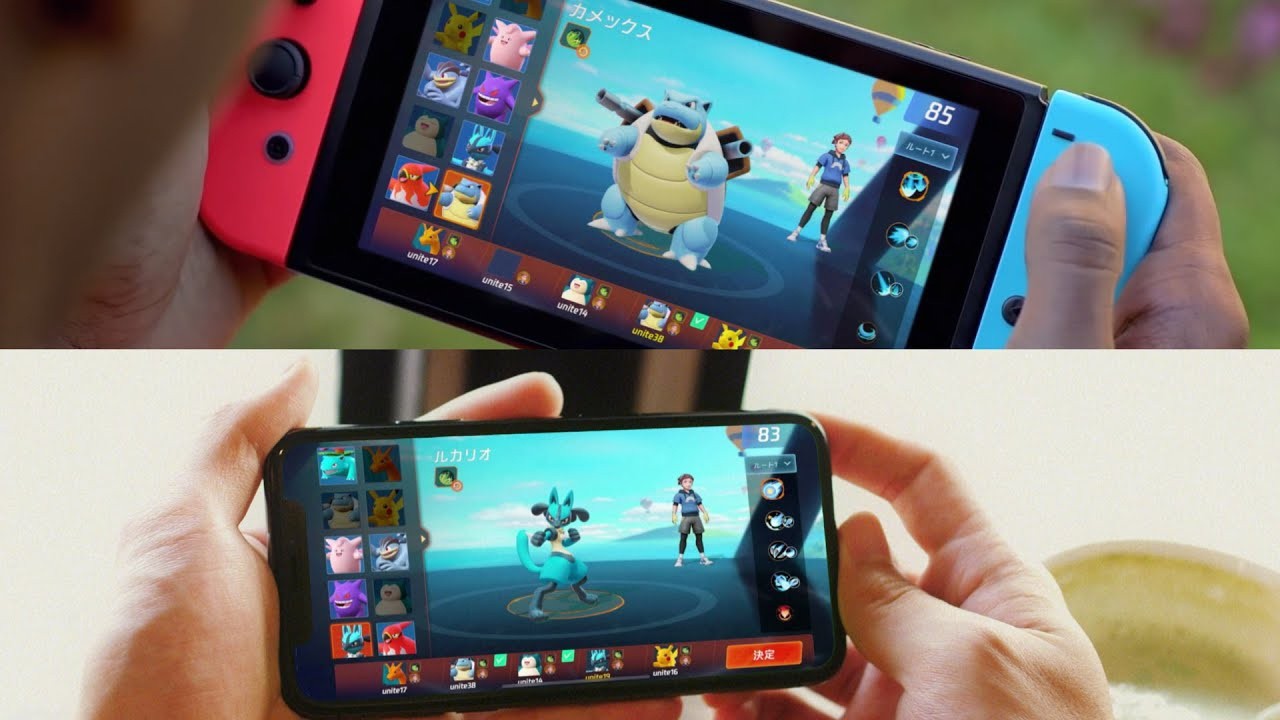
Random: Something’s Really Not Right With That Pokémon Unite Promo Image
Earlier today, The Pokémon Company unveiled Pokémon Unite, a brand new, upcoming online battle game for Switch and mobile devices. That’s all well and good, but what on Earth is going on with its main promotional image?
In our rush to learn everything we could about the game when it was first revealed, we must admit that we didn’t even notice anything was wrong. Taking a closer look, though, reveals that the Switch has been incorrectly mirrored, with a screenshot of the game being whacked onto a console that’s clearly been messed up in editing (thanks @Akfamilyhome).
We’d assume this isn’t intentional, but the image was shown during today’s Pokémon Presents livestream and even serves as the official trailer’s thumbnail. Did nobody at The Pokémon Company notice that the Switch’s Joy-Con should be on the opposite sides, or that the buttons are reversed? As you can see, it isn’t simply a case of the entire image being flipped because the in-game text is showing the correct way – somebody plastered this screenshot onto a backwards Switch photo.
Of course, it doesn’t really matter all that much – we dare say there won’t be many out there who can’t identify which console the game can be played on thanks to the error – but it’s still surprising to see.
Anyway, back to more important stuff – like getting far too excited about the new Pokémon Snap game!
CocosCreator, a free Cocos2d-x powered cross platform game engine, just released a version 2.4.0. If you are interested in learning more about Cocos Creator, check out our complete Cocos Creator tutorial series available here.
This update brings more new features, optimizes performance and improves stability. Efficiency is everything! This version contains many new features and updates, such as resource management system refactoring, asset bundles, optimized the performance of graphic rendering.
The key new feature being the new asset manager with the following features:
Supports loading and pre-loading of all resources, pre-loading can run silently in a lighter way, without affecting operation efficiency.
Supports Asset Bundles.
Supports a more secure automatic release mechanism, no need to consider its reference when releasing resources, to avoid mistaken release of resources.
Support download failure retry, download priority, download concurrent number and other settings, which can be adjusted according to various situations.
Support more convenient custom loading process to achieve special effects.
More details of the Cocos 2.4.0 release is available on the blog here. You can learn more about Cocos Creator and this release in the video below.
Haskell is a functional programming language. To create a program, the user applies and composes functions, in comparison to imperative languages, which use procedural statements.
Haskell features state-of-the-art programming paradigms that can be used for general purpose programs, research, and industrial applications. Most notably, it is purely functional using an advanced type system, which means that every computation, even the ones that produce side-effecting IO operations, are defined using pure functions in the mathematical sense.
Some of the main reasons for Haskell’s increasing popularity are ease of maintenance, extensive packages, multi-core performance, and language safety against some bugs, such as null pointers or deadlock. So let’s see how to get started with Haskell on Fedora.
Install Haskell in Fedora
Fedora provides an easy way to install the Glasgow Haskell Compiler (GHC) via the official repository:
$ sudo dnf install -y ghc

$ ghc --version

The Glorious Glasgow Haskell Compilation System, version 8.6.5
Now that GHC is installed, let’s write a simple program, compile it, and execute it.
First program in Haskell
Let’s write the traditional “Hello, World!” program in Haskell. First, create a main.hs file, and then type or copy the following.
main = putStrLn ("Hello, World!")
Running this program is quite simple.
$ runhaskell main.hs

Hello, World!
Building an executable of the program is as simple as running it.
$ ghc main.hs

[1 of 1] Compiling Main ( main.hs, main.o )

Linking main ...

$ ./main

Hello, World!
GHC provides a Read Eval Print Loop (REPL) command to interactively evaluate Haskell expressions.
$ ghci

Prelude> :load main.hs

[1 of 1] Compiling Main ( main.hs, interpreted )

Ok, one module loaded.

*Main> main

Hello, World!

*Main> :type putStrLn

putStrLn :: String -> IO ()

*Main> :info String

type String = [Char] -- Defined in ‘GHC.Base’

*Main> :help

...
The most common REPL commands are:
:load loads a file.
:reload reloads loaded files.
:type shows the type of an expression.
:info displays information about a name.
:browse lists the loaded functions.
Using Haskell packages
Haskell features a package system to share functions.
To show how to use packages, let’s write a new one.
First, create a MyPackage.hs file, and then, type or copy the following.
module MyPackage where greet name = putStrLn ("Hello, " ++ name ++ "!")
Next, modify the main.hs file as follow:
import MyPackage main = greet ("Fedora")
In the modified main.hs, instead of using the standard putStrLn function to print the “Hello, World!”
the application now uses the greet function from the newly created package:
$ runhaskell main.hs

Hello, Fedora!
GHC automatically looks for packages in the current working directory, and it
can also looks for packages installed globally on the system. To use a Fedora package in your Haskell project,
you need to install the development files. For example, let’s use the ansi-wl-pprint library to add color:
$ sudo dnf install -y ghc-ansi-wl-pprint-devel
Next, modify the MyPackage.hs file:
module MyPackage where import Text.PrettyPrint.ANSI.Leijen greet name = putDoc (green (text ("Hello, " ++ name ++ "!\n")))
Then you can build a small executable using dynamic links:
$ ghc -dynamic main.hs -o greet && strip greet

[1 of 2] Compiling MyPackage ( MyPackage.hs, MyPackage.o )

[2 of 2] Compiling Main ( main.hs, main.o )

Linking greet ...

$ du --si greet

17k greet

$ ./greet

Hello, Fedora!
This concludes how to get started with Haskell on Fedora. You can find the Haskell SIG (Special Interests Groups) on Freenode IRC in #fedora-haskell, or in the mailing list
Learning resources
Haskell may be daunting because it supports many advanced concepts such as GADTs or type-level programing.
However, the basics are quite accessible and they are more than enough to reap the majority of benefits and reliably deliver quality software.
To learn more about the language, here are some further resources:
Rise: Race The Future Update Adds 60fps, Improved Graphics And More
Rise: Race The Future, an arcade racer that launched on Switch last summer, will receive a brand new update that’ll improve your experience both on and off the track.
The update’s set to go live tomorrow on 25th June, and comes with all of the following welcome tweaks:
This new major update features: – New Render Engine with physically based rendering (PBR) and new post process – 60 FPS mode – Improved graphics – Advanced CPU optimisation – New shaders – Global Data Compression – Main Menu at 60 FPS – Improved Italian language
The changes mean that players can look forward to improved loading times, better real-time shadow distance, and more, and you’ll be able to choose between two different visual quality settings:
– The 60 FPS mode for the smoothest animation and more responsive gameplay – The 30 FPS mode for higher graphical fidelity
If you haven’t played this one yet and want to learn more about it, we’d urge you to check out our full review which was posted when the game launched last year. Here’s a taste:
Despite its arcade racer influences, Rise takes a little while to get into. Its floaty handling isn’t immediately accessible and you’ll be slipping all over the place for a while until it all eventually ‘clicks’. When it does, though, the result is a compelling and visually impressive racing game that may not come close to threatening the likes of Ridge Racer for pole position, but certainly offers some entertaining action.
Let us know if you’re a fan of the game by chucking a comment our way below.
Pokémon Unite, An Online Team Battle Game, Revealed For Switch And Mobile
The Pokémon Company has today revealed Pokémon Unite, a new team-based battle game heading to Nintendo Switch and mobile devices.
The news comes from today’s Pokémon Presents livestream hosted by company president, Tsunekazu Ishihara, who announced that the game is being made in conjunction with Tencent Games’ TiMi Studios.
It’ll be a free-to-start experience that includes crossplay across Switch and mobile, with players coming together to compete in real-time battles. A release date hasn’t yet been shared, with more information on the game’s release promised to arrive in the future.
Pokémon UNITE is the first strategic Pokémon team battle game. Players face off against each other in five-on-five team battles. During these battles, players will cooperate with teammates to catch wild Pokémon, level up and evolve their own Pokémon. They will need to defeat their opponents’ Pokémon while trying to earn more points than the opposing team within the allotted time. Pokémon UNITE will be free-to-start.
We imagine this wasn’t what you were expecting for today’s big reveal! Let us know your initial thoughts with a comment below.
Posted by: xSicKxBot - 06-25-2020, 08:13 AM - Forum: Lounge
- No Replies
Disneyland Employee Unions Planning Protest Over Reopening
California's Disneyland is currently on track to open its doors once more in July, though some of its employees are not ready to return. After sending a letter to California governor Gavin Newsom on June 17, the Coalition of Resort Labor Unions is now planning a protest on Disneyland property over concerns about employees and guests visiting the resort during the ongoing COVID-19 (coronavirus) pandemic.
The news comes from The Hollywood Reporter, which explains that unions representing Disneyland Resort employees are planning a protest on Saturday, June 27. From 10 AM to 12 PM PT, employees will circle the property in a caravan. According to the unions, this is being done "as an action to show our concerns regarding safety," According to THR. Invitations to the protest have been posted to Facebook.
Currently, Disney plans to open the Downtown Disney shopping district on July 9. Then, on July 17, Disneyland and Disney California Adventure will open, pending approval from state and local officials. Disney's Grand California Hotel and Spa, along with the Paradise Pier Hotel, will welcome guests on July 23.
Posted by: xSicKxBot - 06-25-2020, 06:46 AM - Forum: Python
- No Replies
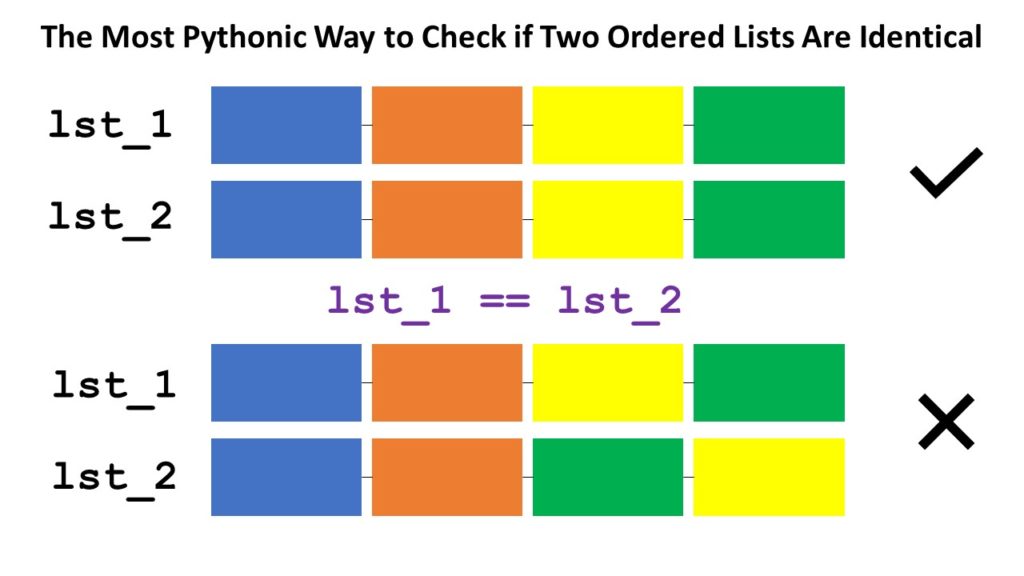
The Most Pythonic Way to Check if Two Ordered Lists Are Identical
The most Pythonic way to check if two ordered lists l1 and l2 are identical, is to use the l1 == l2 operator for element-wise comparison. If all elements are equal and the length of the lists are the same, the return value is True.
Problem: Given are two lists l1 and l2. You want to perform Boolean Comparison: Compare the lists element-wise and return True if your comparison metric returns True for all pairs of elements, and otherwise False.
Let’s discuss the most Pythonic ways of solving this problem. Here’s a quick interactive code overview:
Exercise: Glance over all methods and run the code. What questions come to mind? Do you understand each method?
Read on to learn about each method in detail!
Method 1: Simple Comparison
Not always is the simplest method the best one. But for this particular problem, it is! The equality operator == compares a list element-wise—many Python coders don’t know this!
The following method is what you’d see from a coder coming from another programming language or from a beginner who doesn’t know about the equality operator on lists (see Method 1).
# 2. Simple For Loop

def method_2(l1, l2): for i in range(min(len(l1), len(l2))): if l1[i] != l2[i]: return False return len(l1) == len(l2) l1 = [1, 2, 3, 4, 5]

l2 = [1, 2, 3]

print(method_2(l1, l2))

# False
In the code, you iterate over all indices from 0 to the last position of the smallest list as determined by the part min(len(l1), len(l2)). You then check if both elements at the same position are different. If they are different, i.e., l1[i] != l2[i], you can immediately return False because the lists are also different.
If you went through the whole loop without returning False, the list elements are similar. But one list may still be longer! So, by returning len(l1) == len(l2), you ensure to only return True if (1) all elements are equal and (2) the lists have the same length.
A lot of code to accomplish such a simple thing! Let’s see how a better coder would leverage the zip() function to reduce the complexity of the code.
Method 3: zip() + For Loop
The zip function takes a number of iterables and aggregates them to a single one by combining the i-th values of each iterable into a tuple for every i.
Let’s see how you can use the function to make the previous code more concise:
# 3. Zip + For Loop

def method_3(l1, l2): for x, y in zip(l1, l2): if x != y: return False return len(l1) == len(l2) l1 = [1, 2, 3, 4, 5]

l2 = [1, 2, 3]

print(method_3(l1, l2))

# False
Instead of iterating over indices, you now iterate over pairs of elements (the ones zipped together). If the lists have different sizes, the remaining elements from the longer list will be skipped. This way, element-wise comparison becomes simpler and no elaborate indexing schemes are required. Avoiding indices by means of the zip() function is a more Pythonic way for sure!
You first create an iterable of Boolean values using the generator expression x == y for x, y in zip(l1, l2).
Then, you sum up over the Boolean values (another trick of pro coders) to find the number of elements that are the same and store it in variable num_equal.
Finally, you compare this with the length of both lists. If all three values are the same, both lists have the same elements and their length is the same, too. They are equal!
# 4. Sum + Zip + Len

def method_4(l1, l2): num_equal = sum(x == y for x, y in zip(l1, l2)) return num_equal == len(l1) == len(l2) l1 = [1, 2, 3, 4, 5]

l2 = [1, 2, 3]

print(method_4(l1, l2))

# False print(method_4([1, 2], [1, 2]))

# True
From the methods except the first one using the == operator, this is the most Pythonic way due to the use of efficient Python helper functions like zip(), len(), and sum() and generator expressions to make the code more concise and more readable.
You could also write this in a single line of code!
sum(x == y for x, y in zip(l1, l2)) == len(l1) == len(l2)
# 5. map() + reduce() + len()

from functools import reduce

def method_5(l1, l2): equal = map(lambda x, y: x == y, l1, l2) result = reduce(lambda x, y: x and y, equal) return result and len(l1) == len(l2) l1 = [1, 2, 3, 4, 5]

l2 = [1, 2, 3]

print(method_5(l1, l2))

# False print(method_5([1, 2, 3], [1, 2, 3]))

# True
The map() function combines all pairs of elements to Boolean values (are the two elements equal?). The reduce() function combines all Boolean values performing an and operation. Sure, you can also use the more concise variant using the all() function:
Method 6: map() + all()
This is the same as the previous method—but using the all() function instead of reduce() to combine all Boolean values in a global and operation.
# 6. map() + all()

def method_6(l1, l2): result = all(map(lambda x, y: x == y, l1, l2)) return result and len(l1) == len(l2) l1 = [1, 2, 3, 4, 5]

l2 = [1, 2, 3]

print(method_5(l1, l2))

# False print(method_5([1, 2, 3], [1, 2, 3]))

# True
Thanks for reading this article to the end! I hope you learned something new today. If you want to learn something new every day, join my free Python email series for continuous improvement in Python and computer science.
Where to Go From Here?
Enough theory, let’s get some practice!
To become successful in coding, you need to get out there and solve real problems for real people. That’s how you can become a six-figure earner easily. And that’s how you polish the skills you really need in practice. After all, what’s the use of learning theory that nobody ever needs?
Practice projects is how you sharpen your saw in coding!
Do you want to become a code master by focusing on practical code projects that actually earn you money and solve problems for people?
Then become a Python freelance developer! It’s the best way of approaching the task of improving your Python skills—even if you are a complete beginner.
Summer Girls Adult Bundle, Frontier Summer, Black Tower, Flazm and more
Summer Girls Adult Bundle | 6 Games (18+)
[www.indiegala.com] This summer, temperatures are skyrocketing with the release of the newest and naughtiest adult bundle to date. One tight bundle containing SIX daring games for a hot price is an opportunity that shouldn't be missed.
Scratchy Sale Day 2: Frontier Summer Flash Weekend
[www.indiegala.com] Awesome Summer days await you with the IndieGala Scratchy Summer Sale. Get huge discounts on your favorite games + a Scratch Card with a secret Steam game in it!
Apple has finally injected the Mac with new life as part of a radical overhaul and feature set infusion set to arrive with macOS Big Sur. We took the first beta for a spin to see how it all plays out.
A refreshed design
[embedded content]
It is immediately noticeable, right from the initial boot, that macOS Big Sur has a wholly refreshed design. It’s clean, bright, and consistent, and jibes with similar designs tweaks seen on iOS and iPadOS.
You can see it in the new dock that is full of rich new icons. Some icons look a bit off — such as Quicktime that just stuck a Quicktime “Q” on a blue background — but many of the icons look great.
The menu bar is translucent and blends into the background. This looks great though the translucency may cause legibility issues for those with impaired vision. The menu bar to the right with all of your status icons is enhanced as well.
Menu bar items like volume, AirPlay, Wi-Fi, have all gotten a new look that feels much more in line with what was offered by iPhones and iPads. Much has been tucked into a new feature for Mac — Control Center. Control Center houses Wi-Fi, Bluetooth, AirPlay, and many other common utilities. This helps remove clutter from the menu bar itself, but if you do want to keep them in your menu bar, they can just be dragged right to where you’d like.
Many apps have new looks as well. They come with full-height sidebars and new icons from SF Symbols 2 which was ported from iOS and again, makes everything more consistent.
Safari
Safari has received a massive overhaul as well and frankly deserves a deep dive on its own. But hitting the high points, Safari is now faster and more power efficient than ever.
It has a clean interface with a new customizable start page that can be tailored to your liking. Tabs are more user-friendly and accessible with better icons and previews whenever they are hovered over.
Safari has a new feature called Privacy Report which, when clicked on when visiting a website, will let you know how many trackers were encountered and if they were stopped using Safari’s cross-site tracking.
Safari also has password monitoring, built in translation for web pages, and more.
Other app improvements
Maps was another app overhauled this year. It is built on Catalyst and is much more fluid and natural than the previous design. We are only in the first beta of macOS Big Sur, but it is a big improvement over what we had before.
Maps not only looks better but includes cycle routing, EV vehicle routing with charging locations, curated guides, Look Around, and indoor maps for airports and malls.
Messages is nearly on par with its iPhone and iPad counterparts in Big Sur, too. Up to nine conversations can be pinned on the left side bar making them much more easy keep track of. Search is also robust and works much better than it did in previous version of macOS. These changes are very welcome.
Group conversations can be named, have an image assigned, feature mentions for different participants, and offer inline replies for more manageable reading.
The app icon is here on the Mac as well. When clicked, it allows users to now insert Memoji stickers, search for gifs, access photos with a new image chooser, and send messages with various effects.
Messages has long lagged behind the iPhone and iPad with a poor interface, non-responsive search, and none of the new features that Apple has added to its mobile variant over the years. It finally seems as though Mac is getting some love with this massive Big Sur update.
We saw some nice changes in Photos such as a more fluid interface, an improved retouch tool powered by machine learning, new editing options for photos, portrait photos, and videos, and more relevant memories with additional soundtracks.
Music and Podcasts have new layouts and For You recommendations, like many other system apps.
The Home app got a major update with a new sidebar, status icons along the top, and countless changes as part of HomeKit Secure Video. Apple is opening Catalyst to HomeKit apps this year as well, so we should now see many third-party Home apps coming to the Mac.
A whole new Mac
Apple is putting a lot of work into the Mac. Not just reworking the user interface, but doubling down on Catalyst for easier ports of existing iPad apps. Macs will also be running on Apple silicon with future hardware, allowing iPad and iPhone apps to run natively.
The Mac feels reinvigorated and fresh for the first time in years, and users will instantly recognize the difference with a new look, feel, improved performance, and new features.
Stay tuned to AppleInsider for additional coverage of Apple’s new operating systems.
Posted by: xSicKxBot - 06-25-2020, 12:50 AM - Forum: Windows
- No Replies
How to put AI into action and empower everyone in your organization
Exploring what’s possible
Right now, you may be examining your business strategies and revising plans for the near and distant future. And as we gradually overcome this crisis, there will undoubtedly be a new normal.
This new normal may require you to examine your business model and to redefine who you are as a company, how you approach problems and how you make decisions. It is an opportunity to think big and be bold – and AI can help. Here are three key considerations as you consider whether and how to become an AI-powered organization:
Scaling AI. To be successful, AI must be woven into the very fabric of your entire organization. AI can have the most impact and make the biggest difference when it is part of your culture and strategy, and when your company’s technological capabilities and desired business outcomes are considered side by side.
Driving AI culture and strategy to move beyond pilot and proof of concept requires the right approach from business leaders. That’s why, more than a year ago, we launched AI Business School, a free online master class series designed to set you up for success. More than a million people have accessed the resources there, and I’m happy to share today that we have added two new modules:
My team and I have had many detailed conversations with AI experts and executives across the world that informed all of the modules, and we will continue to add to the content as we learn more from them about what businesses need for their AI journeys.
To bring AI culture to life, companies are bringing technology and business together into a combined lifecycle driven by business outcomes. This model, which is familiar within software development as DevOps, is making its way into AI development with its counterpart, MLOps. MLOps, known to many as machine learning and operations, can improve business results and accelerate time to market by centrally managing models, environments, code and datasets so they can be shared among data scientists, ML engineers, software developers and other IT teams through the entire ML lifecycle.
In Vancouver, BC, transit agency TransLink deployed 18,000 AI models to better predict bus departure times, accounting for factors including traffic, weather and other disruptions. The agency used MLOps with Azure Machine Learning to manage and deliver the models at such a massive scale that they were able to improve their prediction accuracy by 74% and reduce customer wait times by 50%.
AI for everyone. To fully benefit from AI, each of your employees must feel empowered and included. A recent survey of 10,000 employers and employees found that 91% of employees want new skills that will help them succeed alongside AI. Employees of companies that have integrated AI companywide report that they find more meaning in their work and want to use AI more.
Many of your employees may already be using AI tools in their daily work. AI is incorporated into applications in Microsoft 365 to encourage teamwork, facilitate productivity and improve decision making. And your employees in sales, marketing and customer service may be using solutions in Dynamics 365 AI to improve performance across those departments. In Power Platform, AI Builder gives everyone in your organization the ability to add AI capabilities to the apps they create and use – without any technical experience.
Everyone in your organization can benefit from AI tools, regardless of their technical expertise.
Your organization’s data scientists and developers can use Azure AI services to create custom AI models and applications to solve the unique challenges you face.
One scenario I’m particularly passionate about is the ability for AI to empower subject matter experts. AI for Reasoning enables experts and researchers to choose which AI model to employ to analyze information and easily share it with peers.
Swedish whisky maker Mackmyra recently won a silver cube product design award for creating the world’s first machine-generated whisky. The company’s master blenders fed a machine learning model existing recipes, sales data and customer preferences, and the machine made quick work of generating high-quality recipes that would prove popular.
Swiss pharmaceutical company Novartis used AI to redefine its business functions across the organization, empowering every individual to apply AI models to augment their expertise and creativity without needing to learn data science. AI brought together mass amounts of critical information across data sources and streamlined collaboration.
Now, 50,000-plus employees can quickly make sense of the vast amount of data they deal with, deriving insights that will help them transform how medicines are discovered, manufactured and commercialized.
Responsible AI. As you put AI into action, particularly in these times of change, it’s imperative to consider the implications of technology. AI must be integrated in a way that aligns with your company’s values, goals and priorities. Companies that incorporate AI successfully implement practices from the beginning to guard against potential misuse of AI, such as biased or unfair results.
At Microsoft, we’ve been on our own AI journey for some time, and we are committed to sharing key learnings and are doing so both through the Responsible AI module within our AI Business School as well as the Responsible AI Resource Center, which is perfect for technical teams developing and deploying AI.
How can we help?
We know you’ve got a tremendous amount on your plate right now. Considering how you adjust to the changes we’re all experiencing, while continuing to serve your customers and support your employees, is an extremely tall order. As difficult as the current challenges are, we believe the implementation of short-term solutions and a focus on strategic, long-term planning go hand in hand as you transform your company into an AI-powered organization. Now is a perfect time to think of the possibilities. Good ideas coupled with perseverance will go a long way toward helping you respond to today’s challenges and imagine a better tomorrow. We’re excited to help you as you make progress on your AI journey. Visit AI Business School to help you get started putting AI into action. I promise, you’ll be glad you did.