Create an account


Welcome, Guest
You have to register before you can post on our site.

Username
  

Password


Search Forums

(Advanced Search)

Forum Statistics
» Members: 20,233
» Latest member: conrad82
» Forum threads: 21,724
» Forum posts: 22,622

Full Statistics

Online Users
There are currently 878 online users.
» 0 Member(s) | 873 Guest(s)
Applebot, Baidu, Bing, Google, Yandex

 
  News - Escape From Tarkov Patch 12.6 Wipes Character Data
Posted by: xSicKxBot - 05-30-2020, 02:34 PM - Forum: Lounge - No Replies

Escape From Tarkov Patch 12.6 Wipes Character Data

Escape From Tarkov went down for a few hours on Thursday to deploy patch 12.6 (0.12.6.7456), a major update to the early access shooter that included a global wipe of character data among several other changes, additions, and bug fixes. The massive reset erased all player progress, including level, trader rep, and any items stored in your stash, keeping only weapon presets and examined items saved in the handbook.

While the routine wipe was one of the major highlights of the latest Tarkov update, it's not the only thing that patch 12.6 brings with it. A captcha has been added to the flea market as an extra measure against bots, all stashes (no matter which Escape From Tarkov edition you have) have been increased by an additional 20 cells, and players now have the ability to lean while prone. Five new parts for the AR-15/M4 are also available to scavenge, but cannot be purchased from traders. The update also modifies a few quests and brings a number of optimizations, AI improvements, and bug fixes.

Leading up to the most recent wipe, Battlestate Games also temporarily reduced shop prices and unlocked all trader levels, allowing every player to access high-level weapons and gear before the wipe took place, in a kind of "post-wipe event." Patch 12.6 marks the first Escape From Tarkov wipe since October 2019.

Continue Reading at GameSpot

https://www.gamespot.com/articles/escape...01-10abi2f

Print this item

  News - Battlefield 5's Next Update Will Have Its Final New Content
Posted by: xSicKxBot - 05-30-2020, 08:31 AM - Forum: Lounge - No Replies

Battlefield 5's Next Update Will Have Its Final New Content

In April, Battlefield V developers DICE promised that the game would receive one last big update, which will arrive in June as Update 7.0. The latest "This Week in Battlefield V" update on Reddit confirms that the June content update is coming, and will be the last big one for the game--but a comment made by one developer also clears up some potential misconceptions around the game's path forward.

A comment from Braddock512--the game's community manager--clarifies that while there will not be new content coming to the game, this is not the "final" update. "It's the last content update--but we plan on dropping fixes and there will be the Community Games Update to add more tools to the feature," he writes. "There will be new/returning playlists when Update 7.0/June Update drops."

While major updates are ending, and players should perhaps not expect anything too major after Update 7.0, it sounds like the game won't become static and unchanging after the update.

Continue Reading at GameSpot

https://www.gamespot.com/articles/battle...01-10abi2f

Print this item

  [Tut] How to Add Elements to a List in Python?
Posted by: xSicKxBot - 05-30-2020, 04:22 AM - Forum: Python - No Replies

How to Add Elements to a List in Python?

In Python, there are always multiple ways to accomplish the same thing—but with subtle differences in the side effects. A great coder will always choose the most effective way for the problem at hand.

This tutorial shows you six different ways to add elements to a list in Python. In a nutshell, the different ways to add one or more elements to a list are:

  1. append(): add a single element to an existing list.
  2. extend(): add multiple elements to an existing list.
  3. insert(): add an element at an arbitrary position in an existing list.
  4. Slice assignment: replace a slice of an existing list.
  5. List concatenation with +: add one or more elements to a new list.
  6. Asterisk operator *: unpack multiple iterables into a new list.

Try It Yourself: Before we dive into each of those methods, let’s try them yourself in our interactive Python shell!

Exercise: Use each method to add yet another integer element 42 to each list. Which method is the best one to add multiple elements?

Next, you’ll learn about each method in a video tutorial and short example code snippet. I’ve written in-depth articles for each method so feel free to follow the references given in each method.

Method 1: append()


The list.append(x) method—as the name suggests—appends element x to the end of the list. You can call this method on each list object in Python. Here’s the syntax:

list.append(element)


Argument Description
element The object you want to append to the list.

# Method 1: append()
friends = ['Alice', 'Bob', 'Ann']
friends.append('Liz') print(friends)
# ['Alice', 'Bob', 'Ann', 'Liz']

Read More: Python List append() Method

Method 2: extend()


The list.extend(iter) method adds all elements in the argument iterable iter to an existing list. You can call this method on each list object in Python. Here’s the syntax:

list.extend(iterable)


Argument Description
iterable All the elements of the iterable will be added to the end of the list—in the order of their occurrence.

# Method 2: extend()
friends = ['Alice', 'Bob', 'Ann']
friends.extend(['Liz', 'Carl']) print(friends)
# ['Alice', 'Bob', 'Ann', 'Liz', 'Carl']

Read More: Python List extend() Method

Method 3: insert()


The list.insert(i, element) method adds an element element to an existing list at position i. All elements j>i will be moved by one index position to the right. You can call this method on each list object in Python. Here’s the syntax:

list.insert(index, element)


Argument Description
index Integer value representing the position before you want to insert an element
element Object you want to insert into the list.

# Method 3: insert()
friends = ['Alice', 'Bob', 'Ann']
friends.insert(3, 'Liz') print(friends)
# ['Alice', 'Bob', 'Ann', 'Liz']

Read More: Python List insert() Method

Method 4: Slice Assignment


Slice assignment is a little-used, beautiful Python feature to replace a slice with another sequence. Simply select the slice you want to replace on the left and the values to replace it on the right side of the equation. For example, the slice assignment list[2:4] = [42, 42] replaces the list elements with index 2 and 3 with the value 42.

# Method 4: slice assignment
friends = ['Alice', 'Bob', 'Ann']
friends[3:3] = ['Liz'] print(friends)
# ['Alice', 'Bob', 'Ann', 'Liz']

Read More: Python Slice Assignment

Method 5: List Concatenation with +


If you use the + operator on two integers, you’ll get the sum of those integers. But if you use the + operator on two lists, you’ll get a new list that is the concatenation of those lists.

# Method 5: list concatenation
friends = ['Alice', 'Bob', 'Ann']
friends = friends + ['Liz'] print(friends)
# ['Alice', 'Bob', 'Ann', 'Liz']

Read More: Python List Concatenation

Method 6: List Concatenation with Unpacking *


There are many applications of the asterisk operator. But one nice trick is to use it as an unpacking operator that “unpacks” the contents of a container data structure such as a list or a dictionary into another one.

# Method 6: unpacking
friends = ['Alice', 'Bob', 'Ann']
friends = [*friends, 'Liz'] print(friends)
# ['Alice', 'Bob', 'Ann', 'Liz']

A great advantage is that you can quickly unpack all elements of two or more list into a new list.

Read More: Python Unpacking with Asterisk

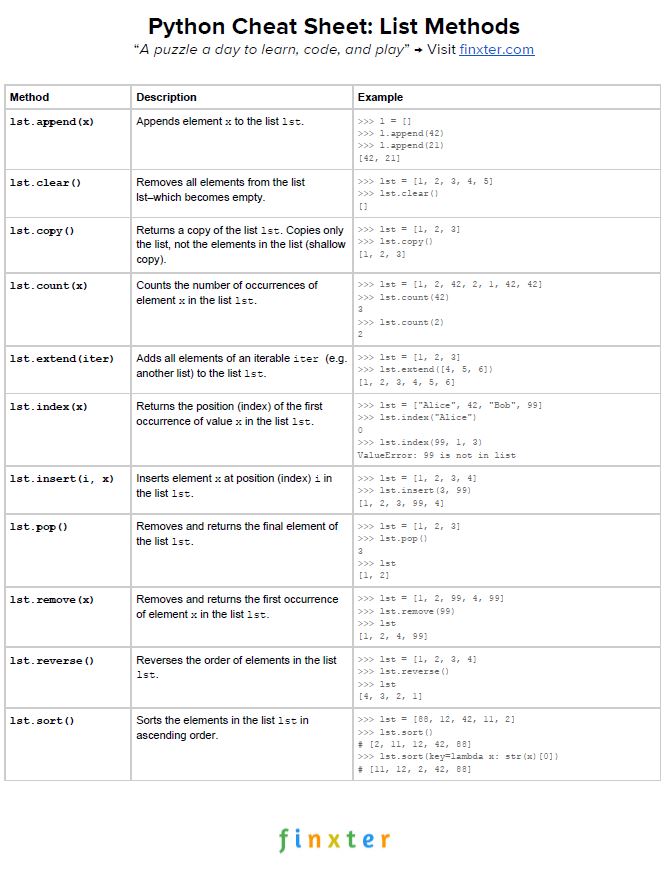
Python List Methods Cheat Sheet


Here’s your free PDF cheat sheet showing you all Python list methods on one simple page. Click the image to download the high-resolution PDF file, print it, and post it to your office wall:


Discussion


Let’s summarize the strengths and weaknesses of the different methods:

  1. Use the append() method to add a single element to an existing list without creating a new list.
  2. Use the extend() method to add multiple elements to an existing list without creating a new list.
  3. Use the insert() method to add an element at an arbitrary position in the list—without creating a new list.
  4. Use slice assignment to replace a slice of an existing list—without creating a new list.
  5. Use list concatenation with + to add one or more elements to a list—if you want to create a new list.
  6. Use the asterisk operator * to unpack multiple iterables into a new list—if you want to create a new list.

Where to Go From Here?


Enough theory, let’s get some practice!

To become successful in coding, you need to get out there and solve real problems for real people. That’s how you can become a six-figure earner easily. And that’s how you polish the skills you really need in practice. After all, what’s the use of learning theory that nobody ever needs?

Practice projects is how you sharpen your saw in coding!

Do you want to become a code master by focusing on practical code projects that actually earn you money and solve problems for people?

Then become a Python freelance developer! It’s the best way of approaching the task of improving your Python skills—even if you are a complete beginner.

Join my free webinar “How to Build Your High-Income Skill Python” and watch how I grew my coding business online and how you can, too—from the comfort of your own home.

Join the free webinar now!


https://www.sickgaming.net/blog/2020/05/...in-python/

Print this item

  (Indie Deal) Bundles & Sales Round-up
Posted by: xSicKxBot - 05-30-2020, 04:22 AM - Forum: Deals or Specials - No Replies

Bundles & Sales Round-up

[www.indiegala.com]

Stay Safe Sale Day 21: Store Sales Round-up
The Stay Safe Sale has rounded-up the deals for this weekend. Get a BONUS Steam copy of Men of War: Assault Squad when spending a minimum of $8/€7/£6 in the IndieGala Store per basket (while stocks last).
Stay Inside, Stay Safe and Enjoy Good Games.
Check out IndieGala on Twitter, YouTube & Facebook[www.facebook.com]


https://steamcommunity.com/groups/indieg...6481484350

Print this item

  Heroic Labs Nakama Sponsor Defold
Posted by: xSicKxBot - 05-30-2020, 02:16 AM - Forum: Game Development - No Replies

Heroic Labs Nakama Sponsor Defold

Today we are talking about Heroic Lab’s Nakama.  Nakama is an open source (as well as hosted and managed) solution for the networking side of the game development side of game development.  In October of 2019, Heroic Labs became a premium sponsor of the Godot Game Engine. This week Heroic Labs announced they are now sponsoring the recently open sourced* Defold Game engine.

Details from the Heroic Labs blog:

Today we are pleased to announce that Heroic Labs has joined the Defold Foundation as their first corporate partner in order to further support and expand open-source tools within the game development community.

The Defold Foundation has been formed to maintain and grow the newly open-sourced Defold game engine which was originally created by one of the world’s leading interactive games companies, King Digital Entertainment, to power their incredibly popular titles.

This partnership with the Defold Foundation has enabled us to join forces to create an open-source client library that integrates Nakama and Defold tightly together to enable developers to take advantage of the full range of client APIs found within Nakama including authentication, matchmaking, leaderboards, multiplayer, realtime chat, and much more.

At Heroic Labs we are firm believers in open-source tools and software being the future of game development; with the steady increase in the popularity of gaming, specifically online and social play, developers need access to tools that enable them to move quickly and provide the most engaging experiences to their players regardless of platform without service lock-in.

You can learn more about the Nakama server here and browse the available open source solutions on GitHub.  Learn more about Heroic Labs and Nakama in the video below.  If you want to learn more about Nakama, unfortunately we do not have a tutorial on the subject, but Nathan at GDQuest does, check it out.

*source available, not technically open source as per OSI definitions.

GameDev News


https://www.sickgaming.net/blog/2020/05/...or-defold/

Print this item

  Microsoft - What’s new in Microsoft Teams for May 2020
Posted by: xSicKxBot - 05-30-2020, 02:15 AM - Forum: Windows - No Replies

What’s new in Microsoft Teams for May 2020

This month, we have new meetings, calling, devices, chat, collaboration, platform, and industry features we will not want you to miss. Read on to stay up-to-date. If you are interested in our recent Microsoft Build news, check out our Teams Build blog!

What’s New: Meetings, Calling, and Devices
Improved meeting join launcher experience
When launching a Teams meeting from a link, you will be provided with clearer options for how to join the meeting. You will be prompted with an option to join on the web, download the Teams client, or join with the native Teams client. We are gradually rolling this out over the coming weeks, and in the interim, you may continue to see this and the former experience.

Picture1.png

Easily access meeting options during a Teams meeting
We are making it easier for meeting organizers to quickly and easily change their presenter and lobby settings once a meeting has started by providing a link directly in the participants pane. This new functionality is available for both scheduled and “Meet Now” meetings.

Picture2.png

Download a participant report in a Teams meeting
Meeting organizers, especially teachers, often need to know who joined their Teams meetings. You can download a participant report, found in the roster view that includes join and leave times for participants. Available in the roster view, meeting organizers can download the report that includes those users who joined while the organizer was present. This feature is only available within the meeting while the meeting is active. Available on desktop (Windows and Mac) and the web.

Picture3.png

Set tenant-wide default selection for “Who Can Present” in meetings
Tenant admins can now update their Teams meeting policies to allow for a new default selection when choosing who can present in new Teams meetings (everyone, people in my organization, specific people, or only me). Today, the default selection is “everyone” unless the meeting organizer selects otherwise through the meetings option configuration. To start, organizations can set this policy via a PowerShell cmdlet, and soon after we will have this policy configurable in the Admin portal.

Set background effects policy at a user-level
Tenant admins can soon assign a user-level policy to control how users engage with background effects in Teams meetings. Options include: offer no filters; background blur only; use background blur and default provided images; and all, which includes the ability for users to upload their own custom images.

Better policy controls over screen sharing from chats
Screen share from chat allows you to immediately start sharing your screen in a 1-1 chat or group chat. This entry point was previously governed by the AllowPrivateCalling policy. If this policy is disabled, users are not able to screen share from chat. The option to start a screen share from chat will now be governed by the ScreenSharingMode policy. Further, the ability to “add audio” to a screen share from chat session (if you want to talk to someone while screen sharing) will be governed by a user’s AllowPrivateCalling setting. This ensures that users who have AllowPrivateCalling disabled cannot start audio calls via screen share from chat.
Picture5.png

Teams and Skype Interoperability
Teams and Skype interoperability will enable collaboration with more partners, customers, and suppliers who rely upon Skype for Consumer (SFC) as their communication app. On either platform, customers will be able to discover users via email search, then chat or call using audio/video. Clients supported include Desktop, Web and Mobile (iOS/Android). Admins will be able to control user access to this feature from The Teams Admin Center.

Reverse Number Lookup (RNL) Enhancements
In the past, the caller name sometimes did not show when they called you. Back in October 2019 we released the feature to make it easier to identify the caller. With the latest enhancements to RNL, the Telco display name will now also show up in your Activity Feed, Call History, and Voicemail as well.

Microsoft Teams Rooms, app version 4.4.41.0 now available
While physical meeting rooms may not be a focal point for many right now, there are still organizations and industries whose essential workers continue to rely on these spaces during this time. We also recognize the vital role Microsoft Teams Rooms will play when organizations return to work. The latest update, app version 4.4.41.0, is now available on the Windows store and is coming to every Teams room over the next few weeks. New features include: Modern authentication support, New application splash screen, Ability to project content to a single display when using a HDMI cable in a dual display configuration, Support for dynamic emergency calling, and more. To learn more about these new features, read the Microsoft Teams Rooms May Update blog.

Poly announces new solution for Microsoft Teams Rooms
Poly Room Solution for Microsoft Teams not only delivers the premium Poly audio and video for Teams, but also provides a clutter-free experience from start to finish, with simple installation and maintenance in any size room. To learn more about the Poly solutions for Microsoft Teams Rooms, coming later this year, click here.

Picture6.png

Jabra PanaCast now certified for Microsoft Teams
The Jabra PanaCast is a plug-and-play device, certified for Microsoft Teams. The Jabra PanaCast is designed to improve meetings by using three 13-megapixel cameras and real-time video stitching to give a full 180° view. Enjoy a natural, inclusive human perspective, with no blind spots ensuring quick, easy collaboration with hassle-free video and audio. To learn more about the Jabra PanaCast, click here.

Picture7.1.png

Yealink, EPOS, and Jabra announce new Teams peripherals
With increased demand for remote work and virtual communication, having the right set of personal devices provides painless interaction and increases time for meaningful connection. With Teams certified devices, you can join professional meetings anywhere with high audio fidelity that removes distracting background noise and ensures that your voice is heard clearly.

Here are some new releases this month:

  • EPOS ADAPT 360, 460T, 560, and 660 headsets range from in ear and over the ear options that optimize concentration and productivity any environment with Active Noise Cancellation, Bluetooth connectivity, and a dedicated Teams button. Availability varies by product: ADAPT 360 (July 3), ADAPT 460T (June 29), ADAPT 560 (June 26), ADAPT 660 (June 22). You can learn more here.

Picture8.1.png

  • Yealink UH36 Dual/Mono is a simple and lightweight USB headset with a dedicated Teams button for long conference calls. Availability starting on May 15. You can learn more here.

Picture9.1.png

  • Jabra Speak 650 is a speaker phone with a dedicated Teams button helps users hold natural conversations with USB and Bluetooth. Availability starting on June 1. You can learn more here.

Picture10.png

Limited time partner offers available for Teams Devices
Crestron
Crestron is offering a program for customers looking to upgrade existing systems to those certified for Microsoft Teams. Special offers are available for a Crestron Smart Soundbar, Flex C-Series Integrator Kit and Mercury system. Offers end June 30, 2020 and are available in the U.S., Canada, Australia, New Zealand, Asia and EMEA. Purchase orders must be placed through an authorized Crestron dealer.

Poly
For customers using Trio Visual+ in Skype for Business who would like to move to a Microsoft Teams environment, Poly is offering a Trio Visual+ to Poly Studio X30 Trade In program. With this promotion, Poly Microsoft customers can replace Trio with Poly Studio X30 and TC8 controller, or pair Trio with the Poly Studio X30, for Teams video meetings in huddle and small room spaces. Between April 15, 2020 and December 31, 2020, customers can trade in Trio Visual+ and save up to $200 when they upgrade to a Poly Studio X30 or up to $300 when they upgrade to a Poly Studio X30 with TC8 controller. This program is globally available.

Yealink
For a limited time, Yealink is offering a devices bundle trial program for remote workers, giving customers 50% off MSRP on any two WFH devices (limit one per device model). This offer is valid through July 31, 2020 and is globally available. Additionally, Yealink is offering a coupon code for the VC210 Teams edition collaboration bar on the Microsoft Teams devices showcase. Use the coupon code: Yealink4Teams at checkout to access the discounted price. This offer is available in the US and Canada only and is valid through July 31, 2020.

What’s New: Chat & Collaboration
Templates in Teams
Create a new team even faster with a variety of templates for common team types. Options will include event management, crisis response, hospital ward and bank branch, just to name a few. Templates comes with pre-defined channels, apps, and guidance on how to utilize and customize it. IT professionals can standardize team structures by creating new custom templates for their organization. Templates in Teams will roll out in the next few months and appear automatically. Check out the deep dive blog to learn more.

Microsoft Lists in Teams
Microsoft Lists helps you track information and organize work. Lists are simple, smart, and flexible, so you can track issues, assets, routines, contacts, inventory and more using customizable views and smart rules and alerts to keep everyone in sync. To learn more, visit the new Microsoft Lists resource center and get first looks at the Microsoft Lists product demo video.

Create a new list directly inside Teams or bring in one that already exists in Microsoft 365.Create a new list directly inside Teams or bring in one that already exists in Microsoft 365.

You can create, share, and track list all from within Microsoft Teams.You can create, share, and track list all from within Microsoft Teams.

Bring more people together in group chats and teams
Whether you need to collaborate with others to deliver a big project or work with a large group of people to complete an ad-hoc task, Microsoft Teams now allows you to bring more people together. Group chats will now be able to accommodate up to 250 users and teams can now have up to 10,000 members.

Pop out chats into separate windows
Users can now streamline their workflow and pop out chats into separate windows. This allows people to move more easily between ongoing conversations. This is now generally available.

What’s New: Onboarding your organization to Teams
New Skype for Business to Teams Upgrade Advisor
Our newest Advisor for Teams, the Skype for Business Upgrade plan, has launched within the Microsoft Teams Admin Center. Whether you’re just getting started with Microsoft Teams, already using Teams alongside Skype for Business, or ready to upgrade, this provides everything you need for a successful transition. Designed for Skype for Business customers with online or on-premises environments, the Skype for Business Upgrade plan shares a proven success framework for implementing change and step-by-step process to enable your organization’s technical and end-user readiness. We’ll connect you with valuable upgrade resources including planning guidance and best practices, free workbooks, schedules and communication templates and live 1:many planning workshops. Learn more here about using Advisor for Teams to help you roll out Teams and upgrade from Skype for Business.

picture201.png

What’s New: Developer, Platform, and App management
Visual Studio and Visual Studio Code Extension for Teams
Developers can use the new Visual Studio and Visual Studio Code Teams extension to quickly build project scaffolding, configure features, create app package manifest and setup hosting, validate app package manifest, and start the app publishing process (for yourself, to your organization’s catalog, or to the Teams app store). Visual Studio Code extension is available in public preview today. Visual Studio extension coming soon!

VSC (2).jpg

Bringing low-code bots to Teams, with Power Virtual Agents
We are working with the newest component of the Power Platform – Power Virtual Agents, which is a low-code chatbot platform. New features will make it easier to create and manage low-code chatbots from within Teams and more streamlined for end users to use Power Virtual Agents bots in Teams. These new features are:

  • Bot Template: FAQ bot template available in GitHub
  • Single sign-on: Power Virtual Agents bots will be available, removing the need for users to sign in again when using a Power Virtual Agents bot in Teams

Simplified Power Apps and Power Virtual Agents “Add to Teams”
Coming soon, Power Apps makers will be able to click a single “Add to Teams” button in Power Apps, which will push the app to the Teams app store. Similarly, the process of adding low-code bots from Power Virtual Agents will be simplified, so developers can spend more time building and less time deploying.

Enhanced workflow automation with Power Automate + Teams
There are several new Power Automate triggers and actions built specifically for Teams to unlock custom message extensions, allow for automated @mentioning, and provide a customized bot experience. To make the process of building automation even easier, we are also rolling out new business process scenario templates built for Teams. When users create a new flow, they will see these templates when they select the “Create from Template option.”

Power Automate triggers-actions.png

Improved Power BI sharing to Teams
We have made it even easier to share Power BI reports to Teams – simply select the report to share and click the new “Share to Teams” button in Power BI. You’ll be prompted to select the user or channel to send the report to, which will automatically be posted to the conversation.

Users can now also copy individual charts in a Power BI report, and when they are pasted to a Teams conversation, the chat will include a rich thumbnail preview of the chart, as well as an adaptive card allowing users to take actions on that chart.

If you want to read more about all our new developer capabilities, check out our Teams Developer blog post: What’s New in the Microsoft Teams Platform | Build 2020.

What’s New: Education
Change in meeting join experience for our education customers
Today, we allow anyone within an organization to start a Teams meeting, regardless if they are the meeting organizer or not. Moving forward, we will restrict the ability to start a meeting to only those users who have been assigned a policy to create a meeting within their organization. Meeting attendees without the ability to create a meeting will see a pre-join screen indicating that the meeting hasn’t started. These individuals will be automatically admitted into the meeting once a user with permissions joins and starts the meeting. For example, where teachers are assigned a policy that enables them to create meetings, but students are not: if a student clicks on a Teams meeting not yet started by a teacher, they will be admitted into the meeting once a teacher has started a meeting.

Keeping distance learning engaging and secure
With many school and universities closed for the foreseeable future, Teams supports faculty, educators, and students to connect, engage, and learn. Here is the latest guidance on how to maximize learning at a distance and keep students safe:

  • Manage student, faculty, and staff engagement in meetings, live events, chat, and more. Learn more about these settings and how to manage them here.
  • Get started in Teams with student and educator quick start guides and create, run, and attend safe Teams meetings with this guidance.
  • Customize your school’s distance learning toolkit with these LMS integrations in Teams.

What’s New: US Government
In-line message translation in GCC and GCC High
In-line message translation will ensure that every worker in the team has a voice and facilitate global collaboration. With a simple click, people who speak different languages can fluidly communicate with one another by translating posts in channels and chat. This is now generally available.

Picture14.png

To see many of these new capabilities in action with demonstrations, check out today’s Microsoft Mechanics video: Microsoft Teams updates | May 2020 and beyond.



https://www.sickgaming.net/blog/2020/05/...-may-2020/

Print this item

  News - Four Unannounced Nintendo Games Potentially Teased By New Amazon Listings
Posted by: xSicKxBot - 05-30-2020, 02:14 AM - Forum: Nintendo Discussion - No Replies

Four Unannounced Nintendo Games Potentially Teased By New Amazon Listings

Nintendo Logo

If these newly spotted retail listings are to be believed, we could be just weeks – or even days – away from learning about four new and unannounced Nintendo-published games headed to Switch.

If you were browsing our site yesterday, you’ll have seen that a number of potential, unnannounced third-party Switch games were hinted at by new listings on Amazon France. It’s exciting enough to see that the likes of Bethesda, Ubisoft and Warner Bros. might have a few Switch games up their sleeves, but these new Nintendo listings are the icing on the cake.

You can see the new listings for yourselves here, here, here, and here. Simply called ‘Nintendo Game 1’, ‘Nintendo Game 2’ etc. at the moment, each listing features a placeholder image of a previous Nintendo product and stops short of giving anything else away other than the platform – Nintendo Switch. Each listing also has a placeholder 31st December release date, which is commonly used by retailers for products when an official date hasn’t yet been revealed.

Here’s what the pages look like at the time of writing. ‘Bring Nintendo Game 3 to Switch, you cowards’.

We're pretty sure 'Nintendo Game 3' won't be an Incineroar, don't worry...
We’re pretty sure ‘Nintendo Game 3’ won’t be an Incineroar, don’t worry…

Between these Nintendo listings and those third-party ones from yesterday, it certainly seems like something could be about to go down. We wouldn’t advise getting your hopes up too much just in case, but we are about to enter what would have been E3 season. And then, of course, we have those reports of several Mario remasters headed our way.

We’ll let you mull that thought over in the comments below.


https://www.sickgaming.net/blog/2020/05/...-listings/

Print this item

  News - Steam Free-Play Games For This Weekend (And One To Add To Your Library)
Posted by: xSicKxBot - 05-30-2020, 02:14 AM - Forum: Lounge - No Replies

Steam Free-Play Games For This Weekend (And One To Add To Your Library)

It's been a particularly busy period for free games, with the Epic Games Store giving away Borderlands: The Handsome Collection and a new Devolver Digital game right now, and memberships like PlayStation Plus and Games With Gold announcing their next round of free games. As usual, Steam also has a few freebies available to claim forever or try out for a limited time this weekend, including a free-play period for the excellent Darkest Dungeon.

Like all free-play weekends on Steam, Darkest Dungeon is free to play until Monday, and it's accompanied by a nice discount if you want to add it to your library and keep playing. The rogue-like turn-based RPG earned a 9/10 in GameSpot's Darkest Dungeon review for its deep, strategic gameplay; foreboding atmosphere; and spectacular art direction.

"Darkest Dungeon plays the long game. It builds you up for a grand bout that will test everything you've learned, as well as your ability to plan several in-game weeks out," wrote critic Daniel Starkey. "The pay-off for this constant offensive comes in short bursts--just enough to keep you going, just enough to keep you hopeful for the next excursion. It's an extraordinary cycle that bears a special teacher--rewarding your cleverness and punishing your foolishness. It transfixes and binds you to this grand journey, dotted with failures and successes. And because you endured, because you thought your way through it, the final victory against the unimaginable evil you face at the bottom of the Darkest Dungeon is personally valuable."

Continue Reading at GameSpot

https://www.gamespot.com/articles/steam-...01-10abi2f

Print this item

  News - BETA: BEDROCK 1.16.0.64 (XBOX ONE / WINDOWS 10 / ANDROID)
Posted by: xSicKxBot - 05-29-2020, 10:19 PM - Forum: Minecraft - No Replies

BETA: BEDROCK 1.16.0.64 (XBOX ONE / WINDOWS 10 / ANDROID)

Remember that only those on Xbox One / Windows 10 / and Android may participate in the Beta builds.  You will not be able to join Realms or non-beta players worlds and you will not be able to open worlds opened in the Beta in earlier/current stable builds of Bedrock.

  • New Nether biomes, blocks and structures no longer generate in worlds with a fixed version defined MCPE-66357
  • Fixed an issue that prevented players from joining Dedicated Servers

Gameplay

  • Fixed an issue that could cause tile entities in a chunk to lose their data when the chunk is loaded MCPE-78279

Mobs

  • Cured zombie villagers can breed again MCPE-48533
  • Mobs that are path finding will be able to get to the end of their path
  • Rabbits will hop properly again when moving MCPE-74537

Graphical

  • Textures now load correctly when descending from high altitude MCPE-77490

Add-Ons and Scripting

  • Content using the player in the base pack will now swim correctly
  • Functions no longer give content log errors when using fake players with scoreboard
  • Playsounds with numbers in their names now play correctly
  • Fixed issue where ‘minecraft:knockback_roar’ would not apply vertical knockback force


https://www.sickgaming.net/blog/2020/05/...0-android/

Print this item

  Xbox Wire - Xbox Insiders are invited to join Alpha and Alpha Skip-Ahead today!
Posted by: xSicKxBot - 05-29-2020, 10:19 PM - Forum: Xbox Discussion - No Replies

Xbox Insiders are invited to join Alpha and Alpha Skip-Ahead today!

Have you always wanted to participate in the Alpha or Alpha Skip-Ahead rings? Well, now’s your chance! We use a carefully curated formula to decide when to open enrollment and to which users. But our most important criterion is that you want to participate!

What do Alpha and Alpha Skip-Ahead offer?


In a previous post we explained why these rings are important for the Xbox Insider Program. Our Alpha and Alpha Skip-Ahead rings receive preview builds of future system updates. Team Xbox examines those features and experiences closely to see how they perform. Alpha and Alpha Skip-Ahead users provide critical feedback we know we can trust. And we’re relying on you to help us make Xbox great!

What’s the difference between each ring?


  • Alpha Skip-Ahead – An “invite only” ring that receives preview builds of a future Xbox One OS release.
    • “Future” release means these builds may not be released to GA for some time. As such, they may contain different features than other rings.
  • Alpha – An “invite-only” ring that receives preview builds of the next upcoming Xbox One OS release.
    • This means this is a preview version of the build that will be delivered to the general audience (GA) next.
    • Alpha receives a preview release of the next upcoming build before any other ring.

What do I have to do to get in?


You have the chance to be part of Alpha or Alpha Skip-Ahead no matter what Xbox Insider Update Preview ring you’re currently in! We have published a survey in the Xbox Insider Hub titled “Joining new rings.” Please complete this survey if you’re interested in joining either ring. Not everyone will be invited, but your participation lets us know you’re interested.

Are you already in Alpha or Alpha Skip-Ahead but want to switch? Let us know in the survey! 

Once you have finished the survey continue playing games, reporting problems, and completing our quests and surveys. We’ll take it from here.

How will I know if I’ve been invited?


We will send out an Xbox Live message letting you know enrollment is open. You can manage your enrollment in the Xbox Insider Hub.


https://www.sickgaming.net/blog/2020/05/...ead-today/

Print this item

 
Latest Threads
RebatesMe 15% Cash Back D...
Last Post: conrad82
24 minutes ago
RebatesMe Electronics Dea...
Last Post: conrad82
34 minutes ago
RebatesMe Grocery Deals $...
Last Post: conrad82
45 minutes ago
RebatesMe Best Offers [OO...
Last Post: conrad82
53 minutes ago
RebatesMe Fashion Deals E...
Last Post: conrad82
1 hour ago
RebatesMe Food Deals Code...
Last Post: conrad82
1 hour ago
RebatesMe Coupon Code [OO...
Last Post: conrad82
1 hour ago
RebatesMe Sign-Up Bonus C...
Last Post: conrad82
1 hour ago
(Free Game Key) Steam | W...
Last Post: xSicKxBot
8 hours ago
News - These Fortnite Swi...
Last Post: xSicKxBot
8 hours ago

Forum software by © MyBB Theme © iAndrew 2016