[www.indiegala.com] Kirito meets a mysterious NPC and receives a cryptic message. A new SAO adventure awaits! https://youtu.be/ixvKAsaUq5M Return to Aincrad & save 78% OFF this Crackerjack Deal! Get ⚔ Sword Art Online: Hollow Realization Deluxe Edition at a historical low price!
Stay Safe Sale Day 15: PID Publisher Sale, up to -90%
[www.indiegala.com] The Stay Safe Sale has ended its second week. Get a BONUS Steam copy of Men of War: Assault Squad when spending a minimum of $8/€7/£6 in the IndieGala Store per basket (while stocks last).
Review: Never Stop Sneakin’ – An Almost-Perfect Parody Of Metal Gear Solid
We recently asked if there were any Switch games we’d missed which you thought were worthy of a review.Never Stop Sneakin’was one of the most-requested games, so here we are!
Humble Heart’s Never Stop Sneakin’ attempts to parody the PSOne-era Metal Gear Solid whilst offering up its own rather impressively streamlined take on the stealth genre. Fans of Hideo Kojima’s beloved franchise will instantly recognise the cocky Codec conversations, overwrought music and ludicrously monikered characters here, all presented in a perfectly pitched recreation of the look and feel of late 90’s Metal Gear.
You assume the role of Agent Hummingbird, a top sneaky sneaker who, under the direction of Major Milestone, is charged with infiltrating a series of enemy bases in an effort to put a stop to the nefarious plans of Amadeus Guildenstern who has, quite cheekily, used a time machine to kidnap all the US presidents – past, present and future – and is demanding to be installed as their replacement for all time.
It’s a ridiculous premise with a lot of ridiculous haircuts, and Humble Hearts has done a great job in playing it completely for laughs with codec conversations full of silly dialogue and some nutty cutscenes that genuinely made us laugh on multiple occasions. This is a lovingly-crafted pastiche, for sure, and it’s one that also manages to impress on its own terms.
There are some beautifully simplified sneaking mechanics here – the touchscreen origins of this game are clear to see – that make shooting, throwing various grenades and performing stealth takedowns entirely automatic and context-sensitive, leaving you with only the direction you’re travelling to worry about. If an enemy sentry, turret or camera spots you, as long as you’ve got a bullet or grenade in your inventory, Agent Hummingbird will fire off a lightning-fast and deadly accurate shot to ensure your cover is never blown.
The top-down levels you’ll sneak through here are tiny puzzle mazes filled with security cameras, enemy goons and gun turrets that must be carefully traversed in order to gain intel and ESP – the in-game currency – from a bunch of hackable terminals. You’ll often be charged with securing some hostage or specialist – by simply approaching them – and most missions are topped off with a quick boss battle or two.
It’s straightforward and fairly repetitive stuff but it’s stylishly made and full of fun little nods to its inspiration; you’ll instantly recognise most of the sound effects here from classic Metal /, and dodging in and around locations feels great owing to those sleek and simple controls. There are also a ton of silly unlockable character and weapon skins to keep you busy unlocking as you progress through the campaign here and we thoroughly enjoyed manoeuvring through dangerous enemy territory dressed as an engineer wielding a tactical fish.
Where Never Stop Sneakin’ does run into a little trouble is in its rather unnecessary base building mechanics which rely on you collecting ESP in order to further the construction of your camp and in turn the story. This leads to unavoidable grinding as you progress, meaning you’ll have to replay levels which are already pretty samey and straightforward the first time around, and the whole thing comes off as an attempt to artificially extend the lifespan of a game which really would have suited a much shorter running time. Boss battles also tend to get repeated and we found ourselves tiring of taking on the same helicopter fight several times over for no real reason.
However, unnecessary bloat and misguided grinding aside, Never Stop Sneakin’ is still a fun budget title that nails its ripping of Metal Gear Solid, is crammed full of silliness and has its very own brand of slick and addictive sneaking action at its core.
Conclusion
Never Stop Sneakin’ is a lovingly crafted parody of early Metal Gear Solid games that pairs some genuinely funny dialogue and ridiculous characters and cutscenes with its own brand of impressively slick stealth action. Its levels are pretty repetitive and there’s quite a bit of unnecessary grinding and replaying of missions in an effort to artificially extend the running time but, overall, this is a fun little title that’s perfect for dipping in and out of for a hit of light-hearted tactical espionage action.
Review: Golf With Your Friends – Only Fun If You Take The Title Literally
When it comes to having a fun day out with some chums you can’t beat a bit of mini-golf (or crazy golf or putt-putt, or whatever you prefer to call it). At the time of writing, however, it’s safe to say that the idea of standing in a small area next to people from a different household is frowned upon at best; luckily, Team17 is here with Golf With Your Friends, in the hope that it can offer the next best thing.
In terms of doing what it says on the tin it’s fair to say that Golf With Your Friends doesn’t pull any punches. Anyone expecting anything other than a golf-themed game with a heavy emphasis on multiplayer would be setting themselves up for disappointment, and with a title like that, they’d only really have themselves to blame. It’s actually even more literal than you’d think, but we’ll address that in a second.
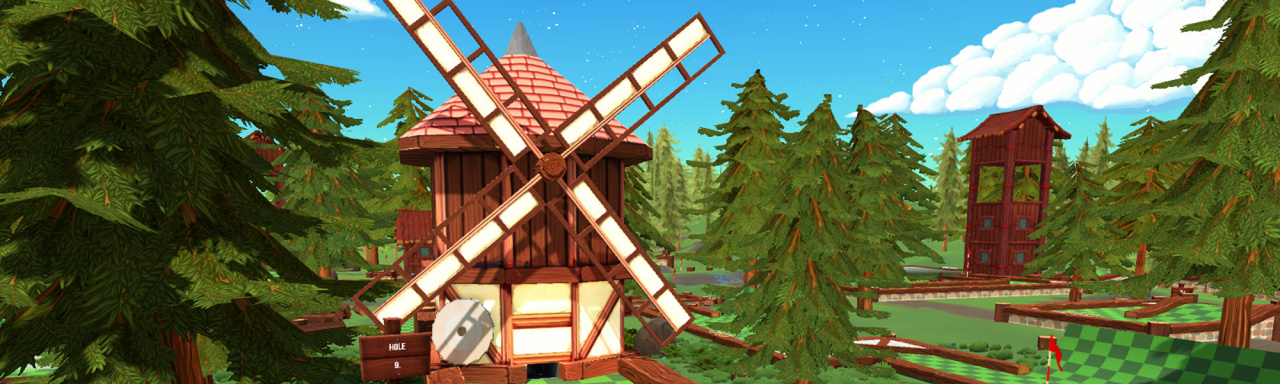
The game contains 11 courses at launch, each with 18 holes, giving nearly 200 holes in total (a twelfth course based on Team17’s prison breakout sim The Escapists is coming soon). Each course has a theme, from sensible ones like a forest and a desert to slightly more off-the-wall offerings like a space station, a volcano and a world made out of sweets. There’s also one based on Worms, because of course there is. Each has its own charm and its own lovely little details, but if we had one criticism it’s that each course only has a single music track that plays on a loop, which can eventually get to you considering it takes roughly half an hour to get through all 18 holes.
The shot process can take a little getting used to: you aim with the right stick, choose your power in advance by moving the left stick up and down, then press A to hit the ball. In some modes, the left stick also applies spin to the ball, which can initially cause some problems; your power is shown as a horizontal gauge on the bottom of the screen so your instinct will be to move the stick left and right to set your power – but that sets the spin instead. Once you get used to it it’s fine, but considering this is a game with a heavy multiplayer focus, it’s not unrealistic to suggest that confusion can break out among some less-experienced players.
This extends to playing the game as a whole, really. Some of the later holes in each course are pretty convoluted and require a fair amount of trial and error before you eventually realise where you’re supposed to go. Eventually, after playing courses a number of times, you’ll remember where the best routes are for each hole and will end up with a better score as a result. Again, though, given that this is designed primarily as a multiplayer game – up to 12 players can take part – the complicated, maze-like nature of some holes means that players with experience will have a clear advantage; there’s no real ‘great leveller’ here that gives everyone an equal chance of victory, something all of the best party games possess.
That’s not to say Golf With Your Friends has nothing going for it, of course: it absolutely does. The level of customisation is impressive, for example, with a huge array of options that go beyond simply choosing your course and the number of players. Most notably, there are five main game modes: Classic, Dunk, Hockey, Explore and Party. Classic goes without saying, while Explore and Party are variations on it; the former turns off time and shot limits while the latter adds quirks like spin, power-ups and the ability to make your ball jump.
Dunk and Hockey, meanwhile, mix things up with varied results. Dunk replaces each hole with a basketball net and makes you jump the ball into the net before you can clear it. This can be extremely tricky because you can’t set the jump height, leading to many a frustrating moment. Hockey, on the other hand, is far more entertaining; this time the hole’s been replaced with an ice hockey goal with a cutout of a goalie randomly sliding left and right to defend it. Naturally, the aim is to score to clear the hole. Hockey is arguably more fun than playing with normal holes because your target is much bigger, allowing for some impressive long-range shots if you’re lucky enough to have the goalie in the opposite corner.
Each of these five modes has even deeper customisation options, allowing you to tweak all manner of bits and pieces. You can choose whether you can collide with opponents’ balls, change the gravity, decide how bouncy the ground is or even choose what size and shape the ball is. Turning it into an egg, a cube or a bauble can have a huge difference on the way it rolls, and while it can be frustrating at times the fact that everyone has the same shape ball means everyone’s struggling together, which makes it a good laugh.
All these options can be taken online, where everyone plays their shots at the same time. This is something of a godsend; it not only keeps online matches within that rough 30-minute duration, but it also adds to the anarchic feel when you see other players’ balls flying all over the place – especially in the more difficult holes where there are plenty of opportunities to mess up and put your ball out-of-bounds. By and large, playing online is great fun, even if the chat option is limited; there are 16 preset things to say, most of which are pretty mild like “oops” and “come on”.
If you plan on playing it online, though, we really do recommend you try to do it with actual friends (see, we told you the title was more literal). In our time spent with the game – including after its launch – each search for a quick online match took absolutely ages. On the occasions when we did find one, we never actually managed to finish all 18 holes in one without everyone else eventually dropping out, leaving us to beat the rest on our own.
It’s a real shame there’s no cross-platform multiplayer; given that it’s been in early access on PC for a couple of years and just launched on Xbox Game Pass, it would have been a great way of pooling together the total userbase. As it is, you’re going to struggle to get a match with a couple of other players, let alone the 12 the game supports.
There’s obviously local multiplayer too, but it has its own flaws. Some can’t be helped: players have to take turns instead of all getting to play at the same time, but when you’re only dealing with one screen you can’t really do anything about that. Others are a little less forgivable, such as the lack of support for single Joy-Con play, meaning you can’t get a two-player game going with just a Switch.
Even more frustrating is the fact that (as far as we can tell) you can’t rename any of the players in local multiplayer; the first player is your username and everyone else is just called Player 2, Player 3 and so on up to Player 12. When a game’s central mechanic involves taking turns then viewing a big leaderboard after each hole, we really wish people were able to enter their own names; instead, there’s likely to be lots of “oooh, I’m right behind Player 6, who’s that again?” and decent helpings of “it’s player 7’s turn”, “that’s you”, “I thought I was 5”. For a game called Golf With Your Friends, it gives an impersonal touch to proceedings; hopefully, this is something that can be added in later.
Conclusion
At its core, Golf With Your Friends is still a decent golf game. Get an online multiplayer game going with some similarly-skilled pals and you’ll have a great time making your way through its weird and wonderful courses (don’t even get us started on the Worms course and the jetpacks you can get). Its main problem is that every time you change these optimum conditions – playing with strangers, playing offline, playing solo, playing with a mix of experts and beginners – you’re going to get diminishing returns from your experience. As long as you take the title literally, you’ll have fun.
ezEngine is an open source 3D game engine with a complete editor written in C++ using the Qt framework. It is hosted on GitHub and available under the MIT source license.
Details of the ezEngine:
ezEngine is an open source C++ game engine in active development. It is currently mainly developed on Windows, and higher level functionality such as rendering and the tools are only available there, but the core libraries are also available for other platforms such as Mac and Linux.
ez is built in a modular way, enabling users to either use all available functionality, or to pick and choose individual features and build the rest yourself. Larger features are implemented through engine and editor plugins and can therefore be easily removed or replaced. For instance sound (Fmod), physics (PhysX) and particle effects are all provided through runtime plugins.
The ezEditor is a full blown editor used for editing scenes and importing and authoring assets.
ezEngine documentation is available here, while Windows binaries are available for download here. You can learn more about ezEngine in action in the video below.
Review: STM Goods’ ChargeTree is a compact way to charge all your gear
The new ChargeTree multi-device wireless charging stand from STM Goods lets you power up your iPhone, AirPods, and Apple Watch while only taking up a tiny footprint.
Multi-device wireless chargers are prevalent these days. Nearly every company that creates a solo wireless charging pad has its own multi-device alternative.
Most of these follow a similar formula. They look like an extra-large charging pad that also has some sort of Apple Watch charging puck integrated into it, whether hovering above the phone or inline with the two other wireless charging sites.
STM Goods is one of the first to buck that trend and take that three-in-one idea and go vertical rather than horizontal.
ChargeTree is powered over USB-C
ChargeTree design
ChargeTree is all about fitting the most into a small space. It has an angled wireless charging stand to the front, a small wireless charging pad for a set of headphones around back, and an Apple Watch charger hovering in the air.
The front charger is capable of outputting up to 10 watts of power, even though iPhones are limited to only 7.5W. It has a small lip covered in silicone for the device to rest on, which helps ensure that it is always correctly aligned with the Qi charger inside, and you can position your phone vertically or horizontally as well.
The phone’s perch hides three status LEDs
Hidden within the phone’s perch are three status lights, one of which will illuminate for each of the three wireless chargers found on the ChargeTree.
When used horizontally, it’s a perfect stand for kicking back and watching a few episodes on Quibi, or maybe taking a FaceTime call while still charging your device.
Side view of the ChargeTree
We’ve frequently been fans of charging stands with the latest generation of iPhones. With Face ID, it is more difficult to unlock the phone while it is flat and parallel with the table or charger, without resorting to entering the code or craning your neck.
Using a charging stand, it is easy to see what is happening on your phone as well as to unlock it when necessary.
AirPods charging pad
Then there is the small wireless charger around back that’s limited to 5W of power. This makes it just right for a set of AirPods, which the stand makes clear by showing an outline of set of the personal audio accessories.
It is just the right size to hold a set of AirPods or AirPods Pro without them sticking out the sides. This too has a silicone pad to prevent lateral movement.
We’ve seen elevated AirPods chargers from companies such as Zens. While it does free up space, they are often right above your iPhone, and has the potential for the Apple Watch to cause damage to your iPhone should it fall or use a larger metal band.
Here, it is only above your AirPods, not your iPhone, and it has enough height that we wouldn’t worry about dangling bands.
The built-in Apple Watch charging puck
We do want to be clear that this Apple Watch charger, for the time being, is not Apple certified, though we’ve not experienced any negative effects in our extensive time testing the device. One perk of not being MFI-certified is that STM can alter the appearance slightly, with the sides of the puck blending down into the body of the ChargeTree for a very sleek appearance.
Should you buy the STM ChargeTree?
If you are put off by the lack of official MFi certification on the Apple Watch charger, then hold off on this version of ChargeTree.
If that doesn’t give you an uneasy feeling, we’d wholely recommend STM Goods’ ChargeTree multi-device charger. It is finally something different and takes space into consideration on our increasingly sought after desk space.
As we get more devices to charge, space becomes a premium and it is nice to have something this small to easily fit on our nightstand or desk.
STM Goods thought through the important aspects such as horizontal charging, easily detectable status lights up front, and utilizing USB-C.
If you have an Apple Watch, a set of AirPods or AirPods Pro, and an iPhone, there is little reason to not consider ChargeTree.
Sleek, minimalist design
Three-in-one charger
Doesn’t slow down under max load
Phone works in both orientations
iPhone fast charge
USB-C support
Apple Watch puck blends in
Charging puck isn’t Apple certified
Only one phone at a time
Rating: 4 out of 5
Where to buy
Snag your own STM ChargeTree for your iPhone, Apple Watch, and AirPods off Amazon for $79.95.
Review: Super Mega Baseball 3 – Step Up To The Plate In This Slugfest Sequel
For the initiated, baseball is the great American pastime. From the pang of a freshly struck home run to the smell of hot dogs wafting down from the stands, it’s the quintessential U.S. sport. Much like gridiron and basketball, the sport’s recent video game recreations have also become more focused on hyper-accurate realism over anything else. The likes of R.B.I. Baseball 20 has followed the trail blazed by MLB The Show with huge attention to detail, but that focus can too often put off players looking for more of a merciful arcade experience. For those looking for a little more accessibility, the Super Mega Baseball series has become the go-to place on Switch.
Of course, we should point out that the latest addition, Super Mega Baseball 3, isn’t a proper pick-up-and-play experience such as retro classics such as Clutch Hitter or MLB Slugfest, but rather a comfortable middle ground between simulation and silliness. There’s just enough tutorial content to ease you into the game’s rule-set and the nuances of the sport, but a huge amount of depth for those that know the subtle difference between a two-seam and a forkball, or the pros and cons of rotational hits vs. linear.
Super Mega Baseball 2: Ultimate Edition set quite a bar when it jumped onto Nintendo Switch last summer, and this instalment thankfully keeps all the things its forerunner did right – the customisable difficulties, the subtleties of power batting and the sheer level of player customisation options – and simply adds in many of the features that were notably absent or in need of extra flesh. One of the biggies, and something most big-name sports sims simply couldn’t live without, is the introduction of a new and improved Franchise mode.
Now you can oversee a team through multiple seasons rather than just the one, controlling everything from rookie signings all the way to the diet of your players. Yes, you can even have a go at being a sports nutritionist, with your choices affecting player performances on the field. There’s a real joyful sense of humour to how Super Mega Baseball 3 ties this mode together, with the option to send your players to aerobics classes if they’re getting a little slow or assign them to yoga classes for a little extra flexibility. There’s no option for trading, but even without that sort of external economy, this new and improved mode will likely become your biggest time sink.
On the field, Super Mega Baseball 3 is every bit the deep and rewarding experience it was in the previous entry, although a few niggles still persist. While it very much leans into the simulation with the sheer amount of nuance to pitching, batting and running, the developer continues to utilise mini-games to make all of the various mechanics flow into one another. Battling is all about finding the rhythm and sweet spot, pitching centres around timing and angles, and running becomes a chess match of sorts, where you need to weigh up moving your runners between bases at the risk of an out. Baserunners can now move off the base as soon as you initiate a steal, forcing you to watch with bated breath as your players attempt to beat catchers to safety. You can also pull off pickoffs now, but these can sometimes be a little too erratic for their own good.
Fielding is one of the few areas in which Super Mega Baseball 3 still struggles, mainly because it can’t quite decide how much agency it wants to give you. For the most part, fielding is done automatically – mainly because balls are often struck so fast they’re already halfway across the diamond before you can react – with your success of making a quick and secure catch determined by the stats of a given player. Your control of this aspect of the game centres around pitching the ball back to one of the bases on the diamond, with each position represented by a face button. It’s an enjoyable aspect, but one that often feels a little too random.
As a full package on Switch, Super Mega Baseball 3 really isn’t struggling for content. While it doesn’t have the additional DLC bulk of the previous game, the improvements to on-field play and modes more than make up for it. Performance-wise, the game rarely drops the ball, although those semi-cartoonish character models are still a bit of an eyesore – even more so with the blurring that’s been employed to keep it running smoothly on portable hardware. Thankfully, the full support for both local and online co-op play (including in Franchise mode) has been included on Switch, so those with a shared love for the sport will really enjoy sending this semi-simulation out to bat.
Conclusion
What it lacks in hyperrealism and officially-licensed teams, Super Mega Baseball 3 more than makes up for with a carefully adjusted set of physics that are deep enough to cater to RBI Baseball players while offering up the welcome addition of some improved modes. Franchise mode alone feels like a proper extension of the brand, with its irreverent sense of humour lending a welcome nuance to an otherwise content-heavy sports simulation.
Posted by: xSicKxBot - 05-25-2020, 01:32 AM - Forum: Lounge
- No Replies
Latest Set Of Xbox And PC Game Pass Titles Announced For May
Xbox Game Pass is getting another handful of games throughout the rest of May on both Xbox One and PC. In addition to games that joined earlier this month like Red Dead Redemption and Final Fantasy 9, the next few weeks will bring four more games to the service, including a new first-party game. It comes from one of the world's most-popular franchises and is among the biggest games releasing on Xbox One this year.
That one is Minecraft Dungeons, the spin-off of the persistently popular building game from Mojang Studios. The game takes the familiar trappings of Minecraft like Creepers, Illagers, and pickaxes and fits them into an isometric dungeon-crawling adventure for up to four players. You can also claim Alan Wake, the classic game from Control developer Remedy, and the city-planning sim Cities: Skylines. Each of those will be available across the Xbox One and PC versions of the service, while PC users will also get Plebby Quest: The Crusades. You can check the dates below, with the first two available right now.
The announcements also mentioned several games that will be leaving both versions of the service on May 29, including Brothers: A Tale of Two Sons and Old Man's Journey. That is in just a few days. You should be able to still start and complete them before they're gone, but you won't want to waste much more time.
Posted by: xSicKxBot - 05-25-2020, 12:06 AM - Forum: Python
- No Replies
Python List to Set Conversion [Interactive Guide]
Do you have a list but you want to convert it to a Python set? No problem! Use the set(...) constructor and pass the list object as an argument. For example, if you have a list of strings friends, you can convert it to a set using the call set(friends).
Exercise: Add another string 'Alice' to the list friends and see the resulting set. How many elements do the list and the set have?
Python List to Set Time Complexity
The time complexity of converting a list to a set is linear in the number of list elements. So, if the set has n elements, the asymptotic complexity is O(n). The reason is that you need to iterate over each element in the list which is O(n), and add this element to the set which is O(1). Together the complexity is O(n) * O(1) = O(n * 1) = O(n).
Here’s the pseudo-code implementation of the list to set conversion method:
def list_to_set(l): s = set() # Repeat n times --> O(n) for x in l: # Add element to set --> O(1) s.add(x) return s friends = ['Alice', 'Bob', 'Ann', 'Liz', 'Alice']

s = list_to_set(friends)

print(s)

# {'Ann', 'Alice', 'Bob', 'Liz'}
Need help understanding this code snippet? Try visualizing it in your browser—just click “Next” to see what the code does in memory:
Collection: A set is a collection of elements like a list or a tuple. The collection consists of either primitive elements (e.g. integers, floats, strings), or complex elements (e.g. objects, tuples). However, in a set all data elements must be hashable because it heavily relies on the hash function to implement the specification.
Unordered: Unlike lists, sets are unordered because there is no fixed order of the elements. In other words, regardless of the order you put stuff in the set, you can never be sure in which order the set stores these elements.
Unique: All elements in the set are unique. Each pair of values (x,y) in the set produces a different pair of hash values (hash(x)!=hash(y)). Hence, each pair of elements x and y in the set are different.
Thus, you can remove all duplicates from a list x by converting it into a set and back into a list using the command list(set(x)). However, the ordering information may be lost in the process (as a set is, by definition, unordered).
This way, the resulting list doesn’t have any duplicates—but it also has lost the order of elements: strings 'Liz' and 'Ann' switched their order after conversion. This may be different on your computer!
Python List to Set to List: list(set(x))
By converting a list x to a set and back to a list with the nested constructor expression list(set(x)), you achieve two things:
You remove all duplicates from the original list x.
You lose all ordering information. The resulting list may (or may not) have a complete new ordering of the remaining elements.
There’s no way out: the set data structure is more efficient than the list data structure only because it’s less powerful.
It’s like compressing an image: by removing information from the original image, the new image needs less resources on your computer at the cost of having a lower quality. If you convert the lossy-compressed image (or the set for that matter) back into the original data structure, it doesn’t look the same anymore.
This highlights an important trade-off in programming: always choose the right data structure for the particular problem at hand.
Python List to Set Preserve Order
But what if you want to preserve the order when converting a list to a set (and, maybe, back)? (You’d only do this to remove duplicates).
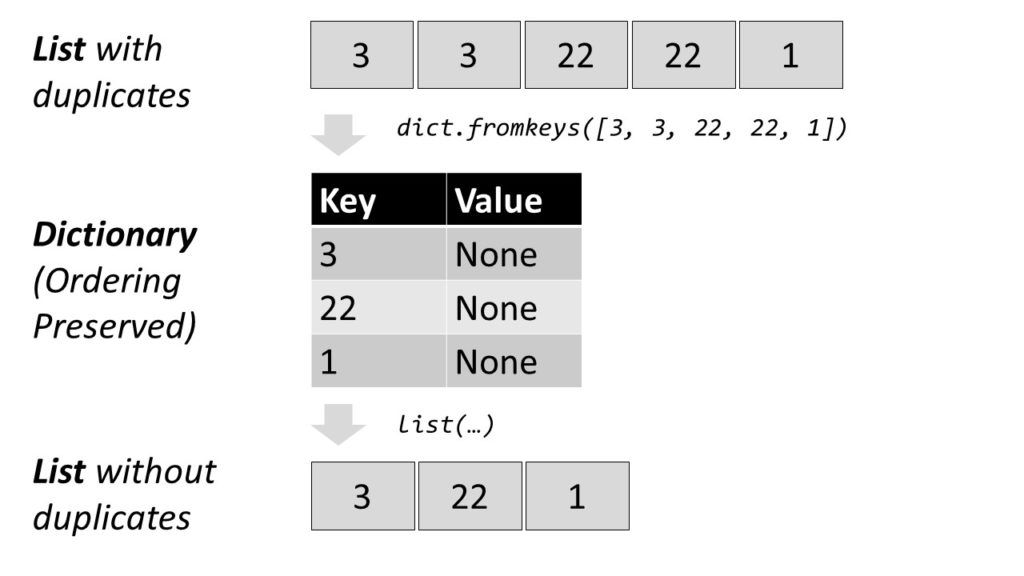
Efficient Method: A shorter and more concise way is to create a dictionary out of the elements in the list to remove all duplicates and convert the dictionary back to a list. This preserves the order of the original list elements.
Convert the list to a dictionary with dict.fromkeys(lst).
Convert the dictionary into a list with list(dict).
Each list element becomes a new key to the dictionary. For example, the list [1, 2, 3] becomes the dictionary {1:None, 2:None, 3:None}. All elements that occur multiple times will be assigned to the same key. Thus, the dictionary contains only unique keys—there cannot be multiple equal keys.
As dictionary values, you take dummy values (per default).
Then, you convert the dictionary back to a list, throwing away the dummy values.
The result is an error message unhashable type: 'list'.
'''

Traceback (most recent call last): File "C:\Users\xcent\Desktop\code.py", line 6, in <module> s = set(users)

TypeError: unhashable type: 'list' '''
Why are lists unhashable?
Because they are mutable: you can change a list by appending or removing elements. If you change the list data type, the hash value changes (it is calculated based on the content of the list). This directly violates the definition that a “hash value […] never changes during its lifetime” (see here).
Key takeaway: mutable data types are not hashable. Therefore, you cannot use them in sets.
So, how to solve it? Simply convert the inner lists into an immutable collection type such as a tuple:
Now, the result is a set of tuple elements. As tuples are immutable, the hash value will never change and you can create a set out of them.
Where to Go From Here?
Enough theory, let’s get some practice!
To become successful in coding, you need to get out there and solve real problems for real people. That’s how you can become a six-figure earner easily. And that’s how you polish the skills you really need in practice. After all, what’s the use of learning theory that nobody ever needs?
Practice projects is how you sharpen your saw in coding!
Do you want to become a code master by focusing on practical code projects that actually earn you money and solve problems for people?
Then become a Python freelance developer! It’s the best way of approaching the task of improving your Python skills—even if you are a complete beginner.
[www.indiegala.com] Digimon Story Cyber Sleuth: Complete Edition delivers everything fans loved about Digimon Story: Cyber Sleuth and Digimon Story: Cyber Sleuth – Hacker’s Memory. + a BONUS Men of War: Assault Squad Steam Key for the next 30ish hours. https://youtu.be/8UWGO7fi9fw This Crackerjack brings engaging storylines, classic turn-based battles, and tons of Digimon to collect!
Naval Warfare FREEbie
[freebies.indiegala.com] A steampunk military campaign of epic proportions in, under and above the surface!
Fixed an issue blocking progress of “The Lie” quest.
Disrespect/Hate Speech
Disrespect/Hate Speech
Harassment/Personal Attacks/Bullying
Name and Shame/Privacy Violation
Gory Violence/Explicit Sexuality
Threats of Violence/Illegal Activity
Political/Religious Discussion
Cheating/Hacking
Spoilers/Distributing Stolen Content
Soliciting/Plagiarism/Phishing/Impersonation
Disruption/Evasion
This site uses cookies to provide you with the best possible user experience. By clicking ‘Accept’, you agree to the policies documented at Cookie Policy and Privacy Policy.
Accept
This site uses cookies to provide you with the best possible user experience. By continuing to use this site, you agree to the policies documented at Cookie Policy and Privacy Policy.
close
Our policies have recently changed. By clicking ‘Accept’, you agree to the updated policies documented at Cookie Policy and Privacy Policy.
Accept
Our policies have recently changed. By continuing to use this site, you agree to the updated policies documented at Cookie Policy and Privacy Policy.