Create an account


Welcome, Guest
You have to register before you can post on our site.

Username
  

Password


Search Forums

(Advanced Search)

Forum Statistics
» Members: 20,228
» Latest member: linklinklink
» Forum threads: 21,716
» Forum posts: 22,614

Full Statistics

Online Users
There are currently 740 online users.
» 0 Member(s) | 734 Guest(s)
Applebot, Baidu, Bing, DuckDuckGo, Google, Yandex

 
  News - Get a job: Stray Bombay Company is looking for a Senior Unreal Engineer
Posted by: xSicKxBot - 05-22-2020, 06:46 PM - Forum: Lounge - No Replies

Get a job: Stray Bombay Company is looking for a Senior Unreal Engineer

The Gamasutra Job Board is the most diverse, active and established board of its kind for the video game industry!

Here is just one of the many, many positions being advertised right now.

Location: Seattle, Washington

Help us define and architect innovative, best-in-class co-operative multiplayer games at scale. As an engineer you are passionate about architecting robust foundations we can build on, while balancing the importance of quickly ruling out ideas. Your knowledge of gameplay, networking and more help keep our games as awesome and fast paced as they need to be. You value collaboration, camaraderie, and compromise, and bring a team-first mindset to every conversation. You help make difficult product decisions easier by effectively surfacing what matters and recognizing when it’s time to compromise.

Along the way, you’ll have a direct impact on both the product direction as well as how we work together as a studio.

(This probably looks like 5+ years experience in gameplay and gameplay systems, networking, and storage, but you tell us!)

Tools and talents of the trade

  • Experience/expertise in networked games (UE4 a bonus!)
  • High degree of fluency in C++, or related skills, as well as version control and continuous integration
  • Experience leading development on a large code base
  • Experience architecting and implementing critical gameplay foundations and components quickly and effectively
  • Demonstrated ability to ship games at a high level of polish with high standards (and an eye to scope)
  • Flexible and open-minded, especially when it comes to creative solutions and rapid prototyping
  • Capable of owning critical live operations, including reliability, performance and availability
  • Pragmatic yet creative in the pursuit of quality… we’ll be scratching our head how you got things that performant!

Other stuff

  • Comfortable with end-to-end ownership of features and feedback
  • Self-driven creative problem solver with a team-first mentality.
  • ‘T-shaped’… you go deep in one or more areas, but can contribute to many across production and development

Interested? Apply now.

Whether you’re just starting out, looking for something new, or just seeing what’s out there, the Gamasutra Job Board is the place where game developers move ahead in their careers.

Gamasutra’s Job Board is the most diverse, most active, and most established board of its kind in the video game industry, serving companies of all sizes, from indie to triple-A.

Looking for a new job? Get started here. Are you a recruiter looking for talent? Post jobs here.


https://www.sickgaming.net/blog/2020/05/...-engineer/

Print this item

  News - April Was A Massive Month For The Games Industry In The US
Posted by: xSicKxBot - 05-22-2020, 04:13 PM - Forum: Lounge - No Replies

April Was A Massive Month For The Games Industry In The US

We've seen lots of indications that video game sales are significantly up as players stay indoors and look for ways to fill time due to the coronavirus. The first NPD report covering a full month since widespread social distancing started has now come out, showing just how big the bump has been in US sales.

On the whole, April spending increased 73% over the same period last year, which marked a new record high for the month. In total it reached $1.5 billion, beating the former record holder, $1.2 billion in April 2008. The high sales also impacted the yearly figures with a 12% increase over 2019. Game sales increased 55% over April 2018.

Final Fantasy 7 Remake had a big debut month, already reaching the #3 spot in this year's best-sellers. Call of Duty: Modern Warfare continued to sell very well after months on the market, and still held onto the second-place spot for the month. Animal Crossing: New Horizons held a high spot as well, and is the best-selling Switch game over the past year.

Continue Reading at GameSpot

https://www.gamespot.com/articles/april-...01-10abi2f

Print this item

  Microsoft - Conversations In Culture podcast series focuses on accessibility for all
Posted by: xSicKxBot - 05-22-2020, 09:51 AM - Forum: Windows - No Replies

Conversations In Culture podcast series focuses on accessibility for all

“When you hear that someone has autism, you can’t go in with specific stereotypes, you need to just start engaging with them one-on-one, learning about them, learning what their challenges are, what they enjoy doing, how they prefer to interact with someone. It’s a very individualized disorder.”

Meet Kendall and Delaney Foster. They’re the sisters behind Unified Robotics, an inclusive after-school program for students with cognitive disabilities. Delaney started the program in 2015 to create a shared activity between her and her sister Kendall, who has autism spectrum disorder. In this episode, find out how the Foster sisters are raising disability awareness. They prove that when programs and technology include people with disabilities, everyone wins.

Read the full episode transcript


https://www.sickgaming.net/blog/2020/05/...y-for-all/

Print this item

  [Tut] Runtime Complexity of Python List Methods [Easy Table Lookup]
Posted by: xSicKxBot - 05-22-2020, 09:25 AM - Forum: Python - No Replies

Runtime Complexity of Python List Methods [Easy Table Lookup]

What’s the runtime complexity of various list methods?

The following table summarizes the runtime complexity of all list methods.

Assume that the length of the data type is defined as n (that is—len(data_type)). You can now categorize the asymptotic complexity of the different complexity functions as follows:


Operation Example Complexity
Index l[i] O(1)
Store l[i] = 42 O(1)
Length len(l) O(1)
Append l.append(42) O(1)
Pop l.pop() O(1)
Clear l.clear() O(1)
Slicing l[a:b] O(b-a)
Extend l1.extend(l2) O(len(l1)+len(l2))
Constructor list(iter) O(len(iter))
Equality l1 == l2 O(n)
Slice Assign l[a:b] = ... O(n)
Delete del l[i] O(n)
Remove l.remove(...) O(n)
Membership x in l / x not in l O(n)
Copy l.copy() O(n)
Pop l.pop(0) O(n)
Min min(l) O(n)
Max max(l) O(n)
Reverse l.reverse() O(n)
Iterate for x in l: O(n)
Sort l.sort() O(n log(n))
Multiply l*k O(n k)

Need to learn more about these methods? Watch me giving you a quick overview of all Python list methods:


You can read more about all methods in my detailed tutorial on the Finxter blog.

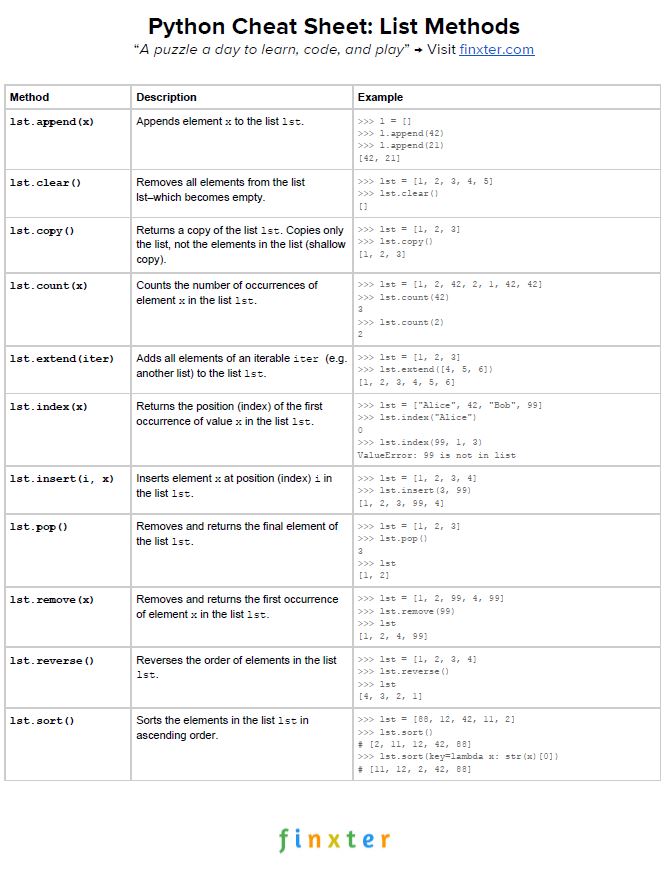
Here’s your free PDF cheat sheet showing you all Python list methods on one simple page. Click the image to download the high-resolution PDF file, print it, and post it to your office wall:


Where to Go From Here?


Enough theory, let’s get some practice!

To become successful in coding, you need to get out there and solve real problems for real people. That’s how you can become a six-figure earner easily. And that’s how you polish the skills you really need in practice. After all, what’s the use of learning theory that nobody ever needs?

Practice projects is how you sharpen your saw in coding!

Do you want to become a code master by focusing on practical code projects that actually earn you money and solve problems for people?

Then become a Python freelance developer! It’s the best way of approaching the task of improving your Python skills—even if you are a complete beginner.

Join my free webinar “How to Build Your High-Income Skill Python” and watch how I grew my coding business online and how you can, too—from the comfort of your own home.

Join the free webinar now!


https://www.sickgaming.net/blog/2020/05/...le-lookup/

Print this item

  (Indie Deal) SAO Hollow Realization Deluxe Deal & PID Deals
Posted by: xSicKxBot - 05-22-2020, 09:18 AM - Forum: Deals or Specials - No Replies

SAO Hollow Realization Deluxe Deal & PID Deals

Sword Art Online: Hollow Realization Deluxe Deal
[www.indiegala.com]
Kirito meets a mysterious NPC and receives a cryptic message. A new SAO adventure awaits!
https://youtu.be/ixvKAsaUq5M
Return to Aincrad & save 78% OFF this Crackerjack Deal! Get ⚔ Sword Art Online: Hollow Realization Deluxe Edition at a historical low price!

Stay Safe Sale Day 15: PID Publisher Sale, up to -90%
[www.indiegala.com]
The Stay Safe Sale has ended its second week. Get a BONUS Steam copy of Men of War: Assault Squad when spending a minimum of $8/€7/£6 in the IndieGala Store per basket (while stocks last).

Happy Hour: Verdict Madness Bundle
[www.indiegala.com]

Stay Inside, Stay Safe and Enjoy Good Games.
Check out IndieGala on Twitter, YouTube & Facebook[www.facebook.com]


https://steamcommunity.com/groups/indieg...7691446394

Print this item

  (Free Game Key) 10 Second Ninja X - Free Steam Game + Steam Spring Cleaning Event
Posted by: xSicKxBot - 05-22-2020, 09:18 AM - Forum: Deals or Specials - No Replies

10 Second Ninja X - Free Steam Game + Steam Spring Cleaning Event

Visit the store page:

10 Second Ninja X

!addlicense asf s/461588 for ASF users

There is also a Steam Spring Cleaning event happening at the moment. There doesn't seem to be an actual sale, just an event to get a badge:

https://store.steampowered.com/springcleaning

Nothing too complicated. After it shows you the tutorial, you just visit each of the rooms and play any one of the three games they show you to complete the tasks.

Once all tasks are completed, you get the Spring Cleaning Event 2020 badge: https://i.imgur.com/lJm3SUg.png

We are welcoming everyone to join our discord[discord.gg]. We are more active there on finding giveaways, small or large, and there are daily raffles you can participate.

?GrabFreeGames.com ?Twitter ?Steam Curator ?Facebook[fb.me]?Discord[discord.gg]
❤️Support us: ✔️HumbleBundle Partner[www.humblebundle.com] Epic Tag: GrabFreeGames


https://steamcommunity.com/groups/GrabFr...6102596655

Print this item

  News - Diablo 3 Patch 2.6.9 Will Launch On PTR Next Week Following Delay
Posted by: xSicKxBot - 05-22-2020, 09:18 AM - Forum: Lounge - No Replies

Diablo 3 Patch 2.6.9 Will Launch On PTR Next Week Following Delay

Blizzard is issuing a new update to Diablo 3 in the public test realm (PTR) to put the next update through its paces before it becomes widely available. The 2.6.9 patch was originally going to begin its testing run on Thursday, May 21, but according to an update on the Blizzard forums, the patch has actually been delayed to next week to allow for "additional QA time" to fix bugs and other issues. No specific date was given, but we'll update you when we know more.

Those who participate in the test next week will be able to check out some new gear for Demon Hunter and Necromancer, with some special items to help speed you on your way. It should help to make the wait for Diablo 4 a little easier, especially as we still don't know when the game is actually going to release.

Continue Reading at GameSpot

https://www.gamespot.com/articles/diablo...01-10abi2f

Print this item

  News - Nintendo Download: 21st May (North America)
Posted by: xSicKxBot - 05-22-2020, 03:48 AM - Forum: Nintendo Discussion - No Replies

Nintendo Download: 21st May (North America)

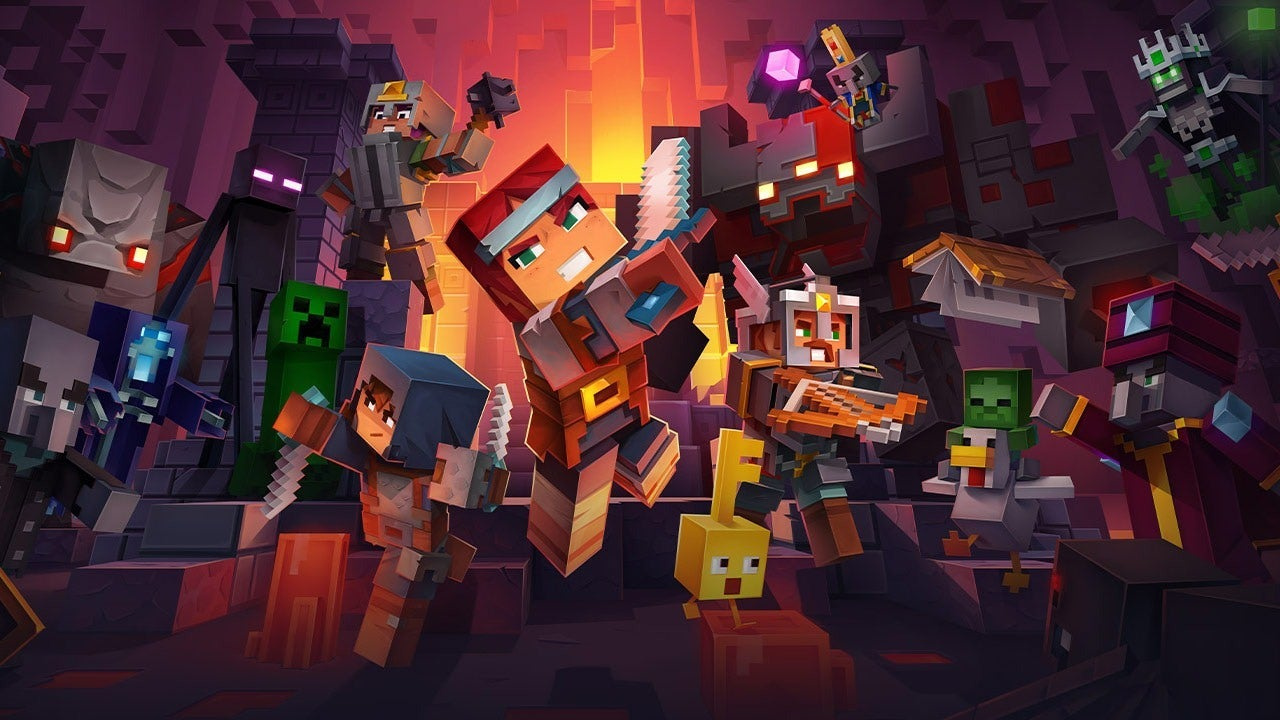
Minecraft Dungeons

The latest Nintendo Download update for North America has arrived, and it’s bringing new games galore to the eShop in your region. As always, be sure to drop a vote in our poll and comment down below with your potential picks for the week. Enjoy!

Nintendo Switch


Minecraft Dungeons (Mojang, Tue 26th May, $19.99) Discover an all-new action-adventure game, inspired by classic dungeon crawlers and set in the Minecraft universe! Brave the dungeons alone, or team up with friends to survive truly spectacular battles! Up to four players can fight together through action-packed, treasure-stuffed, wildly varied levels, all in a quest to save the villagers and take down the nefarious Arch-Illager!

Switch eShop


What The Golf? (TribandProductions, Today, $19.99) A silly physics-based golf parody where every golf course is a new surprising type of golf, some brilliant or hilarious, others so absurd they will make you go: WHAT THE GOLF? Golf a house, a horse or car! More surprising new golf mechanics than you can imagine – Epic golf boss fights – Made by people who know nothing about golf – First (and hopefully the last) game that let you golf a horse – Will NOT make you a better golf player – Surprises! Read our What The Golf? review.

Ailment (Ultimate Games, Wed 27th May, $7.99) If you’re looking for a story-driven action-packed game with lots of guns, hordes of enemies, super intense game-play with horror ambience and sci-fi movie references, then Ailment is the perfect choice for you. The main character wakes up in a med bay after being unconscious for three days and he sees that all of his crew became enemies. The last thing he remembers is returning from another spaceship where he had a rescue mission. But he arrived everyone on that ship was already dead. . . He has to remember what happened to him and find out the truth.

Animal Up! (Nestor Yavorskyy, Fri 22nd May, $2.99) Animal Up! is a tiny, retro styled, highly-addictive, and fast paced arcade game. Take the role of a rescue team on a mission to Save All the Cute Animals from the Flood! Perfect to competing with your friends (1-4 players supported) and an excellent coffee-break game!

Aqua Lungers (WarpedCore Studio, Today, $14.99) Race your way through challenging stages while contending with deadly creatures and dastardly opponents to collect the most treasure. While everyone’s goal is the same, each player is afforded several options to get an edge over their competitors. Players can use their speed and agility to outpace and evade their opponents, while others might use devastating attacks to slow them down and steal their hard earned goods.

Arcade Archives RADICAL RADIAL (HAMSTER, Thu 14th May, $7.99) “RADICAL RADIAL” is an action shooting game released by Nichibutsu in 1983. Control a tire-shaped vehicle and head for the goal. Speed through dangerous courses filled with aliens and enemy vehicles, accelerating, decelerating, shooting, and jumping to get through.

Arrest of a stone Buddha (CIRCLE Ent., Today, $14.99) As a professional killer you’ll live through November 1976; when taking on enemies you’re fast and lucky enough so you don’t need to plan your actions too far. You kill with one shot and you never miss. When you run out of ammo you just throw a gun away. You can disarm any enemy and use any weapon; when it’s time to get out you just use a vehicle nearby.

Black Jack (Sabec, Thu 14th May, $9.99) BlackJack the classic 21 card game. Now you can play Black Jack when you want, where you want. Black Jack rules are the same as the original Blackjack game and just like the real game, hit, stick, split, double-down and apply the insurance Try your luck to beat the smart Ai (artificial intelligent) dealer and win and clear out the house by trying out your new strategies.

Chess (Sabec, Today, $9.99) Chess is the most famous strategic board game of all time. Easy to learn but difficult to master, play against the smart AI player and with four levels of difficulty to choose from anyone from a novice to a master can play.

Concept Destruction (Ratalaika Games, Fri 22nd May, $4.99) Concept Destruction is all about driving miniature cars made of cardboard, and crashing them into each other to earn points by destroying them! Pick from several different modes that suits your playstyle. Pick championship mode if you want to fight your way through mass production or choose survival mode to see how long you can survive a wave of deadly cardboard automobiles!

Discmaster (Conceptsleutelaars, Mon 18th May, $7.99) DISCMASTER is a fun fantasy version of the classic game of Tic-tac-toe with a fun card game twist! The game features a band of adorable young heroes on a brave quest to save their friend Nubby from the clutches of the evil Shadow Master! Choose wisely to position your hero’s discs on the grid to defeat your opponent’s discs and block their attacks.

Fluxteria (Playstige Interactive, Today, $6.99) Welcome to Fluxteria, non-stop arcade-space-shooting action in full 3D. Four modes of play: Story Mode, Survival Mode, Timed-Attack Mode and Obstacle Race Mode. 14 different types of Enemies. 20 different levels in beautifully stylized science-fiction setting. Crystal-Clear shooting and blasting sound effects. Hearth-thumbing music.

Knight Swap 2 (QUByte Interactive, Tue 19th May, $0.99) Knight Swap is a minimalist puzzle game based on the old chess problem of swapping knights on a board. The goal in each level is to move the opposing knights to where the others are placed (and vice versa) using the features of the board.

Lost Artifacts: Time Machine (8Floor Games, Today, $9.99) “A mysterious villain is using a time machine to destroy everything in his path. He wants to return the Priest, the King of Atlantis and the Ancient Emperor so he can use them to create a new world order! Claire and her friends must find out who the villain is and stop him and all his minions.

Luxar (KOALABS, Today, $7.90) In LUXAR, you control an alien luminescent organic entity that has just been born and must pass its first survival trials to show its adult peers that it deserves to grow among them. It will have to cross 16 dark and hostile sectors with labyrinth-shaped alien architectures populated by toxic substances, obstacles, patrol drones and mechanisms of all kinds. You are its only chance to make it happen.

Monster Prom: XXL (Those Awesome Guys, Today, $15.99) There’s only 3 weeks left until prom and you haven’t got a date yet. . and you’re a monster. But that’s okay ‘cause at your high-school everyone else is too! These are the stepping stones into the world of Monster Prom: XXL – the bundled up, content filled edition of Monster Prom, a one-to-four player competitive dating sim that will have you thinking: I never knew I was into that!

Monstrum (Soedesco, Fri 22nd May, Fri 22nd May, $29.99) Stranded on a derelict cargo ship, you find yourself hunted by one of Monstrum’s terrifying predators as you search for a way out. Death is death. Get killed in Monstrum and you’ll be starting all over again. As each of them has their own strategy, abilities and weaknesses, you have to use your wits to outsmart your pursuer in the ship’s procedurally generated environment. Can you survive Monstrum?

Pushy and Pully in Blockland (Resistance Studio, Today, $9.99) Pushy and Pully in Blockland Push is a cooperative arcade game with a retro feeling. Help Pushy and Pully get back their spaceship on their trip across Blockland. Push blocks to defeat the monsters, join blocks of the same colour to get power ups and defeat the bosses to recover the parts of your broken spaceship.

realMyst: Masterpiece Edition (Cyan Worlds, Today, $19.99) It’s been 25 years since Myst became your world. This newly refreshed and rebuilt version is all the things you loved about Myst, but now you are free to investigate this strange world in your own way. You can explore anywhere. Pick your own path through the forest on Myst Island and seek shelter from the thunderstorm in Stoneship Age. Whether you’re visiting Myst Island for the first time, or you’ve been exploring the island for years – there’s never been a better reason to let the surrealistic Ages of realMyst become your world.

Red Wings: Aces of the Sky (All In! Games, Today, $17.99) Red Wings: Aces of the Sky is a dynamic action game that will show you amazing battles straight from the pages of history in a brand new arcade gameplay style. Use your unique skills to take down your opponents, develop your deadly pilot aim, and become the true ace of the sky. Witness the birth, rise, and fall of the Red Baron, Manfred von Richthofen—the ultimate hero of the first World War, credited with 80 victories.

Skelly Selest & Straimium Immortaly Double Pack (Today, $19.99) This bundle contains two wonderfully outlandish indie treasures from retro-inspired UK developer, Caiysware. Skelly Selest: a score-attack slash dash run ‘n’ gun-athon that places players in the skeletal shoes of a Heavenly Keeper. Only the Selestial Order can defeat the sinful horrors that lurk in the depths of Hell.

Steel Rain (PolarityFlow, Today, $14.99) Prepare for the ultimate shoot-’em-up / strategy ReMix with RPG elements! Steel Rain is a truly novel mix of strategy, RPG, and frantic action, with a modern, high velocity shmup core at its center. You get to control 2 wings you can tactically arrange in different formations and firemodes, as you fight your way through an impressive variety of overwhelmingly huge enemy fleets.

The House of Da Vinci 2 (Blue Brain Games, Sun 17th May, $9.99) The long awaited sequel to The House of Da Vinci is finally here. Join more than 1,000,000 players from around the world and dive into the 3D puzzle adventure.

The Persistence (Firesprite, Today, $29.99) The Persistence challenges you to survive aboard a doomed deep space colony starship in the year 2521. Stranded, malfunctioning and caught in the inexorable pull of a black hole, “The Persistence” is overrun with a crew mutated into horrific & murderous aberrations. It’s down to you, a clone of security officer Zimri Eder, to make your way deeper in the decks of The Persistence to repair the systems and prevent the ship from being torn apart.

Water Balloon Mania (Sprakelsoft, Fri 15th May, $4.99) “Water Balloon Mania” is an addictive puzzle game. The goal is to remove all fires from the screen. To do that you have to rotate and position the water balloons on top of or alongside the fires and other water balloons so that there are at least 4 blocks with the same color next to each other. You can move and turn the water balloons with the controller.

Super Nintendo Entertainment System – Nintendo Switch Online


Wild Guns – The Kid gang and their army of robots have taken over! Blast your way through villainous outlaws, diabolical robots and towering, screen-filling bosses. Fortunately, you’ve got plenty of moves to help you survive the firepower headed your way. You’ll need a sharp eye and quick-on-the-draw reflexes to survive on your own. Or team up with a friend and go out blazing in two-player co-op.

Panel de Pon – As the stack of puzzle pieces rises, think fast to match panels and set off cascading chain reactions and combos. You’ll have to make strategic choices quickly to counteract the relentless competitor attacks from above. A selection of single-player and two-player modes and options provides escalating action and zippy fun. This title originally launched for the Super Famicom in 1995, but this is the first time this version of the game will be available in the U.S. Though this title was never translated into English, it may seem familiar!

Operation Logic Bomb – Agent Logan has been fitted with bioelectronic implants that grant him superior strength, reflexes and analytical abilities. He’s been charged with a mission to save the Subspace Particle Transfer Project. Now it’s up to him to infiltrate, neutralize the intruders and rescue the scientists in a top-down shooter with giant bosses and frenzied action that doesn’t let up.

Nintendo Entertainment System – Nintendo Switch Online


Rygar – An old legend proclaimed, “When the peaceful land is covered with evil spirits, a brave soldier will be brought to life from the dead.” Luckily, Rygar, the mythical hero from Argus, has arrived in order to defeat the evil king Ligar and his army of dangerous beasts. Join forces with Rygar for a hybrid action-adventure game with a distinct blend of platforming and role-playing elements!

New DLC


Mortal Kombat 11: Aftermath – Continue the critically acclaimed Mortal Kombat 11 storyline in a new adventure. Fragile alliances are tested and the fate of two worlds hang in the balance. Now is the time to forge a new history. This DLC also includes three new playable fighters: Sheeva, Fujin and Robocop. New players can purchase the Mortal Kombat 11: Aftermath Collection, which includes the base game and the Aftermath DLC. In the original Mortal Kombat 11 cinematic story, take on the role of Earthrealm’s protectors as a menacing new foe bends the forces of time, threatening to turn the tide and rewrite their own dark history.

So that’s your lot for this week’s North American Nintendo Download. Go on, be a sport and drop a vote in the poll above, and comment below with your hot picks!


https://www.sickgaming.net/blog/2020/05/...h-america/

Print this item

  Introducing Project Tye
Posted by: xSicKxBot - 05-21-2020, 09:20 PM - Forum: C#, Visual Basic, & .Net Frameworks - No Replies

Introducing Project Tye

Amiee Lo

Amiee

Project Tye is an experimental developer tool that makes developing, testing, and deploying microservices and distributed applications easier.

When building an app made up of multiple projects, you often want to run more than one at a time, such as a website that communicates with a backend API or several services all communicating with each other. Today, this can be difficult to setup and not as smooth as it could be, and it’s only the very first step in trying to get started with something like building out a distributed application. Once you have an inner-loop experience there is then a, sometimes steep, learning curve to get your distributed app onto a platform such as Kubernetes.

The project has two main goals:

  1. Making development of microservices easier by:
    • Running many services with one command
    • Using dependencies in containers
    • Discovering addresses of other services using simple conventions
  2. Automating deployment of .NET applications to Kubernetes by:
    • Automatically containerizing .NET applications
    • Generating Kubernetes manifests with minimal knowledge or configuration
    • Using a single configuration file

If you have an app that talks to a database, or an app that is made up of a couple of different processes that communicate with each other, then we think Tye will help ease some of the common pain points you’ve experienced.

We have recently demonstrated Tye in a few Build sessions that we encourage you to watch, Cloud Native Apps with .NET and AKS and Journey to one .NET

Installation


To get started with Tye, you will first need to have .NET Core 3.1 installed on your machine.

Tye can then be installed as a global tool using the following command:

dotnet tool install -g Microsoft.Tye --version "0.2.0-alpha.20258.3"

Running a single service


Tye makes it very easy to run single applications. To demonstrate this:

1. Make a new folder called microservices and navigate to it:

mkdir microservices
cd microservices

2. Then create a frontend project:

dotnet new razor -n frontend

3. Now run this project using tye run:

tye run frontend

Image tye run output The above displays how Tye is building, running, and monitoring the frontend application.

One key feature from tye run is a dashboard to view the state of your application. Navigate to http://localhost:8000 to see the dashboard running.

Image tye dashboard

The dashboard is the UI for Tye that displays a list of all of your services. The Bindings column has links to the listening URLs of the service. The Logs column allows you to view the streaming logs for the service.

Image tye logs

Services written using ASP.NET Core will have their listening ports assigned randomly if not explicitly configured. This is useful to avoid common issues like port conflicts.

Running multiple services


Instead of just a single application, suppose we have a multi-application scenario where our frontend project now needs to communicate with a backend project. If you haven’t already, stop the existing tye run command using Ctrl + C.

1. Create a backend API that the frontend will call inside of the microservices/ folder.

dotnet new webapi -n backend

2. Then create a solution file and add both projects:

dotnet new sln
dotnet sln add frontend backend

You should now have a solution called microservices.sln that references the frontend and backend projects.

3. Run tye in the folder with the solution.

tye run

The dashboard should show both the frontend and backend services. You can navigate to both of them through either the dashboard of the url outputted by tye run.

The backend service in this example was created using the webapi project template and will return an HTTP 404 for its root URL.

Getting the frontend to communicate with the backend


Now that we have two applications running, let’s make them communicate.

To get both of these applications communicating with each other, Tye utilizes service discovery. In general terms, service discovery describes the process by which one service figures out the address of another service. Tye uses environment variables for specifying connection strings and URIs of services.

The simplest way to use Tye’s service discovery is through the Microsoft.Extensions.Configuration system – available by default in ASP.NET Core or .NET Core Worker projects. In addition to this, we provide the Microsoft.Tye.Extensions.Configuration package with some Tye-specific extensions layered on top of the configuration system.

If you want to learn more about Tye’s philosophy on service discovery and see detailed usage examples, check out this reference document.

1. If you haven’t already, stop the existing tye run command using Ctrl + C. Open the solution in your editor of choice.

2. Add a file WeatherForecast.cs to the frontend project.

using System; namespace frontend { public class WeatherForecast { public DateTime Date { get; set; } public int TemperatureC { get; set; } public int TemperatureF => 32 + (int)(TemperatureC / 0.5556); public string Summary { get; set; } } }

This will match the backend WeatherForecast.cs.

3. Add a file WeatherClient.cs to the frontend project with the following contents:

using System.Net.Http;
using System.Text.Json;
using System.Threading.Tasks; namespace frontend
{ public class WeatherClient { private readonly JsonSerializerOptions options = new JsonSerializerOptions() { PropertyNameCaseInsensitive = true, PropertyNamingPolicy = JsonNamingPolicy.CamelCase, }; private readonly HttpClient client; public WeatherClient(HttpClient client) { this.client = client; } public async Task<WeatherForecast[]> GetWeatherAsync() { var responseMessage = await this.client.GetAsync("/weatherforecast"); var stream = await responseMessage.Content.ReadAsStreamAsync(); return await JsonSerializer.DeserializeAsync<WeatherForecast[]>(stream, options); } }
}

4. Add a reference to the Microsoft.Tye.Extensions.Configuration package to the frontend project

dotnet add frontend/frontend.csproj package Microsoft.Tye.Extensions.Configuration --version "0.2.0-*"

5. Now register this client in frontend by adding the following to the existing ConfigureServices method to the existing Startup.cs file:

...
public void ConfigureServices(IServiceCollection services)
{ services.AddRazorPages(); /** Add the following to wire the client to the backend **/ services.AddHttpClient<WeatherClient>(client => { client.BaseAddress = Configuration.GetServiceUri("backend"); }); /** End added code **/
}
...

This will wire up the WeatherClient to use the correct URL for the backend service.

6. Add a Forecasts property to the Index page model under Pages\Index.cshtml.cs in the frontend project.

... public WeatherForecast[] Forecasts { get; set; }
...

7. Change the OnGet method to take the WeatherClient to call the backend service and store the result in the Forecasts property:

... public async Task OnGet([FromServices]WeatherClient client) { Forecasts = await client.GetWeatherAsync(); }
...

8. Change the Index.cshtml razor view to render the Forecasts property in the razor page:

@page
@model IndexModel
@{ ViewData["Title"] = "Home page";
} <div class="text-center"> <h1 class="display-4">Welcome</h1> <p>Learn about <a href="https://docs.microsoft.com/aspnet/core">building Web apps with ASP.NET Core</a>.</p>
</div> Weather Forecast: <table class="table"> <thead> <tr> <th>Date</th> <th>Temp. ©</th> <th>Temp. (F)</th> <th>Summary</th> </tr> </thead> <tbody> @foreach (var forecast in @Model.Forecasts) { <tr> <td>@forecast.Date.ToShortDateString()</td> <td>@forecast.TemperatureC</td> <td>@forecast.TemperatureF</td> <td>@forecast.Summary</td> </tr> } </tbody>
</table>

9. Run the project with tye run and the frontend service should be able to successfully call the backend service!

When you visit the frontend service you should see a table of weather data. This data was produced randomly in the backend service. The fact that you’re seeing it in a web UI in the frontend means that the services are able to communicate. Unfortunately, this doesn’t work out of the box on Linux right now due to how self-signed certificates are handled, please see the workaround here

Tye’s configuration schema


Tye has a optional configuration file (tye.yaml) to enable customizing settings. This file contains all of your projects and external dependencies. If you have an existing solution, Tye will automatically populate this with all of your current projects.

To initalize this file, you will need to run the following command in the microservices directory to generate a default tye.yaml file:

tye init

The contents of the tye.yaml should look like this:

Image tye yaml

The top level scope (like the name node) is where global settings are applied.

tye.yaml lists all of the application’s services under the services node. This is the place for per-service configuration.

To learn more about Tye’s yaml specifications and schema, you can check it out here in Tye’s repository on Github.

We provide a json-schema for tye.yaml and some editors support json-schema for completion and validation of yaml files. See json-schema for instructions.

Adding external dependencies (Redis)


Not only does Tye make it easy to run and deploy your applications to Kubernetes, it’s also fairly simple to add external dependencies to your applications as well. We will now add redis to the frontend and backend application to store data.

Tye can use Docker to run images that run as part of your application. Make sure that Docker is installed on your machine.

1. Change the WeatherForecastController.Get() method in the backend project to cache the weather information in redis using an IDistributedCache.

2. Add the following using‘s to the top of the file:

using Microsoft.Extensions.Caching.Distributed;
using System.Text.Json;

3. Update Get():

[HttpGet]
public async Task<string> Get([FromServices]IDistributedCache cache)
{ var weather = await cache.GetStringAsync("weather"); if (weather == null) { var rng = new Random(); var forecasts = Enumerable.Range(1, 5).Select(index => new WeatherForecast { Date = DateTime.Now.AddDays(index), TemperatureC = rng.Next(-20, 55), Summary = Summaries[rng.Next(Summaries.Length)] }) .ToArray(); weather = JsonSerializer.Serialize(forecasts); await cache.SetStringAsync("weather", weather, new DistributedCacheEntryOptions { AbsoluteExpirationRelativeToNow = TimeSpan.FromSeconds(5) }); } return weather;
}

This will store the weather data in Redis with an expiration time of 5 seconds.

4. Add a package reference to Microsoft.Extensions.Caching.StackExchangeRedis in the backend project:

cd backend/
dotnet add package Microsoft.Extensions.Caching.StackExchangeRedis
cd ..

5. Modify Startup.ConfigureServices in the backend project to add the redis IDistributedCache implementation.

 public void ConfigureServices(IServiceCollection services) { services.AddControllers(); services.AddStackExchangeRedisCache(o => { o.Configuration = Configuration.GetConnectionString("redis"); }); }

The above configures redis to the configuration string for the redis service injected by the tye host.

6. Modify tye.yaml to include redis as a dependency.

name: microservice
services:
- name: backend project: backend\backend.csproj
- name: frontend project: frontend\frontend.csproj
- name: redis image: redis bindings: - port: 6379 connectionString: "${host}:${port}"
- name: redis-cli image: redis args: "redis-cli -h redis MONITOR"

We’ve added 2 services to the tye.yaml file. The redis service itself and a redis-cli service that we will use to watch the data being sent to and retrieved from redis.

The "${host}:${port}" format in the connectionString property will substitute the values of the host and port number to produce a connection string that can be used with StackExchange.Redis.

7. Run the tye command line in the solution root

Make sure your command-line is in the microservices/ directory. One of the previous steps had you change directories to edit a specific project.

tye run

Navigate to http://localhost:8000 to see the dashboard running. Now you will see both redis and the redis-cli running listed in the dashboard.

Navigate to the frontend application and verify that the data returned is the same after refreshing the page multiple times. New content will be loaded every 5 seconds, so if you wait that long and refresh again, you should see new data. You can also look at the redis-cli logs using the dashboard and see what data is being cached in redis.

The "${host}:${port}" format in the connectionString property will substitute the values of the host and port number to produce a connection string that can be used with StackExchange.Redis.

Deploying to Kubernetes


Tye makes the process of deploying your application to Kubernetes very simple with minimal knowlege or configuration required.

Tye will use your current credentials for pushing Docker images and accessing Kubernetes clusters. If you have configured kubectl with a context already, that’s what tye deploy is going to use!

Prior to deploying your application, make sure to have the following:

  1. Docker installed based off on your operating system
  2. A container registry. Docker by default will create a container registry on DockerHub. You could also use Azure Container Registry (ACR) or another container registry of your choice.
  3. A Kubernetes Cluster. There are many different options here, including:

If you choose a container registry provided by a cloud provider (other than Dockerhub), you will likely have to take some steps to configure your kubernetes cluster to allow access. Follow the instructions provided by your cloud provider.

Deploying Redis


tye deploy will not deploy the redis configuration, so you need to deploy it first by running:

kubectl apply -f https://raw.githubusercontent.com/dotnet...redis.yaml

This will create a deployment and service for redis.

Tye deploy


You can deploy your application by running the follow command:

tye deploy --interactive

Enter the Container Registry (ex: example.azurecr.io for Azure or example for dockerhub):

You will be prompted to enter your container registry. This is needed to tag images, and to push them to a location accessible by kubernetes.

Image tye deploy output

If you are using dockerhub, the registry name will be your dockerhub username. If you are using a standalone container registry (for instance from your cloud provider), the registry name will look like a hostname, eg: example.azurecr.io.

You’ll also be prompted for the connection string for redis.

Image redis connection string

Enter the following to use the instance that you just deployed:

redis:6379

tye deploy will create Kubernetes secret to store the connection string.

–interactive is needed here to create the secret. This is a one-time configuration step. In a CI/CD scenario you would not want to have to specify connection strings over and over, deployment would rely on the existing configuration in the cluster.

Tye uses Kubernetes secrets to store connection information about dependencies like redis that might live outside the cluster. Tye will automatically generate mappings between service names, binding names, and secret names.

tye deploy does many different things to deploy an application to Kubernetes. It will:

  • Create a docker image for each project in your application.
  • Push each docker image to your container registry.
  • Generate a Kubernetes Deployment and Service for each project.
  • Apply the generated Deployment and Service to your current Kubernetes context.

Image tye deploy building images

You should now see three pods running after deploying.

kubectl get pods NAME READY STATUS RESTARTS AGE
backend-ccfcd756f-xk2q9 1/1 Running 0 85m
frontend-84bbdf4f7d-6r5zp 1/1 Running 0 85m
redis-5f554bd8bd-rv26p 1/1 Running 0 98m

You can visit the frontend application, you will need to port-forward to access the frontend from outside the cluster.

kubectl port-forward svc/frontend 5000:80

Now navigate to http://localhost:5000 to view the frontend application working on Kubernetes.

Image kubernetes portforward

Currently tye does not automatically enable TLS within the cluster, and so communication takes place over HTTP instead of HTTPS. This is typical way to deploy services in kubernetes – we may look to enable TLS as an option or by default in the future.

Adding a registry to tye.yaml


If you want to use tye deploy as part of a CI/CD system, it’s expected that you’ll have a tye.yaml file initialized. You will then need to add a container registry to tye.yaml. Based on what container registry you configured, add the following line in the tye.yaml file:

registry: <registry_name>

Now it’s possible to use tye deploy without --interactive since the registry is stored as part of configuration.

This step may not make much sense if you’re using tye.yaml to store a personal Dockerhub username. A more typical use case would storing the name of a private registry for use in a CI/CD system.

For a conceptual overview of how Tye behaves when using tye deploy for deployment, check out this document.

Undeploying your application


After deploying and playing around with the application, you may want to remove all resources associated from the Kubernetes cluster. You can remove resources by running:

tye undeploy

This will remove all deployed resources. If you’d like to see what resources would be deleted, you can run:

tye undeploy --what-if

If you want to experiment more with using Tye, we have a variety of different sample applications and tutorials that you can walk through, check them out down below:

We have been diligently working on adding new capabilities and integrations to continuously improve Tye. Here are some integrations below that we have recently released. There is also information provided on how to get started for each of these:

  • Ingressto expose pods/services created to the public internet.
  • Redisto store data, cache, or as a message broker.
  • Daprfor integrating a Dapr application with Tye.
  • Zipkinusing Zipkin for distributed tracing.
  • Elastic Stackusing Elastic Stack for logging.

While we are excited about the promise Tye holds, it’s an experimental project and not a committed product. During this experimental phase we expect to engage deeply with anyone trying out Tye to hear feedback and suggestions. The point of doing experiments in the open is to help us explore the space as much as we can and use what we learn to determine what we should be building and shipping in the future.

Project Tye is currently commited as an experiment until .NET 5 ships. At which point we will be evaluating what we have and all that we’ve learnt to decide what we should do in the future.

Our goal is to ship every month, and some new capabilities that we are looking into for Tye include:

  • More deployment targets
  • Sidecar support
  • Connected development
  • Database migrations

We are excited by the potential Tye has to make developing distributed applications easier and we need your feedback to make sure it reaches that potential. We’d really love for you to try it out and tell us what you think, there is a link to a survey on the Tye dashboard that you can fill out or you can create issues and talk to us on GitHub. Either way we’d love to hear what you think.



https://www.sickgaming.net/blog/2020/05/...oject-tye/

Print this item

  AppleInsider - Apple TV+ drama series ‘Little Voice’ debuts July 10
Posted by: xSicKxBot - 05-21-2020, 09:20 PM - Forum: Apples Mac and OS X - No Replies

Apple TV+ drama series ‘Little Voice’ debuts July 10

J.J. Abrams-produced half-hour drama series “Little Voice,” which stars Brittany O’Grady and features original music by Sara Bareilles, is set to make its streaming debut on Apple TV+ in July.

Apple revealed a “first look” at the upcoming show in a press release Thursday, calling the series a “fresh, intensely romantic tale” of a talented but struggling performer in New York.

Little Voice follows Bess King (O’Grady) as she navigates the music scene and copes with life issues like love and family. Also starring are Sean Teale, Colton Ryan, Shalini Bathina, Kevin Valdez, Phillip Johnson Richardson and Chuck Cooper.

The series is produced by Abrams’ Bad Robot Productions in association with Warner Bros. Television. Abrams, Bareilles, Ben Stephenson (“Westworld”) and Jessie Nelson (“I Am Sam,” “Stepmom,”) are listed as executive producers, with the latter writing and directing the first episode.

Nelson previously partnered with Bareilles on the musical “Waitress,” which made its Broadway debut in 2016.

Little Voice streams on July 10 and joins an eclectic collection of Apple TV+ originals including Golden Globe-nominated and Critics Choice and SAG award-winning series The Morning Show, sitcom Mythic Quest: Raven’s Banquet, Beastie Boys Story, The Banker and sci-fi epic See.

While the streaming service has yet to find a breakout hit, Apple is forging ahead with plans to build out its catalog beyond original series, movies and specials. Most recently, the company this week reached a $70 million deal for exclusive streaming rights to Tom Hanks vehicle “Greyhound.”


https://www.sickgaming.net/blog/2020/05/...s-july-10/

Print this item

 
Latest Threads
(Free Game Key) Steam | W...
Last Post: xSicKxBot
2 hours ago
News - These Fortnite Swi...
Last Post: xSicKxBot
2 hours ago
Black Ops (BO1, T5) DLC's...
Last Post: justlance
4 hours ago
Black Ops (BO1, T5) DLC's...
Last Post: Throwaway5326
Yesterday, 12:08 PM
(Indie Deal) FREE Brocco,...
Last Post: xSicKxBot
Yesterday, 11:00 AM
(Free Game Key) Steam | P...
Last Post: xSicKxBot
Yesterday, 11:00 AM
News - World Of Warcraft’...
Last Post: xSicKxBot
Yesterday, 10:59 AM
(Indie Deal) No Clean Sta...
Last Post: xSicKxBot
07-16-2026, 06:35 PM
(Free Game Key) Steam | W...
Last Post: xSicKxBot
07-16-2026, 06:35 PM
News - PlayStation Plus E...
Last Post: xSicKxBot
07-16-2026, 06:35 PM

Forum software by © MyBB Theme © iAndrew 2016