Posted by: xSicKxBot - 05-21-2020, 09:20 PM - Forum: Windows
- No Replies
COVID-19 has only intensified the broadband gap
We are living in a new world, a world racing online as social distancing forces many of us to work, communicate and connect in new ways. In the United States alone, state and local directives have urged 316 million Americans to stay in and, when possible, work from home. As communities around the world adapt to a world with COVID-19, broadband connectivity and access are more critical to our lives and livelihoods than ever before.
Broadband already powers much of our modern lives, but COVID-19 has acted as an accelerant, a fuel of sorts that has driven many essential activities online. All learning, services, commerce, most workplaces and daily interactions online require a high-speed connection to the internet. Those without access to this online world – more than 18 million Americans with 14 million living in rural areas, according to the Federal Communications Commission – risk falling farther behind. While 18 million is a big number – more than the entire populations of Indiana, Iowa and Tennessee combined – a new study has found that the actual number of people lacking access to broadband in the US is closer to 42 million.
We will eventually come out the other end of the COVID-19 crisis, but the future that emerges will look different from the world we left when this crisis began. The future of commerce, work, medicine, education and services will have changed – and, in some instances, permanently.
A problem intensified by COVID-19
Lack of broadband for rural populations, both in the United States and in the developing world, just can’t be ignored. That’s why, in the last three months, we’ve doubled down on our Microsoft Airband Initiative to expand the number of people reached. As of March 31, we’ve helped provide 1.2 million people with access to broadband in rural, previously unserved areas of the United States. This is almost double our total from December 31, 2019, and up from 24,000 people in the whole of 2018. We’re doing the most recent work by donating hotspots and wireless connectivity equipment, and expanding our digital skills offerings by developing COVID-19-specific digital skills offerings for rural communities.
We’re undertaking this work in tandem with ISPs, state and local governments, non-profits such as the National 4-H Council, and other mission-aligned public- and private-sector entities. Eight out of 12 of our commercial ISP partners have taken the FCC’s Keep Americans Connected Pledge, committing to maintaining connectivity to customers who are economically impacted by the crisis. Even those partners that have not formally signed on to the FCC’s pledge have committed to serving their communities by maintaining connectivity for existing customers and connecting new subscribers. The Airband Team has published a customer-ready Airband US COVID-19 Response Summary outlining our programmatic and policy responses to COVID-19 in the US.
We’re not the only ones trying to make a difference. Companies across the country are stepping up to the plate, including tech companies such as Google and T-Mobile. But it isn’t just tech that’s helping – companies such as Land O’Lakes are also working to close the broadband gap. We need the government to step up and meet us halfway.
Policy principles and new federal funding to accelerate much-needed changes
The most significant way to move the dial for Americans without broadband is by changing policy at the federal, state and local level, not only for more funding but to remove roadblocks so that broadband can reach rural and underserved Americans faster. In short, there’s a critical need for Congress to do three things.
First, Congressional action is needed to address the immediate broadband connectivity needs that are having a heightened impact on individuals and communities during the COVID-19 crisis. Funding is needed in the next stimulus bill so that students and teachers have access to remote learning, people have access to their doctors and other telehealth options, and to help people work from home, file and maintain their unemployment benefits, and apply for jobs online.
Second, there’s an urgent need to provide funding to the FCC so it can implement recently enacted broadband-mapping legislation. As we’ve said before, we can’t solve a problem we don’t understand.
Third, additional action is needed to permanently close the broadband gap. With accurate data on broadband availability, we recommend Congress provides funds based on seven important principles. Namely, these funds should be:
Targeted: Any broadband funding mechanism should be designed to address a known market need; for example, the need to deliver broadband access to unserved rural areas and connect students without broadband access before schools start in the fall.
Technology neutral: Broadband funding should be made available on a technology neutral basis.
Broadband-capable: Networks should be required to meet at least the FCC-defined speed for broadband.
Least costly: To minimize costs, funding amounts should be determined through a competitive bidding process (the FCC’s use of reverse auctions is an example of such a mechanism).
Non-distortionary: Any program should aim to minimize market distortions in how funds are collected and how they are distributed.
Deployed quickly: Preference should be given to broadband providers that commit to rapid deployment of broadband networks and services.
Avoid administrative burdens: Programs should minimize red tape and only impose requirements on recipients that are necessary to ensure the integrity of the programs.
With this approach, the country can finally provide the funding needed for ISPs to close the broadband gap. In addition, we support efforts by the FCC, USDA and other federal and state agencies to release funds under new and existing programs to address the needs of vulnerable healthcare workers and patients, educators and learners, and remote workers. This is especially important because, in times of economic downturn, states are more cash-strapped than usual and don’t have resources necessary to make these critical investments.
The COVID-19 virus has created a national crisis. But it has also created an important opportunity. It’s time to galvanize the nation and recognize the obvious. Broadband has become the electricity of the 21st century. Well before the end of the 20th century, we recognized that no American should live without electricity. As we embark on the third decade of the 21st century, every American deserves the opportunity to access broadband.
The Stay Safe Sale has rounded-up the deals for this weekend. Get a BONUS Steam copy of Men of War: Assault Squad when spending a minimum of $8/€7/£6 in the IndieGala Store per basket (while stocks last).
The giveaway requires the Two Factor Authentication in order to add the game. You can enable it by going to your Account, then the Password & Security tab. You do NOT need a phone number for it, you can enable it just by using your email.
We are welcoming everyone to join our discord[discord.gg]. We are more active there on finding giveaways, small or large, and there are daily raffles you can participate.
BETA: BEDROCK 1.16.0.63 (XBOX ONE / WINDOWS 10 / ANDROID)
This latest Beta brings those playing closer to what you would see and expect on the Java Edition of Minecraft. Overall a lot of fixes are the main focus on this beta. If you find more please be sure to report them to Mojang Studios!
Remember that only those on Xbox One / Windows 10 / and Android may participate in the Beta builds. You will not be able to join Realms or non-beta players worlds and you will not be able to open worlds opened in the Beta in earlier/current stable builds of Bedrock.
Crashes and Stability
Fixed several crashes that could occur during gameplay
Fixed a crash when auto crafting 64 honey blocks from recipe book in survival MCPE-68604
Fixed an issue that could occur if the player equipped any piece of netherite armor, used a clear command to clear it, and then equipped another piece of netherite armor of the same type
Fixed a crash that could happen when a mob’s state changed
Fixed navigation.walk to handle the case where it is used on a flying entity, so that the flying entity will not cause lag while it is touching the ground
General
Updated Mojang Studios loading screens
Nether biome distribution now better matches that in Minecraft: Java Edition
Fixed issue where players on Xbox One may have errors accessing the Marketplace
Improved reliability of loading characters MCPE-55968
Fixed an instance where a character can be lost when offline
Fixed an issue that prevented achievements from being unlocked offline after reconnecting
Fix issue of incorrect player hand animations when using fishing rod in third person MCPE-63088
Fixed the Xbox main menu getting stuck forever after cancelling the sync popup box MCPE-53266
Secondary players in a splitscreen game will now animate properly when you look at them
Suspending and resuming the game will no longer make a player’s model disappear MCPE-63119
The second player’s hands in a split screen game will no longer disappear when you look at them with the first player MCPE-58806
Nether Bricks texture has been updated
Chiseled Netherbrick and Quartz Bricks textures are updated
Crimson Trap Door is now called Crimson Trapdoor
Warped Forest are now more rare compared to other Nether biomes
When players enter Warped Forest, the previous music track now plays until it’s finished
Bedrock Credits have been updated
Fixed issue where experimental mode was not being enabled for clients when the server level has it enabled
Optimised sound loading – “load_on_low_memory” is now deprecated in sound_definitions.json, as all audio can now play on low memory devices
Fixed a world conversion issue that was causing some items in chunks to convert to Bedrock incorrectly
Gameplay
Dyeing shulker boxes no longer causes items to vanish MCPE-64164
Fixed incorrect spawn position when set on top of a pressure plate MCPE-65487
Fixed issue where taking Arrows, Fireworks, or Nautilus shells into the offhand will break the offhand UI slot MCPE-64227
Fixed an issue where lava would drop uncooked food MCPE-74767
Added fallback to world spawn if the Respawn Anchor spawn is obstructed
“You home bed was missing or obstructed” message shows again
“Respawn point set” message is now displayed for the Respawn Anchor in all cases MCPE-73159
Respawn Anchors can be charged without setting respawn point and without exploding outside the Nether MCPE-69044
The Respawn Anchor can now have blocks placed against if it contains no charge
Villagers will now harvest crops regardless of what crop amounts they have in their inventory MCPE-67694
XP orbs shoot in random directions once again MCPE-58715
It’s now impossible to use beds if there is no room for the player to stand next to or on top of the bed when they wake up MCPE-42881
It’s now impossible to interact with Piglins who are admiring golden items MCPE-69861
Respawn anchors no longer destroy blocks when detonated underwater
Respawn Anchor now plays an appropriate sound when it depletes MCPE-69265
Lodestone Compass is now supported in commands MCPE-68994
Barrier blocks no longer generate in Bastion Remnants
Chests in Bastion Remnants now always generate with loot MCPE-69003
Mobs no longer consume one of two Swords of the same material dropped in the same place
Fixed Smithing table sound not playing while being used MCPE-69066
Respawn Anchor charging sound no longer plays in Basalt Delta biome MCPE-69189
Lodestone and compass now play an appropriate sound
Twisting Vines Block is now called Twisting Vines
‘Oooh, shiny!’ achievement now unlock when distracting a Piglin with a Gold Ingot by right-clicking
Twisting Vines and Weeping Vines are now destroyed, and popped as items, immediately when flooded
Mined Nether Sprouts no longer produce an invalid item that could not be used MCPE-74339
Moving blocks now have the correct collision box MCPE-62419
Fire now properly converts to Soul Fire on Soul Sand and Soul Soil when Fire ticking is turned off MCPE-69823
Campfires can now be crafted with charcoal MCPE-70862
Using Quartz Block in a stonecutter now produces Quartz Slabs instead of Smooth Quartz slabs MCPE-57925
Dispenser now uses 1 glowstone when filling Respawn Anchor MCPE-72686
Silk touch enchant now works on Respawn Anchor
Silk touch enchant and setBlock command now works on Crimson button, Warped button, Crimson hyphae, Stripped crimson hyphae, Warped hyphae, Stripped warped hyphae, Weeping vines, Twisting vines, Blackstone pressure plate, Polished blackstone button
Chains can now be pushed by Pistons without breaking
Soul Torches can now also be crafted with charcoal MCPE-70585
Warped Fungus on a Stick can now be enchanted similar to Carrot on a Stick MCPE-70948
Iron Bars and Glass Panes now connect to Walls MCPE-73989
Hyphae blocks can now be crafted into their respective planks MCPE-73099
Moving blocks now have the correct collision box MCPE-62419
Graphical
Fixed low light emitting block items not matching the placed blocks brightness
Fixed mobs in mob spawners not being visible MCPE-56879
Maps in item frames no longer have lines through them MCPE-46154
Fixed maps missing textures after reloading world MCPE-54228
Fixed issue where lighting wasn’t refreshed when going through portals back into overworld MCPE-338144
Fixed the excessive hand bob motion caused by playing an animation on the hand and camera together MCPE-54072
Items held by mobs should now render correctly
Lodestone Compass now renders properly in the inventory
User Interface
Tweaked Server Tab navigation
Creative Recipe Books show item groupings again
Added a background to title and subtitle text with adjustable opacity Opacity can be changed in the “Accessibility” tab in the Settings menu
Added a background to the actionbar text used in the /title command The same background is also applied to the item text above the hotbar
Smithing Table UI has been updated
Commands
Fixed a bug where bees and other new mobs were missing a non-“minecraft:” version for /summon commands. You should be able to spawn vanilla mobs without it! MCPE-58557
Added new overload for /replaceitem with an option for destroy (the old behavior) or keep (the command will return an error if an item occupies that slot)
Fixed issue where the clear command would not clear damaged tools
/setblock command fails on the new blocks if attempted with non-default state MCPE-65395
/setblock command now works for more block states
Add-Ons and Scripting
Fixed knockback issue that stopped crates in “Rescue Mission Lava Town” Marketplace pack from moving when hit
Added a new loop mode to animations: now instead of omitting “loop” to have it stop playing when finished, or setting “loop”: true to have it loop when finished, you can now say “loop”: “hold_on_last_frame” to keep applying the last frame of animation
A content error will now show up if a Range json node is defined as an array with a single value
A content error will now show up if you use more than one Move Control Component, Jump Control Component, or Navigation Component
Functions with a mix of invalid and valid commands will only execute the valid ones with command version 1.15 and below In these cases, the function name will not show up in the auto-suggestion list but can still be executed if typed out
Starting on 1.16, functions with any invalid commands (for example incorrect selector syntax) will no longer register and cannot be called
When setting the json variables “attack_interval_min” and “attack_interval_max”, the component will now correctly throw a content error if the max is less than the min MCPE-63542
Fixed issue where sounds would sometimes have incorrect settings applied to them leading to 2D sounds to play as 3D and vice versa
Fixed issue that was cutting off playing sound incorrectly, though can still easily occur if audio is loaded up that takes up a lot of memory
Comments in JSON arrays no longer cause an error MCPE-40873
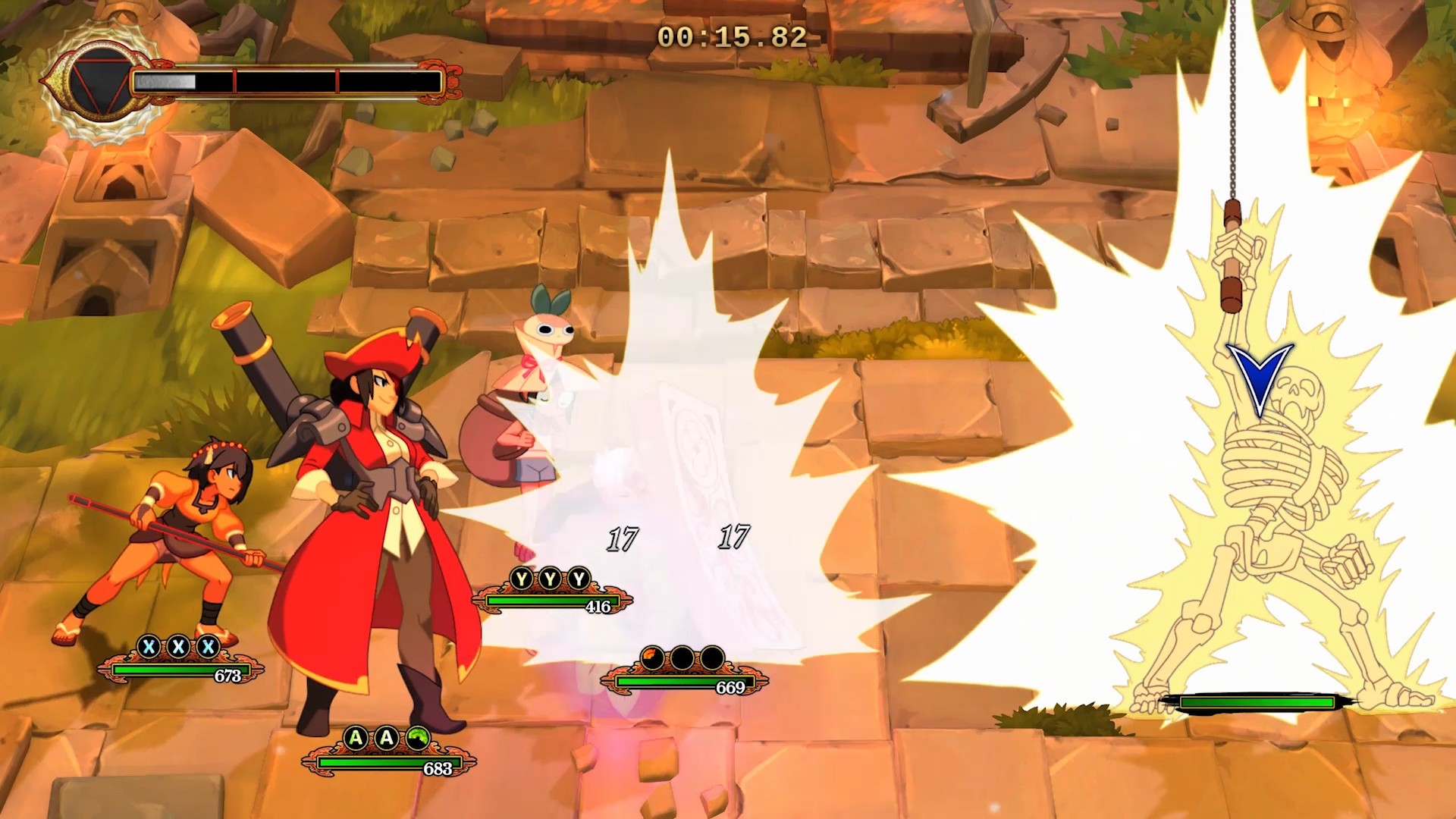
Indivisible Launches Razmi’s Challenges DLC on Xbox One
Razmi’s been hard at work inside Ajna’s brain! She’s crafted a series of fiendishly clever challenges that will require Ajna’s unique skills to complete. It’s Indivisible‘s first official DLC and it’s available today!
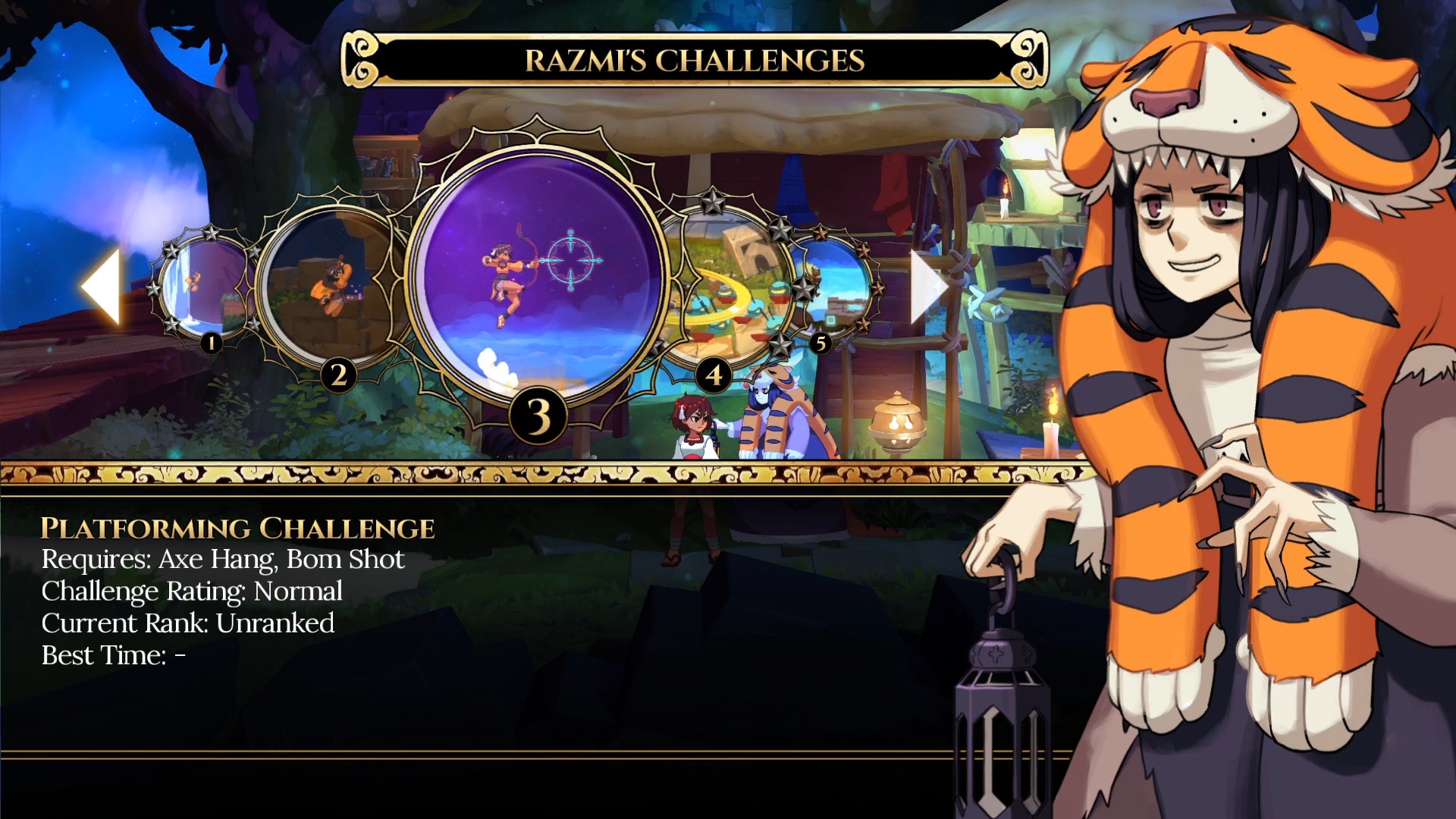
Razmi’s Challenges include 40 specially crafted levels, each one designed to be more difficult from the last. Solve platforming puzzles and defeat powerful foes in combat using only a limited number of Ajna’s abilities in each challenge.
Perfect your technique, and learn some new ones, as you navigate each cunning construct. You’ll need to combine the skills you know in new ways to succeed. And if you don’t succeed? Razmi will be very pleased with her handiwork.
Razmi’s Challenges’ levels will unlock as you progress through the game. As you learn new abilities, new challenges will unlock. Already deep into the game? Every challenge will be available when you load a recent save. Just head to the Inner Realm and talk to Razmi to get started.
Replay each challenge at any time, as often as you like. Your best completion time is displayed when you finish. Challenge yourself to complete each challenge faster the next time through, or share your time with friends to see who is the quickest!
We are excited to share Razmi’s Challenges with you almost as much as Razmi is excited to see Ajna fail trying to complete them!
Razmi Challenges
505 Games
☆☆☆☆☆
★★★★★
Razmi got bored in Ajna’s inner realm and constructed a series of devilish challenges to humiliate her best fiend with! These challenges require a combination of Ajna’s skills that will push her to the very limit, and test her ability to work together with her companions against insurmountable odds in battle. There’s a prize at the end of it! Well, Razmi says there is, anyway… Featuring a new comic side-story with Ajna, Razmi and the rest of the cast, forty new bite-sized challenge levels, two new palettes for Ajna and a new set of trophies to score.
Epic rolls easier refunds, keyless third-party sales into its Epic Games Store
Epic Games has made a few additions to its Epic Games Store platform that developers should be aware of, particularly involving how games can be sold through third-party retailers, and rules around how players can refund some game purchases.
On that third-party retailer addition, Epic now has partnerships with Fanatical, Green Man Gaming, and Genba Digital that allows Epic Games Store-hosted games to be sold and purchased through those outside platforms without keys changing hands.
It’s something Epic says gives players more confidence that they’re making legitimate purchases, and it’s similar an earlier feature Epic rolled out for Humble’s digital game storefronts. On all supported third-party stores, players can now link up their EGS accounts and automatically redeem third-party purchases on the Epic Games Store.
On the refund front, Epic has added a “self-service” refund feature that gives players the ability to request refunds through their transaction history for games with less than two hours of logged play time purchased within the last 14 days.
Those requirements aren’t new by any means as they’re the same play restrictions the company rolled out last January when it first added the refund feature. Instead, the change removes some of the friction from the process. Previously anyone after a refund would need to reach out to support with their request while moving forward that same request can made with the press of a button.
Video: How Ubisoft handled NPC voice design for The Division 2
In this GDC 2020 virtual talk Ubisoft’s Adam Ritchie offers insight into the effort that goes into making NPCs talk in games like Tom Clancy’s The Division 2, as well as the pipeline and tools behind it.
It was an in-depth look at some of the challenges faced and overcome by the Voice Production team on a big, triple-A online, open-world game project.
In addition to this presentation, the GDC Vault and its accompanying YouTube channel offers numerous other free videos, audio recordings, and slides from many of the recent Game Developers Conference events, and the service offers even more members-only content for GDC Vault subscribers.
Those who purchased All Access passes to recent events like GDC or VRDC already have full access to GDC Vault, and interested parties can apply for the individual subscription via a GDC Vault subscription page. Group subscriptions are also available: game-related schools and development studios who sign up for GDC Vault Studio Subscriptions can receive access for their entire office or company by contacting staff via the GDC Vault group subscription page.
In July 2019, online games retailer G2A extended an offer to devs to open up its records to an independent auditor, and to reimburse the developers 10 times the value of any game keys that were found to have been illegally sold. So far only one developer, Wube Games, has taken them up on the offer, and G2A has finalized a figure of $39,600 as compensation for stolen Factorio keys.
While G2A initially promised to involve an independent auditor in the process, their most recent blog post on the subject says they found that "none that would meet our agreed requirements." Wube then agreed to G2A carrying out its own internal investigation.
The developers provided G2A with a list of 321 keys it believed had been illegally sold, and G2A concluded that 198 of those had been sold on its platforms. G2A has agreed to pay Wube Software a total of $39,600 for the keys, 10 times their full retail price. The company confirmed to GamesIndustry.biz that they have received the payment in full from G2A.
Feature: Every Nintendo Switch Online NES Game Ranked
The collection of NES games available to Nintendo Switch Online subscribers continues to grow over time, albeit slowly, and there are now over 50 retro releases from the original Nintendo Entertainment System to enjoy on the service, and today Rygar joined the lineup.
We recently asked Nintendo Life readers to rate the available NES games on Switch using our User Rating system, and it’s now time to reveal the results! The following list is compiled using the ratings (out of 10) given to each game in our database.
It should be noted, however, that this list is not set in stone and will automatically change over time to reflect the ratings. If you look below and see a game you think deserves to be higher up, click on the ‘Profile’ button and score it yourself – your personal rating could boost its placement in the overall ranking.
So, settle down and prepare to scroll through the best NES games available on Nintendo Switch Online in the West (see our full list of every Nintendo Switch Online NES and SNES game for Japanese exclusives). We begin, naturally, at the bottom…
Publisher: Nintendo / Developer: Nintendo R&D1
Release Date: 19th Nov 2006 (USA) / 22nd Dec 2006 (UK/EU)
The beautiful game has seen more than its fair share of digital iterations over the years. This quaint early effort won’t keep you occupied for long, but Soccer is an intriguing look into early sports titles on the system and worth firing up at least once.
Publisher: Nintendo / Developer: Nintendo R&D1
Release Date: 12th Nov 2007 (USA) / 10th Aug 2007 (UK/EU)
Certain entries in Nintendo’s ‘Black Box’ series have aged better than others and, unfortunately, Volleyball went off long ago. In fact, we’d go as far as to say it’s the worst of Nintendo’s early sports titles, providing only the very basics of the game in a rather unattractive package. We much prefer a round of Tennis when it comes to ball-based net sports, but we suppose you’ve got nothing to lose in firing up Volleyball for a match or two.
Publisher: Nintendo / Developer: Nintendo R&D1
Release Date: 1st Jan 2007 (USA) / 29th Dec 2006 (UK/EU)
Another rather primitive take on a national sport, the ‘Black Box’ title Baseball is a slow-and-steady game that takes time to master, but persevere and you’ll find it to be a fun, if simple, experience – especially with a second player in tow. It’s more of a historical document at this point, but there’s fun to be had if you give it a chance.
City Connection didn’t look or feel particularly good back in the day, and time has not been kind to Jaleco’s city-hopping arcade port. With so many other options available in the NES library, getting behind the wheel of this one again isn’t recommended unless you’re determined to take every last NES title available for a quick test drive.
Publisher: Culture Brain / Developer: Nihon Game
Release Date: 1988 (USA) / 5th Mar 2015 (UK/EU)
You’ll need to bring a second player along to get the most out of Kung-Fu Heroes. It’s a simple martial arts game but the combination of decent moves, power-ups and the tactical options that come from having two players controlling Jacky and Lee makes this one worth a go, especially if you’re a fan of kung-fu fighting.
If you can stomach the odd controls and steep difficulty, you may well be able to mine some fun from Clu Clu Land, and as a ‘Black Box’ title it’s certainly got curio kudos. That said, this arcade puzzle-style maze game is unlikely to keep your attention unless you’re a real Nintendo enthusiast or scholar. We’d be tempted to leave our Rupee collecting to Link.
Publisher: Nintendo / Developer: Nintendo R&D1
Release Date: 18th Dec 2006 (USA) / 22nd Dec 2006 (UK/EU)
Rudimentary is perhaps too kind an adjective to describe Tennis, although we’ve always had a soft spot for it (and its Game Boy brethren, in particular). It’s an extremely simple take on the sport, and not one that’ll keep you occupied for any length of time, but at the very least it’s fun to see how far we’ve come.
Game? Why not. Set? Hmm, perhaps. Match? Nah, you’re alright – let’s play Mario Bros. 3.
A relatively unique offering from Tecmo, Mighty Bomb Jack won’t click with everyone and couldn’t be described as ‘essential’. However, if you’ve played through all the obvious NES platformers and are looking for something a bit different, this hybrid platformer offers a good challenge that’s fun to control. Worth a look for arcade-style platforming fans.
Release Date: Nov 1991 (USA) / 29th Apr 1993 (UK/EU)
One of the lesser-known entries in the NES lineup, Eliminator Boat Duel is worth firing up if you’ve never taken its powerboats for a spin. A bird’s-eye view racer from the early ’90s, it isn’t likely to rock your world, but it’s a solid addition to the console’s library and there are many worse ways to spend an hour or two than at the wheel of a ruddy great 8-bit powerboat. The odd ’90s mix of 12-year-old boy’s fantasy and technicolor on the cover alone makes it worth investigating at least once.
As vertical shooters go, Star Soldier hasn’t aged brilliantly, and looks particularly drab these days. It’s not without merit, and shooter fans may get a kick from it, but better alternatives are readily available. One for ‘fans of the genre’ only, then.
“A WINNER IS YOU.” This game is worth playing at least once just to see that iconic meme phrase in its original context. It’s a simple interpretation of professional wrestling with a slim roster, but it’s charged with nostalgia and personality, and given the sorry state of the genre in recent years (Fire Pro Wrestling notwithstanding), you could do much worse than returning to Pro Wrestling for a bout.
Publisher: Nintendo / Developer: Nintendo R&D1
Release Date: 19th Nov 2007 (USA) / 24th Aug 2007 (UK/EU)
Wrecking Crew isn’t something we’d recommend spending vast sums on, but it’s definitely worth checking out as part of the Nintendo Switch Online package of NES games. It can be a frustrating experience and it lacks the control finesse players would come to expect from later Nintendo efforts, but as an early 8-bit Mario puzzle-platformer, it certainly warrants investigation.
Posted by: xSicKxBot - 05-21-2020, 07:46 AM - Forum: Python
- No Replies
Python List Concatenation: Add (+) vs INPLACE Add (+=) vs extend()
A wildly popular operation you’ll find in any (non-trivial) code base is to concatenate lists—but there are multiple methods to accomplish this. Master coders will always choose the right method for the right problem.
This tutorial shows you the difference between three methods to concatenate lists:
Concatenate two lists with the + operator. For example, the expression [1, 2, 3] + [4, 5] results in a new list [1, 2, 3, 4, 5]. More here.
Concatenate two lists with the += operator. This operation is inplace which means that you don’t create a new list and the result of the expression lst += [4, 5] is to add the elements on the right to the existing list object lst. More here.
Concatenate two lists with the extend() method of Python lists. Like +=, this method modifies an existing list in place. So the result of lst.extend([4, 5]) adds the elements 4 and 5 to the list lst. More here.
To summarize: the difference between the + method and the += and extend() methods is that the former creates a new list and the latter modify an existing list object in-place.
You can quickly compare those three methods in the following interactive code shell:
Puzzle: Can you already figure out the outputs of this code snippet?
Fear not if you can’t! I’ll explain you each detailed example next.
Method 1: Add (+)
The standard way of adding two lists is to use the + operator like this:
While the + operator is the most readable one (especially for beginner coders), it’s not the best choice in most scenarios. The reason is that it creates a new list each time you call it. This can become very slow and I’ve seen many practical code snippets where the list data structure used with the + operator is the bottleneck of the whole algorithm.
In the above code snippet, you create two list objects in memory—even though your goal is probably just to update the existing list ['Alice', 'Bob', 'Ann'].
This can be nicely demonstrated in the code visualization tool:
Just keep clicking “Next” until the second list appears in memory.
Method 2: INPLACE Add (+=)
The += operator is not well understood by the Python community. Many of my students (join us for free) believe the add operation lst += [3, 4] is just short for lst = lst + [3, 4]. This is wrong and I’ll demonstrate it in the following example:
Again, you can visualize the memory objects with the following interactive tool (click “Next”):
The takeaway is that the += operation performs INPLACE add. It changes an existing list object rather than creating a new one. This makes it more efficient in the majority of cases. Only if you absolutely need to create a new list, you should use the + operator. In all other cases, you should use the += operator or the extend() method.
Speaking of which…
Method 3: Extend()
Like the previous method +=, the list.extend(iterable) method adds a number of elements to the end of a list. The method operators in-place so no new list object is created.
Click “Next” and explore how the memory allocation “unfolds” as the execution proceeds.
Speed Comparison Benchmark
Having understood the differences of the three methods + vs += vs extend(), you may ask: what’s the fastest?
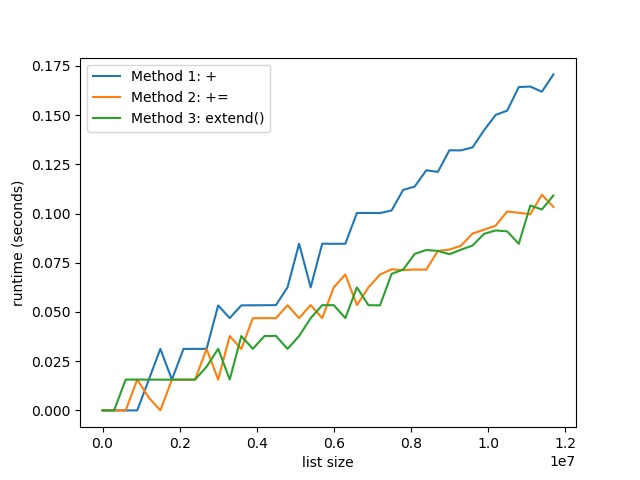
To help you understand why it’s important to choose the best method, I’ve performed a detailed speed benchmark on my Intel i7 (8th Gen) Notebook (8GB RAM) concatenating lists with increasing sizes using the three methods described previously.
Here’s the result:
The plot shows that with increasing list size, the runtime difference between the + method (Method 1), and the += and extend() methods (Methods 2 and 3) becomes increasingly evident. The former creates a new list for each concatenation operation—and this slows it down.
Result: Thus, both INPLACE methods += and extend() are more than 30% faster than the + method for list concatenation.
You can reproduce the result with the following code snippet:
To become successful in coding, you need to get out there and solve real problems for real people. That’s how you can become a six-figure earner easily. And that’s how you polish the skills you really need in practice. After all, what’s the use of learning theory that nobody ever needs?
Practice projects is how you sharpen your saw in coding!
Do you want to become a code master by focusing on practical code projects that actually earn you money and solve problems for people?
Then become a Python freelance developer! It’s the best way of approaching the task of improving your Python skills—even if you are a complete beginner.