Apple was the most imitated brand in phishing attempts in Q1 2020
By Mike Peterson Tuesday, April 14, 2020, 12:16 pm PT (03:16 pm ET)
Apple was the most imitated brand in web-based phishing campaigns in the first quarter of 2020, new research shows.
An example of a fradulent Apple phishing page. Credit: Malwarebytes Lab
Phishing remains one of the most popular tactics for cybercriminals and other bad actors to steal data or money across through fraudulent links sent via email, text or web browser redirects.
According to a new report from cybersecurity firm Checkpoint, web-based phishing campaigns remained the most popular in Q1 2020, accounting for 59% of attempts. Apple ranked as the most imitated brand for the category, followed by Netflix, PayPal, and eBay.
Apple’s jump from 7th place in the fourth quarter of 2019 to first place in Q1 2020 may have been the result of phishing campaigns attempting to take advantage of the buzz surrounding unreleased Apple products, Checkpoint theorizes.
Due to the ongoing coronavirus pandemic, there are a few other notable changes. Mobile-based phishing detections became the second most common attack vector, up from third place in Q4 2019, likely due to more users working from home. Previously, email ranked in second place.
Services commonly used in both at-home leisure and work, like PayPal and Netflix, also saw a boost in popularity between the Q4 2019 and the beginning of Q1 2020.
Checkpoint notes that the total number of brand-based phishing attempts remained stable between Q4 2019 and Q1 2020.
Earlier in April, the U.S. and U.K. governments warned citizens against clicking on any suspicious links to supposed relief websites.
Review: Overcooked 2: Gourmet Edition – The Perfect Recipe For Multiplayer Fun
After nearly two years of regular post-launch support, it seems that Team17 and Ghost Town Games are finally ‘finished’ with Overcooked 2. The developers have been provided some excellent additions in the time since launch, and all of it is now being tied together with the aptly named Overcooked 2: Gourmet Edition. For the purposes of this bonus DLC review, we’ll be focusing more on the content introduced in the expansions; if you‘d like to know more about the core game, feel free to read our full review of it here.
In addition to the full experience of the base game, Overcooked 2: Gourmet Edition also includes a few themed mini-campaigns that were added, alongside a slew of new cooks that you can play as across any of the content. One thing we’d like to highlight right away is that all these expansions taken together provide a substantial amount of extra content. Viewing it from purely a quantity standpoint, the DLC content actually doubles the length of the base game, and it introduces several new and cool gameplay mechanics, too. In many ways, one could even view all this extra content as a soft-sequel. It’s all built upon the foundation of Overcooked 2, but the new mechanics that are explored elevate the content higher than ‘just’ themed level packs.
We’ll start this off by delving into the three expansions offered by the season pass, the first of which is called Campfire Cook-Off. Here, the cooks trade in their chef hats for much more functional baseball caps and take their kitchen skills into the backcountry, where campfire s’mores reign king. The deep woods aesthetic presented here looks great, and it’s punctuated by small details like how the knives you chop food up with are replaced by axes. These axes are actually tied to a bigger game mechanic, too, as you must periodically chop up wood to place on the fire so you can keep cooking with it. Additionally, some levels feature heavy backpacks that must be worn at all times by your cooks, each of which contains an essential ingredient for the dish you’re making. Together, these two mechanics sufficiently add some interesting wrinkles to the standard gameplay, as you must now be vigilant of various cooking temperatures and have to basically chase after ingredients.
The next expansion is called Night of the Hangry Horde, and it trades in the rustic locales of the last expansion in favour of much spookier, horror-themed kitchens. Most notably, this DLC introduces a brand new horde mode that introduces light survival horror elements to the standard arcade action. Here, instead of just having one delivery window, there are now three or four, and they are each regularly bombarded by the ravenous Unbread. While the Unbread zombies wait for you to finish their orders, they’ll attack the boards nailed over their window, and you’ll have to regularly spend the money you make from orders to keep nailing new boards in place lest the zombies come in and lower your castle’s health bar. Additionally, Night of the Hangry Horde introduces a couple of other new game mechanics in its main levels, wherein you must regularly shovel coal into a furnace to keep the ovens going and the chopping boards have been replaced by a guillotine that instantly cuts whatever food you place beneath it. The new game mechanics and game mode introduced here make Night of the Hangry Horde the best of the expansions, exemplifying everything that one could ask for out of a DLC expansion.
The final DLC in the season pass is Carnival of Chaos, which sees our cooks showing off their prowess underneath the Big Top. Compared to the previous two expansions, this one feels a little more rote in its execution, but it still introduces some cool mechanics to make life hell for you. The most notable of these is a cannon which can fire cooks across the map. It requires at least two cooks to use – one to climb in, and the other to fire the button – and occasionally must be aimed properly to ensure the projectile cook reaches the correct destination. Additionally, Carnival of Chaos introduces the idea of combo meals to the mix, which often necessitates the usage of new condiment and beverage machines. Though Carnival of Chaos is missing a ‘wow’ factor here to really change up the way you approach your cooking, it still provides some sufficiently challenging levels to grapple with and is a joy to experience.
The next notable DLC is a standalone campaign of equal length called Surf ‘n’ Turf, which sees your cooks donning their swim trunks and providing service at a beachfront restaurant. Most notably, there’s usually no sink to wash dishes here; instead, your cooks must use a nearby water gun to both wash dishes and put out occasional fires. Additionally, fireplace bellows are often used to stoke the fires for making kebabs. You’d be surprised how much these seemingly innocuous tools can affect your performance, and the near-constant presence of water ensures that Surf ‘n’ Turf features some of the toughest level design in Overcooked 2.
Finally, there’s the Seasonal Update content, which was added for free to the base game for all players to enjoy. The first of these is a campaign centred around the Chinese New Year, and it most notably introduces another new game mode called ‘Survival’. Here, you add precious seconds to the clock with each successfully delivered order, and your goal is simply to make it as far as you can before failing. The other half of the seasonal content is called Winter Wonderland and sees your cooks making various Christmas themed desserts in freezing snowscapes. This content pulls together several ideas introduced in all the previous DLC’s, making it a sort of variety pack that keeps you guessing.
Conclusion
In case you haven’t gathered it yet from reading thus far, Team17 and Ghost Town Games explored a lot of cool ideas via DLC content, and ensured that each expansion had unique theming and gameplay mechanics. Considering that all of this is offered in addition to the absolutely stellar base campaign – which already felt complete on its own – Overcooked 2: Gourmet Edition really stands as a no-brainer. Overcooked 2 is one of the very best local co-op games you can currently buy for the Switch, and if you’ve been looking for that next game to play when you have friends over, look no further than this.
Super Pixel Racers Brings Nostalgic Top-Down Arcade Racing To Switch This Week
If you’re into your top-down arcade racers, Super Pixel Racers looks like it could well be worth a go when it launches on Switch later this week.
With 2D pixel graphics and a 16-bit soundtrack sure to have you reminiscing over the good old days, Super Pixel Racers has players taking on a range of different race styles. You can use any winnings you make to buy new cars with their own individual driving qualities and upgrade schemes. The aim here is to try out different cars and find the style which suits your playing style the best.
Here’s a look at the race styles you can expect to enjoy, as well as some other handy features:
Rally Cross: Classic race against up to 7 other drivers
Rally: Reach checkpoints on a procedurally generated outdoor track
Land Rush: Be in front of the pack when the time ends
Takedown: Destroy the other cars
Hunt: Chase the target down
Drift Show: Score points by drifting
Thirteen Unique Racetracks: From desert dunes to the city streets. A host of unique pixel environments set the stage for some truly super pixel racing.
Hone your drifting, score some Nitro: The more you drift, the quicker your nitro gauge fills up. Use it for an instant hit of speed; equally useful for dodging obstacles or slamming into opponents.
Vehicle Damage & Explosion Mechanics: In-race collisions result in visible damage to your pixel racer. Once a car takes too many hits, it goes up in flames!
The game is set to launch on Switch this Thursday, 16th April. You can pick it up for $14.99 / £11.69, although a 10% discount is available if you grab it from the eShop before launch.
Like the look of this one? Think you’ll take it for a spin? Tell us below.
Little Hope is set in a quaint American town of the same name. As is the case with most horror stories, the town has a dark and ominous past, which in this instance is based on the Salem witch trials of 17th century America. The game seems to predominantly take place in a modern-day setting with another cast of young adults you'll be trying to keep alive. There are clearly scenes set in 1692, though, so it will be interesting to see if you have any agency in these moments. The trailer (which you can see below) certainly makes it seem as though your decisions in the past will have repercussions in the future.
Man of Medan and Little Hope are the first two games in a planned series of branching horror games from the Until Dawn developer. "Each game in the series will feature a brand new story, setting, and characters," Pete Samuels, CEO and Executive Producer at Supermassive Games, said in a blog post. "The Anthology format gives us the opportunity to tap into a variety of horror sub-genres. We've identified 39 that we'd love to represent in the Anthology, but that would take some time!"
Python List Methods Cheat Sheet [Instant PDF Download]
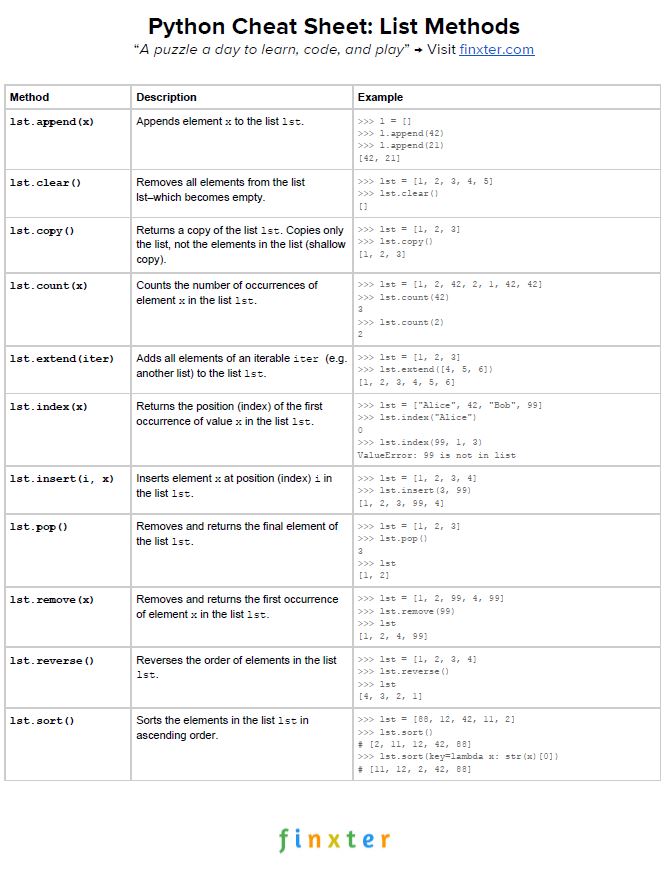
Here’s your free PDF cheat sheet showing you all Python list methods on one simple page. Click the image to download the high-resolution PDF file, print it, and post it to your office wall:
Sorts the elements in the list lst in ascending order.
Go ahead and try the Python list methods yourself:
Puzzle: Can you figure out all outputs of this interactive Python script?
If you’ve studied the table carefully, you’ll know the most important list methods in Python. Let’s have a look at some examples of above methods:
>>> l = []

>>> l.append(2)

>>> l

[2]

>>> l.clear()

>>> l

[]

>>> l.append(2)

>>> l

[2]

>>> l.copy()

[2]

>>> l.count(2)

1

>>> l.extend([2,3,4])

>>> l

[2, 2, 3, 4]

>>> l.index(3)

2

>>> l.insert(2, 99)

>>> l

[2, 2, 99, 3, 4]

>>> l.pop()

4

>>> l.remove(2)

>>> l

[2, 99, 3]

>>> l.reverse()

>>> l

[3, 99, 2]

>>> l.sort()

>>> l

[2, 3, 99]
Where to Go From Here?
Want more cheat sheets? Excellent. I believe learning with cheat sheets is one of the most efficient learning techniques. Join my free Python email list where I’ll send you more than 10 new Python cheat sheets and regular Python courses for continuous improvement. It’s free!
Alternatively if the link doesn't work, you can grab it from the store page itself here: Store Page[store.ubi.com]
Unfortunately the game is not available in Russia
We are welcoming everyone to join our discord[discord.gg]. We are more active there on finding giveaways, small or large, and there are daily raffles you can participate.
Halo 5's In-Game COVID-19 Charity Campaign Has Raised $200,000 Already
The developers of the Halo franchise are raising money to help with COVID-19 relief, and their efforts have brought in a lot of money so far.
Community director Brian Jarrard said on Twitter that Halo 5's in-game charity campaign has raised more than $200,000 USD as of April 10. The game is currently selling a "Relief and Recovery" Req Pack for the game's multiplayer mode, which includes various cosmetics and XP boosts. All proceeds are going to directly to the Global Giving's Coronavirus Relief Fund.
The DLC costs $10 USD, so it has moved a lot of units to reach $200,000 in donations. You can buy the Relief and Recovery REQ pack through Halo 5 or right here on the Xbox Store.
Posted by: xSicKxBot - 04-14-2020, 05:15 AM - Forum: Python
- No Replies
How to Split a List Into Evenly-Sized Chunks?
In this article, I’ll show you how to divide a list into equally-sized chunks in Python. Step-by-step, you’ll arrive at the following great code that accomplishes exactly that:
You can play around with the code yourself but if you need some explanations, read on because I’ll explain it to you in much detail:
Chunking Your List
Let’s make this question more palpable by transforming it into a practical problem:
Problem: Imagine that you have a temperature sensor that sends data every 6 minutes, which makes 10 data points per hour. All these data points are stored in one list for each day.
Now, we want to have a list of hourly average temperatures for each day—this is why we need to split the list of data for one day into evenly sized chunks.
Solution: To achieve this, we use a for-loop and Python’s built-in function range() which we have to examine in depth.
The range() function can be used either with one, two or three arguments.
If you use it with one single argument, e.g., range(10), we get a range object containing the numbers 0 to 9. So, if you call range with one argument, this argument will be interpreted as the max or stop value of the range, but it is excluded from the range.
You can also call the range() function with two arguments, e.g., range(5, 10). This call with two arguments returns a range object containing the numbers 5 to 9. So, now we have a lower and an upper bound for the range. Contrary to the stop value, the start value is included in the range.
In a call of the function range() with three parameters, the first parameter is the start value, the second one is the stop value and the third value is the step size. For example, range(5, 15, 2) returns a range object containing the following values: 5, 7, 9, 11, 13. As you can see, the range starts with the start and then it adds the step value as long as the values are less than the stop value.
In our problem, our chunks have a length of 10, the start value is 0 and the max value is the end of the list of data.
Putting all together: Calling range(0, len(data), 10) will give us exactly what we need to iterate over the chunks. Let’s put some numbers there to visualize it.
For one single day, we have a data length of 24 * 10 = 240, so the call of the range function would be this: range(0, 240, 10) and the resulting range would be 0, 10, 20, 30, …, 230. Pause a moment and consider these values: they represent the indices of the first element of each chunk.
So what do we have now? The start indices of each chunk and also the length – and that’s all we need to slice the input data into the chunks we need.
The slicing operator takes two or three arguments separated by the colon : symbol. They have the same meaning as in the range function.
data = [15.7, 16.2, 16.5, 15.9, ..., 27.3, 26.4, 26.1, 27.2]

chunk_length = 10 for i in range(0, len(data), chunk_length): print(data[i:i+chunk_length])
Play with this code in our interactive Python shell:
However, we can still improve this code and make it reusable by creating a generator out of it.
Chunking With Generator Expressions
A generator is a function but instead of a return statement it uses the keyword yield.
The keyword yield interrupts the function and returns a value. The next time the function gets called, the next value is returned and the function’s execution stops again. This behavior can be used in a for-loop, where we want to get a value from the generator, work with this value inside the loop and then repeat it with the next value. Now, let’s take a look at the improved version of our code:
data = [15.7, 16.2, 16.5, 15.9, ..., 27.3, 26.4, 26.1, 27.2]

chunk_length = 10 def make_chunks(data, length): for i in range(0, len(data), length): yield data[i:i + length] for chunk in make_chunks(data, chunk_length): print(chunk)
That looks already pretty pythonic and we can reuse the function make_chunks() for all the other data we need to process.
Let’s finish the code so that we get a list of hourly average temperatures as result.
import random def make_chunks(data, length): for i in range(0, len(data), length): yield data[i:i + length] def process(chunk): return round(sum(chunk)/len(chunk), 2) n = 10

# generate random temperature values

day_temperatures = [random.random() * 20 for x in range(24 * n)]

avg_per_hour = [] for chunk in make_chunks(day_temperatures, n): r = process(batch) avg_per_hour.append® print(avg_per_hour)
And that’s it, this cool pythonic code solves our problem. We can make the code even a bit shorter but I consider this code less readable because you need to know really advanced Python concepts.
import random make_chunks = lambda data, n: (data[i:i + n] for i in range(0, len(data), n))

process = lambda data: round(sum(data)/len(data), 2) n = 10

# generate random temperature values

day_temperatures = [random.random() * 20 for x in range(24 * n)]

avg_per_hour = [] for chunk in make_chunks(day_temperatures, n): r = process(batch) avg_per_hour.append® print(avg_per_hour)
So, what did we do? We reduced the helper functions to lambda expressions and for the generator function we use a special shorthand – the parenthesis.
Summary
To sum up the solution: We used the range function with three arguments, the start value, the stop value and the step value. By setting the step value to our desired chunk length, the start value to 0 and the stop value to the total data length, we get a range object containing all the start indices of our chunks. With the help of slicing we can access exactly the chunk we need in each iteration step.
Where to Go From Here?
Want to start earning a full-time income with Python—while working only part-time hours? Then join our free Python Freelancer Webinar.
It shows you exactly how you can grow your business and Python skills to a point where you can work comfortable for 3-4 hours from home and enjoy the rest of the day (=20 hours) spending time with the persons you love doing things you enjoy to do.
The 171st GalaQuiz will be LIVE soon, win up to $75 in GalaCredit!
[www.indiegala.com] The GalaQuiz will take place in less than 15 minutes from this announcement Today's GalaQuiz[www.indiegala.com] hints are up. The theme will be Emoji Animals Redux.
Scratchy Spring Sale Day 1: Idea Factory Spring Sale, up to -80%







 in GalaCredit!


