


This is a pure JavaScript solution to use AJAX without jQuery or any other third-party plugins.
The AJAX is a way of sending requests to the server asynchronously from a client-side script. In general, update the UI with server response without reloading the page.
I present two different methods of calling backend (PHP) with JavaScript AJAX.
- via XMLHTTPRequest.
- using JavaScript fetch prototype.
This tutorial creates simple examples of both methods. It will be an easy start for beginners of AJAX programming. It simply reads the content of a .txt file that is in the server via JavaScript AJAX.
If you want to search for a code for using jQuery AJAX, then we also have examples in it.
AJAX call via XMLHTTPRequest
This example uses XMLHttpRequest in JavaScript to send an AJAX request to the server.
The below script has the following AJAX lifecycle to get the response from the server.
- It instantiates
XMLHttpRequestclass. - It defines a callback function to handle the
onreadystatechangeevent. - It prepares the AJAX request by setting the request method, server endpoint and more.
- Calls send() with the reference of the
XMLHttpRequestinstance.
In the onreadystatechange event, it can read the response from the server. This checks the HTTP response code from the server and updates the UI without page refresh.
During the AJAX request processing, it shows a loader icon till the UI gets updated with the AJAX response data.
ajax-xhr.php
<!DOCTYPE html>
<html>
<head>
<title>How to make an AJAX Call in JavaScript with Example</title>
<link rel='stylesheet' href='style.css' type='text/css' />
<link rel='stylesheet' href='form.css' type='text/css' />
<style>
#loader-icon { display: none;
}
</style>
</head>
<body> <div class="phppot-container"> <h1>How to make an AJAX Call in JavaScript</h1> <p>This example uses plain JavaScript to make an AJAX call.</p> <p>It uses good old JavaScript's XMLHttpRequest. No dependency or libraries!</p> <div class="row"> <button onclick="loadDocument()">AJAX Call</button> <div id="loader-icon"> <img src="loader.gif" /> </div> </div> <div id='ajax-example'></div> <script> function loadDocument() { document.getElementById("loader-icon").style.display = 'inline-block'; var xmlHttpRequest = new XMLHttpRequest(); xmlHttpRequest.onreadystatechange = function() { if (xmlHttpRequest.readyState == XMLHttpRequest.DONE) { document.getElementById("loader-icon").style.display = 'none'; if (xmlHttpRequest.status == 200) { // on success get the response text and // insert it into the ajax-example DIV id. document.getElementById("ajax-example").innerHTML = xmlHttpRequest.responseText; } else if (xmlHttpRequest.status == 400) { // unable to load the document alert('Status 400 error - unable to load the document.'); } else { alert('Unexpected error!'); } } }; xmlHttpRequest.open("GET", "ajax-example.txt", true); xmlHttpRequest.send(); }
</script> </body>
</html>
Using JavaScript fetch prototype
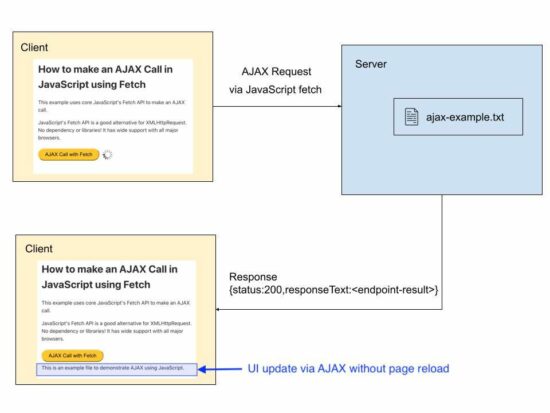
This example calls JavaScript fetch() method by sending the server endpoint URL as its argument.
This method returns the server response as an object. This response object will contain the status and the response data returned by the server.
As like in the first method, it checks the status code if the “response.status” is 200. If so, it updates UI with the server response without reloading the page.
ajax-fetch.php
<!DOCTYPE html>
<html>
<head>
<title>How to make an AJAX Call in JavaScript using Fetch API with Example</title>
<link rel='stylesheet' href='style.css' type='text/css' />
<link rel='stylesheet' href='form.css' type='text/css' />
<style>
#loader-icon { display: none;
}
</style>
</head>
<body> <div class="phppot-container"> <h1>How to make an AJAX Call in JavaScript using Fetch</h1> <p>This example uses core JavaScript's Fetch API to make an AJAX call.</p> <p>JavaScript's Fetch API is a good alternative for XMLHttpRequest. No dependency or libraries! It has wide support with all major browsers.</p> <div class="row"> <button onclick="fetchDocument()">AJAX Call with Fetch</button> <div id="loader-icon"> <img src="loader.gif" /> </div> </div> <div id='ajax-example'></div> <script> async function fetchDocument() { let response = await fetch('ajax-example.txt'); document.getElementById("loader-icon").style.display = 'inline-block'; console.log(response.status); console.log(response.statusText); if (response.status === 200) { document.getElementById("loader-icon").style.display = 'none'; let data = await response.text(); document.getElementById("ajax-example").innerHTML = data; } }
</script> </body>
</html>
An example use case scenarios of using AJAX in an application
AJAX is a powerful tool. It has to be used in an effective way wherever needed.
The following are the perfect example scenarios of using AJAX in an application.
- To update the chat window with recent messages.
- To have the recent notification on a social media networking website.
- To update the scoreboard.
- To load recent events on scroll without page reload.
We have seen how to keep on posting events into a calender using jQuery AJAX script in a previous article.
Download
https://www.sickgaming.net/blog/2022/09/...h-example/