


Before learning how to disable the cut, copy, paste and right-click event in JavaScript we should know first Why.
Why we need this is, for copying and manipulating content displayed on the client. It lets the user struggle to do the following for example.
- Take the copyrighted site content by copy and paste.
- Save media files by right-clicking and saving assets.
We implement this disabling by using the below steps. The first two of them are mandatory and the 3rd one is optional.
- Listen to the event type cut, copy, paste and right-click.
- Prevent the default behavior with the reference of the event object.
- Acknowledge users by showing alert messages [optional step].
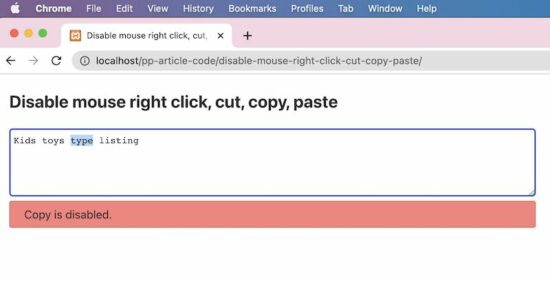
Example 1 – Disabling cut, copy, paste and mouse right-click events
This JavaScript disables the cut, copy, paste and right-click on a textarea content.
It defines a callback invoked on document ready event. It uses jQuery.
In this callback, it listens to the cut, copy, paste and the mouse right-click action requests.
When these requests are raised this script prevents the default behavior. Hence, it stops the expected action based on the cut, copy, and other requests mentioned above.
$(document).ready(function() { $('textarea').on("cut", function(e) { e.preventDefault(); alertUser('Cut'); }); $('textarea').on("copy", function(e) { e.preventDefault(); alertUser('Copy'); }); $('textarea').on("paste", function(e) { e.preventDefault(); alertUser('Paste'); }); $("textarea").on("contextmenu", function(e) { e.preventDefault(); alertUser('Mouse right click'); });

}); function alertUser(message) { $("#phppot-message").text(message + ' is disabled.'); $("#phppot-message").show();

}
HTML with Textarea and alert box
This HTML has the textarea. The JavaScript targets this textarea content to disable the cut, copy and more events.
Once disabled the default behavior, the UI should notify the user by displaying a message.
So, it contains an HTML alert box to show a red ribbon with a related error message to let the user understand.
It includes the jQuery library with a CDN URL. Insert the above script next to the jQuery include then run the example.
The downloadable at the end of this article contains the complete working example.
<!DOCTYPE html>

<html>

<head>

<title>Disable mouse right click, cut, copy, paste with JavaScript or jQuery</title>

<meta name="viewport" content="width=device-width, initial-scale=1" />

<link rel="stylesheet" type="text/css" href="css/style.css" />

<link rel="stylesheet" type="text/css" href="css/form.css" />

<style>

#phppot-message { display: none;

}

</style>

<script src="https://code.jquery.com/jquery-3.6.0.min.js" integrity="sha256-/xUj+3OJU5yExlq6GSYGSHk7tPXikynS7ogEvDej/m4=" crossorigin="anonymous"></script> </head> <body> <div class="phppot-container"> <h2>Disable mouse right click, cut, copy, paste</h2> <textarea name="notes" class="full-width" rows="5"></textarea> <div id="phppot-message" class="error"></div> </div>

</body>

</html>
Example 2 – Thin version using jQuery
This example is a thin version of the above. It also uses the jQuery library to disable the cut, copy paste and right-click events.
This binds all the events to be disabled. It has a single-line code instead of creating exclusive listeners for each event.
This method has a slight disadvantage. That is, it shows a generic message while stopping any one of the cut, copy, paste and right-click events.
In the first method, the acknowledgment message is too specific. That message gives more clarity on what is triggered and what is disabled and prevented.
But, the advantage of the below example is that it is too thin to have it as a client-side feature in our application.
$(document).ready(function() { $('textarea').bind('cut copy paste contextmenu', function(e) { e.preventDefault(); $("#phppot-message").text('The Cut copy paste and the mouse right-click are disabled.'); $("#phppot-message").show(); });

});
Example 3 – For JavaScript lovers
Do you want a pure JavaScript solution for this example? The below script achieves this to disable cut, copy, paste and right-click.
It has no jQuery or any other client-side framework or libraries. I believe that the frameworks are for achieving a volume of effects, utils and more.
If the application is going to have thin requirements, then no need for any framework.
HTML with onCut, onCopy, onPaste and onContextMenu attributes
The Textarea field in the below HTML has the following callback attributes.
- onCut
- OnCopy
- onPaste
- onContextMenu
In these event occurrences, it calls the disableAction(). It sends the event object and a string to specify the event occurred.
<textarea name="notes" class="full-width" rows="5" onCut="disableAction(event, 'Cut');" onCopy="disableAction(event, 'Copy');" onpaste="disableAction(event, 'Paste');" oncontextmenu="disableAction(event, 'Right click');"></textarea>
<div id="phppot-message" class="error"></div>
JavaScript function called on cut, copy, paste and on right click
In the JavaScript code, it reads the event type and disables it.
The event.preventDefault() is the common step in all the examples to disable the cut, copy, paste and right click.
function disableAction(event, action) { event.preventDefault(); document.getElementById("phppot-message").innerText = action + ' is disabled.'; document.getElementById("phppot-message").style.display = 'block';

}
Disclaimer
The keyboard or mouse event callbacks like onMouseDown() or onKeyDown lags in performance. Also, it has its disadvantages. Some of them are listed below.
- The keys can be configured and customized. So, event handling with respect to the keycode is not dependable.
- On clicking the mouse right, it displays the menu before the onMouseDown() gets and checks the key code. So, disabling mouse-right-click is failed by using onMouseDown() callback.
- Above all, an user can easily disable JavaScript in his browser and use the website.
https://www.sickgaming.net/blog/2022/08/...or-jquery/