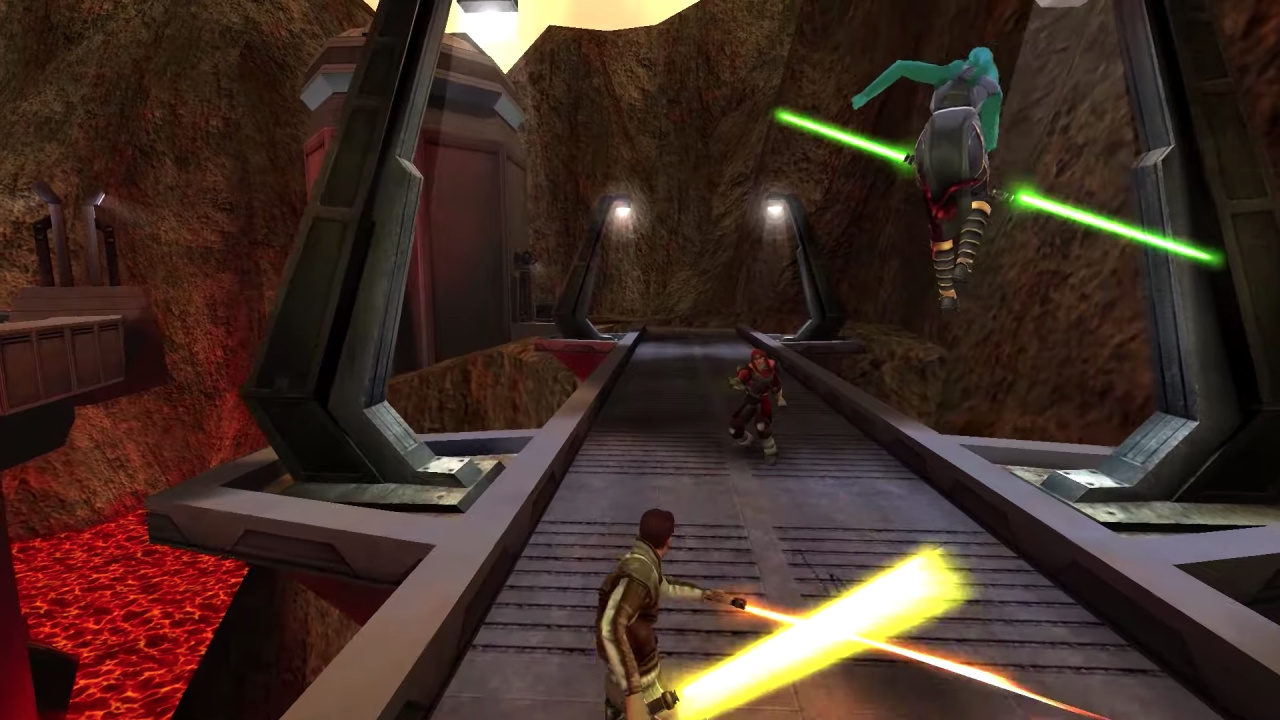
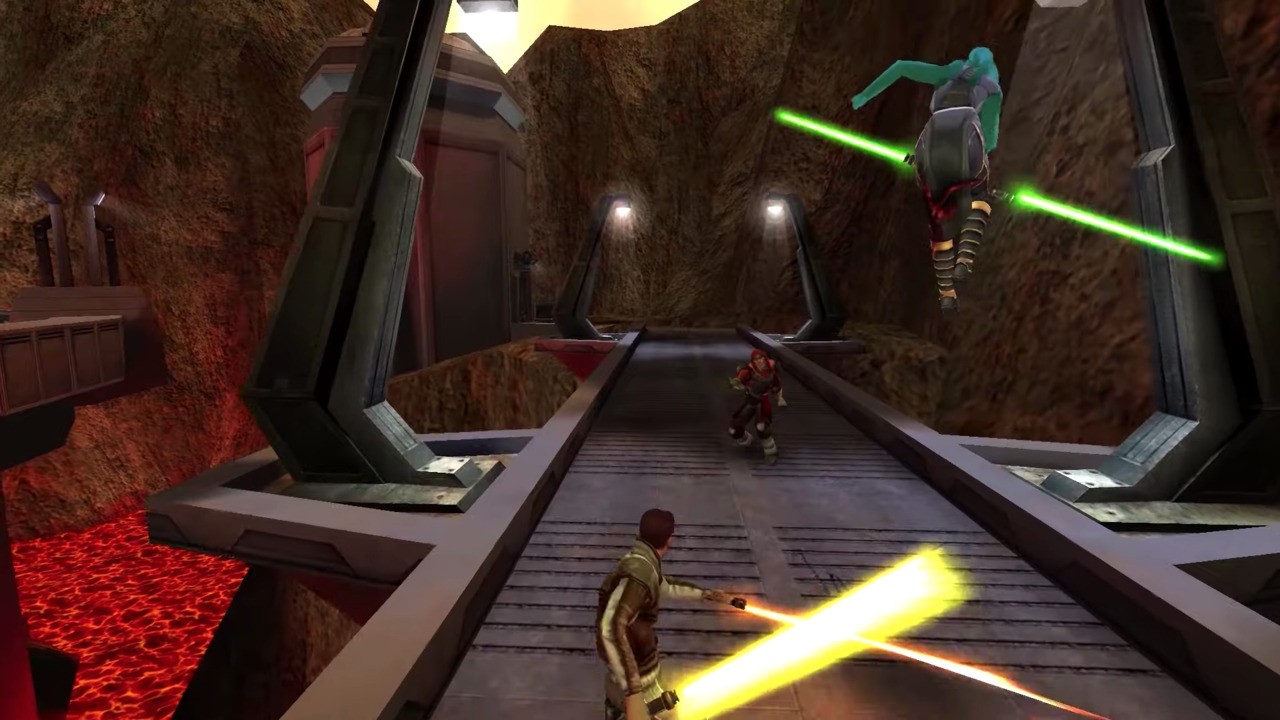
Star Wars: Jedi Knight: Jedi Academy Might Be Released On Switch Next Week
One welcome surprise on the Switch last year was the release of Star Wars Jedi Knight II: Jedi Outcast. Although this version didn’t include the much-loved multiplayer component, Aspyr Media still made the effort to improve the solo experience over time with some patches.
What’s going on with Star Wars: Jedi Knight: Jedi Academy, though? It was confirmed for Switch last September alongside the reveal of Jedi Knight II: Jedi Outcast and was scheduled to be arriving early on in 2020. Well, the latest update comes from the PlayStation Blog of all places. Yep, according to a new post, Jedi Knight: Jedi Academy is arriving digitally on the PlayStation 4 on 26th March. Here’s the description for this console:
The online multiplayer classic comes to PS4 with Trophies and modernized controls! Take on the role of a new student eager to learn the ways of the Force from Jedi Master Luke Skywalker. Interact with famous Star Wars characters as you face the ultimate choice: fight for good and freedom on the light side or follow the path of power and evil to the dark side.
While there’s obviously no mention of the Nintendo Switch release on this page, there’s a theory going around it could be linked to the rumoured Nintendo Direct, which is believed to be taking place on 26th March. This same rumour already predicted the recent Nintendo Indie World Showcase. Keep in mind, there is no guarantee, so we’ll just have to wait and find out.
Welcome to Box Art Brawl, the weekly perusal of regional retro box art variants that ends with a vote on the best of the bunch.
Last weekPerfect Dark for the Nintendo 64 battled itself in round #34 and, quite frankly, we thought Japan’s moody red and black cover would absolutely destroy the competition, as lovely as they are. We’d even avoided doing Perfect Dark because the result seemed so painfully predictable, but it turned out to be much, much closer than we expected. Japan still won, of course, but with 41% to Europe’s 33%, with North America coming in just behind that with the remaining 26%. A far more even split than we had anticipated.
This week you might have heard that there’s a new Animal Crossing game on Switch? Well, we thought we’d go back to the very beginning and take a look at the first one. To be honest the differences between the European and North American versions are minor, but with a couple of bonus Japanese covers to enjoy, we threw caution to the wind.
Come on, city folk, let’s go to the forest...
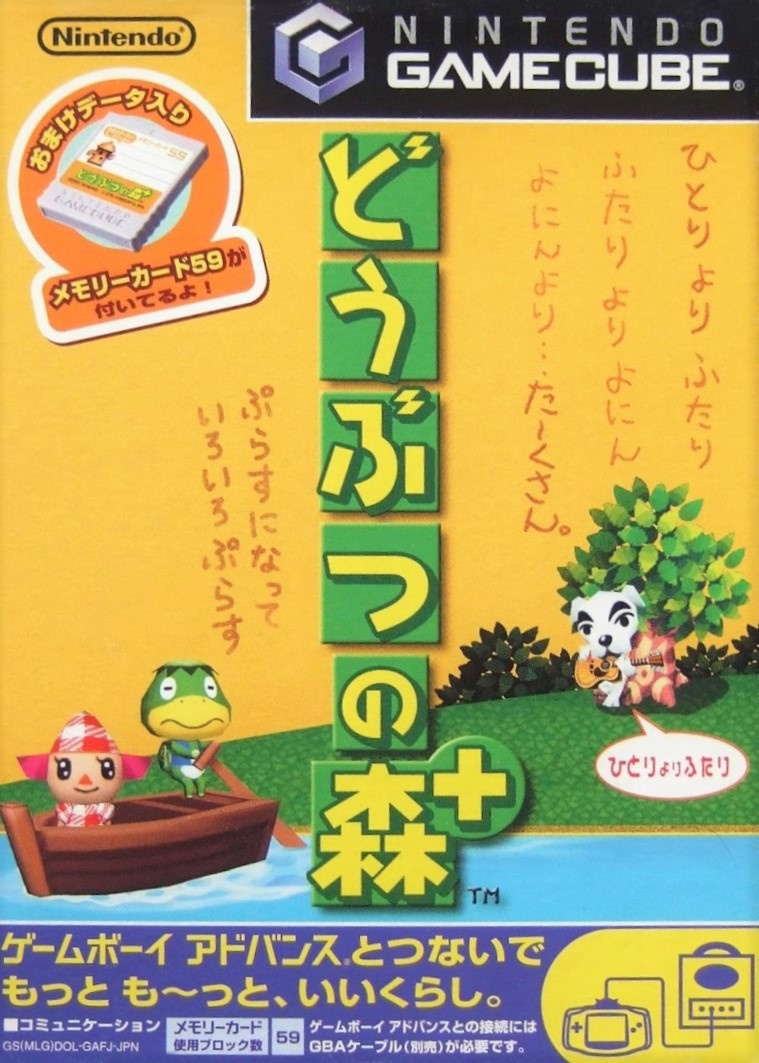
Japan
The Japanese version for GameCube wasn’t the original – the Japanese game began life on Nintendo 64 – but it carried over the yellow theme of the original (which you can see at the bottom of the page). The GameCube port of Dōbutsu no Mori or ‘Animal Forest’ had a ‘+’ added to it along with GBA connectivity enabling you to visit a tropical island via Kapp’n’s boat, and you can see this referenced with said boat at the shore.
We love the yellow, we love the characters, we love the boldness of the logo. The top half is lacking a little something, perhaps, and the strip at the bottom is a bit noisy, but it’s not bad.
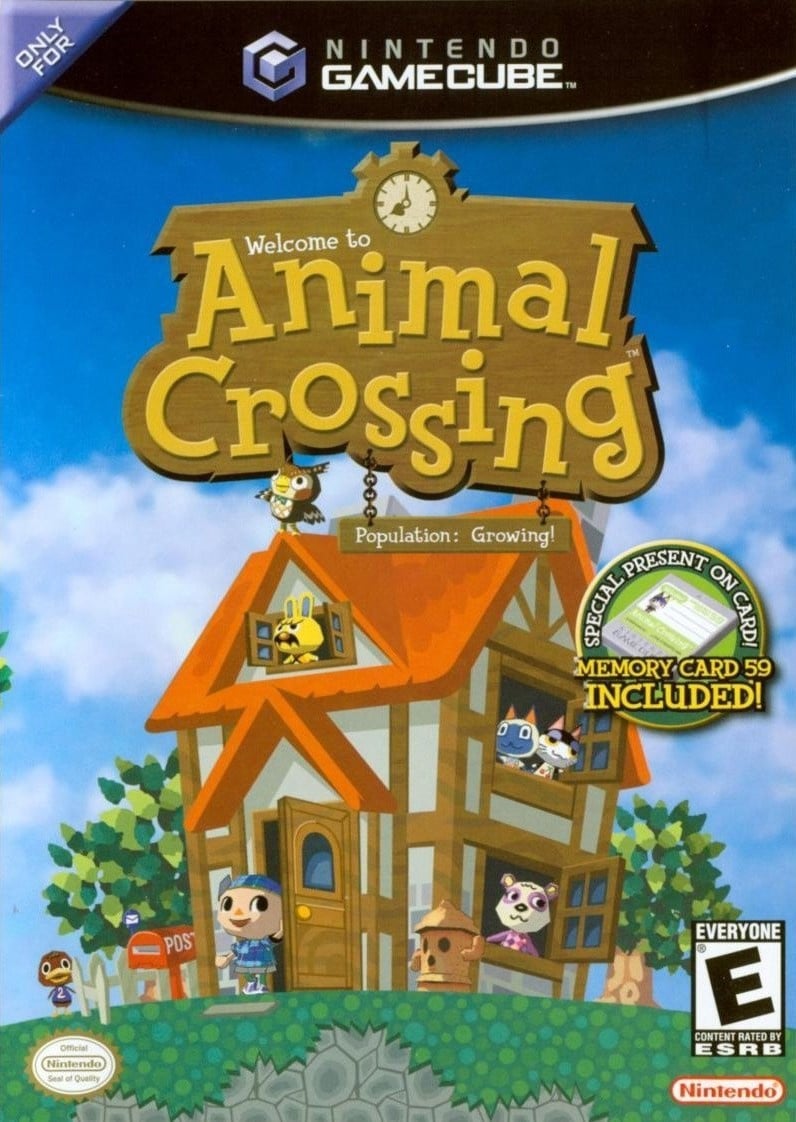
North America
Again with the Memory Card ‘sticker’, the North American version puts a lovely house front and centre, with various animals poking their heads out of windows and the villager coming out the front door to check the post. It’s all set against a beautiful blue sky as Blathers stands on the roof, presumably about to nod off as a new day begins.
Full of optimism and promise, it’s a winner in our eyes. If we’re really searching for issues, the wood-to-letter ratio of the logo is a little wood-heavy, maybe.
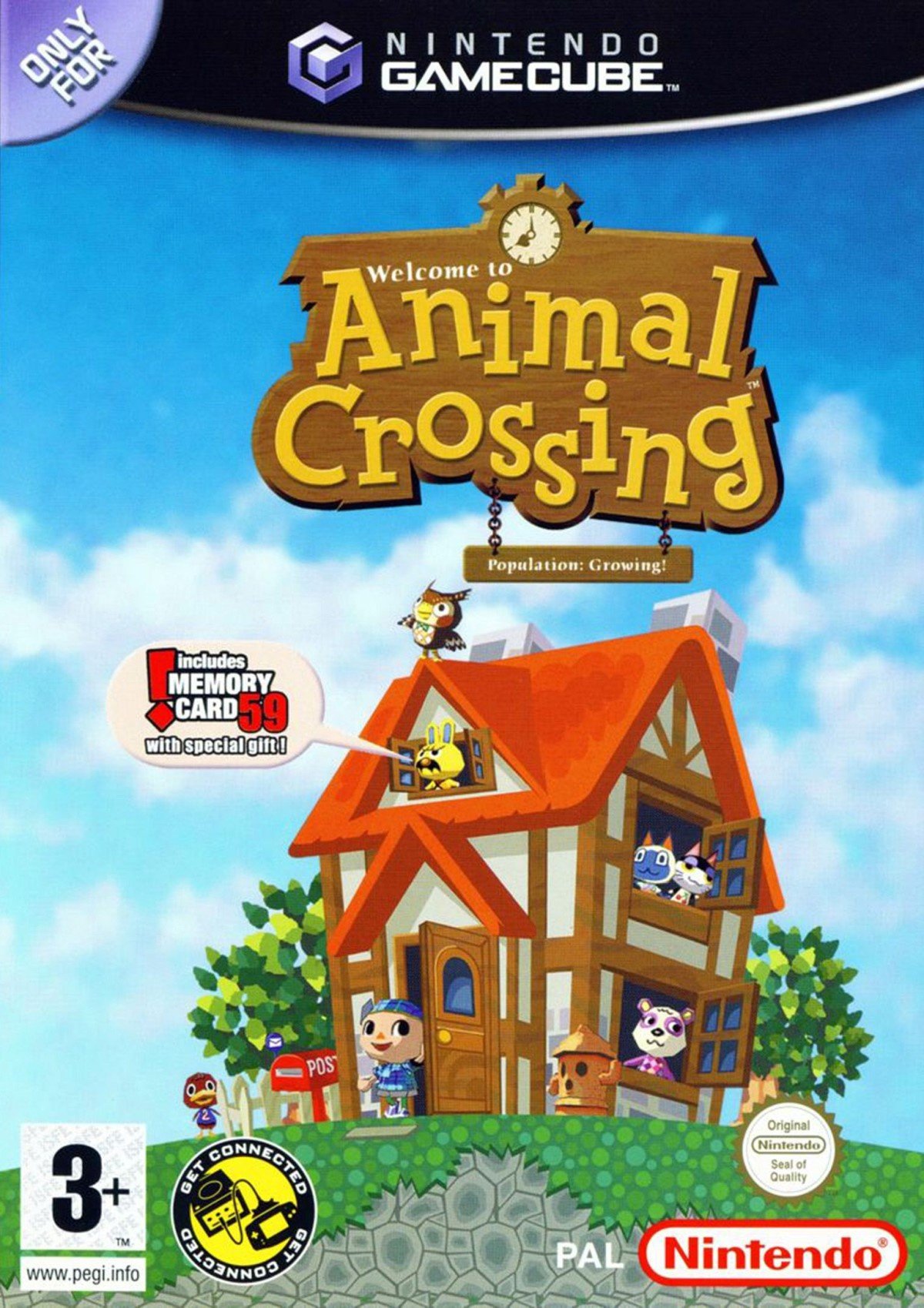
Europe
Finally we have Europe which reduces the size and reframes the house and the logo slightly to the right. The memory card ‘sticker’ is replaced here with a speech bubble coming from Gaston the grumpy yellow rabbit. This one also highlights the GBA connectivity that wasn’t advertised on the NA box with a natty little black, yellow and white stamp which we’re rather partial to.
It’s all much of a muchness between the non-Japanese pair, to be honest. It all depends on the details you prefer. Bigger house or speech bubble? PEGI or ESRB? Get connected or… get a better view of the grass?
Bonus!
Seeing as Japan got not one, not two, but three versions of this game (the N64 original, the Gamecube ‘+’ port and the ‘e+’ version which added e-card features and a host of updates that brought features and events from the North American localised version back to Japan), we thought we’d include the other two for your delectation and delight. They’re not in the poll, but are here to be enjoyed all the same. We particularly enjoy the postage stamps on the N64 box:
And there you have it! All that’s left to do is click your favourite variant below and hit the ol’ vote button:
We hope you’re enjoying New Horizons. Let us know below if you think the N64 or ‘e+’ versions trump the three in the poll and we’ll see you next time for another round.
Inspired by the actions of Ryan Reynolds and Jimmy Fallon, who have both made big donations to charities helping people affected by COVID-19 (coronavirus), Ninja and his wife-slash-manager Jessica Blevins have pledged $150,000 to Feeding America.
In a video, the Mixer streamer announced his own donation, as well as encouraging those who still have spare cash to donate as well. They’re also using Ninja’s social influence to promote measures to flatten the curve, reiterating how important it is to take coronavirus seriously and practice social distancing.
The charity they’ve chosen, Feeding America, is currently working to help the huge number of people who’ve been affected by coronavirus in America, with a dedicated COVID-19 response fund. The work Feeding America is doing includes making sure the 22 million children who rely on school lunches are still able to access good meals while schools are closed. It’s also working to distribute other essential supplies such as cleaning supplies, diapers and personal care products to those in need.
At not-GDC this year, DirectX 12 Ultimate was announced. DirectX 12 Ultimate is a new baseline version of Direct X for new Xbox consoles and PC’s, to make development as easy as possible. In addition to existing features including DirectX Raytracing and Variable Rate Shading, Ultimate includes the new features of Mesh Shaders and Sampler Feedback.
Microsoft’s Game Stack exists to bring developers the tools they need to create bold, immersive game experiences, and DX12 Ultimate is the ideal tool to amplify gaming graphics. DX12 Ultimate is the result of continual investment in the DirectX 12 platform made over the last five years to ensure that Xbox and Windows 10 remain at the very pinnacle of graphics technology. To further empower game developers to create games with stunning visuals, we enhanced features that are already beginning to transform gaming such as DirectX Raytracing and Variable Rate Shading, and have added new major features such as Mesh Shaders and Sampler Feedback.
Together, these features represent many years of innovation from Microsoft and our partners in the hardware industry. DX12 Ultimate brings them all together in one common bundle, providing developers with a single key to unlock next generation graphics on PC and Xbox Series X.
Of course, even the most powerful features are of limited use without the tools necessary to fully exploit them, so we are pleased to announce that our industry-leading PIX graphics optimization tool and our open-source HLSL compiler will provide game developers with the ability to squeeze every last drop of performance out of an entire ecosystem of DX12 Ultimate hardware.
NVidia are currently the only video card maker with DX12 Ultimate compatible devices detailed here. AMD however are the company behind the GPU of the next generation XBox and will be supporting DX12U in their upcoming RDNA 2 hardware.
If you are interested in learning more about DirectX 12 Ultimate you can start with the Getting Started guide available here. You can learn more about the release in the video below.
Teamfight Tactics is out on iOS and Android Right Now
By Joe Robinson19 Mar 2020
While the ‘Auto Chess Wars’ seem to have cooled off a bit heading into 2020, there are still some clear front-runners. ‘OG’ Auto Chess is still plodding away, with the main version existing on mobile devices. Valve’s DOTA Underlords may have lost most of its user-base, but the team were quite quick at getting the game out and have proven very responsive so far in terms of development – we hope the launch of their first official season has gone well.
Elsewhere, Blizzard have gotten in on the action with the most unique Auto Chess take to date – Hearthstone Battlegrounds. ‘Auto Chess but with cards’ isn’t something I’d have expected to work well, but it does, despite my issues with the stat inflation that mires the main CCG.
Arguably though the One Auto Chess to Rule Them All currently is Riot’s Teamfight Tactics, which has just released today on the App Store and Google Play.
I’ve just taken it for a quick spin – it’s pretty decent, although the change from a square grid to a hex isn’t as impactful as I thought it’d be. Perhaps it’s more of a subtle change. Like Underlords it has very good visual production values, and some neat little touches. Your little penguin avatar can actually roam about the map, for example, and there’s a couple of carousel rounds where you need to run and ‘pick’ your starting/free champion from a rotating line-up. Your avatar will pick the first one it touches so path-finding is key, lest you accidentally get someone else.
This can be confusing for new players though, as it really needs you to understand who champions are at a glance and what their traits are.
Other than that, it feels a lot like Underlords and OG Auto Chess. There’s money, there’s three tiers a champion can reach, there’s mob rounds… all the usual mechanics right now. If you want to read more regarding tips & strategies for Teamfight Tactics before jumping in, our sister website Strategy Gamer put together an essential tips guide for anyone new to this particular brand of Auto Battler.
The launch of the mobile version coincides with the ‘Galaxies’ update, which swaps out a lot of content for new sci-fi/space themed environments. There are also brand new champions and synergies to play around with as well.
Teamfight Tactics is free-to-play, but features a Battle Pass system where you can pay for additional in-game goodies, such as avatars and emotes. The Battle Pass for the current Galaxies season is $9.99, but the App store lists several different IAPs currently – we think those are simply Battle Pass IAPS for other languages.
Will you be giving Teamfight Tactics a go, or are you Auto Chessed out?
Apple rumored to be ‘prototyping’ revamped AirPower charging mat
By William Gallagher Monday, March 23, 2020, 02:34 am PT (05:34 am ET)
Despite previously cancelling the planned AirPower charging mat, an unsubstantiated new rumor claims that Apple is revisiting the idea, and is even at the prototyping stage.
The original and never released AirPower wireless charging mat
AirPowerwas a rare public failure for Apple, as it was announced in 2017, but was ultimately cancelled in 2019. At the time, Apple did not give specific reasons for why the project was dropped, though, and now a new rumor claims that it has revived its plans for the wireless charging mat.
AirPower isn’t dead
The project is back on, internally. No guarantee that they’ll finalize and release it, but they haven’t given up yet and they’re trying to re-engineer the coils to displace heat more effectively. Prototyping is underway.
Jon Prosser has tweeted that the project has resumed, and that it has even reached a prototyping stage. As he says, this is not evidence that Apple will ever actually release a product, but it is significant that it has gone beyond design and into testing.
Prosser, who describes himself as a tech analyst, has only a limited track record in Apple rumors. However, he did correctly report when Apple was showing AirPods Pro to media ahead of their official launch.
Also, his report comes after established analyst Ming-Chi Kuo claimed, in January 2020, that Apple was planning to release what he only described as a “smaller wireless charging mat,” in the first six months of 2020.
Kuo did not call this mat AirPower, and the claim that it is “smaller” suggests that it wouldn’t have the AirPower’s ability to charge an iPhone, Apple Watch and AirPods simultaneously.
Consequently, if there is a revised AirPower being prototyped, it may not be the same device as this smaller mat.
However, it does also fit with what Apple said when it cancelled the original AirPower. After saying that it was not going to achieve “our high standards,” and apologizing for it, Apple added one extra comment.
“We continue to believe that the future is wireless,” said Dan Riccio, senior vice president of Hardware Engineering at the time, “and are committed to push[ing] the wireless experience forward.”
Cockpit is a very useful utility allowing you to manage a compatible system over the network from the comfort of a web browser (See the list of supported web browsers and Linux distributions). One such feature is the ability to manage storage configuration. Cockpit contains a frontend for udisks2 – it allows you to create new partitions or format, resize, mount, unmount or delete existing partitions without the need to do it manually from a terminal.
Note: please exercise caution when managing your system disk and it’s partitions – incorrectly handling them may leave your system in unbootable state or incur data loss.
Installing Cockpit
If you don’t have Cockpit installed yet you can do so by issuing:
sudo dnf install cockpit
Note: Depending on your install profile, Cockpit might already be installed and you can skip the installation step! Also, some users may need to install cockpit-storaged package along with it’s dependencies if it has not been installed:
sudo dnf install cockpit-storaged
Add the service to the firewall:
sudo firewall-cmd –add-service=cockpit –permanent
Afterwards enable and start the service:
sudo systemctl enable cockpit.socket –now
And after this everything should be ready and cockpit should be accessible by entering the computers IP address or network domain name in the browser followed by the port 9090. For example: https://cockpit-example.localdomain:9090
Note: you will need to authenticate as privileged user to be able to modify your storage configuration, so tick the “Reuse my password for privileged tasks” checkbox on the Cockpit login page.
Basic provisioning of the storage device
Visiting the “Storage” section will display various statistics and information about the state of the system storage. You can find information about the partitions, their respective mountpoints, realtime disk read/write stats and storage related log information. Also, you can format and partition any newly attached internal/external storage device or attach an NFS mount.
To format and partition a blank storage device, select the device under “Devices” section by clicking on it. This will bring you to the screen of the selected storage device. Here you’ll be able to create a new partition table or format and create new partitions. if the device is empty Cockpit will describe the content of the storage device as unknown.
Click on “Create New Partition Table” to prepare the device. After the partition table has been created, create one or more partitions by clicking “Create Partition” – here you’ll be able to specify the size, name, mountpoint and mount options.
When partitioning the storage device you have the choice between “Don’t owerwrite exiting data” and “Overwrite existing data with zeroes” – this will take slightly longer but is useful if you want to confidently erase the content of the storage device. Please note that this may not be enough for a substitute if your organisation has regulations in place how securely storage data must be erased. If needed, you can also specify custom mount options if defaults don’t suit your needs.
To simply create a single partition taking up all the storage space on the device just specify the name, for example, use “test” then specify it’s mountpoint, such as “/mnt/test” and click “Ok”. If you don’t want it to be immediately mounted uncheck the “Mount Now” checkbox. Specifying the name is optional, but will help you to identify the partition when inspecting the mountpoints. This will create a new XFS (the default recommended filesystem format) formatted partition “test” and mount it to “/mnt/test”.
It will also add the necessary entry to your /etc/fstab so that the partition gets mounted at boot.
Logical Volume Management
Cockpit also offers users to easily create and manage LVM and RAID storage devices. To create new Logical Volume Group, click on the burger menu button in the devices section and select the “Create Volume Group”. Select the available storage device (only devices with unmounted or no partitions will show up) to finish the process and afterwards return to the storage section and select the newly created volume group. From here on you’ll be able to create individual logical volumes by clicking “Create new Logical Volume”. Similarly to individual partitions, you can specify the size of the logical volume during creation if you don’t want to use all the available space of the volume group. After creating the logical volumes you’ll still need to format them and specify mountpoints. This can be done just like creating individual partitions was described earlier only instead of specifying individual disk devices you’re selecting logical volumes.
Here’s how a Logical Volume Group named “vgroup” with two Logical Volumes (lvol0 and lvol1) named “test” mounted on /mnt/test and named “data” mounted on /mnt/data would look like:
Just like before – all the necessary information has been added to the configuration and should persist between system reboots.
Other storage related Cockpit features
Apart from the described features above Cockpit also allows you to mount iscsi disks and nfs mounts located on the network. However, these resources are usually hosted on a dedicated server and require additional configuration going beyond this article. At this time Cockpit itself doesn’t offer the ability for users to configure and serve iscsi and nfs mounts but this may subject to change as Cockpit is an open source project under active development.
?Professor Indie Bundle & Bandai Namco Super Sale!
Professor Indie Bundle | 8 Steam Games | 95% OFF [www.indiegala.com] Time to learn some fascinating trivia, solve some puzzles and use our brain efficiently. Don't forget about the special 24h launch deal!
Quarantine Sale Day 3: Bandai Namco Super Sale!, up to 82% OFF!
GameStop Is Temporarily Closing All Of Its Storefronts
The struggling video game retailer GameStop has tried everything possible to remain open during the COVID-19 outbreak, but as of 22nd March will be closing all access to physical stores across the US.
An official PR explains how for all locations not already closed in accordance with state and local orders, the company will temporarily stop customer access to storefronts. It will now process orders on a digital-only basis, move to curbside pick-up at stores and eCommerce delivery only. This will allow the company to continue to serve customers who purchased online and requested a product pick-up at a local store.
GameStop Chief Executive Officer George Sherman said the priority was the well-being of employees, customers and business partners.
We have been steadfast in our adherence to CDC-guided safety and local government orders for retailers in each of our communities. As millions of Americans look to GameStop to adjust to their new normal of increased time at home, for work, learning and play, we have implemented practices to help ensure the safety and health of our employees, customers and partners. We believe it is prudent to institute further safety protocols while meeting this increased demand through curbside pick-up. As such, stores that remain in operation will provide only pick-up at the door or delivery to home activities to further protect our employees and customers.
All employees have been ensured that they “do not have to work if they are not comfortable” and should remain at home if they feel sick. The company also said it would pay all American employees whose work hours have been eliminated an additional two weeks at their regular pay rate based on average hours worked in the last 10 weeks. The company will also reimburse all benefit-eligible employees based in America, one month of the employee portion of benefit expenses.
GameStop will provide more details about its operations in its fourth-quarter fiscal year 2019 results next week on 26th March.
Posted by: xSicKxBot - 03-23-2020, 12:44 AM - Forum: Lounge
- No Replies
Doom Eternal Doom Hunter Base: Mission 4 Walkthrough And Tips
Doom Eternal's fourth mission has you mounting an assault on the Doom Hunter's base. Below you can find a walkthrough detailing how to get through its deadly demonic threats. For walkthroughs of Doom Eternal's other chapters, check out our guide hub collecting what we have up so far. We'll be publishing more in subsequent days. But if you're looking for more basic Doom Eternal tips, be sure to read our guide detailing everything you should know before playing. Otherwise, you can read our Doom Eternal review in progress.
Mission 4 Walkthrough -- Doom Hunter Base
This mission begins on a train, so kill all of the Soldiers and Imps here--using the Rocket Launcher to make short work of the Mancubus--and then follow the waypoint to detach a carriage and pull into the station.
Climb up the left hand side to reach the platform and defeat the enemies waiting for you. From here, follow the waypoint to jump and wall climb your way to the other side. Head through the door and you'll encounter a Pinky for the first time.