Crazy good deal: 50% off Master & Dynamic MW07 True Wireless Earphones
Exclusive
By Christine McKee Saturday, March 14, 2020, 04:02 pm PT (07:02 pm ET)
Master & Dynamic has partnered with AppleInsider this week to offer readers the lowest price anywhere on its MW07 wireless earphones. Enjoy half off the premium earbuds in your choice of color with our exclusive coupon.
This special deal, which is available exclusively for AppleInsider readers, knocks half off the MW07 True Wireless Earphones with promo code APPLEINSIDER50 when ordered from M&D directly.
Now $99.50 in your choice of seven colors, the MW07 earphones are made of handcrafted acetate for a luxurious look, with rich sound thanks to custom 10mm high-performance Beryllium drivers. In our hands-on review, we found the Master & Dynamic MW07 earphones to offer superior sound vs Apple’s first-gen AirPods.
The MW07 earphones also offer a customizable fit with two different parts — the silicone tip and a “fit wing” — that can be adjusted independently, keeping you comfortable and the MW07 earbuds secure.
The 50% markdown delivers the lowest price available, with retailers like Amazon and B&H selling the same earphones for up to $70 more. Master & Dynamic is also including free delivery, and orders placed Monday-Friday by 1 p.m. Eastern are typically shipped the same day.
[embedded content]
Additional Apple deals
AppleInsider and Apple authorized resellers are also running additional exclusive savings on Apple hardware that will not only deliver the lowest prices on many of the items, but also throw in bonus discounts on AppleCare, Office 365 and more. These offers are as follows:
The Switch Might Be Getting Another Bandai Namco Remaster
Monkey Craft might not necessarily be a household name, but you’re probably at least familiar with its previous release. It was the company contracted by Bandai Namco to help bring Katamari Damacy REROLL to the Nintendo Switch in 2018 and has also assisted with another Bamco remaster on the hybrid device known as Mojipittan Encore.
Here’s where it gets interesting. In addition to helping out with the “planning, programming, and 2D Design” of both of these remasters, the company is now believed to have at least one other Switch title in development. This is all according to its official website, which goes on to reveal it began three different projects in January 2018, May 2019, and August 2019.
The first two dates are thought to cover Katamari Damacy REROLL and Mojipittan Encore. As for the third one, there’s some speculation it could be tied to the recent trademarks for Klonoa, Mr. Driller, Wagyan Land, Genpei Touma Den, and Splatterhouse.
Could another Bandai Namco remaster be coming to Switch? What would you like to see next? Tell us below.
Thankfully, we can all now sit back and relax to discuss our weekend gaming plans. Members of Team Nintendo Life have done just that below and we’d love for you to join us via the poll and comment sections. Enjoy!
Gavin Lane, staff writer
I noticed earlier this week that Super Mario Maker 2 has been updated with new Ninji Speedruns, so I’d like to give those a whirl if I get time this weekend. I’ve still got several unfinished levels waiting for me, but making great levels takes time and it’s much easier to dive into the speedruns.
And after diving into a whole bunch’a beat ‘em ups on Switch earlier this week, I fancy blasting through something on the Capcom Beat ‘Em Up Bundle, too. A little Battle Circuit, maybe. Ring Fit Adventure is also sitting untouched in the cupboard under the telly. I should probably crack that out – there’ll be fighting in the streets to get hold of that game come quarantine lockdown, and mine’s just sitting there.
Have a good one, people! Stay safe, be mindful of others and only push lift buttons with your elbows.
Ryan Craddock, staff writer
I’ve got quite a busy weekend ahead of me so I doubt I’ll get too much game time, but I will be trying to slip in the odd hour or two of Pokémon Mystery Dungeon: Rescue Team DX. I’ve been playing it in relatively short bursts over the last few days and finding it to be a decent way to pass the time without having to invest too much attention. I’m sure the difficulty will ramp up soon enough, though.
Elsewhere, like many of you, I imagine, I’m simply playing the waiting game for New Horizons to arrive. I’m struggling to think about much else really, so much so I even ended up writing a song about it (oh dear!):
Liam Doolan, news reporter
I guess this weekend I’ll be bunkering down and continuing on with my playthrough of Final Fantasy VII on the Switch. Compared to the original release, this new one is a lot less punishing thanks to the Character Booster feature. When I’m not grinding away in-battle, I’ll probably be playing more of the same – that’s Rune Factory 4 Special, DOOM and DOOM II to prepare for the release of DOOM 64 on 20th March. The re-release of the 64 title even comes with a brand new chapter. I can’t wait!
Ollie Reynolds, reviewer
What a week, eh? It’s been a mentally draining one for me, with plenty of activity around the day job thanks to some virus, or something… So this weekend, I’m more than happy to ‘self-isolate’ and finally get a bit of gaming done! I still need to finish Ori and the Blind Forest, but I’ve also got a weird craving to boot up Golf Story again. To be honest, I think I’m in a kind of ‘gaming limbo’ at the moment, and I’m just waiting for next Friday to roll around. Please Animal Crossing, we need you more than ever!
Gonçalo Lopes, contributing writer
The arrival of Mega Man Zero/ZX Legacy Collection gave me fond memories of my Game Boy Advance and how hardcore the Zero games really are. SD Gundam G Generation Cross Rays is still on the table (new DLC is out!) and for the best part of the week my new streaming career will take over the rest of my free time with a fond replay of Chrono Trigger. Timeless game, is it not?
My game of the week is Samurai Shodown. I have returned in full force to SNK’s phenomenal slash ’em up reboot and the amazing Switch conversion.
As always, thanks for reading! Make sure to leave a vote in the poll above and a comment below with your gaming choices over the next few days…
Posted by: xSicKxBot - 03-15-2020, 11:33 AM - Forum: Lounge
- No Replies
Pokemon Go's Legendary Raid Weekends Are Being Extended
Pokemon Go's March Community Day has been postponed due to concerns about the COVID-19 coronavirus outbreak, but a few other events are still going on in the Pokemon mobile game. Niantic is bringing back two more Legendary Pokemon--Cobalion and Lugia--for special Raid weekend events over the next couple of weeks, and now you'll have more time to catch them.
Niantic has announced that it is extending the next two Legendary Raid weekends. "We want to make sure Trainers have enough time to challenge these Legendary Pokemon, so both will be available for a longer time in Raids," the developer explained in a blog post.
The Cobalion Raid event will now run from March 17-23, while the Lugia event will run from March 24-31. You'll also have a chance to encounter both Legendary Pokemon as rewards for participating in the Go Battle League's inaugural season, which officially begins on March 13.
Posted by: xSicKxBot - 03-15-2020, 08:36 AM - Forum: Python
- No Replies
Python List insert() Method
How can you insert an element at a given index in a given list? Python’s insert() method is your friend.
This tutorial shows you everything you need to know to help you master an essential method of the most fundamental container data type in the Python programming language.
Definition and Usage
The list.insert(i, element) method adds an element element to an existing list at position i. All elements j>i will be moved by one index position to the right.
In the first line of the example, you create the list lst. You then insert the integer element 99 at position 3 of the list. The result is the list with five elements [1, 2, 3, 99, 4].
Try it yourself:
Syntax
You can call this method on each list object in Python. Here’s the syntax:
list.insert(index, element)
Arguments
Argument
Description
index
Integer value representing the position before you want to insert an element
element
Object you want to insert into the list.
Video
Code Puzzle
Now you know the basics. Let’s deepen your understanding with a short code puzzle—can you solve it?
# Puzzle

# Puzzle created by Finxter Lee

lst = [1, 3, 4, 5, 6, 7, 8]

lst.insert(1, 2)

print(lst)

# What's the output of this code snippet?
You can check out the solution on the Finxter app.
An interesting case is the second one where you use a negative index in the insert() method:
Python List insert() Negative Index
You can use a negative index in the lst.insert(index, element) method. With a negative index you count backwards, starting from the right. In other words, the index -1 stands for the rightmost element in the list. The insert() method inserts the element right in front of the index position. Thus, you get the following behavior where the element is inserted to the second last position:
So you can see that every integer index is allowed! If you overshoot (e.g. -99), it will simply insert at the beginning of the list.
Python List insert() At Beginning
The insert() method allows you to add an element at the beginning of a list. Simply use the index 0 in the call lst.insert(0, element) to add element to the beginning of the lst.
The insert(i, x) method inserts an element x at position i in the list. This way, you can insert an element to each position in the list—even at the first position. Note that if you insert an element at the first position, each subsequent element will be moved by one position. In other words, element i will move to position i+1.
Python List insert() At End
Okay, you can insert an element at every position in the list—just use the first argument to define the insertion index. Consequently, you can “insert” an element at the end of a list by defining an index that’s greater or equal the size of the list. Remember, insert(index, element) inserts elementbefore the element that’s currently at position index. So if you define an index that’s at least the size of the list, you’ll insert the element at the end of the list:
No matter your concrete choice of the index argument, as long as it’s larger or equal the current size of the list, your element will be inserted at the end of the list.
In Python, there are usually a lot of ways to accomplish the same thing. Using the append() method to add an element to the end of the list is the better way!
Python insert() into Sorted List
How to insert an element into a sorted list (ascending order) and keep the list sorted?
The naive approach is to go over all elements, from first to last, as long as the element to be inserted is still smaller than the current element in the list. As soon as it’s larger, you go back one position and insert it there.
However, the computational complexity of the naive sorted insert algorithm is bad because you need up to n operations to insert an element into a list of n elements.
If you’re interested in the right way of doing it, you can use binary search and the list.insert(i,x) method to insert element x at position i in the list. Here’s the code for the binary search algorithm in Python:
def binary_search(lst, value): lo, hi = 0, len(lst)-1 while lo <= hi: mid = (lo + hi) // 2 if lst[mid] < value: lo = mid + 1 elif value < lst[mid]: hi = mid - 1 else: return mid return -1 l = [3, 6, 14, 16, 33, 55, 56, 89]

x = 56

print(binary_search(l,x))

# 6 (the index of the found element)
How can you insert multiple elements into a list? Just call the insert() method multiple times—once for each element to be inserted! But be careful: you must reverse the order of the elements to be inserted first if you keep the insert position constant. Here’s what I mean:
>>> lst = [1, 2, 3, 4]

>>> insert = [42, 99]

>>> insert.reverse()

>>> for el in insert: lst.insert(2, el) >>> lst

[1, 2, 42, 99, 3, 4]
You want to insert elements 42 and 99 at position 2 of the list lst, in that order. If you’d just iterate over both elements, you’d first insert element 42 before index 2. Now, element 42 obtains the position 2 in the list. Next, you’d insert element 99 before position 2. Now, element 99 obtains position 2 in the list. So basically, you’ve reversed the original order of the elements to be inserted. Therefore, you have to call the reverse() method first before inserting the elements into the list.
There’s really no better alternative. Of course, you could use list concatenation but that is not as efficient because you’d create a new list rather than modify an existing list:
Time Complexity: The insert() method has constant time complexityO(1) no matter the number of elements in the list. The reason is that Python lists are implemented with variable-length array lists so accessing a certain position is fast. Also inserting an element into the array list is fast because you only have to modify the pointers of the preceding and following elements in the list.
Python List insert() vs append()
The difference between the append() and the insert() method is the following:
the append(x) method adds new element x to the end of the list, and
the insert(i, x) method adds new element x at position i in the list. It shifts all subsequent elements one position to the right.
Here’s an example showing both append() and insert() methods in action:
>>> l = [1, 2, 3]

>>> l.append(99)

>>> l

[1, 2, 3, 99]

>>> l.insert(2, 42)

>>> l

[1, 2, 42, 3, 99]
Both methods help you add new elements to the list. But you may ask:
Which is faster, append() or insert()?
All things being equal, the append() method is significantly faster than the insert() method.
Here’s a small script that shows that the append() method has a huge performance advantage over the insert() method when creating a list with 100,000 elements.
import time l1 = []

l2 = [] t1 = time.time() for i in range(100000): l1.append(i) t2 = time.time() for i in range(100000): l2.insert(0,i) t3 = time.time() print("append(): " + str(t2 - t1) + " seconds")

print("insert(): " + str(t3 - t2) + " seconds") # OUTPUT:

# append(): 0.015607357025146484 seconds

# insert(): 1.5420396327972412 seconds
The experiments were performed on my notebook with an Intel® Core™ i7-8565U 1.8GHz processor (with Turbo Boost up to 4.6 GHz) and 8 GB of RAM.
Alternatives: Python List append() vs extend()
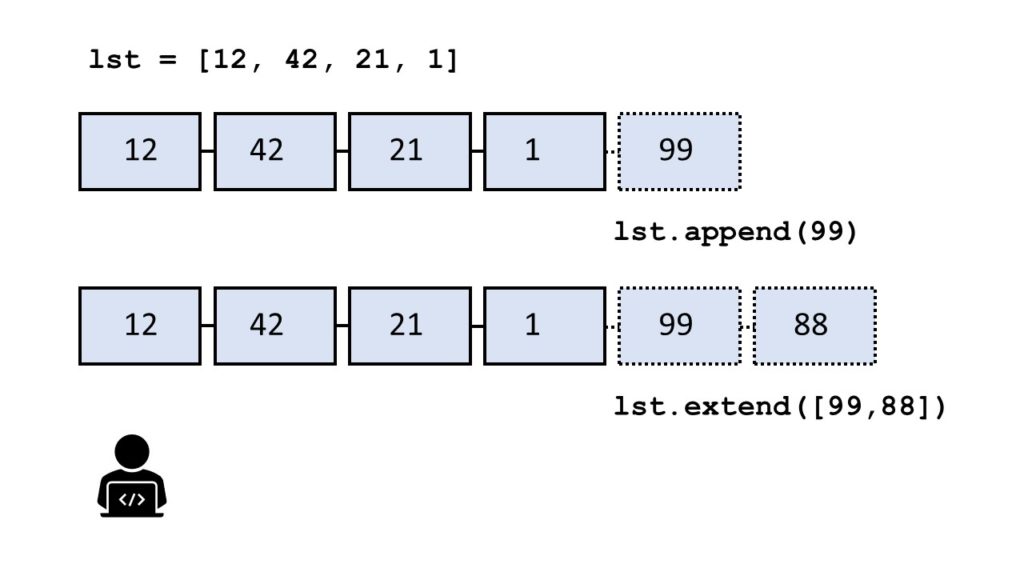
Instead of inserting an element, you can also add a single element to the end of the list using the append() method or even adding multiple elements to the end of the list using the extend() method.
What’s the difference?
I shot a small video explaining the difference and which method is faster, too:
The method list.append(x) adds element x to the end of the list.
The method list.extend(iter) adds all elements in iter to the end of the list.
The difference between append() and extend() is that the former adds only one element and the latter adds a collection of elements to the list.
You can see this in the following example:
>>> l = []

>>> l.append(1)

>>> l.append(2)

>>> l

[1, 2]

>>> l.extend([3, 4, 5])

>>> l

[1, 2, 3, 4, 5]
In the code, you first add integer elements 1 and 2 to the list using two calls to the append() method. Then, you use the extend method to add the three elements 3, 4, and 5 in a single call of the extend() method.
Which method is faster — extend() vs append()?
To answer this question, I’ve written a short script that tests the runtime performance of creating large lists of increasing sizes using the extend() and the append() methods.
Our thesis is that the extend() method should be faster for larger list sizes because Python can append elements to a list in a batch rather than by calling the same method again and again.
I used my notebook with an Intel® Core™ i7-8565U 1.8GHz processor (with Turbo Boost up to 4.6 GHz) and 8 GB of RAM.
Then, I created 100 lists with both methods, extend() and append(), with sizes ranging from 10,000 elements to 1,000,000 elements. As elements, I simply incremented integer numbers by one starting from 0.
Here’s the code I used to measure and plot the results: which method is faster—append() or extend()?
import time def list_by_append(n): '''Creates a list & appends n elements''' lst = [] for i in range(n): lst.append(n) return lst def list_by_extend(n): '''Creates a list & extends it with n elements''' lst = [] lst.extend(range(n)) return lst # Compare runtime of both methods

list_sizes = [i * 10000 for i in range(100)]

append_runtimes = []

extend_runtimes = [] for size in list_sizes: # Get time stamps time_0 = time.time() list_by_append(size) time_1 = time.time() list_by_extend(size) time_2 = time.time() # Calculate runtimes append_runtimes.append((size, time_1 - time_0)) extend_runtimes.append((size, time_2 - time_1)) # Plot everything

import matplotlib.pyplot as plt

import numpy as np append_runtimes = np.array(append_runtimes)

extend_runtimes = np.array(extend_runtimes) print(append_runtimes)

print(extend_runtimes) plt.plot(append_runtimes[:,0], append_runtimes[:,1], label='append()')

plt.plot(extend_runtimes[:,0], extend_runtimes[:,1], label='extend()') plt.xlabel('list size')

plt.ylabel('runtime (seconds)') plt.legend()

plt.savefig('append_vs_extend.jpg')

plt.show()
The code consists of three high-level parts:
In the first part of the code, you define two functions list_by_append(n) and list_by_extend(n) that take as input argument an integer list size n and create lists of successively increasing integer elements using the append() and extend() methods, respectively.
In the second part of the code, you compare the runtime of both functions using 100 different values for the list size n.
In the third part of the code, you plot everything using the Python matplotlib library.
Here’s the resulting plot that compares the runtime of the two methods append() vs extend(). On the x axis, you can see the list size from 0 to 1,000,000 elements. On the y axis, you can see the runtime in seconds needed to execute the respective functions.
The resulting plot shows that both methods are extremely fast for a few tens of thousands of elements. In fact, they are so fast that the time() function of the time module cannot capture the elapsed time.
But as you increase the size of the lists to hundreds of thousands of elements, the extend() method starts to win:
For large lists with one million elements, the runtime of the extend() method is 60% faster than the runtime of the append() method.
The reason is the already mentioned batching of individual append operations.
However, the effect only plays out for very large lists. For small lists, you can choose either method. Well, for clarity of your code, it would still make sense to prefer extend() over append() if you need to add a bunch of elements rather than only a single element.
Python List insert() Returns None
The return value of the insert() method is None. The return value of the insert() method is not a modified list with the added elements. Assuming this is a common source of mistakes.
Here’s such an error where the coder wrongly assumed this:
>>> lst = [1, 2].insert(1, 99)

>>> lst[0]

Traceback (most recent call last): File "<pyshell#16>", line 1, in <module> lst[0]

TypeError: 'NoneType' object is not subscriptable
It doesn’t make sense to assign the result of the insert() method to another variable—because it’s always None. Instead, the insert() method changes a list object without creating (and returning) a new list.
Now, you change the list object itself by calling the insert() method on it. You through away the None return value because it’s not needed.
Python List insert() Return New List
If you use the lst.insert(index, element) operation, you add the element to the existing list lst. But what if you want to create a new list where all elements were added?
The answer is simply to use the list concatenation operation lst[:index] + [element] + lst[index:] which creates a new list each time it is used. The original list lst will not be affected by the list concatenation operation.
Here’s an example that shows that the insert() method only modifies an existing list:
By using the list concatenation operation, you can create a new list rather than inserting the element into an existing list.
Python List insert() Thread Safe
Do you have a multiple threads that access your list at the same time? Then you need to be sure that the list operations (such as insert()) are actually thread safe.
In other words: can you call the insert() operation in two threads on the same list at the same time? (And can you be sure that the result is meaningful?)
The answer is yes (if you use the cPython implementation). The reason is Python’s global interpreter lock that ensures that a thread that’s currently working on it’s code will first finish its current basic Python operation as defined by the cPython implementation. Only if it terminates with this operation will the next thread be able to access the computational resource. This is ensured with a sophisticated locking scheme by the cPython implementation.
The only thing you need to know is that each basic operation in the cPython implementation is atomic. It’s executed wholly and at once before any other thread has the chance to run on the same virtual engine. Therefore, there are no race conditions. An example for such a race condition would be the following: the first thread reads a value from the list, the second threads overwrites the value, and the first thread overwrites the value again invalidating the second thread’s operation.
All cPython operations are thread-safe. But if you combine those operations into higher-level functions, those are not generally thread safe as they consist of many (possibly interleaving) operations.
Where to Go From Here?
The list.insert(index, element) method inserts an element to the end of the list before the given index position.
If you keep struggling with those basic Python commands and you feel stuck in your learning progress, I’ve got something for you: Python One-Liners (Amazon Link).
In the book, I’ll give you a thorough overview of critical computer science topics such as machine learning, regular expression, data science, NumPy, and Python basics—all in a single line of Python code!
OFFICIAL BOOK DESCRIPTION:Python One-Liners will show readers how to perform useful tasks with one line of Python code. Following a brief Python refresher, the book covers essential advanced topics like slicing, list comprehension, broadcasting, lambda functions, algorithms, regular expressions, neural networks, logistic regression and more. Each of the 50 book sections introduces a problem to solve, walks the reader through the skills necessary to solve that problem, then provides a concise one-liner Python solution with a detailed explanation.
[u.1:01] I told you I would guide them to build the Lighthouse. Not carry the torch for you.
[u.2:01] The Guardians require a balance Lord Shaxx can’t provide. There is no one else.
[u.1:02] And what about you?
[u.2:02] I have unfinished business out in the dark. Take this.
[u.1:03] What is this? A letter?
[u.2:03] For your eyes only, when I depart. Trust nothing. No one.
[u.1:04] Ha ha. Except you, of course.
[u.2:04] When have I ever led you astray?
[u.1:05] This week, you mean?
[u.2:05] Help where you can. The Vanguard has been serving too long; their blind spots have grown.
[u.1:06] Perhaps. But they’re wiser, too. Ikora Rey and the Commander have guided the City through dire straits.
[u.2:06] Have you spoken to the House of Light, like I asked?
[u.1:07] I would rather not speak with Fallen.
[u.2:07] They may need our help. Their cause is just.
[u.1:08] What happened to “trust no one?”
[u.2:08] What happened to your sense of right and wrong, hero?
[u.1:09] That is the City’s word, not mine. And the people still remember when I defended its borders from those very Fallen.
[u.2:09] Our kind live for a very long time, Saint. Too long to bear grudges.
[u.1:10] These accolades I wear are a reminder of what we lost to get here.
[u.2:10] I think those who gave them to you would be disappointed to hear that.
[u.1:11] I had nearly forgotten that you finally asked about them.
[u.2:11] We live too long for regrets. You taught me that. Don’t forget the House of Light.
[u.1:12] If I can find the time, yes. Not all of us conjure Echoes.
[u.2:12] Reflections, Saint. I have no need for Echoes anymore.
[u.1:13] What do you mean? What’s the difference?
[u.2:13] One is a manifestation of Light. The other… reserved for Taken Kings. Better suited for traversing the Sundial because of what lies at its core.
[u.1:14] One day you’ll have to tell me exactly what you and the Guardian did to bring me back.
[u.2:14] We did what we had to. Trust me.
[u.1:15] Now you sound like the rat.
[u.2:15] No. The Drifter sounds like me.
[u.1:16] Where do you go next?
[u.2:16] Wherever my road takes me. The Lunar Pyramid has galvanized the Hive; Toland has been left unchecked for too long. I’ve heard he’s still wandering the Cursed City.
[u.1:17] Then you really are just going to leave me with a burning sack. I should call it the Trials of Saint-14.
[u.2:17] You could. But you know how fickle Guardians can be about names.
[u.1:18] I will prepare them, in your stead, for what’s coming—one last time.
[u.1:18] It’s bad luck to say last. Try not to put them on too high a pedestal, Saint. There’s no one else to guide them.
Beyond creation, four eras come together as one! Discover the latest entry in this iconic Tactical RPG series. Form your own team of SD Gundams and deploy for battle — with units from Mobile Suit Gundam Wing, SEED, 00, and Iron-Blooded Orphans!
Xenoblade Chronicles: Definitive Edition Appears On The European Switch eShop
After the new Animal Crossing game launches next week, what’s on the horizon for Nintendo? While it’s hard to predict, one upcoming Switch title that does seem like it will be arriving very soon is Xenoblade Chronicles: Definitive Edition.
Following on from ratings in both North America and South Korea last month, new listings for the game have now popped up on the Switch eShop in both Europe and Australia. This follows on from a listing on the North American eShop a few weeks ago (thanks, GoNintendo).
While the planned release date is still down as ‘2020’ it seems like the game is pretty much ready to go at this point. In fact, not long ago, a Danish retailer with a known history of listing release dates ahead of schedule updated the game page for this title to a 29th May launch.
Do you think we’ll be playing this Definitive Edition within the next few months? Share your thoughts below.
Don’t get us wrong, the Super Mario Lego reveal earlier this week was great and all, but where are The Legend of Zelda and Donkey Kong sets? They’d be amazing, right? If you’re still imagining what else Nintendo and LEGO could eventually come up with, the good news is there seems to be a real chance of it happening.
During a recent interview with LEGO fansite The Brothers Brick, Design Manager at the LEGO Creative Play Lab and Digital Design Lead for LEGO Super Mario – Jonathan Bennink – was asked if Nintendo’s other series could eventually be transformed into LEGO sets.
While he couldn’t share “any specifics” just yet, he did say the LEGO team was open to the idea:
They [Nintendo] have a lot of very exciting IPs that we might do or might not do.
LEGO apparently hasn’t worked with Nintendo for the past four years just to release one wave, either. It’s hoping for a long-term partnership with the Japanese video game giant:
we haven’t worked for four years to release just one wave of products. We hope to have a long and fruitful relationship with Nintendo and their IPs, and we are really looking forward to working with them on a longer-term.
So, there you go – Nintendo and LEGO’s partnership could go well beyond Super Mario sets. Are there any particular sets you would like to see? Leave a comment below.