Posted by: xSicKxBot - 03-16-2020, 07:59 PM - Forum: Windows
- No Replies
Educators: Our team is here to help you and your students
As we continue to see educators around the world transition to distance learning our team is here to help, listen, and support you and your students.
To make it easier to connect with each other, and to answer your questions, we’ve created a new remote learning community. It’s a great resource for best practices, tips & tricks, and sharing personal experiences about how to enable distance learning for schools. We are inspired by the way this community has come together to support each other and share ideas, during this challenging time.
To join this team, get help and share ideas with other educators and our experts, please fill out this form. We’ll add you to the Remote Learning Team after we’ve received your submission.
Building community
In addition, we are in awe of all the incredible resources and ideas our community is sharing, like the tweet and ideas for remote learning from the eTwinz here.
#RemoteLearning | We just want to use this last tweet to tell everyone who is transitioning to this new model due the #coronavirus that you are not alone. This community got your back!
We’ve also set up a new support site to help you get started launching remote learning that includes training resources, practical guides on how to get up and running on Teams, and tools and programs to keep your students engaged.
And, listed below, are additional Microsoft Education resources we have compiled so far to support remote learning.
Guidance on remote learning with Office 365 can be found here. This is a great source of information for using Microsoft Word, Excel, PowerPoint, OneNote and Teams – all rich resources for successfully navigating remote learning.
Get ideas for using Flipgrid, a powerful video-based discussion tool, here. You’ll find webinars, resources for getting started with Flipgrid, and be able to connect with our team through Flipgrid here.
We’re making Minecraft: Education Edition available for free to teachers and students with O365 Education accounts to support remote learning during school closures. Please fill out this form to request access. And download a remote learning toolkit for Minecraft: Education Edition here. Minecraft: Education Edition is a great tool to explore coding, social emotional learning skills development, and more, so if you haven’t tried it yet, now might be the time.
The Microsoft Educator Center is home to a wealth of educator-created professional development resources, and we’ve made new remote learning materials available right on the MEC site, so be sure to check those out.
And we’ve put together a Wakelet that curates all of the current Microsoft Education resources and stories on Remote Learning here. We’ll have more resources there in the coming days too, so please keep an eye on that site.
We’re here to support you
Teaching is among the most challenging professions in ordinary times, and these are anything but ordinary times. Thank you for the work you do on behalf of students each day, and especially now.
You’re not alone in this. Our team is here to help. We’ll continue to share updates, resources and information as those become available here on the Microsoft Education blog. So, stay tuned and keep in touch. One way to send feedback is through Twitter by tagging @MicrosoftEDU.
Welcome back to Box Art Brawl, the weekly vote where you decide which retro regional box art variant wins in the beauty stakes according to sophisticated modern tastes. Oh yes.
Last week Castlevania for the N64 entered the ring in a third appearance for the series and one of the closest fought brawls to date. In the end Europe just edged a victory over Japan by a mere 3% while North America trailed far behind with just a tenth of the overall vote. We guess you weren’t fans of Reinhardt’s bushy eyebrows. Congratulations to Europe, but we’re certain we haven’t seen the last of Castlevania round these parts.
This week is a real gimme; possibly the biggest foregone conclusion in the history of democracy, but we’ve delayed it long enough. Perfect Dark for the Nintendo 64 was given a different cover in each region, an interesting story in itself which we delved into last year by talking to former Rare Art Director Kev Bayliss. However, today ours is not to reason why. Today, we’re just voting for our favourite.
C’mon then. Let’s get on with it.
North America
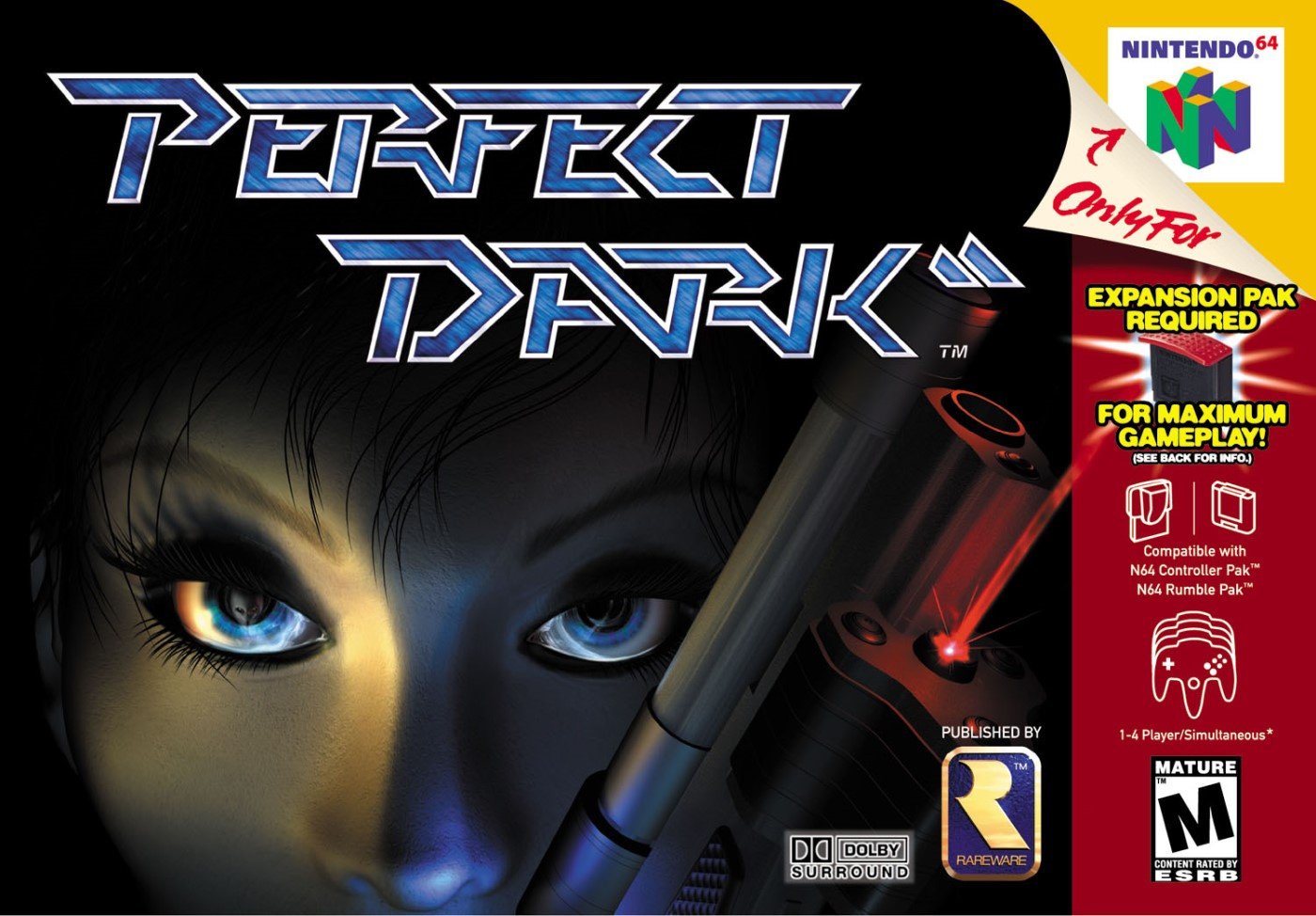
North America got a close-up of Joanna Dark’s CG face with Elvis, her alien chum, reflected in her right eye. Strands of hair flick down over her brow and we like the lighting that suggests she’s hidden in the shadows, waiting to strike. The gun barrel looks particularly clean as it breaks into the frame and who doesn’t love a sexy red laser beam? It makes us think of Arnie’s gun in the first Terminator movie. That’s a good in our books.
The game was compatible with most every ‘Pak’ made for the N64, as you can see from the red strip down the right side. The slick logo sits prominently against the darkness at the top and that little gold Rareware logo gives us the feels, too. It’s dark but still colourful. Not bad, not bad.
Europe
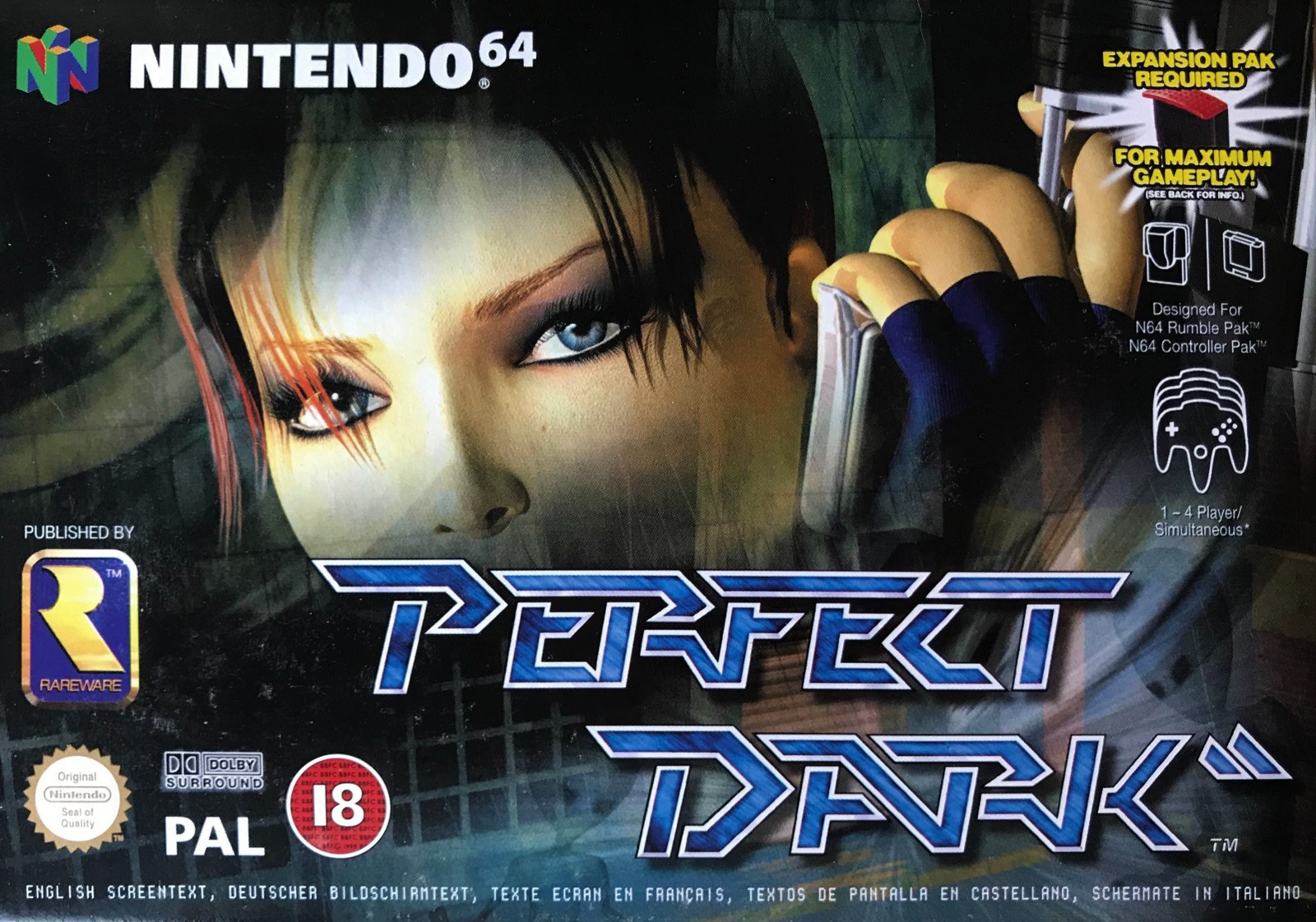
Looking absolutely nothing like the in-game model for the character, here we get the more sultry CG version of Joanna Dark (essentially Lara Croft moonlighting as a secret agent) and the bottom half of the gun we saw on the North American cover. It’s still dark, but the face fades as several images are layered behind ol’ Jo showing various structures and what looks like level geometry. None of it is particularly easy to make out, although you can see Elvis and one of his Maian mates.
The usual black border common to Nintendo’s N64 output in Europe is gone here with the info displayed over the main image. Same logo as the North American variant. Again, it sets the scene nicely. Not bad, but it’s all a bit immaterial, isn’t it…
Japan
Game over, man. Where’s a gif of Homer Simpson dribbling when you need one?
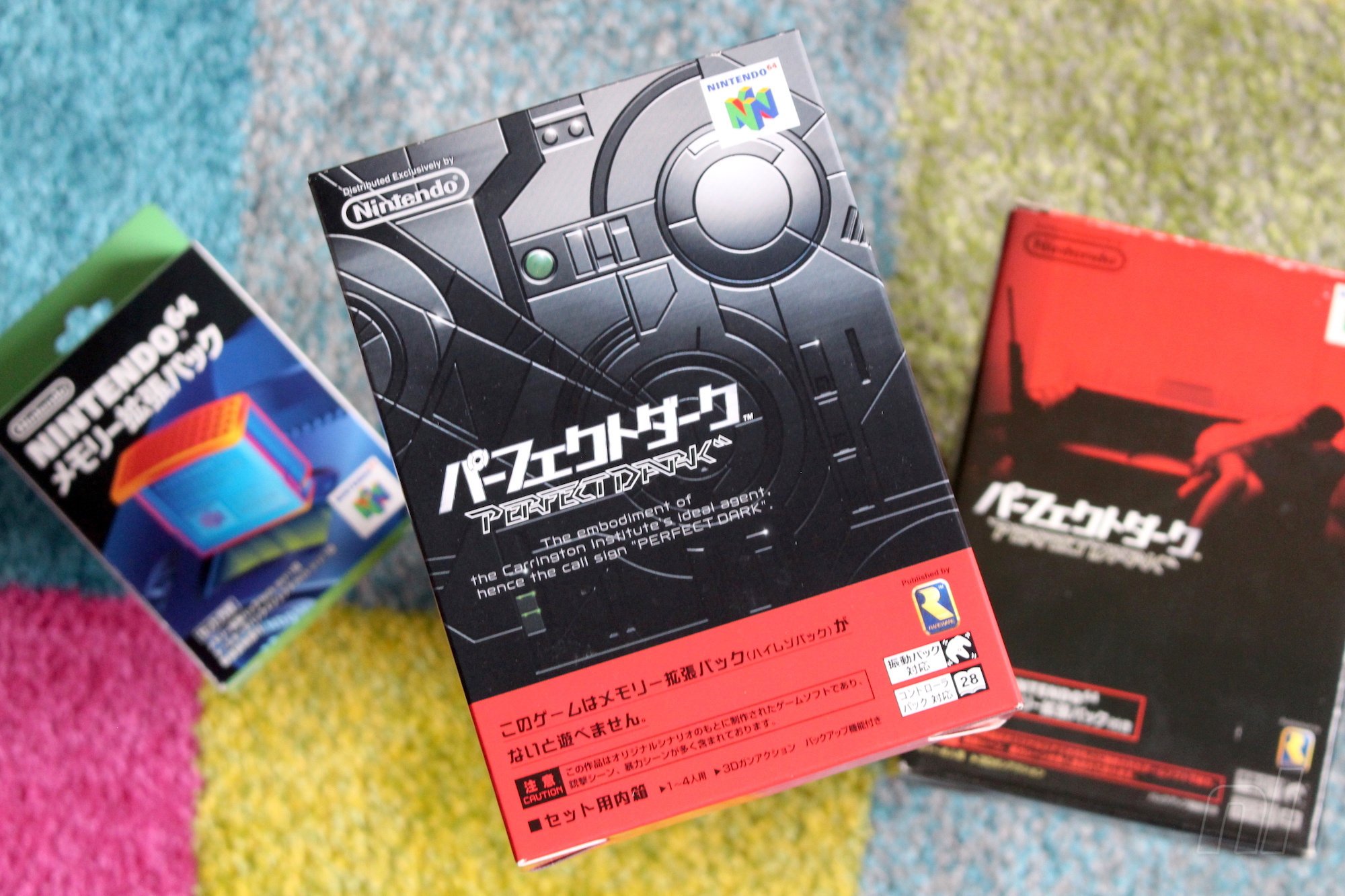
If you really wanted to nitpick you could argue that the game cover inside the big box which contains the game and Expansion Pak is rubbish, but in our experience gamers don’t like to be pedantic like that. Here it is all the same, though:
Ah, there you are Agent Dark! Just in time to click ‘Japan’ below and hit the vote button:
There will be people who don’t like the Japanese one – that’s absolutely fine! Everyone is entitled to their opinion and we welcome all to Box Art Brawl! There’s only one right answer, though…We joke! Ha!
So, tell us why you voted for Japan below and we’ll see you next time. Stay safe, lovely people!
Nintendo Places Third In Metacritic’s 2019 Game Publisher Rankings
Earlier this week, we heard about a Reddit user who had been busy compiling a lot of data from the review aggregate site Metacritic to illustrate the best and worst reviewed Nintendo Switch games since the system was launched.
Now, Metacritic has put together a list to determine “the best and worst game publishers” of 2019, according to 12 months of data. Nintendo placed third (boosting its average score by nearly four points compared to the previous year), and was one below Activision-Blizzard. Some of its highest-rated games last year included Fire Emblem: Three Houses and Super Mario Maker 2. In top spot was 505 Games, best known within the Nintendo community as the team that worked on Bloodstained: Ritual of the Night.
Which game publishers released the best games last year? For the 10th consecutive year, we sifted through 12 months of data to determine the best and worst game publishers of the year, based solely on the quality of their 2019 releases. Sales and user reviews do not factor into these rankings; only critic reviews (as captured by each game’s Metascore) are used to evaluate performance.
Publishers with 4 or fewer distinct titles* released last year are excluded.
We have ranked these publishers in order from best overall game quality to worst, using a points-based system based on four factors: 1. Average Metascore for all games released in 2019 150 possible points (awarded at 1.5 x the average Metascore) 2. % of scored products with good reviews (Metascore of at least 75) 100 possible points (ex: 80% good = 80 points) 3. % of scored products with bad reviews (49 or lower; in this case, a lower % is better) 100 possible points (ex: 20% bad = 80 points) 4. Number of “great” titles (Metascore of 90 or higher, min. 7 reviews) Awarded as 5 bonus points for each distinct title with a 90+ score
Note that the Metascore average (the first factor) counts slightly more than the other factors. In addition, note that iOS games are not included in the figures below.
As explained, this list is based “sorely on the quality” of publisher’s releases last year according to each game’s critic Metascore and does not factor in overall sales or user reviews. Below is the full list:
1. 505 Games 2. Activision Blizzard 3. Nintendo 4. Paradox Interactive 5. Capcom 6. Annapurna Interactive 7. Xbox Game Studios 8. Humble Bundle 9. Square Enix 10. Devolver Digital 11. Focus Home Interactive 12. Take-Two Interactive 13. Electronic Arts 14. Ubisoft 15. Team17 16. Spike Chunsoft 17. Koei Tecmo 18. SEGA 19. Bandai Namco 20. Konami 21. Idea Factory 22. Sony 23. PQube 24. XSEED/Marvelous 25. tinyBuild 26. Iceberg Interactive 27. Koch Media 28. Digerati 29. THQ Nordic 30. Bethesda 31. NIS America 32. Daedlic Entertainment 33. QubicGames 34. Curve Digital 35. Plug In Digital 36. Ratalakia Games 37. Bigben 38. 1C Company 39. Headup Games 40. Merge Games
Here’s what Metacritic had to say about Nintendo’s placement:
Nintendo boosted its average Metascore by nearly four points compared to last year’s mark despite 2019 being one of the company’s rare years without any releases scoring 90 or higher. However, a few Nintendo games narrowly missed that distinction, led by Switch titles Fire Emblem: Three Houses and Super Mario Maker 2. In all, 79% of Nintendo’s 2019 releases scored positive reviews, up from 65% the prior year.
And here’s what it said about the winner, 505 Games:
The Italian game company, which publishes third-party titles for every platform, had a strong 2019 thanks to a steady stream of positively reviewed games and few misfires. Though no 505 title scored higher than 85 last year, 87% (or all but two) of its products received positive reviews overall—tops among all publishers—led by the Remedy-developed award-winner Control and ArtPlay’s Castlevania homage Bloodstained: Ritual of the Night. Upcoming 505 releases include the PC port of Death Stranding (due in June).
What are your thoughts about the ordering of this list? Share your thoughts below.
Gears 5 Is Coming to Xbox Series X With Improvements, Possible 120 FPS Support
Gears 5 is a very impressive game on the Xbox One and Xbox One X as is, but the game is getting a makeover for Xbox Series X that comes with higher framerate and resolution.
Announced by Microsoft on March 16, Gears 5 on Xbox Series X will make use of the Smart Delivery system, meaning players who already own the Xbox One version will get it on the new console for free. The Xbox Series X will automatically know to download the improved version, while any Xbox One consoles will still download the old one.
Improvements on Xbox Series X include better textures and volumetric fog, higher particle count, and 60 frames per second during cutscenes for a smoother transition to gameplay. Shadows and lighting have also been improved, and the game is currently running at 100 frames per second with potential to hit 120 frames per second in multiplayer.
Posted by: xSicKxBot - 03-16-2020, 11:28 AM - Forum: Python
- No Replies
How to Check Your Python Version?
Simple Answer: To check your Python version, run python --version in your command line or shell.
This general method works across all major operating systems (Windows, Linux, and macOS).
Do you need to google important Python keywords again and again? Simply download this popular Python cheat sheet, print the high-resolution PDF, and pin it to your office wall:
In the following video, I’ll show you how to check your Python version for each operating system (Windows, macOS, Linux, Ubuntu) and programming framework (Jupyter). Or scroll down to read the step-by-step instructions on how to check your Python version.
The Python version output consists of three numbers major:minor:micro. For example, version 3.7.2 means that
the major version is 3,
the minor version is 7, and
the micro version is 2.
[ATTENTION] Different major versions are NOT fully compatible. Different minor versions are compatible.
For example, you can execute code written in Python 3.6.4 in Python 3.7.2 because they are the same major version — Python 3. But you cannot execute code written in Python 2.7.4 in Python 3.7.2 because they are different major versions.
Note that new minor versions can add changes to the language. For example, in Python 3.8 they introduced the reversed() function with dictionaries. You cannot use the reversed() function in older versions of Python. But the vast majority of the language is the same.
Check Python Version Windows 10 (Exact Steps)
Three steps to check the Python version on your Win 10 operating system:
Open the Powershell application: Press the Windows key to open the start screen. In the search box, type “powershell”. Press enter.
Execute command: type python --version and press enter.
The Python version appears in the next line below your command.
Check Python Version Windows 7 (Exact Steps)
Three steps to check the Python version on your Win 7 operating system.
Open the command prompt application: Press the Windows key to open the start screen. In the search box type “command”. Click on the command prompt application.
Execute command: type python --version and press enter.
The Python version appears in the next line right below your command.
Check Python Version Mac (Exact Steps)
Four steps to check the Python version on your Mac operating system.
Press CMD + Space to open Spotlight.
Type “terminal” and press enter.
Execute command: type python --version or python -V and press enter.
The Python version appears in the next line below your command.
Check Python Version Linux (Exact Steps)
Three steps to check the Python version on your Linux operating system.
Open the terminal application (for example, bash).
Execute command: type in python --version or python -V and press enter.
The Python version appears in the next line below your command.
Check Python Version Ubuntu (Exact Steps)
Four steps to check the Python version on your Ubuntu operating system.
Open Dash: click the upper left symbol.
Open terminal: type “terminal”, click on the terminal app.
Execute command: type python --version or python -V and press enter.
The Python version appears in the next line right below your command.
Check Python Version Jupyter (Exact Steps)
Three steps to check the Python version in a Jupyter notebook.
Open the Jupyter notebook: type jupyter notebook in your terminal/console.
Write the following Python code snippet in a code cell:
from platform import python_version

print(python_version())
3. Execute the script.
As an alternative, you can also use the following Python code snippet to check your Python version in a Jupyter notebook:
>>> import sys

>>> sys.version
Here is a screenshot on my computer:
How to Check Which Python Version Runs Your Script?
Sometimes, you want to check Python’s version in your Python program.
To achieve this, simply import the sys module and print the sys.version attribute to your Python shell:
>>> import sys

>>> print(sys.version)

3.7.2 (tags/v3.7.2:9a3ffc0492, Dec 23 2018, 23:09:28) [MSC v.1916 64 bit (AMD64)]
Import the built-in sys module and print sys.version for human-readable output.
What are the Different Python Versions?
Python has three main versions: version 1, version 2, and version 3. Version 4 is currently (2019) under development.
As there are some significant differences in syntax, you should always install the latest version in Python. Keep yourself updated on the official Python website here.
How to Upgrade to a Newer Version?
If you are not using a virtual environment, go to python.org/downloads to download and install whatever version you need. It’s the easiest way to upgrade Python.
But now you’ll run into the following problem: how do I run a specific Python version? Check out this StackOverflow answer to learn the exact steps.
Or you can make your life easier by using virtual environments. These let you have multiple versions of Python installed on your system. Plus, you can switch between them instantaneously. One option is to use the built-in module venv. If you’re a Data Scientist, the industry standard is Anaconda.
If you’ve installed multiple installations of Python, running python --version may give you only the version of Python 2. To check which version of Python 3 is installed on your computer, simply run the command python3 --version instead of python --version.
How to Check Python Version – Detailed
Not only does Python have major, minor and micro versions. Each of those versions has further versions, namely the release level and serial.
Most of the time, you will only care about the major, minor and micro releases. Release level and serial are usually for the core Python Dev team to work on changes to the language.
The possible release levels are ‘alpha’, ‘beta’, ‘candidate’, or ‘final’. Alpha contains the first updates made to the language. Beta means the language can be tested with some users but still won’t work perfectly. This is where the phrase ‘beta testers’ comes from. A ‘candidate’ has only a few small bugs left to fix. Final is the last version and the one released to the general public. If you want to try out new features before anyone else, you can download these release levels. However, if you just want a version of Python that works, you should choose ‘final’. When you download any version of Python, it will be a ‘final’ release unless stated otherwise.
Serial is for the smallest changes. The Python Dev team increments it as they make changes to the alpha, beta and candidate versions. All final versions have serial=0. They add future changes to the next major/minor/micro releases.
How to Make Sure My Script Runs a Specific Python Version?
Let’s say you’ve just installed Python 3.8. Your script, my_file.py, uses a brand new feature: reversed() when iterating over a dictionary. For other people to run this script, they must also run Python 3.8. So you should put a check at the start to let other users know this.
We do this by adding an assert statement at the top of my_file.py
# my_file.py

import sys

assert sys.version_info >= (3, 8) my_dict = dict(a=1, b=2, c=3)

for key in reversed(my_dict): print(key)
The assert statement raises an AssertionError if the statement is False. If the statement is True, the script continues to run.
For example, if I am running Python 3.7 and execute my_file.py from the terminal, this happens
But if I am running Python 3.8, the assert statement does not raise an error, and it executes the rest of the script.
# Running Python 3.8

$ python my_file.py

c

b

a
Note: I have used the Anaconda virtual environment to install and quickly switch between multiple Python versions.
Where to Go From Here?
In summary, you can check the Python version by typing python --version in your operating system shell or command line.
Do you struggle with Python? And Python source code sometimes feels like a closed book to you?
If this applies to you, check out my free email course! The course guides you step-by-step to a deeper and deeper Python level of code understanding. Here is what my readers say:
Thank you for your newsletter. I find these newsletters highly informative.
Collen
As a fellow educator and fellow (former) Ph.D. student, I just wanted to let you know that I’m really impressed with your teaching materials. You’re doing a really good job!
Sadly due to Corona Virus/ COVID-19 concerns, this years GDC 2020 had to be postponed and most likely cancelled. Fortunately however, not everything is lost! The GDC have announced they will be streaming a number of talks scheduled for GDC 2020 completely free this year. Details from gdconf.com:
Just a quick reminder that while the Game Developers Conference is no longer happening next week in San Francisco, organizers invite you to watch livestreams of the awards and some of the talks planned for GDC 2020!
For the most up-to-date details on what’s streaming when, check out the new GDC 2020 Virtual Talks hub and be sure to follow the official GDC Twitch channel. That’s where organizers will be streaming speaker-recorded versions of the talks they’d planned for GDC 2020, for free, from 9am to 5pm PT Monday through Friday.
Expect to enjoy some expert talks from studios like 343 Industries, Playground Games, BioWare, Gearbox and more, as well as insightful behind-the-scenes explorations of notable indie games like Baba Is You, A Short Hike, and Kine.
Plus, there will be an assortment of talks offering new and useful advice on how to tackle the core challenges of game development. You’ll have the opportunity to practice new ways of planning, developing, and marketing your game, and get up-to-date insights on everything from UI design to scaling your online infrastructure.
The Independent Games Festival and Game Developers Choice Awards ceremonies will also be free to stream virtually starting at 5pm PT (8pm ET) next Wednesday, March 18th on GDC’s Twitch channel.
The virtual awards ceremony will feature the same hosts (Trent Kusters for the IGF and Kim Swift for the Game Developers Choice Awards) and identical awards categories planned for the original physical event — with the exception of the alt.ctrl.GDC award, which will not be awarded this year.
Directly before the awards at 4pm PT (7pm ET) on March 18th, Double Fine & iam8bit will debut a virtualized 2020 edition of its Day of the Devs showcase that promises to bring “visual beauty, charming design, poignant voices, and just plain cool games” to the official GDC Twitch stream.
As mentioned above, the schedule of talks is available here with times listed in Pacific Time. The talks are available on Twitch but will eventually make it to the GDC YouTube channel as well as the GDC Vault. Be sure to keep an eye on the GDC official Twitter channel too for updates through the week. Or of course just tune in here at GameFromScratch for the top announcements and reveals at virtual GDC 2020! You can learn more in the video below.
Apple A14 in ‘iPhone 12’ said to be as fast as the iPad Pro
By Wesley Hilliard Sunday, March 15, 2020, 12:19 pm PT (03:19 pm ET)
Geekbench scores that may be for the next iPhone processor, the “A14,” have surfaced online, and show massive jumps in multi-core performance and speed.
The iPad Pro has an A12X chipset with improved graphics performance and more cores
Apple improves on their A-series processors every year for each new iPhone release, so a successor to the current iPhone 11 A13 chipset is expected in the fall of 2020. Each year as the iPhone flagship release approaches, benchmark scores for said to be from the new processor in the device start to populate popular benchmark tools, like Geekbench.
The A12X (left) vs the supposed “A14” (right)
It is expected that the “iPhone 12” will have improved performance, and these scores show massive gains year-over-year. Apple has been seeing huge gains in their chipsets despite the rest of the industry hitting a bit of a performance wall.
New Geekbench testing, purporting to be from the A14 processor shows the first A-series processor to cross the 3.0 GHz mark.
The 12.9-inch iPad Pro has an A12X chipset with 8 cores and scores 1110 on a single core, and 4568 on the multi-core. The scores for the alleged A14 go beyond even that.
Single core performance of the device shows a 1658 score, with a 4612 multi-core score. This indicates a huge gain in its overall performance and will make multitasking and navigating apps smoother than ever.
Apple is also rumored to be developing an ARM Mac that could debut as early as this winter. A chip derived from the A14 would make for a good base laptop processor as well, but performance this high would also be beneficial for complex tasks like AR rendering or better image processing in a phone.
Posted by: xSicKxBot - 03-16-2020, 11:27 AM - Forum: Windows
- No Replies
Windows 10: Powering the world with 1B monthly active devices
From the launch of Windows 10, our focus was on moving people from having, to choosing, to loving Windows. With the release of every new build of Windows 10, we have seen customer satisfaction improve as we have made fixes and added new capabilities and experiences. We are humbled that customers are choosing and loving Windows 10, and there has never been a more important time for a secure, reliable platform that can empower people to create, educate and communicate wherever they are.
Today we’re delighted to announce that over one billion people have chosen Windows 10 across 200 countries resulting in more than one billion active Windows 10 devices. We couldn’t be more grateful to our customers, partners and employees for helping us get here.
From one to one billion devices—one customer at a time
One in every seven people on the planet are planning, creating, ideating, executing, moving, shaking and doing great things with Windows 10.
Because no matter who or where in the world or life they are, Windows 10 provides them with the features and flexibility they need to achieve more. From the high-powered developer who needs the most advanced technology available, to the business professional who needs to be productive at work and home, to the student in a developing market who is looking for a low-cost device for learning and self-improvement—Windows 10 is the platform to meet all these needs.
With 100% of the Fortune 500 now using Windows 10 devices, it has become a critical platform for driving business transformation in the enterprise and beyond. As companies transition from Windows 7 to Windows 10, they are making a commitment to running their business more efficiently, more securely, and positioning themselves to offer better products, services and solutions to their customers.
New Windows 10 features and security updates are now delivered faster than ever before. We’ve evolved from releasing a version every three years, to releasing multiple versions per year. And with the recent decoupling of the new Chromium-based Edge browser from Windows 10 we can now deliver new builds to customers outside of the normal Windows 10 release cadence—and to more versions of Windows.
With Windows 10, our focus has always been to put the customer at the center, to listen to feedback, and to have that feedback shape the development process. One of the strongest examples of this customer focus is our Windows Insider Program which now has over 17.8 million Insiders, with members in every country of the world.
We have also strived to make Windows an open, inclusive and accessible platform that can empower everyone to achieve their goals. Our Windows Accessibility team focuses on human-centered design, a method where engineers and designers work to deeply understand peoples’ needs, and then co-design and continuously iterate on solutions directly with them.
It’s incredible to see the results of this work and the impact features like closed captions, narrator, magnifier and custom text size have made on people’s lives. Like Mitra Niknam’s son Andrew who was able to conquer his fear and learn to read. And Andre Louis who is his own one-man band thanks to Seeing AI.
From PCs, to Mixed Reality, to Xbox and more
Freedom of choice has always mattered to us—because we know it matters to you. Windows 10 is the only operating system at the heart of over 80,000 models and configurations of different laptops and 2-in-1s from over 1,000 different manufacturers. But that’s not all. Windows 10 also powers Mixed Reality and HoloLens—transforming the way people build, design, learn and experience the world around them.
And not only is Windows 10 the most popular PC gaming platform on the planet, but it also powers the entire Xbox family of consoles, including the fastest and most powerful Xbox Series X, which will be available later this year.
Windows 10 has enabled new category creation with devices like the Surface Pro, Surface Book and Surface Hub 2S. And we are committed to keep driving to innovate with devices like Surface Neo, a new dual-screen device which will run Windows 10X, which enables unique experiences on multi-posture dual-screen PCs.
Windows is a diverse and powerful canvas that gives our OEM partners the flexible tools they need to deliver innovation to the world which can be seen in their latest and greatest devices, all built on Windows 10:
The Acer ConceptD 700 workstation is also built to handle heavy content creator workflows with ease, thanks to an Intel Xeon E processor and up to NVIDIA Quadro RTX 4000 graphics to address the needs of film makers, animators and AEC (architecture, engineering, construction) designers with powerful and stable performance for 3D computer-aided design (CAD).
The ASUSExpertBook B9 is built for professionals who do business on the go, weighing in at just 865 grams with a 14.9mm-thin profile. In addition, the B9450 integrates a Trusted Platform Module 2.0 (TPM) security chip to keeps business-critical data safe, while a built-in IR camera allows for biometric logins.
The latest version of the popular XPS 13 from Dell is aimed at helping you innovate, collaborate and accomplish more in the next decade with the new 25% brighter XPS InfinityEdge display that delivers more screen space to multitask throughout the day and a new design that delivers a 13.4-inch display in an 11-inch form factor—fitting neatly on an airplane tray.
In the Secured-Core PC family, the HP Elite Dragonfly has built-in Tile technology, which allows users to use an intuitive app to help you find your device near or far even when your PC is turned off. It also contains ocean-bound plastics in the speaker covers, and the outer box packaging is 100% sustainably sourced.
The Lenovo Yoga Slim 7 has up to 10th Gen Intel Core i7 with Intel Iris Plus graphics. It also includes hands-free login and auto-logoff via IR camera and Windows Hello, plus an adjustable Smart Battery that transitions capability based on usage behavior, temperature and whether the device is plugged in.
Combining productivity with a premium experience, the SamsungGalaxy Book Flex α provides the experience of a laptop with the mobility and flexibility of a smartphone.The 2-in-1 PC delivers a super-bright display that allows you to enjoy the screen’s 100% color volume and vibrant picture in almost any lighting with up to5-hours of battery life.
From 1.0 to 10 and beyond
From pioneering seamless touch and pen experiences, to enabling biometric log-in with Windows Hello, and with experiences like the Your Phone app, enabling Android users to connect their phone to their PC—we strive to meet people where they are.
And this innovation continues, bringing Windows to the cloud to make Windows 10 through Azure and virtual machines available on nearly every platform, from Mac to iOS or even Chromebooks. We will strive to make Windows the most accessible operating system on the planet regardless of where our users are, or what device they are on.
Reaching a billion people with Windows 10 is just the beginning. We will invest in Windows not only within Windows 10 for PCs but also across many other Windows editions, serving diverse customer needs including Windows IoT, Windows 10 Teams edition for Surface Hub, Windows Server, Windows Mixed Reality on HoloLens, Windows 10 in S mode, Windows 10X and more.
We are inspired by the ways you use Windows 10, and we look forward to seeing how you continue to use these billion devices in new and exciting ways to power the world.
There are plenty of cloud services available where you can store important documents. Google Drive is undoubtedly one of the most popular. It offers a matching set of applications like Docs, Sheets, and Slides to create content. But you can also store arbitrary content in your Google Drive. This article shows you how to connect it to your Fedora Workstation.
Adding an account
Fedora Workstation lets you add an account either after installation during first startup, or at any time afterward. To add your account during first startup, follow the prompts. Among them is a choice of accounts you can add:
Select Google and a login prompt appears for you to login, so use your Google account information.
Be aware this information is only transmitted to Google, not to the GNOME project. The next screen asks you to grant access, which is required so your system’s desktop can interact with Google. Scroll down to review the access requests, and choose Allow to proceed.
You can expect to receive notifications on mobile devices and Gmail that a new device — your system — accessed your Google account. This is normal and expected.
If you didn’t do this at first startup, or you need to re-add your account, open the Settings tool, and select Online Accounts to add the account. The Settings tool is available through the dropdown at right side of the Top Bar (the “gear” icon), or by opening the Overview and typing settings. Then proceed as described above.
Using the Files app with Google Drive
Open the Files app (formerly known as nautilus). Locations the Files app can access appear on the left side. Locate your Google account in the list.
When you select this account, the Files app shows the contents of your Google drive. Some files can be opened using your Fedora Workstation local apps, such as sound files or LibreOffice-compatible files (including Microsoft Office docs). Other files, such as Google app files like Docs, Sheets, and Slides, open using your web browser and the corresponding app.
Remember that if the file is large, it will take some time to receive over the network so you can open it.
You can also copy and paste files in your Google Drive storage from or to other storage connected to your Fedora Workstation. You can also use the built in functions to rename files, create folders, and organize them.
Be aware that the Files app does not refresh contents in real time. If you add or remove files from other Google connected devices like your mobile phone or tablet, you may need to hit Ctrl+R to refresh the Files app view.
New Splatoon Artwork Celebrates White Day In Japan
@SplatoonJP
Nintendo wrapped up its regular Splatfests in Splatoon 2 some time ago, with Team Chaos (led by Pearl) taking out the grand finale. Since then, there have been some minor patches for the game, and from time to time, new official artwork has released on the Splatoon social accounts. Today is one of those days:
To celebrate White Day in Japan (an event on 14th March where the person who received a gift on Valentine’s Day returns the favour), Nintendo’s official Japanese Splatoon account on Twitter shared a special greeting card featuring Agent 8 and Agent 3.
Are you still playing Splatoon on a regular basis? Did you gift anything on White Day? Tell us below.