Posted by: xSicKxBot - 09-08-2019, 08:55 PM - Forum: Windows
- No Replies
The story behind the world’s first AI-created whisky
Opening new doors Together, Mackmyra and Fourkind have, for the first time, used AI in the creation of a new whisky, by augmenting the capabilities of the master blender to produce novel suggestions.
Their partnership demonstrates how technology can be used to help people achieve their best work, while still relying on their own skills, knowledge and expertise.
For D’Orazio, the experience has changed the way she views technology, and the transformative effects it can have. “We always strive to challenge the traditions in the very traditional whisky trade, and that’s something we can really do now with the help of AI.”
“We see AI as a part of our digital development, and it is really exciting to let AI be a complement to the craft of producing a high-quality whisky. For me as a Master Blender, it is a great achievement to be able to say that I’m now also a mentor for the first ever created AI whisky in the world.”
The success of the world’s first AI whisky has also introduced new business opportunities for Fourkind, allowing it to use the same principles used for Mackmyra, across different industries:
“This AI-generation can have an impact in different industries globally,” says Kartela. “I envision AI systems generating recipes for sweets, perfumes, beverages, and maybe even sneaker designs, and I think we’ll see a lot of complex consumer products being designed by AI or with AI during the next few years.”
“We are showing the way forward, and these new AI solutions can be used to generate products that retain the spirit, look and feel of the brands behind them, while at the same time being new and unique. From medicine to creative tasks, humans will outperform machines in many areas. We just need to know where to use AI to get the most out of us as employees and experts.”
Posted by: xSicKxBot - 09-08-2019, 08:55 PM - Forum: Windows
- No Replies
Hacker movies that have an echo of truth
Films about hacks and cyberattacks have been popular for decades. These movies helped create the image of the hacker genius — just think of Stanley Jobson in “Swordfish.”
There is “Hackers,” in which a group of high schoolers access the mainframe of an oil company and discover evidence of embezzlement and “The Net,” about a woman (Sandra Bullock) whose identity is stolen.
You may think Hollywood depictions of hacking bear no resemblance to real life, but in each of the films below, there is an echo of truth in the fiction.
A classic caper on a list of hacker movies. This story of British bank robbers undertaking a job in Turin, Italy, offers a surprising nod of things to come.
How do Michael Caine and his team plan to escape from this city? By hacking its traffic light system and causing widespread gridlock. This leads to the famous Mini Cooper getaway scene.
From Saudi Arabia to South Africa, billions of dollars are being invested in smart city projects. Some researchers estimate that spending on smart cities will reach $27.5 billion by 2023. It makes protecting those cities reliant on technology from disruption ever more crucial.
“WarGames” (1983)
At the height of the Cold War, a young hacker (Matthew Broderick) breaks into a US military supercomputer and comes close to starting a nuclear war. He thinks he’s playing a game based on a simulation, but this is not a drill.
According to a 2016 study by ISACA and RSA Conference, 74 percent of the world’s businesses expect to be hacked each year. And the economic loss due to cybercrime is estimated to reach $3 trillion by 2020. It is one of the reasons that Microsoft has called for a Digital Geneva Convention to help protect cyberspace in times of peace.
“Sneakers” (1992)
This tech thriller, which spans from the late 1960s to the more computer-literate 1990s, boasts a heavyweight cast that includes Robert Redford and Sidney Poitier. A team of security specialists is approached by the NSA and commissioned to locate a mysterious black box. This team, propelled into a world of espionage, is soon hunted by rogue agents. The box turns out to be the key to cracking all known encryption and is, the team realizes, too powerful to fall into the wrong hands.
In 1992, the idea that something could break all known encryption sounded scary and a little implausible. Today, the existence of such technology is more likely thanks to quantum computing.
According to Martin Giles of the MIT Technology Review, quantum computers are “a security threat that we’re still totally unprepared for,” and it could be 20 years before cybersecurity catches up. Working closely with the United States National Institute for Standards and Technology, Microsoft is engaged with the development of post-quantum cryptography that will be able to withstand quantum computer capabilities, while still working with existing protocols.
Robust cybersecurity is important for businesses and to the future of national economies, and it has become a priority for governments around the world. The Cybersecurity Tech Accord, announced by Microsoft in April 2018, is a public commitment among more than 100 global companies to protect and empower civilians online and help defend them against threats.
“The Net” (1995)
Sandra Bullock plays the lead role in this thriller that foreshadows one worry of the modern security landscape: identity theft.
Admittedly, in 1995, many important records were still paper-based, after all. Still, this is one of the central themes in the plot: Can Angela Bennett (Bullock) overcome a series of interconnected threats and regain her identity?
Today, secure passwords are a must. There is a wealth of personal data stored digitally that can all too easily compromise the security of your identity.
Cyberspace has become a battlefield and powerful cyberweapons are being used against civilians. Tools and Weapons, by Microsoft President Brad Smith and Carol Ann Browne, looks at how the world can respond. To read more and pre-order the book, visitTools and Weapons.And follow @MSFTIssues on Twitter.
If you use your Fedora system for more than just browsing the web, you have probably needed to search for text in your files. For instance, you might be a developer that can’t remember where you left some code snippet. Or you might be looking for a setting stored in your system configuration files. Whatever the reason, there are plenty of ways to search for text on your Fedora system. This article will show you how, including using the built-in utility grep.
Introducing grep
The grep utility allows you to search for text, or more specifically text patterns, on your file system. The name grep comes from global regular expression print. Yikes, what a mouthful! This is because a regular expression (or regex) is a way of defining text patterns.
The grep utility lets you find and print out matches on these patterns — thus the name. It’s a powerful system, and you can even find it in modern code editors like Visual Studio Code or Atom.
Regular expressions
Harnessing all the power of regular expressions is a topic bigger than this article, for sure. The simplest kind of regex can be just a word, or a portion of a word. That pattern is simply “the following characters, in the same order.” The pattern is searched line by line. For example:
pciutil – matches any time the 7 characters pciutil appear together — including pciutil, pciutils, pciutil123, and foopciutil.
^pciutil – matches any time the 7 characters pciutil appear together immediately at the beginning of a line (that’s what the ^ stands for)
pciutil$ – matches any time the 7 characters pciutil appear together immediately before the end of a line (that’s what the $ stands for)
More complicated expressions are also possible. Special characters are used in a regex as wildcards, or to change the way the regex works. If you want to match on one of these characters, use a \ (backslash) before the character.
For instance, the . (period or full stop) is a wildcard that matches any single character. If you use it in the expression pci.til, it matches pciutil, pci4til, or pci!til, but does not match pcitil. There must be a character to match the . in the regular expression.
The ? is a marker in a regex that marks the previous element as optional. So if you built on the previous example, the expression pci.?til would also match on pcitil because there need not be a character between i and t for a valid match.
The + and * are markers that stand for repetition. While + stands for one or more of the previous element, * stands for zero or more. So the regex pci.+til would match any of these: pciutil, pci4til, pci!til, pciuuuuuutil, pci423til. However, it wouldn’t match pcitil — but the regex pci.*til would.
Examples of grep
Now that you know a little about regex, let’s put it to work. Imagine that you’re trying to find a configuration file that mentions a user account jpublic. You tried a bunch of files already, but none were the correct one, and you’re sure it’s there. So, try searching the /etc folder (using sudo because some subfolders are not readable outside the root account):
$ sudo grep -r jpublic /etc/
The -r switch searches the folder recursively. The utility prints a list of matching files, and the line where the hit occurred. In most modern terminal environments, the hit is color highlighted for better readability.
Imagine you have a much larger selection of files in /home/shared and you need to establish which ones mention the name MacNulty. However, you’re not sure whether the capitalization will be consistent, and you’re just looking for names of files, not the context. Also, you believe someone may have misspelled the name as McNulty in some places.
Use the -l switch to only output filenames with a match, a ? marker for optional a in the name, and -i to make the search case-insensitive:
$ sudo grep -irl 'ma\?cnulty' /home/shared
This command will match on strings like Macnulty, McNulty, Mcnulty, and macNulty with no problem. You’ll get a simple list of filenames where the match was found in the contents.
These are only the simplest ways to use grep and regular expressions. You can learn a lot more about both using the info grep command.
But wait, there’s more…
The grep command is venerable but in some situations may not be as efficient as newer search utilities. For instance, the ripgrep utility is engineered to be a fast search utility that can take the place of grep. We covered ripgrep as part of an article on Rust and Rust applications previously in the Magazine:
It’s important to note that ripgrep has its own command line switches and syntax. For example, it has simple switches to print only filename matches, invert searches, and many other useful functions. It can also ignore based on .rgignore files placed in any subdirectories. (It’s also noteworthy that the -r switch is used differently for ripgrep, because it is automatically recursive.)
To install, use this command:
$ sudo dnf install ripgrep
To explore the options, use the manual page (man rg). You’ll find that many, but not all, options are the same as grep.
Feature: Beamdog On Bringing Baldur’s Gate And Classic D&D RPGs To Switch
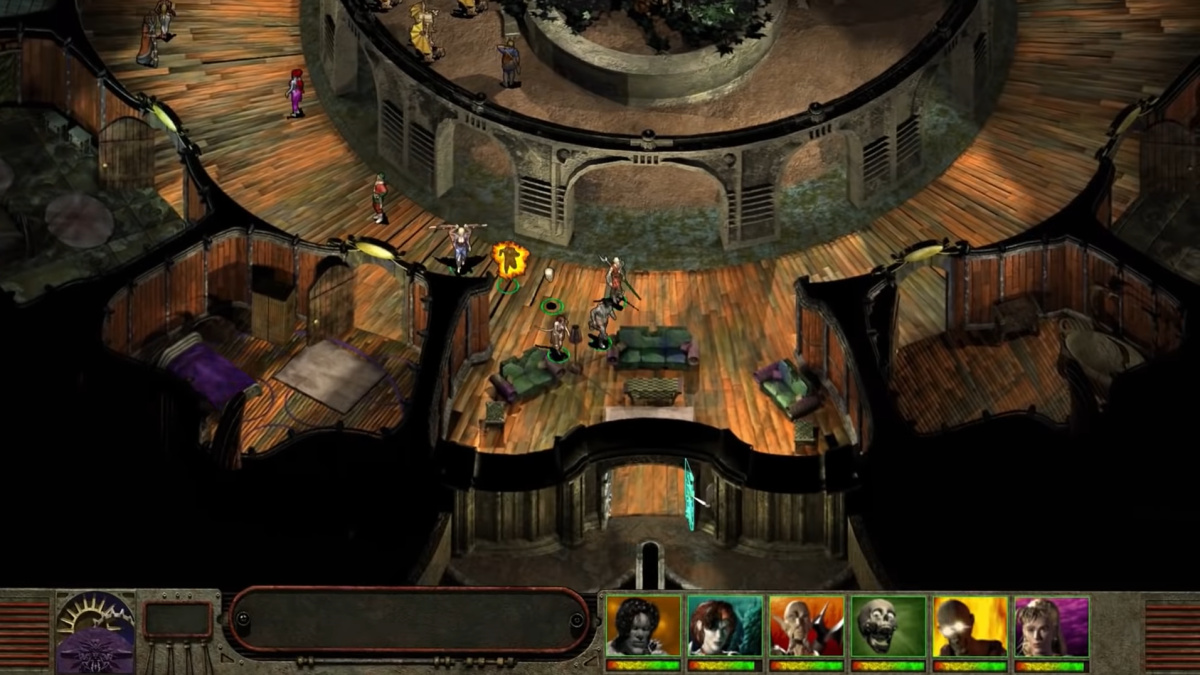
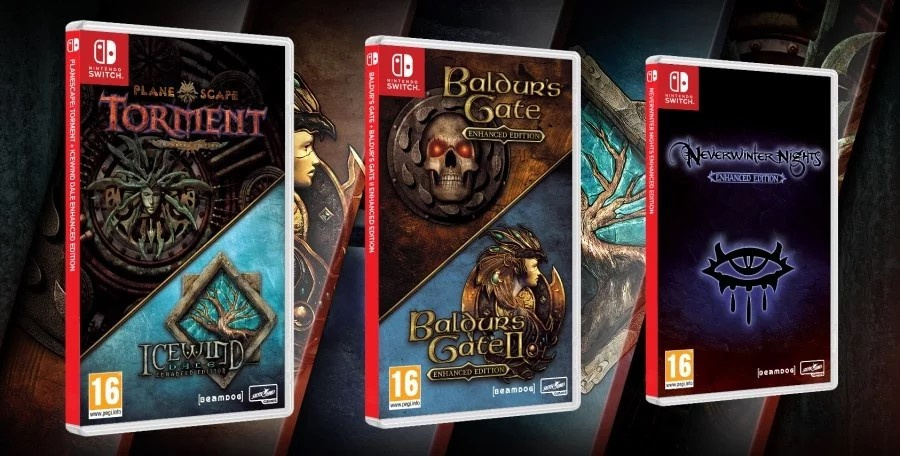
There was a ripple of excitement amongst old-school RPG fans at the end of May when it was announced that a raft of D&D classics were heading to consoles, including your favourite Nintendo handheld hybrid. Beamdog, the developer behind the Enhanced Editions of Baldur’s Gate,Baldur’s Gate II, Planescape Torment,Icewind Dale and Neverwinter Nights, has plenty of pedigree with these games and has released them previously on PC and mobile devices.
We recently got the chance to ask Luke Rideout, producer at Beamdog, about Baldur’s Gate: Enhanced Edition and the challenges of bringing these games to console over two decades after the original PC release.
There may be players on Switch who aren’t familiar with Baldur’s Gate or its legacy, or perhaps have only heard the name – could you explain a little bit about the game and its history?
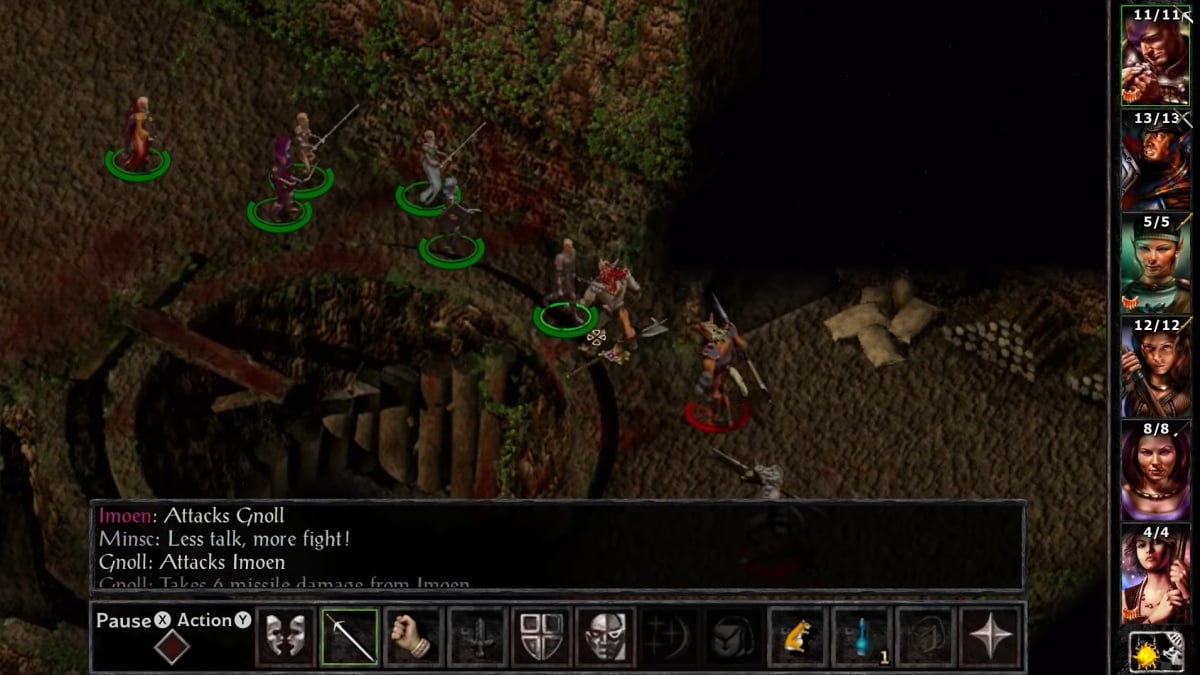
Baldur’s Gate was originally developed and released 20 years ago by BioWare as a fantasy RPG set in the Dungeons & Dragons world of the Forgotten Realms. Back in the ‘90s the game was considered revolutionary for its open world design and branching narrative choices that promoted player agency, all while telling a fantastic story. Back in 2012, Beamdog Co-Owners (and Bioware alumni) Cam Tofer and Trent Oster got the rights to re-release Baldur’s Gate with enhancements to bring it to modern devices, breathing life back into the series for gamers of a new generation. Funnily enough, the story of Baldur’s Gate was based on a tabletop D&D campaign that Cam played in when he was in High School, with their dungeon master, James Ohlen, who is well known as Baldur’s Gate’s lead designer. Cam’s character was a ranger called Minsc with his companion hamster, Boo.
It was a hugely influential RPG – in terms of the Switch’s library, what games do you think have taken inspiration from Baldur’s Gate?
There are so many games that draw inspiration from Baldur’s Gate, both subtle and not-so-subtle. It played a large part in defining the genre of modern RPGs, and its successes informed the design decisions made in many games to come. One game that springs immediately to mind, of course, is Pillars of Eternity, to which some very obvious comparisons can be drawn, from the camera perspective down to the tactical, real time with pause combat. The Witcher might seem a slightly less obvious choice, but CD Projekt worked with BioWare back in that era, and licensed the Aurora Engine to make the first game in the series – which is the engine created by BioWare for Neverwinter Nights – BioWare’s answer to the natural progression of RPGs from Baldur’s Gate.
The Enhanced Edition originally released on PC back in 2012 (and subsequently on mobile devices). What were some of the things about the original which needed updating?
Well, as a Windows 95/98 title, originally, our team had to first re-write hundreds of thousands of lines of code just to get it working on modern systems. Beyond just getting it up and running, the goal was to streamline and smooth out the gameplay so, as Trent likes to say, it became the game everyone remembered, not necessarily the game that it was – since games had advanced quite a bit in the intervening years and objectively, when going back to look at the game as it was in 1998, it had a lot of rough edges. The team optimized the game, removing the loading screens (which were slower to load than just transitioning to another screen), fixed scores of bugs, and brought the UI more in line with modern expectations.
Issues like small text are still commonplace on Switch, even in first-party releases. Having already been optimised for touch devices, what were some of the challenges – technical or otherwise – in bringing Baldur’s Gate and its sequel to Switch? How difficult was it to make it work with a control pad?
Of the challenges we faced, small text wasn’t that big of an issue for us, as we supported text scaling from previous iterations. The biggest challenge for us, really, was adapting a very “late ‘90s” user interface, built for mouse and keyboard with nested menus and scores of buttons, to work with controllers that ostensibly have 14 buttons and a couple analog sticks. We wanted to be sure that the game played well, and didn’t feel like a chore to play. We rewrote our movement code to let players take control of the party movement using the analog stick, instead of pointing and clicking, and changed those banks of buttons into radial menus. To make interacting with a game world that had a lot of pixel hunting, we improved highlighting of in-game objects and a system that snaps the cursor to important game elements, like characters, objects and transition points. We had to make a lot of design decisions to solve issues that seem so harmless when you have the fine control of a mouse and keyboard.
The console releases will include the Beamdog-developed Baldur’s Gate: Seige of Dragonspear expansion – could you tell us more about that?
Baldur’s Gate: Siege of Dragonspear was Beamdog’s love letter to the series. It bridges the gap between the events of Baldur’s Gate I and II, telling a tale of a war-torn Sword Coast in the wake of the events that transpire in the first Baldur’s Gate, fleshing out a number of questions about some otherwise unexplained changes in the political atmosphere of Baldur’s Gate II, and detailing the journey that lands the player ultimately in the dungeons of Jon Irenicus at the start of Baldur’s Gate II. Thanks to the series’ ability to import and continue playing your character from one game to the next, players can build a character in Baldur’s Gate: Enhanced Edition and play using the same character all the way through Siege of Dragonspear and into Baldur’s Gate II: Enhanced Edition. That said, it made a lot of sense to both Beamdog and Skybound Games to combine all three for the console release this fall.
Will the Switch version be making use of any of the console’s unique features?
One question we get asked a lot is whether we implemented touchscreen functionality. It was a hard decision to make, but with the changes made to the game’s UI, and the general finickiness of Baldur’s Gate’s UI under the hood (we are working with 20-year-old UI code), it actually felt like a half measure to leave it in, when much of the original functionality would have been lost. The feature that the Switch does boast that nobody else does and is most exciting, though, is the great feel of the controller scheme, paired with the portability of the Switch, which we support in both docked and undocked modes.
In the past, Beamdog co-founderTrent Oster has spoken plainly about Nintendo’s weaknesseswhen it comes to its digital business and treatment of smaller developers (andoffered some adviceas to how it could improve). How different has the process been developing for Switch and working with the platform holder all these years later?
Things change, that’s for sure. I personally spent my share of time developing for Nintendo back in the Nintendo DS and Wii days, mostly for retail games as opposed to WiiWare. I don’t recall many headaches, but that was in Japan where things may have been very different. Working with the Switch on these games, we’ve been really happy with the support Nintendo provides to developers, and haven’t had much trouble at all navigating the waters of development and certification.
The practice of including a code in a box is becoming disappointingly commonplace for boxed retail versions of many Switch games. Patches aside, will the physical release contain both games on the cartridge?
Anyone that’s sick of codes in a box is going to be in for a treat, in this case. With Skybound Games, we’ve put all the base game content plus DLC, all on one cartridge. For those who aren’t familiar, that’s:
Baldur’s Gate: Enhanced Edition
Baldur’s Gate: Siege of Dragonspear
Baldur’s Gate II: Enhanced Edition
Throne of Bhaal (Expansion to BGII)
Baldur’s Gate: Black Pits
Baldur’s Gate: Black Pits II
For a complete trilogy of games and the “wrap it all up and put a bow on it” expansion, plus two standalone challenge mode games, to boot. Likewise, we’re simultaneously releasing the Planescape: Torment & Icewind Dale Enhanced Editions on one cartridge as well (including Icewind Dale’s Heart of Winter Expansion).
Baldur’s Gate and its sequel are just two of a selection of classic D&D games coming to Switch. Beyond this lineup, does Beamdog have any future plans on Switch?
We can’t speak to our more distant future plans, but this year we have a few more D&D titles coming to Switch. Alongside the Baldur’s Gate Pack this fall, Skybound and Beamdog are releasing a two-pack of Planescape: Torment and Icewind Dale enhanced editions. We’re also releasing Neverwinter Nights: Enhanced Edition on Switch December 3rd!
Finally, what Switch games has the team been enjoying recently?
Many thanks to Luke for his time. The Baldur’s Gate: Enchanced Edition and Planescape:Torment /Icewind Dale bundles will be hitting Switch on 1st October in North America and 4th October elsewhere in both physical and digital formats. Will you be picking up that physical bundle? Let us know with a comment below if you’re eager to play these classics on-the-go.
RPG in a Box, is an all in one voxel based RPG game engine built upon the Godot game engine. It was just released in early access on Humble Store, Itch.io and Steam. RPG in a Box contains all the tools you need to create your own RPG including voxel editing and animation tools, dialog creation tools, world editors and more.
Current features include:
Voxel Editor
Build tiles, objects, and characters from 3D pixel blocks (i.e. voxels) and easily animate them with the editor’s frame-based/stop-motion animation system. Importing from MagicaVoxel (.vox) or PNG sprites is also supported.
Map Editor
Create grid-based worlds with the tiles you’ve built, then bring them to life by adding interactive NPCs and objects using the editor’s intuitive navigation and interaction system.
Scripting
Set up and trigger in-game events with the visual, node-based script editor. Simply drag and drop the desired actions (no programming knowledge required), or manually code “quick scripts” using the custom, Lua-like scripting language.
Dialogue
Write conversations for your NPCs using a visual, flowchart approach similar to that of the script editor. Branching dialogue is supported via player choices and condition checking.
Camera System
Choose from three available camera types for your game: standard, first-person, and isometric. Stage dynamic cutscenes using the engine’s flexible camera scripting system.
UI Customization
Design one or more dialogue box themes and customize the appearance of many other interface elements such as the inventory, main menu, and credits roll.
Basic Items
Define basic items for the player to find in containers or earn through the completion of tasks. Attach scripts to trigger effects for potions and other consumable items.
Sound FX Generator
Generate fun, retro-style sound effects using the built-in tool based on Dr. Petter’s SFXR
Check out RPG in a Box in action in the video below.
10 Top Tips to Learn about Pokemon Masters Ahead of its Release This Week
By Josh Brown26 Aug 2019
The Pokemon franchise is no stranger to mixing up its traditional battle elements for the sake of its many spin-off titles, and Pokemon Masters – the latest attempt due out later this week – is no different. It may look like a fairly standard take on the franchise with its 3v3 battles, but there’s a lot of real-time decision making and new rules in effect here that can trip up even the most dedicated Pokemon fan.
In this quick-fire guide, we’ll highlight a few of Pokemon Masters‘ small mechanical quirks and dish out some helpful tips to overcome its challenges. That way veterans of the franchise won’t fall victim to decades of now obsolete knowledge and muscle memory, and newcomers can jump straight in without feeling too overwhelmed.
1. Pokemon Only Have Single-Type Weaknesses
Unlike basically any other title in the franchise, Pokemon are only ever weak to a single element in Pokemon Masters. Veterans of the franchise will have memorized weakness chart in their minds a long time ago, but that’s actually more of a hindrance in this game.
Rather than a Fire-type Pokémon being weak to Water and Ground, it might only be weak to one or the other. This is thankfully displayed beside each Pokemon on the field. But when these battles are all about quick decisions and fast fingers, you’ll need to keep these strengths in mind before you go using an Ice-type move on a Flying-type Pokemon that’s only actually weak to Electric.
2. Resistances Aren’t A Thing
Staying on a similar subject, type resistances also go the way of the dodo in Pokemon Masters. Just like weaknesses, Pokemon would traditionally resist other types of attacks based on their own. That’s not the case here. Here, there aren’t any resistances at all. That includes complete immunity, too. So don’t worry about using a Normal or Fighting-type move on a Ghost-type Pokemon. You’ll still sock that Ghastly right in the face.
3. Only The AI’s Centre Pokemon Will Use A Sync Move
One of the stranger things about Pokemon Masters is how the rules of battle aren’t identical between the player and the AI. Where you have access to a trio of Sync Moves to suit the situation, your opponent will only ever have the one.
Only the centre Pokemon on the AI team can execute a sync move. To make up for this, AI sync moves will always hit your entire team rather than just the one target like your own. It’s usually a good idea to knock this Pokemon out early to avoid a team wipe in one big blow.
4. Level Caps Aren’t Tied To Rarity
Trainers (or sync pairs) eventually reach what’s known as a “soft cap” – a point where they can’t be levelled up any further without jumping through a few hoops. Similar games usually lock this behind the unit’s rarity (or star rank), requiring players to boost the unit’s rank to unlock their level cap.
While you can upgrade a unit’s rank in Pokemon Masters through the Increase Potential menu, unlocking their max level limit is actually done in a dedicated window using completely different items. So if you’ve seen these systems before in other mobile games, just know that if you’ve reached a unit’s soft level cap, upgrading their rarity isn’t the way to push it further.
5. Use Items to Speed Up Sync Moves
In your effort to knock out the opposing team’s centre lead before they can get their Sync Move off, using items can really speed up the job. Items don’t consume the Move Gauge but do still contribute to the Sync Move countdown.
So if you’re trying to get a Sync Move off before your opponent, consider queueing up item uses on other Pokemon while another spams low-cost moves to accelerate the gauge. Remember: a low-cost move increases the Sync Move gauge just as much as a higher one.
6. Rarity Isn’t Indicative of Overall Strength
There’s no denying that rolling a 5-star character is an exciting prospect, and it’s no surprise that people will cram their teams with as many 5-star gatcha rolls as they can. But Pokemon Masters isn’t as clear-cut as that.
Just because a story character comes in at 3-star rarity, that doesn’t mean they’re completely useless by comparison. Any unit can be upgraded to a 5* with enough effort, and some of those story characters can easily rival a 5-star gatcha pull once they’re boosted to the same point. So just because they’re free, doesn’t mean they’re at the bottom of the tier list. They just need some TLC to really prove their worth. Don’t write them off too soon.
And besides; with type advantages being a thing, almost every sync pair has a use somewhere.
7. Make Use of Status Combos
If you’re having trouble knocking out a strong Pokemon before it has time to finish you off with a Sync Move, make sure you’re making good use of status combos for some easy extra damage. Tapping and holding an attack or skill in battle will show you it’s power, accuracy and additional effects.
Some attacks can inflict common status conditions like Paralysis or Flinching, and certain Sync Moves can exploit these for tons of extra damage. One early example is Flannery and her Torkoal. Torkoal’s base attack, Ember, can inflict Burn with enough luck, and its Sync Move deals considerably more damage to a Burned target. It’s best to build a team that synergizes well with these kinds of combos to exploit these bonuses and take down foes fast.
8. Items Don’t Regenerate Between Rounds
Before you go spamming items early into a zone, be aware that they don’t regenerate between fights. This means if you’re going into a story zone with two or more fights, blowing all your items in that first battle to rush out a Sync Move might leave you grasping at straws later on.
9. Use The Suggested Team To Level Up The Rest
The Level-Up Training zone is a great way to boost low-level sync pairs, but you don’t need to take them in to reap the benefits. Rather than making the easy fights difficult with low-level teams that can’t exploit weaknesses, just use the training manuals rewarded at the end to level up these non-optimal characters. That means you can make quick runs through the level-up training fights with your better teams and use the resulting items to power up your weaker ones.
10. Turn On Battle Order In The Menu
By default, you can’t easily see which Pokemon is next in-line to attack. If you absolutely need to know who’s about to strike next, you can actually turn on a battle order indicator through the menu mid-fight.
Just open it up through the cog icon on the top-left and scroll all the way down. With the option toggled, an indicator on the right-side of the screen will appear with three slots denoting each Pokemon’s position on the battlefield. Enemy Pokemon will show up in red, while friendly Pokemon will be blue.
Want to know anything else before the game releases? Let us know in the comments! There’s still time to pre-register, otherwise Pokemon Masters will release on iOS and Android world-wide on August 29th, 2019.
We just shipped 1.1.0 Preview 1 of Azure SignalR Service SDK to support some new features in ASP.NET Core 3.0, including endpoint routing and server-side Blazor. Let’s take a look how you can use them in your Azure SignalR application.
Here is the list of what’s new in this release:
Endpoint routing support for ASP.NET Core 3
Use SignalR service in server-side Blazor apps
Server stickiness
Endpoint routing support for ASP.NET Core 3
For those who are using Azure SignalR, you should be familiar with AddAzureSignalR() and UseAzureSignalR(). These two methods are required if you want to switch your app server from self-hosted SignalR to use Azure SignalR.
A typical Azure SignalR application usually looks like this in Startup.cs (note where AddAzureSignalR() and UseAzureSignalR() are used):
ASP.NET Core 3.0 introduced a new endpoint routing support which allows routable things like MVC and SignalR to be mixed together in a unified UseEndpoints() interface.
For example, you can call MapGet() and MapHub() in a single UseEndpoints() call, like this:
The only change you need to make is to call AddAzureSignalR() after AddSignalR().
This will be very useful in the case that SignalR is deeply integrated in your code base or the library you’re using. For example, when you’re using server-side Blazor.
Use SignalR service in server-side Blazor apps
Server-side Blazor is a new way to build interactive client-side web UI in ASP.NET Core 3. In server-side Blazor, UI updates are rendered at server side, then sent to browser through a SignalR connection. Since it uses SignalR, there is a natural need to use Azure SignalR service to handle the SignalR traffic so your application can easily scale.
If you look at some server-side Blazor code samples, you’ll see they have a call to MapBlazorHub() to setup the communication channel between client and server.
The implementation of this method calls MapHub() to create a SignalR hub at server side. Before this release there is no way to change the implementation of MapBlazorHub() to use SignalR service. Now if you call AddAzureSignalR(), MapBlazorHub() will also use SignalR service to host the hub instead of hosting it on the server.
Please follow these steps to change your server-side Blazor app to use SignalR service:
Open your Startup.cs, add services.AddSignalR().AddAzureSignalR() in ConfigureServices().
Create a new SignalR service instance.
Get connection string and set it to environment variable Azure:SignalR:ConnectionString.
Then run your app you’ll see the WebSocket connection is going through SignalR service.
The typical connection flow when using SignalR service is that client first negotiates with app server to get the url of SignalR service, then service routes client to app server.
When you have multiple app servers, there is no guarantee that two servers (the one who does negotiation and the one who gets the hub invocation) will be the same one.
We hear a lot of customers asking about whether it’s possible to make the two servers the same one so they can share some states between negotiation and hub invocation. In this release we have added a new “server sticky mode” to support this scenario.
To enable this, you just need to set ServerStickyMode to Required in AddAzureSignalR():
Now for any connection, SignalR service will guarantee negotiation and hub invocation go to the same app server (called “server sticky”).
This feature is very useful when you have client state information maintained locally on the app server. For example, when using server-side Blazor, UI state is maintained at server side so you want all client requests go to the same server including the SignalR connection. So you need to set server sticky mode to Required when using server-side Blazor together with SignalR service.
Please note in this mode, there may be additional cost for the service to route connection to the right app server. So there may be some negative impact in message latency. If you don’t want the performance penalty, there is another Preferred mode you can use. In this mode stickiness is not always guaranteed (only when there is no additional cost to do the routing). But you can still gain some performance benefits as message delivery is more efficient if sender and receiver are on the same app server. Also when sticky mode is enabled, service won’t balance connections between app servers (by default SignalR service balances the traffic by routing to a server with least connections). So we recommend to set sticky mode to Disabled (this is also the default value) and only enable it when there is a need.
You can refer to this doc for more details about server sticky mode.
Posted by: xSicKxBot - 09-08-2019, 02:47 PM - Forum: Windows
- No Replies
New ‘Gears Forever’ trailer now online
We’re just a short time away from the biggest Gears yet with Early Access for either Xbox Game Pass Ultimate or with Gears 5 Ultimate Edition, and today while fans eagerly await its release, we’ve got a brand new trailer showing off Gears 5’s five modes.
In Gears 5, there are five thrilling ways to play: the all-new aggressive, high-stakes co-op mode Escape; the competitive Versus mode, featuring nine modes including the all-new Arcade for players of all levels; the deepest Horde Mode ever; the intuitive Map Builder and the biggest Campaign yet.
Yesterday, we shared news about latest blockbuster partnership in Gears 5 with WWE Superstar Batista making an appearance in Gears 5 as a multiplayer character, donning the armor of the legendary Marcus Fenix. Fans can also look forward to the inclusion of Sarah Connor and the T-800 Endoskeleton from Terminator: Dark Fate and Spartans Emile-A239 and Kat-B320 from Halo: Reach with Xbox Game Pass Ultimate and Gears 5 Ultimate Edition.
Gears 5 early access will begin at 9pm on September 5th in your local time zone. For countries with multiple time zones, the earliest time zone will determine when you can play. For example, North American early access will begin at simultaneously at 9pm ET, 8pm CT and 6pm PT.
Both Xbox Game Pass Ultimate members and Gears 5 Ultimate Edition owners will be able to gear up and take the fight to the Swarm. On behalf of everyone at The Coalition, we’re excited to have fans jump into the world of Gears 5.
For more information on Gears 5 and the Gears franchise, stay tuned to Xbox Wire or follow Gears on Twitter @gearsofwar.
Nvidia’s GPU-powered platform for developing and running conversational AI that understands and responds to natural language requests has achieved some key milestones and broken some records that have big implications for anyone building on their tech — which includes companies large and small, as much of the code they’ve used to achieve these advancements is open source, written in PyTorch and easy to run. (Source: TechCrunch)
Cockpit and the evolution of the Web User Interface
Over 3 years ago the Fedora Magazine published an article entitled Cockpit: an overview. Since then, the interface has see some eye-catching changes. Today’s Cockpit is cleaner and the larger fonts makes better use of screen real-estate.
This article will go over some of the changes made to the UI. It will also explore some of the general tools available in the web interface to simplify those monotonous sysadmin tasks.
Cockpit installation
Cockpit can be installed using the dnf install cockpit command. This provides a minimal setup providing the basic tools required to use the interface.
Another option is to install the Headless Management group. This will install additional packages used to extend the usability of Cockpit. It includes extensions for NetworkManager, software packages, disk, and SELinux management.
Run the following commands to enable the web service on boot and open the firewall port:
To access the web interface, open your favourite browser and enter the server’s domain name or IP in the address bar followed by the service port (9090). Because Cockpit uses HTTPS, the installation will create a self-signed certificate to encrypt passwords and other sensitive data. You can safely accept this certificate, or request a CA certificate from your sysadmin or a trusted source.
Once the certificate is accepted, the new and improved login screen will appear. Long-time users will notice the username and password fields have been moved to the top. In addition, the white background behind the credential fields immediately grabs the user’s attention.
A feature added to the login screen since the previous article is logging in with sudo privileges — if your account is a member of the wheel group. Check the box beside Reuse my password for privileged tasks to elevate your rights.
Another edition to the login screen is the option to connect to remote servers also running the Cockpit web service. Click Other Options and enter the host name or IP address of the remote machine to manage it from your local browser.
Home view
Right off the bat we get a basic overview of common system information. This includes the make and model of the machine, the operating system, if the system is up-to-date, and more.
Clicking the make/model of the system displays hardware information such as the BIOS/Firmware. It also includes details about the components as seen with lspci.
Clicking on any of the options to the right will display the details of that device. For example, the % of CPU cores option reveals details on how much is used by the user and the kernel. In addition, the Memory & Swap graph displays how much of the system’s memory is used, how much is cached, and how much of the swap partition active. The Disk I/O and Network Traffic graphs are linked to the Storage and Networking sections of Cockpit. These topics will be revisited in an upcoming article that explores the system tools in detail.
Secure Shell Keys and authentication
Because security is a key factor for sysadmins, Cockpit now has the option to view the machine’s MD5 and SHA256 key fingerprints. Clicking the Show fingerprints options reveals the server’s ECDSA, ED25519, and RSA fingerprint keys.
You can also add your own keys by clicking on your username in the top-right corner and selecting Authentication. Click on Add keys to validate the machine on other systems. You can also revoke your privileges in the Cockpit web service by clicking on the X button to the right.
Changing the host name and joining a domain
Changing the host name is a one-click solution from the home page. Click the host name currently displayed, and enter the new name in the Change Host Name box. One of the latest features is the option to provide a Pretty name.
Another feature added to Cockpit is the ability to connect to a directory server. Click Join a domain and a pop-up will appear requesting the domain address or name, organization unit (optional), and the domain admin’s credentials. The Domain Membership group provides all the packages required to join an LDAP server including FreeIPA, and the popular Active Directory.
To opt-out, click on the domain name followed by Leave Domain. A warning will appear explaining the changes that will occur once the system is no longer on the domain. To confirm click the red Leave Domain button.
Configuring NTP and system date and time
Using the command-line and editing config files definitely takes the cake when it comes to maximum tweaking. However, there are times when something more straightforward would suffice. With Cockpit, you have the option to set the system’s date and time manually or automatically using NTP. Once synchronized, the information icon on the right turns from red to blue. The icon will disappear if you manually set the date and time.
To change the timezone, type the continent and a list of cities will populate beneath.
Shutting down and restarting
You can easily shutdown and restart the server right from home screen in Cockpit. You can also delay the shutdown/reboot and send a message to warn users.
Configuring the performance profile
If the tuned and tuned-utils packages are installed, performance profiles can be changed from the main screen. By default it is set to a recommended profile. However, if the purpose of the server requires more performance, we can change the profile from Cockpit to suit those needs.
Terminal web console
A Linux sysadmin’s toolbox would be useless without access to a terminal. This allows admins to fine-tune the server beyond what’s available in Cockpit. With the addition of themes, admins can quickly adjust the text and background colours to suit their preference.
Also, if you type exit by mistake, click the Reset button in the top-right corner. This will provide a fresh screen with a flashing cursor.
Adding a remote server and the Dashboard overlay
The Headless Management group includes the Dashboard module (cockpit-dashboard). This provides an overview the of the CPU, memory, network, and disk performance in a real-time graph. Remote servers can also be added and managed through the same interface.
For example, to add a remote computer in Dashboard, click the + button. Enter the name or IP address of the server and select the colour of your choice. This helps to differentiate the stats of the servers in the graph. To switch between servers, click on the host name (as seen in the screen-cast below). To remove a server from the list, click the check-mark icon, then click the red trash icon. The example below demonstrates how Cockpit manages a remote machine named server02.local.lan.
Documentation and finding help
As always, the man pages are a great place to find documentation. A simple search in the command-line results with pages pertaining to different aspects of using and configuring the web service.
The Fedora repository also has a package called cockpit-doc. The package’s description explains it best:
The Cockpit Deployment and Developer Guide shows sysadmins how to deploy Cockpit on their machines as well as helps developers who want to embed or extend Cockpit.
This article only touches upon some of the main functions available in Cockpit. Managing storage devices, networking, user account, and software control will be covered in an upcoming article. In addition, optional extensions such as the 389 directory service, and the cockpit-ostree module used to handle packages in Fedora Silverblue.
The options continue to grow as more users adopt Cockpit. The interface is ideal for admins who want a light-weight interface to control their server(s).
What do you think about Cockpit? Share your experience and ideas in the comments below.