How to use the chown Command on Ubuntu 16.04 / 18.04 with Examples
For new users and students looking for a Linux system to start learning on, the easiest place to start is Ubuntu Linux OS…. It’s a great platform for beginners to start learning Linux on… Ubuntu is an open source Linux operating systems that runs on desktops, laptops, server and other devices…
The same way you use your mouse and keyboard to change files and folder permissions or perform others simple tasks on Microsoft Windows OS, Ubuntu also makes it that easy for you… Just like how simple it is to work on Windows computers, Ubuntu desktop is easy as well and great for beginners.
However, when you’re learning to use and understand Ubuntu Linux, you’ll also want to learn the commands behind the graphics and mouse-clicking… and how to use them… This tutorial is going to show you how.
This post shows new users and students what the chown command is and how to use it.
When you’re ready to learn how to use the chown commands, follow the guide below:
About chown command:
The chowncommand is used by system adminstrators to change the ownership of files and directories on Linux filesystems…. It allows superuser to change and restrict access to files and directories on Linux systems…
Like using your mouse and keyboard to add and remove users access from files and folders in the GUI… the chown is the way to do it on the command line…
Linux has tree major groups to apply permissions to… these are:
User — These permissions apply to a single user who has special access to the file. This user is called the owner. Group — These apply to a single group of users who have access to the file. This group is the owning group. Other — These apply to every other user on the system. These users are known as others, or the world.
When a file is created, the user automatically is assigned owership of the file… and the group becomes the user’s default group….
Syntax:
The syntax is the rule and format of how the chown command can be used… the systax’s options can be reordered.. but straight format must be followed.,.
Below is an example syntax of how to use the chown comamnd….
Code:
chown [OPTION]... [OWNER][:[GROUP]] FILE...
Options:
The command line options are switches or flags that determined how the commands are executed or controlled… they modify the behavior of the command… they are separated by spaces and followed after the commands options…
Below are some options of the chown command:
FILE…
Replace FILE… with the file you want to change it ownership.. If the file doesn’t already exist, the command will fail and not execute…….
-c, –changes
Use the -c or –changes option to report only when a change is made
-f, –silent, –quiet
Use the -f or –silent, –quiet to suppress most error messages
-R, –recursive
Use the -R or –recursive option to operate on files and directories recursively
-v, –verbose
Use the -v or –verbose option to output a diagnostic for every file processed
-h, –help
display this help message and exit
Examples:
Below are some examples of how to run and use the chown on Ubuntu Linux…
If you want to give John owership of a file named Confidential, you run the commands below…
Code:
chown john Confidential
If you wish to make John the ower but make the private group group owner, you run the commands below….
Code:
chown john:private Confidential
If you’re not logged in as a root account, you may have to use the sudo command it it…
Code:
sudo chown john:private Confidential
The commands above give John ownership but assign the private group as group owner of the Confidential file… If access is granted to the private group, all members of that group will be able to access the Confidential file…
To change the ownership and group of an entire directory, including sub-directories, you add the -R option…
Code:
sudo chown -R john:private directories
In the example above, the chown command will give John user ownership but make the private group the group owner of directories….
When you run chownwith the –help option, you’ll see the help text below:
Change the owner and/or group of each FILE to OWNER and/or GROUP.
With --reference, change the owner and group of each FILE to those of RFILE.
-c, --changes like verbose but report only when a change is made
-f, --silent, --quiet suppress most error messages
-v, --verbose output a diagnostic for every file processed
--dereference affect the referent of each symbolic link (this is
the default), rather than the symbolic link itself
-h, --no-dereference affect symbolic links instead of any referenced file
(useful only on systems that can change the
ownership of a symlink)
--from=CURRENT_OWNER:CURRENT_GROUP
change the owner and/or group of each file only if
its current owner and/or group match those specified
here. Either may be omitted, in which case a match
is not required for the omitted attribute
--no-preserve-root do not treat '/' specially (the default)
--preserve-root fail to operate recursively on '/'
--reference=RFILE use RFILE's owner and group rather than
specifying OWNER:GROUP values
-R, --recursive operate on files and directories recursively
The following options modify how a hierarchy is traversed when the -R
option is also specified. If more than one is specified, only the final
one takes effect.
-H if a command line argument is a symbolic link
to a directory, traverse it
-L traverse every symbolic link to a directory
encountered
-P do not traverse any symbolic links (default)
--help display this help and exit
--version output version information an
If you edit something as root you may want to chown the permissions back to the user like so.
The Overlord is dead. The Netherworld is in turmoil. Time to kick some ass! Netherworld Prince Laharl awakens to fight for his throne and it's up to him and some unlikely allies to defend what is rightfully his. Together with his devious vassal Etna, the angel trainee Flonne, and a whole cavalcade of explosive characters, Laharl will slash, shoot, and punch his way to the top. Build your squad to level 9999 and unleash crazy special skills, team attacks, and spells to deal millions of points of damage in this zany high-definition remake of an RPG classic.
Posted by: xSicKxBot - 10-08-2018, 10:40 PM - Forum: Windows
- No Replies
Microsoft Innovative Educators share tips for teachers in podcast series
Welcome to the Microsoft Innovative Educator (MIE) Expert Spotlight Series Podcast, a partnership between Microsoft Education and the TeacherCast Educational Network. In each episode, host Jeff Bradbury, a Microsoft Innovative Educator Expert, interviews other MIEs to share and showcase what they are doing in their classrooms using Microsoft tools and applications.
If you’ve wondered about how other teachers have brought Minecraft: Education Edition, virtual field trips, and even Hip Hop into their classrooms, you’ll probably pick up a few pointers in this playlist!
The podcast can be found on all podcasting platforms in both audio and video formats – just pick one below, or listen to individual episodes from our full playlist below. Most episodes are between 30 and 60 minutes long.
We take a look at the Hack the Classroom event with California educator Tammy Dunbar and learn how you can prepare your students for the 2017 Skype-a-Thon, with help from Paul Watkins and Gina Ruffcorn.
We welcome Sonja and Robyn back on the podcast to discuss the 2018 MIE Program. Together, we discuss the reasons why hundreds of thousands of educators call the MIE program their second family and we discuss how you can become an MIE Expert in 2018!
We invite Josh Sawyer, Senior Manager for US Education for Microsoft, and educators Scott Bricker and Alyson Dame to discuss the Microsoft Showcase Schools Program.
Jeff sits down with Sara Cornish and Trish Cloud from the Minecraft Education team at the Microsoft Education booth. The big announcement at the ISTE Conference revolved around the two new updates for Minecraft Education Edition.
I had the opportunity to sit down with Tricia Van Hollebeke, Justin Chando and Mike Tholfsen from the Microsoft Education team at the Microsoft Education booth at ISTE.
Jeff sits down with Sonja Delafosse and Robyn Hrivnatz from the Microsoft Education team to discuss what makes the MIE program special and how you can become an MIE yourself.
Jeff sits down with Cal Armstrong to discuss how his school district is using Office 365 to provide dynamic and collaborative professional development.
Jeff sits down with David Harcrow to discuss how he is providing a college- and career-ready curriculum that can not be felt in K-12, but well beyond graduation day.
Jeff sits down with Microsoft Innovative Educator Expert and Special Education Educator Lauren Pittman to discuss how technology can be used in the classroom to assist in teaching our exceptional learners.
Jeff speaks to Microsoft Innovative Educator Expert Stacey Ryan to discuss how Skype video conferencing is being used to connect her classrooms worldwide.
Jeff sits down with Microsoft Innovative Educator Expert and MIE Trainer Alex Handy to discuss how he has turned professional development into a successful and enjoyable experience for his teachers and his school district.
Yugi's Jump Force Trailer Reveals He Relies On Others To Fight For Him
Bandai Namco has released the official Jump Force character reveal trailer for Yugi Mutou, the protagonist of Yu-Gi-Oh. Yugi will be joining the growing roster of Shonen Jump characters in the upcoming arena brawler.
Yugi isn't as capable a fighter as the other characters that have already been confirmed to appear in Jump Force. So instead of throwing a punch himself, Yugi summons the monsters and effects from the Yu-Gi-Oh card game to do the fighting for him. In his character reveal trailer, we see Yugi mostly rely on Dark Magician and Dark Magician Girl, but the video also ends with what's probably his ultimate attack: summoning the Egyptian God Card, Slifer the Sky Dragon.
Jump Force takes all of Shonen Jump's most memorable characters and throws them into one three-on-three tag team fighting video game. The game's story is about the Shonen Jump universe crashing into our world, allowing its villains to wreck havoc on our reality. In response, Shonen Jump's heroes decide to unite to stop the spread of evil and separate the two worlds.
In Jump Force's announcement trailer, Bandai Namco revealed Naruto's Naruto, Dragon Ball's Guko and Frieda, One Piece's Luffy, and Death Note's Light and Ryuk would be in the game, although the Death Note characters would not be playable. Bandai would follow up with reveals that characters from both Bleach and Hunter x Hunter would be in Jump Force as well.
Jump Force is being made in celebration of 50 years of Shonen Jump manga and anime. The game is scheduled to release in 2019 on Xbox One, PS4, and PC.
Dash, evade, and smash your way to the truth as the corporate spy, Asaru; or the reckless CIA agent, Amelia! Uncover the dark secrets of the Negabot mega corporation as you save the company from a hostile takeover. Assault Spy is a stylish, fast paced, pure-action game with a dash of comedy.
A closer look at the malware that masquerades as Fortnite cheats
Malware that lures unsuspecting people into giving away personal information by promising cheats or free currency for big online games is not a brand new concept, and the age-old scams are currently running amok with Epic’s free-to-play battle royale game Fortnite.
The company behind the anti-malware software Malwarebytes, for example, has tracked down one particular scam that’s been making the rounds while disguised as a Fortnite cheat. The scam itself is similar to one unearthed earlier this year by the streaming platform Rainway, as well as several others that can be found online at any given moment.
But what makes Malwarebytes’ report particularly interesting is its dive into how the malware itself actually operates. The specific malicious program the company tracks has grabbed a little over 1,200 downloads to date and attempts to steal information from infected systems about everything from cookies and Steam sessions to Bitcoin wallet info.
This particular “cheat” originates from a YouTube video that grabbed over 2,000 views in its first day live and promises an undetectable Fortnite aimbot, Fortnite hacks, loot detecting tools, along with other cheats. A link in the description sends would-be cheaters to a page that promises to deliver a link to the cheat download in exchange for a YouTube channel subscribe, something that Malwarebytes notes is slightly different from the more survey-focused route most malicious programs take. From there, the site directs people to a second site that offers Fortnite cheats, and then a file hosting site to download the “cheat” itself, which Malwarebytes’ software IDs as a ‘trojen.malpack’ that aims to take info on browser sessions, cookies, Bitcoin wallets, and Steam sessions to an IP based out of the Russian Federation.
The site’s blog post has a full breakdown that’s worth checking out about how this specific bit of malware targets the systems and personal information of Fortnite players looking for an illegitimate leg up on their competition.
Amnesia: Collection – In the Mind of a Horror Game Developer
Under what circumstances could you think of torture and execution as entertainment? Now imagine watching this is the highlight of your week. That sounds crazy, right?
In Amnesia, these questions were at the core of production, helping us as developers to set the right mood for the players. Similar questions are common in horror, and I would even go so far as to say that they make for the best horror. “What if a serial killer kidnapped you and held you captive in their basement?” “What if your house was haunted?” Good horror thrives on these scenarios and forces us to consider disturbing scenarios. It puts us in the shoes of the protagonist and makes us think: “What would I do if that were me?”
Games as a medium allow us to take these scenarios even further. A player can’t stop at just imagining the horrid things – they have to actively participate in them. What is a theoretical possibility in movies and books turns into something substantial?
When making Amnesia: The Dark Descent, we wanted to take this as far as we could. Our goal was to make one’s survival a double-edged sword, where every step forward is a step closer to your own darkness. We wanted every encounter, every creepy environment to raise the core questions of the game: “How far would you go to save your own skin?” “What horrible things would you do, or allow to happen?”
It’s the exploration of these questions that contributed to Amnesia’s success, and it’s what we took even further in SOMA. And it’s questions like these we hope you will want to explore with us as well.
What darkness lurks in the depth of your mind? Pick up the Amnesia: Collection today on Xbox One to find out.
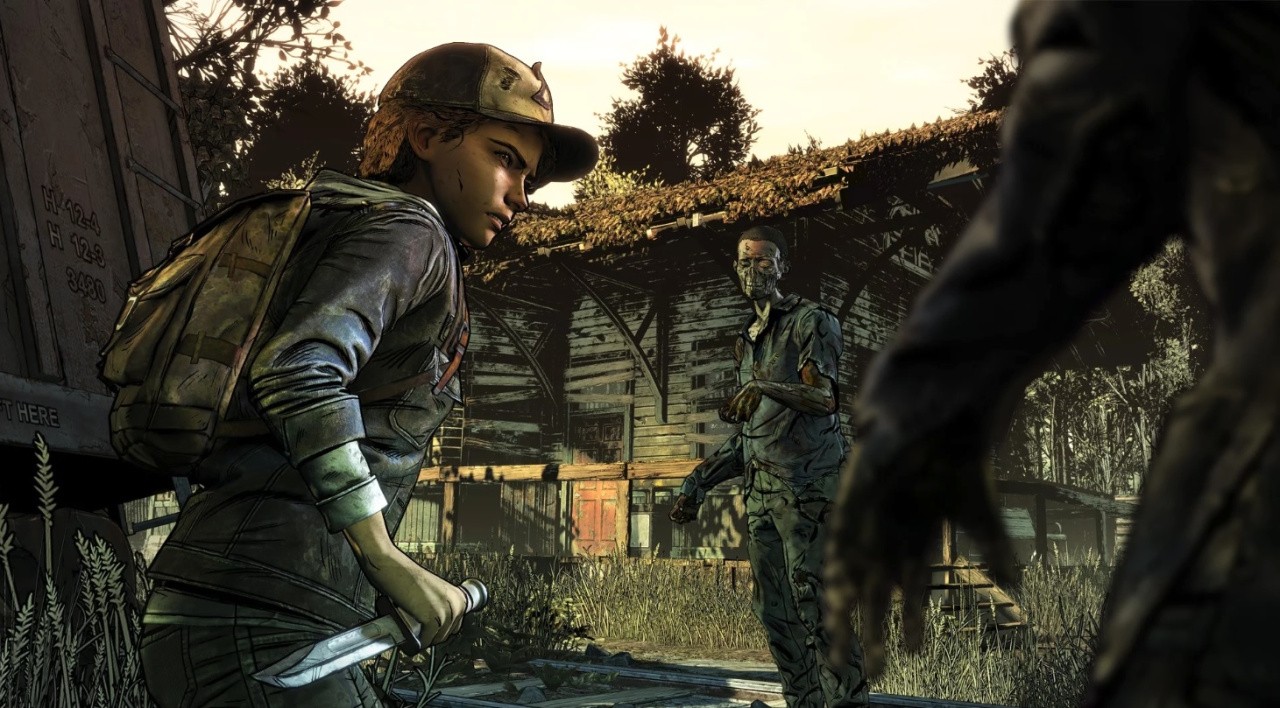
Skybound Games Will Finish The Walking Dead: The Final Season
Since mass layoffs at Telltale Games, the company has been trying to work out a way to finish The Walking Dead. Not long ago, it was revealed Telltale had potentially been thrown a lifeline when multiple partners stepped forward and expressed interest in helping see The Final Season through to completion.
It’s now been confirmed Skybound Games will take over the publishing and development of the final episodes of The Walking Dead. Creator of The Walking Dead and also the founder of Skybound Entertainment Robert Kirkman made it official at New York’s Comic-Con:
We’ll be taking over Telltale’s ‘The Walking Dead’ to finish Clem’s story…We can’t lose Clementine and Rick in the same year.
The news was also confirmed over on the Skybound Twitter account, with the company revealing it would be responsible for completing Clem’s journey. The aim is to keep the original development team intact as Skybound works with former Telltale leaders to come to an agreement. According to Variety, Skybound has never used in-house developers on its games before.
Multiplatform entertainment company Skybound was founded in 2010 to develop properties across multiple forms of media including film, television and video games. Skybound Games was only established earlier this year to assist development.
Add Orwell to your account and play for FREE starting now until October 5th at 10AM Pacific Time! Once you add the game it will remain in your account after the free period, so don’t miss out on this opportunity to play this thrilling, detective simulation!
If you’re the type of person who uses the word “vuln” as a shorthand for code vulnerabilities, you should check out the presentation from the recent Linux Security Summit called “Security in Zephyr and Fuchsia.” In the talk, two researchers from the National Security Agency discuss their contributions to the nascent security stacks of two open source OS projects: Zephyr and Fuchsia.
Microsoft’s Ryan Fairfax explained how to fit an entire Linux stack into 4 MiB of RAM in this presentation. Yet, the hard part, according to Fairfax, was not so much the kernel modification, as it was the development of the rest of the stack. This includes the custom Linux Security Module, which coordinates with the Cortex-M4’s proprietary Pluton security code using a mailbox-based protocol.
In this article, Swapnil Bhartiya interviewed Linux kernel maintainer Greg Kroah-Hartman about how the kernel community is hardening Linux against vulnerabilities. You can see excerpts from their talk in the accompanying video.
The next Linux Security Summit Europe, coming up October 25 – 26 in Edinburgh, offers more essential security information, with refereed presentations, discussion sessions, subsystem updates, and more. There’s still time to register and attend! Check out the full scheduleand stay tuned for more coverage.