Create an account


Welcome, Guest
You have to register before you can post on our site.

Username
  

Password


Search Forums

(Advanced Search)

Forum Statistics
» Members: 20,096
» Latest member: lex9090bb
» Forum threads: 21,728
» Forum posts: 22,591

Full Statistics

Online Users
There are currently 948 online users.
» 1 Member(s) | 941 Guest(s)
Applebot, Baidu, Bing, DuckDuckGo, Google, Yandex, lex9090bb

 
  [Tut] PHP QR Code Generator with chillerlan-php-qrcode Library
Posted by: xSicKxBot - 08-18-2023, 09:46 AM - Forum: PHP Development - No Replies

[Tut] PHP QR Code Generator with chillerlan-php-qrcode Library

by Vincy. Last modified on June 15th, 2023.

This tutorial will create an example for generating a QR code using PHP. This example uses the Chillerlan QR code library. It is a PHP library with advanced features for creating QR codes, bar codes, and more.

There are two examples in this project. The first is a basic use-case scenario, and the second is an advanced example.

Both will help familiarize this library to send data for QR code rendering.

Quick Example


<?php
require_once '../vendor/autoload.php'; use chillerlan\QRCode\QRCode; // Core class for generating the QR code
$qrCode = new QRCode(); // data for which the QR code will be generated
$data = 'www.phppot.com'; // QR code image generation using render function
// it returns the an image resource.
$qrCodeImage = $qrCode->render($data); // Show the generated QR code image on screen
// following header is necessary to show image output
// in the browser
header('Content-Type: image/png');
imagepng($qrCodeImage);
imagedestroy($qrCodeImage);

The above code is a quick example of generating a Chillerlan QR code. You should use Composer to download the chillerlan dependency.

This example imports the library class and gives the data to generate the QR code.

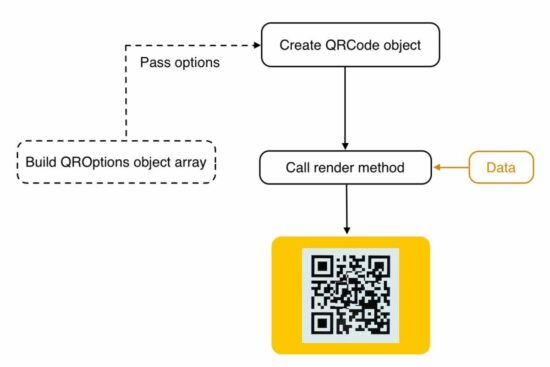
The render() function passes the data to the library with which it will output the QR code image. This output can be returned to a browser or can be saved as a file.

In a previous article, we learned how to render the generated QR code to the browser.

chillerlan php qrcode

Download via composer


Run the following command in your terminal to install this Chillerlan PHP library.

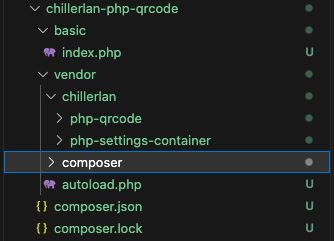
composer require chillerlan/php-qrcode

qrcode project structure

Example 2 – How to configure size, EC level, scale


More configurations help to adjust the QR code quality without affecting readability.  The below parameters are used, which override the default configurations.

  • The version is to set the size of a QR code.
  • ECC level to set the possible values(L, M, Q, H). It is the damage tolerance percentage. We have seen it when coding with phpqrcode library.
  • Scale sets the size of a QR code pixel. The maximum size increases the QR code’s quality.

This library has the QROptions class to set the configurations explicitly. When initiating this class, the code below prepares an array of {version, eccLeverl …} options.

This QROptions instance generates the QRCode object to call the render() action handler. As in the above example, the render() uses the data and bundles it into the QR code binary.

<?php
require_once '../vendor/autoload.php'; use chillerlan\QRCode\QRCode;
use chillerlan\QRCode\QROptions; // data to embed in the QR code image
$data = 'www.phppot.com'; // configuration options for QR code generation
// eccLevel - Error correction level (L, M, Q, H)
// scale - QR code pixe size
// imageBase64 - output as image resrouce or not
$options = new QROptions([ 'version' => 5, 'eccLevel' => QRCode::ECC_H, 'scale' => 5, 'imageBase64' => true, 'imageTransparent' => false, 'foregroundColor' => '#000000', 'backgroundColor' => '#ffffff'
]); // Instantiating the code QR code class
$qrCode = new QRCode($options); // generating the QR code image happens here
$qrCodeImage = $qrCode->render($data); header('Content-Type: image/png');
imagepng($qrCodeImage);
imagedestroy($qrCodeImage);

Chillerlan PHP library


This is one of the popular QR Code generators in PHP. It has clean and easily understandable code with proper modularity.

Some of its features are listed below. This feature list represents the capability of being a component of a PHP application.

Features


  • Creates QR Codes with an improved Model, Version, ECC level, and more configuration
  • It supports encoding numeric, alphanumeric, 8-bit binary, and more.
  • It supports QR code output in GD, ImageMagick, SVG markup, and more formats.
  • It provides QR code readers using GD and ImageMagick libraries.

More about QR code


Hereafter we will see more about the QR code and its evolution,  advantages, and usage scenarios.

The QR code, or the quick response code, is a two-dimensional (2D) bar code. The linked article has the code to generate a barcode using PHP.

The QR code is a Japanese invention for the automotive industry. Later it spreads to more domains. Some of the commonly used places are,

  • Marketing
  • Linking to service providers
  • Information sharing
  • Online payments.

It provides easy access to online information through digital scanners. The QR code contains encoded data that can be decoded with digital scanning. It shares the information, links the service provider or prompts for the payment initiation after scanning.

Example usages of QR code generation and scanning


  • It shows payee details to ensure and allows one to enter the amount to make a mobile payment.
  • It facilitates storing location and contact details. It is for marking locations in the Google map while scanning.
  • When reading the QR code, the application will download v-cards using the contact details stored.
  • The app developing company shows QR codes in the app store to download mobile apps.

Download

↑ Back to Top


https://www.sickgaming.net/blog/2023/06/...e-library/

Print this item

  (Indie Deal) Injustice™ 2 Legendary & Summer Sale | New Vorax Video
Posted by: xSicKxBot - 08-18-2023, 09:45 AM - Forum: Deals or Specials - No Replies

(Indie Deal) Injustice™ 2 Legendary & Summer Sale | New Vorax Video

[www.indiegala.com]
Power up and build the ultimate version of your favorite DC legends in INJUSTICE 2 – winner of IGN's best fighting game of 2017.
https://www.youtube.com/watch?v=jpPqj58JRvk&ab_channel=WarnerBros.GamesUK%26Ireland
Summer Sale
[www.indiegala.com]
New Vorax Video

https://www.youtube.com/watch?v=l2xTKGrCtv8&ab_channel=IndieGala


https://steamcommunity.com/groups/indieg...9018286332

Print this item

  (Free Game Key) Orwell: Keeping an Eye on You and Europa Universalis IV - 2 Free Epi
Posted by: xSicKxBot - 08-18-2023, 09:45 AM - Forum: Deals or Specials - No Replies

(Free Game Key) Orwell: Keeping an Eye on You and Europa Universalis IV - 2 Free Epi

To grab the games for free:

Europa Universalis IV
https://store.epicgames.com/p/europa-universalis-iv

Orwell: Keeping an Eye on You
https://store.epicgames.com/p/orwell-keeping-an-eye-on-you

Next week's freebie:
Black Book

- Click on the GET Button
- Verify that the price is zero
- Click on the Place Order Button
- That's it, the game will be added to you Epic Games Account

This game is free to keep if claimed by Augusts 17th , 2023 5:00 PM or in a day

?GrabFreeGames.com ?Twitter ?Steam Curator ?Facebook[fb.me]?Discord[discord.gg]
❤️Support us: HumbleBundle Partner[www.humblebundle.com] Fanatical Affiliate[www.fanatical.com]


https://steamcommunity.com/groups/GrabFr...9888000387

Print this item

  Decoupling microservices with Apache Camel and Debezium
Posted by: xSicKxBot - 08-17-2023, 11:05 AM - Forum: Java Language, JVM, and the JRE - No Replies

Decoupling microservices with Apache Camel and Debezium

The rise of microservices-oriented architecture brought us new development paradigms and mantras about independent development and decoupling. In such a scenario, we have to deal with a situation where we aim for independence, but we still need to react to state changes in different enterprise domains.

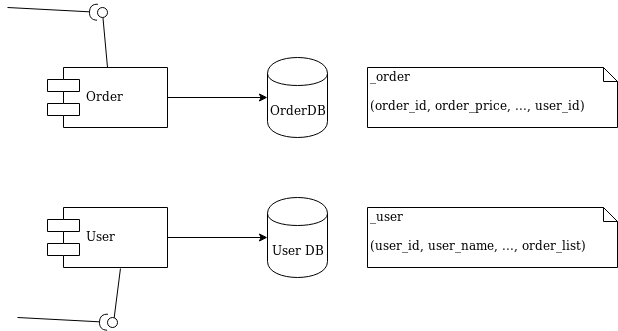
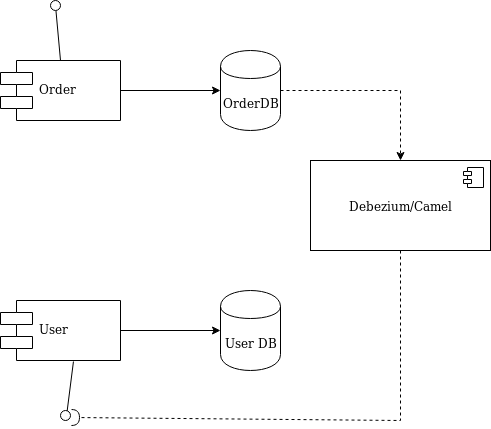
I’ll use a simple and typical example in order to show what we’re talking about. Imagine the development of two independent microservices: Order and User. We designed them to expose a REST interface and to each use a separate database, as shown in Figure 1:

Diagram 1 - Order and User microservices

Figure 1: Order and User microservices.

We must notify the User domain about any change happening in the Order domain. To do this in the example, we need to update the order_list. For this reason, we’ve modeled the User REST service with addOrder and deleteOrder operations.

Solution 1: Queue decoupling


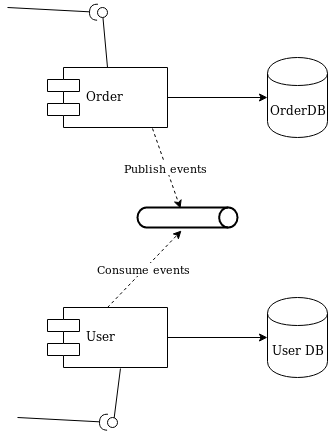
The first solution to consider is adding a queue between the services. Order will publish events that User will eventually process, as shown in Figure 2:

Diagram 2 - decoupling with a queue

Figure 2: Decoupling with a queue.

This is a fair design. However, if you don’t use the right middleware you will mix a lot of infrastructure code into your domain logic. Now that you have queues, you must develop producer and consumer logic. You also have to take care of transactions. The problem is to make sure that every event ends up correctly in both the Order database and in the queue.

Solution 2: Change data capture decoupling


Let me introduce an alternative solution that handles all of that work without your touching any line of your microservices code. I’ll use Debezium and Apache Camel to capture data changes on Order and trigger certain actions on User. Debezium is a log-based data change capture middleware. Camel is an integration framework that simplifies the integration between a source (Order) and a destination (User), as shown in Figure 3:

Diagram 3 - decoupling with Debezium and Camel

Figure 3: Decoupling with Debezium and Camel.

Debezium is in charge of capturing any data change happening in the Order domain and publishing it to a topic. Then a Camel consumer can pick that event and make a REST call to the User API to perform the necessary action expected by its domain (in our simple case, update the list).

Decoupling with Debezium and Camel


I’ve prepared a simple demo with all of the components we need to run the example above. You can find this demo in this GitHub repo. The only part we need to develop is represented by the following source code:

public class MyRouteBuilder extends RouteBuilder { public void configure() { from("debezium:mysql?name=my-sql-connector" + "&databaseServerId=1" + "&databaseHostName=localhost" + "&databaseUser=debezium" + "&databasePassword=dbz" + "&databaseServerName=my-app-connector" + "&databaseHistoryFileName=/tmp/dbhistory.dat" + "&databaseWhitelist=debezium" + "&tableWhitelist=debezium._order" + "&offsetStorageFileName=/tmp/offset.dat") .choice() .when(header(DebeziumConstants.HEADER_OPERATION).isEqualTo("c")) .process(new AfterStructToOrderTranslator()) .to("rest-swagger:http://localhost:8082/v2/api-docs#addOrderUsingPOST") .when(header(DebeziumConstants.HEADER_OPERATION).isEqualTo("d")) .process(new BeforeStructToOrderTranslator()) .to("rest-swagger:http://localhost:8082/v2/api-docs#deleteOrderUsingDELETE") .log("Response : ${body}"); } } 

That’s it. Really. We don’t need anything else.

Apache Camel has a Debezium component that can hook up a MySQL database and use Debezium embedded engine. The source endpoint configuration provides the parameters needed by Debezium to note any change happening in the debezium._order table. Debezium streams the events according to a JSON-defined format, so you know what kind of information to expect. For each event, you will get the information as it was before and after the event occurs, plus a few useful pieces of meta-information.

Thanks to Camel’s content-based router, we can either call the addOrderUsingPOST or deleteOrderUsingDELETE operation. You only have to develop a message translator that can convert the message coming from Debezium:

public class AfterStructToOrderTranslator implements Processor { private static final String EXPECTED_BODY_FORMAT = "{\"userId\":%d,\"orderId\":%d}"; public void process(Exchange exchange) throws Exception { final Map value = exchange.getMessage().getBody(Map.class); // Convert and set body int userId = (int) value.get("user_id"); int orderId = (int) value.get("order_id"); exchange.getIn().setHeader("userId", userId); exchange.getIn().setHeader("orderId", orderId); exchange.getIn().setBody(String.format(EXPECTED_BODY_FORMAT, userId, orderId)); } } 

Notice that we did not touch any of the base code for Order or User. Now, turn off the Debezium process to simulate downtime. You will see that it can recover all events as soon as it turns back on!

You can run the example provided by following the instructions on this GitHub repo.

Caveat


The example illustrated here uses Debezium’s embedded mode. For more consistent solutions, consider using the Kafka connect mode instead, or tuning the embedded engine accordingly.

Share

The post Decoupling microservices with Apache Camel and Debezium appeared first on Red Hat Developer.


https://www.sickgaming.net/blog/2019/11/...-debezium/

Print this item

  [Tut] Write a Long String on Multiple Lines in Python
Posted by: xSicKxBot - 08-17-2023, 11:05 AM - Forum: Python - No Replies

[Tut] Write a Long String on Multiple Lines in Python

5/5 – (1 vote)

To create and manage multiline strings in Python, you can use triple quotes and backslashes, while more advanced options involve string literals, parentheses, the + operator, f-strings, the textwrap module, and join() method to handle long strings within collections like dictionaries and lists.

Let’s get started with the simple techniques first: ?

Basic Multiline Strings


In Python, there are multiple ways to create multiline strings. This section will cover two primary methods of writing multiline strings: using triple quotes and backslashes.

Triple Quotes


Triple quotes are one of the most common ways to create multiline strings in Python. This method allows you to include line breaks and special characters like newline characters directly in the string without using escape sequences. You can use triple single quotes (''') or triple double quotes (""") to define a multiline string.

Here is an example:

multiline_string = '''This is an example
of a multiline string
in Python using triple quotes.''' print(multiline_string)

This will print:

This is an example
of a multiline string
in Python using triple quotes.

Backslash


Another way to create a multiline string is by using backslashes (\). The backslash at the end of a line helps in splitting a long string without inserting a newline character. When the backslash is used, the line break is ignored, allowing the string to continue across multiple lines.

Here is an example:

multiline_string = "This is an example " \ "of a multiline string " \ "in Python using backslashes." print(multiline_string)

This will print:

This is an example of a multiline string in Python using backslashes.

In this example, even though the string is split into three separate lines in the code, it will be treated as a single line when printed, as the backslashes effectively join the lines together.

Advanced Multiline Strings


In this section, we will explore advanced techniques for creating multiline strings in Python. These techniques not only improve code readability but also make it easier to manipulate long strings with different variables and formatting options.

String Literals


String literals are one way to create multiline strings in Python. You can use triple quotes (''' or """) to define a multiline string:

multiline_string = """This is a multiline string
that spans multiple lines."""

This method is convenient for preserving text formatting, as it retains the original line breaks and indentation.

? Recommended: Proper Indentation for Python Multiline Strings

Parentheses


Another approach to create multiline strings is using parentheses. By enclosing multiple strings within parentheses, Python will automatically concatenate them into a single string, even across different lines:

multiline_string = ("This is a long string that spans " "multiple lines and is combined using " "the parentheses technique.")

This technique improves readability while adhering to Python’s PEP 8 guidelines for line length.

+ Operator


You can also create multiline strings using the + operator to concatenate strings across different lines:

multiline_string = "This is a long string that is " + \ "concatenated using the + operator."

While this method is straightforward, it can become cluttered when dealing with very long strings or multiple variables.

F-Strings


F-Strings, introduced in Python 3.6, provide a concise and flexible way to embed expressions and variables within strings. They can be combined with the aforementioned techniques to create multiline strings. To create an F-String, simply add an f or F prefix to the string and enclose expressions or variables within curly braces ({}):

name = "Alice"
age = 30
multiline_string = (f"This is an example of a multiline string " f"with variables, like {name} who is {age} years old.")

F-Strings offer a powerful and readable solution for handling multiline strings with complex formatting and variable interpolation.

? Recommended: Python f-Strings — The Ultimate Guide

Handling Multiline Strings


In Python, there are several ways to create multiline strings, but sometimes it is necessary to split a long string over multiple lines without including newline characters. Two useful methods to achieve this are the join() method and the textwrap module.

Join() Method


The join() method is a built-in method in Python used to concatenate list elements into a single string. To create a multiline string using the join() method, you can split the long string into a list of shorter strings and use the method to concatenate the list elements without newline characters.

Here is an example:

multiline_string = ''.join([ "This is an example of a long string ", "that is split into multiple lines ", "using the join() method."
])
print(multiline_string)

This code would print the following concatenated string:

This is an example of a long string that is split into multiple lines using the join() method.

Notice that the list elements were concatenated without any newline characters added.

Textwrap Module


The textwrap module in Python provides tools to format text strings for displaying in a limited-width environment. It’s particularly useful when you want to wrap a long string into multiple lines at specific column widths.

To use the textwrap module, you’ll need to import it first:

import textwrap

To wrap a long string into multiple lines without adding newline characters, you can use the textwrap.fill() function. This function takes a string and an optional width parameter, and returns a single string formatted to have line breaks at the specified width.

Here is an example:

long_string = ( "This is an example of a long string that is " "split into multiple lines using the textwrap module."
)
formatted_string = textwrap.fill(long_string, width=30)
print(formatted_string)

This code would print the following wrapped string:

This is an example of a long
string that is split into
multiple lines using the
textwrap module.

The textwrap module provides additional functions and options to handle text formatting and wrapping, allowing you to create more complex multiline strings when needed.

Code Style and PEP8


Line Continuation


In Python, readability is important, and PEP8 is the widely-accepted code style guide. When working with long strings, it is essential to maintain readability by using multiline strings. One common approach to achieve line continuation is using parentheses:

long_string = ("This is a very long string that " "needs to be split across multiple lines " "to follow PEP8 guidelines.")

Another option is using the line continuation character, the backslash \:

long_string = "This is a very long string that " \ "needs to be split across multiple lines " \ "to follow PEP8 guidelines."

Flake8


Flake8 is a popular code checker that ensures your code adheres to PEP8 guidelines. It checks for syntax errors, coding style issues, and other potential problems. By using Flake8, you can maintain a consistent code format across your project, improving readability and reducing errors.

To install and run Flake8, use the following commands:

pip install flake8
flake8 your_script.py

E501


When using PEP8 code checkers like Flake8, an E501 error is raised when a line exceeds 80 characters. This is to ensure that your code remains readable and easy to maintain. By splitting long strings across multiple lines using line continuation techniques, as shown above, you can avoid E501 errors and maintain a clean and readable codebase.

Working with Collections


In Python, working with collections like dictionaries and lists is an important aspect of dealing with long strings spanning multiple lines. Breaking down these collections into shorter, more manageable strings is often necessary for readability and organization.

Dictionaries


A dictionary is a key-value pair collection, and in Python, you can define and manage long strings within dictionaries by using multiple lines. The syntax for creating a dictionary is with {} brackets:

my_dict = { "key1": "This is a very long string in Python that " "spans multiple lines in a dictionary value.", "key2": "Another lengthy string can be written " "here using the same technique."
}

In the example above, the strings are spread across multiple lines without including newline characters. This helps keep the code clean and readable.

Brackets


For lists, you can use [] brackets to create a collection of long strings or other variables:

my_list = [ "This is a long string split over", "multiple lines in a Python list."
] another_list = [ "Sometimes, it is important to use", "newline characters to separate lines.",
]

In this example, the first list stores the chunks of a long string as separate elements. The second list showcases the usage of a newline character (\n) embedded within the string to further organize the text.

Frequently Asked Questions


How can I create a multiline string in Python?


There are multiple ways to create a multiline string in Python. One common approach is using triple quotes, either with single quotes (''') or double quotes ("""). For example:

multiline_string = ''' This is a multiline string '''

How to break a long string into multiple lines without adding newlines?


One way to break a long string into multiple lines without including newlines is by enclosing the string portions within parentheses. For example:

long_string = ('This is a very long string ' 'that spans multiple lines in the code ' 'but remains a single line when printed.')

What is the best way to include variables in a multiline string?


The best way to include variables in a multiline string is by using f-strings (formatted string literals) introduced in Python 3.6. For example:

name = 'John'
age = 30 multiline_string = f''' My name is {name} and I am {age} years old. ''' print(multiline_string)

How to manage long string length in Python?


To manage long string length in Python and adhere to the PEP8 recommendation of keeping lines under 80 characters, you can split the string over multiple lines. This can be done using parentheses as shown in a previous example or through string concatenation:

long_string = 'This is a very long string ' + \ 'that will be split over multiple lines ' + \ 'in the code but remain a single line when printed.'

What are the ways to write a multi-line statement in Python?


To create multiline statements in Python, you can use line continuation characters \, parentheses (), or triple quotes ''' or """ for strings. For example:

result = (1 + 2 + 3 + 4 + 5) multiline_string = """ This is a multiline string """

How to use f-string for multiline formatting?


To use f-strings for multiline formatting, you can create a multiline string using triple quotes and include expressions inside curly braces {}. For example:

item = 'apple'
price = 1.99 multiline_string = f""" Item: {item} Price: ${price} """ print(multiline_string)

Python One-Liners Book: Master the Single Line First!


Python programmers will improve their computer science skills with these useful one-liners.

Python One-Liners

Python One-Liners will teach you how to read and write “one-liners”: concise statements of useful functionality packed into a single line of code. You’ll learn how to systematically unpack and understand any line of Python code, and write eloquent, powerfully compressed Python like an expert.

The book’s five chapters cover (1) tips and tricks, (2) regular expressions, (3) machine learning, (4) core data science topics, and (5) useful algorithms.

Detailed explanations of one-liners introduce key computer science concepts and boost your coding and analytical skills. You’ll learn about advanced Python features such as list comprehension, slicing, lambda functions, regular expressions, map and reduce functions, and slice assignments.

You’ll also learn how to:

  • Leverage data structures to solve real-world problems, like using Boolean indexing to find cities with above-average pollution
  • Use NumPy basics such as array, shape, axis, type, broadcasting, advanced indexing, slicing, sorting, searching, aggregating, and statistics
  • Calculate basic statistics of multidimensional data arrays and the K-Means algorithms for unsupervised learning
  • Create more advanced regular expressions using grouping and named groups, negative lookaheads, escaped characters, whitespaces, character sets (and negative characters sets), and greedy/nongreedy operators
  • Understand a wide range of computer science topics, including anagrams, palindromes, supersets, permutations, factorials, prime numbers, Fibonacci numbers, obfuscation, searching, and algorithmic sorting

By the end of the book, you’ll know how to write Python at its most refined, and create concise, beautiful pieces of “Python art” in merely a single line.

Get your Python One-Liners on Amazon!!



https://www.sickgaming.net/blog/2023/08/...in-python/

Print this item

  [Tut] Web Scraping with PHP – Tutorial to Scrape Web Pages
Posted by: xSicKxBot - 08-17-2023, 11:05 AM - Forum: PHP Development - No Replies

[Tut] Web Scraping with PHP – Tutorial to Scrape Web Pages

by Vincy. Last modified on July 21st, 2023.

Web scraping is a mechanism to crawl web pages using software tools or utilities. It reads the content of the website pages over a network stream.

This technology is also known as web crawling or data extraction. In a previous tutorial, we learned how to extract pages by its URL.
View Demo

There are more PHP libraries to support this feature. In this tutorial, we will see one of the popular web-scraping components named DomCrawler.

This component is underneath the PHP Symfony framework. This article has the code for integrating and using this component to crawl web pages.

web scraping php

We can also create custom utilities to scrape the content from the remote pages. PHP allows built-in cURL functions to process the network request-response cycle.

About DomCrawler


The DOMCrawler component of the Symfony library is for parsing the HTML and XML content.

It constructs the crawl handle to reach any node of an HTML tree structure. It accepts queries to filter specific nodes from the input HTML or XML.

It provides many crawling utilities and features.

  1. Node filtering by XPath queries.
  2. Node traversing by specifying the HTML selector by its position.
  3. Node name and value reading.
  4. HTML or XML insertion into the specified container tag.

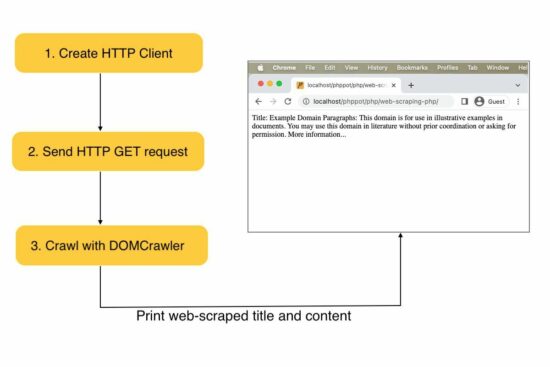
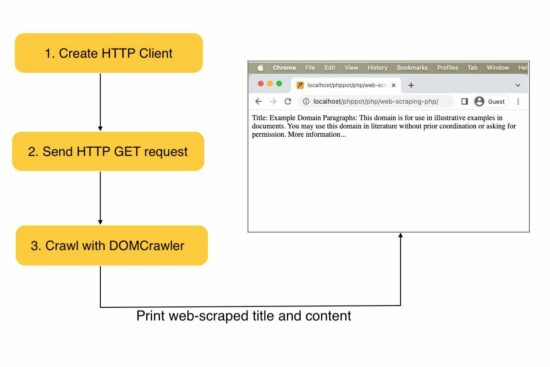
Steps to create a web scraping tool in PHP


  1. Install and instantiate an HTTP client library.
  2. Install and instantiate the crawler library to parse the response.
  3. Prepare parameters and bundle them with the request to scrape the remote content.
  4. Crawl response data and read the content.

In this example, we used the HTTPClient library for sending the request.

Web scraping PHP example


This example creates a client instance and sends requests to the target URL. Then, it receives the web content in a response object.

The PHP DOMCrawler parses the response data to filter out specific web content.

In this example, the crawler reads the site title by parsing the h1 text. Also, it parses the content from the site HTML filtered by the paragraph tag.

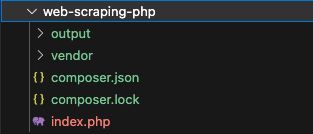
The below image shows the example project structure with the PHP script to scrape the web content.

web scraping php project structure

How to install the Symfony framework library


We are using the popular Symfony to scrape the web content. It can be installed via Composer.
Following are the commands to install the dependencies.

composer require symfony/http-client symfony/dom-crawler
composer require symfony/css-selector

After running these composer commands, a vendor folder can map the required dependencies with an autoload.php file. The below script imports the dependencies by this file.

index.php

<?php require 'vendor/autoload.php'; use Symfony\Component\HttpClient\HttpClient;
use Symfony\Component\DomCrawler\Crawler; $httpClient = HttpClient::create(); // Website to be scraped
$website = 'https://example.com'; // HTTP GET request and store the response
$httpResponse = $httpClient->request('GET', $website);
$websiteContent = $httpResponse->getContent(); $domCrawler = new Crawler($websiteContent); // Filter the H1 tag text
$h1Text = $domCrawler->filter('h1')->text();
$paragraphText = $domCrawler->filter('p')->each(function (Crawler $node) { return $node->text();
}); // Scraped result
echo "H1: " . $h1Text . "\n";
echo "Paragraphs:\n";
foreach ($paragraphText as $paragraph) { echo $paragraph . "\n";
}
?>

Ways to process the web scrapped data


What will people do with the web-scraped data? The example code created for this article prints the content to the browser. In an actual application, this data can be used for many purposes.

  1. It gives data to find popular trends with the scraped news site contents.
  2. It generates leads for showing charts or statistics.
  3. It helps to extract images and store them in the application’s backend.

If you want to see how to extract images from the pages, the linked article has a simple code.

Caution


Web scraping is theft if you scrape against a website’s usage policy.  You should read a website’s policy before scraping it. If the terms are unclear, you may get explicit permission from the website’s owner. Also, commercializing web-scraped content is a crime in most cases. Get permission before doing any such activities.

Before crawling a site’s content, it is essential to read the website terms. It is to ensure that the public can be subject to scraping.

People provide API access or feed to read the content. It is fair to do data extraction with proper API access provision. We have seen how to extract the title, description and video thumbnail using YouTube API.

For learning purposes, you may host a dummy website with lorem ipsum content and scrape it.
View Demo

↑ Back to Top


https://www.sickgaming.net/blog/2023/06/...web-pages/

Print this item

  (Indie Deal) Metal Slug Giveaways, 2K, Paradox & THQ Deals
Posted by: xSicKxBot - 08-17-2023, 11:05 AM - Forum: Deals or Specials - No Replies

(Indie Deal) Metal Slug Giveaways, 2K, Paradox & THQ Deals

[www.indiegala.com]? Lady Luck smiles upon the determined gamers.?
[www.indiegala.com]
Interkosmos 2000 is Out Now
[www.indiegala.com]
Interkosmos: A challenging mini-adventure of astronomical proportions!
https://www.youtube.com/watch?v=2wtVrEyZWcA&ab_channel=OvidWorks
Summer Sale
[www.indiegala.com]
Mortal Kombat XL Deal
[www.indiegala.com]
https://www.youtube.com/watch?v=5RWv4VN07ac&ab_channel=WBGamesITALIA


https://steamcommunity.com/groups/indieg...9007600298

Print this item

  (Free Game Key) Unity of Command Stalingrad Campaign - Free Steam Game (Fanatical)
Posted by: xSicKxBot - 08-17-2023, 11:05 AM - Forum: Deals or Specials - No Replies

(Free Game Key) Unity of Command Stalingrad Campaign - Free Steam Game (Fanatical)

This is a steam key giveaway, made by fanatical, fanatical is a game store / bundle site

You need to have a non limited steam acc to get this, also some countries are probably region locked

Go to the Fanatical website, register / login
Link your steam account to their website
https://www.fanatical.com/account/login
Go to the giveaway page of Unity of Command Stalingrad Campaign
https://www.fanatical.com/en/game/unity-of-command-stalingrad-campaign
Verify that the price is 0
Checkout
View Order and Keys
Reveal Key and redeem it (sometimes they run out of keys)

Keys expire after some time (if they are not used)

?GrabFreeGames.com ?Twitter ?Steam Curator ?Facebook[fb.me]?Discord[discord.gg]
❤️Support us: HumbleBundle Partner[www.humblebundle.com] Fanatical Affiliate[www.fanatical.com]


https://steamcommunity.com/groups/GrabFr...2657393279

Print this item

  PC - The Expanse: A Telltale Series - Episode 1
Posted by: xSicKxBot - 08-17-2023, 11:05 AM - Forum: New Game Releases - No Replies

PC - The Expanse: A Telltale Series - Episode 1


Experience the exciting universe of The Expanse like never before in Telltale’s latest adventure, The Expanse: A Telltale Series. Follow Cara Gee, who reprises her role as Camina Drummer, and explore the dangerous and uncharted edges of The Belt aboard the The Artemis. From scavenging wrecked ships in a zero-g environment, to surviving a mutiny, to combating fearsome pirates, you make the difficult choices and reveal Camina Drummer’s resolve in this latest Telltale adventure.

Publisher: Telltale Games

Release Date: Jul 27, 2023


https://www.metacritic.com/game/pc/the-e...-episode-1

Print this item

  [Tut] 5 Effective Methods to Sort a List of String Numbers Numerically in Python
Posted by: xSicKxBot - 08-16-2023, 08:49 AM - Forum: Python - No Replies

[Tut] 5 Effective Methods to Sort a List of String Numbers Numerically in Python

5/5 – (1 vote)

Problem Formulation


Sorting a list of string numbers numerically in Python can lead to unexpected issues.

For example, using the naive approach to sort the list lst = ["1", "10", "3", "22", "23", "4", "2", "200"] using lst.sort() will result in the incorrect order as it sorts the list of strings lexicographically, not numerically.

In this short article, my goal is to present the five best methods to correctly sort this list numerically. My recommended approach is the fifth one, see below. ?

Method 1: Convert Strings to Integers and Sort


This method involves converting each string in the list to an integer and then sorting them. It’s a direct and simple approach to ensure numerical ordering.

lst = [int(x) for x in lst]
lst.sort()

Output: ['1', '2', '3', '4', '10', '22', '23', '200']

? Recommended: Python List Comprehension

Method 2: Using the key Parameter with sort()


This method uses the key parameter with the int function to sort the strings as integers. It allows for numerical comparison without altering the original strings.

lst.sort(key=int)

Output: ['1', '2', '3', '4', '10', '22', '23', '200']

? Recommended: Python list.sort() with key parameter

Method 3: Using the natsort Module


The natsort module provides a natural sorting algorithm, useful for sorting strings that represent numbers. This method can handle more complex string sorting scenarios.

from natsort import natsorted
lst = natsorted(lst)

Output: ['1', '2', '3', '4', '10', '22', '23', '200']

Method 4: Using Regular Expressions


Using regular expressions, this method can sort strings containing both letters and numbers. It converts the numeric parts into floats for comparison, handling mixed content.

import re def sort_human(l): convert = lambda text: float(text) if text.isdigit() else text alphanum = lambda key: [convert© for c in re.split('([-+]?[0-9]*\.?[0-9]*)', key)] l.sort(key=alphanum) return l lst = sort_human(lst)

Output: ['1', '2', '3', '4', '10', '22', '23', '200']

? Recommended: Python Regular Expression Superpower

Method 5: Using sorted() with key Parameter (Recommended)


This method combines the simplicity of using the key parameter with the benefit of creating a new sorted list, leaving the original untouched. It’s concise and effective.

lst = sorted(lst, key=int)

Output: ['1', '2', '3', '4', '10', '22', '23', '200']

? Recommended: Python sorted() function

Summary – When to Use Which


  • Method 1: Converts strings to integers, then sorts. Simple but alters the original list.
  • Method 2: Uses the key parameter with int for sorting. Preserves the original strings.
  • Method 3: Utilizes the natsort module. Handles complex scenarios.
  • Method 4: Employs regular expressions for sorting alphanumeric strings.
  • Method 5 (Recommended): Combines the simplicity of using key with sorted(). Preserves the original list and offers concise code.

Python One-Liners Book: Master the Single Line First!


Python programmers will improve their computer science skills with these useful one-liners.

Python One-Liners

Python One-Liners will teach you how to read and write “one-liners”: concise statements of useful functionality packed into a single line of code. You’ll learn how to systematically unpack and understand any line of Python code, and write eloquent, powerfully compressed Python like an expert.

The book’s five chapters cover (1) tips and tricks, (2) regular expressions, (3) machine learning, (4) core data science topics, and (5) useful algorithms.

Detailed explanations of one-liners introduce key computer science concepts and boost your coding and analytical skills. You’ll learn about advanced Python features such as list comprehension, slicing, lambda functions, regular expressions, map and reduce functions, and slice assignments.

You’ll also learn how to:

  • Leverage data structures to solve real-world problems, like using Boolean indexing to find cities with above-average pollution
  • Use NumPy basics such as array, shape, axis, type, broadcasting, advanced indexing, slicing, sorting, searching, aggregating, and statistics
  • Calculate basic statistics of multidimensional data arrays and the K-Means algorithms for unsupervised learning
  • Create more advanced regular expressions using grouping and named groups, negative lookaheads, escaped characters, whitespaces, character sets (and negative characters sets), and greedy/nongreedy operators
  • Understand a wide range of computer science topics, including anagrams, palindromes, supersets, permutations, factorials, prime numbers, Fibonacci numbers, obfuscation, searching, and algorithmic sorting

By the end of the book, you’ll know how to write Python at its most refined, and create concise, beautiful pieces of “Python art” in merely a single line.

Get your Python One-Liners on Amazon!!


https://www.sickgaming.net/blog/2023/08/...in-python/

Print this item

 
Latest Threads
Apollo Neuro Discount Cod...
Last Post: lex9090bb
1 minute ago
Apollo Neuro Coupon Code ...
Last Post: lex9090bb
2 minutes ago
Apollo Neuro Promo Code $...
Last Post: lex9090bb
3 minutes ago
Apollo Neuro Promo Code [...
Last Post: lex9090bb
5 minutes ago
TEMU Gutschein: 100 € Rab...
Last Post: ackie1
39 minutes ago
Temu Gutscheincode [ALD91...
Last Post: ackie1
45 minutes ago
Temu Rabattcode [ALD91150...
Last Post: ackie1
47 minutes ago
Exklusiv 100 € Temu Gutsc...
Last Post: ackie1
51 minutes ago
30% Temu Gutscheincode [A...
Last Post: ackie1
55 minutes ago
30% Temu Gutschein | Raba...
Last Post: ackie1
57 minutes ago

Forum software by © MyBB Theme © iAndrew 2016