Experience the exciting universe of The Expanse like never before in Telltale’s latest adventure, The Expanse: A Telltale Series. Follow Cara Gee, who reprises her role as Camina Drummer, and explore the dangerous and uncharted edges of The Belt aboard the The Artemis. From scavenging wrecked ships in a zero-g environment, to surviving a mutiny, to combating fearsome pirates, you make the difficult choices and reveal Camina Drummer’s resolve in this latest Telltale adventure.
Posted by: xSicKxBot - 08-16-2023, 08:49 AM - Forum: Python
- No Replies
[Tut] 5 Effective Methods to Sort a List of String Numbers Numerically in Python
5/5 – (1 vote)
Problem Formulation
Sorting a list of string numbers numerically in Python can lead to unexpected issues.
For example, using the naive approach to sort the list lst = ["1", "10", "3", "22", "23", "4", "2", "200"] using lst.sort() will result in the incorrect order as it sorts the list of strings lexicographically, not numerically.
In this short article, my goal is to present the five best methods to correctly sort this list numerically. My recommended approach is the fifth one, see below.
Method 1: Convert Strings to Integers and Sort
This method involves converting each string in the list to an integer and then sorting them. It’s a direct and simple approach to ensure numerical ordering.
This method uses the key parameter with the int function to sort the strings as integers. It allows for numerical comparison without altering the original strings.
The natsort module provides a natural sorting algorithm, useful for sorting strings that represent numbers. This method can handle more complex string sorting scenarios.
from natsort import natsorted

lst = natsorted(lst)
Using regular expressions, this method can sort strings containing both letters and numbers. It converts the numeric parts into floats for comparison, handling mixed content.
Method 5: Using sorted() with key Parameter (Recommended)
This method combines the simplicity of using the key parameter with the benefit of creating a new sorted list, leaving the original untouched. It’s concise and effective.
Method 1: Converts strings to integers, then sorts. Simple but alters the original list.
Method 2: Uses the key parameter with int for sorting. Preserves the original strings.
Method 3: Utilizes the natsort module. Handles complex scenarios.
Method 4: Employs regular expressions for sorting alphanumeric strings.
Method 5 (Recommended): Combines the simplicity of using key with sorted(). Preserves the original list and offers concise code.
Python One-Liners Book: Master the Single Line First!
Python programmers will improve their computer science skills with these useful one-liners.
Python One-Linerswill teach you how to read and write “one-liners”: concise statements of useful functionality packed into a single line of code. You’ll learn how to systematically unpack and understand any line of Python code, and write eloquent, powerfully compressed Python like an expert.
The book’s five chapters cover (1) tips and tricks, (2) regular expressions, (3) machine learning, (4) core data science topics, and (5) useful algorithms.
Detailed explanations of one-liners introduce key computer science concepts and boost your coding and analytical skills. You’ll learn about advanced Python features such as list comprehension, slicing, lambda functions, regular expressions, map and reduce functions, and slice assignments.
You’ll also learn how to:
Leverage data structures to solve real-world problems, like using Boolean indexing to find cities with above-average pollution
Use NumPy basics such as array, shape, axis, type, broadcasting, advanced indexing, slicing, sorting, searching, aggregating, and statistics
Calculate basic statistics of multidimensional data arrays and the K-Means algorithms for unsupervised learning
Create more advanced regular expressions using grouping and named groups, negative lookaheads, escaped characters, whitespaces, character sets (and negative characters sets), and greedy/nongreedy operators
Understand a wide range of computer science topics, including anagrams, palindromes, supersets, permutations, factorials, prime numbers, Fibonacci numbers, obfuscation, searching, and algorithmic sorting
By the end of the book, you’ll know how to write Python at its most refined, and create concise, beautiful pieces of “Python art” in merely a single line.
This tutorial will show how to add this feature to a website. The code uses the JQuery library with PHP and MySQL to show dynamic auto-suggestions on entering the search key.
The specialty of this example is that it also allows adding a new option that is not present in the list of suggestions.
On key-up, a function executes the Jquery Autocomplete script. It reads suggestions based on entered value. This event handler is an AJAX function. It requests PHP for the list of related countries from the database.
When submitting a new country, the PHP will update the database. Then, this new option will come from the next time onwards.
Steps to have a autocomplete field with a create-new option
Create HTML with a autocomplete field.
Integrate jQuery library and initialize autocomplete for the field.
Create an external data source (database here) for displaying suggestions.
Fetch the autocomplete suggestions from the database using PHP.
Insert a newly created option into the database.
1. Create HTML with a autocomplete field
This HTML is for creating an autocomplete search field in a form. It is a suggestion box that displays dynamic auto-suggestions via AJAX.
3. Create an external data source (database here) for displaying suggestions
Import this SQL to create to database structure to save the autocomplete suggestions. It has some initial data that helps to understand the autocomplete code during the execution.
database.sql
CREATE TABLE IF NOT EXISTS `democountries` (

`id` int NOT NULL AUTO_INCREMENT, `countryname` varchar(255) NOT NULL, PRIMARY KEY (id)

); INSERT INTO `democountries` (`countryname`) VALUES

('Afghanistan'),

('Albania'),

('Bahamas'),

('Bahrain'),

('Cambodia'),

('Cameroon'),

('Denmark'),

('Djibouti'),

('East Timor'),

('Ecuador'),

('Falkland Islands (Malvinas)'),

('Faroe Islands'),

('Gabon'),

('Gambia'),

('Haiti'),

('Heard and Mc Donald Islands'),

('Iceland'),

('India'),

('Jamaica'),

('Japan'),

('Kenya'),

('Kiribati'),

('Lao Peoples Democratic Republic'),

('Latvia'),

('Macau'),

('Macedonia');
4. Fetch the autocomplete suggestions from the database using PHP
The PHP code prepares the MySQL select query to fetch suggestions based on the search keyword.
It fetches records by searching for the country names that start with the keyword sent via AJAX.
This endpoint builds the HTML lists of autocomplete suggestions. This HTML response is used to update the UI to render relevant suggestions.
searchCountry.php
<?php

$conn = new mysqli('localhost', 'root', '', 'db_autocomplete'); if (isset($_POST['query'])) { $query = "{$_POST['query']}%"; $stmt = $conn->prepare("SELECT countryname FROM democountries WHERE countryname LIKE ? ORDER BY countryname ASC"); $stmt->bind_param("s", $query); $stmt->execute(); $result = $stmt->get_result(); if ($result->num_rows > 0) { while ($row = $result->fetch_assoc()) { echo '<li>' . $row['countryname'] . '</li>'; } }

}

?>
5. Insert a newly created option into the database
The expected value is not in the database if no result is found for the entered keyword. This code allows you to update the existing source with your new option.
The form submits action calls the below PHP script. It checks if the country name sent by the AJAX form submit is existed in the database. If not, it inserts that new country name.
After this insert, the newly added item can be seen in the suggestion box in the subsequent autocomplete search.
addCountry.php
<?php

$conn = new mysqli('localhost', 'root', '', 'db_autocomplete'); if (isset($_POST['countryName'])) { $countryName = "{$_POST['countryName']}"; $stmt = $conn->prepare("SELECT * FROM democountries WHERE countryname =?"); $stmt->bind_param("s", $countryName); $stmt->execute(); $result = $stmt->get_result(); if ($result->num_rows > 0) { echo '<p>Country Selected: ' . $countryName . '</p>'; } else { $stmt = $conn->prepare("INSERT INTO democountries (countryname) VALUES (?)"); $stmt->bind_param("s", $countryName); $stmt->execute(); $result = $stmt->insert_id; if (! empty($result)) { echo $countryName . ' saved to the country database.</br>'; } else { echo '<p>Error adding ' . $countryName . ' to the database: ' . mysqli_error($conn) . '</p>'; } }

}

?>
Different libraries providing Autocomplete feature
In this script, I give a custom autocomplete solution. But, many libraries are available to provide advanced feature-packed autocomplete util for your application.
These libraries give additional features associated with the autocomplete solution.
It allows to select single and multiple values from the autocomplete dropdown.
It reads the option index or the key-value pair of the chosen item from the list.
Advantages of autocomplete
Most of us experience the advantages of the autocomplete feature. But, this list is to mention the pros of this must-needed UI feature intensely.
It’s one of the top time-saving UI utilities that saves users the effort of typing the full option.
It’s easy to search and get your results by shortlisting and narrowing. This is the same as how a search feature of a data table narrows down the result set.
- Click on the GET Button - Verify that the price is zero - Click on the Place Order Button - That's it, the game will be added to you Epic Games Account
This game is free to keep if claimed by Augusts 3rd , 2023 5:00 PM or in a day
How Quarkus brings imperative and reactive programming together
The supersonic subatomic Java singularity has expanded!
42 releases, 8 months of community participation, and 177 amazing contributors led up to the release of Quarkus 1.0. This release is a significant milestone with a lot of cool features behind it. You can read more in the release announcement.
Building on that awesome news, we want to delve into how Quarkus unifies both imperative and reactive programming models and its reactive core. We’ll start with a brief history and then take a deep dive into what makes up this dual-faceted reactive core and how Java developers can take advantage of it.
Microservices, event-driven architectures, and serverless functions are on the rise. Creating a cloud-native architecture has become more accessible in the recent past; however, challenges remain, especially for Java developers. Serverless functions and microservices need faster startup times, consume less memory, and above all offer developer joy. Java, in that regard, has just in recent years done some improvements (e.g., ergonomics enhancements for containers, etc.). However, to have a performing container-native Java, it hasn’t been easy. Let’s first take a look at some of the inherent issues for developing container-native Java applications.
Let’s start with a bit of history.
Threads and containers
As of version 8u131, Java is more container-aware, due to the ergonomics enhancements. So now, the JVM knows the number of cores it’s running on and can customize thread pools accordingly — typically the fork/join pool. That’s all great, but let’s say we have a traditional web application that uses HTTP servlets or similar on Tomcat, Jetty, or the like. In effect, this application gives a thread to each request allowing it to block this thread when waiting for IO to occur, such as accessing databases, files, or other services. The sizing for such an application depends on the number of concurrent requests rather than the number of available cores; this also means quota or limits in Kubernetes on the number of cores will not be of great help and eventually will result in throttling.
Memory exhaustion
Threads also cost memory. Memory constraints inside a container do not necessarily help. Spreading that over multiple applications and threading to a large extent will cause more switching and, in some cases, performance degradation. Also, if an application uses traditional microservices frameworks, creates database connections, uses caching, and perhaps needs some more memory, then straightaway one would also need to look into the JVM memory management so that it’s not getting killed (e.g., XX:+UseCGroupMemoryLimitForHeap). Even though JVM can understand cgroups as of Java 9 and adapt memory accordingly, it can still get quite complex to manage and size the memory.
Quotas and limits
With Java 11, we now have the support for CPU quotas (e.g., PreferContainerQuotaForCPUCount). Kubernetes also provides support for limits and quotas. This could make sense; however, if the application uses more than the quota again, we end up with sizing based on cores, which in the case of traditional Java applications, using one thread per request, is not helpful at all.
Also, if we were to use quotas and limits or the scale-out feature of the underlying Kubernetes platform, the problem wouldn’t solve itself; we would be throwing more capacity at the underlying issue or end up over-committing resources. And if we were running this on a high load in a public cloud, certainly we would end up using more resources than necessary.
What can solve this?
A straightforward solution to these problems would be to use asynchronous and non-blocking IO libraries and frameworks like Netty, Vert.x, or Akka. They are more useful in containers due to their reactive nature. By embracing non-blocking IO, the same thread can handle multiple concurrent requests. While a request processing is waiting for some IO, the thread is released and so can be used to handle another request. When the IO response required by the first request is finally received, processing of the first request can continue. Interleaving request processing using the same thread reduces the number of threads drastically and also resources to handle the load.
With non-blocking IO, the number of cores becomes the essential setting as it defines the number of IO threads you can run in parallel. Used properly, it efficient dispatches the load on the different cores, handling more with fewer resources.
Is that all?
And, there’s more. Reactive programming improves resource usage but does not come for free. It requires that the application code embrace non-blocking and avoid blocking the IO thread. This is a different development and execution model. Although there are many libraries to help you do this, it’s still a mind-shift.
First, you need to learn how to write code executed asynchronously because, as soon as you start using non-blocking IOs, you need to express what is going to happen once the response is received. You cannot wait and block anymore. To do this, you can pass callbacks, use reactive programming, or continuation. But, that’s not all, you need to use non-blocking IOs and so have access to non-blocking servers and clients for everything you need. HTTP is the simple case, but think about database access, file systems, and so on.
Although end-to-end reactive provides the best efficiency, the shift can be hard to comprehend. Having the ability to mix both reactive and imperative code is becoming essential to:
Use efficiently the resources on hot paths, and
Provide a simpler code style for the rest of the application.
Enter Quarkus
This is what Quarkus is all about: unifying reactive and imperative in a single runtime.
Quarkus uses Vert.x and Netty at its core. And, it uses a bunch of reactive frameworks and extensions on top to help developers. Quarkus is not just for HTTP microservices, but also for event-driven architecture. Its reactive nature makes it very efficient when dealing with messages (e.g., Apache Kafka or AMQP).
The secret behind this is to use a single reactive engine for both imperative and reactive code.
Quarkus does this quite brilliantly. Between imperative and reactive, the obvious choice is to have a reactive core. What that helps with is a fast non-blocking code that handles almost everything going via the event-loop thread (IO thread). But, if you were creating a typical REST application or a client-side application, Quarkus also gives you the imperative programming model. For example, Quarkus HTTP support is based on a non-blocking and reactive engine (Eclipse Vert.x and Netty). All the HTTP requests your application receive are handled by event loops (IO Thread) and then are routed towards the code that manages the request. Depending on the destination, it can invoke the code managing the request on a worker thread (servlet, Jax-RS) or use the IO was thread (reactive route).
For messaging connectors, non-blocking clients are used and run on top of the Vert.x engine. So, you can efficiently send, receive, and process messages from various messaging middleware.
To help you get started with reactive on Quarkus, there are some well-articulated guides on Quarkus.io:
There are also reactive demo scenarios that you can try online; you don’t need a computer or an IDE, just give it a go in your browser. You can try them out here.
[Tut] Sort a List, String, Tuple in Python (sort, sorted)
5/5 – (1 vote)
Basics of Sorting in Python
In Python, sorting data structures like lists, strings, and tuples can be achieved using built-in functions like sort() and sorted(). These functions enable you to arrange the data in ascending or descending order. This section will provide an overview of how to use these functions.
The sorted() function is primarily used when you want to create a new sorted list from an iterable, without modifying the original data. This function can be used with a variety of data types, such as lists, strings, and tuples.
On the other hand, the sort() method is used when you want to modify the original list in-place. One key point to note is that the sort() method can only be called on lists and not on strings or tuples.
To sort a list using the sort() method, simply call this method on the list object:
Using the sorted() function and the sort() method, you can easily sort various data structures in Python, such as lists, strings, and tuples, in ascending or descending order.
In Python, sorting a list is a common operation that can be performed using either the sort() method or the sorted() function. Both these approaches can sort a list in ascending or descending order.
Using .sort() Method
The sort() method is a built-in method of the list object in Python. It sorts the elements of the list in-place, meaning it modifies the original list without creating a new one. By default, the sort() method sorts the list in ascending order.
Here’s an example of how to use the sort() method to sort a list of numbers:
The sorted() function is another way of sorting a list in Python. Unlike the sort() method, the sorted() function returns a new sorted list without modifying the original one.
Here’s an example showing how to use the sorted() function:
Both the sort() method and sorted() function allow for sorting lists as per specified sorting criteria. Use them as appropriate depending on whether you want to modify the original list or get a new sorted list.
Tuples are immutable data structures in Python, similar to lists, but they are enclosed within parentheses and cannot be modified once created. Sorting tuples can be achieved using the built-in sorted() function.
Ascending and Descending Order
To sort a tuple or a list of tuples in ascending order, simply pass the tuple to the sorted() function.
When sorting a list of tuples, Python sorts them by the first elements in the tuples, then the second elements, and so on. To effectively sort nested tuples, you can provide a custom sorting key using the key argument in the sorted() function.
Here’s an example of sorting a list of tuples in ascending order by the second element in each tuple:
As shown, you can manipulate the sorted() function through its arguments to sort tuples and lists of tuples with ease. Remember, tuples are immutable, and the sorted() function returns a new sorted list rather than modifying the original tuple.
Sorting Strings
In Python, sorting strings can be done using the sorted() function. This function is versatile and can be used to sort strings (str) in ascending (alphabetical) or descending (reverse alphabetical) order.
In this section, we’ll explore sorting individual characters in a string and sorting a list of words alphabetically.
Sorting Characters
To sort the characters of a string, you can pass the string to the sorted() function, which will return a list of characters in alphabetical order. Here’s an example:
text = "python"

sorted_chars = sorted(text)

print(sorted_chars)
Output:
['h', 'n', 'o', 'p', 't', 'y']
If you want to obtain the sorted string instead of the list of characters, you can use the join() function to concatenate them:
The key parameter in Python’s sort() and sorted() functions allows you to customize the sorting process by specifying a callable to be applied to each element of the list or iterable.
Sorting with Lambda
Using lambda functions as the key argument is a concise way to sort complex data structures. For example, if you have a list of tuples representing names and ages, you can sort by age using a lambda function:
An alternative to using lambda functions is the itemgetter() function from the operator module. The itemgetter() function can be used as the key parameter to sort by a specific index in complex data structures:
In some cases, you might need to sort based on a custom comparison function. The cmp_to_key() function from the functools module can be used to achieve this. For instance, you could create a custom comparison function to sort strings based on their lengths:
In Python, you can easily sort lists, strings, and tuples using the built-in functions sort() and sorted(). One notable feature of these functions is the reverse parameter, which allows you to control the sorting order – either in ascending or descending order.
By default, the sort() and sorted() functions will sort the elements in ascending order. To sort them in descending order, you simply need to set the reverse parameter to True. Let’s explore this with some examples.
Suppose you have a list of numbers and you want to sort it in descending order. You can use the sort() method for lists:
numbers = [4, 1, 7, 3, 9]

numbers.sort(reverse=True) # sorts the list in place in descending order

print(numbers) # Output: [9, 7, 4, 3, 1]
If you have a string or a tuple and want to sort in descending order, use the sorted() function:
Keep in mind that the sort() method works only on lists, while the sorted() function works on any iterable, returning a new sorted list without modifying the original iterable.
When it comes to sorting with custom rules, such as sorting a list of tuples based on a specific element, you can use the key parameter in combination with the reverse parameter. For example, to sort a list of tuples by the second element in descending order:
So the reverse parameter in Python’s sorting functions provides you with the flexibility to sort data in either ascending or descending order. By combining it with other parameters such as key, you can achieve powerful and customized sorting for a variety of data structures.
Sorting in Locale-Specific Order
Sorting lists, strings, and tuples in Python is a common task, and it often requires locale-awareness to account for language-specific rules. You can sort a list, string or tuple using the built-in sorted() function or the sort() method of a list. But to sort it in a locale-specific order, you must take into account the locale’s sorting rules and character encoding.
We can achieve locale-specific sorting using the locale module in Python. First, you need to import the locale library and set the locale using the setlocale() function, which takes two arguments, the category and the locale name.
import locale

locale.setlocale(locale.LC_ALL, 'en_US.UTF-8') # Set the locale to English (US)
Next, use the locale.strxfrm() function as the key for the sorted() function or the sort() method. The strxfrm() function transforms a string into a form suitable for locale-aware comparisons, allowing the sorting function to order the strings according to the locale’s rules.
The sorted_strings list will now be sorted according to the English (US) locale, with case-insensitive and accent-aware ordering.
Keep in mind that it’s essential to set the correct locale before sorting, as different locales may have different sorting rules. For example, the German locale would handle umlauts differently from English, so setting the locale to de_DE.UTF-8 would produce a different sorting order.
Sorting Sets
In Python, sets are unordered collections of unique elements. To sort a set, we must first convert it to a list or tuple, since the sorted() function does not work directly on sets. The sorted() function returns a new sorted list from the specified iterable, which can be a list, tuple, or set.
In this example, we begin with a set named sample_set containing four integers. We then use the sorted() function to obtain a sorted list named sorted_list_from_set. The output will be:
[1, 2, 4, 9]
The sorted() function can also accept a reverse parameter, which determines whether to sort the output in ascending or descending order. By default, reverse is set to False, meaning that the output will be sorted in ascending order. To sort the set in descending order, we can set reverse=True.
It’s essential to note that sorting a set using the sorted() function does not modify the original set. Instead, it returns a new sorted list, leaving the original set unaltered.
Sorting by Group and Nested Data Structures
Sorting nested data structures in Python can be achieved using the built-in sorted() function or the .sort() method. You can sort a list of lists or tuples based on the value of a particular element in the inner item, making it useful for organizing data in groups.
To sort nested data, you can use a key argument along with a lambda function or the itemgetter() method from the operator module. This allows you to specify the criteria based on which the list will be sorted.
For instance, suppose you have a list of tuples representing student records, where each tuple contains the student’s name and score:
students = [("Alice", 85), ("Bob", 78), ("Charlie", 91), ("Diana", 92)]
To sort the list by the students’ scores, you can use the sorted() function with a lambda function as the key:
Alternatively, you can use the itemgetter() method:
from operator import itemgetter sorted_students = sorted(students, key=itemgetter(1))
This will produce the same result as using the lambda function.
When sorting lists containing nested data structures, consider the following tips:
Use the lambda function or itemgetter() for specifying the sorting criteria.
Remember that sorted() creates a new sorted list, while the .sort() method modifies the original list in-place.
You can add the reverse=True argument if you want to sort the list in descending order.
Handling Sorting Errors
When working with sorting functions in Python, you might encounter some common errors such as TypeError. In this section, we’ll discuss how to handle such errors and provide solutions to avoid them while sorting lists, strings, and tuples using the sort() and sorted() functions.
TypeError can occur when you’re trying to sort a list that contains elements of different data types. For example, when sorting an unordered list that contains both integers and strings, Python would raise a TypeError: '<' not supported between instances of 'str' and 'int' as it cannot compare the two different data types.
Consider this example:
mixed_list = [3, 'apple', 1, 'banana']

mixed_list.sort()

# Raises: TypeError: '<' not supported between instances of 'str' and 'int'
To handle the TypeError in this case, you can use error handling techniques such as a try-except block. Alternatively, you could also preprocess the list to ensure all elements have a compatible data type before sorting. Here’s an example using a try-except block:
mixed_list = [3, 'apple', 1, 'banana']

try: mixed_list.sort()

except TypeError: print("Sorting error occurred due to incompatible data types")
Another approach is to sort the list using a custom sorting key in the sorted() function that can handle mixed data types. For instance, you can convert all the elements to strings before comparison:
With these techniques, you can efficiently handle sorting errors that arise due to different data types within a list, string, or tuple when using the sort() and sorted() functions in Python.
Sorting Algorithm Stability
Stability in sorting algorithms refers to the preservation of the relative order of items with equal keys. In other words, when two elements have the same key, their original order in the list should be maintained after sorting. Python offers several sorting techniques, with the most common being sort() for lists and sorted() for strings, lists, and tuples.
Python’s sorting algorithms are stable, which means that equal keys will have their initial order preserved in the sorted output. For example, consider a list of tuples containing student scores and their names:
students = [(90, "Alice"), (80, "Bob"), (90, "Carla"), (85, "Diana")]
Sorted by scores, the list should maintain the order of students with equal scores as in the original list:
Notice that Alice and Carla both have a score of 90 but since Alice appeared earlier in the original list, she comes before Carla in the sorted list as well.
To take full advantage of stability in sorting, the key parameter can be used with both sort() and sorted(). The key parameter allows you to specify a custom function or callable to be applied to each element for comparison. For instance, when sorting a list of strings, you can provide a custom function to perform a case-insensitive sort:
How to sort a list of tuples in descending order in Python?
To sort a list of tuples in descending order, you can use the sorted() function with the reverse=True parameter. For example, for a list of tuples tuples_list, you can sort them in descending order like this:
sorted_tuples = sorted(tuples_list, reverse=True)
What is the best way to sort a string alphabetically in Python?
The best way to sort a string alphabetically in Python is to use the sorted() function, which returns a sorted list of characters. You can then join them using the join() method like this:
What are the differences between sort() and sorted() in Python?
sort() is a method available for lists, and it sorts the list in-place, meaning it modifies the original list. sorted() is a built-in function that works with any iterable, returns a new sorted list of elements, and doesn’t modify the original iterable.
Keep in mind that this will create a new list. If you want to create a new tuple instead, you can convert the sorted list back to a tuple like this:
sorted_tuple = tuple(sorted_tuple)
How do you sort a string in Python without using the sort function?
You can sort a string without using the sort() function by converting the string to a list of characters, using a list comprehension to sort the characters, and then using the join() method to create the sorted string:
string = "hello"

sorted_list = [char for char in sorted(string)]

sorted_string = "".join(sorted_list)
What is the method to sort a list of strings with numbers in Python?
If you have a list of strings containing numbers and want to sort them based on the numeric value, you can use the sorted() function with a custom key parameter. For example, to sort a list of strings like ["5", "2", "10", "1"], you can do:
This will sort the list based on the integer values of the strings: ["1", "2", "5", "10"].
Python One-Liners Book: Master the Single Line First!
Python programmers will improve their computer science skills with these useful one-liners.
Python One-Linerswill teach you how to read and write “one-liners”: concise statements of useful functionality packed into a single line of code. You’ll learn how to systematically unpack and understand any line of Python code, and write eloquent, powerfully compressed Python like an expert.
The book’s five chapters cover (1) tips and tricks, (2) regular expressions, (3) machine learning, (4) core data science topics, and (5) useful algorithms.
Detailed explanations of one-liners introduce key computer science concepts and boost your coding and analytical skills. You’ll learn about advanced Python features such as list comprehension, slicing, lambda functions, regular expressions, map and reduce functions, and slice assignments.
You’ll also learn how to:
Leverage data structures to solve real-world problems, like using Boolean indexing to find cities with above-average pollution
Use NumPy basics such as array, shape, axis, type, broadcasting, advanced indexing, slicing, sorting, searching, aggregating, and statistics
Calculate basic statistics of multidimensional data arrays and the K-Means algorithms for unsupervised learning
Create more advanced regular expressions using grouping and named groups, negative lookaheads, escaped characters, whitespaces, character sets (and negative characters sets), and greedy/nongreedy operators
Understand a wide range of computer science topics, including anagrams, palindromes, supersets, permutations, factorials, prime numbers, Fibonacci numbers, obfuscation, searching, and algorithmic sorting
By the end of the book, you’ll know how to write Python at its most refined, and create concise, beautiful pieces of “Python art” in merely a single line.
Garrett, the Master Thief, steps out of the shadows into the City. In this treacherous place, where the Baron’s Watch spreads a rising tide of fear and oppression, his skills are the only things he can trust. Even the most cautious citizens and their best-guarded possessions are not safe from his reach. https://www.youtube.com/watch?v=HJk-d8YBck0&ab_channel=GameSpot



 Recommended:
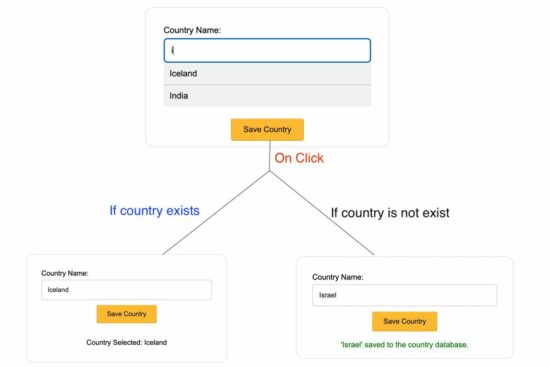



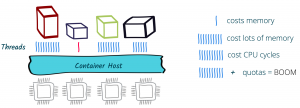
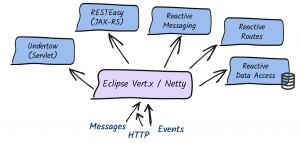
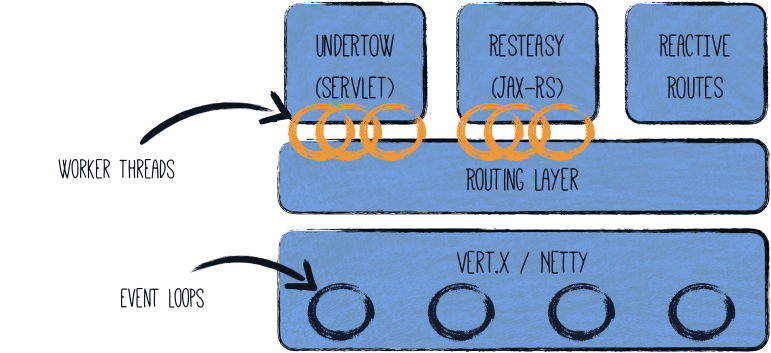


 Image Source: