Five years ago, The Viscount and its crew set sail through The Pale Passage in search of absolute magnetic South. The ship and its crew were tragically lost to the ice, never to be seen again. Her sister ship, The Temperance shall follow in her path, hoping to find answers where The Viscount failed.
You didn't ask to lead this expedition, but here you are. Stuck in the ice, Captain missing, miles from civilisation. Someone has to take charge.
Manage your meagre resources, balance safety and morale, make the hard calls, and head in the only direction you can - through The Pale Beyond.
The game is free to keep if claimed by: Thursday, 9th March 2023 18:00 UTC
We are welcoming everyone to join our discord[discord.gg]. We are more active there in finding giveaways, small or large, and there are daily raffles you can participate.
Bigger and better than ever, Company of Heroes 3 combines heart-pounding combat with deeper strategic choices in a stunning Mediterranean theatre of war. In Company of Heroes 3, every battle tells a story...what's yours?
Brutal, crazy, tactical... this is BLOOD BOWL! The iconic death sport returns with the new video game of fantasy football faithfully using the latest board game rules and new content.Create your team, then crush, mulch and cheat your way to the top... leaving your opponents in the graveyard.
Posted by: xSicKxBot - 03-01-2023, 06:10 AM - Forum: Python
- No Replies
ModuleNotFoundError: No Module Named OpenAI
5/5 – (1 vote)
Quick Fix: Python raises the ImportError: No module named 'openai' when it cannot find the library openai. The most frequent source of this error is that you haven’t installed openai explicitly with pip install openai. Alternatively, you may have different Python versions on your computer, and openai is not installed for the particular version you’re using.
Before I dive into the tutorial, try out one of the following solutions (quick fix):
# ✅ Python 2 or Virtual Environment pip install openai # ✅ Python 3
pip3 install openai # ✅ Python 3.10
pip3.10 install openai # ✅ If you get a Permission Error
sudo pip3 install openai # ✅ If pip is not in your PATH environment variable
python -m pip install openai # ✅ Python 3 if pip is not in your PATH
python3 -m pip install openai # ✅ Python 3.10 if pip is not in your PATH
python3.10 -m pip install openai # ✅ Anaconda
conda install -c conda-forge openai
Problem Formulation
You’ve just learned about the awesome capabilities of the openai library and you want to try it out, so you start your code with the following statement:
import openai
This is supposed to import the OpenAI library into your (virtual) environment. However, it only throws the following ImportError: No module named 'openai':
>>> import openai

Traceback (most recent call last): File "<pyshell#6>", line 1, in <module> import openai

ModuleNotFoundError: No module named 'openai'
Solution Idea 1: Install Library OpenAI
The most likely reason is that Python doesn’t provide openai in its standard library. You need to install it first!
To fix this error, you can run the following command in your Windows shell:
$ pip install openai
This simple command installs openai in your virtual environment on Windows, Linux, and MacOS. It assumes that your pip version is updated. If it isn’t, use the following two commands in your terminal, command line, or shell (there’s no harm in doing it anyways):
Note: Don’t copy and paste the $ symbol. This just illustrates that you run it in your shell/terminal/command line.
Solution Idea 2: Fix the Path
The error might persist even after you have installed the openai library. This likely happens because pip is installed but doesn’t reside in the path you can use. Although pip may be installed on your system the script is unable to locate it. Therefore, it is unable to install the library using pip in the correct path.
To fix the problem with the path in Windows follow the steps given next.
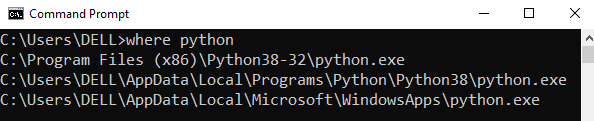
Step 1: Open the folder where you installed Python by opening the command prompt and typing where python
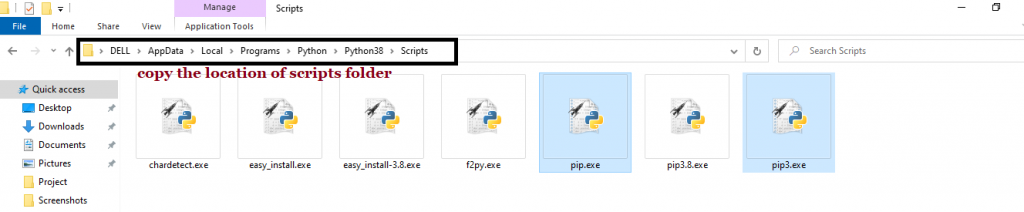
Step 2: Once you have opened the Python folder, browse and open the Scripts folder and copy its location. Also verify that the folder contains the pip file.
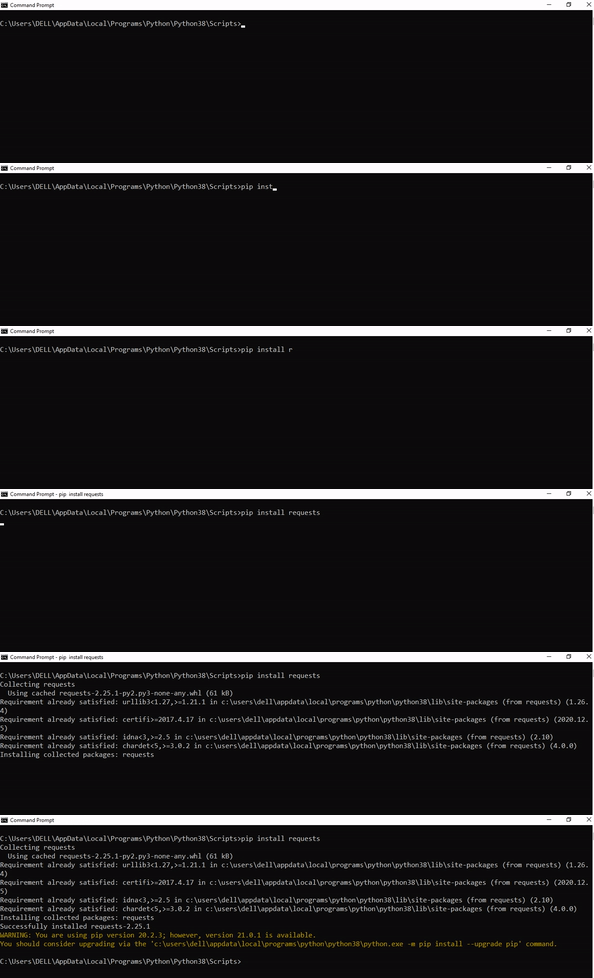
Step 3: Now open the Scripts directory in the command prompt using the cd command and the location that you copied previously.
Step 4: Now install the library using pip install openai command. Here’s an analogous example:
After having followed the above steps, execute our script once again. And you should get the desired output.
Other Solution Ideas
The ModuleNotFoundError may appear due to relative imports. You can learn everything about relative imports and how to create your own module in this article.
You may have mixed up Python and pip versions on your machine. In this case, to install openai for Python 3, you may want to try python3 -m pip install openai or even pip3 install openai instead of pip install openai
If you face this issue server-side, you may want to try the command pip install --user openai
If you’re using Ubuntu, you may want to try this command: sudo apt install openai
You can also check out this article to learn more about possible problems that may lead to an error when importing a library.
Understanding the “import” Statement
import openai
In Python, the import statement serves two main purposes:
Search the module by its name, load it, and initialize it.
Define a name in the local namespace within the scope of the import statement. This local name is then used to reference the accessed module throughout the code.
What’s the Difference Between ImportError and ModuleNotFoundError?
What’s the difference between ImportError and ModuleNotFoundError?
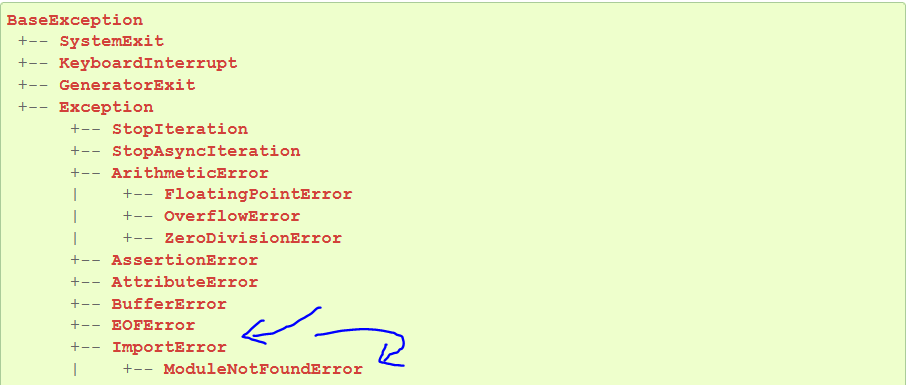
Python defines an error hierarchy, so some error classes inherit from other error classes. In our case, the ModuleNotFoundError is a subclass of the ImportError class.
You can see this in this screenshot from the docs:
You can also check this relationship using the issubclass() built-in function:
Specifically, Python raises the ModuleNotFoundError if the module (e.g., openai) cannot be found. If it can be found, there may be a problem loading the module or some specific files within the module. In those cases, Python would raise an ImportError.
If an import statement cannot import a module, it raises an ImportError. This may occur because of a faulty installation or an invalid path. In Python 3.6 or newer, this will usually raise a ModuleNotFoundError.
Related Videos
The following video shows you how to resolve the ImportError:
How to Fix “ModuleNotFoundError: No module named ‘openai’” in PyCharm
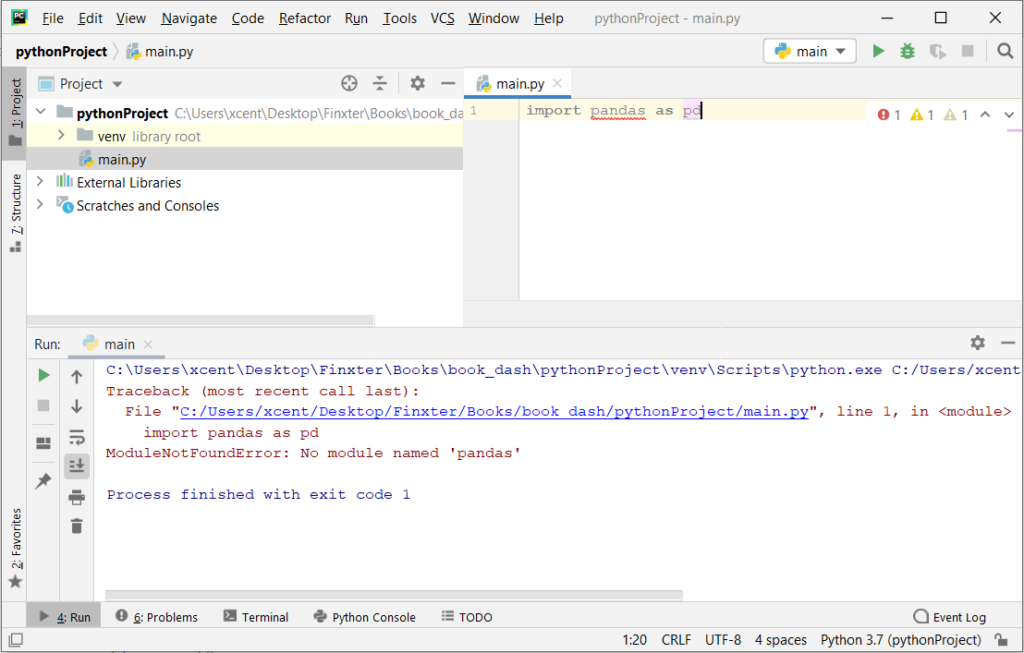
If you create a new Python project in PyCharm and try to import the openai library, it’ll raise the following error message:
Traceback (most recent call last): File "C:/Users/.../main.py", line 1, in <module> import openai

ModuleNotFoundError: No module named 'openai' Process finished with exit code 1
The reason is that each PyCharm project, per default, creates a virtual environment in which you can install custom Python modules. But the virtual environment is initially empty—even if you’ve already installed openai on your computer!
Here’s a screenshot exemplifying this for the pandas library. It’ll look similar for openai.
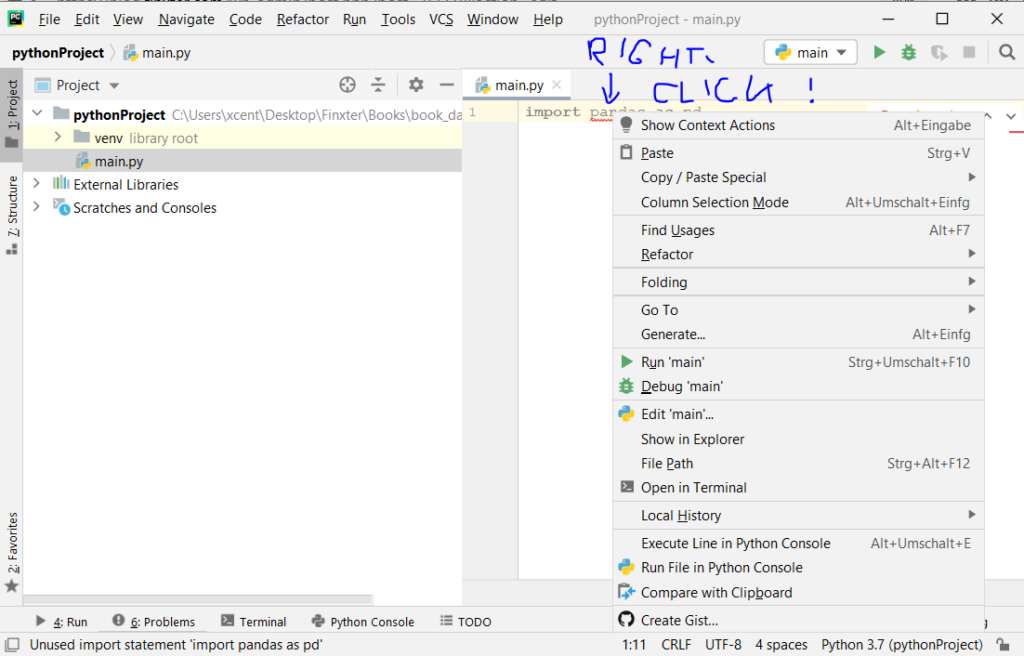
The fix is simple: Use the PyCharm installation tooltips to install OpenAI in your virtual environment—two clicks and you’re good to go!
First, right-click on the openai text in your editor:
Second, click “Show Context Actions” in your context menu. In the new menu that arises, click “Install OpenAI” and wait for PyCharm to finish the installation.
The code will run after your installation completes successfully.
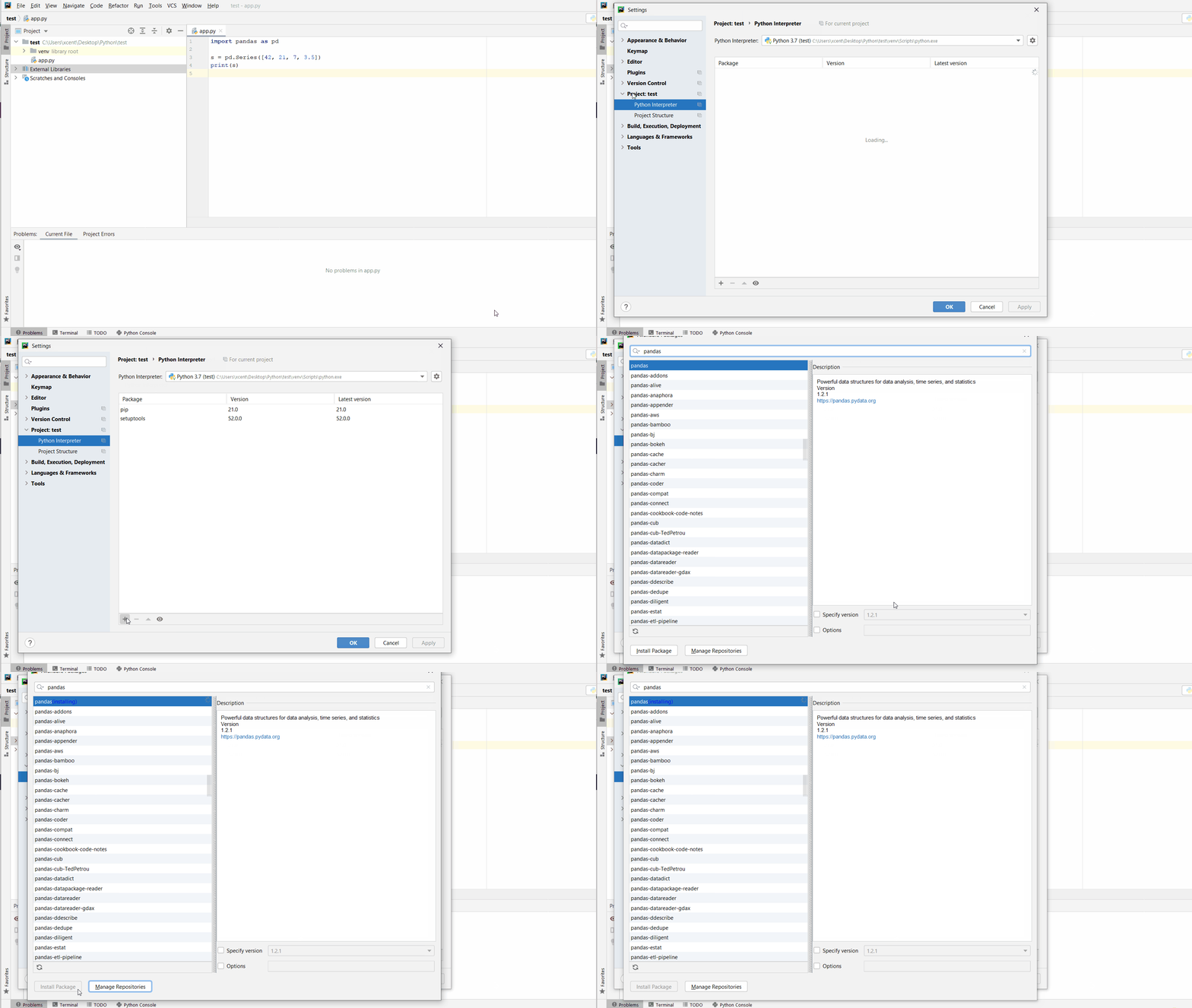
As an alternative, you can also open the Terminal tool at the bottom and type:
Descending suddenly on the world, the macabre Mort armies destroy nation after nation, leaving humanity decimated in their wake. Among the forces resisting the Mort is a small band of mercenaries known as the Ashen Hawk Brigade.
Redemption Reapers is a dark fantasy simulation game set in a medieval world. Be immersed in the tale of the desperate struggle between the Ashen Hawk Brigade and the terrifying Mort legions.
With despair looming as the menacing Mort horde marches ever closer, help your small resistance defeat the enemy masses by bringing together a rich variety of character builds and a meticulous strategy. Experience the exhilaration as you rise up to overcome the odds and achieve victory!
CrecenTech is a US based one stop creative company to cater to your marketing, software, support, and staffing solutions requirements Contact us now! Digital marketing services in USA



 Note: Don’t copy and paste the