Hi all! Starting from this week we will give you regular updates on the Vorax development every friday.
Below are our most recent YouTube videos that will give you an idea of where Vorax is in development.
Video 1: Ambush
Vorax is for the most part an open world game where you've got miles and miles to freely explore to your heart's content. However there are also some more tightly closed spaces, claustrophobic even, like tunnels, sewers and caves. There the mutation has peculiar aspects depending on the environment. Certain kind of monsters are adapting to certain type of conditions, such as light or air, therefore some types of mutations will be specific to closed and dark spaces.
Video 2: Defending The House
The majority of the enemies, especially the toughest are photosensitive. You must balance your physical safety and your mental sanity carefully. Finding a shelter, an appropriate location where you can hide and barricade yourself will protect you, but staying too much into the darkness will slowly chip away at your sanity. Turning on the light might offer some mental comfort, however that will also, potentially, attract unwelcomed guests.
In fact, at night the hostile creatures, mostly photosensitive, come out to hunt. So you need to exercise extreme caution when moving around. We have planned several buildings that can be cleared, reinforced and made into a relatively safe haven for the night. But if these safety operations are not carried out, they can be attacked by creatures.
Video 3: Tunnel
The virus contaminates the whole island, resulting in various forms of aberrations, from small to big... to massive. What delves deep in the dark tunnels is just one of those aberrations. Dealing with it might make both your heart and the ground beneath you tremble.
Our Vision.
We have been trying for months to work on a large game area (in the alpha indiegala for now only 15% of the island is explorable) where we want to give the feeling of a whole environment, flora, fauna, human beings… every cell contaminated by the virus. Because the pathogen does not affect humans exclusively, other 'entities' might be infected by the virus and the resulting mutations can be abnormal.
We also focused heavily on combat system, an aspect that had left us unsatisfied in our previous title, Die Young. The team has placed a big emphasison ranged weapons and firearms, which is why managing the limited ammunition available will be important to survive. But we haven't neglected hand-to-hand combat either. In the coming weeks we will see the use of different work tools that can turn into lethal weapons.
Compared to Die Young we think we've definitely improved the survival side. You will be able to craft almost anything you can find in the game and also you will be able to build a large variety of structures in order to have the most personalized gaming experience possible.
Let's keep in touch next friday.
Keep an eye on ig for updates, especially next week. On the Black Friday weekend you will be able to try out the UPDATED ALPHA[freebies.indiegala.com] build. Once more, for a limited time only. Next weekend, infact, we will update to latest features and fixes we've been working so hard in those months.
Make sure to join us on Discord[discord.gg] for exclusive news.
- Nominate a game in each category (different games in each category, also nominate a game that you already have downloaded) - Play the game that you nominated (thats why the downloaded game above) - Review a game that you nominated (it can be the one you played above) or edit the review
We are welcoming everyone to join our discord[discord.gg]. We are more active there on finding giveaways, small or large, and there are daily raffles you can participate.
On the desolate moon of Lorian, a long-dormant Deadsuit awakens from slumber. Journey beneath the surface on an atmospheric 2D adventure of self-discovery, ancient mysteries, and cosmic terror. Explore winding caverns and acquire new abilities to unearth this alien world’s long-buried secrets.
God Of War Ragnarok Director Would Love A Shot At Castlevania
God of War Ragnarok has only been out for a few weeks, but game director Eric Williams is already angling for a new IP to tackle. In a recent interview with Kinda Funny, Williams said that he wants to make a Castlevania game, and he told fans to lobby Konami to license the IP.
"I don't know what I'm doing next, but if somebody gives me that Castlevania license, we'd love to make that," Williams said. Though it seems that Williams was joking to some extent, his enthusiasm for the Castlevania series is clear in the interview. At one point, he says that he's going to "get in so much trouble" for these comments. However, he further states that he wants to use Kinda Funny's platform to get the word out.
The last mainline Castlevania game, Lords of Shadow 2, came out in 2014. Though it might seem like a long-shot, Konami has shown a recent willingness to create new games rather than license its IPs for gambling. We saw that in the company's lengthy Silent Hill event earlier this year, when they announced several new projects in the works, including a long-rumored Silent Hill 2 remake.
In my previous Wonderland walkthrough blog post, I highlighted an example of exploiting the ‘random’ module to switch users without knowing their password.
In this post, I’ll guide you through the setup and execution of the exploit. You can also watch the accompanying video tutorial here:
What is Python Library Hijacking?
When a user has permission to run a file as another user it is possible to create a spoof file that Python will load instead of the originally intended module or library. The necessary conditions for Python library hijacking are:
The user must have sudo permissions to run a Python file .py as another user
The Python path must be set to look first in the folder where the spoof file is stored
Setup
In order to re-create this vulnerability, I had to learn how to set up the above conditions for the exploit.
On my home network, I have a Raspberry Pi 3b running DietPi operating system. Originally I set this up to run Pi-hole to filter ads out from my home network.
In order to set up the permissions to run a file as another user I edited the sudoers file with visudo.
Visudo is a special editor specifically for editing the sudoers file. It only allows one user to edit the file at a time, and also checks user edits for correct syntax. I created a file called ‘checkmypermissions.py’ and granted sudo permissions to vulnerableuser to run it as user ben.
To do this I used the command ‘sudo visudo’ to edit sudoers file, and then I added the second line for vulnerable user:
# User privilege specification

root ALL=(ALL:ALL) ALL

vulnerableuser ALL=(ben:1001) /usr/bin/python3 /home/vulnerableuser/checkmypermissions.py
The nice thing about visudo is that it checks your formatting to make sure that there are not any errors, and it will even suggest changes to help you format the permissions correctly.
This functionality helped me save time getting the correct spacing and punctuation on the new sudoers line.
Running the Exploit
Once the permissions were set up I ssh’d into vulnerableuser@<raspberry pi IP>. Running the ‘sudo -l’ command showed me the granular sudo permissions.
The line above (ben : 1001) /usr/bin/python3 /home/vulnerableuser/checkmypermissions.py shows that as vulnerableuser I can execute the checkmypermissions.py file as the user Ben.
All that is left to do is to check the Python PATH to make sure that it checks first in the current directory, and then create a python file named numpy.py with code to spawn a shell. One way to check the Python PATH is:
Python
import sys

sys.path
In the example below, we can see that the python PATH is already set to search in the current working directory ('').
Next we create the numpy.py file to spawn a shell.
nano numpy.py
import os

os.system("/bin/bash")
It is important to first set up execute permissions on the spoofed numpy.py file:
chmod +x numpy.py
Now we can carry out the python library hijack and spawn a shell as user ben without knowing their password by running the following command:
sudo -u ben /usr/bin/python3 /home/vulnerableuser/checkmypermissions.py
Project Learnings
Learning #1
I learned that Visudo is a special editor within Linux to change the sudoers file /etc/sudoers.
It helps check formatting to avoid any errors or crashes from poorly written lines. The sudoers file allows the root user to granularize user permissions with the sudoers file on Linux.
Learning #2
Granting run as another user file permissions can expose a machine to library hijacking vulnerabilities.
Running sudo -l can help expose special user file permissions when enumerating for attack vectors to execute privilege escalation.
Learning #3
I found that it is helpful to compile a custom shortlist of Python and bash commands new to me for each project. I borrowed this strategy from my experience with language learning.
Over the years, I’ve improved my Mandarin by taking notes on new vocabulary words and grammar patterns. When working on a new topic area I would always create my own custom grammar and vocabulary lists for reference.
I’ve found that the simple act of focusing on recording a list helps to cement my learning and creates a nice reference for later use.
[www.indiegala.com] Frightening Freebies, Deadly Deals & Gruesome Giveaways are coming! Every store checkout will bring a sweet treat: a FREE Key for you to keep.
Posted by: xSicKxBot - 11-22-2022, 01:48 AM - Forum: Lounge
- No Replies
Assassin's Creed Valhalla Won't Get One Highly Requested Feature
Assassin's Creed Valhalla won't receive a New Game+ mode despite it being a "highly requested feature," Ubisoft confirms.
In a blog outlining the end of new content for Assassin's Creed Valhalla, Ubisoft writes that though the team investigated adding New Game+, it came to the conclusion that there wasn't a way to make New Game+ rewarding due to the game's structure.
"We understand this news will come as a disappointment; however, we hope that the new content released in the past few months, including never-before-seen experiences like Forgotten Saga, has provided an exciting and challenging experience for those seeking more replayable content," Ubisoft writes.
An extinction level event has set the world ablaze. You appear to be the last remaining person alive. Mankind's only hope lies at the core of the Entropy Centre. The Entropy Centre is a mind-bending puzzle adventure where you reverse objects through time to overcome seemingly impossible obstacles and conundrums. Manipulate time to your will and solve ingeniously challenging puzzle rooms, each one taking you closer to the heart of a colossal space station in orbit of Earth.
Deviously challenging with razor-sharp witty writing and outstanding voice acting performances, The Entropy Centre merges a brilliant puzzle game with an epic adventure.
By Java Magazine Editor Andrew Binstock In our previous issue, we explored the use of lightweight frameworks— Javalin, Micronaut, and Helidon—to create microservices, which typically are deployed in the cloud. In that issue’s article on Helidon, we also showed how to package a service into a Docker ...
Posted by: xSicKxBot - 11-21-2022, 05:03 AM - Forum: Python
- No Replies
ModuleNotFoundError: No module named ‘dotenv’
5/5 – (1 vote)
Quick Fix: Python raises the ModuleNotFoundError: No module named 'dotenv' when it cannot find the library dotenv. The most frequent source of this error is that you haven’t installed dotenv explicitly with pip install python-dotenv. Alternatively, you may have different Python versions on your computer, and dotenv is not installed for the particular version you’re using.
Other variants of the installation statement you should try if this doesn’t work are (in that order):
You’ve just learned about the awesome capabilities of the dotenv library and you want to try it out, so you start your code with the following statement:
from dotenv import load_dotenv load_dotenv() # take environment variables from .env.
This is supposed to import the dotenv library into your (virtual) environment. However, it only throws the following ImportError: No module named dotenv:
>>> import dotenv

Traceback (most recent call last): File "<pyshell#6>", line 1, in <module> import dotenv

ModuleNotFoundError: No module named 'dotenv'
Solution Idea 1: Install Library dotenv
The most likely reason is that Python doesn’t provide dotenv in its standard library. You need to install it first!
To fix this error, you can run the following command in your Windows shell:
$ pip install python-dotenv
This simple command installs dotenv in your virtual environment on Windows, Linux, and MacOS. It assumes that your pip version is updated. If it isn’t, use the following two commands in your terminal, command line, or shell (there’s no harm in doing it anyways):
Note: Don’t copy and paste the $ symbol. This is just to illustrate that you run it in your shell/terminal/command line.
Solution Idea 2: Fix the Path
The error might persist even after you have installed the dotenv library. This likely happens because pip is installed but doesn’t reside in the path you can use. Although pip may be installed on your system the script is unable to locate it. Therefore, it is unable to install the library using pip in the correct path.
To fix the problem with the path in Windows follow the steps given next.
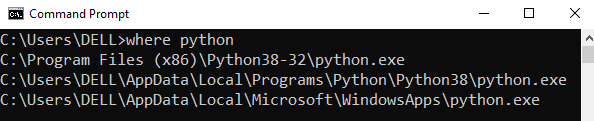
Step 1: Open the folder where you installed Python by opening the command prompt and typing where python
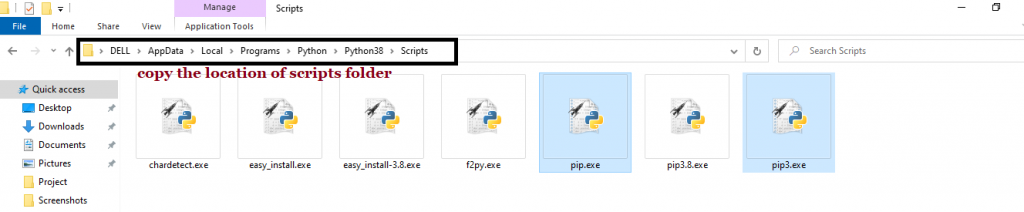
Step 2: Once you have opened the Python folder, browse and open the Scripts folder and copy its location. Also verify that the folder contains the pip file.
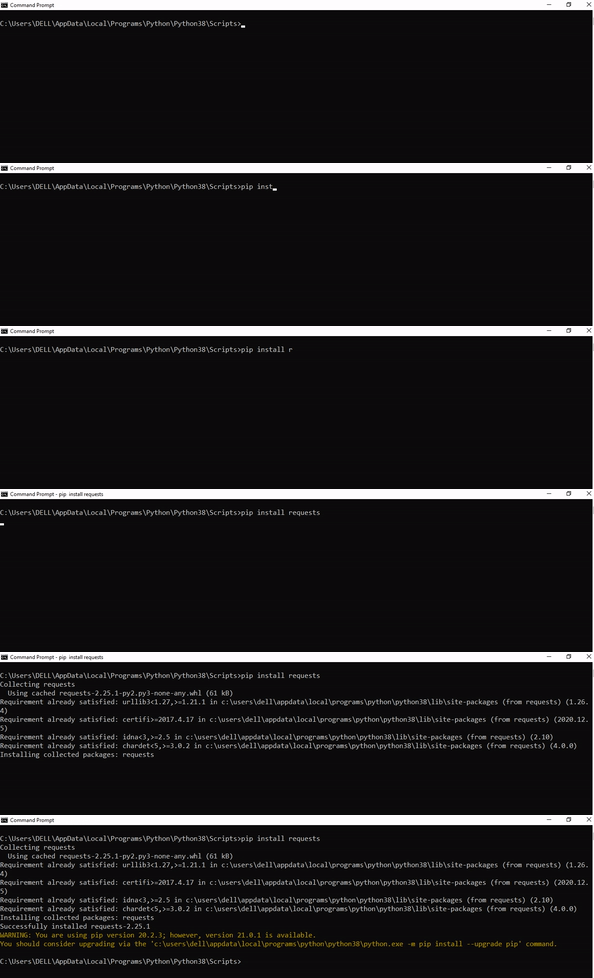
Step 3: Now open the Scripts directory in the command prompt using the cd command and the location that you copied previously.
Step 4: Now install the library using pip install python-dotenv command. Here’s an analogous example:
After having followed the above steps, execute our script once again. And you should get the desired output.
Other Solution Ideas
The ModuleNotFoundError may appear due to relative imports. You can learn everything about relative imports and how to create your own module in this article.
You may have mixed up Python and pip versions on your machine. In this case, to install dotenv for Python 3, you may want to try python3 -m pip install python-dotenv or even pip3 install python-dotenv instead of pip install python-dotenv
If you face this issue server-side, you may want to try the command pip install – user python-dotenv
If you’re using Ubuntu, you may want to try this command: sudo apt install python-dotenv
You can also check out this article to learn more about possible problems that may lead to an error when importing a library.
Understanding the “import” Statement
import dotenv
In Python, the import statement serves two main purposes:
Search the module by its name, load it, and initialize it.
Define a name in the local namespace within the scope of the import statement. This local name is then used to reference the accessed module throughout the code.
What’s the Difference Between ImportError and ModuleNotFoundError?
What’s the difference between ImportError and ModuleNotFoundError?
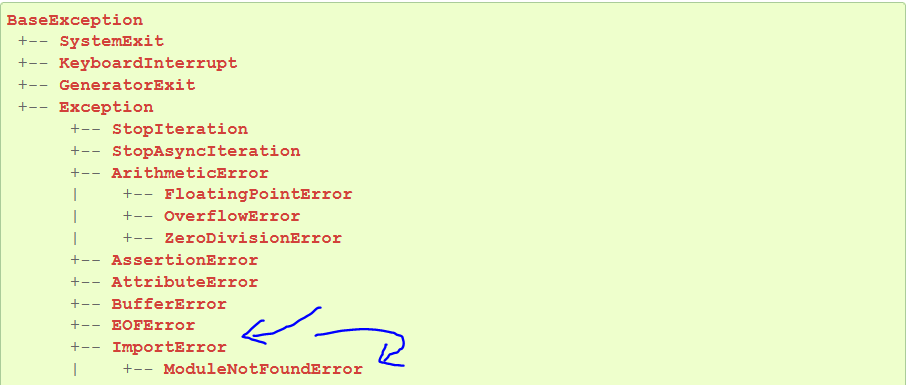
Python defines an error hierarchy, so some error classes inherit from other error classes. In our case, the ModuleNotFoundError is a subclass of the ImportError class.
You can see this in this screenshot from the docs:
You can also check this relationship using the issubclass() built-in function:
Specifically, Python raises the ModuleNotFoundError if the module (e.g., dotenv) cannot be found. If it can be found, there may be a problem loading the module or some specific files within the module. In those cases, Python would raise an ImportError.
If an import statement cannot import a module, it raises an ImportError. This may occur because of a faulty installation or an invalid path. In Python 3.6 or newer, this will usually raise a ModuleNotFoundError.
Related Videos
The following video shows you how to resolve the ImportError:
How to Fix “ModuleNotFoundError: No module named ‘dotenv’” in PyCharm
If you create a new Python project in PyCharm and try to import the dotenv library, it’ll raise the following error message:
Traceback (most recent call last): File "C:/Users/.../main.py", line 1, in <module> import dotenv

ModuleNotFoundError: No module named 'dotenv' Process finished with exit code 1
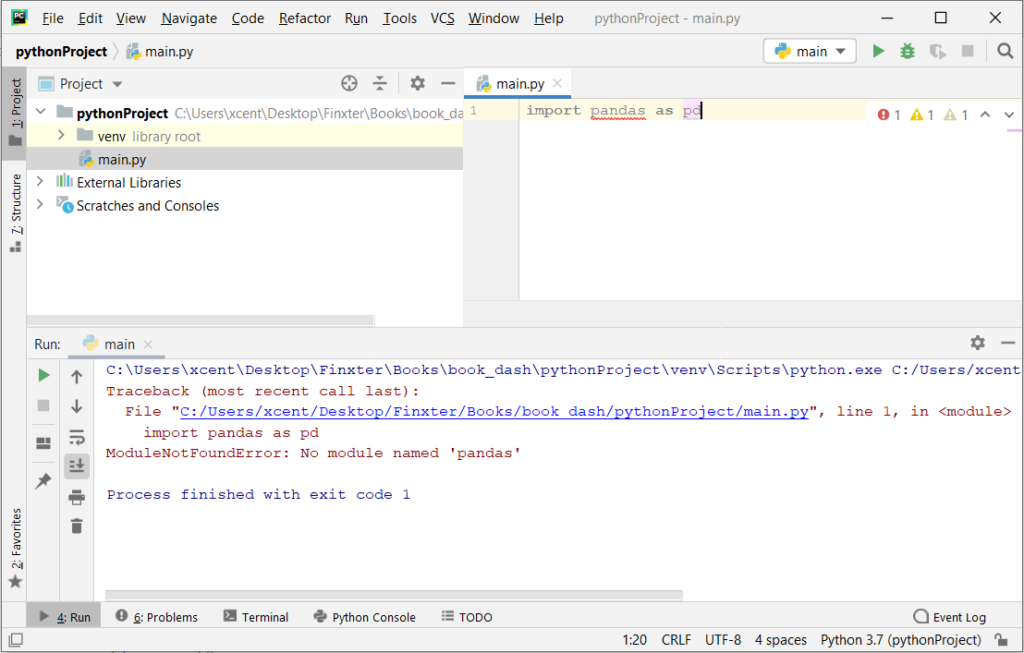
The reason is that each PyCharm project, per default, creates a virtual environment in which you can install custom Python modules. But the virtual environment is initially empty—even if you’ve already installed dotenv on your computer!
Here’s a screenshot exemplifying this for the pandas library. It’ll look similar for dotenv.
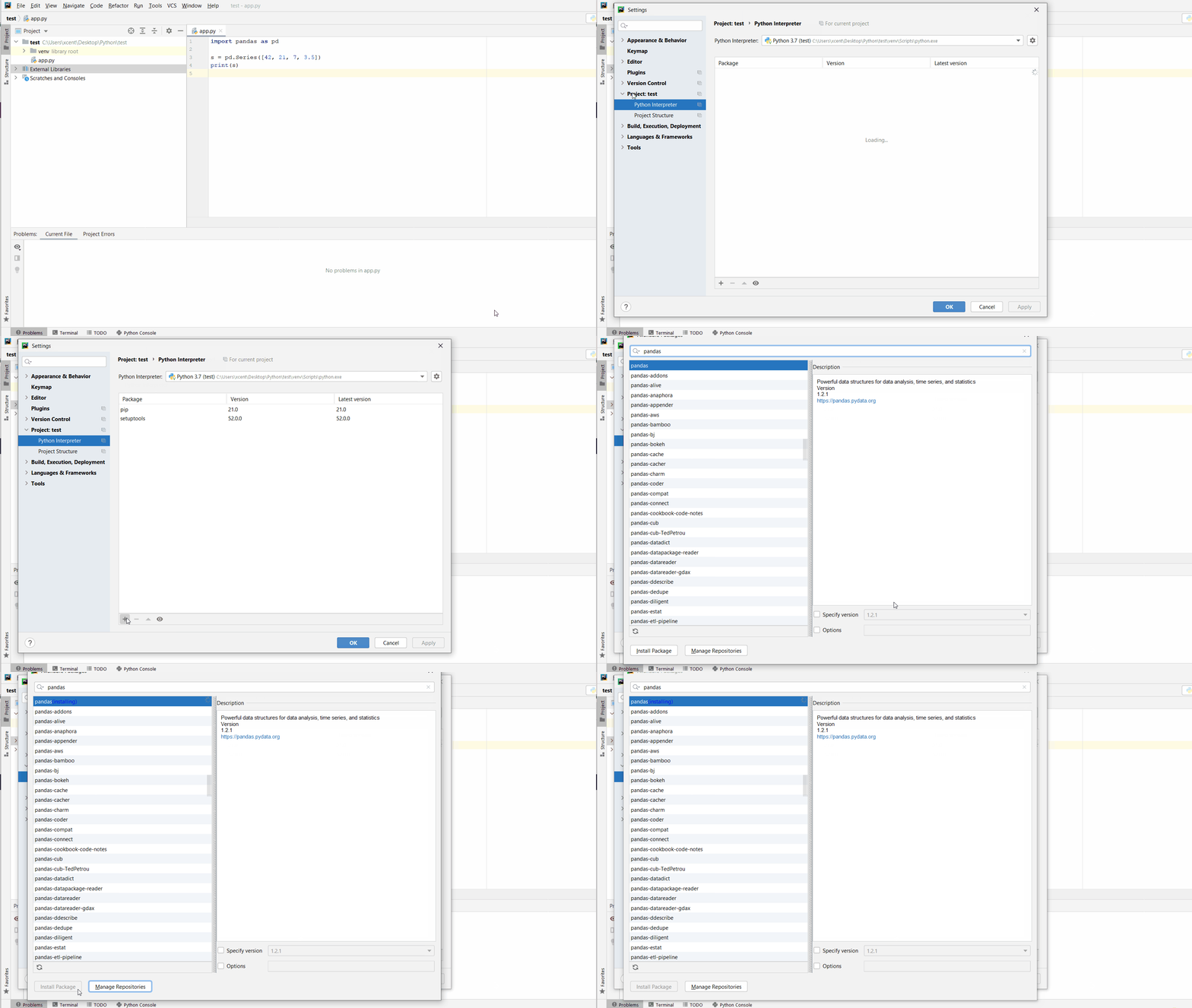
The fix is simple: Use the PyCharm installation tooltips to install Pandas in your virtual environment—two clicks and you’re good to go!
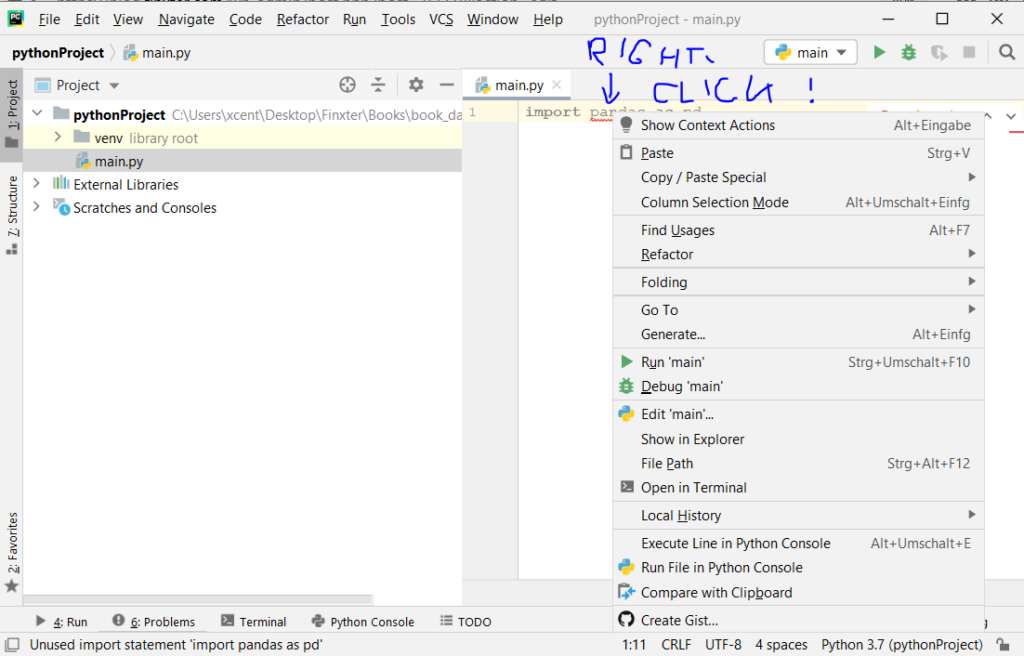
First, right-click on the pandas text in your editor:
Second, click “Show Context Actions” in your context menu. In the new menu that arises, click “Install Pandas” and wait for PyCharm to finish the installation.
The code will run after your installation completes successfully.
As an alternative, you can also open the Terminal tool at the bottom and type:






 Note: Don’t copy and paste the