Posted by: xSicKxBot - 11-21-2022, 05:03 AM - Forum: Lounge
- No Replies
John Leguizamo Speaks Out Against Mario Movie For Lack Of Diversity
The 1993 Super Mario Bros. movie might not have been a commercial success at the time, but eventually became a cult classic. Pulling in Wizard of Oz and Ghostbuster-style aesthetics, the movie was a loose adaptation of the video game and is still the only live-action feature film with these characters.
Actor John Leguizamo, who played Luigi in the film opposite Bob Hoskins' Mario, told IndieWire at that casting the voices of Chris Pratt and Charlie Day as the Mario Bros feels "going backwards." The animated movie caused a stir with Pratt's involvement after the first teaser was released, with most fans citing there's no element of the character showing through. Leguizamo critiques that the casting of the brothers doesn't include a person of color.
"I'm O.G. A lot of people love the original. I did Comic-Con in New York and in Baltimore, and everyone’s like, 'No, no, we love the old one, the original'," Leguizamo said, during the premiere of The Menu. "They're not feeling the new one. I'm not bitter. It's unfortunate."
A single-player, third person horror action-adventure game set on a remote island spiritual retreat. A peaceful weekend soon turns to dread after a group chant opens The Gloom, a psychedelic dimension of terror that feeds off negative energy. Interact with a recurring cast of characters, untangle the complex history of the island, and witness terrifying revelations about the cosmos. Only you can fight off the creatures, reason with the survivors, and unravel the legacy of a cult from the 1970s to reverse the ritual.
Features:
* EXPLORE AN ISLAND FILLED WITH COSMIC DREAD: Interact with the other members of the retreat as they slowly become consumed by their own negative energy.
* Survive against an array of prismatic creatures and cultists released from The Gloom as you piece together the weird history of the island.
* FIGHT OR FLIGHT: You must choose your fights and battle for survival with spiritual weapons and abilities. Collect, craft, and manage your resources to take your chances in close combat - or succumb to panic and flee.
* MIND BODY SPIRIT: Balance is everything. Steel your mind against horror and panic; Protect your body against physical threats; Elevate your spirit to meditate and access supernatural abilities.
* MODERN PSYCHEDELIC HORROR: Inspired by the psychedelic horror of the 1970s, experience a landscape of colored lighting and an electronic rock soundtrack, composed by the award-winning Paul Ruskay.
[www.indiegala.com] This bundle is not for the faint-hearted...delve deep into the dark world of unsettling unexplained activities: Deadly Land, Raptor Boyfriend, Língua, Mr.Brocco & Co, Super Grave Snatchers & Runaway Animals.
The Ghost of Tsushima Director's Cut PS4 physical edition is $20 at Amazon and Best Buy. On the PlayStation store, the PS4 digital edition of Ghost of Tsushima Director's Cut is also $20--for those who don't want the physical.
The past and future cannot be explored alone! Team up with a friend and piece together the mysteries surrounding Albert Vanderboom. Communicate what you see around you to help one another solve various puzzles and explore the worlds from different perspectives!
The Past Within is a multiplayer point-and-click adventure by the creators of the Cube Escape & Rusty Lake series.
ModuleNotFoundError: No Module Named ‘ffmpeg’ (Fixed)
5/5 – (1 vote)
Quick Fix: Python raises the ModuleNotFoundError: No module named 'ffmpeg' when it cannot find the library ffmpeg. The most frequent source of this error is that you haven’t installed ffmpeg explicitly with pip install ffmpeg-python or even pip3 install ffmpeg-python for Python 3. Alternatively, you may have different Python versions on your computer, and ffmpeg is not installed for the particular version you’re using.
Problem Formulation
You’ve just learned about the awesome capabilities of the ffmpeg library and you want to try it out, so you start your code with the following statement:
The first line is supposed to import the ffmpeg library into your (virtual) environment. However, it only throws the following ImportError: No module named ffmpeg:
>>> import ffmpeg

Traceback (most recent call last): File "<pyshell#6>", line 1, in <module> import ffmpeg

ModuleNotFoundError: No module named 'ffmpeg'
Solution Idea 1: Install Library ffmpeg
The most likely reason is that Python doesn’t provide ffmpeg in its standard library. You need to install it first!
To fix this error, you can run the following command in your Windows shell:
$ pip install ffmpeg-python
This simple command installs ffmpeg in your virtual environment on Windows, Linux, and MacOS. It assumes that your pip version is updated. If it isn’t, use the following two commands in your terminal, command line, or shell (there’s no harm in doing it anyways):
Note: Don’t copy and paste the $ symbol. This is just to illustrate that you run it in your shell/terminal/command line.
Solution Idea 2: Fix the Path
The error might persist even after you have installed the ffmpeg library. This likely happens because pip is installed but doesn’t reside in the path you can use. Although pip may be installed on your system the script is unable to locate it. Therefore, it is unable to install the library using pip in the correct path.
To fix the problem with the path in Windows follow the steps given next.
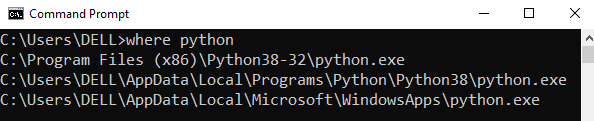
Step 1: Open the folder where you installed Python by opening the command prompt and typing where python
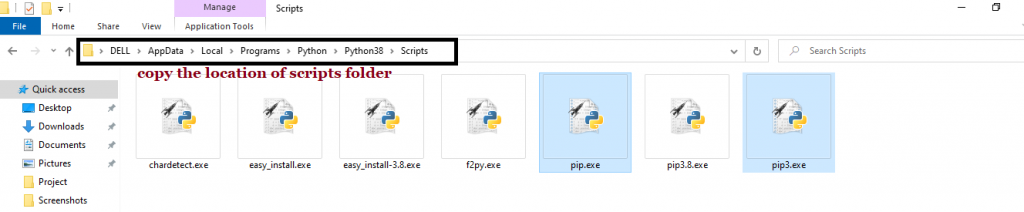
Step 2: Once you have opened the Python folder, browse and open the Scripts folder and copy its location. Also verify that the folder contains the pip file.
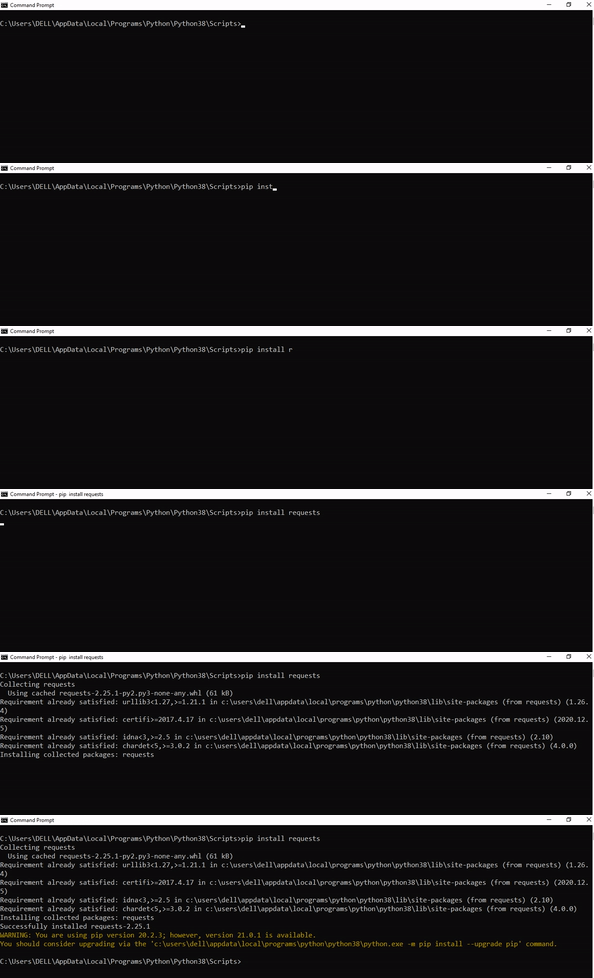
Step 3: Now open the Scripts directory in the command prompt using the cd command and the location that you copied previously.
Step 4: Now install the library using pip install ffmpeg-python command. Here’s an analogous example:
After having followed the above steps, execute our script once again. And you should get the desired output.
Other Solution Ideas
The ModuleNotFoundError may appear due to relative imports. You can learn everything about relative imports and how to create your own module in this article.
You may have mixed up Python and pip versions on your machine. In this case, to install ffmpeg for Python 3, you may want to try python3 -m pip install ffmpeg-python or even pip3 install ffmpeg-python instead of pip install ffmpeg-python
If you face this issue server-side, you may want to try the command pip install – user ffmpeg-python
If you’re using Ubuntu, you may want to try this command: sudo apt install ffmpeg-python
You can also check out this article to learn more about possible problems that may lead to an error when importing a library.
Understanding the “import” Statement
import ffmpeg
In Python, the import statement serves two main purposes:
Search the module by its name, load it, and initialize it.
Define a name in the local namespace within the scope of the import statement. This local name is then used to reference the accessed module throughout the code.
What’s the Difference Between ImportError and ModuleNotFoundError?
What’s the difference between ImportError and ModuleNotFoundError?
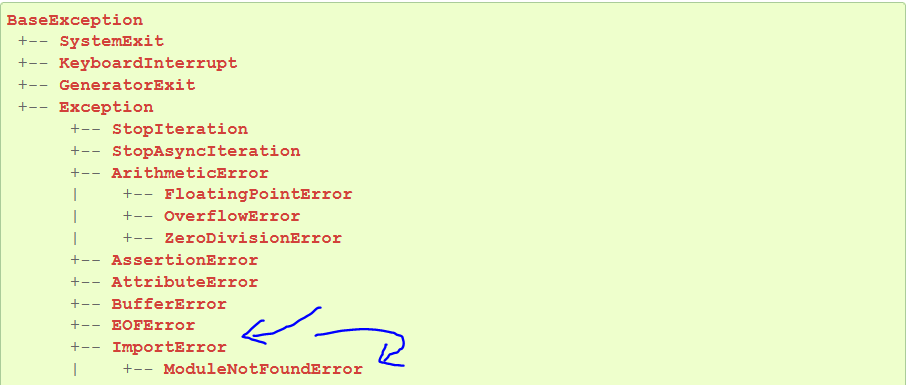
Python defines an error hierarchy, so some error classes inherit from other error classes. In our case, the ModuleNotFoundError is a subclass of the ImportError class.
You can see this in this screenshot from the docs:
You can also check this relationship using the issubclass() built-in function:
Specifically, Python raises the ModuleNotFoundError if the module (e.g., ffmpeg) cannot be found. If it can be found, there may be a problem loading the module or some specific files within the module. In those cases, Python would raise an ImportError.
If an import statement cannot import a module, it raises an ImportError. This may occur because of a faulty installation or an invalid path. In Python 3.6 or newer, this will usually raise a ModuleNotFoundError.
Related Videos
The following video shows you how to resolve the ImportError:
How to Fix “ModuleNotFoundError: No module named ‘ffmpeg’” in PyCharm
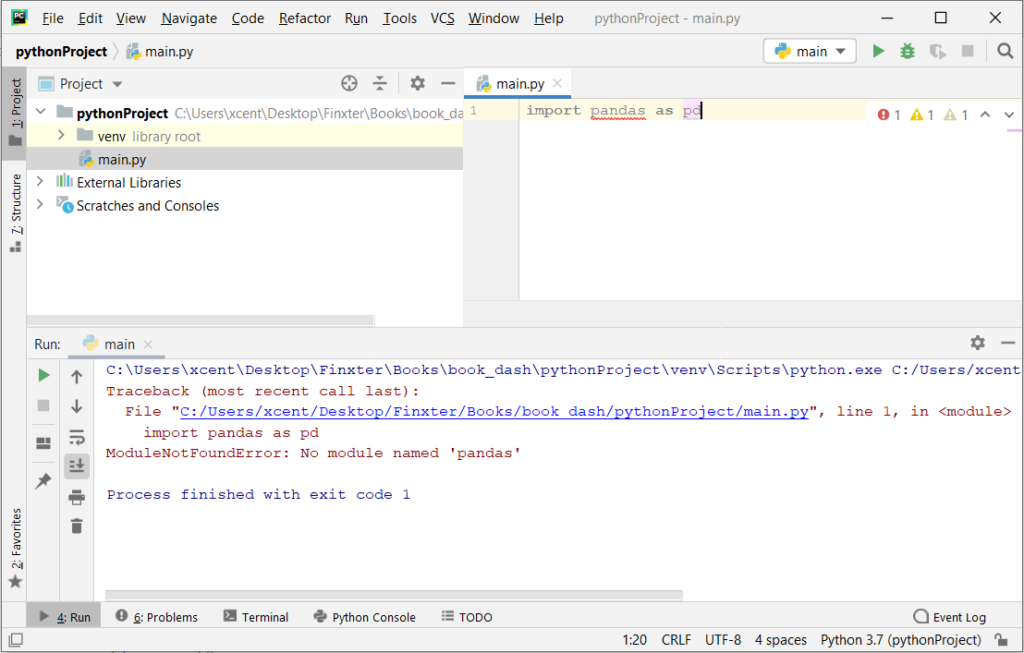
If you create a new Python project in PyCharm and try to import the ffmpeg library, it’ll raise the following error message:
Traceback (most recent call last): File "C:/Users/.../main.py", line 1, in <module> import ffmpeg

ModuleNotFoundError: No module named 'ffmpeg' Process finished with exit code 1
The reason is that each PyCharm project, per default, creates a virtual environment in which you can install custom Python modules. But the virtual environment is initially empty—even if you’ve already installed ffmpeg on your computer!
Here’s a screenshot exemplifying this for the pandas library. It’ll look similar for ffmpeg-python.
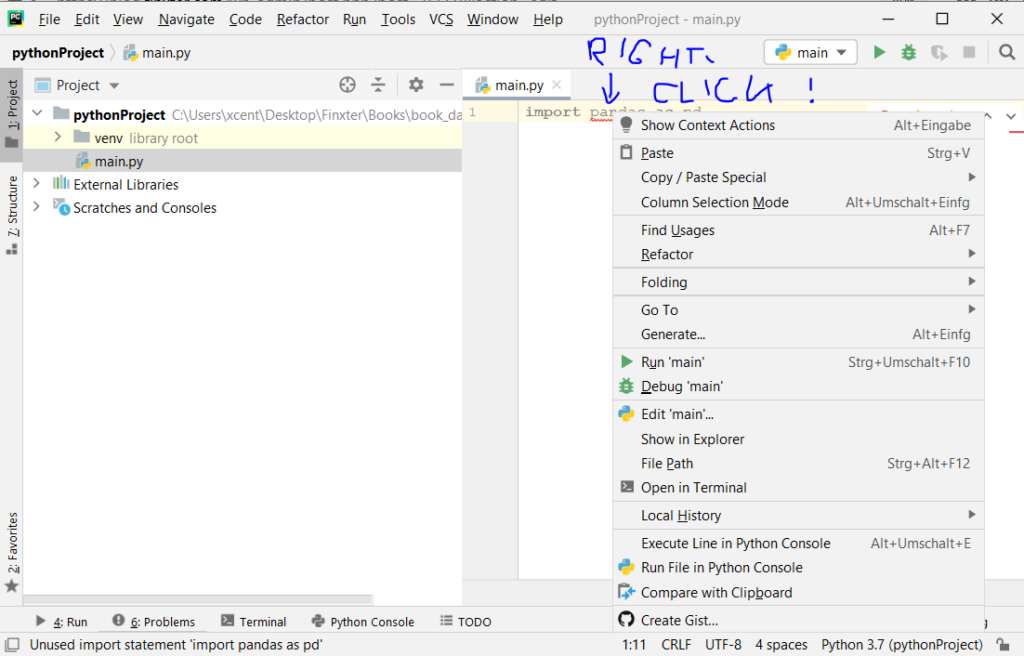
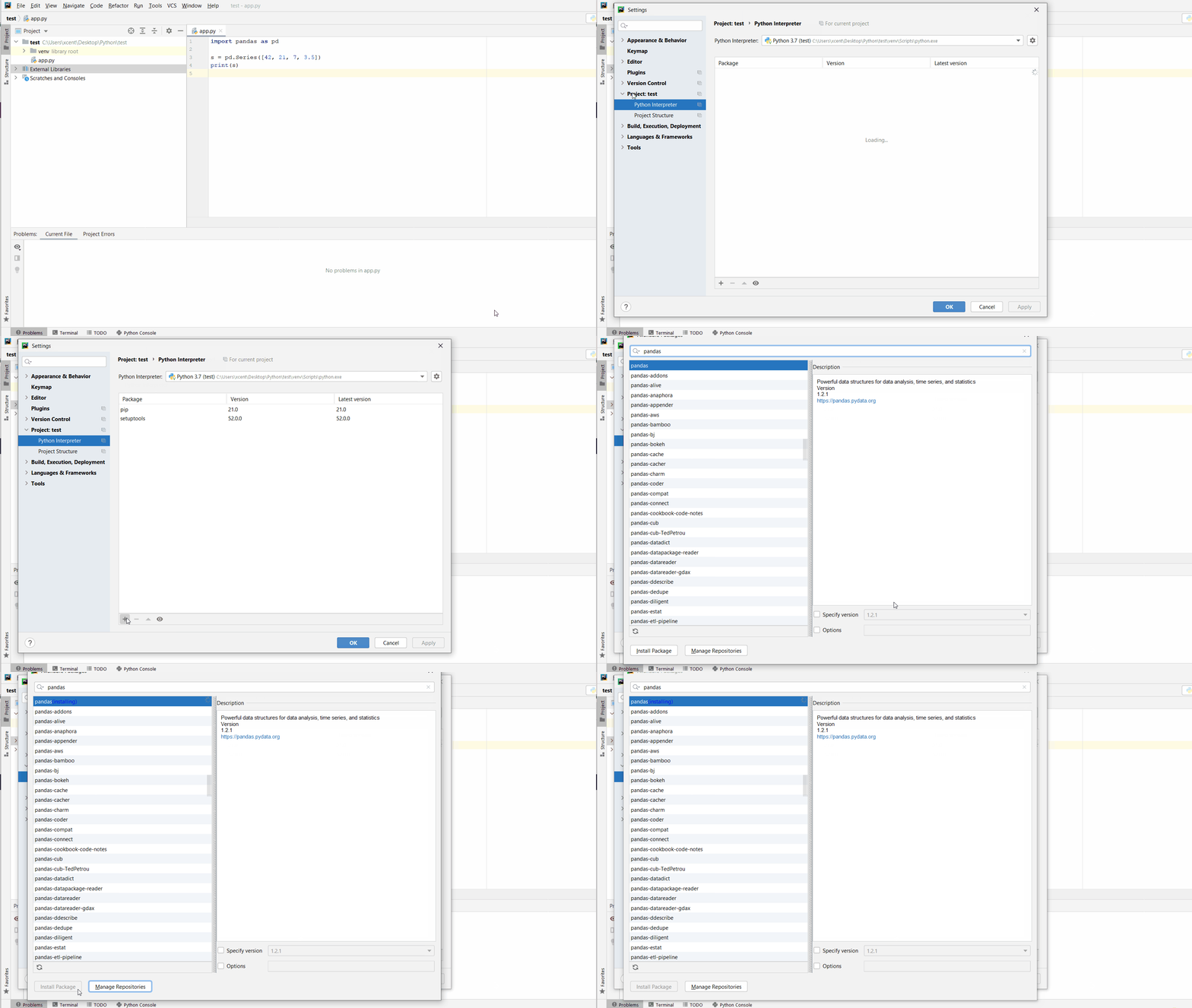
The fix is simple: Use the PyCharm installation tooltips to install Pandas in your virtual environment—two clicks and you’re good to go!
First, right-click on the pandas text in your editor:
Second, click “Show Context Actions” in your context menu. In the new menu that arises, click “Install Pandas” and wait for PyCharm to finish the installation.
The code will run after your installation completes successfully.
As an alternative, you can also open the Terminal tool at the bottom and type:
We are welcoming everyone to join our discord[discord.gg]. We are more active there on finding giveaways, small or large, and there are daily raffles you can participate.
Uncharted: Legacy Of Thieves Collection For PS5 Is $20 Right Now
The Black Friday shopping bonanza is nearly here, but you don't need to wait to score good gaming deals. Amazon and Best Buy are currently offering a pretty nice discount on Uncharted: The Legacy of Thieves Collection for PlayStation 5.
The retailers each have the game marked down to just $20 right now, a sweet discount from its normal $50 list price. For anyone just catching up, the Legacy of Thieves collection includes Uncharted 4: A Thief's End and Uncharted: The Lost Legacy, now beefed up thanks to the power of the PS5.
The games promise better visuals and a higher frame rate, and they also use the DualSense controller's adaptive triggers and haptic feedback to help you "feel" the action more than before.



 Note: Don’t copy and paste the