[www.indiegala.com] This bundle is not for the faint-hearted...delve deep into the dark world of unsettling unexplained activities: Deadly Land, Raptor Boyfriend, Língua, Mr.Brocco & Co, Super Grave Snatchers & Runaway Animals.
The games are free to keep if claimed by: Thursday, 27th October 2022 15:00 UTC.
Next week's freebies: Saturnalia Warhammer 40,000: Mechanicus
We are welcoming everyone to join our discord[discord.gg]. We are more active there on finding giveaways, small or large, and there are daily raffles you can participate.
Call Of Duty: Modern Warfare 2 Cross-Play Can't Be Disabled On Xbox And PC
Call of Duty: Modern Warfare 2 is now officially live, revealing that only PlayStation players currently can turn off cross-play in the game's multiplayer.
Cross-play allows players on all platforms to compete in the same matches, which can benefit matchmaking times given how much larger the pool of players is. Games with cross-play support generally offer the ability to toggle it off, since some console players might not want to play with PC players using mouse and keyboard, while some PC players prefer not to play with console players that have aim-assist.
For some unknown reason, this option in Modern Warfare 2 is only available to PS5 and PS4 players, meaning Xbox and PC players are stuck being lumped into cross-play lobbies until developer Infinity Ward makes a change. This might potentially not be that surprising, however, given that the option to turn off cross-play has also been omitted in titles such as Call of Duty: Warzone and Halo Infinite. As reported by Video Games Chronicle, many players have taken to social media to voice their displeasure with this decision.
You’ve inherited your uncle’s potion shop—and a huge debt. Better get brewing! Customize your store, hire heroes to gather ingredients, befriend (or romance) fellow vendors to learn new haggling strategies, and go head-to-head with competitors in this narrative-driven, deck-building shop simulator.
Summary: You can split a given string at a specific position/index using Python’s string–slicing syntax.
Minimal Example:
# Method 1:

s = "split string at position"

print(s[:12])

print(s[13:]) # Method 2:

import re

s = "split string at position"

pos = re.search('at', s)

l = s[:pos.start()]

r = s[pos.start():]

print(l)

print® # OUTPUT:

split string

at position
Problem Formulation
Problem: Given a string, how will you split the given string at any given position?
Let’s have a look at a couple of examples that demonstrate what the problem asks you to do:
◈Example 1
The following problem requires us to split the string into two parts. You have to cut the given string into two halves based on a certain index/position. The given cut position/index is 12.
# Input

s = "split string at position"

# Output

split string

at position
◈Example 2
The following problem asks us to split the string based on the position of a certain character (“,”) and a word (“or”) present in the string. Thus, in this case, you have not been given the exact position or index to split the string. Instead, you have to find the index/position of certain characters and then split the string accordingly based on the positions of the given characters and words and store the required sub-strings in different variables.
# Input

text = "Bob is the Relationship Manager, contact him at bob@xyz.abc or call him at 6546 "

# Output:

Personnel: Bob is the Relationship Manager

Email: contact him at bob@xyz.abc

Contact Info: call him at 6546
Now, let’s dive into the different ways of solving this problem.
Method 1: Using String Slicing
String slicing is the concept of carving a substring from a given string. Use slicing notation s[start :stop: step] to access every step-th element starting from index start (included) and ending in index stop (excluded). All three arguments are optional, so you can skip them to use the default values (start = 0, stop = len(string), step = 1.)
Approach: Use string slicing to cut the given string at the required position. To do this, you have to use the square-bracket syntax within which you can specify the starting and ending indices to carve out the required sub-strings as shown in the solution below.
Code:
s = "split string at position"

print(s[:12])

print(s[13:])
Output:
split string

at position
◈Example 2 Solution
Approach: Use the index() method of the given character, i.e., “,” and the substring “or” within the given string. Then use this index to extract the required chunks of substrings by splitting the given string with the help of string slicing.
Code:
text = "Bob is the Relationship Manager, contact him at bob@xyz.abc or call him at 6546 "

# get the position of characters where you want to split the string

pos_comma = text.index(',')

pos_or = text.index('or')

# Slice the string based on the position of comma

personnel, email, phone = text[:pos_comma], text[pos_comma+1:pos_or], text[pos_or+2:]

print(f'Personnel: {personnel}\nEmail: {email}\nContact Info: {phone}')
Output:
Personnel: Bob is the Relationship Manager

Email: contact him at bob@xyz.abc Contact Info: call him at 6546
Note: The index() method allows you to find the index of the first occurrence of a substring within a given string. You can learn more about Python’s index() method here: Python String index().
If a regular expression matches a part of your string, a lot of helpful information comes with it, for example, you can find out what’s the exact position of the match. The re.search(pattern, string) method is used to match the first occurrence of a specified pattern in the string and returns a match object. Thus, you can use it to solve the given problem.
Pre-requisite:match_object.start() is a method used to get the position of the first character of the match object and match_object.end() is the method to get the last character of the match object.
Import the regex module and then create a match object by using the re.search() method. You can do this by passing the substring/character that lies at the given split index/position. In this case, the substring that lies at the split index is “at“.
We can then split the string by accessing the start position of the matched string object by calling the method pos.start() where pos denotes the matched object.
Then to get the first half of the split string, you can use string slicing as s[:pos.start()]. Here, we sliced the original string from the start index of the given string until the index of the searched character (not included) that was extracted in the previous step.
Further, we need the second section of the split string. Thus, we will now slice the original string from the index of the searched character to the end of the string, like so: s[pos.start():]
Code:
import re s = "split string at position"

pos = re.search('at', s)

l = s[:pos.start()]

r = s[pos.start():]

print(l)

print®
Output:
split string

at position
◈Example 2Solution
The idea is pretty similar to the solution of example 1. You just need to adjust the start and stop indices within the slice syntax with the help of the start() and end() methods to extract the required split sub-strings one by one.
Code:
import re

text = "Bob is the Relationship Manager, contact him at bob@xyz.abc or call him at 6546"

# Look for the match objects

_comma = re.search(',', text)

_or = re.search('or', text)

# slice to get first substring

personnel = text[:_comma.start()]

# slice to get second substring

email = text[_comma.end()+1:_or.start()]

# slice to get third substring

phone = text[_or.end():]

# Final Output

print(f'Personnel: {personnel}\nEmail: {email}\nContact Info: {phone}')
Output:
Personnel: Bob is the Relationship Manager

Email: contact him at bob@xyz.abc or

Contact Info: call him at 6546
Conclusion
Woohoo! We have successfully solved splitting a string at the position using two different ways. I hope you enjoyed this article and it helps you in your coding journey. Please subscribe and stay tuned for more such interesting articles!
Google, Facebook, and Amazon engineers are regular expression masters. If you want to become one as well, check out our new book: The Smartest Way to Learn Python Regex(Amazon Kindle/Print, opens in new tab).
See this online demo to get the converted array result from a JSON input. View demo
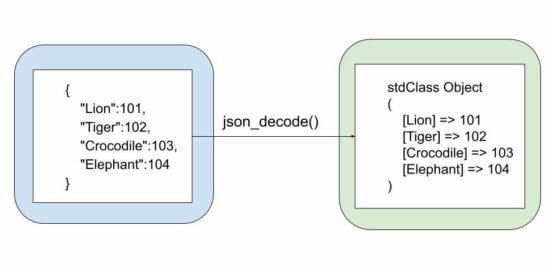
See the diagram that shows the input JSON string and the output stdClass object of the JSON decoding. In the previous article, we have seen examples of the reverse operation that is converting a PHP array to a JSON string.
PHP json_decode()
This native PHP function decodes the JSON string into a parsable object tree or an array. This is the syntax of this function.
json_decode( string $json, ?bool $associative = null, int $depth = 512, int $flags = 0

): mixed
$json – Input JSON string.
$associative – a boolean based on which the output format varies between an associative array and a stdClass object.
$depth – the allowed nesting limit.
$flag – Predefine constants to enable features like exception handling during the JSON to array convert.
This program has a minute change of not setting the boolean flag to the PHP json_decode function. This will return a PHP stdClass object tree instead of an array.
Common mistakes during conversion from JSON to Array
The following JSON string is a valid JSON object in JavaScript, but not here in PHP. The issue is the single quote. It should be changed to a double quote.
If you want to see the JavaScript example to read and display JSON data the linked article has the code.
<?php

// 1. key and value should be within double quotes

$notValidJson = "{ 'lion': 'animal' }";

json_decode($notValidJson); // will return null // 2. without a quote is also not allowed

$notValidJson = '{ lion: "animal" }';

json_decode($notValidJson); // will return null // 3. should not have a comma at the end

$notValidJson = '{ "lion": "animal", }';

json_decode($notValidJson); // will return null

?>
How to convert JSON with large integers
This can be achieved by setting the bitmask parameter of the predefined JSON constants.
The JSON_BIGINT_AS_STRING constant is used to convert JSON with data having large integers.
The function json_last_error() is used to return details about the last error occurrence. The following example handles the possible error cases of this PHP JSON function.
<?php

$jsonString = '{"Lion":101,"Tiger":102,"Crocodile":103,"Elephant":104}';

json_decode($jsonString); switch (json_last_error()) { case JSON_ERROR_DEPTH: echo 'Error: Nesting limit exceeded.'; break; case JSON_ERROR_STATE_MISMATCH: echo 'Error: Modes mismatch.'; break; case JSON_ERROR_CTRL_CHAR: echo 'Error: Unexpected character found.'; break; case JSON_ERROR_SYNTAX: echo 'Error: Syntax error, invalid JSON.'; break; case JSON_ERROR_UTF8: echo 'Error: UTF-8 characters incorrect encoding.'; break; default: echo 'Unexpected error.'; break;

}

?>
SURPRISE! JSON to Array and Array to JSON conversion is not symmetrical
The PHP object is now changed to a PHP array. You may not expect it.
Encode -> Decode -> Encode
The above will not return the data to its original form.
The output of decoding to PHP arrays and encoding from PHP arrays are not always symmetrical. But, the output of decoding from stdClass objects and encoding to stdClass objects are always symmetrical.
So if you have plans to do cyclical conversion between the PHP array and a JSON string, then first convert the PHP array to an object. The convert the JSON.
Bungie Is Aiming To Make Destiny 2's Weapon Crafting More Fun In Lightfall
Destiny 2's weapon crafting can help create some amazing tools of destruction, but the process of doing so is one that developer Bungie wants to overhaul so that it can be more fun. In the studio's latest blog update, Bungie explained some of the changes that will be applied to weapon crafting in the Lightfall expansion.
Deepsight weapons, which require you to kill several thousand enemies before they're fully useful, are being fine-tuned for next year. Uncraftable weapons won't drop with Deepsight resonance from Lightfall and Bungie is looking at "alternate ways" for players to get crafting materials. The core idea is that players will to want to try new weapons for other reasons, not just to earn crafting currencies.
To combat inventory management stress, Bungie aims to "reduce bad luck in weapon recipe unlocking" and create more opportunities within Destiny 2's crafting system for players to create a weapon that has a personal list of curated perks. This new focus will also extend to the Deep Stone Crypt raid from Beyond Light, which will get craftable weapons from next month.
Take your skills on the PGA TOUR and become the next FedExCup Champion as you compete against TOUR pros and establish new rivalries.
For the first time, play as male and female pros including Tiger Woods, in online and local play. Also features licensed courses such as East Lake Golf Club, TPC Sawgrass, TPC Scottsdale, and more.
Create your own dream course with the Course Designer, which features thousands of customizable objects and cross-platform sharing.
Introducing Topgolf with competitive 1-4 player local and online play, bringing the range's excitement and fun to both casual and seasoned players.
Level up your MyPLAYER with new Skills and Archetypes and bring the swag to the green with new licensed gear and apparel.
Plus, run your own online societies to manage tournaments and seasons or test your skills against your friends in Divot Derby and Casual mode.
This article will show you how 6 ways to remove List elements in Python.
To make it more interesting, we have the following running scenario:
Suppose you have a Christmas Listcontaining everyone to buy a gift for. Once a gift is purchased, remove this person from the List. Once all gifts have been purchased, remove the entire List.
As shown on the first highlighted line, the pop() method is appended to the xmas_list. This lets Python know to remove a List element from said List. Since no element is specified, the last element is removed (Linn).
On the second highlighted line, the pop() method is appended to the xmas_list and passed one (1) argument: the element to remove (2). This action removes Inger.
When xmas_list is output to the terminal, the following displays.
['Anna', 'Elin', 'Asa', 'Sofie', 'Gunnel']
Note: Both Linn and Inger are no longer in xmas_list.
Remove All List Elements
In this scenario, all gifts have been purchased, and all List elements will be removed.
xmas_list = ['Anna', 'Elin', 'Inger', 'Asa', 'Sofie', 'Gunnel', 'Linn'] for i in xmas_list.copy(): xmas_list.pop()

print(xmas_list)
As shown on the first highlighted line, a for loop is instantiated. This loop declares a shallow copy of the List to iterate.
On each iteration, the pop() method is called. Since no argument is passed, the last element is removed.
When xmas_list is output to the terminal, an empty List displays.
[]
Method 5: Use List Comprehension
This method uses List Comprehension to remove all List elements that do not meet the specified criteria.
Remove One List Element
In this scenario, Gunnel's gift has been purchased and will be removed from the List.
xmas_list = ['Anna', 'Elin', 'Inger', 'Asa', 'Sofie', 'Gunnel', 'Linn']

xmas_list = [value for value in xmas_list if value != 'Gunnel']

print(xmas_list)
When xmas_list is output to the terminal, the following displays.
['Anna', 'Elin', 'Inger', 'Asa', 'Sofie', 'Linn']
Note: To remove all List elements, pass it empty brackets as shown follows: (xmas_list = []).
Method 6: Use clear()
This method uses clear() to remove all List elements.
In this scenario, all gifts have been purchased, and all List elements will be removed.



 Problem: Given a string, how will you split the given string at any given position?
 Related Tutorial:








 Note: This error is generated because the variable


