JSON string conversion on the client and server side is an important requirement in data handling. Most programming languages contain native functions for handling JSON objects and string data.
The JSON format is a convenient way of structuring, transmitting, or logging hierarchical data. The JSON string is a bundled unit to transmit object properties over the API terminals.
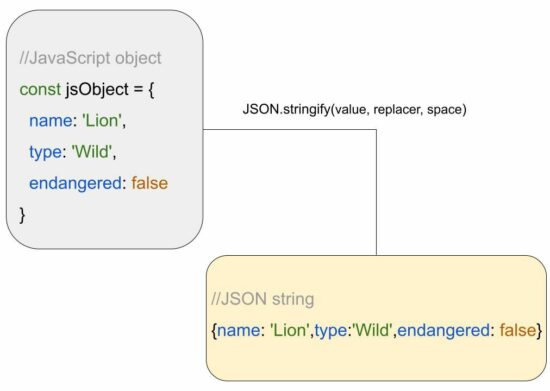
In this tutorial, we will see how to convert a JavaScript object to a JSON string. The JSON.stringify() of the JS script is used to do this. This is a quick solution for converting the given JS object to a JSON.
Quick example
var jsObject = { "name": "Lion", "type": "wild"

};

var jsonString = JSON.stringify(jsObject)

console.log(jsonString);
Output
{"name":"Lion","type":"wild"}
About JavaScript JSON.stringify()
The JSON.stringify() method accepts 3 parameters to convert JavaScript objects into JSON string. See the syntax and the possible parameters of this JavaScript method.
value – The JS object to be converted to a JSON string.
replacer – a function or an array of specifications to convert JavaScript objects.
space – It is a specification used to format or prettify the output JSON.
The JSON.stringify() method can also accept JavaScript arrays to convert into JSON strings.
How to get a formatted JSON string from a JavaScript object
This example supplies the “space” parameter to the JSON.stringify method. This parameter helped to format the JSON string as shown in the output below the program.
var jsObject = { "name": "Lion", "type": "wild"

}; // this is to convert a JS object to a formatted JSON string

var formattedJSON = JSON.stringify(jsObject, null, 2);

console.log(formattedJSON);
Output
{ "name": "Lion", "type": "wild"
}
How to store JSON string to a JavaScript localStorage
How dates in the JavaScript object behave during JSON stringify
The JSON.stringify() function converts the JavaScript Date object into an equivalent date string as shown in the output.
The code instantiates the JavaScript Date() class to set the current date to a JS object property.
// when you convert a JS object to JSON string, date gets automatically converted

// to equivalent string form

var jsObject = { "name": "Lion", "type": "wild", today: new Date()

};

const jsonString = JSON.stringify(jsObject);

console.log(jsonString);
How JSON stringify converts the JavaScript objects with functions
If the JS object contains functions as a value of a property, the JSON.stringify will omit the function. Then, it will return nothing for that particular property.
The resultant JSON string will have the rest of the properties that have valid mapping.
// when you convert a JS object to JSON string, // functions in JS object is removed by JSON.stringify var jsObject = { "name": "Lion", "type": "wild", age: function() { return 10; }

};

const jsonString = JSON.stringify(jsObject);

console.log(jsonString);
Output
{"name":"Lion","type":"wild"}
JavaScript toString() limitations over JSON.stringify:
If the input JavaScript object contains a single or with a predictable structure, toString() can achieve this conversion.
It is done by iterating the JS object array and applying stringification on each iteration. Example,
But, it is not an efficient way that has the probability of missing some properties during the iteration.
Why and how to convert the JSON string into a JSON object
The JSON string is a comfortable format during data transmission and data logging. Other than that it must be in a format of an object tree to parse, read from, and write to the JSON.
The JSON.parse() method is used to convert JSON String to a JSON Object. A JSON object will look like a JS object only. See the following comparison between a JS object and a JSON object.
This giveaway is on gog.com gog is a platform for games that is dedicated to drm-free games (those are games that do not require login or registration to play the game)
How to grab Genesis Alpha One Deluxe Edition - Go to the home page of https://gog.com - Login and Register - Go to the home page again - Wait for 10 seconds then start searching for Genesis Alpha One Deluxe Edition - on the home page look for "Deal of the Day" (above it there should be a banner) - on the banner there is a button "Yes, and claim the game" click it - Thats it
We are welcoming everyone to join our discord[discord.gg]. We are more active there on finding giveaways, small or large, and there are daily raffles you can participate.
GOG Has A Bunch Of Awesome PC Game Deals Right Now
CD Projekt's PC game storefront GOG is in a party mood, as the company is celebrating not only the Halloween season but also the 15th anniversary of the Witcher franchise. Right now, you can grab deep discounts on some of CDPR's biggest games, as well as deals on a curated list of titles in its Halloween sale.
For the CD Projekt Red deals, everything from the Witcher to Cyberpunk 2077 is currently on sale. It's worth noting that you can currently get The Witcher: Enhanced Edition for free, but if you really feel like spending $1.50, the choice is yours. Cyberpunk 2077 is half-price on GOG, and considering that the game has evolved since its rough launch to become a fun sandbox with some incredible level design, that's a bargain price.
Scorn is an atmospheric first person horror adventure game set in a nightmarish universe of odd forms and somber tapestry. It is designed around an idea of "being thrown into the world". Isolated and lost inside this dream-like world you will explore different interconnected regions in a non-linear fashion. The unsettling environment is a character itself. Every location contains its own theme (story), puzzles and characters that are integral in creating a cohesive lived in world. Throughout the game you will open up new areas, acquire different skill sets, weapons, various items and try to comprehend the sights presented to you.
Caught out by an unexpected temporal phenomenon, seven ordinary citizens find themselves stranded in a Temporal Seam; they share their imprisonment with a Raider, a menacing enemy from another timeline with overwhelming power.
Their only hope for survival is to break out of the Temporal Seam with the Super Time Machine but the Raider is on their backs and getting stronger minute-by-minute.
DRAGON BALL: THE BREAKERS is a 1-on-7 online asymmetrical action game in which a band of seven everyday humans tries to survive the Raider (a classic DRAGON BALL rival such as Cell and Frieza) who will hunt and evolve into an unstoppable force.
Posted by: xSicKxBot - 10-26-2022, 01:36 AM - Forum: Python
- No Replies
Python | Split String by Whitespace
Rate this post
Summary: Use "given string".split() to split the given string by whitespace and store each word as an individual item in a list. Minimal Example: print("Welcome Finxter".split()) # OUTPUT: [‘Welcome’, ‘Finxter’]
Problem Formulation
Problem: Given a string, How will you split the string into a list of words using whitespace as a separator/delimiter?
Let’s understand the problem with the help of a few examples:
Example 1: Input: text = “Welcome to the world of Python” Explanation: Split the string into a list of words using a space ” ” as the delimiter to separate the words from the given string. Output: [‘Welcome’, ‘to’, ‘the’, ‘world’, ‘of’, ‘Python’]
Example 2: Input: text = “””Item_1 Item_2 Item_3″”” print(text.split(‘\n’)) Explanation: Split the string into a list of words using a newline “\n” as the delimiter to separate the words from the given string. Output: [‘Item_1’, ‘Item_2’, ‘Item_3’]
Example 3: text = “This is just a random text:\n New Line” Explanation: The given string contains a combination of whitespaces between the words, such as space, multiple-spaces, a tab and a new line character. All of these whitespace characters have to be considered as delimiters while separating the words from the given string and storing them as items in a list. Here’s how the output looks: Output: [‘This’, ‘is’, ‘just’, ‘a’, ‘random’, ‘text:’, ‘New’, ‘Line’]
So, we have two situations at hand. One, that has a single whitespace used as a delimiter and another that has multiple whitespace characters as delimiters in the same string. Let’s dive into the numerous ways of solving this problem.
Method 1: Using split()
split() is a built-in method in Python which splits the string at a given separator and returns a split list of substrings. Here’s a minimal example that demonstrates how the split function works – finxterx42'.split('x') will split the string with the character ‘x’ as the delimiter and return the following list as an output: ['fin', 'ter', '42']. The default separator, i.e., when no value is passed to the split function is considered as any whitespace character, i.e., it will take into account any whitespace such as ‘\n’, ” “, ‘\t’, etc.
Approach: Thus to split a string based on a given whitespace delimiter, you can simply pass the specific whitespace character as a separator/delimiter to the split('whitespace_character') function.
Code:
# Example 1:

text = "Welcome to the world of Python"

print(text.split(' '))

# OUTPUT: ['Welcome', 'to', 'the', 'world', 'of', 'Python'] # Example 2:

text = """Item 1

Item 2

Item 3"""

print(text.split('\n'))

# OUTPUT: ['Item_1', 'Item_2', 'Item_3'] # Example 3: text = "This is just a\trandom text:\nNew Line"

print(text.split()) # OUTPUT: ['This', 'is', 'just', 'a', 'random', 'text:', 'New', 'Line']
Note that to separate the words in the third example we did specify any separator within the split() function. This is because when you don’t specify the separator, then Python will automatically consider that any whitespace character that occurs within the given string is a separator.
Another extremely handy way of separating a string with whitespace characters as separators is to use the regex library.
Approach 1: Import the regex library and use its split method as re.split('\s+', text) where ‘\s+’ returns a match whenever the string contains one or more whitespace characters. Therefore, whenever any whitespace character is encountered, the string will be separated at that point.
Code:
import re

# Example 1:

text = "Welcome to the world of Python"

print(re.split('\s+', text))

# OUTPUT: ['Welcome', 'to', 'the', 'world', 'of', 'Python'] # Example 2:

text = """Item_1

Item_2

Item_3"""

print(re.split('\s+', text))

# OUTPUT: ['Item_1', 'Item_2', 'Item_3'] # Example 3:

text = "This is just a\trandom text:\nNew Line"

print(re.split('\s+', text))

# OUTPUT: ['This', 'is', 'just', 'a', 'random', 'text:', 'New', 'Line']
Approach 2: Another way of using the regex library to solve this question is to use the findall() method of the regex library. Import the regex library and use re.findall(r'\S+', text) where the expression returns all the characters/words in a list that do not contain any whitespace character. This essentially means that whenever Python finds and segregates a string that has no whitespace in it. As soon as a whitespace character is found it considers that as a breakpoint, therefore the next word that has a continuous sequence of characters without the presence of any whitespace character is taken into account.
Here’s a graphical representation of the above explanaton:
Code:
import re

# Example 1:

text = "Welcome to the world of Python"

print(re.findall(r'\S+', text))

# OUTPUT: ['Welcome', 'to', 'the', 'world', 'of', 'Python'] # Example 2:

text = """Item_1

Item_2

Item_3"""

print(re.findall(r'\S+', text))

# OUTPUT: ['Item_1', 'Item_2', 'Item_3'] # Example 3:

text = "This is just a random text:\n New Line"

print(re.findall(r'\S+', text))

# OUTPUT: ['This', 'is', 'just', 'a', 'random', 'text:', 'New', 'Line']
Do you want to master the regex superpower? Check out my new book The Smartest Way to Learn Regular Expressions in Python with the innovative 3-step approach for active learning: (1) study a book chapter, (2) solve a code puzzle, and (3) watch an educational chapter video.
Conclusion
We have successfully solved the given problem using different approaches. I hope you enjoyed this article and it helps you in your Python coding journey. Please subscribe and stay tuned for more interesting articles!
Google engineers are regular expression masters. The Google search engine is a massive text-processing engine that extracts value from trillions of webpages.
Facebook engineers are regular expression masters. Social networks like Facebook, WhatsApp, and Instagram connect humans via text messages.
Amazon engineers are regular expression masters. Ecommerce giants ship products based on textual product descriptions. Regular expressions rule the game when text processing meets computer science.
[www.indiegala.com] Frightening Freebies, Deadly Deals & Gruesome Giveaways are coming! Every store checkout will bring a sweet treat: a FREE Key for you to keep.
Posted by: xSicKxBot - 10-26-2022, 01:36 AM - Forum: Lounge
- No Replies
Dark Souls: Prepare To Die Servers PC Will Be Staying Offline
Bandai Namco has announced that, thanks to an "aging" system, PC servers for Dark Souls: Prepare to Die Edition will remain offline. While this will bring an end to online functions for that game, PC servers for Dark Souls II: Scholar of the First Sin have been reactivated and online functions for the base edition of Dark Souls II and Dark Souls: Remastered will be restored in the future.
"We have determined that we will not be able to support online services for the PC version of Dark Souls: Prepare to Die Edition that was released in 2012, due to an aging system," Bandai Namco tweeted through the official Dark Souls account. "We apologize for the long wait and ask for your understanding in this matter."
We have determined that we will not be able to support online services for the PC version of Dark Souls: Prepare to Die Edition that was released in 2012, due to an aging system. We apologize for the long wait and ask for your understanding in this matter.
Once bustling and full of life, the city of London is in a dark and dismal state. Unemployment and homelessness are at an all-time high. Ethical boundaries are being stretched to their limit and corrupt billionaire, Kenny Hogan, is up to no good. It's up to ragtag band of criminals Frank, Sally, and Gavin, to put a wrench in Kenny Hogan's plans and bring him to his knees. But this is no simple job and there'll be a smattering of obstacles they'll have to face along the way...
Sunday Gold is a point-and-click, turn-based adventure game set in grim, dystopian future. Play as a ragtag trio of criminals to hunt down and expose the dark secrets of an evil mega-corporation and the malevolent billionaire behind it.
Posted by: xSicKxBot - 10-25-2022, 09:13 AM - Forum: Python
- No Replies
Solidity Bytes and String Arrays, Concat, Allocating Memory, and Array Literals
Rate this post
With this article, we’ll discover a new and fascinating world of bytes and strings, as well as ways to manipulate them, allocate memory arrays, and use array literals.
It’s part of our long-standing tradition to make this (and other) articles a faithful companion, or a supplement to the official Solidity documentation, starting with these docs for this article’s topics.
Types bytes and string
Besides the arrays we’ve already discussed, there are also some unique arrays, such as bytes and string arrays.
We have to note that the bytes type is very similar to bytes1[], however, the difference is that a bytes array is tightly packed in memory areas calldata and memory.
Furthermore, string is equal to bytes, but does not have a length property or support for index access.
Solidity doesn’t have string manipulation functions compared to other commonly used programming languages, but this can be worked around by including third-party string libraries.
With vanilla Solidity, we can concatenate two strings, e.g. string.concat(s1, s2), and compare two strings by using their keccak-256 hash, e.g.
Regarding the preferred use (we could consider this a design pattern), the bytes type is better than bytes1[], because bytes1[] is more expensive due to padding additional 31 bytes between the elements when used in memory.
The padding is absent in storage because of the tight packing used (docs).
Note: A rule of thumb says that bytes should be used for arbitrary-length raw byte data and string for arbitrary-length string data in UTF-8.
Note: If our data can be stored in a variable containing a number of bytes up to 32, it is better to use one of the value types bytes1 ... bytes32, due to their low cost.
To access a byte representation of a string s, we could use the following construct: bytes(s)[7] = 'x'; with regard to the string length, bytes(s).length, e.g.
// SPDX-License-Identifier: GPL-3.0 pragma solidity >=0.7.0 <0.9.0; /** * @title String modification * @dev Demonstrates how to modify a string represented as bytes. */

contract StringModification { string public s = "Some string"; function modifyString() public { bytes(s)[7]='Q'; }

}
Note: By using this approach, we’re accessing bytes of the UTF-8 representation, not the individual characters.
Functions bytes.concat() and string.concat()
Concatenation is a synonym for joining or gluing together.
The function string.concat() enables us to concatenate any number of string values.
The result of using the string.concat() function is a single-string memory array containing the concatenated strings without any added spacing or padding.
If we’d like to use function parameters of other types that are not implicitly convertible to the string type, we first have to convert them to the string type.
Byte Concatenation
In the same manner, the bytes.concat() function enables us to concatenate any number of bytes or bytes1 ... bytes32 values.
The function result is a single bytes memory array containing the arguments without padding.
If we’d like to use string parameters or other types not implicitly convertible to bytes type, we first convert them to the bytes type.
Example
Let’s use an example to show how a function performs both string and bytes concatenation:
By calling bytes.concat(...) and string.concat(...) without arguments, a result is an empty array.
Allocating Memory Arrays
We can dynamically resize the storage arrays by adding elements via the .push() member function.
In contrast, memory arrays cannot be dynamically resized and the .push() member function is not available.
However, by using the alternative approach, we can create dynamic-length memory arrays by using the new operator. Just before using the new operator, we have to calculate the required size in advance or create a new, empty array and populate it by copying all elements.
Note: Following the same rule of default values, the elements of freshly allocated arrays are initialized with their default values (docs).
Here we have an example showing arrays a and b, initialized by either a constant size or a parameter-given size.
// SPDX-License-Identifier: GPL-3.0

pragma solidity >=0.4.16 <0.9.0; contract C { function f(uint len) public pure { uint[] memory a = new uint[](7); bytes memory b = new bytes(len); assert(a.length == 7); assert(b.length == len); a[6] = 8; }

}
Array Literals
Array literal is represented by a comma-separated list of any number of expressions, which are listed in square brackets, e.g. [1, a, f(3)].
The array literal type is determined in the following way:
The array literal is a statically-sized memory array, and its length is the number of expressions listed in the brackets;
The base type of the array is determined by the type of the first expression T in the list that satisfies the condition: all other expressions must be implicitly convertible to T. If it’s not possible to find such an expression, a type error is thrown;
Besides the convertibility condition (point 2.), one of the expressions must be of the T type.
The following example will clarify what the points above mean; the type of an array literal [1, 2, 3] is uint8[3] memory, because each of the expressions is of type uint8.
If we want to change the result to type uint[3] memory, we have to convert the first element to uint.
// SPDX-License-Identifier: GPL-3.0

pragma solidity >=0.4.16 <0.9.0; contract C { function f() public pure { g([uint(1), 2, 3]); } function g(uint[3] memory) public pure { // ... }

}
In contrast, the array literal [1, -2] is invalid because it doesn’t comply with point 2., stating that the first expression’s type is a target type T for implicit conversion of other expressions.
Since our first expression is of type uint8, and the second expression is of type int8 (including the negative numbers), the second expression cannot be implicitly converted to uint8.
To avoid a type error, we can declare our array literal as [int8(1), -1], forcing the first expression to be of compatible type int8.
In a more specific case of using, e.g. two-dimensional array literals, we’d step on a problem of fixed-size memory arrays that cannot be converted into each other, regardless of the compatibility of base types.
We can get around this problem by explicitly specifying a common base:
// SPDX-License-Identifier: GPL-3.0

pragma solidity >=0.4.16 <0.9.0; contract C { function f() public pure returns (uint24[2][4] memory) { uint24[2][4] memory x = [[uint24(0x1), 1], [0xffffff, 2], [uint24(0xff), 3], [uint24(0xffff), 4]]; // The following does not work, because some of the inner arrays are not of the right type. // uint[2][4] memory x = [[0x1, 1], [0xffffff, 2], [0xff, 3], [0xffff, 4]]; return x; }

}
We cannot assign fixed-size memory arrays to dynamically-sized memory arrays, as shown by the example:
// SPDX-License-Identifier: GPL-3.0

pragma solidity >=0.4.0 <0.9.0; // This will not compile.

contract C { function f() public { // The next line creates a type error because uint[3] memory // cannot be converted to uint[] memory. uint[] memory x = [uint(1), 3, 4]; }

}
To initialize dynamically-sized arrays, we’d have to resort to assigning the elements individually, as in the example:
// SPDX-License-Identifier: GPL-3.0

pragma solidity >=0.4.16 <0.9.0; contract C { function f() public pure { uint[] memory x = new uint[](3); x[0] = 1; x[1] = 3; x[2] = 4; }

}
Conclusion
In this article, we learned even more about reference types, in particular, bytes and string arrays and concatenation, memory array allocation, and array literals.
First, we explained the uniqueness of the arrays based on bytes and string types, and also touched on some of the similarities with the akin types.
Second, we’ve peeked into how to do string concatenation, comparison, and bytes concatenation.
Third, we discovered the specifics of allocating memory arrays and got introduced to the new operator.
Fourth, we got to know array literals with rules for determining the array literal base type. We also became aware of the invalid array literals and what can be done to make them valid.
What’s Next?
This tutorial is part of our extended Solidity documentation with videos and more accessible examples and explanations. You can navigate the series here (all links open in a new tab):





 With this article, we’ll discover a new and fascinating world of bytes and strings, as well as ways to manipulate them, allocate memory arrays, and use array literals.
 Note: A rule of thumb says that
 Recommended Tutorial:
  Prev Tutorial
 Syllabus
 Next Tutorial