[www.indiegala.com] A one of a kind selection, games made with heart and mind brought to you by Whale Rock Games for the passionate gamers: Time Lock VR 2, The Divine Invasion, NeverSynth, SPACE ACCIDENT, Dofamine & Euphoria: Supreme Mechanics
The land of Benerio was once a shining kingdom by the sea. Then an iron-fisted conqueror, Ludivictus, set the world on fire and redrew the maps. Now Benerio is one downtrodden province in a crumbling Empire where the only true master is corruption.
Enter Eden, a charming mercenary captain forced to become a rebel commander when his village is thrust headfirst into war. Now Eden must rally his allies and stand tall against an imperial army, fearsome monsters, and enemies within.
Lost Eidolons is a turn-based tactical RPG with a gripping cinematic narrative, set in a waning empire riven by civil war. Take on the role of a charming mercenary captain, Eden, and lead his band of allies through epic encounters on a classic turn-based battlefield.
The keyword return ends a function and passes a value to the caller.
The keyword break ends a loop immediately without doing anything else. It can be used within or outside a function.
return
break
Used to end a function
Used to end a for or while loop
Passes an optional value to the caller of the function (e.g., return 'hello')
Doesn’t pass anything to the “outside”
While they serve a different purpose, i.e., ending a function vs ending a loop, there are some cases where they can be used interchangeably.
Similar Use Cases
The following use case shows why you may have confused both keywords return and break. In both cases, you can use them to end a loop inside a function and return to the outside.
Here’s the variant using return:
def f(): for i in range(10): print(i) if i>3: return f()
And here’s the variant using break:
def f(): for i in range(10): print(i) if i>3: break f()
Both code snippets do exactly the same—printing out the first 5 values 0, 1, 2, 3, and 4.
Output:
0

1

2

3

4
However, this is where the similarity between those two keywords ends. Let’s dive into a more common use case where they both perform different tasks in the code.
Different Use Cases
The following example uses both keywords break and return. It uses the keyword break to end the loop as soon as the loop variable i is greater than 3.
So the line print(i) is never executed after variable i reaches the value 4—the loop ends.
But the function doesn’t end because break only ends the loop and not the function. That’s why the statement print('hi') is still executed, and the return value of the function is 42 (which we also print in the final line).
def f(): for i in range(10): if i>3: break print(i) print('hi') return 42 print(f())
Output:
0

1

2

3

hi

42
Summary
The keyword return is different and more powerful than the keyword break because it allows you to specify an optional return value. But it can only be used in a function context and not outside a function.
You use the keyword return to give back a value to the caller of the function or terminate the whole function.
You use the keyword break to immediately stop a for or whileloop.
Rule: Only if you want to exit a loop inside a function and this would also exit the whole function, you can use both keywords. In that case, I’d recommend using the keyword return instead of break because it gives you more degrees of freedom, i.e., specifying the return value. Plus, it is more explicit which improves the readability of the code.
Thanks for reading over the whole tutorial—if you want to keep learning, feel free to join my email academy. It’s fun!
JSON is the best format to transfer data over network. It is an easily parsable format comparatively. That’s why most of the API accepts parameters and returns responses in JSON.
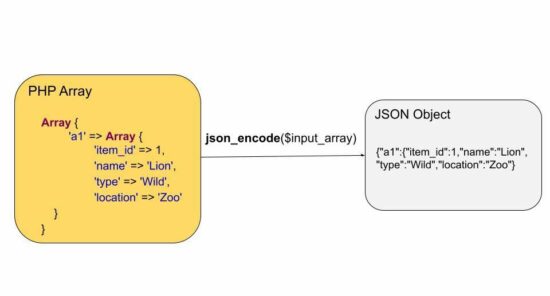
There are online tools to convert an array to a JSON object. This tutorial teaches how to create a program to convert various types of PHP array input into a JSON format.
It has 4 different examples for converting a PHP array to JSON. Those are too tiny in purpose to let beginners understand this concept easily.
Quick example
This quick example is simply coded with a three-line straightforward solution. It takes a single-dimensional PHP array and converts it to JSON.
The other different array-to-JSON examples handle simple to complex array conversion. It also applies pre-modification (like array mapping) before conversion. The four examples are,
Simple to complex PHP array to JSON.
Remove array keys before converting to JSON.
Convert PHP array with accented characters to JSON
<?php

// PHP Array to JSON string conversion for

// simple, associative and multidimensional arrays

// all works the same way using json_encode

// just present different arrays for example purposes only // simple PHP Array to JSON string

echo '<h1>PHP Array to JSON</h1>';

$array = array( 100, 250, 375, 400

);

$jsonString = json_encode($array);

echo $jsonString; // Associative Array to JSON

echo '<h2>Associative PHP Array to JSON</h2>';

$array = array( 'e1' => 1000, 'e2' => 1500, 'e3' => 2000, 'e4' => 2350, 'e5' => 3000

);

$jsonString = json_encode($array);

echo $jsonString; // multidimensional PHP Array to JSON string

echo '<h2>Multidimensional PHP Array to JSON</h2>';

$multiArray = array( 'a1' => array( 'item_id' => 1, 'name' => 'Lion', 'type' => 'Wild', 'location' => 'Zoo' ), 'a2' => array( 'item_id' => 2, 'name' => 'Cat', 'type' => 'Domestic', 'location' => 'Home' )

);

echo json_encode($multiArray);

?>
Output:
//PHP Array to JSON
[100,250,375,400] //Associative PHP Array to JSON
{"e1":1000,"e2":1500,"e3":2000,"e4":2350,"e5":3000} //Multidimensional PHP Array to JSON
{"a1":{"item_id":1,"name":"Lion","type":"Wild","location":"Zoo"},"a2":{"item_id":2,"name":"Cat","type":"Domestic","location":"Home"}}
2) Remove array keys before converting to JSON
This code handles a different scenario of JSON conversion which must be helpful if needed. For example, if the array associates subject=>marks and the user needs only the marks to plot it in a graph.
It removes the user-defined keys from an associative array and applies json_encode to convert it. It is a two-step process.
It applies PHP array_values() to read the value array.
Then, it applies json_encode on the values array.
<?php

// array_values() to remove assigned keys and convert to the original PHP Array key

echo '<h1>To remove assigned associative keys and PHP Array to JSON</h1>';

$array = array( 'e1' => 1000, 'e2' => 1500, 'e3' => 2000, 'e4' => 2350, 'e5' => 3000

); $jsonString = json_encode(array_values($array));

echo $jsonString;

?>
Output:
[1000,1500,2000,2350,3000]
3) Convert the PHP array with accented characters to JSON
It is also a two-step process to convert the array of data containing accented characters.
It applies UTF8 encoding on the array values before converting them into a JSON object.
For encoding all the elements of the given array, it maps the utf8_encode() as a callback using the PHP array_map() function.
We have seen PHP array functions that are frequently used while working with arrays.
<?php

// Accented characters

// to preserve accented characters during PHP Array to JSON conversion

// you need to utf8 encode the values and then do json_encode

echo '<h1>For accented characters PHP Array to JSON</h1>';

$array = array( 'w1' => 'résumé', 'w2' => 'château', 'w3' => 'façade', 'w4' => 'déjà vu', 'w5' => 'São Paulo'

);

$utfEncodedArray = array_map("utf8_encode", $array);

echo json_encode($utfEncodedArray);

?>
It applies to prettyprint on the converted output JSON properties in a neet spacious format.
The PHP json_encode() function accepts the second parameter to set the bitmask flag. This flag is used to set the JSON_PRETTY_PRINT to align the output JSON properties.
<?php

// to neatly align the output with spaces

// it may be useful when you plan to print the

// JSON output in a raw format

// helpful when debugging complex multidimensional PHP Arrays and JSON objects

// lot more constants are available like this, which might be handy in situations

echo '<h1>Convert PHP Array to JSON and Pretty Print</h1>';

$array = array( 'e1' => 1000, 'e2' => 1500, 'e3' => 2000, 'e4' => 2350, 'e5' => 3000

);

echo json_encode($array, JSON_PRETTY_PRINT);

?>
[www.indiegala.com] A new day, a new opportunity to explore the vast anime universe through videogames with a fresh new selection of titles: Project Heartbeat, Skautfold: Usurper, Jester / King, Neko Journey, My Inner Darkness Is A Hot Anime Girl!, Twilight Town: A Cyberpunk Day In Life.
Posted by: xSicKxBot - 10-23-2022, 01:45 AM - Forum: Lounge
- No Replies
Kerbal Space Program 2 Blasts Off Into Early Access February 2023
Kerbal Space Program 2 is finally releasing into early access February 24 next year, after experiencing numerous delays.
The sequel to the 2015 space flight simulator was meant to launch in early 2021, but was delayed, then delayed again to 2022, and finally a third time to 2023. But a specific date is now locked in, with players able to dig into the game on PC via Steam or the Epic Games Store early next year.
Developer Intercept Games released a 14-minute-long video going into some more detail about the game, announcing the early access release, and explaining why it's decided to take this route. "I cannot overstate how important it is for me to hear what people think about this thing we're creating," explained creative director Nate Simpson. "We've been working in a vacuum for quite a while, this is a rare opportunity to actually find out how we've been doing."
The Last Oricru is a story-driven action RPG, that puts you in the middle of an ongoing conflict between two races, on a partly terraformed planet, isolated from outer space by a protective barrier. Your decisions will bring interesting twists into the gameplay, as you can heavily influence the conflict and its outcome. You will experience hundreds of intense fights in a brutal medieval meets sci-fi world, where every decision has its consequences.
Level up your hero, improve your skills before facing one of many boss fights and get ready for an unprecedented amount of possibilities.
Posted by: xSicKxBot - 10-22-2022, 02:35 AM - Forum: Python
- No Replies
Python | Split String into Characters
Rate this post
Summary: Use the list("given string") to extract each character of the given string and store them as individual items in a list. Minimal Example: print(list("abc"))
Problem: Given a string; How will you split the string into a list of characters?
Example: Let’s visualize the problem with the help of an example:
Approach: One of the simplest ways to solve the given problem is to use the list constructor and pass the given string into it as the input.
list() creates a new list object that contains items obtained by iterating over the input iterable. Since a string is an iterable formed by combining a group of characters, hence, iterating over it using the list constructor yields a single character at each iteration which represents individual items in the newly formed list.
Another way to split the given string into characters would be to use a list comprehension such that the list comprehension returns a new list containing each character of the given string as individual items.
Code:
text = "finxter"

print([x for x in text]) # ['f', 'i', 'n', 'x', 't', 'e', 'r']
Prerequisite: To understand what happened in the above code, it is essential to know what a list comprehension does. In simple words, a list comprehension in Python is a compact way of creating lists. The simple formula is [expression + context], where the “expression” determines what to do with each list element. And the “context” determines what elements to select. The context can consist of an arbitrary number of for and if statements. To learn more about list comprehensions, head on to this detailed guide on list comprehensions.
Explanation: Well! Now that you know what list comprehensions are, let’s try to understand what the above code does. In our solution, the context variable x is used to extract each character from the given string by iterating across each character of the string one by one with the help of a for loop. This context variable x also happens to be the expression of our list comprehension as it stores the individual characters of the given string as separate items in the newly formed list.
Multi-line Solution: Another approach to formulating the above solution is to use a for loop. The idea is pretty similar; however, we will not be using a list comprehension in this case. Instead, we will use a for loop to iterate across individual characters of the given string and store them one by one in a new list with the help of the append method.
text = "finxter"

res = []

for i in text: res.append(i)

print(res) # ['f', 'i', 'n', 'x', 't', 'e', 'r']
Yet another way of solving the given problem is to use a lambda function within the map function. Now, this is complex and certainly not the best fit solution to the given problem. However, it may (or may not ;P) be appropriate when you are handling really complex tasks. So, here’s how to use the two built-in Python functions to solve the given problem:
import re

text = "finxter"

print(list(map(lambda c: c, text))) # ['f', 'i', 'n', 'x', 't', 'e', 'r']
Explanation: The map() function is used to execute a specified function for each item of an iterable. In this case, the iterable is the given string and each character of the string represents an individual item within it. Now, all we need to do is to create a lambda function that simply returns the character passed to it as the input. That’s it! However, the map method will return a map object, so you must convert it to a list using the list() function. Silly! Isn’t it? Nevertheless, it works!
Conclusion
Hurrah! We have successfully solved the given problem using as many as three different ways. I hope you enjoyed this article and it helps you in your Python coding journey. Please subscribe and stay tuned for more interesting articles!
Posted by: xSicKxBot - 10-22-2022, 02:35 AM - Forum: Lounge
- No Replies
The Best Metal Gear Games, Ranked
Few video game franchises have been as revolutionary as Metal Gear over the decades, a series that has consistently reinvented itself to offer fresh and exciting twists on tactical espionage action. From the original game that prioritized stealth in an era where action games ruled supreme, to the groundbreaking rebirth of the series that paved the way for cinematic video games, the brainchild of Hideo Kojima has never been short on surprises.
35 years later, the Metal Gear series is a legendary showcase of creative design, intense showdowns, and storylines that helped prove that video games could be cinematic powerhouses. Grab your favorite cardboard box, sneak in for a covert op, and grab some intel on the best Metal Gear Solid games to make the cut in GameSpot's list. Our list is organized from worst to best. We excluded a couple of mobile games and the non-canon Snake's Revenge, but almost the entire franchise is represented here.



 Question: What is the difference between
 Rule: Only if you want to exit a loop inside a function and this would also exit the whole function, you can use both keywords. In that case, I’d recommend using the keyword




 Related Tutorial: