We are welcoming everyone to join our discord[discord.gg]. We are more active there on finding giveaways, small or large, and there are daily raffles you can participate.
The world is a vast, beautiful and dangerous place especially when you have been shrunk to the size of an ant. Explore, build and survive together in this first person, multiplayer, survival-adventure. Can you thrive alongside the hordes of giant insects, fighting to survive the perils of the backyard?
In this article we’re going to have some fun with the Ethereum blockchain, RxJava and web3j. Background During the past year, the technology and financial press has been full of talk about blockchain and it’s disruptive potential. A blockchain is an decentralised, immutable data store. As it is immu...
Do you need to create a function that returns a string but you don’t know how? No worries, in sixty seconds, you’ll know! Go!
A Python function can return any object such as a string. To return a string, create the string object within the function body, assign it to a variable my_string, and return it to the caller of the function using the keyword operation return my_string. Or simply create the string within the return expression like so: return "hello world"
def f(): return 'hello world' f()

# hello world
Create String in Function Body
Let’s have a look at another example:
The following code creates a function create_string() that iterates over all numbers 0, 1, 2, …, 9, appends them to the string my_string, and returns the string to the caller of the function:
def create_string(): ''' Function to return string ''' my_string = '' for i in range(10): my_string += str(i) return my_string s = create_string()

print(s)

# 0123456789
Note that you store the resulting string in the variable s. The local variable my_string that you created within the function body is only visible within the function but not outside of it.
So, if you try to access the name my_string, Python will raise a NameError:
>>> print(my_string)

Traceback (most recent call last): File "<pyshell#1>", line 1, in <module> print(my_string)

NameError: name 'my_string' is not defined
To fix this, simply assign the return value of the function — a string — to a new variable and access the content of this new variable:
>>> s = create_string()

>>> print(s)

0123456789
There are many other ways to return a string in Python.
Return String With List Comprehension
For example, you can use a list comprehension in combination with the string.join() method instead that is much more concise than the previous code—but creates the same string of digits:
def create_string(): ''' Function to return string ''' return ''.join([str(i) for i in range(10)]) s = create_string()

print(s)

# 0123456789
For a quick recap on list comprehension, feel free to scroll down to the end of this article.
You can also add some separator strings like so:
def create_string(): ''' Function to return string ''' return ' xxx '.join([str(i) for i in range(10)]) s = create_string()

print(s)

# 0 xxx 1 xxx 2 xxx 3 xxx 4 xxx 5 xxx 6 xxx 7 xxx 8 xxx 9
def create_string(): ''' Function to return string ''' return 'ho' * 10 s = create_string()

print(s)

# hohohohohohohohohoho
String Concatenation of Function Arguments
Here’s an example of string concatenation that appends all arguments to a given string and returns the result from the function:
def create_string(a, b, c): ''' Function to return string ''' return 'My String: ' + a + b + c s = create_string('python ', 'is ', 'great')

print(s)

# My String: python is great
Concatenate Arbitrary String Arguments and Return String Result
You can also use dynamic argument lists to be able to add an arbitrary number of string arguments and concatenate all of them:
def create_string(*args): ''' Function to return string ''' return ' '.join(str(x) for x in args) print(create_string('python', 'is', 'great'))

# python is great print(create_string(42, 41, 40, 41, 42, 9999, 'hi'))

# 42 41 40 41 42 9999 hi
Background List Comprehension
Knowledge: List comprehension is a very useful Python feature that allows you to dynamically create a list by using the syntax [expression context]. You iterate over all elements in a given context “for i in range(10)“, and apply a certain expression, e.g., the identity expression i, before adding the resulting values to the newly-created list.
In case you need to learn more about list comprehension, feel free to check out my explainer video:
Programmer Humor
Q: How do you tell an introverted computer scientist from an extroverted computer scientist? A: An extroverted computer scientist looks at your shoes when he talks to you.
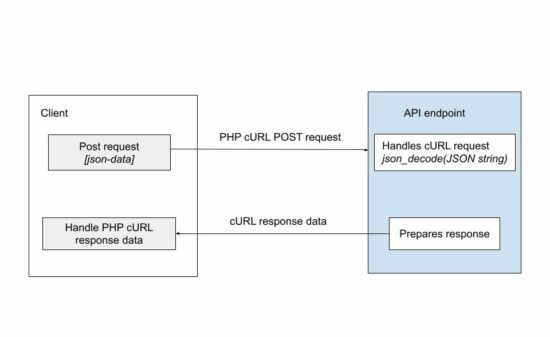
Most of the APIs are used to accept requests and send responses in JSON format. JSON is the de-facto data exchange format. It is important to learn how to send JSON request data with an API call.
The cURL is a way of remote accessing the API endpoint over the network. The below code will save you time to achieve posting JSON data via PHP cURL.
Example: PHP cURL POST by Sending JSON Data
It prepares the JSON from an input array and bundles it to the PHP cURL post.
It uses PHP json_encode function to get the encoded request parameters. Then, it uses the CURLOPT_POSTFIELDS option to bundle the JSON data to be posted.
curl-post-json.php
<?php

// URL of the API that is to be invoked and data POSTed

$url = 'https://example.com/api-to-post'; // request data that is going to be sent as POST to API

$data = array( "animal" => "Lion", "type" => "Wild", "name" => "Simba", "zoo" => array( "address1" => "5333 Zoo", "city" => "Los Angeles", "state" => "CA", "country" => "USA", "zipcode" => "90027" )

); // encoding the request data as JSON which will be sent in POST

$encodedData = json_encode($data); // initiate curl with the url to send request

$curl = curl_init($url); // return CURL response

curl_setopt($curl, CURLOPT_RETURNTRANSFER, true); // Send request data using POST method

curl_setopt($curl, CURLOPT_CUSTOMREQUEST, "POST"); // Data conent-type is sent as JSON

curl_setopt($curl, CURLOPT_HTTPHEADER, array( 'Content-Type:application/json'

));

curl_setopt($curl, CURLOPT_POST, true); // Curl POST the JSON data to send the request

curl_setopt($curl, CURLOPT_POSTFIELDS, $encodedData); // execute the curl POST request and send data

$result = curl_exec($curl);

curl_close($curl); // if required print the curl response

print $result;

?>
The above code is one part of the API request-response cycle. If the endpoint belongs to some third-party API, this code is enough to complete this example.
But, if the API is in the intra-system (custom API created for the application itself), then, the posted data has to be handled.
How to get the JSON data in the endpoint
This is to handle the JSON data posted via PHP cURL in the API endpoint.
<?php

// use the following code snippet to receive

// JSON POST data

// json_decode converts the JSON string to JSON object

$data = json_decode(file_get_contents('php://input'), true);

print_r($data);

echo $data;

?>
The json_encode function also allows setting the allowed nesting limit of the input JSON. The default limit is 512.
If the posted JSON data is exceeding the nesting limit, then the API endpoint will be failed to get the post data.
Other modes of posting data to a cURL request
In a previous tutorial, we have seen many examples of sending requests with PHP cURL POST.
This program sets the content type “application/json” in the CURLOPT_HTTPHEADER. There are other modes of posting data via PHP cURL.
multipart/form-data – to send an array of post data to the endpoint/
application/x-www-form-urlencoded – to send a URL-encoded string of form data.
Note: PHP http_build_query() can output the URL encoded string of an array. Download
[www.indiegala.com] Bringing a selection of indie games with various difficulties, from casual to hardcore, choose your favorite from: Dangerous Level, Ninja Lexx, Penguin Climbing, Cemetery Warrior V, Spider-Robots War, Dezinsector, 3D Hardcore Cube, Sit on bottle
❤️ The Drone Racing League Simulator Store Page[store.epicgames.com]
The games is free to keep until Thursday, September 22nd, 2022 15:00 UTC.
There is another game on GOG dont forget to claim it
We are welcoming everyone to join our discord[discord.gg]. We are more active there on finding giveaways, small or large, and there are daily raffles you can participate.
Elden Ring Board Game Kickstarter Campaign Will Launch In November
An Elden Ring board game from Steamforged Games will launch on Kickstarter on November 22.
The project was revealed in September with nothing but the title--the austere Elden Ring: The Board Game--and a single miniature: a detailed render of Margit The Fell Omen, the video game's initial boss for most players. To date, the campaign has garnered nearly 20,000 followers (meaning Kickstarter users who will be notified upon the campaign's launch).
Details of the board game's features and mechanics are scant thus far. Steamforged Games has promised that gameplay and miniature reveals are forthcoming, though full details will likely only show up upon the Kickstarter Campaign's full release. People who back the game will also receive the board game and any expansions in exclusive Collector's Edition boxes.
What is inside the Red Fridge? Collection of six episodes of psychological analog horror. Tour through liminal spaces filled with surreal events and uncanny strangers. Inspired by retro horrors of the PSX era.



 Knowledge: List comprehension is a very useful Python feature that allows you to dynamically