| Welcome, Guest |
You have to register before you can post on our site.
|
| Online Users |
There are currently 421 online users.
» 0 Member(s) | 416 Guest(s)
Applebot, Baidu, Bing, Google, Yandex
|
|
|
| PC - Shovel Knight Dig |
|
Posted by: xSicKxBot - 10-12-2022, 09:21 PM - Forum: New Game Releases
- No Replies
|
 |
Shovel Knight Dig
When Drill Knight and his dastardly digging crew blast apart Shovel Knight's peaceful campsite and steal his loot, he grabs his trusty Shovel Blade and starts tunnelling after them. Meet new friends and foes, visit strange lands, and outfit yourself in your quest to keep the entire land from collapsing underfoot! Jump, slash, and dig your way down an ever-changing chasm of mystery in Shovel Knight Dig, an all-new Shovel Knight adventure! Publisher: Yacht Club Games Release Date: Sep 23, 2022
https://www.metacritic.com/game/pc/shovel-knight-dig
|

|
|
| [Tut] Python Print Dictionary Values Without “dict_values” |
|
Posted by: xSicKxBot - 10-12-2022, 02:48 AM - Forum: Python
- No Replies
|
|
Python Print Dictionary Values Without “dict_values”
Problem Formulation and Solution Overview
If you print all values from a dictionary in Python using print(dict.values()), Python returns a dict_values object, a view of the dictionary values. The representation prints the keys enclosed in a weird dict_values(...), for example: dict_values([1, 2, 3]).
Here’s an example:
my_dict = {'name': 'Carl', 'age': 42, 'income': 100000}

print(my_dict.values())

# dict_values(['Carl', 42, 100000])
There are multiple ways to change the string representation of the values, so that the print() output doesn’t yield the strange dict_values view object.
Method 1: Convert to List
An easy way to obtain a pretty output when printing the dictionary values without dict_values(...) representation is to convert the dict_value object to a list using the list() built-in function. For instance, print(list(my_dict.value())) prints the dictionary values as a simple list.
Here’s an example:
my_dict = {'name': 'Carl', 'age': 42, 'income': 100000}

print(list(my_dict.values()))

# ['Carl', 42, 100000]
So far, so simple. Read on to learn or recap some important Python features and improve your skills. There are many paths to Rome! 
Method 2: Unpacking
An easy and Pythonic way to print a dictionary without the dict_values prefix is to unpack all values into the print() function using the asterisk operator. This works because the print() function allows an arbitrary number of values as input. It prints those values separated by a single whitespace character per default.
Here’s an example:
my_dict = {'name': 'Carl', 'age': 42, 'income': 100000}

print(*my_dict.values())

# Carl 42 100000
It cannot get any more concise, frankly. 
Of course, you can change the separator and end arguments accordingly to obtain more control of the output:
my_dict = {'name': 'Carl', 'age': 42, 'income': 100000}

print(*my_dict.values(), sep='\n', end='\nThe End')
Output:
Carl

42

100000

The End
Do you need even greater flexibility than this? No problem! See here: 
Method 3: String Join Function and Generator Expression
To convert the dictionary values to a single string object without 'dict_values' in it and with maximal control, you can use the string.join() function in combination with a generator expression and the built-in str() function.
Here’s an example:
my_dict = {'name': 'Carl', 'age': 42, 'income': 100000}

print(', '.join(str(x) for x in my_dict.values()))

# Carl, 42, 100000
 Note: You can replace the comma Note: You can replace the comma ',' with your desired separator character and modify the representation of each individual element by modifying the expression str(x) of the generator expression to something arbitrary complicated.
See here for something crazy that wouldn’t make any sense:
my_dict = {'name': 'Carl', 'age': 42, 'income': 100000}

print(' | '.join('x' + str(x) + 'x' for x in my_dict.values()))

# xCarlx | x42x | x100000x
Note that you could also use the repr() function instead of the str() function in this example—it wouldn’t matter too much.
Finally, I’d recommend you check out this tutorial to learn more how generator expressions work—many Python beginners struggle with this concept even though it’s ubiquitous in expert coders’ code bases. 
 Recommended Tutorial: Understanding One-Line Generators in Python Recommended Tutorial: Understanding One-Line Generators in Python
https://www.sickgaming.net/blog/2022/10/...ct_values/
|
|
|
|
| [Tut] Google Sheets JavaScript API Spreadsheet Tutorial |
|
Posted by: xSicKxBot - 10-12-2022, 02:48 AM - Forum: PHP Development
- No Replies
|
|
Google Sheets JavaScript API Spreadsheet Tutorial
 by Vincy. Last modified on October 11th, 2022. Google Sheets API provides services of to read and write a Google spreadsheet document.
This tutorial is for reading data from Google sheets and displaying them in the UI with JavaScript. Only JavaScript is used without any plugins or dependencies.
Steps to access Google Sheets
It requires the following steps to achieve this.
- Get OAuth Credentials and API keys and configure them into an application.
- Authenticate and Authorise the app to allow accessing Google sheets.
- Read spreadsheet data and store it in an array.
- Parse response data and display them on the UI.
Steps 1 and 2 are common for all Google JavaScript API services. When uploading files to Google Drive via JavaScript API, we have seen it.
We have also seen how to upload to Google Drive using PHP. It doesn’t need API Key. Instead, it does token-based authentication to get API access.
Step 1: Get OAuth Credentials and API keys and configure them into an application
In this step, it needs to create a developer’s web client app to get the client id and the API keys. For that, it requires the following setting should be enabled with the developer’s dashboard.
- Login to the Google Developers console and create a web client.
- Enable Google Sheets API from the gallery of Google APIs.
- Configure OAuth content screen to set the app details
- Click OAuth credentials and get the app client id and secret key.
- Set the scope on which the program going to access the spreadsheet.
- Get the API key to authenticate and authorize the app to access the Google Spreadsheet API service.
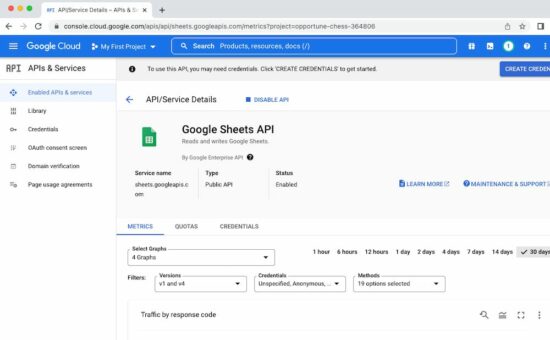
Note: The secret key will be used for server-side implementation, but not in this JavaScript example.
Required scope to access the spreadsheet data
The following scopes should be selected to read the Google Spreadsheets via a program.
- …auth/spreadsheets – to read, edit, create and delete Spreadsheets.
- …auth/spreadsheets.readonly – to read Spreadsheets.
- …auth/drive – to read, edit, create and delete Drive files.
- …auth/drive.readonly – to read Drive files
- …auth/drive.file – to read, edit, create and delete a specific Drive files belongs to the app gets authorized.
Step 2: Authenticate and Authorise the app to allow accessing Google sheets
Authorization is the process of the client signing into the Google API to access its services.
On clicking an “Authorize” button, it calls authorizeGoogleAccess() function created for this example.
This function shows a content screen for the end user to allow access. Then, it receives the access token in a callback handler defined in this function.
Step 3: Read spreadsheet data and store it in an array
Once access is permitted, the callback will invoke the script to access an existing Google spreadsheet.
The listMajors() function specifies a particular spreadsheet id to be accessed. This function uses JavaScript gapi instance to get the spreadsheet data.
Step 4: Parse response data and display them on the UI
After getting the response data from the API endpoint, this script parses the resultant object array.
It prepares the output HTML with the spreadsheet data and displays them to the target element.
If anything strange with the response, it shows the “No records found” message in the browser.
A complete code: Accessing Google Spreadsheets via JavaScript
The following script contains the HTML to show either “Authorize” or the two “Refresh” and “Signout” buttons. Those buttons’ display mode is based on the state of authorization to access the Google Spreadsheet API.
The example code includes the JavaScript library to make use of the required Google API services.
The JavaScript has the configuration to pin the API key and OAuth client id in a right place. This configuration is used to proceed with the steps 2, 3 and 4 we have seen above.
<!DOCTYPE html>
<html>
<head>
<title>Google Sheets JavaScript API Spreadsheet Tutorial</title>
<link rel='stylesheet' href='style.css' type='text/css' />
<link rel='stylesheet' href='form.css' type='text/css' />
</head>
<body> <div class="phppot-container"> <h1>Google Sheets JavaScript API Spreadsheet Tutorial</h1> <p>This tutorial is to help you learn on how to read Google Sheets (spreadsheet) using JavaScript Google API.</p> <button id="authorize_btn" onclick="authorizeGoogleAccess()">Authorize Google Sheets Access</button> <button id="signout_btn" onclick="signoutGoogle()">Sign Out</button> <pre id="content"></pre> </div> <script async defer src="https://apis.google.com/js/api.js" onload="gapiLoaded()"></script> <script async defer src="https://accounts.google.com/gsi/client" onload="gisLoaded()"></script>
</body>
</html>
// You should set your Google client ID and Google API key

const GOOGLE_CLIENT_ID = '';

const GOOGLE_API_KEY = '';

// const DISCOVERY_DOC = 'https://sheets.googleapis.com/$discovery/rest?version=v4'; // Authorization scope should be declared for spreadsheet handing

// multiple scope can he included separated by space

const SCOPES = 'https://www.googleapis.com/auth/spreadsheets.readonly'; let tokenClient;

let gapiInited = false;

let gisInited = false;

document.getElementById('authorize_btn').style.visibility = 'hidden';

document.getElementById('signout_btn').style.visibility = 'hidden'; /** * Callback after api.js is loaded. */

function gapiLoaded() { gapi.load('client', intializeGapiClient);

} /** * Callback after the Google API client is loaded. Loads the * discovery doc to initialize the API. */

async function intializeGapiClient() { await gapi.client.init({ apiKey: GOOGLE_API_KEY, discoveryDocs: [DISCOVERY_DOC], }); gapiInited = true; maybeEnableButtons();

} /** * Callback after Google Identity Services are loaded. */

function gisLoaded() { tokenClient = google.accounts.oauth2.initTokenClient({ client_id: GOOGLE_CLIENT_ID, scope: SCOPES, callback: '', // defined later }); gisInited = true; maybeEnableButtons();

} /** * Enables user interaction after all libraries are loaded. */

function maybeEnableButtons() { if (gapiInited && gisInited) { document.getElementById('authorize_btn').style.visibility = 'visible'; }

} /** * Sign in the user upon button click. */

function authorizeGoogleAccess() { tokenClient.callback = async (resp) => { if (resp.error !== undefined) { throw (resp); } document.getElementById('signout_btn').style.visibility = 'visible'; document.getElementById('authorize_btn').innerText = 'Refresh'; await listMajors(); }; if (gapi.client.getToken() === null) { // Prompt the user to select a Google Account and ask for consent to share their data // when establishing a new session. tokenClient.requestAccessToken({ prompt: 'consent' }); } else { // Skip display of account chooser and consent dialog for an existing session. tokenClient.requestAccessToken({ prompt: '' }); }

} /** * Sign out the user upon button click. */

function signoutGoogle() { const token = gapi.client.getToken(); if (token !== null) { google.accounts.oauth2.revoke(token.access_token); gapi.client.setToken(''); document.getElementById('content').innerText = ''; document.getElementById('authorize_btn').innerText = 'Authorize'; document.getElementById('signout_btn').style.visibility = 'hidden'; }

} /** * Print the names and majors of students in a sample spreadsheet: * https://docs.google.com/spreadsheets/d/1...Thvas/edit */

async function listMajors() { let response; try { // Fetch first 10 files response = await gapi.client.sheets.spreadsheets.values.get({ spreadsheetId: '', range: 'Sheet1!A2:D', }); } catch (err) { document.getElementById('content').innerText = err.message; return; } const range = response.result; if (!range || !range.values || range.values.length == 0) { document.getElementById('content').innerText = 'No values found.'; return; } const output = range.values.reduce( (str, row) => `${str}${row[0]}, ${row[2]}\n`, 'Birds, Insects:\n'); document.getElementById('content').innerText = output;

}
Source and output of this example
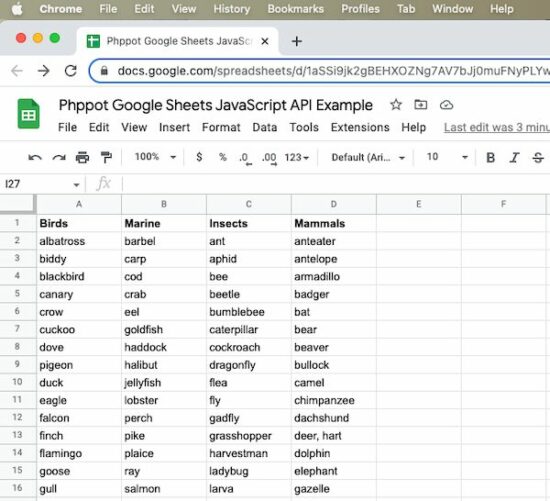
The spreadsheet shown in this screenshot is the source of this program to access its data.
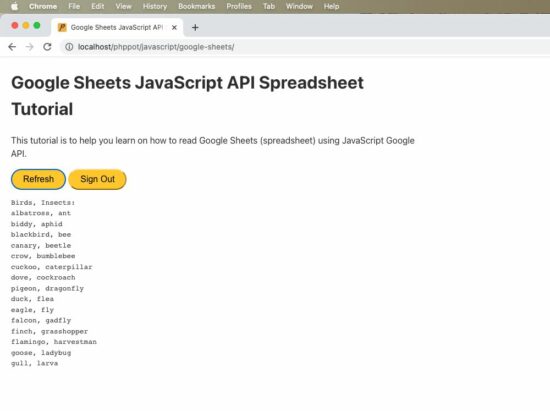
The JavaScript example reads the spreadsheet and displays the Birds and the Insects column data in the UI.
Download
Popular Articles
↑ Back to Top
https://www.sickgaming.net/blog/2022/10/...-tutorial/
|
|
|
|
| (Indie Deal) Conspiracy Corner Bundle, Ubisoft & Cities Sales |
|
Posted by: xSicKxBot - 10-12-2022, 02:48 AM - Forum: Deals or Specials
- No Replies
|
|
Conspiracy Corner Bundle, Ubisoft & Cities Sales
Conspiracy Corner Bundle | 6 Steam Games | 94% OFF  [www.indiegala.com] [www.indiegala.com]
Are we living in a simulation...or are we simulating life...via videogames? Investigate, explore, deduce and uncover conspiracies with the following indie games: Who Stole My Beard?, Just Take Your Left, The Corridor: On Behalf Of The Dead, Fhtagn! - Tales of the Creeping Madness, Abetot Family Estate, NMNE.
https://www.youtube.com/watch?v=prGxSKMdnkw
Ubisoft & Cities Skylines Sales  [www.indiegala.com] [www.indiegala.com]
 [www.indiegala.com] [www.indiegala.com]
https://www.youtube.com/watch?v=0uAgCTBWZVw
Stay Inside, Stay Safe and Enjoy Good Games.
Check out IndieGala on Twitter, YouTube & Facebook[www.facebook.com]
https://steamcommunity.com/groups/indieg...7947227349
|
|
|
|
| News - Marvel Shutting Down The New Blade Movie For Now - Report |
|
Posted by: xSicKxBot - 10-12-2022, 02:48 AM - Forum: Lounge
- No Replies
|
|
Marvel Shutting Down The New Blade Movie For Now - Report
Marvel's Blade movie is reportedly temporarily on pause, according to The Hollywood Reporter. The news comes two weeks after director Bassim Tariq (Mogul Mowgli) exited the project--which Marvel cited as being "due to continued shifts in our production schedule." The comics giant has not issued a statement on the news. The Hollywood Reporter speculates that although the movie is hoping to restart production in early 2023, it is now no longer likely to meet its expected November 3, 2023 release date. "They want to really get it right," an unnamed source told The Hollywood Reporter. Before Tariq's departure, production was expected to begin in November. [Update: In a subsequent report, Marvel is said to have delayed multiple movies, including Blade.] This is also, unfortunately, far from the first delay that Blade has run into. In May 2021, the reboot film was delayed so the studio could further polish Stacy Osei-Kuffour's script. At that time, filming was expected to get underway sometime in July 2022. Continue Reading at GameSpot
https://www.gamespot.com/articles/marvel...01-10abi2f
|
|
|
|
| PC - The DioField Chronicle |
|
Posted by: xSicKxBot - 10-12-2022, 02:48 AM - Forum: New Game Releases
- No Replies
|
|
The DioField Chronicle
The world of men is mired by an age of war which rages for year on end. A band of elite mercenaries calling themselves Blue Fox arise amidst the flames and the chaos, their fates and valiant deeds to be sung of in ages yet to come.
But when all is said and done, will the name "Blue Fox" come to signify hope or darkest tragedy?
An all-new Strategy RPG that chronicles an epic tale of war and honour. Featuring a unique and beautiful world that blends fantasy, medieval and modern-day influences, and a deep yet innovative real-time battle system. Publisher: Square Enix Release Date: Sep 22, 2022
https://www.metacritic.com/game/pc/the-d...-chronicle
|
|
|
|
| [Tut] Python Print Dictionary Without One Key or Multiple Keys |
|
Posted by: xSicKxBot - 10-10-2022, 08:56 PM - Forum: Python
- No Replies
|
|
Python Print Dictionary Without One Key or Multiple Keys
The most Pythonic way to print a dictionary except for one or multiple keys is to filter it using dictionary comprehension and pass the filtered dictionary into the print() function.
There are multiple ways to accomplish this and I’ll show you the best ones in this tutorial. Let’s get started! 
Recommended Tutorial: How to Filter a Dictionary in Python
Method 1: Dictionary Comprehension
Say, you have one or more keys stored in a variable ignore_keys that may be a list or a set for efficiency reasons.
Create a filtered dictionary without one or multiple keys using the dictionary comprehension {k:v for k,v in my_dict.items() if k not in ignore_keys} that iterates over the original dictionary’s key-value pairs and confirms for each key that it doesn’t belong to the ones that should be ignored.
Here’s a minimal example:
ignore_keys = {'x', 'y'}

my_dict = {'x': 1, 'y': 2, 'z': 3} filtered_dict = {k:v for k,v in my_dict.items() if k not in ignore_keys}

print(filtered_dict)

# {'z': 3}
The dict.items() method creates an iterable of key-value pairs over which we can iterate.
The membership operator k not in ignore_keys tests if a given key doesn’t belong to the set.
The runtime complexity of the membership check is constant O(1) if you use a set for the ignore_keys data structure. It would be linear O(n) in the number of elements if you used a list which is not a good idea for that reason.
Note that you can also use this approach to print a dictionary except a single key by putting only one key into the ignore list.
Recommended Tutorial: Dictionary Comprehension in Python
Method 2: Simple For Loop with If Condition
A not-so-Pythonic but reasonably readable way to print a dict without one or multiple keys is to use a simple for loop with if condition to avoid all keys in the ignore list.
Here’s an example using three lines and directly printing the key-value pairs:
ignore_keys = {'x', 'y'}

my_dict = {'x': 1, 'y': 2, 'z': 3} for k, v in my_dict.items(): if k not in ignore_keys: print(k, v)
The output:
z 3
Of course, you can modify the output to your own needs. See the customizations of the built-in print() function and its awesome arguments:
Recommended Tutorial: Python print() and Separator and End Arguments
My Recommendation – Use This Method!
I could have listed many more ways to solve this problem of printing a dict except one or more keys.
I have seen super inefficient ways proposed on forums that use exclude_keys that are list types.
I have also seen elaborate schemes to use set difference operations or more.
But I don’t recommend anything else than dict comprehension if you want to create a filtered dictionary object first and the simple for loop if you want to print on the fly.
That’s it. 
https://www.sickgaming.net/blog/2022/10/...iple-keys/
|
|
|
|
|
|
|



