Final day, to check out the encore weekend freebies
[freebies.indiegala.com] "Encore, encore" we've been hearing and we listened. We've brought back for this weekend a few of your favorites. Keep an eye on for more.
We are welcoming everyone to join our discord[discord.gg]. We are more active there on finding giveaways, small or large, and there are daily raffles you can participate.
Beacon Pines is a cute and creepy adventure set within a mysterious book. You play as both the reader of the book and its main character, Luka.
Something strange is happening at the old warehouse, and Luka and his friends seem to be the only ones taking notice. Sneak out late, make new friends, uncover hidden truths, and collect words that will change the course of fate!
As the book's reader, you'll navigate the story's turning points using The Chronicle: an interactive story tree that branches and grows along with your choices. Exploring one set of events can unlock new charms to use on another branch, leading you to jump back and forth between entirely different versions of the story in order to unravel the mysteries at the heart of Beacon Pines.
Calling all developers to the JUG of all JUGs. If you’re not a JUG member (or don’t even know what that stands for), don’t worry because there’s never been a better chance to experience the best of what the Java User Group communities have to offer when members from around the world come together at...
You can unpack all list elements into the print() function to print all values individually, separated by an empty space per default (that you can override using the sep argument). For example, the expression print('[', *lst, ']') prints the elements in my_list, empty space separated, with the enclosing square brackets and without the separating commas!
Here’s an example:
lst = [1, 2, 3]

print('[', *lst, ']')

# [ 1 2 3 ]
You can learn about the ins and outs of the built-in print() function in the following video:
To master the basics of unpacking, feel free to check out this video on the asterisk operator:
Method 2: String Replace Method
A simple way to print a list without commas is to first convert the list to a string using the built-in str() function. Then modify the resulting string representation of the list by using the string.replace() method until you get the desired result.
Here’s an example:
my_list = [1, 2, 3] # Convert List to String

s = str(my_list)

print(s)

# [1, 2, 3] # Replace Separating Commas

s = s.replace(',', '') # Print List Without Commas

print(s)

# [1 2 3]
The last line of the code snippet shows that the commas are removed from the output.
Method 3: String Join With Generator Expression
You can print a list without commas using the string.join() method on any separator string such as ' ' or '\t'. Pass a generator expression to convert each list element to a string using the str() built-in function.
Specifically, the expression print('[', ' '.join(str(x) for x in my_list), ']') prints my_list to the shell without separating commas.
my_list = [1, 2, 3]

print('[', ' '.join(str(x) for x in my_list), ']')

# Output: [ 1 2 3 ]
The str(object) built-in function converts a given object to its string representation.
Generator expressions or list comprehensions are concise one-liner ways to create a new iterable based by reusing elements from another iterable.
You can dive deeper into generators in the following video:
Note: Combining the join() method with a generator expression and string concatenation is the recommended approach of choice if you want to convert a list to a string without commas instead of printing it.
Here’s an example:
my_list = [1, 2, 3]

s = '[' + ' '.join(str(x) for x in my_list) + ']'

print(s)

# Output: [ 1 2 3 ]
Method 4: Print NumPy Array
Sometimes it is sufficient to use the NumPy default output that is without separating commas. For example, if you print a list it yields [1, 2, 3]. And if you print an array it yields [1 2 3]. You can easily convert a list to a NumPy array using the np.array(lst) constructor.
Coders get paid six figures and more because they can solve problems more effectively using machine intelligence and automation.
To become more successful in coding, solve more real problems for real people. That’s how you polish the skills you really need in practice. After all, what’s the use of learning theory that nobody ever needs?
You build high-value coding skills by working on practical coding projects!
Do you want to stop learning with toy projects and focus on practical code projects that earn you money and solve real problems for people?
If your answer is YES!, consider becoming a Python freelance developer! It’s the best way of approaching the task of improving your Python skills—even if you are a complete beginner.
If you just want to learn about the freelancing opportunity, feel free to watch my free webinar “How to Build Your High-Income Skill Python” and learn how I grew my coding business online and how you can, too—from the comfort of your own home.
The games is free to keep until Thursday, September 8, 2022 5:00 PM.
Next week's freebies: Hundred Days - Winemaking Simulator Realm Royale Reforged Epic Launch Bundle
We are welcoming everyone to join our discord[discord.gg]. We are more active there on finding giveaways, small or large, and there are daily raffles you can participate.
Final day, to check out the encore weekend freebies
[freebies.indiegala.com] "Encore, encore" we've been hearing and we listened. We've brought back for this weekend a few of your favorites. Keep an eye on for more.
New York City, New Year's Eve 1999. An unlikely team of four professional cleaners for the mob gathers to drink and reminisce about their careers at the turn of the millenium. As the details of their stories stop matching up, the ugly truth behind their cooperation begins to reveal itself. What starts as a celebration of a decade of shared history slowly turns into a tense and dangerous standoff.
An homage to 90s cinema - from Tarantino's classics through cult crime thrillers to B-movie action favorites and more - Serial Cleaners remixes those familiar places, characters and scenes into its own unique spin on a decade full of brightly colored optimism... and the grime underneath it all.
Choose your path through the non-linear story by picking the part of the narrative you want to hear next, and then approach each mission as carefully or brazenly as you like. Utilize stealth, exploration and speed as the situation and your preferred experience warrants it. Get rid of the bodies and other damning evidence to wipe the decade's slate clean before the new millenium comes!
Per default, Python doesn’t truncate lists when printing them to the shell, even if they are large. For example, you can call print(my_list) and see the full list even if the list has one thousand elements or more!
Here’s an example:
However, Python may squeeze the text (e.g., in programming environments such as IDLE) so you would have to press the button before seeing the output. The reason is that showing the whole output could be time-consuming and visually cluttering.
Here’s an example:
How to Print a NumPy Array Without Truncating?
In many cases, large NumPy arrays when printed out are not truncated as well on the default Python programming environment IDLE:
However, in the interactive mode of the Python shell, a NumPy array may be truncated, unlike a Python list:
This tutorial is for those who are looking for sending web push notifications with dynamic data using PHP. This is an alternate method of that JavaScript example but with server-side processing in PHP.
It gets the notification content from PHP. The hardcoded notification content can be replaced with any source of data from a database or a file.
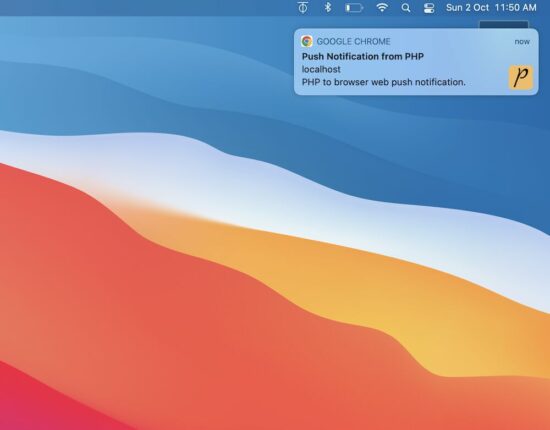
This example shows a web push notification on the browser. The notifications are sent every 10 minutes as configured. Then, the sent notifications are closed automatically. The notifications display time on a browser is configured as 5 minutes.
The notification instances are created and handled on the client side. The JavaScript setTimeout function is used to manage the timer of popping up or down the notifications.
AJAX call to PHP to send the web push notification
This HTML has the script to run the loop to send the notifications in a periodic interval.
It has the function pushNotify() that requests PHP via AJAX to send notifications. PHP returns the notification content in the form of a JSON object.
The AJAX callback handler reads the JSON and builds the notification. In this script, the createNotification() function sends the notification to the event target.
It maps the JavaScript Notification click property to open a URL from the PHP JSON response.
index.php
<!DOCTYPE html>

<html>

<head>

<title>Web Push Notifications in PHP</title>

<meta name="viewport" content="width=device-width, initial-scale=1">

<link href="style.css" type="text/css" rel="stylesheet" />

<script src="https://code.jquery.com/jquery-3.6.1.min.js" integrity="sha256-o88AwQnZB+VDvE9tvIXrMQaPlFFSUTR+nldQm1LuPXQ=" crossorigin="anonymous"></script>

</head>

<body> <div class="phppot-container"> <h1>Web Push Notification using PHP in a Browser</h1> <p>This example shows a web push notification from PHP on browser automatically every 10 seconds. The notification also closes automatically just after 5 seconds.</p> </div> <script> // enable this if you want to make only one call and not repeated calls automatically // pushNotify(); // following makes an AJAX call to PHP to get notification every 10 secs setInterval(function() { pushNotify(); }, 10000); function pushNotify() { if (!("Notification" in window)) { // checking if the user's browser supports web push Notification alert("Web browser does not support desktop notification"); } if (Notification.permission !== "granted") Notification.requestPermission(); else { $.ajax({ url: "push-notify.php", type: "POST", success: function(data, textStatus, jqXHR) { // if PHP call returns data process it and show notification // if nothing returns then it means no notification available for now if ($.trim(data)) { var data = jQuery.parseJSON(data); console.log(data); notification = createNotification(data.title, data.icon, data.body, data.url); // closes the web browser notification automatically after 5 secs setTimeout(function() { notification.close(); }, 5000); } }, error: function(jqXHR, textStatus, errorThrown) { } }); } }; function createNotification(title, icon, body, url) { var notification = new Notification(title, { icon: icon, body: body, }); // url that needs to be opened on clicking the notification // finally everything boils down to click and visits right notification.onclick = function() { window.open(url); }; return notification; } </script>

</body>

</html>
PHP code to prepare the JSON bundle with dynamic content of the notification
This code supplies the notification data from the server side. Hook your application DAO in this PHP to change the content if you want it from a database.
push-notify.php
<?php

// if there is anything to notify, then return the response with data for

// push notification else just exit the code

$webNotificationPayload['title'] = 'Push Notification from PHP';

$webNotificationPayload['body'] = 'PHP to browser web push notification.';

$webNotificationPayload['icon'] = 'https://phppot.com/badge.png';

$webNotificationPayload['url'] = 'https://phppot.com';

echo json_encode($webNotificationPayload);

exit();

?>
Thus we have created the web push notification with dynamic content from PHP. There are various uses of it by having it in an application.
Uses of push notifications
Push notification helps to increase website traffic by sending relevant content to subscribed users.
It’s a way to send pro ads to create entries to bring money into the business.
It helps to spread the brand and keep it on the customer’s minds that retain them with you.



 Recommended Tutorial:
 Note: Combining the
  Recommended Tutorial:
  If your answer is YES!, consider becoming a