The behavior of using ‘this’ varies based on several factors. Some of them are listed below.
It differs between dynamic and explicit binding.
It works differently on strict and non-strict modes.
It varies based on the enclosing contexts.
It differs based on how and where they are called or used.
Generally, the ‘this’ will behave with dynamic binding. JavaScript supports explicit binding with the bind() method to change the default.
Without default value, the JavaScript ‘this’ returns ‘undefined’ in a strict mode.
Different usages of ‘this’ in JavaScript
There are different usage practices in JavaScript to use the ‘this’ keyword to refer to a context. Let us see about the following 2 among those practices.
Set default values to the ‘this’.
Arrow function.
By default, the ‘this’ refers to the global context. But, in strict mode, functions need a default value to use ‘this’ as a reference. The JavaScript classes are always in a strict mode and require object reference to use ‘this’.
The JavaScript arrow functions give compact code. So we can choose it for writing a limited code with purposes. But, I prefer to use traditional expressions while coding.
More examples using JavaScript this
This section gives more examples of the ‘JavaScript this’ keyword. It shows how ‘this’ will work in different scenarios and contexts.
It gives code for accessing properties of a class or JavaScript const block.
It accesses the HTML elements on event handling. It helps to manipulate the DOM objects via JavaScript with the reference of the ‘this’ keyword.
Example 1: Accessing object properties via this using JavaScript call() function
This program binds the properties of an object with the method of another object. It uses the JavaScript call() to log the properties with the reference of the ‘this’ object.
In strict mode, JavaScript this keyword refers to the global window context. But, within a function, it returns undefined.
javascript-this-in-strict-mode.html
<script> "use strict";

let obj = this;

// 'this' is 'window' object

console.log(obj); function getContext() { return this;

}

// In strict mode, JavaScript 'this' inside a funtion is 'undefined'

console.log(getContext());

</script>
Example 3: Set or get object properties using this keyword
This example sets the properties of an object. Also. it reads them using the JavaScript this keyword. It defines functions to get or set the properties.
Example 4: JavaScript this object in different contexts
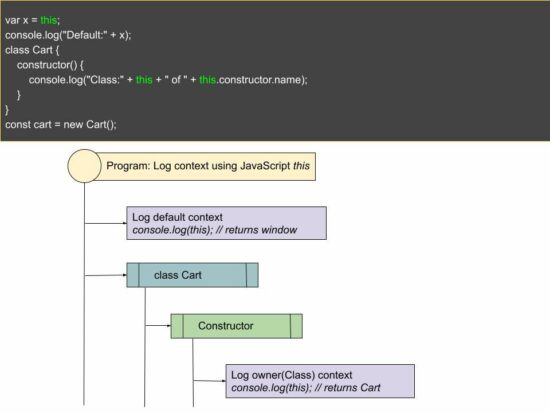
This script logs the ‘JavaScript this’ object in different contexts. The program creates two classes and logs the ‘this’ object from their constructors. It returns the corresponding owner instance and logs it into the developer console.
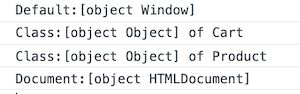
From a jQuery document.ready() function, ‘this’ returns Document:[object HTMLDocument].
this-in-different-context.php
<script src="https://code.jquery.com/jquery-3.6.0.min.js"></script>

<script>

var x = this;

console.log("Default:" + x); class Cart { constructor() { console.log("Class:" + this + " of " + this.constructor.name); }

}

const cart = new Cart(); class Product { constructor() { console.log("Class:" + this + " of " + this.constructor.name); }

}

const product = new Product(); $(document).ready(function(){ var x = this; console.log("Document:" + x);

});

</script>
This program logs the following in the developer console. The ‘this’ object refers to a different context.
Example 5: JavaScript this keyword in event context
The below code contains HTML button with an on-click event handler. It passes the ‘this’ object to manipulate the button element style. Here, the JavaScript this object refers to the button element.
See the below example that creates a compact code to get a global context using ‘this’.
It creates a function consisting of a one-line code to return the global object. This line uses the JavaScript arrow function to use ‘this’.
arrow-function.html
<script>

var getGlobal = (() => this);

console.log(getGlobal());

</script>
Conclusion
I hope you have a good idea of this basic JavaScript concept. The example code guides you on how to use ‘this’ in JavaScript.
The examples with event handlers and arrow functions return relevant object references. Let me know your valuable feedback on this article in the comment section. Download
The adventure of a lifeti-er, afterlifetime-awaits! Help a wayward soul return to the land of the living in this hauntingly humorous comedy adventure that pokes fun at life, death, video games, pop culture, and everything in between.
Prevail in bullet-hell lite battles as you traverse through a greyscale world in search of the eight keys that open the Portal back to Life. But you're not the only one who wants those keys...the evil Dr. Krull and his army will do whatever it takes to get them first, and it's the Grim Reaper's job to stop you from leaving.
Battle enemies, solve puzzles, and laugh until you die (again?), all while taking on side challenges and arcade-style minigames. Enlist the "help" of an apathetic ghost dog named Woof (yes, you can pet him).
Do your best, because after all, it's a matter of life and death!
These examples use functions from the math library.
Add the following code to the top of each script. This snippet will allow the code in this article to run error-free.
import math
Method 1: Use a Generator Expression
This example uses a Generator Expression. This expression performs any operations in memory first and returns an iterable object. An efficient option as upon completion, memory is cleared, and variables erased.
nums = [18, 43, 54, 65, 31, 21, 27]

nums = (math.pow(num,2) for num in nums)

print(nums)
The above code declares a List of Integers and saves it to the variable nums.
Next, a Generator Expression is called and applies the math.pow() function from Python’s built-in math library to each list element. The results save back to nums.
If output to the terminal at this point, an iterable Generator Object similar to the following displays.
<generator object at 0x000002468D9B59A0>
To turn the Generator Object into a List, run the following code.
Note: The math.pow() function accepts two (2) integers as arguments: x (the value) and y (the power), and returns the value of x raised to the power of y.
nums = [18, 43, 54, 65, 31, 21, 27]

nums = [math.sqrt(num) for num in nums]

print(nums)
The above code declares a List of Integers and saves it to the variable nums.
Next, List Comprehension is called and applies themath.sqrt() function from Python’s built-in math library to each List element. The results save back to nums.
If output to the terminal, the following displays.
The above code declares a List of numbers and saves it to the variable nums.
Next, List is called and passed an argument map(), which in turn passes the lambda function to apply the math.degrees() function from Python’s built-in math library to each List element. The result returns to nums.
If output to the terminal, the following displays.
Note: The math.degrees() function accepts an angle as an argument, converts this argument from radians to degrees and returns the result.
Method 4: Use a For Loop
This example uses a for Loop to apply a mathematical operation to each List element.
nums = [18, 43, 54, 65, 31, 21, 27]

i = 0 while i < len(nums): nums[i] = round(math.sqrt(nums[i]), 2) i += 1 print(nums)
The above code declares a List of Integers and saves it to the variable nums. Then, a counter variable, i is declared, set to 0.
Next, a while loop is instantiated and iterates through each List element, applying the math.sqrt() function, and limiting the decimal places to two (2). The results save back to the appropriate element in nums.
Upon completion of the iteration, the output is sent to the terminal.
[4.24, 6.56, 7.35, 8.06, 5.57, 4.58, 5.2]
Bonus: Calculate Commissions on each List Element
This bonus code extracts two (2) columns from a real-estate.csv file, the street and price columns and converts each into a List.
Then, the street column is converted from UPPERCASEuppercase() to Title Case by applying the title() function. Next, Sales Commissions are calculated and applied to each price element using round().
import pandas as pd df = pd.read_csv('real-estate.csv', usecols=['street', 'price']).head(5) street = list(df['street'])

street = [item.title() for item in street] prices = list(df['price'])

commis = [round(p*.06,2) for p in prices] print(street)

print(prices)
Creating a zip from a folder full of files can be done in PHP using the ZipArchive class. This class instance creates a handle to read or write files to a compressed archive.
This class includes several properties and methods to zip file archives.
This file parses the input directory and compresses its files into a zip file. It proceeds with the following steps to create the zip file of a directory.
Create a PHP ZipArchive class instance.
Open a zip file archive with the instance. It accepts the output zip file name and the mode to open the archive.
Apply a recursive parsing in the input directory.
If the directory includes a file, then it adds to the zip archive using addFile().
It handles the use cases of getting the possibilities of being unable to read or archive the directory. Once the zip is created, it displays a message to the browser.
create-zip-file.php
<?php

// Important: You should have read and write permissions to read

// the folder and write the zip file

$zipArchive = new ZipArchive();

$zipFile = "./example-zip-file.zip";

if ($zipArchive->open($zipFile, ZipArchive::CREATE) !== TRUE) { exit("Unable to open file.");

}

$folder = 'example-folder/';

createZip($zipArchive, $folder);

$zipArchive->close();

echo 'Zip file created.'; function createZip($zipArchive, $folder)

{ if (is_dir($folder)) { if ($f = opendir($folder)) { while (($file = readdir($f)) !== false) { if (is_file($folder . $file)) { if ($file != '' && $file != '.' && $file != '..') { $zipArchive->addFile($folder . $file); } } else { if (is_dir($folder . $file)) { if ($file != '' && $file != '.' && $file != '..') { $zipArchive->addEmptyDir($folder . $file); $folder = $folder . $file . '/'; createZip($zipArchive, $folder); } } } } closedir($f); } else { exit("Unable to open directory " . $folder); } } else { exit($folder . " is not a directory."); }

}

?>
Output
//If succeeded it returns Zip file created. //If failed it returns Unable to open directory example-folder.
[or] "example-folder is not a director.
How to download the compressed zip file
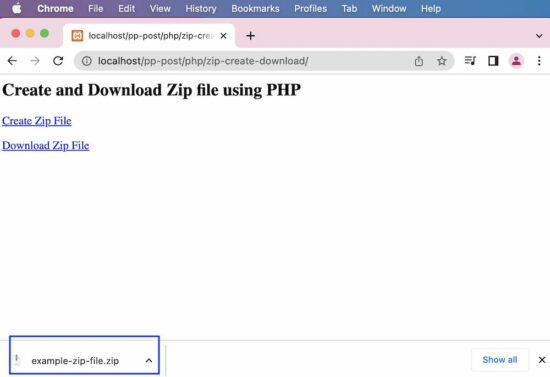
In the last step, the zip file is created using the PHP ZipArchive class. That zip file can be downloaded by using the PHP code below.
It follows the below steps to download the zip file created.
Get the absolute path of the zip file.
Set the header parameters like,
Content length.
Content type.
Content encoding, and more.
download-zip-file.php
<?php

$filename = "example-zip-file.zip";

if (file_exists($filename)) { // adjust the below absolute file path according to the folder you have downloaded // the zip file // I have downloaded the zip file to the current folder $absoluteFilePath = __DIR__ . '/' . $filename; header('Pragma: public'); header('Expires: 0'); header('Cache-Control: must-revalidate, post-check=0, pre-check=0'); header('Cache-Control: private', false); // content-type has to be defined according to the file extension (filetype) header('Content-Type: application/zip'); header('Content-Disposition: attachment; filename="' . basename($filename) . '";'); header('Content-Transfer-Encoding: binary'); header('Content-Length: ' . filesize($absoluteFilePath)); readfile($absoluteFilePath); exit();

}

?>
<div class='container'> <h2>Create and Download Zip file using PHP</h2> <p> <a href="create-zip-file.php">Create Zip File</a> </p> <p> <a href="download-zip-file.php">Download Zip File</a> </p>

</div>
Tales Of Symphonia Remastered Coming To Nintendo Switch In 2023
Announced during the Nintendo Direct, Tales of Symphonia Remastered will launch on Nintendo Switch in early 2023. Originally released on the Nintendo GameCube, the game follows Llyod and Colette, as they journey to save the world from darkness.
They will meet a number of allies along their journey, like the wondering aristocrat Zelos and Presea, a lumberjack who lost her emotions. Together they will make sure that Colette, the current chosen one, can climb the Tower of Salvation and defeat the evil Desians. Tales of Symphonia Remastered will feature up to four player co-op for its real-time combat, letting you and your friends cast magic and defeat enemies together.
From the creators of theHunter: Call of the Wild comes a genre-defying fishing experience! Explore a vast and atmospheric open world in search of the perfect fishing spot. Ride the open waters alone or with friends and embark on your journey to become a master angler.
Challenge: Given a Python list of strings and a query string. Find the strings that partially match the query string.
Example 1:
Input: ['hello', 'world', 'python'] and 'pyth'
Output: ['python']
Example 2:
Input: ['aaa', 'aa', 'a'] and 'a'
Output: ['aaa', 'aa', 'a']
Example 3:
Input: ['aaa', 'aa', 'a'] and 'b'
Output: []
Let’s dive into several methods that solve this and similar type of problems. We start with the most straightforward solution.
Method 1: Membership + List Comprehension
The most Pythonic way to find a list of partial matches of a given string query in a string list lst is to use the membership operator in and the list comprehension statement like so: [s for s in lst if query in s].
Here’s a simple example:
def partial(lst, query): return [s for s in lst if query in s] # Example 1:

print(partial(['hello', 'world', 'python'], 'pyth'))

# ['python'] # Example 2:

print(partial(['aaa', 'aa', 'a'], 'a'))

# ['aaa', 'aa', 'a'] # Example 3:

print(partial(['aaa', 'aa', 'a'], 'b'))

# []
In case you need some background information, feel free to check out our two tutorials and the referenced videos.
To find a list of partial query matches given a string list lst, combine the membership operator with the filter() function in which you pass a lambda function that evaluates the membership operation for each element in the list like so: list(filter(lambda x: query in x, lst)).
Here’s an example:
def partial(lst, query): return list(filter(lambda x: query in x, lst)) # Example 1:

print(partial(['hello', 'world', 'python'], 'pyth'))

# ['python'] # Example 2:

print(partial(['aaa', 'aa', 'a'], 'a'))

# ['aaa', 'aa', 'a'] # Example 3:

print(partial(['aaa', 'aa', 'a'], 'b'))

# []
Generally, I like list comprehension more than the filter() function because the former is more concise (e.g., no need to convert the result to a list) and slightly faster. But both work perfectly fine!
Method 3: Regex Match + List Comprehension
The most flexible way to find a list of partial query matches given a string list lst is provided by Python’s powerful regular expressions functionality. For example, the expression [x for x in lst if re.match(pattern, x)] finds all strings that match a certain query pattern as defined by you.
The following examples showcase this solution:
import re def partial(lst, query): pattern = '.*' + query + '.*' return [x for x in lst if re.match(pattern, x)] # Example 1:

print(partial(['hello', 'world', 'python'], 'pyth'))

# ['python'] # Example 2:

print(partial(['aaa', 'aa', 'a'], 'a'))

# ['aaa', 'aa', 'a'] # Example 3:

print(partial(['aaa', 'aa', 'a'], 'b'))

# []
In this example, we use the dummy pattern .*query.* that simply matches words that contain the query string. However, you could also do more advanced pattern matching—regex to the rescue!
Again, I’d recommend you check out the background info on regular expressions:
Conspiracy Corner Bundle | 6 Steam Games | 94% OFF
[www.indiegala.com] Are we living in a simulation...or are we simulating life...via videogames? Investigate, explore, deduce and uncover conspiracies with the following indie games: Who Stole My Beard?, Just Take Your Left, The Corridor: On Behalf Of The Dead, Fhtagn! - Tales of the Creeping Madness, Abetot Family Estate, NMNE.
Ubisoft Reveals New Details On Its Assassin's Creed Netflix Series
Ubisoft and Netflix are working together on an Assassin's Creed live-action TV series, as was confirmed back in 2020. More details on the project emerged at Ubisoft Forward today, with Marc-Alexis Cote of Ubisoft Quebec confirming the show is "still early in development."
Ubisoft Film and Television is producing the show alongside Netflix and showrunner Jeb Stuart. Stuart wrote the iconic action movies Die Hard and The Fugitive, and more recently wrote Netflix TV show Vikings: Valhalla.
"It's gonna be an epic, genre-bending live-action adaptation of our video game series," Cote said. Along with the show, Ubisoft is also releasing an Assassin's Creed mobile game with Netflix Games.
Scathe is an intense, classic FPS with big guns and even bigger demons. You are Scathe, Enforcer of the Legions of Hell, forged from the earth by the Divine Creator himself. And you, like your fallen kin before you, must prove your worth by navigating a deviously crafted maze, entangled with demonic evil at every twist and turn. So, grab your Hell Hammer and get ready to unleash your almighty fury!
Use Scathe's brute strength and extreme speed to purge your way through Hell's most grotesque abominations, as you search for the Hellstones and defeat the all-powerful Guardians that protect them.




 Question: How would we write code to apply a function to a
 Note: The

 Finxter Challenge!

 Recommended Tutorial: