Posted by: xSicKxBot - 09-11-2022, 08:12 AM - Forum: Python
- No Replies
Python TypeError ‘set’ object is not subscriptable
5/5 – (1 vote)
Minimal Error Example
Given the following minimal example where you create a set and attempt to access an element of this set using indexing or slicing:
my_set = {1, 2, 3}

my_set[0]
If you run this code snippet, Python raises the TypeError: 'set' object is not subscriptable:
Traceback (most recent call last): File "C:\Users\xcent\Desktop\code.py", line 2, in <module> my_set[0]

TypeError: 'set' object is not subscriptable
Why Does the Error Occur?
The Python TypeError: 'set' object is not subscriptable occurs if you try to access an element of a set using indexing or slicing that imply an ordering of the set.
However, sets are unordered collections of unique elements: they have no ordering of elements. Thus, you cannot use slicing or indexing, operations that are only possible on an ordered type.
How to fix the TypeError: 'set' object is not subscriptable?
To fix the TypeError: 'set' object is not subscriptable, either convert the unordered set to an ordered list or tuple before accessing it or get rid of the indexing or slicing call altogether.
Here’s an example where you convert the unordered set to an ordered list first. Only then you use indexing or slicing so the error doesn’t occur anymore:
Posted by: xSicKxBot - 09-11-2022, 08:12 AM - Forum: Lounge
- No Replies
Best NBA 2K23 PFs: Top Power Forwards By Rating
NBA 2K23 is finally here, which means it's time to discuss the league's best power forwards. Barkley or Malone? Duncan or Webber? Dirk or Gasol? This year's list of NBA strong forwards has a lot more talent than you think and with Paolo Banchero being the Rookie Of The Year favorite, we wanted to find out the answers for ourselves. 2K23 ratings are in the wild and if you're curious about who's on the rise, here's everything you need to know about the 10 Best power forwards in NBA 2K23.
Teenage Mutant Ninja Turtles: The Cowabunga Collection
Teenage Mutant Ninja Turtles: The Cowabunga Collection assembles thirteen classic TMNT games by KONAMI in one incredible package. This collection provides a unique opportunity for gamers to experience these immensely popular and very influential games on modern consoles and includes a fantastic set of new quality of life features:
* Added Online Play for certain games and Local Couch Play
* Save Anytime and Rewind
* Eleven Japanese Regional Versions
* Button Mapping
* Unique Development Art & Sketches
* Historic TMNT Media Content
The games are based on the characters and themes based on the 80's children's cartoon and comic book series, The Teenage Mutant Ninja Turtles. The game often takes place in a fictionalized New York City, in the sewers, inside futuristic enemy bases and even across time itself!
Overview:
One of the biggest perks for playing on Bedrock or a Java server with Geyser is the potential for cross-play. Bedrock players can join any server running GeyserMC or Bedrock Edition from any console. Most people know this already from playing on PC and PocketEdition, but the process for joining from a Switch or an Xbox requires a few extra steps. Here is a complete breakdown of how to join a Bedrock server from Xbox and Switch so you can join your friends online.
How to add a Minecraft Server on Xbox:
Joining on Xbox Requires you to change your connection settings. Doing this will give you a new menu from the server page in your game to add a new server. These settings should not affect online play for other games, but you can reset them at any time should you choose to do so.
Open your Xbox settings and select the Network Settings option.
Go to Advanced Settings and choose the DNS Settings option.
Select Manual and you will be taken to a screen to manually enter your DNS settings
For the Primary IPv4 DNS enter:
Code:
104.238.130.180
For the Secondary enter either:
Code:
8.8.8.8
or
Code:
1.1.1.1
Save the changes and the console will perform a connection test
How to add a Minecraft Server on Nintendo Switch:
The process for joining from Switch is almost identical to setting up on Xbox. You can use the same basic settings used in the Xbox setup. You will also receive the exact same menu to join new servers in the game. These settings should not affect online play for other games, but you can reset them at any time should you choose to do so.
Go to your System Settings and scroll down to the Internet option
Click on the Internet Settings option, choose your current network, and click on Change Settings
Scroll down to the DNS Settings and change it to Manual
For the Primary DNS enter:
Code:
104.238.130.180
For the Secondary enter either:
Code:
8.8.8.8
or
Code:
1.1.1.1
Save the changes and you are ready to go.
Joining the game:
Once you get your connection settings saved you can go ahead and open the game. From there the process to join a server is the same regardless of the console you are using.
Click on Play and go to the Servers tab
Click on any of the pre-added servers on the list
A new menu will appear when you try to join the server
Choose the Connect to a Server option at the top of the screen
Enter the Address and Port of the server you want to join
Choose the “add to server list” option to add it to your list, then click Submit
Common Issues: Unable to connect to world:
This is an unfortunately common issue for Bedrock servers. There are not many sure-fire ways to resolve this issue, but here are our recommendations:
Restart your console
Restart your server
Make sure both your game/console and the server are fully updated
If you are using a Java server with Geyser, make sure you have the latest version of the plugin installed and configured correctly. Also make sure you have Floodgate and ViaVersion installed on the server as well.
Change your secondary DNS from
Code:
8.8.8.8
to
Code:
1.1.1.1
or vice versa
The add server menu doesn’t appear:
Change your secondary DNS from 8.8.8.8 to 1.1.1.1 or vice versa. In most cases, switching will allow the menu to pop up as normal. Wow this server is popular:
This error usually means that the server has too many people on it, or too many connection attempts have been made at once. If you believe that you are getting this in error though, the quickest and easiest way to fix it is to either wait a few minutes, or to just restart the server. The problem will go away once the server comes back up or is no longer getting so many connection attempts at once.
You should also consider raising the player cap of your server from the control panel if you have it set to a low number like 2 or 3.
You are not invited to this server:
That means that the whitelist on the server is active. You will need to contact the server’s owner to get added to the whitelist, or disable it altogether. We have a guide available that goes over how whitelisting works and how it can be enabled/disabled.
Please note that if you are using a Java server with Geyser you will need to put a * before a player’s name when adding them to the whitelist. Ex:
Here’s the code that applies these four steps, assuming the image is stored in a file named 'c++.jpg':
from PIL import Image

import numpy as np # 1. Read image

img = Image.open('c++.jpg') # 2. Convert image to NumPy array

arr = np.asarray(img)

print(arr.shape)

# (771, 771, 3) # 3. Convert 3D array to 2D list of lists

lst = []

for row in arr: tmp = [] for col in row: tmp.append(str(col)) lst.append(tmp) # 4. Save list of lists to CSV

with open('my_file.csv', 'w') as f: for row in lst: f.write(','.join(row) + '\n')
Note that the resulting CSV file looks like this with super long rows.
Each CSV cell (column) value is a representation of the RGB value at that specific pixel. For example, [255 255 255] represents the color white at that pixel.
For more information and some background on file I/O, check out our detailed tutorial on converting a list of lists to a CSV:
This example script in JavaScript is to copy text to the system clipboard. I am presenting three different methods in this tutorial.
Via ClipBoard API.
Using document.executeCommand (not recommended).
By user consent.
This JS quick example uses the first and the best method to copy content of a textarea to the clipboard.
Quick example
var contentToCopy = document.getElementById(text_to_copy).value;

navigator.clipboard.writeText(contentToCopy).then(function() { console.log('Copied to clipboard with async.');

}, function(err) { console.error('Unable to copy with async ', err);

});
HTML textarea element from where the content is copied by the JS script.
<textarea id="text_to_copy">Text to copy</textarea>
1) Using The Clipboard API
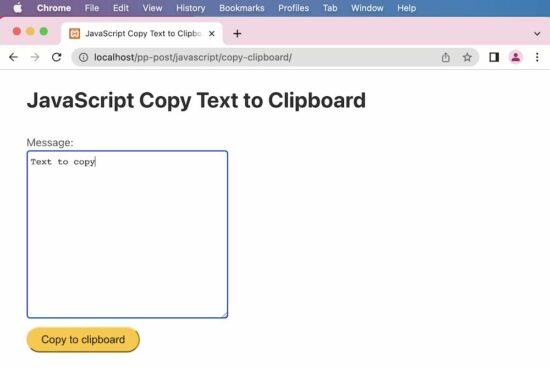
Below HTML script gives an interface with a textarea and a button to trigger the copy action.
On clicking the button to call the JavaScript copyToClipBoard() function. This function moves the textarea content to the clipboard.
This JS script writes the text to the clipboard by calling clipboard.writeText(). It enhances the quick example by providing an interface to copy content via ClipBoard API.
copy-clipboard-async.js
/** * to copy to the clipboard using the Clipboard API * * @param element * @returns */

function copyToClipboard(element) { var contentToCopy = document.getElementById(element).value; navigator.clipboard.writeText(contentToCopy).then(function() { console.log('Copied to clipboard with async.'); }, function(err) { console.error('Unable to copy with async ', err); });

}
2) document.execCommand
This method was widely used to copy content by calling the executeCommand(“copy”). It is deprecated but still supported by many browsers.
It dynamically appends the textarea element to the HTML body and selects its content using JavaScript. Then the executeCommand() function call triggers the copy action.
copy-clipboard-execcommand.js
/** * to copy to the clipboard using the document.execCommand * * @param element * @returns */

function copyToClipboard(element) { var contentToCopy = document.getElementById(element).value; var temp = $("<textarea>"); $("body").append($temp); temp.val(contentToCopy); temp.select(); document.execCommand("copy"); temp.remove(); console.log('Copied!');

}
3) Copy by user
This is the safest method of copying the content to the clipboard. This does not use any native function of the JavaScript and can be described more of a process. It prompts the user to confirm copying the selected content to the clipboard.
copy-by-user-consent.html
<html>
<head>
<title>JavaScript Copy Text to Clipboard</title>
</head>
<body> <!-- In this style, we present the control to the end user to copy. --> <!-- Text to be copied is shown to the user and he uses the built-in browser's feature and copies to the clipboard. --> <!-- If this is possible to use in your use case, then this is the safest method. --> <button id="copy-btn" onclick="copyToClipboard(document.getElementById('copy-btn').innerHTML)">Text to copy.</button> <script> function copyToClipboard(text) { window.prompt("Press Ctrl+C to copy to clipboard.", text); } </script>
</body>
</html>
Supernatural Tales Bundle, Truck Sim, new sales & more
Supernatural Tales Bundle | 8 e-books | 93% OFF
[www.indiegala.com] Summer season is nearly over...but it is never too early for Halloween Fall season! Get your supernatural senses ready, for a collection of books that defies the law of nature: Madison Dark, Fractures, Bayou Arcana, Ritual 2: The Resurrection & the Alpha Gods series with Betrayal, Emergence, Omnibus & Revelation.
Star Wars Andor Spin-Off Gets Nine-Minute Extended Look
Disney's annual Disney+ Day has arrived with a lot for Star Wars fans to enjoy, especially a special look at Andor that's nine minutes long. It's the longest preview we've had at the series so far, and you can watch it now over at Disney+, and gives new details about the story.
We now know that the timeline for Andor takes place five years before the events of Rogue One and confirms what we figured out is that it also acts as an origin story for Cassian Andor from a child of war to an eventual member of the Rebel Alliance.
"Andor is how a revolutionary is born," said star Diego Luna in the Disney+ featurette. "And the beauty of this show is that it commits to a perspective and a point of view. You can tell that there is that integrity behind this character."



 Recommended Tutorial:


![[Image: Discord_aFjEAuVwo5.jpg]](https://cdn.apexminecrafthosting.com/img/uploads/2021/10/05211559/Discord_aFjEAuVwo5.jpg)
![[Image: Discord_ZsEos8p6Wf.jpg]](https://cdn.apexminecrafthosting.com/img/uploads/2021/10/05211556/Discord_ZsEos8p6Wf.jpg)
![[Image: image_2021-10-05_161444.jpg]](https://cdn.apexminecrafthosting.com/img/uploads/2021/10/05211558/image_2021-10-05_161444.jpg)
![[Image: bedrock-server-list.png]](https://cdn.apexminecrafthosting.com/img/uploads/2021/09/07180631/bedrock-server-list.png)
![[Image: add-bedrock-server-1.png]](https://cdn.apexminecrafthosting.com/img/uploads/2021/09/07180627/add-bedrock-server-1.png)
![[Image: add-bedrock-server-2.png]](https://cdn.apexminecrafthosting.com/img/uploads/2021/09/07180629/add-bedrock-server-2.png)