Posted by: xSicKxBot - 07-27-2022, 10:25 AM - Forum: Python
- No Replies
Top 8 Profitable Python Packages to Learn in 2023
5/5 – (1 vote)
Are you interested in Python but you don’t know which Python library is most attractive from a career point of view?
Well, you should focus on the library you’re most excited about.
But if you’re generally open because you have multiple passions, it would be reasonable to also consider annual and hourly income.
These are the most profitable Python libraries, frameworks, modules, or packages:
Python Library (Dev)
Annual Income (USD)
Hourly Income (USD)
Python Developer
$82,000
$55
Keras Developer
$95,000
$63
Django Developer
$117,000
$78
Flask Developer
$103,000
$69
NumPy Developer
$105,000
$70
Pandas Developer
$87,000
$58
TensorFlow Developer
$148,000
$99
PyTorch Developer
$109,000
$73
Table: Annual and Hourly Income of a developer focusing on different Python libraries/frameworks/packages/modules.
What is the most profitable Python library?
The most profitable Python library is TensorFlow. TensorFlow developers make $148,000 per year on average (US) which roughly translates to $99 per hour assuming an annual workload of 1500 hours.
Let’s dive into each Python library from the table, one by one.
#0 – General Python Developer
A Python developer is a programmer who creates software in the Python programming language. Python developers are often involved in data science, web development, and machine learning applications.
A Python developer earns $65,000 (entry-level), $82,000 (mid-level), or $114,000 (experienced) per year in the US according to Indeed. (source)
Do you want to become a Python Developer? Here’s a step-by-step learning path I’d propose to get started with Python:
“Keras is an API designed for human beings, not machines. Keras follows best practices for reducing cognitive load: it offers consistent & simple APIs, it minimizes the number of user actions required for common use cases, and it provides clear & actionable error messages. It also has extensive documentation and developer guides.”
A Keras Developer developer creates, edits, analyzes, debugs, and supervises the development of software written in the Keras deep learning framework. Keras developers create machine learning apps using deep learning.
The average annual income of a Keras Developer in the United States is $95,000 per year, according to PayScale (source). Top earners make $156,000 and more in the US!
Do you want to become a Keras Developer? Here’s a step-by-step learning path I’d propose to get started with Keras:
What is Django? Let’s have a look at the definition from the official website (highlights by me):
“Django is a high-level Python web framework that encourages rapid development and clean, pragmatic design. Built by experienced developers, it takes care of much of the hassle of web development, so you can focus on writing your app without needing to reinvent the wheel. It’s free and open source.”
A Django Developer developer creates, edits, analyzes, debugs, and supervises the development of software written in the Python programming language using the Django web development framework. You need to have good Python, HTML, and CSS skills.
The average annual income of a Django Developer in the United States is between $101,000 (25th percentile) and $137,000 (75th percentile) with an average of $117,000 per year according to Ziprecruiter (source) and $90,000 per year according to PayScale (source). Top earners make $150,000 and more in the US!
Do you want to become a Django Developer? Here’s a step-by-step learning path I’d propose to get started with Django:
A Flask Developer developer creates, edits, analyzes, debugs, and supervises the development of software written in the Flask programming language. You should have a basic understanding of web technologies such as HTML, CSS, JavaScript, and of course Python.
Let’s have a look at the definition from the Flask wiki page (highlights by me):
“Flask is a micro web framework written in Python. It is classified as a microframework because it does not require particular tools or libraries.
It has no database abstraction layer, form validation, or any other components where pre-existing third-party libraries provide common functions.
However, Flask supports extensions that can add application features as if they were implemented in Flask itself. Extensions exist for object-relational mappers, form validation, upload handling, various open authentication technologies and several common framework related tools.”
The average annual income of a Flask Developer in the United States is between $79,000 (25th percentile) and $123,000 (75th percentile) with an average of $103,000 per year according to Ziprecruiter (source). Top earners make $151,000 and more in the US!
Do you want to become a Flask Developer? Here’s a step-by-step learning path I’d propose to get started with Flask:
“Nearly every scientist working in Python draws on the power of NumPy. NumPy brings the computational power of languages like C and Fortran to Python, a language much easier to learn and use. With this power comes simplicity: a solution in NumPy is often clear and elegant.”
The average annual income of a NumPy Developer in the United States is $105,000 per year according to PayScale (source). Top earners make $149,000 and more in the US!
Do you want to become a NumPy Developer? Here’s a step-by-step learning path I’d propose to get started with NumPy:
“pandas is a fast, powerful, flexible and easy to use open source data analysis and manipulation tool, built on top of the Python programming language.”
You may also want to check out our Pandas resources on the Finxter blog:
The average annual income of a Pandas Developer in the United States is $87,000 per year according to Ziprecruiter (source). Top earners make $125,000 and more in the US!
Do you want to become a Pandas Developer? Here’s a step-by-step learning path I’d propose to get started with Pandas:
A TensorFlow Developer creates, edits, analyzes, debugs, and supervises the development of code written with the TensorFlow library that is accessed mostly via the Python API. Because a TensorFlow developer is a deep learning engineer, they design and create machine learning models, train them, and improve them to reach high level of model accuracy and robustness.
TensorFlow is “An end-to-end open source machine learning platform. The core open source library to help you develop and train ML models. TensorFlow makes it easy for beginners and experts to create machine learning models for desktop, mobile, web, and cloud. See the sections below to get started.”
The average annual income of a TensorFlow Developer in the United States is between $104,000 (25th percentile) and $187,000 (75th percentile) with an average of $148,000 per year according to Ziprecruiter (source). Top earners make $197,000 and more in the US!
Do you want to become a TensorFlow Developer? Here’s a step-by-step learning path I’d propose to get started with TensorFlow:
A PyTorch Developer writes code using in Python’s PyTorch library to analyze data, create machine learning models, or runs deep learning algorithms on various hardware devices such as GPUs.
“An open source machine learning framework that accelerates the path from research prototyping to production deployment. More specifically, PyTorch is an optimized tensor library for deep learning using GPUs and CPUs.”
The average annual income of a PyTorch Developer in the United States is $109,000 per year according to PayScale (source). Top earners make $131,000 and more in the US!
Do you want to become a PyTorch Developer? Here’s a step-by-step learning path I’d propose to get started with PyTorch:
Will the last mother fox on Earth be able to save its three little cubs? Experience how life would be in a world ravaged by mankind through the eyes of the last fox on Earth in this eco-conscious adventure. Discover the destructive eect of the human race, which corrupts day after day the most precious and needed resources of the natural environments. Explore Endling's 3D side-scrolling world and defend your cubs, three tiny and defenseless fur balls, feed them, see how they grow up level after level, notice their unique personalities and fears, and most importantly, make them survive. Use the cover of night to sneak with your litter towards a safer place. Spend the day resting in an improvised shelter and plan for your next movement carefully since it could be the last one for you or your cubs.
Posted by: xSicKxBot - 07-27-2022, 10:25 AM - Forum: Lounge
- No Replies
GTA Online Update: How To Start Operation Paper Trail Mission
One of the biggest content drops of the year just arrived in GTA Online. The Criminal Enterprises update was released on July 26 and it delivers a plethora of content to the online world of Los Santos.
Among the content that arrived with The Criminal Enterprises update is a new IAA mission for players to undertake. Called "Operation Paper Trail," this mission allows players to go undercover to figure out why the oil prices have skyrocketed in Los Santos. Players can expect espionage, criminal conspiracies, and high-speed action every step of the way in this operation. However, there's been some confusion as to how actually start Operation Paper Trail in GTA Online. Below, we lay out all of the details you need to know about the new IAA mission.
Starting Operation Paper Trail
As with most IAA missions in GTA Online, Operation Paper Trail begins with Agent ULP. This agent is the player's liaison for the IAA in Los Santos. This time around, Agent ULP has caught wind of a conspiracy behind the rising oil prices in Los Santos. The agent believes that the Duggan family and the FIB are in cahoots to drive up the price of oil. For what reason is unclear, but that's where you come into play. Agent ULP needs your help to get to the bottom of the conspiracy.
Question: How to convert the string to a CSV file in Python?
The desired output is the CSV file:
'my_file.csv':
a,b,c
1,2,3
9,8,7
Simple Vanilla Python Solution
To convert a multi-line string with comma-separated values to a CSV file in Python, simply write the string in a file (e.g., with the name 'my_file.csv') without further modification.
This works if the string is already in the correct CSV format with values separated by commas.
The following code uses the open() function and the file.write() functions to write the multi-line string to a file without modification.
my_string = '''a,b,c

1,2,3

9,8,7''' with open('my_file.csv', 'w') as out: out.write(my_string)
The result is a file 'my_file.csv' with the following contents:
a,b,c
1,2,3
9,8,7
Parsing and Modifying Text to CSV
The string may not be in the correct CSV format.
For example, you may want to convert any of the following strings to a CSV file—their format is not yet ready for writing it directly in a comma-separated file (CSV):
Example 1: 'abc;123;987'
Example 2: 'abc 123 987'
Example 3: 'a=b=c 1=2=3 9=8=7'
…
To parse such a string and modify it before writing it in a file 'my_file.csv', you can use the string.replace() and string.split() methods to make sure that each value is separated by a comma and each row has its own line.
Let’s go over each of those examples to see how to parse the string effectively to bring it into the CSV format:
Example 1
# Example 1:
my_string = 'abc;123;987' with open('my_file.csv', 'w') as out: lines = [','.join(line) for line in my_string.split(';')] my_string = '\n'.join(lines) out.write(my_string)
I’ve higlighted the two code lines that convert the string to the CSV format.
The first highlighted line uses list comprehension to create a list of three lines, each interleaved with a comma.
The second highlighted line uses the string.join() function to bring those together to a CSV format that can be written into the output file.
The output file 'my_file.csv' contains the same CSV formatted text:
a,b,c
1,2,3
9,8,7
Example 2
The following example is the same as the previous code snippet, only that the empty spaces ' ' in the input string should be converted to new lines to obtain the final CSV:
# Example 2:
my_string = 'abc 123 987' with open('my_file.csv', 'w') as out: lines = [','.join(line) for line in my_string.split(' ')] my_string = '\n'.join(lines) out.write(my_string)
The output file 'my_file.csv' contains the same CSV formatted text:
a,b,c
1,2,3
9,8,7
Example 3
If the comma-separated values are not yet comma-separated (e.g., they may be semicolon-separated 'a;b;c'), you can use the string.replace() method to replace the symbols accordingly.
This is shown in the following example:
# Example 3:

my_string = 'a=b=c 1=2=3 9=8=7' with open('my_file.csv', 'w') as out: my_string = my_string.replace('=', ',').replace(' ', '\n') out.write(my_string)
Thanks for reading this article! I appreciate the time you took to learn Python with me.
If you’re interested in writing more concise code, feel free to check out my one-liner book here:
Python One-Liners Book: Master the Single Line First!
Python programmers will improve their computer science skills with these useful one-liners.
Python One-Linerswill teach you how to read and write “one-liners”: concise statements of useful functionality packed into a single line of code. You’ll learn how to systematically unpack and understand any line of Python code, and write eloquent, powerfully compressed Python like an expert.
The book’s five chapters cover (1) tips and tricks, (2) regular expressions, (3) machine learning, (4) core data science topics, and (5) useful algorithms.
Detailed explanations of one-liners introduce key computer science concepts and boost your coding and analytical skills. You’ll learn about advanced Python features such as list comprehension, slicing, lambda functions, regular expressions, map and reduce functions, and slice assignments.
You’ll also learn how to:
Leverage data structures to solve real-world problems, like using Boolean indexing to find cities with above-average pollution
Use NumPy basics such as array, shape, axis, type, broadcasting, advanced indexing, slicing, sorting, searching, aggregating, and statistics
Calculate basic statistics of multidimensional data arrays and the K-Means algorithms for unsupervised learning
Create more advanced regular expressions using grouping and named groups, negative lookaheads, escaped characters, whitespaces, character sets (and negative characters sets), and greedy/nongreedy operators
Understand a wide range of computer science topics, including anagrams, palindromes, supersets, permutations, factorials, prime numbers, Fibonacci numbers, obfuscation, searching, and algorithmic sorting
By the end of the book, you’ll know how to write Python at its most refined, and create concise, beautiful pieces of “Python art” in merely a single line.
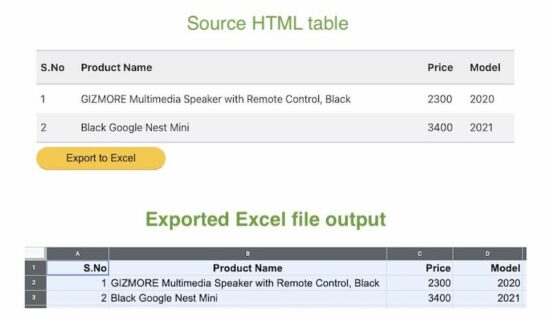
Converting a HTML table to an excel file is a standard requirement of reporting websites. It will be simple and easier if the conversion is taking place on the client side.
There are many client-side and server-side plugins to perform the excel export. For example, PHPSpreadSheet allows writing data into excel and exporting.
This article will give different options and approaches to achieving the HTML table to excel conversion with JavaScript.
This simple example includes a few lines of JavaScript that build the template for excel export.
It uses the following steps to convert the exported excel report of tabular data.
Defines HTML template structure with required meta.
Include the table’s inner HTML into the template.
Marks the location by specifying the protocol to download the file via browser.
The below HTML table code displays a product listing and it is static. Refer jsPDF AutoTables examples to render a dynamic table by loading row by row.
The button below this table triggers the export to excel process on the click event. The exportToExcel() function handles the event and proceeds the client-side export.
This example uses the same HTML table source for the export operation. The difference is that the source table content marks some of the rows with no-export class.
This class is configured in the above script with exclude property of this plugin class.
Conclusion:
So, we have seen three simple implementations of adding HTML table to excel feature. Though the export feature is vital, we must have a component that provides a seamless outcome.
I hope, the above solution can be a good base for creating such components. It is adaptable for sure to dock more features to have an efficient excel report generation tool.
[www.indiegala.com] Colorful & enticing, smooth and yet prickly, the latest eroge bundle brings a bouquet of attractive adult 18+ games: Metempsychosis, Secret Kiss is Sweet and Tender, Magical Girl Noble Rose, Maken-shi Sara, Grayscale Memories, Meria and The Island of Orcs & Hero Zex.
Stray has only been out for a few days, and already PC modders are experimenting with the game by adding their own feline companions to it. And then there's a mod that replaces the lost ginger wanderer with a version of CJ from Grand Theft Auto: San Andreas that's pure nightmare fuel. That's one way to reskin a cat.
His body contorted and forced to trot around on all fours, CJ's inclusion by Sirgalahad172 is intended to be a joke, but in this and any other reality, it's a haunting reminder that no game is safe from the specter of CJ. "This mod is intended as a joke as CJ needs to be modded into any game that exists," Sirgalahad172 wrote in the cursed texts of the mod page.
Every Family has Secrets. Every Secret has a Price. As Dusk Falls is an original interactive drama from INTERIOR/NIGHT that explores the entangled lives of two families across thirty years. Starting in 1998 with a robbery-gone-wrong in small town Arizona, the choices you make have a powerful impact on the characters’ lives in this uncompromising story of betrayal, sacrifice and resilience. Drive the lives and relationships of multiple characters in a decades-spanning story told across two intense books.
Posted by: xSicKxBot - 07-25-2022, 09:17 AM - Forum: Python
- No Replies
The Ultimate Guide on Converting a CSV in Python
4/5 – (1 vote)
Abstract: In this article, we’ll quickly overview the best method, respectively, to convert a CSV file to JSON, Excel, dictionary, Parquet, list, list of lists, list of tuples, text file, DataFrame, XML, NumPy array, and list of dictionaries.
In this article, you’ve learned the best ways to perform the following conversions (click to read more):
You can convert a CSV file to a JSON file by using the following five steps:
Import the csv and json libraries
Open the CSV as a file object in reading mode using the open(path_to_csv, 'r') function in a context manager (=with environment).
Load the CSV content into Python using the csv.DictReader(fobj) and pass the file object just created.
Iterate over each row and update a newly-created dictionarymy_json using one of the column values as key: my_json[key] = row
Store the my_json dictionary data in a JSON file using the json.dumps(my_json) function.
import csv

import json csv_file = 'my_file.csv'

json_file = 'my_file.json' my_json = {}

with open(csv_file, 'r') as fobj: reader = csv.DictReader(fobj) for row in reader: # Use one of the CSV column names as a key key = row['Name'] my_json[key] = row with open(json_file,'w') as fobj: fobj.write(json.dumps(my_json, indent=2))
There are many more details to it, so if this didn’t answer your question yet, go here:
Learn More: Feel free to learn more about this conversion goal in our full guide on the Finxter blog with multiple CSV conversion methods and step-by-step explanations.
How to Convert CSV to Excel (XLSX) in Python?
The most pythonic way to convert a .csv to an .xlsx (Excel) in Python is to use the Pandas library.
Store the DataFrame in an Excel file by calling df.to_excel('my_file.xlsx', index=None, header=True)
import pandas as pd df = pd.read_csv('my_file.csv')

df.to_excel('my_file.xlsx', index=None, header=True)
Note that there are many ways to customize the to_excel() function in case
you don’t need a header line,
you want to fix the first line in the Excel file,
you want to format the cells as numbers instead of strings, or
you have an index column in the original CSV and want to consider it in the Excel file too.
Learn More: Feel free to learn more about this conversion goal in our full guide on the Finxter blog with multiple CSV conversion methods and step-by-step explanations.
How to Convert a CSV to a Dictionary in Python?
The best way to convert a CSV file to a Python dictionary is to create a CSV file object f using open("my_file.csv") and pass it in the csv.DictReader(f) method. The return value is an iterable of dictionaries, one per row in the CSV file, that maps the column header from the first row to the specific row value.
import csv csv_filename = 'my_file.csv' with open(csv_filename) as f: reader = csv.DictReader(f) for row in reader: print(row)
Learn More: Feel free to learn more about this conversion goal in our full guide on the Finxter blog with multiple CSV conversion methods and step-by-step explanations.
How to Convert a CSV to a Parquet Format in Python?
Here’s a step-by-step approach to reading a CSV and converting its contents to a Parquet file using the Pandas library:
Step 1: Run pip install pandas if the module is not already installed in your environment.
Step 3: Run pip install fastparquet to install the fastparquet module
Step 4: import pandas using import pandas as pd
Step 5: Read the CSV file into a DataFrame using df = pd.read_csv('my_file.csv').
Step 6: Write the Parquet file using df.to_parquet('my_file.parquet')
The code snippet to convert a CSV file to a Parquet file is quite simple (steps 4-6):
import pandas as pd

df = pd.read_csv('my_file.csv')

df.to_parquet('my_file.parquet')
Learn More: Feel free to learn more about this conversion goal in our full guide on the Finxter blog with multiple CSV conversion methods and step-by-step explanations.
How to Convert a CSV to a List in Python?
Here’s the code to convert that CSV file to a list of dictionaries, one dictionary per row by using the csv.DictReader(file) function:
import csv csv_filename = 'my_file.csv' with open(csv_filename) as f: reader = csv.DictReader(f) lst = list(*reader)
Learn More: Feel free to learn more about this conversion goal in our full guide on the Finxter blog with multiple CSV conversion methods and step-by-step explanations.
How to Convert a CSV to a List of Lists in Python?
To convert a CSV file 'my_file.csv' into a list of lists in Python, use the csv.reader(file_obj) method to create a CSV file reader. Then convert the resulting object to a list using the list() constructor.
import csv csv_filename = 'my_file.csv' with open(csv_filename) as f: reader = csv.reader(f) lst = list(reader)
Learn More: Feel free to learn more about this conversion goal in our full guide on the Finxter blog with multiple CSV conversion methods and step-by-step explanations.
How to Convert a CSV to a List of Tuples in Python?
To convert a CSV file 'my_file.csv' into a list of tuples in Python, use csv.reader(file_obj) to create a CSV file reader that holds an iterable of lists, one per row. Now, use the list(tuple(line) for line in reader) expression with a generator expression to convert each inner list to a tuple.
Here’s a simple example that converts our CSV file to a list of tuples using this approach:
import csv csv_filename = 'my_file.csv' with open(csv_filename) as f: reader = csv.reader(f) lst = list(tuple(line) for line in reader)
Learn More: Feel free to learn more about this conversion goal in our full guide on the Finxter blog with multiple CSV conversion methods and step-by-step explanations.
How to Convert a CSV to a Text File in Python?
If you want to keep the content (including the delimiter ',') in the CSV file unmodified, the conversion is simple: read the .csv file and write its content into a new .txt file using the open(), read(), and write() functions without importing any library.
In other words, perform the three steps to write a CSV to a TXT file unmodified:
Open the CSV file in reading mode and the TXT file in writing mode.
Read the CSV file and store it in a variable.
Write the content into the TXT file.
Here’s the code snippet that solves our basic challenge:
# 1. Open the CSV file in reading mode and the TXT file in writing mode

with open('my_file.csv', 'r') as f_in, open('my_file.txt', 'w') as f_out: # 2. Read the CSV file and store in variable content = f_in.read() # 3. Write the content into the TXT file f_out.write(content)
Learn More: Feel free to learn more about this conversion goal in our full guide on the Finxter blog with multiple CSV conversion methods and step-by-step explanations.
How to Convert a CSV to a Pandas DataFrame in Python?
To import a given CSV file into a newly-created Pandas DataFrame, use the pd.read_csv('my_file.csv') function that returns a DataFrame created with the content in the CSV file 'my_file.csv'.
Here’s a quick and generic code snippet showcasing this approach:
import pandas as pd

df = pd.read_csv('my_file.csv')

print(df)
Output:
 Name Job Age Income

0 Alice Programmer 23 110000

1 Bob Executive 34 90000

2 Carl Sales 45 50000
Learn More: Feel free to learn more about this conversion goal in our full guide on the Finxter blog with multiple CSV conversion methods and step-by-step explanations.
How to Convert a CSV to an XML in Python?
You can convert a CSV to an XML using the following approach:
Read the whole CSV file into your Python script.
Store the first row as header data that is needed to name your custom XML tags (e.g., <Name>, <Job>, <Age>, and <Income> in our example).
Create a function convert_row() that converts each row separately to an XML representation of that row using basic string formatting.
Iterate over the data row-wise using csv.reader() and convert each CSV row to XML using your function convert_row().
Here’s the code:
# Convert CSV file to XML string

import csv filename = 'my_file.csv' def convert_row(headers, row): s = f'<row id="{row[0]}">\n' for header, item in zip(headers, row): s += f' <{header}>' + f'{item}' + f'</{header}>\n' return s + '</row>' with open(filename, 'r') as f: r = csv.reader(f) headers = next® xml = '<data>\n' for row in r: xml += convert_row(headers, row) + '\n' xml += '</data>' print(xml)
Learn More: Feel free to learn more about this conversion goal in our full guide on the Finxter blog with multiple CSV conversion methods and step-by-step explanations.
How to Convert a CSV to a NumPy Array in Python?
You can convert a CSV file to a NumPy array simply by calling np.loadtxt() with two arguments: the filename and the delimiter string. For example, the expression np.loadtxt('my_file.csv', delimiter=',') returns a NumPy array from the 'my_file.csv' with delimiter symbols ','.
Here’s an example:
import numpy as np array = np.loadtxt('my_file.csv', delimiter=',')

print(array)
Output:
[[9. 8. 7.] [6. 5. 4.] [3. 2. 1.]]
Learn More: Feel free to learn more about this conversion goal in our full guide on the Finxter blog with multiple CSV conversion methods and step-by-step explanations.
How to Convert a CSV to a List of Dictionaries?
Convert a CSV file to a list of Python dictionaries in three steps:
Create a CSV file object f using open("my_file.csv") and pass it in the csv.DictReader(f) method.
The return value is an iterable of dictionaries, one per row in the CSV file. Each dictionary maps the column header from the first row to the specific row value.
As the last step, convert the iterable of dictionaries to a list using the Python built-in list() function.
Here’s the code to convert that CSV file to a list of dictionaries, one dictionary per row by using the csv.DictReader(file) function:
import csv csv_filename = 'my_file.csv' with open(csv_filename) as f: reader = csv.DictReader(f) lst = list(*reader)
Learn More: Feel free to learn more about this conversion goal in our full guide on the Finxter blog with multiple CSV conversion methods and step-by-step explanations.
Summary
You can find a more detailed article on each topic in the following table:
Posted by: xSicKxBot - 07-25-2022, 09:17 AM - Forum: Lounge
- No Replies
Best Gaming Keyboards In 2022
Your gaming keyboard choice is one of the most important decisions you can make for your setup. If you thought choosing a mouse or headset was hard, then you're in for quite the task with gaming keyboards. Between key switches, mechanical vs membrane keyboards, and all the extra features that keyboards tend to come with--such as multimedia keys and RGB lighting--there is a lot to consider. That's why we've tested and narrowed down the field of only the best gaming keyboards you can buy in 2022. For details on the differences between various keyboard switches, scroll down below the list. Our list of the best gaming keyboards includes wireless and wired options as well as keyboards with different form factors and switches.
Looking to complete your gaming keyboard and mouse combo, or just want more gaming peripherals to shop for? Check out our picks for the best gaming headset and best gaming mouse. And if you are trying to find something new to play, we have a roundup of the best PC games to play in 2022. We also have a list of the best Steam Deck games, if you've managed to get your hands on Valve's new handheld.


 A Python developer earns $65,000 (entry-level), $82,000 (mid-level), or $114,000 (experienced) per year in the US according to Indeed. (
 Learn More: Read more about this specific Python library career path in


 Question: How to convert the string to a CSV file in Python?



 Abstract: In this article, we’ll quickly overview the best method, respectively, to convert a CSV file to JSON, Excel, dictionary, Parquet, list, list of lists, list of tuples, text file, DataFrame, XML, NumPy array, and list of dictionaries.