Create an account


Welcome, Guest
You have to register before you can post on our site.

Username
  

Password


Search Forums

(Advanced Search)

Forum Statistics
» Members: 20,145
» Latest member: Benbeckman81
» Forum threads: 22,063
» Forum posts: 22,934

Full Statistics

Online Users
There are currently 504 online users.
» 0 Member(s) | 499 Guest(s)
Applebot, Baidu, Bing, Google, Yandex

 
  [Tut] How to Increment a Dictionary Value
Posted by: xSicKxBot - 07-22-2022, 10:33 PM - Forum: Python - No Replies

How to Increment a Dictionary Value

5/5 – (1 vote)

Problem Formulation and Solution Overview


In this article, you’ll learn how to increment a dictionary value in Python.

To make it more fun, we have the following running scenario:

Trinity Bank keeps track of its latest mortgage rates in a Dictionary format. Recently there has been a steady increase in rates. How would Trinity Bank increment/increase the Dictionary value of a selected rate?


mtg_rates = {'30-Year-Fixed': 5.625,
'20-Year-Fixed': 5.250,
'10-Year-Variable': 5.125,
'7-Year-Variable': 5.011,
'5-Year-Variable': 4.625}

? Question: How would we write code to increment a Dictionary value in Python?

We can accomplish this task by one of the following options:


Method 1: Use Dictionary Key Name


This method passes an existing Dictionary Key Name to access and increment the appropriate Value.

mtg_rates['30-Year-Fixed'] += 1
print(mtg_rates['30-Year-Fixed'])

In this example, the 30-Year-Fixed mortgage rate is referenced by name (mtg_rates['30-Year-Fixed']) and its value is incremented by one (1).

Then, this updated value is saved back to mtg_rates['30-Year-Fixed'] and output to the terminal.


6.625


Method 2: Use Dictionary.get()


This method uses the Dictionary.get() method and passes a Dictionary Key as an argument to retrieve and increment the corresponding Value.

mtg_rates['20-Year-Fixed'] = mtg_rates.get('20-Year-Fixed') + 2
print(mtg_rates['20-Year-Fixed'])

In this example, the 20 Year Fixed mortgage rate is referenced and accessed using (mtg_rates.get('20-Year-Fixed')). This value is then incremented by two (2).

Then, this updated value is saved back to mtg_rates['20-Year-Fixed'] and output to the terminal.


7.25


Method 3: Use Dictionary.update()


This method uses Dictionary.update() to reference the appropriate Key and increment the Value.

new_rate = mtg_rates['10-Year-Variable'] + 3
mtg_rates.update({'10-Year-Variable': new_rate})
print(mtg_rates['10-Year-Variable'])

In this example, the current value of a 10 Year Variable mortgage rate is retrieved, incremented by three (3) and saved to new_rate.

Next, the appropriate Key for the key:value pair is accessed, and the Value is updated to reflect the contents of new_rate and output to the terminal.


8.125


Method 4: Use Unpacking


This method uses Unpacking to increment the Value of a key:value pair.

mtg_rates = {**mtg_rates, '7-Year-Variable': 9.011}
print(mtg_rates)

Above, accesses the 7 Year Variable mortgage rate, increments the rate to the amount indicated (9.011), and outputs it to the terminal.


9.011


Method 5: Use Dictionary Comprehension


This method increments all Mortgage Rates in one fell swoop using Dictionary Comprehension.

new_rates = dict(((key, round(value*1.10, 3)) for key, value in mtg_rates.items()))
print(new_rates)

Above, accesses each mortgage rate in the mtg_rates Dictionary and increments the rate by 1.10. Then, round() is called to round the results down to three (3) decimal places. The result saves to new_rates and output to the terminal.


{'30-Year-Fixed': 6.188, '20-Year-Fixed': 5.775, '10-Year-Variable': 5.638, '7-Year-Variable': 5.512, '5-Year-Variable': 5.088}


Summary


These methods of incrementing a Dictionary Value should give you enough information to select the best one for your coding requirements.

Good Luck & Happy Coding!


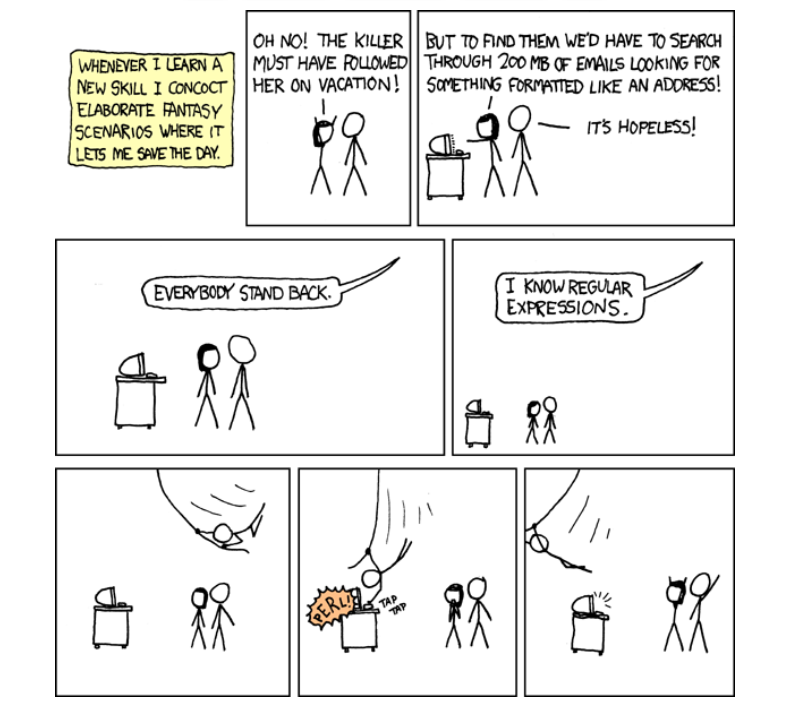
Regex Humor


Wait, forgot to escape a space. Wheeeeee[taptaptap]eeeeee. (source)


https://www.sickgaming.net/blog/2022/07/...ary-value/

Print this item

  (Indie Deal) FREE Larry 5, VR Hope Bundle, Mega Man Deal
Posted by: xSicKxBot - 07-22-2022, 10:32 PM - Forum: Deals or Specials - No Replies

FREE Larry 5, VR Hope Bundle, Mega Man Deal

Leisure Suit Larry 5 - Passionate Patti Does a Little Undercover Work
[freebies.indiegala.com]
Passionate Patti Does a Little Undercover Work! is (despite the number) the fourth game in Al Lowe's Leisure Suit Larry series.

VR Hope Bundle | 6 VR Steam Games | 93% OFF
[www.indiegala.com]
Where's hope, there's life...virtual life. Enter a whole new reality with a whole new VR bundle including: The Great C, HOPE VR: Progressive Meditation, Dark Threads, VR Walking Simulator, Legendary Hunter VR & Dodo Adventures.

Deal Ending Soon: The Quarry[www.indiegala.com]
https://www.youtube.com/watch?v=Zh2K7SxRHmo
Mega Man Deal & more Sales
[www.indiegala.com]

https://www.youtube.com/watch?v=JtJ_8Aj52co
Stay Inside, Stay Safe and Enjoy Good Games.
Check out IndieGala on Twitter, YouTube & Facebook[www.facebook.com]


https://steamcommunity.com/groups/indieg...0805054150

Print this item

  PC - Eyes in the Dark: The Curious Case of One Victoria Bloom
Posted by: xSicKxBot - 07-22-2022, 10:32 PM - Forum: New Game Releases - No Replies

Eyes in the Dark: The Curious Case of One Victoria Bloom


Fight with light against the dark in this "roguelight" platformer starring Victoria Bloom. Drive back the darkness that's overrun Bloom Manor and conquer swarms of creatures as you discover powerful new items to upgrade your arsenal. Are you ready to enter the ever-changing manor?

Publisher: Gearbox Publishing

Release Date: Jul 14, 2022


https://www.metacritic.com/game/pc/eyes-...oria-bloom

Print this item

  News - Call Of Duty: Warzone How To Complete The Cursed Ground Event
Posted by: xSicKxBot - 07-22-2022, 10:32 PM - Forum: Lounge - No Replies

Call Of Duty: Warzone How To Complete The Cursed Ground Event

Call of Duty Season 4 has added the new "Cursed Ground" public event to Warzone's Fortune's Keep map, and while it's very much optional, completing it will give you valuable rewards to use in your match. Here we break down everything you need to know about the Cursed Ground event.

What is the Cursed Ground event

Several "cursed chests" have been hidden around Fortune Keep's island. These special chests contain power-ups and high-quality items, but they can only be unlocked by completing the Cursed Ground zombie-killing event.

Finding and activating Cursed Chests

Cursed Chest on Fortune's Keep

The Cursed Chests on Fortune's Keep will spawn at one or more places each map. These locations are random, so you likely won't find a chest in the same spot for each match. The chest locations won't appear on the Tac Map right away, but they'll mark on the map as a white skull icon once you're in close proximity.

Continue Reading at GameSpot

https://www.gamespot.com/articles/call-o...01-10abi2f

Print this item

  [Tut] How to Check ‘future’ Package Version in Python?
Posted by: xSicKxBot - 07-21-2022, 08:40 PM - Forum: Python - No Replies

How to Check ‘future’ Package Version in Python?

5/5 – (2 votes)

In this article, I’ll show you:

? How to check the version of the Python module (package, library) future? And how to check if future is installed anyways?

These are the eight best ways to check the installed version of the Python module future:

  • Method 1: pip show future
  • Method 2: pip list
  • Method 3: pip list | findstr future
  • Method 4: library.__version__
  • Method 5: importlib.metadata.version
  • Method 6: conda list
  • Method 7: pip freeze
  • Method 8: pip freeze | grep future

Before we go into these ways to check your future version, let’s first quickly understand how versioning works in Python—you’ll be thankful to have spent a few seconds on this topic, believe me!

A Note on Python Version Numbering


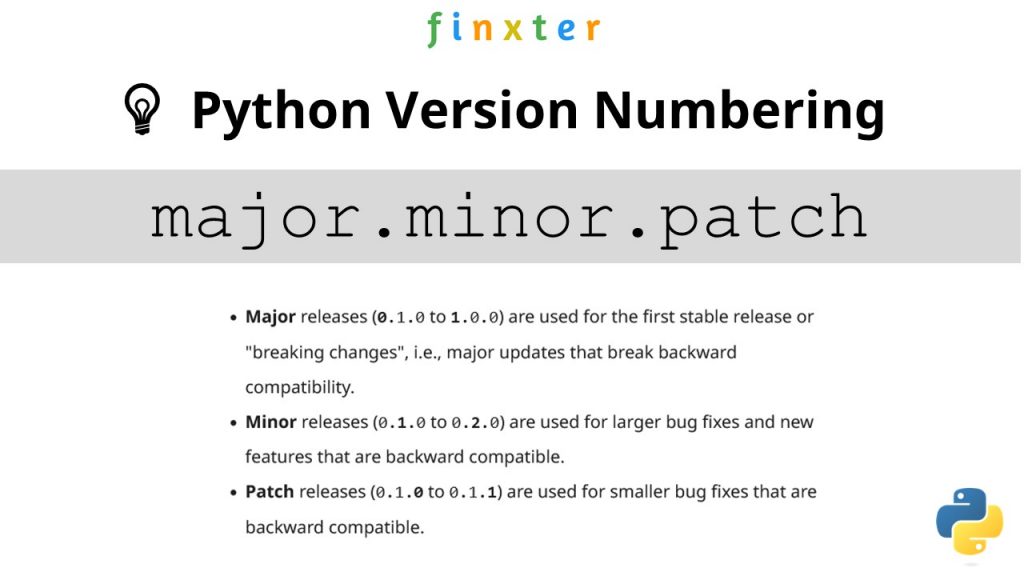
?Python versioning adds a unique identifier to different package versions using semantic versioning. Semantic versioning consists of three numerical units of versioning information in the format major.minor.patch.

Python Version Numbering

In this tutorial, we’ll use the shorthand general version abbreviation like so:

x.y.z

Practical examples would use numerical values for x, y, and z:

  • 1.2.3
  • 4.1.4
  • 1.0.0

This is shorthand for

major.minor.patch
  • Major releases (0.1.0 to 1.0.0) are used for the first stable release or “breaking changes”, i.e., major updates that break backward compatibility.
  • Minor releases (0.1.0 to 0.2.0) are used for larger bug fixes and new features that are backward compatible.
  • Patch releases (0.1.0 to 0.1.1) are used for smaller bug fixes that are backward compatible.

Let’s dive into the meat of this article:

? Question: How to check the (major, minor, patch) version of future in your current Python environment?

Method 1: pip show


To check which version of the Python library future is installed, run pip show future or pip3 show future in your CMD/Powershell (Windows), or terminal (macOS/Linux/Ubuntu).

This will work if your pip installation is version 1.3 or higher—which is likely to hold in your case because pip 1.3 was released a decade ago in 2013!!

Here’s an example in my Windows Powershell: I’ve highlighted the line that shows that my package version is a.b.c:

PS C:\Users\xcent> pip show future
Name: future
Version: a.b.c
Summary: ...
Home-page: ...
Author: ...
Author-email: ...
License: ...
Location: ...
Requires: ...
Required-by: ...

In some instances, this will not work—depending on your environment. In this case, try those commands before giving up:

python -m pip show future
python3 -m pip show future
py -m pip show future
pip3 show future

Next, we’ll dive into more ways to check your future version.


But before we move on, I’m excited to present you my new Python book Python One-Liners (Amazon Link).

If you like one-liners, you’ll LOVE the book. It’ll teach you everything there is to know about a single line of Python code. But it’s also an introduction to computer science, data science, machine learning, and algorithms. The universe in a single line of Python!


The book was released in 2020 with the world-class programming book publisher NoStarch Press (San Francisco).

Link: https://nostarch.com/pythononeliners

Method 2: pip list


To check the versions of all installed packages, use pip list and locate the version of future in the output list of package versions sorted alphabetically.

This will work if your pip installation is version 1.3 or higher.

Here’s a simplified example for Windows Powershell, I’ve highlighted the line that shows the package version is 1.2.3:

PS C:\Users\xcent> pip list
Package Version
--------------- ---------
aaa 1.2.3
...
future 1.2.3
...
zzz 1.2.3

In some instances, this will not work—depending on your environment. Then try those commands before giving up:

python -m pip list
python3 -m pip list
py -m pip list
pip3 list

Method 3: pip list + findstr on Windows


To check the versions of a single package on Windows, you can chain pip list with findstr future using the CMD or Powershell command: pip3 list | findstr future to locate the version of future in the output list of package versions automatically.

Here’s an example for future:

pip3 list | findstr future 1.2.3

Method 4: Module __version__ Attribute


To check which version is installed of a given library, you can use the library.__version__ attribute after importing the library (package, module) with import library.

Here’s the code:

import my_library
print(my_library.__version__)
# x.y.z for your version output

Here’s an excerpt from the PEP 8 docs mentioning the __version__ attribute.

PEP 8 describes the use of a module attribute called __version__ for recording “Subversion, CVS, or RCS” version strings using keyword expansion. In the PEP author’s own email archives, the earliest example of the use of an __version__ module attribute by independent module developers dates back to 1995.”

You can also use the following one-liner snippet to run this from your terminal (macOS, Linux, Ubuntu) or CMD/Powershell (Windows):

python3 -c "import my_library; print(my_library.__version__)"

However, this method doesn’t work for all libraries, so while simple, I don’t recommend it as a general approach for that reason.

Method 5: importlib.metadata.version


The importlib.metadata library provides a general way to check the package version in your Python script via importlib.metadata.version('future') for library future. This returns a string representation of the specific version such as 1.2.3 depending on the concrete version in your environment.

Here’s the code:

import importlib.metadata
print(importlib.metadata.version('future'))
# 1.2.3

Method 6: conda list


If you have created your Python environment with Anaconda, you can use conda list to list all packages installed in your (virtual) environment. Optionally, you can add a regular expression using the syntax conda list regex to list only packages matching a certain pattern.

How to list all packages in the current environment?

conda list

How to list all packages installed into the environment 'xyz'?

conda list -n xyz

Regex: How to list all packages starting with 'future'?

conda list '^future'

Method 7: pip freeze


The pip freeze command without any option lists all installed Python packages in your environment in alphabetically order (ignoring UPPERCASE or lowercase). You can spot your specific package future if it is installed in the environment.

pip freeze

Output example (depending on your concrete environment/installation):

PS C:\Users\xcent> pip freeze
aaa==1.2.3
...
future==1.2.3
...
zzz==1.2.3

You can modify or exclude specific packages using the options provided in this screenshot:

Method 8: pip freeze + grep on Linux/Ubuntu/macOS


To check the versions of a single package on Linux/Ubuntu/macOS, you can chain pip freeze with grep future using the CMD or Powershell command: pip freeze | grep future to programmatically locate the version of your particular package future in the output list of package versions.

Here’s an example for future:

pip freeze | grep future
future==1.2.3

Related Questions


Check future Installed Python


How to check if future is installed in your Python script?

To check if future is installed in your Python script, you can run import future in your Python shell and surround it by a try/except to catch a potential ModuleNotFoundError.

try: import future print("Module future installed")
except ModuleNotFoundError: print("Module future not installed")

Check future Version Python


How to check the package version of future in Python?

To check which version of future is installed, use pip show future or pip3 show future in your CMD/Powershell (Windows), or terminal (macOS/Linux/Ubuntu) to obtain the output major.minor.patch.

pip show future # or pip3 show future
# 1.2.3

Check future Version Linux


How to check my future version in Linux?

To check which version of future is installed, use pip show future or pip3 show future in your Linux terminal.

pip show future # or pip3 show future
# 1.2.3

Check future Version Ubuntu


How to check my future version in Ubuntu?

To check which version of future is installed, use pip show future or pip3 show future in your Ubuntu terminal.

pip show future # or pip3 show future
# 1.2.3

Check future Version Windows


How to check my future version on Windows?

To check which version of future is installed, use pip show future or pip3 show future in your Windows CMD, command line, or PowerShell.

pip show future # or pip3 show future
# 1.2.3

Check future Version Mac


How to check my future version on macOS?

To check which version of future is installed, use pip show future or pip3 show future in your macOS terminal.

pip show future # or pip3 show future
# 1.2.3

Check future Version Jupyter Notebook


How to check my future version in my Jupyter Notebook?

To check which version of future is installed, add the line !pip show future to your notebook cell where you want to check. Notice the exclamation mark prefix ! that allows you to run commands in your Python script cell.

!pip show future

Output: The following is an example on how this looks for future in a Jupyter Notebook cell:

Package Version
--------------- ---------
aaa 1.2.3
...
future 1.2.3
...
zzz 1.2.3

Check future Version Conda/Anaconda


How to check the future version in my conda installation?

Use conda list 'future' to list version information about the specific package installed in your (virtual) environment.

conda list 'future'

Check future Version with PIP


How to check the future version with pip?

You can use multiple commands to check the future version with PIP such as pip show future, pip list, pip freeze, and pip list.

pip show future
pip list
pip freeze
pip list

The former will output the specific version of future. The remaining will output the version information of all installed packages and you have to locate future first.

Check Package Version in VSCode or PyCharm


How to check the future version in VSCode or PyCharm?

Integrated Development Environments (IDEs) such as VSCode or PyCharm provide a built-in terminal where you can run pip show future to check the current version of future in the specific environment you’re running the command in.

pip show future
pip3 show future pip list
pip3 list pip freeze
pip3 freeze

You can type any of those commands in your IDE terminal like so:

pip IDE check package version

Summary


In this article, you’ve learned those best ways to check a Python package version:

  • Method 1: pip show future
  • Method 2: pip list
  • Method 3: pip list | findstr future
  • Method 4: library.__version__
  • Method 5: importlib.metadata.version
  • Method 6: conda list
  • Method 7: pip freeze
  • Method 8: pip freeze | grep future

Thanks for giving us your valued attention — we’re grateful to have you here! ?


Programmer Humor


There are only 10 kinds of people in this world: those who know binary and those who don’t.
??‍♂️
~~~

There are 10 types of people in the world. Those who understand trinary, those who don’t, and those who mistake it for binary.
??‍♂️?‍♀️

Related Tutorials


https://www.sickgaming.net/blog/2022/07/...in-python/

Print this item

  (Indie Deal) Japanese Indies Bundle, NMS Update
Posted by: xSicKxBot - 07-21-2022, 08:40 PM - Forum: Deals or Specials - No Replies

Japanese Indies Bundle, NMS Update

Japanese Indies Bundle | 95% OFF
[indiegala.com]
Save 95% on a vast selection of 15 Steam games (and 3 DLCs), filled with pretty anime girls and captivating challenges, for the fans of games & Japanese culture alike! + a special BONUS: Get 5% cashback. (final chance)

https://youtu.be/JSvwcneTNu4
https://www.youtube.com/watch?v=QCL22fo3p_Y
Happy Hour: Evil Village Bundle
[www.indiegala.com]


https://steamcommunity.com/groups/indieg...0800870597

Print this item

  (Free Game Key) Tannenberg - Free Epic Games Game
Posted by: xSicKxBot - 07-21-2022, 08:40 PM - Forum: Deals or Specials - No Replies

Tannenberg - Free Epic Games Game

Visit the store page and add the games to your account:

Tannenberg[store.epicgames.com]

The games are free to keep until July 28th 2022 - 15:00 UTC.

Next week's freebie:
Lawn Mowing Simulator

We are welcoming everyone to join our discord[discord.gg]. We are more active there on finding giveaways, small or large, and there are daily raffles you can participate.

?GrabFreeGames.com ?Twitter ?Steam Curator ?Facebook[fb.me]?Discord[discord.gg]
❤️Support us: ✔️HumbleBundle Partner[www.humblebundle.com] Epic Tag: GrabFreeGames


https://steamcommunity.com/groups/GrabFr...0425921929

Print this item

  PC - Neon Blight
Posted by: xSicKxBot - 07-21-2022, 08:40 PM - Forum: New Game Releases - No Replies

Neon Blight


Welcome to the cyberpunk future of Neon Blight. As the new owner of a cyberpunk gun shop, it's your job to provide the throng of wannabe heroes with the weapons they need to succeed in the fight against the megacorporations that rule the world.

Operate your very own gun store, fight through seemingly endless waves of enemies, and acquire the ultimate weapon by making your way through the Outer Border and the throng of enemies bent on keeping you away from your ultimate goal.

Publisher: Bleeding Tapes

Release Date: Jul 11, 2022


https://www.metacritic.com/game/pc/neon-blight

Print this item

  [Tut] How to Check ‘abc’ Package Version in Python?
Posted by: xSicKxBot - 07-20-2022, 07:50 AM - Forum: Python - No Replies

How to Check ‘abc’ Package Version in Python?

5/5 – (2 votes)

In this article, I’ll show you:

? How to check the version of the Python module (package, library) abc? And how to check if abc is installed anyways?

These are the eight best ways to check the installed version of the Python module abc:

  • Method 1: pip show abc
  • Method 2: pip list
  • Method 3: pip list | findstr abc
  • Method 4: library.__version__
  • Method 5: importlib.metadata.version
  • Method 6: conda list
  • Method 7: pip freeze
  • Method 8: pip freeze | grep abc

Before we go into these ways to check your abc version, let’s first quickly understand how versioning works in Python—you’ll be thankful to have spent a few seconds on this topic, believe me!

A Note on Python Version Numbering


?Python versioning adds a unique identifier to different package versions using semantic versioning. Semantic versioning consists of three numerical units of versioning information in the format major.minor.patch.

Python Version Numbering

In this tutorial, we’ll use the shorthand general version abbreviation like so:

x.y.z

Practical examples would use numerical values for x, y, and z:

  • 1.2.3
  • 4.1.4
  • 1.0.0

This is shorthand for

major.minor.patch
  • Major releases (0.1.0 to 1.0.0) are used for the first stable release or “breaking changes”, i.e., major updates that break backward compatibility.
  • Minor releases (0.1.0 to 0.2.0) are used for larger bug fixes and new features that are backward compatible.
  • Patch releases (0.1.0 to 0.1.1) are used for smaller bug fixes that are backward compatible.

Let’s dive into the meat of this article:

? Question: How to check the (major, minor, patch) version of abc in your current Python environment?

Method 1: pip show


To check which version of the Python library abc is installed, run pip show abc or pip3 show abc in your CMD/Powershell (Windows), or terminal (macOS/Linux/Ubuntu).

This will work if your pip installation is version 1.3 or higher—which is likely to hold in your case because pip 1.3 was released a decade ago in 2013!!

Here’s an example in my Windows Powershell: I’ve highlighted the line that shows that my package version is a.b.c:

PS C:\Users\xcent> pip show abc
Name: abc
Version: a.b.c
Summary: ...
Home-page: ...
Author: ...
Author-email: ...
License: ...
Location: ...
Requires: ...
Required-by: ...

In some instances, this will not work—depending on your environment. In this case, try those commands before giving up:

python -m pip show abc
python3 -m pip show abc
py -m pip show abc
pip3 show abc

Next, we’ll dive into more ways to check your abc version.


But before we move on, I’m excited to present you my new Python book Python One-Liners (Amazon Link).

If you like one-liners, you’ll LOVE the book. It’ll teach you everything there is to know about a single line of Python code. But it’s also an introduction to computer science, data science, machine learning, and algorithms. The universe in a single line of Python!


The book was released in 2020 with the world-class programming book publisher NoStarch Press (San Francisco).

Link: https://nostarch.com/pythononeliners

Method 2: pip list


To check the versions of all installed packages, use pip list and locate the version of abc in the output list of package versions sorted alphabetically.

This will work if your pip installation is version 1.3 or higher.

Here’s a simplified example for Windows Powershell, I’ve highlighted the line that shows the package version is 1.2.3:

PS C:\Users\xcent> pip list
Package Version
--------------- ---------
aaa 1.2.3
...
abc 1.2.3
...
zzz 1.2.3

In some instances, this will not work—depending on your environment. Then try those commands before giving up:

python -m pip list
python3 -m pip list
py -m pip list
pip3 list

Method 3: pip list + findstr on Windows


To check the versions of a single package on Windows, you can chain pip list with findstr abc using the CMD or Powershell command: pip3 list | findstr abc to locate the version of abc in the output list of package versions automatically.

Here’s an example for abc:

pip3 list | findstr abc 1.2.3

Method 4: Module __version__ Attribute


To check which version is installed of a given library, you can use the library.__version__ attribute after importing the library (package, module) with import library.

Here’s the code:

import my_library
print(my_library.__version__)
# x.y.z for your version output

Here’s an excerpt from the PEP 8 docs mentioning the __version__ attribute.

PEP 8 describes the use of a module attribute called __version__ for recording “Subversion, CVS, or RCS” version strings using keyword expansion. In the PEP author’s own email archives, the earliest example of the use of an __version__ module attribute by independent module developers dates back to 1995.”

You can also use the following one-liner snippet to run this from your terminal (macOS, Linux, Ubuntu) or CMD/Powershell (Windows):

python3 -c "import my_library; print(my_library.__version__)"

However, this method doesn’t work for all libraries, so while simple, I don’t recommend it as a general approach for that reason.

Method 5: importlib.metadata.version


The importlib.metadata library provides a general way to check the package version in your Python script via importlib.metadata.version('abc') for library abc. This returns a string representation of the specific version such as 1.2.3 depending on the concrete version in your environment.

Here’s the code:

import importlib.metadata
print(importlib.metadata.version('abc'))
# 1.2.3

Method 6: conda list


If you have created your Python environment with Anaconda, you can use conda list to list all packages installed in your (virtual) environment. Optionally, you can add a regular expression using the syntax conda list regex to list only packages matching a certain pattern.

How to list all packages in the current environment?

conda list

How to list all packages installed into the environment 'xyz'?

conda list -n xyz

Regex: How to list all packages starting with 'abc'?

conda list '^abc'

Method 7: pip freeze


The pip freeze command without any option lists all installed Python packages in your environment in alphabetically order (ignoring UPPERCASE or lowercase). You can spot your specific package abc if it is installed in the environment.

pip freeze

Output example (depending on your concrete environment/installation):

PS C:\Users\xcent> pip freeze
aaa==1.2.3
...
abc==1.2.3
...
zzz==1.2.3

You can modify or exclude specific packages using the options provided in this screenshot:

Method 8: pip freeze + grep on Linux/Ubuntu/macOS


To check the versions of a single package on Linux/Ubuntu/macOS, you can chain pip freeze with grep abc using the CMD or Powershell command: pip freeze | grep abc to programmatically locate the version of your particular package abc in the output list of package versions.

Here’s an example for abc:

pip freeze | grep abc
abc==1.2.3

Related Questions


Check abc Installed Python


How to check if abc is installed in your Python script?

To check if abc is installed in your Python script, you can run import abc in your Python shell and surround it by a try/except to catch a potential ModuleNotFoundError.

try: import abc print("Module abc installed")
except ModuleNotFoundError: print("Module abc not installed")

Check abc Version Python


How to check the package version of abc in Python?

To check which version of abc is installed, use pip show abc or pip3 show abc in your CMD/Powershell (Windows), or terminal (macOS/Linux/Ubuntu) to obtain the output major.minor.patch.

pip show abc # or pip3 show abc
# 1.2.3

Check abc Version Linux


How to check my abc version in Linux?

To check which version of abc is installed, use pip show abc or pip3 show abc in your Linux terminal.

pip show abc # or pip3 show abc
# 1.2.3

Check abc Version Ubuntu


How to check my abc version in Ubuntu?

To check which version of abc is installed, use pip show abc or pip3 show abc in your Ubuntu terminal.

pip show abc # or pip3 show abc
# 1.2.3

Check abc Version Windows


How to check my abc version on Windows?

To check which version of abc is installed, use pip show abc or pip3 show abc in your Windows CMD, command line, or PowerShell.

pip show abc # or pip3 show abc
# 1.2.3

Check abc Version Mac


How to check my abc version on macOS?

To check which version of abc is installed, use pip show abc or pip3 show abc in your macOS terminal.

pip show abc # or pip3 show abc
# 1.2.3

Check abc Version Jupyter Notebook


How to check my abc version in my Jupyter Notebook?

To check which version of abc is installed, add the line !pip show abc to your notebook cell where you want to check. Notice the exclamation mark prefix ! that allows you to run commands in your Python script cell.

!pip show abc

Output: The following is an example on how this looks for abc in a Jupyter Notebook cell:

Package Version
--------------- ---------
aaa 1.2.3
...
abc 1.2.3
...
zzz 1.2.3

Check abc Version Conda/Anaconda


How to check the abc version in my conda installation?

Use conda list 'abc' to list version information about the specific package installed in your (virtual) environment.

conda list 'abc'

Check abc Version with PIP


How to check the abc version with pip?

You can use multiple commands to check the abc version with PIP such as pip show abc, pip list, pip freeze, and pip list.

pip show abc
pip list
pip freeze
pip list

The former will output the specific version of abc. The remaining will output the version information of all installed packages and you have to locate abc first.

Check Package Version in VSCode or PyCharm


How to check the abc version in VSCode or PyCharm?

Integrated Development Environments (IDEs) such as VSCode or PyCharm provide a built-in terminal where you can run pip show abc to check the current version of abc in the specific environment you’re running the command in.

pip show abc
pip3 show abc pip list
pip3 list pip freeze
pip3 freeze

You can type any of those commands in your IDE terminal like so:

pip IDE check package version

Summary


In this article, you’ve learned those best ways to check a Python package version:

  • Method 1: pip show abc
  • Method 2: pip list
  • Method 3: pip list | findstr abc
  • Method 4: library.__version__
  • Method 5: importlib.metadata.version
  • Method 6: conda list
  • Method 7: pip freeze
  • Method 8: pip freeze | grep abc

Thanks for giving us your valued attention — we’re grateful to have you here! ?


Programmer Humor


There are only 10 kinds of people in this world: those who know binary and those who don’t.
??‍♂️
~~~

There are 10 types of people in the world. Those who understand trinary, those who don’t, and those who mistake it for binary.
??‍♂️?‍♀️

Related Tutorials


https://www.sickgaming.net/blog/2022/07/...in-python/

Print this item

  (Indie Deal) Cashback Bonus returns with old and new sales
Posted by: xSicKxBot - 07-20-2022, 07:50 AM - Forum: Deals or Specials - No Replies

Cashback Bonus returns with old and new sales

Cashback Sale is LIVE
[www.indiegala.com]
For the next 4 days, any purchase made on IndieGala (be it store deals or bundles) will be rewarding you instantly and handsomely, directly into your IndieGala account, with 5% of your final purchase (in the form of GalaCredit).

https://www.youtube.com/watch?v=b6hyGafV8_g
[www.indiegala.com]
https://www.youtube.com/watch?v=uK7En100og0
Stay Inside, Stay Safe and Enjoy Good Games.
Check out IndieGala on Twitter, YouTube & Facebook[www.facebook.com]


https://steamcommunity.com/groups/indieg...9459269007

Print this item

 
Latest Threads
Apollo Neuro Coupon Code ...
Last Post: jax9090nnn
1 hour ago
Apollo Neuro Promo Code [...
Last Post: jax9090nnn
1 hour ago
Apollo Neuro Coupon Code ...
Last Post: jax9090nnn
1 hour ago
Apollo Neuro Discount Cod...
Last Post: jax9090nnn
1 hour ago
Apollo Neuro Coupon Code ...
Last Post: jax9090nnn
1 hour ago
Apollo Neuro Promo Code $...
Last Post: jax9090nnn
1 hour ago
Apollo Neuro Coupon Code ...
Last Post: jax9090nnn
1 hour ago
Apollo Neuro Promo Code [...
Last Post: jax9090nnn
1 hour ago
Codice Sconto Temu [ald91...
Last Post: Benbeckman81
2 hours ago
Coupon Temu [ald911505] -...
Last Post: Benbeckman81
2 hours ago

Forum software by © MyBB Theme © iAndrew 2016