JANITOR BLEEDS is a retro-inspired horror game set in an old arcade which you'll find in the dark forest after a car crash. Someone has recently been there, and you try desperately to look for help. A mysterious arcade machine called JANITOR pulls you to play itself, releasing a horrible force upon you.
The only way to survive is to go deeper into the arcade and keep playing JANITOR, but the further you go, the more the events of the arcade game start to influence the real world. When your eyes are glued to the screen, who knows what is happening right behind your back?
The dark corners and hallways hide many secrets. Collect coins and items to progress in the game and most importantly, keep yourself alive. Immerse yourself in the atmosphere of an amusement arcade from the 90s, abandoned long ago.
For the last 24 years, Java technology has expanded the innovative landscape of applications and solutions we interact with either personally or professionally. And the next 24 years is shaping to be even more innovative, bringing greater opportunities to the technology landscape. And that's due to ...
[freebies.indiegala.com] Time to get beesy with this Easter freebie. Protect your bee hive fortress against the hornet menace by building the best Bee defense: a BeeFense!
Posted by: xSicKxBot - 04-29-2022, 05:52 AM - Forum: Lounge
- No Replies
Call Of Duty: Modern Warfare 2 Logo Revealed
The official logo for Call of Duty: Modern Warfare 2 has been revealed, while Activision is teasing that the game will usher in the "new era" for Call of Duty.
The related logo animation appears to include some indistinct chatter, along with lines on what looks like a topographical map. Perhaps the audio and other assets contain clues about the game. Take a look below and let us know what you think is hidden in it--there's a Task Force 141 emblem and possibly coordinates pointing to Singapore.
The logo itself meshes the "M" and the "W" and the "II" together, and people quickly pointed out that it also bears a strong resemblance to the band Nine Inch Nails' famous logo.
The games are free to keep until May 5th 2022 - 15:00 UTC.
Next week's freebie: Terraforming Mars
We are welcoming everyone to join our discord[discord.gg]. We are more active there on finding giveaways, small or large, and there are daily raffles you can participate.
Midnight in Singapore. Your contact's a no show, your client wants answers and your empty bank balance hangs over you like a neon-tinted Sword of Damocles. Welcome to 2032. Welcome to Chinatown Detective Agency. The world is in a state of flux as the global economy nears the nadir of its decade-long collapse. Singapore stands as a last refuge of order but even here the government struggles on the brink of chaos. Private detectives are now the first call for those citizens able to afford a semblance of justice.
That's where you come in. You are Amira Darma, once a rising star at INTERPOL, now a freshly minted Private Investigator in the heart of Chinatown, and your first client is about to walk through your door...
Inspired by the classic Carmen Sandiego games of the 80s and 90s, Chinatown Detective Agency is a mystery adventure game that will take you across Singapore and the world in hot pursuit of criminals, witnesses and clues. Solve puzzles and uncover leads using real research and investigation, and manage your time and money to solve cases from clients both well-intentioned and nefarious. Along the way, untangle a web of conspiracies and plots that threaten to push the Lion City over the edge.
Posted by: xSicKxBot - 04-28-2022, 10:51 AM - Forum: Python
- No Replies
How to Round a Number Down in Python?
Problem Formulation: Given a float number. How to round the float down in Python?
Here are some examples of what you want to accomplish:
42.52 --> 42
21.99999 --> 22
-0.1 --> -1
-2 --> -2
Solution: If you have little time, here’s the most straightforward answer:
To round a positive or negative number x down in Python, apply integer division// to x and divide by 1. Specifically, the expression x//1 will first perform normal float division and then throw away the remainder—effectively “rounding x down”.
In general, there are multiple ways to round a float number x down in Python:
Vanilla Python: The expression x//1 will first perform normal division and then skip the remainder—effectively “rounding x down”.
Round down: The math.floor(x) function rounds number x down to the next full integer.
Round down (float representation): Alternatively, numpy.floor(x) rounds down and returns a float representation of the next full integer (e.g., 2.0 instead of 2).
Round up: The math.ceil(x) function rounds number x up to the next full integer.
Round up and down: The Python built-in round(x) function rounds x up and down to the closest full integer.
Let’s dive into each of those and more options in the remaining article. I guarantee you’ll get out of it having learned at least a few new Python tricks in the process!
Method 1: Integer Division (x//1)
The most straightforward way to round a positive or negative number x down in Python is to use integer division// by 1. The expression x//1 will first perform normal division and then skip the remainder—effectively “rounding x down”.
For example:
42.52//1 == 42
21.99//1 == 21
-0.1//1 == -1
-2//1 == -2
This trick works for positive and negative numbers—beautiful isn’t it?
Info: The double-backslash // operator performs integer division and the single-backslash / operator performs float division. An example for integer division is 40//11 = 3. An example for float division is 40/11 = 3.6363636363636362.
Feel free to watch the following video for some repetition or learning:
Method 2: math.floor()
To round a number down in Python, import the math library with import math, and call math.floor(number).
The function returns the floor of the specified number that is defined as the largest integer less than or equal to number.
Note: The math.floor() function correctly rounds down floats to the next-smaller full integer for positive and negative integers.
Here’s a code example that rounds our five numbers down to the next-smaller full integer:
Both math.floor() and np.floor() round down to the next full integer. The difference between math.floor() and np.floor() is that the former returns an integer and the latter returns a float value.
Method 4: int(x)
Use the int(x) function to round a positive number x>0 down to the next integer. For example, int(42.99) rounds 42.99 down to the answer 42.
Here’s an example for positive numbers where int() will round down:
print(int(42.52))

# 42 print(int(21.99999))

# 21
However, if the number is negative, the function int() will round up! Here’s an example for negative numbers:
print(int(-0.1))

# 0 print(int(-2))

# -2
Before I show you how to overcome this limitation for negative numbers, feel free to watch my explainer video on this function here:
Method 5: int(x) – bool(x%1)
You can also use the following vanilla Python snippet to round a number x down to the next full integer:
If x is positive, round down by calling int(x).
If x is negative, round up by calling int(x) - bool(x%1).
Explanation: Any non-zero expression passed into the bool() function will yield True which is represented by integer 1.
The modulo expression x%1 returns the decimal part of x.
If it is non-zero, we subtract bool(x%1) == 1, i.e., we round down.
If it is zero (for whole numbers), we subtract bool(x%1) == 0, i.e., we’re already done.
Here’s what this looks like in a simple Python function:
Alternatively, you can use the following slight variation of the function definition:
def round_down(x): if x<0: return int(x) - int(x)!=x return int(x)
Method 6: round()
This method is probably not exactly what you want because it rounds a number up and down, depending on whether the number is closer to the smaller or larger next full integer. However, I’ll still mention it for comprehensibility.
Python’s built-in round() function takes two input arguments:
a number and
an optional precision in decimal digits.
It rounds the number to the given precision and returns the result. The return value has the same type as the input number—or integer if the precision argument is omitted.
Per default, the precision is set to 0 digits, so round(3.14) results in 3.
Here are three examples using the round() function—that show that it doesn’t exactly solve our problem.
Again, we have a video on the round() function — feel free to watch for maximum learning!
Python One-Liners Book: Master the Single Line First!
Python programmers will improve their computer science skills with these useful one-liners.
Python One-Linerswill teach you how to read and write “one-liners”: concise statements of useful functionality packed into a single line of code. You’ll learn how to systematically unpack and understand any line of Python code, and write eloquent, powerfully compressed Python like an expert.
The book’s five chapters cover (1) tips and tricks, (2) regular expressions, (3) machine learning, (4) core data science topics, and (5) useful algorithms.
Detailed explanations of one-liners introduce key computer science concepts and boost your coding and analytical skills. You’ll learn about advanced Python features such as list comprehension, slicing, lambda functions, regular expressions, map and reduce functions, and slice assignments.
You’ll also learn how to:
Leverage data structures to solve real-world problems, like using Boolean indexing to find cities with above-average pollution
Use NumPy basics such as array, shape, axis, type, broadcasting, advanced indexing, slicing, sorting, searching, aggregating, and statistics
Calculate basic statistics of multidimensional data arrays and the K-Means algorithms for unsupervised learning
Create more advanced regular expressions using grouping and named groups, negative lookaheads, escaped characters, whitespaces, character sets (and negative characters sets), and greedy/nongreedy operators
Understand a wide range of computer science topics, including anagrams, palindromes, supersets, permutations, factorials, prime numbers, Fibonacci numbers, obfuscation, searching, and algorithmic sorting
By the end of the book, you’ll know how to write Python at its most refined, and create concise, beautiful pieces of “Python art” in merely a single line.
Follow OpenJDK on Twitter With the release of Java 9 in 2017, the Java release schedule shifted, from a major release every 3+ years to a feature release every six-months. One of the main reasons for this change was to offer developers more predictable access to continued enhancements. Feature relea...
Bootstrap gives built-in UI components to build websites easier. Here we go with Bootstrap pagination implementation in a project.
Pagination is an essential component of web pages listing voluminous data. It will guide how PHP pagination helps to navigate among pages of batched results.
Quick example
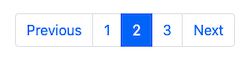
See this example shows a static Bootstrap pagination HTML. By knowing this structure, it is simple then to load and loop through the dynamic result.
If you are looking for a Bootstrap pagination script with PHP and MySQL database, then get started. In this article, we are going to implement a Bootstrap-enabled PHP pagination.
It is used to read page results from the database. Then it allows page-to-page navigation using the Bootstrap nav links. This example renders pagination with or without previous and next links.
Follow the below steps to add pagination for a list in PHP.
Create the database structure and load sample data.
Configure and map the database results to the pagination component.
Compute variables like start, limit and current page number to generate pagination links.
Highlight the current page and among the clickable pagination links.
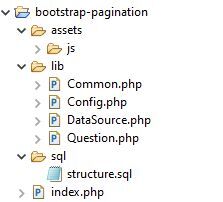
File structure
The below screenshot shows the file structure of the bootstrap pagination example. It shows a clear way of building the pagination component in PHP. This simple structure makes the learners understand the code flow easily.
Database Script
The below script is used to add data to the database. Import this SQL to have the table structure and sample data. It will help to see the pagination result on the screen while running this example.
structure.sql
 --

-- Database: `bootstrap_pagination`

-- -- -------------------------------------------------------- --

-- Table structure for table `tbl_product`

-- CREATE TABLE `tbl_product` ( `id` int(11) NOT NULL, `product_name` varchar(255) NOT NULL, `price` varchar(255) NOT NULL, `model` varchar(255) NOT NULL

) ENGINE=InnoDB DEFAULT CHARSET=utf8mb4; --

-- Dumping data for table `tbl_product`

-- INSERT INTO `tbl_product` (`id`, `product_name`, `price`, `model`) VALUES

(1, 'GIZMORE Multimedia Speaker with Remote Control, Black', '€15.72', '2020'),

(2, 'Black Google Nest Mini', '€41.11', '2021'),

(3, 'Black Digital Hand Band, Packaging Type: Box', '€21.77', '2019'),

(4, 'Lenovo IdeaPad 3 Intel Celeron N4020 14\'\' HD ', '€356.59', '2021'),

(5, 'JBL Airpods', '€27.81', '2020'),

(6, 'Black Google Nest Mini', '€41.11', '2021'),

(7, 'Black Digital Hand Band, Packaging Type: Box', '€21.77', '2019'),

(8, 'Lenovo IdeaPad 3 Intel Celeron N4020 14\'\' HD ', '€356.59', '2021'),

(9, 'Dell New Inspiron 3515 Laptop', '€537.48', '2021'); --

-- Indexes for dumped tables

-- --

-- Indexes for table `tbl_product`

--

ALTER TABLE `tbl_product` ADD PRIMARY KEY (`id`); --

-- AUTO_INCREMENT for dumped tables

-- --

-- AUTO_INCREMENT for table `tbl_product`

--

ALTER TABLE `tbl_product` MODIFY `id` int(11) NOT NULL AUTO_INCREMENT, AUTO_INCREMENT=11;
Designing HTML page with Bootstrap styles
This HTML page shows the database results with a bootstrap pagination navbar. It includes no external CSS. This design completely depends on Bootstrap CSS.
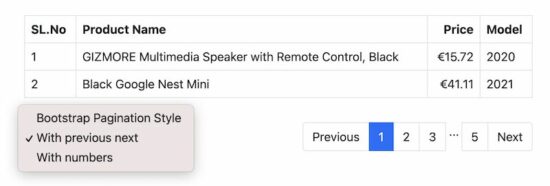
It connects PHP model to fetch the database results. This HTML has the embedded PHP loop to iterate the results. It displays the database results in a tabular view with a limited number of rows as configured.
It shows a dropdown to choose pagination styles. This example provides two types of pagination navbar with or without the previous next links.
The page links and style type are passed to the page URL. These params are used to build the Bootstrap pagination navbar using Common.php file.
This simple JavaScript function is to pass the chosen pagination style to the URL. On changing the dropdown value, it calls the JavaScript change_url() by passing the chosen style.
assets/js/product.js
 function change_url(val) { window.location.href = "index.php?type=" + val;

}
Show pagination results via PHP
This is the PHP model class that contains functions to get paginated results.
Create Bootstrap pagination links in HTML using PHP
This Common PHP class includes the Bootstrap pagination-related functions.
It prepares the unordered pagination link list in a Bootstrap nav container.
The pagination() function receives the $count, $perpage and $href parameters. It uses $href as the base URL. It gets the current page from the query string.
It prepares the pagination URL by connecting the base URL and the pagination parameters.
If the pagination loop index points to the current page, then no link will be provided to that particular instance. And also, it highlights that instance to mark as an active page.
It displays the previous and next links on a conditional basis. This condition is based on the selected option of the Bootstrap pagination UI style chosen from the dropdown.
This example contains shortened pagination links. It helps to have a good look even if there are more pages. It avoids horizontal scrolling or wrapping.
[www.indiegala.com] It's time to act and react to the rift in time with some good time & some great video games, including: Jubilee, RaidTitans, Bangman, Explosive Candy World, Rift Racoon & Area 86.



 Info: The double-backslash
  Note: The