Article summary: Here’s a quick visual overview of the contents of this tutorial.
Flat List: To sum over a list of numbers in a single line of Python code, use Python’s built-in function sum(list).
Nested List: To sum over a list of lists in one line Python, use a generator expression to flatten the list and pass the result into the function: sum(x for y in list for x in y).
Method 1: Sum over a Flat List in One Line
Problem: How to sum over all values in a given Python list?
Example: Given the following list.
a = [1, 2, 3]
You want to calculate the sum of all values in the list—using only a single line of Python code!
# RESULT: 6
Solution: Python’s built-in sum() function helps you to sum over all values in an iterable, such as a Python list.
Summing up a list of numbers appears everywhere in coding. Fortunately, Python provides the built-in sum() function to sum over all elements in a Python list—or any other iterable for that matter. (Official Docs)
Code: Here’s the minimal code example.
a = [1, 2, 3] print(sum(a))

# 6
How does it work? The syntax is sum(iterable, start=0):
Argument
Description
iterable
Sum over all elements in the iterable. This can be a list, a tuple, a set, or any other data structure that allows you to iterate over the elements. Example: sum([1, 2, 3]) returns 1+2+3=6.
start
(Optional.) The default start value is 0. If you define another start value, the sum of all values in the iterable will be added to this start value. Example: sum([1, 2, 3], 9) returns 9+1+2+3=15.
Exercise: Try to modify the sequence so that the sum is 30 in our interactive Python shell:
Method 2: Sum over a Nested List of Lists in One Line
Problem: Given multiple lists in a list of lists. How can you sum over all values in a list of lists such as [[1, 2], [3, 4], [5, 6]] in Python?
Solution: Use a generator expression to flatten the values in the nested list and pass the resulting iterable into the sum() function.
Code: The following code creates a list of lists:
a = [[1, 2], [3, 4], [5, 6]]
To sum over the values in the list of lists, use the following one-liner:
print(sum(x for y in a for x in y))
The output is printed on the shell:
# OUTPUT: 21
But how does it work? The main part of the code is the generator expression x for y in a for x in y that flattens the list.
The part x for y in a for x in y iterates over all elements y in the nested list a.
The part x for y in a for x in y iterates over all elements y in the inner list y.
The part x for y in a for x in y stores the inner element in the iterable.
Python programmers will improve their computer science skills with these useful one-liners.
Python One-Linerswill teach you how to read and write “one-liners”: concise statements of useful functionality packed into a single line of code. You’ll learn how to systematically unpack and understand any line of Python code, and write eloquent, powerfully compressed Python like an expert.
The book’s five chapters cover tips and tricks, regular expressions, machine learning, core data science topics, and useful algorithms. Detailed explanations of one-liners introduce key computer science concepts and boost your coding and analytical skills. You’ll learn about advanced Python features such as list comprehension, slicing, lambda functions, regular expressions, map and reduce functions, and slice assignments. You’ll also learn how to:
• Leverage data structures to solve real-world problems, like using Boolean indexing to find cities with above-average pollution • Use NumPy basics such as array, shape, axis, type, broadcasting, advanced indexing, slicing, sorting, searching, aggregating, and statistics • Calculate basic statistics of multidimensional data arrays and the K-Means algorithms for unsupervised learning • Create more advanced regular expressions using grouping and named groups, negative lookaheads, escaped characters, whitespaces, character sets (and negative characters sets), and greedy/nongreedy operators • Understand a wide range of computer science topics, including anagrams, palindromes, supersets, permutations, factorials, prime numbers, Fibonacci numbers, obfuscation, searching, and algorithmic sorting
By the end of the book, you’ll know how to write Python at its most refined, and create concise, beautiful pieces of “Python art” in merely a single line.
Image Editor: Move Scale Skew Rotate and Spin with CSS Transform
Last modified on July 22nd, 2020.
Are you interested in creating an image editor tool? If so, this article will help you to get started with it.
An image editor will have a range of tools. It can be very basic with only tools like resize, rotate and crop. Or it can be super extensive like a Photoshop.
Rotate is a basic and essential tool that is part of any image editor. Let us start with something easy and basic like rotate then add some more essential tools.
I will be using CSS transform property as the core and add JavaScript to enrich the tool.
This can become a basic starter toolkit that can be expanded to a full fledged image editor in the future.
Do not underestimate the power of CSS. Gone or those days, where CSS just applies decoration on top of HTML and beautifies the document. CSS3 and beyond, with the combined support of HTML5, advancements in the browser support has change CSS to a powerful UI tool.
It complements well with the JavaScript. When we combine it together, we can create wonders. The divide between thin-client and thick-client has vanished. The CSS is a very good beginner’s tool to start with simple image editor features.
When you work on image editing capabilities with CSS, you must consider browser compatibility. Some browsers will not render as you code. So, we have to be carefully choosing the properties.
I have used CSS keyframesrules to set the core properties.
In this article, you can find the example code of the below items with a demo.
Rotation and spin
Skew
Scale
Translation
A quick glance on CSS transform and image editing
CSS transform property can be used to do basic image editing. It supports functions like rotation, skew, scale and translate.
The key functions are rotate(), skew(), scale(), translate().
The transform functions have classification based on the axis of animation. For example rotateX(), rotateY() and more. This can be used for image animation.
We can apply the transform functions in a combination way for a single UI element’s selector. When we use many transform function, the animation effects happen in a right to left order.
Examples and demo on image editing
Scaling an image
The scaling is a transform function that allows us to scale up or down the element’s dimension. The scaling transform output varies based on the function used and its parameters.
The scale() function can have single or dual parameters. With a single parameter, it applies uniform scaling in both x, y-axis. When we supply separate values for the x, y-axis, then the scaling range will vary.
With three params the scale3d() function allows scaling in x,y,z axis.
We can also apply scaling with respect to single axis by using scaleX(), scaleY() or scaleZ().
The above demo has a slider to scale up and down an image.
Below code has the UI elements to apply scaling transform on an image element. It has a pallet with an image element and animation tools.
Like other transform functionality, the translate() function performs 2D, 3D translation.
The translate() function with one or two params results in 2D translation. The two params are to move the image in the x, y-axis of a 2D plane. With single param, the translate() will happen in a horizontal direction.
The translateX() and translateY() are for implementing translation in a particular direction.
The translate3d() with x, y, z factors allows creating 3D animation.
In this demo, there are two sliders in horizontal and vertical directions. On dragging the handle of these sliders, it moves the image on the 2D plane shown above.
This HTML shows the template elements to set the image-translate demo.
This script sets the horizontal and vertical translation slider properties. The horizontal slider has the range between o -160. And, the vertical translation ranges between 0 to 50.
image-translate/assets/js/translate.js
$(document).ready(function() { var translateX; var handle = $("#translate-x"); $("#slider").slider({ range : "min", min : 0, max : 160, create : function() { handle.text($(this).slider("value") + " px"); }, slide : function(event, ui) { translateX = ui.value; handle.text(translateX + " px"); translate(translateX); } }); var translateY; var vhandle = $("#translate-y"); $("#v-slider").slider({ range : "min", min : 0, max : 50, orientation : "vertical", create : function() { vhandle.text($(this).slider("value") + " px"); }, slide : function(event, ui) { translateY = ui.value; vhandle.text(translateY + " px"); translatey(translateY); } }); }); function translate(translateX) { $('#image').css('transform', 'translateX(' + translateX + 'px)');

} function translatey(translateY) { $('#image').css('transform', 'translateY(' + translateY + 'px)');

}
Tools for rotating an image
Ah yes, we have reached the rotate tool. This is a core feature in any image editor. Rotation spins the image or other UI elements based on the angle specified.
With a negative degree, the animation will happen in counter-clockwise rotation.
Like scale and translate, rotate function also has classification based on the axis. Those are,
rotate(angle)
rotate3d(x, y, z, angle)
rotateX(angle)
rotateY(angle)
rotateZ(angle)
The rotate3d() function needs the angle and the x, y, z co-ordinates of the rotation axis.
A spin will make the image rotate from 0 to 360 degrees. You can stop spinning or refresh the image orientation back to its original.
When you click the rotation tool, a jQuery script rotates the image based on the specified angle.
It changes the images’ transform property using jQuery $.css() function.
The rotation slider ranges from 0 to 360 degrees. I have added the rotation script below. It shows how to turn on a jQuery UI slider to rotate an image element.
By changing each point of the element in a fixed direction will skew the element. This change will tilt or skews the elements layout based on the specified angle.
The skew transform functions skewX(), skewY(), skewZ() tilting element boxes along with the X, Y, Z axis.
$(document).ready(function() { var skewAngle; var handle = $("#skew-angle"); $("#slider").slider({ range : "min", min : 0, max : 40, create : function() { handle.text($(this).slider("value") + " deg"); }, slide : function(event, ui) { skewAngle = ui.value; handle.text(skewAngle + " deg"); skew(skewAngle); } }); });

function skew(skewAngle) { $('#image').css('transform', 'skew(' + skewAngle + 'deg)'); }
Conditions and exceptions on applying transform property
The CSS transform property will not work with some UI elements.
For example, table column element <col>, table column group element <col-group>, and more. Those are non-transformable elements.
What are transformable elements?
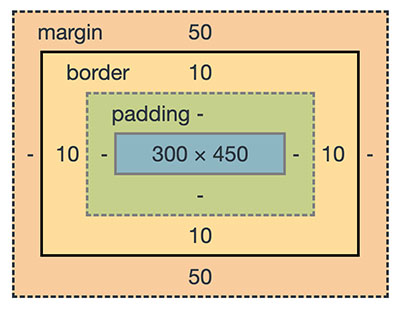
Most of the UI elements enclosed with the CSS box model are transformable. The following image shows the HTML element layout enclosed by a CSS box model.
Also, renderable graphical elements, clipPath elements are also known as a transformable element.
Importance of respecting system preferences
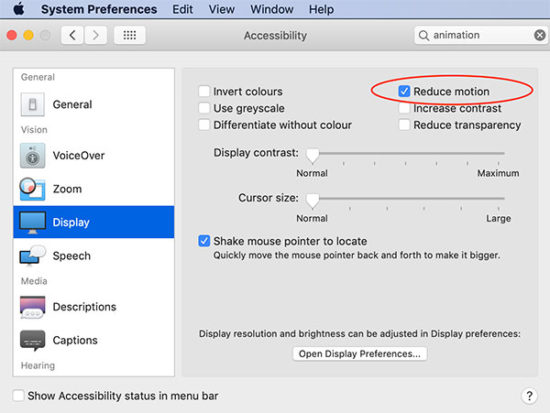
The system preferences will affect the motion of elements. If your system preferences is set to reduce animation is on, it will omit the animation effect of the above demo.
To respect this settings we have to add a CSS media rule to set the prefers-reduced-motion. The possible values are no-preferences and reduce.
This media rule with reduce option provides a CSS block to suppress animation.
In the above examples, I have used the media rule to respect the user’s system preferences. You can test this with the demo by enabling the reduced-motion.
Conclusion
We have seen the CSS transform based image editing. This is just a beginning only. This can serve as a bootstrap for building a full fledged image editor.
With CSS transform, we have added JavaScript and enriched the tool. We have also added various motion effects.
I have added most of the template files and the jQuery scripts above. But you can find the complete bundle with the downloadable source code here below.
Since Borderlands 2 was free, i have to announce this as well, and a few other words :)
Its on Epic Games Commander Lilith & the Fight for Sanctuary[www.epicgames.com] - on Epic Games Click Get, Place Order, thats it --------- Also Rocket League will be Free 2 Play soon (telling you to not buy it), my guess 22nd September (end of summer) maybe before, it will move to the Epic Games Store, people who own it will get some dlcs or all, im not sure --------- I have made some nice raffles for you guys to enter if you want (including a Fall Guys Raffle
Remember that only those on Xbox One / Windows 10 / and Android may participate in the Beta builds. You will not be able to join Realms or non-beta players worlds and you will not be able to open worlds opened in the Beta in earlier/current stable builds of Bedrock.
Performance and Stability
Fixed crash that could occur when playing an emote and suspending the game (MCPE-73235)
General
Tweaked arm animation for Brutes, Piglins, and Vindicators that have their weapons removed (MCPE-83581)
Emotes can no longer be equipped before unlocking them (MCPE-84810)
Custom skins now work properly on multiplayer (MCPE-48207)
Achievement Screen
New achievements screen design and added a new achievement details screen (available after gradual roll-out). We would love to hear your feedback on it here in this post!
Fixed bug where system language setting for Simplified and Traditional Chinese was not honored by the game
Nintendo Switch can now upload worlds to Realms again (REALMS-474)
NB – this fix is still in beta so won’t be available for Realms or non-beta platforms yet, but we wanted to give you a heads up this fix is on its way!
Game no longer crashes if a player opens a Shulker Box they’re standing on after rejoining a multiplayer session
Fixed issue where some walls were not correctly connected on world load
Fishing Rod will now correctly cast when close to a Mob (MCPE-65249)
Fixed an issue that meant the block highlight/selection box was extending above blocks
Fixed an issue with missing animation when damaging bamboo
Added Noto Sans font license button and pop-up dialog to Settings screen (in the Profile section)
Graphical
Fixed a graphical issue with glass blocks in City Living world, that affected some devices on Windows 10
Fixed an issue with the skybox background graphics not rendering correctly on some devices
Actors
The “minecraft:behavior.controlled_by_player” goal is now data-driven
Physics Component’s has_gravity is now used to decide whether a mob should apply water gravity, if the mob does not have a Navigation Component
Ender Crystals can no longer be pushed
The Squid’s rendering is now data-driven
Minecarts are now data-driven. This converted minecart rideable, minecarts with chest, with hopper, with command block, and with TNT to be data-driven
Display Name Component
Items can now override their display name with a localized ‘value’. If a value is not supplied the component will stay with its default name. If the value supplied is not in the localization file the display name will be the value string
Item Parsing
Example 1
any_tag functionality added to several actor components. In addition to representing items as item names in json they can now be represented as a set of tags
“item”: {“any_tag”: “food”}
“item”: {“any_tag”: [“food”, “wood”]}
“bribe_items”: [“emerald”, {“any_tag”: “stone”}]
minecraft:ageable feed_items can now use any_tag functionality
minecraft:breedable breed_items can now use any_tag functionality
minecraft:bribeable bribe_items can now use any_tag functionality
minecraft:giveable items can now use any_tag functionality
minecraft:healable items can now use any_tag functionality
minecraft:tamemount feed_items and auto_reject_items can now use any_tag functionality
minecraft:equippable accepted_items can now use any_tag functionality
Example 2
looks for “apple” key in the vanilla localization for a string to use as the display text, which it will NOT find a value so the display name will just be “apple”
“minecraft:display_name”: { “value”: “apple” }
Example 3
looks for “item.apple.name” key in the vanilla localization for a string to use as the display text, which it will find a value as “Apple”. Note “minecraft:” namespace not required.
To ensure that we can devote our resources to the platforms where most Crafters are playing, we are ending support for certain older devices and platforms where Minecraft is available. Effective in October 2020, Minecraft will no longer be updated or supported on Gear VR, Windows 10 Mobile, Android devices with 768MB of RAM or less, iOS devices running iOS 10 or below, or video cards that only support DirectX 10.1 or below.
If your device is affected, a prompt will appear in-game to let you know if it will no longer receive updates. Please see the article on Minecraft.net for more information.
Nintendo eShop policy change gives shoppers more time to cancel pre-orders
Nintendo has altered its cancellation policy to let consumers opt-out of digital pre-orders up to one week before launch.
Nintendo would previously charge shoppers as soon as they’d placed a pre-order on the Nintendo eShop, irrespective of when their chosen game was launching.
As highlighted by NintendoLife, however, the company has now quietly tweaked that policy to ensure eShop customers won’t be charged any sooner than seven days before launch, and will also let them “cancel pre-orders up until time of payment.”
“The expected payment date [for pre-orders] is no sooner than seven days before the product is released,” reads the amended policy. “You may cancel your pre’orders up until time of payment.
“You can cancel pre-orders by selecting Shop Menu in your Nintendo Account settings then selecting Your Pre-orders, or by selecting Your Pre-orders in Account Information on Nintendo eShop on your device.”
Game Discoverability Now: Are the ‘store wars’ really upon us?
The following blog post, unless otherwise noted, was written by a member of Gamasutras community. The thoughts and opinions expressed are those of the writer and not Gamasutra or its parent company.
Welcome to the latest Game Discoverabilityland weekly round-up, whereby I go semi-deep on something, follow up on some other things, and end it out with ‘like a thousand other things’ about game discovery/platforms that you might have missed.
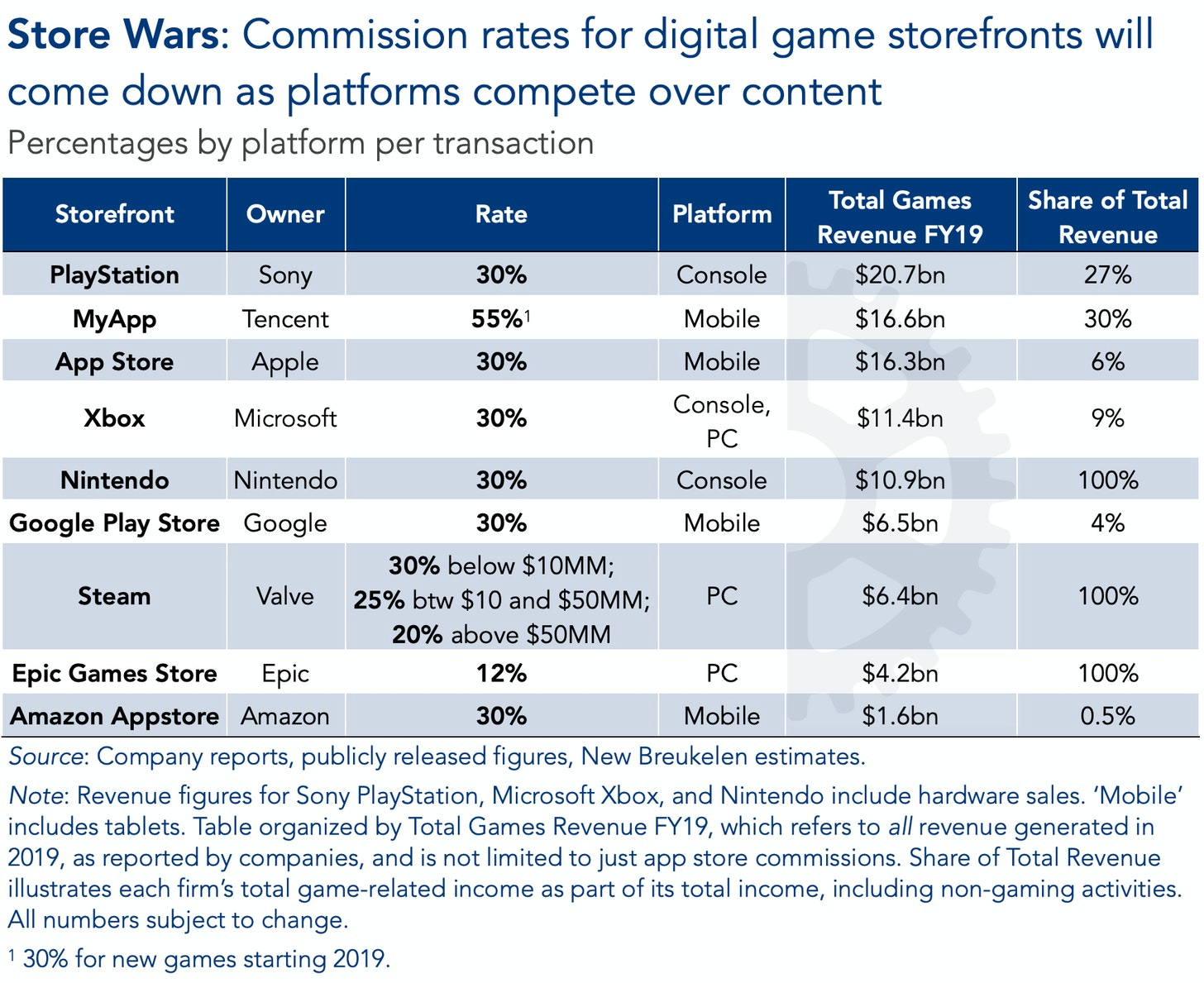
Anyhow, his very interesting thoughts on Epic vs. Apple strayed into some areas I’ve been thinking about a lot. He shared his below infographic on how game platforms pay out, and suggested: “If everyone continues to agree, content creators won’t stand a chance. But all it takes is for one of them to drastically lower their rates, and game makers and audiences will flock to it.”
So here’s my counterthesis to Joost, unfortunately for everyone hoping that royalty percentages for third-party game studios will improve. I do think that the game industry is changing significantly, and platform exclusives can be important (especially on consoles!) But I see two major trends:
A move towards a ‘catalog’ first-party games that can be used however the platform wants. It’s a source of continued revenue/profit, & owned high-quality titles can be used for ‘free’ in the game subscription wars of the future (ahem, Xbox Game Pass). There are no bidding wars for content or awkwardness over the developer being bought out, if you own the company making the game.
So I don’t think most large platforms will compete for market share by reducing royalty rates. (I know Epic is trying, but I believe it’s more about ‘fairness’ to Tim Sweeney than for tedious capitalist business reasons.)
Why no store wars this way? It’s (relatively) easy for third-party studios to convert games to other formats, and no single platform can entice devs for exclusives purely on royalty boosts. Even Epic had to use advances against sales as well as royalty changes.
Taking the platform cut from 30% to 20% would be amazing – and I still think large platforms should do it on their lowest revenue tier anyhow. But I see the future as ‘third-parties launch their games on multiple platforms with a 30% cut, and then get incremental revenue from Game Pass-like subscription/bundle deals’.
And when the bundles erode the standalone sales for an average game – and they will – I am hoping and presuming that the platforms will step up their subscription-related payments to compensate. You’re going to do that, right, platforms?
Extra insight: virtual events, Steam followers
There’s been a couple of notable follow-ups to previous newsletters, so I thought I’d group them together here:
When I tried, it, though, some of my thoughts echoed Michael French of Games London’s: “Impressed by what I’ve seen of the Indie Arena Booth interface, but still jarring to get kicked to various other places/apps – Discord, Steam, YouTube – which all opened at jumpy points. Guess there’s still no solution to this in the short term when it comes to events.”
He concluded: “Ultimately my ‘trip’ (opening a new tab in Chrome) to ‘Gamescom’ (opening the Indie Arena website) this year felt a lot like playing WorldsAway on Compuserve back in ’94/’95 – sparsely populated, system and bandwidth heavy, and a little unsatisfying.”
I think I attended early on and there were more people, but I would broadly agree. Not that I have a better idea, because recreating a real event in virtual space is darn tricky.
The things I think worked the best in GDC (virtual) Summer involved a lot of interactive text chat with speakers whose pre-recorded talk videos were playing at the same time. And that speedruns with devs idea (not mine!) was great. But that doesn’t solve the ‘interact with exhibitors’ issue. But it’ll evolve alongside hybrid events…
How followers could help discern wishlist quality…
He suggested that another broad way of working out wishlist quality is looking at Steam followers to wishlists as a ratio, noting: “For example, Ruinarch before its big surge in publicity had a ratio of 4:1, a low ratio of wishlisters to followers. Whereas there was a game that launched a while back called WarriOrb that did quite badly from its 16K wishlists built up – however, this game has a ratio of 16:1.”
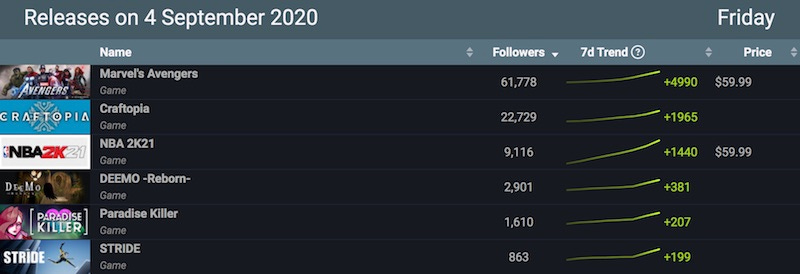
I actually had a paragraph about this in my original newsletter which I deleted, because I sometimes track SteamDB’s upcoming follower counts, and there’s been some weird anomalies.
But thinking about it again, it’s a valid point. Followers seem to come when there’s ‘interested parties’ browsing around the site. So it seems likely they will be higher quality compared to ‘one off click bookmark-y when grabbing demo’ style wishlists. So… another metric to take into account – could followers be a more accurate metric for launch sales than wishlists nowadays? It’d be fascinating if so.
Other stuff…
Here’s a number of other game discoverability and/or platform things that you might be unaware of. But you are now! Uh, aware of them that is, not unaware of them…
Spiritfarer’s main menu has a ‘sign up for newsletter’ option which gives you a free eBook if you give them your email. Different platforms have different rules on this. But for those that allow it, it seems like in-game incentives like this are a great idea for building audience.
Here’s an interesting point made by Richard East relating to this newsletter’s lead story – Switch royalty rates are actually closer to 25% than 30%, because 5% of Switch eShop spend is returned as coins that expire after 12 months, so Nintendo pays for up to 5% of eShop spend. (I wonder what % are redeemed?)
The Alpha version of GameDataCrunch is now available – here’s the page for Descenders, for example. It looks like a fun time for people who like to research tag browsing and ranking in a very, very ‘here’s what the actual data says’ way, in ways you can’t do on Steam.
The Nintendo eShop has added how many days left a discount is available for as part of its default view. (I think it might start with X days to go, not at the beginning of the sale?) A little more impetus to buy during sales since you can see when it ‘runs out’, but still a very sale-centric universe on Switch.
Interesting to see Apple introducing App Store changes, including this one: “For apps that are already on the App Store, bug fixes will no longer be delayed over guideline violations except for those related to legal issues.” On some consoles, getting important patches hung up on small errors that were always in the build has sometimes been an issue! (More rapid/instant patching for all systems, please?)
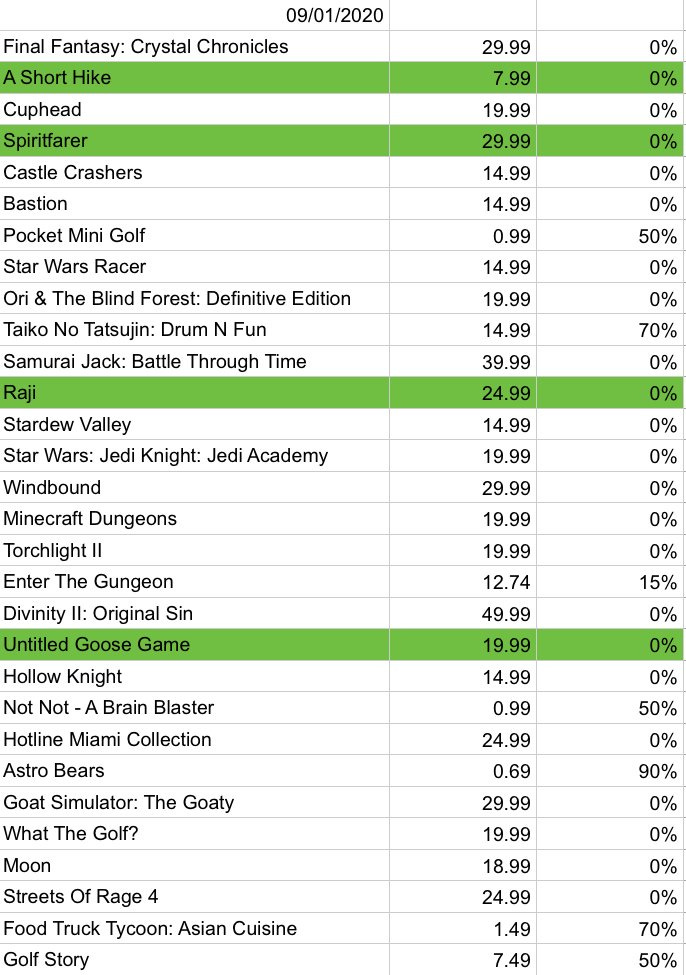
Finally, quoting myself on Twitter this week: “Interesting to note the games featured in Nintendo’s latest Indie World showcase – many launching shortly afterwards – doing well in U.S. Switch eShop digital charts. Conclusion: Indie World + immediate Switch launch can be a good blitz marketing tactic.” Indie World games highlighted in green:
GIVEAWAY: Win A Nintendo Switch And A 65-inch TCL 4K TV*
This is your chance to win a Nintendo Switch bundle with a 4K TV included! CNET and GameSpot are joining forces to give away a grand prize package that includes a TCL 65-inch 6-series 4K TV, a Nintendo Switch, a 12 month subscription to the family plan of Nintendo Switch Online, a 128GB micro SD card, a case, and a screen protector.
To sign up for this giveaway, read our official rules, accept the terms and conditions, and sign up through the form below. Don’t see the form? If you are on a mobile device, please use this link. Otherwise, make sure your ad blocker is disabled and refresh the page.
Don’t forget that you have the option to increase your chances of winning by completing any of the available actions on the form like subscribing to our YouTube channel or following us on Facebook.
Announcing Experimental Mobile Blazor Bindings May update
Eilon
May 26th, 2020
It’s been a few months so it’s time for another update of Experimental Mobile Blazor Bindings! This release brings several bug fixes in the areas of CSS styling support, adding XML doc comments to common APIs, and several syntax improvements to common controls.
Here are the major changes in this release:
Update to latest native mobile component versions in Xamarin.Forms 4.5 and add doc comments #96, #110, #111
Because most of the components in Mobile Blazor Bindings are based on Xamarin.Forms native controls, the components have been updated to Xamarin.Forms 4.5. For example, properties such as Image.IsAnimationPlaying and Stepper.StepperPosition are now available. The doc comments that are seen in IntelliSense have also been imported so that you get useful help while coding:
Improve Label and Button syntax
Because one of the key motivators for building Mobile Blazor Bindings was to have patterns that were more familiar to web developers, the syntax for Label and Button components has been simplified and improved.
In previous versions setting the text for a Label’s Span’s Text or a Button’s Text had to be done via a property setter:
Speaking of Span.Text, a Label with complex formatting used to have many intermediate tags:
<Label FontSize="12"> <FormattedText> <FormattedString> <Spans> <Span Text="This text is large... " FontSize="50" /> <Span Text="and this is plain... " /> <Span Text="and this is green!" TextColor="Color.Green" /> </Spans> </FormattedString> </FormattedText>

</Label>
And starting with Preview 3, the intermediate tags have all been removed:
<Label FontSize="12"> <Span FontSize="50">This text is large... </Span> <Span>and this is plain... </Span> <Span TextColor="Color.Green">and this is green!</Span>

</Label>
CSS improvements
CSS is a great way to style your application while keeping it separate from the layout and behavior. Check out the CSS Styles topic for more information on how to use CSS in your Mobile Blazor Bindings apps.
There are three CSS-related improvements in this release:
The minimum version of Xamarin.Forms is now 4.5, which fixes most CSS issues, such as the ability to use almost all CSS selectors.
A small breaking change was made to use spaces as separators instead of commas when specifying multiple class names (this matches web behavior). See issue #100 for more information.
A bug fix was made to ensure CSS is loaded properly on iOS devices.
More information:
For more information please check out:
Thank you to community blog posts!
If you’d like to learn more, please check out these blog posts from community members:
Thank you!
What’s next? Let us know what you want!
We’re listening to your feedback, which has been both plentiful and helpful! We’re also fixing bugs and adding new features. And you may have seen last week’s announcement for .NET Multi-platform App UI (.NET MAUI). As an experiment, what we find with Mobile Blazor Bindings will feed directly into the Blazor aspects of .NET MAUI so please share with us your thoughts on using Blazor with .NET MAUI on this project’s repo or on .NET MAUI’s GitHub repo.
This project will continue to take shape in large part due to your feedback, so please let us know your thoughts at the GitHub repo.
P.S.: My apologies for the delay in this update. The realities of work-from-home (and stay-at-home parenting) meant that progress was extremely limited. I thank everyone for their patience, understanding, and support. You can always stay up-to-date by going to the GitHub repo and using the latest builds, or reach me on Twitter @original_ejl.
Apple mass producing ‘AirTags,’ about to begin ‘iPhone 12’ production
A new report from the supply chain says that Apple has already begun “AirTags” mass production, plus it will soon ramp up “iPhone 12” manufacturing, and it’s also increasing orders for iPads.
As rumors persist that Apple will announce the date of its “iPhone 12” event, a new report claims that production is now or shortly to be underway on Apple’s “AirTags,” certain models of “iPhone 12,” and new iPads.
According to the Nikkei Asian Review, Apple has managed to shorten the coronavirus-induced production delays to weeks instead of months. The “iPhone 12” range is reported to be about to begin limited manufacturing, before ramping up toward the end of September or the start of October.
“We’ve managed to shorten the delay significantly and we are not stopping here,” a supply chain executive reportedly said. “The final assembly for some models is still going to be early October, but we are working to keep moving the production as early as possible.”
Backing up other recent rumors, Nikkei Asian Review says that the “iPhone 12” production is going to start with the expected 6.1-inch OLED “iPhone 12 Max.” Reportedly this model amounts to 40% of all the 5G iPhone orders Apple has placed
It’s claimed that Apple has ordered components for up to 80 million 5G iPhones, but two sources have told Nikkei Asian Review that it’s more likely only between 73 and 74 million will be produced before the end of the year. The remainder will be produced in early 2021.
While production on the “iPhone 12” range builds up, Nikkei Asian Review also says that Apple is already mass producing the forthcoming “AirTags” accessory. Plus it has increased production for new iPads, reportedly aiming for 27 million devices between September and December.
That’s claimed to be almost as many as Apple produced of its entire iPad range in July to December 2019.
Nikkei Asian Review sources also deny rumors of an annual refresh of the iPhone SE. Reportedly multiple sources say that there won’t be a 2021 version.