In this article, you’ll learn the basics of parsing an HTML document using Python and the LXML library.
Introduction
Data is the most important ingredient in programming. It comes in all shapes and forms. Sometimes it is placed inside documents such as CSV or JSON, but sometimes it is stored on the internet or in databases. Some of it is stored/transferred or processed through the XML format, which is in many ways similar to HTML format, yet its purpose is to transfer and store data, unlike HTML, whose main purpose is to display the data. On top of that, the way of writing HTML and XML is similar. Despite the differences and similarities, they supplement each other very well.
Both Xpath and XML are engineered by the same company W3C, which imposes that Xpath is the most compatible Python module to be used for parsing the XML documents. Since one of the programing principals which would push you towards the programming success is to “not reinvent the wheel”, we are going to refer to the W3C (https://www.w3.org/) consortium document and sources in regarding the syntax and operators on our examples to bring the concept of XPath closer to the people wishing to understand it better and use it on real-life problems.
The IT industry has accepted the XML way of transferring data as one of its principles. Imagine if one of your tasks was to gather information from the internet? Copying and pasting are one of the simplest tools to use (as it is regularly used by programmers as well); it might only lead us to gather some simple data from the web, although the process might get painfully repetitive. Yet, in case if we have more robust data, or more web pages to gather the data from, we might be inclined to use more advanced Python packages to automate our data gathering.
Before we start looking into scraping tools and strategies, it is good to know that scraping might not be legal in all cases, therefore it is highly suggested that we look at the terms of service of a particular web site, or copyright law regarding the region in which the web site operates.
For purposes of harvesting the web data, we will be using several Python libraries that allow us to do just that. The first of them is the requests module. What it does is that it sends the HTTP requests, which returns us the response object. It only used if urge to scrape the content from the internet. If we try to parse the static XML file it would not be necessary.
There are many parsing modules. LXML, Scrapy and BeautifulSoup are some of them. To tell which one is better is often neglected since their size and functionality differs from one another. For example, BeautifulSoup is more complex and serves you with more functionality, but LXML and Scrapy comes lightweight and can help you traversing through the documents using XPath and CSS selectors.
There are certain pitfalls when trying to travel through the document using XPath. Common mistake when trying to parse the XML by using XPath notation is that many people try to use the BeautifulSoup library. In fact that is not possible since it does not contain the XPath traversing methods. For those purposes we shall use the LXML library.
The requests library is used in case we want to download a HTML mark-up from the particular web site.
The first step would be to install the necessary packages. Trough pip install notation all of the modules above could be installed rather easily.
Necessary steps:
pip install lxml (xpath module is a part of lxml library)
pip install requests (in case the content is on a web page)
The best way to explain the XML parsing is to picture it through the examples.
The first step would be to install the necessary modules. Trough pip install notation all of the modules above could be installed rather easily.
What is the XPath?
The structure of XML and HTML documents is structurally composed of the nodes (or knots of some sort), which is a broader picture that represents the family tree-like structure. The roof instance, or the original ancestor in each tree, is called the root node, and it has no superior nodes to itself. Subordinate nodes are in that sense respectively called children or siblings, which are the elements at the same level as the children. The other terms used in navigating and traversing trough the tree are the ancestors and descendants, which in essence reflect the node relationship the same way we reflect it in real-world family tree examples.
XPath is a query language that helps us navigate and select the node elements within a node tree. In essence, it is a step map that we need to make to reach certain elements in the tree. The single parts of this step map are called the location steps, and each of these steps would lead us to a certain part of the document.
The terminology used for orientation along the axis (with regards to the current node) is very intuitive since it uses regular English expressions related to real-life family tree relationships.
XPath Selector
XPath selector is the condition using which we could navigate through an XML document. It describes relationships as a hierarchical order of the instances included in our path. By combining different segment of XML syntax it helps us traverse through to the desired parts of the document. The selector is a part of the XPath query language. By simply adding different criteria, the XPath selector would lead us to different elements in the document tree. The best way to learn the XPath selector syntax and operators is to implement it on an example. In order to know how to configure the XPath selector, it is essential to know the XPath syntax. XPath selector is compiled using an etree or HTML module which is included within the LXML package. The difference is only if we are parsing the XML document or HTML.
The selector works similarly as a find method with where it allows you to select a relative path of the element rather than the absolute one, which makes the whole traversing less prone to errors in case the absolute path gets too complicated.
XPath Syntax
XPath syntax could be divided into several groups. To have an exact grasp of the material presented we are going to apply further listed expressions and functions on our sample document, which would be listed below. In this learning session, we are going to use a web site dedicated to scraping exercises.
Node selection:
Expression
Description
nodename
Selects all nodes with the name “nodename“
/
Selects from the root node
//
Selects nodes in the document from the current node that match the selection no matter where they are.
.
Selects the current node
..
Selects the parent of the current node
@
Selects attributes
Using “..” and “.” we can direct and switch levels as we desire. Two dot notations would lead us from wherever we are to our parent element, whereas the one dot notations would point us to the current node.
The way that we travel from the “context node” (our reference node), which is the milestone of our search, is called “axes”, and it is noted with double slash //. What it does is that it starts traversing from the first instance of the given node. This way of path selection is called the “relative path selection”. To be certain that the // (empty tag) expression would work, it must precede an asterisk (*) or the name tag. Trough inspecting the element and copying its XPath value we are getting the absolute path.
XPath Functions and Operators
here are 6 common operators which are used inside the XPath query. Operators are noted the same way as in plain Python and serve the same purpose. The functions are meant to aid the search of desired elements or their content.
Path Expression
Result
=
Equal to
!=
Not equal to
>
Is greater than
<
Is less than
=>
Is greater or equal to
=<
Is less or equal to
To add more functionality to our XPath expression we can use some of LXML library functions. Everything that is written in-between the “[]” is called a predicate and it is used to closer describe the search path. Most frequently used functions are contains() and starts-with(). Those functions and their results would be displayed in the table below.
Going Up and Down the Axis
The conventional syntax used to traverse up and down the XPath axes is ElementName::axis.
To reach the elements placed above or below our current axes, we might use some of the following axes.
The goal of this scraping exercise is to scrape all the book genres placed at the left-hand side of the web site. It almost necessary to see the page source and to inspect some of the elements which are we aiming to scrape.
from lxml import html

import requests url = 'http://books.toscrape.com/' # downloading the web page by making a request objec

res = requests.get(url) # making a tree object

tree = html.fromstring(res.text) # navingating the tree object using the XPath

book_genres = tree.xpath("//ul/li/a[contains(@href, 'categ')]/text()")[0:60] # since the result is the list object, we iterate the elements,

# of the list by making a simple for loop

for book_genre in book_genres: print (book_genre.strip())
The 197th GalaQuiz will be LIVE soon, win up to $50 in GalaCredit!
[www.indiegala.com] The GalaQuiz will take place in less than 15 minutes from this announcement Today's GalaQuiz[www.indiegala.com] hints are up. The theme will be 90's rom-coms.
Over on the Unity Asset Store, Unity are running the Power Tools bundle, a collection of addons for the Unity game engine providing functionality from dialog support, to advanced terrain tools and even in game painting capabilities. This bundle is organized into tiers, buying a higher dollar value tier gives you access to all the lower tiers.
The tiers of this bundle include:
$9.99
Editor Console Pro
Rainbow Folders 2
Tail Animator
$29.99
Dynamic Bone
The Vegetation Engine
Nice Vibrations Haptic Feedback
Path Painter
Obi Rope
Lean Touch+
$59.99
Enhanced Scroller
Microsplat Terrain Collection
Paint in 3D
TerraWorld – Automatic Level Designer
DoozyUI: Complete UI Management System
Poly Few Mesh Simplifier and Auto LOD Generation
Dialog System for Unity
If you purchase the bundle using this link, GFS receives a small commission (and thanks if you do!). You can learn more about the bundle in the video below. The bundle runs until August 1st, 2020.
Destiny 2: Where Is Xur July 17-21? Exotic Weapons And Armor Location
Though Destiny 2's next expansion, Beyond Light, has been delayed until November, that might be good news for Guardians. The Season of Arrivals has been greatly expanded, providing more time to hang out on Titan, Mercury, Mars, and Io, and to complete activities that will leave the game in the fall--including several raids, and the new Moments of Triumph. Gear up with new Exotics to take down Destiny 2's toughest (old) challenges by visiting Xur this week. Here's where to find him and what he's selling.
Head to the Tower to find Xur this week, hanging out in Hangar section. For his weapon, Xur is offering Skyburner's Oath. Hunters can pick up the Lucky Raspberry chest armor; for Titans, there's the Peacekeepers leg armor; and for Warlocks, Xur has the Vespers of Radius chest armor. Read on for an in-depth look at the stats and attributes of each Exotic.
Xur Location
Spawn in at the central Tower transmat zone and head to your left to take the stairs down to the Hangar. When you reach the bottom, turn left and walk past the Dead Orbit area to find some stairs leading up to a catwalk, near the edge of the area. You'll find Xur standing there, surveying the Tower and overlooking a spectacular view of the Last City.
Posted by: xSicKxBot - 07-19-2020, 03:38 AM - Forum: Python
- No Replies
Python One Line If Without Else
Crafting beautiful Python one-liners is as much an art as it is a science. In this tutorial, you’ll learn how to compress an if statement without an else branch into a single line of Python code.
Problem: What’s the one-liner equivalent of the simple if statement without an else branch?
Here’s an example:
condition = True if condition: print('hi') # hi
You may want to (i) print something, (ii) assign a value to a variable, or (iii) append an element to a list if the condition holds.
In this article, I’ll show you four methods of how to accomplish this goal. All four methods are generally applicable—and you can easily customize them to your specific application.
Let’s have a quick overview of the four methods in our interactive code shell:
Exercise: Run the code for both True and False conditions. Are all methods semantically equivalent?
Method 1: One-Liner If Statement
The first is also the most straightforward method: if you want a one-liner without an else statement, just write the if statement in a single line! There are many tricks (like using the semicolon) that help you create one-liner statements. But for an if body with only one statement, it’s just as simple as avoiding the line break.
condition = True # Method 1: One-Liner If

if condition: print('hi')

# hi
This method is perfectly valid and you could see it in practice. Yet, I have to mention that it “violates” the PEP8 standard (multiple statements in a single line). Therefore, you shouldn’t consider this to be Pythonic code (there are worse things under the sun though).
Method 2: Ternary with Throw-Away Else Branch
Sure, you can also use the ternary operator:
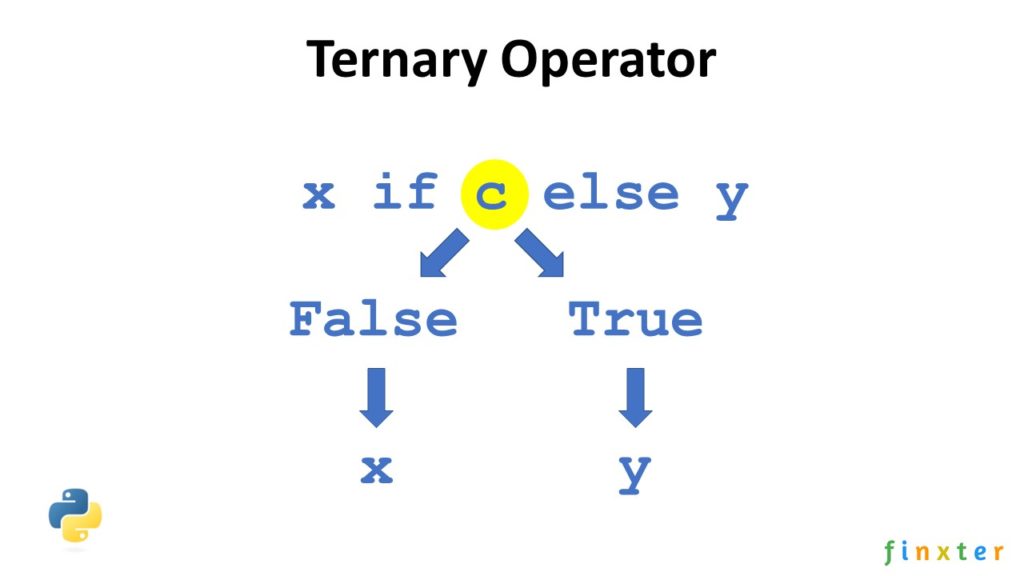
If you need a quick refresher on the ternary operator, check out my detailed blog article. The ternary operator is commonly used to conditionally assign values. But you can also throw away the return value by not assigning the result to any variable. In this case, it doesn’t matter if you use None or any other “dummy” return value as the result of the else branch:
condition = True # Method 2: Ternary with Dummy

print('hi') if condition else None
It’s readable, short, and concise and I like this (well, I may be a bit biased as author of the book Python One-Liners). Sure, people will ask why you didn’t write it in multiple lines. But where is the fun there?
Method 3: Ternary with Default Value for Assignment
If you need to assign a value conditionally to a variable, but you want to do so without an else branch, you can do the following:
condition = True # Method 3: Ternary with Dummy for Assignment

x = 42 if condition else None
If the condition does not hold, the “dummy” value None is assigned to the variable.
Method 4: Short Circuiting
This method I like most. It uses a Python optimization called “short circuiting” for Boolean operators: the logical and operator simply returns the second operand if the first is True. There’s no Boolean conversion of the second operand, it’s just returned as is.
If the first operand is False, the second operand is not even evaluated.
You can use this to conditionally execute the if branch print('hi') or any other code function.
condition = True # Method 4: Short circuiting

condition and print('hi')
There are two options:
condition == True: As the first operand is True, the second operand is returned. Thus, the statement print('hi') is executed and the string hi appears on the screen.
condition == False: As the first operand is False, the second operand is not even evaluated because the result of the logical and operation is False anyway. Thus, the statement print('hi') is never executed.
Where to Go From Here?
Enough theory, let’s get some practice!
To become successful in coding, you need to get out there and solve real problems for real people. That’s how you can become a six-figure earner easily. And that’s how you polish the skills you really need in practice. After all, what’s the use of learning theory that nobody ever needs?
Practice projects is how you sharpen your saw in coding!
Do you want to become a code master by focusing on practical code projects that actually earn you money and solve problems for people?
Then become a Python freelance developer! It’s the best way of approaching the task of improving your Python skills—even if you are a complete beginner.
The 196th GalaQuiz will be LIVE soon, win up to $50 in GalaCredit!
[www.indiegala.com] The GalaQuiz will take place in less than 15 minutes from this announcement Today's GalaQuiz[www.indiegala.com] hints are up. The theme will be Famous Duets.
Random: Super Smash Bros. Ultimate Mod Swaps Snake For Ninja
With Super Smash Bros. Ultimate throwing the door open to a number of popular third-party franchise characters, it wouldn’t be completely out of the question to see the ultra-popular Fortnite be represented in some way later down the line. For many, when you think of games like Fortnite, you think less about its in-game characters and more about the real-life people who have helped to make it the wild success that it is.
So, what are the chances that Ninja, the world’s most famous streamer best known for his Fortnite coverage, could end up in the game one day? It’s unlikely, sure – in fact, we’d happily bet our entire Smash amiibo collection on such a collaboration never happening – but one modder has taken the time to show us just what that particular mashup could look like.
Below, you’ll see Snake’s character model replaced with Ninja’s in-game Fortnite skin, with all of Snake’s movements and attacks still intact. His voice has been replaced with clips from Ninja’s streams, including a scream of ‘What am I doing?!’ for his Final Smash. As a word of warning, the clip features some mature language.
If you’d rather avoid such language, we’ve grabbed some screenshots for you, too.
What do you think? Could you see a Fortnite representative working in Smash? Can you imagine the absolute chaos such a reveal would cause among the more vocal members of the Nintendo community? Have your say below.
Colors Live And The Colors SonarPen Are Now Available To Pre-Order
If you missed out on the Colors LiveKickstarter campaign but wish you could have secured a copy for yourself, you’ll be pleased to know that general pre-orders have now gone live.
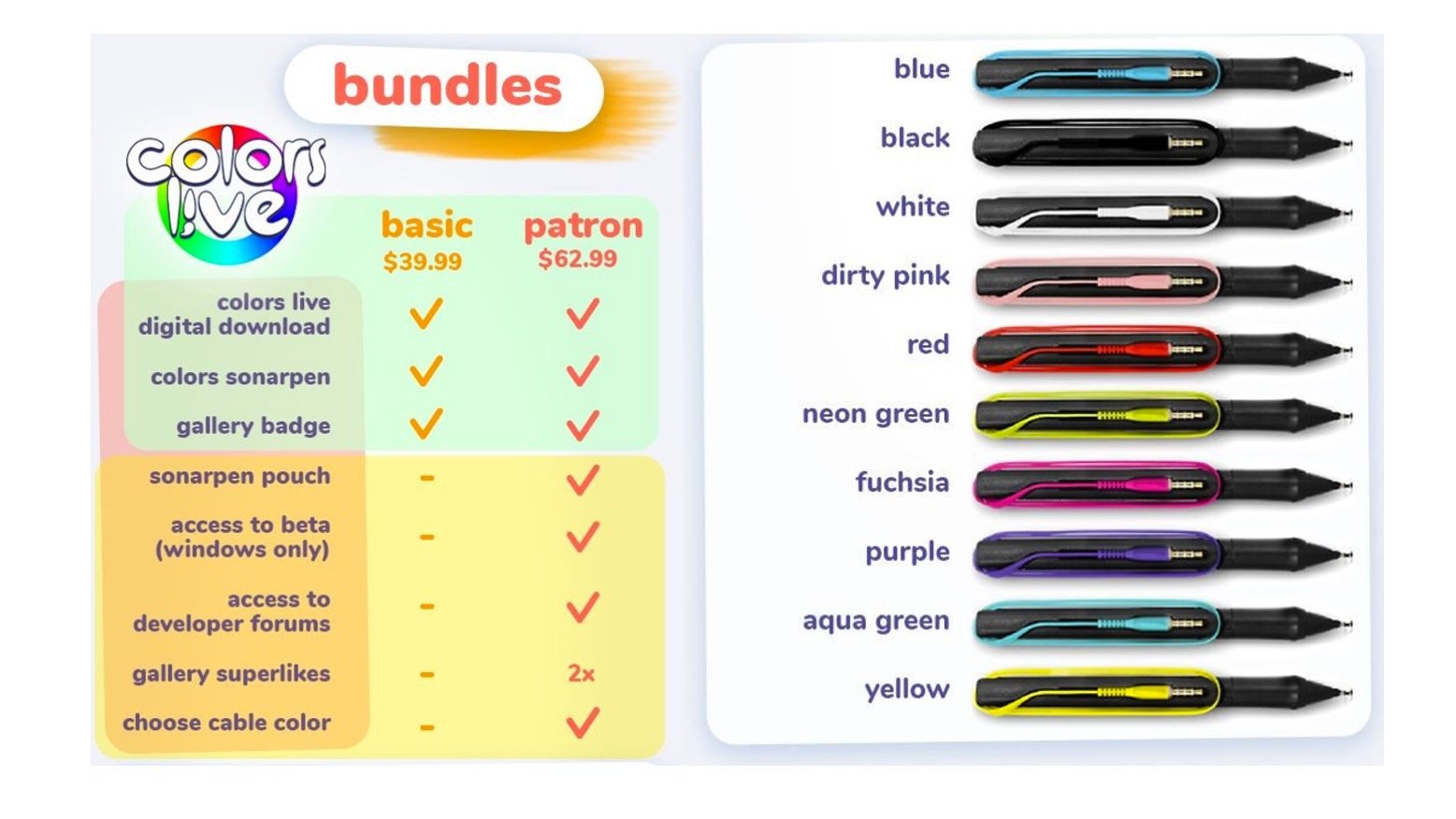
The team behind the game has opened pre-orders on its very own store via Gamefound. There are two different options to choose from: a $39.99 Basic Pre-Order Bundle which includes a digital copy of the game, the SonarPen, and an in-game badge, or the $62.99 Patron Pre-Order Bundle which throws in plenty of in-game extras, a pouch for your pen, access to a beta, and a choice of pen colour.
Your SonarPen will be shipped out to you when the game launches this summer, and you’ll receive a digital game code via email which can be redeemed on the Switch eShop once the software goes live.
Posted by: xSicKxBot - 07-19-2020, 03:33 AM - Forum: Lounge
- No Replies
MLB Parks Will Use Crowd Noises From MLB The Show
Major League Baseball is starting up next week, but the players will be in empty stadiums due to the ongoing coronavirus pandemic. They'll still get to hear the roar of the crowd, though, as stadium engineers have rigged up the system to play sounds from MLB The Show.
ESPN reports that engineers have set about 75 different effects and reactions, so players can get a big reaction when they score a home run or simulated disappointment when they strikeout. The sounds are borrowed from Sony's San Diego Studios, which has been capturing the sounds over the course of several baseball seasons. The move imitates one that European soccer leagues have used with the FIFA series.
MLB executive vice president for strategy Chris Marinak said they made sure the sounds would be able to match the game's action, so that it wouldn't be distracting.
Our focus this week is someone who has been a part of the Destiny community since the beginning. Alongside her friends and clanmates, she enjoys playing Crucible, raiding, and everything in between. She keeps the mood chill in her stream and concentrates on enjoying the good times.
Please meet Chibikim.
Welcome! Please tell us a little bit about yourself and what first got you into gaming.
Chibikim: My name is Chibikim (or Chibi as my friends call me), and I’m from Chicago, Illinois. When I’m not watching anime, bad movies, or gardening, you’ll find me playing Destiny with friends on PC or console. What first got me into gaming was playing Super Mario Bros. for the first time with my sister on the Nintendo as a kid. Chrono Trigger for the SNES is still my personal favorite.
When I got into college, I got more involved in RPGs and playing a lot of fighting games such as Street Fighter. I was about to get into the fighting tourney scene until I saw Destiny at E3 and was just blown away at how gorgeous it looked and how you could interact with players from all over the world.
Glad you chose to go with Destiny, but we have to know – who did you main in Street Fighter?
Chibikim: My favorite Street Fighter character was Chun Li. I really loved her design in the Alpha series. She wore a modified qipao (Chinese dress), with the white classic boots so she can pull off her devastating leg moves, and her finisher, the spinning bird kick. She’s strong, athletic, graceful, and powerful. She showed that you can be beautiful and kick ass at the same time. I still look up to her and Ikora at the same time as powerful women who have made a big impact on my life in gaming.
When did you first start playing Destiny and what made you decide to start becoming active in the community?
Chibikim: I first started playing Destiny when it came out for the PlayStation 4 on September 9. I remember it well because I took some time off to play the game. I was so entranced with the beauty of it and how you could travel to different planets, explore, and ride around in a Sparrow. The fantasy element was incredible too. I started to get more active in the Destiny community around late June in 2017.
Before the game came out, I struggled with personal interaction. Talking to people always made me feel uncomfortable. Destiny helped me come out of my shell. I started playing online and I made a lot of friends through Twitch and Twitter that were deeply involved in the game. It was then that I started to open up more and became more involved in the community itself. As a result, I joined Team Resolute on August 29, 2017, just a few weeks before Destiny 2 came out. I never thought a game like Destiny would help me open up and bring out my true personality that I was hiding all this time.
It’s always nice hearing about Destiny can help people make more friends. What has been your most memorable Destiny moment over the last few years?
Chibikim: It was losing Cayde-6 in Forsaken. I remember watching the Destiny 2 trailer at E3 and I saw a beaten down Cayde-6. I was shocked at what happened to him, [and then] I saw Uldren pull the trigger. The next thing I knew, Twitter exploded and there was confusion as to whether he lived or not. I was saying to myself “Man, he’s not dead. Maybe he’ll pull through.” Cayde’s death stunned me so much because he always made you smile when times were bleak, especially during the Red War. To this day, that Forsaken trailer was the biggest moment in my life I will never forget. It was dynamic.
That was a heavy moment we knew would hit the community hard. It was fun watching everyone plan their revenge. What has been your favorite subclass and weapons to wield against minions of the darkness?
Chibikim: I was a Titan main, but now I’m loving Warlock! Dawnblade is my favorite super. I love Icarus Dash a lot. As far as weapons go, I love The Jade Rabbit, Not Forgotten, Claws of the Wolf, Jack, King Queen 3, and Suros Regime (I love the spinning up sound).
You and DeeJ share and affinity for the mighty Suros Regime. Tell us about your channel and what kind of content can we find there.
Chibikim: My channel is just me playing with friends, be it in the Crucible, raids, or special events. Expect a lot of laughs. I keep it chill and relaxed. I just play to have fun. Winning or losing in Crucible doesn’t matter to me. I try to make the viewer understand that it’s OK to lose. You’re not going to win all the time and in the end it’s just a game.
I’m not the best player in the world and I’m OK with that because I enjoy being with my fireteam and having a great time. I also love interacting with the viewer as well because I’m all about keeping the community healthy and enjoyable!
You can’t win them all, that is for sure. Where can we find you on the internet?
Big shout to Chibikim for taking the time to share a bit about herself and her Destiny experiences. It’s always fun getting to know someone from the community. Stop by her channel and say hi.
We will have a new Community Focus soon. I believe Dmg has an artist coming up. If you have any suggestions on who else we should focus on let us know us on Twitter or our forums.



 in GalaCredit!