Paper Mario: The Origami King Leaked Online Ahead Of Next Week’s Release
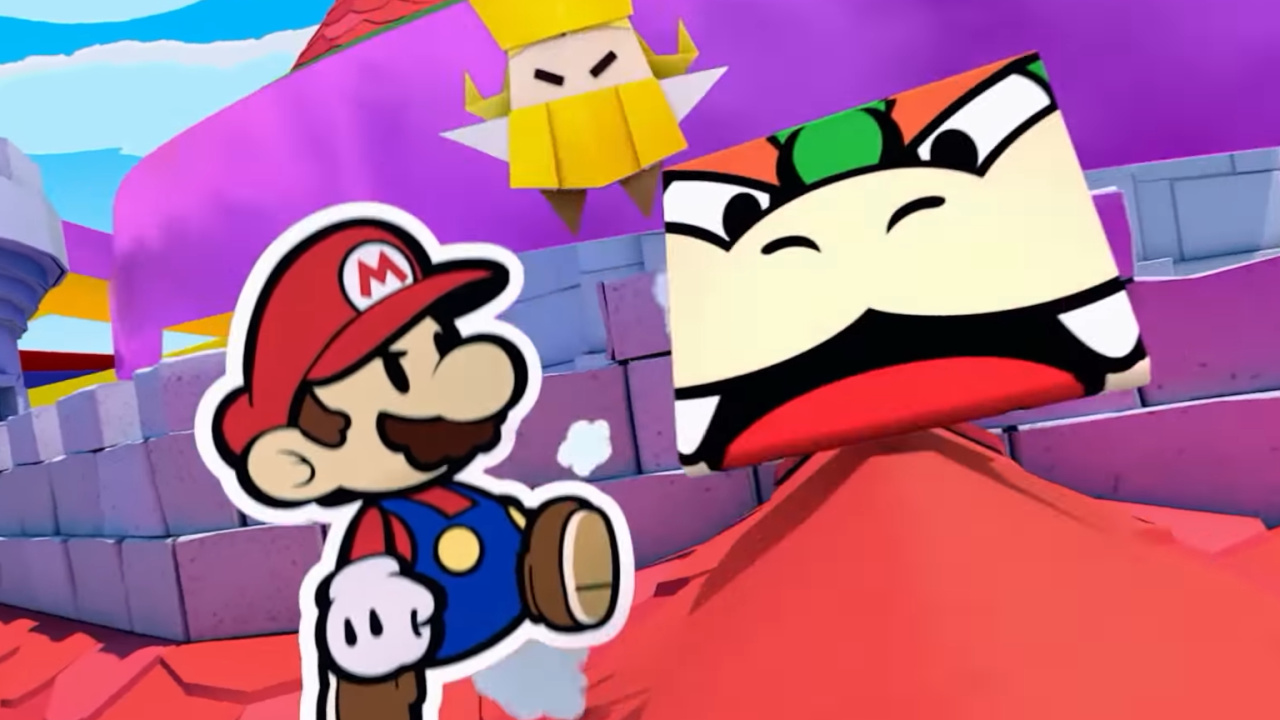
Oh no, Paper Mario: The Origami King has been leaked online less than a week out from its official release. This has been confirmed by a well-known dataminer over on Twitter, who is now sifting through the Switch game’s files.
Gaming Reinvented adds to this – revealing how late-game content is already circulating on the worldwide web:
“We’ve checked and found what seems to be spoilers for the final boss, as well as the last dungeon of the game and various other late game content.”
There’s also footage being uploaded to streaming platforms, so you might want to avoid using any search terms related to Paper Mario.
Surprisingly, this isn’t the first time a Paper Mario game has been leaked. Nintendo accidentally made Paper Mario: Color Splash available on the Wii U eShop two weeks ahead of schedule back in 2016.
If you’d like to see direct footage of Paper Mario: The Origami King – we advise you stick to Nintendo’s Treehouse broadcast, which aired on its YouTube channel yesterday.
Far Cry 6 Brings Back A Voiced Protagonist, But With A Few Twists
Far Cry 6 is the next game in Ubisoft's open-world shooter franchise. While Far Cry 5 brought the series to North America for the first time, and with its follow-up New Dawn taking a surprising turn towards the post-apocalypse, Far Cry 6 brings the series back to its roots in a tropical locale. This return to the series' roots also brings back a kind of protagonist who has more of a personal stake in the story, and FC6's lead character will be more present and visible throughout the campaign.
Revealed during Ubisoft Forward, the protagonist of Far Cry 6 is Dani Rojas, is a native of the island of Yara--a country "frozen in time" due to economic sanctions. With the rise of a guerrilla revolution in the country, Rojas gets swept up in the push for change against Presidente Anton Castillo's regime. Unlike other Far Cry protagonists who are outsiders making their way through a foreign land, Rojas has deep ties to the island, making their investment in its future more personal.
Taking cues from Assassin's Creed Odyssey and Valhalla, players can choose from either a male or female version of Dani, and both will be fully voiced throughout the campaign. Furthermore, Dani Rojas will also appear in cutscenes interacting with other characters throughout the game, moving away from the first-person dialogue sequences and making the protagonist more visible.
Posted by: xSicKxBot - 07-13-2020, 08:28 AM - Forum: Python
- No Replies
Python One Line X
This is a running document in which I’ll answer all questions regarding the single line of Python code. If you want to check out my book “Python One-Liners” and become a one-liner wizard—be my guest!
Let’s get started!
Python One Line If Without Else
Python One Line If Else
Python One Line Elif
Python One Line Function
Python One Line For Loop
Python One Line For Loop If
Python One Line For Loop Lambda
Python One Line While Loop
Python One Line HTTP Web Server
Want to create your own webserver in a single line of Python code? No problem, just use this command in your shell:
$ python -m http.server 8000
The terminal will tell you:
Serving HTTP on 0.0.0.0 port 8000
To shut down your webserver, kill the Python program with CTRL+c.
This works if you’ve Python 3 installed on your system. To check your version, use the command python --version in your shell.
You can run this command in your Windows Powershell, Win Command Line, MacOS Terminal, or Linux Bash Script.
You can see in the screenshot that the server runs on your local host listening on port 8000 (the standard HTTP port to serve web requests).
Note: The IP address is NOT 0.0.0.0—this is an often-confused mistake by many readers. Instead, your webserver listens at your “local” IP address 127.0.0.1 on port 8000. Thus, only web requests issued on your computer will arrive at this port. The webserver is NOT visible to the outside world.
Python 2: To run the same simple webserver on Python 2, you need to use another command using SimpleHTTPServerinstead of http:
$ python -m SimpleHTTPServer 8000

Serving HTTP on 0.0.0.0 port 8000 ...
If you want to start your webserver from within your Python script, no problem:
import http.server

import socketserver PORT = 8000 Handler = http.server.SimpleHTTPRequestHandler with socketserver.TCPServer(("", PORT), Handler) as httpd: print("serving at port", PORT) httpd.serve_forever()
You can execute this in our online Python browser (yes, you’re creating a local webserver in the browser—how cool is that)!
This code comes from the official Python documentation—feel free to read more if you’re interested in setting up the server (most of the code is relatively self-explanatory).
In this one-liner tutorial, you’ll learn about the popular sorting algorithm Quicksort. Surprisingly, a single line of Python code is all you need to write the Quicksort algorithm!
Problem: Given a list of numerical values (integer or float). Sort the list in a single line of Python code using the popular Quicksort algorithm!
Example: You have list [4, 2, 1, 42, 3]. You want to sort the list in ascending order to obtain the new list [1, 2, 3, 4, 42].
Short answer: The following one-liner solution sorts the list recursively using the Quicksort algorithm:
q = lambda l: q([x for x in l[1:] if x <= l[0]]) + [l[0]] + q([x for x in l if x > l[0]]) if l else []
You can try it yourself using the following interactive code shell:
Now, let’s dive into some details!
The following introduction is based on my new book “Python One-Liners”(Amazon Link) that teaches you the power of the single line of code (use it wisely)!
Introduction: Quicksort is not only a popular question in many code interviews – asked by Google, Facebook, and Amazon – but also a practical sorting algorithm that is fast, concise, and readable. Because of its beauty, you won’t find many introduction to algorithm classes which don’t discuss the Quicksort algorithm.
Overview: Quicksort sorts a list by recursively dividing the big problem (sorting the list) into smaller problems (sorting two smaller lists) and combining the solutions from the smaller problems in a way that it solves the big problem. In order to solve each smaller problem, the same strategy is used recursively: the smaller problems are divided into even smaller subproblems, solved separately, and combined. Because of this strategy, Quicksort belongs to the class of “Divide and Conquer” algorithms.
Algorithm: The main idea of Quicksort is to select a pivot element and then placing all elements that are larger or equal than the pivot element to the right and all elements that are smaller than the pivot element to the left. Now, you have divided the big problem of sorting the list into two smaller subproblems: sorting the right and the left partition of the list. What you do now is to repeat this procedure recursively until you obtain a list with zero elements. This list is already sorted, so the recursion terminates.
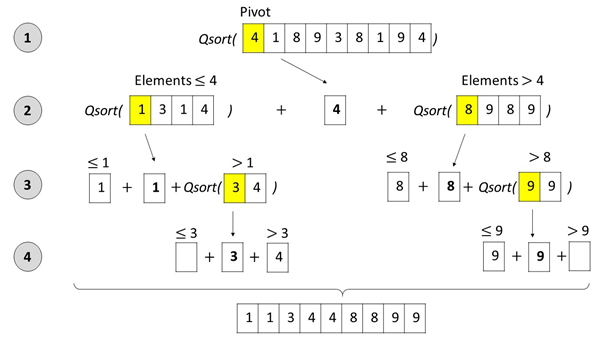
The following Figure shows the Quicksort algorithm in action:
Figure: The Quicksort algorithm selects a pivot element, splits up the list into (i) an unsorted sublist with all elements that are smaller or equal than the pivot, and (ii) an unsorted sublist with all elements that are larger than the pivot. Next, the Quicksort algorithm is called recursively on the two unsorted sublists to sort them. As soon as the sublists contain maximally one element, they are sorted by definition – the recursion ends. At every recursion level, the three sublists (left, pivot, right) are concatenated before the resulting list is handed to the higher recursion level.
You create a function q which implements the Quicksort algorithm in a single line of Python code – and thus sorts any argument given as a list of integers.
## The Data

unsorted = [33, 2, 3, 45, 6, 54, 33] ## The One-Liner

q = lambda l: q([x for x in l[1:] if x <= l[0]]) + [l[0]] + q([x for x in l if x > l[0]]) if l else [] ## The Result

print(q(unsorted))
What is the output of this code?
## The Result

print(q(unsorted))

# [2, 3, 6, 33, 33, 45, 54]
Python One Line With Statement
Python One Line Exception Handling
Python One Line Try Except
Python One Line Execute
Python One Line Reverse Shell
Python One Line Read File
Python One Line Return If
Python One Line Regex Match
Python One Line Recursion
Python One Line Regex
Python One Line Read File to List
Python One Line Read Stdin
Python One Line Replace
Python One Line Ternary
Ternary (from Latin ternarius) is an adjective meaning “composed of three items”. (source) So, literally, the ternary operator in Python is composed of three operands.
Syntax: The three operands are written in an intuitive combination ... if ... else ....
<On True> if <Condition> else <On False>
Operand
Description
<On True>
The return expression of the operator in case the condition evaluates to True
<Condition>
The condition that determines whether to return the <On True> or the <On False> branch.
<On False>
The return expression of the operator in case the condition evaluates to False
Operands of the Ternary Operator
Let’s have a look at a minimum example in our interactive code shell:
Exercise: Run the code and input your age. What’s the output? Run the code again and try to change the output!
The 196th GalaQuiz will be LIVE soon, win up to $50 in GalaCredit!
[www.indiegala.com] The GalaQuiz will take place in less than 15 minutes from this announcement Today's GalaQuiz[www.indiegala.com] hints are up. The theme will be Famous Duets.
Watch Dogs 2 Part 2: Watch Harder - Free Uplay Game
So after the spectacular disaster of the streaming service Ubisoft provided from their site, i have made another announcement to tag people again so you can officially claim the game here:
It should work this time, i claimed it myself and the page was fully responsive this time without log-in issues. There might STILL be issues with the game not appearing in the library, could again be traffic issues from the site and hasn't updated yet.
Core, a game development platform by Manticore Games (previous hands-on here), have just announced a pilot program enabling game developers to get paid for their game creations. Core is built on top of the Unreal game engine and provides you everything you need to create your own games. Details of the pilot payment program from the Manticore blog:
We designed the Creator Payouts Pilot Program around one simple concept: the more people play your game, the more you should get paid.
Each calendar month, creators in the program can receive $3 per average daily player. This will be calculated by taking the daily number of unique users who log into your games and averaging them across that month.
This means that if you have 500 unique users log into your games every day (they do not need to be the same players) you could receive $1,500 after the end of the month. If you average 1,000 users, you could receive $3,000. If you average 10,000 … you get the idea.
We chose this system because we want creators to be unified in the mission of making fun games and bringing new players to Core. You don’t need to manage subscriptions or design a vast catalog of microtransactions. Instead, the only thing you need to focus on is making great games that attract and retain players. The more players you and your fellow creators bring in, the more money you could make.
During the pilot, spots are limited for the chance to monetize your Core creations. If you are interested in getting in the pilot, you need the fill out this form. Be sure to check out the terms and conditions and the FAQ. Check out the video below for more details.
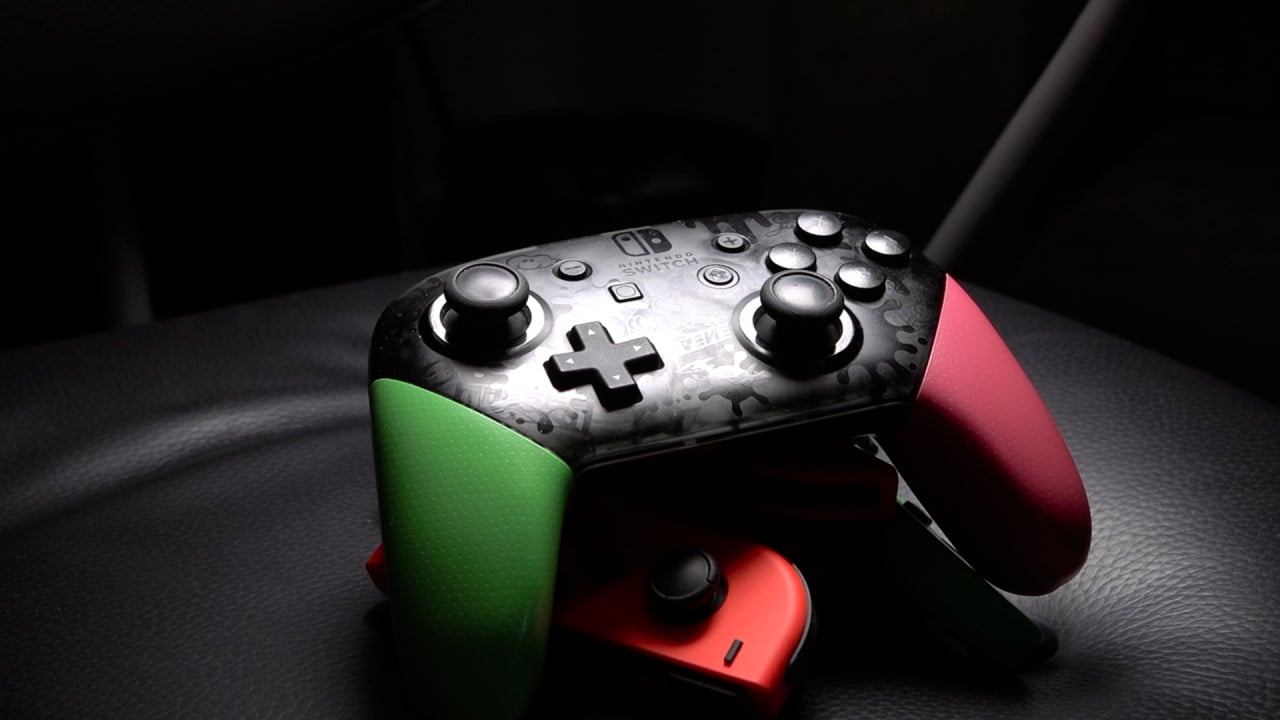
Guide: How To Fix A Drifting Nintendo Switch Pro Controller
If your in-game character is moving when you’re not touching the left stick, or your aiming is slow or limited in one or more directions, you could well be suffering from something called ‘stick drift’ or just ‘drifting’. This is when something’s gone coco in your controller’s analogue stick, and it’s not functioning like the reliable potentiometer that it should be.
Drifting is a problem that is undeniably common in the Switch’s Joy-Con, but it can also affect Pro Controllers as well. That’s not to say Nintendo’s products are cheap or shoddy universally; drift is an issue that can affect any controller on the market – even the mighty Xbox One Elite Controller isn’t safe. We already have a guide up on how to fix drifting Joy-Con if you need it, but the same rules don’t completely apply to the Pro Controller.
Although the steps detailed below are simple and not tremendously challenging, we do have to state that you follow this guide at your own risk, we cannot take responsibility for any whoopsies that may occur.
Guide: How To Fix A Drifting Nintendo Switch Pro Controller
Calibrating
First things first, and we know this may seem obvious to some, but it’s only obvious if you know. You want to go into your Switch’s settings menu and recalibrate the offending stick – it’s usually the left stick but we aren’t here to judge.
Go to the Home Menu, navigate down to System Settings, scroll all the way down to the bottom of the left menu and select Controllers and Sensors.
Scroll down on the right hand part of the screen and select Calibrate Control Sticks because we’re planning to do just that. A little popup menu will let you know that any button mapping changes you may have made will be temporarily disabled; just select OK.
You’ll then need to click in the stick that’s been drifting. You’ll then be presented with a screen that shows how the console interprets the stick movement; rotate the stick on its axis, flick it around, generally get a feel for how it’s behaving.
Also be sure to leave it alone for a time. If the crosshair moves without you doing anything (however little), if you’re unable to make a clean, smooth 360º rotation, or if it doesn’t even want to move all the way to the edge in some areas, you’ve got a problem. Thankfully you’re in the right place to sort it out.
Press the X button to enter calibration and follow the onscreen instructions as best as you can. Once that’s complete run through the same tests we mentioned earlier like flicking the stick and rotating it. If the issue no longer presents itself you’re one of the mega lucky ones, and you don’t need to do anything more. If you’re still seeing problems however, you’re going to need to get a bit more technical.
Cleaning the Stick
If you’re still stuck in a drifting pickle, you’ll need to get a few supplies, namely these:
Small Phillips Head Screwdriver (long-necked)
Compressed Air
Contact Cleaner
You’ll need to disassemble the Pro Controller to a degree in order to effectively clean it, as unlike the Joy-Con there’s no rubber skirt you can pull up to access the stick’s internals. Don’t worry, if you click this link it will take you right to the part of our handy guide video that should help you out if you’re not sure what to do or where, but it’s a fairly simple procedure as long as you pay attention to which screws come from where, and make sure you don’t lose any. Seriously.
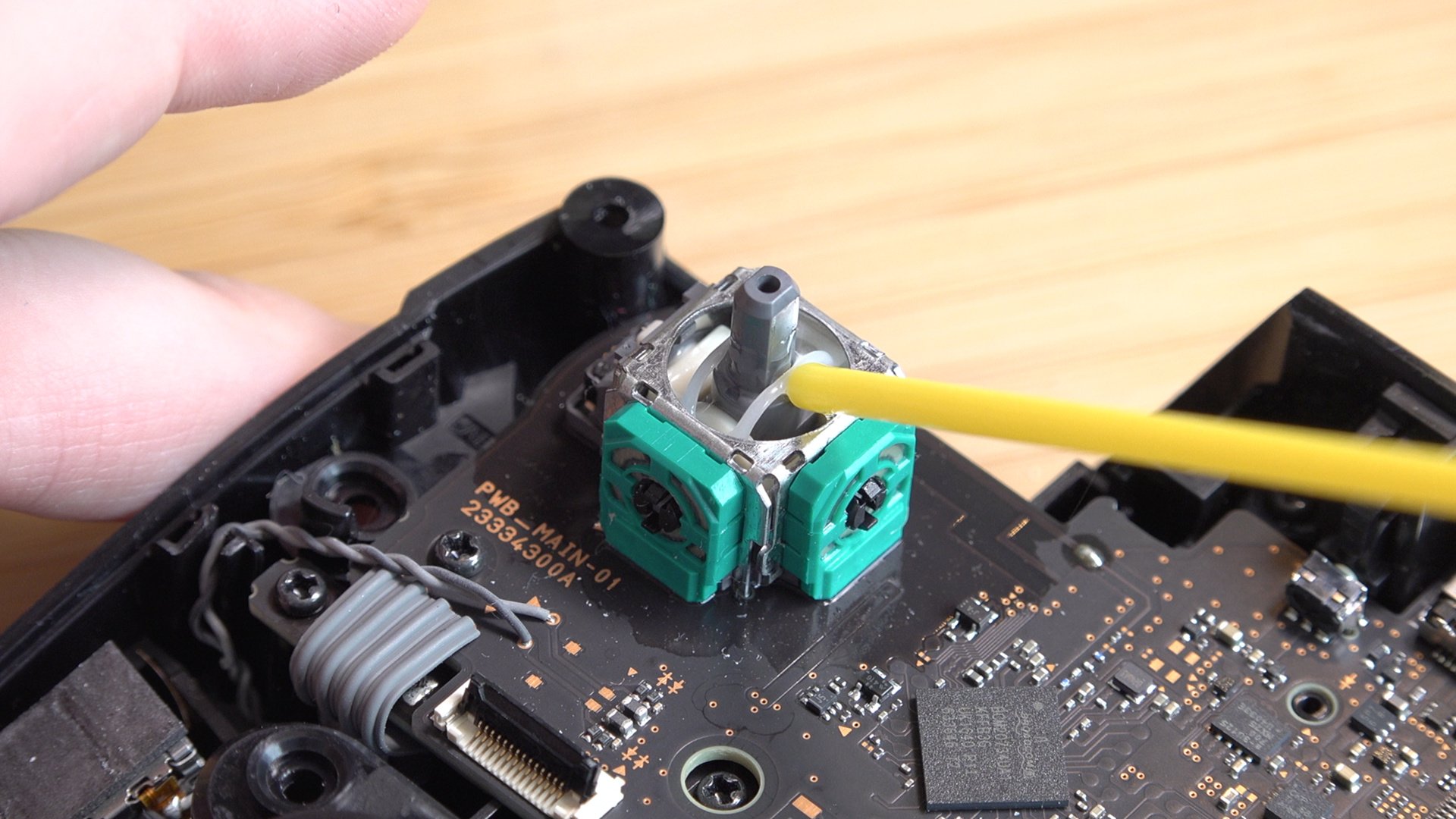
Once it’s open you’ll be able to access the problem stick’s internal gubbins and have a proper look at what’s going on. In all likelihood you’re going to see dust, debris, hair, the usual suspects for why precise electronics aren’t cutting the proverbial mustard. Grab your handy can of compressed air and blast these intrusive bits of rubbish out of your precious equipment. Make sure you follow the instructions on the can of compressed air that you have, as some contain a liquid that may potentially damage your controller. Follow the instructions, and don’t go being a silly sausage now you hear?
Once you’ve got out as much as you can, it’s time to whack out that contact cleaner. Spray the area underneath the plastic stick cap generously but carefully; you want to coat it but not drown it. Give the stick a general wiggle to make sure the cleaner gets in and around everywhere it needs to, and don’t be afraid if it feels like the stick is catching in places, that’s just because the faceplate of the controller usually stops it from moving this far. Be gentle, but be firm.
Wait for a few minutes and repeat the process, feeling free to apply and rotate at the same time if you like, as long as you don’t put too much on as we said before. You can repeat the process again if you like, but it likely isn’t necessary.
Once you’ve applied the final dousing of cleaning, wait a good ten minutes with the controller in a well-ventilated area to make sure it’s all lovely and dry in there before putting it back together.
Now put it back together.
Return to the Stick Calibration screen and test out your newly cleaned stick. Still not working perfectly? Don’t worry, a quick recalibration just like before should solve any woes that may befall you.
Once you’ve completed that you should now have a fully-working Pro Controller again, unless there was something else wrong with it like the A button had melted. Hooray!
Still not Working?
It’s possible to replace the analogue sticks in a Pro Controller, but we’re not really happy to recommend that; the sticks are soldered in place which may seem trivial to some, but there’s too much that can go wrong with a soldering iron for us to feel comfortable taking you through that, nor the process of ordering replacement sticks.
Clockwise from top left: 1) Pączki. 2) Cobweb. 3) Nintendo Switch Pro Controller.
In that case your only other option is to get in touch with Nintendo directly and discuss repairing the controller with them. It’s possible you may be charged for a repair depending on various circumstances, so be prepared to cough up a bit to get back on the Pro Controller train.
Has this guide helped at all? Let us know in the comments below.
This Sealed Copy Of Super Mario Bros. Just Sold For $114,000
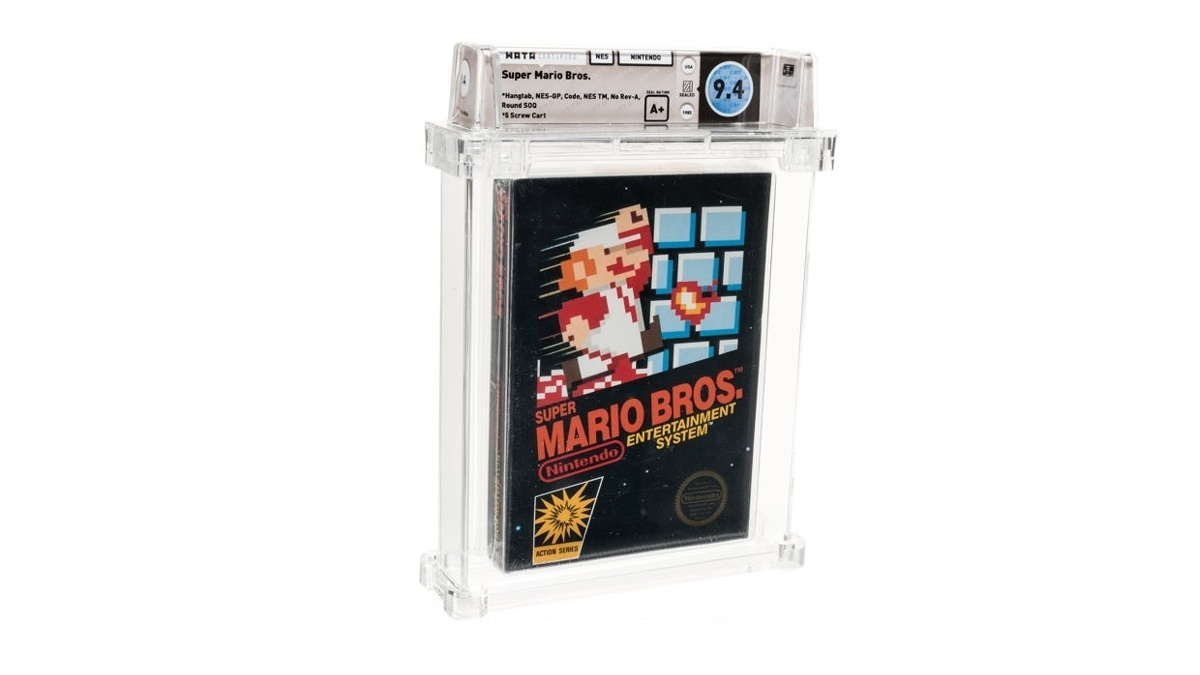
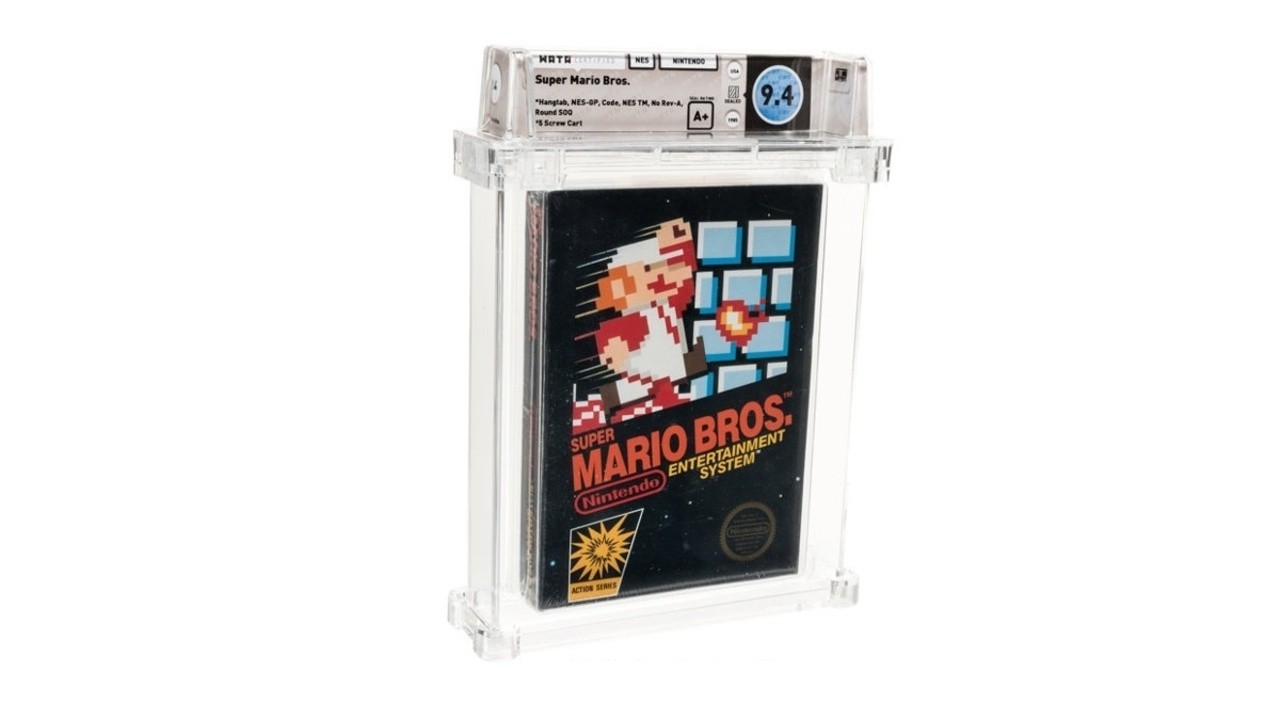
Remember when a super rare sticker sealed copy of Super Mario Bros. on NES sold for $100,150 USD last February? Well, another copy of the exact same game (in a similar condition) has now broken this record – going for the sum of $114,000 USD (this roughly equates to £90,000). That makes this particular copy the most expensive video game ever sold.
Why exactly did this US retail version go for more, you ask? Apart from its sealed state and 9.4 out of 10 grade, it’s all to do with the cardboard hangtabs. Heritage Auctions explains the appeal and history of these variants underneath the listing:
What’s the deal with cardboard hangtabs? one may, understandably, wonder.
Cardboard hangtabs were originally used on the US test market copies of black box games, back before plastic was used to seal each game. As Nintendo began to further establish their company in the US, their packaging was updated almost continuously. Strangely, the addition of the plastic wrap came before the box cutting die was altered to remove the cardboard hangtab. This rendered the functionality of the cardboard hangtab completely useless, since it was under the plastic seal.
There are four sub-variants of the plastic sealed cardboard hangtab box (this particular copy of Super Mario Bros. being the “3 Code” variant) that were produced within the span of one year. Each sub-variant of the cardboard hangtab black box, produced within that timeframe, had a production period of just a few months; a drop in the bucket compared to the title’s overall production run.
In short, a cardboard hangtab copy of any early Nintendo Entertainment System game brings a certain air of “vintage” unrivaled by its successors.
Part of the interest is also the fact it’s a copy of Super Mario Bros. – an iconic game from 1985 that’s sold more than 40 million copies worldwide and happens to be the highest-selling NES game of all time. The winner of this latest auction wishes to remain anonymous – fingers crossed it’s going to a collector’s home.
If you would like to revisit the original Super Mario Bros. release, but don’t fancy forking out 100k or don’t have access to an original copy of the game, the good news it’s playable on Nintendo’s Switch Online subscription service.
Posted by: xSicKxBot - 07-13-2020, 03:52 AM - Forum: Lounge
- No Replies
Hyper Scape Open Beta Now Live On PC
Ubisoft devoted a portion of today's Ubisoft Forward presentation to talking about its new sci-fi battle royal shooter, Hyper Scape. While the company did not yet confirm a release date, it did announce that it is opening up its ongoing Hyper Scape beta today, July 12.
The Hyper Scape beta is now open to all players on PC. You can download and jump into the beta right now for free from Ubisoft's Uplay store. In addition to announcing the open beta, Ubisoft released a new trailer for Hyper Scape that shares more details on the game's world; you can check that out below.
Coinciding with the launch of the open beta, Ubisoft has introduced a new weapon to the game: the Harpy, an SMG that the publisher says "excels in close-to-mid-quarters combat." A new hack, the Shockwave, is also now available in the game. This one launches an AOE blast that can knock other players away.






 in GalaCredit!