Yacht Club Is Seeking A Gameplay Programmer For A New 3D Project
Earlier this year, Yacht Club games revealed it would be moving on from Shovel Knight‘s original outing after six years of development. Although the company hasn’t made any official announcements yet, at least one project in the pipeline seems to be 3D.
Gamasutra’s Job Board has issued a reminder of this – advertising a position for a mid-senior gameplay programmer at Yacht Club Games.
Yacht Club Games is working on a new 3D project and is building out our 3D team (and custom engine) to complement our existing 2D team. We are on the lookout to hire a capable mid to senior level gameplay programmer with a desire to build great gameplay experiences in a small, team-centered environment!
This same job listing originally appeared on the Yacht Club Games’ website at the end of last year (thanks, Nintendo Enthusiast). Notably, Yacht Club is “building out” its 3D team and “custom engine” to help complement its existing 2D team.
In February of this year, director Sean Velasco said the team had begun internal development on two new projects – and teased a brand new IP that was sure to interest fans of Shovel Knight. Prior to this, in an interview with GamesBeat, Velasco said a 3D game was the next “logical step” for Yacht Club.
“We love 3D action games. We want to make a big 3D game at some point. But in order to make a big 3D game, I think first you have to make a small 3D game. Or just something that’s smaller, some kind of in-between.”
Would you be interested in a 3D game from Yacht Club? Share your thoughts down below.
First, we have Watch Dogs 2, the highly-regarded hack-'em-up that lets you manipulate traffic lights and pilot RC cars all over San Francisco. Second, there's Street Fighter V, the latest entry in the genre-defining fighting game series. Third is Hello Neighbor, a stealth-horror game about sneaking into your strange neighbor's house.
Sony has been expanding its PS Now offerings in recent months, as Microsoft's similar Xbox Game Service continues to grow. PS Now is a similar subscription model that allows you to stream or download games, which makes the games also playable on PC. It comes in at $10 a month. PS Now is not to be confused with PlayStation Plus, a monthly subscription that allows players to utilize online multiplayer, which also comes with several free games per month. The free PS Plus games for July are Rise of the Tomb Raider, NBA 2K20, and the acclaimed narrative game Erica.
Create a List of Random Numbers — The Most Pythonic Way
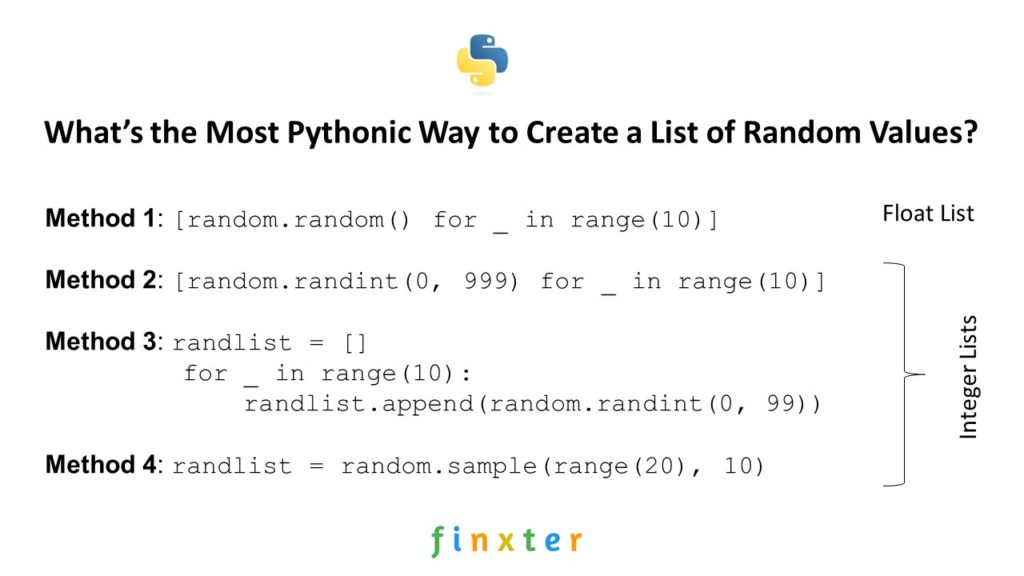
Do you want to initialize a list with some random numbers? In this article, I’ll show you four different way of accomplishing this—along with a short discussion about “the most Pythonic way”.
Problem: Given an integer n. Create a list of n elements in a certain interval (example interval: [0, 20]).
Then, you create a list of random floats by repeatedly calling random.random() that generates a random float number between 0 and 1 each time it is called.
You call it ten times as defined in the context part for _ in range(10). Note that the underscore serves as a “throw-away” variable as you don’t actually need it to create the list.
Also note that the list comprehension statement evaluates the expression multiple times—and not only once in the beginning. That’s why all the numbers in the list are different.
You can easily extend the creation of floats in a larger interval by multiplying the randomly created float with a constant: [random.random() * 999 for _ in range(10)] would create a list of random floats in the interval [0, 999].
If you struggle with understanding list comprehension, watch my explainer video:
Using list comprehension to generate a list of random numbers is readable, concise, and efficient. Were it not for the fourth method, I’d consider this to be the most Pythonic way to create a list of random floats.
Method 2: List Comprehension to Random Integer List [0, 999]
Just for the sake of completeness, here’s the list comprehension statement that creates a list of random integers in the interval [0, 999]:
# Method 2: List Comprehension Random Int List [0, 999]

import random

randlist = [random.randint(0, 999) for _ in range(10)]
You use the random.randint(0, 999) function to create a random integer value between start value 0 and end value 999, so all created integers are in the interval [0, 999].
This is a very Pythonic and readable way to create a list of random integers. You can stop reading right away and use it in your own code.
Method 3: For Loop Random Int List [0, 99]
An alternative that’s often used by non-Python coders is to use a simple for loop that does the same thing as list comprehension (but demanding more space):
# Method 3: For Loop Random Int List [0, 99]

import random

randlist = []

for _ in range(10): randlist.append(random.randint(0, 99))
Again, you use the throw-away underscore variable as the random number is not a function of a loop variable. Each two calls to the random.randint() function are independent.
I’d consider this the least Pythonic way to solve this problem.
Method 4: random.sample()
Finally, we arrive at the most Pythonic way to solve this problem: stand on the shoulders of giants and use existing built-in functionality. The random.sample() method takes a “universe” from which the random numbers are drawn and a list size n—and draws n random numbers from your universe.
# Method 4: random.sample()

import random

# Generate 10 random numbers between 0 and 20 (included)

randlist = random.sample(range(20), 10)
You use the universe range(20) of the first 20 integer numbers 0, …, 19 and draw 10 random elements from the universe. Note that per default, no duplicates are allowed. If the universe is small than the list size n, an error is thrown:
ValueError: Sample larger than population or is negative
Discussion
In this tutorial, you’ve learned four methods to solve the problem of creating a list of random numbers. Objectively, the most Pythonic way to accomplish this is the fourth method: use the random.sample() function as it’s implemented to do exactly this.
But subjectively, I’d use the first or second method based on list comprehension to create a list of random floats or integers.
Why? Because I’m lazy and knowing the random.random() and random.randint() functions is already enough to solve the problem effectively. In practice, I don’t want to waste too much energy trying to remember code functions that do neither improve readability, nor efficiency of my code.
Where to Go From Here?
Enough theory, let’s get some practice!
To become successful in coding, you need to get out there and solve real problems for real people. That’s how you can become a six-figure earner easily. And that’s how you polish the skills you really need in practice. After all, what’s the use of learning theory that nobody ever needs?
Practice projects is how you sharpen your saw in coding!
Do you want to become a code master by focusing on practical code projects that actually earn you money and solve problems for people?
Then become a Python freelance developer! It’s the best way of approaching the task of improving your Python skills—even if you are a complete beginner.
[www.indiegala.com] Awesome Summer days await you with the IndieGala Scratchy Summer Sale. Get huge discounts on your favourite games + a Scratch Card with a secret Steam game in it!
Posted by: xSicKxBot - 07-07-2020, 01:23 PM - Forum: Windows
- No Replies
‘I’m bored!’ Virtual summer camps to the rescue
First things first: Do what works for you.
No one knows your child’s needs like you do, so try mixing and matching activities to make a schedule that works for you. This weekly schedule comes filled with activity ideas, and you can customize it to fit your needs. We’ve also listed some free and paid programs that can help fill the time and keep your kids occupied—but try adding in other activities that are tried-and-true favorites for your family.
Team up for success.
Planning everything can be tiring, so try partnering with other parents and guardians and have each person gather activities for a set day of the week. Then share what you’ve found, like printables, activity ideas, crafts, and more.
Consider themed days.
Brainstorming activity ideas can be tricky, but picking a theme for certain days can help streamline the process and kickstart your creativity. Need ideas? This customizable schedule has a few to get you started.
Browse free activities from Microsoft.
From fun learning to creative projects to family activities, these ideas can help keep kids busy and engaged.
Check out virtual summer camps.
These camp and online learning ideas span age ranges, with free and paid options, all with a focus on keeping summer full of fun.
Age 3-18
Outschool Summer Camp—Feed your kid’s curiosity and elevate their summer with a variety of fun classes where they can learn with peers in live video classes that meet in small groups. From subjects like reading, writing, and math, to the history of comics, spy school, hand-sewing, and Star Wars tech, they’ll find something to keep them engaged. The inspiring teachers consist of professional educators, artists, scientists, and adults with an expertise to share. Class prices vary and start at $5/class.
Camp Wonderopolis—Kids get hands-on with cool experiments that exercise their mind and body. Build vocabulary, background knowledge in science, reading comprehension, critical thinking, and other literacy skills along the way. Whether you register as a Camper (kids of all ages) or Counselor (parents, community and library program staff, teachers), you’ll find appropriate activities for you. Free
Age 4+
Epic!—Explore this digital library with resources for kids under 12. Get instant access to over 40,000 of the best books, learning videos, quizzes, and more, including fiction and nonfiction titles. Try free for 30 days. Afterward, unlimited access is $7.99/month.
DIY.org—Search this huge library of hands-on projects, how-to videos, and an awesome kid community. DIY.org has a variety of courses for any skill level, across 50 different categories that include photography, drawing, science, Minecraft, music, Legos, cooking, inventions, and more. Kids earn badges while they learn new skills. Activities range from simply watching fun videos to teaching and inspiring other kids. Try free for 14 days, give as a gift, or buy for yourself. The cost is $15-25/month depending on the number of kids and your billing preferences.
Kanopy—Access Kanopy with your library card for a free way to watch thousands of films, TV series, animated books, and educational content—all without ads. You can check out up to 10 titles per month, with three days to watch each. Plus, get Kanopy Kids for unlimited age-appropriate shows and movies with access to parental controls. Free. If your library isn’t on Kanopy, the app helps you send a request.
Age 8-15
Age 14+
BBC micro:bit—Create, learn, and code with the pocket-sized computer that’s transforming the world. Do quick projects in MakeCode, Python, and Scratch to help you get the most out of the micro:bit’s features or tackle design challenges and work to save the planet with technology. Micro:bit cost can vary. Free projects and lessons available at microbit.org.
CreativeLive—Browse this collection of educational video courses with content ranging from photography, flower arranging, mixed-media collage, drawing, and music composition to lifestyle content such as business skills and personal growth. Courses range from $9.99 to $199. App is for iOS | Website is for everyone Microsoft 365 (formerly known as Office 365) subscribers get more than 300 hours of creative classes taught by experts. Valued at $120, free for 3 months, it’s perfect for the summer! Learn more about the benefits
No matter what summer activities you choose, we hope the season is filled with fun, new adventures, and learning together.
Nintendo Reveals The Top 15 Most-Downloaded Switch Games In June 2020 (Europe)
Ryan can list the first 151 Pokémon all in order off by heart – a feat he calls his ‘party trick’ despite being such an introvert that he’d never be found anywhere near a party. He’d much rather just have a night in with Mario Kart and a pizza, and we can’t say we blame him.
No, Zelda: Breath Of The Wild 2’s Voice Work Isn’t Complete
GameXplain has done some digging and apparently the original interview was mistranslated. Voice actors Navarro and Nerea Alfonso were actually joking about the level of secrecy surrounding the game, and weren’t even permitted to confirm or deny if they’re coming back for Zelda: Breath of the Wild 2.
Now, though, it appears that an update on the game’s development may have accidentally surfaced online thanks to an interview with Marc Navarro and Nerea Alfonso, the voice actors behind Revali and Zelda’s Spanish dubs.
As reported by Gamereactor, the pair have noted that their work on the new game is already done in a conversation with Spanish podcast ‘A Coffee With Nintendo‘. Interestingly, the two went on to say that they were unsure whether or not they should have disclosed that information.
If this really is the case, that suggests that work on the game may be much closer to completion that we may have originally thought. We would, of course, be able to assume that the game’s plot and dialogue have been fully written and scripted, that localisation has also been completed – in European territories, at the very least – and that localised dubbing has already been laid down. It would also confirm that Revali is set to return in the game, which is nice.
As soon as Nintendo so much as breathes the words ‘Breath of the Wild 2’ in any official capacity going forward, we’ll make sure to update you as soon as possible. Here’s hoping we won’t have too much longer to wait before that day comes.
Xbox Insider Release Notes – Alpha (2007.200625-0000)
Hey Xbox Insiders! We have a new Xbox One update preview coming to the Alpha ring. It’s important we note that some updates made in these preview OS builds include background improvements that ensure a quality and stable build for Xbox One.
We continue to post these release notes, even when the noticeable changes to the UI are minimal, so you’re aware when updates are coming to your device. Details can be found below!
System Update Details:
OS version released: RS_XBOX_RELEASE_2007\19041.3445.200625-0000
Available: 2:00 p.m. PT – June 26, 2020
Mandatory: 3:00 a.m. PT – June 27, 2020
New Information
Mixer
Users may see some Mixer features missing from the console, starting with this build. These features disappearing include:
Mixer content tile on the Home dashboard, searches and Pins referencing Mixer
Mixer application in My games & apps
References to Mixer streaming, or content tiles, in Guide
Mixer streams, as well as “Start broadcast” found in Guide
Mixer broadcast mic options in Settings
Party co-stream capabilities
Users who would like to continue to use Mixer can do so until July 22nd by opting out of Xbox Insider flight rings.
Fixes Implemented
Thanks to the hard work of Xbox engineers, we are happy to announce the following fixes have been implemented for this build:
System
Various updates to properly reflect local languages across the console
Note: Users participating in Preview may see “odd” text across the console, for more information go here.
Known Issues
We understand some issues have been listed in previous Xbox Insider Release Notes. These items aren’t being ignored, but it will take Xbox engineers more time to find a solution.
We’re still tracking these known issues:
Audio
Users who have Dolby Atmos enabled and console display settings set to 120hz with 36 bits per pixel (12-bit) are experiencing loss of Dolby Atmos audio in some situations.
Workaround: Disable 120hz or set Video Fidelity to 30 bits per pixel (10-bit) or lower.
Some users have reported that Dolby Atmos for Headphones audio setting changes when the console is rebooted/updated.
Note: If you attempt to set the audio to Dolby Atmos for Headphones and see a message advising you to launch the Dolby Access App, please file feedback before launching the app.
Game DVR
We are aware game clips (non-4K and 4K) are not recording at all or recording the incorrect length with recent updates. We are investigating.
Note: Make sure you report the behavior on the console as soon as you record the clip and notice either behavior.
Workaround: We’ve implemented a fix where clips that do not record in 4K will instead record in 1080p instead.
Guide
When installing or updating a game/app, the installation progress bar may not show progress. The issue is known and being investigated.
We’ve received reports that the Friends tab is not showing the correct status of online/offline friends.
Some users may notice that the Guide has changed appearance and functionality, this is expected behavior as there are certain experiences being flighted among a random subset of users in Preview.
Messages
Users are reporting that Message notifications that have been marked as read are re-appearing as new. We are aware and investigating the behavior.
My Games & Apps
Users have reported seeing black tiles instead of game artwork when browsing their collection.
Note: We are still investigating the issue, please report the issue again from the console if you have done so with a prior update and are still seeing this behavior.
Some titles in collection may appear with a “trial” tag incorrectly in collection.
Profile Color
Sometimes users may encounter the incorrect Profile color when powering on the console.
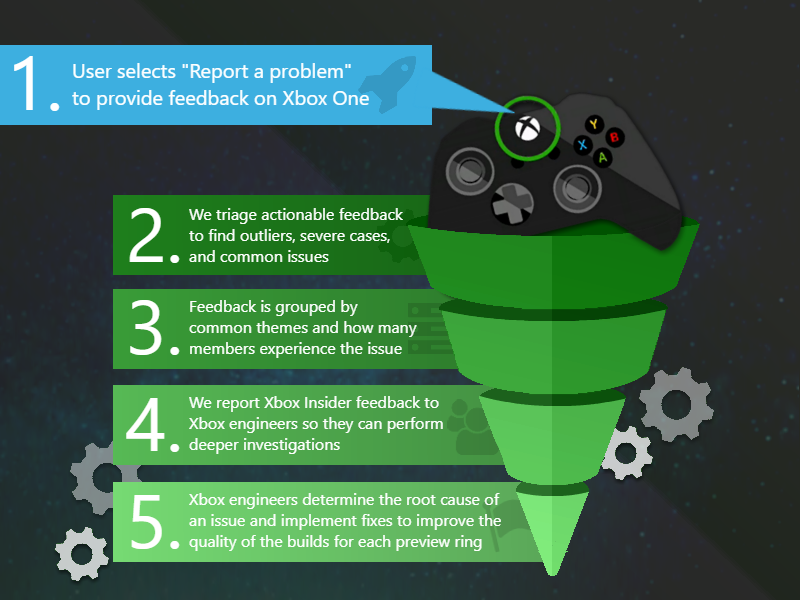
Make sure to use Report a problem to keep us informed of your issue. We may not be able to respond to everyone, but the data we’ll gather is crucial to finding a resolution.
How to Get Xbox Insider Support
If you’re an Xbox Insider looking for support, please reach out to the community subreddit. Official Xbox staff, moderators, and fellow Xbox Insiders are there to help with your concerns.
When posting to the subreddit, please look through most recent posts to see if your issue has already been posted or addressed. We always recommend adding to threads with the same issue before posting a brand new one. This helps us support you the best we can! Don’t forget to use “Report a problem” before posting—the information shared in both places helps us understand your issue better.
Thank you to every Xbox Insider in the subreddit today. We love that it has become such a friendly and community-driven hub of conversation and support.
For more information regarding the Xbox Insider Program follow us on Twitter. Keep an eye on future Xbox Insider Release Notes for more information regarding your Xbox One Update Preview ring!
Sprytile is a free tile map editor that runs entirely inside Blender, similar in functionality to the recently covered Crocotile 3D. Over the weekend, Sprytile for the most current Blender 2.8x versions was just released. Details from the Sprytile Itch.io page:
Sorry for the long long long delay, but finally the official release of Sprytile for Blender 2.8 is out!
All of the work porting Blender to 2.8 was handled by Yonji and Ologon, with Ologon taking the work to the finish line. Ologon has written a guide on the changes to the Blender 2.8 workflow on the forum.
A major change to the workflow is the use of the Sprytile tools tab in the Tools Sidebar. Open the sidebar by pressing the arrow button on the right of the viewport, or pressing the T key. Another optional workflow change is setting up the pixel viewport. By default, Blender 2.8 will make your textures look darker without this step, but you might want to skip this if you will be using the color correction functionality of Blender. Sprytile tools are now part of Blender 2.8’s toolbar. To use the ‘Get Normal’ mode, you just need to press ‘N’ on the keyboard while in Build mode.
I’m very grateful to the community for porting Sprytile to Blender 2.8 and continuing to showcase the work they make with Sprytile.
Sprytile is available as a free download here, with the documentation available here. Be sure to note that many things have changed for Blender 2.8, shown in the guide above, or by watching Sprytile in action in the video below.
Apple evaluating Hong Kong security law imposed by China
Apple is “assessing” the implications of China’s newly invoked “National Security Law,” an edict designed to crack down on political crimes and, according to critics, permanently stifle unrest in Hong Kong.
Passed last week, the National Security Law builds a latticework of legal instruments through which China can assert pressure on Hong Kong dissidents and crush political opponents, The New York Times reports.
Apple is assessing the situation, reports Bloomberg.
“Apple has always required that all content requests from local law enforcement authorities be submitted through the Mutual Legal Assistance Treaty in place between the United States and Hong Kong,” Apple said in a statement. As part of the process, “the U.S. Department of Justice reviews Hong Kong authorities’ requests for legal conformance.”
Google, Facebook, Twitter and other major tech companies put a temporary hold on user data requests from Hong Kong authorities as they review the law, the report said.
The National Security Law covers separatism, subversion, terrorism and collusion with foreign countries, among other ill-defined crimes, each of which can carry a maximum sentence of life in prison. Facets of the new regulations are designed to suppress protests, a commonly used and effective tool for pro-democracy advocates to voice displeasure of the ruling Communist Party. No draft was circulated to the public prior to swift adoption by the Chinese legislature, and Hong Kong authorities had little input, if any, in the proceedings.
Constructed to prevent citizens from enlisting the help of outside entities, including foreign countries, in pushing forward pro-democracy efforts, the law is of particular interest to Apple and other tech companies. Activists in Hong Kong often turn to apps and non-Chinese services to communicate, facilitate demonstrations and foment unrest.
For example, Apple last year caught flak for removing HKmap Live, an app protestors used to monitor police movement. CEO Tim Cook at the time defended the move, saying malcontents were utilizing the app to accomplish nefarious deeds.
Apple last year also removed the Quartz app from the Chinese App Store after the outlet published extensive coverage of the Hong Kong protests.