You can combine different types of plot – scatter, line, histogram etc. – but you may have to specify the colors manually if you do.
import random # Set seed to reproduce results

random.seed(1) # Generate random data

x = [random.random() for _ in range(100)]

y = [random.random() for _ in range(100)] # Scatter plot

plt.scatter(x, y, label='Data') # Red line plot acting as the 'line of best fit'

plt.plot([0, 1], label='Best Fit', c='r')

plt.legend()

plt.show()
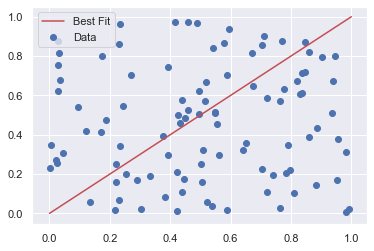
In this example, I first generated some random data before making a scatter plot from it. Then, I drew a line plot on top of it to act as the line of best fit (note that this is just an example and isn’t actually the line of best fit for this dataset!). Unfortunately, matplotlib does not automatically change the color of each plot if you plot a line and a scatter plot on top of each other. So, I manually changed it to red with the c keyword argument.
Let’s dive into a more detailed example of how legends work in matplotlib.
Matplotlib Legend Example
To display a legend on any plot, you must call plt.legend() at some point in your code – usually, just before plt.show() is a good place.
There are 3 ways you can call it:
plt.legend()
plt.legend(labels)
plt.legend(handles, labels)
The first option – plt.legend() – automatically detects which elements to show. It does this by displaying all plots that have been labeled with the label keyword argument. The order of the lines in the legend are the same as the order you plot them.
vals = np.array([0, 1, 2, 3, 4]) # Plot vals first

plt.plot(vals, label='vals') # Plot vals/2 second

plt.plot(vals/2, label='vals/2') # Call plt.legend() without arguments

plt.legend()

plt.show()
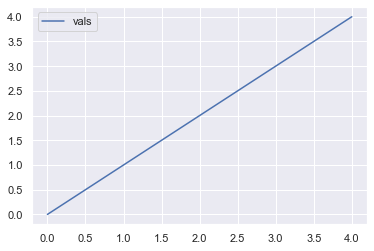
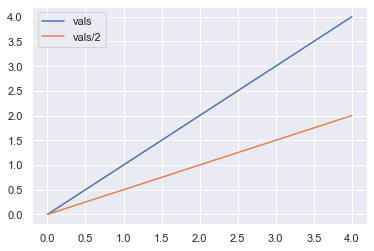
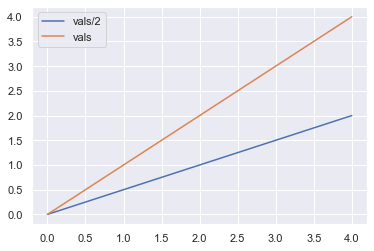
First I plotted vals and then plotted vals/2. You can see that vals is displayed first in the legend and is a blue line. Now let’s swap the order.
# Plot vals/2 first

plt.plot(vals/2, label='vals/2') # Plot vals second

plt.plot(vals, label='vals') # Call plt.legend() without arguments

plt.legend()

plt.show()
Now vals/2 is displayed first in the legend and is colored blue. By changing the order of the plots, you change not only the order in the legend but also the colors of the lines.
Note: you can manually control the colors using the c keyword argument if you want to.
The second option –plt.legend(labels) – is rarely used but I’ll show you what it does just for completeness.
The argument labels must be an iterable – most likely a list or tuple – containing the labels you want to display in the legend. Instead of explicitly labeling each line you draw like so:
This method does work but can cause you a lot of headaches. For example, the iterable labels must be exactly the same length as the number of lines you draw. Moreover, if you change the order of any of your plots, you must also change the order of the elements in labels. Lastly, it violates The Zen of Python Explicit is better than implicit because you implicitly label each plot based on its order.
It is much easier for everyone if you explicitly label each of the plots rather than implicitly doing so like this. Thus, both the matplotlib docs and I do not recommend you use this method.
The final method – plt.legend(handles, labels) – provides you with the most flexibility but takes slightly longer to write.
Both handles and labels are iterables – usually lists or tuples. The handles are the lines you wish to appear on the legend and the labels are, as I hope you know by now, the word(s) you want to appear in the legend next to each line.
# Save plots with descriptive variable names

linear, = plt.plot(vals)

sqrt, = plt.plot(vals**0.5) # Create iterables handles and labels

handles = [linear, sqrt]

labels = ['Linear', 'Square Root'] # Pass handles and lables to plt.legend()

plt.legend(handles, labels)

plt.show()
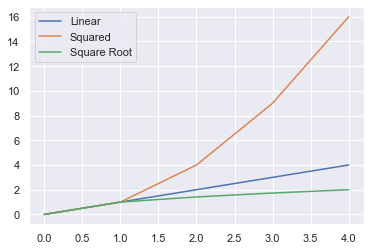
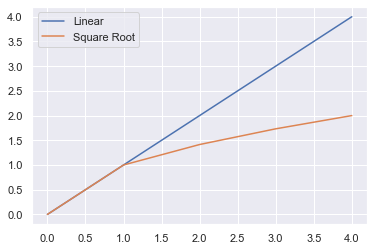
First, you must save the output of each line in a variable. The function plt.plot() returns a list of length 1, so you must unpack it by putting a comma after your variable name to get the value inside the list. The value is a matplotlib.lines.Line2D object which is how matplotlib stores lines.
# linear_wrong is a list of length 1

linear_wrong = plt.plot(val) # linear_correct is a Line2D object - what you want

linear_correct, = plt.plot(val)
For ease of reading, I created the lists handles and labels which I then passed to plt.legend(). You can skip this intermediate step if you wish.
The biggest advantage of this method is that you have total control of the order in which the legend’s items appear: the order you pass handles is the order they will appear. This means you can plot them in any order you want and still control the order of the legend entries. This is in contract to method 1 where the order you plot your lines is the order they appear in the legend.
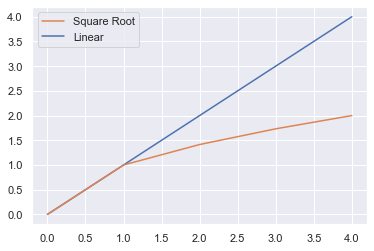
So, to make Square Root appear as the first entry in the legend, do the following.
linear, = plt.plot(vals)

sqrt, = plt.plot(vals**0.5) # Swap order of sqrt and linear

handles_ = [sqrt, linear]

labels_ = ['Square Root', 'Linear'] plt.legend(handles_, labels_)

plt.show()
In this plot, the color of the lines has not changed but the order in the legend has changed because I changed the lists handles and labels.
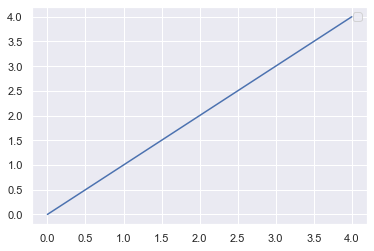
Finally, one thing many Python programmers don’t know is that if your label starts with an underscore, it will not be displayed in the legend. This may be useful if you have many plots and want to be able to easily scan the code but not display the names in the plots.
# No legend displayed because of underscore

plt.plot(vals, label='_I will not be displayed')

plt.legend()

plt.show()
No handles with labels found to put in legend.
Matplotlib Legend Location
To change the location of a legend in matplotlib, use the loc keyword argument in plt.legend().
By default, matplotlib draws the legend in the ‘best’ location i.e. the place that overlaps the least with the lines drawn. This can be slow if you plot a lot of data, so manually setting a location can speed up the process.
To manually set it, use the loc keyword and one of these 10, self-explanatory, strings:
‘upper right’, ‘upper left’, ‘upper center’
‘lower right’, ‘lower left’, ‘lower center’
‘center right’ or ‘center left’
‘right’ or ‘center’ (for some reason, ‘left’ is not an option)
Here are some examples of putting the legend in different locations. If you are unsure how to plot subplots in matplotlib, check out my article.
fig, axes = plt.subplots(nrows=1, ncols=3, figsize=plt.figaspect(1/3)) # Differnet legend locations

locations = ['best', 'upper center', 'lower left'] for ax, loc in zip(axes.flat, locations): ax.plot(vals, label='vals') ax.set_title(f"Legend loc='{loc}") # Set legend location ax.legend(loc=loc)

plt.show()
You can change the default location for all plots by setting plt.rcParams['legend.loc'] to the loc value of your choice.
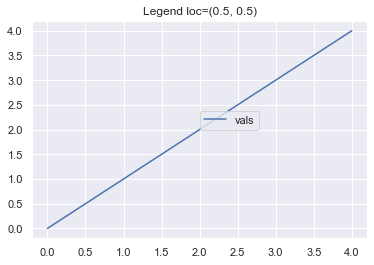
Finally, you can choose any coordinate points by passing a 2-tuple to loc instead of a string. This will specify the location of the lower-left corner of the legend as a fraction of the axes. So setting loc=(0.5, 0.5) will place the bottom left corner half way along the x-axis and half way along the y-axis.
plt.plot(vals, label='vals') # Set location of legend

plt.legend(loc=(0.5, 0.5)) plt.title('Legend loc=(0.5, 0.5)')

plt.show()
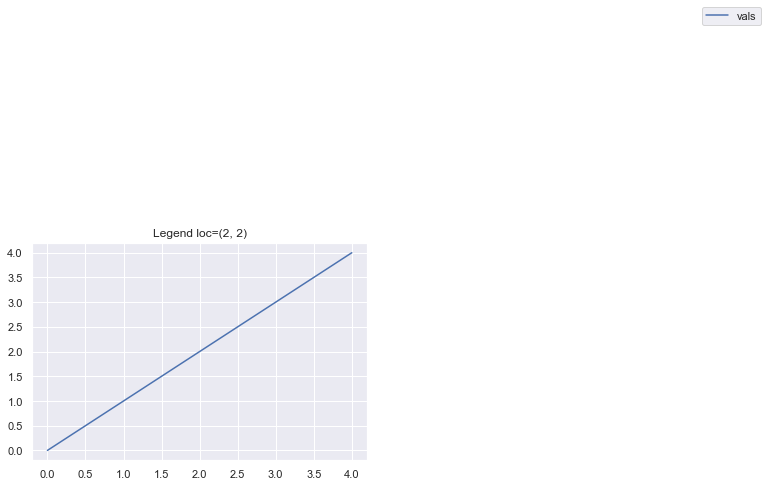
If you input loc=(2, 2) you get a very stange looking graph because matplotlib places the legend at double the length and double the height of the axes.
plt.plot(vals, label='vals') # Set location of legend

plt.legend(loc=(2, 2)) plt.title('Legend loc=(2, 2)')

plt.show()
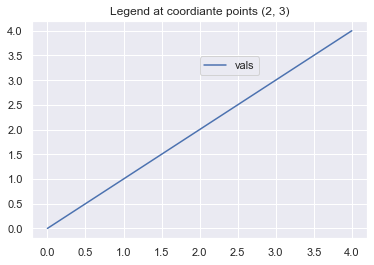
Of course, it is possible to place the legend at any coordinate point you want. Just remember to scale it by the maximum x- and y-axis values (both 4 in this example). So, to place the legend at the coordinate points (2, 3), pass loc=(2/4, 3/4).
plt.plot(vals, label='vals') # Set location of legend

plt.legend(loc=(2/4, 3/4)) plt.title('Legend at coordiante points (2, 3)')

plt.show()
Matplotlib Legend Font Size
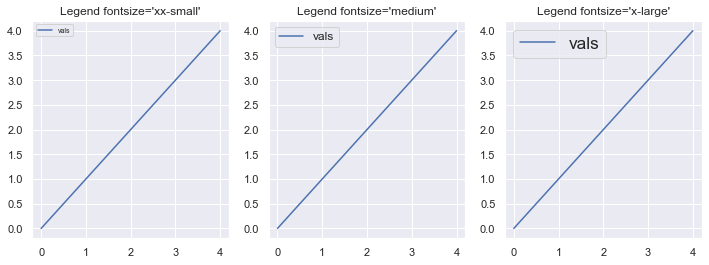
To change the fontsize of a legend, use the fontsize keyword argument. It can take any int or float – the absolute size in points. Try lots of different sizes to get a feel for it.
These are all relative to the current default font size. Let’s look at some examples.
fig, axes = plt.subplots(nrows=1, ncols=3, figsize=plt.figaspect(1/3)) # Different font sizes to try

fonts = ['xx-small', 'medium', 'x-large'] for ax, font in zip(axes.flat, fonts): ax.plot(vals, label='vals') ax.set_title(f"Legend fontsize='{font}'") # Set fontsize in legend ax.legend(fontsize=font) plt.show()
Matplotlib Legend Title
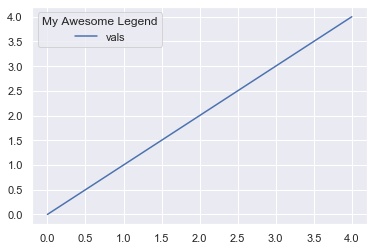
To add a title to a legend use the title keyword argument.
plt.plot(vals, label='vals') # Add title to legend

plt.legend(title='My Awesome Legend')

plt.show()
Matplotlib Legend Title Font Size
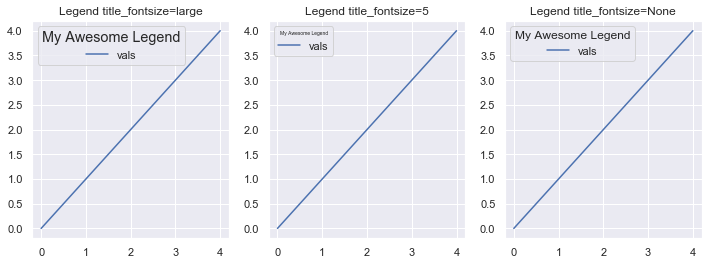
To change the font size of the title for a legend in matplotlib use the title_fontsize keyword argument. Like the fontsize keyword argument, it accepts any int or float – the absolute size in points – or one of the fontsize strings.
The matplotlib docs are actually incorrect because they say that title_fontsize only accepts a string or None.
fig, axes = plt.subplots(nrows=1, ncols=3, figsize=plt.figaspect(1/3)) # Differnet fontsizes to try

title_size = ['large', 5, None] for ax, size in zip(axes.flat, title_size): ax.plot(vals, label='vals') ax.set_title(f"Legend title_fontsize={size}") # Set title_fontsize of the legend ax.legend(title='My Awesome Legend', title_fontsize=size)

plt.show()
Matplotlib Legend Color
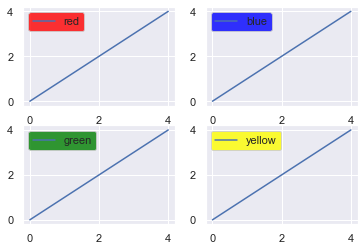
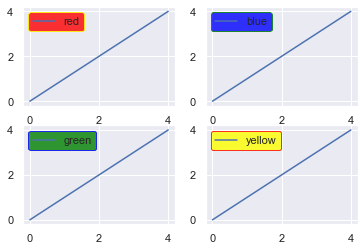
You can change both the facecolor and edgecolor of a legend using those keyword arguments in the function call.
The facecolor is the main color and the edgecolor is, you guessed it, the color around the edge of the box.
fig, axes = plt.subplots(nrows=2, ncols=2) # facecolors to choose

colors = ['red', 'blue', 'green', 'yellow'] for ax, color in zip(axes.flat, colors): ax.plot(vals, label=color) # Set facecolor of the legend ax.legend(facecolor=color)

plt.show()
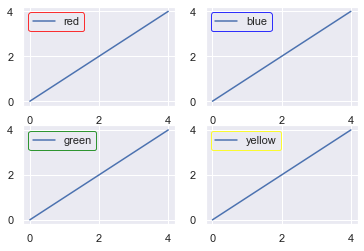
Let’s do the same now but just change the edge color.
fig, axes = plt.subplots(nrows=2, ncols=2) # Edgecolors to choose

colors = ['red', 'blue', 'green', 'yellow'] for ax, color in zip(axes.flat, colors): ax.plot(vals, label=color) # Choose edgecolor of legend ax.legend(edgecolor=color)

plt.show()
Of course, you can mix and match the face and edge colors to your heart’s content.
fig, axes = plt.subplots(nrows=2, ncols=2) # Colors to use

colors = ['red', 'blue', 'green', 'yellow'] # Same as colors but reversed

edges = colors[::-1] for ax, color, edge in zip(axes.flat, colors, edges): ax.plot([0, 1, 2, 3, 4], label=color) # Choose both the facecolor and edgecolor ax.legend(facecolor=color, edgecolor=edge)

plt.show()
Matplotlib Legend Order
To learn how to order elements in a legend, check out the Matplotlib Legend Example section.
Matplotlib Legend Background Color
To learn how to change the background color of a legend, check out the Matplotlib Legend Color section.
Conclusion
That’s it, you now know all the basics of working with legends in matplotlib.
You know the three different ways to call the function – plt.legend(), plt.legend(labels) and plt.legend(handles, labels) – you know how to set its location with both strings and coordinate points. Plus you can change the font size, set a title and even change the font size of the title. Lastly, you can jazz up your legends by setting the facecolor or edgecolor to anything you want.
Where To Go From Here?
Do you wish you could be a programmer full-time but don’t know how to start?
Check out the pure value-packed webinar where Chris – creator of Finxter.com – teaches you to become a Python freelancer in 60 days or your money back!
It doesn’t matter if you’re a Python novice or Python pro. If you are not making six figures/year with Python right now, you will learn something from this webinar.
These are proven, no-BS methods that get you results fast.
This webinar won’t be online forever. Click the link below before the seats fill up and learn how to become a Python freelancer, guaranteed.
With many people looking for a way to pass the next few weeks, this Humble Bundle might come at the perfect time. The Coding Starter Kit by No Starch Press Bundle is a collection of eBooks from No Starch about teaching kids and beginners programming, often through the lens of game development. As with all Humbles, this bundle is organized into tiers.
1$ Tier
Lauren Ipsum: A Story About Computer Science and Other Improbable Things
The Official ScratchJr Book
25 Scratch 3 Games For Kids
Build Your Own Website. A Comic Guide to HTML, CSS and WordPress
Make Your Own Scratch Games!
Super Scratch Programming Adventure!
8$ Tier
A Beginner’s Guide to Circuits
Learn Robotics With Raspberry Pi
Micro:bit For Mad Scientists
JavaScript for Kids
Electronics for Kids
15$ Tier
Coding with Minecraft
Python For Kids
Doing Math with Python
Invent Your Own Computer Games with Python
Mission Python – Code a Space Adventure Game!
As with all Humble Bundles, you get to decide how your money is allocated, between Humble, the Publisher, charity and if you so choose (and thanks if you do!) to support GFS is purchased using this link. You can learn more about the bundle in the video below.
Today we’re talking about multiplayer games, whether they be on iPhone (or iPad), Android or Windows Phone (lolz). There are fairly significant games out there that you can play with your friends locally, and then vast, massively multiplayer experiences that you can play online. Granted, a lot of these venture into Free-to-Play territory but it’s come to a point where we can’t ignore them.
What are the best multiplayer iPhone & Android games?
Mucho Party
Fortnite
Identity V
Clash of Clans
Heads Up!
Spaceteam
Hades Star
Talisman: Digital Edition
Arena of Valor
Triple Agent
Worms 4
Words With Friends
Presented for the curious, here is a list of multiplayer iphone & android games across all types, as well as local party games to help liven up a gathering. For those of you who’ve been paying attention, yes this is similar to the ‘Best Party Games’ feature we had – as an experiment I decided to ask Michael to give it an overhaul with a new focus. Enjoy!
Mucho Party
Developer: GlobZ Platforms:iTunes, Android Price: Free (effectively a trial with limited games), $3.99 one-time IAP for full unlock.
Sample a sumptuous variety of mini-games with inspired and easily-digested twists with goofy facial reactions, and deft touch controls. Your player avatar has an oversized head with a handful of emote options which are customizable: just snap a few photos of your mug with exaggerated expressions and mild hilarity ensues. Yes, the new Mario Party is a classic return to form but Mucho Party is a really nice substitute available for the price of a song. A hidden gem.
Fortnite fever shows no chance of breaking anytime soon; the game continues to generate its own hype through cross-overs and events like Thanos’s brief appearance or the sudden appearance of that black hole. It has crafting and the Battle Royale last-man-standing appeal. This phenomenon came from nowhere and isn’t going anywhere for the foreseeable future. Both it and PUGB (Player Unknown Battlegrounds) are still the golden standard for Battle Royale games, and until Apex launches on mobile, I don’t see them being unseated.
Identity V
Developer: NetEase Games Platforms: iOS, Android Price: Free
One hunter chases four innocents across a gothic manse while the would-be escapees struggle to find and solve puzzles. The asymmetry and creepy-cute aesthetic make for a thrilling and iconic experience. The devs are always experimenting with new play modes (like the 8v2 for starters) and the hunt-or-be-hunted setup is a timely mix of the survival- and battle-royale games so en vogue these days. Add in a splash of progression (skill trees, new and unusual characters, cosmetic unlocks) and you have a winner.
Clash of Clans is an august title dating all the way back to 2012. Supercell’s launched a billion other projects since and they all have similar DNA: easy core gameplay loops with short bursts of required activity and an addictive structure. Oh, and they’re all free-to-play with boosts and shortcuts tucked not-so-discreetly away behind a paywall. Clash is the original and still among the greats, though it has some issues with plateaus and top-level play, the ramping up to the endgame is still a delight.
Heads Up!
Developer: Warner Bros. Platforms:iOS, Android Price: $0.99, Free (android). Optional IAP to unlock extra category modes.
Heads Up! Was a victim of its own success for a time. The game is dead simple: a word appears on screen and is held above the guesser’s head. This same guesser is assailed by clues from teammates until the guesser finds the right word or phrase . Cycling through words quickly to rack up a high score, switching up the guessing role amongst team members. Heads Up! has one simple advantage over every other game on this list: it doesn’t need a surface to work. Works just as great standing or crammed together in a vehicle. Anywhere with good sight lines is fair game for Heads Up! short of a hall of mirrors. It’s so good that it’s cliche, at risk of getting played to death and forgotten. In case you’ve never given it a chance with a bored group, do.
Spaceteam
Developer: Henry Smith Platforms:iOS, Android Price: Free
Masquerading as chaos and nonsense, Spaceteam never fails to gin up a riotous good time. Navigating the reaches of space takes technical know-how and precise coordination, and Spaceteam spoofs these facts of spacetime-travel by splitting up instructions from control panels. Someone knows which button to press, and where, but the orders and details are deliberately turned into techno-speak-gibberish. Jabbering, giddy gibbons sharing gibberish…in space. Seriously though, the game works wonders for those improvisational types who thrive on chaos and unprecedented social situations. Oh, and it allows for cross-platform play between Android and iOS.
Hades’ Star
Developer: Parallel Space Inc. Platforms:iOS, Android Price: Free
Hades’ Star has a persistent, dynamic and massive world whose contours are shaped by the collective actions of the players. In this respect, it’s like a bite-sized EVE Online, though a tad simpler. I’ve always found that vast settings make the crawl of real-time games more palatable, like with Subterfuge. Situated in outer space, the 4X stages of explore and expand take a good amount of time, but that deliberation is the best part of Hades Star.
It suffers from a little free-to-play structure in its later stages, I guess, but it isn’t really a game which makes sense to binge, so the premium currency of ‘crystals’ is for those who want to play faster on their own terms. A little-known treat for fans of MMOs, 4X or the outer reaches of the universe.
Talisman is a wild time and a mess, digital or analogue, but it’s markedly tidier and every bit as much of a caper on the good old ‘pad. Collecting magic artefacts, spells and literal pieces of fate and destiny as the hour grows late. It’s a classic and epic game, but also well suited to casual meet-and-greets, too. Because each turn’s decisions are relatively simple and straightforward, players can banter, chow down or otherwise divert themselves without hampering the flow of the gameplay at all.
Arena of Valor
Developer: Tencent Platforms:iOS, Android Price: Free, IAP for cosmetics and other unlocks
Deliberately as evocative of League of Legends as possible, this one is a good game with a few caveats. First, the monetization is not especially burdensome but hard to ignore. Secondly, the controls work pretty well but since the Switch version came out they feel second fiddle, in terms of responsivity. Still, you can experience a polished and mature MOBA with respectable mechanics, tutorials and matchmaking. It’s not quite as vibrant a scene as it used to be, but Arena of Valor is still a rush to play.
Triple Agent is a mixture of chaos and order, of ineffective backstabs, liars giving useful tips and honest fools botching the naked truth. It’s a find-the-betrayer style party game, just like Mafia and Werewolf, but what sets it apart from its ilk, aside from a whip-smart app and panoply of extra optional win conditions, is the total miniaturisation of the experience. One device is passed around to dole out identities, clues and the final elimination vote. The group at the end of the chaotic play session collectively eliminates one person, and if they were a Good Guy the Bad Guys win and vice versa. Really fresh interface and game design take on an old standard.
Worms are good for the earth, enriching the soil and setting the fields for a rich harvest next season. Worms from Team 17, on the other hand, spend all their lives trading quips and aiming impractical and ultraviolent weapons at each other. Carpet bombs, napalm, the holy hand grenade, anything and everything is an instrument of death in Worms. The terrain is destructible too, and the only ‘loot crate’ drops are just in-game goodies and not a euphemism for scummy monetisation. This is a premier zany 2D shootout, decades old and no worse for wear.
Whoof, Words with Friends is a veritable dinosaur, dating back practically to the first days of the iPhone itself. It is an excellent multiplayer game because it accommodates all kinds of time commitments and skill levels. Yes, it’s a duo affair but so good it bears repeating. A simple word game gets even better with asynchronous play and friends list integration, so that when a moment of creative insight strikes, you can quickly convert it into a witty and devastating turn of phrase. It’s like texting, but with a score attached.
Other Party & Multiplayer Game Recommendations
Royal Adviser
Soul Knight
Psych
Mysterium
Legends of Andor
What are your favourite multiplayer games? Let us know in the comments!
[This message comes directly from the desk of Matthew Miller, the Fedora Project Leader. — Ed.]
Congratulations to the Fedora community for the upcoming on-time release of Fedora 32 Beta. While we’ve gotten better at hitting our schedule over the years, it’s always nice to celebrate a little bit each time we do. But that may not be what’s on your mind this week. Like you, I’ve been thinking a lot about the global COVID-19 pandemic. During the Beta period, many of us were unaffected by this outbreak, but as the effects intensify around the world, the month between now and the final release will be different.
“Friends” is the first of our Four Foundations for a reason: Fedora is a community. The most important Fedora concerns right now are your health and safety. Many of you are asked to work from home, to practice social distancing, or even to remain under quarantine. For some of you, this will mean more time to contribute to your favorite open source projects. For others, you have additional stress as partners, kids, and others in your life require additional care. For all of us, the uncertainty weighs on our minds.
I want to make one thing very clear: do not feel bad if you cannot contribute to the level you want to. We always appreciate what you do for the Fedora community, but your health — both physical and mental — is more important than shipping a release. As of right now, we’re planning to continue on schedule, but we understand that the situation is changing rapidly. We’re working on contingency plans and the option of delaying the Fedora 32 release remains on the table.
As you may already know, the Fedora Council has decided to refrain from sponsoring events through the end of the May. We will continue to re-evaluate this as the global situation changes. Please follow the directions of your local public health authorities and keep yourself safe.
Posted by: xSicKxBot - 03-17-2020, 10:43 AM - Forum: Lounge
- No Replies
DayZ Update Adds New Location And Weapon, Full Patch Notes Revealed
Developer Bohemia Interactive has released a brand-new update for its survival game DayZ that addresses some bugs, adds a new weapon and ammunition, and more. We've compiled the full patch notes below.
The headlining feature of DayZ's 1.07 update is the inclusion of amusement parks, new locations within the game world replete with shooting ranges for target practice and structures to seek shelter from the zombie horde. If you would rather go on the offensive, though, Bohemia Interactive has added the new Repeater Carbine to help you take the scalps off your enemies. There are also two new ammunition types added in the 1.07 update: the Repeater Carbine's .357 rounds and 12ga Rubber Slugs that can be used with any shotgun.
DayZ's newest patch also addresses a number of bugs within the game, such as game and server crashes, problems around item duplication exploits, inaccessible items, unregistered bullet discharge, and more.
Posted by: xSicKxBot - 03-17-2020, 05:46 AM - Forum: Lounge
- No Replies
Destiny 2 Update 2.8.0
Combat Systems
Abilities
Armor
Increased the number of armor sets available from world drops to 11 sets, up from 3.
Several sets that were previously unavailable or extremely difficult to come by are now available as world drops.
Armor Energy
You can now change the energy type of any piece of armor to either of the other two energy types directly from the armor piece’s inspection screen by hovering the cursor over the armor’s energy icon.
The cost of changing the armor to another energy type at energy value 1 is 1 Upgrade Module.
You can also change the armor to another energy type at the equivalent energy value to its current energy value. The cost for doing so is 1 Upgrade Module + the aggregate cost of upgrading from energy value 1 to its current energy value.
Armor Stats
Prime Engrams will now more reliably drop armor with higher overall stat rolls and spikier distributions.
Exotic armor will now more reliably drop with higher overall stat rolls
Legendary armor now has an improved chance of receiving higher overall stat rolls, though low rolls will still be present
Armor Mods
The seasonal armor mod socket (i.e. Undying Mods, Dawn Mods) can now equip mods released during the season in which it was released, plus the previous season and the following season.
For example, armor with the Dawn Mod socket (from Season 9) can now equip Dawn Mods, Undying Mods (from Season 8), and Worthy Mods (from Season 10)
The Hands-On mod now provides energy on projectile melee kills (such as the hunter’s throwing knife)
Enhanced armor mods have been added to cover all weapon types for all armor mods that have an enhanced version.
Exotics
Hunter
Assassin’s Cowl
The invisibility and healing effect now triggers on powered melee (both against combatants and Guardians) and finishers
The duration of the invisibility granted by this exotic increases based on the tier of the enemy defeated
Arc Staff kills no longer activate this perk
FROST-EE5
Changed the ability regeneration so that it no longer stacks multiplicatively with other class ability energy generating perks.
Khepri’s Sting
All of your smoke bombs deal 150% damage while wearing this exotic
Orpheus Rigs
The maximum amount of Super you can regain from this exotic with a single use of Shadowshot is 50%.
Young Ahamkara’s Spine
Increases the explosion radius for tripmines by 14%.
Titan
Ashen Wake
Killing an enemy with a Fusion Grenade while wearing this exotic now refunds grenade energy. The amount of grenade energy refunded scales based on the tier of enemy killed.
Anteus Wards
The shield created during a slide no longer allows chip damage through
Doomfang Pauldrons
Fixed an issue where Doomfang Pauldrons would sometimes grant Super energy from melee kills while in your Super
Dunemarchers
Increase the radius of static charge to 20 meters, up from 12 meters.
Mk. 44 Stand Asides
Reduced the delay from the start of sprinting until the overshield comes in to 0.5 seconds, down from 1.25 seconds.
One-Eyed Mask
The target marking from this exotic has been replaced with target highlighting, eliminating the ability to detect targets through walls
No longer provides a damage bonus when defeating your marked target
Restored the previous overshield granted by defeating your marked target, which now has a duration of 6 seconds (down from 8)
Severance Enclosure
The explosion now triggers on powered melee (both against combatants and Guardians) and finishers
The radius and damage of the explosion created by this exotic increases based on the tier of the enemy defeated
Stronghold
Stronghold now maximizes sword defense stats, resulting in a high Defense guard that does not lose guard energy on taking hits or decay over time.
The armor retains its existing healing functionality.
Warlock
Apotheosis Veil
This exotic is now guaranteed to drop with a minimum +16 to Intellect.
Contraverse Hold
Reduced the damage reduction granted by this exotic to 20%, down from 40%
Sanguine Alchemy
Completely redesigned with a new perk, Blood Magic, that allows the wearer to pause the countdown timer of any rift they are standing in by getting weapon kills, extending the rift’s duration.
Ophidian Aspects
Now increases the lunge range of all Warlock melee attacks, even if the ability is on cooldown.
Verity’s Brow
The buff provided by this exotic now increases your grenade damage by 10% per stack
The buff to allies’ grenade recharge rates now kicks in when you cast your grenade
The wearer of this exotic now receives buff text notification indicating how many allies are currently benefiting from your increased grenade recharge
Weapons
Exotics
Izanagi’s Burden
Honed Edge’s animation is no longer affected by reload speed.
Outlaw has been replaced with No Distractions.
The Last Word
Fan Fire
Now adjusts the precision scalar of the weapon while hip-firing
Aiming down sights no longer provides additional effective range (damage falloff) for this weapon
Reduced stability for Mouse and Keyboard input
Adjusted the way target acquisition is handled for this weapon in hipfire to improve the experience
Reduced the effective range of this weapon
Fighting Lion
Due to backend changes with the grenade launcher archetype, Fighting Lion inherited minor adjustments
Rate of Fire increased from 72 RPM to 90 RPM
Direct hit damage in PvE is now 35 (Previously 27)
Devil’s Ruin
Fixed an bug that allowed Pyrogenesis to proc in unintended circumstances, allowing the laser to be fired repeatedly
Symmetry
Fixed an issue that caused the weapon to randomly stop firing.
Fixed an issue where this weapon could damage allies under some circumstances
Lord of Wolves
Release the Wolves now significantly reduces the accuracy of the weapon while active.
Reduced stability for Mouse and Keyboard input
Swords
Sword attacks for all sword types have been altered, generally increased in efficacy to account for the energy system.
Sword stats are now the following:
Impact
Swing Speed
Charge Rate
How fast this weapon recharges its energy.
Guard Resistance
Damage reduction while guarding with this weapon against most attacks.
Guard Efficiency
Reduces the amount of energy required to guard an attack.
Guard Endurance
How long you can maintain your guard with this weapon.
Ammo Capacity
Energy
Swords now replace your melee ability with the Sword’s energy meter while wielded. This energy recovers naturally on its own and is consumed by different Sword related actions.
Light attacks
Light attack strings can now be endlessly looped on all sword sub-archetypes.
Light attacks for all sub-archetypes can now cleave to hit multiple enemies.
Heavy attacks
Heavy attacks have consume your Sword’s energy when activated.
Note: Different swords can consume different amount of energy based on the attack used.
If your energy is full, your heavy attack is stronger. The reverse is also true.
Guard action
Guarding no longer consumes ammo, but instead uses the Sword’s energy while active.
Note: You still require a minimum of 1 available ammo to begin guarding.
Shield Bypass
A portion of damage from Sword attacks now bypass elemental shields to strike the target directly.
Note: There are exceptions to this rule, particularly for projectile based attacks that Swords generate.
Sword Perks
Whirlwind Blade
This effect will now also end if the player guards.
Multi-Hit attacks no longer count as more than one hit.
En Garde
Reduced the damage bonus from +50% to +30%
Shattering Blade
Reduced the damage bonus from 3x to ~1.67x
Energy Transfer
Reduced the amount of ability energy gained from this perk due to Guard no longer consuming ammunition
Counterattack
Changed the activation requirements:
Blocking an attack immediately after guarding increases damage for a short duration.
Duration is now 2 seconds (Previously 5)
Glide can no longer be activated during sword attacks or other full body melee attacks.
Grenade Launchers
Aggressive Frame grenade launchers are now Rapid-Fire Frame grenade launchers
Rapid-Fire Frame grenade launchers have had their damage reduced to account for their Rate of Fire (0.8x), but now also have increased reserves.
Previously, Aggressive Frame grenade launchers fired faster than Adaptive but had the same damage.
Damage to Major enemies and above by Power weapon grenade launchers reduced by ~10%
Sniper Rifles
Damage to Major enemies and above reduced to pre Shadowkeep values (~-20%)
Adaptive Snipers
Reduced precision multiplier from 3.25x to 2.95x
Rapid-Fire Snipers
Reduced base impact from 100 damage to 90 damage
Shotguns
Target acquisition for non slug shotguns has been adjusted to no longer account for precision locations.
Previously, target acquisition could actually cause the player’s spread to deviate from the intended aim vector, causing most of the spread to miss.
Cone angle is now adjusted on a per sub-archetype basis and is no longer adjusted by the Range stat.
Aiming down sights no longer adjusts effective range for this weapon archetype
Fusion Rifles
Target acquisition for fusion rifles has been adjusted to no longer account for precision locations.
Previously, target acquisition could actually cause the player’s volley to deviate from the intended aim vector, causing most of the volley to miss.
Damage falloff for this weapon archetype can now floor at 0.5x (Previously 0.75x)
Effective range and the impact of the optics stat for this weapon archetype has been reduced across the board.
Backup plan now adjusts impact to match the Rapid-Fire sub-archetype while active.
Charge time is now set to match the Rapid-Fire’s sub-archetype * 0.85 while active.
One-Two Punch
The effect now ends upon dealing melee damage or swapping weapons.
General
Fixed issue with emissive elements on the following weapons and ornaments
One Thousand Voices
Summer Storm for Riskrunner
Jade Countenance for Fighting Lion
Fixed an issue where Multikill Clip would remain active indefinitely.
Fixed an issue where killing Shanks with Lumina would not reliably generate a Remnant.
Fixed an issue where Wish-Ender would deal more damage than intended when shooting through certain objects.
Fixed an issue where large portions of the Packmaster’s Command ornament for Lord of Wolves would disappear when standing next to a wall.
Player Identity Systems
Emblems
Stat Trackers
Emblems now use an updated details screen to support Stat Trackers.
All Emblems now have Stat Trackers that can be equipped and unequipped
The Stat Trackers available on an emblem are related to the emblem’s source/category.
Stat Trackers are broken down into categories based on Activity and Time-span
Activity Categories are:
Seasons
Account
Crucible
Destination
Gambit
Raids
Strikes
Trials of Osiris
Time Span Categories are:
Weekly
Seasonal
Career*
*Note: Career stats respect pre-Season 10 data where possible but otherwise will begin tracking in Season 10
All of the Above
Stat Trackers can become Gilded when Stats reach certain thresholds
Stat Trackers now have their own dedicated section, which players can access through the Triumphs screen.
Stat Trackers are categorized into Seasonal, Weekly, Career and All.
Stat Trackers are sub-categorized by Stat Tracker type.
Feature Triumphs on the Triumphs overview have been reduced from displaying 3 to 1
Collections
The Emblem collection has been reorganized to reflect the Stat Trackers structure
Emblem Variants
Emblem Variants have been converted into their own Emblem items
Emblem Perks and Auras
Emblem Perks and Auras have been removed from Emblems.
Clans
Clan Banner Perks have been updated for Season 10
Accessories
Ships
Fixed an effects issue on Lost Legend’s engines
Ghosts
Fixed an animation issue with Sanctum Plate Shell
Sparrows
Updated thruster effects for Dawning sparrows Chill of Winter and Holiday Cheer
Fixed effects issues for Azure Azazyel and The Bronco
Investment
The season 9 Fond Memories Bright Engram has been retired, and in its place players can now obtain the new Season 10 Luminous Bright Engram
Bright Engrams are no longer available for purchase in the Eververse store, and instead can only be earned by leveling up the Season Pass
In place of the Bright Engram, the Eververse store now offers a Silver sale item that will refresh daily
The Gunsmith now has a chance of selling Season 9 seasonal armor mods
“Improved Crucible Scanner” Ghost Shell perk has been created and has a chance to roll on Crucible-themed Ghosts
Two new consumables are available in the Eververse store for Bright Dust, the Scavenger’s Boon and the Glimmershard (both 250 Bright Dust each)
Scavenger’s Boon:
When used, this item causes enemies killed with precision damage to have a chance to drop Planetary Materials when defeated
The effect lasts 4 hours
Note that only one Scavenger’s Boon can be active at a time
Glimmershard:
When used, this item causes bosses to have a chance to drop additional Glimmer when defeated
The effect lasts 4 hours
Note that only one Glimmershard can be active at a time
Multiple bugs fixed to ensure various Legendary Engram previews accurately represent their contents
Shadowkeep campaign reward exotic armor now has the proper source string in Collections
Eververse store bundles with prices that have been reduced due to owning some of the contents no longer are advertised as “Sale”, and instead read “Complete the Set”
Season 8 weapons acquired from the Season Pass now have a valid source string in Collections
Several multiplayer emotes that had an item type of “Emote” now have the correct item type on their tooltip, “Multiplayer Emote”
Year 3 exotic armor items in Xur’s inventory now properly require Shadowkeep instead of the Season Pass
Mod Components no longer dismantle as a stack
Power and Progression
Updated XP rewards from Mars ambient chests and public spaces to be consistent with Shadowkeep values.
Reduced the power of the incomplete version of ‘Legend of Acrius’ when purchased from a vendor.
Paid character boosts raise the player to the new soft cap of 950.
Note: Players cannot purchase a character boost until their first character has reached the soft cap.
User Interface
Fixed an issue where some items were not being properly displayed in Collections.
Fixed an issue where players don’t receive a “Fireteam Chat Not Available” message when Steam is down.
Fixed an issue where tracking a pursuit would dismiss the Release Icon.
Fixed an issue where incorrect icons were appearing during “The Other Side” mission.
Fixed an issue where Open Fireteam slots were being displayed after dismissing activity selection.
Fixed an issue where a placeholder tooltip could appear while in Orbit.
Fixed an issue that caused some Graphical Corruption when navigating to the Seasons screen.
Fixed an issue where the Rank 50 toast would display overlapping numbers.
Fixed an issue where we displayed a misalignment in the Post-Purchase Animation.
Fixed an issue where the Launch Overlay would not dismiss when navigating to the Quests Screen.
Console Settings UI screen layouts have changed to match the experience on PC, allowing for future updates.
Settings that use the carousel selection method can now be navigated using d-pad input when focused.
Added a Favorite augment over the Finisher icon to easily determine which Finishers are currently the player’s favorites.
Added game hints during loading screens.
Added the ability to change the color of the Reticle on Consoles.
Players can choose from 7 different colors, matching PC.
Added a Completion State to Seasons Pass Bonuses.
Added Categories to the Quests Screen.
Quest Items will now be automatically filtered to any of the seven categories:
New Light
Note: This category will hide if there are no active New Light quests in the character’s inventory.
All Quests
Shadowkeep
Seasonal
Playlists
Exotics
The Past
The Quest tab will now display a sheen animation when there are new quest items available.
The sheen is dismissed by hovering over the new quest item.
Added comma separators to the Glimmer count in the loot stream.
No longer keeps me awake at night.
Changing fireteams on the PVP Private Matches Launch Screen now uses Left/Right buttons.
Players can now see which Seasons they own by looking at the Season Rank tooltip in the Seasons Screen.
Frontline – General Bug Fixes / Quality of Life
(Frontline is a team dedicated to fixing an assortment of issues, no matter their area. Say hello!)
Combat
Changes were made to Cabal Psion’s Psionic Rupture ground attack to improve client performance during heated engagements.
Elite, Mini-Boss, and Boss nameplates will now correctly display as “friendly” when invading during Gambit matches.
The Hunter Tempest strike melee ability can now be performed when using PC controls where Sprint is set to “Hold”.
Titan Sunbreaker melee ability “Mortar Blast” will now more consistently deliver its detonation damage in Crucible.
Friendly projectiles that travel along the ground will pass through ally Titan Banner Shields. Burning Maul and Voidwall Grenade are examples of abilities that generate ground follow projectiles.
Hunter exotic “Liar’s Handshake” Cross Counter melee damage buff will now expire as intended after picking up a carry object (such as a Forge Battery)
Fixed an issue where Hunter’s would remain off radar for too long when coming out of invisibility while crouched.
Getting killed by “The Cut and Run” scout rifle now properly displays an Obituary icon in the battle feed.
Character Sub-Classes with ranged melee abilities will now count towards Melee Kill bounties and Triumphs. (These include Titan Hammer Throw, Hunter Throwing Knives and Corrosive Smoke Bomb, and Warlock Celestial Fire and Ball Lightning.)
Weekly Strike Bounties for Hive and Vex boss kills will now award progress to players for killing Savathun’s Song (Shrieker Boss), Xol (Hive Worm God), and the Garden World strike’s Vex Cyclops Boss.
The Inspect Player function for the PS4 “Jumper” button layout will now properly trigger off of holding L1+R1 as indicated.
Hunters should no longer be able to get into an “immune to damage” state using a Sword and the Card Shuffle emote.
Player Identity
Crucible Triumph Challenge Accepted now requires 10 Weekly Challenges to complete.
The “Additional Bounties” from Vanguard, Crucible and Gambit vendors will now progress their corresponding Daily Bounty Triumphs; Vanguard Agent, Mercenary and Daily Bounty.
The Fastidious Miser Triumph will now be correctly progressed and completed for Players who’ve found all 30 Ascendant Chests across the three Curse Weeks in the Dreaming City, and have claimed those corresponding Triumphs.
The “Earned while leveling” mods will now properly show as unlocked in Collections across all categories. (Ex. Chest: Unflinching Light Arms Aim mod)
Removed a duplicate Worldline Zero Catalyst Triumph entry.
The Black Talon Catalyst Triumph will now correctly progress and complete from Black Talon kills, instead of Lord of Wolves.
The Forsaken Triumph ‘WANTED: The Rifleman’ can now be obtained from either killing the Rifleman or upon completion the corresponding Adventure mission.
This addresses a rare issue where a player may not receive credit for killing the Rifleman before the mission ended.
Rewards
The Sound effects from Warlock exotic “Transversive Steps” will now trigger only when a player has reserve ammo to refill their current weapon’s magazine.
Black Armory Schematics can now be dismantled. Dismantling will delete a single Schematic from the stack.
Obtaining the MIDA Catalyst is no longer impeded by playing with Clanmates. Drop rates were adjusted and now properly scale with the Clan “Catalyst Seeker” Perk bonus.
Added drop chance for wins at Glory Rank 3 Fabled (5% without Clan bonus, 10% with Clan bonus)
Increased drop chance for wins at Glory Rank 4 Mythic (5% > 10% without Clan bonus, 10% > 30% with Clan bonus)
Now guaranteed drop for any win at Glory Rank 5 Legend.
The Well Well Well Gambit Invasion Medal Triumph now has an icon.
The Prime Attunement buff will now appear for any new characters upon reaching 900 Power, even if previous character was deleted.
Tess will no longer present the player with an empty Solstice of Heroes Gift screen.
World
The Rifleman will no longer occasionally disappear during the boss fight, prematurely ending the mission.
Crucible quest step “Forging the Broadsword – The constant” now specifically points players to complete Crucible Daily bounties.
The Malfeasance exotic quest no longer requires owning the Forsaken expansion. Players who pick-up the New Light Malfeasance Intro quest will now be awarded the “Darkness In the Light” quest step upon killing the Ascendant Servitor Primeval boss.
Addressed an issue with placing the tribute banner to open the Tribute Hall doors. New Players, as well as any Players who were previously unable to, can now correctly place the banner, completing “The Tribute Hall” introduction quest.
Improved Performance during the final boss fight of Garden of Salvation Raid.
Players should no longer be able to cause players to be kicked to Orbit during Crucible matches by repeatedly performing Titan Bubbles and Warlock Wells of Radiance.
Fixed and issue where players were having to wait for others to load in when traveling to the Tower.
Steam
Music volume is applied immediately instead of after the Bungie splash screen.
PC Client: fixed an issue that could slow load times for some users when the game wasn’t in focus(Alt-tabbed to another window).
General
The Pigeon and the Phoenix lore book pages are now visible for players who earned them. Acquiring the Bastion Exotic Weapon will unlock all pages.
Dawning 2019 Gifts were well past their expiration date and can now be safely discarded.
Dawning Exotic Sparrow pursuit can no longer be acquired from Eva’s abandoned quests section during other events.
Gambit and Crucible melee kills bounties will now properly count projectile melee abilities like Celestial Fire, Ball Lightning, and Throwing Knife.
Crucible
Trials of Osiris returns at last!
Talk to Saint-14 in the Tower Hangar to begin your Trials journey. The Trials playlist will first become available on Friday, 3\13.
The Anomaly, Cauldron, and Exodus Blue have been added to the Crucible map rotation. These maps will now appear in most playlists.
Fixed a large number of out-of-environment bugs on Distant Shore.
Fixed a large number of out-of-environment bugs on Fragment.
Performance
Fixed UI stuttering and framerate drops when loading or applying mods
Improved framerate in Gambit and Gambit Prime
Fixed framerate issues during the Sanctified Mind encounter of the Garden of Salvation Raid
Fixed framerate issues in the Pit of Heresy Dungeon, specifically in tunnel encounters
Fixed stutter at high framerate on PC
General improvements to performance on PC when a lot of debris is on the ground
We are proud to welcome three new Xbox most valuable professionals (MVPs) awardees: Dhayana Sena, Courtney Craven, and Matt Armstrong. Everything from creating a welcoming community to creating awareness of game accessibility, these leaders go above and beyond in the gaming community. Read on to find out more about them and how they impact the gaming community.
Feeling alone and cast aside due to her
love for pop culture and geekdom, Dhayana created her own, community hub, a
website called Attack On Geek. After adding game
reviews and content to her new site, she became aware that several women around
the world often hid their genders/identities in order to be taken seriously
when playing games online. This discovery inspired her to take a stand against
discrimination and create awareness for inclusivity and accessibility in
gaming.
“I’ve always felt that true change comes
from within, so by starting a community that focuses on content for everyone —
regardless of background, level of experience, and such – I hope that others
will feel inspired to do the same,” explains Dhayana.
Overtime Attack on Geek evolved from a
personal blog to a platform that shares all voices and varied content including
writing and streaming. Now, the community has grown beyond Attack on Geek.
Today, there is Women of Xbox Twitter and
Discord accounts to empower female gamers, strengthen community ties, and share
the love of Xbox gaming.
Now for a quick Q & A to learn more
about Dhayana
Anika: If you could talk to girls growing up who love gaming, what
would you tell them?
Dhayana: My advice to girls
who love games and feel alone, is that you’re never really alone. Gaming
connects us all globally and just when you think you’re all alone, you’ll find
someone who may share in your experiences, love the same things you do, and
someone who you might form strong bonds with. So, don’t fret if you feel as if
there’s no one out there who understands you. Trust me, there are plenty!
Anika: What do you like to do in your free time?
Dhayana: Free time? What’s
that? (Laughs). Beyond working on Attack On Geek, Xbox content and Women of
Xbox, I really enjoy keeping up my health and fitness, collectible shopping (I love
anime and comic book statues), and watching anime.
Anika: What is your favorite game of all time?
Dhayana: “Tough pick but if I have to pick just one, I’ve always loved Uncharted 2: Among Thieves.”
Two years ago, Courtney, along with her partner, Susan Banks, created Can I Play That? (CIPT)A website dedicated to sharing content about gaming accessibility authored by gamers who have disabilities.
“We wanted to use our platform and
success to pass the microphone to gamers with disabilities and allow them to
speak on the accessibility areas in which they are the experts,” Courtney
explains.
CIPT includes accessibility game reviews,
features why and how contributors play, as well as accessibility reference
guides for game creators and developers.
“We’ve grown massively in our first year
and every so often, I’ll get an email from someone noting that they’d never
even considered the accessibility of games and after visitingCIPT,
learned so much and came away with a new perspective,” notes Courtney, “I’d
like to continue to spread that sort of awareness and I’d also like for us to
help standardize accessibility.”
In addition to all the impactful
information and stories on the site, CIPT Awarded several developers for
accessibility in their games — including Gears 5 for Best Overall
Accessible Game and Apex Legends for Most Accessible Multiplayer Chat. You
can view the full list here.
Now for a quick Q & A to learn more
about Courtney
Anika: What do you want
those who work in the gaming industry to know about the importance of gaming
accessibility?
Courtney: One of our new
contributors wrote our “Blind and
Low-Vision Accessibility Guide” recently and something she said in it really
stuck with me: Know that blind people want to play your game. I think that’s
the thing that may not be something enough people are aware of. Not just blind
players, but disabled players of all kinds. Know that there is a massive desire
from the disabled community to play your amazing game, so do what you can to
allow them.”
Anika: What do you like to do in your free time?
Courtney: I have a
one-year-old Cattle Dog mix who I’m continually trying to tire out and keep
entertained. She keeps me from spending all my free time sitting in front of my
TV, playing a game. I’m also a fiction writer and I’m hoping to have the
manuscript I wrote for my MFA thesis published.
Anika: What is your favorite game of all time?
Courtney: It’s a tie between the Mass Effect trilogy and the Dragon Age series.
Matt has been an active Xbox community member and fan for many years. His passion for Xbox led him to becoming a moderator for the XboxOne subreddit, a title he has held for three years. Since then, he has become a moderator for the Xbox Insiders subreddit and is involved with early access discussions on Reddit, “Having an engineer directly respond to issues is a great way to show gamers that you’re listening and working to resolve issues,” explains Matt, “Having that interaction with the community makes for a very positive experience.”
In addition to moderating two subreddits,
Matt is also part of an indie developer studio based in Washington state. Over
the last summer, they released their first game on Xbox called Masked Memories.
In this game, Matt was both the narrator and audio director of the game.
Now for a quick Q & A to learn more
about Matt
Anika: What
do you like to do in your free time?
Matt: When I’m not moderating Reddit, I spend time with my 2 girls who are
growing up to be gamers as well. I’m also a voice actor and have been in a few
small YouTube animations, as well as a few indie games. My first role was the
character I (eye) in a Fallout 4 mod called The Code. I’m also the
narrator for the game Masked Memories, and a news reporter in the RPG Exospace.
Outside of that, I’ve starred in a few fanfic dubs and audio dramas. I also
narrate audiobooks for Learning Ally. Outside of that, I’m usually sailing the
treacherous waters in Sea of Thieves or playing one of the countless
games on my Switch.
Anika: What is your favorite game of all time?
Matt: This is a tough one. I’ve been gaming since the dawn of the NES. Looking back through all the games I’ve played I’d have to say my absolute favorite is Super Mario World. In this current gen though, Sea of Thieves is really taking the top spot for me on Xbox and even though it hasn’t dropped yet, I’m confident Animal Crossing: New Horizons will be my favorite on Switch.
More Than an Award
The Xbox MVP award is given to community
leaders and professionals who are committed to helping others through their
passion, knowledge, and expertise in all things Xbox. MVPs spearhead many projects
that impact the gaming community. Everything from starting their own charity
groups to building fun, welcoming communities, MVPs are leaders who go above
and beyond in the gaming community.
For more information about the MVP
program or if you would like to nominate someone check out https://mvp.xbox.com/.
Posted by: xSicKxBot - 03-17-2020, 05:45 AM - Forum: Lounge
- No Replies
Nintendo staff working from home after employee tests positive for coronavirus
Nintendo of America is the latest game company to urge employees to work from home, this time after an employee working in its Redmond offices tested positive for the coronavirus.
Notably, Nintendo is allowing staff in Washington and California (two U.S. states that have been hit especially hard by the outbreak) to work from home as a “precautionary step” following the test.
“We have determined that the individual had contact with other employees and we have notified those employees to the situation,” a Nintendo rep told The Hollywood Reporter. “All impacted employees are now self-quarantining, whether they are experiencing symptoms or not.”
This comes more than a week after fellow Washington-based game companies Bungie and Microsoft made a show of rolling out remote work infrastructures and allowing their staff to work from home for an extended period. Around the same time, Take-Two CEO Strauss Zelnick said that while he wasn’t a big believer in staff working from home, “one unexpected consequence [of the coronavirus outbreak] is a lot of us who are skeptical about remote work are gonna be less skeptical about it.”
Update: An earlier version of this story mistakenly implied that Nintendo of America had instituted this work from home policy in response to the positive coronavirus test, when in fact the company announced it last week.
First of all, thanks to all backers’ love right from the beginning. A few days ago we got a little problem with Nintendo copyright. Our company highly respects intellectual property protection, and we were unintentional to infringe on Nintendo’s copyright by using the Nintendo game scene in the introduction of product function. But it just showed in the product’s use cases, we never intended to use the games character’s image to promote our products. We apologize to the copyright party and will resolve it properly. Our team will be more careful with the copyright-protected content and provide better services for you in the future. And we have submitted our own product’s patent. We highly valued intellectual property protection and product innovation and want to build a good community with all of you.
As we all know, Kickstarter always advocates and encourages innovation. It is a fair platform and helps tons of outstanding products to get support and moving the development of technology forward. I believe this is also how all backers think about Kickstarter. We highly value each of your precise options. Our production is still ongoing to deliver the prime output for all of our backers after the campaign end. We really appreciate the early backers’ support and trust and we have prepared an exquisite gift for every backer who still supports us until now. Your support and trust is our motivation.
Thanks,
CEO of Better DiGi Team
Update #2 [Mon 9th Mar, 2020 11:40 GMT]: Bigger Digi has told us why the Kickstarter was pulled – it was due to the use of a Nintendo copyright-protected game in the materials used for the campaign. The Kickstarter is coming back ‘soon’, along with a more detailed statement from the company’s CEO.
Update #1 [Fri 6th Mar, 2020 14:00 GMT]: Since the feature was written, the Kickstarter campaign has been taken down due to an “intellectual property dispute”. When the campaign launched, a second campaign – branded as ‘fake’ by Better Digi – also went live. Whether or not this is related, we’ll no doubt find out soon. We’ve reached out to Better Digi and will update this piece with its response when we have it.
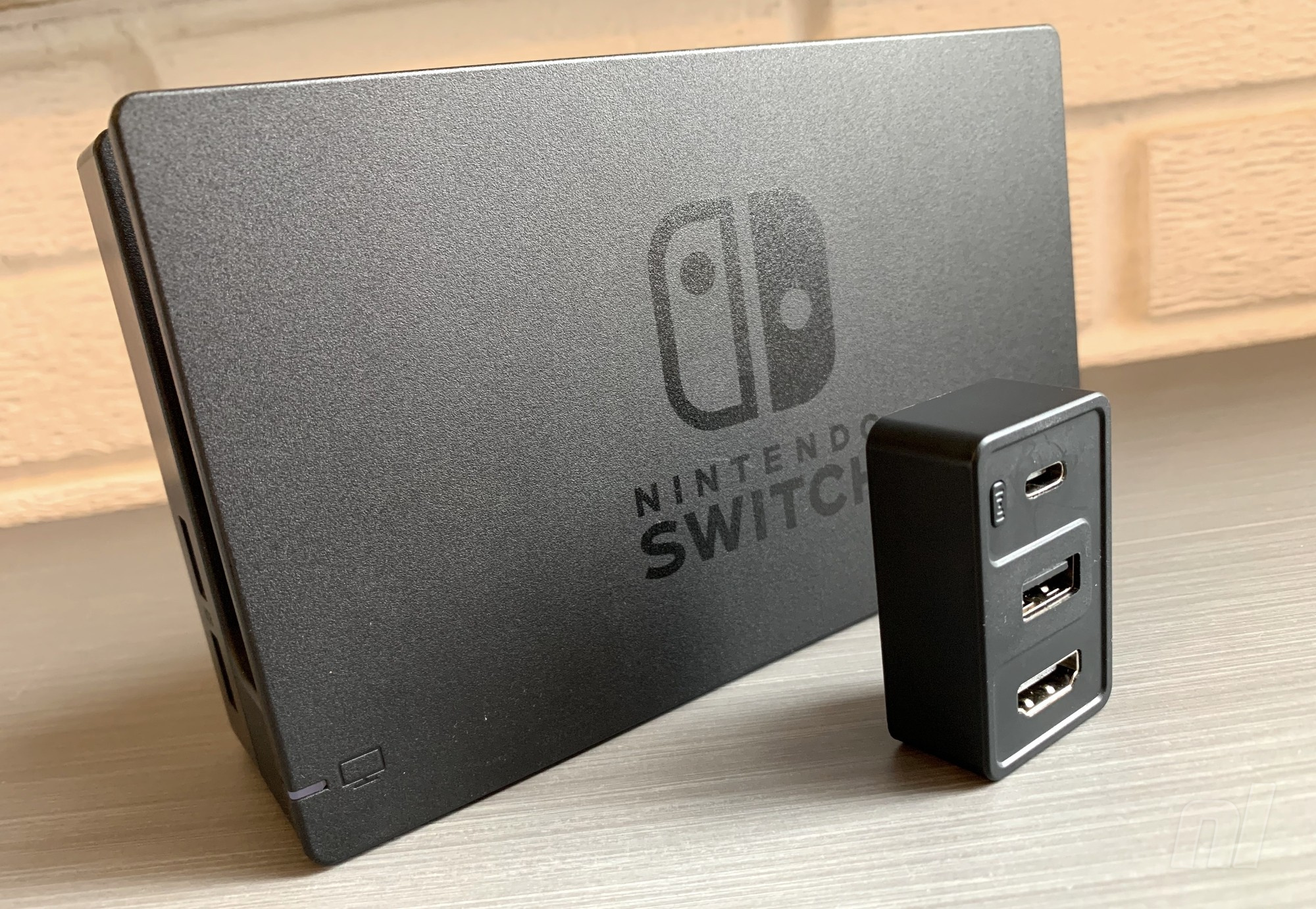
Yesterday, we announced the news that Better Digi’s Dongii – a Switch dock that’s small enough to fit in your pocket – had hit crowdfunding platform Kickstarter. We’ve actually had one of these units at the Nintendo Life office for a few weeks now, and have been putting it through its paces to see what all the fuss is about. The good news? This tiny little device is something of a game-changer, not only giving Switch owners a cheap alternative to the expensive and hard-to-find official dock, but also a wonderfully portable option which can easily be transported with the console if you’re visiting a friend and fancy some docked action.
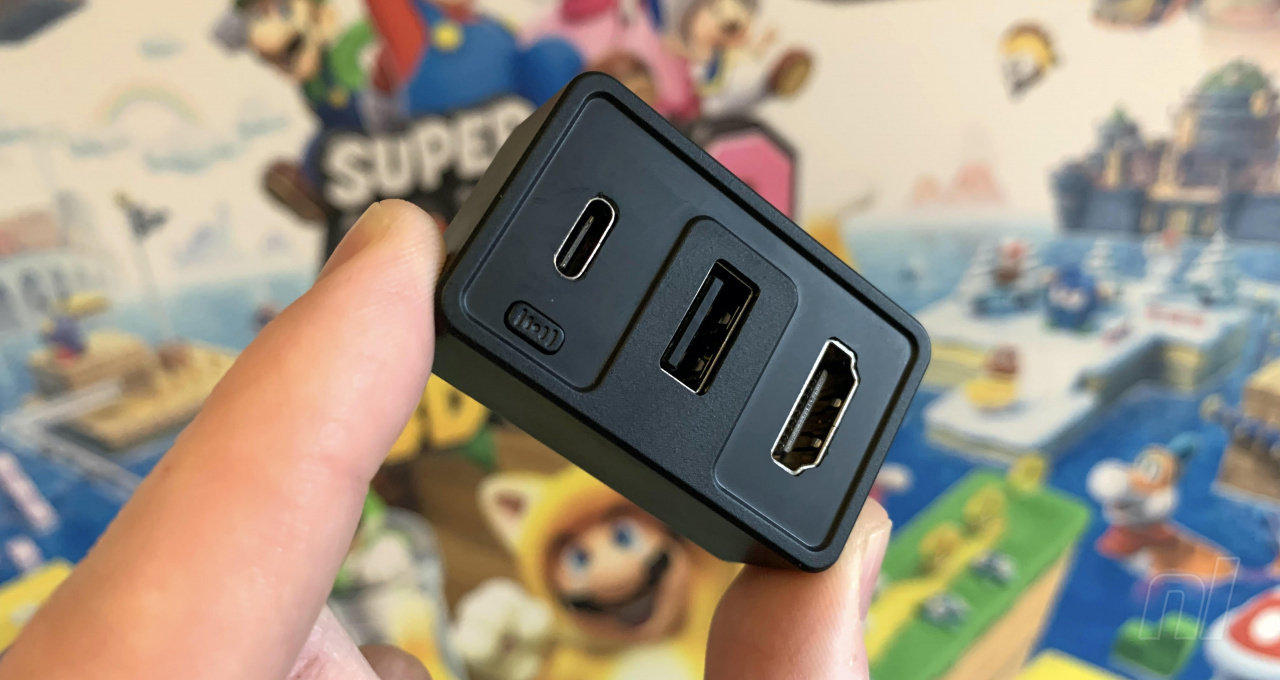
The Dongii joins Human Things’ Genki Convert Dock in the category of teeny, tiny Switch docks and has a single male USB-C on one side, which plugs into the power supply (more on that in a second). On the other, it offers three ports: HDMI, USB-C and USB-A. The first two are pretty self-explanatory; they connect the Dongii to your TV and Switch respectively. The latter is for connecting physical devices, such as wired controllers. There’s also Bluetooth 5.0 capability so you can connect the unit to wireless audio devices like headphones, with pairing handled by a physical button on the Dongii itself (it’s worth noting that the cheapest version of the Dongii lacks Bluetooth support).
However, the Dongii itself is only part of the picture – it needs to be connected to a USB-C charger to work properly, and even then, it has to be a charger that will supply the required juice. When fully assembled, the unit is significantly smaller than the original Switch dock, which, lest we forget, also needs a bulky power supply to operate. The final unit will ship with its own 65W GaN charger, but this wasn’t ready when our review unit was sent to us, so we’ve used a standard 45W USB-C power block.
While this powers the Dongii just fine, it doesn’t provide the fast-charging capability of the more potent 65W dock. It’s also not as nice to look at as it obviously hasn’t been designed with the Dongii in mind, but the final product will look a lot more appealing. Another plus to the Dongii’s charger being detachable is that you can plug it directly into any portable power bank that supports USB-C PD and supplied the correct amount of power – combine this setup with a portable screen, like the C-Force CF016XT, and you’re taking your ‘on-the-road’ setup to a whole new level.
Of course, when it comes to third-party docks, the question of safety is always present. We’ve had reports of docks bricking Switch consoles in the past, with some suggesting that, in the early days of USB-C, the protocol wasn’t standard across all products. However, according to Better Digi, the Dongii benefits from “years of optimisation” and “countless rounds of testing”, which means it “delivers the proper voltage and amperage to the Switch based on its battery level and ensures the best and safest performance”.
While we can’t categorically say this is totally true, we didn’t experience any issues using the Dongii over the past few weeks, even when running it through the aforementioned third-party charger. Better Digi also claims that because the Switch isn’t actually ‘docked’ during use, heat build-up is less of an issue. We’ve all heard the anecdotal reports of consoles ‘warping’ as they get hot inside the dock, but we’re not sure it’s as widespread a problem as Better Digi might have you believe.
Dongii is a great accessory for your Switch, then, but that’s not the end of its usefulness; because it supports the USB-C standard, it can also be used with devices other than your Switch, such as laptops. The USB-A port allows you to plug in flash drives and other accessories, and you can even use the device to connect your smartphone to a monitor, turning it into a computer you can carry in your pocket (assuming it has the functionality that is, like Samsung’s phones). It’s capable of outputting up to 4K resolution for this purpose.
Starting at just $29 via its crowdfunding campaign (it then rises to $65), the Dongii is likely to become a must-have device for Switch owners. It has already doubled its initial Kickstarter target of $10,000, and if you’re currently on the fence about supporting this crowdfunding campaign, we’d recommend you give it a shot – especially if you’re a keen traveller or are simply in the market for a second dock in your home.