The first “One Punch Man” game finally makes its debut! Dive into a dynamic fighting game experience with beloved characters from the first Season of One Punch Man! Play as your favorite hero – or become one! YOU are the hero!
We know you’re busy and might miss out on all the exciting things we’re talking about on Xbox Wire every week. If you’ve got a few minutes, we can help remedy that. We’ve pared down the past week’s news into one easy-to-digest article for all things Xbox! Or, if you’d rather watch than read, you can feast your eyes on our weekly video show above. Be sure to come back every Friday to find out what’s happening This Week on Xbox!
Rock Band Rivals Welcomes You to 2020 Happy New Year! With every new year comes a list of resolute goals, dreams, regrets – things you wish you did better, or different, things you love and want to keep doing forever. Rivals Season 15 will celebrate those resolutions with 8 weeks of carefully curated challenges, each focused on a particular aspect of goals for the New Year… Read more
Sea of Thieves Passes 10 Million Players Since Launch We’re excited and humbled to share that Sea of Thieves has now been played by more than ten million players, reinforcing its status as the most successful new IP from Xbox this generation. It’s mind-blowing to think of that many people setting sail on the Sea of Thieves, and it’s all been made possible by the support and passion of our fantastic community… Read more
Free Gifts in Celebration of DC Universe Online’s Anniversary First off, we’d like to thank our Xbox One players for making DC Universe Online in 2019 so memorable! Dark magic emerged early in the year with Episode 34: Justice League Dark. Then players repelled the invasion of the Dark Multiverse in Episode 35: Metal Part I and are still defending Earth as we know it in Episode 36: Metal Part II… Read more
Tekken 7, Frostpunk, and Sword Art Online: Fatal Bullet Coming Soon to Xbox Game Pass for Console Happy New Year! Time for those resolutions. I promise for 2020, I will not get sucked into an MMO and lose my body in the real world. I will build the last city on Earth. I will probably not get caught up on my pile of games, but I will at least prioritize what games I want to play next. I will try to play more with my friends so we can all geek out about these games together… Read more
Mistress of Blade Coming to Black Desert on Xbox One A small and hidden village of the Oeki Clan that resides alongside the banks of the Turina river gives birth to the newest class in Black Desert, Kunoichi. Trained at a very young age to master the use of a shortsword, kunais, and the hidden arts of Ninjutsu, Kunoichi has the ability to swiftly and silently dispose of her enemies… Read more
New with Xbox Game Pass for PC: Frostpunk, FTL: Faster Than Light Story time. A few weeks ago, while we were all sitting around a giant pile of gifts and wrapping paper, my kitten was losing her mind, darting from pile of paper to ribbon to making loops around the tree. It was like an avalanche of fun. Well, I feel you little kitten, because being overstimulated by so many exciting new toys is totally me right now… Read more
Paladins Season 3 Begins with New Champion Release, Community Battle Pass Paladins had an exciting year in 2019 – we released four new champions, a variety of exciting Battle Passes, and a series of updates which brought more bug fixes and quality of life improvements than ever before. We declared 2019 the best year ever for Paladins, and we think we achieved our goal. But we’ve never been comfortable resting on our laurels… Read more
Next Week on Xbox: New Games for January 15 to 17 Welcome to Next Week on Xbox, where we cover all the new games coming soon to Xbox One! Every week the team at Xbox aims to deliver quality gaming content for you to enjoy on your favorite gaming console. To find out what’s coming soon to Xbox One, read on below and click on each of the game profiles for pre-order details (dates are subject to change)... Read more
A Rambler’s Guide to Kentucky Route Zero: TV Edition, Coming to Xbox One January 28 Kentucky Route Zero is a magical realist adventure game about a secret highway that runs through the caves beneath Kentucky. The three of us at Cardboard Computer have been working on this game for almost 10 years, publishing episodes, free ‘interlude’ games, and other odd objects (a play, a T.V. station, a hotline for secret tourism) as we go… Read more
Posted by: xSicKxBot - 01-21-2020, 03:57 AM - Forum: Lounge
- No Replies
Don’t Miss: Making Horizon Zero Dawn’s Machines feel like living creatures
One of the most memorable features of the recent PlayStation 4 title Horizon Zero Dawn are the sophisticated robots, known as Machines, that wander the game world like a natural part of the landscape.
They are clearly automatons, with all their inner workings plainly visible. But they also exhibit unmistakable animal-like behaviors and movements. These Machines are a key feature of the game’s unique primordial futurist milieu.
How were these distinctive robot/creatures conceived of and designed? We talked with several devs from Guerrilla Games, the studio behind HZD, to see just what went into the making of the Machines.
At the start of the design process, the team queried local Holland universities, including the Delft University of Technology’s robotics department, for assistance. (Among the insights gleaned — far-robots would potentially be 3D printed.) One question the developers posed: Are there areas of nature that could be improved upon?
“Skeletons, they told us,” says Jan-Bart van Beek, studio art director. “Skeletons are kind of shit, because they’re on the inside, surrounded by very soft tissue. And it’s a single point of failure — if your leg breaks, you’re pretty much dead as an animal.”
Tallneck
Instead, the profs suggested the possibility of something more like exoskeletons to the team–think lobsters, not humans, and you’ve got the right idea.
“If you look at some of our robot designs, you can see the outside has sort of a metal framework, and there is soft tissue on the insides, which also creates a convenient soft spot for arrows to be pumped into, ” van Beek says.
“All these things came from the inspiration of the robotics engineer explaining to us how they would build a robotic T-Rex if they had to do that,” he adds.
Thunderjaw
Originally, the machines weren’t intended to have such animal-like movements. The team initially made the machines behave in a way that was more, well, mechanical. “It felt too much like a bug, like it wasn’t moving the way it should be moving,” says Richard Oud, lead creature animator.
To bring the designs into the game — instead of waiting for a perfected model — the team would take unpolished models directly from ZBrush, slap a skeleton in, and bring it right in. Even if it was running at a slow FPS, it would give them some idea of the creature.
“You had to have big tough ones that were fast and deadly, and you also wanted ones that were easier at the beginning of the game,” says Blake Politeski, machine designer.
“And at the same time, we needed to find ways that these would fit in with the fiction of these sort of robots that are maintaining nature. They’re part of nature, so it had to fit with that narrative as well.”
Watchers
The modeling was in and of itself a colossal task. It took “man years” of work, and van Beek believes that it took five modelers around eight months for the T-Rex-like Thunderjaw. And that was just on the modeling end: it was around 18 months from the initial sketch to get it working and enjoyable in-game.
Despite the work, the team had a “realization that if we would nail the Thunderjaw, we would sort of know how to make the game,” van Beek says.
And to dial in how these robotic animals should move, the team even pulled in Dr. Stuart Sumida, who has done anatomical consulting on myriad projects including films The Lion King, Dinosaur, Hercules, and Harry Potter, and Disney World’s Countdown to Extinction and Expedition Everest rides. Oud also took a several month long course focused on animal and creature animation, as well.
Stormbird
Balancing the design of the animals with their in-game functions was another challenge, especially in terms of the visual complexity of the machines.
“There was always a risk maybe that it would just overload everything, you’d end up with a Christmas tree problem, where you have all these kinds of blinking lights and different colors and you’d actually have no idea what’s going on anymore,” van Beek says.
Animation and design worked together on this issue, so that all of the various machines’ gameplay elements were kept intact, while also keeping it clear to the players what they were there for.
Weight was also a challenge. The bigger things are, the harder they fall, as they say. But it also tends to mean the slower they move. Dennis Zopfi, lead machine designer, mentioned this difficulty in the Behemoth in particular.
Behemoth
“From [an] AI and animation point, it was very hard to get right … you can’t make the thing turn too fast, because then it loses its weight,” Zopfi says.
“But if it cannot turn fast enough then, because the player’s very agile and athletic, so the players run by very fast and we had a lot of issues with making it look right but also making it responsive enough to deal with the player.”
Conveying weight to the player was a combination of factors, including the sound, animation, particles, and how the camera shakes.
“There’s lots of subtle little things maybe that can make a bunch of polygons colliding with a bunch of other polygons sort of look like a real thing,” van Beek says.
Guerrilla Games shared a series of images and videos with us that show the process of creating one particular type of Machine. Specifically it’s the Longleg, a flightless avian robot that’s somewhat reminiscent of the extinct apex predator known as “terror birds.”
1. Visual concept art of the Longleg
2. Final model of the Longleg
[embedded content]
3. Animation rig of the Longleg
[embedded content]
4. Reference footage: a real flightless bird
[embedded content]
5a. Blocking (CTRLs)
[embedded content]
5b. Block (No CTRLs)
6. Longleg animation network
[embedded content]
7. Longleg final polish
[embedded content]
8. The end result: Longleg in the game
Looking back at the team’s past work — like the giant spider-like MAWLR in KillZone 3 – brings into perspective just how quickly gaming technology continues to improve.
“That was incredibly complex at the time,” Politeski says. “And I remember thinking, ‘Oh my God we can’t do anything bigger than this.’ And then I look back now and it’s like, even our most basic robots overshadow that a lot. The amount that goes into each of these and how technically detailed they are and how complex they are is not really going to be seen by the players. But to me, it’s actually amazing how big and complex these things are, and how we somehow managed to get it all working together.”
Volition is searching for a Principal Writer for the Saints Row franchise. The ideal candidate is adept at interactive writing and storytelling for AAA open world action games, while also being able to direct, inspire, and mentor writers and other game developers. This is a rare opportunity to become an integral part of Volition’s creative team.
About Volition:
Deep Silver Volition has created original, smash hit games for over 20 years, including the Saints Row series. The studio has prospered by making games no one else can make, focusing on work-life balance, and developing a culture of collaboration, continuous growth, and learning. Volition is located in the heart of Champaign, Illinois – the best kept secret in the Midwest. Champaign has all the activities, amenities and diversity of much larger cities, but without the traffic and high cost of housing.
Responsibilities:
Drive the narrative vision for the Saints Row franchise.
Ensure narrative vision is consistent with the creative vision for projects throughout production.
Lead a team of internal and remote writers to produce high quality writing.
Collaborate across disciplines to identify and deliver on writing needs.
Write and edit dialogue and other in-game text to be high-quality, snappy, and entertaining, and to match the Saints Row tone and style.
Write or contribute high level direction for pitches, concepts, cinematics, style guides, documentation, and marketing material.
Facilitate giving and receiving narrative feedback across the team.
Share and represent the game’s narrative vision to the team and to the public.
Conduct presentations, writing reviews, brainstorming sessions, and other meetings as needed.
Required Qualifications:
8+ years of experience as a game writer.
In-depth understanding of how writing and gameplay work together to create fun, engaging experiences for the player.
Exceptional talent for creating vivid characters, compelling narratives, and believable dialogue.
Ability to lead, mentor, delegate, and provide clear direction to others.
Open minded, with a knack for inspiring others and building consensus.
Meticulous proofreading and editorial skills. Attention to detail.
Positive, professional attitude. Disciplined and self-motivated with a strong work ethic.
Strong communication and organizational skills.
Passion for games and ability to articulate that passion clearly and analytically.
Broad knowledge of pop culture, modern games, and entertainment.
Ambition to create a Game of the Year title.
Preferred Qualifications:
Previous experience as a Narrative Director, Lead Writer, Principal Writer or Creative Director.
Proven track record with AAA open world games.
Experience working with actors, casting, and directing VO recording sessions.
Whether you’re just starting out, looking for something new, or just seeing what’s out there, the Gamasutra Job Board is the place where game developers move ahead in their careers.
Gamasutra’s Job Board is the most diverse, most active, and most established board of its kind in the video game industry, serving companies of all sizes, from indie to triple-A.
Decoupling microservices with Apache Camel and Debezium
The rise of microservices-oriented architecture brought us new development paradigms and mantras about independent development and decoupling. In such a scenario, we have to deal with a situation where we aim for independence, but we still need to react to state changes in different enterprise domains.
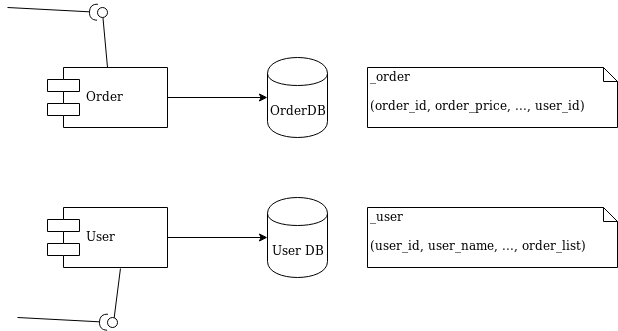
I’ll use a simple and typical example in order to show what we’re talking about. Imagine the development of two independent microservices: Order and User. We designed them to expose a REST interface and to each use a separate database, as shown in Figure 1:
Figure 1: Order and User microservices.
We must notify the User domain about any change happening in the Order domain. To do this in the example, we need to update the order_list. For this reason, we’ve modeled the User REST service with addOrder and deleteOrder operations.
Solution 1: Queue decoupling
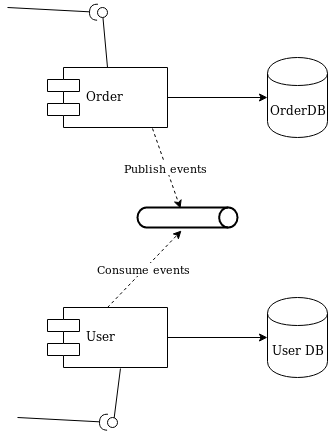
The first solution to consider is adding a queue between the services. Order will publish events that User will eventually process, as shown in Figure 2:
Figure 2: Decoupling with a queue.
This is a fair design. However, if you don’t use the right middleware you will mix a lot of infrastructure code into your domain logic. Now that you have queues, you must develop producer and consumer logic. You also have to take care of transactions. The problem is to make sure that every event ends up correctly in both the Order database and in the queue.
Solution 2: Change data capture decoupling
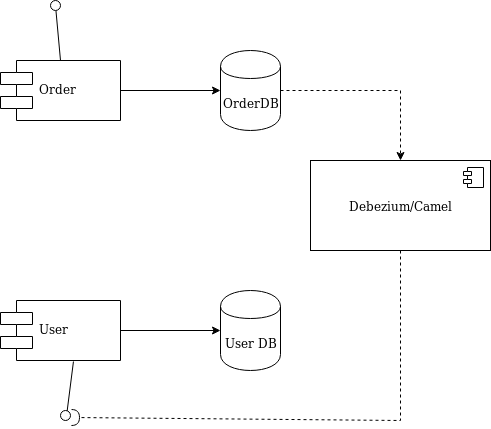
Let me introduce an alternative solution that handles all of that work without your touching any line of your microservices code. I’ll use Debezium and Apache Camel to capture data changes on Order and trigger certain actions on User. Debezium is a log-based data change capture middleware. Camel is an integration framework that simplifies the integration between a source (Order) and a destination (User), as shown in Figure 3:
Figure 3: Decoupling with Debezium and Camel.
Debezium is in charge of capturing any data change happening in the Order domain and publishing it to a topic. Then a Camel consumer can pick that event and make a REST call to the User API to perform the necessary action expected by its domain (in our simple case, update the list).
Decoupling with Debezium and Camel
I’ve prepared a simple demo with all of the components we need to run the example above. You can find this demo in this GitHub repo. The only part we need to develop is represented by the following source code:
Apache Camel has a Debezium component that can hook up a MySQL database and use Debezium embedded engine. The source endpoint configuration provides the parameters needed by Debezium to note any change happening in the debezium._order table. Debezium streams the events according to a JSON-defined format, so you know what kind of information to expect. For each event, you will get the information as it was before and after the event occurs, plus a few useful pieces of meta-information.
Thanks to Camel’s content-based router, we can either call the addOrderUsingPOST or deleteOrderUsingDELETE operation. You only have to develop a message translator that can convert the message coming from Debezium:
public class AfterStructToOrderTranslator implements Processor { private static final String EXPECTED_BODY_FORMAT = "{\"userId\":%d,\"orderId\":%d}"; public void process(Exchange exchange) throws Exception { final Map value = exchange.getMessage().getBody(Map.class); // Convert and set body int userId = (int) value.get("user_id"); int orderId = (int) value.get("order_id"); exchange.getIn().setHeader("userId", userId); exchange.getIn().setHeader("orderId", orderId); exchange.getIn().setBody(String.format(EXPECTED_BODY_FORMAT, userId, orderId)); } }
Notice that we did not touch any of the base code for Order or User. Now, turn off the Debezium process to simulate downtime. You will see that it can recover all events as soon as it turns back on!
The example illustrated here uses Debezium’s embedded mode. For more consistent solutions, consider using the Kafka connect mode instead, or tuning the embedded engine accordingly.
Posted by: xSicKxBot - 01-21-2020, 12:50 AM - Forum: Python
- No Replies
Python Regex Compile
Why have regular expressions survived seven decades of technological disruption? Because coders who understand regular expressions have a massive advantage when working with textual data. They can write in a single line of code what takes others dozens!
This article is all about the re.compile(pattern) method of Python’s re library. Before we dive into re.compile(), let’s get an overview of the four related methods you must understand:
The findall(pattern, string) method returns a list of string matches. Read more in our blog tutorial.
The search(pattern, string) method returns a match object of the first match. Read more in our blog tutorial.
The match(pattern, string) method returns a match object if the regex matches at the beginning of the string. Read more in our blog tutorial.
The fullmatch(pattern, string) method returns a match object if the regex matches the whole string. Read more in our blog tutorial.
Equipped with this quick overview of the most critical regex methods, let’s answer the following question:
How Does re.compile() Work in Python?
The re.compile(pattern) method returns a regular expression object (see next section)
You then use the object to call important regex methods such as search(string), match(string), fullmatch(string), and findall(string).
In short: You compile the pattern first. You search the pattern in a string second.
This two-step approach is more efficient than calling, say, search(pattern, string) at once. That is, IF you call the search() method multiple times on the same pattern. Why? Because you can reuse the compiled pattern multiple times.
Here’s an example:
import re # These two lines ...

regex = re.compile('Py...n')

match = regex.search('Python is great') # ... are equivalent to ...

match = re.search('Py...n', 'Python is great')
In both instances, the match variable contains the following match object:
<re.Match object; span=(0, 6), match='Python'>
But in the first case, we can find the pattern not only in the string ‘Python is great’ but also in other strings—without any redundant work of compiling the pattern again and again.
Specification:
re.compile(pattern, flags=0)
The method has up to two arguments.
pattern: the regular expression pattern that you want to match.
We’ll explore those arguments in more detail later.
Return Value:
The re.compile(patterns, flags) method returns a regular expression object. You may ask (and rightly so):
What’s a Regular Expression Object?
Python internally creates a regular expression object (from the Pattern class) to prepare the pattern matching process. You can call the following methods on the regex object:
Method
Description
Pattern.search(string[, pos[, endpos]])
Searches the regex anywhere in the string and returns a match object or None. You can define start and end positions of the search.
Pattern.match(string[, pos[, endpos]])
Searches the regex at the beginning of the string and returns a match object or None. You can define start and end positions of the search.
Pattern.fullmatch(string[, pos[, endpos]])
Matches the regex with the whole string and returns a match object or None. You can define start and end positions of the search.
Pattern.split(string, maxsplit=0)
Divides the string into a list of substrings. The regex is the delimiter. You can define a maximum number of splits.
Pattern.findall(string[, pos[, endpos]])
Searches the regex anywhere in the string and returns a list of matching substrings. You can define start and end positions of the search.
Pattern.finditer(string[, pos[, endpos]])
Returns an iterator that goes over all matches of the regex in the string (returns one match object after another). You can define the start and end positions of the search.
Pattern.sub(repl, string, count=0)
Returns a new string by replacing the first count occurrences of the regex in the string (from left to right) with the replacement string repl.
Pattern.subn(repl, string, count=0)
Returns a new string by replacing the first count occurrences of the regex in the string (from left to right) with the replacement string repl. However, it returns a tuple with the replaced string as the first and the number of successful replacements as the second tuple value.
If you’re familiar with the most basic regex methods, you’ll realize that all of them appear in this table. But there’s one distinction: you don’t have to define the pattern as an argument. For example, the regex method re.search(pattern, string) will internally compile a regex object p and then call p.search(string).
def search(pattern, string, flags=0): """Scan through string looking for a match to the pattern, returning a Match object, or None if no match was found.""" return _compile(pattern, flags).search(string)
The re.search(pattern, string) method is a mere wrapper for compiling the pattern first and calling the p.search(string) function on the compiled regex object p.
Is It Worth Using Python’s re.compile()?
No, in the vast majority of cases, it’s not worth the extra line.
Consider the following example:
import re # These two lines ...

regex = re.compile('Py...n')

match = regex.search('Python is great') # ... are equivalent to ...

match = re.search('Py...n', 'Python is great')
Don’t get me wrong. Compiling a pattern once and using it many times throughout your code (e.g., in a loop) comes with a big performance benefit. In some anecdotal cases, compiling the pattern first lead to 10x to 50x speedup compared to compiling it again and again.
But the reason it is not worth the extra line is that Python’s re library ships with an internal cache. At the time of this writing, the cache has a limit of up to 512 compiled regex objects. So for the first 512 times, you can be sure when calling re.search(pattern, string) that the cache contains the compiled pattern already.
# --------------------------------------------------------------------

# internals _cache = {} # ordered! _MAXCACHE = 512

def _compile(pattern, flags): # internal: compile pattern if isinstance(flags, RegexFlag): flags = flags.value try: return _cache[type(pattern), pattern, flags] except KeyError: pass if isinstance(pattern, Pattern): if flags: raise ValueError( "cannot process flags argument with a compiled pattern") return pattern if not sre_compile.isstring(pattern): raise TypeError("first argument must be string or compiled pattern") p = sre_compile.compile(pattern, flags) if not (flags & DEBUG): if len(_cache) >= _MAXCACHE: # Drop the oldest item try: del _cache[next(iter(_cache))] except (StopIteration, RuntimeError, KeyError): pass _cache[type(pattern), pattern, flags] = p return p
Can you find the spots where the cache is initialized and used?
While in most cases, you don’t need to compile a pattern, in some cases, you should. These follow directly from the previous implementation:
You’ve got more than MAXCACHE patterns in your code.
You’ve got more than MAXCACHE different patterns between two same pattern instances. Only in this case, you will see “cache misses” where the cache has already flushed the seemingly stale pattern instances to make room for newer ones.
You reuse the pattern multiple times. Because if you don’t, it won’t make sense to use sparse memory to save them in your memory.
(Even then, it may only be useful if the patterns are relatively complicated. Otherwise, you won’t see a lot of performance benefits in practice.)
To summarize, compiling the pattern first and storing the compiled pattern in a variable for later use is often nothing but “premature optimization”—one of the deadly sins of beginner and intermediate programmers.
What Does re.compile() Really Do?
It doesn’t seem like a lot, does it? My intuition was that the real work is in finding the pattern in the text—which happens after compilation. And, of course, matching the pattern is the hard part. But a sensible compilation helps a lot in preparing the pattern to be matched efficiently by the regex engine—work that would otherwise have be done by the regex engine.
Regex’s compile() method does a lot of things such as:
Combine two subsequent characters in the regex if they together indicate a special symbol such as certain Greek symbols.
Prepare the regex to ignore uppercase and lowercase.
Check for certain (smaller) patterns in the regex.
Analyze matching groups in the regex enclosed in parentheses.
Here’s the implemenation of the compile() method—it looks more complicated than expected, no?
def _compile(code, pattern, flags): # internal: compile a (sub)pattern emit = code.append _len = len LITERAL_CODES = _LITERAL_CODES REPEATING_CODES = _REPEATING_CODES SUCCESS_CODES = _SUCCESS_CODES ASSERT_CODES = _ASSERT_CODES iscased = None tolower = None fixes = None if flags & SRE_FLAG_IGNORECASE and not flags & SRE_FLAG_LOCALE: if flags & SRE_FLAG_UNICODE: iscased = _sre.unicode_iscased tolower = _sre.unicode_tolower fixes = _ignorecase_fixes else: iscased = _sre.ascii_iscased tolower = _sre.ascii_tolower for op, av in pattern: if op in LITERAL_CODES: if not flags & SRE_FLAG_IGNORECASE: emit(op) emit(av) elif flags & SRE_FLAG_LOCALE: emit(OP_LOCALE_IGNORE[op]) emit(av) elif not iscased(av): emit(op) emit(av) else: lo = tolower(av) if not fixes: # ascii emit(OP_IGNORE[op]) emit(lo) elif lo not in fixes: emit(OP_UNICODE_IGNORE[op]) emit(lo) else: emit(IN_UNI_IGNORE) skip = _len(code); emit(0) if op is NOT_LITERAL: emit(NEGATE) for k in (lo,) + fixes[lo]: emit(LITERAL) emit(k) emit(FAILURE) code[skip] = _len(code) - skip elif op is IN: charset, hascased = _optimize_charset(av, iscased, tolower, fixes) if flags & SRE_FLAG_IGNORECASE and flags & SRE_FLAG_LOCALE: emit(IN_LOC_IGNORE) elif not hascased: emit(IN) elif not fixes: # ascii emit(IN_IGNORE) else: emit(IN_UNI_IGNORE) skip = _len(code); emit(0) _compile_charset(charset, flags, code) code[skip] = _len(code) - skip elif op is ANY: if flags & SRE_FLAG_DOTALL: emit(ANY_ALL) else: emit(ANY) elif op in REPEATING_CODES: if flags & SRE_FLAG_TEMPLATE: raise error("internal: unsupported template operator %r" % (op,)) if _simple(av[2]): if op is MAX_REPEAT: emit(REPEAT_ONE) else: emit(MIN_REPEAT_ONE) skip = _len(code); emit(0) emit(av[0]) emit(av[1]) _compile(code, av[2], flags) emit(SUCCESS) code[skip] = _len(code) - skip else: emit(REPEAT) skip = _len(code); emit(0) emit(av[0]) emit(av[1]) _compile(code, av[2], flags) code[skip] = _len(code) - skip if op is MAX_REPEAT: emit(MAX_UNTIL) else: emit(MIN_UNTIL) elif op is SUBPATTERN: group, add_flags, del_flags, p = av if group: emit(MARK) emit((group-1)*2) # _compile_info(code, p, _combine_flags(flags, add_flags, del_flags)) _compile(code, p, _combine_flags(flags, add_flags, del_flags)) if group: emit(MARK) emit((group-1)*2+1) elif op in SUCCESS_CODES: emit(op) elif op in ASSERT_CODES: emit(op) skip = _len(code); emit(0) if av[0] >= 0: emit(0) # look ahead else: lo, hi = av[1].getwidth() if lo != hi: raise error("look-behind requires fixed-width pattern") emit(lo) # look behind _compile(code, av[1], flags) emit(SUCCESS) code[skip] = _len(code) - skip elif op is CALL: emit(op) skip = _len(code); emit(0) _compile(code, av, flags) emit(SUCCESS) code[skip] = _len(code) - skip elif op is AT: emit(op) if flags & SRE_FLAG_MULTILINE: av = AT_MULTILINE.get(av, av) if flags & SRE_FLAG_LOCALE: av = AT_LOCALE.get(av, av) elif flags & SRE_FLAG_UNICODE: av = AT_UNICODE.get(av, av) emit(av) elif op is BRANCH: emit(op) tail = [] tailappend = tail.append for av in av[1]: skip = _len(code); emit(0) # _compile_info(code, av, flags) _compile(code, av, flags) emit(JUMP) tailappend(_len(code)); emit(0) code[skip] = _len(code) - skip emit(FAILURE) # end of branch for tail in tail: code[tail] = _len(code) - tail elif op is CATEGORY: emit(op) if flags & SRE_FLAG_LOCALE: av = CH_LOCALE[av] elif flags & SRE_FLAG_UNICODE: av = CH_UNICODE[av] emit(av) elif op is GROUPREF: if not flags & SRE_FLAG_IGNORECASE: emit(op) elif flags & SRE_FLAG_LOCALE: emit(GROUPREF_LOC_IGNORE) elif not fixes: # ascii emit(GROUPREF_IGNORE) else: emit(GROUPREF_UNI_IGNORE) emit(av-1) elif op is GROUPREF_EXISTS: emit(op) emit(av[0]-1) skipyes = _len(code); emit(0) _compile(code, av[1], flags) if av[2]: emit(JUMP) skipno = _len(code); emit(0) code[skipyes] = _len(code) - skipyes + 1 _compile(code, av[2], flags) code[skipno] = _len(code) - skipno else: code[skipyes] = _len(code) - skipyes + 1 else: raise error("internal: unsupported operand type %r" % (op,))
Don’t worry, you don’t need to understand the code. Just note that all this work would have to be done by the regex engine at “matching runtime” if you wouldn’t compile the pattern first. If we can do it only once, it’s certainly a low-hanging fruit for performance optimizations—especially for long regular expression patterns.
How to Use the Optional Flag Argument?
As you’ve seen in the specification, the compile() method comes with an optional third ‘flag’ argument:
Flags allow you to control the regular expression engine. Because regular expressions are so powerful, they are a useful way of switching on and off certain features (for example, whether to ignore capitalization when matching your regex).
Syntax
Meaning
re.ASCII
If you don’t use this flag, the special Python regex symbols w, W, b, B, d, D, s and S will match Unicode characters. If you use this flag, those special symbols will match only ASCII characters — as the name suggests.
re.A
Same as re.ASCII
re.DEBUG
If you use this flag, Python will print some useful information to the shell that helps you debugging your regex.
re.IGNORECASE
If you use this flag, the regex engine will perform case-insensitive matching. So if you’re searching for [A-Z], it will also match [a-z].
re.I
Same as re.IGNORECASE
re.LOCALE
Don’t use this flag — ever. It’s depreciated—the idea was to perform case-insensitive matching depending on your current locale. But it isn’t reliable.
re.L
Same as re.LOCALE
re.MULTILINE
This flag switches on the following feature: the start-of-the-string regex ‘^’ matches at the beginning of each line (rather than only at the beginning of the string). The same holds for the end-of-the-string regex ‘$’ that now matches also at the end of each line in a multi-line string.
re.M
Same as re.MULTILINE
re.DOTALL
Without using this flag, the dot regex ‘.’ matches all characters except the newline character ‘n’. Switch on this flag to really match all characters including the newline character.
re.S
Same as re.DOTALL
re.VERBOSE
To improve the readability of complicated regular expressions, you may want to allow comments and (multi-line) formatting of the regex itself. This is possible with this flag: all whitespace characters and lines that start with the character ‘#’ are ignored in the regex.
re.X
Same as re.VERBOSE
Here’s how you’d use it in a practical example:
import re text = 'Python is great (python really is)' regex = re.compile('Py...n', flags=re.IGNORECASE) matches = regex.findall(text)

print(matches)

# ['Python', 'python']
Although your regex ‘Python’ is uppercase, we ignore the capitalization by using the flag re.IGNORECASE.
Where to Go From Here?
You’ve learned about the re.compile(pattern) method that prepares the regular expression pattern—and returns a regex object which you can use multiple times in your code.
Learning Python is hard. But if you cheat, it isn’t as hard as it has to be:
OpenJDK provides production-ready open-source builds of the Java Development Kit, version 11, an implementation of the Java SE 11 Platform under the GNU General Public License, version 2, with the Classpath Exception.
Java SE 8u191(Java SE 8 update 191) and Java SE 8u192(Java SE 8 update 192) are now available.Oracle strongly recommends that most Java SE users upgrade to the latest Java 8 update, which includes important security fixes. Oracle will not post further updates of Java SE 8 to its public download sites for commercial use after January 2019. For information on new features and bug fixes included in this release, please read the Java SE 8u191 and Java SE 8u192 release notes.
Oracle Java SE Embedded Version 8 Update 191 is also available. You can create customized JREs using the JRECreate tool. To get started, download an eJDK bundle suitable for your target platform and follow instructions to create a JRE that suits your application's needs. Oracle Java SE 8 Embedded is the final major release of the Oracle Java SE Embedded product. Starting with JDK 9, Oracle doesn't plan to offer a separate Java SE Embedded product download.
Also released are Java SE 7u201 and Java SE 6u211, which are both available as part of Oracle Java SE Support. For more information about those releases, please read the following release notes:
Contact Form with Custom Image Captcha Validation like Google reCaptcha
Last modified on January 9th, 2020 by Vincy.
A contact form on a website is a medium to the users to contact the site admin or maintainer. It acts as a medium of communication. For many a websites, it is a critical factor in getting a sale.
The Captcha in a form is a mechanism to prevent bots or malicious users from submitting the form. It protects the site from security abuses.
There are components available in the market to render captcha in a form. Google reCAPTCHA is a popular and unbeatable service to make your form captcha-enabled.
Different websites use different types of captcha.
Displaying random alpha-numeric characters.
Requesting to solve puzzles, Google reCAPTCHA-like image captcha.
I created an example code for a contact form in PHP with the reCAPTCHA-like image captcha mechanism.
Ready-made contact form components are existing huge in number around the web. If you want to get one among them, then we need to be sure about the security and robustness of the code.
I have created a secure spam-free contact form script, Iris. I coded this component to easily integrate and configure with your application. If you are looking for a contact form that controls spam without using a captcha, then you will like it.
This also component includes Google reCAPTCHA. You can enable or disable this feature on a need basis. In similar ways, it comes with loads of features that is configurable in minutes.
About this example
This example code has the Name, Email, Subject and Message fields. These are some basic fields that we have seen with other PHP contact form example earlier.
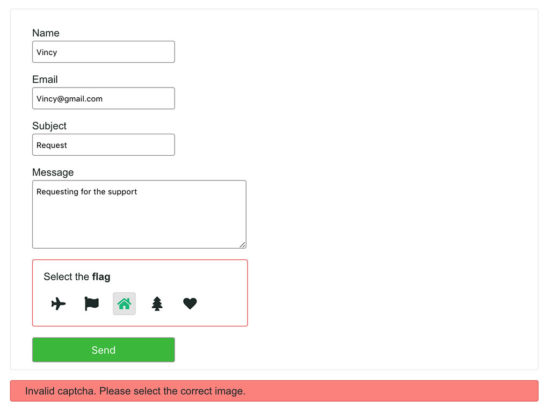
Added to these fields, I have added an image captcha section in this code. This section will show five random images and ask to choose one. The random images are from the database.
I used jQuery script to validate the form field data before posting it to the PHP.
In PHP, it validates the captcha image clicked by the user. Based on the server-side captcha validation, the PHP will respond to the user.
File structure
The PHP contact form with an image captcha example includes less number of files.
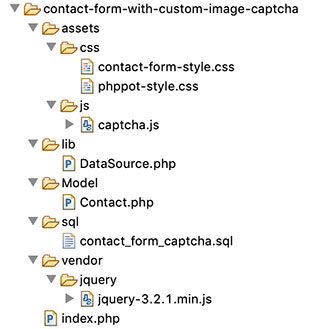
The file structure is in the below screenshot. You can see that it has a systematic code with a conventional structure.
This code snippet shows the HTML part of the index.php, the landing page.
This contact form contains some basic fields with custom captcha in PHP.
The captcha section shows the SVG image markup from the database. It displays five random images and requests the user to select one.
The HTML form has the specification of a jQuery validation handler. The form-submit event will invoke this handler to process the form validation.
This HTML includes the response containers to display notifications to the user. These notifications acknowledge the user about the captcha validation or other responses.
jQuery script to validate contact form and highlight captcha selection
This section shows the jQuery script for validation and captcha selection.
The validateContactForm() function is handling the form validation. All the contact form fields are mandatory. This function is making sure about the non-empty state of the form fields.
On selecting one of the lists of captcha images, the script puts the selected value in a form field. Also, it highlights the selected by adding CSS via script.
If the user selects no captcha, then the validation will return false.
On loading the contact form, the PHP code reads the random captcha images from the database. In PHP, it picks one image from the random results as the captcha code.
The HTML form contains a hidden field to have this code.
When the user selects an image and posts it to the PHP, it will validate the selected captcha.
The user-selected captcha is matched with the pre-loaded code, then the PHP code will return true. Then, it will process the contact email sending script.
index.php (Captcha Validation and Mail sending)
<?php namespace Phppot; require_once ("Model/Contact.php"); $contact = new Contact(); if (! empty($_POST['send'])) { if ($_POST['captcha_code'] == $_POST['captcha_chosen']) { $contact->sendContactMail($_POST); $message = "Hi, we have received your message. Thank you."; $type = "success"; } else { $message = "Invalid captcha. Please select the correct image."; $type = "error"; $border = "border-error-color"; } } $result = $contact->getRecord(); $termId = $result[0]['id']; $captchaResult = $contact->getCaptchaIcons($termId); $randomCaptchaResult = $contact->getRandomCaptchaId($termId); $captchaOutput = array_merge($captchaResult, $randomCaptchaResult); ?>
In this PHP model class, it has the functions to read random captcha images from the database.
The getRecord() method reads a single random record to load captcha code on the page load.
The sendContactMail() function send the contact mail. I used PHP mail() function for this example. If you want to use SMTP for sending the email, you can see the example in the linked article.
Model/Contact.php
<?php namespace Phppot; use Phppot\DataSource; class Contact { private $ds; function __construct() { require_once __DIR__ . './../lib/DataSource.php'; $this->ds = new DataSource(); } function getRecord() { $query = "SELECT * FROM tbl_term ORDER BY RAND() LIMIT 1"; $result = $this->ds->select($query); return $result; } function getCaptchaIcons($id) { $query = "SELECT tbl_captcha_images.*, tbl_term.name FROM tbl_captcha_images JOIN tbl_term ON tbl_captcha_images.term_id = tbl_term.id WHERE term_id != " . $id . " ORDER BY RAND() LIMIT 4"; $captchaResult = $this->ds->select($query); return $captchaResult; } function getRandomCaptchaId($id) { $query = "SELECT tbl_captcha_images.*, tbl_term.name FROM tbl_captcha_images JOIN tbl_term ON tbl_captcha_images.term_id = tbl_term.id WHERE term_id = " . $id . " ORDER BY RAND() LIMIT 1"; $captcha = $this->ds->select($query); return $captcha; } function sendContactMail($postValues) { $name = $postValues["userName"]; $email = $postValues["userEmail"]; $subject = $postValues["subject"]; $content = $postValues["content"]; $toEmail = "SITE_ADMIN_EMAIL"; // Put in place the recipient email $mailHeaders = "From: " . $name . "<" . $email . ">\r\n"; mail($toEmail, $subject, $content, $mailHeaders); } }
lib/Datasource.php
<?php namespace Phppot; /** * Generic datasource class for handling DB operations. * Uses MySqli and PreparedStatements. * * @version 2.3 */ class DataSource { // PHP 7.1.0 visibility modifiers are allowed for class constants. // when using above 7.1.0, declare the below constants as private const HOST = 'localhost'; const USERNAME = 'root'; const PASSWORD = ''; const DATABASENAME = 'contact_form_captcha'; private $conn; /** * PHP implicitly takes care of cleanup for default connection types. * So no need to worry about closing the connection. * * Singletons not required in PHP as there is no * concept of shared memory. * Every object lives only for a request. * * Keeping things simple and that works! */ function __construct() { $this->conn = $this->getConnection(); } /** * If connection object is needed use this method and get access to it. * Otherwise, use the below methods for insert / update / etc. * * @return \mysqli */ public function getConnection() { $conn = new \mysqli(self::HOST, self::USERNAME, self::PASSWORD, self::DATABASENAME); if (mysqli_connect_errno()) { trigger_error("Problem with connecting to database."); } $conn->set_charset("utf8"); return $conn; } /** * To get database results * * @param string $query * @param string $paramType * @param array $paramArray * @return array */ public function select($query, $paramType = "", $paramArray = array()) { $stmt = $this->conn->prepare($query); if (! empty($paramType) && ! empty($paramArray)) { $this->bindQueryParams($stmt, $paramType, $paramArray); } $stmt->execute(); $result = $stmt->get_result(); if ($result->num_rows > 0) { while ($row = $result->fetch_assoc()) { $resultset[] = $row; } } if (! empty($resultset)) { return $resultset; } } }
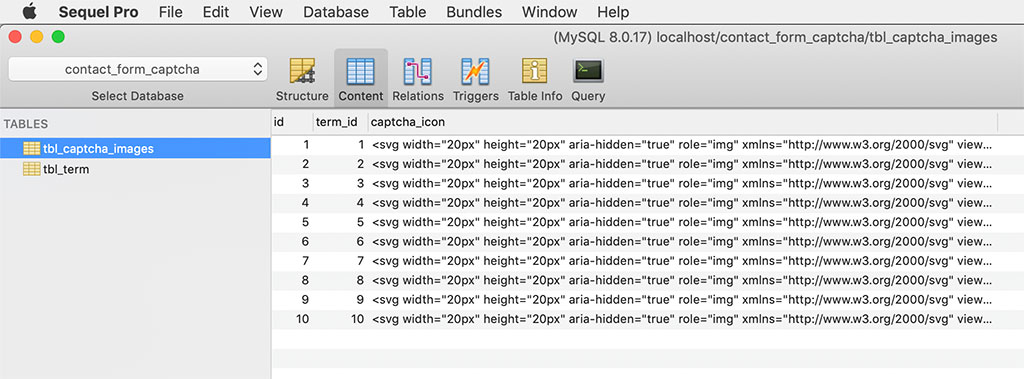
This SQL script includes the structure and data of the tables used to display custom captcha. The tbl_captcha_images table contains the SVG markup of the captcha images.
I have used another table tbl_term to hold the captcha term and title. The captcha term is for stating the user what to select. The captcha title is a slug to add it with a title attribute.
?All aboard the Casual Cruise Bundle & Warner Bros Sale
Get ready to embark on a Casual Cruise Bundle
[www.indiegala.com] With 9 stops & a 93% OFF ticket price this Steam ship is ready to cruise. Don't miss the special 24h launch price!
Warner Bros Winter Sale, up to -75%
[www.indiegala.com] Christmas may have passed, but these Warner Bros Deals have miraculously returned! DC, MK, LEGO and more fantastic worlds await. Here are some highlights:
HYPERCHARGE: Unboxed Dev Says All The Game’s Updates Will Be Entirely Free
One genre that’s somewhat underrepresented on the Switch is FPS. More recently, we’ve got games like Overwatch and Alien: Isolation, but the pickings are still considerably slim compared to the number of first-person shooters available on other platforms. Fortunately, by the end of this month, there’ll be at least one more to select from on Nintendo’s hybrid platform and it’s called Hypercharge: Unboxed.
This upcoming release is a bright and colourful FPS that takes place in your typical suburban household and draws inspiration from Toy Story, Small Soldiers and perhaps even certain entries in the Army Men series. You take control of a 5-inch tall soldier as you fight off wave after wave of enemies in bedrooms, bathrooms, gardens and more. Unlike various other shooters, though, you won’t have to pay to unlock any other additional content in the game.
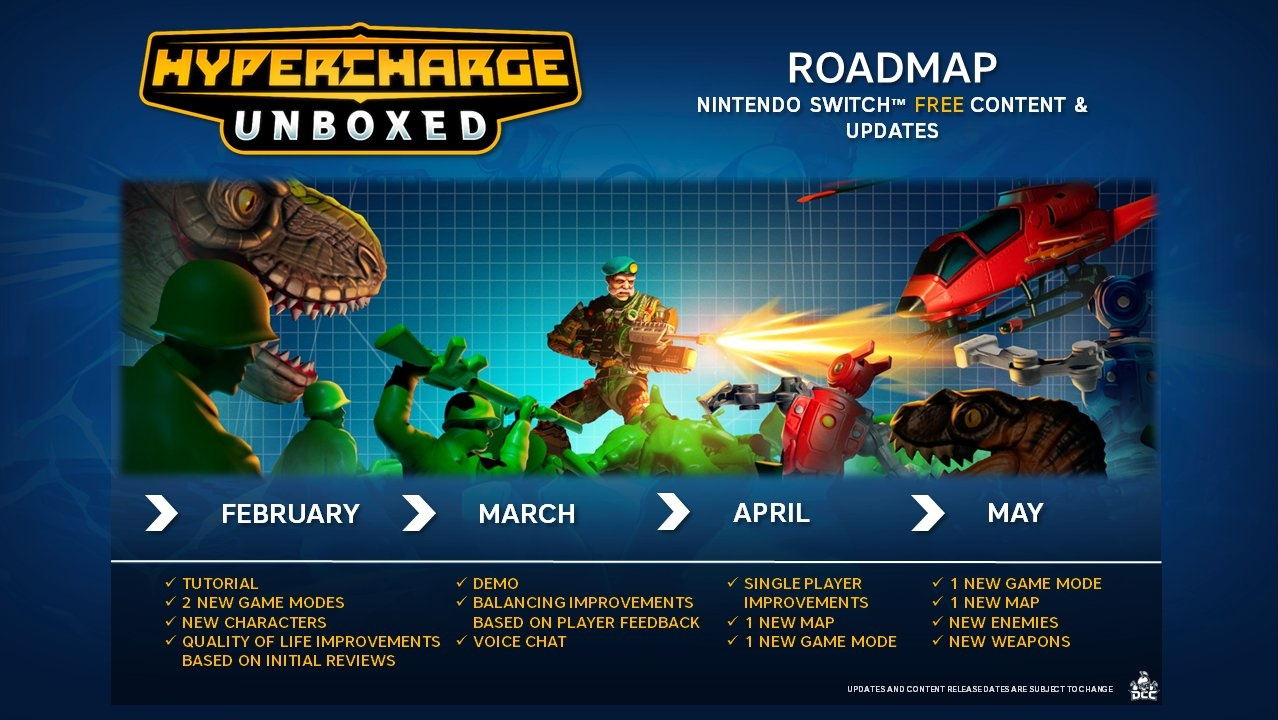
On the official Hypercharge: Unboxed Twitter account, the UK-based indie developer behind the game – Digital Cybercherries – revealed all of the game’s updates would be entirely free and shared a full road map of the plans for the next four months after the game releases.
When you spend your hard-earned cash on a game, you shouldn’t have to splash out even more on updates. Well guess what, you won’t pay for our updates. Here is a breakdown of what we aim to have in-game this year.
As you can see above, these updates will add new characters, modes, maps, enemies, and weapons. There’ll also be quality of life improvements and in March a demo will be made available.
Keep an eye out for our Nintendo Life review of Hypercharge: Unboxed, which goes live later today.