Autodesk have just released their annual update to Maya, Maya 2020. Detailed release notes are currently unavailable so all we have to go off right now is the press release features:
Maya 2020 highlights include:
— Over 60 animation features and updates to the graph editor and time slider.
— Cached Playback: Experience faster animation playback and more predictable results with new preview modes, layered dynamics caching, and more efficient caching of image planes.
— Animation bookmarks: Mark, organize, and navigate through specific events in time and frame playback ranges.
— Arnold GPU: Access Arnold 6 for production rendering on the CPU and GPU.
— Bifrost for Maya: Significant performance improvements, Cached Playback support, and new MPM cloth constraints bring even more power to the visual programming environment.
— Viewport improvements: Interact with and select dense geometry or a large number of smaller meshes faster in the viewport and UV editors.
— Modeling enhancements: Spend more time modeling and less time cleaning up your models, with new Remesh and Retopologize features.
— Rigging improvements: Simplify rig and character TD workwith matrix-driven workflows, nodes for precisely tracking positions on deforming geometry, and a new GPU-accelerated wrap deformer.
While not currently updated, you will eventually be able to download a 30 day trial of Maya 2020 here. Additionally Autodesk have released a short 4min feature video for Maya 2020 available here. You can learn more about this release in the video below.
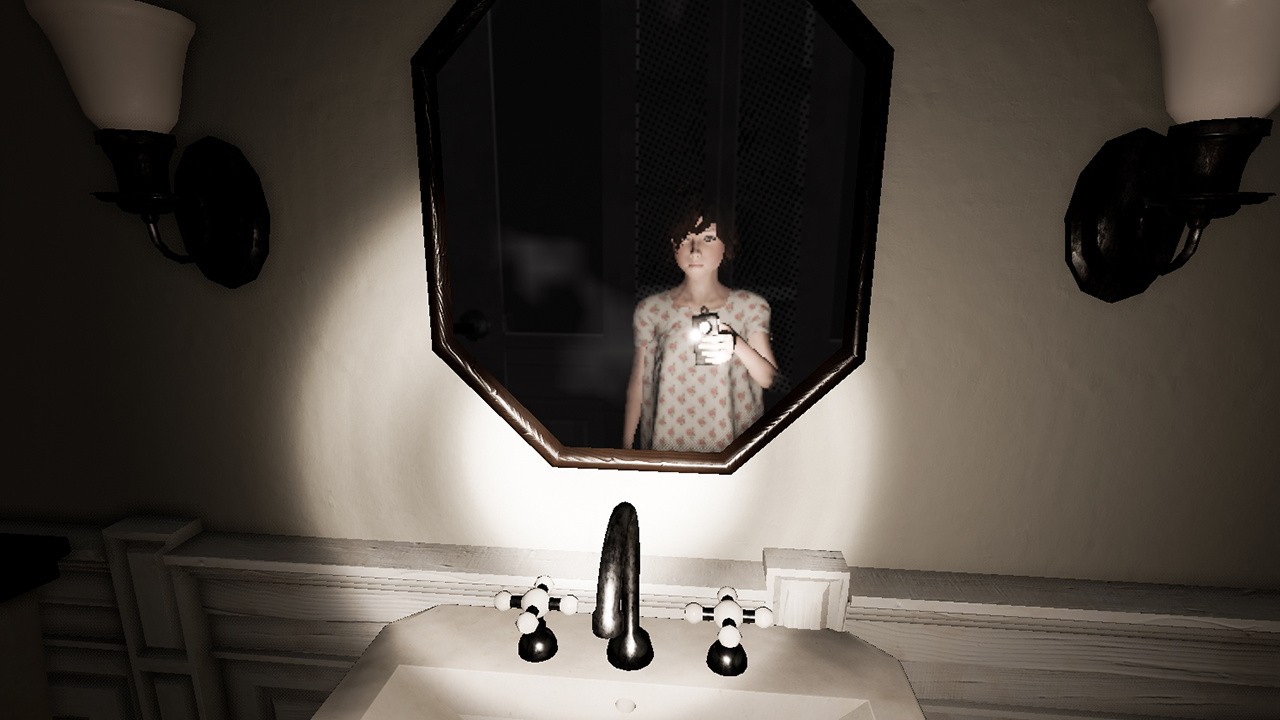
Never Again Kicks Off Switch’s New Year With Some Spooky First-Person Horror
Launching on Nintendo Switch early next year is Never Again, a first-person horror that first appeared on Steam back in May.
The game combines its spooky horror with puzzle-solving and exploration; you’ll be uncovering the story of a little girl suffering from asthma, which isn’t helped by the fact that things appear to go terribly wrong in a suffocating nightmare. The Switch’s eShop listing for the game tells us more:
The main character – Sasha Anders, a thirteen year old girl who awakens from a nightmare. The world seems to be upside down for her. Everything becomes so strange. The house is imbued with loneliness and longing and it seems strange to our character considering it was always dominated by love and harmony. Everywhere except for the heroine’s room, suspiciously darkens, without even a single sound. Her parents and younger brother have gone missing. The girl is smart and sensible beyond her years, but each person has their own fears, and sometimes they cannot cope. This is especially troubling Sasha, due to the slightest fear, she feels suffocated.
The listing ends with, “The saddest part of this mystical tale, is that it is not a tale at all”. Chilling.
It’ll arrive on Switch on 30th January for $13.99 if you’re interested. At the time of writing, user reviews on Steam are ‘very positive’.
What do you think? Share your thoughts with us below.
Birdo Joins Mario Kart Tour’s Holiday Event As A Playable Character
Yet another new tour is on the way to Mario Kart Tour this week, and it looks set to add three new characters for players to pick up.
Serving as the last tour of the year, the ‘Holiday Tour’ is due to kick off from 10pm PT on 17th December (so that’s 6am GMT the following morning). As you can see in the promotional image posted above, we can expect to see Yoshi (Reindeer) and Pauline (New Year’s) taking to the track, and you might just be able to make out Birdo on the left-hand side. Nothing gets past us.
Over the next few days, we will reveal what we believe are the 10 best games of 2019, organized by release date. Then, on December 17, we will reveal which of the nominees gets to take home the coveted title of GameSpot's Best Game of 2019. So be sure to come back then for the big announcement, and in the meantime, follow along with all of our other end-of-the-year coverage collected in our Best Games of 2019 hub.
Parvati. Ellie. Nyoka. Vicar Max. Some of the most memorable moments I had with video games this year were simply spending time with the incredible, fleshed-out companions in The Outer Worlds. Getting to know them, helping them through their highs and lows, and testing their patience. The Outer Worlds is full of great moments with these folks, but they're only some of the highlights in the game's landscape of wonderfully written characters and rich setting.
The Outer Worlds doesn't challenge conventions as much as some of our other nominees this year, but that doesn't stop it from being one of 2019's most exceptionally-made games in its own right. The form is recognisable, but the execution is masterful. The game feels focussed--not a single line of dialogue is wasted, despite there being a lot of it; the world feels large and full of things to discover, despite being relatively modest; the combat mechanics are clever, impactful, and allow for creativity, despite seeming straightforward. Your journey through The Outer Worlds will be full of highlights and surprises.
But the quality of the writing and quest design is The Outer Worlds' crown on its head. This is a game by Obsidian Entertainment, this is what they do best, and their strengths are definitely on show here. The Outer Worlds is not an open-world game, but the web of possibilities feels complex, and the sense of freedom you have in how you approach your situations is liberating.
The form is recognisable, but the execution is masterful.
It's a high-profile role-playing game wonderfully free of silos and full of greys--the distinctions between good and evil, right and wrong, and what kind of person you are aren't strictly defined. This is your own adventure, and The Outer Worlds allows you to approach it in so many different ways. Bring a knife to a gunfight, smooth-talk your way into finding an amicable solution, hack a robot boss character and shut it down, sneak around and steal from the wealthy, kill everyone, be a dumb-dumb, or punch the quest-giver with the dumb bowler hat multiple times, just because you can.
While the web of opportunities will eventually siphon off to just a few possible outcomes, there's no denying how rich the journey there is. There are plenty of familiarities, but they're of the high-end, top-shelf variety. The Outer Worlds is an intricately-crafted game that's a joy to play, and the new gold standard for blockbuster RPGs.
Unreal Engine 4.24 was just released by Epic Games, although the biggest new feature is actually outside of the engine. Last month Epic Games announced they acquired Quixel and in this release you can now use your Epic credentials to download over 11K high quality textures completely free, as long as you use them in Unreal Engine. You can either access the textures in Unreal Marketplace as packs, or using Quixel Bridge. Another major feature of this release is that Unreal Studio has been folded into Unreal Engine, with that functionality, including Datasmith, available for free.
There’s a host of new features and improvements across the board, with something for everyone. You can now create even more convincing interior and exterior scenes for games and visualization with new tools for nondestructively creating and editing open-world landscapes that adapt to other scene elements; gorgeous atmospheric skies; and Screen Space Global Illumination that scales across console and desktop platforms.
For those looking to create more believable characters, creatures, and virtual beings, we’re proud to offer a first look at our new strand-based hair and fur system that enables you to simulate and render hundreds of thousands of photoreal hairs at up to real time speeds. Formerly part of Unreal Studio, Datasmith—the toolkit for converting entire scenes at high fidelity from 3ds Max, SketchUp Pro, Cinema 4D, and a host of CAD and BIM formats—is now available for free as part of 4.24 and all future versions of Unreal Engine going forward. Add to that new Visual Dataprep for streamlined, easy-to-use, automated data preparation, and getting data from any source real-time ready is faster and easier.
That’s not to mention the first-class USD support that enables modelers and layout artists to work in parallel; enhancements to multi-display rendering that make it much easier to use out of the box, even on existing projects; and a new task-based wizard to give you a better starting point when creating new projects.
You can learn a great deal more about this release in the complete release notes or keep watching the video below.
Black Desert Mobile is an iOS and Android adaptation of the popular MMORPG Black Desert Online. The game will task players with uncovering the hidden secrets of the Ancients by following the Black Spirit. Some questions about controller support, family names, and best classes have arisen among players, so we are here to offer some advice and practical tips to help you get started.
Black Desert Mobile Guide
Does Black Desert Mobile Offer Controller Support?
The answer here is both yes and no. Yes, Black Desert Mobile does offer bluetooth controller support, but it’s functionality is limited at best. This means that you can pair a PlayStation 4 or Xbox One bluetooth controller to your iPhone or Android device, but you’ll only get limited functionality out of it.
What does that mean exactly? You’ll be able to use the controller to do things like move the camera, your character, and utilize basic attack moves. However, as far as using the controller to select buttons on the screen and navigate through the menu goes, you’ll have to use your fingers.
Some players have suggested that they were able to avoid this by using a controller with mapping features, but the majority of folks likely won’t have that on hand. It’s unclear if Pearl Abyss plans to build out the Black Desert Mobile controller support any further, or leave it as is.
What is a Family Name in Black Desert Online?
If you’re a Black Desert veteran, you’ll likely be familiar with Family Names, but if you’re new to the game or have been away for a while, a short explanation will go a long way. In Black Desert Mobile, your family name is essentially your surname, a name that is unique to you and all of your characters in the server.
You can change your family name by purchasing a name change coupon in the store, but it won’t be free. It’ll cost you 400 Pearls, which comes out to $10/£7. Once you’ve purchased the coupon, you’ll be able to change your family name. This Black Desert Mobile tip should help you as you start.
Black Desert Mobile – Family Name vs. Character Name
As the name implies, your character name is simply your first name, while your family name is your last name. So if your character was named, John Doe (I know, creative, huh?) then your character name would be John and your family name would be Doe. Every new character will adapt a new character name but will keep the same family name. Hopefully this Black Desert Mobile tip will go a long ways towards explaining the difference.
Black Desert Mobile Class – Which Should You Pick?
Perhaps the biggest question players are asking is which Black Desert Mobile class should you pick? While there is no right answer, the class you choose will affect your character’s appearance and fighting style.
There are currently five Black Desert Mobile classes available in the game, with more coming in the future. Below is a list of all five classes:
Giant
Ranger
Valkyrie
Warrior
Witch
While there is no right answer on which class is the best to choose, each class will likely be better for different players based on their playstyle.
The Giant class is best for those who love to melee and cause chaos. With a high DPS (damage per second), you’ll be able to deal loads of damage to enemies rather quickly. On the other hand, the Ranger class offers a mix of melee and ranged fighting. While it still offers a high DPS, you’ll also be able to deal a fair amount of damage from distance as well.
The Valkyrie class in Black Desert Mobile is best for those who want to play a support role. As a Valkyrie, you’ll be able to cast recovery spells and defensive aid to keep your team alive.
The Warrior is perhaps one of the best all-round Black Desert Mobile classes. With a nice balance, players will be able to try their hand at playing an attacking role as well as a defensive role. The Witch is similar to the Ranger in that it can deal lots of damage to enemies really quick, however, you’ll need to be careful because this class can’t take a whole lot of damage.
Black Desert Mobile Auto Attack/Combat
Black Desert Mobile offers players the opportunity to use an auto attack/combat feature which will make fighting a whole lot easier. However, it isn’t available right away, so figuring out how to unlock and use auto attack/combat can be a little bit confusing.
To unlock auto attack/combat, you’ll need to finish the Ancient Stone Chamber story quest, which will come around level 13. Once you’ve completed that mission, you’ll be able to use the auto attack feature.
Once you’ve unlocked it, you should see a button on your screen when you’re in combat that will allow you to enable the auto attack feature. Simply press the button every time you’re in a fight and would like to use it and you’ll instantly attack all the nearby enemies.
Is Black Desert Mobile Pay to Win?
As with any mobile game, a lot of questions are being asked about Black Desert Mobile microtransactions and if it is a pay to win style game. The game offers a premium currency called Black Pearls, which players can use in the shop to buy more item storage, pets, cosmetics, and more.
Players can also earn Black Pearls by playing through the game as rewards, but as you might expect, it’ll take longer. While players who buy Black Pearls may have a slight advantage, overall, Black Desert Online is not a pay to win game and the microtransactions are handled well in our opinion.
What is the Black Desert Mobile Max Level?
Players will be able to ‘Awaken’ their character at level 65, which will essentially change their playstyle. Once your character class has been awoken, you’ll get new abilities, weapons, and more.
Each of the Black Desert Mobile classes offer different types of awakenings. You can see each class’s awakening below:
Giant – Destroyer
Ranger – Windwalker
Valkyrie – Lancer
Warrior – Berkserker
Witch – Archmage
Hopefully this list of Black Desert Mobile tips and advice will help your first few hours go by smoothly. If you have any questions, drop a comment below and we will do our best to get back to you.
Andrew Smith is a freelance contributor at Pocket Tactics. You can find more of his work on his site, Guide Fall.
Posted by: xSicKxBot - 12-17-2019, 07:41 AM - Forum: Windows
- No Replies
Windows search bar: The one stop for answers, now with Bing Visual Search
Every day, we have questions. Search engines, apps, digital voice assistants, or phones are usually our go-to places to find answers.
You may already know that you can use the search bar in Windows – found on your PC taskbar – to find things like an app, setting, or a file you’ve been working on.
But did you know it can also find answers to questions like…
What’s the weather like in Paris? What’s the score of the Leicester City match? How do you unzip a file?
Windows brings all these searches together in one place. It’s easy to find and easy to use.
You don’t have to scroll through a long list of results, you don’t have to open a browser, and you don’t have to leave whatever application you’re in. With a couple of keystrokes, you can find your answers.
“The goal was to enable search in Windows to bring the web to where you are,” says Alexander Campbell, a senior program manager working on search. “People spend a lot of time on the web and in browsers. We saw an opportunity to help people save time in Windows by bringing convenient, fast web results directly to the search bar in Windows. Stay on task and in your flow, just by hitting the Windows key or clicking on the search box.”
It’s also a convenient place to start a search that leads to a website. From the search bar in Windows, you can quickly type and navigate to a URL, without having to open a browser first.
“We have a search experience that gives you quick answers, web results and helps you start your web task. It’s amazing what you can do with it,” he adds.
Every day it gets more useful: a full web search experience powered by the intelligence of Bing. You can search for quick calculations, music videos, movie trailers, sports scores, stock prices, movie times, weather forecasts and much more. Results turn up right in the taskbar. If you want to see more, you can open the results in your browser.
“The search bar in Windows gives you the quick info you need with none of the distraction,” Campbell says. “In the middle of an essay? It’s easy to jump in, check a fact and then get back to your work.”
The Windows and Bing teams worked together to bring a true web search experience into Windows, just like what you’d expect in a browser, into the search bar. And the teams continue to improve the search capability thanks to your feedback and Bing innovation.
The search bar is also the best place to go when you need to get things done on your Windows 10 device. Let’s say you need to download an app, Search can find it for you fast. For example, type “download microsoft to-do” or “download solitaire” and get an install link in the results preview. It’s also an easy way to get Tech Help answers to common questions, like “how do I connect a printer” or “how do I unzip files.”
And now, in addition to entering a text search, you can search with an image by taking a screenshot. This feature is rolling out to users in the U.S. first with international markets to follow shortly after. (You need the Windows 10 May 2019 Update or newer to see this.)
Simply click the Bing Visual Search button in the bottom right corner and snip any part of your screen to search the web using the image.
“Visual search is a new way of searching,” says Ravi Yada, product lead for Bing Visual Search. “There are a lot of things you can’t describe in words to get good enough results. By using an image as input for search, Bing can help you search what you see.”
Bing added camera-based searches in 2017, and made visual search features available in the Windows Photos App, Microsoft Edge, the Bing App and on Android phones through Microsoft Launcher. With the latest releases of Windows, you can use Windows Search to snip any part of your screen and search.
“We found people also wanted to search with screenshots, so we brought searching with screen snips to the Windows search bar,” says Nektarios Ioannides, Bing Image Search lead.
For instance, if you’re planning your wardrobe for winter and you want inspiration from what your favorite celebs are wearing? You’ll find similar results. Or you might be shopping for furniture and see a sofa you like. Snip it and use it to comparison shop with Visual Search results [1].
Aside from finding similar products, Visual Search can recognize landmarks, flowers, celebrities, animals. It also recognizes text in images, so you can copy or search it [2].
“Search is evolving. We’re still expanding the breadth of capabilities,” Ioannides says. “It’s cool to see the growth and excitement it generates, especially as we move into a world where using our eyes to search becomes more common.”
For developers, there’s an API to incorporate Visual Search within products and apps they create.
“Search in Windows is now more intelligent than ever at getting you where you want to go, saving steps and time,” Campbell says. “We can’t wait to see how you use it.”
Let us know your feedback and what you want to see next by clicking the “Feedback” button in the top right corner of the search experience.
Eager to try this yourself? If you’re reading this on a device running Windows 10 May 2019 Update or newer, click on the following examples:
[1] Shopping results are only available to users in the United States and United Kingdom.
Guide: Last Minute Handmade Nintendo Christmas Gifts, To Show You Really Care
Left your seasonal shopping until the last minute this year? Worry not because you’ve still got time and there are plenty of Nintendo-related gifts for your loved ones this year that are only a click away. From Nintendo-branded ugly Christmas sweaters to all the games and accessories they can handle, what if you want to show you really care this Christmas?
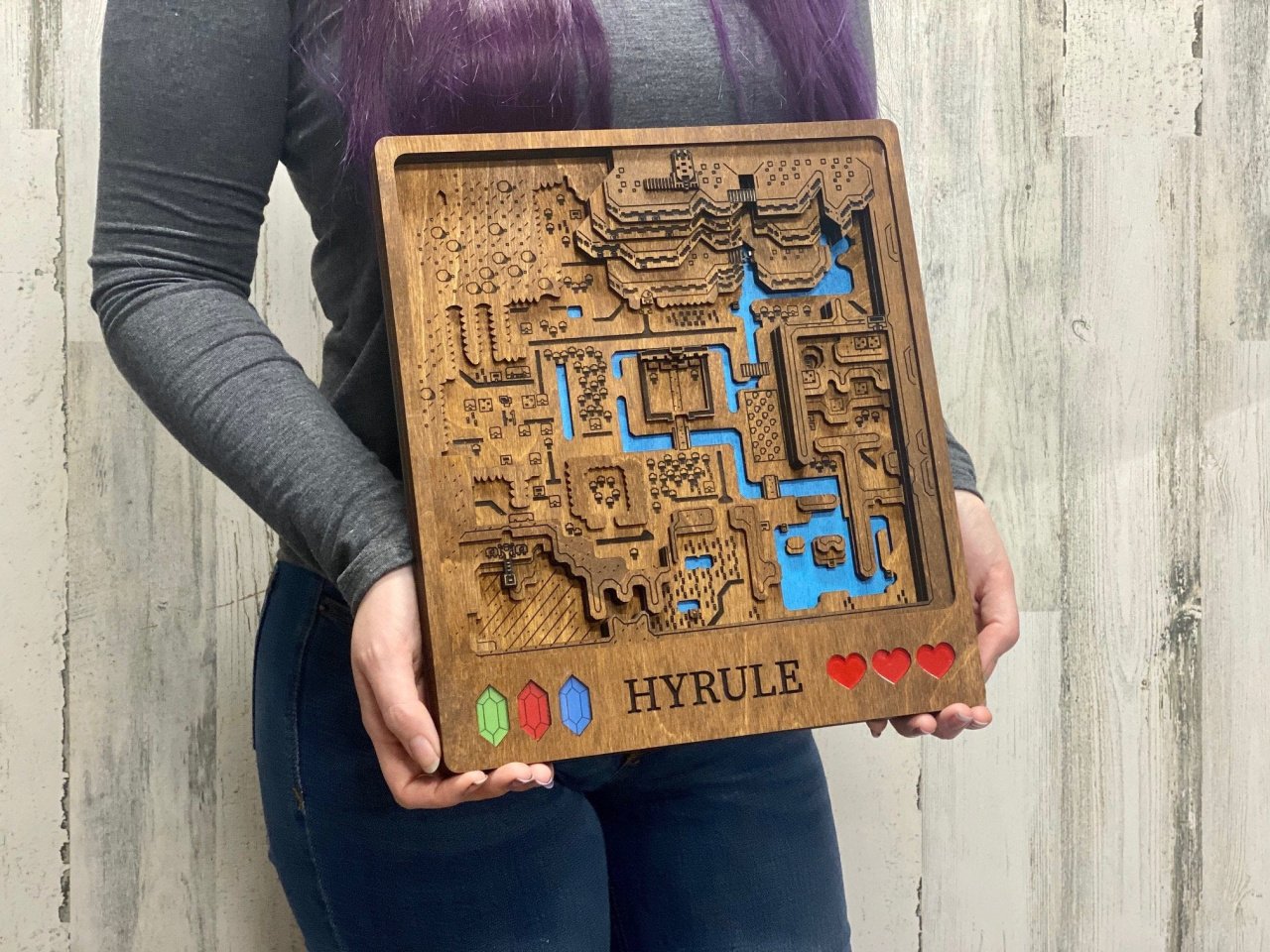
Well, why not get them a bespoke, handcrafted Nintendo gift? There are plenty of official options of course, but there are some incredible offerings available from individual sellers that give a very personal touch to some quality gaming gifts. What better gift could there be than something handmade that the recipient is unlikely to find on the High Street? They don’t need to know it was last minute.
Below we’ve collected some of the best handmade and specialised Nintendo-related items we’ve found on our internet travels. From retro neon lamps to Xmas tree decorations, handmade maps to mugs for your Christmas coffee or ‘nog – if you’re stuck for gift ideas, check out these assorted goodies and put something special under the tree for your Nintendo fans this Christmas.
Please note that some links on this page are affiliate links, which means if you click them and make a purchase we may receive a small percentage of the sale which helps support the site. Please read our FTC Disclosure for more information.
Posted by: xSicKxBot - 12-17-2019, 07:41 AM - Forum: Lounge
- No Replies
New Final Fantasy 7 Key Art Shows Familiar Looks At Tifa, Sephiroth
Square Enix has released a new batch of art and screenshots from the Final Fantasy 7 Remake, and it's quite a nostalgia trip for longtime fans. Among the new artwork are familiar character shots of Tifa and Sephiroth, along with new looks at characters like President Shinra, Aerith, and more.
The batch of art and screens comes from Famitsu. It includes the iconic images of Tifa looking up at the stars and Sephiroth walking through fire, plus character renders of Sephiroth, Shinra, and Shiva. Mixed in are several new screenshots, mostly consisting of the main cast in this first episodic release: Cloud, Aerith, and Tifa.
This comes just after a new Game Awards trailer that focused primarily on Cloud. We've also seen recent indication that, while it is slated as a PS4 exclusive for release this fall, that exclusivity may be temporary.
The Final Fantasy 7 Remake will launch on March 3, 2020, so a year of exclusivity would mean it could hit other platforms in 2021. We already know that this is being planned as a multi-part series, with the first release remaking and expanding on the original game's events in Midgar, the large opening area. Square Enix has not detailed how many more parts there will be, or when they'll release.
Adobe announced today that they have acquired Oculus Medium, a VR based content creation tool developed at Facebook’s Oculus division.
Details from the Adobe announcement:
Today, I am thrilled to welcome the amazing Medium team to the Adobe family. Born as an innovative VR authoring tool at Facebook’s Oculus division, the Medium team and technology are an exciting addition to Adobe as we aim to meaningfully accelerate our 3D and immersive efforts.
Medium has been a beacon of creativity in the VR space, pushing creative and technical boundaries of 3D modeling. The creative tool enables users to sculpt, model and paint in an immersive environment – to easily create characters, objects, environments, expressive works of art and more. The integration of Medium’s tools and technology will greatly contribute to our 3D and immersive strategy.
Medium also have a blog post about the acquisition, with details of how existing customers will be impacted:
To our passionate Medium users, nothing is changing for you today. And the app is currently still free when you activate your new Oculus Touch controllers on the Oculus Store. Stay tuned for more features, improvements, and other developments coming from Adobe in 2020 as Medium continues to evolve.
If you wish to learn more about the acquisition, be sure to check out the video below.