Posted by: xSicKxBot - 04-10-2019, 06:31 AM - Forum: Lounge
- No Replies
Game Of Thrones Actor Talks About Season 8's Massive Battle Scene
It is known that there will be a massive battle scene in Game of Thrones Season 8, and now one of the actors who fights in it has described what it was like working on it.
John Bradley, who plays Samwell Tarly in the fantasy series, told Entertainment Weekly that director Miguel Sapochnik has a "forensic sense of detail." As you may remember, Sapochnik also directed the Battle of the Bastards Season 6 epic fight sequence.
"[Director Miguel Sapochnik] has such a forensic sense of detail the way he can see the point of view of all these different characters in his head and know what each individual beat meansto them. It's so inspiring," Bradley said.
Bradley also shared an anecdote from filming the sequence. He said he got carried away while shooting the sequence and did things himself as an actor that Sam probably wouldn't have.
"When doing these huge fight sequences, you get carried away sometimes. You want to make yourself look as good as possible. Miguel said to me, 'I know that you want to show you’re quite good at this. But remember your character. Sam's not that good at this," Bradley said. "You have to play him because that's what's going to be truthful. So stop being so good!"
The battle scene from Season 8 sees living characters like Sam, Jon Snow, Daenerys, Sansa, Arya, Brienne, and others fighting against the Night King as his army; it's the showdown that's been teased since the show started years ago. The battle is reportedly the "longest consecutive battle sequence ever committed to film," eclipsing the 40-minute Helm's Deep battle scene from The Lord of the Rings: Two Towers.
Filming the episode took 11 weeks of night shoots. According to a report, up to 750 people worked all night for almost three months in sub-freezing temperatures and enduring cold rain, mud, and heavy wind.
Game of Thrones returns for its eighth and final season April 14 on HBO.
Posted by: xSicKxBot - 04-10-2019, 06:31 AM - Forum: Windows
- No Replies
Garage projects team up to illustrate the power of mixed reality
A customizable 3D Map canvas for MR creators
Maps SDK offers a host of developer-friendly controls, allowing creators to focus their energy on innovative MR experiences. Developers can drag the map control into a Unity scene to build on an out-of-the-box map complete with 3D terrain and configurable city and location labels sourced from Bing Maps, rather than start from scratch and create their own. From there, they can overlay additional geo-anchored content that users can explore via a table-top map experience with built-in panning, zooming, and navigation tools.
In effect, Maps SDK creates a canvas against which developers can illustrate content in new and interesting ways. Whether developers are layering in data visualizations, custom 3D objects/terrain, or other geo-anchored content, the project gives them a head start so they can spend less time on the basics, and more time bringing a creative MR map experience to life.
Explore places near and far, now in mixed reality
“We are constantly thinking about the intersection between maps and new mediums,” shared Brian Kircher, a Senior Software Engineer on the Maps team and developer for Maps SDK. “We not only wanted to empower MR developers, but also inspire them.” By day, Brian, David Buerer, and Jesse Levine, work on the Maps team and sit next to Oswaldo Ribas, the current PM of Microsoft Garage project Outings. “Last summer, we were brainstorming how we could illustrate what a 3D map control could do when it hit us that Outings was the perfect experience to bring to mixed reality,” shared Jesse, a Program Manager II. Pairing up with the Outings team, the three pitched an Outings mixed reality experience to a group of Bing interns.
The original Outings Garage project launched last December, and presents users with points of interest by pulling in rich pictures and relevant descriptions from digital travel journals so they can explore local gems and far-away destinations through a Tinder-esque, card UI. The team of interns was able to easily create a similar travel exploration experience in a few short weeks by leveraging Maps SDK and the location-based data that powers the Outings iOS and Android apps. While the sand-boxed sample app is not connected to the mobile experiences (locations saved on mobile will not appear in the MR experience), Outings fans will recognize the same point-of-interest cards, now overlayed geographically against the rich, 3D terrain from Maps SDK.
• Discover points of interest via search or panning/zooming as the crow flies across a 3D, tabletop globe • Save favorite destinations to build a bucket list or travel itinerary • Explore famous natural and urban landmarks in 3D
The Maps SDK team polished the new experience and enhanced the SDK, incorporating feedback from the interns and Outings team, as well as other teams around Microsoft working on innovative 3D experiences. The team has already collected feedback from first-party developers, but is excited to open feedback up to third-party developers creating anything from productivity to entertainment experiences.
Try it now and share your feedback
Maps SDK is now available and accepting feedback via GitHub. The sample experience, Outings, is a UWP app for mixed reality headsets and HoloLens, and now available for download and feedback via the Microsoft Store.
By attempting to re-package the roguelike back in 2015, Brace Yourself Games may have accidentally made one of the most compelling deconstructions of it in video games. Crypt of the Necrodancer finds ways to make turn-based dungeon crawling feel entirely new by barely tweaking the essentials and obfuscating it all under bright lights and big sounds.
You’re tasked with exploring a multi-layered, procedurally generated dungeon full of baddies. It sounds like every roguelike, proc-gen game you’ve ever heard. Ironically, it’s what you hear in Necrodancer that changes the entire landscape. This dungeon is a dancefloor.
The monsters mambo. The powerful, toe tapping beats of Canabalt and Binding of Issac’s Danny Baranowsky gives everything in earshot life.
To move, you must hop from space to space to the rhythm. Like Rogue, when you move, everything else in the game moves. Unlike Rogue, the monsters will move on every beat, whether you do or not. You’re all swirling around each other, slam dancing to the same beat. Staying in time while slaying your foes and collecting loot keeps your combo counter ticking. This is vital for collecting large amounts of gold to spend on the occasional warbling shopkeeper and keeping your arsenal in top shape as your enemies grow ever powerful. You don’t have to move on beat; breaking your combo doesn’t necessarily hurt you. But why are we here if not to shake it like a salt shaker?
Roguelike have always been a patient, turn-based affair. The addition of a beat to move to adds a sort of time limit that makes decision making a frantic affair. You must keep moving, even if it means trotting in a holding pattern until you’re sure of the next move. The dungeon’s denizens won’t just let you meander, of course. They will all be trotting along, either towards you or in specific patterns that are often simple to determine.
They all have their own sort of tells that inform you of when they’re going to strike you. For example, the turn before the skeleton attacks, they throw their hands in the air (possibly waving them like they just don’t care). These become a challenge to keep track of when multiple monsters with different rules all occupy the same room. In these moments, Necrodancer toes the line between stiff challenge and absolute mess pretty admirably.
This is all before tossing in traps, like the ones that can speed the tempo up temporarily. Other hazards like tiles of water that take two turns to leave make simple navigation difficult. Besides trying to find openings to attack the enemy in, you also need to avoid getting stuck. It can be incredibly demanding, and sometimes the mobile control options really let you down here.
There are three types, traditional d-pads, side buttons, and swipe controls. None of them are particularly better than the other outside of the realm of preference. But they can but unreliably when you really need to tap yourself out of a jam. Some of it is the panic throwing you off rhythm, but other times, it’s just a two button input not reading on time.
Lots of exploration options open up thanks to your shovel. You can dig your way through most of the walls around. You often have to, if you want to open hidden doors to secret shops or find big treasure and equipment. It can also be used as yet another layer of strategy to get the jump on mini-bosses if necessary. The kind of versatility that such a simple mechanic can provide to the rest of your arsenal is still a mind-boggling thing to behold.
The is A LOT of content to get into in NecroDancer, especially the Amplified version that contains all of the DLC from the PC edition. Several zones, daily challenge runs, and continues modes can keep you bopping for dozens of hours. 14 different characters all have different ways to play the game to challenge you even further. There’s just so much to be done that those who can’t get enough Necrodancing will never have to.
There’s no NecroDancer conversation that doesn’t discuss its very stellar soundtrack at least a little bit. Maybe more incredible than the number of tracks that come in the game is the number of riffs and remixes that accompany them for when you go through stages as different characters. It may seem a bit like a no brainer for a music game to have lots of good music, but as it is the core of everything else this game provides, that is sounds so good so often feels like that much more of a feat.
Importing music is also a feature that carries over from the PC port, but it’s kind of a mess on mobile. The app will access your Apple Music account and choose among songs that are downloaded to your device. But it can only seem to recognize certain songs. There seems to be no rhyme or reason as to what it can and can’t register. But of the around 30 songs I downloaded as a test; it could only read 5. The packed in tracks are good enough, but the fact that this feature isn’t working well is a disappointment.
But as far as getting a rhythm game/roguelike fix that is unique and rewarding goes, you really can’t go wrong with Crypt of the NecroDancer Amplified. It’s clever, easy to learn mechanics and deep well of content is worth the price on any platform. The inputs could be more responsive, and the custom tracks are off the table, but otherwise, this is a very faithful port of one of the best indies of this generation.
Posted by: xSicKxBot - 04-10-2019, 12:31 AM - Forum: Lounge
- No Replies
Ryan Reynolds Is Producing A Wacky-Sounding New TV Game Show
Deadpool actor Ryan Reynolds is getting involved with a new TV show, and it might not be what you expect. Reynolds is producing the new ABC game show "Don't."
As reported by Variety, the original game show is a "comedic physical game show" where families of four take part in mental and physical challenges where they "don't" do something. Examples include "don't forget," "don't slip," or anything else, it seems.
ABC cruelly canceled Two Guys, A Girl & a Pizza Place 18 years ago. ‘DON’T’ is so good, it‘ll fast become the 2nd best show ABC has ever produced. And ABC will worship me. And my sitcom will be back on the air. @TraylorHoward@NathanFillion and @RichardRuccolo, you’re on notice. https://t.co/YwIIjSMEgL
Here's more from Variety's description of the show:
"Each episode will focus on one family as they go through the 'Don't' tests. If they succeed, they'll win a cash prize. But if the family fails a challenge, one of them will be eliminated. When just one contestant is left, the last remaining family member must compete on their own. Whatever money they've earned, the family keeps."
Reynolds has a history with ABC, as he starred on the late '90s sitcom Two Guys and a Girl (which was originally titled Two Guys, A Girl & a Pizza Place). More recently, the Deadpool franchise joins ABC owner Disney after that company bought the Deadpool series from Fox. He also has some experience with game shows, as he showed up on a South Korean game show as part of viral marketing for Deadpool 2.
"All my life, the word 'don't' has tortured me," Reynolds said. "From 'don't curse' to 'don't play ball in the house' to 'don't eat the crab salad you left in the sun for three days.' I cannot wait for my personal trauma to become the next great ABC family show," Reynolds said.
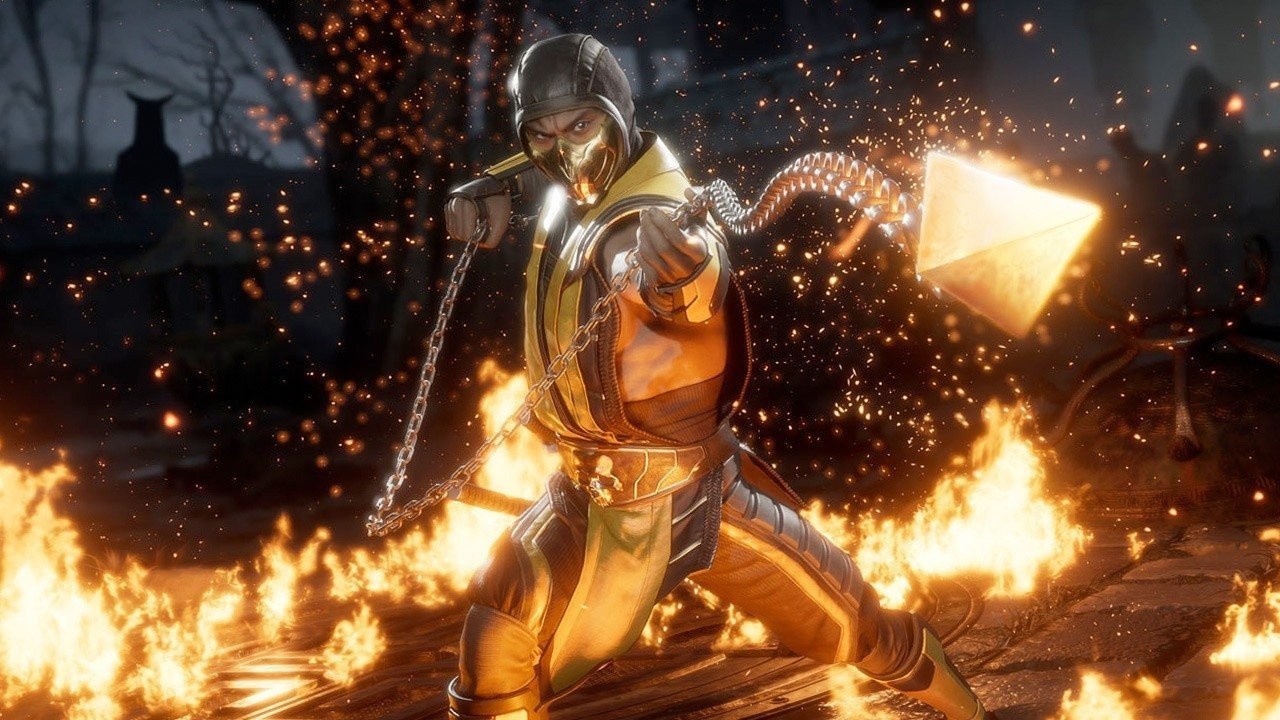
Mortal Kombat 11 Will Have A $100 Premium Edition On Switch
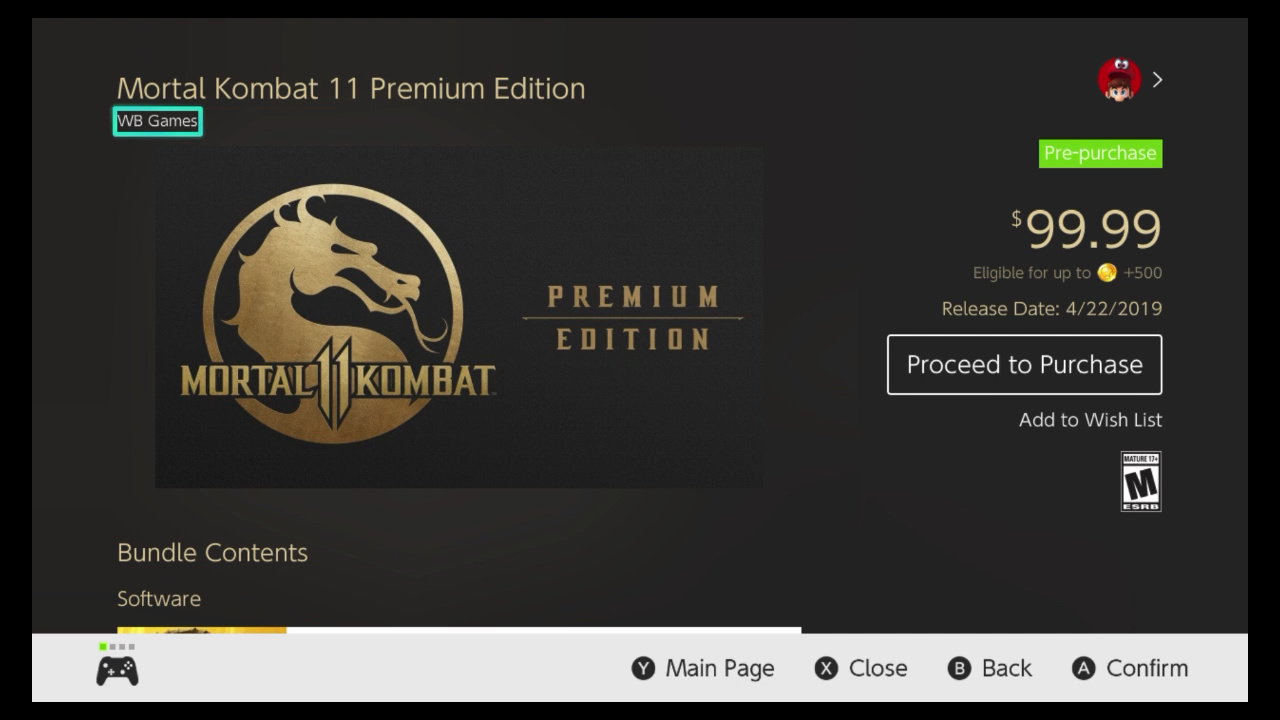
Mortal Kombat 11 has now appeared on the North American Nintendo Switch eShop, revealing its pricing, file size and more.
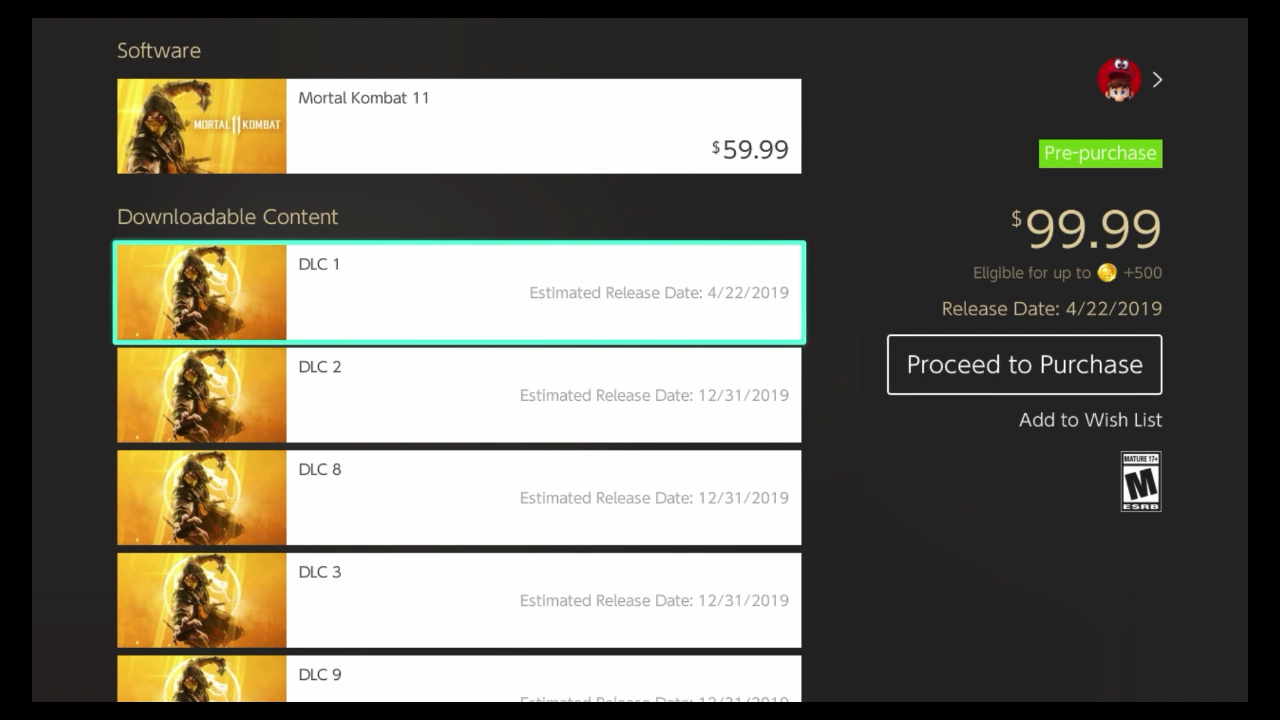
The main game is available to pre-purchase as we speak for $59.99, with the required amount of space currently set at 22.5GB (Nintendo notes that this is subject to change). It confirms that 1-2 players are supported locally, and online play will support 2-8 players.
Elsewhere, a Premium Edition is available for a mighty $99.99. The package comes with the base game, plus 13 pieces of DLC (as confirmed earlier today). Interestingly, while no details are given for what these pieces of DLC will contain, ‘DLC 1’ is set to release on the same day as the game, with all other DLC having a generic 31st December 2019 release date at present.
We’ve taken a couple of screenshots for you below.
Are you planning on picking this one up on 22nd April? Will you go for the Premium Edition, or is that far too costly? Tell us below.
Sniper Elite V2 Remastered Pricing And Release Date Revealed For Switch
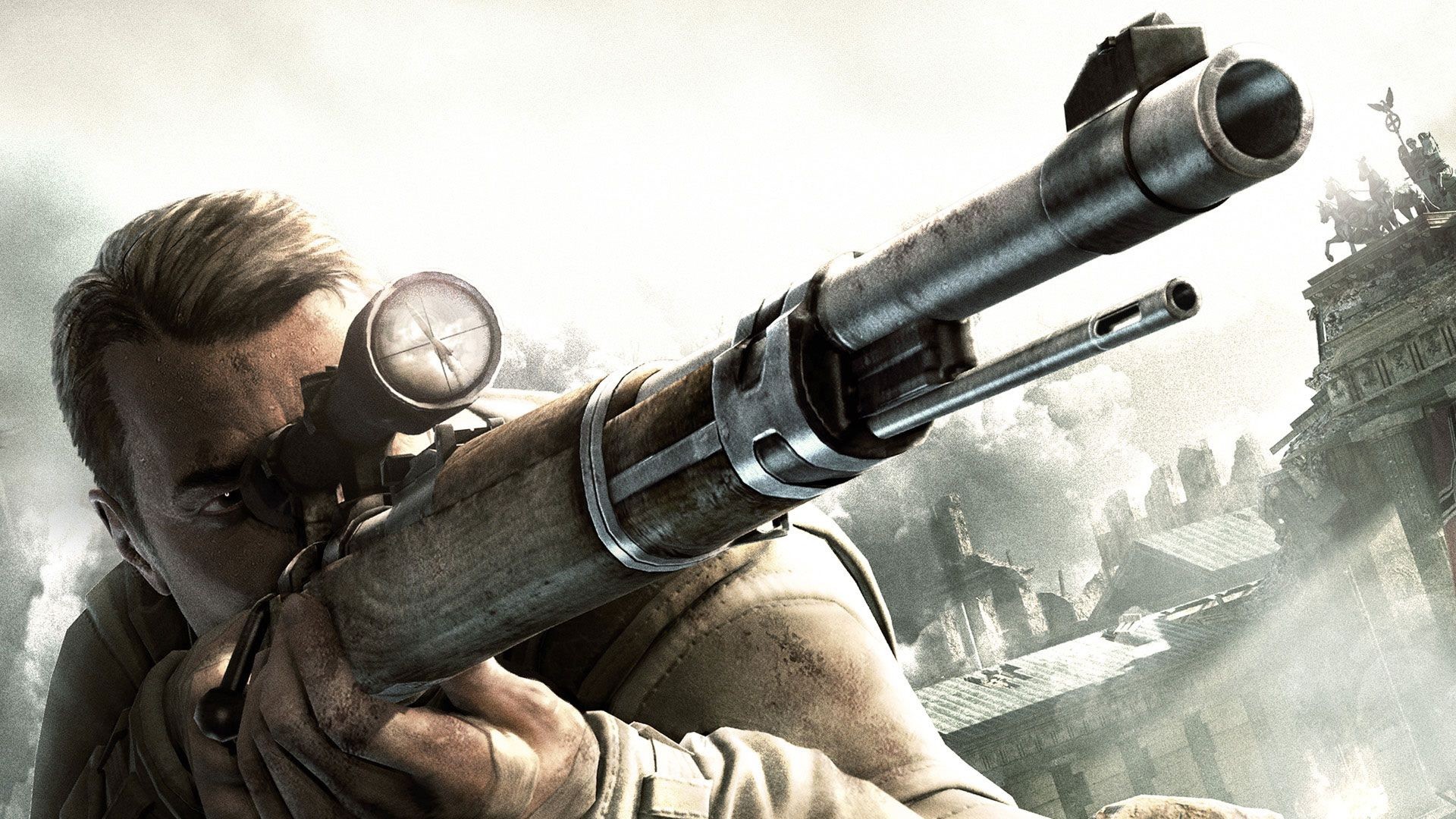
Rebellion has today confirmed the release date for Sniper Elite V2 Remastered on Switch. It’ll be available both digitally and physically on the same day as all other platforms, 14th May.
The news comes alongside a brand new trailer (which you can see for yourself above). Of course, Switch owners won’t benefit from the 4K and HDR support, but the game is also said to feature “beautifully updated environments, characters, weapons and vehicles, modernised rendering and post-processing effects, enhanced texturing and level geometry, a revamped lighting system” and more.
In addition to these visual upgrades, Sniper Elite V2 Remastered introduces a brand new frame-by-frame photo mode, seven new playable characters from Rebellion’s Zombie Army series, multiplayer for up to 8 players online, and all the additional content ever released for the game.
It’ll become available to pre-purchase on the Switch eShop from 24th April, with pricing set at £29.99 / $34.99 / €34.99; a 10% discount will be available before launch.
Hands on: Pixelmator Photo is king of the iPad photo editing apps
Since Pixelmator Photo is now available for iPad, AppleInsider takes you on a deep dive of the features and performance you can expect from the latest tablet-bound image editor.
Pixelmator Photo on iPad App Store
We’ve spent quite a bit of time using the original Pixelmator on our Mac, as well as the more powerful Pixelmator Pro. On iOS, we’ve utilized the original Pixelmator app but wanted more dedicated to photos —and with Pixelmator Photo, that’s just what we got.
Pixelmator Photo is a fast, capable photo editor that could easily handle anything we threw at it. Compared to other editors we’re fond of —such as Darkroom —Pixelmator Photo didn’t go from the iPhone to the iPad. It was designed from the beginning for Apple’s tablets.
We first saw Pixelmator Photo at Apple’s iPad Pro event last fall and have been eagerly awaiting the release ever since. For the past month or so we’ve been editing our best shots using the beta of Pixelmator Photo and were overwhelmingly impressed with its abilities.
UI and layout
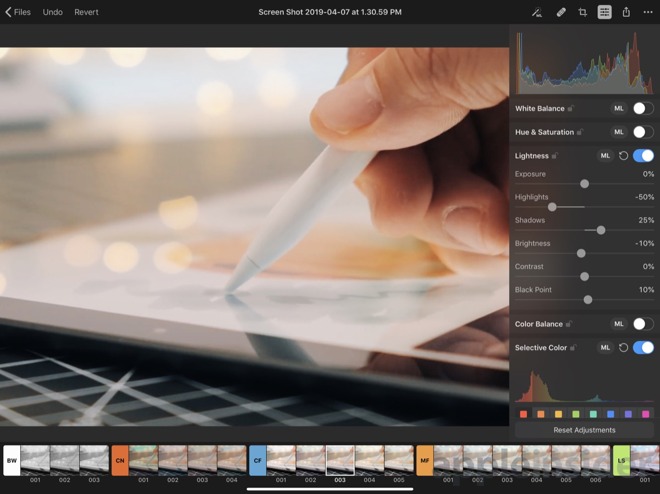
The app itself is very well arranged. Most controls appear on the right side, with occasional sliders and filters available along the bottom. This leaves the bulk of the display dedicated to content.
Pixelmator Photo
From the top left, you can head back to the file selector, undo, or revert. This is important because everything in Pixelmator Photo is non-destructive so no matter how much editing you do, you can always go back to the original.
On the top right, the auto button, repair control, crop function, adjustments, export, and more are placed.
As you open different controls, they elegantly slide over the image without being burdensome. They even make use of popover so multiple elements could be open at the same time such as the adjustments panel and the “more” menu. It all feels very natural and fluid.
Pixelmator Photo iCoud-based file picker
When you launch the app, it will automatically have any recent images ready to go. That doesn’t necessarily mean recent images you’ve opened with Pixelmator, but rather any stored on iCloud Drive. As an example, as we prepared our iMac 5K review, we had screenshots and other images littered across our desktop. Those images were then instantly available the second we opened the Pixelmator Photo app. Saying this is handy is an understatement.
A proper image workflow has been a bit of a rough point for iOS users and Pixelmator has done a great job simplifying this. It is painless to manage images on our Mac, and as long as they are in iCloud, it is just as easy to edit them on our tablet. This has made our iPad Pro our preferred device for image editing. At least the bulk of the time.
Editing imagery
Pixelmator Photo supports over 500 RAW formats which means even our newer Nikon Z 7 was supported.
Pixelmator Photo
One of the biggest, flagship features of Pixelmator Photo is machine learning. Pixelmator has leaned on Core ML to automatically improve photos. In our time with Pixelmator Photo, this has been spot on more often than not. It really does an amazing job adjusting the image. Frequently we’d just hit that and be on our way. If there was a particular look or effect we were trying to achieve however, we went manual.
This even applies to crop, where ML will automatically crop it so the subject is perfectly framed.
As you dig into the manual adjustments, each section can be toggled on/off, adjusted, or automatically set with the Machine Learning button that does its best to make it look as it should. We appreciated the ability to not just automate the entire photo using ML, but each individual adjustment type.
All of the tools were designed for touch, rather than a desktop UI. A few of the most intuitive controls include the Color Balance, Selective Color, and the Curves. Color Balance has a color wheel you can drag the selector in as well as adjustments on either side to tint your image. Curves shows a live histogram as you move the line around and add inflection points.
When adjusting, there are several pre-designed filters along the bottom that were “inspired by pro photography” as well as your own that you create. The list is quite extensive, but it isn’t the most filters we’ve seen in an editing app. They all are pretty solid and of course, you can tweak them once applied to dial in your look.
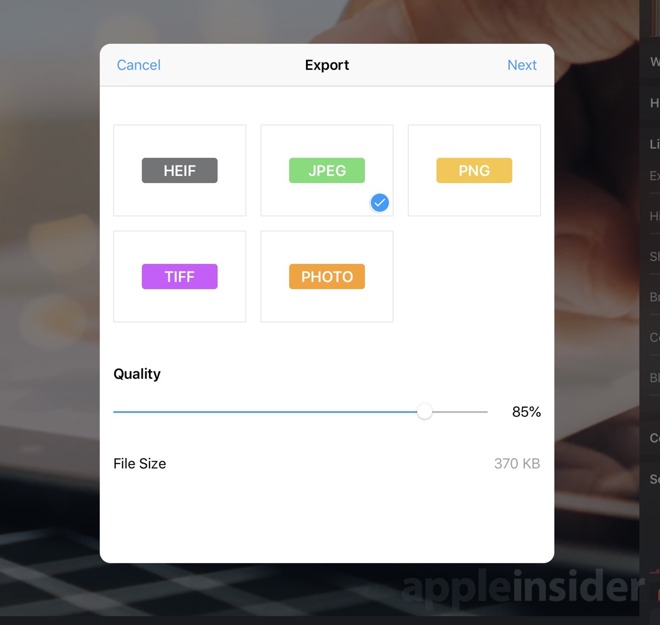
Pixelmator Photo export interface
When you’re finished editing an image, you have three options —modify the original in the Photos app, save the image to photos, or export it via the Share Sheet. Using the first option is unavailable if you didn’t open the original from the Photos app, which was usually the case for us as we opened from iCloud Drive. When using the export option, you first get an export screen that allows you to choose the format (HEIF, JPEG, PNG, TIFF) and the quality. It even gives you a prediction of file size before you proceed. Then the Share Sheet appears with all the common destinations.
Should you buy it?
Yes. That is the easy, simple answer here. We consider the app to be cheap at only $4.99. That is also a one-time purchase, unlike Photoshop that requires the monthly subscription.
We love the layout, the abilities, and the amazing performance for such a low price. Editing on our tablet is much more convenient than always sitting down at our computer. In iOS 12, Apple really improved the camera import flow which makes getting photos from your shooter to your tablet all the easier.
If you want to try out Pixelmator Photo for yourself it is available now on the App Store.
Blender Cloud Free Month Trial And Hands On Preview
The Blender Foundation recently released their new animated short Spring, a completely open film that is used to push development of Blender forward. Along side the Spring release, they are also offering a free month when you sign up for the Blender Cloud service. The Blender Cloud is a subscription service that helps support the development of Blender, while offering you several nice features including:
All of the assets used in their open films
Sample blend file to download and learn from
1,500+ textures and dozens of HDR environment maps
Plugin to access the above resources
Dozens of high quality multi-part tutorials
Tools to share and collaborate with others on Blender Cloud
You can sign up here for €9.90 a month. The first month will be free and you will not be billed until the 2nd month begins enabling you to try Blender Cloud for free. To see inside the Blender Cloud service, check out the video below.
Put the power of an army at your fingertips, conquer all worlds and wage war against friends online. Put the power of a full army ? even dragons ? at your fingertips in Skyworld, the award-winning VR wargame from the creators of Arizona Sunshine.
Lock, Load, & Face the Madness! Get ready for the mind-blowing insanity, as one of four trigger-happy mercenaries, taking out everything that stands in your way. With its addictive action, frantic first person shooter combat, massive arsenal of weaponry, RPG elements and four-player co-op, Borderlands is the breakthrough experience that challenges all the conventions of modern shooters. Borderlands places you in the role of a mercenary on the lawless and desolate planet of Pandora, hell bent on finding a legendary stockpile of powerful alien technology known as The Vault.