Remnant II is the sequel to the best-selling game Remnant: From the Ashes that pits survivors of humanity against new deadly creatures and god-like bosses across terrifying worlds. Play solo or co-op with two other friends to explore the depths of the unknown to stop an evil from destroying reality itself. To succeed, players will need to rely on their own skills and those of their team to overcome the toughest challenges and to stave off humanity's extinction.
Open Liberty Java runtime now available to Red Hat Runtimes subscribers
Open Liberty is a lightweight, production-ready Java runtime for containerizing and deploying microservices to the cloud, and is now available as part of a Red Hat Runtimes subscription. If you are a Red Hat Runtimes subscriber, you can write your Eclipse MicroProfile and Jakarta EE apps on Open Liberty and then run them in containers on Red Hat OpenShift, with commercial support from Red Hat and IBM.
Develop cloud-native Java microservices
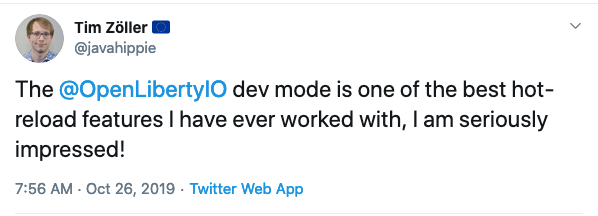
Open Liberty is designed to provide a smooth developer experience with a one-second startup time, a low memory footprint, and our new dev mode:
Open Liberty provides a full implementation of MicroProfile 3 and Jakarta EE 8. MicroProfile is a collaborative project between multiple vendors (including Red Hat and IBM) and the Java community that aims to optimize enterprise Java for writing microservices. With a four-week release schedule, Liberty usually has the latest MicroProfile release available soon after the spec is published.
Also, Open Liberty is supported in common developer tools, including VS Code, Eclipse, Maven, and Gradle. Server configuration (e.g., adding or removing a capability, or “feature,” to your app) is through an XML file. Open Liberty’s zero migration policy means that you can focus on what’s important (writing your app!) and not have to worry about APIs changing under you.
Deploy in containers to any cloud
When you’re ready to deploy your app, you can just containerize it and deploy it to OpenShift. The zero migration principle means that new versions of Open Liberty features will not break your app, and you can control which version of the feature your app uses.
Monitoring live microservices is enabled by MicroProfile Metrics, Health, and OpenTracing, which add observability to your apps. The emitted metrics from your apps and from the Open Liberty runtime can be consolidated using Prometheus and presented in Grafana.
Learn with the Open Liberty developer guides
Our Open Liberty developer guides are available with runnable code and explanations to help you learn how to write microservices with MicroProfile and Jakarta EE, and then to deploy them to Red Hat OpenShift.
[Oracle Blog] Easily install Oracle Java on Oracle Linux in OCI: It’s a perfect ma
Oracle Java is supported on Oracle's long-standing and highly performant operating system, Oracle Linux. Learn how you can use RPMs available from the OCI yum service to easily install Oracle Java on an Oracle Linux system running on OCI.
[Tut] Top 7 Ways to Use Auto-GPT Tools in Your Browser
5/5 – (1 vote)
Installing Auto-GPT is not simple, especially if you’re not a coder, because you need to set up Docker and do all the tech stuff. And even if you’re a coder you may not want to go through the hassle. In this article, I’ll show you some easy Auto-GPT web interfaces that’ll make the job easier!
Tool #1 – Auto-GPT on Hugging Face
Hugging Face user aliabid94 created an Auto-GPT web interface (100% browser-based) where you can put in your OpenAI API key and try out Auto-GPT in seconds.
The example shows the Auto-GPT run of an Entrepreneur-GPT that is designed to grow your Twitter account.
Tool #2 – AutoGPTJS.com
I haven’t tried autogptjs.com but the user interface looks really compelling and easy to use. Again, you need to enter your OpenAI API key and you should create a new one and revoke it after use. Who knows where the keys are really stored?
Well, this project looks trustworthy as it’s also available on GitHub.
Tool #3 – AgentGPT
AgentGPT is an easy-to-use browser based autonomous agent based on GPT-3.5 and GPT-4. It is similar to Auto-GPT but uses its own repository and code base.
AutoGPT UI, built with Nuxt.js, is a user-friendly web tool for managing AutoGPT workspaces. Users can easily upload AI settings and supporting files, adjust AutoGPT settings, and initiate the process via our intuitive GUI. It supports both individual and multi-user workspaces. Its workspace management interface enables easy file handling, allowing drag-and-drop features and seamless interaction with source or generated content.
Some More Comments…
Before you go, here are a few additional notes.
Token Usage and Revoking Keys
To access Auto-GPT, you need to use the OpenAI API key, which is essential for authenticating your requests. The token usage depends on the API calls you make for various tasks.
You should set a spending limit and revoke your API keys after putting them in any browser-based Auto-GPT tool. After all, you don’t know where your API keys will end up so I use a strict one-key-for-one-use policy and revoke all keys directly after use.
3 More Tools
The possibilities with Auto-GPT innovation are vast and ever-expanding.
For instance, researchers and developers are creating new AI tools such as Godmode (I think it’s based on BabyAGI) to easily deploy AI agents directly in the web browser.
With its potential to grow and adapt, Auto-GPT is poised to make an impact on numerous industries, driving further innovation and advancements in AI applications.
AutoGPT Chrome extension is another notable add-on, providing an easily accessible interface for users.
Yesterday I found a new tool called JARVIS (HuggingGPT), named after the J.A.R.V.I.S. artificial intelligence from Ironman, that is an Auto-GPT alternative created by Microsoft research that uses not only GPT-3.5 and GPT-4 but other LLMs as well and is able to generate multimedia output such as audio and images (DALL-E). Truly mindblowing times we’re living in.
The ChartJS library provides modules for creating candlestick charts. It also supports generating OHLC (Open High Low Close) charts.
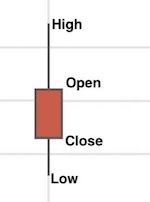
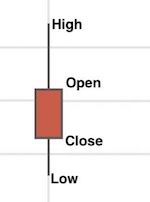
The candlestick and OHLC charts are for showing financial data in a graph. Both these charts look mostly similar but differ in showing the ‘open’ and ‘close’ points.
In this article, we will see JavaScript code for creating a candlestick chart using ChartJs.
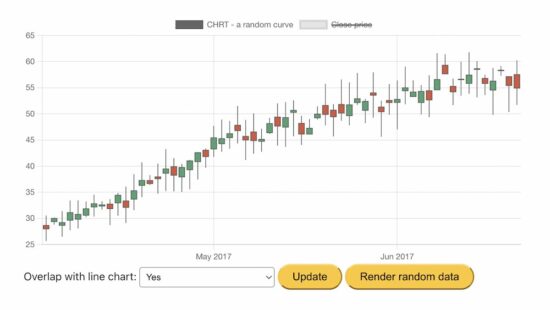
This example generates the random data for the candlestick graph on loading the page.
We have seen many examples of creating ChartJS JavaScript charts. If you are new to the ChartJS library, how to create a bar chart is a simple example for getting started.
How to get and plot candlestick random data via JavaScript?
This JavaScript code uses the chartjs.chart.financial.js script functions to create a candlestick chart.
It generates and uses random bar data for the chart. The random data of each bar includes a horizontal coordinate, x, and four vertical coordinates, o, h, l, and c (open, high, low, close).
It performs the below steps during the chart generation process.
It makes random bar data by taking the initial date and the number of samples.
It initiates the ChartJS class to set the chart type, dataset, and options as we did in other ChartJS examples.
It sets the random bar data to the ChartJS dataset property and updates the chart instance created in step 3.
It checks if the user sets the “Mixed” option and adds the close points to the dataset if yes.
Step 5 overlaps a line chart of close points on the rendered candlestick chart.
chart-data-render.js
var barCount = 60;

var initialDateStr = '01 Apr 2017 00:00 Z'; var ctx = document.getElementById('candlestick-chart').getContext('2d');

ctx.canvas.width = 800;

ctx.canvas.height = 400; var barData = getRandomData(initialDateStr, barCount);

function lineData() { return barData.map(d => { return { x: d.x, y: d.c } }) }; var chart = new Chart(ctx, { type: 'candlestick', data: { datasets: [{ label: 'Random Curve', data: barData }] }

}); function randomNumber(min, max) { return Math.random() * (max - min) + min;

} function randomBar(date, lastClose) { var open = +randomNumber(lastClose * 0.95, lastClose * 1.05).toFixed(2); var close = +randomNumber(open * 0.95, open * 1.05).toFixed(2); var high = +randomNumber(Math.max(open, close), Math.max(open, close) * 1.1).toFixed(2); var low = +randomNumber(Math.min(open, close) * 0.9, Math.min(open, close)).toFixed(2); return { x: date.valueOf(), o: open, h: high, l: low, c: close }; } function getRandomData(dateStr, count) { var date = luxon.DateTime.fromRFC2822(dateStr); var data = [randomBar(date, 30)]; while (data.length < count) { date = date.plus({ days: 1 }); if (date.weekday <= 5) { data.push(randomBar(date, data[data.length - 1].c)); } } return data;

}

var update = function () { var mixed = document.getElementById('mixed').value; var closePrice = { label: 'Close Price', type: 'line', data: null }; // put data in chart if (mixed === 'true') { closePrice = { label: 'Close Price', type: 'line', data: lineData() }; } else { } chart.config.data.datasets = [ { label: 'Random Curve', data: barData }, closePrice ] chart.update();

};

document.getElementById('update').addEventListener('click', update); document.getElementById('randomizeData').addEventListener('click', function () { barData = getRandomData(initialDateStr, barCount); update();

});
More functionalities and features are there in the ChartJS module. It allows customizing the output candlestick chart. This example enables two of them.
Overlap line data over the close points of the candlestick bars.
I am reloading the candlestick with a new set of random bar data.
ChartJS candlestick functionalities
Some possible customization options for the candlestick chart are listed below.
To change the bar type between candlestick and OHLC. The OHLC chart will display the ‘open’ and ‘close’ points by horizontal lines on the candle body.
To change the scale type, border, and color.
To allow overlapping line charts with the rendered candlestick chart to highlight the close points of the bar data.
[www.indiegala.com] The definitive MK11 experience! Take control of Earthrealm's protectors in 2 acclaimed, time-bending Story Campaigns as they race to stop Kronika from rewinding time & rebooting history. Feat. the complete 37-fighter roster, incl. Rain, Mileena & Rambo. https://www.youtube.com/watch?v=f8o9bysnzoQ&ab_channel=MortalKombat
- Click on the GET Button - Verify that the price is zero - Click on the Place Order Button - That's it, the game will be added to you Epic Games Account
Hello everyone, I have here a list of games that should work pretty universally across windows PC's. Mostly thought of as LAN games but you could setup a VPN and make it available to anyone who connects to your VPN. You could see some being used with hamachi which is also just a type of vpn or tunnel connection. Now that we have a brief introduction, let's begin.
Number 1:
Cod4-Cod7or8?
These games are iffy which versions you use that work for LAN/WAN.
Plutonium offers working LAN files for World at War, Black Ops 1, Black ops 2, and Modern Warfare 3.
You can go through their site if you want https://plutonium.pw/
You will need to sign up to connect to their servers anyways.
But there's work arounds that keep LAN available even if they go down. So good to keep in mind and keep backups.
IW4X it's a MW2 crack with extra stuff like new gamemodes weapons maps etc
Cod ghost, Advanced warfare and mw2(2009) with xlabs Mwr with h1
Number 2:
Diablo II (2): Lord of Destruction
1 of my favorites, easiest to use. I love that it is a direct play game. Can copy all the files directly to new PC and play from there. Or have files hosted on server and play from any pc that has folder mounted to it. Well onto the next point. LAN works well with this version. up to 8 players can join also. Lot's of fun, can be kind of grindy though. Should work with VPN pretty easily also. Can be found on most torrent sites.
Number 3:
Age of Empires 2: HD
Pretty simple base empire building game. Control armies with satellite view of the map and send units anywhere immediately. Not turn based like civilization.
Number 4:
Civilization 3-4
Turn based civilization building game. Control entire countries. With 2+ people the game can get kind of long unless the others know how to play. Can be real fun if you like in depth strategy games. Civ3 has a max lan multiplayer of 8. Civ4 I think has 4. Not sure about civ2
Number 5:
Counter Strike 1.6
It's a classic ofc CS 1.6 has lan and is very easy with direct play to change user names and connect to each other. Use to do play it in high school off thumb drives. Definitely a classic. Can host up to 32 players also. BIG lobbies.
Notable Mentions: (Other games I found across reddit they claimed worked and I want to keep track of for later testing, if you know more please comment more below so we can add to the list!)
Left 4 Dead 1 and 2 (Back 4 Blood | the next l4d)
Age of Empires 2: HD
Earth 2150
Battlefield 2
Battlefield 1942
Battlefiled bad company 2. from nosteam multiplayer.
BattleField 3/4
Retrocycles
Warcraft 3
Medal of Honor: Allied Assault
The Battle of Middle Earth
Divinity: Original Sin 2
Grim Dawn
Barony
Starbound
Borderlands 1
Borderlands 2
Borderlands 3
It takes two
Portal 2
Escape from Tarkov
7 days to die
Monster hunter world
Stardew Valley
Factorio
The forest
farming simulator 19/22
sea of thieves (use a fake xbox account when you are playing multiplayer cracks that require them. online-fix.me, read the megathread. )
forza horizon 4/5 online-fix.me, read the megathread
raft
Resident Evil 5 and 6, only for two people
Evil Dead
halo MCC
GTFO
TRINE series amazing platformer with up to 3 player coop
worm wwd
risk of rain 2
terraria (Reported Working: Razer 1.4.2.1 | found on crackhub)
pummel party
golf simulator
monopoly
Phasmophobia
Forewarned ( Online-fix.me )
Splinter cell chaos theory
Don't starve together
Dying light
Street of rouge
Payday 2
Human fall flat
Sniper elite 4
valheim
Goldberg emulator. used in titles such as Monster Hunter World to enable LAN multiplayer. an alternative is the SSE.
cs.rin.ru/forum
Steam unblocked can help you out.
I'll mention a few other sites that will point you in the right direction and fill this out more later.
Hope this helps for the time being.
nosteamgames.ro
Good list of multiplayer games to choose from!
Counter-Strike: Global Offensive MP-SP
Call of Duty: Modern Warfare 2 MP-SP
Call of Duty: Modern Warfare 3 MP-SP
Call of Duty 4: Modern Warfare MP-SP
Call of Duty: Black Ops SP-MP-ZM online
Counter-Strike Source MP-SP
Grand Theft Auto San Andreas MP-SP
Grand Theft Auto IV MP-SP
Battlefield: Bad Company 2 MP-SP
Call of Duty 5: World at War MP-SP
Call of Duty 2 MP-SP
Left 4 Dead 1 MP-SP
Left4Dead 2 MP-SP
Killing Floor MP-SP
Halo 2 MP-SP
Grand Theft Auto Vice City MP-SP
(From nostream website)
All free to play multiplayer 1 way or another.
New features in Red Hat CodeReady Studio 12.13.0.GA and JBoss Tools 4.13.0.Final for
JBoss Tools 4.13.0 and Red Hat CodeReady Studio 12.13 for Eclipse 2019-09 are here and waiting for you. In this article, I’ll cover the highlights of the new releases and show how to get started.
JBoss Tools or Bring-Your-Own-Eclipse (BYOE) CodeReady Studio requires a bit more.
This release requires at least Eclipse 4.13 (2019-09), but we recommend using the latest Eclipse 4.13 2019-09 JEE Bundle because then you get most of the dependencies pre-installed.
Once you have installed Eclipse, you can either find us on the Eclipse Marketplace under “JBoss Tools” or “Red Hat CodeReady Studio.”
For JBoss Tools, you can also use our update site directly:
Our main focus for this release was improvements for container-based development and bug fixing. Eclipse 2019-06 itself has a lot of new cool stuff, but I’ll highlight just a few updates in both Eclipse 2019-06 and JBoss Tools plugins that I think are worth mentioning.
Red Hat OpenShift
OpenShift Container Platform 4.2 support
With the new OpenShift Container Platform (OCP) 4.2 now available (see the announcement), even if this is a major shift compared to OCP 3, Red Hat CodeReady Studio and JBoss Tools are compatible with this major release in a transparent way. Just define your connection to your OCP 4.2 based cluster as you did before for an OCP 3 cluster, and use the tooling!
CodeReady Containers 1.0 Server Adapter
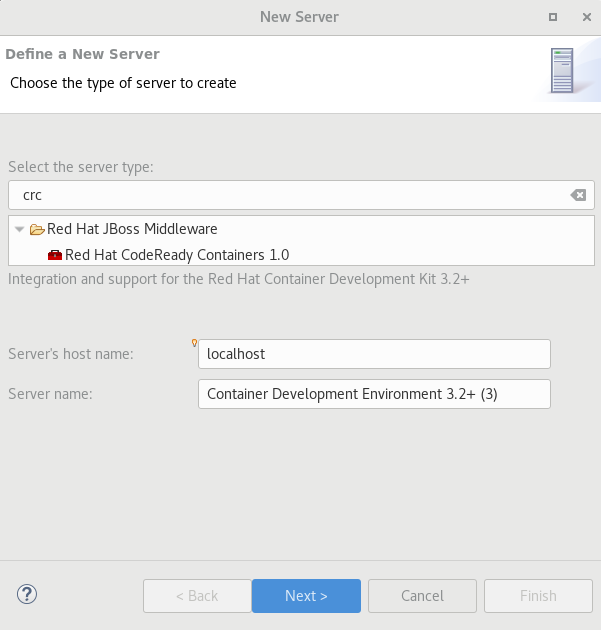
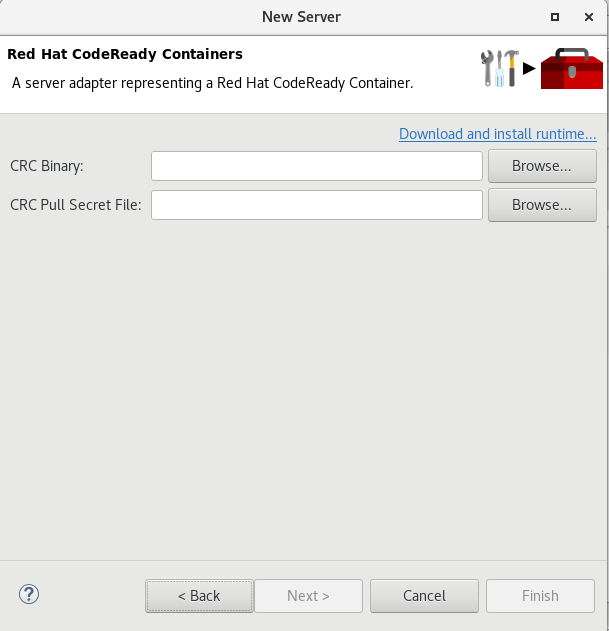
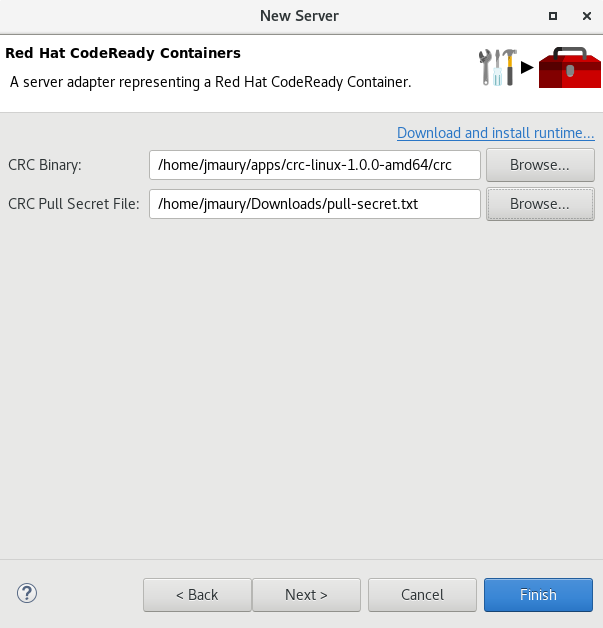
A new server adapter has been added to support the next generation of CodeReady Containers 1.0. Although the server adapter itself has limited functionality, it is able to start and stop the CodeReady Containers virtual machine via its crc binary. Simply hit Ctrl+3 (Cmd+3 on OSX) and type new server, which will bring up a command to set up a new server.
Enter crc in the filter textbox.
You should see the Red Hat CodeReady Containers 1.0 server adapter.
Select Red Hat CodeReady Containers 1.0 and click Next.
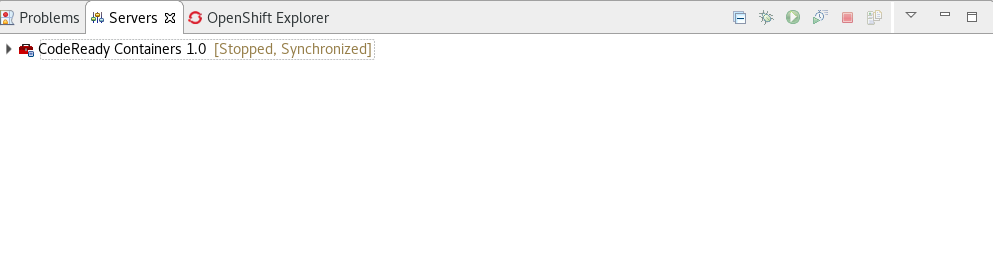
Once you’re finished, a new CodeReady Containers server adapter will then be created and visible in the Servers view.
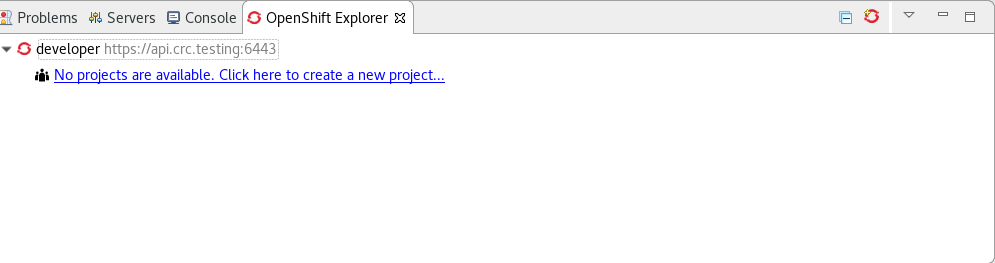
Once the server is started, a new OpenShift connection should appear in the OpenShift Explorer view, allowing the user to quickly create a new Openshift application and begin developing their AwesomeApp in a highly replicatable environment.
Server tools
Wildfly 18 Server Adapter
A server adapter has been added to work with Wildfly 18. It adds support for Java EE 8 and Jakarta EE 8.
EAP 7.3 Beta Server Adapter
A server adapter has been added to work with EAP 7.3 Beta.
Hibernate Tools
Hibernate Runtime Provider Updates
A number of additions and updates have been performed on the available Hibernate runtime providers.
The Hibernate 5.4 runtime provider now incorporates Hibernate Core version 5.4.7.Final and Hibernate Tools version 5.4.7.Final.
The Hibernate 5.3 runtime provider now incorporates Hibernate Core version 5.3.13.Final and Hibernate Tools version 5.3.13.Final.
Platform
Views, Dialogs and Toolbar
Quick Search
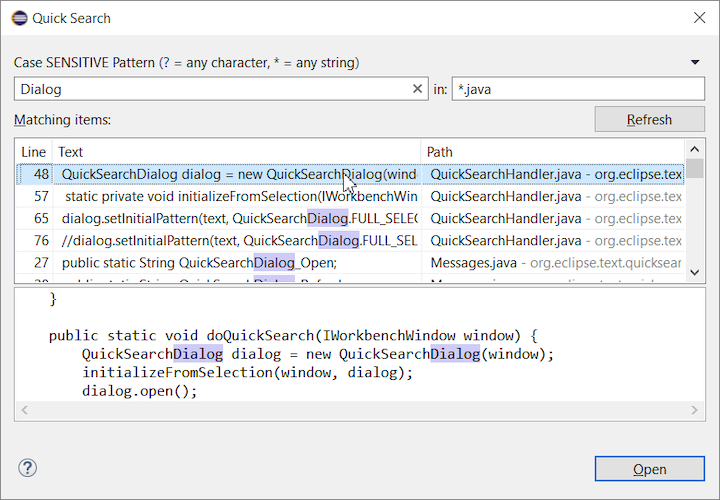
The new Quick Search dialog provides a convenient, simple and fast way to run a textual search across your workspace and jump to matches in your code. The dialog provides a quick overview showing matching lines of text at a glance. It updates as quickly as you can type and allows for quick navigation using only the keyboard. A typical workflow starts by pressing the keyboard shortcut Ctrl+Alt+Shift+L (or Cmd+Alt+Shift+L on Mac). Typing a few letters updates the search result as you type. Use Up-Down arrow keys to select a match, then hit Enter to open it in an editor.
Save editor when Project Explorer has focus
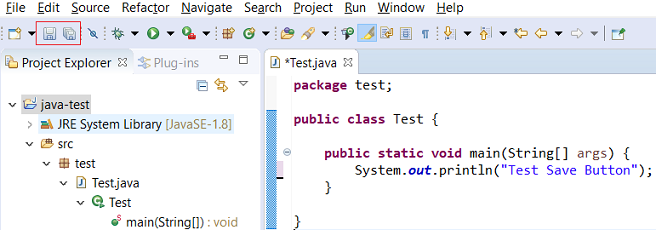
You can now save the active editor even when the Project Explorer has focus. In cases where an extension contributes Saveables to the Project Explorer, the extension is honored and the save action on the Project Explorer will save the provided saveable item instead of the active editor.
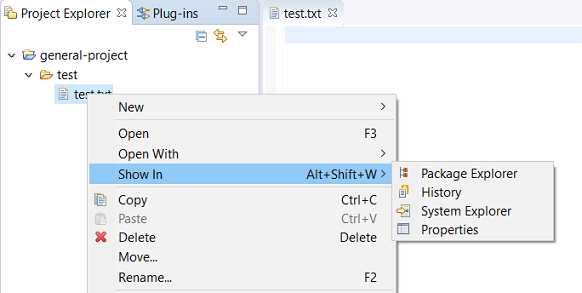
“Show In” context menu available for normal resources
The Show In context menu is now available for an element inside a resource project on the Project Explorer.
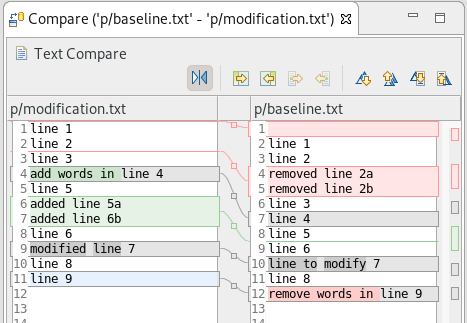
Show colors for additions and deletions in Compare viewer
In simple cases such as a two-way comparison or a three-way comparison with no merges and conflicts, the Compare viewer now shows different colors, depending on whether text has been added, removed, or modified. The default colors are green, red, and black, respectively.
The colors can be customized through usual theme customization approaches, including using related entries in the Colors and Fonts preference page.
Editor status line shows more selection details
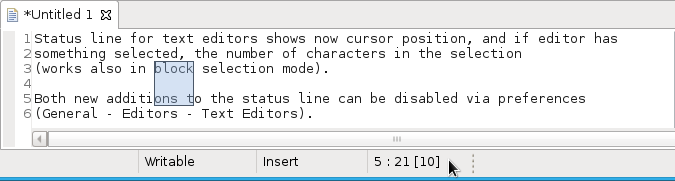
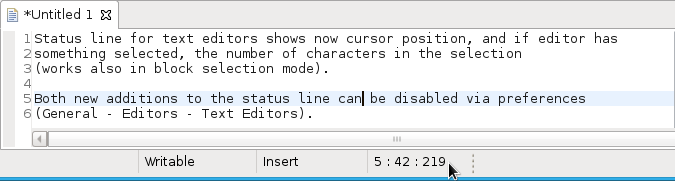
The status line for Text Editors now shows the cursor position, and when the editor has something selected, it shows the number of characters in the selection as well. This also works in the block selection mode.
These two new additions to the status line can be disabled via the General > Editors > Text Editors preference page.
Shorter dialog text
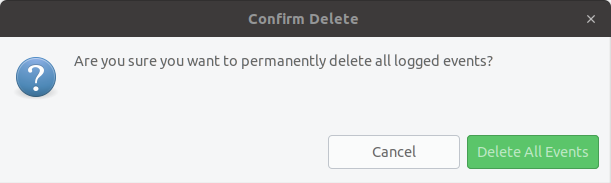
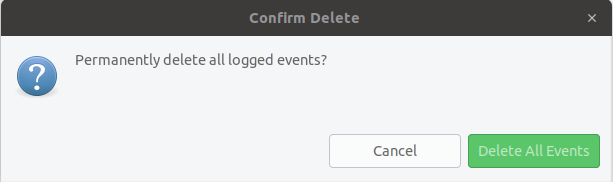
Several dialog texts have been shortened. This allows you to capture important information faster.
Previously:
Now:
Close project via middle-click
In the Project Explorer, you can now close a project using middle-click.
Debug
Improved usability of Environment tab in Launch Configurations
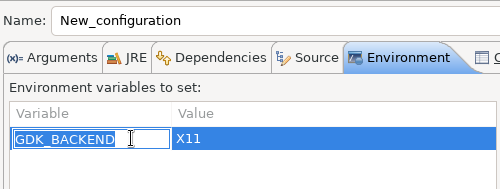
In the Environment tab of the Launch Configuration dialog, you can now double-click on an environment variable name or value and start editing it directly from the table.
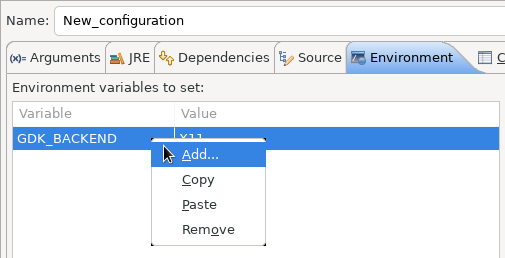
Right-clicking on the environment variable table now opens a context menu, allowing for quick addition, removal, copying, and pasting of environment variables.
Show Command Line for external program launch
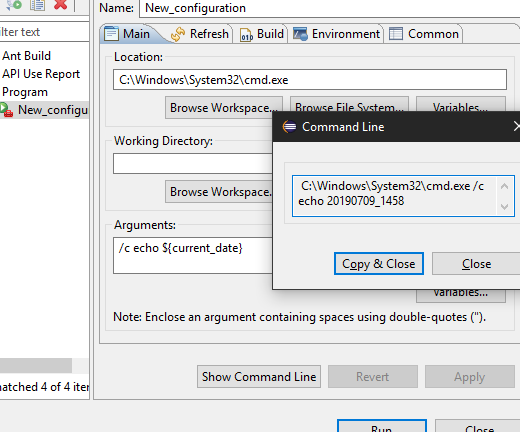
The External Tools Configuration dialog for launching an external program now supports the Show Command Line button.
Preferences
Close editors automatically when reaching 99 open editors
The preference to close editors automatically is now enabled by default. It will be triggered when you have opened 99 files. If you continue to open editors, old editors will be closed to protect you from performance problems. You can modify this setting in the Preferences dialog via the General > Editors > Close editors automatically preference.
In-table color previews for Text Editor appearance color options
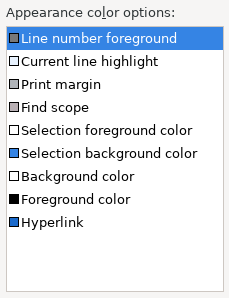
You can now see all the colors currently being used in Text Editors from the Appearance color options table, located in the Preferences > General > Editors > Text Editor page.
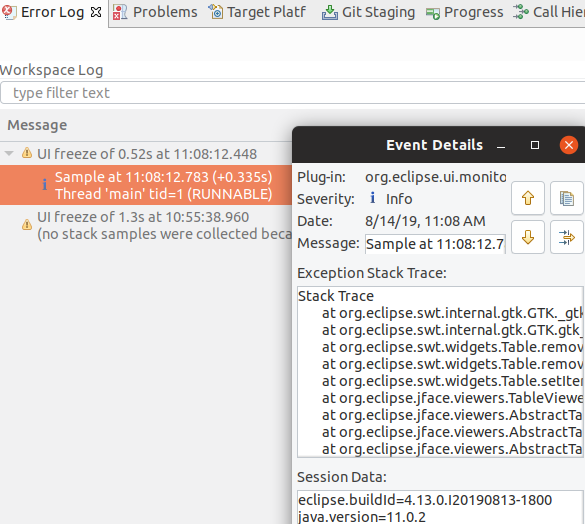
Automatic detection of UI freezes in the Eclipse SDK
The Eclipse SDK has been configured to show stack traces for UI freezes in the Error Log view by default for new workspaces. You can use this information to identify and report slow parts of the Eclipse IDE.
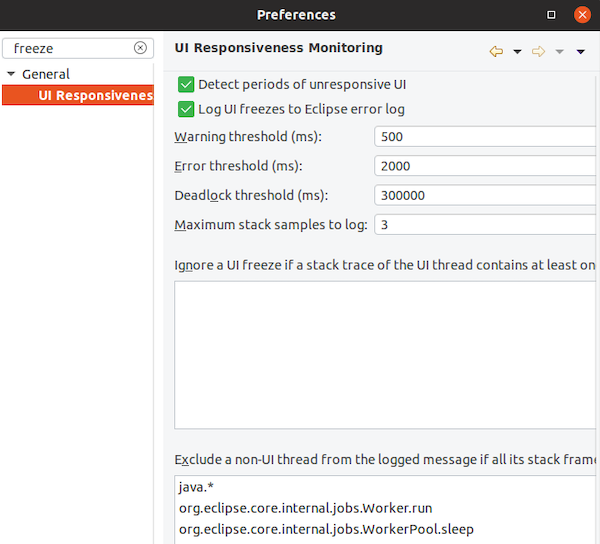
You can disable the monitoring or tweak its settings via the options in the General > UI Responsiveness Monitoring preference page as shown below.
Themes and Styling
Start automatically in dark theme based on OS theme
On Linux and Mac, Eclipse can now start automatically in dark theme when the OS theme is dark. This works by default, that is on a new workspace or when the user has not explicitly set or changed the theme in Eclipse.
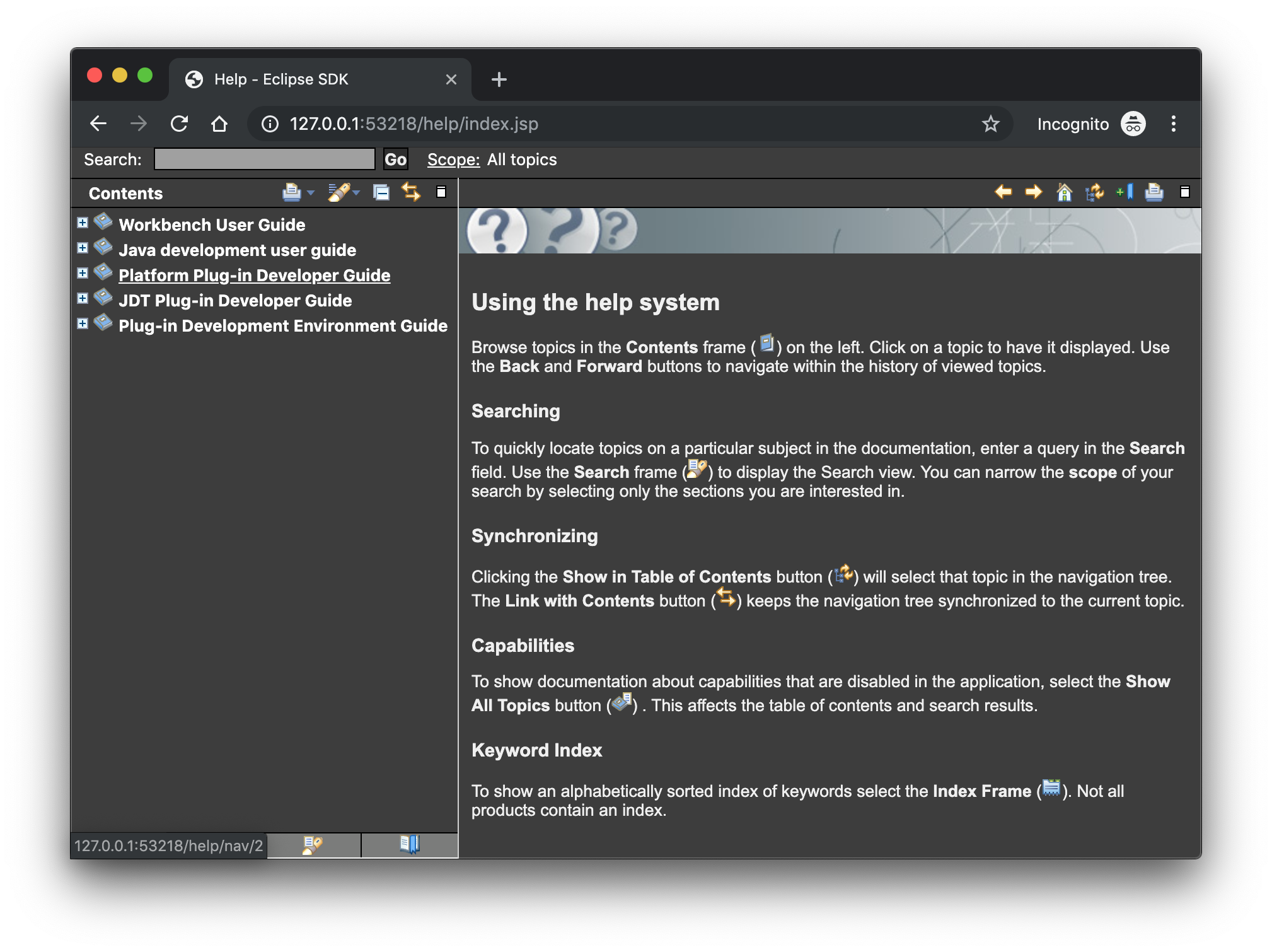
Display of Help content respects OS theme
More and more operating systems provide a system-wide dark theme. Eclipse now respects this system-wide theme setting when the Eclipse help content is displayed in an external browser. A prerequisite for this is a browser that supports the prefers-color-scheme CSS media query.
As of the time of writing, the following browser versions support it:
Firefox version 67
Chrome version 76
Safari version 12.1
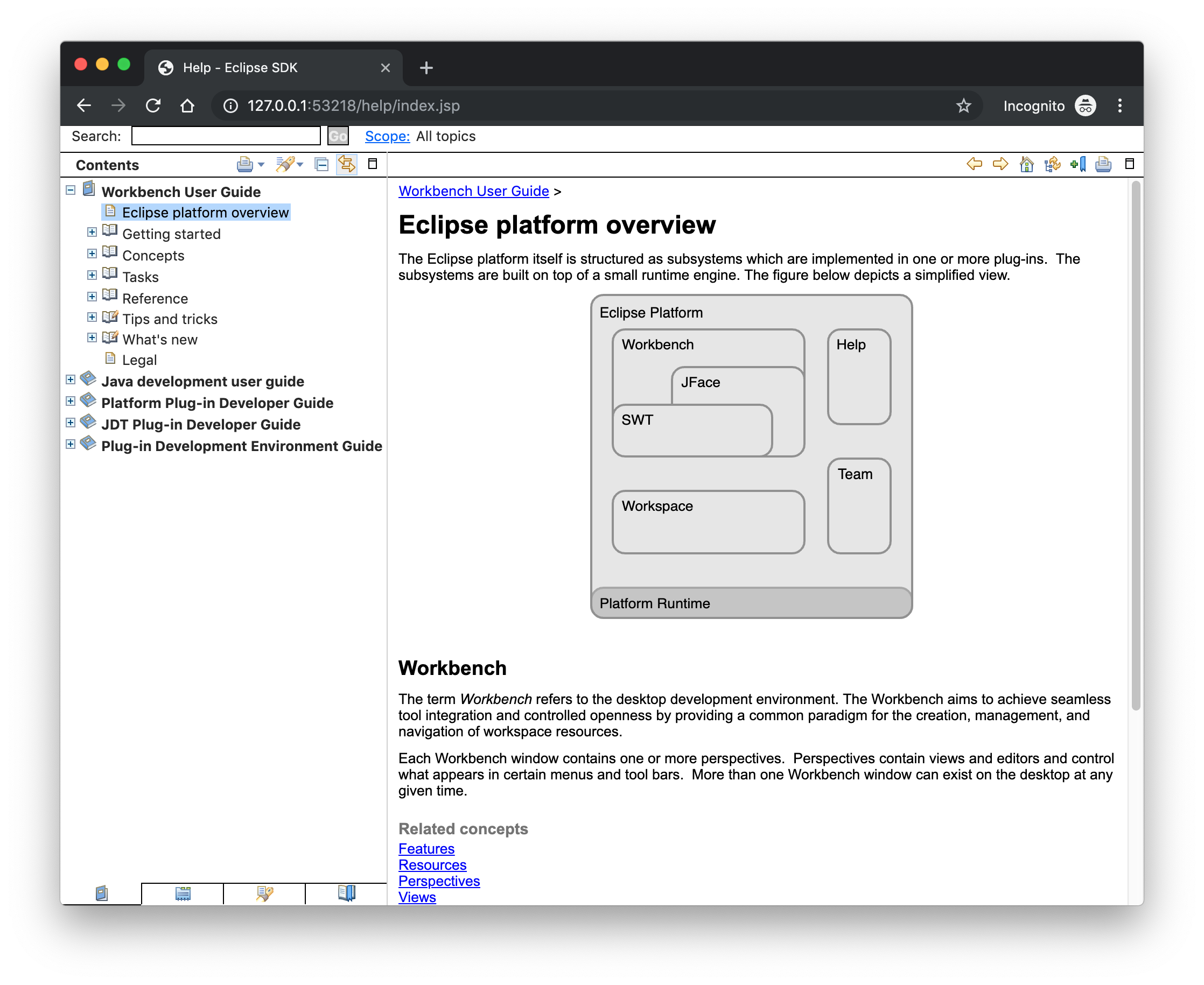
Help content uses high-resolution icons.
The Help System, as well as the help content of the Eclipse Platform, the Java Development Tooling, and the Plug-in Development Environment, now uses high-resolution icons. They are now crisp on high-resolution displays and also look much better in the dark theme.
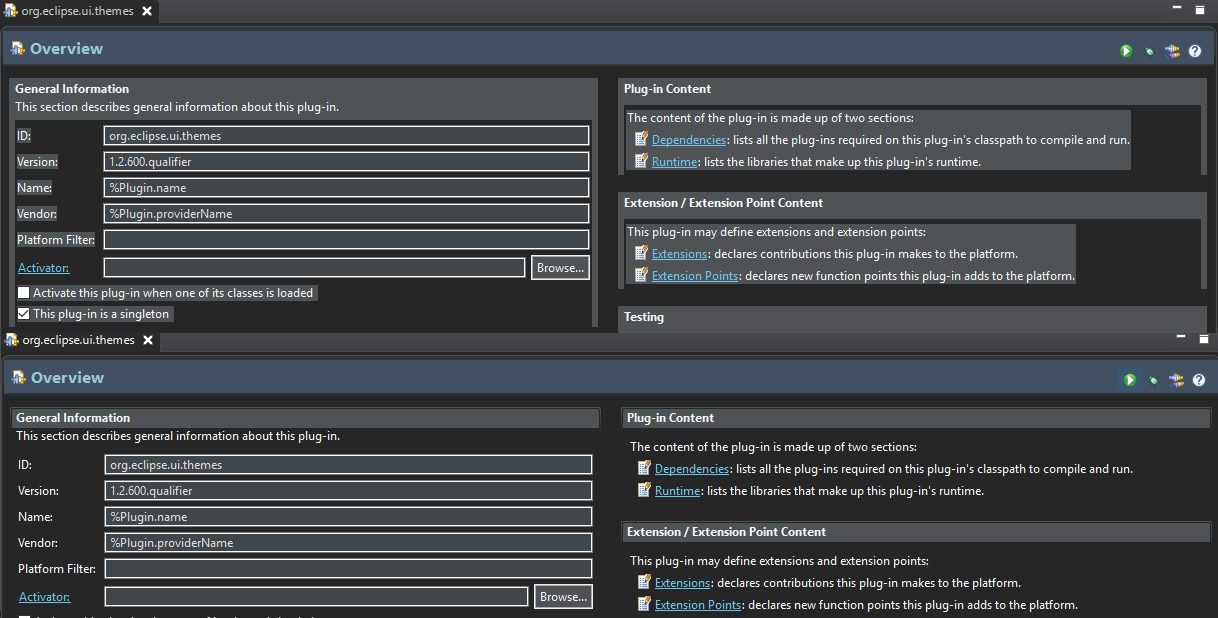
Improved dark theme on Windows
Labels, Sections, Checkboxes, Radio Buttons, FormTexts, and Sashes on forms now use the correct background color in the dark mode on windows.
General Updates
Interactive performance
Interactive performance has been further improved in this release and several UI freezes have been fixed.
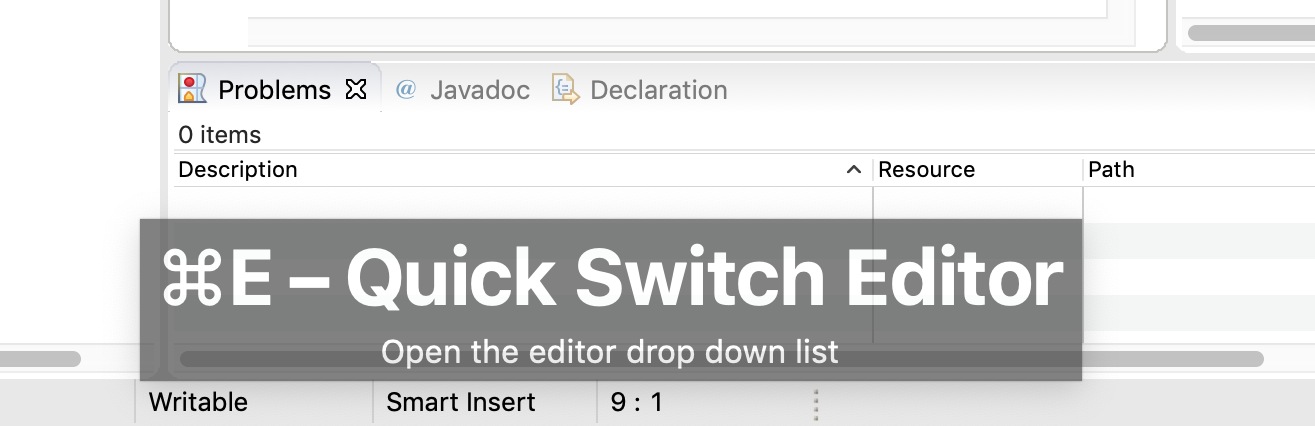
Show key bindings when command is invoked
For presentations, screencasts, and learning purposes, it is very helpful to show the corresponding key binding when a command is invoked. When the command is invoked (via a key binding or menu interaction) the key binding, the command’s name and description are shown on the screen.
You can activate this in the Preferences dialog via the Show key binding when command is invoked checkbox on the General > Keys preference page. To toggle this setting quickly, you can use the Toggle Whether to Show Key Binding command (e.g., via the quick access).
Java Developement Tools (JDT)
Java 13 Support
Java 13 is out, and Eclipse JDT supports Java 13 for 4.13 via Marketplace.
The release notably includes the following Java 13 features:
JEP 354: Switch Expressions (Preview).
JEP 355: Text Blocks (Preview).
Please note that these are preview language features; hence, the enable preview option should be on. For an informal introduction of the support, please refer to Java 13 Examples wiki.
Java Views and Dialogs
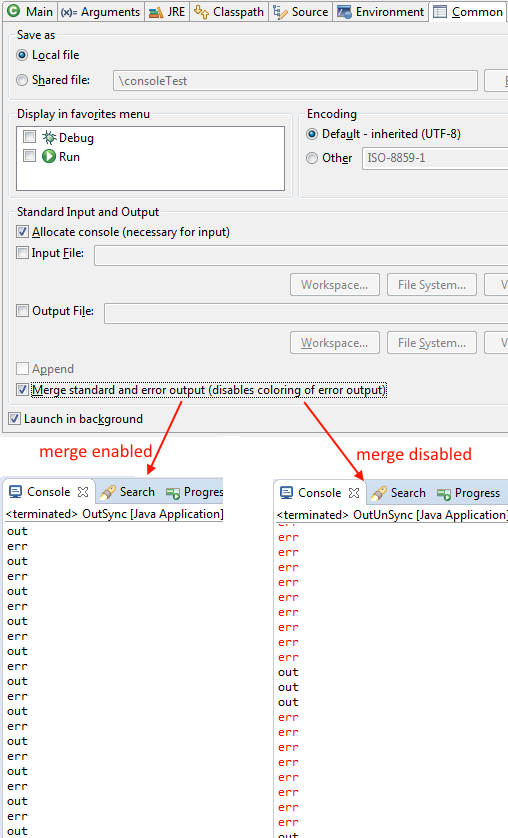
Synchronize standard and error output in console
The Eclipse Console view currently can not ensure that mixed standard and error output is shown in the same order as it is produced by the running process. For Java applications, the launch configuration Common tab now provides an option to merge standard and error output. This ensures that standard and error output is shown in the same order it was produced but also disables the individual coloring of error output.
Java Editor
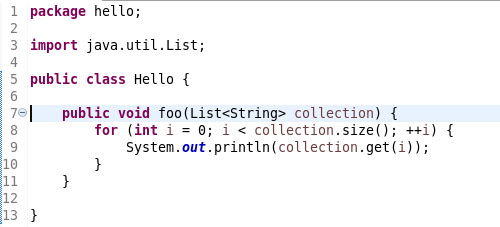
Convert to enhanced ‘for’ loop using Collections
The Java quickfix/cleanup Convert to enhanced ‘for’ loop is now offered on for loops that are iterating through Collections. The loop must reference the size method as part of the condition and if accessing elements in the body, must use the get method. All other Collection methods other than isEmpty invalidate the quickfix being offered.
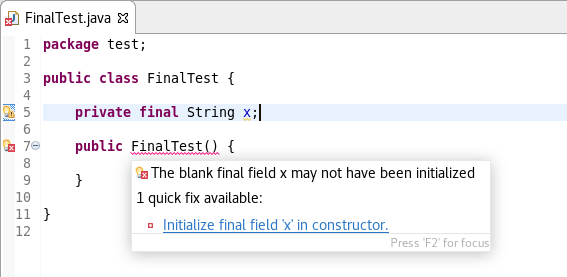
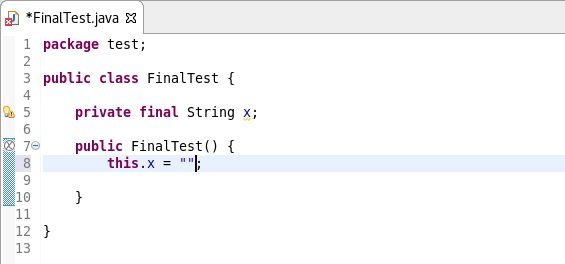
Initialize ‘final’ fields
A Java quickfix is now offered to initialize an uninitialized final field in the class constructor. The fix will initialize a String to the empty string, a numeric base type to 0, and, for class fields, it initializes them using their default constructor if available or null if no default constructor exists.
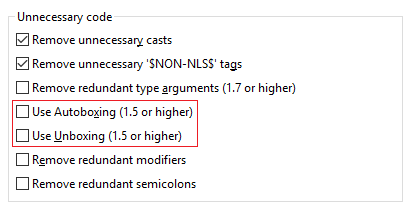
Autoboxing and Unboxing
Use Autoboxing and Unboxing when possible. These features are enabled only for Java 5 and higher.
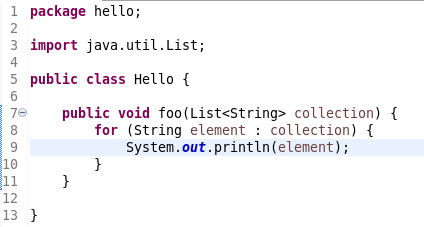
Improved redundant modifier removal
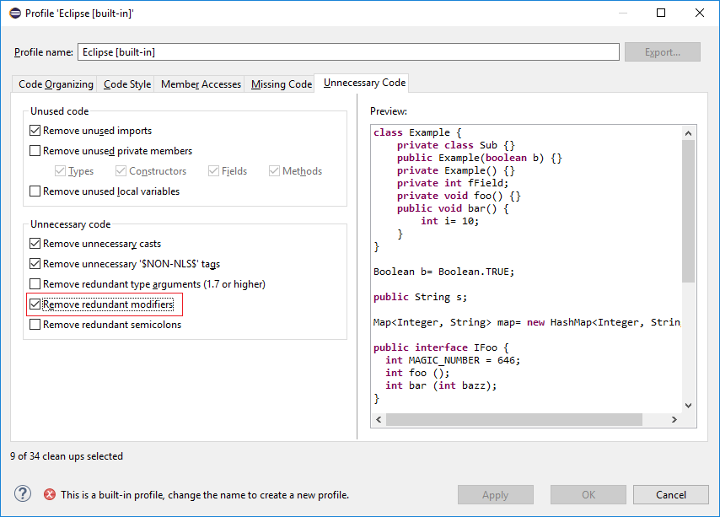
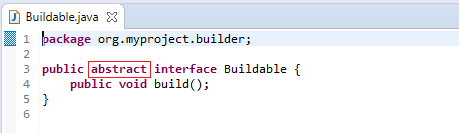
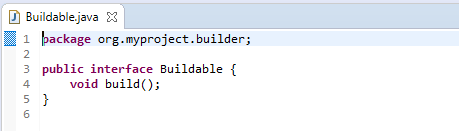
The Remove redundant modifier now also removes useless abstract modifier on the interfaces.
For the given code:
You get this:
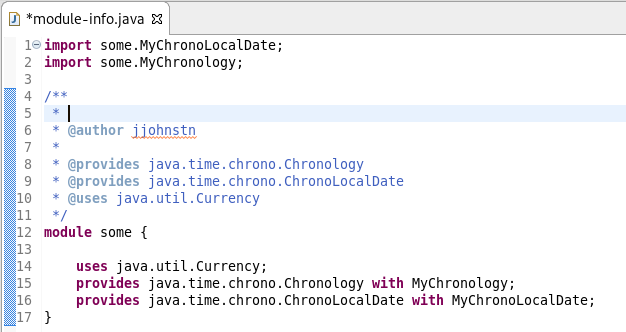
Javadoc comment generation for module
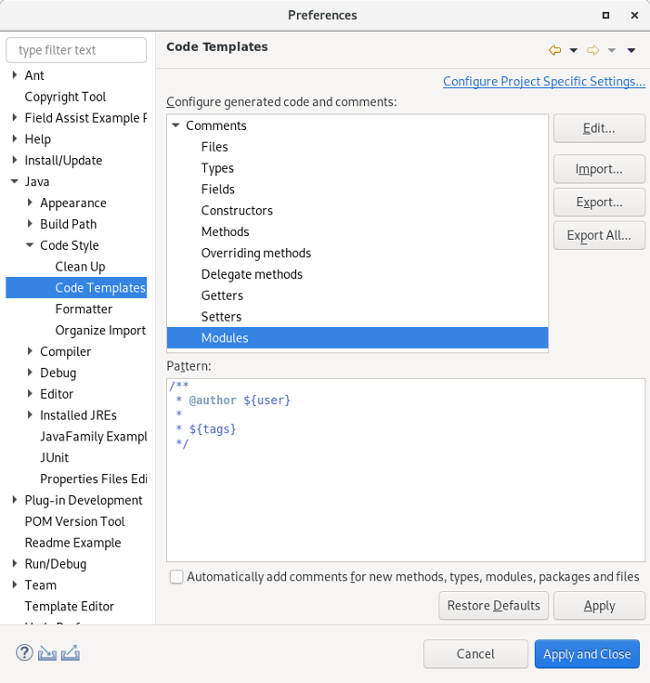
Adding a Javadoc comment to a Java module (module-info.java) will result in automatic annotations being added per the new module comment preferences.
The $(tags) directive will add @uses and @provides tags for all uses and provides module statements.
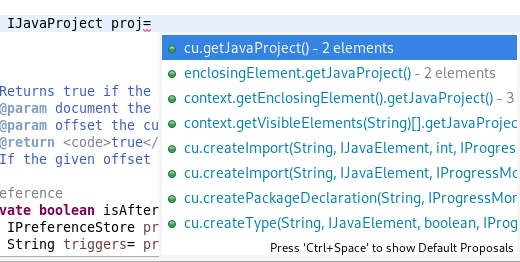
Chain Completion Code Assist
Code assist for “Chain Template Proposals” will be available. These will traverse reachable local variables, fields, and methods, to produce a chain whose return type is compatible with the expected type in a particular context.
The preference to enable the feature can be found in the Advanced sub-menu of the Content Assist menu group (Preferences > Java > Editor > Content Assist > Advanced).
Java Formatter
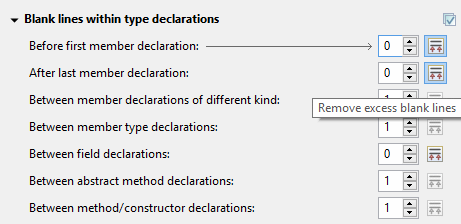
Remove excess blank lines
All the settings in the Blank lines section can now be configured to remove excess blank lines, effectively taking precedence over the Number of empty lines to preserve setting. Each setting has its own button to turn the feature on, right next to its number control. The button is enabled only if the selected number of lines is smaller than the Number of empty lines to preserve; otherwise, any excess lines are removed anyway.
Changes in blank lines settings
There’s quite a lot of changes in the Blank lines section of the formatter profile.
Some of the existing subsections and settings are now phrased differently to better express their function:
The Blank lines within class declarations subsection is now Blank lines within type declaration.
Before first declaration is now Before first member declaration.
Before declarations of the same kind is now Between member declarations of different kind.
Before member class declarations is now Between member type declarations.
Before field declarations is now Between field declarations.
Before method declarations is now Between method/constructor declarations.
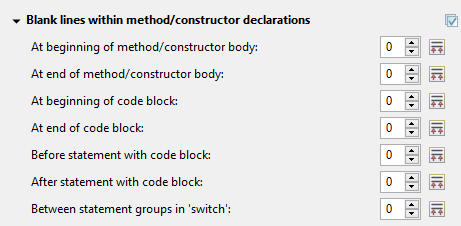
More importantly, a few new settings have been added to support more places where the number of empty lines can be controlled:
After last member declaration in a type (to complement previously existing Before first member declaration setting).
Between abstract method declarations in a type (these cases were previously handled by Between method/constructor declarations).
At end of method/constructor body (to complement previously existing At beginning of method/constructor body setting).
At beginning of code block and At end of code block.
Before statement with code block and After statement with code block.
Between statement groups in ‘switch.’
Most of the new settings have been put in a new subsection Blank lines within method/constructor declarations.
JUnit
JUnit 5.5.1
JUnit 5.5.1 is here and Eclipse JDT has been updated to use this version.
Debug
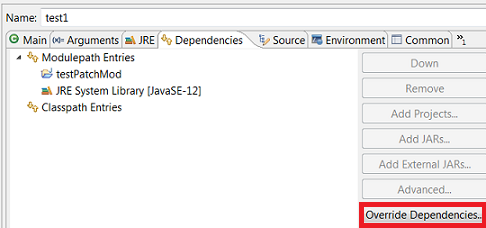
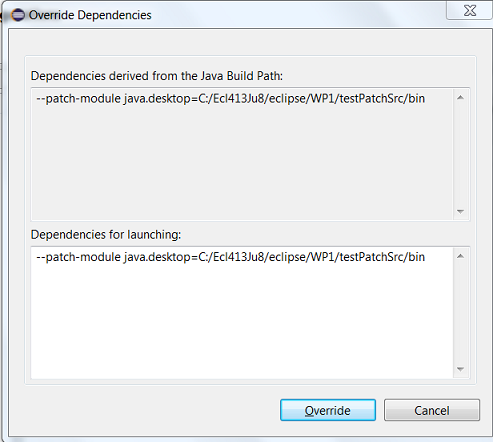
Enhanced support for –patch-module during launch
The Java Launch Configuration now supports patching of different modules by different sources during the launch. This can be verified in the Override Dependencies… dialog in the Dependencies tab in a Java Launch Configuration.
Java Build
Full build on JDT core preferences change
Manually changing the settings file .settings/org.eclipse.jdt.core.prefs of a project will result in a full project build, if the workspace auto-build is on. For example, pulling different settings from a git repository or generating the settings with a tool will now trigger a build. Note that this includes timestamp changes, even if actual settings file contents were not changed.
For the 4.13 release, it is possible to disable this new behavior with the VM property: -Dorg.eclipse.disableAutoBuildOnSettingsChange=true. It is planned to remove this VM property in a future release.
And more…
You can find more noteworthy updates in on this page.
What is next?
Having JBoss Tools 4.13.0 and Red Hat CodeReady Studio 12.13 out we are already working on the next release for Eclipse 2019-12.





 Recommended: