Create an account


Welcome, Guest
You have to register before you can post on our site.

Username
  

Password


Search Forums

(Advanced Search)

Forum Statistics
» Members: 20,145
» Latest member: Benbeckman81
» Forum threads: 22,065
» Forum posts: 22,936

Full Statistics

Online Users
There are currently 548 online users.
» 0 Member(s) | 542 Guest(s)
Applebot, Baidu, Bing, DuckDuckGo, Google, Yandex

 
  (Indie Deal) FREE Echo of the Wilds, PDX Bundle, Tons of Sales
Posted by: xSicKxBot - 07-17-2022, 12:12 PM - Forum: Deals or Specials - No Replies

FREE Echo of the Wilds, PDX Bundle, Tons of Sales

Grab the PDX Mini Legacy Bundle at 96% OFF
[www.indiegala.com]
This weekend only, you will not find a better Paradox Steam deal than this! Get Age of Wonders: Planetfall (Premium Edition), BATTLETECH (Mercenary Collection & Shadow Hawk Pack), Pillars of Eternity (Definitive Edition), Knights of Pen and Paper + 1 & 2 Deluxiest Edition + the Haunted Fall & Here Be Dragons expansions & more in the exclusive PDX Mini Legacy Bundle (while stocks last). BONUS: Get 5% CashBack for any purchase immediately.

Echo of the Wilds FREEbie
[freebies.indiegala.com]
Check out the newest summer FREEbie: Echo of the Wilds, a puzzle narrative adventure, featuring randomized wilderness survival elements.

https://www.youtube.com/watch?v=IXG1_KuGwlY
Tons of Sales
[www.indiegala.com]
[www.indiegala.com]
https://www.youtube.com/watch?v=0N_K6fIwlRA
Stay Inside, Stay Safe and Enjoy Good Games.
Check out IndieGala on Twitter, YouTube & Facebook[www.facebook.com]


https://steamcommunity.com/groups/indieg...9448506752

Print this item

  News - Elden Ring Was June 2022's Best-Selling Game In The US
Posted by: xSicKxBot - 07-17-2022, 12:12 PM - Forum: Lounge - No Replies

Elden Ring Was June 2022's Best-Selling Game In The US

The NPD Group has released its latest monthly sales report, revealing which games and consoles sold the best during June 2022, and once again, Elden Ring was a standout.

Elden Ring was June 2022's best-selling game, and it continues to be the highest-selling title of 2022 so far. Additionally, after just five months on the market, Elden Ring is already inside the top 10 best-selling premium games in US history for dollar sales, NPD said. Again, this is not units sold, but dollars driven. The research company did not share the full top 10 list, so it's unclear where Elden Ring ranks.

Following the publication of this story, the NPD Group issued a retraction for the section of its note pertaining to Elden Ring being among the top 10 best-selling premium games in the US all-time. This may not be true, and NPD apologized for the mistake. "This is based on an incomplete data set," NPD said.

Continue Reading at GameSpot

https://www.gamespot.com/articles/elden-...01-10abi2f

Print this item

  PC - Time on Frog Island
Posted by: xSicKxBot - 07-17-2022, 12:12 PM - Forum: New Game Releases - No Replies

Time on Frog Island


A terrible storm ravages the seas around you, casting your mighty vessel into the perilous rocks of a nearby island. You awake to find your ship in pieces, shipwrecked on a strange island filled with... frogs?

A spaghetti network of trades will take you all over this strange island as you seek out materials to fix your boat. You will meet a cast of friendly characters, solve head scratching puzzles, find hidden treasures, and much more as you explore the world of Time on Frog Island.

Publisher: Merge Games

Release Date: Jul 12, 2022


https://www.metacritic.com/game/pc/time-on-frog-island

Print this item

  [Tut] 8 Best Ways to Check the Package Version in Python
Posted by: xSicKxBot - 07-16-2022, 08:41 AM - Forum: Python - No Replies

8 Best Ways to Check the Package Version in Python

5/5 – (1 vote)

In this article, I’ll show you how to check the version of a Python module (package, library).

These are the eight best ways to check the version of a Python module:

  • Method 1: pip show my_package
  • Method 2: pip list
  • Method 3: pip list | findstr my_package
  • Method 4: my_package.__version__
  • Method 5: importlib.metadata.version
  • Method 6: conda list
  • Method 7: pip freeze
  • Method 8: pip freeze | grep my_package

Let’s dive into some examples for each of those next!

Method 1: pip show


To check which version of a given Python library, say xyz, is installed, use pip show xyz or pip3 show xyz. For example, to check the version of your NumPy installation, run pip show numpy in your CMD/Powershell (Windows), or terminal (macOS/Linux/Ubuntu).

This will work if your pip installation is version 1.3 or higher—which is likely to hold in your case because pip 1.3 was released a decade ago in 2013!!

Here’s an example in my Windows Powershell for NumPy: I’ve highlighted the line that shows that my package version is 1.21.0:

PS C:\Users\xcent> pip show numpy
Name: numpy
Version: 1.21.0
Summary: NumPy is the fundamental package for array computing with Python.
Home-page: https://www.numpy.org
Author: Travis E. Oliphant et al.
Author-email: None
License: BSD
Location: c:\users\xcent\appdata\local\programs\python\python39\lib\site-packages
Requires:
Required-by: pandas, matplotlib

In some instances, this will not work—depending on your environment. In this case, try those commands before giving up:

python -m pip show numpy
python3 -m pip show numpy
py -m pip show numpy
pip3 show numpy

Of course, replace “numpy” with your particular package name.

Method 2: pip list


To check the versions of all installed packages, use pip list and locate the version of your particular package in the output list of package versions sorted alphabetically.

This will work if your pip installation is version 1.3 or higher.

Here’s an example in my Windows Powershell, I’ve highlighted the line that shows that my package version is 1.21.0:

PS C:\Users\xcent> pip list
Package Version
--------------- ---------
beautifulsoup4 4.9.3
bs4 0.0.1
certifi 2021.5.30
chardet 4.0.0
cycler 0.10.0
idna 2.10
kiwisolver 1.3.1
matplotlib 3.4.2
mss 6.1.0
numpy 1.21.0
pandas 1.3.1
Pillow 8.3.0
pip 21.1.1
pyparsing 2.4.7
python-dateutil 2.8.1
pytz 2021.1
requests 2.25.1
setuptools 56.0.0
six 1.16.0
soupsieve 2.2.1
urllib3 1.26.6

In some instances, this will not work—depending on your environment. Then try those commands before giving up:

python -m pip list
python3 -m pip list
py -m pip list
pip3 list

Method 3: pip list + findstr on Windows


To check the versions of a single package on Windows, you can chain pip list with findstr xyz using the CMD or Powershell command: pip3 list | findstr numpy to locate the version of your particular package xyz in the output list of package versions automatically.

Here’s an example for numpy:

pip3 list | findstr numpy 1.21.0

Method 4: Library.__version__ Attribute


To check your package installation in your Python script, you can also use the xyz.__version__ attribute of the particular library xyz. Not all packages provide this attribute but as it is recommended by PEP, it’ll work for most libraries.

Here’s the code:

import numpy
print(numpy.__version__)
# 1.21.0

Here’s an excerpt from the PEP 8 docs mentioning the __version__ attribute.

PEP 8 describes the use of a module attribute called __version__ for recording “Subversion, CVS, or RCS” version strings using keyword expansion. In the PEP author’s own email archives, the earliest example of the use of an __version__ module attribute by independent module developers dates back to 1995.”

Method 5: importlib.metadata.version


The importlib.metadata library provides a general way to check the package version in your Python script via importlib.metadata.version('xyz') for library xyz. This returns a string representation of the specific version. For example, importlib.metadata.version('numpy') returns 1.21.0 in my current environment.

Here’s the code:

import importlib.metadata
print(importlib.metadata.version('numpy'))
# 1.21.0

Method 6: conda list


If you have created your Python environment with Anaconda, you can use conda list to list all packages installed in your (virtual) environment. Optionally, you can add a regular expression using the syntax conda list regex to list only packages matching a certain pattern.

How to list all packages in the current environment?

conda list

How to list all packages installed into the environment 'xyz'?

conda list -n xyz

Regex: How to list all packages starting with 'py'?

conda list '^py'

Regex: How to list all packages starting with 'py' or 'code'?

conda list '^(py|code)'

Method 7: pip freeze


The pip freeze command without any option lists all installed Python packages in your environment in alphabetically order (ignoring UPPERCASE or lowercase). You can spot your specific package if it is installed in the environment.

pip freeze

Output from my local Windows environment with PowerShell (strange packages I know) ;):

PS C:\Users\xcent> pip freeze
asn1crypto==1.5.1
et-xmlfile==1.1.0
openpyxl==3.0.10

For example, I have the Python package openpyxl installed with version 3.0.10.


You can modify or exclude specific packages using the options provided in this screenshot:

Method 8: pip freeze + grep on Linux/Ubuntu/macOS


To check the versions of a single package on Linux/Ubuntu/macOS, you can chain pip freeze with grep xyz using the CMD or Powershell command: pip freeze | grep xyz to programmatically locate the version of your particular package xyz in the output list of package versions.

Here’s an example for numpy:

pip freeze | grep scikit-learn
scikit-learn==0.17.1

Related Questions


Check Package Version Python


How to check package version in Python?

To check which version of a given Python package is installed, use pip show my_package. For example, to check the version of your NumPy installation, run pip show numpy in your CMD/Powershell (Windows), or terminal (macOS/Linux/Ubuntu).

pip show my_package

Check Package Version Linux


How to check my package version in Linux?

To check which version of a given Python package is installed, use pip show my_package. For example, to check the version of your NumPy installation, run pip show numpy in your Linux terminal.

pip show my_package

Check Package Version Ubuntu


How to check my package version in Ubuntu?

To check which version of a given Python package is installed, use pip show my_package. For example, to check the version of your NumPy installation, run pip show numpy in your Ubuntu terminal/shall/bash.

pip show my_package

Check Package Version Windows


How to check package version on Windows?

To check which version of a given Python package is installed, use pip show my_package. For example, to check the version of your NumPy installation, run pip show numpy in your Windows CMD, command line, or PowerShell.

pip show my_package

Check Package Version Mac


How to check package version on macOS?

To check which version of a given Python package is installed, use pip show my_package. For example, to check the version of your NumPy installation, run pip show numpy in your macOS terminal.

pip show my_package

Check Package Version Jupyter Notebook


How to check package version in your Jupyter Notebook?

To check which version of a given Python package is installed, add the line !pip show my_package to your notebook cell where you want to check. Notice the exclamation mark prefix ! that allows you to run commands in your Python script cell. For example, to check the version of your NumPy installation, run !pip show numpy in your macOS terminal.

!pip show my_package

For example, this is a screenshot on how this looks for numpy in a Jupyter Notebook:


Check Package Version Terminal


How to check package version in my terminal?

To check which version of a given Python package is installed, use pip show my_package. For example, to check the version of your NumPy installation, run pip show numpy in your terminal.

pip show my_package

Check Package Version Conda/Anaconda


How to check package version in my conda installation?

Use conda list 'my_package' to list version information about the specific package installed in your (virtual) environment.

conda list 'my_package'

Check Package Version with PIP


How to check package version with pip?

You can use multiple commands to check the package version with PIP such as pip show my_package, pip list, pip freeze, and pip list.

pip show my_package
pip list
pip freeze
pip list

Check Package Version in VSCode or PyCharm


How to check package version in VSCode or PyCharm?

Integrated Development Environments (IDEs) such as VSCode or PyCharm provide a built-in terminal where you can run pip show my_package to check the current version of my_package in the specific environment you’re running the command in.

pip show my_package
pip list
pip freeze

You can type any of those commands in your IDE terminal like so:

pip IDE check package version

Summary


In this article, you’ve learned those best ways to check a Python package version:

  • Method 1: pip show my_package
  • Method 2: pip list
  • Method 3: pip list | findstr my_package
  • Method 4: my_package.__version__
  • Method 5: importlib.metadata.version
  • Method 6: conda list
  • Method 7: pip freeze
  • Method 8: pip freeze | grep my_package

Thanks for giving us your valued attention — we’re grateful to have you here! ?


Programmer Humor


There are only 10 kinds of people in this world: those who know binary and those who don’t.
??‍♂️
~~~

There are 10 types of people in the world. Those who understand trinary, those who don’t, and those who mistake it for binary.
??‍♂️?‍♀️


https://www.sickgaming.net/blog/2022/07/...in-python/

Print this item

  [Tut] Add Watermark using PHP to Existing or New PDF
Posted by: xSicKxBot - 07-16-2022, 08:41 AM - Forum: PHP Development - No Replies

Add Watermark using PHP to Existing or New PDF

by Vincy. Last modified on July 16th, 2022.

FPDF is a fantastic library for working with PDF documents in PHP. It is the most popular one with a large number of plugins that enhances its core features.

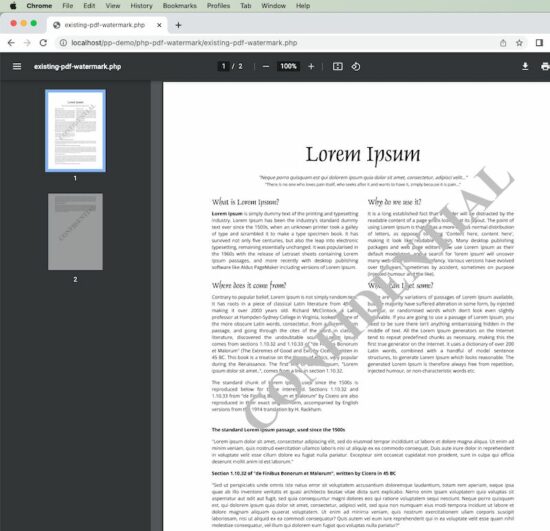
Adding a watermark to a PDF document is a basic need in document editing work. Imagine that you have a project where you need to create a feature-rich PDF document editor project with the sole purpose of managing watermarks.

This PHP script will help you as a foundation code to solve your basic watermarking needs. You can use this as a base and build on top of it if you require more.

I have covered two aspects of adding watermarks.

  1. Add a watermark to an existing PDF document.
  2. Add a watermark to a new PDF document.

I am also presenting an online demo that watermarks a PDF document using this PHP script.

If you are looking for adding a watermark to a web page with a generated image using PHP, refer to this linked article.

View demo

PHP Watermark PDF

Add a watermark to an existing PDF document


To add a watermark to an existing PDF document, I am using FPDF and FPDI libraries. FPDF is the foundation and FPDI is used to load and edit an existing document.

FPDI helps to load an existing PDF document and use it as a template in FPDF to create a document.

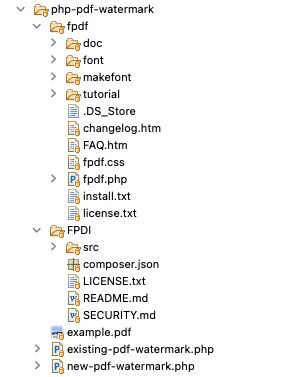
You need to download both FPDF and FPDI libraries and add it to the project. Refer to the project file structure image below.

existing-pdf-watermark.php

<?php
require_once __DIR__ . '/fpdf/fpdf.php';
require_once __DIR__ . '/FPDI/src/autoload.php'; function addWatermark($x, $y, $watermarkText, $angle, $pdf)
{ $angle = $angle * M_PI / 180; $c = cos($angle); $s = sin($angle); $cx = $x * 1; $cy = (300 - $y) * 1; $pdf->_out(sprintf('q %.5F %.5F %.5F %.5F %.2F %.2F cm 1 0 0 1 %.2F %.2F cm', $c, $s, - $s, $c, $cx, $cy, - $cx, - $cy)); $pdf->Text($x, $y, $watermarkText); $pdf->_out('Q');
} $pdf = new \setasign\Fpdi\Fpdi();
$fileInput = 'example.pdf';
$pages_count = $pdf->setSourceFile($fileInput);
for ($i = 1; $i <= $pages_count; $i ++) { $pdf->AddPage(); $tplIdx = $pdf->importPage($i); $pdf->useTemplate($tplIdx, 0, 0); $pdf->SetFont('Times', 'B', 70); $pdf->SetTextColor(192, 192, 192); $watermarkText = 'CONFIDENTIAL'; addWatermark(105, 220, $watermarkText, 45, $pdf); $pdf->SetXY(25, 25);
}
$pdf->Output();
?>

Add a watermark to a new PDF document


Following PHP script is as simple as it gets. The Header function is used to render the PDF document page header. This is called by the AddPage function.

addWatermark is the key function responsible for creating the watermark. It sets the watermark text and performs the rotation to position it across the document. The X and Y location of where to start the watermark text and its color is defined in the Header function.

You can make adjustments by setting a smaller font, position, color, etc as per your choice.

new-pdf-watermark.php

<?php
require __DIR__ . '/fpdf/fpdf.php'; class PDF extends FPDF
{ function Header() { // setting the font, color and text for watermark $this->SetFont('Times', 'B', 48); $this->SetTextColor(140, 180, 205); $watermarkText = 'New PDF Watermark - PHP'; $this->addWatermark(35, 190, $watermarkText, 45); } function addWatermark($x, $y, $watermarkText, $angle) { $angle = $angle * M_PI / 180; $c = cos($angle); $s = sin($angle); $cx = $x * $this->k; $cy = ($this->h - $y) * $this->k; $this->_out(sprintf('q %.5F %.5F %.5F %.5F %.2F %.2F cm 1 0 0 1 %.2F %.2F cm', $c, $s, - $s, $c, $cx, $cy, - $cx, - $cy)); $this->Text($x, $y, $watermarkText); $this->_out('Q'); }
} $pdf = new PDF();
$pdf->AddPage();
$pdf->SetFont('Arial', '', 12);
$pdfDocumentContent = "Lorem ipsum dolor sit amet, consectetur adipiscing elit, sed do eiusmod tempor incididunt ut labore et dolore magna aliqua. Ut enim ad minim veniam, quis nostrud exercitation ullamco laboris nisi ut aliquip ex ea commodo consequat. Duis aute irure dolor in reprehenderit in voluptate velit esse cillum dolore eu fugiat nulla pariatur. .\n\n";
for ($i = 0; $i < 15; $i ++) { $pdf->MultiCell(0, 5, $pdfDocumentContent, 0, 'J');
}
$pdf->Output();
?>

PHP project structure


PHP PDF Watermark Project Structure

I have given the complete PHP project as a free download below. The dependent libraries FPDF and FPDI are not available in the project download zip file. You can download them from their official website and add them to your project as per the given project structure above before adding watermarks.

View demo Download

↑ Back to Top


https://www.sickgaming.net/blog/2022/07/...r-new-pdf/

Print this item

  (Indie Deal) FREE Dwarflings, Super Gear Bundle, Konami Deals
Posted by: xSicKxBot - 07-16-2022, 08:41 AM - Forum: Deals or Specials - No Replies

FREE Dwarflings, Super Gear Bundle, Konami Deals

Dwarflings FREEbie
[freebies.indiegala.com]
Lemmings meets Lost Vikings. The newest FREEbie is a hardcore classic which will be challenging your brain & fingers with mind boggling puzzles.

Super Gear Bundle | 6 Steam Games | 94% OFF
[www.indiegala.com]
It's time to kick this summer into gear with a super selection of indie games: Forgotten Fields, Heads Will Roll, PROJECTIONS, Wordeous, Mad Restaurant People & Super Gear Quest.

Konami Sale, up to 92% OFF
[www.indiegala.com]
https://www.youtube.com/watch?v=3tBJBv_yCg0
https://www.youtube.com/watch?v=Zh2K7SxRHmo
Stay Inside, Stay Safe and Enjoy Good Games.
Check out IndieGala on Twitter, YouTube & Facebook[www.facebook.com]


https://steamcommunity.com/groups/indieg...2631139422

Print this item

  News - Destiny 2's Solstice Event Gets A Tune-Up Before It Begins On July 19
Posted by: xSicKxBot - 07-16-2022, 08:41 AM - Forum: Lounge - No Replies

Destiny 2's Solstice Event Gets A Tune-Up Before It Begins On July 19

Destiny 2's annual celebration, Solstice, makes a return on July 19 with some major changes to its festivities. This year the focus is on less grinding, more reward for taking part in activities that will be tracked through the new Event Card that Guardians will receive next week.

Similar to how the weekly challenges tab works, Bungie says it'll list Event Challenges, Event Seals and titles, and upgraded Event Card rewards. That last point refers to the Event Card having a monetized aspect, which can be unlocked for 1,000 Silver--around $10 for the in-game currency--which will then allow Guardians to earn exclusive rewards along the premier tier by forking over some Event Tickets.

The new emoji that can be earned from the premium Event Card

Some Solstice cosmetics will be available for purchase at the Eververse shop, in case you want to spend some Silver on select items instead. Tickets are earned even if you haven't upgraded your card, and the Event Card can be upgraded at any time while the event is active.

Continue Reading at GameSpot

https://www.gamespot.com/articles/destin...01-10abi2f

Print this item

  PC - GWENT: Rogue Mage
Posted by: xSicKxBot - 07-16-2022, 08:41 AM - Forum: New Game Releases - No Replies

GWENT: Rogue Mage


GWENT: Rogue Mage is a first single-player expansion to GWENT: The Witcher Card Game. It combines elements of roguelike, deckbuilding, and strategy games with GWENT card battles.

Publisher: CD Projekt Red Studio

Release Date: Jul 07, 2022


https://www.metacritic.com/game/pc/gwent-rogue-mage

Print this item

  [Oracle Blog] JavaOne Update Series: Part 1
Posted by: xSicKxBot - 07-15-2022, 12:22 AM - Forum: Java Language, JVM, and the JRE - No Replies

JavaOne Update Series: Part 1

From October 17-20 in Las Vegas, JavaOne will be jam-packed with hundreds of valuable and actionable sessions directly from the experts. You’ll find learning sessions, tutorials, hands-on labs, lightning talks, panels, an unconference, and birds-of-a-feather sessions, covering a variety of topics from the Core Java Platform, to Cloud Development, AI/ML, Security and Manageability, and more.

https://blogs.oracle.com/java/post/javao...ies-part-1

Print this item

  [Tut] How to Multiply List Elements by a Number – Top 5 Ways
Posted by: xSicKxBot - 07-15-2022, 12:22 AM - Forum: Python - No Replies

How to Multiply List Elements by a Number – Top 5 Ways

5/5 – (1 vote)

Problem Formulation and Solution Overview


In this article, you’ll learn how to multiply List Elements by a Number in Python.

This example multiples the first five (5) Prime Numbers by two (2) and return the result.


? Question: How would we write Python code to multiply the list elements?

We can accomplish this task by one of the following options:


Method 1: Use List Comprehension


This method uses List Comprehension to apply a mathematical operation to each element and return the result.

prime_nums = [2, 3, 5, 7, 11]
mult_result = [x * 2 for x in prime_nums]
print(mult_result)

Above declares the first (5) Prime Numbers and saves this List to prime_nums. Next, List Comprehension loops through each element and applies the multiplication operation to each. The output saves to mult_result and is output to the terminal.


[4, 6, 10, 14, 22]


Method 2: Use Pandas tolist()


This method requires an additional library to be imported, Pandas, to use the tolist() function.

import pandas as pd prime_nums = [2, 3, 5, 7, 11]
mult_result = pd.Series(prime_nums)
mult_result = (mult_result*2).tolist()
print(mult_result)

Above, imports the Pandas Library. Click here if this requires installation. Then, the first (5) Prime Numbers are declared and saved to prime_nums.

Next, prime_nums is passed as an argument to the pd.Series() function and returns mult_result. The output of mult_result at this point is shown below.


0 2
1 3
2 5
3 7
4 11
dtype: int64

Now, we need to convert this output to a list (tolist()) and apply the multiplication operation to each element. The results save to mult_result and are output to the terminal.


[4, 6, 10, 14, 22]


Method 3: Use map and lambda Functions


This method wraps the map(), and lambda functions inside a Python List and calculates the results.

prime_nums = [2, 3, 5, 7, 11]
mult_result = list(map(lambda x: x*2, prime_nums))
print(mult_result)

Above declares the first (5) Prime Numbers and saves them to prime_nums. The next line does the following:

  • The map() function is passed the lambda() function as an argument (map(lambda x: x*2, prime_nums)).
  • The lambda performs the multiplication operation to each element of prime_nums and saves it to map() as an object similar to below.
    <map object at 0x000001DC99CBBBB0>
  • The map() object is then converted to a List.
  • The results save to mult_result.

Then, mult_result is output to the terminal.


[4, 6, 10, 14, 22]


Method 4: Use Numpy Array()


This method requires an additional library to be imported, NumPy, to use the np.array() function.

import numpy as np prime_nums = [2, 3, 5, 7, 11]
the_result = list(np.array(prime_nums) * 2)
print(the_result)

Above, imports the NumPy Library. Click here if this requires installation. Then the first (5) Prime Numbers are declared and saved to prime_nums.

Next, prime_nums is passed as an argument to np.array() where the multiplication operation is applied to each element. Then, this is converted to a List, saved to the_result and output to the terminal.


[4, 6, 10, 14, 22]


Method 5: Use Slicing


This method uses Python’s infamous Slicing! No overhead, and a very pythonic way to resolve the issue.

prime_nums = [2, 3, 5, 7, 11]
prime_nums[:] = [x * 2 for x in prime_nums]
print(prime_nums)

Above declares the first (5) Prime Numbers and saves them to prime_nums.

Then slicing is applied and used in conjunction with List Comprehension to apply the multiplication operation to each element. The results save back to prime_nums and are output to the terminal.


[4, 6, 10, 14, 22]


?A Finxter Favorite!


Summary


These methods of multiplying list elements by a number should give you enough information to select the best one for your coding requirements.

Good Luck & Happy Coding!


Programmer Humor


?‍♀️ Programmer 1: We have a problem
?‍♂️ Programmer 2: Let’s use RegEx!
?‍♀️ Programmer 1: Now we have two problems

… yet – you can easily reduce the two problems to zero as you polish your “RegEx Superpower in Python“. ?


https://www.sickgaming.net/blog/2022/07/...op-5-ways/

Print this item

 
Latest Threads
(Free Game Key) Epic Game...
Last Post: xSicKxBot
55 minutes ago
News - Paralives’ Success...
Last Post: xSicKxBot
55 minutes ago
Apollo Neuro Coupon Code ...
Last Post: jax9090nnn
2 hours ago
Apollo Neuro Promo Code [...
Last Post: jax9090nnn
2 hours ago
Apollo Neuro Coupon Code ...
Last Post: jax9090nnn
2 hours ago
Apollo Neuro Discount Cod...
Last Post: jax9090nnn
2 hours ago
Apollo Neuro Coupon Code ...
Last Post: jax9090nnn
2 hours ago
Apollo Neuro Promo Code $...
Last Post: jax9090nnn
2 hours ago
Apollo Neuro Coupon Code ...
Last Post: jax9090nnn
2 hours ago
Apollo Neuro Promo Code [...
Last Post: jax9090nnn
2 hours ago

Forum software by © MyBB Theme © iAndrew 2016