As orphans, Jenn and Tristan's life path brought them to a mysterious scientist, who took them in and cared for them as his own children. But one day, he disappeared under very odd circumstances.
While searching desperately for him, the duo found a hidden cellar and the Moon Gate portal, transporting them to a dangerous parallel world where goblins thrive.
Your adventure begins as you fight to bridge these two very different worlds.
Young Souls is a gorgeous 2D brawler meets story-rich action RPG. Fight hordes of belligerent goblins, level up with hundreds of weapons and accessories, explore, and journey between worlds, as rebellious twins battle their way to save their foster father.
Will Smith Was Asked To Leave After Oscars Slap But He Refused, Academy Says
The newest chapter of the Will Smith/Chris Rock drama at the Oscars has unfolded. The Academy of Motion Picture Arts and Sciences said that Smith was asked to leave the venue after he struck Rock on stage, but the Independence Day star refused, according to the Associated Press. TMZ's sources, meanwhile, say this is not the case and that Smith was told by a producer that he could stay. Some said Smith could stay and others wanted him gone, according to the report.
"There were various discussions during several commercial breaks, but they never reached a consensus," TMZ reported.
Smith, who has publicly apologized to Rock and the Academy, is facing potential disciplinary action. The Academy's board met this week to begin discussions about punishing Smith for violating its conduct standards. Smith could be suspended or expelled from the Academy, or face other sanctions, the group said. Harvey Weinstein, Roman Polanski, and Billy Cosby are among the very small group of people to have been expelled from the Academy.
City of Brass is a recurring giveaway, being given once on the Epic Store on May 2019. The games are free to keep until Apr 7th 2022 - 15:00 UTC.
Next week's freebie: Rogue Legacy The Vanishing of Ethan Carter
We are welcoming everyone to join our discord[discord.gg]. We are more active there on finding giveaways, small or large, and there are daily raffles you can participate.
Swap the element at index i with the element at index j, so that the element list[i] is now at position j and the original element list[j] is now at position i.
Examples:
Swapping indices 0 and 2 in list [1, 2, 3] modifies the list to [3, 2, 1].
Swapping indices 1 and 2 in list [1, 2, 3] modifies the list to [1, 3, 2].
Swapping indices 1 and 3 in list ['alice', 'bob', 'carl', 'denis'] modifies the list to ['alice', 'denis', 'carl', 'bob'].
Method 1: Multiple Assignment
To swap two list elements by index i and j, use the multiple assignment expression lst[i], lst[j] = lst[j], lst[i] that assigns the element at index i to index j and vice versa.
lst = ['alice', 'bob', 'carl']

i, j = 0, 2 # Swap index i=0 with index j=2

lst[i], lst[j] = lst[j], lst[i] print(lst)

# ['carl', 'bob', 'alice']
The highlighted line works as follows:
First, it obtains the elements at positions j and i by running the right-hand side of the assignment operation.
Second, it assigns the obtained elements in one go to the inverse indices i and j (see left-hand side of the assignment operation).
To help you better understand this code snippet, I’ve recorded a quick video that shows you how the generalization of multiple assignment, i.e., slice assignment, works as a Python One-Liner:
Method 2: Swap Two Elements by Value Using indexof()
Let’s quickly discuss a variant of this problem whereby you want to swap two elements but you don’t know their indices yet.
To swap two list elements x and y by value, get the index of their first occurrences using the list.index(x) and list.index(y) methods and assign the result to variables i and j, respectively. Then apply the multiple assignment expression lst[i], lst[j] = lst[j], lst[i] to swap the elements.
The latter part, i.e., swapping the list elements, remains the same. The main difference is highlighted in the following code snippet:
lst = ['alice', 'bob', 'carl']

x, y = 'alice', 'carl' # Get indices i and j associated with elements x and y

i, j = lst.index(x), lst.index(y) # Swap element at index i with element at index j

lst[i], lst[j] = lst[j], lst[i] print(lst)

# ['carl', 'bob', 'alice']
Do you need a quick refresher on the list.index() method?
Background: The list.index(value) method returns the index of the value argument in the list. You can use optional start and stop arguments to limit the index range where to search for the value in the list. If the value is not in the list, the method throws a ValueError.
Feel free to also watch the following quick explainer video:
Python One-Liners Book: Master the Single Line First!
Python programmers will improve their computer science skills with these useful one-liners.
Python One-Linerswill teach you how to read and write “one-liners”: concise statements of useful functionality packed into a single line of code. You’ll learn how to systematically unpack and understand any line of Python code, and write eloquent, powerfully compressed Python like an expert.
The book’s five chapters cover (1) tips and tricks, (2) regular expressions, (3) machine learning, (4) core data science topics, and (5) useful algorithms.
Detailed explanations of one-liners introduce key computer science concepts and boost your coding and analytical skills. You’ll learn about advanced Python features such as list comprehension, slicing, lambda functions, regular expressions, map and reduce functions, and slice assignments.
You’ll also learn how to:
Leverage data structures to solve real-world problems, like using Boolean indexing to find cities with above-average pollution
Use NumPy basics such as array, shape, axis, type, broadcasting, advanced indexing, slicing, sorting, searching, aggregating, and statistics
Calculate basic statistics of multidimensional data arrays and the K-Means algorithms for unsupervised learning
Create more advanced regular expressions using grouping and named groups, negative lookaheads, escaped characters, whitespaces, character sets (and negative characters sets), and greedy/nongreedy operators
Understand a wide range of computer science topics, including anagrams, palindromes, supersets, permutations, factorials, prime numbers, Fibonacci numbers, obfuscation, searching, and algorithmic sorting
By the end of the book, you’ll know how to write Python at its most refined, and create concise, beautiful pieces of “Python art” in merely a single line.
DOWNLOAD JAVA 11 How time flies! Over the last several months, Oracle announced changes to evolve the Java platform ensuring it continues forward with a vibrant future for users. Those advances included: Increasing the pace and predictability of delivery Since the release of Java 9, the Java platfor...
Why do we need a contact form on a website? It is to enable (prospective) customers to connect with you.
Elon Musk says, “…maximize the area under the curve of customer happiness…”.
So, increasing the possibilities of reading the customer’s mind will drive us forward to attain the goal. The contact form interface is one of the tools to know our customers.
Let’s design a simple and useful contact form component for your website. The below sections explain how to create a contact form from the scratch.
Uses of a contact form in a website
There are a few more advantages of having a contact form interface.
It helps have conversions by knowing the requirement of the customers.
It helps to know the scope of improvements.
It helps to collect the end users’ ideas and opinions relevant to the business model.
About this example
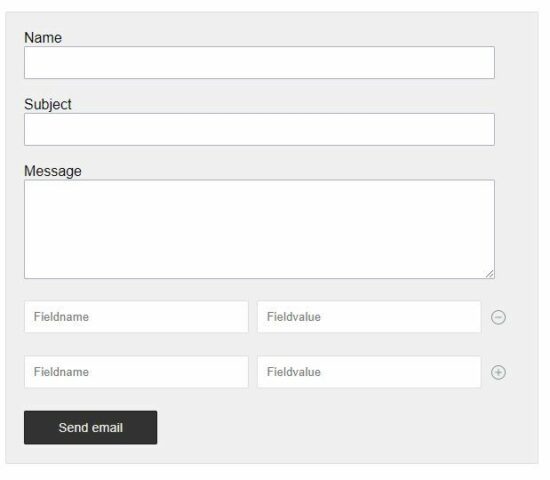
This example code is for designing an HTML contact form with the following features.
This HTML contact form backend code allows both send an email and the store-to-database action. But, The store-to-database feature is optional and disabled initially.
This configuration file has the flag to enable or disable the store-to-database feature.
By default, the ENABLE_DATABASE flag is set to false. Make it true to show the “store-to-database” control in the UI.
It requires the form action PHP file to process data submitted by the user.
It includes the form validation javascript and required jQuery dependency.
By connecting all the contact form example components, this file lets the HTML contact form be interactive.
It shows two controls to save to the database or to send an email. By default the save to the database control will be hidden. It is configurable to display this option.
Form validation can be done either on the server-side or client-side. But, validation on the client-side with Javascript is very usual. And it is quite easy and seamless also.
So, I created a jQuery-based validation script to validate the HTML contact form. It requires all fields to be mandatory except the custom fields.
The contact form custom fields are optional. But, in PHP, it checks the custom field name and value not to be empty. This server-side validation will be done before preparing the contact-form action parameter.
Other JavaScript handlers
This contact.js file does not only include the validation handler. But also, defines handlers to add, delete custom field rows in the UI.
It allows anyone row of custom field inputs to be in the HTML contact form. It is coded in the showHideControls() function of the below file.
contact.js
function validate() { var valid = true; $(".info").html(""); var userName = document.forms["mailForm"]["userName"].value; var subject = document.forms["mailForm"]["subject"].value; var userMessage = document.forms["mailForm"]["userMessage"].value; if (userName == "") { $("#userName-info").html("(required)"); $("#userName").css('background-color', '#FFFFDF'); valid = false; } if (subject == "") { $("#subject-info").html("(required)"); $("#subject").css('background-color', '#FFFFDF'); valid = false; } if (userMessage == "") { $("#userMessage-info").html("(required)"); $("#userMessage").css('background-color', '#FFFFDF'); valid = false; } handleLoader(valid); return valid;

}

function handleLoader(valid) { if (valid == true) { if ($("#savetodatabase")) { $("#savetodatabase").hide();// hide submit } $("#send").hide(); $("#loading-image").show();// show loader }

}

function addMore() { $(".input-row:last").clone().insertAfter(".input-row:last"); $(".input-row:last").find("input").val(""); showHideControls();

}

function remove() { $(".input-row:last").remove(".input-row:last"); $(".plus-button:last").show(); $(".minus-button:last").hide(); $(".input-row:last").find("input").val("");

}

function showHideControls() { $(".plus-button").hide(); $(".minus-button").show(); $(".minus-button:last").hide(); $(".plus-button:last").show();

}
PHP contact form action to send email or store to Database
Generally, the contact form action will send an email with the body of posted form data. This example gives additional support to store the posted message and the details in the database.
This will be suitable when the HTML contact form is used to collect the following.
Users’ feedback
Support request
Project inquiry
Comments
This PHP code handles the form submission by checking the posted action index. It uses the PHP mail() function to send the HTML contact form email. If you want to send an email via SMTP using the PHPMailer library, the link has the code for it.
Refer PHP.net manual to know more about this mail() function.
If the user clicks the ‘Save to database’ button, it connects the Database via the DataSource class. It triggers insert action by sending the form data in the query parameters.
This .sql file contains the create a statement and required indices of the tbl_contact table.
Import this SQL after setting up this example code in your PHP environment.
Note: This is only required if you need the “Store to database” option.
database.sql
-- -------------------------------------------------------- --

-- Table structure for table `tbl_contact`

-- CREATE TABLE `tbl_contact` ( `id` int(11) NOT NULL, `userName` varchar(255) NOT NULL, `subject` varchar(255) NOT NULL, `userMessage` text NOT NULL

) ENGINE=InnoDB DEFAULT CHARSET=utf8mb4; -- -------------------------------------------------------- --

-- Table structure for table `tbl_custom_field`

-- CREATE TABLE `tbl_custom_field` ( `id` int(11) NOT NULL, `contact_id` int(11) NOT NULL, `fieldName` varchar(11) NOT NULL, `fieldValue` varchar(11) NOT NULL

) ENGINE=InnoDB DEFAULT CHARSET=utf8mb4; --

-- Indexes for dumped tables

-- --

-- Indexes for table `tbl_contact`

--

ALTER TABLE `tbl_contact` ADD PRIMARY KEY (`id`); --

-- Indexes for table `tbl_custom_field`

--

ALTER TABLE `tbl_custom_field` ADD PRIMARY KEY (`id`); --

-- AUTO_INCREMENT for dumped tables

-- --

-- AUTO_INCREMENT for table `tbl_contact`

--

ALTER TABLE `tbl_contact` MODIFY `id` int(11) NOT NULL AUTO_INCREMENT; --

-- AUTO_INCREMENT for table `tbl_custom_field`

--

ALTER TABLE `tbl_custom_field` MODIFY `id` int(11) NOT NULL AUTO_INCREMENT;
Conclusion
I hope this article gives you a useful contact form component for your website. It will be helpful to have a good idea to create a form like this on your own.
Custom field integration with contact forms a rare and tricky requirement. Share your thoughts in the comments section to continue posting useful codes.
[www.indiegala.com] Fusion! With the power of anime and gaming combined, the Anime Sale was born! Official anime/manga video games, anime-inspiring games, famous classic/modern Japanese franchises, otaku-favorite titles & more.
The game is free to keep until April 1st 2022 - 13:00 UTC.
We are welcoming everyone to join our discord[discord.gg]. We are more active there on finding giveaways, small or large, and there are daily raffles you can participate.
Distant Worlds, the critically acclaimed 4X space strategy game is back with a brand new 64-bit engine, 3D graphics and a polished interface to begin an epic new Distant Worlds series with Distant Worlds 2.
Distant Worlds 2 is a vast, pausable real-time 4X space strategy game. Experience the full depth and detail of turn-based strategy, but with the simplicity and ease of real-time, and on the scale of a massively-multiplayer online game.
Huge Galaxies with up to 2,000 star systems and tens of thousands of planets, moons and asteroids are yours to explore and exploit, whether peacefully through mining and diplomacy or by conquest! The complex process of generating a galaxy ensures that every new game will be different and the many galaxy setup options ensure incredible replayability as well as the ability to have your game be just the way you like it.
Posted by: xSicKxBot - 03-31-2022, 01:50 AM - Forum: Lounge
- No Replies
Activision Is Going Hard On Call Of Duty With A New Studio In Montreal
Beenox, an Activision-owned studio that supports the mammoth Call of Duty franchise, has today announced that it will be expanding into a new location in Montreal, in addition to its headquarters in Quebec City.
The second office will allow Beenox to increase its staff by over 20%, the studio said in a press release, continuing an expansion that has already seen it hire over 150 developers in the last year. As far as what the new studio will be focusing on, the press release states that the new studio will be able to "support the growth of the [Call of Duty] franchise and additional ambitious projects."



 Background: The