Posted by: xSicKxBot - 11-07-2020, 11:08 AM - Forum: Lounge
- No Replies
Do You Need The PS5's Pulse Headset To Access 3D Audio?
The first things you'll notice on the PlayStation 5 when playing games are the console's graphical and performance upgrades over its predecessor. But while it's a little less obvious, the PS5 makes major strides in audio as well, boasting its own 3D audio technology to make games as immersive as possible. The trouble is, at launch, PS5's Tempest 3D AudioTech won't work through your TV or speakers--it'll only work with headphones.
Sony is offering its Pulse 3D wireless headset as a launch peripheral, which raises the question: Do you need to buy the Pulse 3D to get the most out of your PS5?
The answer to that question, thankfully, is no--although the Pulse 3D is a pretty good set of headphones with some added benefits for gaming, like a noise-cancelling microphone. But other headphones can get the same benefits as well.
Spending reaches $384 million in post-apocalyptic games this year
The latest Sensor Tower report has revealed that post-apocalyptic mobile games have performed exceptionally well this year. Despite the global pandemic currently plaguing the world, games featuring a post-apocalyptic setting have seen the fastest growth in the U.S. for Q1 to Q3.
Player spending in these games has risen by 106%, reaching approximately $384 million. The standout post-apocalyptic games that saw the fastest growth across all game settings were State of Survival from FunPlus and Last Shelter: Survival from Long Tech. If people are playing these games because of our current global climate, there’s almost no doubt this trend will continue into next year.
Plague Inc. became one of the top-selling iOS games in January when news about the coronavirus outbreak started to become more widespread. The game’s sales prompted Ndemic Creations, the developers behind Plague Inc. to release a statement: “We specifically designed the game to be realistic and informative, while not sensationalising serious real-world issues. However, please remember that Plague Inc. is a game, not a scientific model and that the current coronavirus outbreak is a very real situation which is impacting a huge number of people.”
Unsurprisingly, the fastest growing art style during the same Q1 to Q3 period was Retro – Low Poly, accounting for games like Minecraft and Roblox. As two of the biggest games in the world, we aren’t surprised to see this category make large gains as these games continue to grow extensively.
Our website is currently offline due to very high player numbers. I’m copying our statement on the coronavirus outbreak here so people can still see it.https://t.co/pA6CUS7nJIpic.twitter.com/StXP6aemDe
If you’d like to brush up on your Plague Inc. skills, be sure to check out our Plague Inc. tips which highlights everything you’ll need on your virus spreading quest. Looking for something a little more strategic? Head on over to our best mobile strategy games list for all the tactical challenges you could ask for.
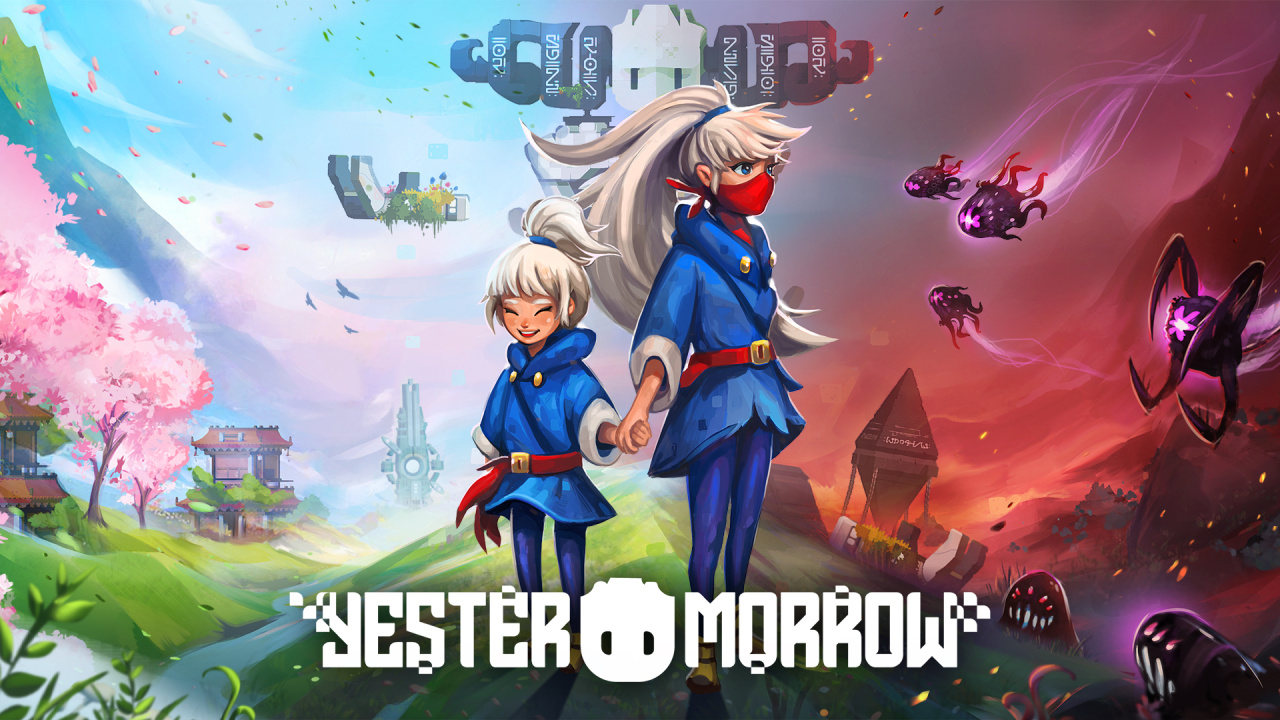
Mini Review: YesterMorrow – A Time-Travelling Novelty Which Grows Old, Fast
On paper, YesterMorrow is a really neat concept for a game. A side-scrolling adventure, its main twist is the ability to jump between two separate timelines, spaced several years apart. You play as Yui, a young girl whose life is thrown into disrepair after her home is destroyed and her family kidnapped by ‘Shadows’ during the Festival of Light. Wracked with guilt for failing to act quick enough, she sets off on an adventure to reverse her misfortunes, save her family, and fix her past.
What’s immediately striking with YesterMorrow is its visuals; the game looks really slick right from the start. It’s not pixelated, but the art style utilised certainly gives off a pixelated effect. The characters are ‘chunky’ in an endearing, adorable way, and the environments are bursting with colour and personality. There are lots of little details, from the way water ripples when you walk through it, to how Yui’s hair swishes about as you jump across platforms. Oh, and you can pet lots of animals.
The gameplay is – surprisingly – largely devoid of any combat. It focuses more on the platforming and puzzle aspects, utilising the time travel mechanic to alter your immediate surroundings; so for example, boulders might be blocking a passageway in the future timeline, but hopping into the past will remove this pesky obstacle. It works both ways, too: you can flip a switch in the past, go back to the future (come on, we had to get that in there) and whatever the switch activates in the past will, somehow, still be ticking along in the future.
Unfortunately, the novelty of time travel wears thin pretty quickly. It’s really the only unique aspect to YesterMorrow, and the game’s heavy reliance on the mechanic means that you’re going to be constantly backtracking trodden ground, switching between timelines at such frequency, it soon becomes quite repetitive. In addition, the rest of the game’s mechanics – from the platforming to puzzle-solving – are very much a case of ‘been there, done that’. We’ve seen it all before, and YesterMorrow ultimately fails to inject enough originality to hold our attention.
To make matters worse, YesterMorrow on the Switch is a bit of a disaster from a technical standpoint. It strives to hit 30fps most of the time, but there are far too many occasions where it plummets to a snail’s pace; so much so that it even causes input lag when you’re jumping about and avoiding enemies. We also came across a frankly bizarre technical hiccup in which flashes of light would come across the screen, flickering with such intensity that it would give Pokémon’s infamous ‘Dennō Senshi Porygon’ TV episode a run for its money. Check out the screenshots above, and you’ll see what this issue looks like in a static image; it’s much worse in motion, mind.
It’s a real shame that YesterMorrow performs so poorly, because visually it’s a real treat, and it’s backed up by a pretty great soundtrack. More importantly though, its gameplay – while functional – can’t hold a candle to a game like Celeste, and we feel it really should have nailed this aspect if it’s to be successful. YesterMorrow may be worth a go if the severe technical issues get ironed out, but it’s by no means a must-buy.
Adorable Multiplayer Brawler Cake Bash Cooks Up A November Release On Switch
Publisher Coatsink and developers High Tea Frog have announced that Cake Bash, a four-player party game where you quite literally bash each other as cakes, will launch on Nintendo Switch on 19th November.
The game launched on a variety of other platforms last month and was received fairly well by critics, so it’s good to see it making the jump to Switch. It’ll be priced at $19.99 when it arrives on the eShop, but a demo is already available should you want to give it a try.
In Cake Bash, you fight to be the tastiest cake, it’s a frantic four-player party game where adorable drawn-to-life cakes beat the crumbs out of each other! Pick your favourite cake and battle in a variety of lifelike places with unique goals – cover yourself in sweeties or hurl fruit into a pie, there’s plenty for everyone!
To cool down, try an assortment of minigame treats – roast perfect marshmallows, pipe the finest frosting, or be the last flan standing in Fork Knife.
Guide your cakes through the bakery as they dress to impress the customer in Get Tasty! Buy delicious toppings in a series of games to be the chosen one…
Compete on the same screen, find challengers online or battle well-baked bots. It’s time to get out of the oven and into the fray!
We must say, the whole thing looks pretty delightful – and tasty, too.
Will you be giving this one a go when it launches on Switch later this month? Let us know with a comment.
Posted by: xSicKxBot - 11-07-2020, 04:55 AM - Forum: Lounge
- No Replies
PS5 Review: A Promising Start To The Next Generation
The PS4 was a fantastic console, a platform that both indie and AAA games flocked to and shined on. Bolstered by a varied lineup of first-party exclusives, Sony's fourth console commanded the attention of gamers over the past seven years. While the PS4's success was undeniably a good thing for Sony, it leaves the company with the tough challenge of topping itself.
With the PS5, instead of simply releasing a new console with more horsepower, Sony has taken a bolder step to clearly establish that this is a brand-new generation. The PS5's console design speaks to this, looking less like a PlayStation and more like an evil megacorp's cyberpunk headquarters. It's a brash design that looks nice when standing tall and a little strange when resting on its side, but in either orientation it's undeniably eye-catching. The next-generation machine is big, bold, and next to stablemates like the PS4 Pro, downright intimidating.
Though it may be a cold behemoth in its stature, the PS5 is also warm and inviting when turned on. The menus are all reminiscent of the PS4, creating a sense of familiarity that helps users get their feet planted, but it's also stripped down and streamlined to only the necessities. Installed games stand in a line of up to nine titles on the homepage, capped off by a library button that reveals your full collection. This is similar to the PS4, though unfortunately, there's currently no way to organize these games at launch--whatever was used most recently shows up first, and there are no folders. Sorting sizable libraries by the platform is easy, though, allowing you to parse which games are native to the PS5 in just a few button presses.
Posted by: xSicKxBot - 11-07-2020, 12:58 AM - Forum: Python
- No Replies
How to Get MD5 of a String? A Python One-Liner
Rapid Answer: The following one-liner calculates the MD5 from the string 'hello world':
import hashlib as h;print(h.md5(b'hello world').hexdigest())
Background: MD5 message-digest is a vulnerable cryptographic algorithm to map a string to a 128-bit hash value. You can use it as a checksum on a given text to ensure that the message hasn’t been corrupted. However, you shouldn’t use it as a protection against malicious corruption due to its vulnerability. With modern hardware and algorithms, it’s easy to crack!
Problem: How to generate an MD5 sum from a string?
Example: Say, you have the following string text:
text = 'hello world'
And you want to convert it to the MD5 hash value:
5eb63bbbe01eeed093cb22bb8f5acdc3
We’ll discuss some methods to accomplish this next.
Method 1: hashlib.md5() — Multi-Liner
The hashlib library provides a function md5() that creates an object that can calculate the hash value of a given text for you via the method update():
# Method 1: hashlib.md5()

import hashlib m = hashlib.md5()

text = 'hello world'

m.update(text.encode('utf-8')) print(m.hexdigest())

# 5eb63bbbe01eeed093cb22bb8f5acdc3
Make sure to encode the string as a Unicode string with the string.encode('utf-8') method. Otherwise, Python will throw an error.
I also initialized the md5 object with the Unicode string directly rather than using the update() method. The one-liner now has minimum number of characters—I don’t think it can be made even more concise!
Python One-Liners Book
Python programmers will improve their computer science skills with these useful one-liners.
Python One-Linerswill teach you how to read and write “one-liners”: concise statements of useful functionality packed into a single line of code. You’ll learn how to systematically unpack and understand any line of Python code, and write eloquent, powerfully compressed Python like an expert.
The book’s five chapters cover tips and tricks, regular expressions, machine learning, core data science topics, and useful algorithms. Detailed explanations of one-liners introduce key computer science concepts and boost your coding and analytical skills. You’ll learn about advanced Python features such as list comprehension, slicing, lambda functions, regular expressions, map and reduce functions, and slice assignments. You’ll also learn how to:
• Leverage data structures to solve real-world problems, like using Boolean indexing to find cities with above-average pollution • Use NumPy basics such as array, shape, axis, type, broadcasting, advanced indexing, slicing, sorting, searching, aggregating, and statistics • Calculate basic statistics of multidimensional data arrays and the K-Means algorithms for unsupervised learning • Create more advanced regular expressions using grouping and named groups, negative lookaheads, escaped characters, whitespaces, character sets (and negative characters sets), and greedy/nongreedy operators • Understand a wide range of computer science topics, including anagrams, palindromes, supersets, permutations, factorials, prime numbers, Fibonacci numbers, obfuscation, searching, and algorithmic sorting
By the end of the book, you’ll know how to write Python at its most refined, and create concise, beautiful pieces of “Python art” in merely a single line.
https://youtu.be/DWORAoQeFIE Spooky scary deals send you free scratchy treats filled with mysterious Steamy sweets! For every purchase...you'll get something special: a BONUS Scratch Card with a secret Steam game in it for every store cart purchase!
LVM is a tool for logical volume management which includes allocating disks, striping, mirroring and resizing logical volumes. It is commonly used on Fedora installations (prior to BTRFS as default it was LVM+Ext4). But have you ever started up your system to find a message like the image above, after you logged in? Uh oh, Gnome just said the home volume is almost out of space! Luckily, there is likely some space sitting around in another volume, unused and ready to re-alocate. Here’s how to reclaim hard-drive space with LVM.
The key to easily re-alocate space between volumes is the Logical Volume Manager (LVM). Fedora 32 and before use LVM to divide disk space by default. This technology is similar to standard hard-drive partitions, but LVM is a lot more flexible. LVM enables not only flexible volume size management, but also advanced capabilities such as read-write snapshots, striping or mirroring data across multiple drives, using a high-speed drive as a cache for a slower drive, and much more. All of these advanced options can get a bit overwhelming, but resizing a volume is straight-forward.
LVM basics
The volume group serves as the main container in the LVM system. By default Fedora only defines a single volume group, but there can be as many as needed. Actual hard-drive and hard-drive partitions are added to the volume group as physical volumes. Physical volumes add available free space to the volume group. A typical Fedora install has one formatted boot partition, and the rest of the drive is a partition configured as an LVM physical volume.
Out of this pool of available space, the volume group allocates one or more logical volumes. These volumes are similar to hard-drive partitions, but without the limitation of contiguous space on the disk. LVM logical volumes can even span multiple devices! Just like hard-drive partitions, logical volumes have a defined size and can contain any filesystem which can then be mounted to specific directories.
What’s needed
Confirm the system uses LVM with the gnome-disks application, and make sure there is free space available in some other volume. Without space to reclaim from another volume, this guide isn’t useful. A Fedora live CD/USB is also needed. Any file system that needs to shrink must be unmounted. Running from a live image allows all the volumes on the hard-disk to remain unmounted, even important directories like / and /home.
Use gnome-disks to verify free space
A word of warning
No data should be lost by following this guide, but it does muck around with some very low-level and powerful commands. One mistake could destroy all data on the hard-drive. So backup all the data on the disk first!
Resizing LVM volumes
To begin, boot the Fedora live image and select Try Fedora at the dialog. Next, use the Run Command to launch the blivet-gui application (accessible by pressing Alt-F2, typing blivet-gui, then pressing enter). Select the volume group on the left under LVM. The logical volumes are on the right.
Explore logical volumes in blivet-gui
The logical volume labels consist of both the volume group name and the logical volume name. In the example, the volume group is “fedora_localhost-live” and there are “home”, “root”, and “swap” logical volumes allocated. To find the full volume, select each one, click on the gear icon, and choose resize. The slider in the resize dialog indicates the allowable sizes for the volume. The minimum value on the left is the space already in use within the file system, so this is the minimum possible volume size (without deleting data). The maximum value on the right is the greatest size the volume can have based on available free space in the volume group.
Resize dialog in blivet-gui
A grayed out resize option means the volume is full and there is no free space in the volume group. It’s time to change that! Look through all of the volumes to find one with plenty of extra space, like in the screenshot above. Move the slider to the left to set the new size. Free up enough space to be useful for the full volume, but still leave plenty of space for future data growth. Otherwise, this volume will be the next to fill up.
Click resize and note that a new item appears in the volume listing: free space. Now select the full volume that started this whole endeavor, and move the slider all the way to the right. Press resize and marvel at the new improved volume layout. However, nothing has changed on the hard drive yet. Click on the check-mark to commit the changes to disk.
Review changes in blivet-gui
Review the summary of the changes, and if everything looks right, click Ok to proceed. Wait for blivet-gui to finish. Now reboot back into the main Fedora install and enjoy all the new space in the previously full volume.
Planning for the future
It is challenging to know how much space any particular volume will need in the future. Instead of immediately allocating all available free space, consider leaving it free in the volume group. In fact, Fedora Server reserves space in the volume group by default. Extending a volume is possible while it is online and in use. No live image or reboot needed. When a volume is almost full, easily extend the volume using part of the available free space and keep working. Unfortunately the default disk manager, gnome-disks, does not support LVM volume resizing, so install blivet-gui for a graphical management tool. Alternately, there is a simple terminal command to extend a volume:
Reclaiming hard-drive space with LVM just scratches the surface of LVM capabilities. Most people, especially on the desktop, probably don’t need the more advanced features. However, LVM is there when the need arises, though it can get a bit complex to implement. BTRFS is the default filesystem, without LVM, starting with Fedora 33. BTRFS can be easier to manage while still flexible enough for most common usages. Check out the recent Fedora Magazine articles on BTRFS to learn more.
This week at Bungie, we’re beginning our descent to Europa.
Every release, we have a long conversation about what we should show players leading up to launch, and what we should leave for players to discover. We want to build up the sense of wonder as a new Season or expansion makes its approach without spoiling everything that’s coming. With just a week to go before launch, we’ve almost reached our destination.
Our Beyond Light Launch Trailer went live last week. A ViDoc, exploring Beyond Light and Season of the Hunt, is available for your viewing pleasure. We’ve released our Season of the Hunt calendar to help you plan out your days for the next few months.
All that’s left is a quick preview of patch notes and a maintenance timeline. After that, we leave the rest to you.
It’s All in the Patch
Over the last few weeks, our goals have been to set expectations. We’ve covered the Destiny Content Vault, upcoming Sandbox changes, Gambit tuning, and more. These updates aren’t mind-blowing or overly game changing, they’re just nice little morsels to chew on in the final days leading up to launch. In any case, we hope you like the following quality of life appetizers before your meal is delivered on November 10.
Archives
Beginning November 10, two new kiosks will be available in the Tower. First up, the Quest Archive will be found next to the Postmaster. Our hope is that this removes some of the confusion when trying to track down the odd quest that you previously discarded. Additionally, this will be the place for any veteran players to pick up the New Light Quest on November 10, if they have a strong desire to experience new player tutorials and the (re-)introduction to the Cosmodrome.
Next up, the Monument to Lost Lights Exotic Archive will be found by the Vault. Here, players may acquire various Exotics and Legendary Pinnacle/Pursuit weapons that were once available through now-retired quests. As many of these Exotics were tied to lengthy quests or difficult objectives, we wanted to make sure their prices reflected those previous efforts. Players will need an amount of Glimmer, destination materials, masterworking materials, and an Exotic Cipher or Ascendant Shard in order to purchase the Exotic or Legendary which they desire. We’re also introducing a currency, Spoils of Conquest, which can only be acquired when completing raids. This currency will be required for Exotics previously tied to Vaulted raids.
In the past, Exotic Ciphers were very limited in nature. While you can expect one to be available as part of the Season Pass, Xur will also offer a quest to earn one Exotic Cipher on a weekly cadence.
Now, let’s move on to some traditional patch notes…
Crucible
Trials of Osiris
Trials of Osiris Power level requirement increased to 1210.
Added ADEPT weapons and weapon mods to Flawless chest rewards.
Added physics blockers to some out-of-bounds areas on Altar of Flame.
Added physics blockers to some out-of-bounds areas on Exodus Blue.
Added physics blockers to some out-of-bounds areas on Cauldron.
Player Identity
Login screens now have a dark background.
Updated the full-screen menus to have a dark background style.
Player waypoints now display Season Rank, HUD waypoints.
Added toggle functionality to the character screen, allowing the player to make a choice between Light and Dark subclasses.
Character screen visuals updated depending on player choice between Light and Dark.
Character Creation
Changed selection from “Male” & “Female” to “Masculine” & “Feminine.”
Guardian head and hair models have been replaced with improved versions.
Several color swatches have been changed to better represent the applied color.
Player’s previous head selections are still used.
Misc
Fixed a bug that prevented online friends from showing up in the roster on Stadia for players with more than 100 friends.
Fixed a bug that occasionally prevented players from earning progress on bounties when joining an activity in progress.
This most notably impacted Iron Banner bounties and could cause players to have their Artifact Power bonus enabled during Iron Banner matches.
A few Sandbox changes that we missed in our Sandbox preview
Traveler’s Chosen
Reduced muzzle flash intensity.
Point of the Stag
Increased Point of the Stag’s Max Power Level to 1310.
Divinity
Fixed a bug that prevented some weapons from dealing precision damage to the Divinity cage (e.g. Eriana’s Vow).
Hunter Dodge
Increased Hunter’s Dodge cooldown by a few seconds.
(E.g. Tier 4, old cooldown: 22 sec. New cooldown: 26 sec.)
Anti-Champion Mods
Anti-barrier rounds will now penetrate Taken Phalanx shields.
All Anti-Champion mods have been shifted to armor, rather than taking a weapon mod slot.
Orbs of Light have been changed to Orbs of Power as they can now be consumed by Light and Dark subclasses.
Before we end our patch note preview, we do want to call out the collectors among you who have been talking about the impending removal of Expired Ramen Coupons from your inventories. We know this one stings a bit. It’s a byproduct of us cleaning up inventory systems and doing general maintenance.
We want to a provide a parting gift before these coupons are tossed into the bin. These coupons can’t be redeemed for spicy ramen, but they can decorate your desktop for as long as you desire.
…and there we have it. Full patch notes will be released on Tuesday around launch time. Stay tuned!
Novembrrrrrrrrrrrrrrrrrrr
With a new expansion coming next week, we also have a fresh update coming to Bungie Store! We’re entering the holiday season, so it’s a pretty good time to start gift shopping for your favorite Guardians out there in the world.
Starting November 9, upgrade your arsenal of collectibles and gifts at Bungie Store with new exclusive products and free in-game emblems with purchase, including the Destiny 2: Beyond Light Original Soundtrack!
Cosmic Alignment (Available November 9 through December 4, 2020)
Between Stars (Available November 9 through February 9, 2021)
Shattered Harmony (Available November 9 with purchase of Destiny 2: Beyond Light Original Soundtrack)
Follow @BungieStore on Twitter for more deals and discounts to be announced every Friday in Novembrrrr from The Drifter, The Exo Stranger and Variks.
Let’s Talk Maintenance and Pre-Loads
Next Monday, November 9, Destiny 2 will go offline for an extended maintenance period. We want to give everyone ample time to download Destiny 2 Update 3.0.0. Our teams are prepping for the launch day assault on our servers. Destiny Player Support has the full timeline for maintenance, downloads, and more. Read up, spread the word, and get ready for Beyond Light.
This is their report.
UPDATE 3.0.0.1
Next Monday, maintenance for Update 3.0.0.1 will begin. Below is a timeline of events:
November 9, 3:30 PM PST (2330 UTC): Background maintenance for Update 3.0.0.1 will begin.
November 9, 4:00 PM PST (0000 UTC): In preparation for downtime, players will be removed from activities and will be required to download a small update before logging in again.
November 9, 6:50 PM PST (0250 UTC): Sign-on for Destiny 2 will be disabled.
November 9, 7:00 PM PST (0300 UTC): Destiny 2 will be brought offline for expected maintenance. Players will be removed from activities and won’t be able to log back into Destiny 2 until 9 AM PST on November 10.
November 10, 9:00 AM PST (1700 UTC): Destiny 2 Update 3.0.0.1 will be available across all platforms and regions. Players will be able to log back into Destiny 2.
November 10 12:00 PM PDT (2000 UTC): Destiny 2 maintenance is expected to conclude.
For more information, please visit our Destiny Server and Update Status help article.
BEYOND LIGHT PRE-LOAD
Pre-load for Update 3.0.0.1 will be available prior to the game’s release. Below are pre-load timelines and instructions based on platform:
PlayStation
Beginning on November 8 after 8 PM PST (0400 UTC), users can start pre-downloading Update 3.0.0.1 by:
Navigating to Destiny 2
Pressing the “Options” button
And selecting “Check for Updates”
In an effort to decrease server load, some PlayStation Plus users may be able to pre-download Update 3.0.0.1 starting on November 7 after 8 PM PST (0400 UTC) if they have auto update/download enabled on their PlayStation 4. For instructions on how to setup auto update/download, please click here.
PLEASE NOTE: BUNGIE RECOMMENDS THAT PLAYERS SHOULD NOT DELETE THEIR CURRENT VERSION OF DESTINY 2 ON THEIR PLAYSTATION CONSOLE TO SPEED UP THE PRE-DOWNLOAD PROCESS.
Pre-load for Xbox will be available shortly after Destiny 2 is taken offline for expected maintenance at 7 PM PST (0300 UTC) on November 9. For instructions on how to setup auto update, please click here.
Pre-load for PC will be available shortly after Destiny 2 is taken offline for expected maintenance at 7 PM PST (0300 UTC) on November 9. Update 3.0.0.1 should automatically be put in the Steam download queue once it is available to pre-load. For more information on managing Steam downloads and updates, please click here.
STORAGE REQUIREMENTS
Below are the updated storage requirements for Beyond Light:
Platform
Destiny 2 Install Size
Storage Space Needed for Installation
Xbox Series X|S
65.7 GB
65.7GB
PlayStation 5
70.78 GB
70.78 GB
PlayStation 4
70.78 GB
171.68 GB*
Xbox One
65.7 GB
65.7 GB
PC
69.7 GB**
186.2 GB***
* PlayStation 4: Includes current installed version of Destiny 2 (100.9 GB) + Update 3.0.0.1 pre-load (70.78 GB) = 171.68 GB
** PC: Destiny 2 Install Size may vary based on languages installed, size shown is maximum size possible
*** PC: Includes current installed version of Destiny 2 (up to 116.5 GB) + Update 3.0.0.1 pre-load (up to 69.7 GB) = 186.2 GB
DESTINY CONTENT VAULT AND THE END OF SEASON OF ARRIVALS
With the start of Year 4 and the introduction of the Destiny Content Vault on November 10, certain items will be deprecated from player inventories that correspond with Vaulted destinations, activities, and campaigns.
Additionally, certain Titles will become Legacy Seals and unavailable to earn at the start of Year 4. Players should be sure to equip the following Titles before November 9 at 7 PM PST (0300 UTC), after which they will be unavailable to earn. For more information, please visit our Year 4 Triumphs Update help article.
Seal
Title
A Shadow Rises
Shadow
Reckoner
Reckoner
Black Armory
Blacksmith
Destinations
Wayfarer
Lore
Chronicler
Undying
Undying
Dawn
Savior
Almighty
Almighty
Arrivals
Forerunner
Moments of Triumph 2020
MMXX
BUNGIE REWARDS
With the release of Beyond Light on November 10, certain Bungie Rewards will no longer be available to earn. These include the ‘Eclipse Sunset’ and ‘Sunset’ emblems, the Year of Shadowkeep Artifact Coins, the Moments of Triumph t-shirt, the Raid Ring, the Prophecy Dungeon Hoodie, the MMXX Seal, and the Forerunner Seal.
Players should be sure to earn these rewards by November 9 at 7 PM PST (0300 UTC) and claim these rewards from the Bungie Rewards page before November 13 at 8 AM PST (1600 UTC).
Encore
Before we kick off a new year of Destiny content, we have a final round for Movie of the Week. 2020 isn’t over yet, but we’ve had a blast watching community-created content throughout Shadowkeep and its associated Seasons. Many thanks to those who’ve submitted their footage (and art!), as it’s kept us sane week over week.
Here are your final Movie of the Week selections before Beyond Light brings some Darkness to the table.
Movie of the Week: Thanks, Taken!
Movie of the Week: Festival of the Lost, Parting Shot
Movie of the Week: Give ‘em a hand
Movie of the Week: SEVENTH COLUMN!!! …AND ANOTHER ONE!
Movie of the Week: It isn’t over until it’s over
Next week, we’ll have a new companion section for Movie of the Week. We felt it important to give the same spotlight to the artists of our community as we’ve been giving to those who create fun videos.
To throw your hat in the ring, submit your content to the Community Creations portal on Bungie.net. If you also post your content to social media, tag it with #DestinyMOTW or #DestinyArt. We’ll snag a few winners each week and grant them some fancy new emblems.
We’ve been here a few times. What was once months became weeks. Weeks have become mere days. Five more sleeps stand between you and Beyond Light. Well, that’s if you can even sleep the night before launch. I know I probably won’t. Many of you have been on this journey with us from the start. In the last year, numerous Guardians have begun their journey through New Light. No matter how long you’ve been a Guardian, we can’t thank you enough for playing.
Sega Asks 650 Employees To ‘Voluntarily Retire’, Cuts Executive Salaries
Sega
Following this week’s news that Sega Sammy is set to sell the majority of its shares in Sega Entertainment, the company has now announced that it is asking 650 employees to ‘voluntarily retire’ and will slash the salaries of top executives.
The company, formed by a merger of both Sega and Sammy in 2004, has revealed its plans in a newly-published Notice of Forecast document. As spotted by Kotaku, the notice reads, “In light of the situation that many of our Group’s business are significantly affected by COVID-19, we have established a Structural Reform Committee to reform our organization structure to adapt to the external environment…
“In order to recover earnings at an early stage and achieve sustainable growth in the future, we consider that it is necessary to promote cost-reduction centered on fixed expenses and build an even more efficient system and decided to call for voluntary retirement of employees.”
This call for voluntary retirement has been issued to a total of 650 full-time and contracted employees, asking for a retirement date of 28th February 2021. Those who choose to take the option will receive a “payment of extraordinary retirement allowances and reemployment support”.
As noted above, it’s not just the employees who have been affected. The document goes on to say that the company’s Representative Director’s monthly salary will be cut by 30%, with the Senior Executive Vice President and Senior Vice President also getting 20% and 10% monthly cuts respectively. These changes will be in effect from November 2020 to March 2021.
Speaking about its future, Sega Sammy says, “We expect to record approximately 10 billion yen as extraordinary losses (structural reform expenses) in fiscal year ending March 2021.”