A responsive navigation bar is a one of a must-needed requirement of any modern web application. It is an easy job if the navigation bar contains single level menu and action controls. But, it will be complex it is a multi-level menu to fit the layout into a small viewport.
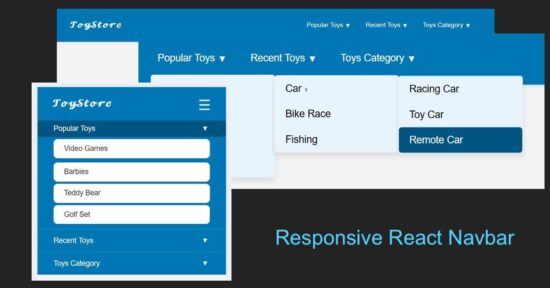
With this React example code you’ll learn how to build a responsive React navbar. It includes a multi-level dropdown menu for different view port. It will a plugable and reusable React component for your different application frontend.
Responsive navbar in React header
This React JSX code has the a responsive navigation bar component. It provides 1) menu bar with Desktop and mobile variants, 2)sub menu bar with click-to-expand effect.
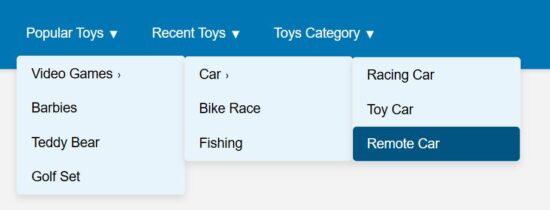
The menuData contains the array of multi-level menu items. The image shown below renders the horizontal menu on the site header.

src/components/Navbar/Navbar.jsx
import { useState } from "react";
import menuData from "./MenuData";
import Dropdown from "./DropDown";
import "../../../public/assets/css/style.css"; const Navbar = () => { const [menuOpen, setMenuOpen] = useState(false); const [openIndex, setOpenIndex] = useState(null); const toggleSubmenu = (index, e) => { if (window.innerWidth <= 768) { e.preventDefault(); setOpenIndex(openIndex === index ? null : index); } };
return ( <nav className="navbar"> <div className="navbar-container"> <h2 className="logo"></h2> <button className="menu-toggle" onClick={() => setMenuOpen(!menuOpen)} aria-label="Toggle menu" > ☰ </button> <ul className={`menu ${menuOpen ? "open" : ""}`}> {menuData.map((menu, i) => ( <li key={i} className="menu-item has-submenu"> <a href="#" onClick={(e) => toggleSubmenu(i, e)}> {menu.title} <span className="expand">▼</span> </a> {menu.subMenu && ( <Dropdown items={menu.subMenu} className={openIndex === i ? "open" : ""} /> )} </li> ))} </ul> </div> </nav>
);
};
export default Navbar;
These are the main and submenu items defined for this React example.
src/components/Navbar/MenuData.js
const menuData = [ { title: "Popular Toys", subMenu: [ { title: "Video Games", subMenu: [ { title: "Car", subMenu: ["Racing Car", "Toy Car", "Remote Car"] }, "Bike Race", "Fishing" ] }, "Barbies", "Teddy Bear", "Golf Set" ] }, { title: "Recent Toys", subMenu: [ "Yoyo", "Doctor Kit", { title: "Fun Puzzle", subMenu: ["Cards", "Numbers"] }, "Uno Cards" ] }, { title: "Toys Category", subMenu: [ "Battery Toys", { title: "Remote Toys", subMenu: ["Cars", "Aeroplane", "Helicopter"] }, "Soft Toys", "Magnet Toys" ] }
]; export default menuData;
React menu dropdown hooks to toggle submenu
A component Dropdown returns the submenu look-and-feel. The React state openIndex has the menu open/close state by its index.
The Dropdown component’s expand/collapse state is depends on the menuOpen set with a toggle action. The menu toggle effect is for the mobile view to slide down the menu options on clicking a burger icon.
src/components/Navbar/DropDown.jsx
import { useState } from "react"; const Dropdown = ({ items, className }) => { const [openIndex, setOpenIndex] = useState(null); const toggleSubmenu = (index, e) => { if (window.innerWidth <= 768) { e.preventDefault(); setOpenIndex(openIndex === index ? null : index); } }; return ( <ul className={`dropdown ${className || ""}`}> {items.map((item, i) => typeof item === "string" ? ( <li key={i}> <a href="#">{item}</a> </li> ) : ( <li key={i} className="has-submenu"> <a href="#" onClick={(e) => toggleSubmenu(i, e)}> {item.title} <span className="expand">›</span> </a> {item.subMenu && ( <Dropdown items={item.subMenu} className={openIndex === i ? "open" : ""} /> )} </li> ) )} </ul> );
};
export default Dropdown;
Mobile menu navbar view
This heading shows the mobile view of this responsive navbar. In the mobile view, a burger icon will be appeared on the top right corner of the web layout.
This icon’s click event is bound to toggle a sliding menu. In this sliding menu, each menu items are vertically expandable to show its submenu.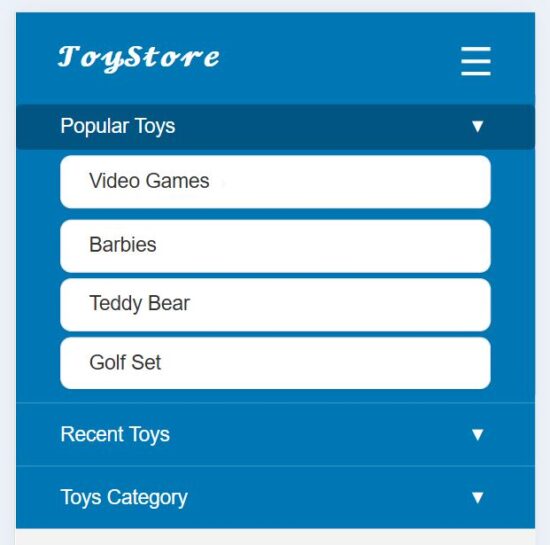
References: