Posted on Leave a comment

Bedrock: Beta & Preview 1.19.10.21

Have you been checking out the JAVA Edition updates while waiting for the Beta and Preview to release?  Well, look no further as Mojang Studios released the latest for you to check out.  If you find any bugs please report them so they can be fixed prior to the June 7th release date.

Features and Bug FixesSpectator Mode (Experimental)

  • Players in Spectator gamemode can’t get effects from gameplay
  • Players in Spectator don’t trigger raids while being in Village with Bad Omen effect
Sculk Sensor
  • Sculk Sensors are now occluded by Wool in a consistent manner, no matter which direction vibrations come from (MCPE-153815)
  • Sculk Sensors cannot detect a Player placing, destroying, walking, and falling on Carpets anymore (MCPE-153956)
  • Sculk Sensors cannot detect Wool and Carpets hitting the ground in item form anymore (MCPE-152998)
  • Sculk Sensor now retains information about the vibration it is reacting to through save and load
  • Sculk Sensors can now detect a Boat with Chest having its Chest opened and closed (MCPE-156199)
  • Sculk Sensors give out a Redstone Signal of 12 and 13 when detecting fluids being placed and picked up, respectively
  • Sculk Sensors can now detect a Player drinking Milk
  • Sculk Sensors can now detect a Player picking up Powder Snow via Bucket (MCPE-153817)
  • Sculk Sensors cannot detect an entity jumping on Wool covered by Sculk Veins anymore
  • Sculk Sensors cannot detect an entity standing still in Scaffolding anymore (MCPE-118454)
  • Sculk Sensors can now detect an entity moving in Powder Snow and cobwebs (MCPE-153105)
  • Sculk Sensors can now detect items being placed in the hand of an Armor Stand
  • Sculk Sensors cannot detect any more items being equipped on mobs at spawn time
Sculk Shrieker
  • Sculk Shrieker now retains information about the vibration it is reacting to through save and load
  • A Sculk Shrieker can no longer summon a Warden underwater (MCPE-153791)
Warden
  • Warden can now spawn on more types of non-full blocks, such as upper Slabs, Redstone Dust, Snow layers, Buttons, and Tripwires. Known limitations: The current solution doesn’t allow spawn on some types of blocks such as Leaves and lower Slabs. (MCPE-155821)
  • Warden now retains information about the vibration it is reacting to through save and load
  • Warden sonic boom attack now bypasses enchantment damage reduction such as Protection (MCPE-156282)
Allay
  • Allay now retains information about the vibration it is reacting to through save and load
Mangrove Propagule
  • Mangrove propagule now uses grass sounds
  • Mangrove propagule is no longer destroyed by flowing water (MCPE-154011)
Deep Dark
  • Campground Structures generate correctly in Ancient Cities (MCPE-156084)
  • Sculk Vein feature can now generate within the same height span as the Sculk Patch feature. (MCPE-156074)
Blocks
  • Mangrove Leaf Blocks are no longer collected into different stacks when using silk touch (MCPE-153786)
  • Stripped Mangrove Logs now craft into Stripped Mangrove Wood instead of Mangrove Wood (MCPE-155365)
  • Mangrove propagules now render correctly when placed in flower pots (MCPE-155528)
  • Sweet Berry Bush can now be planted on Mud, Muddy Mangrove Roots, and Rooted Dirt (MCPE-153916)
Gameplay
  • Smelting gold/iron tools and weapons into nuggets now rewards XP (MCPE-136467)
  • Fixing the bug where the Soul Campfire was using the wrong tag resulted in cases where some custom recipes for Campfires were not working correctly (MCPE-98305)
  • Fixed entities disappearing when importing worlds converted from legacy console editions of Minecraft
  • Teleporting entities into unloaded chunks no longer deletes them (MCPE-1529)
  • Fishing Rod no longer crashes the game when the fish hook is cast through dimension-changing portals (MCPE-154161)
  • Fixed bug causing player’s hitbox to not reset if they die while swimming (MCPE-155232)
  • Fixed issue with health boost extra life not staying (MCPE-153504)
  • Wooden tools can now be repaired using Mangrove Planks, Crimson Planks, and Warped Planks (MCPE-153808)
Character Creator
  • Infinite loading should no longer occur when entering the dressing room
  • Fixed up some of the text for the emote wheel so it would fit inside the box
  • Fixed issue where the Emote Expedite List would be unable to display duplicate emotes, and the issue where the Emote Expedite List would not display correctly if the user did not enter the Dressing Room first
Graphical
  • Fixed the issue where water fog expanding speed did not match the value specified in ‘midPercentage’ field (MCPE-153864)
  • Fixed issue where under water fog transition between biomes is not smooth while affected by eye adapting effect
Splitscreen
  • Fixed animation system issues for players in split screen situations
    • Fixed Crossbow, Trident, and Shield rendering for other players (MCPE-118528)
    • Fix split-screen render position when sleeping in a bed (MCPE-65705)
    • Fix Elytra’s animation is during split-screen
    • Fix attached Lead position when the second player is using first person perspective
Graphical
  • Fixed device loss when reloading RTX worlds that caused DX11 to be used resulting in a black screen
  • Fog setting with negative fog start will no longer cause UI elements get tinted by fog color
  • Fixed the issue where terrain flickers in and out of the fog on Switch
Marketplace
  • Minecoins read by the text-to-speech reader will now say ‘Minecoins’
  • Fixed the ratings percentages to add up to 100%.
  • Fixed issue where info and buttons do not appear for downloaded skin packs (MCPE-152216)
Villager
Wandering Trader
  • The Wandering Trader will now flee from Zoglins
  • The Wandering Trader will now drink milk to clear its invisibility effect (MCPE-44605)
Wither
  • Wither now breaks Obsidian when attacked by the player (MCPE-64630)
  • Wither no longer breaks surrounding blocks after a shorter delay than intended after being attacked
Player Rendering
  • Changed entity JSON files for the player to fix the hands not rendering while holding a map (MCPE-100259)
User Interface
  • Added the player’s cause of death to the death screen
  • On the death screen in Pocket UI, moved the Main Menu button to the top navigation to avoid accidental button presses when dying mid-fight
  • Fixed incorrect positioning of “Select (A)” tip on the death screen when using a gamepad controller
  • Added correct death message when dying from Sweet Berry Bush (MCPE-103583)
  • Added a minimum size to yellow splash screen text.
  • Fixed “Crafting” word above the crafting slots in the Inventory in Bedrock’s Classic UI (MCPE-152697)
  • Worlds created with templates will now always disable achievements.
  • Fixed bug where items can be dropped by clicking in the dark gray area of the player inventory when using Furnace, Blast Furnace, Smoker, Enchant Table, Grindstone, Brewing Stand, Anvil, Beacon and Smithing Table, Loom, Cartography table, Stone cutter
  • Fixed an issue where some paragraphs of text in modals were being misaligned (MCPE-153789)
Vanilla Parity
  • Actors entering nether portals exit in the same relative position and rotation to the portal (MCPE-139835)
  • Muddy Mangrove Roots are now broken fastest with a shovel (MCPE-153710)
  • Mangrove Roots are now broken fastest with an axe (MCPE-155606)
  • Updated Ancient City structures to match Java
Mobile Controls
  • Updated the visual style of the touch control joystick
Performance and Stability
  • The game will no longer crash in multiplayer when a player leaves the game while changing dimensions.
  • Fixed a crash that would happen when players died while affected with withering.

Technical Updates

Actor Properties (Experimental)
  • Actor properties will now save and load correctly across multiple clients and entities.
AI Goals
  • Added “minecraft:drink_milk” behavior which allows a mob to drink milk based on specified environment conditions
Commands
  • Fixed an issue in the teleport command where a “facing” argument would calculate an incorrect vertical orientation. (MCPE-144870)
GameTest Framework (Experimental)
  • The /script profiler command now includes native API calls its trace call stacks
Posted on Leave a comment

JAVA Edition: 1.19 Pre-Release 5

Today’s release fixes more bugs as we count down to six more days!  Be sure to report any bugs you find so Mojang Studios can squash them!

Fixed Bugs in 1.19 Pre-Release 5

  • MC-249121 – Sculk is missing subtitles for some sounds
  • MC-249323 – Modifying a world preset to not include overworld settings will not give a datapack error, but selecting the world type will instantly crash your game
  • MC-250034 – Standing on top of mud as it converts to clay causes the player to fall through or be pushed out of the block
  • MC-250295 – Allay’s head does not rotate to where it looks
  • MC-251030 – Standing on top of soul sand or mud that converts to sculk will cause entities to fall through it
  • MC-251323 – Mobs target emerging warden/ warden faces attacking mob while emerging if dealt melee damage
  • MC-251594 – Leads are leashed too high on allays
  • MC-252038 – Warden attacks immediately if hit during emerging animation
  • MC-252108 – Eating a food item no longer opens the piston doors in city_center_2
  • MC-252157 – ‘CustomName’ NBT tag still prevents wardens from digging down
  • MC-252352 – URL in eula.txt (dedicated server) points to the wrong location
Posted on Leave a comment

JAVA Edition: 1.19 Pre-Release 4

Today’s Pre-Release contains a round of bug fixes.  Have you encountered what’s been fixed below?

Fixed Bugs in 1.19 Pre-Release 4

  • MC-220067 – Chunk corruption with command block full of certain Unicode characters
  • MC-245504 – Touchscreen mode crash // java.lang.ClassCastException: class eec$a cannot be cast to class eec$c (eec$a and eec$c are in unnamed module of loader ‘app’)
  • MC-249831 – Aquifers can cut themselves off at chunk borders
  • MC-251840 – Game crash whilst getting block state: cwj: Missing Palette entry for index 8
  • MC-251859 – Gear equipping sound plays every time armor/elytra durability changes while equipped
  • MC-251989 – Cannot send chats or use commands in multiplayer since 1.19 Pre-release 1
Posted on Leave a comment

Mark Your Calendars: June 7th Will Be Wild!

That’s right, The Wild update is coming on June 7th!  This update will be available for everyone on JAVA Edition and those playing Bedrock across the consoles and Windows Store.  Want to know what’s coming?  Below are the latest updates for each version.

1.19 Pre-Release 1-3

Changes in1.19 Pre-Release 3
  • Wardens’ sonic boom attack now bypasses the damage reduction by armor enchantments such as Protection
Technical Changes in 1.19 Pre-Release 3
  • item_interact_start is no longer detectable as a vibration to allow more specific actions to be detected, like drink or eat, but item_interact_finish still is
Fixed Bugs in 1.19 Pre-Release 3
  • MC-209932 – Sculk sensors only detect the last turtle egg being broken when being stepped on
  • MC-210277 – Sculk sensors are not activated upon chickens laying eggs
  • MC-210278 – Sculk sensors are not activated upon bees entering or leaving their hive or nest
  • MC-214622 – Sculk sensors do not detect daylight detector mode switching
  • MC-249094 – Unexpected culling of inner sculk shrieker faces
  • MC-249230 – Frogs prioritize eating entities over panicking when being damaged
  • MC-250162 – Placing a map in an item frame will break any intersecting paintings and item frames with a map inside
  • MC-250238 – Frogs attempt to pathfind to entities outside of their reach causing them to spin and twitch constantly
  • MC-250983 – Allays can get stuck and freeze inside non-full blocks
  • MC-251220 – Block lighting on extended parts is a lot darker in 22w17a compared to 1.18.2
  • MC-251420 – Demo Mode: The “Purchase Now!” link’s destination is incorrect
  • MC-251858 – Subtitles are higher than in previous versions
  • MC-251872 – The game output and server console are logged with warnings regarding chat packets with invalid signatures when using entity selectors within commands
  • MC-251878 – Sculk sensors hearing items being dropped on the ground don’t alert shriekers even if a player drops it
  • MC-251968 – /execute running chat related commands logs “Received chat packet without valid signature” warning
  • MC-252071 – Warden still detects after death if the signal is traveling before death
  • MC-252078 – Allays no longer flee or panic when taking damage
Changes in 1.19 Pre-Release 2
  • If the Warden is stuck in a liquid, it will angrily despawn instead of digging
  • Reverted using generic equip sound when equipping blocks in the head slot
Technical Changes in 1.19 Pre-Release 2
  • Added game event teleport with a vibration frequency of 5
Fixed Bugs in 1.19 Pre-Release 2
  • MC-186148 – “death.attack.witherSkull.item” displays raw translation string (is untranslated)
  • MC-186851 – “death.attack.sting.item” displays raw translation string (is untranslated)
  • MC-207268 – Sculk sensors don’t detect stripping logs, tilling dirt, or pathing grass
  • MC-208759 – Sculk Sensor’s ‘block placed’ doesn’t trigger with villagers placing crops
  • MC-208760 – Sculk Sensor’s ‘block placed’ doesn’t trigger when snow golems place snow layers
  • MC-208761 – Sculk Sensor’s ‘block destroyed’ doesn’t trigger when pistons destroy blocks
  • MC-209701 – Sculk sensors are not activated upon placing food onto campfires
  • MC-209900 – Sculk sensors are not activated upon inserting or retrieving music discs from jukeboxes
  • MC-210330 – Sculk sensors are not activated upon throwing eyes of ender
  • MC-210489 – Sculk sensors are not activated upon pointed dripstone filling partially filled cauldrons
  • MC-210496 – Sculk sensors are not activated upon harvesting sweet berry bushes
  • MC-210801 – Wool incorrectly occludes the vibration of item frames being placed
  • MC-212430 – Sculk sensors are not activated upon rain or snow filling partially filled cauldrons
  • MC-213387 – Sculk sensors don’t detect endermen/shulkers teleporting from one place to another
  • MC-220086 – Sculk sensors do not detect using an axe to clear the wax/weathering of a copper block
  • MC-220087 – Sculk sensors do not detect using a honeycomb to wax copper
  • MC-249696 – Certain void worlds fail to spawn the player on the stone platform
  • MC-250259 – Warden AI doesn’t function properly when it rides on entities
  • MC-250941 – Goats’ horns don’t snap on copper ore
  • MC-250956 – Baby goats with horns lose their horns when fed
  • MC-251314 – Goats loaded from older worlds lose their horns
  • MC-251336 – Darkness fog flashes at high duration values
  • MC-251412 – Warden afflicting Darkness to players in the same team
  • MC-251500 – Wardens ignore PersistenceRequired and dig away
  • MC-251601 – Darkness rendering incorrectly when reloading the game
  • MC-251639 – Warden emerging particles don’t match up with block they emerge on the entire way
  • MC-251646 – “death.attack.sonic_boom.item” displays raw translation string (is untranslated)
  • MC-251670 – Villager sometimes won’t refill their stock
  • MC-251675 – Mesa Mineshafts no longer generate with /place command outside of badlands biomes despite saying the structure has been generated successfully
  • MC-251736 – Reflected ghast fireball cannot hit the ghast
  • MC-251824 – Wardens aren’t angered by being hit with damageless projectiles
  • MC-251854 – “It Spreads” advancement can be granted when killing a mob that does not give experience
  • MC-251859 – Gear equipping sound plays every time armor/elytra durability changes while equipped
  • MC-251860 – The minecraft:item.armor.equip_generic sound is produced when giving items to allays
  • MC-251862 – Shift clicking the destroy item button in the creative inventory creates a vibration when there is nothing in your equipment slots
  • MC-251864 – The minecraft:item.armor.equip_generic sound is produced when filling water buckets with fish, axolotls, or tadpoles
  • MC-251871 – The minecraft:item.armor.equip_generic sound is produced and can only be heard by other players when switching items between hands
  • MC-251876 – Villagers produce armor equipping sound when previewing armor
  • MC-251889 – io.netty.handler.codec.EncoderException when evaluating too many entity selectors in chat preview
  • MC-251890 – run_command click events send value as command instead of chat message
  • MC-251915 – Milking cows, mooshrooms and goats plays gear equipping sound
  • MC-251916 – Eating food items that return empty containers plays gear equipping sound
  • MC-251919 – Equipping a player head, skull or carved pumpkin displays the generic “Gear equips” subtitle
  • MC-251920 – Taking a plant from a pot plays the gear equipping sound and subtitle
  • MC-251921 – Equipping horse armor onto a horse plays the “Gear equips” sound
  • MC-251922 – “Gear equips” sound plays when equipping or removing a saddle from a horse wearing horse armor
  • MC-251924 – Gear equipping sounds and subtitles are played when foxes pick up any item
  • MC-251925 – Gear equipping sounds and subtitles are played when dolphins throw around items
  • MC-251927 – Gear equipping sounds and subtitles are played when CanPickUpLoot mobs pick up items
  • MC-251928 – Gear equips sound plays when filling a single bottle with honey
  • MC-251929 – Gear equips sound plays when filling a single bottle with water from a water source
Changes 1.19 Pre-Release 1
  • Slightly reduced the number of Mangrove trees in Mangrove Swamps
  • Endermen, Skeletons, Wither Skeletons, and Piglins now spawn in a wider range of light levels in the Nether (from light level 0 to 11)
  • Item interaction vibrations are now emitted when you start or finish “using” an item with a start and finish state (such as Bows, Crossbows, Goat Horns, Shields, Food)
  • Item interaction vibrations are now ignored when sneaking
  • Placing items that aren’t armor (such as Pumpkins and Skulls) in your headwear slot now plays a generic equip sound
Technical Changes in 1.19 Pre-Release 1
  • Auto-completion is now available for the template argument to place template
  • Custom servers can now enable or disable chat preview for certain clients by sending a new network packet
  • Now, a chat preview is also shown for chat-related commands, such as /say and /msg
  • test-rainbow-chat has been removed from server.properties
Added Game Events
  • note_block_play with a vibration frequency of 6
  • instrument_play with a vibration frequency of 15
Fixed Bugs in 1.19 Pre-Release 1
  • MC-94060 – Equipping armor/elytra through inventory or dispenser doesn’t play sounds
  • MC-134892 – PacketBuffer.writeString’s max length is in bytes, while readString is in characters
  • MC-209222 – Attempting to open the Minecraft Realms menu claims that the client is outdated, even if the snapshot may be newer than the release
  • MC-210279 – Sculk sensors are not activated upon entities being summoned by a spawner
  • MC-213915 – Equipping armor through the inventory does not count as a vibration
  • MC-218222 – Distance value for Sculk Sensors is limited to integers
  • MC-225195 – Goats don’t panic when tempted with their favorite food
  • MC-230735 – “FOV Effects” setting description is inaccurate
  • MC-249141 – No subtitles are produced upon frogs stepping
  • MC-249164 – The entity.frog.tounge sound is misspelled
  • MC-249209 – Frogs don’t panic when tempted with their favorite food
  • MC-249260 – Tadpoles are not tempted by slime balls
  • MC-249328 – Frogs can jump around while being tempted with slimeballs
  • MC-249456 – Tadpoles drop experience, unlike other baby mobs
  • MC-249619 – The comparator frequency of sculk sensors when you are stepping on it is the last frequency it heard
  • MC-249711 – Items collected off the ground by allays travel too high above their hitboxes
  • MC-249757 – ‘It Spreads’ advancement is not a child of ‘Monster Hunter’
  • MC-249834 – Swapping items to the player’s off-hand can generate vibrations
  • MC-249980 – The Birthday Song advancement description doesn’t capitalize the word Cake
  • MC-250006 – The ID of the British cat doesn’t match the texture name
  • MC-250019 – Sculk catalyst triggers when a villager converts into a zombie villager by a zombie
  • MC-250317 – The subtitle for picking up a Tadpole with a bucket is the generic “Bucket fills” subtitle
  • MC-250351 – /tp “argument” duplicated on the tab options
  • MC-250919 – The server crashes when attempting to load chunks that contain command blocks that consist of large numbers of characters within the previous output field
  • MC-250932 – Goat horn subtitles are improperly capitalized
  • MC-250940 – Goat horn playing isn’t detected as a vibration
  • MC-251132 – Server logs “Game test server” messages
  • MC-251312 – Entity selectors in /say commands are no longer evaluated
  • MC-251355 – Potted mangrove propagule model is incorrect
  • MC-251405 – Structure Block messages are formatted as chat
  • MC-251479 – Duplicate object key [lang file]
  • MC-251550 – Failed to launch the game on a 32-bit operating system
  • MC-251640 – io.netty.handler.codec.EncoderException when using special characters in chat message
  • MC-251641 – Game crash regarding warden anger
  • MC-251647 – Chat closes itself if the control for Open Chat is set to Enter
  • MC-251649 – Clicking “incomplete command” message removes / in chat
  • MC-251650 – Iron golems can spawn on non-spawnable blocks such as leaves, glass, sea lanterns, etc
  • MC-251652 – Warden emerge/roar/sonic charge/dig animation (and possibly other similar animations) don’t start unless the player looks at the Warden first
  • MC-251656 – /say command fails to apply server message styling when sent from a command block, server console, or RCON, unlike /msg
  • MC-251690 Wardens can spawn on any non-full block, as long as it’s solid
  • MC-251736 – Reflected ghast fireball cannot hit the ghast
  • MC-251762 – You can run commands with a double slash prefix
  • MC-251773 – The –dev argument for the data generators no longer converts NBT to SNBT properly

Minecraft BETA & Preview 1.19.10.20

Known Issues
  • Potion effects of differing strengths do not stack correctly. We hope to have this addressed in a future beta/preview update.
Minecraft Beta
  • Minecraft Beta players on Windows and Xbox will need to install the latest Minecraft Preview version to test out the latest pre-release features. More information can be found at aka.ms/PreviewFAQ
Warden
  • Warden can now path through lava (MCPE-153582)
  • Warden can now pass through water (MCPE-153602)
  • Warden is no longer pushable while emerging or digging
  • If the Warden is in liquid when attempting to despawn, it will not do the digging animation, instead, it will just despawn without any animation/sound (MCPE-155706)
  • Warden now always chases a nuisance after it roars at it
  • Warden now increases its anger towards an attacking nuisance by 100 anger for each attack
Sculk Sensor
  • The Sculk Sensor now correctly detects when a Big Dripleaf block changes its tilting state (MCPE-153115)
  • The Sculk Sensor now correctly detects when a Grass, Grass Path, Dirt, Coarse Dirt, or Rooted Dirt Block is tilled with a Hoe (MCPE-153734)
  • Sculk Sensors cannot detect a player equipping a handheld item anymore (MCPE-153971)
Allay
  • Taking a stackable item from an Allay now correctly adds this item to existing stacks (MCPE-153540)
  • Taking a stackable item from an Allay no longer causes item duplication
  • Allay pickup range is changed from 64 to 32 blocks to match Java Edition (MCPE-156022)
Sculk Vein
  • A Sculk Vein block now drops as many items as its number of faces when mined with Silk Touch
Sculk Catalyst
  • Sculk Catalyst can now spread Sculk through Mud and Muddy Mangrove Roots (MCPE-153924)
Sculk Shrieker
  • Sculk Shriekers now scan for Wardens in a box with side 48 blocks, not 96 blocks
  • Sculk Shriekers now apply the Darkness effect to players with threat level 3 or 4
  • Sculk Shrieker now detects players when riding any type of entity (MCPE-153814)
  • Sculk Shriekers now activate repeatedly while players are standing on them (50%) (MCPE-153818)
  • Sculk Shriekers now implicate the player that provokes it from afar
Mangrove
  • Mangrove Propagules are no longer blocked to grow by leaves (MCPE-154982)
Mangrove log
  • Mangrove Log is now included in Bonus Chest loot tables (MCPE-153924)
Mangrove Swamp
  • Villagers now spawn as Swamp Villagers in Mangrove Swamp (MCPE-153731)
  • Clay patches now correctly generate in Mangrove Swamps
Touch Controls
  • Players can now continuously jump while holding down the jump button (MCPE-117045)
  • Players can now descend from the top of Scaffolding with the new touch controls (MCPE-154309)
  • Updated the visual style of the touch control joystick
Vanilla Parity
  • Mobs equipping items in armor slots now produce sounds (MCPE -46939)
  • Campfires can now provide full-faced bottom support to other blocks
  • Lecterns can now provide full-faced bottom support to other blocks
  • Weeping Vines can now be placed underneath all blocks which can provide full-faced bottom support (MCPE-153083) (MCPE-104717)
  • Breaking a Boat with a Chest or minecart with a chest will now anger nearby piglins (MCPE-153393)
  • Structure Blocks can no longer be waterlogged (MCPE-59566)
  • The relative positioning of entities exiting Nether portals no longer have their placement snapped to a block position coordinate (MCPE-139835)
  • Fixed a visual bug where liquids could have unexpected heights in the corners depending on diagonally-adjacent blocks (MCPE-152995)
Spectator Mode
  • Players in Spectator mode can now breathe anywhere
  • Players in Spectator mode cannot be pushed by Piston
  • Spectators will be ignored for sleeping rules to skip the night
  • Moving around as a Spectator will no longer affect a player’s hunger level
  • Spectators no longer broadcast self-made sounds; such as footsteps, climbing, watersplash, etc.
  • The Player’s insomnia timer stops ticking once the player switches to Spectator mode
  • Render only head for players in Spectator mode
  • Render players in Spectator semi-transparently
  • Projectiles such as Arrows, Tridents, and Fireballs will now shoot through Spectators
  • Spectators playing with a gamepad no longer are shown unusable tooltips
Blocks
  • Advanced Pick Block now copies the items inside when used on a Boat with Chest (MCPE-153410)
  • Nether Sprouts and Fungi can now be placed on Mud and Muddy Mangrove Roots
  • Mangrove Leaves are no longer collected into separate stacks when using shears
Commands
  • Chests with loot tables no longer drop items when removed with ‘/clone’, ‘/fill’ or ‘/setblock’ (MCPE-151876)
EDU
  • Small changes to size, button layout, and photo removal behavior in Book & Quill to make it function better on mobile devices
Frog
  • Tadpoles now grow up into Temperate Frog in Meadow and Stony Peak, and into Cold Frog in Deep Dark
Froglight
  • Froglight walk sound volume is now more similar to other blocks’ walk sound volume (MCPE-154879)
Gameplay
  • Players are no longer pushed by Doors as they close (MCPE-154734)
  • Items now stack properly in the offhand when inventory is full (MCPE-34959)
  • Equipping items in armor slots through the inventory screen now produces sounds (MCPE-46939)
  • Players can now hear each other equipping items in armor slots ()
  • Fixed an issue where entities loaded by Structure Blocks and commands would cause the despawn of the original mob used to save the structure and any mobs from previous loads of the structure (MCPE-155036)
  • Fixed an issue where after 1.18.30 teleporting an entity to a chunk that has not been loaded since before 1.18.30 would result in the loss of that entity
  • Fixed a bug where Slimes would no longer spawn in flat worlds made before 1.18 (MCPE-119396)
  • Fixed a bug where failed Slime spawn attempts would reduce the spawning rates of other mobs (MCPE-153502)
General
  • Fixed a bug causing riding passengers to stop riding when reloaded if they were across chunk borders
  • Fixed a bug that reset the player’s vertical camera angle upon entering a boat (MCPE-152762)
  • Fixed a bug where players could take fall damage when walking around on Scaffolding at certain heights (even when not actually falling) (MCPE-154779)
  • Fixed a bug where upgrading old worlds could result in water columns below y=0
Goat
  • Goat Horn now correctly drops when Goats ram Mangrove Logs (MCPE-154912)
Graphical
  • Items in off-hand are not rendered black anymore
  • Fixed a visual issue where Barrier Blocks would show a red texture/overlay when being viewed from the inside (MCPE-98938)
Mobile Controls
  • Added Bluetooth mouse and keyboard support on iOS
Mobs
  • The Trader Llama now has its own spawn egg
  • The Trader Llama now has the correct name displayed when opening its inventory (MCPE-47165)
Music
  • Music is now included in the iOS app and is no longer needed to be downloaded from the Marketplace
Shield
  • Shields that are disabled when struck by an Axe or by Warden now plays a broken item sound (MCPE-153315)
Stability and Performance
  • Fixed a crash that could occur when Boats are unloaded from the world
  • Fixed a crash that could occur when a Wither is loaded into the world
User Interface
  • Added settings to change the duration of notifications
  • The friendly Fire game rule toggle has been moved to the Multiplayer tab on the Create New World screen
  • On mobile devices, the experience bar is centered over the entire length of the hotbar, including the ellipsis at the end
  • Added copy coordinate control panel to the chat screen
Blocks
  • Mob Spawners now drop XP only when destroyed by a Pickaxe ()

Technical Updates

General
  • Renamed minecraft:block_collisionblock component to minecraft:collision_box 
  • Renamed the ‘minecraft:block_light_filter’ component to ‘minecraft:light_dampening’ and added appropriate versioning
  • Renamed the ‘part visibility’ component’s field ‘rules’ to ‘conditions’ and added appropriate versioning
  • Renamed the ‘crafting_table’ component’s field ‘custom_description’ to ‘table_name’ and added appropriate versioning
  • Updated documentation for “minecraft:map_color” and “minecraft:material_instances”
Items
  • Fixed minecraft:block_placeritem component to correctly trigger block component minecraft:on_player_placing 
Actors
  • Direction facing will now be preserved through a transformation from one actor type to another
Commands
  • Autocomplete suggestions now show only valid parameters
Gameplay
  • Fixed interaction priority when using a Bucket on a waterlogged and interactable block, eg. Lever (MCPE-154221)
Mobs
  • The Trader Llama is now its own dedicated mob instead of being a normal Llama with specific component groups
Technical Experimental Features
Commands
  • New execute command functionality is now available via the “Upcoming Creator Features” experimental toggle
GameTest Framework
  • Added argument keepVelocity: bool to functions teleport and teleportFacing – If true, preserves velocity when teleporting the Entity
Posted on Leave a comment

One Block At A Time JAVA Snapshot Out Now!

A monumental update has come to test out in Mojang Studio’s latest Snapshot!  Caves?  Cliffs?  Who needs those when we should really get back to the roots of Minecraft and appreciate simple designs.  A lot of players have suggested that over the years Minecraft isn’t Minecraft anymore with the new additions implemented since the official release of Minecraft, so let’s take a step back and appreciate what is in store for us here.

Features

Gameplay

  • Fixed all inventory issues by removing the inventory

  • Made the whole world into a player inventory space

  • Up to 14 quintillion inventory slots

  • Also removed experience and enchanting, while we’re at it

  • Fixed MC-4 by having no items on the ground

  • Dropper drops. Droppier drops?

  • Improved chest excitement factor >:)

  • Added the ability to throw stuff. YEET!

  • Glass is 50% more realistic when thrown

  • Added wrestling moves as an alternative to leashes

  • Reworked combat because it’s hard to create a more immersive gameplay experience

  • Sneaky block? What sneaky block?

Get the Snapshot

Snapshots are available for Minecraft: Java Edition. To install the snapshot, open up the Minecraft Launcher and enable snapshots in the “Installations” tab. 

Snapshots can corrupt your world, so please backup and/or run them in a different folder from your main worlds.

Cross-platform server jar:

If you didn’t catch on, April Fools.

Posted on Leave a comment

Today’s the Day for Mandatory Migration

You’re all probably tired of me bringing this up once again, but this is a friendly reminder that today is the day where Mojang Accounts are being retired and Microsoft Accounts will be required to log in.

While not all Mojang Accounts will stop working some may find that they can no longer log into Minecraft until they migrate their account.  For those that are still able to log in with your Mojang Account use this time to migrate over to the new login system so you do not experience any interrupted play.

If you have any questions please review Mojang Studio’s FAQ for Account Migration here.

Posted on Leave a comment

Java Edition: A Scary Snapshot

It’s finally here!  I know I’ve been dreading (in a good way) this update.  Today’s snapshot is a very early look at the much anticipated Warden and the Deep Dark.  What we see today is not the final form of what is going to be offered.  Expect changes and adjustments.  Those ready to die on in remember to create a new world as this snapshot is not compatible with other snapshots.  

What is your favorite part of this latest snapshot?

Changelog

  • Added Deep Dark biome to the Overworld
  • Added Ancient City structures to the Deep Dark
  • Added Darkness mob effect
  • Added Sculk, Sculk Veins, Sculk Catalyst, and Sculk Shrieker blocks
  • Re-added Sculk Sensor to the Creative Mode menu
  • Sculk Sensors now always activate when stepped on, even when sneaking
  • Sculk Sensors can now only be obtained with Silk Touch, otherwise, they drop XP
  • Added the Swift Sneak enchantment
  • Added Warden mob

Ancient City

Wander the halls of these long-abandoned structures in the Deep Dark depths to uncover some relics long forgotten.

  • Ancient City structures spawn in the Deep Dark biome

  • In chests, guarded by sculk sensors and shriekers, you can find the new Swift Sneaking enchantment

  • You can also find a new mysterious block called Reinforced Deepslate here, which cannot be obtained in Survival

  • Mobs cannot spawn in Ancient Cities

Known Issues

  • Ancient City structures extend far beyond the Deep Dark biome, even though they start there

  • Aquifers can sometimes intersect with Ancient City structures and submerge/destroy big chunks of the structure

Darkness

  • A new mob effect unique to the Warden and Sculk Shrieker, which will afflict you with it when nearby.

  • Lowers the gamma down at an equivalent of “Moody” while having this effect.

  • In periodic pulses, will lower the overall brightness of the world so that the darkness creeps up against light sources.

  • When the Warden is around, torches will be more important than ever!

  • A new Accessibility slider has been added in your Options menu called “Darkness Effect”

  • Controls how dark the Darkness effect gets when a Warden or Sculk Shrieker gives it to you, but will not affect the fog distance

Deep Dark

Dig into the depths far underground to uncover the darkest biome in Minecraft – the Deep Dark.

  • Dimly lit and eerie, the Deep Dark is sure to strike fear into the hearts of even the bravest player

  • The floor of the Deep Dark is covered in sculk

  • The only mob that calls the Deep Dark home is the Warden

Sculk

The rattling tendrils of the Sculk Sensors had to come from somewhere, right? Introducing Sculk, a new family of blocks that dwells in the Deep Dark.

  • Added Sculk block

    • When Wool blocks are placed on a Sculk block, it will let nearby Sculk Sensors know, preventing that vibration from being occluded
  • Added Sculk Vein block

    • These veins are found on the edge of Sculk patches

    • Similar to Glow Lichen, they can be placed in any orientation

    • Sculk Vein can be waterlogged

  • Added Sculk Shrieker block

    • Notable for its boney appendages, this block responds to Sculk Sensors detecting vibrations by sending out a warning call to distant Wardens.

      • Watch out when stepping on them, as they will feel that too and send out a call!
    • Initially, it may take some time for a Warden to arrive, but you’ll hear it responding in the distance…

    • Once it’s close enough, a call from the Sculk Shrieker will summon the Warden nearby – be prepared!

    • Sculk Shriekers can be found generating in the Deep Dark or growing from Sculk Catalysts.

  • Added Sculk Catalyst block

    • A mysteriously soul-emitting block that blooms when mobs die within an 8 block radius

    • Mobs that perish in the presence of the catalyst will not drop their experience

    • Instead, a bubbling charge will be created at the place the mob perished

    • This charge from mobs will spread through Sculk Veins and Sculk blocks in random directions until they find a valid substrate they can convert into Sculk

      • The value of the charge is directly proportional to the amount of XP the perished mob would have dropped, and each time a block is converted into Sculk it will remove 1 value from that charge

      • This charge in the Sculk blocks and Sculk Veins will eventually decay, but it will decay much, much slower in the close vicinity of the Sculk Catalyst, and much faster away from its host

      • If the charge decays 4 blocks away from the catalyst, it has a chance of growing a Sculk Sensor or a Sculk Shrieker

      • Charges and their values also merge when they move to the same position

  • All Sculk family blocks require Silk Touch to acquire. Otherwise, they drop experience when mined

  • The efficient tool for all Sculk family blocks is the Hoe

  • Made Sculk Sensor available in creative mode

Swift Sneak

Imbue your boots with this shiny new enchantment to move as fast while crouching as you would normally walk!

  • This enchantment can be found exclusively in chests in Ancient Cities and has 3 levels

  • When applied, it will increase your movement speed while crouching

  • Can only be applied to boots, and cannot be combined with Soul Speed, Frost Walker, or Depth Strider

Warden

The horror of the Deep Dark! A creature with no eyes, roughly resembling the Sculk that can be found throughout the Deep Dark, the Warden is an unstoppable force of nature that inhabits this biome

  • Just like Sculk Sensors, these terrifying creatures use vibrations as a means to navigate their environment

  • When vibrations aren’t enough, they will also use a sense of smell to track down their prey – you can observe them sniffing their surroundings to get closer to unsuspecting players and mobs

  • To add to their myriad of ways to detect you, try not to get too close! If you collide with a Warden, it will notice you

  • In the Deep Dark, Wardens are everywhere – you just can’t see them. They slumber beneath your feet and only dig out when enough Sculk Shriekers have alerted them of your presence

  • Watch your step: the more vibrations a Warden detects, the angrier it will get. You can hear and see this from how fast the souls in its chest are beating

  • Once a mob has pushed beyond the Warden’s anger threshold, it will face its prey and roar before charging

  • If, however, you keep the Warden from noticing you or getting angry for 60 seconds, it will dig back underground and despawn

  • They have a special interaction with thrown projectiles

    • If the Warden receives two projectile vibrations within 5 seconds of one another, it will grow angrier at the shooter

    • If the Warden receives a projectile vibration more than 5 seconds from the last projectile, it will not grow angrier at the shooter

    • This allows you to strategically distract the Warden without it getting angry while you take loot from nearby chests

  • Unfortunately for all players, Wardens will also disable shields when they hit them with their fists

  • They do not drop any loot

  • Wardens are powerful creatures, and it is often better to sneak around one that has emerged instead of taking it head on – you’ve been warned

How Do I Get The Experimental Snapshot?

NOTE: These snapshots are experimental! Some features may be significantly changed or even removed.

Installation

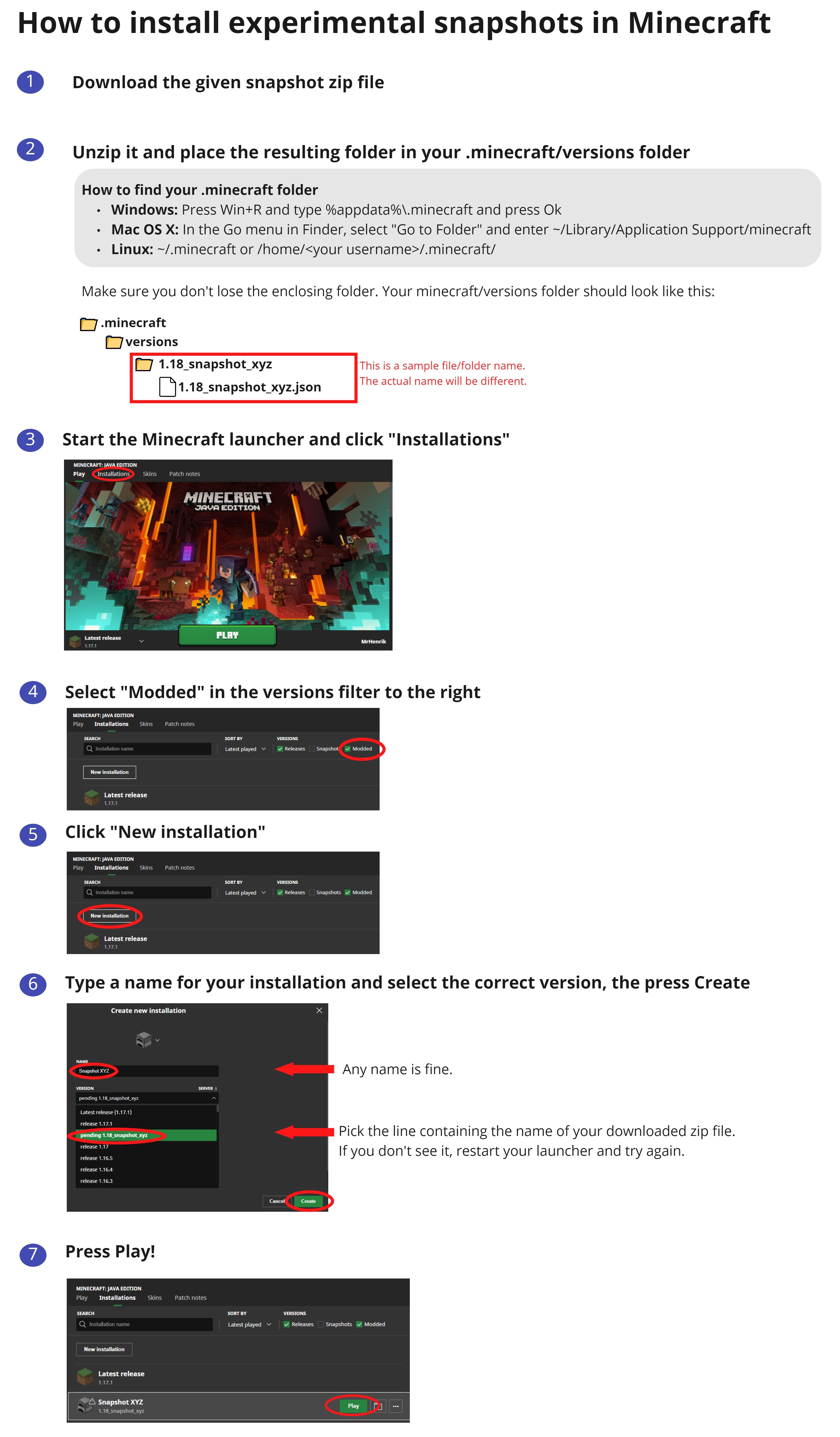
For a visual guide on how to install the experimental snapshot, check out this nifty link with pretty pictures! Otherwise, just follow the steps below:

  • Download this zip file
  • Unpack the folder into your “versions” folder of your local Minecraft application data folder (see below if you are confused)
  • Create a new launch installation in the launcher and select the “pending 1.19_deep_dark_experimental_snapshot-1” version
  • Start the game and the remaining files will be downloaded
  • Play in a new world! This version is not compatible with other snapshots!

Finding The Minecraft Application Data Folder

Windows: Press Win+R and type %appdata%\.minecraft and press Ok

Mac OS X: In Finder, in the Go menu, select “Go to Folder” and enter ~/Library/Application Support/minecraft

Linux: ~/.minecraft or /home/<your username>/.minecraft/

Can I Open Old Worlds In This Experimental Snapshot?

No, experimental snapshots can only open worlds that were created in the same version. Later on in the actual 1.19 release, you will be able to open 1.18 worlds.

Cross-Platform Server Jar:

NOTE: This experimental snapshot does not include all of the latest 1.18 features you may have seen in recent snapshots.

Posted on Leave a comment

IMPORTANT: Migrate Your JAVA Account Now!

We made a post over a year ago in October when Mojang Studios announced that all Minecraft: JAVA Edition Mojang accounts would eventually need to migrate to a Microsoft Account to continue playing.  Earlier today Mojang released an article noting that starting on March 10th you will need to have a Microsoft Account to continue playing Minecraft: JAVA Edition.

If you don’t migrate your account by then don’t worry!  Your account is not lost.  You can still migrate your account to a Microsoft Account but you will not get the previously mentioned cape.  If you would like to read more information I’ve included a link to the FAQ for you to review.

Posted on Leave a comment

Bedrock: Beta 1.18.20.23

Remember that only those on Xbox One / Windows 10 / and Android may participate in the Beta builds.  You will not be able to join Realms or non-beta players worlds and you will not be able to open worlds opened in the Beta in earlier/current stable builds of Bedrock.  These builds are not to be considered a final build and are a work in progress.

This latest Beta has a few changes to Frogs, a cooldown period on the Goat Horn, changes to Drowned spawns, and many, many fixes.  Read below and find out.

Experimental Features

Frog
  • Frogs now only use jump animation when using Jump Goal
  • Frogs are now tempted and bred using Slime Balls
  • Tadpole health is now 6
  • Adjusted Frog spawning in Swamps, weight 10, herd size 2-5
  • JumpToBlockGoal now correctly has the mob jump to small blocks like Lily Pads
Frog Spawn
  • Frog Spawn now breaks when pushed by a Piston
  • Frog Spawn is now destroyed when the water source beneath it is removed
  • Frog Spawn no longer prevented from hatching when a block is underneath it
  • Frog Spawn can now be placed on waterlogged blocks
  • Frog Spawn can no longer be placed above solid ground or underwater with the ‘/fill’ command
  • Frog Spawn Block is now destroyed by falling blocks (MCPE-150781)
Goat Horn
  • After using Goat Horn, there is now a cooldown period before it can be used again

Features and Bug Fixes

Custom Skins
  • Fixed custom skins not saving when leaving the Dressing Room
Gameplay
  • Fixed an issue where the Mending enchantment would not always correctly consume XP Orbs to repair (MCPE-120119)
Mobs
  • Drowned can no longer spawn where the block light level is above 0 (MCPE-150148
User Interface
  • Fixed truncated label (in some languages) above 2×2 crafting grid in Pocket UI inventory screen
  • Fixed the Create New World opt-in beta setting not persisting between play sessions
Vanilla Parity
  • Cauldrons are now not fillable by Dripstones that are below flowing water
Items
  • Custom armor can now be equipped with the “Use” button when different armor is already equipped (MCPE-125323)

Technical Updates

Blocks
  • Fixed an issue where projectiles would ‘bounce’ off of Bells in strange ways (MCPE-47847)
Commands
  • The ‘/tickingarea’ command no longer modifies areas from entities with tick_world component
Molang
  • Fixed Logical AND to evaluate before Logical OR, and for comparison operators to evaluate before equality operators
    • This is a Molang Versioned Change that only takes effect for Molang expressions in packs that use a min_engine_version of 1.18.20 or higher
    • For example A && B || Cnow evaluates as (A && B) || C and A < B == C > D now evalutes as (A < B) == (C > D)
Structure Generation and Actor Spawning
  • Fixed duplicate End Crystals spawning on top of End Spikes (MCPE-147817)
Experimental
  • Fixed an issue in which actor properties would not always sync from the server to the client
EatMobGoal
  • EatMobGoal is now unable to start when the player is the target
GameTest Framework
  • Vector
    • Added function length(): number- Returns the length of this vector
    • Added function normalized(): Vector- Returns this as a normalized vector
    • Added static function distance(a:Vector, b:Vector): number- Returns distance between two vectors
    • Added static function lerp(a:Vector, b:Vector, t: number): Vector- Returns the linear interpolation between a and b using t as the control
    • Added static function slerp(a:Vector, b:Vector, s: number): Vector- Returns the spherical linear interpolation between a and b using s as the control
    • Added static function cross(a:Vector, b:Vector): Vector- Returns the cross product of these two vectors
    • Added static function add(a:Vector, b:Vector): Vector- Returns the addition of these vectors
    • Added static function subtract(a:Vector, b:Vector): Vector- Returns the subtraction of these vectors
    • Added static function multiply(a:Vector, b:Vector): Vector- Returns the component-wise product of these vectors
    • Added static function divide(a:Vector, b:Vector): Vector- Returns the component-wise division of these vectors
    • Added static function multiply(a:Vector, b:number): Vector- Returns the product of this vector and a scalar
    • Added static function divide(a:Vector, b:number): Vector- Returns the division of this vector and a scalar
    • Added static function min(a:Vector, b:Vector): Vector- Returns a vector that is made from the smallest components of two vectors.
    • Added static function max(a:Vector, b:Vector): Vector- Returns a vector that is made from the largest components of two vectors
  • World
    • Added function playSound(soundName: String, soundOptions: SoundOptions): void- plays a sound specified by the sound name, at a location, pitch, or volume as optionally specified in the SoundOptions argument
  • EntityItemComponent
    • Added component EntityItemComponentthat can be used to obtain an ItemStack from an item entity – e.g., getComponent(“item”).itemStack
Posted on Leave a comment

JAVA Edition: Snapshot 22w05a

Another week another snapshot.  This one is small but there are a decent amount of fixes.  Those who had issues with the re-arranged Badlands biomes layout will rest assured that the feature is being looked at and will return at a later date.

Changes in 22w05a

  • A change in 22w03a that re-arranged Badlands biome layouts have been reverted to avoid causing generation changes and chunk borders. This change will be re-introduced later.

Fixed Bugs in 22w05a

  • MC-4533 – Water graphical glitch when connecting diagonally
  • MC-70848 – Water looks like it flows up
  • MC-105317 – Structure blocks do not rotate entities correctly when loading
  • MC-214289 – Pointed dripstone can replace blocks when generating
  • MC-216004 – Wood pillars from mineshafts are generating on pointed dripstones
  • MC-216589 – Abandoned Mineshafts don’t delete dripstone in certain situations
  • MC-232290 – Foxes will lay down in powder snow and not try to escape even when taking damage
  • MC-236775 – Biome Selector is disordered in other languages
  • MC-243152 – Slimes spawn in “Redstone Ready” superflat worlds
  • MC-245772 – Outdated chests’ loot tables get deleted when updating to 1.18.1
  • MC-245910 – Campfires and hoppers cause constant chunk saving
  • MC-247636 – Deleting a world no longer logs that a world is being deleted
  • MC-248181 – The player disappears at certain heights
  • MC-248189 – Teleporting below level 0 from the overworld to another dimension freezes the game on the loading screen until the player dies
  • MC-248195 – Typing /placefeature crashes client when connected to a server
  • MC-248210 – Harsh chunk borders appear when upgrading to 22w03a
  • MC-248225 – Incorrect BlockPos getSquaredDistance() calculation
  • MC-248230 – Players get stuck on the “Loading terrain…” screen after rejoining the world whilst above or below the build limit

Get the Snapshot

Snapshots are available for Minecraft: Java Edition. To install the snapshot, open up the Minecraft Launcher and enable snapshots in the “Installations” tab.

Snapshots can corrupt your world, so please backup and/or run them in a different folder from your main worlds.

Cross-platform server jar: