Posted on Leave a comment

Python zip(): Get Elements from Multiple Lists

5/5 – (1 vote)

Understanding zip() Function

The zip() function in Python is a built-in function that provides an efficient way to iterate over multiple lists simultaneously. As this is a built-in function, you don’t need to import any external libraries to use it.

The zip() function takes two or more iterable objects, such as lists or tuples, and combines each element from the input iterables into a tuple. These tuples are then aggregated into an iterator, which can be looped over to access the individual tuples.

Here is a simple example of how the zip() function can be used:

list1 = [1, 2, 3]
list2 = ['a', 'b', 'c']
zipped = zip(list1, list2) for item1, item2 in zipped: print(item1, item2)

Output:

1 a
2 b
3 c

The function also works with more than two input iterables:

list1 = [1, 2, 3]
list2 = ['a', 'b', 'c']
list3 = [10, 20, 30] zipped = zip(list1, list2, list3) for item1, item2, item3 in zipped: print(item1, item2, item3)

Output:

1 a 10
2 b 20
3 c 30

Keep in mind that the zip() function operates on the shortest input iterable. If any of the input iterables are shorter than the others, the extra elements will be ignored. This behavior ensures that all created tuples have the same length as the number of input iterables.

list1 = [1, 2, 3]
list2 = ['a', 'b'] zipped = zip(list1, list2) for item1, item2 in zipped: print(item1, item2)

Output:

1 a
2 b

To store the result of the zip() function in a list or other data structure, you can convert the returned iterator using functions like list(), tuple(), or dict().

list1 = [1, 2, 3]
list2 = ['a', 'b', 'c']
zipped = zip(list1, list2) zipped_list = list(zipped)
print(zipped_list)

Output:

[(1, 'a'), (2, 'b'), (3, 'c')]

Feel free to improve your Python skills by watching my explainer video on the zip() function:

YouTube Video

Working with Multiple Lists

Working with multiple lists in Python can be simplified by using the zip() function. This built-in function enables you to iterate over several lists simultaneously, while pairing their corresponding elements as tuples.

For instance, imagine you have two lists of the same length:

list1 = [1, 2, 3]
list2 = ['a', 'b', 'c']

You can combine these lists using zip() like this:

combined = zip(list1, list2)

The combined variable would now contain the following tuples: (1, 'a'), (2, 'b'), and (3, 'c').

To work with multiple lists effectively, it’s essential to understand how to get specific elements from a list. This knowledge allows you to extract the required data from each list element and perform calculations or transformations as needed.

In some cases, you might need to find an element in a list. Python offers built-in list methods, such as index(), to help you search for elements and return their indexes. This method is particularly useful when you need to locate a specific value and process the corresponding elements from other lists.

As you work with multiple lists, you may also need to extract elements from Python lists based on their index, value, or condition. Utilizing various techniques for this purpose, such as list comprehensions or slices, can be extremely beneficial in managing and processing your data effectively.

multipled = [a * b for a, b in zip(list1, list2)]

The above example demonstrates a list comprehension that multiplies corresponding elements from list1 and list2 and stores the results in a new list, multipled.

In summary, the zip() function proves to be a powerful tool for combining and working with multiple lists in Python. It facilitates easy iteration over several lists, offering versatile options to process and manipulate data based on specific requirements.

Creating Tuples

The zip() function in Python allows you to create tuples by combining elements from multiple lists. This built-in function can be quite useful when working with parallel lists that share a common relationship. When using zip(), the resulting iterator contains tuples with elements from the input lists.

To demonstrate once again, consider the following two lists:

names = ["Alice", "Bob", "Charlie"]
ages = [25, 30, 35]

By using zip(), you can create a list of tuples that pair each name with its corresponding age like this:

combined = zip(names, ages)

The combined variable now contains an iterator, and to display the list of tuples, you can use the list() function:

print(list(combined))

The output would be:

[('Alice', 25), ('Bob', 30), ('Charlie', 35)]

Zip More Than Two Lists

The zip() function can also work with more than two lists. For example, if you have three lists and want to create tuples that contain elements from all of them, simply pass all the lists as arguments to zip():

names = ["Alice", "Bob", "Charlie"]
ages = [25, 30, 35]
scores = [89, 76, 95] combined = zip(names, ages, scores)
print(list(combined))

The resulting output would be a list of tuples, each containing elements from the three input lists:

[('Alice', 25, 89), ('Bob', 30, 76), ('Charlie', 35, 95)]

💡 Note: When dealing with an uneven number of elements in the input lists, zip() will truncate the resulting tuples to match the length of the shortest list. This ensures that no elements are left unmatched.

Use zip() when you need to create tuples from multiple lists, as it is a powerful and efficient tool for handling parallel iteration in Python.

Working with Iterables

A useful function for handling multiple iterables is zip(). This built-in function creates an iterator that aggregates elements from two or more iterables, allowing you to work with several iterables simultaneously.

Using zip(), you can map similar indices of multiple containers, such as lists and tuples. For example, consider the following lists:

list1 = [1, 2, 3]
list2 = ['a', 'b', 'c']

You can use the zip() function to combine their elements into pairs, like this:

zipped = zip(list1, list2)

The zipped variable will now contain an iterator with the following element pairs: (1, 'a'), (2, 'b'), and (3, 'c').

It is also possible to work with an unknown number of iterables using the unpacking operator (*).

Suppose you have a list of iterables:

iterables = [[1, 2, 3], "abc", [True, False, None]]

You can use zip() along with the unpacking operator to combine their corresponding elements:

zipped = zip(*iterables)

The result will be: (1, 'a', True), (2, 'b', False), and (3, 'c', None).

💡 Note: If you need to filter a list based on specific conditions, there are other useful tools like the filter() function. Using filter() in combination with iterable handling techniques can optimize your code, making it more efficient and readable.

Using For Loops

The zip() function in Python enables you to iterate through multiple lists simultaneously. In combination with a for loop, it offers a powerful tool for handling elements from multiple lists. To understand how this works, let’s delve into some examples.

Suppose you have two lists, letters and numbers, and you want to loop through both of them. You can employ a for loop with two variables:

letters = ['a', 'b', 'c']
numbers = [1, 2, 3]
for letter, number in zip(letters, numbers): print(letter, number)

This code will output:

a 1
b 2
c 3

Notice how zip() combines the elements of each list into tuples, which are then iterated over by the for loop. The loop variables letter and number capture the respective elements from both lists at once, making it easier to process them.

If you have more than two lists, you can also employ the same approach. Let’s say you want to loop through three lists, letters, numbers, and symbols:

letters = ['a', 'b', 'c']
numbers = [1, 2, 3]
symbols = ['@', '#', '$']
for letter, number, symbol in zip(letters, numbers, symbols): print(letter, number, symbol)

The output will be:

a 1 @
b 2 #
c 3 $

Unzipping Elements

In this section, we will discuss how the zip() function works and see examples of how to use it for unpacking elements from lists. For example, if you have two lists list1 and list2, you can use zip() to combine their elements:

list1 = [1, 2, 3]
list2 = ['a', 'b', 'c']
zipped = zip(list1, list2)

The result of this operation, zipped, is an iterable containing tuples of elements from list1 and list2. To see the output, you can convert it to a list:

zipped_list = list(zipped) # [(1, 'a'), (2, 'b'), (3, 'c')]

Now, let’s talk about unpacking elements using the zip() function. Unpacking is the process of dividing a collection of elements into individual variables. In Python, you can use the asterisk * operator to unpack elements. If we have a zipped list of tuples, we can use the * operator together with the zip() function to separate the original lists:

unzipped = zip(*zipped_list)
list1_unpacked, list2_unpacked = list(unzipped)

In this example, unzipped will be an iterable containing the original lists, which can be converted back to individual lists using the list() function:

list1_result = list(list1_unpacked) # [1, 2, 3]
list2_result = list(list2_unpacked) # ['a', 'b', 'c']

The above code demonstrates the power and flexibility of the zip() function when it comes to combining and unpacking elements from multiple lists. Remember, you can also use zip() with more than two lists, just ensure that you unpack the same number of lists during the unzipping process.

Working with Dictionaries

Python’s zip() function is a fantastic tool for working with dictionaries, as it allows you to combine elements from multiple lists to create key-value pairs. For instance, if you have two lists that represent keys and values, you can use the zip() function to create a dictionary with matching key-value pairs.

keys = ['a', 'b', 'c']
values = [1, 2, 3]
new_dict = dict(zip(keys, values))

The new_dict object would now be {'a': 1, 'b': 2, 'c': 3}. This method is particularly useful when you need to convert CSV to Dictionary in Python, as it can read data from a CSV file and map column headers to row values.

Sometimes, you may encounter situations where you need to add multiple values to a key in a Python dictionary. In such cases, you can combine the zip() function with a nested list comprehension or use a default dictionary to store the values.

keys = ['a', 'b', 'c']
values1 = [1, 2, 3]
values2 = [4, 5, 6] nested_dict = {key: [value1, value2] for key, value1, value2 in zip(keys, values1, values2)}

Now, the nested_dict object would be {'a': [1, 4], 'b': [2, 5], 'c': [3, 6]}.

Itertools.zip_longest()

When you have uneven lists and still want to zip them together without missing any elements, then itertools.zip_longest() comes into play. It provides a similar functionality to zip(), but fills in the gaps with a specified value for the shorter iterable.

from itertools import zip_longest list1 = [1, 2, 3, 4]
list2 = ['a', 'b', 'c']
zipped = list(zip_longest(list1, list2, fillvalue=None))
print(zipped)

Output:

[(1, 'a'), (2, 'b'), (3, 'c'), (4, None)]

Error Handling and Empty Iterators

When using the zip() function in Python, it’s important to handle errors correctly and account for empty iterators. Python provides extensive support for exceptions and exception handling, including cases like IndexError, ValueError, and TypeError.

An empty iterator might arise when one or more of the input iterables provided to zip() are empty. To check for empty iterators, you can use the all() function and check if iterables have at least one element. For example:

def zip_with_error_handling(*iterables): if not all(len(iterable) > 0 for iterable in iterables): raise ValueError("One or more input iterables are empty") return zip(*iterables)

To handle exceptions when using zip(), you can use a tryexcept block. This approach allows you to catch and print exception messages for debugging purposes while preventing your program from crashing. Here’s an example:

try: zipped_data = zip_with_error_handling(list1, list2)
except ValueError as e: print(e)

In this example, the function zip_with_error_handling() checks if any of the input iterables provided are empty. If they are, a ValueError is raised with a descriptive error message. The tryexcept block then catches this error and prints the message without causing the program to terminate.

By handling errors and accounting for empty iterators, you can ensure that your program runs smoothly when using the zip() function to get elements from multiple lists. Remember to use the proper exception handling techniques and always check for empty input iterables to minimize errors and maximize the efficiency of your Python code.

Using Range() with Zip()

Using the range() function in combination with the zip() function can be a powerful technique for iterating over multiple lists and their indices in Python. This allows you to access the elements of multiple lists simultaneously while also keeping track of their positions in the lists.

One way to use range(len()) with zip() is to create a nested loop. First, create a loop that iterates over the range of the length of one of the lists, and then inside that loop, use zip() to retrieve the corresponding elements from the other lists.

For example, let’s assume you have three lists containing different attributes of products, such as names, prices, and quantities.

names = ["apple", "banana", "orange"]
prices = [1.99, 0.99, 1.49]
quantities = [10, 15, 20]

To iterate over these lists and their indices using range(len()) and zip(), you can write the following code:

for i in range(len(names)): for name, price, quantity in zip(names, prices, quantities): print(f"Index: {i}, Name: {name}, Price: {price}, Quantity: {quantity}")

This code will output the index, name, price, and quantity for each product in the lists. The range(len()) construct generates a range object that corresponds to the indices of the list, allowing you to access the current index in the loop.

Frequently Asked Questions

How to use zip with a for loop in Python?

Using zip with a for loop allows you to iterate through multiple lists simultaneously. Here’s an example:

list1 = [1, 2, 3]
list2 = ['a', 'b', 'c'] for num, letter in zip(list1, list2): print(num, letter) # Output:
# 1 a
# 2 b
# 3 c

Can you zip lists of different lengths in Python?

Yes, but zip will truncate the output to the length of the shortest list. Consider this example:

list1 = [1, 2, 3]
list2 = ['a', 'b'] for num, letter in zip(list1, list2): print(num, letter) # Output:
# 1 a
# 2 b

What is the process to zip three lists into a dictionary?

To create a dictionary from three lists using zip, follow these steps:

keys = ['a', 'b', 'c']
values1 = [1, 2, 3]
values2 = [4, 5, 6] zipped = dict(zip(keys, zip(values1, values2)))
print(zipped) # Output:
# {'a': (1, 4), 'b': (2, 5), 'c': (3, 6)}

Is there a way to zip multiple lists in Python?

Yes, you can use the zip function to handle multiple lists. Simply provide multiple lists as arguments:

list1 = [1, 2, 3]
list2 = ['a', 'b', 'c']
list3 = [4, 5, 6] for num, letter, value in zip(list1, list2, list3): print(num, letter, value) # Output:
# 1 a 4
# 2 b 5
# 3 c 6

How to handle uneven lists when using zip?

If you want to keep all elements from the longest list, you can use itertools.zip_longest:

from itertools import zip_longest list1 = [1, 2, 3]
list2 = ['a', 'b'] for num, letter in zip_longest(list1, list2, fillvalue=None): print(num, letter) # Output:
# 1 a
# 2 b
# 3 None

Where can I find the zip function in Python’s documentation?

The zip function is part of Python’s built-in functions, and its official documentation can be found on the Python website.

💡 Recommended: 26 Freelance Developer Tips to Double, Triple, Even Quadruple Your Income

The post Python zip(): Get Elements from Multiple Lists appeared first on Be on the Right Side of Change.

Posted on Leave a comment

Bitcoin Is Not Bad For the Environment

5/5 – (2 votes)

🟠 Story: Alice has just been orange-pilled and decides to spend a few hours reading Bitcoin articles.

She lands on a mainstream media article on “Bitcoin’s high energy consumption” proposing alternative (centralized) “green coins” that supposedly solve the problem of high energy consumption.

Alice gets distracted and invests in green tokens, effectively buying the bags of marketers promoting green crypto.

After losing 99% of her money, she’s disappointed by the whole industry and concludes that Bitcoin is not for her because the industry is too complex and full of scammers.

Here’s one of those articles recommending five centralized shitcoins:

Here’s another article with shallow content and no unique thought:

In this article, I’ll address Bitcoin’s energy “concern” quickly and efficiently. Let’s get started! 👇👇👇

Bitcoin Is Eco #1: Inbuilt Incentive to Use Renewable Energy Sources

Miners, who are responsible for validating transactions and securing the network, are driven by profit. Consequently, Bitcoin’s decentralized nature and proof-of-work consensus mechanism have an inbuilt incentive to use renewable energy sources where they are cheapest.

🌞 Renewable energy often provides a more cost-effective solution, leading miners to gravitate towards these sources naturally:

Source: Wikipedia

This non-competition with other energy consumers ensures that Bitcoin’s energy consumption is sustainable and environmentally friendly.

💡 Renewable energy (specifically: solar energy) offers the lowest-cost energy sources. Fossil-powered miners operate at lower profitability and tend to lose market share compared to renewable-powered miners.

Consider these statistics:

☀ The Bitcoin Mining Council (BMC), a global forum of mining companies that represents 48.4% of the worldwide bitcoin mining network, estimated that in Q4 2022, renewable energy sources accounted for 58.9% of the electricity used to mine bitcoin, a significant improvement compared to 36.8% estimated in Q1 2021 (source).

In the first half of 2023, the members are utilizing electricity with a sustainable power mix of 63.1%, thereby contributing to a slight improvement in the global Bitcoin mining industry’s sustainable electricity mix to 59.9% (source).

Bitcoin is one of the greenest industries on the planet; year after year, it becomes greener!

Bitcoin Is Eco #2: Monetizing Stranded Energy

  • Bitcoin’s energy consumption provides a way to use excess energy that would otherwise go to waste.
  • For example, solar panels often generate more energy than needed, especially during peak hours.
  • Batteries are still expensive and not easily accessible everywhere. Also, they don’t solve the fundamental problem of excess energy — they only buffer it.
  • Bitcoin mining can consume this excess energy, ensuring that it is not wasted and contributing to the overall efficiency of the energy system.

Bitcoin’s role as an energy consumer of last resort is an innovative solution to a modern problem. By tapping into excess energy from renewable sources like solar, wind, and hydroelectric power, Bitcoin mining ensures that energy that would otherwise go to waste is put to productive use.

This is called stranded energy, and energy insiders already propose to use Bitcoin as a solution to utilize stranded energy in economically and ecologically viable ways:

🌳 Bitcoin’s energy consumption is not merely a drain on resources but a strategic tool for enhancing the energy system’s efficiency and sustainability.

By acting as a consumer of last resort, Bitcoin mining transforms a potential waste into a valuable asset, fostering economic development, encouraging renewable energy, and offering a flexible solution to energy grid stabilization.

Bitcoin Is Eco #3: Incentivizing Renewable Energy Development

TL;DR: According to Wright’s Law, technological innovation leads to a reduction in costs over time. Bitcoin’s demand for energy incentivizes developing and deploying renewable energy sources, such as solar and wind power, which, in turn, helps to reduce the cost per kilowatt-hour, making renewable energy more accessible and appealing to other industries as well.

Being able to monetize stranded energy (see previous point #2) not only contributes to the overall efficiency of the energy system but also encourages further investments in renewable energy sources, driving innovation in energy-efficient technologies.

And with more investments in solar energy, the price per kWh continues to drop due to Wrights Law accelerating the renewable energy transition.

🥜 In a Nutshell: More Bitcoin Mining --> More Solar Energy --> Lower Cost per kwh --> More Solar Energy

What sets Bitcoin mining apart is its geographical flexibility and ability to turn on and off like a battery for the energy grid. Mining operations can be strategically located near renewable energy sources, consuming excess energy when available and pausing when needed elsewhere.

This unique characteristic allows Bitcoin mining to act as a stabilizing force in the energy grid, reducing the need for energy storage or wasteful dissipation of excess stranded energy and providing economic incentives for both energy producers and local communities.

Bitcoin Is Eco #4: No It Won’t Consume All the World’s Energy

Contrary to popular belief, Bitcoin’s energy consumption does not grow linearly with Bitcoin adoption and price. Instead, it grows logarithmically with the Bitcoin price, meaning it will likely never exceed 1-2% of the Earth’s total energy consumption.

And even if it were to exceed a few percentage points, it’ll use mostly stranded energy (see previous points #2 and #3) and won’t be able to compete with other energy consumers such as:

  1. Data Centers: High energy for cooling and uninterrupted operation.
  2. Hospitals: Continuous power for life-saving equipment and systems.
  3. Manufacturing Facilities: Energy for uninterrupted production processes.

These will always be able to pay a higher price for energy than Bitcoin.

Bitcoin’s energy consumption isn’t a big deal, even without considering its ecological benefits (see point #5).

Bitcoin Is Eco #5: Bitcoin’s Utility Overcompensates For Its Energy Use

Like everything else, Bitcoin has not only costs but also benefits. The main argument of Bitcoiners is, of course, the high utility the new system provides.

Bitcoin’s decentralized financial system reduces the need for the traditional financial sector’s overhead, such as large buildings, millions of employees, and other expenses related to gold extraction and banking operations. Bitcoin is the superior and more efficient technology that will more than half the energy costs of the financial system.

Source: Nasdaq

For example, this finding shows that both the traditional banking sector and gold need more energy than Bitcoin.

“A 2021 study by Galaxy Digital provided similar findings. It stated that Bitcoin consumed 113.89 terawatt hours (TWh) per year, while the banking sector consumed 263.72 TWh per year.

[…] According to the CBECI, the annual power consumption of gold mining stands at 131 TWh of electricity per year. That’s 10 percent more than Bitcoin’s 120 TWh. This further builds the case for Bitcoin as an emerging digital gold.” (CNBC)

And this doesn’t include the energy benefits that could accrue to Bitcoin when replacing much of the monetary premium in real estate:

💡 Recommended: 30 Reasons Bitcoin Is Superior to Real Estate

Bitcoin Is Eco #6: Deflationary Benefits to the Economy

TL;DR: Bitcoin’s deflationary nature encourages saving rather than spending. A Bitcoin standard will lead to a reduction in overall consumption, which has significant ecological benefits.

Bitcoin, a deflationary currency with a capped supply, may offer environmental benefits by reducing consumption. Traditional economies, driven by inflation, encourage spending, often resulting in overconsumption and waste.

For instance, wars are usually funded more by inflation rather than taxation. Millions of people buy cars and houses they can’t afford with debt, the source of all inflation.

In contrast, Bitcoin’s deflationary nature incentivizes saving, leading to decreased and highly rational consumption. Because BTC money cannot be printed, the economy would have much lower debt levels, so excess consumption is far less common in deflationary environments.

Reduced consumption can benefit the environment in several ways. Lower demand for goods means fewer greenhouse gas emissions from manufacturing and transportation. It also means less pollution from resource extraction and waste.

All technological progress is deflationary, i.e., goods become cheaper and not more expensive with technological progress. A deflationary economy promotes sustainable businesses that deliver true value without excess overhead making the economic machine much more efficient and benefitting all of us.

Mainstream Keynesian economists do not share the view that deflation is good for the economy, so I added this summary of an essay from the Mises Institute: 👇

“Deflation Is Always Good for the Economy” (Mises Institute)

Main Thesis: Deflation, defined as a general decline in prices of goods and services, is always good for the economy, contrary to the popular belief that it leads to economic slumps. The real problem is not deflation itself, but policies aimed at countering it.

Supporting Arguments:

  1. Misunderstanding of Deflation: Most experts believe that deflation generates expectations for further price declines, causing consumers to postpone purchases, which weakens the economy. However, this view is based on a misunderstanding of deflation and inflation.
  2. Inflation is Not Essentially a Rise in Prices: Inflation is not about general price increases, but about the increase in the money supply. Price increases are often a result of an increase in the money supply, but not always. Prices can fall even with an increase in the money supply if the supply of goods increases at a faster rate.
  3. Rising Prices Aren’t the Problem with Inflation: Inflation is harmful not because of price increases, but because of the damage it inflicts on the wealth-formation process. Money created out of thin air (e.g., by counterfeiting or loose monetary policies) diverts real wealth toward the holders of new money, leaving less real wealth to fund wealth-generating activities. This weakens economic growth.
  4. Easy-Money Policies Divert Resources to Non-Productive Activities: Increases in the money supply give rise to non-productive activities, or “bubble activities,” which cannot stand on their own and require the diversion of wealth from wealth generators. Loose monetary policies aimed at fighting deflation support these non-productive activities, weakening the foundation of the economy.
  5. Allowing Non-Productive Activities to Fail: Once non-productive activities are allowed to fail and the sources of the increase in the money supply are sealed off, a genuine, real-wealth expansion can ensue. With the expansion of real wealth for a constant stock of money, prices will fall, which is always good news.

Facts and Stats:

  1. Inflation Target: Mainstream thinkers view an inflation rate of 2% as not harmful to economic growth, and the Federal Reserve’s inflation target is 2%.
  2. Example of Inflation: If the money supply increases by 5% and the quantity of goods increases by 10%, prices will fall by 5%, ceteris paribus, despite the fact that there is an inflation of 5% due to the increase in the money supply.
  3. Example of Company Departments: In a company with 10 departments, if 8 departments are making profits and 2 are making losses, a responsible CEO will shut down or restructure the loss-making departments. Failing to do so diverts funding from wealth generators to loss-making departments, weakening the foundation of the entire company.

🧑‍💻 To summarize, Bitcoin has the potential to gradually shift our inflationary, high-consumption economy to a deflationary rational consumption economy while providing a more efficient and greener digital financial system that doesn’t rely on centralized parties and has built-in trust and robustness unmatched by any other financial institution.

The myth of Bitcoin’s high energy consumption is rooted in misunderstandings and oversimplifications. When examined closely, the cryptocurrency’s energy usage reveals a complex interplay of incentives, efficiencies, and innovations that not only mitigate its environmental impact but also contribute positively to global energy dynamics.

Bitcoin’s alignment with renewable energy, utilization of excess energy, incentivization of renewable energy development, logarithmic growth of energy consumption, and deflationary nature all point to a more sustainable and ecologically beneficial system.

As the world continues to grapple with environmental challenges, it is essential to approach the subject of Bitcoin’s energy consumption with an open mind and a willingness to engage with the facts. The evidence suggests that Bitcoin is not the environmental villain it is often portrayed to be, but rather a part of the solution to a more sustainable future.

💡 Recommended: Are Energy Costs and CapEx Invested in Bitcoin Worth It?

The post Bitcoin Is Not Bad For the Environment appeared first on Be on the Right Side of Change.

Posted on Leave a comment

Check Python Version from Command Line and in Script

5/5 – (1 vote)

Check Python Version from Command Line

Knowing your Python version is vital for running programs that may be incompatible with a certain version. Checking the Python version from the command line is simple and can be done using your operating system’s built-in tools.

Windows Command Prompt

In Windows, you can use PowerShell to check your Python version. Open PowerShell by pressing Win+R, typing powershell, and then pressing Enter. Once PowerShell is open, type the following command:

python --version

This command will return the Python version installed on your Windows system. If you have both Python 2 and Python 3 installed, you can use the following command to check the Python 3 version:

python3 --version

macOS Terminal

To check the Python version in macOS, open the Terminal by going to Finder, clicking on Applications, and then navigating to Utilities > Terminal. Once the Terminal is open, type the following command to check your Python version:

python --version

Alternatively, if you have Python 3 installed, use the following command to check the Python 3 version:

python3 --version

Linux Terminal

In Linux, open a terminal window and type the following command to check your Python version:

python --version

For Python 3, use the following command:

python3 --version

It is also possible to check the Python version within a script using the sys module:

import sys
print(sys.version)

This code snippet will print the Python version currently being used to run the script. It can be helpful in identifying version-related issues when debugging your code.

Check Python Version in Script

Using Sys Module

The sys module allows you to access your Python version within a script. To obtain the version, simply import the sys module and use the sys.version_info attribute. This attribute returns a tuple containing the major, minor, and micro version numbers, as well as the release level and serial number.

Here is a quick example:

import sys
version_info = sys.version_info
print(f"Python version: {version_info.major}.{version_info.minor}.{version_info.micro}")
# Output: Python version: 3.9.5

You can also use sys.version to get the Python version as a string, which includes additional information about the build. For example:

import sys
version = sys.version
print(f"Python version: {version.split()[0]}")

These methods work for both Python 2 and Python 3.

Using Platform Module

Another way to check the Python version in a script is using the platform module. The platform.python_version() function returns the version as a string, while platform.python_version_tuple() returns it as a tuple.

Here’s an example of how to use these functions:

import platform
version = platform.python_version()
version_tuple = platform.python_version_tuple()
print(f"Python version: {version}")
print(f"Python version (tuple): {version_tuple}")

Both the sys and platform methods allow you to easily check your python version in your scripts. By utilizing these modules, you can ensure that your script is running on the correct version of Python, or even tailor your script to work with multiple versions.

Python Version Components

Python versions are composed of several components that help developers understand the evolution of the language and maintain their projects accordingly. In this section, we will explore the major components, including Major Version, Minor Version, and Micro Version.

Major Version

The Major Version denotes the most significant changes in the language, often introducing new features or language elements that are not backwards compatible. Python currently has two major versions in widespread use: Python 2 and Python 3. The transition from Python 2 to Python 3 was a significant change, with many libraries and applications needing updates to ensure compatibility.

For example, to check the major version of your Python interpreter, you can use the following code snippet:

import sys
print(sys.version_info.major)

Minor Version

The Minor Version represents smaller updates and improvements to the language. These changes are typically backwards compatible, and they introduce bug fixes, performance enhancements, and minor features. For example, Python 3.6 introduced formatted string literals (f-strings) to improve string manipulation, while Python 3.7 enhanced asynchronous functionality with the asyncio module.

You can check the minor version of your Python interpreter with this code snippet:

import sys
print(sys.version_info.minor)

Micro Version

The Micro Version is the smallest level of changes, focused on addressing specific bugs, security vulnerabilities, or minor refinements. These updates should be fully backwards compatible, ensuring that your code continues to work as expected. The micro version is useful for package maintainers and developers who need precise control over their dependencies.

To find out the micro version of your Python interpreter, use the following code snippet:

import sys
print(sys.version_info.micro)

In summary, Python versions are a combination of major, minor, and micro components that provide insight into the evolution of the language. The version number is available as both a tuple and a string, representing release levels and serial versions, respectively.

Working with Multiple Python Versions

Working with multiple Python versions on different operating systems like mac, Windows, and Linux is often required when developing applications or scripts. Knowing how to select a specific Python interpreter and check the version of Python in use is essential for ensuring compatibility and preventing errors.

Selecting a Specific Python Interpreter

In order to select a specific Python interpreter, you can use the command line or terminal on your operating system. For instance, on Windows, you can start the Anaconda Prompt by searching for it in the Start menu, and on Linux or macOS, simply open the terminal or shell.

Once you have the terminal or command prompt open, you can use the python command followed by the specific version number you want to use, such as python2 or python3. For example, if you want to run a script named example_script.py with Python 3, you would enter python3 example_script.py in the terminal.

Note: Make sure you have the desired Python version installed on your system before attempting to select a specific interpreter.

To determine which Python version is currently running your script, you can use the sys module. In your script, you will need to import sys and then use the sys.version attribute to obtain information about the currently active Python interpreter.

Here’s an example that shows the Python version in use:

import sys
print("Python version in use:", sys.version.split()[0])

For a more platform-independent way to obtain the Python version, you can use the platform module. First, import platform, and then use the platform.python_version() function, like this:

import platform
print("Python version in use:", platform.python_version())

In conclusion, managing multiple Python versions can be straightforward when you know how to select a specific interpreter and obtain the currently active Python version. This knowledge is crucial for ensuring compatibility and preventing errors in your development process.

🐍 Recommended: How To Run Multiple Python Versions On Windows?

Python Version Compatibility

Python, one of the most widely-used programming languages, has two major versions: Python2 and Python3. Understanding and checking their compatibility ensures that your code runs as intended across different environments.

To check the Python version via the command line, open the terminal (Linux, Ubuntu) or command prompt (Windows), and run the following command:

python --version

Alternatively, you can use the shorthand:

python -V

For checking the Python version within a script, you can use the sys module. In the following example, the major and minor version numbers are obtained using sys.version_info:

import sys
version_info = sys.version_info
print(f"Python {version_info.major}.{version_info.minor} is running this script.")

Compatibility between Python2 and Python3 is essential for maintaining codebases and leveraging pre-existing libraries. The 2to3 tool checks for compatibility by identifying the necessary transitions from Python2 to Python3 syntax.

To determine if a piece of code is Python3-compatible, run the following command:

2to3 your_python_file.py

Python packages typically declare their compatibility with specific Python versions. Reviewing the package documentation or its setup.py file provides insight into supported Python versions. To determine if a package is compatible with your Python environment, you can check the package’s release history on its project page and verify the meta-information for different versions.

When using Ubuntu or other Linux distributions, Python is often pre-installed. To ensure compatibility between different software components and programming languages (like gcc), regularly verify and update your installed Python versions.

Comparing Python Versions

When working with Python, it’s essential to know which version you are using. Different versions can have different syntax and functionality. You can compare the Python version numbers using the command line or within a script.

To check your Python version from the command line, you can run the command python --version or python3 --version. This will display the version number of the Python interpreter installed on your system.

In case you are working with multiple Python versions, it’s important to compare them to ensure compatibility. You can use the sys.version_info tuple, which contains the major, minor, and micro version numbers of your Python interpreter. Here’s an example:

import sys if sys.version_info < (3, 0, 0): print("You are using Python 2.x")
else: print("You are using Python 3.x or higher")

This code snippet compares the current Python version to a specific one (3.0.0) and prints a message to the shell depending on the outcome of the comparison.

In addition to Python, other programming languages like C++ can also have different versions. It’s important to be aware of the version number, as it affects the language’s features and compatibility.

Remember to always verify and compare Python version numbers before executing complex scripts or installing libraries, since a mismatch can lead to errors and unexpected behavior. By using the command line or programmatically checking the version in your script, you can ensure smooth and error-free development.

Frequently Asked Questions

How to find Python version in command line?

You can find the Python version in the command line by running the following command:

python --version

Or:

python -V

This command will display the Python version installed on your system.

How to check for Python version in a script?

To check for the Python version in a script, you can use the sys module. Here’s an example:

import sys
print("Python version")
print(sys.version)
print("Version info.")
print(sys.version_info)

This code will print the Python version and version information when you run the script.

Ways to determine Python version in prompt?

As mentioned earlier, you can use the python --version or python -V command in the command prompt to determine the Python version. Additionally, you can run:

python -c "import sys; print(sys.version)"

This will run a one-liner that imports the sys module and prints the Python version.

Is Python installed? How to verify from command line?

To verify if Python is installed on your system, simply run the python --version or python -V command in the command prompt. If Python is installed, it will display the version number. If it’s not installed, you will receive an error message or a command not found message.

Verifying Python version in Anaconda environment?

To verify the Python version in an Anaconda environment, first activate the environment with conda activate <environment_name>. Next, run the python --version or python -V command as mentioned earlier.

Determining Python version programmatically?

Determining the Python version programmatically can be done using the sys module. As shown in the second question, you can use the following code snippet:

import sys
print("Python version: ", sys.version)
print("Version info: ", sys.version_info)

This code will print the Python version and version information when executed.

🐍 Recommended: HOW TO CHECK YOUR PYTHON VERSION

The post Check Python Version from Command Line and in Script appeared first on Be on the Right Side of Change.

Posted on Leave a comment

List Comprehension in Python

5/5 – (2 votes)

Understanding List Comprehension

List comprehension is a concise way to create lists in Python. They offer a shorter syntax to achieve the same result as using a traditional for loop and a conditional statement. List comprehensions make your code more readable and efficient by condensing multiple lines of code into a single line.

The basic syntax for a list comprehension is:

new_list = [expression for element in iterable if condition]

Here, the expression is applied to each element in the iterable (e.g., a list or a range), and the result is appended to the new_list if the optional condition is True. If the condition is not provided, all elements will be included in the new list.

Let’s look at an example. Suppose you want to create a list of squares for all even numbers between 0 and 10. Using a list comprehension, you can write:

squares = [x**2 for x in range(11) if x % 2 == 0]

This single line of code generates the list of squares, [0, 4, 16, 36, 64, 100]. It’s more concise and easier to read compared to using a traditional for loop:

squares = []
for x in range(11): if x % 2 == 0: squares.append(x**2)

You can watch my explainer video on list comprehension here:

YouTube Video

List comprehensions can also include multiple conditions and nested loops.

For example, you can create a list of all numbers divisible by both 3 and 5 between 1 and 100 with the following code:

divisible = [num for num in range(1, 101) if num % 3 == 0 and num % 5 == 0]

In this case, the resulting list will be [15, 30, 45, 60, 75, 90].

One more advanced feature of Python list comprehensions is the ability to include conditional expressions directly in the expression part, rather than just in the condition.

For example, you can create a list of “even” and “odd” strings based on a range of numbers like this:

even_odd = ["even" if x % 2 == 0 else "odd" for x in range(6)]

This code generates the list ["even", "odd", "even", "odd", "even", "odd"].

If you want to learn to write more concise Python code, check out my book: 👇

Check out my new Python book Python One-Liners (Amazon Link).

If you like one-liners, you’ll LOVE the book. It’ll teach you everything there is to know about a single line of Python code. But it’s also an introduction to computer science, data science, machine learning, and algorithms. The universe in a single line of Python!

The book was released in 2020 with the world-class programming book publisher NoStarch Press (San Francisco).

Publisher Link: https://nostarch.com/pythononeliners

Creating New Lists

List comprehensions provide a concise way to make new lists by iterating through an existing list or other iterable object. They are more time and space-efficient than traditional for loops and offer a cleaner syntax.

A basic example of list comprehension is creating a list of even numbers:

even_numbers = [x*2 for x in range(5)] # Output: [0, 2, 4, 6, 8]

This creates a new list by multiplying each element within the range(5) function by 2. This compact syntax allows you to define a new list in a single line, making your code cleaner and easier to read.

You can also include a conditional statement within the list comprehension:

even_squares = [x**2 for x in range(10) if x % 2 == 0] # Output: [0, 4, 16, 36, 64]

This example creates a new list of even squares from 0 to 64 by using an if statement to filter out the odd numbers. List comprehensions can also be used to create lists from other iterable objects like strings, tuples, or arrays.

For example, extracting vowels from a string:

text = "List comprehensions in Python"
vowels = [c for c in text if c.lower() in 'aeiou'] # Output: ['i', 'o', 'e', 'e', 'o', 'i', 'o', 'i', 'o']

To create a Python list of a specific size, you can use the multiplication approach within your list comprehension:

placeholder_list = [None] * 5 # Output: [None, None, None, None, None]

This will create a list with five None elements. You can then replace them as needed, like placeholder_list[2] = 42, resulting in [None, None, 42, None, None].

Filtering and Transforming Lists

List comprehensions in Python provide a concise way to filter and transform values within an existing list.

Filtering a list involves selecting items that meet a certain condition. You can achieve this using list comprehensions by specifying a condition at the end of the expression.

For example, to create a new list containing only even numbers from an existing list, you would write:

numbers = [1, 2, 3, 4, 5, 6, 7, 8, 9]
even_numbers = [num for num in numbers if num % 2 == 0]

In this case, the condition is num % 2 == 0. The list comprehension iterates over each item in the numbers list and only includes items where the condition is true.

You can watch my video on filtering lists here:

YouTube Video

Aside from filtering, list comprehensions can also transform items in a list. You can achieve this by altering the expression at the beginning of the list comprehension.

For example, to create a list of squares from an existing list, you can use the following code:

squares = [num ** 2 for num in numbers]

Here, the expression num ** 2 transforms each item in the list by squaring it. The squares list will now contain the squared values of the original numbers list.

By combining filtering and transformation, you can achieve even more powerful results in a single, concise statement.

For instance, to create a new list containing the squares of only the even numbers from an existing list, you can write:

even_squares = [num ** 2 for num in numbers if num % 2 == 0]

In this example, we simultaneously filter out odd numbers and square the remaining even numbers.

To further explore list comprehensions, check out these resources on

Code Optimization and Readability

List comprehensions in Python provide a way to create a new list by filtering and transforming elements of an existing list while significantly enhancing code readability. They enable you to create powerful functionality within a single line of code. Compared to traditional for loops, list comprehensions are more concise and generally preferred in terms of readability.

Here’s an example of using a list comprehension to create a list containing the squares of even numbers in a given range:

even_squares = [x ** 2 for x in range(10) if x % 2 == 0]

This single line of code replaces a multiline for loop as shown below:

even_squares = []
for x in range(10): if x % 2 == 0: even_squares.append(x ** 2)

As you can see, the list comprehension is more compact and easier to understand. In addition, it often results in improved performance. List comprehensions are also useful for tasks such as filtering elements, transforming data, and nesting loops.

Here’s another example – creating a matrix transpose using nested list comprehensions:

matrix = [[1, 2, 3], [4, 5, 6], [7, 8, 9]]
transpose = [[row[i] for row in matrix] for i in range(len(matrix[0]))]

This code snippet is equivalent to the nested for loop version:

transpose = []
for i in range(len(matrix[0])): row_list = [] for row in matrix: row_list.append(row[i]) transpose.append(row_list)

While using list comprehensions, be mindful of possible downsides, including loss of readability if the expression becomes too complex. To maintain code clarity, it is crucial to strike the right balance between brevity and simplicity.

List Comprehensions with Different Data Types

List comprehensions work with various data types, such as strings, tuples, dictionaries, and sets.

For example, you can use list comprehensions to perform mathematical operations on list elements. Given a list of integers, you can easily square each element using a single line of code:

num_list = [2, 4, 6]
squared_list = [x**2 for x in num_list]

Handling strings is also possible with list comprehensions. When you want to create a list of the first letters of a list of words, use the following syntax:

words = ["apple", "banana", "cherry"]
first_letters = [word[0] for word in words]

Working with tuples is very similar to lists. You can extract specific elements from a list of tuples, like this:

tuple_list = [(1, 2), (3, 4), (5, 6)]
first_elements = [t[0] for t in tuple_list]

Additionally, you can use list comprehensions with dictionaries. If you have a dictionary and want to create a new one where the keys are the original keys and the values are the squared values from the original dictionary, use the following code:

input_dict = {"a": 1, "b": 2, "c": 3}
squared_dict = {key: value**2 for key, value in input_dict.items()}
YouTube Video

💡 Recommended:

Lastly, list comprehensions support sets as well. When you need to create a set with the squared elements from another set, apply the following code:

input_set = {1, 2, 3, 4}
squared_set = {x**2 for x in input_set}

💡 Recommended: Python Generator Expressions

Using Functions and Variables in List Comprehensions

List comprehensions in Python are a concise and powerful way to create new lists by iterating over existing ones. They provide a more readable alternative to using for loops and can easily add multiple values to specific keys in a dictionary.

When it comes to using functions and variables in list comprehensions, it’s important to keep the code clear and efficient. Let’s see how to incorporate functions, variables, and other elements mentioned earlier:

Using Functions in List Comprehensions You can apply a function to each item in the list using a comprehension. Here’s an example with the upper() method:

letters = ['a', 'b', 'c', 'd']
upper_letters = [x.upper() for x in letters]

This comprehension will return a new list containing the uppercase versions of each letter. Any valid function can replace x.upper() to apply different effects on the input list.

Utilizing Variables in List Comprehensions With variables, you can use them as a counter or a condition. For example, a list comprehension with a counter:

squares = [i**2 for i in range(1, 6)]

This comprehension creates a list of squared numbers from 1 to 5. The variable i is a counter that iterates through the range() function.

For a more complex example, let’s say we want to filter out odd numbers from a list using the modulo % operator:

numbers = [1, 2, 3, 4, 5, 6, 7, 8, 9]
even_numbers = [x for x in numbers if x % 2 == 0]

In this case, the variable x represents the current element being manipulated during the iteration, and it is used in the condition x % 2 == 0 to ensure we only keep even numbers.

Working with Nested List Comprehensions

Nested list comprehensions in Python are a versatile and powerful feature that allows you to create new lists by applying an expression to an existing list of lists. This is particularly useful for updating or traversing nested sequences in a concise and readable manner.

I created a video on nested list comprehensions here: 👇

YouTube Video

A nested list comprehension consists of a list comprehension inside another list comprehension, much like how nested loops work. It enables you to iterate over nested sequences and apply operations to each element.

For example, consider a matrix represented as a list of lists:

matrix = [ [1, 2, 3], [4, 5, 6], [7, 8, 9]
]

To calculate the square of each element in the matrix using nested list comprehensions, you can write:

squared_matrix = [[x**2 for x in row] for row in matrix]

This code is equivalent to the following nested for loop:

squared_matrix = []
for row in matrix: squared_row = [] for x in row: squared_row.append(x**2) squared_matrix.append(squared_row)

As you can see, the nested list comprehension version is much more concise and easier to read.

Python supports various sequences like lists, tuples, and dictionaries. You can use nested list comprehensions to create different data structures by combining them. For instance, you can convert the matrix above into a dictionary where keys are the original numbers and values are their squares:

matrix_dict = {x: x**2 for row in matrix for x in row}

This generates a dictionary that looks like:

{1: 1, 2: 4, 3: 9, 4: 16, 5: 25, 6: 36, 7: 49, 8: 64, 9: 81}

Advanced List Comprehension Techniques

List comprehension is a powerful feature in Python that allows you to quickly create new lists based on existing iterables. They provide a concise and efficient way of creating new lists with a few lines of code.

The first advanced technique to consider is using range() with index. By utilizing the range(len(...)) function, you can iterate over all the items in a given iterable.

numbers = [1, 2, 3, 4, 5]
squares = [number ** 2 for number in numbers]

In addition to creating new lists, you can also use conditional statements in list comprehensions for more control over the output.

For example, if you want to create a new list with only the even numbers from an existing list, you can use a condition like this:

numbers = [1, 2, 3, 4, 5, 6]
even_numbers = [num for num in numbers if num % 2 == 0]

Another useful feature is the access of elements in an iterable using their index. This method enables you to modify the output based on the position of the elements:

words = ["apple", "banana", "cherry", "date"]
capitals = [word.capitalize() if i % 2 == 0 else word for i, word in enumerate(words)]

In this example, the enumerate() function is used to get both the index (i) and the element (word). The even-indexed words are capitalized, and the others remain unchanged.

Moreover, you can combine multiple iterables using the zip() function. This technique allows you to access elements from different lists simultaneously, creating new lists based on matched pairs.

x = [1, 2, 3]
y = [4, 5, 6]
combined = [a + b for a, b in zip(x, y)]

Frequently Asked Questions

What is the syntax for list comprehensions with if-else statements?

List comprehensions allow you to build lists in a concise way. To include an if-else statement while constructing a list, use the following syntax:

new_list = [expression_if_true if condition else expression_if_false for item in iterable]

For example, if you want to create a list of numbers, where even numbers are squared and odd numbers remain unchanged:

numbers = [1, 2, 3, 4, 5]
new_list = [number ** 2 if number % 2 == 0 else number for number in numbers]

How do you create a dictionary using list comprehension?

You can create a dictionary using a dict comprehension, which is similar to a list comprehension. The syntax is:

new_dict = {key_expression: value_expression for item in iterable}

For example, creating a dictionary with square values as keys and their roots as values:

squares = {num ** 2: num for num in range(1, 6)}

How can you filter a list using list comprehensions?

Filtering a list using list comprehensions involves combining the basic syntax with a condition. The syntax is:

filtered_list = [expression for item in iterable if condition]

For example, filtering out even numbers from a given list:

numbers = [1, 2, 3, 4, 5]
even_numbers = [number for number in numbers if number % 2 == 0]

What is the method to use list comprehension with strings?

List comprehensions can be used with any iterable, including strings. To create a list of characters from a string using list comprehension:

text = "Hello, World!"
char_list = [char for char in text]

How do you combine two lists using list comprehensions?

To combine two lists using list comprehensions, use a nested loop. Here’s the syntax:

combined_list = [expression for item1 in list1 for item2 in list2]

For example, combining two lists containing names and ages:

names = ["Alice", "Bob", "Charlie"]
ages = [25, 30, 35]
combined = [f"{name} is {age} years old" for name in names for age in ages]

What are the multiple conditions in a list comprehension?

When using multiple conditions in a list comprehension, you can have multiple if statements after the expression. The syntax is:

new_list = [expression for item in iterable if condition1 if condition2]

For example, creating a list of even numbers greater than 10:

numbers = list(range(1, 20))
result = [number for number in numbers if number % 2 == 0 if number > 10]

💡 Recommended: List Comprehension in Python — A Helpful Illustrated Guide

Python One-Liners Book: Master the Single Line First!

Python programmers will improve their computer science skills with these useful one-liners.

Python One-Liners

Python One-Liners will teach you how to read and write “one-liners”: concise statements of useful functionality packed into a single line of code. You’ll learn how to systematically unpack and understand any line of Python code, and write eloquent, powerfully compressed Python like an expert.

The book’s five chapters cover (1) tips and tricks, (2) regular expressions, (3) machine learning, (4) core data science topics, and (5) useful algorithms.

Detailed explanations of one-liners introduce key computer science concepts and boost your coding and analytical skills. You’ll learn about advanced Python features such as list comprehension, slicing, lambda functions, regular expressions, map and reduce functions, and slice assignments.

You’ll also learn how to:

  • Leverage data structures to solve real-world problems, like using Boolean indexing to find cities with above-average pollution
  • Use NumPy basics such as array, shape, axis, type, broadcasting, advanced indexing, slicing, sorting, searching, aggregating, and statistics
  • Calculate basic statistics of multidimensional data arrays and the K-Means algorithms for unsupervised learning
  • Create more advanced regular expressions using grouping and named groups, negative lookaheads, escaped characters, whitespaces, character sets (and negative characters sets), and greedy/nongreedy operators
  • Understand a wide range of computer science topics, including anagrams, palindromes, supersets, permutations, factorials, prime numbers, Fibonacci numbers, obfuscation, searching, and algorithmic sorting

By the end of the book, you’ll know how to write Python at its most refined, and create concise, beautiful pieces of “Python art” in merely a single line.

Get your Python One-Liners on Amazon!!

The post List Comprehension in Python appeared first on Be on the Right Side of Change.

Posted on Leave a comment

8 Millionaire Tips to Reach Financial Freedom as a Coder

5/5 – (1 vote)

If you’re like me, you don’t want to hear tips from people who haven’t been there and done that, so let’s start with a few words on my financial situation:

👩‍💻 About Me: My investments and business portfolio is worth north of one million USD at the time of writing. While I’m technically financially free in that I don’t have to work anymore to maintain my lifestyle, I love business and finances, so I keep writing blogs for Finxter.

For some readers, my financial situation may be uninterestingly low. Others may find it significant. Only you can judge if I’m the right person for you to take seriously. Finally, this is not investment advice but educational entertainment.

With this out of the way, let’s get started with the slow lane to becoming a millionaire:

Five Millionaire Tips From the Slow Lane

The National Study of Millionaires by Ramsey Solutions provides valuable insights into the financial habits and behaviors of millionaires in the United States.

Contrary to popular belief, the majority of millionaires did not inherit their wealth, nor did they earn it through high salaries or risky investments.

Instead, they achieved their financial success through consistent investing, avoiding debt, and smart spending. Let’s recap these points as they are important:

  1. Consistent Investing
  2. Avoiding Debt
  3. Smart Spending

Here are some key takeaways from the study, particularly relevant for techies and coders:

Millionaire Tip #1 – Invest Consistently

Three out of four millionaires (75%) attributed their success to regular, consistent investing over a long period of time. This is a crucial lesson for tech professionals, who often have access to employer-sponsored retirement plans like 401(k)s. By consistently contributing to these plans and taking advantage of employer matching, techies can build substantial wealth over time.

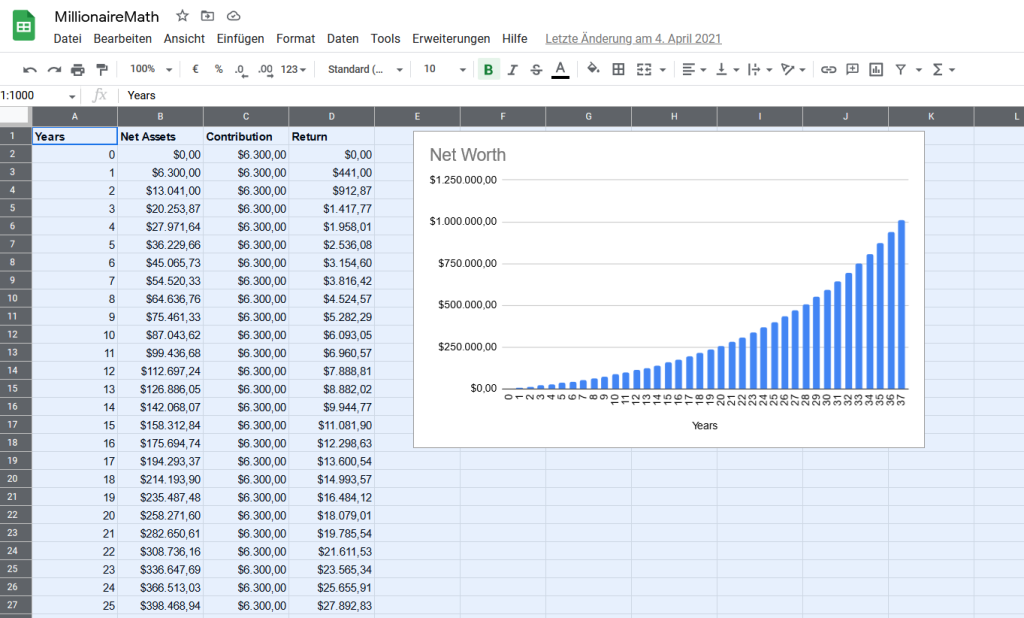
I have written a blog post about the math of consistent investments as a coder for various specific situations:

👩‍💻 Recommended: The Math of Becoming a Millionaire in 13 Years

Millionaire Tip #2 – Avoid Lifestyle Debt

Nearly three-quarters of the millionaires surveyed have never carried a credit card balance. For tech professionals, who may face student loan debt or the temptation to overspend on gadgets and tech gear, it’s essential to prioritize paying off debt and avoiding new debt. This will free up more money for investing and reduce the financial stress that comes with carrying debt.

The only debt acceptable is debt to build financial assets such as a business or investments (e.g., real estate) because it can help you inject leverage and financial horsepower into your life.

However, the risk is significant, and even if financial leverage can accelerate your wealth-building journey, it can cost you dearly: every number, no matter how large, multiplied by zero is zero.

Millionaire Tip #3 – Spend Smartly

The study found that 94% of millionaires live on less than they make, and 93% use coupons when shopping. Tech professionals can adopt similar frugal habits by budgeting, tracking expenses, and looking for ways to save money on everyday purchases. This will allow them to invest more and reach their financial goals faster.

Millionaire Tip #4 – Educate Yourself

The majority of millionaires in the study graduated from college, with over half (52%) earning a master’s or doctoral degree. For tech professionals, continuing education and skill development can lead to higher earning potential and career advancement. Whether it’s pursuing advanced degrees, certifications, or online courses, investing in education can pay off in the long run.

The Finxter Academy, for example, provides relevant tech courses with certifications you can use to showcase your skills to potential employers such as Google, Facebook, Amazon, OpenAI, or Tesla. 👇👇

Millionaire Tip #5 – Focus on the Right Career

The top five careers for millionaires in the study include engineer, accountant, teacher, management, and attorney. For techies, pursuing a career in engineering or management can be a path to financial success. However, it’s essential to remember that hard work and dedication are more critical factors than job title or salary. In fact, 93% of millionaires said they got their wealth because they worked hard, not because they had big salaries.

As my blog post “Millionaire Math” outlines, there are many paths to financial freedom, but all of them require a savings rate of 10% or (much) higher.

👩‍💻 In conclusion, becoming a millionaire in the US is achievable for tech professionals who are willing to invest consistently, avoid debt, spend wisely, and work hard. By adopting the financial habits and behaviors of millionaires, techies can build substantial wealth and achieve their financial goals.

Three Millionaire Tips From The Fast Lane

The slow lane is good enough to becoming a millionaire coder. Many have done it. You can do it too. But becoming rich young may be even more attractive for you.

In that case, you have other options you can employ in addition to (not necessarily instead of) the slow lane:

Millionaire Tip #6 – Leverage Scalable Business Models

A coder creates a software application that solves a specific problem for a niche market. Over time, the app gains traction and attracts a large user base. The coder monetizes the app through a subscription model, generating $500,000 in annual revenue. After a few years of consistent growth, a larger software company takes notice and offers to acquire the app for $2.5 million at a 5x revenue multiple. The coder accepts the offer and experiences an explosive wealth event by selling the app.

Stories like these happen every day. The odds are much higher than playing the lottery — in fact, many savvy entrepreneurs have proven that this strategy is replicable. I have built roughly three-quarters of my wealth by leveraging scalable business models and asset value through the profit multiple.

Below is an expanded table of profit multiples and example business valuations for one-person coding startups, along with example businesses that a one-person coder could realistically build.

Profit Multiple Annual Net Profit Business Valuation Example Business
2x $50,000 $100,000 A mobile app for time management
3x $100,000 $300,000 A SaaS platform for small business accounting
4x $150,000 $600,000 A web application for project management
5x $200,000 $1,000,000 A cryptocurrency trading bot
6x $300,000 $1,800,000 A machine learning tool for data analysis
7x $500,000 $3,500,000 A blockchain platform for supply chain tracking
8x $1,000,000 $8,000,000 A cybersecurity software for enterprise protection
9x $2,000,000 $18,000,000 A cloud-based platform for IoT device management
10x $5,000,000 $50,000,000 A virtual reality platform for education
11x $9,090,909 $100,000,000 An AI-powered platform for personalized marketing

It’s important to note that achieving a business valuation of $100 million as a one-person coder is a significant accomplishment and would likely require a highly innovative and scalable technology, a large addressable market, and strong competitive advantages. Additionally, as the business grows, it may be necessary to hire additional team members, seek external funding, and expand the business’s operations.

It’s also worth noting that the profit multiples used in the table are for illustrative purposes and may vary based on the specific circumstances of the business. Factors such as growth potential, competitive landscape, and risk profile can all influence the profit multiple and business valuation.

👩‍💻 One-person coders have the potential to build valuable businesses by leveraging their technical skills and entrepreneurial mindset. By creating innovative and scalable technology solutions, coders can address market needs, generate revenue, and achieve significant business valuations.

Millionaire Tip #7 – Monetize Open-Source Contributions

A coder contributes to an open-source project that becomes widely used in the tech industry. The coder decides to offer premium features and support services for a fee. The coder’s contributions and premium offerings become so popular that they generate $200,000 in annual revenue. A venture capital firm recognizes the potential of the project and offers to invest $1 million in exchange for a minority stake in the coder’s business. The coder agrees to the investment, which provides an immediate influx of capital and an explosive wealth event.

Here are five real examples of open-source developers who have created significant wealth as a result of their open-source work:

  1. Linus Torvalds: Linus Torvalds is the creator of the Linux kernel, which is the foundation of the Linux operating system. Linux is one of the most successful open-source projects in history and is used by millions of servers, desktops, and embedded systems worldwide. Torvalds has earned significant wealth through his work on Linux, including awards, speaking engagements, and his role as a Fellow at the Linux Foundation.
  2. Guido van Rossum: Guido van Rossum is the creator of the Python programming language, which is one of the most popular programming languages in the world. Python is used for web development, data analysis, machine learning, and more. Van Rossum has earned significant wealth through his work on Python, including his role as a software engineer at Google and later as a Distinguished Engineer at Microsoft.
  3. Matt Mullenweg: Matt Mullenweg is the co-founder of WordPress, the most popular content management system (CMS) in the world. WordPress is an open-source project that powers over 40% of all websites on the internet. Mullenweg has earned significant wealth through his work on WordPress, including his role as the CEO of Automattic, the company behind WordPress.com, WooCommerce, and other products.
  4. Dries Buytaert: Dries Buytaert is the creator of Drupal, an open-source CMS that is used by many large organizations, including NASA, the White House, and the BBC. Buytaert has earned significant wealth through his work on Drupal, including his role as the co-founder and CTO of Acquia, a company that provides cloud hosting and support for Drupal sites.
  5. John Resig: John Resig is the creator of jQuery, a popular JavaScript library that simplifies web development. jQuery is used by millions of websites and has become a standard tool for web developers. Resig has earned significant wealth through his work on jQuery, including his role as a software engineer at Khan Academy and his work as an author and speaker.

Millionaire Tip #8 – Build Multiple Income Streams

A coder starts a side hustle offering tech consulting services to small businesses. Over time, the coder’s reputation grows, and the consulting business generates $250,000 in annual revenue. The coder decides to scale the business by hiring additional consultants and expanding the service offerings. After a few years of growth, a larger consulting firm approaches the coder with an offer to acquire the business for $1 million at a 4x revenue multiple. The coder accepts the offer and experiences an explosive wealth event by selling the consulting business.

During all this time building the successful venture on the side, the coder also had a full-time income from their job and investment portfolio — multiple income streams!

👩‍💻 In each of these scenarios, you leverage your technical skills and entrepreneurial mindset to create value and generate revenue. By seizing opportunities and making strategic decisions, you can experience explosive wealth events that significantly increase your net worth.

Feel free to read our advanced article on the math of becoming a millionaire: 👇

💡 Recommended: The Math of Becoming a Millionaire in 13 Years

Prompt Engineering with Python and OpenAI

You can check out the whole course on OpenAI Prompt Engineering using Python on the Finxter academy. We cover topics such as:

  • Embeddings
  • Semantic search
  • Web scraping
  • Query embeddings
  • Movie recommendation
  • Sentiment analysis

👨‍💻 Academy: Prompt Engineering with Python and OpenAI

The post 8 Millionaire Tips to Reach Financial Freedom as a Coder appeared first on Be on the Right Side of Change.

Posted on Leave a comment

Python IndexError: Tuple Index Out of Range [Easy Fix]

5/5 – (1 vote)

Key Points:

  • To solve the “IndexError: tuple index out of range”, avoid do not access a non-existing tuple index. For example, my_tuple[5] causes an error for a tuple with three elements.
  • If you access tuple elements in a loop, keep in mind that Python uses zero-based indexing: For a tuple with n elements, the first element has index 0 and the last index n-1.
  • A common cause of the error is trying to access indices 1, 2, ..., n instead of using the correct indices 0,1, ..., (n-1).

The following video shows how I fixed a similar error on a list instead of a tuple:

YouTube Video

If you’re like me, you try things first in your code and fix the bugs as they come.

One frequent bug in Python is the IndexError: tuple index out of range. So, what does this error message mean?

The error “tuple index out of range” arises if you access invalid indices in your Python tuple. For example, if you try to access the tuple element with index 100 but your tuple consist only of three elements, Python will throw an IndexError telling you that the tuple index is out of range.

Minimal Example

Here’s a screenshot of this happening on my Windows machine:

Let’s have a look at an example where this error arises:

my_tuple = ('Alice', 'Bob', 'Carl')
print(my_tuple[3])

The element with index 3 doesn’t exist in the tuple with three elements. Why is that?

The following graphic shows that the maximal index in your tuple is 2. The call my_tuple[2] would retrieve the third tuple element 'Carl'.

  • my_tuple[0] --> Alice
  • my_tuple[1] --> Bob
  • my_tuple[2] --> Carl
  • my_tuple[3] --> ??? Error ???

Did you try to access the third element with index 3?

It’s a common mistake: The index of the third element is 2 because the index of the first tuple element is 0.

How to Fix the IndexError in a For Loop? [General Strategy]

So, how can you fix the code? Python tells you in which line and on which tuple the error occurs.

To pin down the exact problem, check the value of the index just before the error occurs.

To achieve this, you can print the index that causes the error before you use it on the tuple. This way, you’ll have your wrong index in the shell right before the error message.

Here’s an example of wrong code that will cause the error to appear:

# WRONG CODE
my_tuple = ('Alice', 'Bob', 'Ann', 'Carl') for i in range(len(my_tuple)+1): my_tuple[i] ''' OUTPUT
Traceback (most recent call last): File "C:\Users\xcent\Desktop\code.py", line 5, in <module> my_tuple[i]
IndexError: tuple index out of range '''

The error message tells you that the error appears in line 5.

So, let’s insert a print statement before that line:

my_tuple = ('Alice', 'Bob', 'Ann', 'Carl') for i in range(len(my_tuple)+1): print(i) my_tuple[i]

The result of this code snippet is still an error.

But there’s more:

0
1
2
3
4
Traceback (most recent call last): File "C:\Users\xcent\Desktop\code.py", line 6, in <module> my_tuple[i]
IndexError: tuple index out of range

You can now see all indices used to retrieve an element.

The final one is the index i=4 which points to the fifth element in the tuple (remember zero-based indexing: Python starts indexing at index 0!).

But the tuple has only four elements, so you need to reduce the number of indices you’re iterating over.

The correct code is, therefore:

# CORRECT CODE
my_tuple = ('Alice', 'Bob', 'Ann', 'Carl') for i in range(len(my_tuple)): my_tuple[i]

Note that this is a minimal example and it doesn’t make a lot of sense. But the general debugging strategy remains even for advanced code projects:

  • Figure out the faulty index just before the error is thrown.
  • Eliminate the source of the faulty index.

Programmer Humor

“Real programmers set the universal constants at the start such that the universe evolves to contain the disk with the data they want.”xkcd

Where to Go From Here?

Enough theory. Let’s get some practice!

Coders get paid six figures and more because they can solve problems more effectively using machine intelligence and automation.

To become more successful in coding, solve more real problems for real people. That’s how you polish the skills you really need in practice. After all, what’s the use of learning theory that nobody ever needs?

You build high-value coding skills by working on practical coding projects!

Do you want to stop learning with toy projects and focus on practical code projects that earn you money and solve real problems for people?

🚀 If your answer is YES!, consider becoming a Python freelance developer! It’s the best way of approaching the task of improving your Python skills—even if you are a complete beginner.

If you just want to learn about the freelancing opportunity, feel free to watch my free webinar “How to Build Your High-Income Skill Python” and learn how I grew my coding business online and how you can, too—from the comfort of your own home.

Join the free webinar now!

The post Python IndexError: Tuple Index Out of Range [Easy Fix] appeared first on Be on the Right Side of Change.

Posted on Leave a comment

Python Tuple Concatenation: A Simple Illustrated Guide

5/5 – (1 vote)

Python tuples are similar to lists, but with a key difference: they are immutable, meaning their elements cannot be changed after creation.

Tuple concatenation means joining multiple tuples into a single tuple. This process maintains the immutability of the tuples, providing a secure and efficient way to combine data. There are several methods for concatenating tuples in Python, such as using the + operator, the * operator, or built-in functions like itertools.chain().

# Using the + operator to concatenate two tuples
tuple1 = (1, 2, 3)
tuple2 = (4, 5, 6)
concatenated_tuple = tuple1 + tuple2
print("Using +:", concatenated_tuple) # Output: (1, 2, 3, 4, 5, 6) # Using the * operator to repeat a tuple
repeated_tuple = tuple1 * 3
print("Using *:", repeated_tuple) # Output: (1, 2, 3, 1, 2, 3, 1, 2, 3) # Using itertools.chain() to concatenate multiple tuples
import itertools
tuple3 = (7, 8, 9)
chained_tuple = tuple(itertools.chain(tuple1, tuple2, tuple3))
print("Using itertools.chain():", chained_tuple)
# Output: (1, 2, 3, 4, 5, 6, 7, 8, 9)

The + operator is used to join two tuples, the * operator is used to repeat a tuple, and the itertools.chain() function is used to concatenate multiple tuples. All these methods maintain the immutability of the tuples

Understanding Tuples

💡 Python tuple is a fundamental data type, serving as a collection of ordered, immutable elements. Tuples are used to group multiple data items together. Tuples are created using parentheses () and elements within the tuple are separated by commas.

For example, you can create a tuple as follows:

my_tuple = (1, 2, 3, 4, 'example')

In this case, the tuple my_tuple has five elements, including integers and a string. Python allows you to store values of different data types within a tuple.

Immutable means that tuples cannot be changed once defined, unlike lists. This immutability makes tuples faster and more memory-efficient compared to lists, as they require less overhead to store and maintain element values.

Being an ordered data type means that the elements within a tuple have a definite position or order in which they appear, and this order is preserved throughout the tuple’s lifetime.

💡 Recommended: Python Tuple Data Type

Tuple Concatenation Basics

One common operation performed on tuples is tuple concatenation, which involves combining two or more tuples into a single tuple. This section will discuss the basics of tuple concatenation using the + operator and provide examples to demonstrate the concept.

Using the + Operator

The + operator is a simple and straightforward way to concatenate two tuples. When using the + operator, the two tuples are combined into a single tuple without modifying the original tuples. This is particularly useful when you need to merge values from different sources or create a larger tuple from smaller ones.

Here’s the basic syntax for using the + operator:

new_tuple = tuple1 + tuple2

new_tuple will be a tuple containing all elements of tuple1 followed by elements of tuple2. It’s essential to note that since tuples are immutable, the original tuple1 and tuple2 remain unchanged after the concatenation.

Examples of Tuple Concatenation

Let’s take a look at a few examples to better understand tuple concatenation using the + operator:

tuple1 = (1, 2, 3)
tuple2 = (4, 5, 6) # Concatenate the tuples
tuple3 = tuple1 + tuple2
print(tuple3) # Output: (1, 2, 3, 4, 5, 6)

In this example, we concatenated tuple1 and tuple2 to create a new tuple called tuple3. Notice that the elements are ordered, and tuple3 contains all the elements from tuple1 followed by the elements of tuple2.

Here’s another example with tuples containing different data types:

tuple1 = ("John", "Doe")
tuple2 = (25, "New York") # Concatenate the tuples
combined_tuple = tuple1 + tuple2
print(combined_tuple) # Output: ('John', 'Doe', 25, 'New York')

In this case, we combined a tuple containing strings with a tuple containing an integer and a string, resulting in a new tuple containing all elements in the correct order.

Using the * Operator

The * operator can be used for replicating a tuple a specified number of times and then concatenating the results. This method can be particularly useful when you need to create a new tuple by repeating an existing one.

Here’s an example:

original_tuple = (1, 2, 3)
replicated_tuple = original_tuple * 3
print(replicated_tuple)
# Output: (1, 2, 3, 1, 2, 3, 1, 2, 3)

In the example above, the original tuple is repeated three times and then concatenated to create the replicated_tuple. Note that using the * operator with non-integer values will result in a TypeError.

Using itertools.chain()

The itertools.chain() function from the itertools module provides another way to concatenate tuples. This function takes multiple tuples as input and returns an iterator that sequentially combines the elements of the input tuples.

Here’s an illustration of using itertools.chain():

import itertools tuple1 = (1, 2, 3)
tuple2 = (4, 5, 6)
concatenated_tuple = tuple(itertools.chain(tuple1, tuple2))
print(concatenated_tuple)
# Output: (1, 2, 3, 4, 5, 6)

In this example, the itertools.chain() function is used to combine tuple1 and tuple2. The resulting iterator is then explicitly converted back to a tuple using the tuple() constructor.

It’s important to note that itertools.chain() can handle an arbitrary number of input tuples, making it a flexible option for concatenating multiple tuples:

tuple3 = (7, 8, 9)
result = tuple(itertools.chain(tuple1, tuple2, tuple3))
print(result)
# Output: (1, 2, 3, 4, 5, 6, 7, 8, 9)

Both the * operator and itertools.chain() offer efficient ways to concatenate tuples in Python.

Manipulating Tuples

Tuples are immutable data structures in Python, which means their content cannot be changed once created. However, there are still ways to manipulate and extract information from them.

Slicing Tuples

Slicing is a technique for extracting a range of elements from a tuple. It uses brackets and colons to specify the start, end, and step if needed. The start index is inclusive, while the end index is exclusive.

my_tuple = (0, 1, 2, 3, 4)
sliced_tuple = my_tuple[1:4] # This will return (1, 2, 3)

You can also use negative indexes, which count backward from the end of the tuple:

sliced_tuple = my_tuple[-3:-1] # This will return (2, 3)

Tuple Indexing

Tuple indexing allows you to access a specific element in the tuple using its position (index).

my_tuple = ('apple', 'banana', 'cherry')
item = my_tuple[1] # This will return 'banana'

An IndexError will be raised if you attempt to access an index that does not exist within the tuple.

Adding and Deleting Elements

Since tuples are immutable, you cannot directly add or delete elements. However, you can work around this limitation by:

  • Concatenating tuples: You can merge two tuples by using the + operator.
tuple1 = (1, 2, 3)
tuple2 = (4, 5, 6)
combined_tuple = tuple1 + tuple2 # This will return (1, 2, 3, 4, 5, 6)
  • Converting to a list: If you need to perform several operations that involve adding or removing elements, you can convert the tuple to a list. Once the operations are completed, you can convert the list back to a tuple.
my_tuple = (1, 2, 3)
my_list = list(my_tuple)
my_list.append(4) # Adding an element
my_list.remove(2) # Removing an element
new_tuple = tuple(my_list) # This will return (1, 3, 4)

Remember that manipulating tuples in these ways creates new tuples and does not change the original ones.

Common Errors and Solutions

One common error that users might encounter while working with tuple concatenation in Python is the TypeError. This error can occur when attempting to concatenate a tuple with a different data type, such as an integer or a list.

>>> (1, 2, 3) + 1
Traceback (most recent call last): File "<pyshell#2>", line 1, in <module> (1, 2, 3) + 1
TypeError: can only concatenate tuple (not "int") to tuple

To overcome this issue, make sure to convert the non-tuple object into a tuple before performing the concatenation.

For example, if you’re trying to concatenate a tuple with a list, you can use the tuple() function to convert the list into a tuple:

tuple1 = (1, 2, 3)
list1 = [4, 5, 6]
concatenated_tuple = tuple1 + tuple(list1)

Another common error related to tuple concatenation is the AttributeError. This error might arise when attempting to call a non-existent method or attribute on a tuple. Since tuples are immutable, they don’t have methods like append() or extend() that allow addition of elements.

Instead, you can concatenate two tuples directly using the + operator:

tuple1 = (1, 2, 3)
tuple2 = (4, 5, 6)
concatenated_tuple = tuple1 + tuple2

When working with nested tuples, ensure proper syntax and data structure handling to avoid errors like ValueError and TypeError. To efficiently concatenate nested tuples, consider using the itertools.chain() function provided by the itertools module.

This function helps to flatten the nested tuples before concatenation:

import itertools nested_tuple1 = ((1, 2), (3, 4))
nested_tuple2 = ((5, 6), (7, 8)) flattened_tuple1 = tuple(itertools.chain(*nested_tuple1))
flattened_tuple2 = tuple(itertools.chain(*nested_tuple2)) concatenated_tuple = flattened_tuple1 + flattened_tuple2

Frequently Asked Questions

How can I join two tuples?

To join two tuples, simply use the addition + operator. For example:

tuple_a = (1, 2, 3)
tuple_b = (4, 5, 6)
result = tuple_a + tuple_b

The result variable now contains the concatenated tuple (1, 2, 3, 4, 5, 6).

What is the syntax for tuple concatenation?

The syntax for concatenating tuples is straightforward. Just use the + operator between the two tuples you want to concatenate.

concatenated_tuples = first_tuple + second_tuple

How to concatenate a tuple and a string?

To concatenate a tuple and a string, first convert the string into a tuple containing a single element, and then concatenate the tuples. Here’s an example:

my_tuple = (1, 2, 3)
my_string = "hello"
concatenated_result = my_tuple + (my_string,)

The concatenated_result will be (1, 2, 3, 'hello').

Is it possible to modify a tuple after creation?

Tuples are immutable, which means they cannot be modified after creation (source). If you need to modify the contents of a collection, consider using a list instead.

How can I combine multiple lists of tuples?

To combine multiple lists of tuples, use a combination of list comprehensions and tuple concatenation. Here is an example:

lists_of_tuples = [ [(1, 2), (3, 4)], [(5, 6), (7, 8)]
] combined_list = [t1 + t2 for lst in lists_of_tuples for t1, t2 in lst]

The combined_list variable will contain [(1, 2, 3, 4), (5, 6, 7, 8)].

Can tuple concatenation be extended to more than two tuples?

Yes, tuple concatenation can be extended to more than two tuples by using the + operator multiple times. For example:

tuple_a = (1, 2, 3)
tuple_b = (4, 5, 6)
tuple_c = (7, 8, 9)
concatenated_result = tuple_a + tuple_b + tuple_c

This will result in (1, 2, 3, 4, 5, 6, 7, 8, 9).

💡 Recommended: Python Programming Tutorial [+Cheat Sheets]

The post Python Tuple Concatenation: A Simple Illustrated Guide appeared first on Be on the Right Side of Change.

Posted on Leave a comment

Measure Execution Time with timeit() in Python

5/5 – (1 vote)

Understanding Timeit in Python

The timeit module is a tool in the Python standard library, designed to measure the execution time of small code snippets. It makes it simple for developers to analyze the performance of their code, allowing them to find areas for optimization.

⏱ The timeit module averages out various factors that affect the execution time, such as the system load and fluctuations in CPU performance. By running the code snippet multiple times and calculating an average execution time, it provides a more reliable measure of your code’s performance.

To get started using timeit, simply import the module and use the timeit() method. This method accepts a code snippet as a string and measures its execution time. Optionally, you can also pass the number parameter to specify how many times the code snippet should be executed.

Here’s a quick example:

import timeit code_snippet = '''
def example_function(): return sum(range(10)) example_function() ''' execution_time = timeit.timeit(code_snippet, number=1000)
print(f"Execution time: {execution_time:.6f} seconds")

Sometimes, you might want to evaluate a code snippet that requires additional imports or setup code. For this purpose, the timeit() method accepts a setup parameter where you can provide any necessary preparation code.

For instance, if we adjust the previous example to include a required import:

import timeit code_snippet = '''
def example_function(): return sum(range(10)) example_function() ''' setup_code = "import math" execution_time = timeit.timeit(code_snippet, setup=setup_code, number=1000)
print(f"Execution time: {execution_time:.6f} seconds")

Keep in mind that timeit is primarily intended for small code snippets and may not be suitable for benchmarking large-scale applications.

Measuring Execution Time

The primary method of measuring execution time with timeit is the timeit() function. This method runs the provided code repeatedly and returns the total time taken. By default, it repeats the code one million times! Be careful when measuring time-consuming code, as it may take a considerable duration.

import timeit code_to_test = '''
example_function() ''' elapsed_time = timeit.timeit(code_to_test, number=1000)
print(f'Elapsed time: {elapsed_time} seconds')

When using the timeit() method, the setup time is excluded from execution time. This way, the measurement is more accurate and focuses on the evaluated code’s performance, without including the time taken to configure the testing environment.

Another useful method in the timeit module is repeat(), which calls the timeit() function multiple times and returns a list of results.

results = timeit.repeat(code_to_test, repeat=3, number=1000)
averaged_result = sum(results) / len(results)
print(f'Average elapsed time: {averaged_result} seconds')

Sometimes it’s necessary to compare the execution speeds of different code snippets to identify the most efficient implementation. With the time.time() function, measuring the execution time of multiple code sections is simplified.

import time start_time = time.time()
first_example_function()
end_time = time.time() elapsed_time_1 = end_time - start_time start_time = time.time()
second_example_function()
end_time = time.time() elapsed_time_2 = end_time - start_time print(f'First function elapsed time: {elapsed_time_1} seconds')
print(f'Second function elapsed time: {elapsed_time_2} seconds')

In conclusion, using the timeit module and the time.time() function allows you to accurately measure and compare execution times in Python.

The Timeit Module

To start using the timeit module, simply import it:

import timeit

The core method in the timeit module is the timeit() method used to run a specific code snippet a given number of times, returning the total time taken.

For example, suppose we want to measure the time it takes to square a list of numbers using a list comprehension:

import timeit code_to_test = """
squared_numbers = [x**2 for x in range(10)] """ elapsed_time = timeit.timeit(code_to_test, number=1000)
print("Time taken:", elapsed_time)

If you are using Jupyter Notebook, you can take advantage of the %timeit magic function to conveniently measure the execution time of a single line of code:

%timeit squared_numbers = [x**2 for x in range(10)]

In addition to the timeit() method, the timeit module provides repeat() and autorange() methods.

  • The repeat() method allows you to run the timeit() method multiple times and returns a list of execution times, while
  • the autorange() method automatically determines the number of loops needed for a stable measurement.

Here’s an example using the repeat() method:

import timeit code_to_test = """
squared_numbers = [x**2 for x in range(10)] """ elapsed_times = timeit.repeat(code_to_test, number=1000, repeat=5)
print("Time taken for each run:", elapsed_times)

Using Timeit Function

To measure the execution time of a function, you can use the timeit.timeit() method. This method accepts two main arguments: the stmt and setup. The stmt is a string representing the code snippet that you want to time, while the setup is an optional string that can contain any necessary imports and setup steps. Both default to 'pass' if not provided.

Let’s say you have a function called square() that calculates the square of a given number:

def square(x): return x ** 2

To measure the execution time of square() using timeit, you can do the following:

results = timeit.timeit('square(10)', 'from __main__ import square', number=1000)

Here, we’re asking timeit to execute the square(10) function 1000 times and return the total execution time in seconds. You can adjust the number parameter to run the function for a different number of iterations.

Another way to use timeit, especially for testing a callable function, is to use the timeit.Timer class. You can pass the callable function directly as the stmt parameter without the need for a setup string:

timer = timeit.Timer(square, args=(10,))
results = timer.timeit(number=1000)

Now you have your execution time in the results variable, which you can analyze and compare with other functions’ performance.

Examples and Snippets

The simplest way to use timeit.timeit() is by providing a statement as a string, which is the code snippet we want to measure the execution time for.

Here’s an example:

import timeit code_snippet = "sum(range(100))"
elapsed_time = timeit.timeit(code_snippet, number=1000)
print(f"Execution time: {elapsed_time:.6f} seconds")

In the example above, we measure the time it takes to execute sum(range(100)) 1000 times. The number parameter controls how many repetitions of the code snippet are performed. By default, number=1000000, but you can set it to any value you find suitable.

For more complex code snippets with multiple lines, we can use triple quotes to define a multiline string:

Python Timeit Functions

The timeit module in Python allows you to accurately measure the execution time of small code snippets. It provides two essential functions: timeit.timeit() and timeit.repeat().

⏱ The timeit.timeit() function measures the execution time of a given statement. You can pass the stmt argument as a string containing the code snippet you want to time. By default, timeit.timeit() will execute the statement 1,000,000 times and return the average time taken to run it.

However, you can adjust the number parameter to specify a different number of iterations.

For example:

import timeit code_to_test = "sum(range(100))" execution_time = timeit.timeit(code_to_test, number=10000)
print(execution_time)

⏱ The timeit.repeat() function is a convenient way to call timeit.timeit() multiple times. It returns a list of timings for each repetition, allowing you to analyze the results more thoroughly. You can use the repeat parameter to specify the number of repetitions.

Here’s an example:

import timeit code_to_test = "sum(range(100))" execution_times = timeit.repeat(code_to_test, number=10000, repeat=5)
print(execution_times)

In some cases, you might need to include additional setup code to prepare your test environment. You can do this using the setup parameter, which allows you to define the necessary setup code as a string. The execution time of the setup code will not be included in the overall timed execution.

import timeit my_code = '''
def example_function(): return sum(range(100)) example_function() ''' setup_code = "from __main__ import example_function" result = timeit.timeit(my_code, setup=setup_code, number=1000)
print(result)

Measuring Execution Time of Code Blocks

The timeit module provides a straightforward interface for measuring the execution time of small code snippets. You can use this module to measure the time taken by a particular code block in your program.

Here’s a brief example:

import timeit def some_function(): # Your code block here time_taken = timeit.timeit(some_function, number=1)
print(f"Time taken: {time_taken} seconds")

In this example, the timeit.timeit() function measures the time taken to execute the some_function function. The number parameter specifies the number of times the function will be executed, which is set to 1 in this case.

For more accurate results, you can use the timeit.repeat() function, which measures the time taken by the code block execution for multiple iterations.

Here’s an example:

import timeit def some_function(): # Your code block here repeat_count = 5
time_taken = timeit.repeat(some_function, number=1, repeat=repeat_count)
average_time = sum(time_taken) / repeat_count
print(f"Average time taken: {average_time} seconds")

In this example, the some_function function is executed five times, and the average execution time is calculated.

Besides measuring time for standalone functions, you can also measure the time taken by individual code blocks inside a function. Here’s an example:

import timeit def some_function(): # Some code here start_time = timeit.default_timer() # Code block to be measured end_time = timeit.default_timer() print(f"Time taken for code block: {end_time - start_time} seconds")

In this example, the timeit.default_timer() function captures the start and end times of the specified code block.

Using Timeit with Jupyter Notebook

Using Timeit with Jupyter Notebook

Jupyter Notebook provides an excellent environment for running and testing Python code. To measure the execution time of your code snippets in Jupyter Notebook, you can use the %timeit and %%timeit magic commands, which are built into the IPython kernel.

⏱ The %timeit command is used to measure the execution time of a single line of code. When using it, simply prefix your line of code with %timeit.

For example:

%timeit sum(range(100))

This command will run the code multiple times and provide you with detailed statistics like the average time and standard deviation.

⏱ To measure the execution time of a code block spanning multiple lines, you can use the %%timeit magic command. Place this command at the beginning of a cell in Jupyter Notebook, and it will measure the execution time for the entire cell.

For example:

%%timeit
total = 0
for i in range(100): total += i

Managing Garbage Collection and Overhead

When using timeit in Python to measure code execution time, it is essential to be aware of the impact of garbage collection and overhead.

🚯 Garbage collection is the process of automatically freeing up memory occupied by objects that are no longer in use. This can potentially impact the accuracy of timeit measurements if left unmanaged.

By default, timeit disables garbage collection to avoid interference with the elapsed time calculations. However, you may want to include garbage collection in your measurements if it is a significant part of your code’s execution, or if you want to minimize the overhead and get more realistic results.

To include garbage collection in timeit executions, you can use the gc.enable() function from the gc module and customize your timeit setup.

Here’s an example:

import timeit
import gc mysetup = "import gc; gc.enable()"
mycode = """
def my_function(): # Your code here pass
my_function() """ elapsed_time = timeit.timeit(setup=mysetup, stmt=mycode, number=1000)
print(elapsed_time)

Keep in mind that including garbage collection will likely increase the measured execution time. Manage this overhead by balancing the need for accurate measurements with the need to see the impact of garbage collection on your code.

Additionally, you can use the timeit.repeat() and timeit.autorange() methods to measure execution time of your code snippets multiple times, which can help you capture the variability introduced by garbage collection and other factors.

Choosing the Best Timer for Performance Measurements

Measuring the execution time of your Python code is essential for optimization, and the timeit module offers multiple ways to achieve this. This section will focus on selecting the best timer for measuring performance.

When using the timeit module, it is crucial to choose the right timer function. Different functions may provide various levels of accuracy and be suitable for different use cases. The two main timer functions are time.process_time() and time.perf_counter().

time.process_time() measures the total CPU time used by your code, excluding any time spent during the sleep or wait state. This is useful for focusing on the computational efficiency of your code. This function is platform-independent and has a higher resolution on some operating systems.

Here is an example code snippet:

import time
import timeit start = time.process_time() # Your code here end = time.process_time()
elapsed = end - start
print(f"Execution time: {elapsed} seconds")

On the other hand, time.perf_counter() measures the total elapsed time, including sleep or wait states. This function provides a more accurate measurement of the total time required by your code to execute. This can help in understanding the real-world performance of your code.

Here’s an example using time.perf_counter():

import time
import timeit start = time.perf_counter() # Your code here end = time.perf_counter()
elapsed = end - start
print(f"Execution time: {elapsed} seconds")

In addition to measuring execution time directly, you can also calculate the time difference using the datetime module. This module provides a more human-readable representation of time data.

Here’s an example code snippet that calculates the time difference using datetime:

from datetime import datetime start = datetime.now() # Your code here end = datetime.now()
elapsed = end - start
print(f"Execution time: {elapsed}")

Frequently Asked Questions

How to measure function execution time using timeit?

To measure the execution time of a function using the timeit module, you can use the timeit.timeit() method. First, import the timeit module, and then create a function you want to measure. You can call the timeit.timeit() method with the function’s code and the number of executions as arguments.

For example:

import timeit def my_function(): # Your code here execution_time = timeit.timeit(my_function, number=1000)
print("Execution time:", execution_time)

What is the proper way to use the timeit module in Python?

The proper way to use the timeit module is by following these steps:

  1. Import the timeit module.
  2. Define the code or function to be timed.
  3. Use the timeit.timeit() method to measure the execution time, and optionally specify the number of times the code should be executed.
  4. Print or store the results for further analysis.

How to time Python functions with arguments using timeit?

To time a Python function that takes arguments using timeit, you can use a lambda function or functools.partial(). For example:

import timeit
from functools import partial def my_function(arg1, arg2): # Your code here # Using a lambda function
time_with_lambda = timeit.timeit(lambda: my_function("arg1", "arg2"), number=1000) # Using functools.partial()
my_function_partial = partial(my_function, "arg1", "arg2")
time_with_partial = timeit.timeit(my_function_partial, number=1000)

What are the differences between timeit and time modules?

The timeit module is specifically designed for measuring small code snippets’ execution time, while the time module is more generic for working with time-related functions. The timeit module provides more accurate and consistent results for timing code execution, as it disables the garbage collector and uses an internal loop, reducing the impact of external factors.

How to use timeit in a Jupyter Notebook?

In a Jupyter Notebook, use the %%timeit cell magic command to measure the execution time of a code cell:

%%timeit
# Your code here

This will run the code multiple times and provide the average execution time and standard deviation.

What is the best practice for measuring execution time with timeit.repeat()?

The timeit.repeat() method is useful when you want to measure the execution time multiple times and then analyze the results. The best practice is to specify the number of repeats, the number of loops per repeat, and analyze the results to find the fastest, slowest, or average time. For example:

import timeit def my_function(): # Your code here repeat_results = timeit.repeat(my_function, number=1000, repeat=5)
fastest_time = min(repeat_results)
slowest_time = max(repeat_results)
average_time = sum(repeat_results) / len(repeat_results)

Using timeit.repeat() allows you to better understand the function’s performance in different situations and analyze the variability in execution time.

💡 Recommended: How to Determine Script Execution Time in Python?

The post Measure Execution Time with timeit() in Python appeared first on Be on the Right Side of Change.

Posted on Leave a comment

Python – Get Quotient and Remainder with divmod()

5/5 – (1 vote)

Understanding divmod() in Python

divmod() is a useful built-in function in Python that takes two arguments and returns a tuple containing the quotient and the remainder. The function’s syntax is quite simple: divmod(x, y), where x is the dividend, and y is the divisor.

💡 The divmod() function is particularly handy when you need both the quotient and the remainder for two numbers. In Python, you can typically compute the quotient using the // operator and the remainder using the % operator. Using divmod() is more concise and efficient because it avoids redundant work.

Here’s a basic example to illustrate how divmod() works:

x, y = 10, 3
result = divmod(x, y)
print(result) # Output: (3, 1)

In this example, divmod() returns a tuple (3, 1) – the quotient is 3, and the remainder is 1.

divmod() can be particularly useful in various applications, such as solving mathematical problems or performing operations on date and time values. Note that the function will only work with non-complex numbers as input.

Here’s another example demonstrating divmod() with larger numbers:

x, y = 2050, 100
result = divmod(x, y)
print(result) # Output: (20, 50)

In this case, the quotient is 20, and the remainder is 50.

To summarize, the divmod() function in Python is an efficient way to obtain both the quotient and the remainder when dividing two non-complex numbers.

I created an explainer video on the function here:

YouTube Video

Divmod’s Parameters and Syntax

The divmod() function in Python is a helpful built-in method used to obtain the quotient and remainder of two numbers. To fully understand its use, let’s discuss the function’s parameters and syntax.

This function accepts two non-complex parameters, number1 and number2.

  • The first parameter, number1, represents the dividend (the number being divided), while
  • the second parameter, number2, denotes the divisor (the number dividing) or the denominator.

The syntax for using divmod() is straightforward:

divmod(number1, number2)

Note that both parameters must be non-complex numbers. When the function is executed, it returns a tuple containing two values – the quotient and the remainder.

Here’s an example to make it clear:

result = divmod(8, 3)
print("Quotient and Remainder =", result)

This code snippet would output:

Quotient and Remainder = (2, 2)

This indicates that when 8 is divided by 3, the quotient is 2 and the remainder is 2. Similarly, you can apply divmod() with different numbers or variables representing numbers.

Return Value of Divmod

The divmod() function in Python is a convenient way to calculate both the quotient and remainder of two numbers simultaneously. This function accepts two arguments, which are the numerator and denominator, and returns a tuple containing the quotient and remainder as its elements.

The syntax for divmod() is as follows:

quotient, remainder = divmod(number1, number2)

Here is an example of how divmod() can be used:

result = divmod(8, 3)
print('Quotient and Remainder =', result)

In this example, divmod() returns the tuple (2, 2) representing the quotient (8 // 3 = 2) and the remainder (8 % 3 = 2). The function is useful in situations where you need to calculate both values at once, as it can save computation time by avoiding redundant work.

When working with arrays, you can use NumPy’s divmod() function to perform element-wise quotient and remainder calculations.

Here is an example using NumPy:

import numpy as np x = np.array([10, 20, 30])
y = np.array([3, 5, 7]) quotient, remainder = np.divmod(x, y)
print('Quotient:', quotient)
print('Remainder:', remainder)

In this case, the output will be two arrays, one for the quotients and one for the remainders of the element-wise divisions.

Working with Numbers

In Python, working with numbers, specifically integers, is a common task that every programmer will encounter. The divmod() function is a built-in method that simplifies the process of obtaining both the quotient and the remainder when dividing two numbers. This function is especially useful when working with large datasets or complex calculations that involve integers.

The divmod() function takes two arguments, the dividend and the divisor, and returns a tuple containing the quotient and remainder. The syntax for using this function is as follows:

result = divmod(number1, number2)

Here’s a simple example that demonstrates how to use divmod():

dividend = 10
divisor = 3
result = divmod(dividend, divisor)
print(result) # Output: (3, 1)

In this example, we divide 10 by 3, and the function returns the tuple (3, 1), representing the quotient and remainder, respectively.

An alternative approach to finding the quotient and remainder without using divmod() is to employ the floor division // and modulus % operators. Here’s how you can do that:

quotient = dividend // divisor
remainder = dividend % divisor
print(quotient, remainder) # Output: 3 1

While both methods yield the same result, the divmod() function offers the advantage of calculating the quotient and remainder simultaneously, which can be more efficient in certain situations.

When working with floating-point numbers, the divmod() function can still be applied. However, keep in mind that the results may be less precise due to inherent limitations in representing floating-point values in computers:

dividend_float = 10.0
divisor_float = 3.0
result_float = divmod(dividend_float, divisor_float)
print(result_float) # Output: (3.0, 1.0)

Divmod in Action: Examples

The divmod() function in Python makes it easy to simultaneously obtain the quotient and remainder when dividing two numbers. It returns a tuple that includes both values. Let’s dive into several examples to see how it works.

Consider dividing 25 by 7. Using divmod(), we can quickly obtain the quotient and remainder:

result = divmod(25, 7)
print(result) # Output: (3, 4)

In this case, the quotient is 3, and the remainder is 4.

Now, let’s look at a scenario involving floating-point numbers. The divmod() function can also handle them:

result = divmod(8.5, 2.5)
print(result) # Output: (3.0, 0.5)

Here, we can see that the quotient is 3.0, and the remainder is 0.5.

Another example would be dividing a negative number by a positive number:

result = divmod(-15, 4)
print(result) # Output: (-4, 1)

The quotient is -4, and the remainder is 1.

It’s essential to remember that divmod() does not support complex numbers as input:

result = divmod(3+2j, 2)
# Output: TypeError: can't take floor or mod of complex number.

The Division and Modulo Operators

In Python programming, division and modulo operators are commonly used to perform arithmetic operations on numbers. The division operator (//) calculates the quotient, while the modulo operator (%) computes the remainder of a division operation. Both these operators are an essential part of Python’s numeric toolkit and are often used in mathematical calculations and problem-solving.

The division operator is represented by // and can be used as follows:

quotient = a // b

Here, a is the dividend, and b is the divisor. This operation will return the quotient obtained after dividing a by b.

On the other hand, the modulo operator is represented by % and helps in determining the remainder when a number is divided by another:

remainder = a % b

Here, a is the dividend, and b is the divisor. This operation will return the remainder obtained after dividing a by b.

Let’s take a look at an example:

a = 10
b = 3
quotient = a // b # Result: 3
remainder = a % b # Result: 1
print("Quotient:", quotient, "Remainder:", remainder)

This code snippet computes the quotient and remainder when 10 is divided by 3. The output of this code will be:

Quotient: 3 Remainder: 1

Python also provides a built-in function divmod() for simultaneously computing the quotient and remainder. The divmod() function takes two arguments – the dividend and the divisor – and returns a tuple containing the quotient and the remainder:

result = divmod(10, 3)
print(result) # Output: (3, 1)

Alternative Methods to Divmod

In Python, the divmod() method allows you to easily compute the quotient and remainder of a division operation. However, it’s also worth knowing a few alternatives to the divmod() method for computing these values.

One of the simplest ways to find the quotient and remainder of a division operation without using divmod() is by using the floor division (//) and modulus (%) operators. Here’s an example:

dividend = 10
divisor = 3
quotient = dividend // divisor
remainder = dividend % divisor
print(quotient, remainder) # Output: 3 1

If you want to avoid using the floor division and modulus operators and only use basic arithmetic operations, such as addition and subtraction, you can achieve the quotient and remainder through a while loop. Here’s an example:

dividend = 10
divisor = 3
quotient = 0
temp_dividend = dividend while temp_dividend >= divisor: temp_dividend -= divisor quotient += 1 remainder = temp_dividend
print(quotient, remainder) # Output: 3 1

For finding the quotient and remainder of non-integer values, you may consider using the math module, which provides math.floor() and math.fmod() functions that work with floating-point numbers:

import math dividend = 10.5
divisor = 3.5
quotient = math.floor(dividend / divisor)
remainder = math.fmod(dividend, divisor)
print(quotient, remainder) # Output: 2 3.5

Implementing Divmod in Programs

The divmod() function in Python is a convenient way to obtain both the quotient and the remainder of two numbers. It takes two numbers as arguments and returns a tuple containing the quotient and the remainder.

Here’s a basic example that demonstrates how to use the divmod() function:

numerator = 10
denominator = 3
quotient, remainder = divmod(numerator, denominator)
print("Quotient:", quotient)
print("Remainder:", remainder)

In this example, the divmod() function receives two arguments, numerator and denominator, and returns the tuple (quotient, remainder). The output will be:

Quotient: 3
Remainder: 1

You can also use divmod() in a program that iterates through a range of numbers. For example, if you want to find the quotient and remainder of dividing each number in a range by a specific denominator, you can do the following:

denominator = 3
for num in range(1, 11): quotient, remainder = divmod(num, denominator) print(f"{num} // {denominator} = {quotient}, {num} % {denominator} = {remainder}")

This program will print the quotient and remainder for each number in the range 1 to 10 inclusive, when divided by 3.

When writing functions that require a variable number of arguments, you can use the *args syntax to pass a tuple of numbers to divmod().

Here’s an example:

def custom_divmod(*args): results = [] for num_pair in zip(args[::2], args[1::2]): results.append(divmod(*num_pair)) return results quotients_remainders = custom_divmod(10, 3, 99, 5, 8, 3)
print(quotients_remainders)

In this example, the custom_divmod() function receives a variable number of arguments. The zip() function is used to create pairs of numerators and denominators by slicing the input arguments. The resulting list of quotient-remainder tuples is then returned.

By utilizing the divmod() function in your programs, you can efficiently obtain both the quotient and remainder of two numbers in a single call, making your code more concise and easier to read.

Frequently Asked Questions

How to use divmod function in Python?

The divmod() function in Python is a built-in function that takes two numbers as arguments and returns a tuple containing the quotient and the remainder of the division operation. Here’s an example:

result = divmod(10, 3)
print(result) # Output: (3, 1)

How to find quotient and remainder using divmod?

To find the quotient and remainder of two numbers using divmod(), simply pass the dividend and divisor as arguments to the function. The function will return a tuple where the first element is the quotient and the second element is the remainder:

q, r = divmod(10, 3)
print("Quotient:", q) # Output: 3
print("Remainder:", r) # Output: 1

How does divmod work with negative numbers?

When using divmod() with negative numbers, the function will return the quotient and remainder following the same rules as for positive numbers. However, if either the dividend or the divisor is negative, the result’s remainder will have the same sign as the divisor:

result = divmod(-10, 3)
print(result) # Output: (-4, 2)

How to perform division and modulo operations simultaneously?

By using the divmod() function, you can perform both division and modulo operations in a single step, as it returns a tuple containing the quotient and the remainder:

result = divmod(10, 3)
print("Quotient and Remainder:", result) # Output: (3, 1)

Is there a divmod equivalent in other languages?

While not all programming languages have a function named “divmod,” most languages provide a way to perform integer division and modulo operations. For example, in JavaScript, you can use the following code to obtain similar results:

let dividend = 10;
let divisor = 3; let quotient = Math.floor(dividend / divisor);
let remainder = dividend % divisor;
console.log(`Quotient: ${quotient}, Remainder: ${remainder}`); // Output: Quotient: 3, Remainder: 1

What are the differences between divmod and using // and %?

Using divmod() is more efficient when you need both the quotient and remainder, as it performs the calculation in a single step. However, if you only need the quotient or the remainder, you can use the floor division // operator for the quotient and the modulo % operator for the remainder:

q = 10 // 3
r = 10 % 3
print("Quotient:", q) # Output: 3
print("Remainder:", r) # Output: 1

💡 Recommended: Python Programming Tutorial [+Cheat Sheets]

The post Python – Get Quotient and Remainder with divmod() appeared first on Be on the Right Side of Change.

Posted on Leave a comment

Collections.Counter: How to Count List Elements (Python)

5/5 – (1 vote)

Understanding Collections.Counter

Python’s Collections Module

The collections module in Python contains various high-performance container datatypes that extend the functionality of built-in types such as list, dict, and tuple. These datatypes offer more specialized tools to efficiently handle data in memory. One of the useful data structures from this module is Counter.

Counter Class in Collections

Counter is a subclass of the dictionary that allows you to count the frequency of elements in an iterable. Its primary purpose is to track the number of occurrences of each element in the iterable. This class simplifies the process of counting items in tuples, lists, dictionaries, sets, strings, and more.

Here’s a basic example of using the Counter class:

from collections import Counter count = Counter("hello")
print(count)

This example would output:

Counter({'l': 2, 'h': 1, 'e': 1, 'o': 1})

The Counter class provides a clear and pythonic way to perform element counting tasks. You can easily access the count of any element using the standard dictionary syntax:

print(count['l'])

This would return:

2

In conclusion, the collections.Counter class is an invaluable tool for handling and analyzing data in Python. It offers a straightforward and efficient solution to count elements within iterables, enhancing the standard functionality provided by the base library.

Working with Collections.Counter

The collections.Counter class helps maintain a dictionary-like structure that keeps track of the frequency of items in a list, tuple, or string. In this section, we will discuss how to create and update a collections.Counter object.

Creating a Counter

To get started with collections.Counter, you need to import the class from the collections module. You can create a counter object by passing an iterable as an argument:

from collections import Counter my_list = ['a', 'b', 'a', 'c', 'a', 'b']
counter = Counter(my_list) print(counter)

Output:

Counter({'a': 3, 'b': 2, 'c': 1})

In this example, the Counter object, counter, counts the occurrences of each element in my_list. The result is a dict-like structure where the keys represent the elements and the values represent their counts.

Updating a Counter

You can update the counts in a Counter object by using the update() method. This method accepts an iterable or a dictionary as its argument:

counter.update(['a', 'c', 'd'])
print(counter)

Output:

Counter({'a': 4, 'b': 2, 'c': 2, 'd': 1})

In the above example, we updated the existing Counter object with a new list of elements. The resulting counts now include the updated elements.

You can also update a Counter with a dictionary whose keys are elements and values are the desired updated counts:

counter.update({'a': 1, 'd': 5})
print(counter)

Output:

Counter({'a': 5, 'd': 6, 'b': 2, 'c': 2})

In this case, we provided a dictionary to the update() method, and the counts for the ‘a’ and ‘d’ elements were increased accordingly.

Working with collections.Counter is efficient and convenient for counting items in an iterable while maintaining a clear and concise code structure. By leveraging the methods to create and update Counter objects, you can effectively manage frequencies in a dict-like format for various data processing tasks.

Counting Elements in a List

There are several ways to count the occurrences of elements in a list. One of the most efficient approaches is to use the collections.Counter class from the collections module. This section will explore two main methods: using list comprehensions and utilizing Counter class methods.

List Comprehensions

List comprehensions offer a concise and readable way to count elements in a list. For example, let’s assume we have a list of numbers and want to count how many times each number appears in the list:

numbers = [1, 2, 3, 2, 1, 3, 1, 1, 2, 3]
unique_numbers = set(numbers)
count_dict = {num: numbers.count(num) for num in unique_numbers}
print(count_dict)

The output would be: {1: 4, 2: 3, 3: 3}

In this example, we first create a set of unique numbers and then use a list comprehension to create a dictionary with the counts of each unique element in the list.

Using Counter Class Methods

The collections.Counter class provides an even more efficient way to count elements in a list. The Counter class has a constructor that accepts an iterable and returns a dictionary-like object containing the counts of each element.

Here’s an example using the same list of numbers:

from collections import Counter numbers = [1, 2, 3, 2, 1, 3, 1, 1, 2, 3]
counter = Counter(numbers)
print(counter)

The output would be: Counter({1: 4, 2: 3, 3: 3})

In addition to the constructor, the Counter class also provides other methods to work with counts, such as most_common() which returns a list of the n most common elements and their counts:

most_common_elements = counter.most_common(2)
print(most_common_elements)

The output would be: [(1, 4), (2, 3)]

In summary, counting elements in a list can be achieved using list comprehensions or by employing the collections.Counter class methods. Both techniques can provide efficient and concise solutions to count elements in a Python list.

Counter Methods and Usage

In this section, we will explore the various methods and usage of the collections.Counter class in Python. This class is a versatile tool for counting the occurrences of elements in an iterable, such as lists, strings, and tuples.

Keys and Values

Counter class in Python is a subclass of the built-in dict class, which means it provides methods like keys() and values() to access the elements and their counts. To obtain the keys (unique elements) and their respective values (counts), use the keys() and values() methods, respectively.

from collections import Counter my_list = ['a', 'b', 'a', 'c', 'c', 'c']
counter = Counter(my_list) # Access keys and values
print(counter.keys()) # Output: dict_keys(['a', 'b', 'c'])
print(counter.values()) # Output: dict_values([2, 1, 3])

Most Common Elements

The most_common() method returns a list of tuples containing the elements and their counts in descending order. This is useful when you need to identify the most frequent elements in your data.

from collections import Counter my_list = ['a', 'b', 'a', 'c', 'c', 'c']
counter = Counter(my_list) # Get most common elements
print(counter.most_common()) # Output: [('c', 3), ('a', 2), ('b', 1)]

You can also pass an argument to most_common() to return only a specific number of top elements.

print(counter.most_common(2)) # Output: [('c', 3), ('a', 2)]

Subtracting Elements

The subtract() method allows you to subtract the counts of elements in another iterable from the current Counter. This can be helpful in comparing and analyzing different datasets.

from collections import Counter my_list1 = ['a', 'b', 'a', 'c', 'c', 'c']
my_list2 = ['a', 'c', 'c']
counter1 = Counter(my_list1)
counter2 = Counter(my_list2) # Subtract elements
counter1.subtract(counter2)
print(counter1) # Output: Counter({'c': 1, 'a': 1, 'b': 1})

In this example, the counts of elements in my_list2 are subtracted from the counts of elements in my_list1. The counter1 object is updated to reflect the new counts after subtraction.

Working with Different DataTypes

In this section, we’ll explore how to use Python’s collections.Counter to count elements in various data types, such as strings and tuples.

Counting Words in a String

Using collections.Counter, we can easily count the occurrence of words in a given string. First, we need to split the string into words, and then pass the list of words to the Counter object.

Here’s an example:

from collections import Counter text = "This is a sample text. This text is just a sample."
words = text.split() word_count = Counter(words)
print(word_count)

This would output a Counter object showing the frequency of each word in the input string:

Counter({'This': 2, 'is': 2, 'a': 2, 'sample': 2, 'text.': 1, 'text': 1, 'just': 1})

Counting Elements in Tuples

collections.Counter is also handy when you want to count the occurrences of elements in a tuple. Here’s a simple example:

from collections import Counter my_tuple = (1, 5, 3, 2, 1, 5, 3, 1, 1, 2, 2, 3, 3, 3) element_count = Counter(my_tuple)
print(element_count)

This code would output a Counter object showing the count of each element in the tuple:

Counter({3: 5, 1: 4, 2: 3, 5: 2})

As you can see, using collections.Counter makes it easy to count elements in different data types like strings and tuples in Python. Remember to import the Counter class from the collections module.

Advanced Topics and Additional Functions

Negative Values in Counter

The collections.Counter can handle negative values as well. It means that the count of elements can be negative, zero, or positive integers.

Let’s see an example with negative values:

from collections import Counter count_1 = Counter(a=3, b=2, c=0, d=-1)
print(count_1)

Output:

Counter({'a': 3, 'b': 2, 'c': 0, 'd': -1})

As you can see, the Counter object shows negative, zero, and non-negative occurrences of elements. Remember that negative counts do not affect the total number of elements.

Working with Unordered Collections

When you use collections.Counter to count elements in a list, tuple, or string, you don’t need to worry about the order of the elements. With Counter, you can count the occurrences of elements in any iterable without considering the sequence of the contained items.

Here’s an example for counting elements in an unordered collection:

from collections import Counter unordered_list = [12, 5, 3, 5, 3, 7, 12, 3] count_result = Counter(unordered_list)
print(count_result)

Output:

Counter({3: 3, 12: 2, 5: 2, 7: 1})

As demonstrated, the Counter function efficiently calculates element occurrences, regardless of the input order. This behavior makes it a practical tool when working with unordered collections, thus simplifying element frequency analysis.

Frequently Asked Questions

How do you use Collections.Counter to count elements in a list?

To use collections.Counter to count elements in a list, you first need to import the Counter class from the collections module. Then, create a Counter object by passing the list as an argument to the Counter() function. Here’s an example:

from collections import Counter my_list = ['apple', 'banana', 'apple', 'orange', 'banana', 'apple']
counter = Counter(my_list)
print(counter)

This will output:

Counter({'apple': 3, 'banana': 2, 'orange': 1})

What is the syntax for importing collections.Counter in Python?

To import the Counter class from the collections module in Python, use the following syntax:

from collections import Counter

How can you sort a Counter object by key?

To sort a Counter object by its keys, you can use the sorted() function in combination with the items() method:

sorted_counter = dict(sorted(counter.items()))
print(sorted_counter)

How do you convert a Python Counter object to a dictionary?

Converting a Counter object to a regular Python dictionary is as simple as passing the Counter object to the dict() function:

counter_dict = dict(counter)
print(counter_dict)

What are some examples of using collections.Counter in Python?

collections.Counter is versatile and can be used with different types of iterables, including lists, tuples, and strings. Here are some examples:

# Count characters in a string
text = "hello world"
char_counter = Counter(text)
print(char_counter) # Count items in a tuple
my_tuple = (1, 2, 3, 2, 1, 3, 1, 1, 2)
tuple_counter = Counter(my_tuple)
print(tuple_counter)

How can you update a Counter object in Python?

You can update a Counter object with new elements by using the update() method. Here’s an example:

counter = Counter({'apple': 3, 'banana': 2, 'orange': 1})
new_items = ['apple', 'banana', 'grape']
counter.update(new_items)
print(counter)

This will update the counts for the existing elements and add new elements if they were not already present:

Counter({'apple': 4, 'banana': 3, 'orange': 1, 'grape': 1})

💡 Recommended: Python Container Types: A Quick Guide

The post Collections.Counter: How to Count List Elements (Python) appeared first on Be on the Right Side of Change.