The most important collection data type in Python is the list data type. You’ll use lists basically in all your future projects so take 3-5 minutes and study this short guide carefully.
You can also play my short video tutorial as you read over the methods:
Method
Description
lst.append(x)
Appends element x to the list lst.
lst.clear()
Removes all elements from the list lst–which becomes empty.
lst.copy()
Returns a copy of the list lst. Copies only the list, not the elements in the list (shallow copy).
lst.count(x)
Counts the number of occurrences of element x in the list lst.
lst.extend(iter)
Adds all elements of an iterable iter(e.g. another list) to the list lst.
lst.index(x)
Returns the position (index) of the first occurrence of value x in the list lst.
lst.insert(i, x)
Inserts element x at position (index) i in the list lst.
lst.pop()
Removes and returns the final element of the list lst.
lst.remove(x)
Removes and returns the first occurrence of element x in the list lst.
lst.reverse()
Reverses the order of elements in the list lst.
lst.sort()
Sorts the elements in the list lst in ascending order.
If you’ve studied the table carefully, you’ll know the most important list methods in Python. Let’s have a look at some examples of above methods:
>>> l = []
>>> l.append(2)
>>> l
[2]
>>> l.clear()
>>> l
[]
>>> l.append(2)
>>> l
[2]
>>> l.copy()
[2]
>>> l.count(2)
1
>>> l.extend([2,3,4])
>>> l
[2, 2, 3, 4]
>>> l.index(3)
2
>>> l.insert(2, 99)
>>> l
[2, 2, 99, 3, 4]
>>> l.pop()
4
>>> l.remove(2)
>>> l
[2, 99, 3]
>>> l.reverse()
>>> l
[3, 99, 2]
>>> l.sort()
>>> l
[2, 3, 99]
Today, I stumbled upon this beautiful regex problem:
Given is a multi-line string and a regex pattern. How to find all lines that do NOT contain the regex pattern?
I’ll give you a short answer and a long answer.
The short answer is to use the pattern '((?!regex).)*' to match all lines that do not contain regex pattern regex. The expression '(?! ...)' is a negative lookahead that ensures that the enclosed pattern ... does not follow from the current position.
So let’s discuss this solution in greater detail. (You can also watch my explainer video if you prefer video format.)
Detailed Example
Let’s consider a practical code snippet. I’ll show you the code first and explain it afterwards:
import re
s = '''the answer is 42
the answer: 42
42 is the answer
43 is not
the answer
42''' for match in re.finditer('^((?!42).)*$', s, flags=re.M): print(match) '''
<re.Match object; span=(49, 58), match='43 is not'>
<re.Match object; span=(59, 69), match='the answer'> '''
You can see that the code successfully matches only the lines that do not contain the string '42'.
How can you do it?
The general idea is to match a line that doesn’t contain the string ‘42', print it to the shell, and move on to the next line.
The re.finditer(pattern, string) accomplishes this easily by returning an iterator over all match objects.
Finally, you need to define the re.MULTILINE flag, in short: re.M, because it allows the start ^ and end $ metacharacters to match also at the start and end of each line (not only at the start and end of each string). You can read more about the flags argument at this blog tutorial.
Together, this regular expression matches all lines that do not contain the specific word '42'.
In case you had some problems understanding the concept of lookahead (and why it doesn’t consume anything), have a look at this explanation from the matching group tutorial on this blog:
Positive Lookahead (?=…)
The concept of lookahead is a very powerful one and any advanced coder should know it. A friend recently told me that he had written a complicated regex that ignores the order of occurrences of two words in a given text. It’s a challenging problem and without the concept of lookahead, the resulting code will be complicated and hard to understand. However, the concept of lookahead makes this problem simple to write and read.
But first things first: how does the lookahead assertion work?
In normal regular expression processing, the regex is matched from left to right. The regex engine “consumes” partially matching substrings. The consumed substring cannot be matched by any other part of the regex.
Figure:A simple example of lookahead. The regular expression engine matches (“consumes”) the string partially. Then it checks whether the remaining pattern could be matched without actually matching it.
Think of the lookahead assertion as a non-consuming pattern match. The regex engine goes from the left to the right—searching for the pattern. At each point, it has one “current” position to check if this position is the first position of the remaining match. In other words, the regex engine tries to “consume” the next character as a (partial) match of the pattern.
The advantage of the lookahead expression is that it doesn’t consume anything. It just “looks ahead” starting from the current position whether what follows would theoretically match the lookahead pattern. If it doesn’t, the regex engine cannot move on. Next, it “backtracks”—which is just a fancy way of saying: it goes back to a previous decision and tries to match something else.
Positive Lookahead Example: How to Match Two Words in Arbitrary Order?
What if you want to search a given text for pattern A AND pattern B—but in no particular order? If both patterns appear anywhere in the string, the whole string should be returned as a match.
Now, this is a bit more complicated because any regular expression pattern is ordered from left to right. A simple solution is to use the lookahead assertion (?.*A) to check whether regex A appears anywhere in the string. (Note we assume a single line string as the .* pattern doesn’t match the newline character by default.)
Let’s first have a look at the minimal solution to check for two patterns anywhere in the string (say, patterns ‘hi’ AND ‘you’).
>>> import re
>>> pattern = '(?=.*hi)(?=.*you)'
>>> re.findall(pattern, 'hi how are yo?')
[]
>>> re.findall(pattern, 'hi how are you?')
['']
In the first example, both words do not appear. In the second example, they do.
Let’s go back to the expression (?=.*hi)(?=.*you) to match strings that contain both ‘hi’ and ‘you’. Why does it work?
The reason is that the lookahead expressions don’t consume anything. You first search for an arbitrary number of characters .*, followed by the word hi. But because the regex engine hasn’t consumed anything, it’s still in the same position at the beginning of the string. So, you can repeat the same for the word you.
Note that this method doesn’t care about the order of the two words:
>>> import re
>>> pattern = '(?=.*hi)(?=.*you)'
>>> re.findall(pattern, 'hi how are you?')
['']
>>> re.findall(pattern, 'you are how? hi!')
['']
No matter which word “hi” or “you” appears first in the text, the regex engine finds both.
You may ask: why’s the output the empty string? The reason is that the regex engine hasn’t consumed any character. It just checked the lookaheads. So the easy fix is to consume all characters as follows:
Now, the whole string is a match because after checking the lookahead with ‘(?=.*hi)(?=.*you)’, you also consume the whole string ‘.*’.
Negative Lookahead (?!…)
The negative lookahead works just like the positive lookahead—only it checks that the given regex pattern does not occur going forward from a certain position.
Here’s an example:
>>> import re
>>> re.search('(?!.*hi.*)', 'hi say hi?')
<re.Match object; span=(8, 8), match=''>
The negative lookahead pattern (?!.*hi.*) ensures that, going forward in the string, there’s no occurrence of the substring 'hi'. The first position where this holds is position 8 (right after the second 'h'). Like the positive lookahead, the negative lookahead does not consume any character so the result is the empty string (which is a valid match of the pattern).
You can even combine multiple negative lookaheads like this:
>>> re.search('(?!.*hi.*)(?!\?).', 'hi say hi?')
<re.Match object; span=(8, 9), match='i'>
You search for a position where neither ‘hi’ is in the lookahead, nor does the question mark character follow immediately. This time, we consume an arbitrary character so the resulting match is the character 'i'.
Where to Go From Here?
Summary: You’ve learned that you can match all lines that do not match a certain regex by using the lookahead pattern ((?!regex).)*.
Now this was a lot of theory! Let’s get some practice.
In my Python freelancer bootcamp, I’ll train you how to create yourself a new success skill as a Python freelancer with the potential of earning six figures online. The next recession is coming for sure and you want to be able to create your own economy so that you can take care of your loved ones.
Both Python and Go are still relevant today. Both languages are still widely used. However, many people have been switching from Python to the newer and faster language Golang, also known as Go. Go is a much newer language than Python, released by Google in 2009, and it has many advantages over many other programming languages. Golang is an excellent language, although not so one-sidedly better than Python that Python will go away any time soon.
Python, released back in 1991, still has its advantages. Despite how fast computer technology changes, programming languages do not become obsolete quickly. Many languages much older than Python are still in common use today. Since Go is already well established as a successful language, Go may also last for decades.
Go is Both Easy to Learn and Fast
Many programming languages are either fast and difficult (for example, C++) or easier to use but too slow for many types of applications (for example, Javascript). While an application coded in a slow language may still run very smoothly, there are limits on what one can do with a slow language. Golang manages to be both fast and easy.
Golang is as fast as languages such as C++, which is no small achievement. Compared to Go, Python is sluggish. It can take tens of times less processing power to run code in Golang than it takes to run programs in Python. Sometimes, this doesn’t matter – an application might take so little processing power to run that it executes fast even if written in a slow language. Programs coded in slow, high-level languages may work perfectly fine. For other types of applications, speed is vital. This difference gives Golang quite an advantage over Python, though there is no reason to use a fast language if the application does not require speed.
Since a large company like Google created Golang, one might expect it to be impressive, and it is. A programmer will not usually start with a more difficult language like C, C++, or assembler. Instead, they will begin with a programming language that is easier to learn and then learn a more difficult language at a later date. Golang is accessible to novices. One could argue that it is even easier than Python, perhaps even more accessible than Javascript.
Go Lets You Get the Job Done With Less Code
Not only is Go faster than Python, but a program written in Go will require fewer lines of code. Many Python programs re-written in Golang take only half or a third as many lines. The less code there is, the easier it is to debug. This element gives Golang another significant advantage. It is no wonder that the popularity of Golang has increased by so much over the last few years.
Python Includes More Libraries
One of the best things about Python is how easy it is to find code for whatever purpose you need. You will easily be able to find code to add to your program without having to create it yourself. Python comes with a very large number of code libraries created by its users since the language first appeared in 1991. For tasks that the libraries the language comes with cannot handle, there are also free third party libraries. The official libraries may not be good enough for all web development tasks, but you can rely on third-party libraries such as Django for web development. Go also has a great deal of free code for you to use and learn from, but it does not quite beat Python in this case. Go has plenty of useful libraries, but Python’s free libraries are even better.
With Python, there is plenty of help available if you want to learn to code an entire application with graphics and animation. You can easily download an open-source app and modify it to learn how to create commercial applications in Python. No other programming language gives its users as much free source code as Python.
Python is Easy
While Python does not manage to be both fast and easy, it is not both slow and challenging either. It is a relatively easy language, only arguably less accessible than Go is. Python’s free libraries and good commonly used tutorials make it easy to learn. The syntax is also easy to learn in Python. Most languages require you to use an unnecessarily large number of symbols. This requirement can frustrate a novice coder very much, as they will place a semicolon or some other symbol in the wrong place and break their program. Python minimizes the number of brackets, commas, and other symbols required.
Which Language Pays Better?
An expert in the Python language can make almost twice as much money as an expert in Go. While a Go developer in the United States earns only $64000 per year, a Python developer makes $120000. Higher pay is not an advantage of the language per se, but it is a significant reason to learn it. Python does not seem to be obsolete; new jobs for Python developers will continue to appear in the future. You probably want to go with Python if you are interested in learning to do one or the other professionally. Go might be a better language in most ways, but Python programming pays better. For someone hiring software developers, Go is, of course, the better programming language if developers cost much less.
Is Python More Object-Oriented?
Most programmers prefer object-oriented languages. Go is only, to a limited extent, object-oriented. Python is much better in this regard. Programming languages have been shifting more towards being object-oriented over the last few decades, and Go seems old fashioned if it is not fully object-oriented.
With an object-oriented language, code is divided into reusable chunks, instead of being a long sequence. Bugs are much easier to find in object-oriented languages, as an error is likely to break only one portion of the code and not the program as a whole. Data is kept separate from instructions. The C languages, javascript, and visual basic are all object-oriented. The lack of object-orientation does not mean that go is hard to learn, but some programmers may find more advanced projects more difficult due to the lack of it.
Different Languages for Different Purposes
Programmers use Python for web development. Go, on the other hand, is what you could call a system language. A system language is used for creating software that one must pay a monthly fee for, engines for video games, and operating systems. A system language is also for industrial machinery and robotics.
System languages are less likely to be for applications that focus on user interaction. Programmers do not create games, word processors, and media players in system languages. Python and Golang have different purposes. However, it is still possible for programmers to have to choose between one or the other for a specific project.
Python is probably better if you are looking for a general-purpose language. While only a small fraction of game development uses Python, it is nonetheless possible to create a commercial-grade game in Python.
Python is Still More Popular in 2020
Even though many people have switched from Python to Go over the last ten years, Python is still at the top. Python is the most popular programming language today, with Go only being the seventh most widely used [2]. While there is no way to know or even define what the most popular programming language is, Python comes out on top according to a variety of different metrics. C++, C#, and Java are the only languages that are near to Python in popularity.
Languages such as Scala and R have become more popular over the last few years and might be able to overtake Python in the future [3]. The PHP, R, Go, and Assembly languages are also among the most popular. However, Python has remained arguably the most popular programming language for a while and may continue to be the most popular for a while longer.
Here are some Google Trends searching for different keywords:
So no matter how you look—Python is not only the larger programming language, it’s also growing at a much faster pace.
Is Python or Go better for AI Programming?
Today, artificial intelligence is everywhere. The economy runs on it, as advertisers use it to make predictions about what consumers will buy. Artificial intelligence is vital to real estate developers and stock traders. AI also makes predictions for medical purposes. Both Go and Python are relevant to artificial intelligence. In fact, they are probably the two most popular languages for AI developers. The two languages’ usefulness for creating AI will help them continue to be popular in the future, as AI becomes increasingly relevant.
Python for AI Programming
Advantages: Availability of libraries
Python has been around since 1991, and since Python appeared, programmers have built vast numbers of free libraries. Many of these libraries are useful for AI programmers. Python libraries include code for datasets, for creating new algorithms, and for processing the most complex data. The TensorFlow library, the most popular library for AI programmers, is for the Python language.
Advantages: The python community matters
The size of the community that works on a language certainly matters. If a programming language is commonly used, then one can easily find people to work with as well as plentiful source code. Tools like Github make it easier to develop Python code than it ever was before.
Advantages: Python is easy to use
Not only is python code easy to write, but it is also easy to debug and edit. Python code is split into small, manageable chunks. This is less true for most other languages.
Since AI projects often involve large teams, it must be easy for one programmer to understand code written by another. With Python, there is little risk of a programmer not being able to understand the purpose of code they did not write themselves.
Disadvantages: Unsuitable for massive projects
While Python’s ease of use an object orientation can help a mid-sized project succeed, there are some problems with using Python for the most significant projects. If hundreds or even more programmers are involved, Python is not always the right way to go. Python does not use a static type system. The lack of static typing means that the code can be unsure of whether you are trying to put two words together or do a mathematical operation. Type errors happen more commonly in Python than in other languages. If programmers with plenty of experience in coding but relatively little experience in Python work on a Python project, they are annoyed by the syntax, which is in odd ways different from other languages.
Disadvantages: Too many versions of the language exist
Many different versions of Python are used. Python 3 did not fully replace Python 2, which is still commonly used today. This mix of versions results in all sorts of confusion and problems, especially if a large team is working on a project.
Part of the reason why programmers still use older versions of Python is that the libraries are for Python 2 and have not been updated to Python 3 yet. Some programmers also prefer the older version, if only because it is what they have the most experience with. Libraries built for different versions of the programming language are not compatible with each other.
Disadvantages: Cannot take full advantage of new technology
While Golang is for the age of multi-core CPUs, Python is not. Python cannot take advantage of the new technology nearly to the extent that Golang can. There are ways to tap into modern multi-core computing using Python, but even with newer versions of the language, these are workarounds.
Is Go Better for AI Programming?
Advantages: Go is very fast
While speed is not as crucial in AI programming as one might assume, speed is nonetheless relevant. Go is much faster than Python, mainly because it is a compiled language rather than an interpreted language.
With a compiled language, the program is first translated into bytecode that a computer can run directly, and then executed. Every line of text that a programmer writes in Golang is converted into binary before the machine runs it. With a compiled language, instructions are carried out very fast because the code does not have to be translated into binary while the program is running.
Many languages, including many older languages such as C++, are compiled. Many other languages, on the other hand, are interpreted. Python is an interpreted language that has to translate the code into binary and then execute it in real-time. Many programs, including many programs in artificial intelligence, do not require speed, so Python is still usable in AI programming. However, Go has quite an advantage here.
Advantages: Golang supports concurrency
Concurrency is the ability of a programming language to run multiple scripts at the same time. Concurrency is more important than it used to be, including when coding artificial intelligence projects. Python is not truly a concurrent language. At best, it is weakly concurrent.
Advantages: Go has many libraries for AI-related code
While Python is well known for how many free libraries it has, Golang’s libraries are rapidly growing. Many of these free libraries contain AI-related code written in Go. These libraries make it much faster and cheaper for programmers to develop new artificial intelligence projects.
Advantages: Go is better for massive projects
If hundreds of programmers are working on an AI project together, they are more likely to use Go than to use Python. Finding small bugs in massive programs can be a nightmare. Go is better for minimizing the number of errors. It is also easier to debug in Go than in Python.
Advantages: Go is vastly better for mathematical calculations
Go is a faster language in general, and this is particularly true if you are talking about mathematics. A Go program can do math 20 or 50 times faster than a Python program [4]. Many artificial intelligence projects require plenty of mathematical calculations.
Disadvantages: Golang’s libraries are less extensive
While there are many excellent libraries for the Go language, including for Artificial intelligence-related projects, the libraries are not yet as extensive as they are for Python. Python still has an advantage in terms of how much free high-quality code there is available.
Disadvantages: Coding AI in Golang is difficult
If you want to code AI in Golang, you need a team of experts. While Golang can be a fairly easy language to learn for many purposes, this is not the case if you are coding AI. Some features such as multithreading work against Golang when programmers are working on an AI project. Python AI projects can include programmers that do not have such specialized skills.
Overall, both languages are good for AI programming. They may be the two most popular languages for this purpose.
Why do Programmers Choose to Use the Go Language in 2020?
The syntax is familiar to many programmers
The syntax of Go makes it easy for programmers who know other languages to use. Anyone who knows how to program in a C language or in any other language that uses something similar to the C syntax can quickly learn Go. Go is particularly similar to C for more elementary tasks. It becomes more significantly different if more advanced tasks are attempted.
Go has an excellent team behind it
While Google does not back the Go language with the full weight of its resources, there is still an excellent team working on Go. Go is actively being improved by top-end software engineers all the time. Some of the best software engineers in the world are currently working on making the already popular Go language even better.
The number of commands in Go is not enormous
Someone who works with Go for years will pretty much know the whole language and no longer have to look anything up. Languages that contain an enormous number of commands are not likely to be fully learned, so even experienced programmers look up documentation. If programmers have to look everything up, things tend to slow down. When one is learning to code in Go and does not yet know it by heart, it is easy to find a complete list of commands for the language on the official website. The website organizes the commands in a way that makes it easy to find what you are looking for. Despite its power, the Go language is easy to learn, and to a lesser extent, may even be easy to master.
Go programs compile almost instantly
One advantage of using an interpreted language like Python instead of a compiled language like C is that the code can be tested right away without having to be compiled. If one makes a small change to a large program in a compiled language, they must compile it before they can test it. Having to wait for the program to compile before they can test a small change can be quite a hassle.
Thankfully, modern technology makes the compiling process much faster than it was decades ago, and the Go language is designed to compile faster than C does. Often, a Go program will compile effectively instantly. Therefore, programmers are not likely to use Python over Go because one does not have to compile it. The delay in compiling a program is less relevant than ever before.
The Go language has good auto-formatting tools
If every programmer is writing code with their own formatting style, it becomes a chore to read code you didn’t write yourself. With good auto-formatting tools, everyone can use the same style without having to agree on which type of formatting is the best. Auto-formatting can also save you time, as you can write code without worrying about the format and then have the computer automatically format it for you.
The Go language encourages programmers to use a similar style
With Python, there is far more risk of different programmers arguing over what the best programming practices for their language are. This is less of an issue with Go. Go is designed to encourage programmers to use a similar style.
More than one variable can be declared on each line
With most languages, you can only declare a single variable on each line and need separate lines to do math with your variables. With the Go language, one can set the value of X, set the value of Y, add a number to the value of Y, and then multiply X by Y to get Z on the same line of code. This feature reduces the number of lines and makes the code easier to read.
Why Do Programmers Use the Python Language in 2020?
Despite the speed and accessibility of the Go language, Python remains the most popular. As long as the program does not have to be very fast, Python is an excellent language. Speed is not always crucial; this is proven by the fact that the most popular programming language in the world is one of the slower programming languages.
Python has excellent tutorials
If one is new to programming, the early stages are going to be a challenge, and slowly working your way through a lengthy tutorial might be the right way to go. Python has plenty of accessible free tutorials, more than at least most other languages. The active Python community also helps new users get their questions answered as well as possible. Experienced programmers can also find more advanced tutorials. There are also complex program templates available for free.
Python has an excellent integrated development environment
The integrated development environment allows you to not only run but debug your code with a graphical interface. Python’s integrated development environment is particularly good, above the usual standard for programming languages.
The Python community is helpful to amateurs
The Python community on google groups, Reddit, and elsewhere will not have any problem answering the type of questions that new programmers are likely to ask. You will find a supportive and encouraging community if you work with Python.
Experienced programmers can also benefit from the Python community. It is easy to figure out how to build more advanced projects, including client-server architecture, and applications where graphics play an essential role. There will be open source examples for you to learn from, and people willing to help you build these projects. Widely available explanations of how to build a certain type of application tend to be better than their equivalents in Java and other languages.
Python is a general-purpose language
While Python is most strongly associated with web development, it is nonetheless a general-purpose language and not a web development language. Python is general-purpose to the extent that C++ is general-purpose. Python can be used to create anything, games included. Scientists, artificial intelligence researchers, and people building social networks all use Python.
There are always lots of jobs and always lots of workers
Since Python is more popular than at least most other languages, one can easily find high paying work if they know how to code in Python. Developers can also find skilled programmers to work on their projects with ease. There are neither too few nor too many people learning to write code in Python.
Python programmers may make more money than not only Go programmers but programmers in any other language. Python may be the only language where most coders earn six-figure salaries [5]. Those who know many other programming languages approach the six-figure mark, but only with Python do most programmers exceed it.
Python works equally well on many different operating systems
The python language work on Windows, on Mac OS, and on Linux equally well. This cross-platform compatibility helps it remain the world’s most popular language.
Modified versions of the python language exist
If you want a language similar to Python but with faster running speed or more support for concurrency, there is PyPy, which is an alternative implementation of the Python language. Instead of using an interpreter, as regular Python does, PyPy uses something closer to a compiler. PyPy is also much better for multitasking than standard Python is.
It’s easy to get into amateur game development with Python
Amateur game development with C++ can feel like a daunting task unless you already have a lot of programming experience. With Python, you can easily find free templates for games, which you can modify to create your own games. Amateur game design is the most fun way to learn a new programming language.
How Do Python and Go Compare?
Go
Python
Speed
Faster
Slower
Execution
Compiled
Interpreted
Programmers pay
Lower
Higher
Year released
2009
1991
Object-oriented
Not really
Yes
Concurrent
Yes
Not per default
Memory management
Yes
No
Popularity
Popular
Even more popular
Ease of use
Easy
Slightly less easy
Which Language Should I Use in 2020?
It depends on whether or not speed is key in the applications you are trying to develop. The single largest difference between the two languages is that Go is quite a lot faster than Python. If speed matters a lot, Python is not good enough for the task.
If, however, speed is not critical, then Python may be slightly better than Go in most ways. The free source code and application templates available to Python developers are fantastic. It will take a while before the Go libraries catch up to the quality of the Python libraries.
Python is more likely to be used in data science than Go is. If a scientist is interested in converting a great deal of raw data into useful statistics, they will use either Python or the R language [6]. Go is much less likely to be used to create programs that interpret raw data.
If you are unsure of which language to learn, Python pays considerably better. While a good Go programmer will earn a six-figure salary and a mediocre Python programmer will not, typical Python programmers may be better paid than those in any other language.
This morning, I read over an actual Quora thread with this precise question. While there’s no dumb question, the question reveals that there may be some gap in understanding the basics in Python and Python’s regular expression library.
So if you’re an impatient person, here’s the short answer:
How to match an exact word/string using a regular expression in Python?
You don’t! Well, you can do it by using the straightforward regex 'hello' to match it in 'hello world'. But there’s no need to use an expensive and less readable regex to match an exact substring in a given string. Instead, simply use the pure Python expression 'hello' in 'hello world'.
So far so good. But let’s dive into some more specific questions—because you may not exactly have looked for this simplistic answer. In fact, there are multiple ways of understanding your question and I have tried to find all interpretations and answered them one by one:
(You can also watch my tutorial video as you go over the article)
How to Check Membership of a Word in a String (Python Built-In)?
This is the simple answer, you’ve already learned. Instead of matching an exact string, it’s often enough to use Python’s in keyword to check membership. As this is a very efficient built-in functionality in Python, it’s much faster, more readable, and doesn’t require external dependencies.
Thus, you should rely on this method if possible:
>>> 'hello' in 'hello world'
True
The first example shows the most straightforward way of doing it: simply ask Python whether a string is “in” another string. This is called the membership operator and it’s very efficient.
You can also check whether a string does not occur in another string. Here’s how:
>>> 'hi' not in 'hello world'
True
The negative membership operator s1 not in s2 returns True if string s1 does not occur in string s2.
But there’s a problem with the membership operator. The return value is only a Boolean value. However, the advantage of Python’s regular expression libraryre is that it returns a match object which contains more interesting information such as the exact location of the matching substring.
So let’s explore the problem of exact string matching using the regex library next:
How to Match an Exact String (Regex)?
Here’s how you can match an exact substring in a given string:
After importing Python’s library for regular expression processing re, you use the re.search(pattern, string) method to find the first occurrence of the pattern in the string. If you’re unsure about this method, check out my detailed tutorial on this blog.
This returns a match object that wraps a lot of useful information such as the start and stop matching positions and the matching substring. As you’re looking for exact string matches, the matching substring will always be the same as your searched word.
But wait, there’s another problem: you wanted an exact match, right? But this also means that you’re getting prefix matches of your searched word:
What if you want to match only whole words—not exact substrings? The answer is simple: use the word boundary metacharacter '\b'. This metacharacter matches at the beginning and end of each word—but it doesn’t consume anything. In other words, it simply checks whether the word starts or ends at this position (by checking for whitespace or non-word characters).
Here’s how you use the word boundary character to ensure that only whole words match:
In both examples, you use the same regex '\bno\b' that searches for the exact word 'no' but only if the word boundary character '\b' matches before and after. In other words, the word 'no' must appear on its own as a separate word. It is not allowed to appear within another sequence of word characters.
As a result, the regex doesn’t match in the string 'nobody knows' but it matches in the string 'nobody knows nothing - no?'.
Note that we use raw string r'...' to write the regex so that the escape sequence '\b' works in the string. Without the raw string, Python would assume that it’s an unescaped backslash character '\', followed by the character 'b'. With the raw string, all backslashes will just be that: backslashes. The regex engine then interprets the two characters as one special metacharacter: the word boundary '\b'.
But what if you don’t care whether the word is upper or lowercase or capitalized? In other words:
How to Match a Word in a String (Case Insensitive)?
You can search for an exact word in a string—but ignore capitalization. This way, it’ll be irrelevant whether the word’s characters are lowercase or uppercase. Here’s how:
All three ways are equivalent: they all ignore the capitalization of the word’s letters. If you need to learn more about the flags argument in Python, check out my detailed tutorial on this blog. The third example uses the in-regex flag (?i) that also means: “ignore the capitalization”.
How to Find All Occurrences of a Word in a String?
Okay, you’re never satisfied, are you? So let’s explore how you can find all occurrences of a word in a string.
In the previous examples, you used the re.search(pattern, string) method to find the first match of the pattern in the string.
Next, you’ll learn how to find all occurrences (not only the first match) by using the re.findall(pattern, string) method. You can also read my blog tutorial about the findall() method that explains all the details.
>>> import re
>>> re.findall('no', 'nononono')
['no', 'no', 'no', 'no']
Your code retrieves all matching substrings. If you need to find all match objects rather than matching substrings, you can use the re.finditer(pattern, string) method:
The re.finditer(pattern, string) method creates an iterator that iterates over all matches and returns the match objects. This way, you can find all matches and get the match objects as well.
How to Find All Lines Containing an Exact Word?
Say you want to find all lines that contain the word ’42’ from a multi-line string in Python. How’d you do it?
The answer makes use of a fine Python regex specialty: the dot regex matches all characters, except the newline character. Thus, the regex .* will match all characters in a given line (but then stop).
Here’s how you can use this fact to get all lines that contain a certain word:
>>> import re
>>> s = '''the answer is 42
the answer: 42
42 is the answer
43 is not'''
>>> re.findall('.*42.*', s)
['the answer is 42', 'the answer: 42', '42 is the answer']
Three out of four lines contain the word '42'. The findall() method returns these as strings.
How to Find All Lines Not Containing an Exact Word?
In the previous section, you’ve learned how to find all lines that contain an exact word. In this section, you’ll learn how to do the opposite: find all lines that NOT contain an exact word.
This is a bit more complicated. I’ll show you the code first and explain it afterwards:
import re
s = '''the answer is 42
the answer: 42
42 is the answer
43 is not
the answer
42''' for match in re.finditer('^((?!42).)*$', s, flags=re.M): print(match) '''
<re.Match object; span=(49, 58), match='43 is not'>
<re.Match object; span=(59, 69), match='the answer'> '''
You can see that the code successfully matches only the lines that do not contain the string '42'.
How can you do it?
The general idea is to match a line that doesn’t contain the string ‘42', print it to the shell, and move on to the next line. The re.finditer(pattern, string) accomplishes this easily by returning an iterator over all match objects.
Finally, you need to define the re.MULTILINE flag, in short: re.M, because it allows the start ^ and end $ metacharacters to match also at the start and end of each line (not only at the start and end of each string).
Together, this regular expression matches all lines that do not contain the specific word '42'.
Where to Go From Here?
Summary: You’ve learned multiple ways of matching an exact word in a string. You can use the simple Python membership operator. You can use a default regex with no special metacharacters. You can use the word boundary metacharacter '\b' to match only whole words. You can match case-insensitive by using the flags argument re.IGNORECASE. You can match not only one but all occurrences of a word in a string by using the re.findall() or re.finditer() methods. And you can match all lines containing and not containing a certain word.
Pheww. This was some theory-heavy stuff. Do you feel like you need some more practical stuff next?
Then check out my practice-heavy Python freelancer course that helps you prepare for the worst and create a second income stream by creating your thriving coding side-business online.
The web is full of tutorials about regular expressions. But I realized that most of those tutorials lack a thorough motivation.
Why do regular expressions exist?
What are they used for?
What are some practical applications?
Somehow, the writers of those tutorials believe that readers are motivated by default to learn a technology that’s complicated and hard to learn.
Well, readers are not. If you’re like me, you tend to avoid complexity and you first want to know WHY before you invest dozens of hours learning a new skill. Is this you? Then keep reading. (Otherwise, leave now—and don’t tell me I didn’t warn you.)
So what are some applications of regular expressions?
As you read through the article, you can watch my explainer video:
Here’s the ToC that also gives you a quick overview of the regex applications:
Search and Replace in a Text Editor
The most straightforward application is to search a given text in your text editor. Say, your boss asks you to replace all occurrences of a customer 'Max Power' with the name 'Max Power, Ph.D.,'.
Here’s how it would look like:
I used the popular text editor Notepad++ (recommended for coders). At the bottom of the “Replace” window, you can see the box selection “Regular expression”. But in the example, we used the most straightforward regular expression: a simple string.
So you search and replace all occurrences of the string ‘Max Power’ and give it back to your boss. But your boss glances over your document and tells you that you’ve missed all occurrences with only 'Max' (without the surname 'Power'). What do you do?
Simple, you’re using a more powerful regex: 'Max( Power)?' rather than only 'Max Power':
Don’t worry, it’s not about the specific regex 'Max( Power)?' and why it works. I just wanted to show you that it’s possible to match all strings that either look like this: 'Max Power' or like this: 'Max'.
This is another common application: use regular expressions to search (and find) certain files on your operating system.
For example, this guy tried to find all files with the following filename patterns:
abc.txt.r12222
tjy.java.r9994
He managed to do it on Windows using the command:
dir * /s/b | findstr \.r[0-9]+$
Large parts of the commands are a regular expression. In the final part, you can already see that he requires the file to end with .r and an arbitrary number of numeric symbols.
As soon as you’ve mastered regular expressions, this will cost you no time at all and your productivity with your computer will skyrocket.
Searching Your Files for Text
But what if you don’t want to find files with a certain filename but with a certain file content? Isn’t this much harder?
As it turns out, it isn’t! Well, if you use regular expression and grep.
Here’s what a grep guru would do to find all lines in a file 'haiku.txt' that contain the word 'not'.
Grep is an aged-old file search tool written by famous computer scientist Ken Thompson. And it’s even more powerful than that: you can also search a bunch of files for certain content.
Well, using regular expressions to find content on the web is considered the holy grail of search. But the web is a huge beast and supporting a full-fledged regex engine would be too demanding for Google’s servers. It costs a lot of computational resources. Therefore, nobody actually provides a search engine that allows all regex commands.
However, web search engines such as Google support a limited number of regex commands. For example, you can search queries that do NOT contain a specific word:
The search “Jeff -Bezos” will give you all the Jeff’s that do not end with Bezos. If a firstname is dominated like this, using advanced search operators is quite a useful extension.
With the explosion of data and knowledge, mastering search is a critical skill in the 21st century.
Validate User Input in Web Applications
If you’re running a web application, you need to deal with user input. Often, users can put anything in the input fields (even cross-site scripts to hack your webserver). Your application must validate that the user input is okay—otherwise you’re guaranteed to crash your backend application or database.
How can you validate user input? Regex to the rescue!
Here’s how you’d check whether
The user input consists only of lowercase letters: [a-z]+,
The username consists of only lowercase letters, underscores, or numbers: [a-z_0-9]+, or
The input does not contain any parentheses: [^\(\)]+.
With regular expressions, you can validate any user input—no matter how complicated it may seem.
Think about this: any web application that processes user input needs regular expressions. Google, Facebook, Baidu, WeChat—all of those companies work with regular expressions to validate their user input. This skill is wildly important for your success as a developer working for those companies (or any other web-based company for that matter).
Guess what Google’s ex tech lead argues is the top skill of a programmer? You got it: regular expressions!
Extract Useful Information With Web Crawlers
Okay, you can validate user input with regular expressions. But is there more? You bet there is.
Regular expressions are not only great to validate textual data but to extract information from textual data.
For example, say you want to gain some advantage over your competition. You decide to write a web crawler that works 24/7 exploring a subset of webpages. A webpage links to other webpages. By going from webpage to webpage, your crawler can explore huge parts of the web—fully automatized.
Imagine the potential! Data is the asset class of the 21st century and you can collect this valuable asset with your own web crawler.
A web crawler can be a Python program that downloads the HTML content of a website:
Your crawler can now use regular expressions to extract all outgoing links to other websites (starting with "<a href=").
A simple regular expression can now automatically get the stuff that follows—which is the outgoing URL. You can store this URL in a list and visit it at a later point in time.
As you’re extracting links, you can build a web graph, extract other information (e.g., embedded opinions of people) and run complicated subroutines on parts of the textual data (e.g., sentiment analysis).
Don’t underestimate the power of web crawlers when used in combination with regular expressions!
Data Scraping and Web Scraping
In the previous example, you’ve already seen how to extract useful information from websites with a web crawler.
But often the first step is to simply download a certain type of data from a large number of websites with the goal of storing it in a database (or a spreadsheet). But the data needs to have a certain structure.
The process of extracting a certain type of data from a set of websites and converting it to the desired data format is called web scraping.
Web scrapers are needed in finance startups, analytics companies, law enforcement, eCommerce companies, and social networks.
Regular expressions help greatly in processing the messy textual data. There are many different applications such as finding titles of a bunch of blog articles (e.g., for SEO).
from urllib.request import urlopen
import re html = urlopen("https://blog.finxter.com/start-learning-python/").read() print(str(html))
titles = re.findall("\<title\>(.*)\</title\>", str(html)) print(titles)
# ['What's The Best Way to Start Learning Python? A Tutorial in 10 Easy Steps! | Finxter']
You extract all data that’s enclosed in opening and closing title tags: <title>...</title>.
Data Wrangling
Data wrangling is the process of transforming raw data into a more useful format to simplify the processing of downstream applications. Every data scientists and machine learning engineer knows that data cleaning is at the core of creating effective machine learning models and extracting insights.
As you may have guessed already, data wrangling is highly dependent on tools such as regular expression engines. Each time you want to transform textual data from one format to another, look no further than regular expressions.
In Python, the regex method re.sub(pattern, repl, string) transforms a string into a new one where each occurrence of pattern is replaced by the new string repl. You can learn everything about the substitution method on my detailed blog tutorial (+video).
This way, you can transform currencies, dates, or stock prices into a common format with regular expressions.
Parsing
Show me any parser and I show you a tool that leverages hundreds of regular expressions to process the input quickly and effectively.
You may ask: what’s a parser anyway? And you’re right to ask (there are no dumb questions). A parser translates a string of symbols into a higher-level abstraction such as a formalized language (often using an underlying grammar to “understand” the symbols). You’ll need a parser to write your own programming language, syntax system, or text editor.
For example, if you write a program in the Python programming language, it’s just a bunch of characters. Python’s parser brings order into the chaos and translates your meaningless characters into more meaningful abstractions (e.g. keywords, variable names, or function definitions). This is then used as an input for further processing stages such as the execution of your program.
If you’re looking at how parsers are implemented, you’ll see that they heavily rely on regular expressions. This makes sense because a regular expression can easily analyze and catch parts of your text. For example, to extract function names, you can use the following regex in your parser:
You can see that our mini parser extracts all function names in the code. Of course, it’s only a minimal example and it wouldn’t work for all instances. For example, you can use more characters than the given ones to define a function name.
If you’re interested in writing parsers or learning about compilers, regular expressions are among the most useful tools in existence!
Programming Languages
Yes, you’ve already learned about parsers in the previous point. And parsers are needed for any programming language. To put it bluntly: there’s no programming language in the world that doesn’t rely on regular expressions for their own implementation.
But there’s more: regular expressions are also very popular when writing code in any programming language. Some programming languages such as Perl provide built-in regex functionality: you don’t even need to import an external library.
I assure you, if you’re becoming a professional coder, you will use regular expressions in countless of coding projects. And the more you use it, the more you’ll learn to love and appreciate the power of regular expressions.
Syntax Highlighting Systems
Here’s how my standard coding environment looks like:
Any code editor provides syntax highlighting capablities:
Function names may be blue.
Strings may be yellow.
Comments may be red.
And normal code may be white.
This way, reading and writing code becomes far more convenient. More advanced IDEs such as PyCharm provide dynamic tooltips as an additional feature.
All of those functionalities are implemented with regular expressions to find the keywords, function names, and normal code snippets—and, ultimately, to parse the code to be highlighted and enriched with additional information.
Lexical Analysis in a Compiler
In compiler design, you’ll need a lexical analyzer:
The lexical analyzer needs to scan and identify only a finite set of valid string/token/lexeme that belong to the language in hand. It searches for the pattern defined by the language rules.
Regular expressions have the capability to express finite languages by defining a pattern for finite strings of symbols. The grammar defined by regular expressions is known as regular grammar. The language defined by regular grammar is known as regular language.
As it turns out, regular expressions are the gold standard for creating a lexical analyzer for compilers.
I know this may sound like a very specific application but it’s an important one nonetheless.
Formal Language Theory
Theoretical computer science is the foundation of all computer science. The great names in computer science, Alan Turing, Alonzo Church, and Steven Kleene, all spent significant time and effort studying and developing regular expressions.
If you want to become a great computer scientist, you need to know your fair share of theoretical computer science. You need to know about formal language theory. You need to know about regular expressions that are at the heart of these theoretical foundations.
How do regular expressions relate to formal language theory? Each regular expression defines a “language” of acceptable words. All words that match the regular expression are in this language. All words that do not match the regular expression are not in this language. This way, you can create a precise sets of rules to describe any formal language—just by using the power of regular expressions.
Where to Go From Here?
Regular expressions are widely used for many practical applications. The ones described here are only a small subsets of the ones used in practice. However, I hope to have given you a glance into how important and relevant regular expressions have been, are, and will remain in the future.
I always struggled with the plt.imshow() method of Python’s matplotlib library. To help you and me master it, I committed to write the most in-depth resource about it on the web.
As you study the resource, you can play my explainer video that leads you through the code in this article:
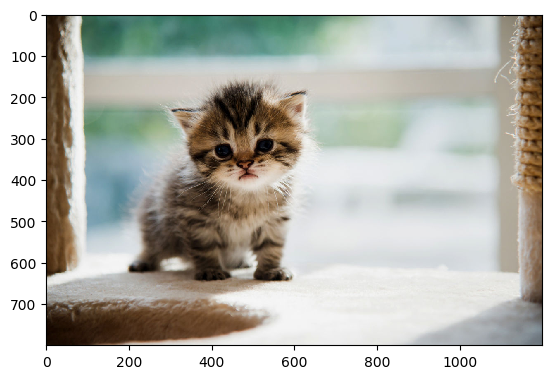
To show an image in matplotlib, first read it in using plt.imread(), then display it with plt.imshow().
import matplotlib.pyplot as plt cat_img = plt.imread('Figures/cat.jpeg')
plt.imshow(cat_img)
To turn the (annoying) axis ticks off, call plt.axis('off').
Much better! But there is a lot more you can do than just show images. Let’s look at how this works in more detail.
Matplotlib Imshow Example
When you display an in image in matplotlib, there are 2 steps you need to take: first you read the image and then you show it.
You read in the image using plt.imread() and pass it a string. I have the images stored in a directory called Figures, so I first write Figures/ followed by the name of the image with its file extension – cat.jpeg. If your images are stored in your current working directory, you can omit Figures/.
I store the output of plt.imread() in a variable with a descriptive name because you need to pass this to plt.imshow(). So, the first line is cat_img = plt.imread('Figures/cat.jpeg').
Images are made up of pixels and each pixel is a dot of color. The cat image is 1200×800 pixels. When an image is loaded into a computer, it is saved as an array of numbers. Each pixel in a color image is made up of a Red, Green and Blue (RGB) part. It can take any value between 0 and 255 with 0 being the darkest and 255 being the brightest. In a grayscale image, each pixel is represented by just a single number between 0 and 1. If a pixel is 0, it is completely black, if it is 1 it is completely white. Everything in between is a shade of gray.
So, if the cat image was black and white, it would be a 2D numpy array with shape (800, 1200). As it is a color image, it is in fact a 3D numpy array (to represent the three different color channels) with shape (800, 1200, 3).
Note that Numpy writes image sizes is the opposite way to matplotlib and the ‘real world’. Numpy is from the world of mathematics and matrices where you always write the number of rows (height) first followed by the columns (width). If you need a quick NumPy refresher, check out my in-depth NumPy tutorial on this blog.
Matplotlib bases its image functions on the ‘real world’ and so displays the width first followed by the height.
Once you’ve read your image into a numpy array, it’s time to display it using plt.imshow(). This is similar to plt.show() which you call at the end of any matplotlib plot. However, unlike plt.show(), you must pass the image you want to display as an argument. This is helpful if you have read in multiple images but only want to display a certain number of them.
plt.imshow(cat_img)
I’m not sure why but, by default, all images are shown with axis ticks and labels. This can be quite annoying, so call plt.axis('off') to remove them.
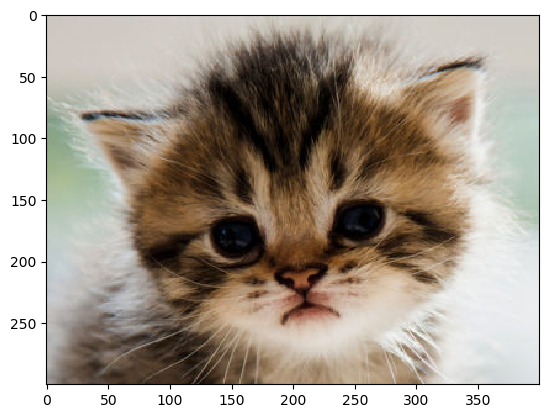
However, ticks and labels can be helpful if you only want to select part of the image. By using them as guides, I’ll slice cat_img to just get the head of our cute kitten.
# Slicing found by using axis ticks and lables on image above
cat_head = cat_img[150:450, 275:675, :]
plt.imshow(cat_head)
The above image is a jpeg but you can also display other types of image files such as pngs.
# A png image
snow_img = plt.imread('Figures/snowboarder.png')
plt.axis('off')
plt.imshow(snow_img)
You can display gifs but it is slightly more complicated to do so and so is outside the scope of this article. If you read in and show a gif using the above steps, matplotlib will just show one of its frames.
You can turn any color image into a grayscale image in matplotlib. Since grayscale images are 2D numpy arrays, use slicing to turn your 3D array into a 2D one.
cat_img = plt.imread('Figures/cat.jpeg') # Turn 3D array into 2D by selecting just one of the three dimensions
grayscale_cat = cat_img[:, :, 0]
If you write cat_img[:, :, 1] or cat_img[:, :, 2] you will get different arrays but the final image will still look the same. This is because grayscale images just care about the relative difference of intensity between each pixel and this is the same over each RGB channel.
Let’s plot it and see what happens.
plt.axis('off')
plt.imshow(grayscale_cat)
Wait, what?
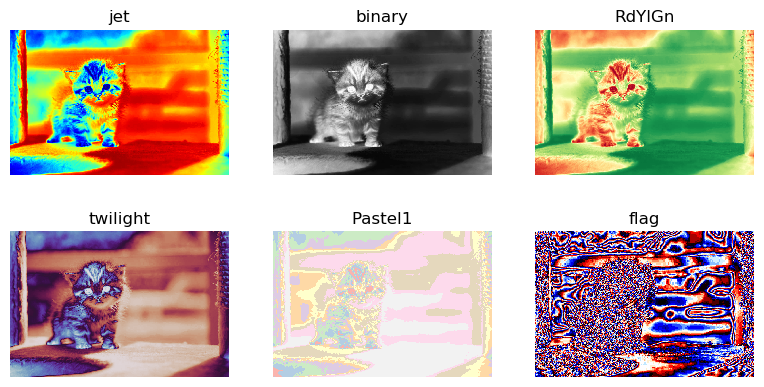
Don’t worry, you haven’t done anything wrong! You created a grayscale image but matplotlib applied a colormap to it automatically. This happens even if you pick the second or third dimension in your grayscale_cat definition.
To make it grayscale, set the cmap keyword argument to 'gray' in plt.imshow().
Perfect! Now you can easily turn any color image into a grayscale one in matplotlib. But there are many more colors you can choose from. Let’s look at all the colormaps in detail.
Matplotlib Imshow Colormap
There are many different colormaps you can apply to your images. Simply pass the name to the cmap keyword argument in plt.imshow() and you’re good to go. I recommend you play around with them since most of the names won’t mean anything to you on first reading.
The default colormap is viridis. Let’s explicitly apply it to our cat image.
# Turn cat_img into a 2D numpy array colored_cat = cat_img[:, :, 0]
plt.axis('off')
plt.imshow(colored_cat, cmap='viridis')
I could write a whole article on colormaps – in fact, the creator of Seaborn did. It’s a fascinating topic. Choosing the right one can make your plot incredible and choosing a bad one can ruin it.
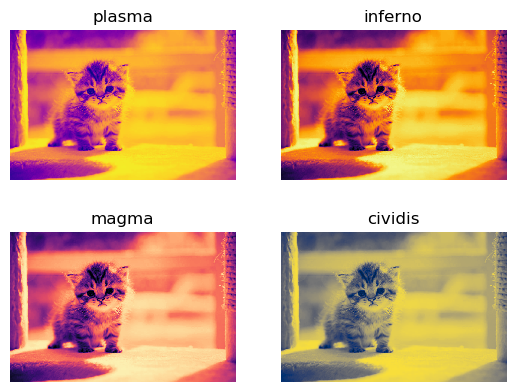
For beginners, matplotlib recommends the Perceptually Uniform Sequential colormaps as they work well and are easy on the eyes. Here’s a list of them all.
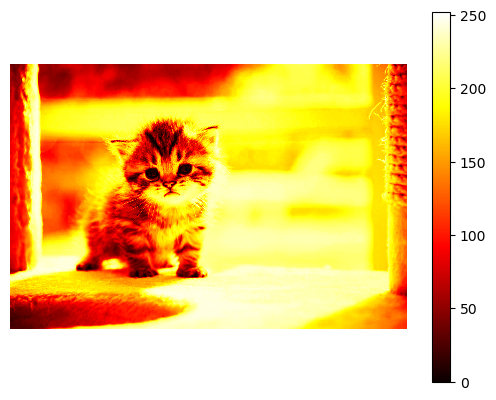
If your image has a colormap applied to it, you may want to tell the reader what each color means by providing a colorbar. Use plt.colorbar() to add one.
Remember that every value in an array representing a colored image is a number between 0 and 255 and so the colorbar reflects this.
Note that I called plt.imshow() on the first line. Unlike plt.show(), you can modify images after calling plt.imshow() and the changes will be applied to the output.
Matplotlib Imshow Size
As with every Figure in matplotlib, you can manually set the Figure‘s size. Simply call plt.figure() at the top and set the figsize argument. You can either set it to a specific size in inches or set the aspect ratio:
plt.figure(figsize=plt.figaspect(2)) – aspect ratio of 2, i.e. twice as tall as it is wide.
Note: the default figsize can be found by calling plt.rcParams['figure.figsize'] and is (6.4, 4.8) inches.
Let’s see what happens when we modify the Figure size of our cat image.
# 1 inch wide x 1 inch tall...?
plt.figure(figsize=(1, 1)) cat_img = plt.imread('Figures/cat.jpeg')
plt.axis('off')
plt.imshow(cat_img)
This is certainly smaller than the original. But it doesn’t look like it is 1×1 inches – it’s clearly wider that it is tall. But it looks like one of the sides is correct which is better than nothing.
Let’s try to make it 1 inch wide and 3 inches tall.
# 1 inch wide x 3 inches tall...?
plt.figure(figsize=(1, 3)) cat_img = plt.imread('Figures/cat.jpeg')
plt.axis('off')
plt.imshow(cat_img)
Now the image hasn’t changed at all. What’s going on?
When you resize images in most programs like Microsoft Word or Google Sheets, they maintain their original height/width ratios. This is called preserving the aspect ratio of the image and is usually a very good thing. It ensures that pixels in the image are not distorted when you resize them. This is also the default behavior in matplotlib.
If you actually want to distort the image and to fill up the entire space available in the Figure, change the aspect keyword argument in plt.imshow().
There are only two possible values for aspect:
‘equal’ – (default) preserves the aspect ratio, i.e. the side lengths of the pixels are equal (square)
‘auto’ – does not preserve the aspect ratio
Let’s look at the same examples as above but set aspect='auto'.
# 1 inch wide x 1 inch tall (definitely)
plt.figure(figsize=(1, 1)) cat_img = plt.imread('Figures/cat.jpeg')
plt.axis('off')
plt.imshow(cat_img, aspect='auto')
Great! Now, the image is clearly 1×1 inches but it has come at the expense of slight image distortion.
Let’s distort it even further.
# 1 inch wide x 3 inches tall (definitely)
plt.figure(figsize=(1, 3)) cat_img = plt.imread('Figures/cat.jpeg')
plt.axis('off')
plt.imshow(cat_img, aspect='auto')
Perfect! Clearly the image is distorted but now you know how to do it.
Note the default aspect value can be changed for all images by setting plt.rcParams['image.aspect'] = 'auto'.
Summary
Now you know the basics of displaying images with matplotlib.
You understand why you need to first read images in from a file and store them as a numpy array (NumPy tutorial here) before displaying them with plt.imshow(). You know how to read in different types of image files (hint – if it’s a still image, it’s the same process regardless of the file type!).
If you want to set a specific colormap, you use the cmap keyword argument and you can also turn your color image to a grayscale one. Finally, you can add a colorbar and change the size of your image to be anything you want.
There are some more advanced topics to learn about such as interpolation, adding legends and using log scales for your axes but I’ll leave them for another article.
Where To Go From Here?
Do you wish you could be a programmer full-time but don’t know how to start?
Check out the pure value-packed webinar where Chris – creator of Finxter.com – teaches you to become a Python freelancer in 60 days or your money back!
It doesn’t matter if you’re a Python novice or Python pro. If you are not making six figures/year with Python right now, you will learn something from this webinar.
These are proven, no-BS methods that get you results fast.
This webinar won’t be online forever. Click the link below before the seats fill up and learn how to become a Python freelancer, guaranteed.
Just like me an hour ago, you’re probably sitting in front of your regular expression code, puzzled by a strange error message:
re.error: multiple repeat at position x
How does it arise? Where does it come from? And, most importantly, how can you get rid of it?
This article gives you answers to all of those questions. Alternatively, you can also watch my short explainer video that shows you real quick how to resolve this error:
How Does the Multiple Repeat Error Arise in Python Re?
Python’s regex library re throws the multiple repeat error when you try to stack two regex quantifiers on top of each other. For example, the regex 'a++' will cause the multiple repeat error. You can get rid of this error by avoiding to stack quantifiers on top of each other.
Here’s an example:
>>> import re
>>> re.findall('a++', 'aaaa')
Traceback (most recent call last): File "<pyshell#29>", line 1, in <module> re.findall('a++', 'aaaa') File "C:\Users\xcent\AppData\Local\Programs\Python\Python37\lib\re.py", line 223, in findall ...
re.error: multiple repeat at position 2
I have shortened the error message to focus on the relevant parts. In the code, you first import the regex library re. You then use the re.findall(pattern, string) function (see this blog tutorial) to find the pattern 'a++' in the string 'aaaa'.
However, this doesn’t make a lot of sense: what’s the meaning of the pattern a++ anyway?
[Tips] What’s the Source of the Multiple Repeat Error and How to Avoid It?
The error happens if you use the Python regex package re. There are many different reasons for it but all of them have the same source: you stack quantifiers on top of each other.
If you don’t know what a quantifier is, scroll down and read the following subsection where I show you exactly what it is.
Here’s a list of reasons for the error message. Maybe your reason is among them?
You use the regex pattern 'X++' for any regex expression X. To avoid this error, get rid of one quantifier.
You use the regex pattern 'X+*' for any regex expression X. To avoid this error, get rid of one quantifier.
You use the regex pattern 'X**' for any regex expression X. To avoid this error, get rid of one quantifier.
You use the regex pattern 'X{m,n}*' for any regex expression X and number of repetitions m and n. To avoid this error, get rid of one quantifier.
You try to match a number of characters '+' and use a second quantifier on top of it such as '+?'. In this case, you should escape the first quantifier symbol '\+'.
You try to match a number of characters '*' and use a second quantifier on top of it such as '*+'. Avoid this error by escaping the first quantifier symbol '\*'.
Oftentimes, the error appears if you don’t properly escape the special quantifier metacharacters in your regex pattern.
Here’s a StackOverflow post that shows some code where this happened:
...
term = 'lg incite" OR author:"http++www.dealitem.com" OR "for sale'
p = re.compile(term, re.IGNORECASE) ...
I edited the given code snippet to show the important part. The code fails because of a multiple repeat error. Can you see why?
The reason is that the regex 'lg incite" OR author:"http++www.dealitem.com" OR "for sale' contains two plus quantifiers stacked on top of each other in the substring 'http++'. Get rid of those and the code will run again!
Python Regex Quantifiers
The word “quantifier” originates from latin: it’s meaning is quantus = how much / how often.
This is precisely what a regular expression quantifier means: you tell the regex engine how often you want to match a given pattern.
If you think you don’t define any quantifier, you do it implicitly: no quantifier means to match the regular expression exactly once.
So what are the regex quantifiers in Python?
Quantifier
Meaning
A?
Match regular expression A zero or one times
A*
Match regular expression A zero or more times
A+
Match regular expression A one or more times
A{m}
Match regular expression A exactly m times
A{m,n}
Match regular expression A between m and n times (included)
Note that in this tutorial, I assume you have at least a remote idea of what regular expressions actually are. If you haven’t, no problem, check out my detailed regex tutorial on this blog.
You see in the table that the quantifiers ?, *, +, {m}, and {m,n} define how often you repeat the matching of regex A.
Let’s have a look at some examples—one for each quantifier:
In each line, you try a different quantifier on the same text 'aaaa'. And, interestingly, each line leads to a different output:
The zero-or-one regex 'a?' matches four times one 'a'. Note that it doesn’t match zero characters if it can avoid doing so.
The zero-or-more regex 'a*' matches once four 'a's and consumes them. At the end of the string, it can still match the empty string.
The one-or-more regex 'a+' matches once four 'a's. In contrast to the previous quantifier, it cannot match an empty string.
The repeating regex 'a{3}' matches up to three 'a's in a single run. It can do so only once.
The repeating regex 'a{1,2}' matches one or two 'a's. It tries to match as many as possible.
You’ve learned the basic quantifiers of Python regular expressions.
Where to Go From Here?
To summarize, you’ve learned that the multiple repeat error appears whenever you try to stack multiple quantifiers on top of each other. Avoid this and the error message will disappear.
I just wrote a regular expression in Python that matches multiple times in the text and wondered: how to count the number of matches?
Consider the example where you match an arbitrary number of word characters '[a-z]+' in a given sentence 'python is the best programming language in the world'.
You can watch my explainer video as you read over the tutorial:
How many matches are there in the string? To count the number of matches, you can use multiple methods:
1. Python re.findall()
Use the re.findall(pattern, string) method that returns a list of matching substrings. Then count the length of the returned list. Here’s an example:
>>> import re
>>> pattern = '[a-z]+'
>>> text = 'python is the best programming language in the world'
>>> len(re.findall(pattern, text))
9
Why is the result 9? Because there are nine matching substrings in the returned list of the re.findall() method:
Definition: returns an iterator that goes over all non-overlapping matches of the pattern in the text.
The flags argument allows you to customize some advanced properties of the regex engine such as whether capitalization of characters should be ignored. You can learn more about the flags argument in my detailed blog tutorial.
Example: You can use the iterator to count the number of matches. In contrast to the re.findall() method described above, this has the advantage that you can analyze the match objects themselves that carry much more information than just the matching substring.
import re
pattern = '[a-z]+'
text = 'python is the best programming language in the world'
for match in re.finditer(pattern, text): print(match) '''
<re.Match object; span=(0, 6), match='python'>
<re.Match object; span=(7, 9), match='is'>
<re.Match object; span=(10, 13), match='the'>
<re.Match object; span=(14, 18), match='best'>
<re.Match object; span=(19, 30), match='programming'>
<re.Match object; span=(31, 39), match='language'>
<re.Match object; span=(40, 42), match='in'>
<re.Match object; span=(43, 46), match='the'>
<re.Match object; span=(47, 52), match='world'> '''
If you want to count the number of matches, you can use a simple count variable:
import re
pattern = '[a-z]+'
text = 'python is the best programming language in the world' count = 0
for match in re.finditer(pattern, text): count += 1 print(count)
# 9
Or a more Pythonic solution:
import re
pattern = '[a-z]+'
text = 'python is the best programming language in the world' print(len([i for i in re.finditer(pattern, text)]))
# 9
This method works great if there are non-overlapping matches.
3. Overlapping Matches
The above two methods work great if there are no overlapping matches. If there are overlapping matches, the regex engine will just ignore them because it “consumes” the whole matching substrings and starts matching the next pattern only after the stop index of the previous match.
So if you need to find the number of overlapping matches, you need to use a different approach.
The idea is to keep track of the start position in the previous match and increment it by one after each match:
import re
pattern = '99'
text = '999 ways of writing 99 - 99999' left = 0
count = 0
while True: match = re.search(pattern, text[left:]) if not match: break count += 1 left += match.start() + 1
print(count)
# 7
By keeping track of the start index of the previous match in the left variable, we can control where to look for the next match in the string. Note that we use Python’s slicing operation text[left:] to ignore all left characters that are already considered in previous matches. In each loop iteration, we match another pattern in the text. This works even if those matches overlap.
Where to Go From Here
You’ve learned three ways of finding the number of matches of a given pattern in a string.
If you struggle with regular expressions, check out our free 20,000 word regex tutorial on the Finxter blog! It’ll give you regex superpowers!
I don’t know how often I sat in front of my computer, writing regular expressions and wondering: how to escape this or that character? The problem is that some special characters have a special meaning in Python strings and regular expressions. If you want to remove the special meaning, you need to escape the characters with an additional backslash.
If you have this problem too, you’re in luck. This article is the ultimate guide to escape special characters in Python. Just click on the topic that interests you and learn how to escape the special character you’re currently struggling with!
If you’re the impatient guy, you’re in luck too. Just try to add the backslash to your special character you want to escape: \x to escape special character x.
You can also watch the following video where I give you a quick example:
Python Regex Escape Characters
If you use special characters in strings, they carry a special meaning. Sometimes you don’t need that. The general idea is to escape the special character x with an additional backslash \x to get rid of the special meaning.
In the following, I show how to escape all possible special characters for Python strings and regular expressions:
Python Regex Escape Parentheses ()
How to escape the parentheses ( and ) in Python regular expressions?
Parentheses have a special meaning in Python regular expressions: they open and close matching groups.
You can get rid of the special meaning of parentheses by using the backslash prefix: \( and \). This way, you can match the parentheses characters in a given string. Here’s an example:
>>> import re
>>> re.findall(r'\(.*\)', 'Python is (really) great')
['(really)']
The result shows a string that contains the “special” characters '(' and ')'.
Python Regex Escape Square Brackets []
How to escape the square brackets [ and ] in Python regular expressions?
Square brackets have a special meaning in Python regular expressions: they open and close character sets.
You can get rid of the special meaning of brackets by using the backslash prefix: \[ and \]. This way, you can match the brackets characters in a given string. Here’s an example:
>>> import re
>>> re.findall(r'\[.*\]', 'Is Python [really] easy?')
['[really]']
The result shows a string that contains the “special” characters '[' and ']'.
Python Regex Escape Curly Brace (Brackets)
How to escape the curly braces{ and } in Python regular expressions?
The curly braces don’t have any special meaning in Python strings or regular expressions. Therefore, you don’t need to escape them with a leading backslash character \. However, you can do so if you wish as you see in the following example:
>>> import re
>>> re.findall(r'\{.*\}', 'if (2==2) { y = 3; }')
['{ y = 3; }']
>>> re.findall(r'{.*}', 'if (2==2) { y = 3; }')
['{ y = 3; }']
>>> re.findall('{.*}', 'if (2==2) { y = 3; }')
['{ y = 3; }']
All three cases match the same string enclosed in curly braces—even though we did not escape them and didn’t use the raw string r'' in the third example.
Python Regex Escape Slash (Backslash and Forward-Slash)
How to escape the slash characters—backslash \ and forward-slash /—in Python regular expressions?
The backslash has a special meaning in Python regular expressions: it escapes special characters and, thus, removes the special meaning. (How meta.)
You can see that the resulting matches have escaped backslashes themselves. This is because the backslash character has a special meaning in normal strings. Thus, the Python interpreter escapes it automatically by itself when printing it on the shell. Note that you didn’t need to escape the backslash characters when writing the raw string r'C:\home\usr\dir\hello\world' because the raw string already removes all the special meaning from the backslashed characters. But if you don’t want to use a raw string but a normal string, you need to escape the backslash character yourself:
In contrast to the backslash, the forward-slash doesn’t need to be escaped. Why? Because it doesn’t have a special meaning in Python strings and regular expressions. You can see this in the following example:
The result shows that even in a non-raw string, you can use the forward-slash without leading escape character.
Python Regex Escape String Single Quotes
How to escape the single quotes ' in Python regular expressions?
Single quotes have a special meaning in Python regular expressions: they open and close strings.
You can get rid of the special meaning of single quotes by using the backslash prefix: \'. This way, you can match the string quote characters in a given string. Here’s an example:
>>> import re
>>> re.findall('\'.*\'', "hello 'world'")
["'world'"]
The result shows a string that contains the “special” single quote characters. The result also shows an alternative that removes the special meaning of the single quotes: enclose them in double quotes: "hello 'world'".
Python Regex Escape String Double Quotes
How to escape the double quotes " in Python regular expressions?
Double quotes have a special meaning in Python regular expressions: they open and close strings.
You can get rid of the special meaning of single quotes by using the backslash prefix: \". This way, you can match the string quote characters in a given string. Here’s an example:
>>> import re
>>> re.findall('\".*\"', 'hello "world"')
['"world"']
The result shows a string that contains the “special” single quote characters. The result also shows an alternative that removes the special meaning of the single quotes: enclose them in double quotes: 'hello "world"'.
Python Regex Escape Dot (Period)
How to escape the regex dot (or period) meta character . in Python regular expressions?
The dot character has a special meaning in Python regular expressions: it matches an arbitrary character (except newline).
You can get rid of the special meaning of the dot character by using the backslash prefix: \.. This way, you can match the dot character in a given string. Here’s an example:
>>> import re
>>> re.findall('..\.', 'my. name. is. python.')
['my.', 'me.', 'is.', 'on.']
The result shows four strings that contain the “special” characters '.'.
Python Regex Escape Plus
How to escape the plus symbol + in Python regular expressions?
The plus symbol has a special meaning in Python regular expressions: it’s the one-or-more quantifier of the preceding regex.
You can get rid of the special meaning of the regex plus symbol by using the backslash prefix: \+. This way, you can match the plus symbol characters in a given string. Here’s an example:
>>> import re
>>> re.findall('\++', '+++python+++rocks')
['+++', '+++']
The result shows both usages: the plus symbol with and without leading escape character. If it is escaped \+, it matches the raw plus character. If it isn’t escaped +, it quantifies the regex pattern just in front of it (in our case the plus symbol itself).
Python Regex Escape Asterisk
How to escape the asterisk symbol * in Python regular expressions?
The asterisk symbol has a special meaning in Python regular expressions: it’s the zero-or-more quantifier of the preceding regex.
You can get rid of the special meaning of the regex asterisk symbol by using the backslash prefix: \*. This way, you can match the asterisk symbol characters in a given string. Here’s an example:
>>> import re
>>> re.findall('\**', '***python***rocks')
['***', '***']
The result shows both usages: the asterisk symbol with and without leading escape character. If it is escaped \*, it matches the raw asterisk character. If it isn’t escaped *, it quantifies the regex pattern just in front of it (in our case the asterisk symbol itself).
Python Regex Escape Question Mark
How to escape the question mark symbol ? in Python regular expressions?
The question mark symbol has a special meaning in Python regular expressions: it’s the zero-or-one quantifier of the preceding regex.
You can get rid of the special meaning of the question mark symbol by using the backslash prefix: \?. This way, you can match the question mark symbol characters in a given string. Here’s an example:
>>> import re
>>> re.findall('...\?', 'how are you?')
['you?']
The result shows that the question mark symbol was matched in the given string.
Python Regex Escape Underscore
How to escape the underscore character _ in Python regular expressions?
The underscore doesn’t have a special meaning in Python regular expressions or Python strings.
Therefore, you don’t need to escape the underscore character—just use it in your regular expression unescaped.
>>> import re
>>> re.findall('..._', 'i_use_underscore_not_whitespace')
['use_', 'ore_', 'not_']
In both cases, Python finds the underscore characters in the string and matches them in the result.
Python Regex Escape Pipe
How to escape the pipe symbol | (vertical line) in Python regular expressions?
The pipe symbol has a special meaning in Python regular expressions: the regex OR operator.
You can get rid of the special meaning of the pipe symbol by using the backslash prefix: \|. This way, you can match the parentheses characters in a given string. Here’s an example:
>>> import re
>>> re.findall('.\|.', 'a|b|c|d|e')
['a|b', 'c|d']
By escaping the pipe symbol, you get rid of the special meaning. The result is just the matched pipe symbol with leading and trailing arbitrary character.
If you don’t escape the pipe symbol, the result will be quite different:
In this case, the regex .|. matches “an arbitrary character or an arbitrary character”—quite meaningless!
Python Regex Escape Dollar
How to escape the dollar symbol $ in Python regular expressions?
The dollar symbol has a special meaning in Python regular expressions: it matches at the end of the string.
You can get rid of the special meaning by using the backslash prefix: \$. This way, you can match the dollar symbol in a given string. Here’s an example:
>>> import re
>>> re.findall('\$\d+', 'Your house is worth $1000000')
['$1000000']
Note that the \d+ regex matches an arbitrary number of numerical digits between 0 and 9.
Python Regex Escape Greater Than and Smaller Than
How to escape the greater than < and smaller than > symbols in Python regular expressions?
Greater and smaller than symbols don’t have a special meaning in Python regular expressions. Therefore, you don’t need to escape them.
Here’s an example:
>>> import re
>>> re.findall('<.*>.*<.*>', '<div>hello world</div>')
['<div>hello world</div>']
The result shows a string that even without escaping the HTML tag symbols, the regex matches the whole string.
Python Regex Escape Hyphen
How to escape the hyphen- in Python regular expressions?
Outside a character set, the hyphen doesn’t have a special meaning and you don’t need to escape it. Here’s an example:
>>> import re
>>> re.findall('..-', 'this is-me')
['is-']
The unescaped hyphen character in the regex matches the hyphen in the string.
However, inside a character set, the hyphen stands for the range symbol (e.g. [0-9]) so you need to escape it if you want to get rid of its special meaning and match the hyphen symbol itself. Here’s an example:
>>> re.findall('[a-z\-]+', 'hello-world is one word')
['hello-world', 'is', 'one', 'word']
Note that, in this case, if you don’t escape the hyphen in the character set, you get the same result:
>>> re.findall('[a-z-]+', 'hello-world is one word')
['hello-world', 'is', 'one', 'word']
The reason is that the hyphen appears at the end of the character set where it can have only one meaning: the hyphen symbol itself. However, in all other cases, the hyphen would be assumed to mean the range character which will result in strange behavior. A good practice is, thus, to escape the hyphen in the character class per default.
Python Regex Escape Newline
In a recent StackOverflow article, I read the following question:
I got a little confused about Python raw string. I know that if we use raw string, then it will treat '\' as a normal backslash (ex. r'\n' would be '\' and 'n'). However, I was wondering what if I want to match a new line character in raw string. I tried r'\n', but it didn’t work. Anybody has some good idea about this?
The coder asking the question has understood that the Python interpreter doesn’t assume that the two characters \ and n do have any special meaning in raw strings (in contrast to normal strings).
However, those two symbols have a special meaning for the regex engine! So if you use them as a regular expression pattern, they will indeed match the newline character:
>>> import re
>>> text = '''This
is
a
multiline
string'''
>>> re.findall(r'[a-z]+\n', text)
['his\n', 'is\n', 'a\n', 'multiline\n']
Therefore, you don’t need to escape the newline character again to match it in a given string.
Python re.escape Method
If you know that your string has a lot of special characters, you can also use the convenience method re.escape(pattern) from Python’s re module.
Specification: re.escape(pattern)
Definition: escapes all special regex meta characters in the given pattern.
Example: you can escape all special symbols in one go:
The dot symbol has a special meaning in the string 'https://www.finxter.com/'. There are no other special symbols. Therefore, all special symbols are replaced.
Note that “only characters that can have special meaning in a regular expression are escaped. As a result, '!', '"', '%', "'", ',', '/', ':', ';', '<', '=', '>', '@', and "`" are no longer escaped” (source).
Python Regex Bad Escape
There are some common errors in relation to escaping in Python regular expressions.
If you try to escape a normal character that has not a special meaning, Python will throw a “bad escape error”:
>>> re.findall('\m', 'hello {world}')
Traceback (most recent call last): File "<pyshell#61>", line 1, in <module> re.findall('\m', 'hello {world}') File "C:\Users\xcent\AppData\Local\Programs\Python\Python37\lib\re.py", line 223, in findall return _compile(pattern, flags).findall(string) File "C:\Users\xcent\AppData\Local\Programs\Python\Python37\lib\re.py", line 286, in _compile p = sre_compile.compile(pattern, flags) File "C:\Users\xcent\AppData\Local\Programs\Python\Python37\lib\sre_compile.py", line 764, in compile p = sre_parse.parse(p, flags) File "C:\Users\xcent\AppData\Local\Programs\Python\Python37\lib\sre_parse.py", line 930, in parse p = _parse_sub(source, pattern, flags & SRE_FLAG_VERBOSE, 0) File "C:\Users\xcent\AppData\Local\Programs\Python\Python37\lib\sre_parse.py", line 426, in _parse_sub not nested and not items)) File "C:\Users\xcent\AppData\Local\Programs\Python\Python37\lib\sre_parse.py", line 507, in _parse code = _escape(source, this, state) File "C:\Users\xcent\AppData\Local\Programs\Python\Python37\lib\sre_parse.py", line 402, in _escape raise source.error("bad escape %s" % escape, len(escape))
re.error: bad escape \m at position 0
As the error message suggests, there’s no escape sequence \m so you need to get rid of it to avoid the error.
Where to Go From Here
Wow, you either have read about a lot of escaped character sequences or you did a lot of scrolling to reach this point.
In both cases, you have a great advantage over other coders: you’re a persistent guy or gal!
Do you want to increase your advantage over your peers? Then join my Python email academy! I’ll teach you the ins and outs of Python coding—all free!
Regular expressions are a strange animal. Many students find them difficult to understand – do you?
I realized that a major reason for this is simply that they don’t understand the special regex characters. To put it differently: understand the special characters and everything else in the regex space will come much easier to you.
Regular expressions are built from characters. There are two types of characters: literal characters and special characters.
Literal Characters
Let’s start with the absolute first thing you need to know with regular expressions: a regular expression (short: regex) searches for a given pattern in a given string.
What’s a pattern? In its most basic form, a pattern can be a literal character. So the literal characters 'a', 'b', and 'c' are all valid regex patterns.
For example, you can search for the regex pattern 'a' in the string 'hello world' but it won’t find a match. You can also search for the pattern 'a' in the string 'hello woman' and there is a match: the second last character in the string.
Based on the simple insight that a literal character is a valid regex pattern, you’ll find that a combination of literal characters is also a valid regex pattern. For example, the regex pattern 'an' matches the last two characters in the string 'hello woman'.
Summary: Regular expressions are built from characters. An important class of characters are the literal characters. In principle, you can use all Unicode literal characters in your regex pattern.
Special Characters
However, the power of regular expressions come from their abstraction capability. Instead of writing the character set[abcdefghijklmnopqrstuvwxyz], you’d write [a-z] or even \w. The latter is a special regex character—and pros know them by heart. In fact, regex experts seldomly match literal characters. In most cases, they use more advanced constructs or special characters for various reasons such as brevity, expressiveness, or generality.
So what are the special characters you can use in your regex patterns?
Let’s have a look at the following table that contains all special characters in Python’s re package for regular expression processing.
Special Character
Meaning
\n
The newline symbol is not a special symbol particular to regex only, it’s actually one of the most widely-used, standard characters. However, you’ll see the newline character so often that I just couldn’t write this list without including it. For example, the regex 'hello\nworld' matches a string where the string 'hello' is placed in one line and the string 'world' is placed into the second line.
\t
The tabular character is, like the newline character, not a “regex-specific” symbol. It just encodes the tabular space ' ' which is different to a sequence of whitespaces (even if it doesn’t look different over here). For example, the regex 'hello\n\tworld' matches the string that consists of 'hello' in the first line and ' world' in the second line (with a leading tab character).
\s
The whitespace character is, in contrast to the newline character, a special symbol of the regex libraries. You’ll find it in many other programming languages, too. The problem is that you often don’t know which type of whitespace is used: tabular characters, simple whitespaces, or even newlines. The whitespace character '\s' simply matches any of them. For example, the regex '\s*hello\s+world' matches the string ' \t \n hello \n \n \t world', as well as 'hello world'.
\S
The whitespace-negation character matches everything that does not match \s.
\w
The word character regex simplifies text processing significantly. It represents the class of all characters used in typical words (A-Z, a-z, 0-9, and '_'). This simplifies the writing of complex regular expressions significantly. For example, the regex '\w+' matches the strings 'hello', 'bye', 'Python', and 'Python_is_great'.
\W
The word-character-negation. It matches any character that is not a word character.
\b
The word boundary is also a special symbol used in many regex tools. You can use it to match, as the name suggests, the boundary between the a word character (\w) and a non-word (\W) character. But note that it matches only the empty string! You may ask: why does it exist if it doesn’t match any character? The reason is that it doesn’t “consume” the character right in front or right after a word. This way, you can search for whole words (or parts of words) and return only the word but not the delimiting characters that separate the word, e.g., from other words.
\d
The digit character matches all numeric symbols between 0 and 9. You can use it to match integers with an arbitrary number of digits: the regex '\d+' matches integer numbers '10', '1000', '942', and '99999999999'.
\D
Matches any non-digit character. This is the inverse of \d and it’s equivalent to [^0-9].
But these are not all characters you can use in a regular expression.
There are also meta characters for the regex engine that allow you to do much more powerful stuff.
A good example is the asterisk operator that matches “zero or more” occurrences of the preceding regex. For example, the pattern .*txt matches an arbitrary number of arbitrary characters followed by the suffix 'txt'. This pattern has two special regex meta characters: the dot . and the asterisk operator *. You’ll now learn about those meta characters:
Regex Meta Characters
Feel free to watch the short video about the most important regex meta characters:
Next, you’ll get a quick and dirty overview of the most important regex operations and how to use them in Python.
Here are the most important regex operators:
Meta Character
Meaning
.
The wild-card operator (dot) matches any character in a string except the newline character '\n'. For example, the regex '...' matches all words with three characters such as 'abc', 'cat', and 'dog'.
*
The zero-or-more asterisk operator matches an arbitrary number of occurrences (including zero occurrences) of the immediately preceding regex. For example, the regex ‘cat*’ matches the strings 'ca', 'cat', 'catt', 'cattt', and 'catttttttt'.
?
The zero-or-one operator matches (as the name suggests) either zero or one occurrences of the immediately preceding regex. For example, the regex ‘cat?’ matches both strings ‘ca’ and ‘cat’ — but not ‘catt’, ‘cattt’, and ‘catttttttt’.
+
The at-least-one operator matches one or more occurrences of the immediately preceding regex. For example, the regex ‘cat+’ does not match the string ‘ca’ but matches all strings with at least one trailing character ‘t’ such as ‘cat’, ‘catt’, and ‘cattt’.
^
The start-of-string operator matches the beginning of a string. For example, the regex ‘^p’ would match the strings ‘python’ and ‘programming’ but not ‘lisp’ and ‘spying’ where the character ‘p’ does not occur at the start of the string.
$
The end-of-string operator matches the end of a string. For example, the regex ‘py$’ would match the strings ‘main.py’ and ‘pypy’ but not the strings ‘python’ and ‘pypi’.
A|B
The OR operator matches either the regex A or the regex B. Note that the intuition is quite different from the standard interpretation of the or operator that can also satisfy both conditions. For example, the regex ‘(hello)|(hi)’ matches strings ‘hello world’ and ‘hi python’. It wouldn’t make sense to try to match both of them at the same time.
AB
The AND operator matches first the regex A and second the regex B, in this sequence. We’ve already seen it trivially in the regex ‘ca’ that matches first regex ‘c’ and second regex ‘a’.
Note that I gave the above operators some more meaningful names (in bold) so that you can immediately grasp the purpose of each regex. For example, the ‘^’ operator is usually denoted as the ‘caret’ operator. Those names are not descriptive so I came up with more kindergarten-like words such as the “start-of-string” operator.
Let’s dive into some examples!
Examples
import re text = ''' Ha! let me see her: out, alas! he's cold: Her blood is settled, and her joints are stiff; Life and these lips have long been separated: Death lies on her like an untimely frost Upon the sweetest flower of all the field. ''' print(re.findall('.a!', text)) '''
Finds all occurrences of an arbitrary character that is
followed by the character sequence 'a!'.
['Ha!'] ''' print(re.findall('is.*and', text)) '''
Finds all occurrences of the word 'is',
followed by an arbitrary number of characters
and the word 'and'.
['is settled, and'] ''' print(re.findall('her:?', text)) '''
Finds all occurrences of the word 'her',
followed by zero or one occurrences of the colon ':'.
['her:', 'her', 'her'] ''' print(re.findall('her:+', text)) '''
Finds all occurrences of the word 'her',
followed by one or more occurrences of the colon ':'.
['her:'] ''' print(re.findall('^Ha.*', text)) '''
Finds all occurrences where the string starts with
the character sequence 'Ha', followed by an arbitrary
number of characters except for the new-line character. Can you figure out why Python doesn't find any?
[] ''' print(re.findall('\n$', text)) '''
Finds all occurrences where the new-line character '\n'
occurs at the end of the string.
['\n'] ''' print(re.findall('(Life|Death)', text)) '''
Finds all occurrences of either the word 'Life' or the
word 'Death'.
['Life', 'Death'] '''
In these examples, you’ve already seen the special symbol \n which denotes the new-line character in Python (and most other languages). There are many special characters, specifically designed for regular expressions.
Where to Go From Here
You’ve learned all special characters of regular expressions, as well as meta characters. This will give you a strong basis for improving your regex skills.
If you want to accelerate your skills, you need a good foundation. Check out my brand-new Python book “Python One-Liners (Amazon Link)” which boosts your skills from zero to hero—in a single line of Python code!


 Figure: A simple example of lookahead. The regular expression engine matches (“consumes”) the string partially. Then it checks whether the remaining pattern could be matched without actually matching it.