Posted on Leave a comment

Matplotlib Subplots – A Helpful Illustrated Guide

Too much stuff happening in a single plot? No problem—use multiple subplots!

This in-depth tutorial shows you everything you need to know to get started with Matplotlib’s subplots() function.

If you want, just hit “play” and watch the explainer video. I’ll then guide you through the tutorial:

Let’s start with the short answer on how to use it—you’ll learn all the details later!

The plt.subplots() function creates a Figure and a Numpy array of Subplot/Axes objects which you store in fig and axes respectively.

Specify the number of rows and columns you want with the nrows and ncols arguments.

fig, axes = plt.subplots(nrows=3, ncols=1)

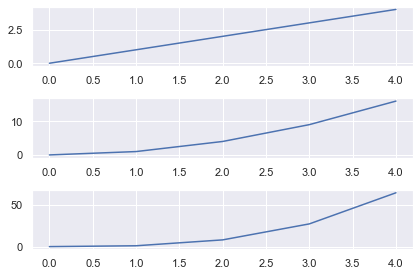
This creates a Figure and Subplots in a 3×1 grid. The Numpy array axes has shape (nrows, ncols) the same shape as the grid, in this case (3,) (it’s a 1D array since one of nrows or ncols is 1). Access each Subplot using Numpy slice notation and call the plot() method to plot a line graph.

Once all Subplots have been plotted, call plt.tight_layout() to ensure no parts of the plots overlap. Finally, call plt.show() to display your plot.

# Import necessary modules and (optionally) set Seaborn style
import matplotlib.pyplot as plt
import seaborn as sns; sns.set()
import numpy as np # Generate data to plot
linear = [x for x in range(5)]
square = [x**2 for x in range(5)]
cube = [x**3 for x in range(5)] # Generate Figure object and Axes object with shape 3x1
fig, axes = plt.subplots(nrows=3, ncols=1) # Access first Subplot and plot linear numbers
axes[0].plot(linear) # Access second Subplot and plot square numbers
axes[1].plot(square) # Access third Subplot and plot cube numbers
axes[2].plot(cube) plt.tight_layout()
plt.show()
Matplotlib Figures and Axes

Up until now, you have probably made all your plots with the functions in matplotlib.pyplot i.e. all the functions that start with plt..

These work nicely when you draw one plot at a time. But to draw multiple plots on one Figure, you need to learn the underlying classes in matplotlib.

Let’s look at an image that explains the main classes from the AnatomyOfMatplotlib tutorial:

To quote AnatomyOfMatplotlib:

The Figure is the top-level container in this hierarchy. It is the overall window/page that everything is drawn on. You can have multiple independent figures and Figures can contain multiple Axes.

Most plotting ocurs on an Axes. The axes is effectively the area that we plot data on and any ticks/labels/etc associated with it. Usually we’ll set up an Axes with a call to subplots (which places Axes on a regular grid), so in most cases, Axes and Subplot are synonymous.

Each Axes has an XAxis and a YAxis. These contain the ticks, tick locations, labels, etc. In this tutorial, we’ll mostly control ticks, tick labels, and data limits through other mechanisms, so we won’t touch the individual Axis part of things all that much. However, it is worth mentioning here to explain where the term Axes comes from.

The typical variable names for each object are:

  • Figurefig or f,
  • Axes (plural) – axes or axs,
  • Axes (singular) – ax or a

The word Axes refers to the area you plot on and is synonymous with Subplot. However, you can have multiple Axes (Subplots) on a Figure. In speech and writing use the same word for the singular and plural form. In your code, you should make a distinction between each – you plot on a singular Axes but will store all the Axes in a Numpy array.

An Axis refers to the XAxis or YAxis – the part that gets ticks and labels.

The pyplot module implicitly works on one Figure and one Axes at a time. When we work with Subplots, we work with multiple Axes on one Figure. So, it makes sense to plot with respect to the Axes and it is much easier to keep track of everything.

The main differences between using Axes methods and pyplot are:

  1. Always create a Figure and Axes objects on the first line
  2. To plot, write ax.plot() instead of plt.plot().

Once you get the hang of this, you won’t want to go back to using pyplot. It’s much easier to create interesting and engaging plots this way. In fact, this is why most StackOverflow answers are written with this syntax.

All of the functions in pyplot have a corresponding method that you can call on Axes objects, so you don’t have to learn any new functions.

Let’s get to it.

Matplotlib Subplots Example

The plt.subplots() function creates a Figure and a Numpy array of Subplots/Axes objects which we store in fig and axes respectively.

Specify the number of rows and columns you want with the nrows and ncols arguments.

fig, axes = plt.subplots(nrows=3, ncols=1)

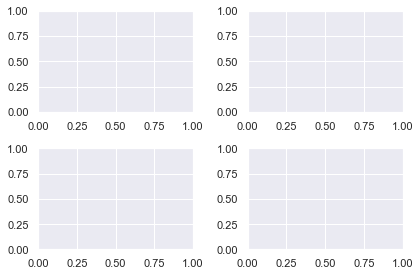
This creates a Figure and Subplots in a 3×1 grid. The Numpy array axes is the same shape as the grid, in this case (3,). Access each Subplot using Numpy slice notation and call the plot() method to plot a line graph.

Once all Subplots have been plotted, call plt.tight_layout() to ensure no parts of the plots overlap. Finally, call plt.show() to display your plot.

fig, axes = plt.subplots(nrows=2, ncols=2) plt.tight_layout()
plt.show()
The most important arguments for plt.subplots() are similar to the matplotlib subplot function but can be specified with keywords. Plus, there are more powerful ones which we will discuss later.

To create a Figure with one Axes object, call it without any arguments

fig, ax = plt.subplots()

Note: this is implicitly called whenever you use the pyplot module. All ‘normal’ plots contain one Figure and one Axes.

In advanced blog posts and StackOverflow answers, you will see a line similar to this at the top of the code. It is much more Pythonic to create your plots with respect to a Figure and Axes.

To create a Grid of subplots, specify nrows and ncols – the number of rows and columns respectively

fig, axes = plt.subplots(nrows=2, ncols=2)

The variable axes is a numpy array with shape (nrows, ncols). Note that it is in the plural form to indicate it contains more than one Axes object. Another common name is axs. Choose whichever you prefer. If you call plt.subplots() without an argument name the variable ax as there is only one Axes object returned.

I will select each Axes object with slicing notation and plot using the appropriate methods. Since I am using Numpy slicing, the index of the first Axes is 0, not 1.

# Create Figure and 2x2 gris of Axes objects
fig, axes = plt.subplots(nrows=2, ncols=2) # Generate data to plot. data = np.array([1, 2, 3, 4, 5]) # Access Axes object with Numpy slicing then plot different distributions
axes[0, 0].plot(data)
axes[0, 1].plot(data**2)
axes[1, 0].plot(data**3)
axes[1, 1].plot(np.log(data)) plt.tight_layout()
plt.show()

First I import the necessary modules, then create the Figure and Axes objects using plt.subplots(). The Axes object is a Numpy array with shape (2, 2) and I access each subplot via Numpy slicing before doing a line plot of the data. Then, I call plt.tight_layout() to ensure the axis labels don’t overlap with the plots themselves. Finally, I call plt.show() as you do at the end of all matplotlib plots.

Matplotlib Subplots Title

To add an overall title to the Figure, use plt.suptitle().

To add a title to each Axes, you have two methods to choose from:

  1. ax.set_title('bar')
  2. ax.set(title='bar')

In general, you can set anything you want on an Axes using either of these methods. I recommend using ax.set() because you can pass any setter function to it as a keyword argument. This is faster to type, takes up fewer lines of code and is easier to read.

Let’s set the title, xlabel and ylabel for two Subplots using both methods for comparison

# Unpack the Axes object in one line instead of using slice notation
fig, (ax1, ax2) = plt.subplots(nrows=1, ncols=2) # First plot - 3 lines
ax1.set_title('many')
ax1.set_xlabel('lines')
ax1.set_ylabel('of code') # Second plot - 1 line
ax2.set(title='one', xlabel='line', ylabel='of code') # Overall title
plt.suptitle('My Lovely Plot')
plt.tight_layout()
plt.show()
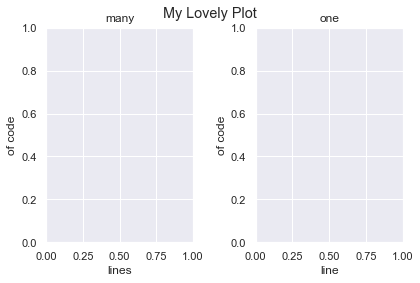
Clearly using ax.set() is the better choice.

Note that I unpacked the Axes object into individual variables on the first line. You can do this instead of Numpy slicing if you prefer. It is easy to do with 1D arrays. Once you create grids with multiple rows and columns, it’s easier to read if you don’t unpack them.

Matplotlib Subplots Share X Axis

To share the x axis for subplots in matplotlib, set sharex=True in your plt.subplots() call.

# Generate data
data = [0, 1, 2, 3, 4, 5] # 3x1 grid that shares the x axis
fig, axes = plt.subplots(nrows=3, ncols=1, sharex=True) # 3 different plots
axes[0].plot(data)
axes[1].plot(np.sqrt(data))
axes[2].plot(np.exp(data)) plt.tight_layout()
plt.show()
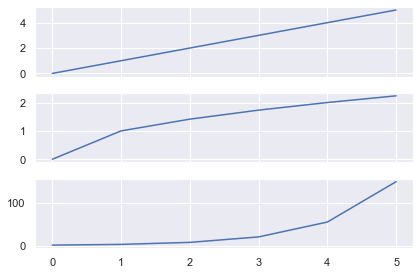
Here I created 3 line plots that show the linear, square root and exponential of the numbers 0-5.

As I used the same numbers, it makes sense to share the x-axis.
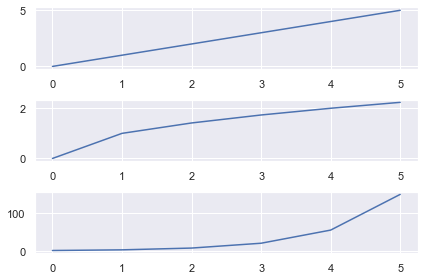
Here I wrote the same code but set sharex=False (the default behavior). Now there are unnecessary axis labels on the top 2 plots.

You can also share the y axis for plots by setting sharey=True in your plt.subplots() call.

Matplotlib Subplots Legend

To add a legend to each Axes, you must

  1. Label it using the label keyword
  2. Call ax.legend() on the Axes you want the legend to appear

Let’s look at the same plot as above but add a legend to each Axes.

# Generate data, 3x1 plot with shared XAxis
data = [0, 1, 2, 3, 4, 5]
fig, axes = plt.subplots(nrows=3, ncols=1, sharex=True) # Plot the distributions and label each Axes
axes[0].plot(data, label='Linear')
axes[1].plot(np.sqrt(data), label='Square Root')
axes[2].plot(np.exp(data), label='Exponential') # Add a legend to each Axes with default values
for ax in axes: ax.legend() plt.tight_layout()
plt.show()
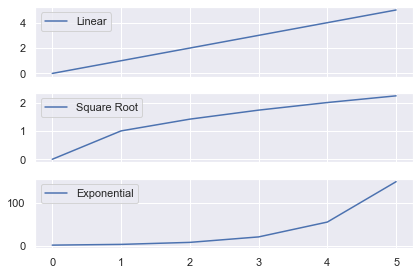
The legend now tells you which function has been applied to the data. I used a for loop to call ax.legend() on each of the Axes. I could have done it manually instead by writing:

axes[0].legend()
axes[1].legend()
axes[2].legend()

Instead of having 3 legends, let’s just add one legend to the Figure that describes each line. Note that you need to change the color of each line, otherwise the legend will show three blue lines.

The matplotlib legend function takes 2 arguments

ax.legend(handles, labels)
  • handles – the lines/plots you want to add to the legend (list)
  • labels – the labels you want to give each line (list)

Get the handles by storing the output of you ax.plot() calls in a list. You need to create the list of labels yourself. Then call legend() on the Axes you want to add the legend to.

# Generate data and 3x1 grid with a shared x axis
data = [0, 1, 2, 3, 4, 5]
fig, axes = plt.subplots(nrows=3, ncols=1, sharex=True) # Store the output of our plot calls to use as handles
# Plot returns a list of length 1, so unpack it using a comma
linear, = axes[0].plot(data, 'b')
sqrt, = axes[1].plot(np.sqrt(data), 'r')
exp, = axes[2].plot(np.exp(data), 'g') # Create handles and labels for the legend
handles = [linear, sqrt, exp]
labels = ['Linear', 'Square Root', 'Exponential'] # Draw legend on first Axes
axes[0].legend(handles, labels) plt.tight_layout()
plt.show()

First I generated the data and a 3×1 grid. Then I made three ax.plot() calls and applied different functions to the data.

Note that ax.plot() returns a list of matplotlib.line.Line2D objects. You have to pass these Line2D objects to ax.legend() and so need to unpack them first.

Standard unpacking syntax in Python is:

a, b = [1, 2]
# a = 1, b = 2

However, each ax.plot() call returns a list of length 1. To unpack these lists, write

x, = [5]
# x = 5

If you just wrote x = [5] then x would be a list and not the object inside the list.

After the plot() calls, I created 2 lists of handles and labels which I passed to axes[0].legend() to draw it on the first plot.
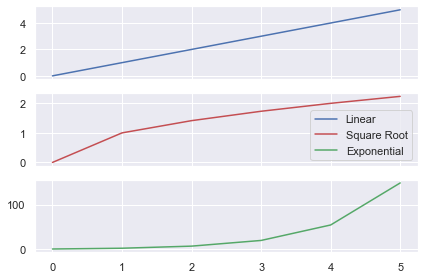
In the above plot, I changed thelegend call to axes[1].legend(handles, labels) to plot it on the second (middle) Axes.

Matplotlib Subplots Size

You have total control over the size of subplots in matplotlib.

You can either change the size of the entire Figure or the size of the Subplots themselves.

First, let’s look at changing the Figure.

Matplotlib Figure Size

If you are happy with the size of your subplots but you want the final image to be larger/smaller, change the Figure.

If you’ve read my article on the matplotlib subplot function, you know to use the plt.figure() function to to change the Figure. Fortunately, any arguments passed to plt.subplots() are also passed to plt.figure(). So, you don’t have to add any extra lines of code, just keyword arguments.

Let’s change the size of the Figure.

# Create 2x1 grid - 3 inches wide, 6 inches long
fig, axes = plt.subplots(nrows=2, ncols=1, figsize=(3, 6))
plt.show()
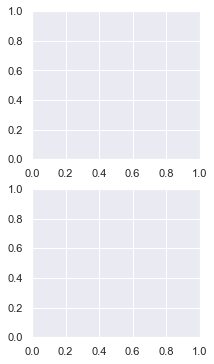
I created a 2×1 plot and set the Figure size with the figsize argument. It accepts a tuple of 2 numbers – the (width, height) of the image in inches.

So, I created a plot 3 inches wide and 6 inches long – figsize=(3, 6).

# 2x1 grid - twice as long as it is wide
fig, axes = plt.subplots(nrows=2, ncols=1, figsize=plt.figaspect(2))
plt.show()
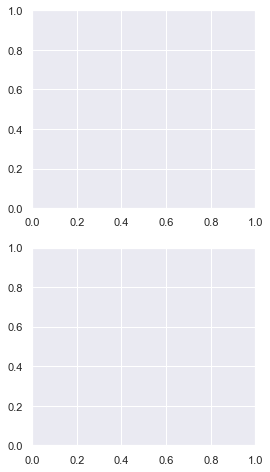
You can set a more general Figure size with the matplotlib figaspect function. It lets you set the aspect ratio (height/width) of the Figure.

Above, I created a Figure twice as long as it is wide by setting figsize=plt.figaspect(2).

Note: Remember the aspect ratio (height/width) formula by recalling that height comes first in the alphabet before width.

Matplotlib Subplots Different Sizes

If you have used plt.subplot() before (I’ve written a whole tutorial on this too), you’ll know that the grids you create are limited. Each Subplot must be part of a regular grid i.e. of the form 1/x for some integer x. If you create a 2×1 grid, you have 2 rows and each row takes up 1/2 of the space. If you create a 3×2 grid, you have 6 subplots and each takes up 1/6 of the space.

Using plt.subplots() you can create a 2×1 plot with 2 rows that take up any fraction of space you want.

Let’s make a 2×1 plot where the top row takes up 1/3 of the space and the bottom takes up 2/3.

You do this by specifying the gridspec_kw argument and passing a dictionary of values. The main arguments we are interested in are width_ratios and height_ratios. They accept lists that specify the width ratios of columns and height ratios of the rows. In this example the top row is 1/3 of the Figure and the bottom is 2/3. Thus the height ratio is 1:2 or [1, 2] as a list.

# 2 x1 grid where top is 1/3 the size and bottom is 2/3 the size
fig, axes = plt.subplots(nrows=2, ncols=1, gridspec_kw={'height_ratios': [1, 2]}) plt.tight_layout()
plt.show()
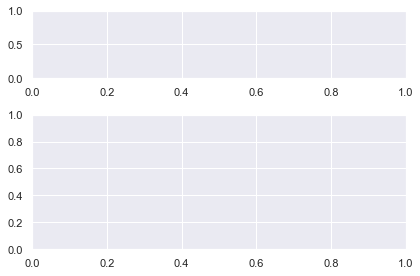
The only difference between this and a regular 2×1 plt.subplots() call is the gridspec_kw argument. It accepts a dictionary of values. These are passed to the matplotlib GridSpec constructor (the underlying class that creates the grid).

Let’s create a 2×2 plot with the same [1, 2] height ratios but let’s make the left hand column take up 3/4 of the space.

# Heights: Top row is 1/3, bottom is 2/3 --> [1, 2]
# Widths : Left column is 3/4, right is 1/4 --> [3, 1]
ratios = {'height_ratios': [1, 2], 'width_ratios': [3, 1]} fig, axes = plt.subplots(nrows=2, ncols=2, gridspec_kw=ratios) plt.tight_layout()
plt.show()
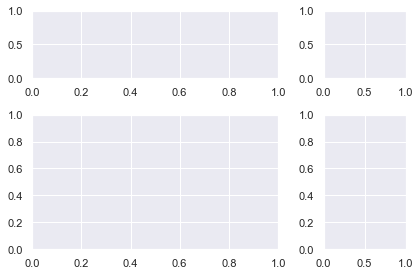
Everything is the same as the previous plot but now we have a 2×2 grid and have specified width_ratios. Since the left column takes up 3/4 of the space and the right takes up 1/4 the ratios are [3, 1].

Matplotlib Subplots Size

In the previous examples, there were white lines that cross over each other to separate the Subplots into a clear grid. But sometimes you will not have that to guide you. To create a more complex plot, you have to manually add Subplots to the grid.

You could do this using the plt.subplot() function. But since we are focusing on Figure and Axes notation in this article, I’ll show you how to do it another way.

You need to use the fig.add_subplot() method and it has the same notation as plt.subplot(). Since it is a Figure method, you first need to create one with the plt.figure() function.

fig = plt.figure()
<Figure size 432x288 with 0 Axes>

The hardest part of creating a Figure with different sized Subplots in matplotlib is figuring out what fraction of space each Subplot takes up.

So, it’s a good idea to know what you are aiming for before you start. You could sketch it on paper or draw shapes in PowerPoint. Once you’ve done this, everything else is much easier.

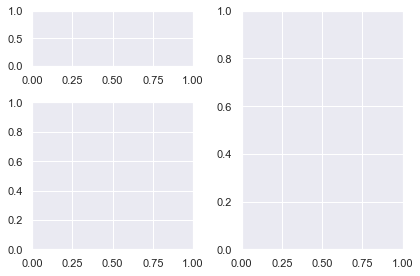
I’m going to create this shape.

I’ve labeled the fraction each Subplot takes up as we need this for our fig.add_subplot() calls.

I’ll create the biggest Subplot first and the others in descending order.
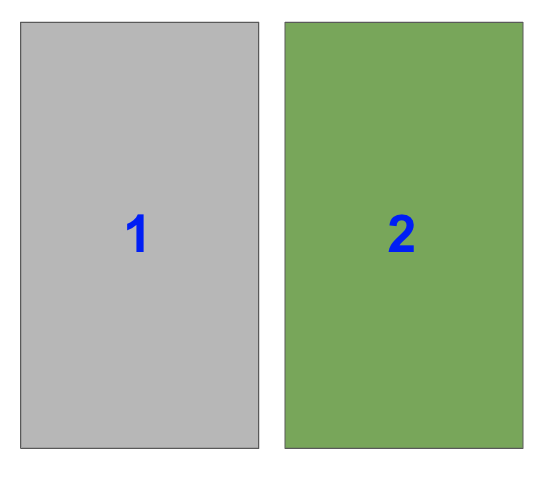
The right hand side is half of the plot. It is one of two plots on a Figure with 1 row and 2 columns. To select it with fig.add_subplot(), you need to set index=2.

Remember that indexing starts from 1 for the functions plt.subplot() and fig.add_subplot().

In the image, the blue numbers are the index values each Subplot has.

ax1 = fig.add_subplot(122)

As you are working with Axes objects, you need to store the result of fig.add_subplot() so that you can plot on it afterwards.

Now, select the bottom left Subplot in a a 2×2 grid i.e. index=3

ax2 = fig.add_subplot(223)
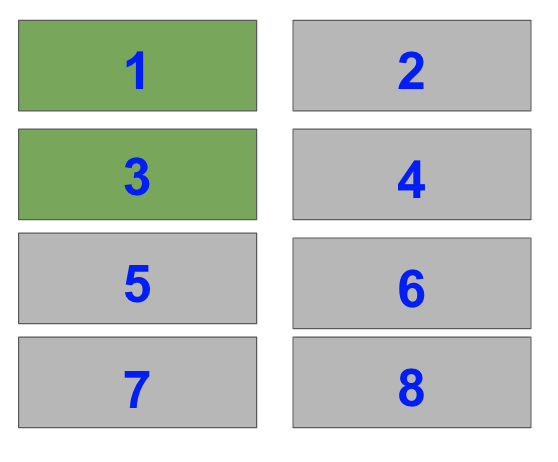
Lastly, select the top two Subplots on the left hand side of a 4×2 grid i.e. index=1 and index=3.

ax3 = fig.add_subplot(423)
ax4 = fig.add_subplot(421)

When you put this altogether you get

# Initialise Figure
fig = plt.figure() # Add 4 Axes objects of the size we want
ax1 = fig.add_subplot(122)
ax2 = fig.add_subplot(223)
ax3 = fig.add_subplot(423)
ax4 = fig.add_subplot(421) plt.tight_layout(pad=0.1)
plt.show()
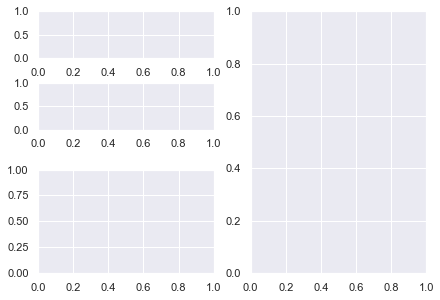
Perfect! Breaking the Subplots down into their individual parts and knowing the shape you want, makes everything easier.

Now, let’s do something you can’t do with plt.subplot(). Let’s have 2 plots on the left hand side with the bottom plot twice the height as the top plot.

Like with the above plot, the right hand side is half of a plot with 1 row and 2 columns. It is index=2.

So, the first two lines are the same as the previous plot

fig = plt.figure()
ax1 = fig.add_subplot(122)
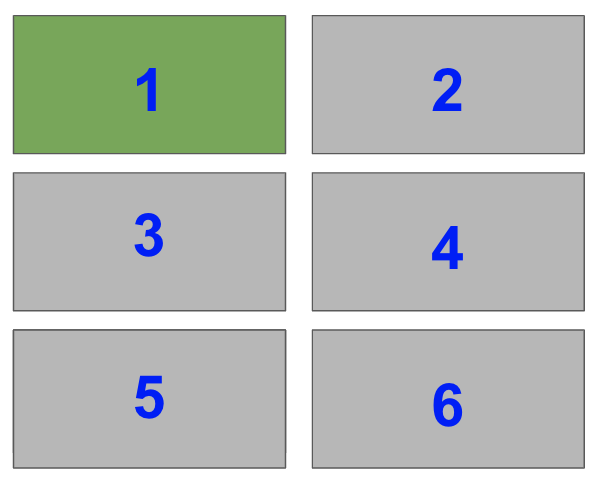
The top left takes up 1/3 of the space of the left-hand half of the plot. Thus, it takes up 1/3 x 1/2 = 1/6 of the total plot. So, it is index=1 of a 3×2 grid.

ax2 = fig.add_subplot(321)
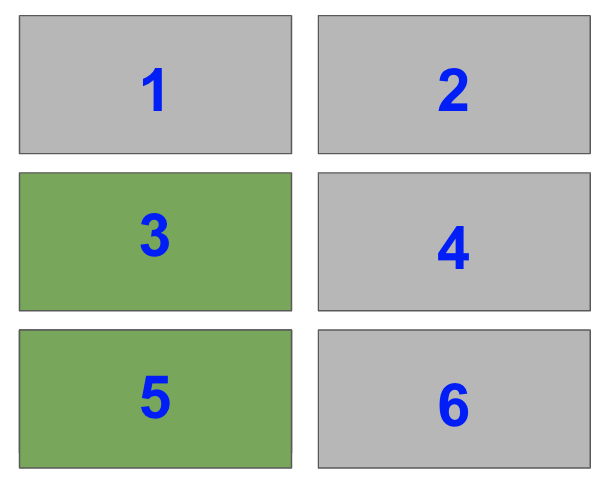
The final subplot takes up 2/3 of the remaining space i.e. index=3 and index=5 of a 3×2 grid. But you can’t add both of these indexes as that would add two Subplots to the Figure. You need a way to add one Subplot that spans two rows.

You need the matplotlib subplot2grid function – plt.subplot2grid(). It returns an Axes object and adds it to the current Figure.

Here are the most important arguments:

ax = plt.subplot2grid(shape, loc, rowspan, colspan)
  • shape – tuple of 2 integers – the shape of the overall grid e.g. (3, 2) has 3 rows and 2 columns.
  • loc – tuple of 2 integers – the location to place the Subplot in the grid. It uses 0-based indexing so (0, 0) is first row, first column and (1, 2) is second row, third column.
  • rowspan – integer, default 1- number of rows for the Subplot to span to the right
  • colspan – integer, default 1 – number of columns for the Subplot to span down

From those definitions, you need to select the middle left Subplot and set rowspan=2 so that it spans down 2 rows.

Thus, the arguments you need for subplot2grid are:

  • shape=(3, 2) – 3×2 grid
  • loc=(1, 0) – second row, first colunn (0-based indexing)
  • rowspan=2 – span down 2 rows

This gives

ax3 = plt.subplot2grid(shape=(3, 2), loc=(1, 0), rowspan=2)

Sidenote: why matplotlib chose 0-based indexing for loc when everything else uses 1-based indexing is a mystery to me. One way to remember it is that loc is similar to locating. This is like slicing Numpy arrays which use 0-indexing. Also, if you use GridSpec, you will often use Numpy slicing to choose the number of rows and columns that Axes span.

Putting this together, you get

fig = plt.figure() ax1 = fig.add_subplot(122)
ax2 = fig.add_subplot(321)
ax3 = plt.subplot2grid(shape=(3, 2), loc=(1, 0), rowspan=2) plt.tight_layout()
plt.show()
Matplotlib Subplots_Adjust

If you aren’t happy with the spacing between plots that plt.tight_layout() provides, manually adjust the spacing with the matplotlib subplots_adjust function.

It takes 6 optional, self explanatory arguments. Each is a float in the range [0.0, 1.0] and is a fraction of the font size:

  • left, right, bottom and top is the spacing on each side of the Suplots
  • wspace – the width between Subplots
  • hspace – the height between Subplots

Let’s compare tight_layout with subplots_adjust.

fig, axes = plt.subplots(nrows=2, ncols=2, sharex=<strong>True</strong>, sharey=<strong>True</strong>) plt.tight_layout()
plt.show()
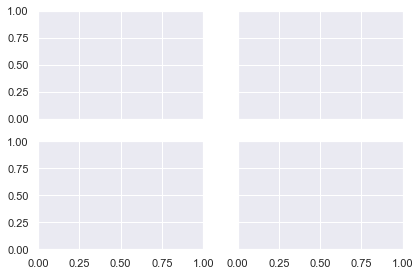
Here is a 2×2 grid with plt.tight_layout(). I’ve set sharex and sharey to True to remove unnecessary axis labels.

fig, axes = plt.subplots(nrows=2, ncols=2, sharex=<strong>True</strong>, sharey=<strong>True</strong>) plt.subplots_adjust(wspace=0.05, hspace=0.05)
plt.show()
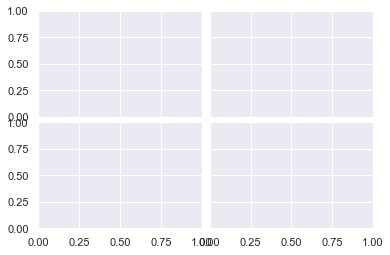
Now I’ve decreased the height and width between Subplots to 0.05 and there is hardly any space between them.

To avoid loads of similar examples, I recommend you play around with the arguments to get a feel for how this function works.

Matplotlib Subplots Colorbar

Adding a colorbar to each Axes is similar to adding a legend. You store the ax.plot() call in a variable and pass it to fig.colorbar().

Colorbars are Figure methods since they are placed on the Figure itself and not the Axes. Yet, they do take up space from the Axes they are placed on.

Let’s look at an example.

# Generate two 10x10 arrays of random numbers in the range [0.0, 1.0]
data1 = np.random.random((10, 10))
data2 = np.random.random((10, 10)) # Initialise Figure and Axes objects with 1 row and 2 columns
# Constrained_layout=True is better than plt.tight_layout()
# Make twice as wide as it is long with figaspect
fig, axes = plt.subplots(nrows=1, ncols=2, constrained_layout=True, figsize=plt.figaspect(1/2)) pcm1 = axes[0].pcolormesh(data1, cmap='Blues')
# Place first colorbar on first column - index 0
fig.colorbar(pcm1, ax=axes[0]) pcm2 = axes[1].pcolormesh(data2, cmap='Greens')
# Place second colorbar on second column - index 1
fig.colorbar(pcm2, ax=axes[1]) plt.show()
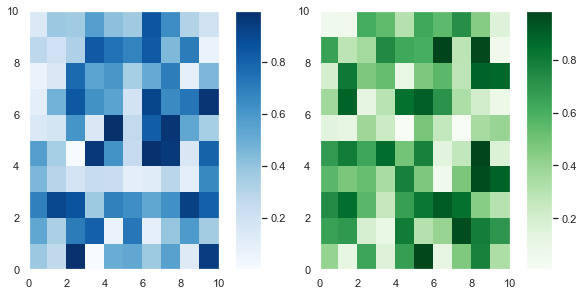
First, I generated two 10×10 arrays of random numbers in the range [0.0, 1.0] using the np.random.random() function. Then I initialized the 1×2 grid with plt.subplots().

The keyword argument constrained_layout=True achieves a similar result to calling plt.tight_layout(). However, tight_layout only checks for tick labels, axis labels and titles. Thus, it ignores colorbars and legends and often produces bad looking plots. Fortunately, constrained_layout takes colorbars and legends into account. Thus, it should be your go-to when automatically adjusting these types of plots.

Finally, I set figsize=plt.figaspect(1/2) to ensure the plots aren’t too squashed together.

After that, I plotted the first heatmap, colored it blue and saved it in the variable pcm1. I passed that to fig.colorbar() and placed it on the first column – axes[0] with the ax keyword argument. It’s a similar story for the second heatmap.

The more Axes you have, the fancier you can be with placing colorbars in matplotlib. Now, let’s look at a 2×2 example with 4 Subplots but only 2 colorbars.

# Set seed to reproduce results
np.random.seed(1) # Generate 4 samples of the same data set using a list comprehension # and assignment unpacking
data1, data2, data3, data4 = [np.random.random((10, 10)) for _ in range(4)] # 2x2 grid with constrained layout
fig, axes = plt.subplots(nrows=2, ncols=2, constrained_layout=True) # First column heatmaps with same colormap
pcm1 = axes[0, 0].pcolormesh(data1, cmap='Blues')
pcm2 = axes[1, 0].pcolormesh(data2, cmap='Blues') # First column colorbar - slicing selects all rows, first column
fig.colorbar(pcm1, ax=axes[:, 0]) # Second column heatmaps with same colormap
pcm3 = axes[0, 1].pcolormesh(data3+1, cmap='Greens')
pcm4 = axes[1, 1].pcolormesh(data4+1, cmap='Greens') # Second column colorbar - slicing selects all rows, second column
# Half the size of the first colorbar
fig.colorbar(pcm3, ax=axes[:, 1], shrink=0.5) plt.show()

If you pass a list of Axes to ax, matplotlib places the colorbar along those Axes. Moreover, you can specify where the colorbar is with the location keyword argument. It accepts the strings 'bottom', 'left', 'right', 'top' or 'center'.

The code is similar to the 1×2 plot I made above. First, I set the seed to 1 so that you can reproduce the results – you will soon plot this again with the colorbars in different places.

I used a list comprehension to generate 4 samples of the same dataset. Then I created a 2×2 grid with plt.subplots() and set constrained_layout=True to ensure nothing overlaps.

Then I made the plots for the first column – axes[0, 0] and axes[1, 0] – and saved their output. I passed one of them to fig.colorbar(). It doesn’t matter which one of pcm1 or pcm2 I pass since they are just different samples of the same dataset. I set ax=axes[:, 0] using Numpy slicing notation, that is all rows : and the first column 0.

It’s a similar process for the second column but I added 1 to data3 and data4 to give a range of numbers in [1.0, 2.0] instead. Lastly, I set shrink=0.5 to make the colorbar half its default size.

Now, let’s plot the same data with the same colors on each row rather than on each column.

# Same as above
np.random.seed(1)
data1, data2, data3, data4 = [np.random.random((10, 10)) for _ in range(4)]
fig, axes = plt.subplots(nrows=2, ncols=2, constrained_layout=True) # First row heatmaps with same colormap
pcm1 = axes[0, 0].pcolormesh(data1, cmap='Blues')
pcm2 = axes[0, 1].pcolormesh(data2, cmap='Blues') # First row colorbar - placed on first row, all columns
fig.colorbar(pcm1, ax=axes[0, :], shrink=0.8) # Second row heatmaps with same colormap
pcm3 = axes[1, 0].pcolormesh(data3+1, cmap='Greens')
pcm4 = axes[1, 1].pcolormesh(data4+1, cmap='Greens') # Second row colorbar - placed on second row, all columns
fig.colorbar(pcm3, ax=axes[1, :], shrink=0.8) plt.show()
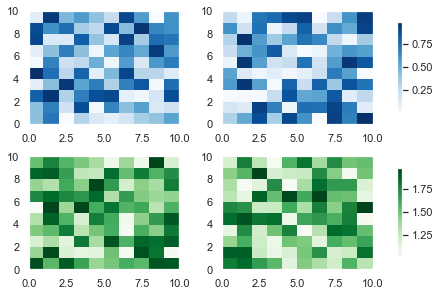
This code is similar to the one above but the plots of the same color are on the same row rather than the same column. I also shrank the colorbars to 80% of their default size by setting shrink=0.8.

Finally, let’s set the blue colorbar to be on the bottom of the heatmaps.

You can change the location of the colorbars with the location keyword argument in fig.colorbar(). The only difference between this plot and the one above is this line

fig.colorbar(pcm1, ax=axes[0, :], shrink=0.8, location='bottom')

If you increase the figsize argument, this plot will look much better – at the moment it’s quite cramped.

I recommend you play around with matplotlib colorbar placement. You have total control over how many colorbars you put on the Figure, their location and how many rows and columns they span. These are some basic ideas but check out the docs to see more examples of how you can place colorbars in matplotlib.

Matplotlib Subplot Grid

I’ve spoken about GridSpec a few times in this article. It is the underlying class that specifies the geometry of the grid that a subplot can be placed in.

You can create any shape you want using plt.subplots() and plt.subplot2grid(). But some of the more complex shapes are easier to create using GridSpec. If you want to become a total pro with matplotlib, check out the docs and look out for my article discussing it in future.

Summary

You can now create any shape you can imagine in matplotlib. Congratulations! This is a huge achievement. Don’t worry if you didn’t fully understand everything the first time around. I recommend you bookmark this article and revisit it from time to time.

You’ve learned the underlying classes in matplotlib: Figure, Axes, XAxis and YAxis and how to plot with respect to them. You can write shorter, more readable code by using these methods and ax.set() to add titles, xlabels and many other things to each Axes. You can create more professional looking plots by sharing the x-axis and y-axis and add legends anywhere you like.

You can create Figures of any size that include Subplots of any size – you’re no longer restricted to those that take up 1/xth of the plot. You know that to make the best plots, you should plan ahead and figure out the shape you are aiming for.

You know when to use plt.tight_layout() (ticks, labels and titles) and constrained_layout=True (legends and colorbars) and how to manually adjust spacing between plots with plt.subplots_adjust().

Finally, you can add colorbars to as many Axes as you want and place them wherever you’d like.

You’ve done everything now. All that is left is to practice these plots so that you can quickly create amazing plots whenever you want.

Where To Go From Here?

Do you wish you could be a programmer full-time but don’t know how to start?

Check out my pure value-packed webinar where I teach you to become a Python freelancer in 60 days or your money back!

https://tinyurl.com/become-a-python-freelancer

It doesn’t matter if you’re a Python novice or Python pro. If you are not making six figures/year with Python right now, you will learn something from this webinar. 

These are proven, no-BS methods that get you results fast.

This webinar won’t be online forever. Click the link below before the seats fill up and learn how to become a Python freelancer, guaranteed.

https://tinyurl.com/become-a-python-freelancer

Posted on Leave a comment

Python Regex And Operator [Tutorial + Video]

This tutorial is all about the AND operator of Python’s re library. You may ask: what? (And rightly so.)

Sure, there’s the OR operator (example: 'iPhone|iPad'). But what’s the meaning of matching one regular expression AND another?

There are different interpretations for the AND operator in a regular expression (regex):

  • Ordered: Match one regex pattern after another. In other words, you first match pattern A AND then you match pattern B. Here the answer is simple: you use the pattern AB to match both.
  • Unordered: Match multiple patterns in a string but in no particular order (source). In this case, you’ll use a bag-of-words approach.

I’ll discuss both in the following. (You can also watch the video as you read the tutorial.)

Ordered Python Regex AND Operator

Given a string. Say, your goal is to find all substrings that match string 'iPhone', followed by string 'iPad'. You can view this as the AND operator of two regular expressions. How can you achieve this?

The straightforward AND operation of both strings is the regular expression pattern iPhoneiPad.

In the following example, you want to match pattern ‘aaa’ and pattern ‘bbb’—in this order.

>>> import re
>>> text = 'aaabaaaabbb'
>>> A = 'aaa'
>>> B = 'bbb'
>>> re.findall(A+B, text)
['aaabbb']
>>> 

You use the re.findall() method. In case you don’t know it, here’s the definition from the Finxter blog article:

The re.findall(pattern, string) method finds all occurrences of the pattern in the string and returns a list of all matching substrings.

Please consult the blog article to learn everything you need to know about this fundamental Python method.

The first argument is the pattern A+B which evaluates to 'aaabbb'. There’s nothing fancy about this: each time you write a string consisting of more than one character, you essentially use the ordered AND operator.

The second argument is the text 'aaabaaaabbb' which you want to search for the pattern.

The result shows that there’s a matching substring in the text: 'aaabbb'.

Unordered Python Regex AND Operator

But what if you want to search a given text for pattern A AND pattern B—but in no particular order? In other words: if both patterns appear anywhere in the string, the whole string should be returned as a match.

Now this is a bit more complicated because any regular expression pattern is ordered from left to right. A simple solution is to use the lookahead assertion (?.*A) to check whether regex A appears anywhere in the string. (Note we assume a single line string as the .* pattern doesn’t match the newline character by default.)

Let’s first have a look at the minimal solution to check for two patterns anywhere in the string (say, patterns 'hi' AND 'you').

>>> import re
>>> pattern = '(?=.*hi)(?=.*you)'
>>> re.findall(pattern, 'hi how are yo?')
[]
>>> re.findall(pattern, 'hi how are you?')
['']

In the first example, both words do not appear. In the second example, they do.

But how does the lookahead assertion work? You must know that any other regex pattern “consumes” the matched substring. The consumed substring cannot be matched by any other part of the regex.

Think of the lookahead assertion as a non-consuming pattern match. The regex engine goes from the left to the right—searching for the pattern. At each point, it has one “current” position to check if this position is the first position of the remaining match. In other words, the regex engine tries to “consume” the next character as a (partial) match of the pattern.

The advantage of the lookahead expression is that it doesn’t consume anything. It just “looks ahead” starting from the current position whether what follows would theoretically match the lookahead pattern. If it doesn’t, the regex engine cannot move on.

A simple example of lookahead. The regular expression engine matches (“consumes”) the string partially. Then it checks whether the remaining pattern could be matched without actually matching it.

Let’s go back to the expression (?=.*hi)(?=.*you) to match strings that contain both 'hi' and 'you'. Why does it work?

The reason is that the lookahead expressions don’t consume anything. You first search for an arbitrary number of characters .*, followed by the word hi. But because the regex engine hasn’t consumed anything, it’s still at the same position at the beginning of the string. So, you can repeat the same for the word you.

Note that this method doesn’t care about the order of the two words:

>>> import re
>>> pattern = '(?=.*hi)(?=.*you)'
>>> re.findall(pattern, 'hi how are you?')
['']
>>> re.findall(pattern, 'you are how? hi!')
['']

No matter which word "hi" or "you" appears first in the text, the regex engine finds both.

You may ask: why’s the output the empty string? The reason is that the regex engine hasn’t consumed any character. It just checked the lookaheads. So the easy fix is to consume all characters as follows:

>>> import re
>>> pattern = '(?=.*hi)(?=.*you).*'
>>> re.findall(pattern, 'you fly high')
['you fly high']

Now, the whole string is a match because after checking the lookahead with '(?=.*hi)(?=.*you)', you also consume the whole string '.*'.

Python Regex Not

How can you search a string for substrings that do NOT match a given pattern? In other words, what’s the “negative pattern” in Python regular expressions?

The answer is two-fold:

  • If you want to match all characters except a set of specific characters, you can use the negative character class [^...].
  • If you want to match all substrings except the ones that match a regex pattern, you can use the feature of negative lookahead (?!...).

Here’s an example for the negative character class:

>>> import re
>>> re.findall('[^a-m]', 'aaabbbaababmmmnoopmmaa')
['n', 'o', 'o', 'p']

And here’s an example for the negative lookahead pattern to match all “words that are not followed by words”:

>>> re.findall('[a-z]+(?![a-z]+)', 'hello world')
['hello', 'world']

The negative lookahead (?![a-z]+) doesn’t consume (match) any character. It just checks whether the pattern [a-z]+ does NOT match at a given position. The only times this happens is just before the empty space and the end of the string.

[Collection] What Are The Different Python Re Quantifiers?

The “and”, “or”, and “not” operators are not the only regular expression operators you need to understand. So what are other operators?

Next, you’ll get a quick and dirty overview of the most important regex operations and how to use them in Python. Here are the most important regex quantifiers:

Quantifier Description Example
. The wild-card (‘dot’) matches any character in a string except the newline character ‘n’. Regex ‘…’ matches all words with three characters such as ‘abc’, ‘cat’, and ‘dog’.
* The zero-or-more asterisk matches an arbitrary number of occurrences (including zero occurrences) of the immediately preceding regex. Regex ‘cat*’ matches the strings ‘ca’, ‘cat’, ‘catt’, ‘cattt’, and ‘catttttttt’.
? The zero-or-one matches (as the name suggests) either zero or one occurrences of the immediately preceding regex. Regex ‘cat?’ matches both strings ‘ca’ and ‘cat’ — but not ‘catt’, ‘cattt’, and ‘catttttttt’.
+ The at-least-one matches one or more occurrences of the immediately preceding regex. Regex ‘cat+’ does not match the string ‘ca’ but matches all strings with at least one trailing character ‘t’ such as ‘cat’, ‘catt’, and ‘cattt’.
^ The start-of-string matches the beginning of a string. Regex ‘^p’ matches the strings ‘python’ and ‘programming’ but not ‘lisp’ and ‘spying’ where the character ‘p’ does not occur at the start of the string.
$ The end-of-string matches the end of a string. Regex ‘py$’ would match the strings ‘main.py’ and ‘pypy’ but not the strings ‘python’ and ‘pypi’.
A|B The OR matches either the regex A or the regex B. Note that the intuition is quite different from the standard interpretation of the or operator that can also satisfy both conditions. Regex ‘(hello)|(hi)’ matches strings ‘hello world’ and ‘hi python’. It wouldn’t make sense to try to match both of them at the same time.
AB  The AND matches first the regex A and second the regex B, in this sequence. We’ve already seen it trivially in the regex ‘ca’ that matches first regex ‘c’ and second regex ‘a’.

Note that I gave the above operators some more meaningful names (in bold) so that you can immediately grasp the purpose of each regex. For example, the ‘^’ operator is usually denoted as the ‘caret’ operator. Those names are not descriptive so I came up with more kindergarten-like words such as the “start-of-string” operator.

We’ve already seen many examples but let’s dive into even more!

import re text = ''' Ha! let me see her: out, alas! he's cold: Her blood is settled, and her joints are stiff; Life and these lips have long been separated: Death lies on her like an untimely frost Upon the sweetest flower of all the field. ''' print(re.findall('.a!', text)) '''
Finds all occurrences of an arbitrary character that is
followed by the character sequence 'a!'.
['Ha!'] ''' print(re.findall('is.*and', text)) '''
Finds all occurrences of the word 'is',
followed by an arbitrary number of characters
and the word 'and'.
['is settled, and'] ''' print(re.findall('her:?', text)) '''
Finds all occurrences of the word 'her',
followed by zero or one occurrences of the colon ':'.
['her:', 'her', 'her'] ''' print(re.findall('her:+', text)) '''
Finds all occurrences of the word 'her',
followed by one or more occurrences of the colon ':'.
['her:'] ''' print(re.findall('^Ha.*', text)) '''
Finds all occurrences where the string starts with
the character sequence 'Ha', followed by an arbitrary
number of characters except for the new-line character. Can you figure out why Python doesn't find any?
[] ''' print(re.findall('n$', text)) '''
Finds all occurrences where the new-line character 'n'
occurs at the end of the string.
['n'] ''' print(re.findall('(Life|Death)', text)) '''
Finds all occurrences of either the word 'Life' or the
word 'Death'.
['Life', 'Death'] '''

In these examples, you’ve already seen the special symbol ‘n’ which denotes the new-line character in Python (and most other languages). There are many special characters, specifically designed for regular expressions. Next, we’ll discover the most important special symbols.

Related Re Methods

There are seven important regular expression methods which you must master:

  • The re.findall(pattern, string) method returns a list of string matches. Read more in our blog tutorial.
  • The re.search(pattern, string) method returns a match object of the first match. Read more in our blog tutorial.
  • The re.match(pattern, string) method returns a match object if the regex matches at the beginning of the string. Read more in our blog tutorial.
  • The re.fullmatch(pattern, string) method returns a match object if the regex matches the whole string. Read more in our blog tutorial.
  • The re.compile(pattern) method prepares the regular expression pattern—and returns a regex object which you can use multiple times in your code. Read more in our blog tutorial.
  • The re.split(pattern, string) method returns a list of strings by matching all occurrences of the pattern in the string and dividing the string along those. Read more in our blog tutorial.
  • The re.sub(The re.sub(pattern, repl, string, count=0, flags=0) method returns a new string where all occurrences of the pattern in the old string are replaced by repl. Read more in our blog tutorial.

These seven methods are 80% of what you need to know to get started with Python’s regular expression functionality.

Where to Go From Here?

You’ve learned everything you need to know about the Python Regex AND Operator.

Summary:

There are different interpretations for the AND operator in a regular expression (regex):

  • Ordered: Match one regex pattern after another. In other words, you first match pattern A AND then you match pattern B. Here the answer is simple: you use the pattern AB to match both.
  • Unordered: Match multiple patterns in a string but in no particular order. In this case, you’ll use a bag-of-words approach.

Want to earn money while you learn Python? Average Python programmers earn more than $50 per hour. You can certainly become average, can’t you?

Join the free webinar that shows you how to become a thriving coding business owner online!

[Webinar] Become a Six-Figure Freelance Developer with Python

Join us. It’s fun! 🙂

Posted on Leave a comment

Python Regex Or – A Simple Illustrated Guide

This tutorial is all about the or | operator of Python’s re library. You can also play the tutorial video while you read:

What’s the Python Regex Or | Operator?

Given a string. Say, your goal is to find all substrings that match either the string 'iPhone' or the string 'iPad'. How can you achieve this?

The easiest way to achieve this is the Python or operator | using the regular expression pattern (iPhone|iPad).

Here’s an example:

>>> import re
>>> text = 'Buy now: iPhone only $399 with free iPad'
>>> re.findall('(iPhone|iPad)', text)
['iPhone', 'iPad']

You have the (salesy) text that contains both strings 'iPhone' and 'iPad'.

You use the re.findall() method. In case you don’t know it, here’s the definition from the Finxter blog article:

The re.findall(pattern, string) method finds all occurrences of the pattern in the string and returns a list of all matching substrings.

Please consult the blog article to learn everything you need to know about this fundamental Python method.

The first argument is the pattern (iPhone|iPad). It either matches the first part right in front of the or symbol |—which is iPhone—or the second part after it—which is iPad.

The second argument is the text 'Buy now: iPhone only $399 with free iPad' which you want to search for the pattern.

The result shows that there are two matching substrings in the text: 'iPhone' and 'iPad'.

Python Regex Or: Examples

Let’s study some more examples to teach you all the possible uses and border cases—one after another.

You start with the previous example:

>>> import re
>>> text = 'Buy now: iPhone only $399 with free iPad'
>>> re.findall('(iPhone|iPad)', text)
['iPhone', 'iPad']

What happens if you don’t use the parenthesis?

>>> text = 'iPhone iPhone iPhone iPadiPad'
>>> re.findall('(iPhone|iPad)', text)
['iPhone', 'iPhone', 'iPhone', 'iPad', 'iPad']
>>> re.findall('iPhone|iPad', text)
['iPhone', 'iPhone', 'iPhone', 'iPad', 'iPad']

In the second example, you just skipped the parentheses using the regex pattern iPhone|iPad rather than (iPhone|iPad). But no problem–it still works and generates the exact same output!

But what happens if you leave one side of the or operation empty?

>>> re.findall('iPhone|', text)
['iPhone', '', 'iPhone', '', 'iPhone', '', '', '', '', '', '', '', '', '', '']

The output is not as strange as it seems. The or operator allows for empty operands—in which case it wants to match the non-empty string. If this is not possible, it matches the empty string (so everything will be a match).

The previous example also shows that it still tries to match the non-empty string if possible. But what if the trivial empty match is on the left side of the or operand?

>>> re.findall('|iPhone', text)
['', 'iPhone', '', '', 'iPhone', '', '', 'iPhone', '', '', '', '', '', '', '', '', '', '']

This shows some subtleties of the regex engine. First of all, it still matches the non-empty string if possible! But more importantly, you can see that the regex engine matches from left to right. It first tries to match the left regex (which it does on every single position in the text). An empty string that’s already matched will not be considered anymore. Only then, it tries to match the regex on the right side of the or operator.

Think of it this way: the regex engine moves from the left to the right—one position at a time. It matches the empty string every single time. Then it moves over the empty string and in some cases, it can still match the non-empty string. Each match “consumes” a substring and cannot be matched anymore. But an empty string cannot be consumed. That’s why you see the first match is the empty string and the second match is the substring 'iPhone'.

How to Nest the Python Regex Or Operator?

Okay, you’re not easily satisfied, are you? Let’s try nesting the Python regex or operator |.

>>> text = 'xxx iii zzz iii ii xxx'
>>> re.findall('xxx|iii|zzz', text)
['xxx', 'iii', 'zzz', 'iii', 'xxx']

So you can use multiple or operators in a row. Of course, you can also use the grouping (parentheses) operator to nest an arbitrary complicated construct of or operations:

>>> re.findall('x(i|(zz|ii|(x| )))', text)
[('x', 'x', 'x'), (' ', ' ', ' '), ('x', 'x', 'x')]

But this seldomly leads to clean and readable code. And it can usually avoided easily by putting a bit of thought into your regex design.

Python Regex Or: Character Class

If you only want to match a single character out of a set of characters, the character class is a much better way of doing it:

>>> import re
>>> text = 'hello world'
>>> re.findall('[abcdefghijklmnopqrstuvwxyz]+', text)
['hello', 'world']

A shorter and more concise version would be to use the range operator within character classes:

>>> re.findall('[a-z]+', text)
['hello', 'world']

The character class is enclosed in the bracket notation [ ] and it literally means “match exactly one of the symbols in the class”. Thus, it carries the same semantics as the or operator: |. However, if you try to do something on those lines…

>>> re.findall('(a|b|c|d|e|f|g|h|i|j|k|l|m|n|o|p|q|r|s|t|u|v|w|x|y|z)+', text)
['o', 'd']

… you’ll first write much less concise code and, second, risk of getting confused by the output. The reason is that the parenthesis is the group operator—it captures the position and substring that matches the regex. Used in the findall() method, it only returns the content of the last matched group. This turns out to be the last character of the word 'hello' and the last character of the word 'world'.

How to Match the Or Character (Vertical Line ‘|’)?

So if the character '|' stands for the or character in a given regex, the question arises how to match the vertical line symbol '|' itself?

The answer is simple: escape the or character in your regular expression using the backslash. In particular, use 'A\|B' instead of 'A|B' to match the string 'A|B' itself. Here’s an example:

>>> import re
>>> re.findall('A|B', 'AAAA|BBBB')
['A', 'A', 'A', 'A', 'B', 'B', 'B', 'B']
>>> re.findall('A\|B', 'AAAA|BBBB')
['A|B']

Do you really understand the outputs of this code snippet? In the first example, you’re searching for either character 'A' or character 'B'. In the second example, you’re searching for the string 'A|B' (which contains the '|' character).

Python Regex And

If there’s a Python regex “or”, there must also be an “and” operator, right?

Correct! But think about it for a moment: say, you want one regex to occur alongside another regex. In other words, you want to match regex A and regex B. So what do you do? You match regex AB.

You’ve already seen many examples of the “Python regex AND” operator—but here’s another one:

>>> import re
>>> re.findall('AB', 'AAAACAACAABAAAABAAC')
['AB', 'AB']

The simple concatenation of regex A and B already performs an implicit “and operation”.

Python Regex Not

How can you search a string for substrings that do NOT match a given pattern? In other words, what’s the “negative pattern” in Python regular expressions?

The answer is two-fold:

  • If you want to match all characters except a set of specific characters, you can use the negative character class [^...].
  • If you want to match all substrings except the ones that match a regex pattern, you can use the feature of negative lookahead (?!...).

Here’s an example for the negative character class:

>>> import re
>>> re.findall('[^a-m]', 'aaabbbaababmmmnoopmmaa')
['n', 'o', 'o', 'p']

And here’s an example for the negative lookahead pattern to match all “words that are not followed by words”:

>>> re.findall('[a-z]+(?![a-z]+)', 'hello world')
['hello', 'world']

The negative lookahead (?![a-z]+) doesn’t consume (match) any character. It just checks whether the pattern [a-z]+ does NOT match at a given position. The only times this happens is just before the empty space and the end of the string.

[Collection] What Are The Different Python Re Quantifiers?

The “and”, “or”, and “not” operators are not the only regular expression operators you need to understand. So what are other operators?

Next, you’ll get a quick and dirty overview of the most important regex operations and how to use them in Python. Here are the most important regex quantifiers:

Quantifier Description Example
. The wild-card (‘dot’) matches any character in a string except the newline character ‘n’. Regex ‘…’ matches all words with three characters such as ‘abc’, ‘cat’, and ‘dog’.
* The zero-or-more asterisk matches an arbitrary number of occurrences (including zero occurrences) of the immediately preceding regex. Regex ‘cat*’ matches the strings ‘ca’, ‘cat’, ‘catt’, ‘cattt’, and ‘catttttttt’.
? The zero-or-one matches (as the name suggests) either zero or one occurrences of the immediately preceding regex. Regex ‘cat?’ matches both strings ‘ca’ and ‘cat’ — but not ‘catt’, ‘cattt’, and ‘catttttttt’.
+ The at-least-one matches one or more occurrences of the immediately preceding regex. Regex ‘cat+’ does not match the string ‘ca’ but matches all strings with at least one trailing character ‘t’ such as ‘cat’, ‘catt’, and ‘cattt’.
^ The start-of-string matches the beginning of a string. Regex ‘^p’ matches the strings ‘python’ and ‘programming’ but not ‘lisp’ and ‘spying’ where the character ‘p’ does not occur at the start of the string.
$ The end-of-string matches the end of a string. Regex ‘py$’ would match the strings ‘main.py’ and ‘pypy’ but not the strings ‘python’ and ‘pypi’.
A|B The OR matches either the regex A or the regex B. Note that the intuition is quite different from the standard interpretation of the or operator that can also satisfy both conditions. Regex ‘(hello)|(hi)’ matches strings ‘hello world’ and ‘hi python’. It wouldn’t make sense to try to match both of them at the same time.
AB  The AND matches first the regex A and second the regex B, in this sequence. We’ve already seen it trivially in the regex ‘ca’ that matches first regex ‘c’ and second regex ‘a’.

Note that I gave the above operators some more meaningful names (in bold) so that you can immediately grasp the purpose of each regex. For example, the ‘^’ operator is usually denoted as the ‘caret’ operator. Those names are not descriptive so I came up with more kindergarten-like words such as the “start-of-string” operator.

We’ve already seen many examples but let’s dive into even more!

import re text = ''' Ha! let me see her: out, alas! he's cold: Her blood is settled, and her joints are stiff; Life and these lips have long been separated: Death lies on her like an untimely frost Upon the sweetest flower of all the field. ''' print(re.findall('.a!', text)) '''
Finds all occurrences of an arbitrary character that is
followed by the character sequence 'a!'.
['Ha!'] ''' print(re.findall('is.*and', text)) '''
Finds all occurrences of the word 'is',
followed by an arbitrary number of characters
and the word 'and'.
['is settled, and'] ''' print(re.findall('her:?', text)) '''
Finds all occurrences of the word 'her',
followed by zero or one occurrences of the colon ':'.
['her:', 'her', 'her'] ''' print(re.findall('her:+', text)) '''
Finds all occurrences of the word 'her',
followed by one or more occurrences of the colon ':'.
['her:'] ''' print(re.findall('^Ha.*', text)) '''
Finds all occurrences where the string starts with
the character sequence 'Ha', followed by an arbitrary
number of characters except for the new-line character. Can you figure out why Python doesn't find any?
[] ''' print(re.findall('n$', text)) '''
Finds all occurrences where the new-line character 'n'
occurs at the end of the string.
['n'] ''' print(re.findall('(Life|Death)', text)) '''
Finds all occurrences of either the word 'Life' or the
word 'Death'.
['Life', 'Death'] '''

In these examples, you’ve already seen the special symbol ‘\n’ which denotes the new-line character in Python (and most other languages). There are many special characters, specifically designed for regular expressions. Next, we’ll discover the most important special symbols.

Related Re Methods

There are seven important regular expression methods which you must master:

  • The re.findall(pattern, string) method returns a list of string matches. Read more in our blog tutorial.
  • The re.search(pattern, string) method returns a match object of the first match. Read more in our blog tutorial.
  • The re.match(pattern, string) method returns a match object if the regex matches at the beginning of the string. Read more in our blog tutorial.
  • The re.fullmatch(pattern, string) method returns a match object if the regex matches the whole string. Read more in our blog tutorial.
  • The re.compile(pattern) method prepares the regular expression pattern—and returns a regex object which you can use multiple times in your code. Read more in our blog tutorial.
  • The re.split(pattern, string) method returns a list of strings by matching all occurrences of the pattern in the string and dividing the string along those. Read more in our blog tutorial.
  • The re.sub(The re.sub(pattern, repl, string, count=0, flags=0) method returns a new string where all occurrences of the pattern in the old string are replaced by repl. Read more in our blog tutorial.

These seven methods are 80% of what you need to know to get started with Python’s regular expression functionality.

Where to Go From Here?

You’ve learned everything you need to know about the Python Regex Or Operator.

Summary:

Given a string. Say, your goal is to find all substrings that match either the string 'iPhone' or the string 'iPad'. How can you achieve this?

The easiest way to achieve this is the Python or operator | using the regular expression pattern (iPhone|iPad).


Want to earn money while you learn Python? Average Python programmers earn more than $50 per hour. You can certainly become average, can’t you?

Join the free webinar that shows you how to become a thriving coding business owner online!

[Webinar] Become a Six-Figure Freelance Developer with Python

Join us. It’s fun! 🙂

Posted on Leave a comment

This One Tool Controls 90% of Your Investment Success

Do you want to build wealth?

Asset allocation is the process of dividing your portfolio into stocks, bonds, and cash. A famous 1990 study by Kaplan and Ibbotson proves that asset allocation is the most important investment decision for your investment success—far more important than selecting individual securities within the broader asset classes stocks, bonds, and cash.

But what’s the best asset allocation for you?

  • 20% stocks, 50% bonds, 30% cash
  • 50% stocks, 50% bonds
  • 80% stocks, 10% bonds, 10% cash
  • 100% stocks

These different asset allocations have a significant impact on your portfolio risk and return. You must invest most of your time and effort in getting the numbers right.

This is where online tools for asset allocation come into play. They allow you to play with the numbers and see for yourself, based on historical asset class returns, what’s the most sensible investment decision for you.

The best tool for asset allocation comes from my student Ann who just started out with Python and the Python visualization framework Dash. With Python, Dash, and Flask, she has built an incredibly useful tool to help you, as an individual investor, save thousands of dollars of fees paid to investment advisors. And the best thing: it’s 100% free! Check it out.

Play with your asset allocation: https://www.wealthdashboard.app

I just recorded a video that leads you through the app.

Click to watch the video and try out the app. Here’s a screenshot of the app:

Here are some features of the app:

  • Find your risk-optimal portfolio: Divide your money into stocks, bonds, and cash.
  • Industry leading data: almost 100 years of historical data to backtest different asset allocations.
  • Rebalancing tool: bring your portfolio back to the asset allocation year over year.
  • Inflation: see how inflation eats away your return.

Click to play with the app: Don’t miss out and make the most important investment decision in your life now!

Posted on Leave a comment

Python Regex – How to Match the Start of Line (^) and End of Line ($)

This article is all about the start of line ^ and end of line $ regular expressions in Python’s re library. These two regexes are fundamental to all regular expressions—even outside the Python world. So invest 5 minutes now and master them once and for all!

Python Re Start-of-String (^) Regex

You can use the caret operator ^ to match the beginning of the string. For example, this is useful if you want to ensure that a pattern appears at the beginning of a string. Here’s an example:

>>> import re
>>> re.findall('^PYTHON', 'PYTHON is fun.')
['PYTHON']

The findall(pattern, string) method finds all occurrences of the pattern in the string. The caret at the beginning of the pattern ‘^PYTHON’ ensures that you match the word Python only at the beginning of the string. In the previous example, this doesn’t make any difference. But in the next example, it does:

>>> re.findall('^PYTHON', 'PYTHON! PYTHON is fun')
['PYTHON']

Although there are two occurrences of the substring ‘PYTHON’, there’s only one matching substring—at the beginning of the string.

But what if you want to match not only at the beginning of the string but at the beginning of each line in a multi-line string? In other words:

Python Re Start-of-Line (^) Regex

The caret operator, per default, only applies to the start of a string. So if you’ve got a multi-line string—for example, when reading a text file—it will still only match once: at the beginning of the string.

However, you may want to match at the beginning of each line. For example, you may want to find all lines that start with ‘Python’ in a given string.

You can specify that the caret operator matches the beginning of each line via the re.MULTILINE flag. Here’s an example showing both usages—without and with setting the re.MULTILINE flag:

>>> import re
>>> text = '''
Python is great.
Python is the fastest growing
major programming language in
the world.
Pythonistas thrive.'''
>>> re.findall('^Python', text)
[]
>>> re.findall('^Python', text, re.MULTILINE)
['Python', 'Python', 'Python']
>>> 

The first output is the empty list because the string ‘Python’ does not appear at the beginning of the string.

The second output is the list of three matching substrings because the string ‘Python’ appears three times at the beginning of a line.

Python re.sub()

The re.sub(pattern, repl, string, count=0, flags=0) method returns a new string where all occurrences of the pattern in the old string are replaced by repl. Read more in the Finxter blog tutorial.

You can use the caret operator to substitute wherever some pattern appears at the beginning of the string:

>>> import re
>>> re.sub('^Python', 'Code', 'Python is \nPython') 'Code is \nPython'

Only the beginning of the string matches the regex pattern so you’ve got only one substitution.

Again, you can use the re.MULTILINE flag to match the beginning of each line with the caret operator:

>>> re.sub('^Python', 'Code', 'Python is \nPython', flags=re.MULTILINE) 'Code is \nCode'

Now, you replace both appearances of the string ‘Python’.

Python re.match(), re.search(), re.findall(), and re.fullmatch()

Let’s quickly recap the most important regex methods in Python:

  • The re.findall(pattern, string, flags=0) method returns a list of string matches. Read more in our blog tutorial.
  • The re.search(pattern, string, flags=0) method returns a match object of the first match. Read more in our blog tutorial.
  • The re.match(pattern, string, flags=0) method returns a match object if the regex matches at the beginning of the string. Read more in our blog tutorial.
  • The re.fullmatch(pattern, string, flags=0) method returns a match object if the regex matches the whole string. Read more in our blog tutorial.

You can see that all four methods search for a pattern in a given string. You can use the caret operator ^ within each pattern to match the beginning of the string. Here’s one example per method:

>>> import re
>>> text = 'Python is Python'
>>> re.findall('^Python', text)
['Python']
>>> re.search('^Python', text)
<re.Match object; span=(0, 6), match='Python'>
>>> re.match('^Python', text)
<re.Match object; span=(0, 6), match='Python'>
>>> re.fullmatch('^Python', text)
>>> 

So you can use the caret operator to match at the beginning of the string. However, you should note that it doesn’t make a lot of sense to use it for the match() and fullmatch() methods as they, by definition, start by trying to match the first character of the string.

You can also use the re.MULTILINE flag to match the beginning of each line (rather than only the beginning of the string):

>>> text = '''Python is
Python'''
>>> re.findall('^Python', text, flags=re.MULTILINE)
['Python', 'Python']
>>> re.search('^Python', text, flags=re.MULTILINE)
<re.Match object; span=(0, 6), match='Python'>
>>> re.match('^Python', text, flags=re.MULTILINE)
<re.Match object; span=(0, 6), match='Python'>
>>> re.fullmatch('^Python', text, flags=re.MULTILINE)
>>> 

Again, it’s questionable whether this makes sense for the re.match() and re.fullmatch() methods as they only look for a match at the beginning of the string.

Python Re End of String ($) Regex

Similarly, you can use the dollar-sign operator $ to match the end of the string. Here’s an example:

>>> import re
>>> re.findall('fun$', 'PYTHON is fun')
['fun']

The findall() method finds all occurrences of the pattern in the string—although the trailing dollar-sign $ ensures that the regex matches only at the end of the string.

This can significantly alter the meaning of your regex as you can see in the next example:

>>> re.findall('fun$', 'fun fun fun')
['fun']

Although, there are three occurrences of the substring ‘fun’, there’s only one matching substring—at the end of the string.

But what if you want to match not only at the end of the string but at the end of each line in a multi-line string?

Python Re End of Line ($)

The dollar-sign operator, per default, only applies to the end of a string. So if you’ve got a multi-line string—for example, when reading a text file—it will still only match once: at the end of the string.

However, you may want to match at the end of each line. For example, you may want to find all lines that end with ‘.py’.

To achieve this, you can specify that the dollar-sign operator matches the end of each line via the re.MULTILINE flag. Here’s an example showing both usages—without and with setting the re.MULTILINE flag:

>>> import re
>>> text = '''
Coding is fun
Python is fun
Games are fun
Agreed?'''
>>> re.findall('fun$', text)
[]
>>> re.findall('fun$', text, flags=re.MULTILINE)
['fun', 'fun', 'fun']
>>> 

The first output is the empty list because the string ‘fun’ does not appear at the end of the string.

The second output is the list of three matching substrings because the string ‘fun’ appears three times at the end of a line.

Python re.sub()

The re.sub(pattern, repl, string, count=0, flags=0) method returns a new string where all occurrences of the pattern in the old string are replaced by repl. Read more in the Finxter blog tutorial.

You can use the dollar-sign operator to substitute wherever some pattern appears at the end of the string:

>>> import re
>>> re.sub('Python$', 'Code', 'Is Python\nPython') 'Is Python\nCode'

Only the end of the string matches the regex pattern so there’s only one substitution.

Again, you can use the re.MULTILINE flag to match the end of each line with the dollar-sign operator:

>>> re.sub('Python$', 'Code', 'Is Python\nPython', flags=re.MULTILINE) 'Is Code\nCode'

Now, you replace both appearances of the string ‘Python’.

Python re.match(), re.search(), re.findall(), and re.fullmatch()

All four methods—re.findall(), re.search(), re.match(), and re.fullmatch()—search for a pattern in a given string. You can use the dollar-sign operator $ within each pattern to match the end of the string. Here’s one example per method:

>>> import re
>>> text = 'Python is Python'
>>> re.findall('Python$', text)
['Python']
>>> re.search('Python$', text)
<re.Match object; span=(10, 16), match='Python'>
>>> re.match('Python$', text)
>>> re.fullmatch('Python$', text)
>>>

So you can use the dollar-sign operator to match at the end of the string. However, you should note that it doesn’t make a lot of sense to use it for the fullmatch() methods as it, by definition, already requires that the last character of the string is part of the matching substring.

You can also use the re.MULTILINE flag to match the end of each line (rather than only the end of the whole string):

>> text = '''Is Python
Python'''
>>> re.findall('Python$', text, flags=re.MULTILINE)
['Python', 'Python']
>>> re.search('Python$', text, flags=re.MULTILINE)
<re.Match object; span=(3, 9), match='Python'>
>>> re.match('Python$', text, flags=re.MULTILINE)
>>> re.fullmatch('Python$', text, flags=re.MULTILINE)
>>>

As the pattern doesn’t match the string prefix, both re.match() and re.fullmatch() return empty results.

How to Match the Caret (^) or Dollar ($) Symbols in Your Regex?

You know that the caret and dollar symbols have a special meaning in Python’s regular expression module: they match the beginning or end of each string/line. But what if you search for the caret (^) or dollar ($) symbols themselves? How can you match them in a string?

The answer is simple: escape the caret or dollar symbols in your regular expression using the backslash. In particular, use ‘\^’ instead of ‘^’ and ‘\$’ instead of ‘$’. Here’s an example:

>>> import re
>>> text = 'The product ^^^ costs $3 today.'
>>> re.findall('\^', text)
['^', '^', '^']
>>> re.findall('\$', text)
['$']

By escaping the special symbols ^ and $, you tell the regex engine to ignore their special meaning.

Where to Go From Here?

You’ve learned everything you need to know about the caret operator ^ and the dollar-sign operator $ in this regex tutorial.

Summary: The caret operator ^ matches at the beginning of a string. The dollar-sign operator $ matches at the end of a string. If you want to match at the beginning or end of each line in a multi-line string, you can set the re.MULTILINE flag in all the relevant re methods.

Want to earn money while you learn Python? Average Python programmers earn more than $50 per hour. You can become average, can’t you?

Join the free webinar that shows you how to become a thriving coding business owner online!

[Webinar] Are You a Six-Figure Freelance Developer?

Join us. It’s fun! 🙂

Posted on Leave a comment

The Python Re Plus (+) Symbol in Regular Expressions

This article is all about the plus “+” symbol in Python’s re library. Study it carefully and master this important piece of knowledge once and for all!

What’s the Python Re + Quantifier?

Say, you have any regular expression A. The regular expression (regex) A+ then matches one or more occurrences of A. We call the “+” symbol the at-least-once quantifier because it requires at least one occurrence of the preceding regex. For example, the regular expression ‘yes+’ matches strings ‘yes’, ‘yess’, and ‘yesssssss’. But it does neither match the string ‘ye’, nor the empty string because the plus quantifier + does not apply to the whole regex ‘yes’ but only to the preceding regex ‘s’.

Let’s study some examples to help you gain a deeper understanding.

>>> import re
>>> re.findall('a+b', 'aaaaaab')
['aaaaaab']
>>> re.findall('ab+', 'aaaaaabb')
['abb']
>>> re.findall('ab+', 'aaaaaabbbbb')
['abbbbb']
>>> re.findall('ab+?', 'aaaaaabbbbb')
['ab']
>>> re.findall('ab+', 'aaaaaa')
[]
>>> re.findall('[a-z]+', 'hello world')
['hello', 'world']

Next, we’ll explain those examples one by one.

Examples 1 and 2: Greedy Plus (+) Quantifiers

Here’s the first example:

>>> re.findall('a+b', 'aaaaaab')
['aaaaaab']

You use the re.findall() method. In case you don’t know it, here’s the definition from the Finxter blog article:

The re.findall(pattern, string) method finds all occurrences of the pattern in the string and returns a list of all matching substrings.

Please consult the blog article to learn everything you need to know about this fundamental Python method.

The first argument is the regular expression pattern ‘a+b’ and the second argument is the string to be searched. In plain English, you want to find all patterns in the string that start with at least one, but possibly many, characters ‘a’, followed by the character ‘b’.

The findall() method returns the matching substring: ‘aaaaaab’. The asterisk quantifier + is greedy. This means that it tries to match as many occurrences of the preceding regex as possible. So in our case, it wants to match as many arbitrary characters as possible so that the pattern is still matched. Therefore, the regex engine “consumes” the whole sentence.

The second example is similar:

>>> re.findall('ab+', 'aaaaaabb')
['abb']

You search for the character ‘a’ followed by at least one character ‘b’. As the plus (+) quantifier is greedy, it matches as many ‘b’s as it can lay its hands on.

Examples 3 and 4: Non-Greedy Plus (+) Quantifiers

But what if you want to match at least one occurrence of a regex in a non-greedy manner. In other words, you don’t want the regex engine to consume more and more as long as it can but returns as quickly as it can from the processing.

Again, here’s the example of the greedy match:

>>> re.findall('ab+', 'aaaaaabbbbb')
['abbbbb']

The regex engine starts with the first character ‘a’ and finds that it’s a partial match. So, it moves on to match the second ‘a’—which violates the pattern ‘ab+’ that allows only for a single character ‘a’. So it moves on to the third character, and so on, until it reaches the last character ‘a’ in the string ‘aaaaaabbbbb’. It’s a partial match, so it moves on to the first occurrence of the character ‘b’. It realizes that the ‘b’ character can be matched by the part of the regex ‘b+’. Thus, the engine starts matching ‘b’s. And it greedily matches ‘b’s until it cannot match any further character. At this point it looks at the result and sees that it has found a matching substring which is the result of the operation.

However, it could have stopped far earlier to produce a non-greedy match after matching the first character ‘b’. Here’s an example of the non-greedy quantifier ‘+?’ (both symbols together form one regex expression).

>>> re.findall('ab+?', 'aaaaaabbbbb')
['ab']

Now, the regex engine does not greedily “consume” as many ‘b’ characters as possible. Instead, it stops as soon as the pattern is matched (non-greedy).

Examples 5 and 6

For the sake of your thorough understanding, let’s have a look at the other given example:

>>> re.findall('ab+', 'aaaaaa')
[]

You can see that the plus (+) quantifier requires that at least one occurrence of the preceding regex is matched. In the example, it’s the character ‘b’ that is not partially matched. So, the result is the empty list indicating that no matching substring was found.

Another interesting example is the following:

>>> re.findall('[a-z]+', 'hello world')
['hello', 'world']

You use the plus (+) quantifier in combination with a character class that defines specifically which characters are valid matches.

Note Character Class: Within the character class, you can define character ranges. For example, the character range [a-z] matches one lowercase character in the alphabet while the character range [A-Z] matches one uppercase character in the alphabet.

The empty space is not part of the given character class [a-z], so it won’t be matched in the text. Thus, the result is the list of words that start with at least one character: ‘hello’, ‘world’.

What If You Want to Match the Plus (+) Symbol Itself?

You know that the plus quantifier matches at least one of the preceding regular expression. But what if you search for the plus (+) symbol itself? How can you search for it in a string?

The answer is simple: escape the plus symbol in your regular expression using the backslash. In particular, use ‘\+’ instead of ‘+’. Here’s an example:

>>> import re
>>> text = '2 + 2 = 4'
>>> re.findall(' + ', text)
[]
>>> re.findall(' \+ ', text)
[' + ']
>>> re.findall(' \++ ', '2 ++++ 2 = 4')
[' ++++ ']

If you want to find the ‘+’ symbol in your string, you need to escape it by using the backslash. If you don’t do this, the Python regex engine will interpret it as a normal “at-least-once” regex. Of course, you can combine the escaped plus symbol ‘\+’ with the “at-least-once” regex searching for at least one occurrences of the plus symbol.

[Collection] What Are The Different Python Re Quantifiers?

The plus quantifier—Python re +—is only one of many regex operators. If you want to use (and understand) regular expressions in practice, you’ll need to know all of them by heart!

So let’s dive into the other operators:

A regular expression is a decades-old concept in computer science. Invented in the 1950s by famous mathematician Stephen Cole Kleene, the decades of evolution brought a huge variety of operations. Collecting all operations and writing up a comprehensive list would result in a very thick and unreadable book by itself.

Fortunately, you don’t have to learn all regular expressions before you can start using them in your practical code projects. Next, you’ll get a quick and dirty overview of the most important regex operations and how to use them in Python. In follow-up chapters, you’ll then study them in detail — with many practical applications and code puzzles.

Here are the most important regex quantifiers:

Quantifier Description Example
. The wild-card (‘dot’) matches any character in a string except the newline character ‘n’. Regex ‘…’ matches all words with three characters such as ‘abc’, ‘cat’, and ‘dog’.
* The zero-or-more asterisk matches an arbitrary number of occurrences (including zero occurrences) of the immediately preceding regex. Regex ‘cat*’ matches the strings ‘ca’, ‘cat’, ‘catt’, ‘cattt’, and ‘catttttttt’.
? The zero-or-one matches (as the name suggests) either zero or one occurrences of the immediately preceding regex. Regex ‘cat?’ matches both strings ‘ca’ and ‘cat’ — but not ‘catt’, ‘cattt’, and ‘catttttttt’.
+ The at-least-one matches one or more occurrences of the immediately preceding regex. Regex ‘cat+’ does not match the string ‘ca’ but matches all strings with at least one trailing character ‘t’ such as ‘cat’, ‘catt’, and ‘cattt’.
^ The start-of-string matches the beginning of a string. Regex ‘^p’ matches the strings ‘python’ and ‘programming’ but not ‘lisp’ and ‘spying’ where the character ‘p’ does not occur at the start of the string.
$ The end-of-string matches the end of a string. Regex ‘py$’ would match the strings ‘main.py’ and ‘pypy’ but not the strings ‘python’ and ‘pypi’.
A|B The OR matches either the regex A or the regex B. Note that the intuition is quite different from the standard interpretation of the or operator that can also satisfy both conditions. Regex ‘(hello)|(hi)’ matches strings ‘hello world’ and ‘hi python’. It wouldn’t make sense to try to match both of them at the same time.
AB  The AND matches first the regex A and second the regex B, in this sequence. We’ve already seen it trivially in the regex ‘ca’ that matches first regex ‘c’ and second regex ‘a’.

Note that I gave the above operators some more meaningful names (in bold) so that you can immediately grasp the purpose of each regex. For example, the ‘^’ operator is usually denoted as the ‘caret’ operator. Those names are not descriptive so I came up with more kindergarten-like words such as the “start-of-string” operator.

We’ve already seen many examples but let’s dive into even more!

import re text = ''' Ha! let me see her: out, alas! he's cold: Her blood is settled, and her joints are stiff; Life and these lips have long been separated: Death lies on her like an untimely frost Upon the sweetest flower of all the field. ''' print(re.findall('.a!', text)) '''
Finds all occurrences of an arbitrary character that is
followed by the character sequence 'a!'.
['Ha!'] ''' print(re.findall('is.*and', text)) '''
Finds all occurrences of the word 'is',
followed by an arbitrary number of characters
and the word 'and'.
['is settled, and'] ''' print(re.findall('her:?', text)) '''
Finds all occurrences of the word 'her',
followed by zero or one occurrences of the colon ':'.
['her:', 'her', 'her'] ''' print(re.findall('her:+', text)) '''
Finds all occurrences of the word 'her',
followed by one or more occurrences of the colon ':'.
['her:'] ''' print(re.findall('^Ha.*', text)) '''
Finds all occurrences where the string starts with
the character sequence 'Ha', followed by an arbitrary
number of characters except for the new-line character. Can you figure out why Python doesn't find any?
[] ''' print(re.findall('n$', text)) '''
Finds all occurrences where the new-line character 'n'
occurs at the end of the string.
['n'] ''' print(re.findall('(Life|Death)', text)) '''
Finds all occurrences of either the word 'Life' or the
word 'Death'.
['Life', 'Death'] '''

In these examples, you’ve already seen the special symbol ‘n’ which denotes the new-line character in Python (and most other languages). There are many special characters, specifically designed for regular expressions. Next, we’ll discover the most important special symbols.

What’s the Difference Between Python Re + and ? Quantifiers?

You can read the Python Re A? quantifier as zero-or-one regex: the preceding regex A is matched either zero times or exactly once. But it’s not matched more often.

Analogously, you can read the Python Re A+ operator as the at-least-once regex: the preceding regex A is matched an arbitrary number of times but at least once (as the name suggests).

Here’s an example that shows the difference:

>>> import re
>>> re.findall('ab?', 'abbbbbbb')
['ab']
>>> re.findall('ab+', 'abbbbbbb')
['abbbbbbb']

The regex ‘ab?’ matches the character ‘a’ in the string, followed by character ‘b’ if it exists (which it does in the code).

The regex ‘ab+’ matches the character ‘a’ in the string, followed by as many characters ‘b’ as possible (and at least one).

What’s the Difference Between Python Re * and + Quantifiers?

You can read the Python Re A* quantifier as zero-or-more regex: the preceding regex A is matched an arbitrary number of times.

Analogously, you can read the Python Re A+ operator as the at-least-once regex: the preceding regex A is matched an arbitrary number of times too—but at least once.

Here’s an example that shows the difference:

>>> import re
>>> re.findall('ab*', 'aaaaaaaa')
['a', 'a', 'a', 'a', 'a', 'a', 'a', 'a']
>>> re.findall('ab+', 'aaaaaaaa')
[]

The regex ‘ab*’ matches the character ‘a’ in the string, followed by an arbitary number of occurrences of character ‘b’. The substring ‘a’ perfectly matches this formulation. Therefore, you find that the regex matches eight times in the string.

The regex ‘ab+’ matches the character ‘a’, followed by as many characters ‘b’ as possible—but at least one. However, the character ‘b’ does not exist so there’s no match.

What are Python Re *?, +?, ?? Quantifiers?

You’ve learned about the three quantifiers:

  • The quantifier A* matches an arbitrary number of patterns A.
  • The quantifier A+ matches at least one pattern A.
  • The quantifier A? matches zero-or-one pattern A.

Those three are all greedy: they match as many occurrences of the pattern as possible. Here’s an example that shows their greediness:

>>> import re
>>> re.findall('a*', 'aaaaaaa')
['aaaaaaa', '']
>>> re.findall('a+', 'aaaaaaa')
['aaaaaaa']
>>> re.findall('a?', 'aaaaaaa')
['a', 'a', 'a', 'a', 'a', 'a', 'a', '']

The code shows that all three quantifiers *, +, and ? match as many ‘a’ characters as possible.

So, the logical question is: how to match as few as possible? We call this non-greedy matching. You can append the question mark after the respective quantifiers to tell the regex engine that you intend to match as few patterns as possible: *?, +?, and ??.

Here’s the same example but with the non-greedy quantifiers:

>>> import re
>>> re.findall('a*?', 'aaaaaaa')
['', 'a', '', 'a', '', 'a', '', 'a', '', 'a', '', 'a', '', 'a', '']
>>> re.findall('a+?', 'aaaaaaa')
['a', 'a', 'a', 'a', 'a', 'a', 'a']
>>> re.findall('a??', 'aaaaaaa')
['', 'a', '', 'a', '', 'a', '', 'a', '', 'a', '', 'a', '', 'a', '']

In this case, the code shows that all three quantifiers *?, +?, and ?? match as few ‘a’ characters as possible.

Related Re Methods

There are five important regular expression methods which you should master:

  • The re.findall(pattern, string) method returns a list of string matches. Read more in our blog tutorial.
  • The re.search(pattern, string) method returns a match object of the first match. Read more in our blog tutorial.
  • The re.match(pattern, string) method returns a match object if the regex matches at the beginning of the string. Read more in our blog tutorial.
  • The re.fullmatch(pattern, string) method returns a match object if the regex matches the whole string. Read more in our blog tutorial.
  • The re.compile(pattern) method prepares the regular expression pattern—and returns a regex object which you can use multiple times in your code. Read more in our blog tutorial.
  • The re.split(pattern, string) method returns a list of strings by matching all occurrences of the pattern in the string and dividing the string along those. Read more in our blog tutorial.
  • The re.sub(The re.sub(pattern, repl, string, count=0, flags=0) method returns a new string where all occurrences of the pattern in the old string are replaced by repl. Read more in our blog tutorial.

These seven methods are 80% of what you need to know to get started with Python’s regular expression functionality.

Where to Go From Here?

You’ve learned everything you need to know about the asterisk quantifier * in this regex tutorial.

Summary: Regex A+ matches one or more occurrences of regex A. The “+” symbol is the at-least-once quantifier because it requires at least one occurrence of the preceding regex. The non-greedy version of the at-least-once quantifier is A+? with the trailing question mark.

Want to earn money while you learn Python? Average Python programmers earn more than $50 per hour. You can certainly become average, can’t you?

Join the free webinar that shows you how to become a thriving coding business owner online!

[Webinar] Are You a Six-Figure Freelance Developer?

Join us. It’s fun! 🙂

Posted on Leave a comment

Python Re * – The Asterisk Quantifier for Regular Expressions

Every computer scientist knows the asterisk quantifier of regular expressions. But many non-techies know it, too. Each time you search for a text file *.txt on your computer, you use the asterisk operator.

This article is all about the asterisk * quantifier in Python’s re library. Study it carefully and master this important piece of knowledge once and for all!

Alternatively, you can also watch the video where I lead you through the whole article:

What’s the Python Re * Quantifier?

When applied to regular expression A, Python’s A* quantifier matches zero or more occurrences of A. The * quantifier is called asterisk operator and it always applies only to the preceding regular expression. For example, the regular expression ‘yes*’ matches strings ‘ye’, ‘yes’, and ‘yesssssss’. But it does not match the empty string because the asterisk quantifier * does not apply to the whole regex ‘yes’ but only to the preceding regex ‘s’.

Let’s study two basic examples to help you gain a deeper understanding. Do you get all of them?

>>> import re
>>> text = 'finxter for fast and fun python learning'
>>> re.findall('f.* ', text)
['finxter for fast and fun python ']
>>> re.findall('f.*? ', text)
['finxter ', 'for ', 'fast ', 'fun ']
>>> re.findall('f[a-z]*', text)
['finxter', 'for', 'fast', 'fun']
>>> 

Don’t worry if you had problems understanding those examples. You’ll learn about them next. Here’s the first example:

Greedy Asterisk Example

>>> re.findall('f.* ', text)
['finxter for fast and fun python ']

You use the re.findall() method. In case you don’t know it, here’s the definition from the Finxter blog article:

The re.findall(pattern, string) method finds all occurrences of the pattern in the string and returns a list of all matching substrings.

Please consult the blog article to learn everything you need to know about this fundamental Python method.

The first argument is the regular expression pattern ‘f.* ‘. The second argument is the string to be searched for the pattern. In plain English, you want to find all patterns in the string that start with the character ‘f’, followed by an arbitrary number of optional characters, followed by an empty space.

The findall() method returns only one matching substring: ‘finxter for fast and fun python ‘. The asterisk quantifier * is greedy. This means that it tries to match as many occurrences of the preceding regex as possible. So in our case, it wants to match as many arbitrary characters as possible so that the pattern is still matched. Therefore, the regex engine “consumes” the whole sentence.

Non-Greedy Asterisk Example

But what if you want to find all words starting with an ‘f’? In other words: how to match the text with a non-greedy asterisk operator?

The second example is the following:

>>> re.findall('f.*? ', text)
['finxter ', 'for ', 'fast ', 'fun ']

In this example, you’re looking at a similar pattern with only one difference: you use the non-greedy asterisk operator *?. You want to find all occurrences of character ‘f’ followed by an arbitrary number of characters (but as few as possible), followed by an empty space.

Therefore, the regex engine finds four matches: the strings ‘finxter ‘, ‘for ‘, ‘fast ‘, and ‘fun ‘.

Asterisk + Character Class Example

The third example is the following:

>>> re.findall('f[a-z]*', text)
['finxter', 'for', 'fast', 'fun']

This regex achieves almost the same thing: finding all words starting with f. But you use the asterisk quantifier in combination with a character class that defines specifically which characters are valid matches.

Within the character class, you can define character ranges. For example, the character range [a-z] matches one lowercase character in the alphabet while the character range [A-Z] matches one uppercase character in the alphabet.

But note that the empty space is not part of the character class, so it won’t be matched if it appears in the text. Thus, the result is the same list of words that start with character f: ‘finxter ‘, ‘for ‘, ‘fast ‘, and ‘fun ‘.

What If You Want to Match the Asterisk Character Itself?

You know that the asterisk quantifier matches an arbitrary number of the preceding regular expression. But what if you search for the asterisk (or star) character itself? How can you search for it in a string?

The answer is simple: escape the asterisk character in your regular expression using the backslash. In particular, use ‘\*’ instead of ‘*’. Here’s an example:

>>> import re
>>> text = 'Python is ***great***'
>>> re.findall('\*', text)
['*', '*', '*', '*', '*', '*']
>>> re.findall('\**', text)
['', '', '', '', '', '', '', '', '', '', '***', '', '', '', '', '', '***', '']
>>> re.findall('\*+', text)
['***', '***']

You find all occurrences of the star symbol in the text by using the regex ‘\*’. Consequently, if you use the regex ‘\**’, you search for an arbitrary number of occurrences of the asterisk symbol (including zero occurrences). And if you would like to search for all maximal number of occurrences of subsequent asterisk symbols in a text, you’d use the regex ‘\*+’.

[Collection] What Are The Different Python Re Quantifiers?

The asterisk quantifier—Python re *—is only one of many regex operators. If you want to use (and understand) regular expressions in practice, you’ll need to know all of them by heart!

So let’s dive into the other operators:

A regular expression is a decades-old concept in computer science. Invented in the 1950s by famous mathematician Stephen Cole Kleene, the decades of evolution brought a huge variety of operations. Collecting all operations and writing up a comprehensive list would result in a very thick and unreadable book by itself.

Fortunately, you don’t have to learn all regular expressions before you can start using them in your practical code projects. Next, you’ll get a quick and dirty overview of the most important regex operations and how to use them in Python. In follow-up chapters, you’ll then study them in detail — with many practical applications and code puzzles.

Here are the most important regex quantifiers:

Quantifier Description Example
. The wild-card (‘dot’) matches any character in a string except the newline character ‘n’. Regex ‘…’ matches all words with three characters such as ‘abc’, ‘cat’, and ‘dog’.
* The zero-or-more asterisk matches an arbitrary number of occurrences (including zero occurrences) of the immediately preceding regex. Regex ‘cat*’ matches the strings ‘ca’, ‘cat’, ‘catt’, ‘cattt’, and ‘catttttttt’.
? The zero-or-one matches (as the name suggests) either zero or one occurrences of the immediately preceding regex. Regex ‘cat?’ matches both strings ‘ca’ and ‘cat’ — but not ‘catt’, ‘cattt’, and ‘catttttttt’.
+ The at-least-one matches one or more occurrences of the immediately preceding regex. Regex ‘cat+’ does not match the string ‘ca’ but matches all strings with at least one trailing character ‘t’ such as ‘cat’, ‘catt’, and ‘cattt’.
^ The start-of-string matches the beginning of a string. Regex ‘^p’ matches the strings ‘python’ and ‘programming’ but not ‘lisp’ and ‘spying’ where the character ‘p’ does not occur at the start of the string.
$ The end-of-string matches the end of a string. Regex ‘py$’ would match the strings ‘main.py’ and ‘pypy’ but not the strings ‘python’ and ‘pypi’.
A|B The OR matches either the regex A or the regex B. Note that the intuition is quite different from the standard interpretation of the or operator that can also satisfy both conditions. Regex ‘(hello)|(hi)’ matches strings ‘hello world’ and ‘hi python’. It wouldn’t make sense to try to match both of them at the same time.
AB  The AND matches first the regex A and second the regex B, in this sequence. We’ve already seen it trivially in the regex ‘ca’ that matches first regex ‘c’ and second regex ‘a’.

Note that I gave the above operators some more meaningful names (in bold) so that you can immediately grasp the purpose of each regex. For example, the ‘^’ operator is usually denoted as the ‘caret’ operator. Those names are not descriptive so I came up with more kindergarten-like words such as the “start-of-string” operator.

We’ve already seen many examples but let’s dive into even more!

import re text = ''' Ha! let me see her: out, alas! he's cold: Her blood is settled, and her joints are stiff; Life and these lips have long been separated: Death lies on her like an untimely frost Upon the sweetest flower of all the field. ''' print(re.findall('.a!', text)) '''
Finds all occurrences of an arbitrary character that is
followed by the character sequence 'a!'.
['Ha!'] ''' print(re.findall('is.*and', text)) '''
Finds all occurrences of the word 'is',
followed by an arbitrary number of characters
and the word 'and'.
['is settled, and'] ''' print(re.findall('her:?', text)) '''
Finds all occurrences of the word 'her',
followed by zero or one occurrences of the colon ':'.
['her:', 'her', 'her'] ''' print(re.findall('her:+', text)) '''
Finds all occurrences of the word 'her',
followed by one or more occurrences of the colon ':'.
['her:'] ''' print(re.findall('^Ha.*', text)) '''
Finds all occurrences where the string starts with
the character sequence 'Ha', followed by an arbitrary
number of characters except for the new-line character. Can you figure out why Python doesn't find any?
[] ''' print(re.findall('n$', text)) '''
Finds all occurrences where the new-line character 'n'
occurs at the end of the string.
['n'] ''' print(re.findall('(Life|Death)', text)) '''
Finds all occurrences of either the word 'Life' or the
word 'Death'.
['Life', 'Death'] '''

In these examples, you’ve already seen the special symbol ‘\n’ which denotes the new-line character in Python (and most other languages). There are many special characters, specifically designed for regular expressions. Next, we’ll discover the most important special symbols.

What’s the Difference Between Python Re * and ? Quantifiers?

You can read the Python Re A? quantifier as zero-or-one regex: the preceding regex A is matched either zero times or exactly once. But it’s not matched more often.

Analogously, you can read the Python Re A* operator as the zero-or-more regex (I know it sounds a bit clunky): the preceding regex A is matched an arbitrary number of times.

Here’s an example that shows the difference:

>>> import re
>>> re.findall('ab?', 'abbbbbbb')
['ab']
>>> re.findall('ab*', 'abbbbbbb')
['abbbbbbb']

The regex ‘ab?’ matches the character ‘a’ in the string, followed by character ‘b’ if it exists (which it does in the code).

The regex ‘ab*’ matches the character ‘a’ in the string, followed by as many characters ‘b’ as possible.

What’s the Difference Between Python Re * and + Quantifiers?

You can read the Python Re A* quantifier as zero-or-more regex: the preceding regex A is matched an arbitrary number of times.

Analogously, you can read the Python Re A+ operator as the at-least-once regex: the preceding regex A is matched an arbitrary number of times too—but at least once.

Here’s an example that shows the difference:

>>> import re
>>> re.findall('ab*', 'aaaaaaaa')
['a', 'a', 'a', 'a', 'a', 'a', 'a', 'a']
>>> re.findall('ab+', 'aaaaaaaa')
[]

The regex ‘ab*’ matches the character ‘a’ in the string, followed by an arbitary number of occurrences of character ‘b’. The substring ‘a’ perfectly matches this formulation. Therefore, you find that the regex matches eight times in the string.

The regex ‘ab+’ matches the character ‘a’, followed by as many characters ‘b’ as possible—but at least one. However, the character ‘b’ does not exist so there’s no match.

What are Python Re *?, +?, ?? Quantifiers?

You’ve learned about the three quantifiers:

  • The quantifier A* matches an arbitrary number of patterns A.
  • The quantifier A+ matches at least one pattern A.
  • The quantifier A? matches zero-or-one pattern A.

Those three are all greedy: they match as many occurrences of the pattern as possible. Here’s an example that shows their greediness:

>>> import re
>>> re.findall('a*', 'aaaaaaa')
['aaaaaaa', '']
>>> re.findall('a+', 'aaaaaaa')
['aaaaaaa']
>>> re.findall('a?', 'aaaaaaa')
['a', 'a', 'a', 'a', 'a', 'a', 'a', '']

The code shows that all three quantifiers *, +, and ? match as many ‘a’ characters as possible.

So, the logical question is: how to match as few as possible? We call this non-greedy matching. You can append the question mark after the respective quantifiers to tell the regex engine that you intend to match as few patterns as possible: *?, +?, and ??.

Here’s the same example but with the non-greedy quantifiers:

>>> import re
>>> re.findall('a*?', 'aaaaaaa')
['', 'a', '', 'a', '', 'a', '', 'a', '', 'a', '', 'a', '', 'a', '']
>>> re.findall('a+?', 'aaaaaaa')
['a', 'a', 'a', 'a', 'a', 'a', 'a']
>>> re.findall('a??', 'aaaaaaa')
['', 'a', '', 'a', '', 'a', '', 'a', '', 'a', '', 'a', '', 'a', '']

In this case, the code shows that all three quantifiers *?, +?, and ?? match as few ‘a’ characters as possible.

Related Re Methods

There are five important regular expression methods which you should master:

  • The re.findall(pattern, string) method returns a list of string matches. Read more in our blog tutorial.
  • The re.search(pattern, string) method returns a match object of the first match. Read more in our blog tutorial.
  • The re.match(pattern, string) method returns a match object if the regex matches at the beginning of the string. Read more in our blog tutorial.
  • The re.fullmatch(pattern, string) method returns a match object if the regex matches the whole string. Read more in our blog tutorial.
  • The re.compile(pattern) method prepares the regular expression pattern—and returns a regex object which you can use multiple times in your code. Read more in our blog tutorial.
  • The re.split(pattern, string) method returns a list of strings by matching all occurrences of the pattern in the string and dividing the string along those. Read more in our blog tutorial.
  • The re.sub(The re.sub(pattern, repl, string, count=0, flags=0) method returns a new string where all occurrences of the pattern in the old string are replaced by repl. Read more in our blog tutorial.

These seven methods are 80% of what you need to know to get started with Python’s regular expression functionality.

Where to Go From Here?

You’ve learned everything you need to know about the asterisk quantifier * in this regex tutorial.

Summary: When applied to regular expression A, Python’s A* quantifier matches zero or more occurrences of A. The * quantifier is called asterisk operator and it always applies only to the preceding regular expression. For example, the regular expression ‘yes*’ matches strings ‘ye’, ‘yes’, and ‘yesssssss’. But it does not match the empty string because the asterisk quantifier * does not apply to the whole regex ‘yes’ but only to the preceding regex ‘s’.

Want to earn money while you learn Python? Average Python programmers earn more than $50 per hour. You can certainly become average, can’t you?

Join the free webinar that shows you how to become a thriving coding business owner online!

[Webinar] Become a Six-Figure Freelance Developer with Python

Join us. It’s fun! 🙂

Posted on Leave a comment

Freelance Developer – How to Code From Home and Earn Six Figures [Industry Report]

What keeps you going day after day? No matter what, you already know that your motivation is the most important building block of your success. In the following, I’d like to give you some fact-based motivation why creating your coding business online can easily be the most rewarding decision in your life. 

Yet, motivation is not everything. If you want to make your business work, you must show some persistency. You need to keep working on it for many months, even years.

There’s no quick and easy way to create a successful and lasting business. It takes time, discipline, and focused effort. 

The truth is that creating a successful business is a straightforward endeavor if you have the right mindset, habits, and motivation. Using the words of legendary speaker Jim Rohn: “it’s easy to do, but it’s also easy not to do.”

This tutorial intends to give you all the motivation you need to sustain a long time (say, one or two years) working daily on your new online coding business.

You can also watch the video while reading the blog article where I’ll lead you through all the content and more:

In particular, you’ll find an answer to these questions: 

  • Why should you even consider working from home on your online coding business? 
  • What are the advantages? 
  • What are the disadvantages? 
  • What can you expect to happen after you decided not to follow the herd by working for a big corporation or the government? 
  • And, last but not least, what can you expect to earn as a freelance developer?

Let’s take a high-level perspective analyzing some major trends in society.

The Workforce Disruption of the 21st Century

Massive change is the only constant in today’s world. One aspect of those changes is the nature of employment in a globalized economy. It becomes more and more evident that freelancing is the most suitable way of organizing, managing, and delivering talents to small businesses and creators in the 21st century.

Say, you’re a small business owner, and you need to get some editing done for an ebook project. Would you hire a new employee for this project? Or would you just visit an online freelancing platform and hire the best editor you can get for a fair price?

You may find the answer obvious, but I don’t think that most people have already realized the second-order consequences: online freelancing is not a niche idea but has the power to transform and, ultimately, dominate the organization of the world’s talent. It’s accessible to billions of creators and business owners. And it’ll become even more efficient in the future.

When I discuss the evolution of the traditional “job market” to a project-driven “freelancer market”, I often end up debating the ethical implication of this. Yes, it means that there will be less job security in the future. It also means that there will be a massive global competition for skill. The ones who deliver excellent work will get paid much better than their lazy, low-quality competition. You may not like this trend. But this doesn’t mean that it is not happening right now. This tutorial is not about whether we should or should not enter this area. It’s about how you can benefit from this global trend. But to take a stand on this, I find it a highly positive development towards a more efficient workforce where you can simply focus on the work you like, and you’re good at and outsource everything else.

To me, freelancing already is an integral ingredient of my existence. Here’s how freelancing impacts every aspect of my professional life today:

  • By working as a freelancer myself, I funded and grew my passion online business Finxter.com.
  • I hire freelancers for Finxter. The more Finxter grows, the more I rely on freelancers to create more value for my users.
  • I host the most comprehensive Python freelancer course in the world. This is my way of centralizing and sharing (but also learning from) the expertise of professionals across the globe.

My online business would have never been possible in its current form (and scale) without leveraging the efficiency gains of freelancing.

This is great because before freelancing became popular, large corporations practically owned the monopoly for exploiting the benefits of globalized labor.

Today, every small business owner can access the global pool of talents. This way, new arbitrage opportunities open up for every small business owner who seizes them.

Both business owners and freelancers benefit from this trend (as well as the people who, like me, work on both sides).

So how can you benefit from the global freelancing trend? You can benefit by becoming an arbitrage trader: buy and sell freelancing services at the same time! You purchase the services you’re not good at. You sell the services you’re good at. This way, you’re continually increasing your hourly rate. Can you see why? A bit of napkin math will highlight the fundamental arithmetic of outsourcing.

Why Outsourcing is Genius [Alice Example]

Say, you’re a fast coder: you write ten lines of code per minute. But you suck at customer service: you write 0.1 emails per minute. But you need to do both in your current position. To write 100 lines of code and answer ten emails, you need 10 + 100 = 110 minutes. Most of the time, you’ll be answering emails.

Let’s assume further that Alice has the exact opposite preferences: she writes only one line of code per minute (10x slower than you) but answers one email per minute (10x faster than you). To write 100 lines of code and answer ten emails, she’d need 100 + 10 = 110 minutes, too. Most of the time, she’ll be writing code.

Both of you spend most of your time doing work you suck at.

But what if you decide to hire each other? You hire Alice to answer your emails, and Alice hires you to do her coding. Now, you have to write 200 lines of code instead of 100 lines of code which takes you only 20 minutes. Alice now answers 20 emails instead of 10, which takes her 20 minutes. In total, you too finish your work in 20+20=40 minutes instead of 110+110=220 minutes! Together, you saved 220 – 40 = 180 minutes – 3 hours per day!

It’s a stupid idea to do everything by yourself! You’ll leave vast amounts of money on the table if you’re guilty of this.

The freelancer disruption will make the world much more efficient. So let’s get some clarity: is freelancing for you?

Python Freelancer: To Be Or Not To Be?

Becoming a freelancer is an exciting way of growing your business skills, participating in the new economy, learning new technologies, practicing your communication expertise, learning how to sell and market your skills, and earning more and more money on the side. Technology and globalization have opened up this opportunity. And now it’s up to you to seize it.

But what can you expect from this new path of becoming a freelance developer (e.g., focusing on the Python programming language)?

First and foremost, freelancing is a path of personal growth, learning new skills, and earning money in the process. But in today’s digital economy, becoming a Python freelancer is – above everything else – a lifestyle choice. It can give you fulfillment, flexibility, and endless growth opportunities. Additionally, it offers you a unique way of connecting with other people, learning about their exciting projects, and finding friends and acquaintances on the road.

While this sounds nice – becoming a Python freelancer can also be a struggle with the potential to make your life miserable and stressful if you’re approaching it with the wrong strategies and tactics. But no worries, this book is all about teaching you these.

So is being a Python freelancer for you? Let’s discuss the pros and cons of becoming a Python freelancer. The list is based not only on my personal experience as a Python freelancer — working for diverse projects in science, data analytics, and even law enforcement — but I have also assembled the experiences of some of the top experts in the field.

The Good Things

There are many advantages to being a Python freelancer. Here are the most important of them:

Flexibility: You are flexible in time and space. I am living in a large German city (Stuttgart) where rent prices are growing rapidly, year after year. However, since I am working full-time in the Python industry, being self-employed, and 100% digital, I have the freedom to move to the countryside. Outside large cities, housing is exceptionally cheap, and living expenses are genuinely affordable. I am earning good money matched only by a few employees in my home town — while I don’t have to compete for housing to live close to my employers. That’s a huge advantage which can make your life wonderfully peaceful and efficient. Taken to an extreme, you can move to countries with minimal living expenses: earn Dollars and pay Rupees. As a Python freelancer, you are 100% flexible, and this flexibility opens up new possibilities for your life and work.

Independence: Do you hate working for your boss? Being a Python freelancer injects a dose of true independence into your life. While you are not free from influences (after all, you are still working for clients), you can theoretically get rid of any single client while not losing your profession. Firing your bad clients is even a smart thing to do because they demand more of your time, drain your energy, pay you badly (if at all), and don’t value your work in general. In contrast, good clients will treat you with respect, pay well and on time, come back, refer you to other clients, and make working with them a pleasant and productive experience. As an employee, you don’t have this freedom of firing your boss until you find a good one. This is a unique advantage of being a Python freelancer compared to being a Python employee.

Tax advantages: As a freelancer, you start your own business. Please note that I’m not an accountant — and tax laws are different in different countries. But in Germany and many other developed nations, your small Python freelancing business usually comes with a lot of tax advantages. You can deduct a lot of things from the taxes you pay like your Notebook, your car, your living expenses, working environment, eating outside with clients or partners, your smartphone, and so on. At the end of the year, many freelancers enjoy tax benefits worth tens of thousands of dollars.

Business expertise: This advantage is maybe the most important one. As a Python freelancer, you gain a tremendous amount of experience in the business world. You learn to offer and sell your skills in the marketplace, you learn how to acquire clients and keep them happy, you learn how to solve problems, and you learn how to keep your books clean, invest, and manage your money. Being a Python freelancer gives you a lot of valuable business experiences. And even if you plan to start a more scalable business system, being a Python freelancer is a great first step towards your goal.

Paid learning: While you have to pay to learn at University, being a Python freelancer flips this situation upside down. You are getting paid for your education. As a bonus, the things you are learning are as practical as they can be. Instead of coding toy projects in University, you are coding (more or less) exciting projects with an impact on the real world.

Save time in commute: Being in commute is one of the major time killers in modern life. Every morning, people are rushing to their jobs, offices, factories, schools, or universities. Every evening, people are rushing back home. On the way, they leave 1-2 hours of their valuable time on the streets, every single day, 200 days a year. During a ten year period, you’ll waste 2000-4000 hours — enough to become a master in a new topic of your choice, or writing more than ten full books and sell them on the marketplace. Commute time to work is one of the greatest inefficiencies in our society. And you, as a Python freelancer, can eliminate it. This will make your life easier, and you have an unfair advantage compared to any other employee. You can spend the time on learning, recreation, or building more side businesses. You don’t even need a car (I don’t have one), which will save you hundreds of thousands of dollars throughout your lifetime (the average German employee spends 300,000 € for cars).

Family time: During the last 12 months of being self-employed with Python, I watched my 1-year old son walking his first steps and speaking his first words. Many fathers who work at big companies as employees may have missed their sons and daughters growing up. In my environment, most fathers do not have time to spend with their kids during their working days. But I have, and I’m very grateful for this.

Are you already convinced that becoming a Python freelancer is the way to go for you? You are not alone. To help you with your quest, I have created the only Python freelancer course on the web, which pushes you to Python freelancer level in a few months — starting as a beginner coder. The course is designed to pay for itself because it will instantly increase your hourly rate on diverse freelancing platforms such as Upwork or Freelancer.com.

The Bad Things

But it’s not all fun and easy being a Python freelancer. There are a few severe disadvantages which you have to consider before starting your own freelancing business. Let’s dive right into them!

No stability: It’s hard to reach a stable income as a Python freelancer. If you feel only safe if you know exactly how much income you bring home every month, you’ll be terrified as a Python freelancer. Especially if you live from paycheck to paycheck and don’t have yet developed the valuable habit of saving money every month. In this case, being a Python freelancer can be very dangerous because it will ultimately push you out of business within a few bad months. You need to buffer the lack of stability with means of a rigorous savings plan. There is no way around that.

Bad clients: Yes, they exist. If you commit to becoming a Python freelancer, you will get those bad clients for sure. They expect a lot, are never satisfied, give you a bad rating, and don’t even pay you. You might as well already accept this fact and write 10% of your income off as insurance for freeing yourself from any of those bad clients. I’m not kidding — set apart a fraction of your income so that you can always fire the bad clients immediately. You save yourself a lot of time, energy, and ultimately money (time is money in the freelancing business).

Procrastination: Are you a procrastinator? It may be difficult for you to start a freelancing business because this requires that you stay disciplined. No boss kicks your ass if you don’t perform. All initiative is on you. Of course, if you have established a thriving freelancing business, new clients will line up to do business with you. In this case, it may be easier to overcome procrastination. But especially in the early days where you have to make a name for yourself, you must show the discipline which this job profile requires. Make a clear plan for how you acquire clients. For example, if you are a Python freelancer at Upwork, make it a habit to apply for ten projects every day. Yes, you’ve heard this right. Commit first, figure out later. You can always hire your freelancers to help you with this if you have more projects than you can handle. Or even withdraw your services. But doing this will ensure that you never run out of clients, which will practically guarantee your success as a freelancer in the long run.

Legacy code: Kenneth, an experienced Python freelancer, describes this disadvantage as follows: “Python has been around for 25+ years, so, needless to say, there are some projects that have a lot of really old code that might not be up to modern standards. Legacy code presents its own fun challenge. You can’t usually refactor it, at least not easily, because other, equally old, code depends on it. That means you get to remember that this one class with a lowercase name and camel-case methods acts in its own special way. This is another place where you thank your lucky stars if there are docs and tests. Or write to them as quickly as possible if there’s not!” [1]

Competition: Python is a very well documented language. Although the code projects in Python are snowballing, so is the international competition. Many coders are attracted to Python because of its excellent documentation and suitability for machine learning and data science. Thus, the significant advantage of writing Python code that is fun, can sometimes also be the biggest curse. Competition can be fierce. However, this is usually only a problem if you are just starting and have not yet made a name for yourself. If you are doing good work, and focus on one sought-after area (e.g., machine learning nowadays), you have good chances to have plenty of clients competing for your valued time!

Solitude: If you are working as an employee at a company, you always have company, quite literally. You will meet your buddies at the coffee corner, you’ll attend seminars and conferences, you’ll present your work to your group, and you’ll generally get a lot of external input regarding upcoming trends and technology. As a freelancer, you cannot count on these advantages. You have to structure your day well, read books, attend conferences, and meet new people. Otherwise, you will quickly fall out of shape with both your coding and communication skills because you regularly work on your own. The ambitious way out is to continually grow your freelancing business by hiring more and more employees.

What’s unique in Python freelancing compared to general IT or coding freelancing?

Python is a unique language in many ways. The code is clean; there are strict rules (PEP standards), and “writing Pythonic code” is a globally accepted norm of expressing yourself in code. This has the big advantage that usually, you will work on clean and standardized code projects which are easily understandable. This is in stark contrast to languages such as C, where it’s hard to find common ground from time to time.

The Python ecosystem is also incredibly active and vivid — you’ll find tons of resources about every single aspect. As mentioned previously, the documentation is excellent. Many languages such as COBOL (wtf, I know), Go, Haskell and C# are documented poorly in comparison to Python. This helps you a lot when trying to figure out the nasty bugs in your code (or your clients’).

The barrier of entry is also low, which is partly a result of the great documentation, and partly a result of the easy to understand language design. Python is clean and concise — no doubt about that.

Finally, if you plan to start your career in the area of machine learning or data science, Python is the 800-pound gorilla in the room. The library support is stunning — more and more people migrating from Matlab or R to Python because of its generality and the rise of new machine learning frameworks such as TensorFlow.

Knowing about those, let’s dive into the more worldly benefits of becoming a freelance developer.

What’s the Hourly Rate of a Python Freelancer?

Today, many Python freelance developers earn six figures. ​

How much can you expect to earn as a Python freelancer?

​The short answer is: the average Python developer makes between $51​ and $61 per hour (worldwide).

​This data is based on various sources:

  • Codementor argues that the average freelancer earns between $61 and $80 in 2019: ​source
  • ​This Subreddit gives a few insights about what some random freelancers earn per hour (it’s usually more than $30 per hour): source
  • ​Ziprecruiter finds that the average Python freelancer earns $52 per hour in the US—the equivalent of $8,98​0 per month or $107,000 per year: source
  • Payscale is more pessimistic and estimates the average hourly rate around $29 per hour: source
  • As a Python developer, you can expect to earn between $10 and $80 per hour, with an average salary of $51 (source). I know the variation of the earning potential is high, but so is the quality of the Python freelancers in the wild. Take the average salary as a starting point and add +/- 50% to account for your expertise.
  •  If you work on the side, let’s make it 8 hours each Saturday, you will earn $400 extra per week – or $1600 per month (before taxes). Your hourly rate will be a bit lower because you have to invest time finding freelancing clients – up to 20% of your total time. (source)

If you want to learn more about the state of the art of Python freelancing and its earning potential, watch my free webinar about the state of the art of Python freelancing.

1.1 Million USD — How Much You Are Worth as an Average Python Coder?

What’s your market value as a Python developer?

I base this calculation on a standard way of evaluating businesses. In a way, you’re a one-person business when selling your coding skills to the marketplace (whether you’re an employee or a freelancer). When estimating the value of a company, analysts often use multiples of its yearly earnings. Let’s take this approach to come up with a rough estimate of how much your Python skills are worth.

Say, we are taking a low multiple of 10x of your (potential) yearly earning of a Python freelancer.

As an AVERAGE Python freelancer, you’ll earn about $60 per hour.

So the market value of being an average Python coder is:

Yearly Earnings: $60 / hour x 40 hours/week x 46 weeks/year = $110,000 / year

Market Value: Yearly Earnings x 10 = $1.1 Million

As it turns out, Python is a Million-Dollar Skill (even for an average coder)!

And the value of a top 5% coder can easily be 10x or 100x of the average coder:

“A great lathe operator commands several times the wage of an average lathe operator, but a great writer of software code is worth 10,000 times the price of an average software writer.”

Bill Gates

So if you want to thrive with your own coding business, you need to think strategically.

Being cheap costs you hundreds of thousands of dollars. You simply cannot invest too much time, energy, and even money in the right learning material.

Here’s another quote from a billionaire:

“Ultimately, there’s one investment that supersedes all others: Invest in yourself. Nobody can take away what you’ve got in yourself, and everybody has potential they haven’t used yet.”

Warren Buffet

Do you want to know how to go from beginner to average Python freelancer — and even move beyond average?

Then join my Python freelancer program. It’s the world’s most in-depth Python freelancer program — distilling thousands of hours of real-market experience of professional Python freelancers in various industries.

I guarantee that you will earn your first dollars on a freelancer platform within weeks — otherwise, you’ll get your money back.

But one warning: the Python freelancer program is only for those who commit now to invest 1-2 hours every day into their new coding business online. It’s not for the weak players who would rather watch 3.5 hours of Netflix in the evening.

If you fully commit, joining this new venture will be one of the most profitable investments in your life.

Click to join: https://blog.finxter.com/become-python-freelancer-course/

Code From Home! How to Be Happier & Earn More Money

What is the number one reason why you should consider working from home?

The number one reason is commute time. It’s healthy and makes you happier to skip commute time altogether.

Commute time is a huge productivity killer and drains your energy. Even if you use the time productively by listening to audiobooks or reading — it’s still a waste of your time.

When I became self-employed, my work productivity skyrocketed. At the same time, work became easier and less stressful. When I analyzed my days to find out about the reason for this, it struck me: No commute time.

Suddenly, I had a lot more time and more energy to create more content. Skipping commute time simply gave me more resources.

Working from home means that you don’t have these enormous drains of energy every day — even more so if you’re involved in a lot of office politics costs.

Many scientific research studies show that having a long commute time makes you less happy. It’s one of the top ten influential factors for your happiness — even more important than making a lot of money with your job.

Working from home is one of the best advantages of being a Python freelancer.

You save 1-2h per day commute time. Invest this commute time into your dream project every day, and you’ll be wildly successful in a few years.

You could write 2-3 books per year, finish ten small web projects per year, or learn and master an entirely new skill such as business or marketing.

What Does it Take to Be a Freelancer?

Surprisingly, many people fear to take the first steps towards freelance development. They are hesitant because they believe that they don’t have enough knowledge, skill, or expertise.

But this is far from the truth. If anything else, it’s a limiting belief that harms their ability to make progress towards their dream life.

The only thing it takes for sure to become a freelancer is to be human (and this may not even be a requirement in the decades to come). Everything else you already have in more — or less — rudimentary form:

  • Communication skills. You need to ask and respond to questions, figure out what your clients want, be responsive, positive, enthusiastic, and helpful.
  • Technical skills. There’s always an underlying set of technical skills for which clients hire you. They may want you to develop their next website, write their copy and ads, create valuable content, or solve any other problem. Before being able to deliver the solution, you first need to have the technical skills required to develop this solution.
  • The ability and ambition to learn. You won’t know everything you need to know to solve the client’s problems. So you need to learn. There’s no way around. If you are willing to learn, you can solve any problem — it’s just a matter of time. And each time you learn more in your area of expertise, the next freelancer gig will become a little bit easier.
  • Time. All of us have the same number of hours every day. You already have enough time to become a freelancer. You just need to focus your effort—and maybe even skip the Netflix episode this evening.

You see, there’s nothing special about what you need to have to become a freelancer. You already have everything you need to get started. Now, it’s just a matter of your persistence.

Are You Good Enough to Start Earning Money?

André, one of my early students at my “Coffee Break Python” email series, asked me the following question:

“How much do I have to learn to become a Python freelancer?”

My answer is straightforward: start right away — no matter your current skill level.

But I know that for many new Python coders, it’s tough to start right away. Why? Because they don’t have the confidence, yet, to start taking on projects.

And the reason is that they never have quite finished a Python project — and, of course, they are full of doubts and low self-esteem. They fear not being able to finish through with the freelancer project and earn the criticism of their clients.

If you have to overcome this fear first, then I would recommend that you start doing some archived freelancer projects. I always recommend a great resource where you can find these archived freelancer projects (at Freelancer.com). On this resource, you’ll find not only a few but all the freelancer projects in different areas — such as Python, data science, and machine learning — that have ever been published at the Freelancer.com platform. There are thousands of such projects.

Unfortunately, many projects published there are crappy, and it’ll take a lot of time finding suitable projects. To relieve you from this burden, I have compiled a list of 10 suitable Python projects (and published a blog article about that), which you can start doing today to improve your skill level and gain some confidence. Real freelancers have earned real money solving these projects — so they are as practical as they can be.

I recommend that you invest 70% of your learning time finishing these projects. First, you select the project. Second, you finish this project. No matter your current skill level. Even if you are a complete beginner, then it will just take you weeks to finish the project, which earned the freelancer 20 dollars. So what? Then you have worked weeks to make $20 (which you would have invested for learning anyways), and you have improved your skill level a lot. But now you know you can solve the freelancer project.

The next projects will be much easier then. This time, it’ll take you not weeks but a week to finish a similar project. And the next project will take you only three days. And this is how your hourly rate increases exponentially in the beginning until you reach some convergence, and your hourly rate flattens out. At this point, you must specialize even further. Select the skills that interest you and focus on those skills first. Always play your strengths.

Start early

If you want to know how much you can earn and get the overall picture of the state of Python freelancing in 2019, then check out my free webinar: How to earn $3000/M as a Python freelancer. It’ll take you only 30-40 minutes, and I’ll explain to you in detail the state of the art in freelancing, future outlooks and hot skills, and how much you can earn compared to employees and other professions.

Can I Start Freelancing as an Intermediate-Level Python Programmer?

For sure! You should have started much earlier. Have a look at the income distribution of Python freelancers:

Python freelancer

Hourly Rate as a Python Freelancer Online

It resembles a Gaussian distribution around the average value of $51 per hour. So if you are an average Python freelancer, you can earn $51 per hour in the US!

I have gained a lot of experience at the freelancing platform Upwork.com. Many beginner-level Python coders earn great money finishing smaller code projects. If you are an intermediate-level Python coder and interested in freelancing, you should start earning money ASAP.

The significant benefit is not only that you are getting paid to learn and improving your Python skills even further. It’s also about learning the right skill sets that will make you successful online: communication, marketing, and also coding (the essential practical stuff).

Only practice can push you to the next level. And working as a Python freelancer online will give you a lot of practice for sure!

Are You too Old to Become a Python Freelancer?

The short answer is no. You are not too old.

The older you are, the better your communication skills tend to be. Having excellent communication skills is the main factor for your success in the Python freelancing space.

Just to make this point crystal clear: there are plenty of successful freelancers with limited technical skills that earn even more than highly-skilled employees. They are successful because they are responsive, positive, upbeat, and are committed making the lives of their clients easier. That’s what matters most as a freelancer.

As you see there’s no age barrier here—just double down on your advantages rather than focus too much on your disadvantages.

Are You too Young to Become a Python Freelancer?

The short answer is no. You are not too young.

Was Warren Buffet too young when buying his first stocks at the age of 11? Was Magnus Carlsen, the world’s best chess player, too young when he started playing chess at age 5? Was Mark Zuckerberg too young when he started Facebook?

If anything else, a young age is an advantage, and you should use this advantage by relentlessly pursuing maximal value for your clients. If you do just that, you have a good chance to build yourself a thriving business within a few years.

If you are young, you learn quickly. By focusing your learning on highly practical tasks such as solving problems for clients by using Python code, you create a well-rounded personality and skillset.

Just to make this point crystal clear: there are plenty of successful freelancers earning more than employees who have very limited technical skills. They are successful because they are responsive, positive, upbeat, and are committed making the lives of their clients easier. That’s what matters most as a freelancer.

As you see, there’s no age barrier here—just double down on your advantages rather than focus too much on your disadvantages.

Where to Go From Here

If you want to become a Python freelance developer (and create your coding business online), check out my free webinar “How to Build Your High-Income Skill Python”. Just click the link, register, and watch the webinar immediately. It’s a replay so you won’t have to wait even a minute to watch it. The webinar is an in-depth PowerPoint presentation that will give you a detailed overview of the Python freelancing space.

Posted on Leave a comment

Python Re Dot

You’re about to learn one of the most frequently used regex operators: the dot regex . in Python’s re library.

What’s the Dot Regex in Python’s Re Library?

The dot regex . matches all characters except the newline character. For example, the regular expression ‘…’ matches strings ‘hey’ and ‘tom’. But it does not match the string ‘yo\ntom’ which contains the newline character ‘\n’.

Let’s study some basic examples to help you gain a deeper understanding.

>>> import re
>>> >>> text = '''But then I saw no harm, and then I heard
Each syllable that breath made up between them.'''
>>> re.findall('B..', text)
['But']
>>> re.findall('heard.Each', text)
[]
>>> re.findall('heard\nEach', text)
['heard\nEach']
>>> 

You first import Python’s re library for regular expression handling. Then, you create a multi-line text using the triple string quotes.

Let’s dive into the first example:

>>> re.findall('B..', text)
['But']

You use the re.findall() method. Here’s the definition from the Finxter blog article:

The re.findall(pattern, string) method finds all occurrences of the pattern in the string and returns a list of all matching substrings.

Please consult the blog article to learn everything you need to know about this fundamental Python method.

The first argument is the regular expression pattern ‘B..’. The second argument is the string to be searched for the pattern. You want to find all patterns starting with the ‘B’ character, followed by two arbitrary characters except the newline character.

The findall() method finds only one such occurrence: the string ‘But’.

The second example shows that the dot operator does not match the newline character:

>>> re.findall('heard.Each', text)
[]

In this example, you’re looking at the simple pattern ‘heard.Each’. You want to find all occurrences of string ‘heard’ followed by an arbitrary non-whitespace character, followed by the string ‘Each’.

But such a pattern does not exist! Many coders intuitively read the dot regex as an arbitrary character. You must be aware that the correct definition of the dot regex is an arbitrary character except the newline. This is a source of many bugs in regular expressions.

The third example shows you how to explicitly match the newline character ‘\n’ instead:

>>> re.findall('heard\nEach', text)
['heard\nEach']

Now, the regex engine matches the substring.

Naturally, the following relevant question arises:

How to Match an Arbitrary Character (Including Newline)?

The dot regex . matches a single arbitrary character—except the newline character. But what if you do want to match the newline character, too? There are two main ways to accomplish this.

  • Use the re.DOTALL flag.
  • Use a character class [.\n].

Here’s the concrete example showing both cases:

>>> import re
>>> >>> s = '''hello
python'''
>>> re.findall('o.p', s)
[]
>>> re.findall('o.p', s, flags=re.DOTALL)
['o\np']
>>> re.findall('o[.\n]p', s)
['o\np']

You create a multi-line string. Then you try to find the regex pattern ‘o.p’ in the string. But there’s no match because the dot operator does not match the newline character per default. However, if you define the flag re.DOTALL, the newline character will also be a valid match.

Learn more about the different flags in my Finxter blog tutorial.

An alternative is to use the slightly more complicated regex pattern [.\n]. The square brackets enclose a character class—a set of characters that are all a valid match. Think of a character class as an OR operation: exactly one character must match.

What If You Actually Want to Match a Dot?

If you use the character ‘.’ in a regular expression, Python assumes that it’s the dot operator you’re talking about. But what if you actually want to match a dot—for example to match the period at the end of a sentence?

Nothing simpler than that: escape the dot regex by using the backslash: ‘\.’. The backslash nullifies the meaning of the special symbol ‘.’ in the regex. The regex engine now knows that you’re actually looking for the dot character, not an arbitrary character except newline.

Here’s an example:

>>> import re
>>> text = 'Python. Is. Great. Period.'
>>> re.findall('\.', text)
['.', '.', '.', '.']

The findall() method returns all four periods in the sentence as matching substrings for the regex ‘\.’.

In this example, you’ll learn how you can combine it with other regular expressions:

>>> re.findall('\.\s', text)
['. ', '. ', '. ']

Now, you’re looking for a period character followed by an arbitrary whitespace. There are only three such matching substrings in the text.

In the next example, you learn how to combine this with a character class:

>>> re.findall('[st]\.', text)
['s.', 't.']

You want to find either character ‘s’ or character ‘t’ followed by the period character ‘.’. Two substrings match this regex.

Note that skipping the backslash is required. If you forget this, it can lead to strange behavior:

>>> re.findall('[st].', text)
['th', 's.', 't.']

As an arbitrary character is allowed after the character class, the substring ‘th’ also matches the regex.

[Collection] What Are The Different Python Re Quantifiers?

If you want to use (and understand) regular expressions in practice, you’ll need to know the most important quantifiers that can be applied to any regex (including the dot regex)!

So let’s dive into the other regexes:

Quantifier Description Example
. The wild-card (‘dot’) matches any character in a string except the newline character ‘n’. Regex ‘…’ matches all words with three characters such as ‘abc’, ‘cat’, and ‘dog’.
* The zero-or-more asterisk matches an arbitrary number of occurrences (including zero occurrences) of the immediately preceding regex. Regex ‘cat*’ matches the strings ‘ca’, ‘cat’, ‘catt’, ‘cattt’, and ‘catttttttt’.
? The zero-or-one matches (as the name suggests) either zero or one occurrences of the immediately preceding regex. Regex ‘cat?’ matches both strings ‘ca’ and ‘cat’ — but not ‘catt’, ‘cattt’, and ‘catttttttt’.
+ The at-least-one matches one or more occurrences of the immediately preceding regex. Regex ‘cat+’ does not match the string ‘ca’ but matches all strings with at least one trailing character ‘t’ such as ‘cat’, ‘catt’, and ‘cattt’.
^ The start-of-string matches the beginning of a string. Regex ‘^p’ matches the strings ‘python’ and ‘programming’ but not ‘lisp’ and ‘spying’ where the character ‘p’ does not occur at the start of the string.
$ The end-of-string matches the end of a string. Regex ‘py$’ would match the strings ‘main.py’ and ‘pypy’ but not the strings ‘python’ and ‘pypi’.
A|B The OR matches either the regex A or the regex B. Note that the intuition is quite different from the standard interpretation of the or operator that can also satisfy both conditions. Regex ‘(hello)|(hi)’ matches strings ‘hello world’ and ‘hi python’. It wouldn’t make sense to try to match both of them at the same time.
AB  The AND matches first the regex A and second the regex B, in this sequence. We’ve already seen it trivially in the regex ‘ca’ that matches first regex ‘c’ and second regex ‘a’.

Note that I gave the above operators some more meaningful names (in bold) so that you can immediately grasp the purpose of each regex. For example, the ‘^’ operator is usually denoted as the ‘caret’ operator. Those names are not descriptive so I came up with more kindergarten-like words such as the “start-of-string” operator.

We’ve already seen many examples but let’s dive into even more!

import re text = ''' Ha! let me see her: out, alas! he's cold: Her blood is settled, and her joints are stiff; Life and these lips have long been separated: Death lies on her like an untimely frost Upon the sweetest flower of all the field. ''' print(re.findall('.a!', text)) '''
Finds all occurrences of an arbitrary character that is
followed by the character sequence 'a!'.
['Ha!'] ''' print(re.findall('is.*and', text)) '''
Finds all occurrences of the word 'is',
followed by an arbitrary number of characters
and the word 'and'.
['is settled, and'] ''' print(re.findall('her:?', text)) '''
Finds all occurrences of the word 'her',
followed by zero or one occurrences of the colon ':'.
['her:', 'her', 'her'] ''' print(re.findall('her:+', text)) '''
Finds all occurrences of the word 'her',
followed by one or more occurrences of the colon ':'.
['her:'] ''' print(re.findall('^Ha.*', text)) '''
Finds all occurrences where the string starts with
the character sequence 'Ha', followed by an arbitrary
number of characters except for the new-line character. Can you figure out why Python doesn't find any?
[] ''' print(re.findall('n$', text)) '''
Finds all occurrences where the new-line character 'n'
occurs at the end of the string.
['n'] ''' print(re.findall('(Life|Death)', text)) '''
Finds all occurrences of either the word 'Life' or the
word 'Death'.
['Life', 'Death'] '''

In these examples, you’ve already seen the special symbol ‘\n’ which denotes the new-line character in Python (and most other languages). There are many special characters, specifically designed for regular expressions.

Related Re Methods

There are five important regular expression methods which you should master:

  • The re.findall(pattern, string) method returns a list of string matches. Read more in our blog tutorial.
  • The re.search(pattern, string) method returns a match object of the first match. Read more in our blog tutorial.
  • The re.match(pattern, string) method returns a match object if the regex matches at the beginning of the string. Read more in our blog tutorial.
  • The re.fullmatch(pattern, string) method returns a match object if the regex matches the whole string. Read more in our blog tutorial.
  • The re.compile(pattern) method prepares the regular expression pattern—and returns a regex object which you can use multiple times in your code. Read more in our blog tutorial.
  • The re.split(pattern, string) method returns a list of strings by matching all occurrences of the pattern in the string and dividing the string along those. Read more in our blog tutorial.
  • The re.sub(The re.sub(pattern, repl, string, count=0, flags=0) method returns a new string where all occurrences of the pattern in the old string are replaced by repl. Read more in our blog tutorial.

These seven methods are 80% of what you need to know to get started with Python’s regular expression functionality.

Where to Go From Here?

You’ve learned everything you need to know about the dot regex . in this regex tutorial.

Summary: The dot regex . matches all characters except the newline character. For example, the regular expression ‘…’ matches strings ‘hey’ and ‘tom’. But it does not match the string ‘yo\ntom’ which contains the newline character ‘\n’.

Want to earn money while you learn Python? Average Python programmers earn more than $50 per hour. You can certainly become average, can’t you?

Join the free webinar that shows you how to become a thriving coding business owner online!

[Webinar] Become a Six-Figure Freelance Developer with Python

Join us. It’s fun! 🙂

Posted on Leave a comment

Python Re ? Quantifier

Congratulations, you’re about to learn one of the most frequently used regex operators: the question mark quantifier A?.

In particular, this article is all about the ? quantifier in Python’s re library.

What’s the Python Re ? Quantifier

When applied to regular expression A, Python’s A? quantifier matches either zero or one occurrences of A. The ? quantifier always applies only to the preceding regular expression. For example, the regular expression ‘hey?’ matches both strings ‘he’ and ‘hey’. But it does not match the empty string because the ? quantifier does not apply to the whole regex ‘hey’ but only to the preceding regex ‘y’.

Let’s study two basic examples to help you gain a deeper understanding. Do you get all of them?

>>> import re
>>>
>>> re.findall('aa[cde]?', 'aacde aa aadcde')
['aac', 'aa', 'aad']
>>>
>>> re.findall('aa?', 'accccacccac')
['a', 'a', 'a']
>>>
>>> re.findall('[cd]?[cde]?', 'ccc dd ee')
['cc', 'c', '', 'dd', '', 'e', 'e', '']

Don’t worry if you had problems understanding those examples. You’ll learn about them next. Here’s the first example:

>>> re.findall('aa[cde]?', 'aacde aa aadcde')
['aac', 'aa', 'aad']

You use the re.findall() method. In case you don’t know it, here’s the definition from the Finxter blog article:

The re.findall(pattern, string) method finds all occurrences of the pattern in the string and returns a list of all matching substrings.

Please consult the blog article to learn everything you need to know about this fundamental Python method.

The first argument is the regular expression pattern ‘aa[cde]?’. The second argument is the string to be searched for the pattern. In plain English, you want to find all patterns that start with two ‘a’ characters, followed by one optional character—which can be either ‘c’, ‘d’, or ‘e’.

The findall() method returns three matching substrings:

  • First, string ‘aac’ matches the pattern. After Python consumes the matched substring, the remaining substring is ‘de aa aadcde’.
  • Second, string ‘aa’ matches the pattern. Python consumes it which leads to the remaining substring ‘ aadcde’.
  • Third, string ‘aad’ matches the pattern in the remaining substring. What remains is ‘cde’ which doesn’t contain a matching substring anymore.

The second example is the following:

>>> re.findall('aa?', 'accccacccac')
['a', 'a', 'a']

In this example, you’re looking at the simple pattern ‘aa?’. You want to find all occurrences of character ‘a’ followed by an optional second ‘a’. But be aware that the optional second ‘a’ is not needed for the pattern to match.

Therefore, the regex engine finds three matches: the characters ‘a’.

The third example is the following:

>>> re.findall('[cd]?[cde]?', 'ccc dd ee')
['cc', 'c', '', 'dd', '', 'e', 'e', '']

This regex pattern looks complicated: ‘[cd]?[cde]?’. But is it really?

Let’s break it down step-by-step:

The first part of the regex [cd]? defines a character class [cd] which reads as “match either c or d”. The question mark quantifier indicates that you want to match either one or zero occurrences of this pattern.

The second part of the regex [cde]? defines a character class [cde] which reads as “match either c, d, or e”. Again, the question mark indicates the zero-or-one matching requirement.

As both parts are optional, the empty string matches the regex pattern. However, the Python regex engine attempts as much as possible.

Thus, the regex engine performs the following steps:

  • The first match in the string ‘ccc dd ee’ is ‘cc’. The regex engine consumes the matched substring, so the string ‘c dd ee’ remains.
  • The second match in the remaining string is the character ‘c’. The empty space ‘ ‘ does not match the regex so the second part of the regex [cde] does not match. Because of the question mark quantifier, this is okay for the regex engine. The remaining string is ‘ dd ee’.
  • The third match is the empty string ”. Of course, Python does not attempt to match the same position twice. Thus, it moves on to process the remaining string ‘dd ee’.
  • The fourth match is the string ‘dd’. The remaining string is ‘ ee’.
  • The fifth match is the string ”. The remaining string is ‘ee’.
  • The sixth match is the string ‘e’. The remaining string is ‘e’.
  • The seventh match is the string ‘e’. The remaining string is ”.
  • The eighth match is the string ”. Nothing remains.

This was the most complicated of our examples. Congratulations if you understood it completely!

[Collection] What Are The Different Python Re Quantifiers?

The question mark quantifier—Python re ?—is only one of many regex operators. If you want to use (and understand) regular expressions in practice, you’ll need to know all of them by heart!

So let’s dive into the other operators:

A regular expression is a decades-old concept in computer science. Invented in the 1950s by famous mathematician Stephen Cole Kleene, the decades of evolution brought a huge variety of operations. Collecting all operations and writing up a comprehensive list would result in a very thick and unreadable book by itself.

Fortunately, you don’t have to learn all regular expressions before you can start using them in your practical code projects. Next, you’ll get a quick and dirty overview of the most important regex operations and how to use them in Python. In follow-up chapters, you’ll then study them in detail — with many practical applications and code puzzles.

Here are the most important regex quantifiers:

Quantifier Description Example
. The wild-card (‘dot’) matches any character in a string except the newline character ‘\n’. Regex ‘…’ matches all words with three characters such as ‘abc’, ‘cat’, and ‘dog’.
* The zero-or-more asterisk matches an arbitrary number of occurrences (including zero occurrences) of the immediately preceding regex. Regex ‘cat*’ matches the strings ‘ca’, ‘cat’, ‘catt’, ‘cattt’, and ‘catttttttt’.
? The zero-or-one matches (as the name suggests) either zero or one occurrences of the immediately preceding regex. Regex ‘cat?’ matches both strings ‘ca’ and ‘cat’ — but not ‘catt’, ‘cattt’, and ‘catttttttt’.
+ The at-least-one matches one or more occurrences of the immediately preceding regex. Regex ‘cat+’ does not match the string ‘ca’ but matches all strings with at least one trailing character ‘t’ such as ‘cat’, ‘catt’, and ‘cattt’.
^ The start-of-string matches the beginning of a string. Regex ‘^p’ matches the strings ‘python’ and ‘programming’ but not ‘lisp’ and ‘spying’ where the character ‘p’ does not occur at the start of the string.
$ The end-of-string matches the end of a string. Regex ‘py$’ would match the strings ‘main.py’ and ‘pypy’ but not the strings ‘python’ and ‘pypi’.
A|B The OR matches either the regex A or the regex B. Note that the intuition is quite different from the standard interpretation of the or operator that can also satisfy both conditions. Regex ‘(hello)|(hi)’ matches strings ‘hello world’ and ‘hi python’. It wouldn’t make sense to try to match both of them at the same time.
AB  The AND matches first the regex A and second the regex B, in this sequence. We’ve already seen it trivially in the regex ‘ca’ that matches first regex ‘c’ and second regex ‘a’.

Note that I gave the above operators some more meaningful names (in bold) so that you can immediately grasp the purpose of each regex. For example, the ‘^’ operator is usually denoted as the ‘caret’ operator. Those names are not descriptive so I came up with more kindergarten-like words such as the “start-of-string” operator.

We’ve already seen many examples but let’s dive into even more!

import re text = ''' Ha! let me see her: out, alas! he's cold: Her blood is settled, and her joints are stiff; Life and these lips have long been separated: Death lies on her like an untimely frost Upon the sweetest flower of all the field. ''' print(re.findall('.a!', text)) '''
Finds all occurrences of an arbitrary character that is
followed by the character sequence 'a!'.
['Ha!'] ''' print(re.findall('is.*and', text)) '''
Finds all occurrences of the word 'is',
followed by an arbitrary number of characters
and the word 'and'.
['is settled, and'] ''' print(re.findall('her:?', text)) '''
Finds all occurrences of the word 'her',
followed by zero or one occurrences of the colon ':'.
['her:', 'her', 'her'] ''' print(re.findall('her:+', text)) '''
Finds all occurrences of the word 'her',
followed by one or more occurrences of the colon ':'.
['her:'] ''' print(re.findall('^Ha.*', text)) '''
Finds all occurrences where the string starts with
the character sequence 'Ha', followed by an arbitrary
number of characters except for the new-line character. Can you figure out why Python doesn't find any?
[] ''' print(re.findall('\n$', text)) '''
Finds all occurrences where the new-line character '\n'
occurs at the end of the string.
['\n'] ''' print(re.findall('(Life|Death)', text)) '''
Finds all occurrences of either the word 'Life' or the
word 'Death'.
['Life', 'Death'] '''

In these examples, you’ve already seen the special symbol ‘\n’ which denotes the new-line character in Python (and most other languages). There are many special characters, specifically designed for regular expressions. Next, we’ll discover the most important special symbols.

What’s the Difference Between Python Re ? and * Quantifiers?

You can read the Python Re A? quantifier as zero-or-one regex: the preceding regex A is matched either zero times or exactly once. But it’s not matched more often.

Analogously, you can read the Python Re A* operator as the zero-or-multiple-times regex (I know it sounds a bit clunky): the preceding regex A is matched an arbitrary number of times.

Here’s an example that shows the difference:

>>> import re
>>> re.findall('ab?', 'abbbbbbb')
['ab']
>>> re.findall('ab*', 'abbbbbbb')
['abbbbbbb']

The regex ‘ab?’ matches the character ‘a’ in the string, followed by character ‘b’ if it exists (which it does in the code).

The regex ‘ab*’ matches the character ‘a’ in the string, followed by as many characters ‘b’ as possible.

What’s the Difference Between Python Re ? and + Quantifiers?

You can read the Python Re A? quantifier as zero-or-one regex: the preceding regex A is matched either zero times or exactly once. But it’s not matched more often.

Analogously, you can read the Python Re A+ operator as the at-least-once regex: the preceding regex A is matched an arbitrary number of times but at least once.

Here’s an example that shows the difference:

>>> import re
>>> re.findall('ab?', 'aaaaaaaa')
['a', 'a', 'a', 'a', 'a', 'a', 'a', 'a']
>>> re.findall('ab+', 'aaaaaaaa')
[]

The regex ‘ab?’ matches the character ‘a’ in the string, followed by character ‘b’ if it exists—but it doesn’t in the code.

The regex ‘ab+’ matches the character ‘a’ in the string, followed by as many characters ‘b’ as possible—but at least one. However, the character ‘b’ does not exist so there’s no match.

What are Python Re *?, +?, ?? Quantifiers?

You’ve learned about the three quantifiers:

  • The quantifier A* matches an arbitrary number of patterns A.
  • The quantifier A+ matches at least one pattern A.
  • The quantifier A? matches zero-or-one pattern A.

Those three are all greedy: they match as many occurrences of the pattern as possible. Here’s an example that shows their greediness:

>>> import re
>>> re.findall('a*', 'aaaaaaa')
['aaaaaaa', '']
>>> re.findall('a+', 'aaaaaaa')
['aaaaaaa']
>>> re.findall('a?', 'aaaaaaa')
['a', 'a', 'a', 'a', 'a', 'a', 'a', '']

The code shows that all three quantifiers *, +, and ? match as many ‘a’ characters as possible.

So, the logical question is: how to match as few as possible? We call this non-greedy matching. You can append the question mark after the respective quantifiers to tell the regex engine that you intend to match as few patterns as possible: *?, +?, and ??.

Here’s the same example but with the non-greedy quantifiers:

>>> import re
>>> re.findall('a*?', 'aaaaaaa')
['', 'a', '', 'a', '', 'a', '', 'a', '', 'a', '', 'a', '', 'a', '']
>>> re.findall('a+?', 'aaaaaaa')
['a', 'a', 'a', 'a', 'a', 'a', 'a']
>>> re.findall('a??', 'aaaaaaa')
['', 'a', '', 'a', '', 'a', '', 'a', '', 'a', '', 'a', '', 'a', '']

In this case, the code shows that all three quantifiers *?, +?, and ?? match as few ‘a’ characters as possible.

Related Re Methods

There are five important regular expression methods which you should master:

  • The re.findall(pattern, string) method returns a list of string matches. Read more in our blog tutorial.
  • The re.search(pattern, string) method returns a match object of the first match. Read more in our blog tutorial.
  • The re.match(pattern, string) method returns a match object if the regex matches at the beginning of the string. Read more in our blog tutorial.
  • The re.fullmatch(pattern, string) method returns a match object if the regex matches the whole string. Read more in our blog tutorial.
  • The re.compile(pattern) method prepares the regular expression pattern—and returns a regex object which you can use multiple times in your code. Read more in our blog tutorial.
  • The re.split(pattern, string) method returns a list of strings by matching all occurrences of the pattern in the string and dividing the string along those. Read more in our blog tutorial.
  • The re.sub(The re.sub(pattern, repl, string, count=0, flags=0) method returns a new string where all occurrences of the pattern in the old string are replaced by repl. Read more in our blog tutorial.

These seven methods are 80% of what you need to know to get started with Python’s regular expression functionality.

Where to Go From Here?

You’ve learned everything you need to know about the question mark quantifier ? in this regex tutorial.

Summary: When applied to regular expression A, Python’s A? quantifier matches either zero or one occurrences of A. The ? quantifier always applies only to the preceding regular expression. For example, the regular expression ‘hey?’ matches both strings ‘he’ and ‘hey’. But it does not match the empty string because the ? quantifier does not apply to the whole regex ‘hey’ but only to the preceding regex ‘y’.

Want to earn money while you learn Python? Average Python programmers earn more than $50 per hour. You can certainly become average, can’t you?

Join the free webinar that shows you how to become a thriving coding business owner online!

[Webinar] Become a Six-Figure Freelance Developer with Python

Join us. It’s fun! 🙂