Posted on Leave a comment

Microsoft Store powers new experiences for all at ultra-accessible theme park in Texas

When Gordon Hartman opened Morgan’s Wonderland in April 2010, it was the culmination of a dream he’d had for five years after seeing his daughter, Morgan, a girl with physical and cognitive disabilities, wanting to play with other vacationing kids at a hotel swimming pool – but the children were leery of her and didn’t want to interact with her.

At that moment, he resolved to create opportunities and places where people with and without disabilities can come together not only for fun, but also for a better understanding of one another.

So he and his wife Maggie built the first ultra-accessible theme park of its kind. Completely wheelchair-accessible, the destination in San Antonio, Texas, has hosted more than 1.3 million guests from the U.S. and 69 other countries since it opened. With more than 25 attractions, including rides, Wonderlands, gardens, an 8-acre catch-and-release fishing lake and an 18,000-square-foot special-event center, it’s long been established as fun and understanding for everyone.

Now it’s going to give its visitors a new technology experience.

From day one, Morgan’s Wonderland has focused on inclusion and ultra-accessible play for people with and without disabilities, says Hartman. But technology has been a game-changer for his family.

“My daughter, Morgan, who has both physical and cognitive disabilities, but computer technology has made it possible for her to become more engaged, to become more inquisitive and to understand more of the world around her,” says Hartman.

To help the park’s visitors experience that same type of engagement, Microsoft Store is revamping the Sensory Village at Morgan’s Wonderland. The new Microsoft Experience includes an interactive gaming area, featuring Xbox One X stations and the Xbox Adaptive Controller, which connects to external buttons, switches, mounts and joysticks to give gamers with limited mobility, an easy-to-set-up and readily available way to play Xbox One games.

Additionally, Surface devices will connect to the park’s interactive map, taking guests through the favorite attractions of the Wonder Squad, Morgan’s Wonderland’s super heroes.

Finally, a Wish Machine, powered by Surface Studio, will take submissions from visitors for the chance to have their holiday wish granted by Microsoft Store through Dec. 20.*

Three boys in front of a TV screen, playing a video game using the Xbox Adaptive Controller

“We chose the experiences based on our mission of inclusion,” says Kara Rowe, worldwide director of Microsoft Store Visuals & Experience. “Understanding that mission was paramount in determining what we chose, such as what we experience today in our stores that resonates the most with our customers.”

Rowe says the company created a custom-made Xbox One X gameplay station with the Xbox Adaptive Controllers laid out to be easily accessible for wheelchairs. And in turn, they’ll use the feedback they get from the park’s guests to help create and refine even more accessible experiences in the future – for Microsoft Store and the company’s product groups.

“We were thoughtful about the different use case scenarios for any guest to make sure that the experiences are truly ultra-inclusive,” says Rowe, referring to a phrase Hartman coined from the early days at the park.

The cross-company collaboration, which started with Microsoft volunteers from the Microsoft San Antonio datacenter and Microsoft Store locations, also helped provide auditory and visual cues, such as braille, that would help visitors to the Sensory Village.

“Every person has jumped at the chance to be involved, sharing personal stories as to why it matters to them,” Rowe says.

Visitors at the Sensory Village in Morgan's Wonderland

Hartman credits Microsoft with adding technological vitality to the park.

“It utilizes technology that enables people with disabilities individuals to interact and have fun together in an environment designed to stimulate the senses,” he says.

Rowe says this is the first time a Microsoft Experience has been in a theme park.

“This is about understanding how to teach and help a community learn with technology available to them in an inclusive way,” Rowe says. “Opening up in this space is really special. It is magical for us to have local employees volunteering because our company inspires us to do these activities, to activate cross channels, to come together and align to this greater mission of empowerment.”

Microsoft has committed to maintain and evaluate the space to ensure refreshed experiences.

“Sensory Village is built on technology, and Microsoft is a technological giant,” Hartman says. “We believe Microsoft’s leadership in technology can translate into tremendous benefits for the disability community.”

*The Wish Machine experience celebrates the excitement of the holiday season and the power of a wish. Wish Machine is powered by Surface Studio, where contestants record a video up to 60 seconds long of themselves making a holiday wish. NO PURCHASE NECESSARY. Open to guests of Morgan’s Wonderland who are at least 13 years old. Enter by December 20, 2018. For Official Rules, including prize descriptions, click here.) Void where prohibited.

*Editor’s note: Correction on spelling of Gordon Hartman’s first name.

Updated December 10, 2018 1:25 pm

Posted on Leave a comment

PHP 5.6.39 is available

Hello! The PHP development team announces the immediate availability of PHP 5.6.39. This is a security release. Several security bugs have been fixed in this release. All PHP 5.6 users are encouraged to upgrade to this version. For source downloads of PHP 5.6.39 please visit our downloads page: http://www.php.net/downloads.php Windows binaries can be found on http://windows.php.net/download/. The list of changes is recorded in the ChangeLog: http://www.php.net/ChangeLog-5.php#5.6.39 Please note that according to the PHP version support timelines( http://php.net/supported-versions.php ), PHP 5.6.39 is the last scheduled release of PHP 5.6 branch. There may be additional release if we discover important security issues that warrant it, otherwise this release will be the final one in the PHP 5.6 branch. If your PHP installation is based on PHP 5.6, it may be a good time to start making the plans for the upgrade to PHP 7.1, PHP 7.2 or PHP 7.3. To verify the downloads, you can use the following information: php-5.6.39.tar.bz2 SHA256 hash: b3db2345f50c010b01fe041b4e0f66c5aa28eb325135136f153e18da01583ad5 PGP signature: -----BEGIN PGP SIGNATURE----- iQEcBAABAgAGBQJcB7duAAoJEMK/C8Qzz8iz1ocH/2LHnP4frU5Lox2eaWCDCUY0 TnFJmEM6TOh8K0g7z3McsK1uDUCHdIYLEX10N1ruKDryvAXgl5Jp3nZDqbJIymtb cbgQkLNeiPu0gsccPz/pR/vXWT7EzkPzWdkH8Ne01RJRxUZi9MFHwd80bToDGkPs RU8ba96rlLu32iGMnRtvgjaLfnCWYWHH/fuObTy66ksRwe1mTtSMbXHGZ7t5fBy6 km7uapx14CAcadQeekwrOZdx/+6pTd0T9n0IU7d7oIr4fSqXErIH6RHH0YBDR/+a 6Jev0JleCxQjGY+rhPve/nAQxkDRx3/h1KMVrgIAP4ozPOIE/Ca+X6zbC9xS0Io= =Yy6C -----END PGP SIGNATURE----- php-5.6.39.tar.gz SHA256 hash: 127b122b7d6c7f3c211c0ffa554979370c3131196137404a51a391d8e2e9c7bb PGP signature: -----BEGIN PGP SIGNATURE----- iQEcBAABAgAGBQJcB7d3AAoJEMK/C8Qzz8izHUUH/iyPshr5U3EIaPcxsN22LOyn 7I3lYLdUhClRUNHNmSMyj3FmoIDavJQ++mrJ7L8RVlXzhbIjG4edSomcskXnjfKu js3hFiuF6XmrzpfEc/iGnptHzltD4Ts0LiKRk1Dnm1D7R8Drk0jdIHdMAGeCgZH9 lN0TBPxTW7JZ4OE5Mc9I1UtBTGboSw2TASuIFrWtNiYFfnr/i8CmDu1u1TSmmbs+ 3YHLBxF8k2RaYaX36F8E6gnvKEY12SzWlfS44A0XaVv9C+YfCQCVrRsqg+Pd0LBm YOk0II4ATjS/jUvxnYNuqENbw64sOvh8qNKSNAoBohgi88EGqzcITZp4KuwzaJE= =zTcm -----END PGP SIGNATURE----- php-5.6.39.tar.xz SHA256 hash: 8147576001a832ff3d03cb2980caa2d6b584a10624f87ac459fcd3948c6e4a10 PGP signature: -----BEGIN PGP SIGNATURE----- iQEcBAABAgAGBQJcB7d+AAoJEMK/C8Qzz8iz8e0H/1BwoQHUrEKXpdTEzqA/NsOA d008nHnmBc6WkHB7JAbNCFOlmKuiNgSZMRb7sQBaszY7qGwDQ+K6LUysQ9FAyUA/ N0TjfITiqUoqnV3X1dOOLOfEBrVFlXp/spiqu5ywmhlUY6l2/3W8Jbg9/SfiwHYV lEZHP4qDEiIUHD/q6MsTECt/VEm6YS4fN++quFEOmp+qwvHs1U9AU29Z5S84qVhf 07HfeDye2sEcdWXbwgMfksubLYgneZb3Lm9MnBcQ3T/RNZ8vUkBPdJ+pesY2sJJ6 TeX3z6aqbCqySliJ9qrgli1H8uxdAp53AFvdxKGGM2HFPjpFrPmsCZ6cijKTgxQ= =24z1 -----END PGP SIGNATURE----- Julien Pauli & Ferenc Kovacs
Posted on Leave a comment

PHP 7.3.0 Released

The PHP development team announces the immediate availability of PHP 7.3.0. This release marks the third feature update to the PHP 7 series. PHP 7.3.0 comes with numerous improvements and new features such as - Flexible Heredoc and Nowdoc Syntax - PCRE2 Migration - Multiple MBString Improvements - LDAP Controls Support - Improved FPM Logging - Windows File Deletion Improvements - Several Deprecations For source downloads of PHP 7.3.0 please visit our downloads page. Windows binaries can be found on the PHP for Windows site. The list of changes is recorded in the ChangeLog. The migration guide will be available in the PHP Manual, shortly. Please consult it for the detailed list of new features and backward incompatible changes. Release Announcement: <http://php.net/releases/7_3_0.php> Downloads: <http://www.php.net/downloads> Windows downloads: <http://windows.php.net/download> Changelog: <http://www.php.net/ChangeLog-7.php#7.3.0> Migration guide: <http://php.net/manual/en/migration73.php> Many thanks to all the contributors and supporters! Christoph M. Becker, Stanislav Malyshev P.S. Below is the verification information for the downloads, which is also available on <https://gist.github.com/cmb69/2a2f0afa81d56259a86096e9b5784126>. php-7.3.0.tar.bz2 SHA256 hash: 7a267daec9969a997c5c8028c350229646748e0fcc71e2f2dbb157ddcee87c67 PGP signature: -----BEGIN PGP SIGNATURE----- iQJABAABCAAqFiEEy69p8XOg/qS1N/Rw1myVkxGLzLYFAlwGqNIMHGNtYkBwaHAu bmV0AAoJENZslZMRi8y2NvwP/A776q5KYtcQkAkf73dP9K6J33jYmG+qEtffgdfL 6KFwtfx8s2S4cOcXvIAHQ+ugmUKnCvde8qfjiUFS+BUYmFYQyGvrGc7IQ2TM4to1 Mo/6favn3iwhOy+NjR+15K+7bZ3SYc4XhR8nK4Mvr1p+XFtHQFodb1cgv9brxptR OVOqBbHqLQtZj9sSCLFkC7kfeCaTOI/RBZLKXNqenivZp/c6iaSBMXzm8MIzc1Fh B+GzgujCpeMWKYrj5ftgQDxCKNO+xfXyxcFfiwZn2ktAlgqYfaMDbVRFDQitz6E6 Ekws/AGHOvISETObg8tRXTfsyqdl8Xwmw2n5r9Nn4VhKLubT+M4Dql2d5Wi5bT2T TCm6Tevl4ifMLVO+xRqLZh0CjbU7UJiDV7W+X7kznDnzhk5k0H9o2p/bhRVBOLfq d2BXtyAaNcXc6Y6432kkRDByDD9tHK/Z8JbK5y48YSJBWUC3g1moWVyeCwuTaUTy UEh2CDQy+cjvAU2j/l0ky35b0Pcdm2CvEMEyUxwh/7azYwT4FhFWn/sk+nL5TXmi qU8SpDf3Hax4Ep03vdgSWikdf4PHNy9tGvryH1qEZ/Td3yMRjgWlBQj28Iz8GkeK 76URNVUSVAVFgQCYONrzxBt292a+F4/hZE9Q8oX3sZxEYBWioQMsxHfYndJccKs4 RWd8 =Cukm -----END PGP SIGNATURE----- php-7.3.0.tar.gz SHA256 hash: 391bd0f91d9bdd01ab47ef9607bad8c65e35bc9bb098fb7777b2556e2c847b11 PGP signature: -----BEGIN PGP SIGNATURE----- iQJABAABCAAqFiEEy69p8XOg/qS1N/Rw1myVkxGLzLYFAlwGqNMMHGNtYkBwaHAu bmV0AAoJENZslZMRi8y2VS8QAIyPF89W/4tCTa9sJqlFYXKWoY2LVw9TzV158djD QwUqVkBCj7T3M8A8532mMFBLDNCUvutdqOf2d8EKnMUPkso6rthwIqdar0qB9kZf D2zzc38SkiyN/To9uaZ1nZ1/jU8tFo3NUhWt6SvN4+ZsnRLoG5SOcG0eoOxQX+NJ eDP+iqS8PwaORv6kULKEJhOibaUnAYru+2pb7WIVqUxuzDbcfkeI75SpQD+7f/r3 Wszgiz5x4DRR2clmItRjS7nCVETYJfoDDRcmwF/ZyP9usi9K+guBQ/RbzyEa1INa NUjq8B0Ga0eRL45OYslm7fAvMIZ6byLsCSIdEVuWfHlOWpNz3iQ3KO4FB8yjhl0h VWN+mp+n18DggdqDdkYggYjjxdk5b91044MmCX6CjDu+I4W72cijwKnbtdLfGPRM wSsW3eisIUROGdWDd0r6nSyiIjjqbZRZyF+LZY2x2k8F5Y/wuwRPKSTSY9x/WXZ/ 3HIQliNC721I2eIeu5ngFVOHj9YWBXYqnwHC+TgIFQDiDxJkeM/6/c5ZGfXlTD8P Fnd85eNdRLpHSdmSJJoi0qqi5bI9Fdvvc7W6uH/grvUED1ll0D+h+eBlbNx8e1re KoY2oIoWlKVLRPR5rZyR7FWPb2o430bAjEkyveWYFS28aam4T+nacMNceHJapTMo 4/Sj =f2Io -----END PGP SIGNATURE----- php-7.3.0.tar.xz SHA256 hash: 7d195cad55af8b288c3919c67023a14ff870a73e3acc2165a6d17a4850a560b5 PGP signature: -----BEGIN PGP SIGNATURE----- iQJABAABCAAqFiEEy69p8XOg/qS1N/Rw1myVkxGLzLYFAlwGqNMMHGNtYkBwaHAu bmV0AAoJENZslZMRi8y29O4P/iIOkQcn5pR7otaw/k1dnCtE68AXO6HmJ2HJvImB k5qaTvqnfzS6wuCcC7JWxhzHY7lTohzYUc4IEMBVt9moI8UodWXuSqrlJhvYHdnY JiNUXbzXPfecMizBjFb5QT78/PDmV96xG7hwiMBUw3tM/NiwIDlrliU5FQthsgr1 JxtIYG7+fVpFitVoqHFwpZSLhSemNv92HHbtnVIyUmGUPoEFWRU0x7ZQH5RP22wh UhDrblSAruPkmwbYdUcDOqhbB0c5XeyXPi0e+SvEAgpIRZaj3cjQvc3f1AVRhJaX h6RvEZ5T3ukAD5p0ufltoHYqt6yylWxvM4g2JB16COP3EnfeEOJbmuYH2oFQMsl6 uDgM2Jq/yHFQZzOPDg/+f7JRLttRIwKJOZtjBd0ZDXsatz9OWLRk7Qfg0b5IcVw1 7HMzwj5roPQSdaVVZVzkW59odjwMRPssO9qsMU7TuIA/1P+G1Kcr/U9vOMqamhD+ 5/QMQ1I6/6BKuP2VC+tA4AzPnlvH1WTIekr6X4LCEyQ3lYtegmVmTKJjKeBQusBY meKj+0IxFfuWJlm9Z28OnV2iqAqWxtvzwdDm8xtm5OKUB5nepNlAaw+MaQ2H3gSo Q6h3X3DGvBMV66m2f+uPYkIkU6e9wSoG3XJlD9U1phEkUkhaqWzt/VZw9yUQJ5hs 6skX =WNbv -----END PGP SIGNATURE-----
Posted on Leave a comment

Embark on the Voyage Aquatic, a new Minecraft Hour of Code

More than 50 percent of jobs require technology skills, and in less than a decade that number will grow to 77 percent of jobs.1 Just 40% of schools have classes that teach programming and if you are a girl, black or Hispanic, or live in a rural community you are even less likely to have access.2

Minecraft and Microsoft are committed to helping close the STEM gap and expanding opportunities for students to learn computer science. For the fourth year, we are partnering with Code.org to support Hour of Code, a global movement demystifying computer science and making coding more accessible through one-hour tutorials and events. Hour of Code helps students get ‘Future Ready’ by connecting them with STEM learning experiences and career opportunities. 

Today, we launched a new Minecraft Hour of Code tutorial, the Voyage Aquatic, which takes learners on an aquatic adventure to find treasure and solve puzzles with coding. Voyage Aquatic encourages students to think creatively, try different coding solutions and apply what they learn in mysterious Minecraft worlds. 

Since 2015, learners around the world have completed nearly 100 million Minecraft Hour of Code sessions. The tutorials offer more than 50 puzzles, as well as professional development, facilitator guides and online training to help educators get started teaching computer science.

Dive into the Voyage Aquatic 

Minecraft teamed up with four YouTube creators – AmyLee33, Netty PlaysiBallisticSquid and Tomohawk, with a cumulative following of more than five million – for this year’s Minecraft Hour of Code. These creative YouTubers guide participants along their journey through caves, ruins and underwater reefs to solve puzzles and learn coding concepts. 

Voyage Aquatic presents 12 unique challenges, focusing on how to use loops and conditionals, two fundamental concepts in computer science. The tutorial also includes a ‘free play’ level for participants to apply what they learn in the prior puzzles and use coding to build imaginative underwater creations.  

People of all ages and experience levels can use the Minecraft world to learn the basics of coding. The tutorial is free, open to anyone and available for any device. If your language is not available, you can help contribute to translation here.

Host an Hour of Code

Anyone can host an Hour of Code. Download a free facilitator’s guide to lead your own Minecraft Hour of Code at your school, library, museum, learning center or even at home. 

Learn how to effectively facilitate an Hour of Code with this new Microsoft Education course for educators. Learn about the benefits of Hour of Code for your students, and where to find resources to lead an Hour of Code. 

Let us know about your experience by posting on Facebook or Twitter and make sure to mention #HourofCode. Tag us @playcraftlearn!

Keep coding in Minecraft

You can continue your coding journey in Minecraft: Education Edition (or Minecraft on Windows 10) using Code Builder, a special feature that allows you to code in Minecraft. 

  • Visit education.minecraft.net/cs for trainings, lessons and classroom activities to go beyond Hour of Code with your students. 
  • If you already have a license for Minecraft: Education Edition, click this link to launch a special Voyage Aquatic world in Minecraft. Use code to fill an aquarium with marine life. 
  • If you are not licensed, you can download a free trial of Minecraft: Education Edition for Windows 10, macOS and iPad by visiting aka.ms/download.

Save the date: Computer Science Education Week, December 3-9 

  • Attend an event: Join an Hour of Code or STEM workshop at a Microsoft Store near you. Sign up at microsoft.com/en-us/store/locations/events-for-educators. 
  • Connect coding to careers with Skype in the Classroom: Sign up for free 30-minute Skype in the Classroom broadcasts and live Q&A with professionals who use code to create amazing things, including two Minecraft game designers! Happening December 3-7, introduce your students to nine inspiring ‘Code Creators’ in the worlds of dance, fashion, gaming, animation and artificial intelligence in a series brought to you by Microsoft and Code.org. Get your questions ready as we explore code-powered creativity. Register for free at aka.ms/codecreators.
  • Learn how to bring CS to your school: Microsoft is helping close the skills gap for all youth by increasing access to equitable computer science education. Discover resources at www.microsoft.com/digital-skills. 

The Future of Jobs Employment, Skills and Workforce Strategy for the Fourth Industrial Revolution, World Economic Forum, January 2016.

2 Pioneering Results in the Blueprint of U.S. K-12 Computer Science Education, Google Gallup poll, 2016.

The post Embark on the Voyage Aquatic, a new Minecraft Hour of Code appeared first on Minecraft: Education Edition.

This post was originally published on this site.

Posted on Leave a comment

PHP 7.2.12 Released

Hi, The PHP development team announces the immediate availability of PHP 7.2.12. This is a bugfix release. All PHP 7.2 users are encouraged to upgrade to this version. For source downloads of PHP 7.2.12 please visit our downloads page. Windows binaries can be found on the PHP for Windows site. The list of changes is recorded in the ChangeLog. Release Announcement: http://php.net/releases/7_2_12.php Downloads: http://www.php.net/downloads Windows downloads: http://windows.php.net/download Changelog: http://www.php.net/ChangeLog-7.php#7.2.12 Many thanks to all the contributors and supporters! Sara Golemon, Remi Collet php-7.2.12.tar.gz SHA256 hash: d7cabdf4e51db38121daf0d494dc074743b24b6c79e592037eeedd731f1719dd PGP signature: -----BEGIN PGP SIGNATURE----- iQIcBAABAgAGBQJb4XhtAAoJENyf+NPuWvJ/Ce4P/iZ3t3Y4K4890hNza170OIUb f8N/bne1t+9kbRUohaHY7pm5NtU8sBUdibSRtdoH0TfEq4OoTAECYvXiESsL20t4 cCdv397IstGvxEmzZ++rCPXM2ywo7chYqqtFPwQt8nP7VLLAueMk3AWo1QUI+zWE /YZ8cSuZHWH/oF0WISXBrcevCE08Cv9LiFO4HDTISY/BWdvUufCan/+eiRIvHg8e kZUJ/h4+fePiS8h5l6/OaZbxvCJIDbigABXaPlkxlU25o8BXws1a7d2XoYxlvixc gX8/OA3gvXqqb1wEBt1R5fgAvtnuNUFOWFknHYlDSmF0JT9VTGJgSIpUm2cHiq5/ ZqH3ZHJPhOpqpt7VjOJ2TG1OabN0Q2NVCAd4nqhrLLJ8+8QxL1vdQpfUkDvvONFF /aP67MqfnYCrNi0byaRw2JKfQHO4UxsEiK2BiwsGEC7g2EJEGVsqxfCBfV/LedoE sJEkuBag4qjOWxrCdMz+duIT5h38pSxAA9a44/WpK2oazODP7W1F0YylyDu4d7es m4dqXuj/qfSl+jg1SCVGSeYdot8gYxzsIKMfodgFYiCdRm7WUnM8krBZMcRcf9fz B7RE4hmK4YCAL5WEks+97jVPz0sbE/Cr+Tv1/v/PYUzjhADKXPjk5Q/UdjS6EhrL NwOETt0tRmFfxGj+hJZq =UR4J -----END PGP SIGNATURE----- php-7.2.12.tar.bz2 SHA256 hash: b724c4c20347b6105be109d98cc395a610174e8aadb506c82e8cb645b65ef6b6 PGP signature: -----BEGIN PGP SIGNATURE----- iQIcBAABAgAGBQJb4XhwAAoJENyf+NPuWvJ/+zsQAI8KWhLQRwaV3dW1OnkZU5oH +1B0kHzT2/wQZjeb2Ss1273+Y7rQoTY4fad4G+KHWSluRFZeC7FJlf80vqltW4yl aug2RpVBVMv8V9rSnUUOBAzty14JgpclveiOaciEcpx69tf8m0FgTncF5jmDZSex 8avc2iAWjr3sRha4fMkCdXdQmQr3GP3EKYEY7kD9c4QWc7UAqXcPYbi3ohkAoM/w GYFe3DpJDHJGRH2f9V3SlG2nlC2D0Z00G5WzIqC8S1QC52C1c+r/teYk6F9uo67w 8x44XUhTbUEB/U3OgoWaxl982UURMhw9O8FJtm2M4RlhdUlZYlNh+gI72hari+fX Iab+Y7DQGe2uVtiJDYQ+okZyAcQw4+XbPHyiNJKsADVEtYl2wKnKN4E6j+ecdr6d mytB/Lym6fJKs0+ULxiBe5ZssMNrbZJfmEIaQEcEJlwenLEq0Qo6oBkXKVgE6y4Q DPHEt4CDiQ2r88T3sLWiT+vI8IxY51A34U997jRGJuJHHHMyaWBXTXuUV4pCzgyT fabDvTJrrbKnDKMKKAEQfBLlN/2c31eOhgEEgnqh5ctzqUhtEYh5dvPJuxf6TXQE 0vkNTy8O2kN0BKWnb2/bXxaCPBtOe00thTuEHTF+r3WwJW//cvFbM9uP231f4j31 kWenDLac6ei+uqtFMwHe =ajoR -----END PGP SIGNATURE----- php-7.2.12.tar.xz SHA256 hash: 989c04cc879ee71a5e1131db867f3c5102f1f7565f805e2bb8bde33f93147fe1 PGP signature: -----BEGIN PGP SIGNATURE----- iQIcBAABAgAGBQJb4XhzAAoJENyf+NPuWvJ/BkkP/0mE5NN/q95Y/ehYAkgxt32w BrC5v7aVR5Jagv5cBEj2xyQb1SVoSvRZwf7EHVxw0JSSy21x1xE3tQuU2e585Y/F DjGbv15uJ/Dv+ggDVoKeP04/itfDVyzumriDULNeCw5lpVdOctg04umxE+WEKN/s 7Y0kUkETUtUOqwN69cWZEFEcR/7FPJWO0CC329zy/VzPm7yiO1Ov1X6HDIkHOViO aYU0RWptFxFAnhkP7ucOTeeGU/d32Zsv4G5M/HtUERg5W1Ap+wdxz0nQlupKCRv6 UQbz3jD9uINnhRb4xsL5HV+Q6GoiQNwywXsuznl8oDn/pjm6k1+LvNjsLwoB9RMV Xs0CaVKJ7Fr0M7m/1DqgUO4LEGcBSmI13ynrXteGzw4wzxBOXiJttKQvxttX8hJY u/zHhRMGBoAi+RAfW1ckvSzpZUJMZ3HxRtMKkgGKNP5ZF3l3dQQj4cPpqAxHJQAh sKsI/cSShwPFc2BgvSPJyqIYVDQ1tiF89jhnzsL0+TV25pUtejJQ+flskFpTUFWl XpzbuStYHiaQsA3zp9rz/PAISzThSq7FzlMU3iHzSdPHAMqd5VY/uNwAx/SYbCoY Jt0AupXeFBb2rHQk4yN9JviKWgHnKWjx7wNvMYbIeCbhocZ1fFcf0XI/6+R5/jku zLm7hb+gqvqkqg4XigiX =9IiV -----END PGP SIGNATURE-----
Posted on Leave a comment

Microsoft Store releases top cybersecurity tips for small business owners

October is National Cyber Security Awareness Month, and Microsoft Store is committed to helping small business owners understand the dangers of cyberattacks and the actionable steps they can take to mitigate cyber threats.

Getting hacked is a scary threat, yet most small business owners don’t think they’re at risk.

Nearly 82 percent[1] of small business owners think their business does not have data that hackers would be interested in stealing, yet 61 percent[2] have suffered a cyberattack and over half[3] have had a data breach.

What’s even scarier than not knowing your business is vulnerable to a cyberattack is finding out your business has been hacked.

Identifying Vulnerabilities

Small business owners may not know the appropriate steps to protect themselves, and others may find the topic can be daunting.

This was the case for Quants Bakery, a six-employee catering and subscription-based vegan bakery in Glendora, California. Sean Etesham, CEO, started the online-based business in September 2017 after he saw a need for more vegan options at his local coffee shops. Like so many first-time small business owners who are strapped for resources, he launched the business and operated it without a dedicated IT person or cybersecurity software.

“Our worst nightmare would be if someone broke into the back end …and took all of the customer credit card information…and posted it online,” shared Sean.

Microsoft Store recently teamed up with a Microsoft cybersecurity expert to take Sean and his now CIO, Richard Idigo, through a lifelike simulation of a common phishing scam, giving them a firsthand look at the damage that can be done in mere minutes. Sean and Richard were shocked at how easily a hacker can create a false site to access passwords and compromise their data.

“I’ve made a lot of sacrifices in terms of my time and energy that could’ve been spent elsewhere,” explained Sean about starting his business. “I cashed out my retirement accounts, and my investment accounts, and put all that money towards the business.”

Any small business owner can attest that success and health of their business is of utmost importance, so addressing cybersecurity vulnerabilities should be a top concern.

The simulation helped Sean to understand the type of security protections and other actions he needed to have in place to safeguard his business and avoid phishing attacks. He worked with a business solutions specialist at Microsoft Store to decide on Microsoft 365 Business as the right solution for their productivity, collaboration, and security needs.

By understanding cybersecurity risk factors, every small business owner can put an affordable, actionable plan in place to mitigate risk and save time and money it takes to recover from a breach.

Addressing Vulnerabilities

Many small business owners do not have IT departments to turn to in the case of a cybersecurity emergency. During National Cyber Security Awareness Month, Microsoft Store is offering small business owners the opportunity to understand the risks of cyberattacks and will be the go-to destination for personalized guidance from in-store business solutions specialists.

If you’re a small business owner, visit Microsoft Store and online to discover cybersecurity solutions like Microsoft 365 Business that are customized for the needs of small businesses to more effectively navigate the cybersecurity landscape and mitigate cyber risks.

[1] SMEs and Cyber Attacks, by Towergate Insurance

[2] 2017 State of Cybersecurity In Small & Medium Sized Businesses, 2017 by The Ponemon Institue

[3] SMBs Are Vulnerable To Cyber Attacks, 2016 by The Ponemon Institute

[4] HACKED: Just Because It’s in the Cloud, Doesn’t Mean Bad Guys Can’t Reach It, 2017 by UPS Capital

Posted on Leave a comment

ASP.NET Core 2.2.0-preview3 now available

Today we’re very happy to announce that the third preview of the next minor release of ASP.NET Core and .NET Core is now available for you to try out. We’ve been working hard on this release, along with many folks from the community, and it’s now ready for a wider audience to try it out and provide the feedback that will continue to shape the release.

How do I get it?

You can download the new .NET Core SDK for 2.2.0-preview3 (which includes ASP.NET 2.2.0-preview3) from https://www.microsoft.com/net/download/dotnet-core/2.2

Visual Studio requirements

Customers using Visual Studio should also install and use the Preview channel of Visual Studio 2017 (15.9 Preview 3 or later) in addition to the SDK when working with .NET Core 2.2 and ASP.NET Core 2.2 projects. Please note that the Visual Studio preview channel can be installed side-by-side with existing an Visual Studio installation without disrupting your current development environment.

Azure App Service Requirements

If you are hosting your application on Azure App Service, you can follow these instructions to install the required site extension for hosting your 2.2.0-preview3 applications.

Impact to machines

Please note that is a preview release and there are likely to be known issues and as-yet-to-be discovered bugs. While the .NET Core SDK and runtime installs are side-by-side, your default SDK will become the latest one. If you run into issues working on existing projects using earlier versions of .NET Core after installing the preview SDK, you can force specific projects to use an earlier installed version of the SDK using a global.json file as documented here. Please log an issue if you run into such cases as SDK releases are intended to be backwards compatible.

What’s new in Preview 3

For a full list of changes, bug fixes, and known issues you can read the release announcement.

Routing

We’ve introduced the concept of Parameter Transformers to routing in ASP.NET Core 2.2. A parameter transformer customizes the route generated by transforming parameter’s route values, and gives developers new options when generating routes. For example, a custom slugify parameter transformer in route pattern blog\{article:slugify} with Url.Action(new { article = "MyTestArticle" }) generates blog\my-test-article. Parameter transformers implement Microsoft.AspNetCore.Routing.IOutboundParameterTransformer and are configured using ConstraintMap.

These features are specific to the new endpoint routing system used in MVC by default in 2.2.

Parameter transformers are also used by frameworks to transform the URI to which an endpoint resolves. For example, ASP.NET Core MVC uses parameter transformers to transform the route value used to match an area, controller, action, and page.

routes.MapRoute(
 name: "default",
 template: "{controller=Home:slugify}/{action=Index:slugify}/{id?}");

With the preceding route, the action SubscriptionManagementController.GetAll() is matched with the URI /subscription-management/get-all. A parameter transformer doesn’t change the route values used to generate a link. Url.Action("GetAll", "SubscriptionManagement") outputs /subscription-management/get-all.

ASP.NET Core provides API conventions for using a parameter transformers with generated routes:

  • MVC has the Microsoft.AspNetCore.Mvc.ApplicationModels.RouteTokenTransformerConvention API convention. This convention applies a specified parameter transformer to all attribute routes in the app. The parameter transformer will transform attribute route tokens as they are replaced. For more information, see Use a parameter transformer to customize token replacement.
  • Razor pages has the Microsoft.AspNetCore.Mvc.ApplicationModels.PageRouteTransformerConvention API convention. This convention applies a specified parameter transformer to all automatically discovered Razor pages. The parameter transformer will transform the folder and file name segments of Razor page routes. For more information, see Use a parameter transformer to customize page routes.

Link Generation

Added a new service called LinkGenerator, it is a singleton service that supports generating paths and absolute URIs both with and without an HttpContext. If you need to generate links in Middleware or somewhere outside of Razor then this new service will be useful to you. You can use it in Razor, but the existing APIs like Url.Action are already backed by the new service so you can continue to use those.

return _linkGenerator.GetPathByAction(
 httpContext,
 controller: "Home",
 action: "Index",
 values: new { id=42 });

For now this is useful to link to MVC actions and pages from outside of MVC. We will add additional features in the next release targeting non-MVC scenarios.

Health Checks

DbContextHealthCheck

We added a new DbContext based check for when you are using Entity Framework Core:

// Registers required services for health checks
services.AddHealthChecks()
 // Registers a health check for the MyContext type. By default the name of the health check will be the
 // name of the DbContext type. There are other options available through AddDbContextCheck to configure
 // failure status, tags, and custom test query.
 .AddDbContextCheck<MyContext>();

This check will make sure that the application can communicate with the database you configured for MyContext. By default the DbContextHealthCheck will call the CanConnectAsync method that is being added to Entity Framework Core 2.2. You can customize what operation is run when checking health using overloads of the AddDbContextCheck method.

Health Check Publisher

We added the IHealthCheckPublisher interface that has a single method you can implement:

Task PublishAsync(HealthReport report, CancellationToken cancellationToken);

If you add an IHealthCheckPublisher to DI then the health checks system will periodically execute your health checks and call PublishAsync with the result. We expect this to be useful when you are interacting with a push based health system that expects each process to call it periodically in order to determine health.

Tags

In preview3 we added the ability to tag health checks with a list of strings when you register them:

services.AddHealthChecks()
 .AddDbContextCheck<MyContext>(tags: new[] { "db" });

Once you’ve done this then you can filter execution of your checks via tag:

app.UseHealthChecks("/liveness", new HealthCheckOptions
{
 Predicate = (_) => false
});

app.UseHealthChecks("/readiness", new HealthCheckOptions
{
 Predicate = (check) => check.Tags.Contains("db")
});

We see tags as a way for consumers of health checks, application authors, to use as a convenient grouping and filtering mechanism for their health checks. Not something that health check authors will pre-populate.

You can also customize what status a failure of this check means for your application, for example if your application is written such that it can handle the database not being available then a database being down might mean Degraded rather than UnHealthy.

Validation Performance Improvements

MVC’s validation system is designed to be extensible and flexible allowing developer to determine on a per request basis what validators apply to a given model. This is great for authoring complex validation providers. However, in the most common case your application only uses the built-in validation pieces such as DataAnnotations ([Required], [StringLength] etc, or IValidatableObject) and don’t require this extra flexability.

In 2.2.0-preview3, we’re adding a feature that allows MVC to short-circuit validation if it can determine that a given model graph would not require any validation. This results in significant improvements when validating models that cannot or do not have any associated validators. This includes objects such as collections of primitives (byte[], string[], Dictionary<string, string> etc), or complex object graphs without many validators.

For this model – https://github.com/aspnet/Mvc/blob/release/2.2/benchmarkapps/BasicApi/Models/Pet.cs – the table below compares the difference in Requests Per Second (RPS) with and without the enhancement:

Description RPS Memory (MB) Avg. Latency (ms) Startup (ms) First Request (ms) Ratio
Baseline 78,738 398 3.5 547 111.3 1.00
Validation changes 90,167 401 2.9 541 115.9 1.15

HTTP Client Performance Improvements

Some significant performance improvements have been made to SocketsHttpHandler by improving the connection pool locking contention. For applications making many outgoing HTTP requests, such as some Microservices architectures, throughput should be significantly improved. Our internal benchmarks show that under load HttpClient throughput has improved by 60% on Linux and 20% on Windows. At the same time the 90th percentile latency was cut down by two on Linux. See Github #32568 for the actual code change that made this improvement.

Requests Per Second Linux (higher is better)

image

Requests Per Second Windows (higher is better)

image

Request Latency Linux (lower is better)

image

Request Latency Windows (lower is better)

image

ASP.NET Core Module

We added support for the ability to detect client disconnects when you’re using the new IIS in-process hosting model. The HttpContext.RequestAborted cancellation token now gets tripped when your client disconnnects.

The ASP.NET Core Module also features enhanced diagnostics logs that configurable via the new handler settings or environment variables that expose a higher fidelity of diagnostic information.

<?xml version="1.0" encoding="utf-8"?>
<configuration>
 <location path="." inheritInChildApplications="false">
 <system.webServer>
 <handlers>
 <add name="aspNetCore" path="*" verb="*" modules="AspNetCoreModuleV2" resourceType="Unspecified" />
 </handlers>
 <aspNetCore processPath="dotnet" arguments=".\clientdisconnect.dll" stdoutLogEnabled="false" stdoutLogFile=".\logs\stdout" hostingModel="inprocess">
 <handlerSettings>
 <handlerSetting name="debugFile" value="debug.txt" />
 <handlerSetting name="debugLevel" value="TRACE" />
 </handlerSettings> 
 </aspNetCore>
 </system.webServer>
 </location>
</configuration>

SignalR Java Client

Preview 3 includes a few notable changes to the SignalR Java Client as we progress towards a 1.0 release:

The “groupId” for the Maven package has changed to com.microsoft.signalr. To reference the new package from a Maven POM file, add the following dependency:

<dependency>
 <groupId>com.microsoft.signalr</groupId>
 <artifactId>signalr</artifactId>
 <version>1.0.0-preview3-35501</version>
</dependency>

Or in Gradle:

implementation 'com.microsoft.signalr:signalr:1.0.0-preview3-35501'

In Preview 3 we’ve changed all the APIs to be asynchronous, using RxJava. Our Java Client documentation will be updated to show the new usage patterns. We also have support for the invoke method, allowing the client code to wait for the server method to complete. This version also includes support for serializing custom types in method arguments and return values.

The Java Client currently requires Android API Level 26 (or higher). We are investigating moving down to a lower API level before RTM. If you are planning to use SignalR in an Java-based Android application, please comment on the GitHub issue tracking our Android API level support so we know what API level would work well for our users.

Migrating an ASP.NET Core 2.1 project to 2.2

To migrate an ASP.NET Core project from 2.1.x to 2.2.0-preview3, open the project’s .csproj file and change the value of the the element to netcoreapp2.2. You do not need to do this if you’re targeting .NET Framework 4.x.

Giving Feedback

The main purpose of providing previews is to solicit feedback so we can refine and improve the product in time for the final release. Please help provide us feedback by logging issues in the appropriate repository at https://github.com/aspnet or https://github.com/dotnet. We look forward to receiving your feedback!

Posted on Leave a comment

What’s next for Surface Hub 2

Surface Hub 2

Surface Hub 2’s light, sleek and intelligent design starts to ship in Q2 2019

Surface Hub 2 enables the power of collaborative work, allowing businesses to unlock the full potential of their greatest resource – people.  As work changes – thanks to the ongoing digital revolution and a shift to non-traditional work spaces – fostering a team-based collaborative culture and spaces designed to enhance productivity and creativity are critical to businesses’ success. 48% of executives recognize the importance of collaboration and are modernizing their workplaces and systems to attract and retain the next generation of talent.

Surface Hub 2 represents the culmination of years of listening to our customers to better understand their needs. Often to better compete, these businesses must modernize their workplaces and systems to attract the best of the next generation.

People loved the original Surface Hub because it brought people together to work and create, but they also asked us for a more beautiful screen, something easier to install and transport, and more seamless integration of software and apps. We’ve taken that feedback to heart and used it to work across Microsoft to transform the creation process for Surface Hub 2 and our two new offerings in the Surface Hub family – Surface Hub 2S and Surface Hub 2X. Today we’re pumped to share more about these incredible collaboration devices.

Lighter, sleeker, and easier to use

We’ve learned a lot from our Surface fans who have been vocal in their appreciation for our meticulously designed products, attention to detail, brilliant touch displays, and cohesive experiences across not only modes of input like Surface Pen, but also across hardware and software.  Surface Hub 2 is gorgeous – lighter, sleeker, and more intuitive than its predecessor, all while being as easy to install as putting a TV on a wall. Paired with elegant mobile stands from our partner Steelcase, Surface Hub 2 can be moved around the room with ease and anchored to a spot with a simple tap of your foot, providing the kind of freedom that’s never been seen in collaborative workspaces before. Now you can have a meeting wherever you choose, helping shift meetings from being passive to active, helping people better engage, create better ideas and drive better business outcomes.

We all remember how we felt when we received our first laptop. For the first time we weren’t tethered to our offices or the computer in our parent’s kitchen. We were free to go where we wanted, write our ideas down whenever and wherever inspiration struck, go write a paper in a coffee shop or create a presentation from the couch while watching our favorite show. Surface Hub 2 brings freedom not just to large screen devices, but also the collaborative process.

Workers using Surface Hub 2 to collaborate

Collaborate across the world

In addition to having the convenience of being able to create an anytime, anywhere collaboration space with the transportable Surface Hub 2 stand you can effectively meet with teams from all over the world. If your colleague is hundreds or even thousands of miles away from you, they will feel like they’re in the same room with Surface Hub 2. Meetings sound and look crystal clear in Microsoft Teams and Skype for Business with our improved microphones, speakers, 4K camera, and true to scale video calling.

Intuitive experiences to make your team more productive

Surface Hub 2 seamlessly integrates intuitive hardware, software, and modes of interaction to help people get in and stay in their flow.  With the new Microsoft Whiteboard app, amazing features designed for large touch screens make you feel like you’re at a real whiteboard, but with the added benefit of intelligent ink, the ability to find people, Bing search built in, image stacks, and more. Surface Hub 2 provides a robust whiteboard experience, but your whiteboard can be shared across Windows 10, iOS, and Android devices, so you can jump back into the same brainstorm session anytime, anywhere, from any device.

Surface Hub 2S

Since we previewed Surface Hub 2 in May, we’ve been humbled by the positive feedback we’ve received from the ecosystem. Current and future Surface Hub customers see the promise of Surface Hub 2 and demand for the device is real, which is why we’re so excited to share that we will begin to ship Surface Hub 2S in Q2 2019!

Surface Hub 2S was built for customers who have told us they still want the original Surface Hub experience that they know and have built for, but in a lighter, thinner, more vibrant design. With Surface Hub 2S customers will be able to deploy either an on-premise or hybrid environment and keep the software experiences that they have standardized on with the original Surface Hub. Businesses can also now continue to use Skype for Business on their Surface Hub 2S or deploy the latest version of Microsoft Teams.

Surface Hub 2 in action

Thoughtfully Composed

Looking forward to 2020, we will release updates to the Surface Hub family to enable customers to update to Surface Hub 2X. This includes the ability to tile, rotate, and enable multi user log in. This simple update is enabled by our design of removable processor cartridges, in an easily accessible hardware chassis on the back of the Surface Hub 2. This processor cartridge can be removed, upgraded and serviced over time. The cartridge is what will enable customers to make the switch to the Microsoft 365 powered Surface Hub 2X in 2020.

We are kicking off conversations with our customers about deploying Surface Hub 2 now. For more information on Surface Hub 2, visit www.microsoft.com/surface/business/surface-hub-2.

As with all our devices, Surface Hub 2 was designed to give people a product that will help them create more, do more, and achieve more. With Surface Hub 2 we believe we have created an experience that not only people, but teams will love. Surface Hub 2 breaks down barriers between teammates and will help organizations around the world to elevate themselves with a more modern and collaborative culture. We can’t wait to see how and where our customers use Surface Hub 2 and look forward to sharing more news in the coming months.

Updated October 3, 2018 11:32 am

Posted on Leave a comment

How to get the Windows 10 October 2018 Update


People enjoying the latest tech

Earlier today, Yusuf Mehdi announced the Windows 10 October 2018 Update, the newest feature update for Windows 10. I’m excited to share our October 2018 Update rollout plans, how you can get the update today, plus some new update experience enhancements.

As with prior Windows 10 feature rollouts, our goal is to deliver the October 2018 Update in a phased and controlled rollout to provide a great update experience for all. We are beginning the global rollout out via Windows Update in the coming weeks.  As with previous rollouts, we will use real-time feedback and telemetry to update your device when data shows your device is ready and will have a great experience. You don’t have to do anything to get the update; it will roll out automatically to you through Windows Update.

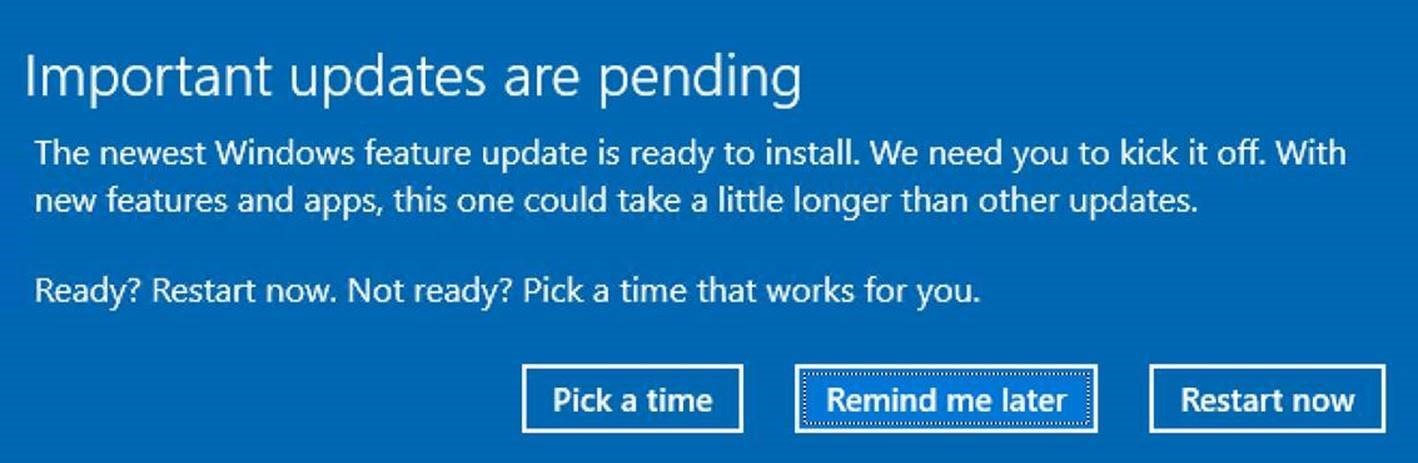
Once the update is downloaded to your device and ready to be installed we’ll notify you.  You are then able to pick a time that won’t disrupt you to finish the installation and reboot.   We are continually working to improve the update experience with each new release of Windows 10.

The last Windows 10 feature update rollout, the April 2018 Update, utilized machine learning (ML) to identify devices that were ready to update, incorporating key attributes like compatibility data. By leveraging machine learning we were able to safely rollout quickly, and as a result the April 2018 Update is now the most widely used version of Windows 10.  Further, our artificial intelligence/ML targeted rollout approach led to the lowest call and online support requests for any release of Windows 10.

With the October 2018 Update, we are expanding our use of machine learning and intelligently selecting devices that our data and feedback predict will have a smooth update experience. We will be further enhancing the performance of our machine learning model by incorporating more device signals such as improved driver telemetry and weighting of key features such as anti-malware software as we broaden the phased rollout. As we did with the April 2018 Update, we will be proactively monitoring all available feedback and update experience data, making the appropriate product updates when we detect issues, and adjusting the rate of rollout as needed to assure all devices have the best possible update experience.

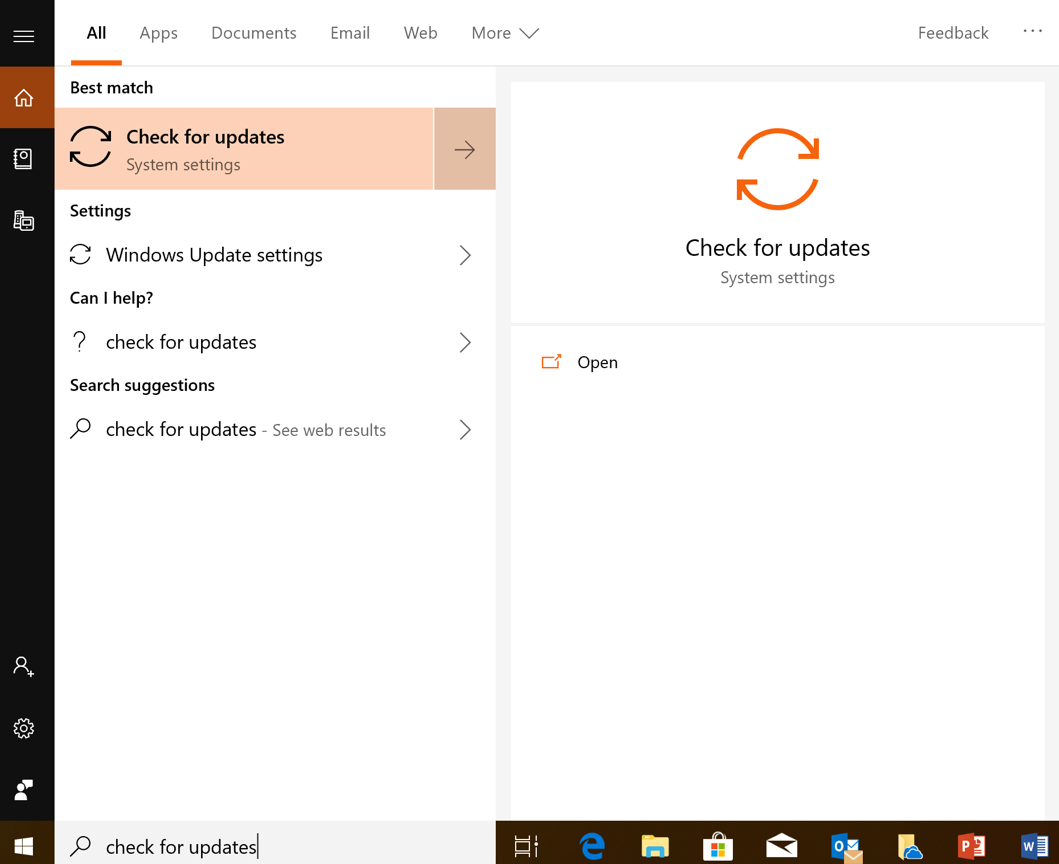
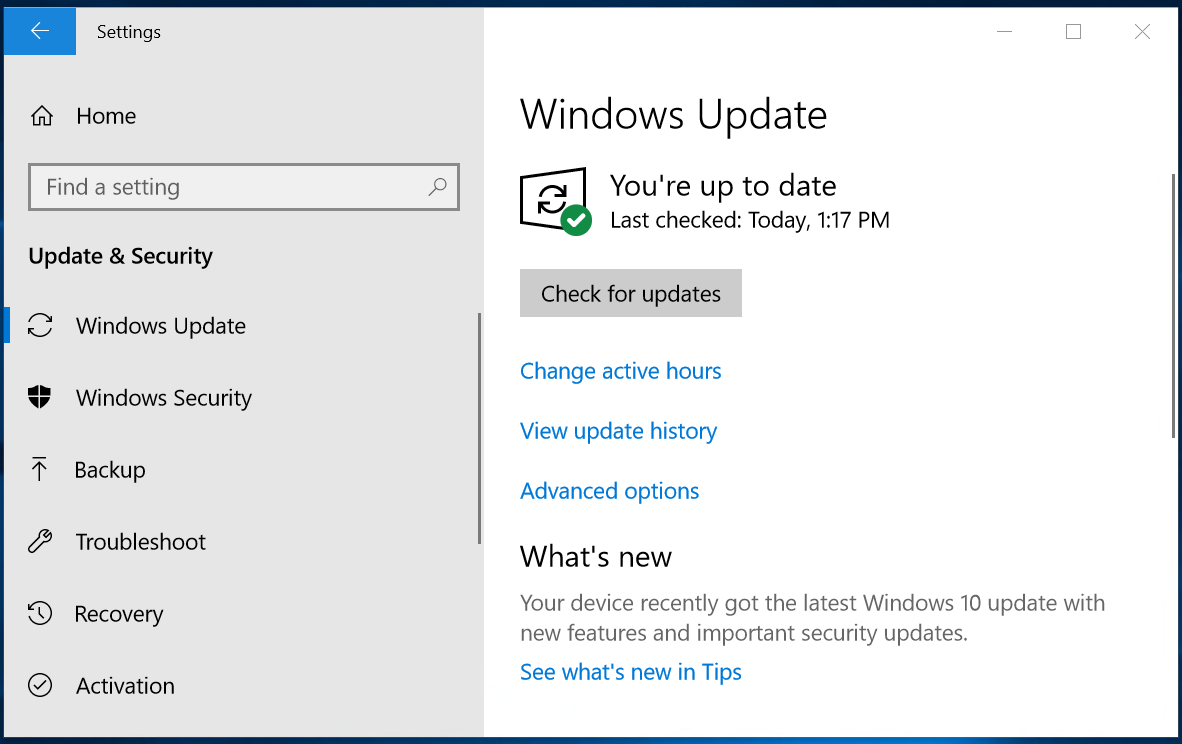
While we encourage you to wait until the update is offered to your device, if you’re an advanced user on an actively serviced version of Windows 10 and would like to install the Windows 10 October 2018 Update now, you can do so by manually checking for updates. In the Search box in the taskbar, type “Check for updates.” Once there, simply click “Check for updates” to begin the download and installation process. We are also streamlining the ability for users who seek to manually check for updates by limiting this to devices with no known key blocking issues, based on our ML model.  If we detect that your device has a compatibility issue, we will not install the update until that issue is resolved, even if you “Check for updates.”  You can also watch this video that outlines how to get the October 2018 Update.

If you’re using a Windows 10 PC at work, you will need to check with your IT administrator for details on your organization’s specific plans to update.

Improving the update experience

We have heard clear feedback that while our users appreciate that updates keep their devices secure, they find the update experience can sometimes be disruptive.  The October Update includes several improvements to the update experience to offer more control and further reduce disruptions.

Intelligent scheduling of update activity: For our many mobile users on laptops and 2-in-1 devices, we have improved Window’s ability to know when a device will not be in use and perform certain update activities then, so as not to disrupt the user. This ability to update at night when plugged in and not on battery power will help hide update activity and minimize user disruption from updates. To further minimize disruption (in case your system is updating overnight), Windows also silences audio when it wakes for Windows Updates.   If your device hasn’t updated for several nights, we will then suggest you plug in your device so that we can update at night.

Intelligent reboot scheduling:  Windows Update will now automatically determine the least disruptive opportunity, outside of Active Hours, and will use an enhanced machine-learning-powered activity check that can determine if a user is going to be away for a while or is only stepping away temporarily.

Faster updates, less down time:  We’ve also made further improvements to the feature update installation process and are targeting to further shorten the amount of time your device is offline during updates by up to 31% compared to the Windows 10 April 2018 Update (based on results from the Windows Insider Program) during the rollout of the October Update.

Smaller downloads:  In the October Update we are introducing a new update package delivery design for monthly quality updates that creates a compact update package for easier and faster deployment.  Users will benefit from the new small update size when installing applicable quality updates as they are 40% more efficient.

Enhanced privacy controls

We continue to focus on putting our customers in control so in the October Update we are enhancing the privacy choice and controls available to users to manage their privacy.  We are now enabling each new account on a device to personally tailor the main privacy settings, instead of only the initial user who sets up the device.   Furthermore, during new device setup, we now offer an activity history page that allows users the opportunity to opt in to sending activity history to Microsoft, to help improve cross device experiences.  This allows users to pick up where they left off in various activities (such as a working on a Word document) on their other devices (Learn more about activity history).

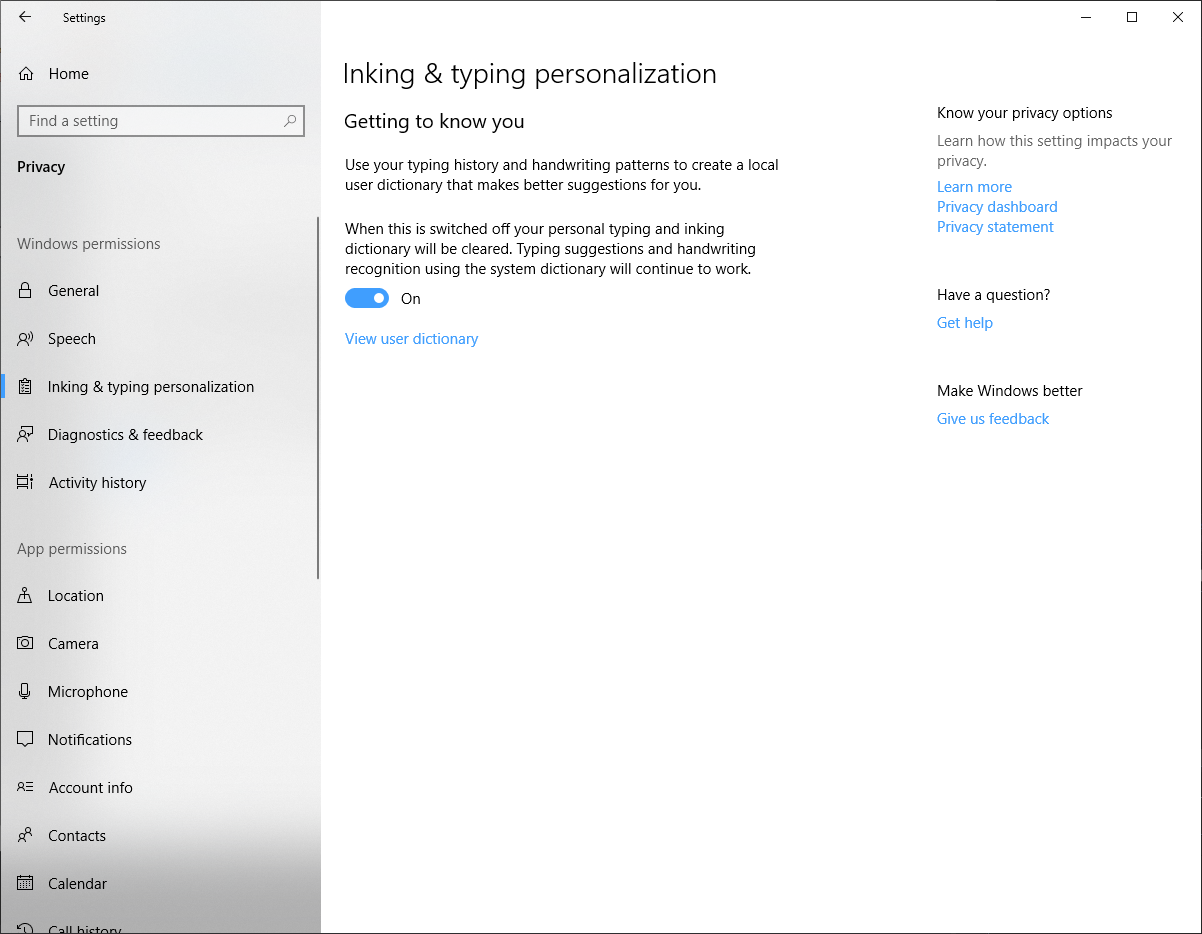
Additionally, we are splitting Inking & typing personalization out from the Speech privacy page.  This enables more granular control of your inking and typing personalization data by managing it separately from your online speech recognition data. Learn more about online speech recognition and inking & typing personalization.

Semi-Annual Channel (Targeted) released

For our commercial customers, the release of the Windows 10, version 1809 on October 2, 2018 marks the start of the servicing timeline for the Semi-Annual Channel (“Targeted”) release; and beginning with this release, all future feature updates of Windows 10 Enterprise and Education editions that release around September will have a 30 month servicing timeline.  Just as we’re immediately beginning rolling out the October Update in phases to consumers, we recommend IT administrators do the same within their organizations to validate that apps, devices, and infrastructure used by their organization work well with the new release before broadly deploying. We use data to guide our phased consumer rollout and encourage commercial customers to do the same through Windows AnalyticsThe update is now available through Windows Server Update Services (WSUS), Windows Update for Business (WUfB) and System Center Configuration Manager’s (SCCM) phased deployment.  For an overview of what’s new and what’s changed, please see What’s new for IT pros in Windows 10, version 1809.

Continuously evolving Windows 10 and the update experience

We’re excited to bring you the latest Windows 10 Features and improvements and hope that you enjoy the improved update experience.    Please provide us feedback as we continue our journey to evolve the update experience, so that our great new product and security features and other enhancements arrive without disruption.

Updated October 2, 2018 4:40 pm

Posted on Leave a comment

Find out what’s new in Windows and Office in October

TheWindows 10 October 2018 Update is available now, and we’re also releasing new innovations in Office 365, To-Do and Outlook.com. These updates were designed to help you make the most of your time across work, home and everywhere in between.

Offering tools for your whole life has never been more important as the lines between work and life have never been more blurred. Whether you are juggling a career and family, running a family as head of household, or growing your career or education, you tell us your greatest need is simply more time and the tools to do what matters most to you.

You can get the Windows October 2018 Update in a couple different ways. If you already have a Windows 10 PC and have automatic updates enabled, the update will be delivered to you when it’s ready for your machine. That roll out begins on Oct. 9. If you are an advanced user and would like to get the update sooner, visit this blog post to learn how. Office updates will roll out over the coming months, and more details are below.

Our favorite new features in Windows & Office

Your Phone app

No need to dig for your phone to text. And you can finally stop emailing yourself photos. With the new Your Phone app you get instant access to your Android phone’s photos and texts on your computer. Snap a pic on your Android phone, see it on your PC. You can also drag and drop photos from your phone onto your PC. And you can copy, edit or ink that photo, right from your PC. Text your friends, group message and type with a keyboard — Your Phone app allows you to view, send and receive the SMS from your Android, on your PC. Android 7.0+ are compatible with Your Phone app[1], which also helps link iPhones to your PC.

For iPhone users, you can surf the web on your phone, then send the webpage instantly to your computer to pick up where you left off. Then you can read, watch or browse with all the benefits of a bigger screen. With a linked phone, continuing on your PC is always just one share away.

For quicker access to your phone’s content, pin Your Phone app to your desktop or your taskbar. You can also fire it up through the All Apps list in Start Menu, or by clicking the Windows key and searching for Your Phone app.

Timeline on phone

In April, we introduced you to Timeline on your Windows 10 PC. It aims to end the frustration we’ve all encountered digging through emails and file folders for a document we just can’t find. Timeline makes it way easier to find what matters to you across your devices. You can also pick up what you were doing  — even if it was on your iOS or Android device — on your Windows 10 PC when you’re ready to get back to it.

Now, your PC’s timeline is available on your phone, so you can scroll back in time to find the files and websites you were using on your phone, computer and tablet. Basically, you can pick up where you left off, wherever you left off[2]. Go back and forth in time by easily scrolling back to find things you were working on earlier today or earlier this week[3]. Share or remove activities whenever you want from a specific day or hour. Available in preview starting today on Android phone via Microsoft Launcher app, coming soon to preview for iPhone.

Inking and 3D in PowerPoint and Word

PowerPoint[4] is a powerful tool for visually telling your story, and Word[5] is a canvas for organizing and collaborating on ideas. Whether you’re pitching a concept, teaching a lesson or writing a paper, today we’re making it even easier to showcase your thoughts with new AI-powered inking features and 3D updates that help you find creative flow and design beautiful content.

  • Because some prefer to sketch out their thoughts first, now, you can ink[6] your ideas and we’ll use AI to transform them into perfectly formatted slides. An inked bulleted list will transform into perfectly formatted text. Or, if you’re inking a flow chart or diagram, you can draw both words and shapes, and PowerPoint will easily convert them into text and snapped shapes in one fell swoop.
  • Our AI-powered design engine, PowerPoint Designer, is getting smarter. Designer can now recommend slide designs based on handwritten ink. Or, if typing is more your style, Designer can take a simple block of text, understand the context using AI, and then provide design ideas using icons and Smart Art. To provide even more design options, we’re also adding 350 new icons to our library.

We’re adding built-in animations to 3D models in PowerPoint and Word. New 3D Embedded Animations make it faster and easier for anyone to add movement and animation to slides and

  • To give you even more creative flexibility, we’re also adding over 30 new animated 3D models.
  • If you like the flexibility of editing Word documents using digital pen, we also have some great updates for you. Using Ink Editor[7], you can already do things like remove and highlight text. Today, we’ve added new pen gestures that make editing a document from start to finish easier, including adding line breaks, inserting new words as well as splitting and joining words.

For the last few years, we’ve been on a mission to transform Office[8], and use AI to make everyday tasks easier. June, we revealed a fresh, new design for our Office apps and just last month we announced new AI-powered features in Excel and PowerPoint. We’re excited to show you what more there is to come.

Most updates to PowerPoint and Word will begin rolling out to Office 365 subscribers on Windows today. The ink to Designer feature will roll out next month. 3D Embedded Animations will roll out to Office Insiders first, and will become generally available in the coming weeks. Text to Smart Art and icons will also be available for PowerPoint Online and Mac. 

Microsoft To-Do

Our task app, To-Do helps you manage, prioritize and complete the most important things you need to achieve each day. To help you keep track of tasks using whatever mode is most comfortable to you, today we’re announcing the ability to update your tasks using ink. With your digital pen and a touch enabled Windows device, simply add a task to your list using ink, and then strike out when complete. By signing in with your Microsoft Account, your tasks are then conveniently synced with the To-Do app across iOS, Android and Windows and the web.

Outlook.com

Over one year ago, we updated Outlook.com to give our millions of users a faster, smarter and more personalized inbox. Today, we’re making two new updates that make staying on top of tasks easier and interacting with brands you love, better.

  • The new Tasks experience in Outlook.com helps you manage tasks without breaking your flow or leaving your inbox. Powered by To-Do, you can now create tasks by dragging and dropping an email to your task list. Or, easily schedule items by dragging a task to your calendar. Your tasks then travel with you on the To-Do app.
  • Is your inbox overflowing with offers and newsletters from brands? Today, we’re launching a new experience in Outlook.com to help you sort through the noise and interact more easily with the brands you love. Brands now can obtain a verified icon, making it easier for you to identify legitimate businesses in your inbox. And with the new profile card, you quickly have access to contact information, package deliveries, reservations, store locations and more. You’ll also be able to easily see what newsletters you’re enrolled in, and unsubscribe in one click with the new subscription portal. Finally, we are making it easy to find promotions in your inbox by surfacing offer details right in your message list, so you don’t have to open the email to see the deal. These new features will begin rolling out to Outlook.com customers in the US in the coming months.

Snip & Sketch (previously known as Screen Sketch) is now an app.

You can now update Snip & Sketch (originally introduced as part of the Windows Ink Workspace under the name “Screen Sketch”) via the Microsoft Store. It will now appear in the list when you press Alt + Tab. You can also set the window size now, and it even supports multiple windows.

Easy snipping is just a single step away. We’ve heard that you want to be able to quickly snip and share a screenshot, and we’re making it happen! Pressing the Windows key + Shift + S will now bring up a snipping toolbar – use it to snip a rectangle, something a bit more freeform, or full screen and it will go straight to your clipboard. If that’s all you need, you can take it from there.

But say you want more. Immediately after taking a snip, you’ll now get an invitation to take you and your snip to the Snip & Sketch app where you can annotate and share away.

But wait, there’s more! Is the Windows key + Shift + S keyboard shortcut too long to remember? We’ve added easy entry options:

  • Just click the pen tail button. If you have a digital pen, go into Pen & Windows Ink Settings – you’ll find Screen Snipping is now an option for single click. This will launch you directly into our snipping experience below.

  • Press Print Screen. You heard it right, just one button! It’s not enabled by default, so go to Keyboard Settings, where you’ll see a new option that says “Use the Print Screen key to launch screen snipping.” Opening Settings and searching for “print screen” will take you to the right page.
  • Press the quick action button in Action Center, labelled “Screen snip.” It should be there as soon as you upgrade, but if not you can always enable it via Notifications & Actions Settings.

A note about Snipping Tool: As part of the process of consolidating and modernizing our snipping experiences in Windows, when you upgrade to the October 2018 Update you’ll see a note about this in the Snipping Tool.

Snipping Tool is still available, and will continue to be available until our data and user feedback indicate people don’t need both experiences.

Other updates in Windows & Office

Microsoft Edge General Improvements

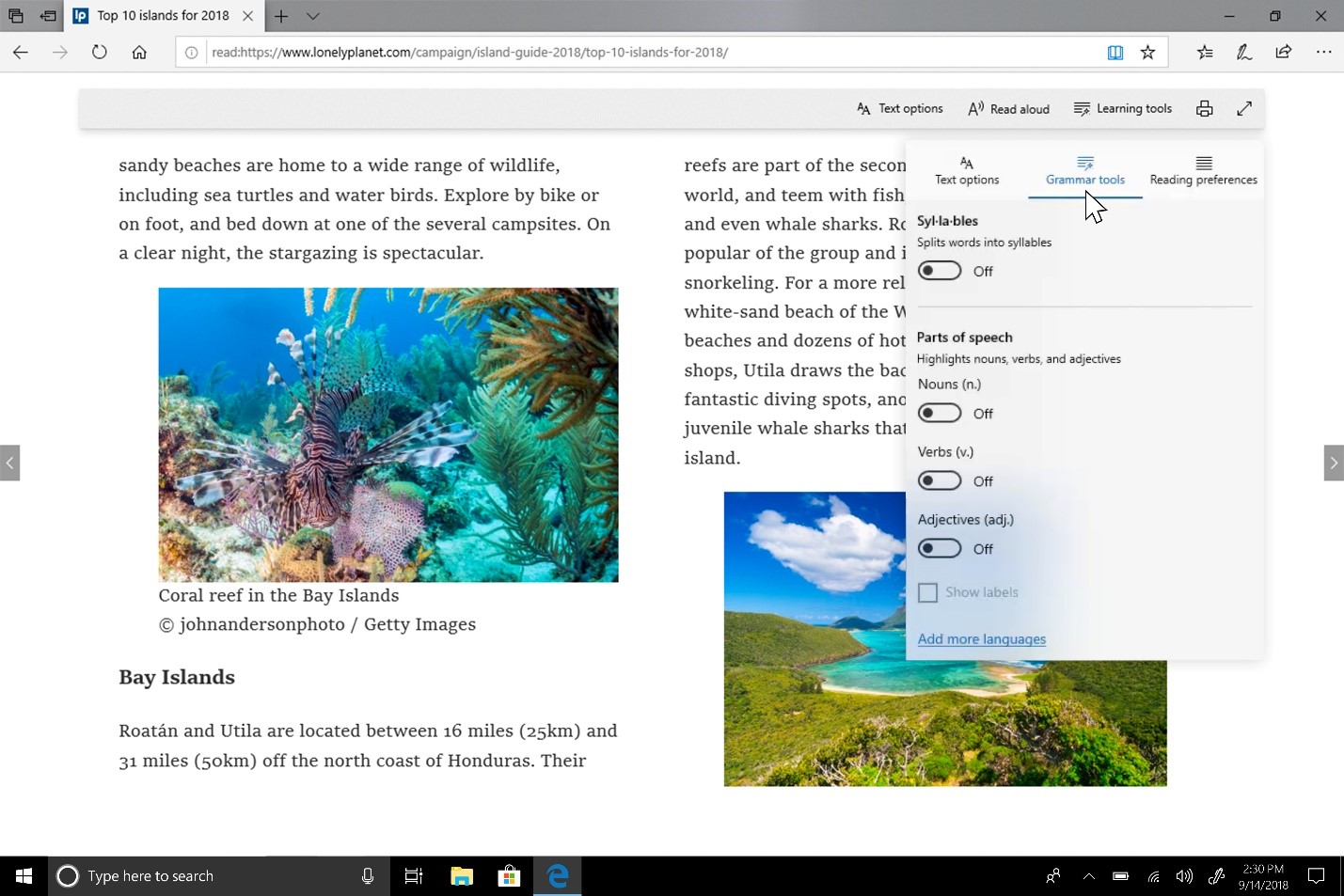
There are now more ways to improve reading and focus, also an improved look/design of Microsoft Edge and more control via customization:

  • Learning Tools: Microsoft Edge is the only browser with Microsoft Learning Tools built-in that help improve reading and focus.
  • Themes: Select a theme or choose custom colors that work best for you.
  • Grammar Tools: Identify parts of speech with different colors.
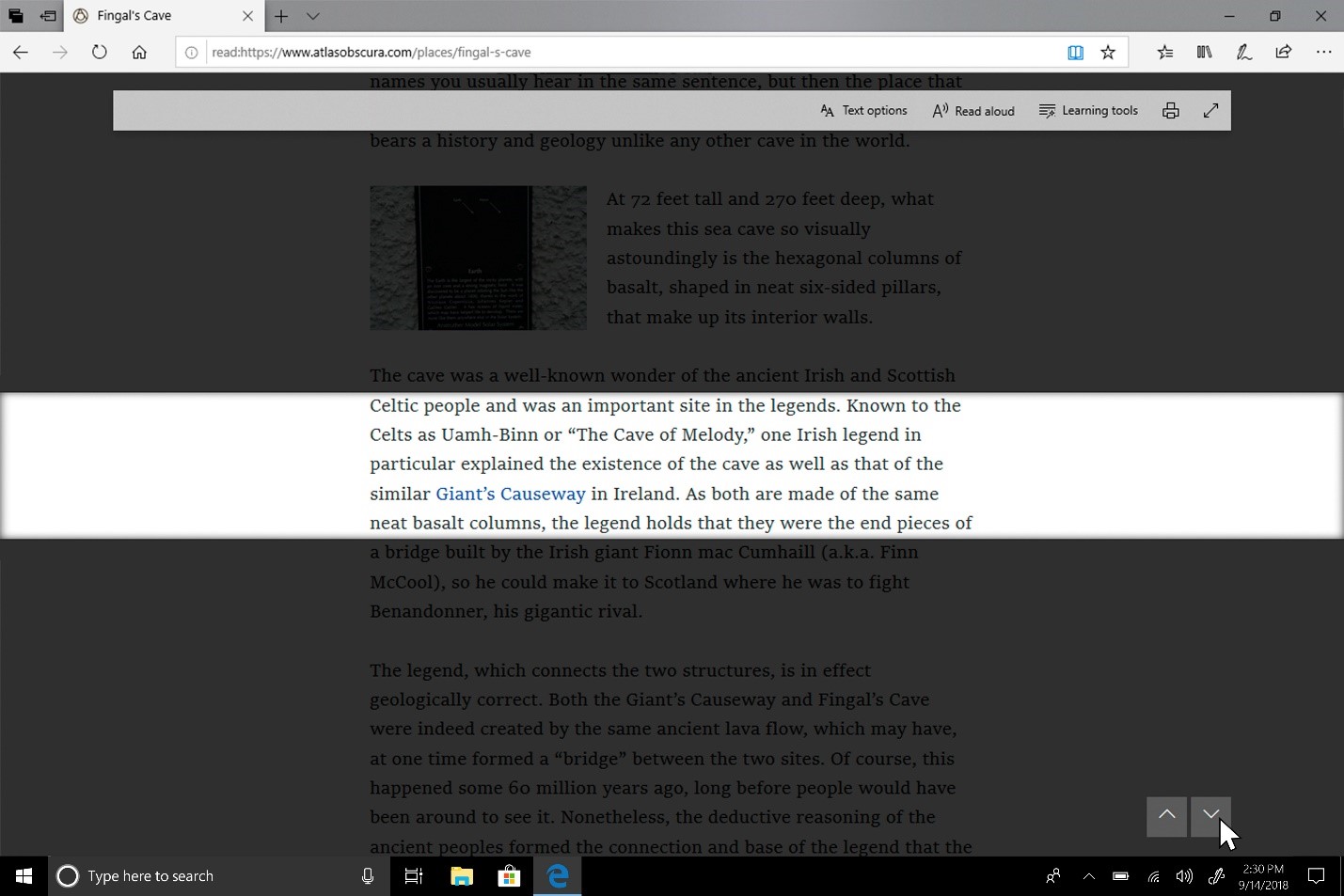
  • Line Focus: Like a reading ruler, this feature highlights lines of text, which helps focus your eyes and attention.
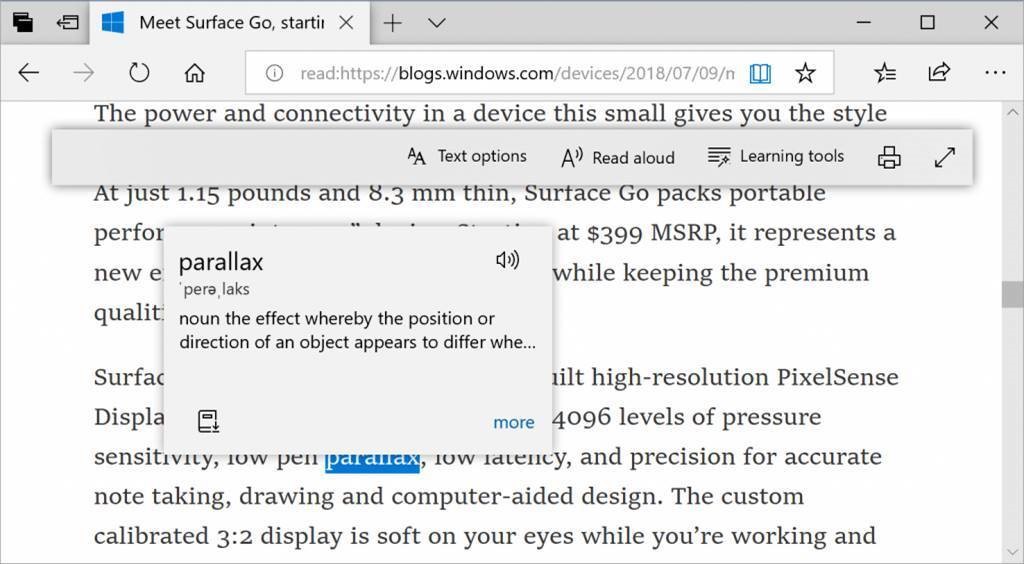
  • Offline dictionary. Highlight a word and the definition automatically pops up.

Learning tools get richer: Under the learning tools available in Reading View, you can see additional themes. Choose the theme color that’s easiest for you to see.

Grammar Tools: Now you can separate words into syllables and highlight parts of speech, such as nouns, verbs and adjectives. Along with highlighting parts of speech, you can now also change the color as well as turn on an indicator right over what you’ve highlighted, making it much easier to identify the part of speech.

Line focus: Helps improve focus while reading an article by highlighting sets of one, three or five lines.

Once you’ve set your preference, you can easily scroll down the page and the line focus moves as you read.

Look up definitions for words in Reading View for web pages, books and PDFs: We’ve added a new dictionary function, so you can look up definitions for key words when reading a page or document, even when you are offline. Simply select a single word to see the definition appear above your selection.

You can also choose to have a word read aloud so you can hear the correct pronunciation or expand more details from the definition. You can also toggle to choose whether definitions appear and which types of content they work in under the “General” tab of the Microsoft Edge settings menu.

Microsoft Edge PDF Improvements

Improved toolbar options: The PDF toolbar can now be invoked by just hovering at the top, making the tools more easily accessible. The toolbar, available whenever a PDF document is opened in Microsoft Edge, will now show text descriptions for the icons to make them quickly understandable. New options like “Add notes” make these handy tools available when you need them.

Pin/unpin PDF toolbar: The toolbar can now be pinned at the top of the document, making all the PDF tools easily accessible if you need them. You can also unpin the toolbar for an immersive reading experience. If the toolbar is unpinned, it will hide itself – just hover over the top area to bring it back.

Rendering improvements: Now you will see less of the white pages when you navigate through PDF files in Microsoft Edge.

New design improvements: As we continue to evolve how Microsoft Edge leverages the Fluent Design System for a more natural and usable experience, you may notice some subtle tweaks to the look of the tab bar. In the October 2018 Update, we’re adding a new depth effect to help emphasize the active tab.

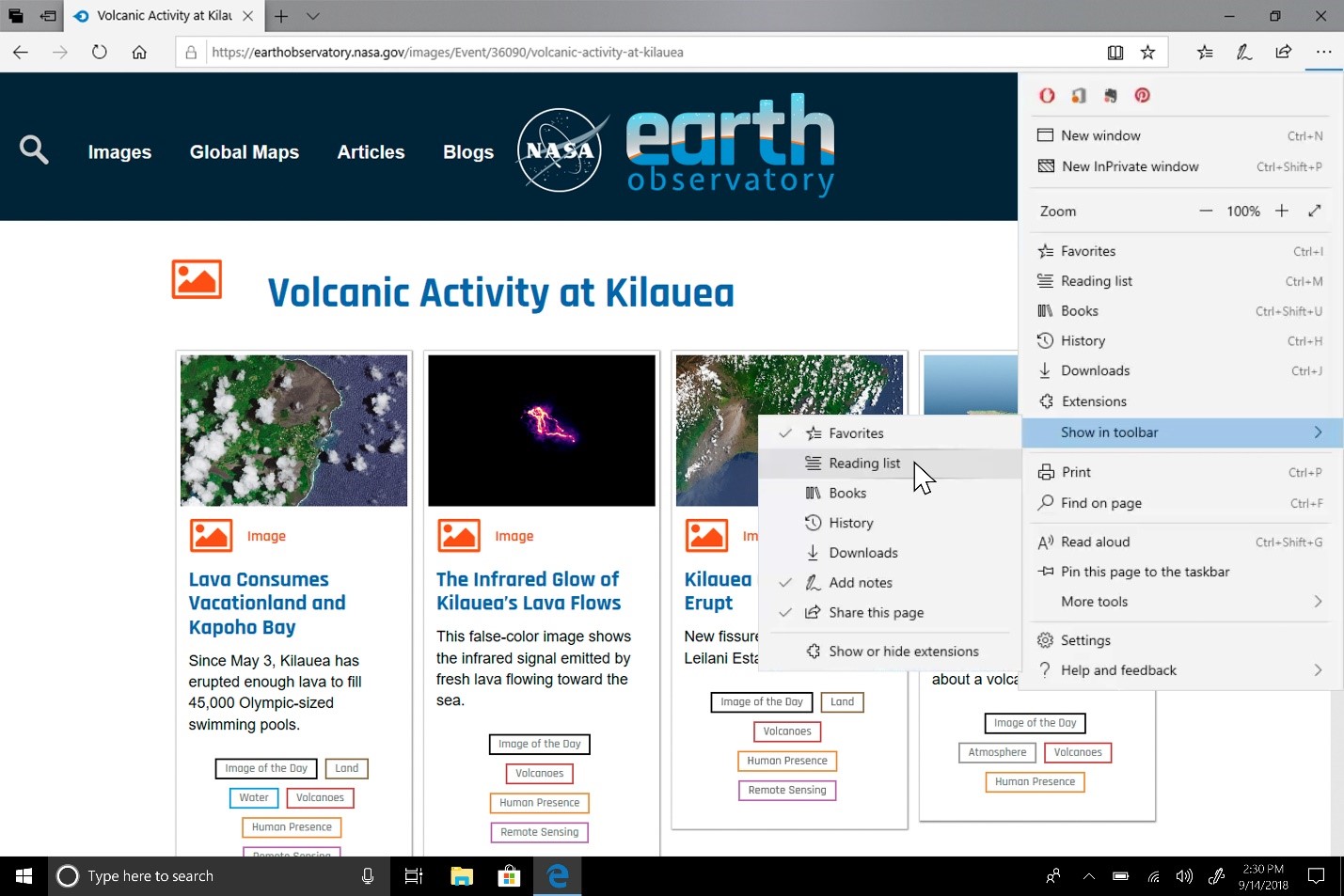
Redesigned “…” menu and Settings: We’ve heard your feedback that the Microsoft Edge settings were getting a little complex for a single page. In this release, we’re making Settings easier to navigate, putting commonly used actions front and center, and providing more ways to customize. The menu options are now organized into groups, with icons for each entry and keyboard shortcuts (where applicable). Click the “…” button in the top-right corner of Microsoft Edge to see what’s new.

Customize toolbar items for Microsoft Edge: When you click “…” in the toolbar, you’ll find a refined menu that puts common commands like “New window” and “New InPrivate window” front and center. We’ve also added the much-requested ability to customize which icons appear in the Microsoft Edge toolbar – you can remove them all for a tidier look or add as many as you like to bring your favorite functionality to your fingertips.

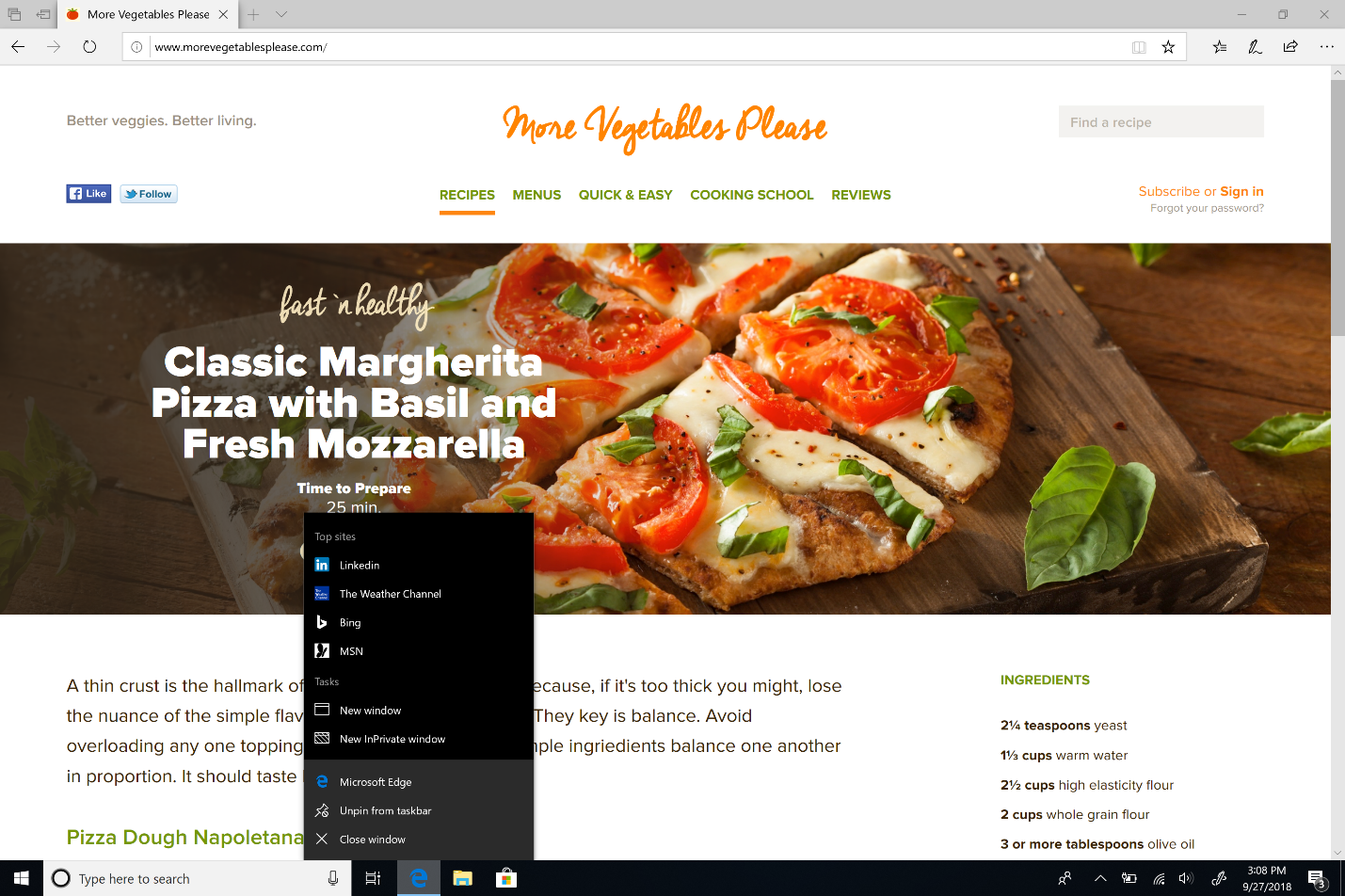
See your top sites in the Jump List: You can now see your top sites in the Jump List on the Windows taskbar or Start menu. Just right-click the Microsoft Edge icon to see a list of your most-visited sites and pin the ones that matter most to you. Right-click on any entry to remove it from the list.

Do more from the “Downloads” pane: We’ve added options for “Show in folder” and “Copy link” to the right-click menu for items in the “Downloads” pane.

Last (but not least), the October Update breaks Settings out into subpages by category, with better-organized options and less clutter on each page. The new Settings experience is designed to match the Microsoft Edge Favorites, for a quicker and more familiar experience.

Microsoft Edge Platform and Enterprise Management Updates

Web Authentication API: Microsoft Edge now includes unprefixed support for the new Web Authentication API (a.k.a. WebAuthN). Web Authentication provides an open, scalable and interoperable solution to facilitate authentication, which replaces passwords with stronger hardware-bound credentials. The implementation in Microsoft Edge allows the use of Windows Hello (via PIN or biometrics) and external authenticators, like FIDO2 Security Keys or FIDO U2F Security Keys, to securely authenticate to websites.

Microsoft WebDriver is now a Feature on Demand: We’ve made Microsoft WebDriver a Feature on Demand (FoD) so it’s easier to get the right version for your device. You can install WebDriver by turning on Developer Mode, or by going to Settings > Apps > Apps & features > Manage optional features and installing it as a standalone.

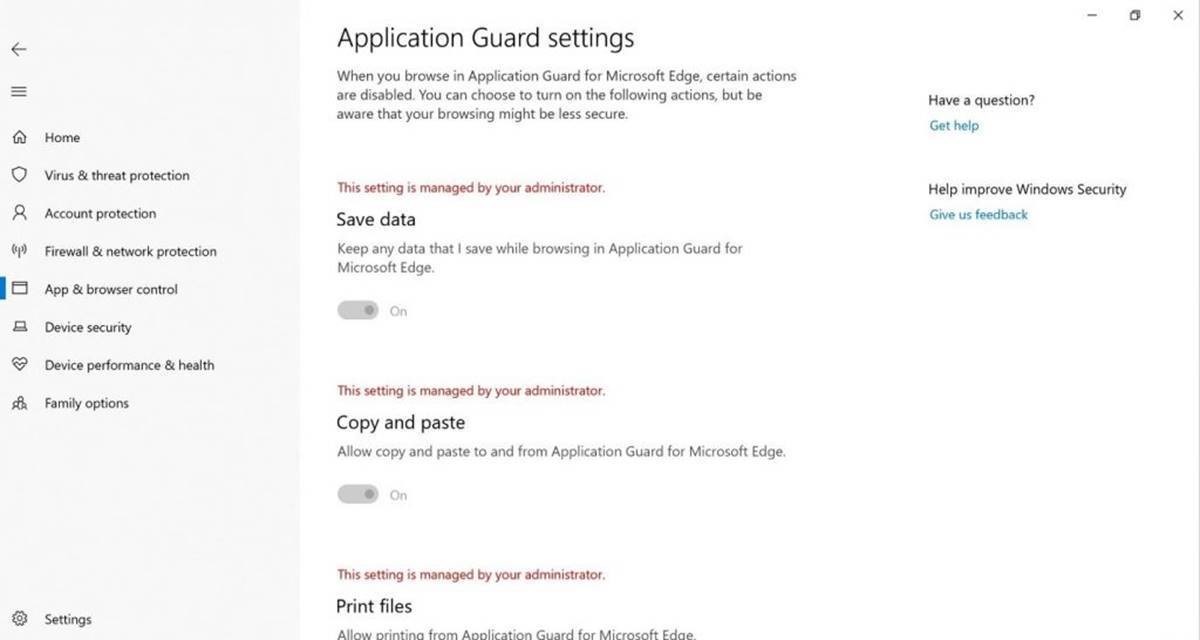
New Microsoft Edge Group Policies: The Microsoft Edge team has introduced new Group Policies and MDM settings for IT administrators to manage Microsoft Edge. The new policies include enabling/disabling full-screen mode, printing, favorites bar and saving history; prevent certificate error overrides; configuring the Home button and startup options; setting the New Tab page and Home button URL and managing extensions. Learn more about the new Microsoft Edge policies.

Users can control whether media can play automatically: In the October 2018 Update, we’ve added a new setting in Microsoft Edge to allow you to control whether sites can automatically play videos. You can find this setting under Advanced settings > Media autoplay, with options to customize the behavior according to your preferences:

When “Allow” is selected, sites can play videos when you first browse to the site in an active tab. When “Limit” is elected, sites can only autoplay silent videos, so users are never surprised by sound; once the user clicks anywhere on the page, autoplay is re-enabled for that domain for the duration of that tab. When “Block” is selected, sites cannot autoplay until you interact with the media content.

Users can also enable or block autoplay at any time, or change autoplay permissions on a per-site basis, by clicking the information icon or lock icon on the left side of the address bar and selecting “manage permissions” to get started.

Retired XSS Filter: We are retiring the XSS filter in Microsoft Edge beginning with the October 2018 Update. Our customers remain protected thanks to modern standards like Content Security Policy, which provide more powerful, performant and secure mechanisms to protect against content injection attacks, with high compatibility across modern browsers.

Stay productive

SwiftKey intelligence comes to Windows

SwiftKey gives you more accurate autocorrections and predictions by learning your writing style – including the words, phrases and emoji that matter to you. It’s available for Android and iOS, and starting with the October 2018 Update, SwiftKey will now power the typing experience on Windows when using the touch keyboard to write in English (United States), English (United Kingdom), French (France), German (Germany), Italian (Italy), Spanish (Spain), Portuguese (Brazil), or Russian.

Windows now shows you insights about how its AI has been helping you type with efficiency. If you use the software keyboard on Windows, there are many features built into the typing experience that leverage AI and machine learning to help you be more efficient. Some examples include autocorrecting your spelling mistakes, prediction of the next word you would type, word suggestions as you start typing so you don’t have to type the full word, and displaying the number of words you’ve typed by swiping over the letters on the software keyboard (yes, you can do that, try it out if you haven’t yet).

Windows now shows you stats about each of these features. Go to Settings > Devices > Typing and click on “View typing insights” link to see them.

If you have any feedback, please send it via this support form.

Say hello to your new clipboard experience! (Cloud Clipboard)

Copying and pasting is something we all do, multiple times a day. But what do you do if you need to copy the same few things again and again? How do you copy content across your devices? We’re addressing that and taking the clipboard to the next level. Simply press the Windows key + V and you’ll be presented with our brand-new clipboard experience.

Not only can you paste from the clipboard history, but you can also pin the items you find yourself using all the time. This history is roamed using the same technology that powers Timeline, which means you can access your clipboard across any PC with the October 2018 Update of Windows or higher.

Our new settings page for enabling this experience is under Settings > System > Clipboard.

Roamed text on the clipboard is only supported for clipboard content less than 100kb. Currently, the clipboard history supports plain text, HTML and image less than 1MB.

Here comes Emoji 11

Unicode 11 comes with 157 new emoji and they’re now available in the October 2018 Update. These include superheroes, redheads, a softball, a pirate flag and a llama. You can get to them using the Emoji Panel (“Windows key + .”) or the touch keyboard.

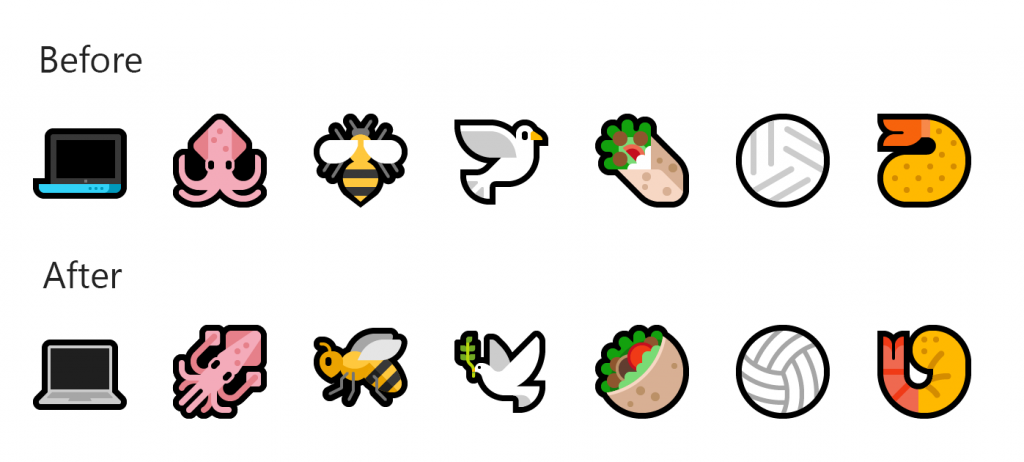
When you get the October 2018 Update, you’ll also find tweaks to some of our existing emoji – such as:

Our ninja cats got a bit of love too – can you spot the difference?

If you have any feedback about our emoji and emoji typing experiences, please let us know! We’d love to hear it.

The Emoji Panel is currently available for 190+ locales.

Start tile folder naming

We’re now adding the ability to name your tile folders. To create a tile folder in Start, just drag one tile on top of another for a second, then release. Continue dropping as many tiles into the folder as you’d like. When you expand the folder, you’ll see a new option to name it.

Search Improvements

Save time with Search Previews

Thank you for the positive feedback on the web previews we added last year. With this release, we’re happy to share our latest improvements to Search:

  1. Enhanced home screen

We’ve redesigned the home screen to get you to your content faster. Save time and keystrokes by scanning the ‘Pick up where you left off’ section for your recently accessed items. Focus your search with a filter to quickly find content from your PC and the cloud. Cloud-search enhancements include email from Outlook.com, and documents from OneDrive.

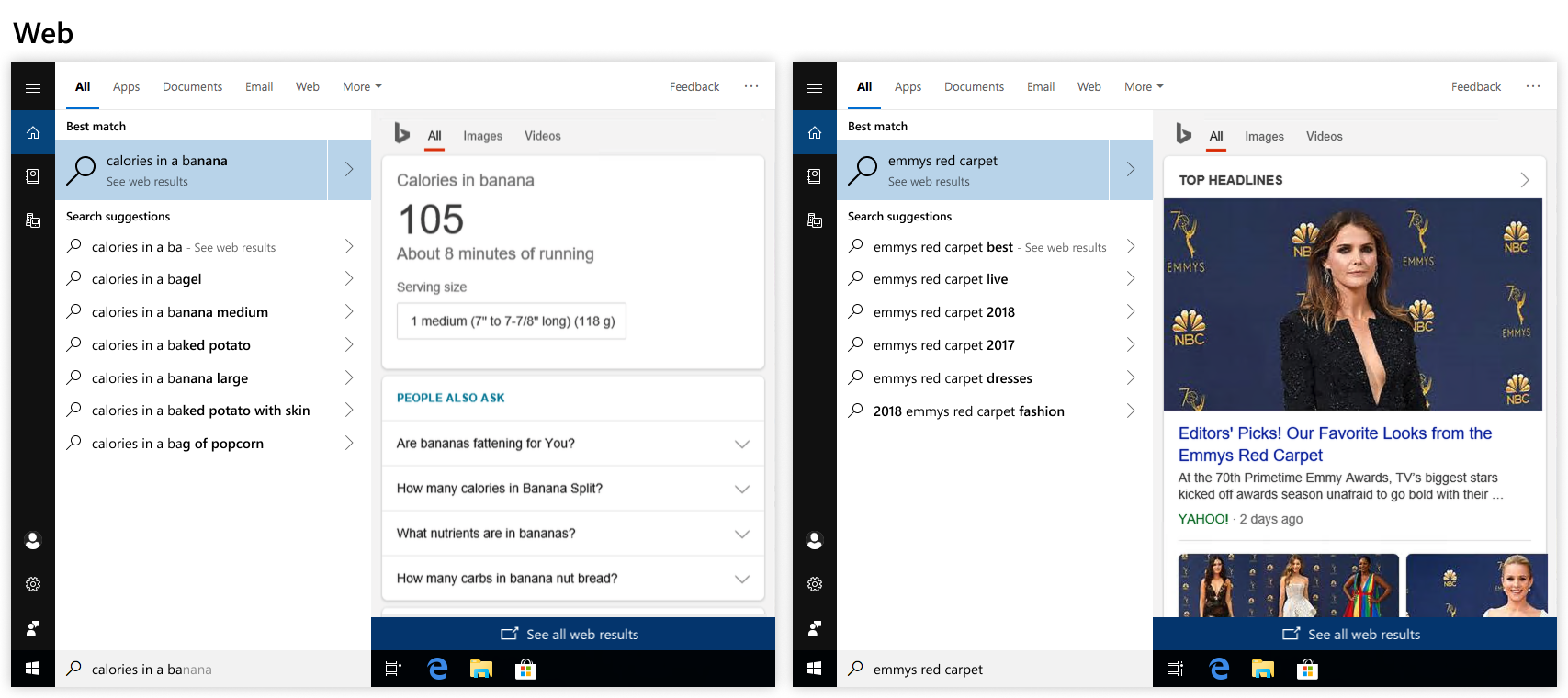
  1. Previews for all search results

We’ve expanded previews to include apps, documents, email, people, and more. Previews save you time and give you the information you need, making it faster to start and finish your task.

Use Search previews to:

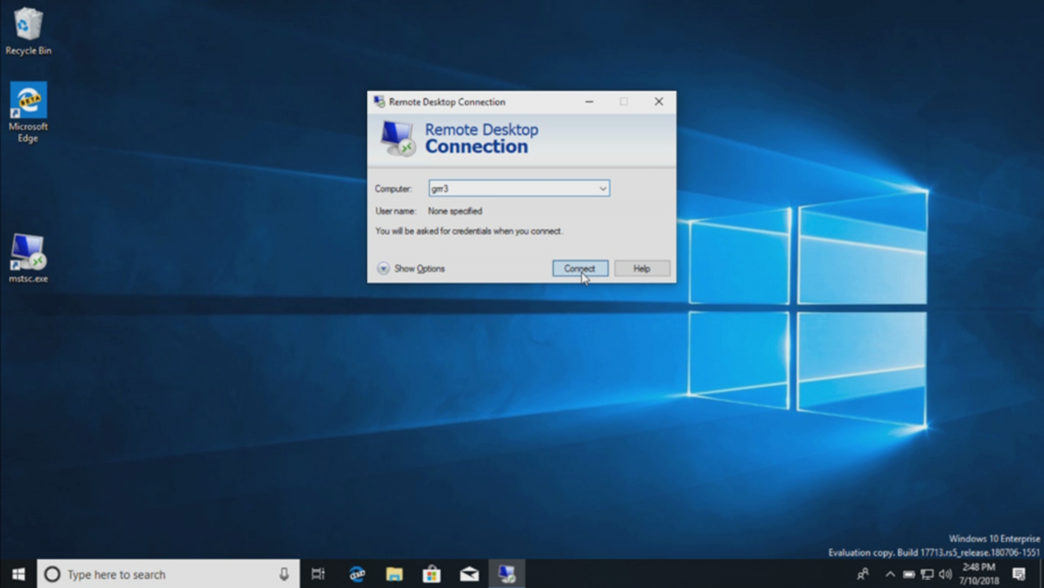
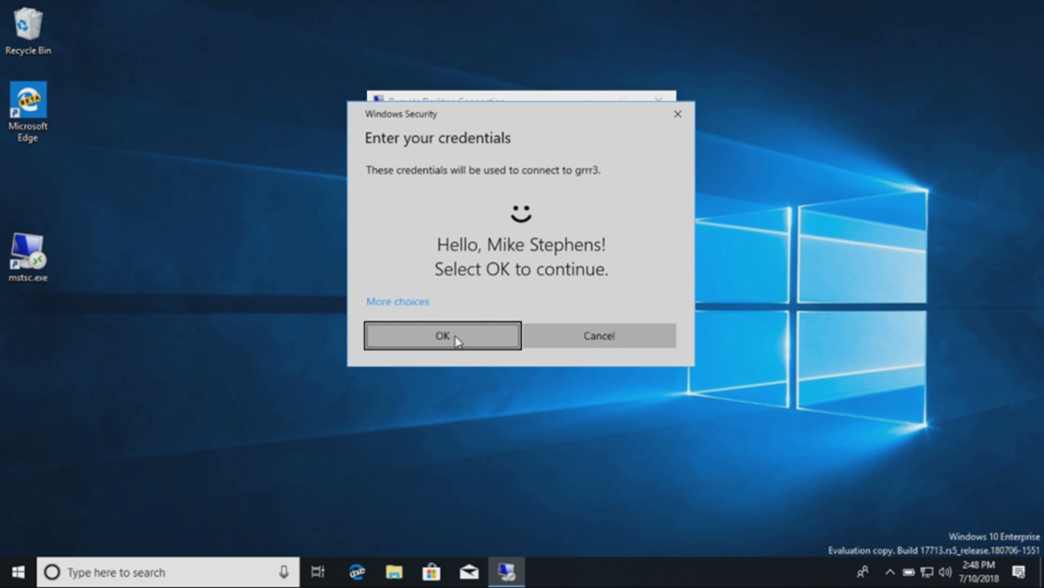
  • Get back to what you were doing with fast access to your recent files. Just search for an app to select a file from the Recent list, like a Word doc or Remote Desktop session.
  • Jump-start your tasks with quick actions in previews. Create an Outlook meeting, send an IM, run PowerShell as Administrator, open a file’s location, and much more.
  • Easily distinguish between files with details including location, last modified date, and author all shown in the preview.
  • Get web search results like quick answers, news, and websites, without opening a browser. To find image and video results for a web search, select an option at the top of the preview.

We’ll be updating and improving the Search experience over time as we develop and add features. Stay tuned!

Search is now available in the Calendar app for Windows 10!

Now you can find past or future events by searching for the name, location, people included or words in the event body. Events that match your search will be clearly visible on your calendar, while those that don’t will be dimmed so you can find what you need quickly.

Search works for Outlook.com and Office 365 accounts.

Windows Mixed Reality Improvements

Introducing Mixed Reality Flashlight

How many times have you been immersed in a captivating virtual experience and wanted to take a quick glance at your friend in the same room; or reach for a drink, your phone or a keyboard; or needed to find a surface to set down your controllers?

You’ve probably fumbled about as you were removing your headset, which can be really fun if you have controllers in your hands.

But now that awkwardness may become a thing of the past, as you can now peer into your physical environment through Flashlight – without removing your headset! With the October 2018 Update, you can open a portal into your real world at any time via the Start menu, a button shortcut or a voice command. . This opens a low-latency pass-through camera feed connected to your controller. It’s comfortable, intuitive and keeps you immersed.

Flashlight finally allows you to mix your physical and virtual realities.

Introducing Quick Actions

While using an Immersive Application, you can easily Go Home, view the time or launch Mixed Reality Capture tools (Photo, Video and more) with Quick Actions. To launch Immersive Application Quick Actions, simply press the Windows key.

Stream audio to both the headset and the PC speakers simultaneously

Now you can hear sound from your normal PC speakers when not running the Mixed Reality Portal (MRP) and from the headset’s audio jack or built-in headphones when mixed reality is running. Close all apps, including MRP, and go to Settings > Mixed reality > Audio and speech to turn on “When Mixed Reality Portal is running, mirror headset audio to desktop.” You will now hear audio from both the headset and PC speakers when running mixed reality.

Other improvements for Windows Mixed Reality users

  • With the October 2018 Update, Windows no longer requires a physical monitor to be connected while running Mixed Reality in cases such as backpack PCs. Setting up WMR for the first time[9] in Mixed Reality Portal and unlocking the PC on the sign-in screen still requires a monitor to be connected initially. However, you can configure auto login to prevent needing to sign in for subsequent usage. Remember to set up a room boundary if you’re using Windows Mixed Reality while standing.
  • We’ve also made some adjustments to the mixed reality video capture experience in the October 2018 Update to make it easier to stop videos from the Start menu.

PC Gaming Improvements

Game bar Improvements

We’re now rolling out more functionality to the Game bar:

  • New look: Enjoy a cleaner new look and layout.
  • New audio controls: With the new audio control panel, get more control out of individual audio channels without ever having to leave your game.
  • Game bar is now an app: Launching Game bar is now easier than ever, whether through the desktop, apps, the Start menu, or task bar.

Game Mode Improvements

  • Fewer gaming interruptions: Based on feedback from gamers, we’ve simplified the way Game Mode works. Now auto-enabled for all games with a master On/Off toggle in Windows Settings, Game Mode suppresses Windows Update driver installs and blocks Windows Update interruptions such as restart notifications while you’re gaming. You may also see improved game performance with less FPS variability depending on the specific game and system.


Notable App Updates

Skype for Windows 10 gets a big update

This new Skype for Windows 10 update brings all the latest and greatest Skype capabilities to Windows 10 users. Customers will enjoy the same consistent experience across all devices and platforms – iOS, Android, Mac and Windows. Exclusive to Windows 10, you can now use the Share Charm to quickly share content directly with your Skype contacts. If you’re browsing in Microsoft Edge or looking for a document in File Explorer and find something you want to share, just tap the Share icon and select a Skype contact to share with – there’s no need to launch Skype.

Here are some more new things you can do in Skype for Windows 10:

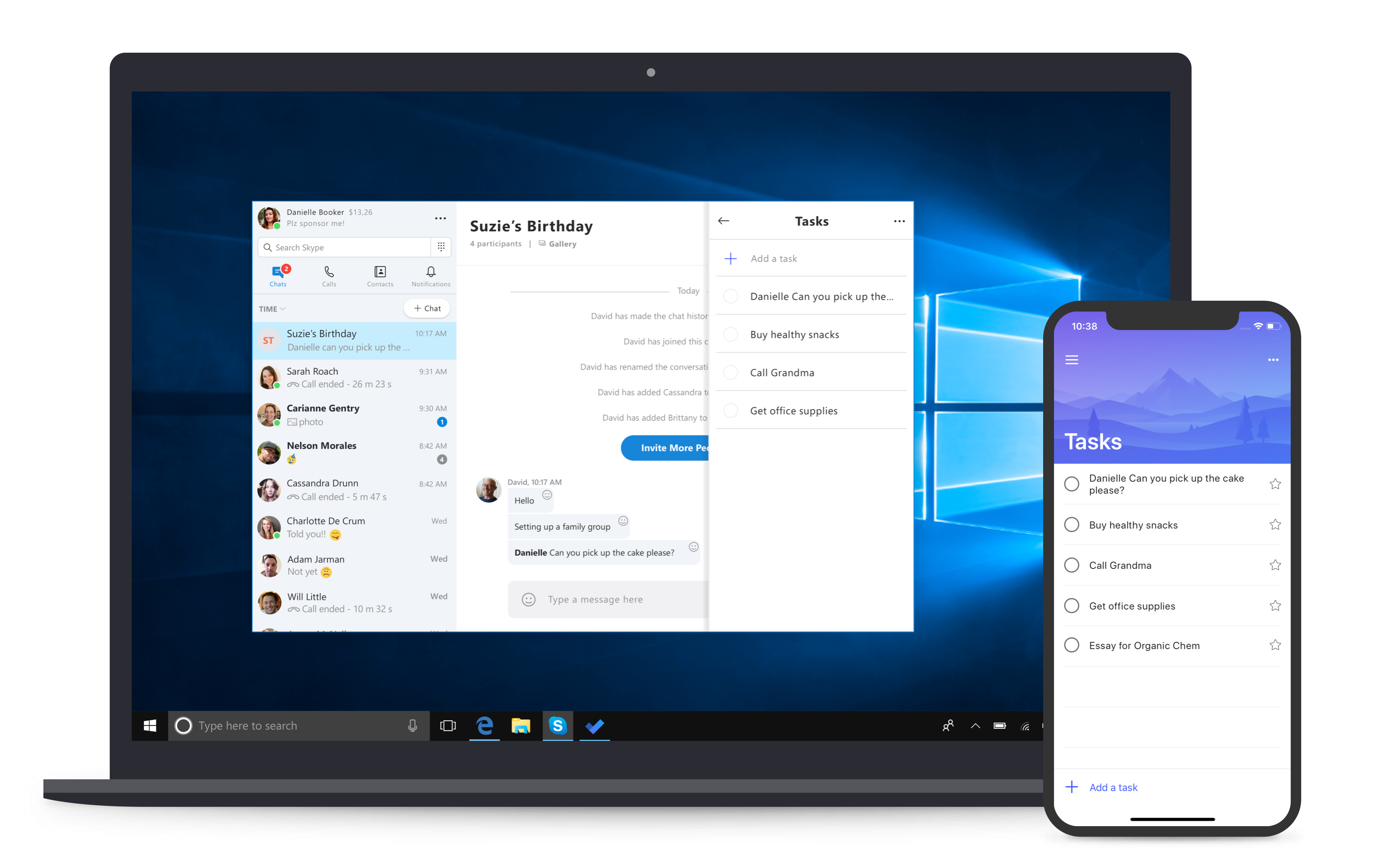
  • To-Do—Add tasks to your To-Do list directly from Skype. Select the message and then tap “Create a task” to open the tasks pane. From here, you can add, edit and check off tasks. Tasks will be saved and available in Skype, or in the To-Do app.
  • Call recording — With call recording, you can save a call to the chat and return to it later, so you won’t forget something important.  Missed a meeting? No problem, now you can find and replay key moments or decisions, just as they were made by those on the call.
  • Private Conversations — Have end-to-end encrypted Skype audio calls, send text messages, image, audio and video files. The content is hidden in chat list notifications to keep the information you share private.
  • Themes — You can now customize your chat bubbles. Give them color to make your chats more festive or stick with our classic colors when you need to get down to business.
  • And much more — Archive conversations, ability to mute others in a group call, @mentions and more.

If you’ve chosen to have updates installed automatically on your Windows 10 device, you don’t have to do anything — these new features will be available to you automatically through Microsoft Store updates. As always, please join us in the Skype Community and send us your feedback by opening your settings and selecting Help & Feedback.

Microsoft Forms

Microsoft Forms is a simple, lightweight tool for creating surveys and quizzes. Millions of people have used Forms since we released it for education and commercial organizations. Today, we’re extending the Forms Public Preview to consumers as well. With Forms, you can easily create, run and analyze results from surveys and quizzes. Simply share a link or QR code, and your friends and family can access your form from virtually anywhere, on any device and at any time. With real-time responses and automatically generated charts, Forms makes it easy for creators to quickly understand the results and take the right next step. To get started, you can sign in using a free Microsoft Account here.

Microsoft Font Maker app

With the Microsoft Font Maker app you can use your digital pen to create a custom font based on the nuances of your own handwriting[10] – currently available via the Microsoft Store and we’d love to hear your feedback! Install the fonts you create to add a personal touch to everything you do.

Currently you can use the app to create a basic English font.

Security

Remote Desktop with Windows Hello Biometrics

With the October 2018 Update, Azure Active Directory and Active Directory users using Windows Hello for Business can use biometrics[11] to authenticate to a remote desktop session.

This feature works with Windows Hello PIN, however it does not work with convenience PIN.

To get started, bring up Remote Desktop Connection (mstsc.exe), type the name of the computer to which you want to connect and click Connect.

Because you signed using Windows Hello for Business, Windows remembers how you signed in and automatically selects Windows Hello for Business to authenticate you to your RDP session, but you can click More choices to choose alternate credentials.

In this example, Windows uses facial recognition to authenticate the RDP session to the Windows Server 2016 Hyper-V server. You can continue to use Windows Hello for Business in the remote session, but you must use your PIN.

Have feedback? We’d love to hear it! Head to the Feedback Hub to share your thoughts about Windows Hello with face, fingerprint or PIN.

Web Sign-in to Windows 10

Until now, Windows logon only supported the use of identities federated to ADFS or other providers that support the WS-Fed protocol. We are introducing “Web Sign-in,” a new way of signing into your Windows PC. Web Sign-in enables Windows logon support for non-ADFS federated providers (e.g. SAML).

To try out Web Sign-in:

  1. Azure AD Join your Windows 10 PC. (Note: Web Sign-in is only supported on Azure AD Joined PCs).

  1. Set the following policy to enable Web Sign-in (Policy CSP/Authentication/EnableWebSignIn).
  2. On the lock screen, select Web Sign-in under Sign-in options.
  3. Click on the “Sign in” button to continue.

Faster sign-in to a Windows 10 shared PC

Do you have shared PCs deployed in your work place? Do you wish that signing in to a PC with your account was faster? Starting with the October 2018 Update, we are introducing “Fast Sign-in,” which enables users to sign in to a shared Windows 10 PC in a flash.

To enable Fast Sign-in:

  1. Set up a shared or guest PC with Windows 10.
  2. Set the following policy to enable Fast Sign-in (Policy CSP/Authentication/EnableFastFirstSignIn).
  3. With the policy enabled, sign-in to a shared PC with your account, and check out the difference.

Windows Defender Security Center is now called Windows Security

You can still get to the app in all the usual ways – simply ask Cortana to open Windows Security or interact with the taskbar icon. Windows Security lets you manage all your security needs, including Windows Defender Antivirus and Windows Defender Firewall.

General Windows Security improvements

More easily understand current threats: We’ve listened to feedback and continued to improve the Virus & threat protection section. We’ve changed the location of the Current threats area, which displays all threats that need action. You can quickly take action on threats straight from this screen.

Controlled folder access improvements: Controlled folder access can help prevent ransomware and other destructive malware from changing your personal files. Sometimes apps that you normally use might be blocked from making changes to common folders like Documents and Pictures, and we’ve listened to feedback and made it easier for you to allow apps that were recently blocked so you can stay productive while using this great feature.

To allow a recently blocked app to make changes to your protected folders, open the Virus & threat protection section, then click Ransomware protection, and Allow an app through Controlled folder access.  From there you can click the plus button to allow an app, and you’ll see the new option to add Recently blocked apps.  This will open a list where you can easily choose which blocked items you’d like to trust to make changes.  Alternately you can still browse for an app to allow.

A more complete view of your security: We’re continuing to work on how other security apps you’ve installed show up in the Windows Security app. There’s a new page called Security providers that you can find in the Settings section of the app. Click Manage providers to see a list of all the security providers (including antivirus, firewall and web protection) that are running on your device. Here you can easily open the providers’ apps, or get more information on how to resolve any issue that they have reported to you through the Windows Security app.

This also means you’ll see more links to other security apps within the Windows Security app. For example, if you open the Firewall & network protection section, you’ll see the firewall apps that are running on your device under each firewall type (domain, private and public networks).

New device health assessment: In the Device performance & health section, we’ve added a new assessment for the Windows time service. If we detect that your device’s time is not properly synced with our time servers and the time-syncing service is disabled, we’ll provide the option for you to turn it back on.

Windows Security gets a Fluent Design refresh

We’ve heard your feedback, and when you install the October 2018 Update you’ll find we’ve updated Windows Security to include the Fluent Design elements you know and love. You’ll also notice we’ve adjusted the spacing and padding around the app and will now dynamically size the categories on the main page if more room is needed for extra info. Last but not least, we’ve also updated the title bar of the app so that it will now use your accent color if you’ve enabled that option in Color Settings.

Windows Defender Firewall now supports Windows Subsystem for Linux (WSL) processes

You can add specific rules for a WSL process in Windows Defender Firewall, just as you would for any Windows process. Also, Windows Defender Firewall now supports notifications for WSL processes. For example, when a Linux tool wants to allow access to a port from the outside (like SSH or a web server like nginx), the Windows Defender Firewall will prompt to allow access just like it would for a Windows process when the port starts accepting connections.

Antivirus products required to run as a protected process

The Windows Security Center (WSC) service now requires antivirus products to run as a protected process to register. Products that have not yet implemented this will not appear in the Windows Security UI, and Windows Defender Antivirus will remain enabled side-by-side with these products.

Windows Defender Application Guard Improvements

Windows Defender Application Guard introduced a new user interface inside Windows Security in the October 2018 Update. Standalone users can now install and configure their Windows Defender Application Guard settings in Windows Security without needing to change Registry key or Group policy settings. Additionally, users who are managed by enterprise policies will be able to check their settings to see what their administrators have configured for their machines to better understand the behavior of Windows Defender Application Guard. This new UI aims to improve the overall experience for users to manage and check their Windows Defender Application Guard settings. As long as devices meet the minimum requirements, these settings will appear in Windows Security.

Find details here.

To check this out, go to Windows Security and select App & browser control.

Under Isolated browsing select Install Windows Defender Application Guard.  After installation restart the device (only for standalone users).

To view or change Application Guard settings select Change Application Guard settings.

Windows Account Protection Improvements

In October 2018 Update, the Account Protection section in Windows Security Center now identifies the paired device that is being monitored for Dynamic lock. In cases where you have multiple devices paired to the PC, this UI indicator will help you easily determine which device is being monitored to lock your PC if you walk away.

You can learn more about the benefits of account protection through a video that is available on the page via the link on “Learn more about account protection.”

Ease of Access (Accessibility) Improvements

You can access Ease of Access settings by going to Settings > Ease of Access.

Make Text Bigger

Now, when you go to Settings > Ease of Access > Display in the October 2018 Update, you’ll find a new setting called “Make everything bigger.” This slider will adjust text across the system, Win32 apps and Universal Windows Platform apps.

That means you can now make text bigger in the Start menu, File Explorer, Settings, etc., without having to change the overall scaling of your system.

Magnifier Improvements

Choose where to keep the mouse cursor: We’ve heard your feedback asking us for a way to keep your mouse centered on the screen in Full-Screen mode, and with the October 2018 Update, we’re making it happen. This new option under Settings > Ease of Access > Magnifier > “Keep your mouse…” > “centered on the screen” enables easier tracking and use of the mouse, especially helpful at higher magnification levels.

More options for increments: You’ve also been asking for even more control of your zoom level increments, so we’ve taken a moment to add two new increments to the list: 5 percent and 10 percent.
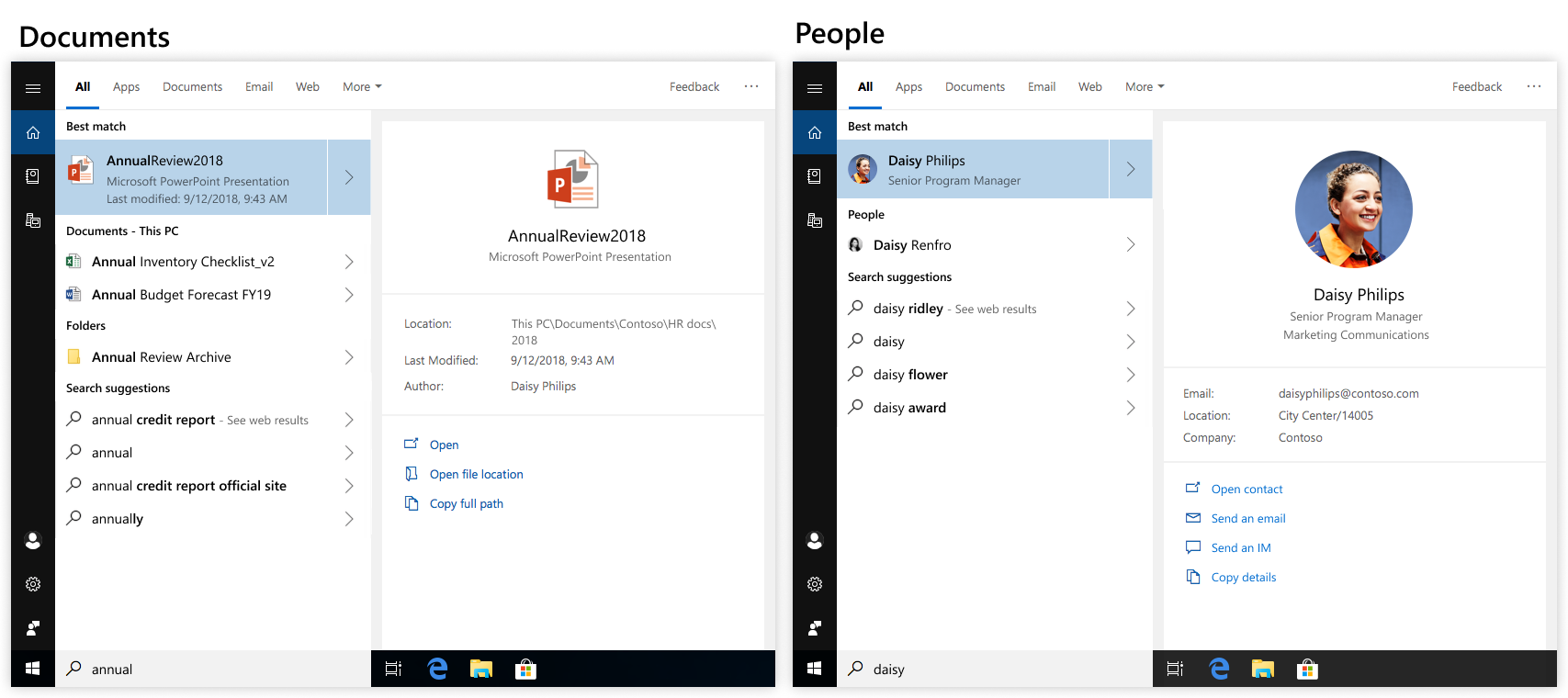
Narrator Improvements

Selection commands in Narrator Scan Mode: Narrator’s scan mode now supports selecting content in Microsoft Edge, Word, Outlook, Mail and most text surfaces. Standard Shift- selection commands can be used as well as Control + A for the entire document. Caps + Shift + Down Arrow will speak the current selection. For a full list of selection commands, you can refer to Narrator’s Show Commands List by pressing Caps + F1. Once you select content, copy it to the clipboard by pressing Control + C. Formatting information will also be retained.

Narrator Standard Keyboard Layout: Narrator now ships with a new keyboard layout that is designed to be more familiar to screen reader users. For details on these changes, check out Intro to New Narrator Keyboard Layout.

Automatic Dialog Reading: Narrator will now automatically read the contents of a dialog box when brought to the foreground. The experience is for Narrator to speak the title of the dialog, the focused element within the dialog and the static text, if any, at the top of the dialog. For example, if you try to close a document in Word with unsaved changes, Narrator will speak the title “Microsoft Word,” the focus “Save button” and the static text within the dialog.

Narrator Keyboard improvements: We have added the Scan Mode secondary action command and Spell current selection command. Please refer to Intro to New Narrator Keyboard Layout doc for more information.

Microsoft Store offerings

Check out great Windows 10 devices, and discover what the October 2018 Update has to offer with free demos and workshops at your local Microsoft Store or online.  Get a free consultation from expert Service Advisors to determine if your device is eligible for the update, or get assistance setting up a new device.

[1] Users must link their mobile phone to their PC in PC settings or through Your Phone app from the Microsoft Store. Users will receive an app from Microsoft which they must download to their mobile phone and follow the setup prompts. For PCs tied to the China region, Your Phone app services will be enabled in the future. Back to top

[2] Timeline shows 7 days of past activities, including activities done on a tablet and laptop when users are signed into their Microsoft accounts. Back to top

[3] Timeline shows 7 days of past activities, including activities done on a tablet and laptop when users are signed into their Microsoft accounts.Back to top

[4] Office sold separately. Back to top

[5] Office sold separately. Back to top

[6] Touch capable tablet or PC required. Pen accessory may be sold separately. Back to top

[7] Touch capable tablet or PC required. Pen accessory may be sold separately. Back to top

[8] Office sold separately. Back to top

[9] Minimum system requirements for WMR can be found here. Back to top

[10] Touch capable tablet or PC required. Pen accessory may be sold separately. Back to top

[11] Compatible biometric hardware required. Back to top

Updated October 5, 2018 11:35 am